YETI 200X - Portable power station GOAL ZERO - Free user manual and instructions
Find the device manual for free YETI 200X GOAL ZERO in PDF.



| Product type | Portable power station |
| Brand | Goal Zero |
| Model | YETI 200X |
| Battery type | Li-ion NMC |
| Battery capacity | Up to 187 Wh (14.4 V, up to 13 Ah) |
| Equivalent capacity | Up to 52,000 mAh at 3.6 V |
| Weight | 6.5 lbs (2.9 kg) |
| Dimensions | 20.0 × 13.0 × 13.0 cm |
| Output ports | USB (5 V, 2.4 A), USB-C (5-12 V, 3 A), USB-C PD (5-20 V, 3 A, 60 W max), 6 mm port (12 V, 10 A, 120 W max), 12V car port (10 A), AC inverter (120 V/230 V, 120 W, 200 W peak) |
| Charge input port | 8 mm (13-22 V, 7 A, 100 W max) |
| AC charging time | Approximately 5 hours |
| Inverter | Pure sine wave |
| Charge controller | MPPT |
| Operating temperature | 0 to 40 °C (32 to 104 °F) |
| Warranty | 12 months (battery: 180 days), extendable to 2 years upon registration |
| Maintenance and storage | Recharge every 3 to 6 months; store in a cool, dry place; ideally kept plugged in |
| Safety | Overcharge, short-circuit, and temperature protection; built-in battery management system |
| Repairability | Contact customer support for any repairs |
| Simultaneous charge and output use | Yes |
Frequently Asked Questions - YETI 200X GOAL ZERO
User questions about YETI 200X GOAL ZERO
0 question about this device. Answer the ones you know or ask your own.
Ask a new question about this device
Download the instructions for your Portable power station in PDF format for free! Find your manual YETI 200X - GOAL ZERO and take your electronic device back in hand. On this page are published all the documents necessary for the use of your device. YETI 200X by GOAL ZERO.
USER MANUAL YETI 200X GOAL ZERO
Before using or storing, plug your Goal Zero Yeti into the wall until it is fully charged. Keep your Goal Zero Yeti plugged in when not in use. For more tips and tricks on keeping your battery healthy, see the BATTERY 101 section.
Table of Contents
| Getting Started | |
| ii. Get to Know Your Gear | 2 |
| iii. How it Works | |
| Charging Your Goal Zero Yeti | 4 |
| i. Charging from Solar | |
| ii. Charging from the Wall | |
| Using Your Goal Zero Yeti | 6 |
| ii. How to Use | |
| iii. Best-Use Strategy | |
| iv. Cold Weather Usage | |
| v. LED Display | |
| Storage and Downtime Maintenance | 8 |
| Technical Specifications | 9 |
| Frequently Asked Questions | 10 |
| Troubleshooting | 12 |
| Warranty | 13 |
| François | 16 |
| Deutsch | 30 |
| Espanol | 44 |
| 日本語 | 58 |
Get To Know Your Gear
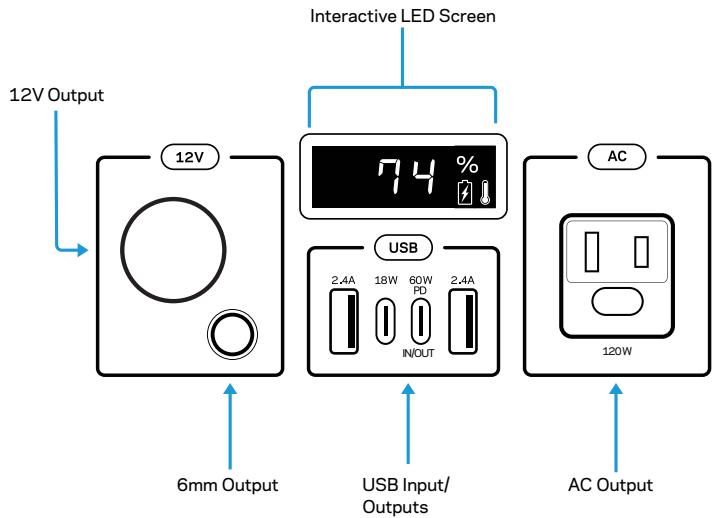
Front of Yeti 200X
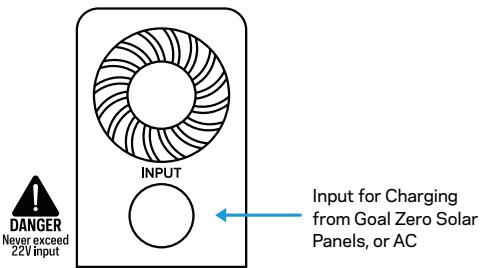
Back of Yeti 200X
How it Works
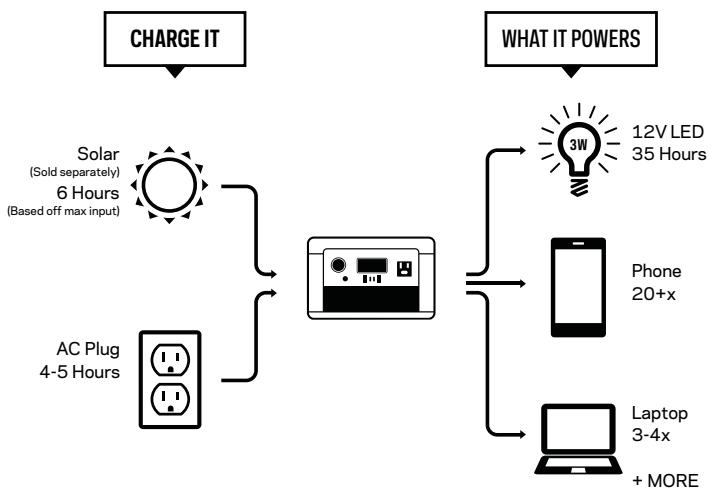
Charging Your Goal Zero Yeti
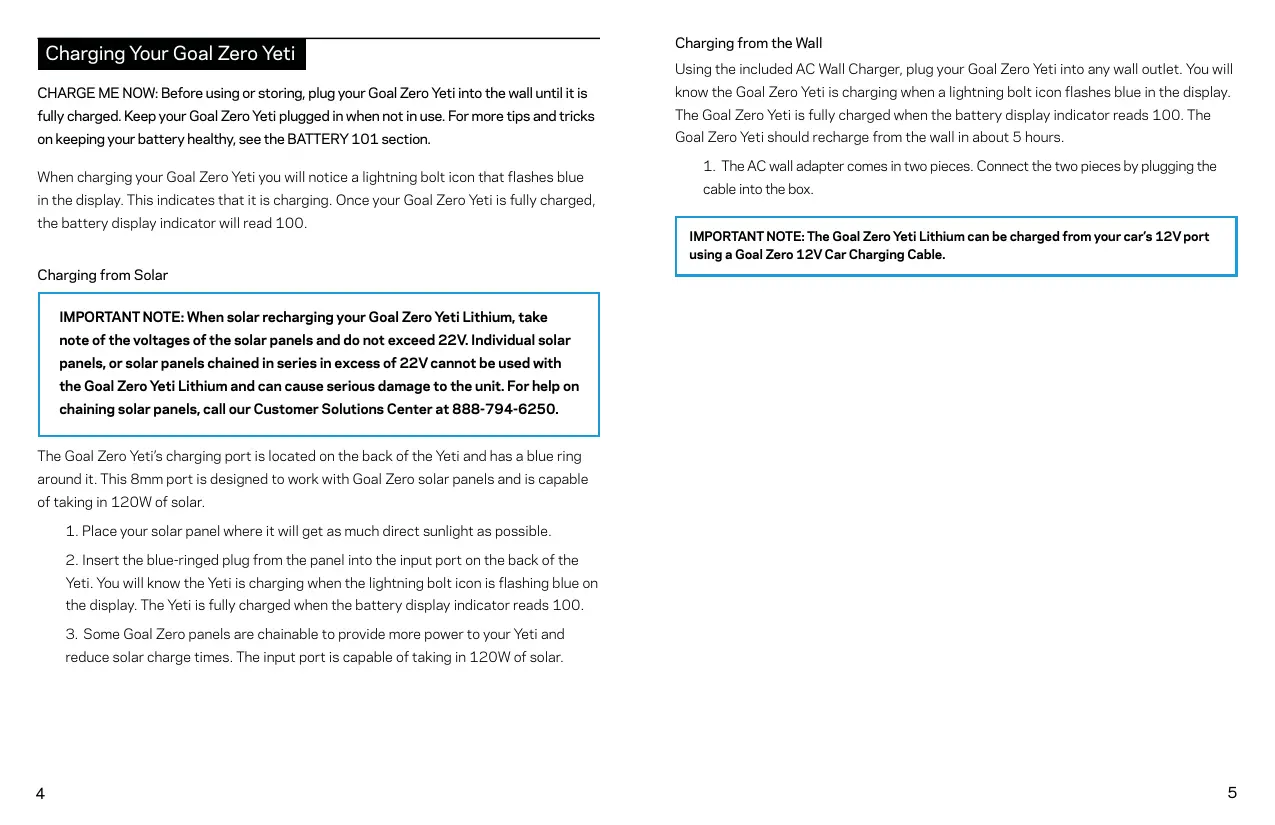
CHARGE ME NOW: Before using or storing, plug your Goal Zero Yeti into the wall until it is fully charged. Keep your Goal Zero Yeti plugged in when not in use. For more tips and tricks on keeping your battery healthy, see the BATTERY 101 section.
When charging your Goal Zero Yeti you will notice a lightning bolt icon that flashes blue in the display. This indicates that it is charging. Once your Goal Zero Yeti is fully charged, the battery display indicator will read 100.
Charging from Solar
IMPORTANT NOTE: When solar recharging your Goal Zero Yeti Lithium, take note of the voltages of the solar panels and do not exceed 22V. Individual solar panels, or solar panels chained in series in excess of 22V cannot be used with the Goal Zero Yeti Lithium and can cause serious damage to the unit. For help on chaining solar panels, call our Customer Solutions Center at 888-794-6250.
The Goal Zero Yeti's charging port is located on the back of the Yeti and has a blue ring around it. This 8mm port is designed to work with Goal Zero solar panels and is capable of taking in 120W of solar.
- Place your solar panel where it will get as much direct sunlight as possible.
- Insert the blue-ringed plug from the panel into the input port on the back of the Yeti. You will know the Yeti is charging when the lightning bolt icon is flashing blue on the display. The Yeti is fully charged when the battery display indicator reads 100.
- Some Goal Zero panels are chainable to provide more power to your Yeti and reduce solar charge times. The input port is capable of taking in 120W of solar.
Charging from the Wall
Using the included AC Wall Charger, plug your Goal Zero Yeti into any wall outlet. You will know the Goal Zero Yeti is charging when a lightning bolt icon flashes blue in the display. The Goal Zero Yeti is fully charged when the battery display indicator reads 100. The Goal Zero Yeti should recharge from the wall in about 5 hours.
- The AC wall adapter comes in two pieces. Connect the two pieces by plugging the cable into the box.
IMPORTANT NOTE: The Goal Zero Yeti Lithium can be charged from your car's 12V port using a Goal Zero 12V Car Charging Cable.
Using your Goal Zero Yeti
How to use your Goal Zero Yeti:
- Press the power button located above each port you will be using. **When not using certain ports, make sure to turn them off to conserve power.
- You'll know the port is turned on when the LED light on the button is illuminated.
- Plug in your gear for power anywhere life takes you.
- If possible, keep your Goal Zero Yeti plugged into a power source when not in use.
- You can charge your Goal Zero Yeti, and run your gear at the same time.
Best-Use Strategy:
When recharging gear with your Yeti, take note of the LED Battery Display. If you plug in devices that have a high power requirement, the charge level of your Yeti can drop very quickly and you may not get exactly 187Wh of power. On the flipside, if you're charging devices that draw power more slowly (a tablet), you will get closer to 187Wh from your Yeti. Also, especially when using the AC power output, the Goal Zero Yeti will be converting the energy from the DC power of the battery to the AC power needed by your device. Although your Goal Zero Yeti has a highly efficient inverter, there is still some energy lost in the conversion and you will not get the full rated capacity of the battery. If you're experiencing shorter runtimes, you may want to check the device's power requirements, see Troubleshooting for help.
Cold Weather Usage:
Cold temperatures (below freezing) can impact the Goal Zero Yeti's battery capacity. If you'll be out living off-grid in sub-zero conditions, we recommend keeping your Goal Zero Yeti in an insulated cooler, connected to a power source (solar panels), and charging your gear. The natural heat generated by the Goal Zero Yeti contained in an insulated cooler will keep battery capacity at its highest.
LED Display + Buttons
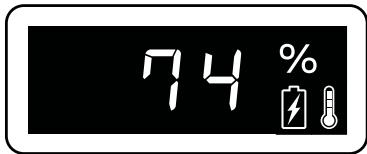
The built-in LED display indicates battery level. Battery level displays as a number from 0 to 100. When charging your Goal Zero Yeti you will notice a lightning bolt icon that flashes blue in the display. This indicates the current charge status. Once your Goal Zero Yeti is fully charged, the battery level display will read 100. Note that when you first plug in a power source, whether it's a solar panel or a wall charger, the Yeti may take a minute
to detect and adjust its charge circuitry before it starts drawing power from the source.
Storage and Downtime Maintenance
Having your Goal Zero Yeti connected to a power source, like a solar panel or wall plug, between adventures or while in storage keeps its battery healthy and topped off. This prolongs battery life and will ensure your Goal Zero Yeti is charged and ready to go all day, every day.
If you can't keep your Goal Zero Yeti plugged into a power source during storage, fully-charge your Goal Zero Yeti every 3 months and store it in a cool, dry place.
Failure to maintain your Goal Zero Yeti by following these steps can result in battery damage which will void the product warranty.
Technical Specifications
| Battery: | |
| Cell Chemistry | Li-ion NMC |
| Pack Capacity | Up to 187Wh (14.4V, up to 13Ah) |
| Single Cell Equivalent Capacity | Up to 52000mAh @ 3.6V |
| Lifecycles | 500 Cycles to 80% capacity |
| Shelf-life | Charge every 3-6 months |
| Management System | MPPT charge controller, low battery protection |
| Ports: | |
| USB port (output) | 5V, up to 2.4A (12W max), regulated |
| USB-C port (output) | 5-12V, up to 3.0A (18W max), regulated |
| USB-C port (input/output) | 5-20V, up to 3.0A (60W max), regulated |
| 6mm port (output, 6mm) | 12V, up to 10A (120W max) |
| 12V car port (output) | 12V, up to 10A (120W max) |
| 120VAC Inverter (output, modified sine wave) | 120VAC 60Hz, 1A (120W, 200W surge) |
| 230VAC Inverter (output, modified sine wave) | 230VAC 50Hz, .5A (120W, 200W surge) |
| Charging Port (input, 8mm, blue, circle) | 13-22V, up to 7A (100W max) |
| General: | |
| Chainable | No |
| Weight | 5 lbs (2.27 kg) |
| Dimensions | 7.9 x 5.1 x 5.1 in (20.0 x 13.0 x 13.0 cm) |
| Operating usage temp. | 32-104 F (0-40 C) |
| Certs | ### C€ |
| Warranty | 12 months |
Frequently Asked Questions
What type of battery is in my Goal Zero Yeti?
Your Goal Zero Yeti uses custom designed Lithium Ion. Here are some basic facts about Lithium-ion batteries:
- Lithium-ion batteries can store and release a lot of energy in a short period of time. The batteries in your Goal Zero Yeti are in a protective enclosure with a sophisticated battery management and protection system controlling its terminals to the outside world.
- It is critical that your battery does not get wet as moisture and water can get into the battery cells behind the protection circuitry and bypass that protection.
How do I know if my device will work with the Goal Zero Yeti?
First, you'll need to determine the amount of power your device requires. This may require some research on your end, a good internet search or examining the user guide for your device should suffice.
Second, you will need to check the capacity for the individual output ports. For example, the Goal Zero Yeti's AC port is powered by an inverter that allows for 120W of power. This means if your device is pulling more than 120W for an extended period of time, the Goal Zero Yeti's inverter will shut off. Another number to watch for is the surge rating of your device as compared to that of the port. The Goal Zero Yeti inverter has an advanced surge management system that will maximize its compatibility with various devices, but there will still be items that will surge at a higher rate, and for a longer time, than the Goal Zero Yeti can manage, in which case the port will turn itself off.
Finally, once you know your device is compatible, you'll want to determine how long you'll be able to power your gear from the Goal Zero Yeti. Here's a quick and dirty lesson in power. All Goal Zero power packs and solar generators have a number in their name, ex. Guide10 Plus Power Pack, Goal Zero Yeti 200X. These numbers refer to the Watt Hours (Wh), or the amount of energy that can be stored in each Power Station, and how you'll know if your gear is compatible. For example, a 200 Wh Power Station should run a 100W light for 2 hours
(200 / 100 = 2) . If your gear falls within the 200Wh capacity of the Goal Zero Yeti, you'll want to check the restrictions on each of the output ports.
Another factor in the math is how much power is being converted going from the Goal Zero Yeti battery to the device you are powering/charging. In some situations, like when running a 12V device, such as the LAL 350, directly off the 12V port, there will be no conversion and so no additional losses. In using the USB ports to charge a phone, you add a layer of conversion (12V battery in the Goal Zero Yeti is being converted to a 5V USB output), which introduces around 10% of losses.
When using the inverter, there are two layers of conversion (1.2V to high voltage, DC to AC). The least efficient way of using the battery in the Goal Zero Yeti is to use an AC-DC adapter off the AC ports, as is the case if you use a phone wall charger to charge your phone, as it adds yet another layer of conversion in the wall adapter.
So when you're deciding on what to power from your new GOAL ZERO recharger, do some research into your device's watt consumption. For more quick tips and learning tools, check out www.GoalZero.com/learn.html
Troubleshooting
If your devices are not recharging from your Goal Zero Yeti, follow these steps:
- Ensure the Output Port has been turned on. The LED light on the power button should be lit up.
a. If any of the lights have turned red, this indicates a trip. Push the button again to reset it. The light will turn white when it is successfully reset.
- Check the Battery Display. If it is at 20% or below, charge your Goal Zero Yeti.
- Check the LED Display for warning icons:
OVERLOAD: Power draw exceeds port's maximum allowance. Indicated by red light in the port's button.

Temperature warning.
Allow unit to cool.

Battery requires attention.
Contact customer support.
1-888-794-6250
- Verify your device is suitable for use with the Goal Zero Yeti:
a. All of the Goal Zero Yeti output ports have their own max power capacity. Check the Goal Zero Yeti's Tech Specs to ensure your device is compatible. - If you are still experiencing trouble with your Goal Zero Yeti, please call our Customer Solutions Center at 1-888-794-6250 or by email at support@goalzero.com
Warranty & Contact
LIMITED WARRANTY
GOAL ZERO LLC warrants to the original consumer purchaser that this GOAL ZERO product will be free from defects in workmanship and material under normal consumer use during the applicable warranty period identified in Paragraph 2, below, subject to the exclusions set forth in Paragraph 5, below. This warranty statement sets forth GOAL ZERO's total and exclusive warranty obligation. We will not assume, nor authorize any person to assume for us, any other liability in connection with the sales of our products.
WARRANTY PERIOD
The warranty period for GOAL ZERO battery cells (whether purchased on a stand-alone basis or as part of another product) is 180 days. The warranty period for all other GOAL ZERO products and components is one (1) year. In each case, the warranty period is measured starting on the date of purchase by the original consumer purchaser. The sales receipt from the first consumer purchase, or other reasonable documentary proof, is required in order to establish the start date of the warranty period. If you completed the online GOAL ZERO Product Registration Form within 30 days after purchasing your product, that registration can also establish the start date of the warranty period (but warranty coverage is not conditioned upon such registration).
REMEDY
GOAL ZERO will repair or replace (at GOAL ZERO's option and expense) any GOAL ZERO product that fails to operate during the applicable warranty period due to a defect in workmanship or material.
LIMITED TO ORIGINAL CONSUMER BUYER
The warranty on GOAL ZERO's products is limited to the original consumer purchaser and is not transferable to any subsequent owner.
EXCLUSIONS
GOAL ZERO's warranty does not apply to (i) any product that is misused, abused, modified, damaged by accident, or used for anything other than normal consumer use as authorized in GOAL ZERO's then-current product literature, or (ii) any product purchased through an online auction house. GOAL ZERO's warranty does not apply to any battery cell or product containing a battery cell unless the battery cell is fully charged by you within seven (7) days after you purchase the product and at least once every 6 months thereafter.
HOW TO RECEIVE SERVICE
To obtain warranty service, you must contact our customer service team via telephone at (888) 794-6250, or via email at support@goalzero.com. If our customer service team determines that further assistance is required, they will give you a Return Material Authorization ("RMA") number and will provide you with prepaid return shipping label that you can use to mail back your non-functioning item(s). You must properly package the product, clearly marking the RMA number on the package and including proof of your purchase date with the product. We will process your return and send your repaired or replacement product to you at our expense for product being shipped to locations in North America. For product purchased or being shipped outside of North America, please contact the local distributor from whom you purchased the product or email support@goalzero.com to obtain further distributor information.
IMPLIED WARRANTYIS
THE LIMITED WARRANTY STATED HEREIN IS IN LIEU OF ALL OTHER EXPRESS WARRANTY. IN NO EVENT SHALL ANY IMPLIED WARRANTYES, INCLUDING BUT NOT LIMITED TO ANY WARRANTYES OF MERCHANTABILITY, FITNESS FOR A PARTICULAR PURPOSE OR NON-INFRINGEMENT, EXTEND BEYOND THE APPLICABLE WARRANTY PERIOD IDENTIFIED IN PARAGRAPH 2, ABOVE. Some states do not allow limitations on how long an implied warranty lasts, so the above limitation may not apply to you. This warranty gives you specific legal rights, and you may also have other rights which vary from state to state.
EXCLUSIVE REMEDY; LIMITATION OF LIABILITY
The foregoing provisions state GOAL ZERO's entire liability, and your exclusive remedy, for any breach of warranty, express or implied. IN NO EVENT WILL GOAL ZERO BE LIABLE FOR ANY CONSEQUENTIAL OR INCIDENTAL DAMAGES ARISING FROM ANY USE OR MALFUNCTION OF ANY GOAL ZERO PRODUCT, OR FROM ANY BREACH OF WARRANTY, INCLUDING DAMAGE TO OTHER DEVICES. IN NO EVENT WILL GOAL ZERO'S LIABILITY FOR ANY CLAIM, WHETHER IN CONTRACT, WARRANTY, TORT (INCLUDING NEGLIGENCE AND STRICT LIABILITY) OR UNDER ANY OTHER THEORY OF LIABILITY, EXCEED THE AMOUNT PAID BY YOU FOR THE GOAL ZERO PRODUCT. Some states do not allow the exclusion or limitation of incidental or consequential damages, so the above limitation or exclusion may not apply to you.

FREE EXTENDED WARRANTY
Get an ADDITIONAL YEAR of protection for your Goal Zero Yeti Lithium
Portable Power Station by simply registering your product at:
GOALZERO.com/extendedwarranty
This gives you TWO TOTAL years of worry-free product coverage. It's free and easy peace of mind for you and your new power companion.
Recharger Notre Goal Zero Yeti
Cold temperatures (below freezing) can impact the Goal Zero Yeti's battery capacity. If you'll be out living off-grid in sub-zero conditions, we recommend keeping your Goal Zero Yeti in an insulated cooler, connected to a power source (solar panels), and charging your gear. The natural heat generated by the Goal Zero Yeti contained in an insulated cooler will keep battery capacity at its highest.
Affichage LED + Boutons:
Specifications Techniques
How do I know if my device will work with the Goal Zero Yeti?
www.GoalZero.com/learn.html
Dépannage
Designed in the U.S.A.
Made in China
Goal Zero Yeti is a trademark of Goal Zero.
This equipment has been tested and found to comply with the limits for a Class B digital device, pursuant to part 15 of the FCC Rules. These limits are designed to provide reasonable protection against harmful interference in a residential installation. This equipment generates, uses and can radiate radio frequency energy and, if not installed and used in accordance with the instructions, may cause harmful interference to radio communications. However, there is no guarantee that interference will not occur in a particular installation. If this equipment does cause harmful interference to radio or television reception, which can be determined by turning the equipment off and on, the user is encouraged to try to correct the interference by one or more of the following measures:
—Reorient or relocate the receiving antenna.
—Increase the separation between the equipment and receiver.
-Connect the equipment into an outlet on a circuit different from that to which the receiver is connected.
—Consult the dealer or an experienced radio/TV technician for help.
This device complies with part 15 of the FCC Rules. Operation is subject to the following two conditions: (1) This device may not cause harmful interference, and (2) this device must accept any interference received, including interference that may cause undesired operation.
- Table of Contents
- Get To Know Your Gear
- How it Works
- Charging Your Goal Zero Yeti
- Charging from the Wall
- Using your Goal Zero Yeti
- How to use your Goal Zero Yeti:
- Best-Use Strategy:
- Cold Weather Usage:
- LED Display + Buttons
- Storage and Downtime Maintenance
- Technical Specifications
- Frequently Asked Questions
- What type of battery is in my Goal Zero Yeti?
- How do I know if my device will work with the Goal Zero Yeti?
- Troubleshooting
- Warranty & Contact
- LIMITED WARRANTY
- WARRANTY PERIOD
- REMEDY
- LIMITED TO ORIGINAL CONSUMER BUYER
- EXCLUSIONS
- HOW TO RECEIVE SERVICE
- IMPLIED WARRANTYIS
- EXCLUSIVE REMEDY; LIMITATION OF LIABILITY
- FREE EXTENDED WARRANTY
- Recharger Notre Goal Zero Yeti
- Affichage LED + Boutons:
- Specifications Techniques
- Dépannage
Brand : GOAL ZERO
Model : YETI 200X
Category : Portable power station