USER MANUAL YETI 500X GOAL ZERO
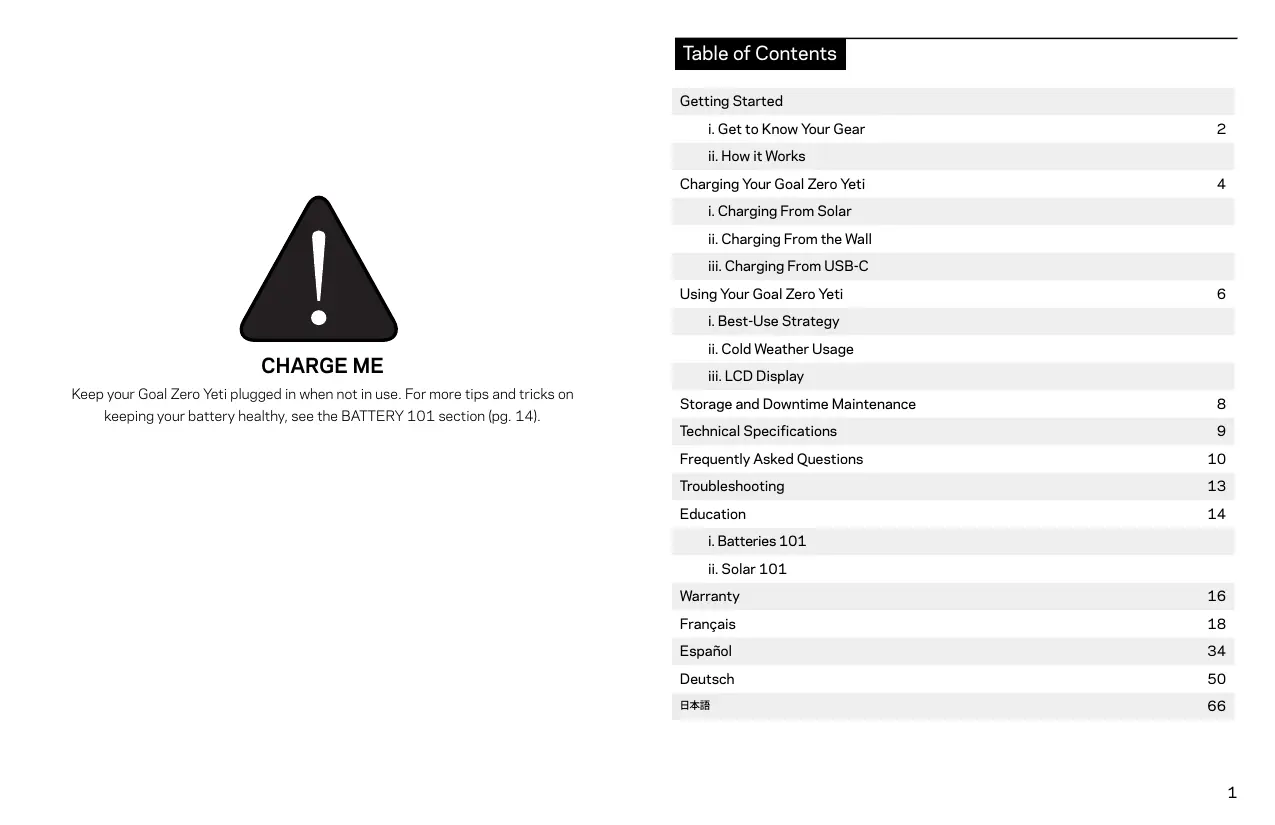
Keep your Goal Zero Yeti plugged in when not in use. For more tips and tricks on keeping your battery healthy, see the BATTERY 101 section (pg. 14).
Table of Contents
| Getting Started |
| i. Get to Know Your Gear | 2 |
| ii. How it Works |
| Charging Your Goal Zero Yeti | 4 |
| i. Charging From Solar |
| ii. Charging From the Wall |
| iii. Charging From USB-C |
| Using Your Goal Zero Yeti | 6 |
| i. Best-Use Strategy |
| ii. Cold Weather Usage |
| iii. LCD Display |
| Storage and Downtime Maintenance | 8 |
| Technical Specifications | 9 |
| Frequently Asked Questions | 10 |
| Troubleshooting | 13 |
| Education | 14 |
| i. Batteries 101 |
| ii. Solar 101 |
| Warranty | 16 |
| François | 18 |
| Espanol | 34 |
| Deutsch | 50 |
| 日本語 | 66 |
Get To Know Your Gear
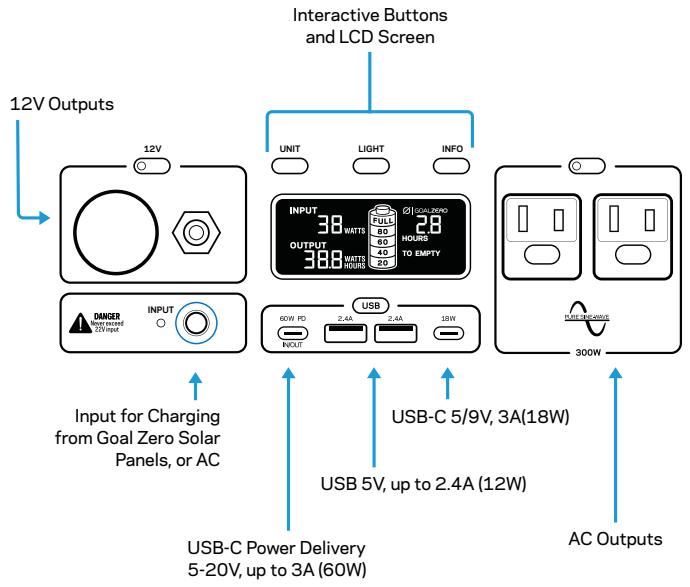
Front of Yeti 500X
Back of Yeti 500X
How it Works
Charging Your Goal Zero Yeti
CHARGE ME: Keep your Goal Zero Yeti plugged in when not in use. For more tips and tricks on keeping your battery healthy, see the BATTERY 101 section (pg. 14).
When charging your Goal Zero Yeti you will notice a battery segment blinking in the display. This indicates the current charge status. Once your Goal Zero Yeti is fully charged, all battery segments will be lit and remain solid. As long as there is more power going into the Goal Zero Yeti than is being pulled from the output ports, the display will also indicate an estimated time until fully charged. This is an estimated time based on the power input and output numbers at that time; it will gradually adjust to a shorter or longer time as the average charge or discharge rates fluctuate.
Charging from Solar
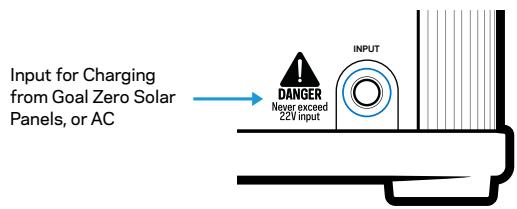
IMPORTANT NOTE: When solar charging your Goal Zero Yeti Lithium, take note of the voltages of the solar panels and do not exceed 22V. Individual solar panels, or solar panels chained in series in excess of 22V cannot be used with the Goal Zero Yeti Lithium and can cause serious damage to the unit. For help on chaining solar panels, call our Customer Solutions Center at 888-794-6250.
Your Goal Zero Yeti has two 8mm charging ports. One is located on the left side of the faceplate. The other is located on the back in the bottom right hand corner. Both 8mm ports are designed to work with Goal Zero solar panels and are capable of taking in 120W of solar.
NOTE: You can only use one 8mm input at a time to charge your Yeti. If you plug into both 8mm input ports at the same time, the Yeti will always default to the front 8mm port.
- Place your solar panel where it will get as much direct sunlight as possible.
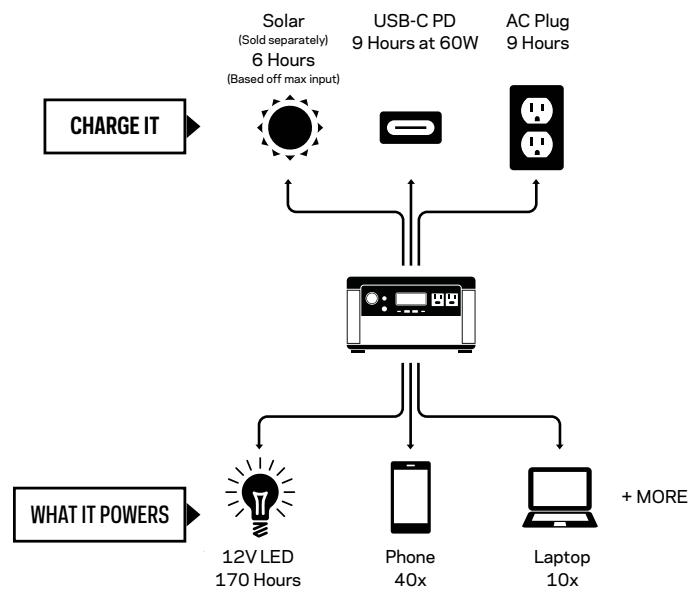
- Insert the blue-ringed plug from the panel into either input port on the Yeti. You will know the Yeti is charging when the blue LED light next to the input port lights up, and the battery segments in the LCD battery display are blinking. The Yeti is fully charged when all battery segments stop blinking and remain solid.
- Some Goal Zero panels are chainable to provide more power to your Yeti and reduce solar charge times. The input port is capable of taking in 120W of solar.
Charging from the Wall:
Using the included AC Wall Charger, plug your Goal Zero Yeti into any wall outlet. You will know the Goal Zero Yeti is charging when the blue LED light next to the input port turns on, and battery segments in the battery display are blinking. The Goal Zero Yeti is fully charged when all battery segments stop blinking and remain solid. The Goal Zero Yeti should recharge from the wall in about 9 hours.
- The AC wall adapter comes in two pieces. Connect the two pieces by plugging the cable into the box.
Charging from USB-C:
Charge your Yeti using the 60W USB-C PD input/output port by plugging into any USB-C charger (sold separately).
NOTE: You can plug into both the 8mm input port and the USB-C input/output port at the same time to receive up to a combined 180 watts.
NOTE: For additional charging options such as car charging and fast charging, visit www.goalzero.com/shop/yeti-accessories.
Using your Goal Zero Yeti
How to use your Goal Zero Yeti:
- Press the power button located above each port you will be using. **When not using certain ports, make sure to turn them off to conserve power.
- You'll know the port is turned on when the white LED light on the button is illuminated.
- Plug in your gear for power anywhere life takes you.
- If possible, keep your Goal Zero Yeti plugged into a power source when not in use.
- You can charge your Goal Zero Yeti, and run your gear at the same time.
Best-Use Strategy:
When charging gear with your Goal Zero Yeti, take note of the LCD Battery Display. If you plug in devices that have a high power requirement, the charge level of your Goal Zero Yeti can drop very quickly and you may not get exactly 500Wh of energy. Also, especially when using the AC power output, the Goal Zero Yeti will be converting the energy from the DC power of the battery to the AC power needed by your device. Although your Goal Zero Yeti has a highly efficient inverter, there is still some energy lost in the conversion and you will not get the full rated capacity of the battery. If you're experiencing shorter runtimes, you may want to check the device's power requirements, see TROUBLESHOOTING (pg. 13) for help.
Cold Weather Usage:
Cold temperatures (below freezing) can impact the Goal Zero Yeti's battery capacity. If you'll be out living off-grid in sub-zero conditions, we recommend keeping your Goal Zero Yeti in an insulated cooler, connected to a power source (solar panels), and charging your gear. The natural heat generated by the Goal Zero Yeti contained in an insulated cooler will keep battery capacity at its highest.
You can activate the display backlight by pressing the LIGHT button. The built-in LCD display indicates four important things:
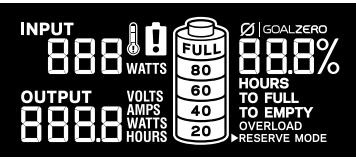
- INPUT shows the amount of power (watts) going into the Goal Zero Yeti while charging. If charging from solar, you'll see the watts change as you reposition the panels into/out of the sunlight.
- OUTPUT shows the amount of power (watts) your devices are using while plugged into the Goal Zero Yeti.
- TIME TO EMPTY/FULL shows the amount of time before your Goal Zero Yeti is completely charged or empty, depending on if the net amount of power going into the Goal Zero Yeti is positive or negative.
- BATTERY LEVEL shows 5 segments, approximating 20% - 40% - 60% - 80% - 100% capacity. As you use your Goal Zero Yeti, segments will disappear from the display, indicating the remaining charge. When charging your Goal Zero Yeti you will notice a battery segment blinking. This indicates the current charge status. Once your Goal Zero Yeti is fully charged, all battery segments will be lit and remain solid. As long as there is more power going into the Goal Zero Yeti than is being pulled from the output ports, the display will also indicate an estimated time until fully charged. This is an estimated time based on the power input and output numbers at that time; it will adjust to a shorter or longer time if the charge or discharge rates fluctuate. Note that when you first plug in a power source, whether it's a solar panel or a wall charger, the Yeti may take a minute to detect and adjust its charge circuitry before it starts drawing power from the source.
Pressing the UNITS button will scroll through different output and power consumption settings. Pressing and holding the UNITS button will reset the WATT HOUR output counter. Pressing the INFO button will alternate the screen between showing the detailed battery state of charge percentage and the Time to Empty/Full.
Storage and Downtime Maintenance
Having your Goal Zero Yeti connected to a power source, like a solar panel or wall plug, between adventures or while in storage keeps its battery healthy and topped off. This prolongs battery life and will ensure your Goal Zero Yeti is charged and ready to go all day, every day.
If you can't keep your Goal Zero Yeti plugged into a power source during storage, fully-charge your Goal Zero Yeti every 3 months and store it in a cool, dry place.
Failure to maintain your Goal Zero Yeti by following these steps can result in battery damage which will void the product warranty.
Technical Specifications
| Battery: |
| Cell Chemistry | Li-ion NMC |
| Pack Capacity | Up to 505Wh (10.8V, up to 46.8Ah) |
| Single Cell Equivalent Capacity | Up to 140.4Ah @ 3.6V |
| Lifecycles | 500 Cycles to 80% capacity (Discharge rate: 0.2C, Full charge/discharge, Temp: 25C) |
| Shelf-life | Charge every 3-6 months |
| Management System | 'MPPT' charge controller, low battery protection |
| Ports: |
| USB-C PD port (input/output) | 5-20V, up to 3.0A (60W max) |
| USB-C port (output) | 5/9V, up to 3.0A (18W max) |
| USB-A port (output) | 5V, up to 2.4A (12W max) |
| 6mm port (output, 6mm) | 12V, up to 10A (120W max) |
| 12V car port (output) | 12V, up to 10A (120W max), regulated |
| 120V AC Inverter (output, pure sine wave) | 120VAC 60Hz, 2.5A (300W, 1200W surge) |
| 230V AC Inverter (output, pure sine wave) | 230VAC 50Hz, 1.3A (300W, 1200W surge) |
| UNIVERSAL OR AUSTRALIA (TYPE 1) AC PLUGS | |
| Charging Port (input, 8mm, blue, circle) | 13-22V, up to 10A (120W max) |
| General: |
| Chainable | No |
| Weight | 12.9 lbs (5.85 kg) |
| Dimensions | 7.5 x 11.25 x 5.8 in (19.05 x 28.58 x 14.73 cm) |
| Operating usage temp. | 32-104 F (0-40 C) |
| Certs | © ☑ ☐ ☥ |
| Warranty | 12 months |
Frequently Asked Questions
What type of battery is in my Goal Zero Yeti?
Your Goal Zero Yeti uses custom designed Lithium Ion. Here are some basic facts about Lithium Ion batteries:
- Lithium Ion batteries can store and release a lot of energy in a short period of time. The batteries in your Goal Zero Yeti are in a protective enclosure with a sophisticated battery management and protection system controlling its terminals to the outside world.
- It is critical that your battery does not get wet as moisture and water can get into the battery cells behind the protection circuitry and bypass that protection.
Can I take the Yeti 500X on a plane?
No, the lithium battery is over 100Wh and not allowed on planes under FAA regulations.
How do I know if my Goal Zero Yeti is charged?
To check the charge level of your Goal Zero Yeti, refer to the LCD Battery Display. When lit up, you'll see a battery outline with 5 segments, indicating the current charge level. It is OK to use your Goal Zero Yeti even when it's not fully charged.
Why is the light on the AC button blinking?
A blinking light on the AC button indicates that at the current load, the AC inverter will be shutting off soon. Recharge your Goal Zero Yeti as soon as possible to continue powering your device. Once the AC inverter has shut off, the Yeti will attempt to reset itself three times. After three attempts, the AC inverter will remain off until you physically reset it by pushing the AC button or by recharging the battery a small amount.
Why is the light on the port activation button red?
A red light on the 12V, USB, and AC activation buttons indicate the port has been shut off to protect whatever you have plugged in. Recharge your Goal Zero Yeti as soon as possible to continue powering your devices.
How do I know if my device will work with the Goal Zero Yeti?
First, you'll need to determine the amount of power your device requires. This may require
some research on your end, a good internet search or examining the user guide for your device should suffice.
Second, you will need to check the capacity for the individual output ports. For example, the Goal Zero Yeti's AC port is powered by an inverter that allows for 300W of power. This means if your device is pulling more than 300W for an extended period of time, the Goal Zero Yeti's inverter will shut off. Another number to watch for is the surge rating of your device as compared to that of the port. The Goal Zero Yeti inverter has an advanced surge management system that will maximize its compatibility with various devices, but there will still be items that will surge at a higher rate, and for a longer time, than the Goal Zero Yeti can manage, in which case the port will turn itself off.
Finally, once you know your device is compatible, you'll want to determine how long you'll be able to power your gear from the Goal Zero Yeti. Here's a quick and dirty lesson in power.
All Goal Zero power packs and solar generators have a number in their name, ex. Sherpa 100AC Power Bank, Goal Zero Yeti 500X. These numbers refer to the Watt Hours (Wh), or the amount of energy that can be stored in each battery and how you'll know if your gear is compatible with each Power Station. For example, a 200Wh Power Station should run a 100W light for 2 hours (200 / 100 = 2) . If your gear falls within the 500Wh capacity of the Goal Zero Yeti, you'll want to check the restrictions on each of the output ports.
Another factor in the math is how much power is being converted going from the Goal Zero Yeti battery to the device you are powering/charging. In some situations when running a 12V device directly off the 12V port, there will be no conversion and so no additional losses. An example of this, is the LAL 350 running off of the 12V port. In using the USB ports to charge a phone, you add a layer of conversion (12V battery in the Goal Zero Yeti is being converted to a 5V USB output), which introduces around 10% of losses. When using the inverter, there are two layers of conversion (12V to high voltage, DC to AC). The least efficient way of using the battery in the Goal Zero Yeti is to use an AC-DC adapter off the AC ports, as is the case if you use a phone wall charger to charge your phone, as it adds yet another layer of conversion in the wall adapter.
So when you're deciding on what to power from your new Goal Zero Power Station, do some research into your device's watt consumption. For more quick tips and learning tools, check out www.GoalZero.com/learn.html
Troubleshooting
If your devices are not recharging from your Goal Zero Yeti, follow these steps:
- Ensure the Output Port has been turned on. The white LED light on the power button should be lit up.
a. If any of the lights have turned red, this indicates a trip. Push the button again to reset it. The light will turn white when it is successfully reset.
- Check the Battery Display. If it is at 20% or below, charge your Goal Zero Yeti.
- Check the LCD Display for warning icons:
OVERLOAD: Power draw exceeds port's maximum allowance. Indicated by red light in the port's button.
BATT SAFE MODE: Activates when battery voltage drops too low to run the 12V car port effectively (>10.5V). All other ports stay active (designed to protect standard 12V devices).

Temperature warning.
Allow unit to cool.

Battery requires attention.
Contact customer support.
1-888-794-6250
- Verify your device is suitable for use with the Goal Zero Yeti:
a. All of the Goal Zero Yeti output ports have their own max power capacity. Check the Goal Zero Yeti's Tech Specs to ensure your device is compatible.
- If you are still experiencing trouble with your Goal Zero Yeti, please call our Customer Solutions Center at 1-888-794-6250 or by email at support@goalzero.com
Education
BATTERIES 101: Goal Zero utilizes the latest and greatest in battery technology to accompany you on all life's adventures. From the versatile and lightweight Lithium-ion, to the robust and powerful Lead Acid, we've compiled some helpful tips to keep your Goal Zero batteries working their best.
i. Batteries need exercise.
The best thing for any battery is to use it. Don't leave the battery sitting without being charged for extended periods of time. If you will be storing the Goal Zero Yeti without a charger, make sure it's fully charged before you put it away.
ii. The "Battery Memory" myth.
Thanks to old Nickel-Cadmium (NiCd) batteries, there's a myth running around that you should completely drain your batteries before plugging them in for a recharge, called "deep cycling". Although true with NiCd batteries, the typical batteries you'll find in most of your gear today, including the advanced lithium and lead-acid batteries used in your GOAL ZERO Power Station, require no such draining. In fact, you should avoid deep cycling your batteries - it does more harm than good in most cases.
iii. The "Stadium Effect".
The stadium effect occurs when recharging your batteries. You'll notice your battery quickly filling up in the beginning, then slowing down noticeably when trying to charge up the last several percentages. Think of how quickly a stadium fills up when the doors first open - there are hundreds of open seats so it's easy to find the one you want. Eventually there are only a few open seats here and there and people have to maneuver around to find the spot they want and filling those seats takes longer. The same theory applies to recharging batteries. It's easy for energy to flow in and take up empty space in the beginning, and as time goes on and there is less space available, it takes longer for the energy to fill in the holes.
iv. Read the manual.
It might be a long read, but the manual is the best place to find the do's and don'ts for the battery in your specific device. Reading your manual will ensure you're taking steps to keep your batteries happy and healthy.
SOLAR 101: GOAL ZERO makes it easy to recharge your gear from the sun - we didn't invent solar power, we perfected it. Some things to keep in mind when recharging your gear with solar power:
i. Solar panels don't store power from the sun, they collect it.
We teach you to COLLECT - STORE - USE, which is the best way to utilize solar power to recharge your gear. COLLECT the sun's energy with a solar panel. STORE the power in a Power Station. USE the Power Station to power your gear, day or night. If you're really a diehard, you can plug your gear directly into the junction box located on the back of our NOMAD Solar Panels to recharge from the sun.
ii. Not all solar charge times are created equal.
Most solar panel manufacturers calculate their recharge times with the following equation: Device Watt Hours/Solar Panel Watts = Solar Recharge Times. So theoretically, a 13 watt solar panel would recharge a 50 watt-hour recharger in 3.84 hours (50 / 13 = 3.84) - and this is the number you could find in marketing material for a solar panel. However, in order to standardize results across all manufacturers, these tests are completed in laboratory settings. The truth is, on a good, sunny day, you'll receive about 50 - 75% of your solar panel's rated wattage, and this is how the engineers at GOAL ZERO calculate the solar recharge times you see on our packaging.
iii. Solar works, even in overcast conditions.
Solar panels utilize IR, UV, and visible rays from the sun that can penetrate through clouds. Although the efficiency of the solar panel will decrease in cloudy conditions, you'll still be collecting valuable power from the sun.
iv. Proper alignment works wonders.
Keeping your solar panel angled toward the sun can dramatically increase solar efficiency. Set it up and let Mother Nature do the rest.
LIMITED WARRANTY
GOAL ZERO LLC warrants to the original consumer purchaser that this GOAL ZERO product will be free from defects in workmanship and material under normal consumer use during the applicable warranty period identified in Paragraph 2, below, subject to the exclusions set forth in Paragraph 5, below. This warranty statement sets forth GOAL ZERO's total and exclusive warranty obligation. We will not assume, nor authorize any person to assume for us, any other liability in connection with the sales of our products.
WARRANTY PERIOD
The warranty period for GOAL ZERO battery cells (whether purchased on a stand-alone basis or as part of another product) is 180 days. The warranty period for all other GOAL ZERO products and components is one (1) year. In each case, the warranty period is measured starting on the date of purchase by the original consumer purchaser. The sales receipt from the first consumer purchase, or other reasonable documentary proof, is required in order to establish the start date of the warranty period. If you completed the online GOAL ZERO Product Registration Form within 30 days after purchasing your product, that registration can also establish the start date of the warranty period (but warranty coverage is not conditioned upon such registration).
REMEDY
GOAL ZERO will repair or replace (at GOAL ZERO's option and expense) any GOAL ZERO product that fails to operate during the applicable warranty period due to a defect in workmanship or material.
LIMITED TO ORIGINAL CONSUMER BUYER
The warranty on GOAL ZERO's products is limited to the original consumer purchaser and is not transferable to any subsequent owner.
EXCLUSIONS
GOAL ZERO's warranty does not apply to (i) any product that is misused, abused, modified, damaged by accident, or used for anything other than normal consumer use as authorized in GOAL ZERO's then-current product literature, or (ii) any product purchased through an online auction house. GOAL ZERO's warranty does not apply to any battery cell or product containing a battery cell unless the battery cell is fully charged by you within seven (7) days after you purchase the product and at least once every 6 months thereafter.
HOW TO RECEIVE SERVICE
To obtain warranty service, you must contact our customer service team via telephone at (888) 794-6250, or via email at support@goalzero.com. If our customer service team determines that further assistance is required, they will give you a Return Material Authorization ("RMA") number and will provide you with prepaid return shipping label that you can use to mail back your non-functioning item(s). You must properly package the product, clearly marking the RMA number on the package and including proof of your purchase date with the product. We will process your return and send your repaired or replacement product to you at our expense for product being shipped to locations in North America. For product purchased or being shipped outside of North America, please contact the local distributor from whom you purchased the product or email support@goalzero.com to obtain further distributor information.
IMPLIED WARRANTYES
THE LIMITED WARRANTY STATED HEREIN IS IN LIEU OF ALL OTHER EXPRESS WARRANTY. IN NO EVENT SHALL ANY IMPLIED WARRANTYES, INCLUDING BUT NOT LIMITED TO ANY WARRANTYES OF MERCHANTABILITY, FITNESS FOR A PARTICULAR PURPOSE OR NON-INFRINGEMENT, EXTEND BEYOND THE APPLICABLE WARRANTY PERIOD IDENTIFIED IN PARAGRAPH 2, ABOVE. Some states do not allow limitations on how long an implied warranty lasts, so the above limitation may not apply to you. This warranty gives you specific legal rights, and you may also have other rights which vary from state to state.
EXCLUSIVE REMEDY; LIMITATION OF LIABILITY
The foregoing provisions state GOAL ZERO'S entire liability, and your exclusive remedy, for any breach of warranty, express or implied. IN NO EVENT WILL GOAL ZERO BE LIABLE FOR ANY CONSEQUENTIAL OR INCIDENTAL DAMAGES ARISING FROM ANY USE OR MALFUNCTION OF ANY GOAL ZERO PRODUCT, OR FROM ANY BREACH OF WARRANTY, INCLUDING DAMAGE TO OTHER DEVICES. IN NO EVENT WILL GOAL ZERO'S LIABILITY FOR ANY CLAIM, WHETHER IN CONTRACT, WARRANTY, TORT (INCLUDING NEAGILENCE AND STRICT LIABILITY) OR UNDER ANY OTHER THEORY OF LIABILITY, EXCEED THE AMOUNT PAID BY YOU FOR THE GOAL ZERO PRODUCT. Some states do not allow the exclusion or limitation of incidental or consequential damages, so the above limitation or exclusion may not apply to you.

FREE EXTENDED WARRANTY
Get an ADDITIONAL YEAR of protection for your Goal Zero Yeti Lithium Portable Power Station by simply registering your product at:
GOALZERO.com/extendedwarranty
This gives you TWO TOTAL years of worry-free product coverage.
It's free and easy peace of mind for you and your new Power Station.
Recharger Notre Goal Zero Yeti
Specifications Techniques
Batterie:
Designed in the U.S.A.
Made in China
Goal Zero Yeti is a trademark of Goal Zero.
This equipment has been tested and found to comply with the limits for a Class B digital device, pursuant to part 15 of the FCC Rules. These limits are designed to provide reasonable protection against harmful interference in a residential installation. This equipment generates, uses and can radiate radio frequency energy and, if not installed and used in accordance with the instructions, may cause harmful interference to radio communications. However, there is no guarantee that interference will not occur in a particular installation. If this equipment does cause harmful interference to radio or television reception, which can be determined by turning the equipment off and on, the user is encouraged to try to correct the interference by one or more of the following measures:
—Reorient or relocate the receiving antenna.
—Increase the separation between the equipment and receiver.
-Connect the equipment into an outlet on a circuit different from that to which the receiver is connected.
—Consult the dealer or an experienced radio/TV technician for help.
This device complies with part 15 of the FCC Rules. Operation is subject to the following two conditions: (1) This device may not cause harmful interference, and (2) this device must accept any interference received, including interference that may cause undesired operation.