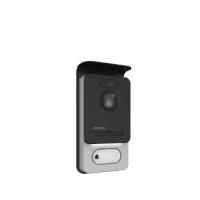
WelcomeEye Comfort - DES9500VDP - 531019 - WelcomeEye Compact - DES9300VDP - 531004 - Video Doorphone PHILIPS - Free user manual and instructions
Find the device manual for free WelcomeEye Comfort - DES9500VDP - 531019 - WelcomeEye Compact - DES9300VDP - 531004 PHILIPS in PDF.



| Product type | Wired 2-wire video door phone |
| Brand | Philips |
| Models | WelcomeEye Comfort (DES9500VDP, 531019) / WelcomeEye Compact (DES9300VDP, 531004) |
| Screen (Comfort) | 7 inches, resolution 800 × 480 |
| Screen (Compact) | 4.3 inches, resolution 480 × 272 |
| Monitor dimensions (Comfort) | 142 (H) × 210 (L) × 15 (P) mm |
| Monitor dimensions (Compact) | 116 (H) × 146 (L) × 16 (P) mm |
| Power supply | 100-240 V AC, 50-60 Hz via power adapter |
| Consumption (Comfort) | 11.1 W (460 mA) |
| Consumption (Compact) | 9.6 W (400 mA) |
| Ringtones | 6 melodies, 85 dB |
| Outdoor station (ref. 538200) | Color CMOS sensor 900 TVL, angle H100°/V75°, white LED night vision, IP44, -20°C to +50°C |
| Electric strike control | 12 V / 1.1 A (mechanical memory required) |
| Gate control | Dry contact, switching capacity 12 V / 2 A |
| Wiring | 2 wires, cross-section 0.75 mm² up to 80 m or 1.5 mm² up to 120 m |
| Installation | Recommended height: 1.60 m from the ground; wall mount supplied |
| Warranty | Parts and labor (excluding consumables, misuse, etc.) |
| Maintenance | Soft dry cloth; do not use solvents or conductive tools |
| Safety | Double insulation; do not open the device; unplug before cleaning |
| Compatible accessories | Additional monitors (AddComfort/AddCompact), camera (WelcomeEye Cam), additional outdoor station (Outdoor), electric strike, lock, etc. |
Frequently Asked Questions - WelcomeEye Comfort - DES9500VDP - 531019 - WelcomeEye Compact - DES9300VDP - 531004 PHILIPS
User questions about WelcomeEye Comfort - DES9500VDP - 531019 - WelcomeEye Compact - DES9300VDP - 531004 PHILIPS
0 question about this device. Answer the ones you know or ask your own.
Ask a new question about this device
Download the instructions for your Video Doorphone in PDF format for free! Find your manual WelcomeEye Comfort - DES9500VDP - 531019 - WelcomeEye Compact - DES9300VDP - 531004 - PHILIPS and take your electronic device back in hand. On this page are published all the documents necessary for the use of your device. WelcomeEye Comfort - DES9500VDP - 531019 - WelcomeEye Compact - DES9300VDP - 531004 by PHILIPS.
USER MANUAL WelcomeEye Comfort - DES9500VDP - 531019 - WelcomeEye Compact - DES9300VDP - 531004 PHILIPS
to find out about our products
Flashez-moi
5. INSTALLATION DU PRODUIT
- Wiring.
- Configuring the intercom
- Installing the main or additional monitor
- Installing the main or additional intercom panel
- Installing a camera (optional)
- Get more out of your device
6 TECHNICAL CHARACTERISTICS. p.8
7 ACCESSORIES. p.9
8 TECHNICAL ASSISTANCE - WARRANTY. p.10
9 SAFETY PRECAUTIONS p.11

1. SAFETY INSTRUCTIONS

Important!
- Please read the user manual carefully before installing or using this product.
- If you are installing this product for a third party, please remember to leave the manual or a copy of it with the end user.
Warning:
- The various components may only be dismantled by an authorised technician.
Safety precautions:
- To ensure the safe operation of the system, installers, users and technicians must follow all the safety procedures described in this manual.
- Specific warnings and warning symbols are marked on the components where necessary.
2. CONTENTS OF THE KIT
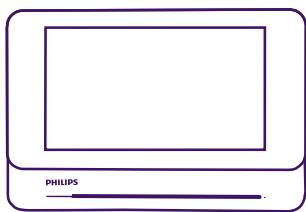
1. Monitor 7” (WelcomeEye Comfort)
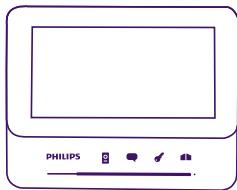
1.bis Monitor 4,3" (WelcomeEye Compact)
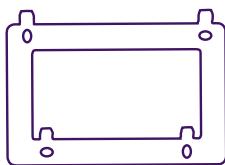
2. Wall bracket
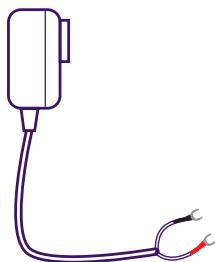
3. Plug-in power supply

4. Adaptor for plug-in power supply compatible with EU or UK plug
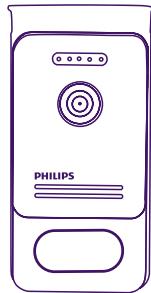
5. Intercom panel

3. GENERAL
This videophone consists of an indoor answering unit with a touch screen and an outdoor panel with an intercom and camera, allowing you to see and communicate with the visitor who has pressed the bell. It is easy to install as only two wires are needed for all functions: bell, video image, intercom and strike plate and automatic opener controls.
The WelcomeEye technology allows you to share the intercom panel between 2 families. Each family can own up to 3 monitors.
The system can operate up to one camera and two intercom panels.
To get the most out of your intercom, please read this instruction manual carefully. The complete instructions can be downloaded at www.philips.com.
4. NOMENCLATURE
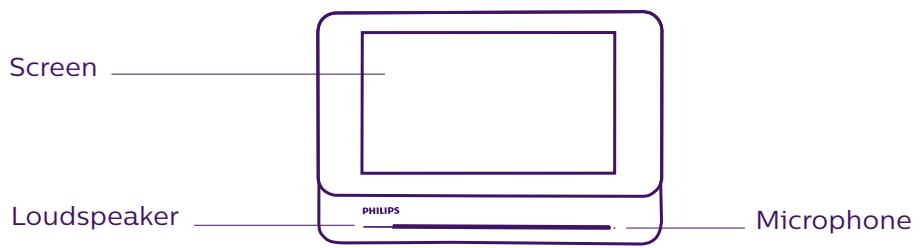
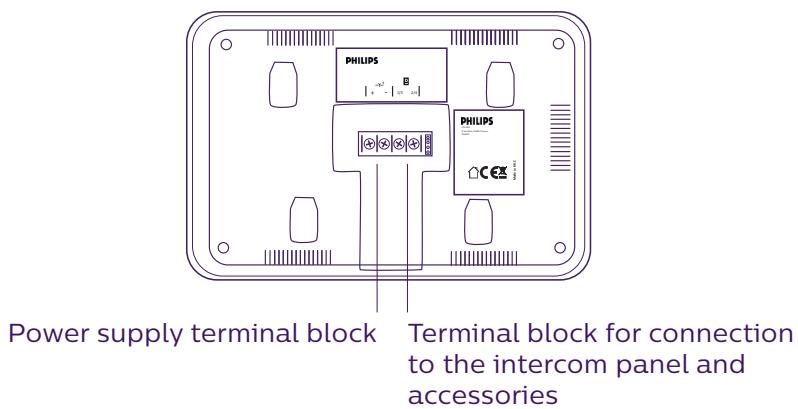
Monitor:
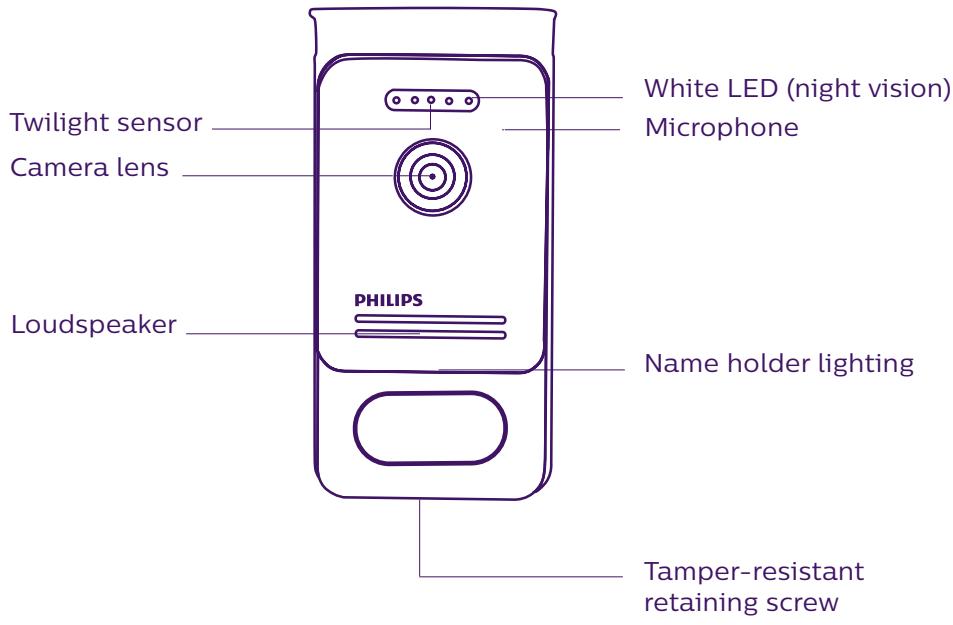
Intercom panel
Notes:
- When someone presses the call button, the inside monitor rings and the video is displayed.
- To change the nameplate label, remove the front cover and unclip the plastic cap behind the label.
5. PRODUCT INSTALLATION
Important notes and advice:
- To make the most of your intercom panel, we recommend configuring it (for 1 or 2 families, 1 or 2 intercoms, loudspeaker volume) before final installation. To do this, a table connection may be necessary to check that the settings are correct.
- If you test your product before installing it, ensure that you do not test it with the intercom panel and the monitor in the same room to avoid the videophone emitting a shrill noise (feedback).
- Do not expose the camera lens to direct sunlight or a reflective surface.
- We recommend running the cables through a protective sheath to protect them against breakage and bad weather.
1. Wiring.
To avoid the risk of interference and malfunctions, do not run the videophone cable through the same sheath as the electrical cables.
Warning: Do not double up the wires to increase their section.
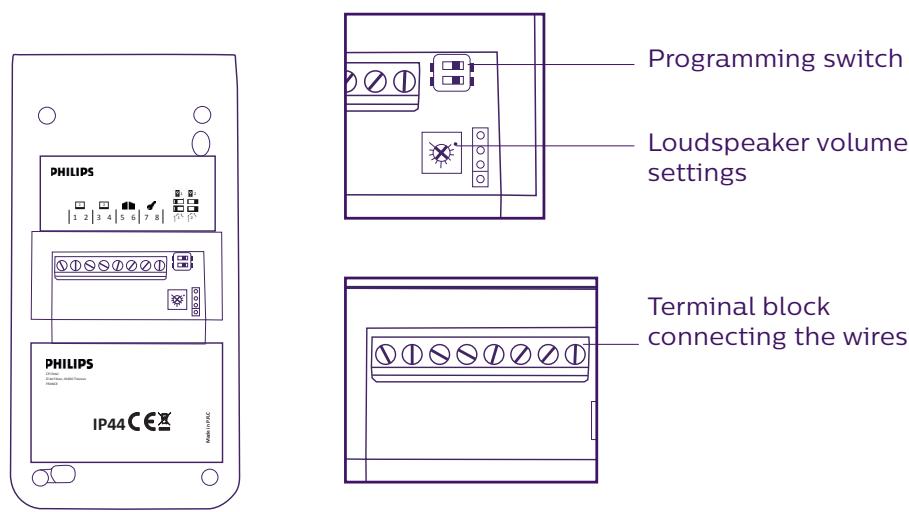
a. Connecting the videophone (monitor, intercom panel and camera, see fig. 1, fig. 2 and fig. 3)
Wires to be used: 2 wires 0.75mm2 with 80m length or 2 wires 1.5mm2 with 120m length.
- Make sure to connect the wires in accordance with one of the wiring diagrams depending on the desired configuration.
- Refer to the label stuck to the back of the monitor and the back of the intercom panel.
- Configure the switches on the back of the intercom panel as well as the monitor interface according to the chosen configuration (see section 2 intercom configuration).
b. Connecting a gate motor
The camera delivers a dry contact with no current, to be connected to the push button control of your automatic opener.
- Connect it directly to terminals 5 and 6 at the back of the intercom panel (no need to observe polarity).
- The opening function is only possible if the video of the respective intercom panel is displayed.
c. Connecting a strike plate or electric lock
Important: The strike plate or electric lock that you are ordering must have a mechanical memory. The strike plate current cannot exceed 1.1A.
- Connect it directly to terminals 7 and 8 at the back of the intercom panel (no need to observe polarity).
- The opening function is only possible if the video of the respective intercom panel is displayed.
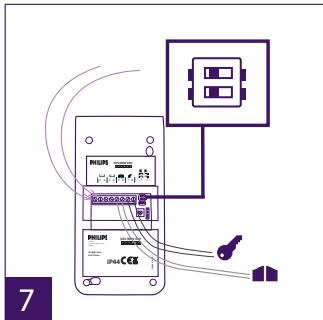
2. Configuring the intercom (see fig. 1, fig. 2 and fig. 3)
a. Configuring the intercom number:
Place switch 2 on the left on intercom no. 1 and on the right on intercom no. 2.
b. Configuring the number of families:
Place switch 1 on the left to be in one-family mode and on the right to be in 2-family mode.
c. Intercom volume settings:
Turn the volume control with a Phillips head screwdriver to adjust the intercom volume.
3. Installing the main or additional monitor
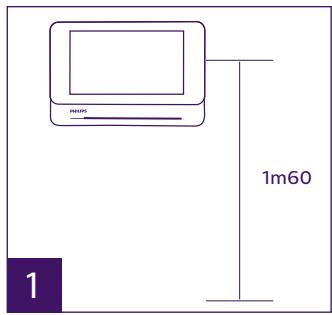
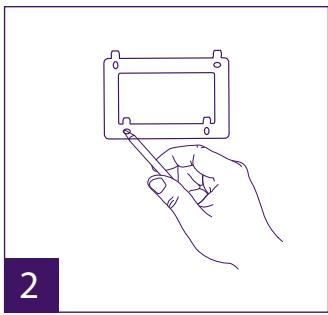
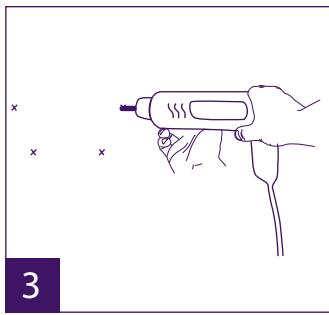
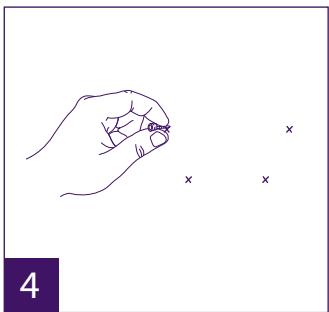
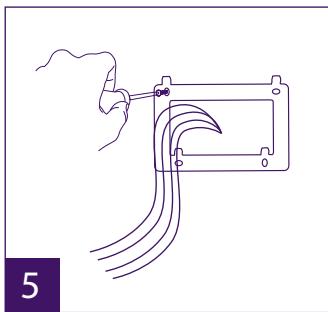
1 - Position the wall bracket so that the screen of the monitor is approximately 1.60m above the ground.
2 - Mark the location of the holes using the U bolt.
3 - Drill.
4 - Use pegs adapted to the bracket (those supplied are suitable for solid walls).
5 - Attach the wall bracket.
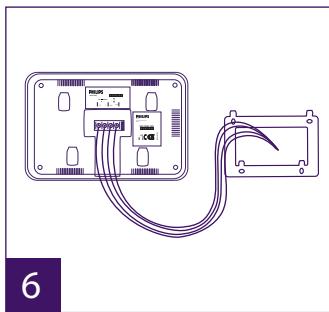
6 - Connect the 2 intercom panel wires and the 2 power supply wires in accordance with the wiring diagram.
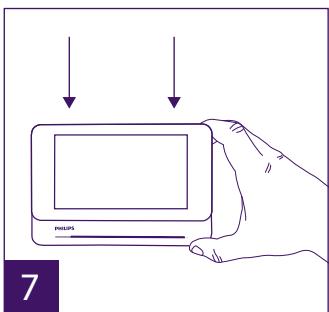
7 - Position the monitor on the wall bracket.
8 - Depending on the configuration selected, and when wiring is completed, the interface may have to be configured. For more information please refer to the complete
instructions which can be downloaded at www.philips.com.

Warning: during this step, do not connect the power supply to the 230V AC
4. Installing the main or additional intercom panel
Warning: The product must not be connected to the power supply before wiring is complete.
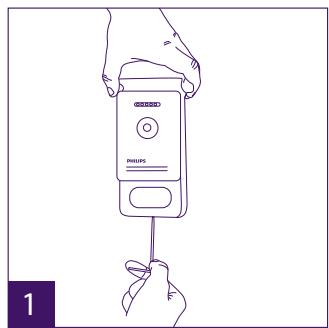
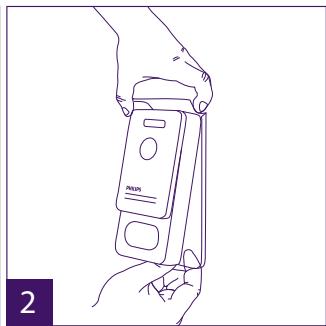
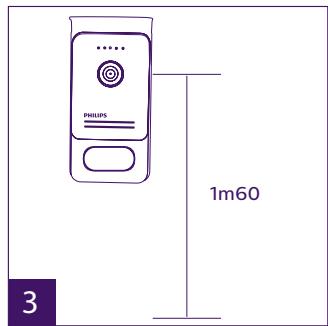
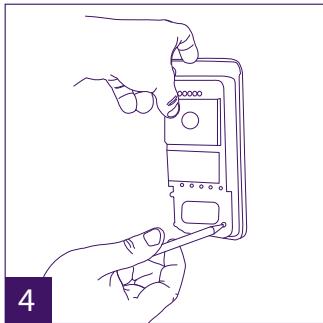
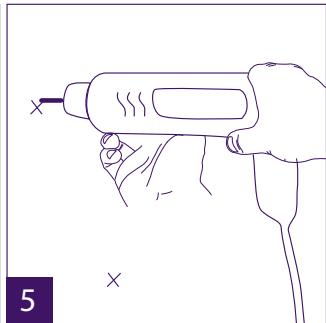
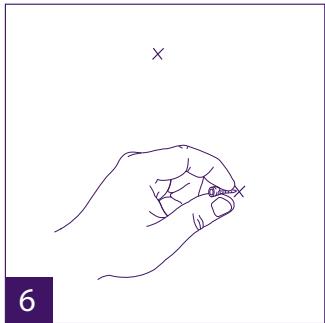
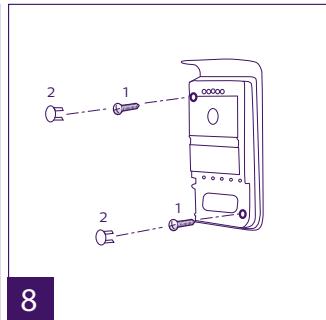
1 - Remove the tamper-resistant screw from the intercom panel.
2 - Tip the intercom panel cover forward.
3 – The intercom's lens should be approximately 1.60m above the ground.
4 - Mark the locations.
5 - Drill.
6 - Use pegs adapted to the nature of the support (the screws supplied are suitable for solid walls).
7 - Connect the two wires from the monitor and, if necessary, connect the electric strike
plate and the gate (see section 1. Wiring). Configure the switches at the back of the intercom panel (see section 2. Configuring the intercom).
8 - Insert the screws and refit the two caps concealing the retaining screws.
Note: screw through the black covers on the back of the intercom panel - do not remove them.
9 – Refit the front cover of the intercom and tighten the tamper-resistant retaining screw.
10 - Connect the 230VAC power supply to the modular adaptor, for an installation compliant with applicable standards (NFC 15-100 in France).
- Verify the smooth functioning (video call, etc.).
- When there is a second intercom panel, don't forget to configure the monitor(s).
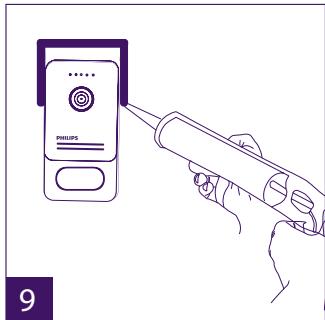
11 - Attach a silicone seal between the shield and the wall to stop flowing water. Do not use acetic acid-based silicone (vinegar odour).
5. Installing a camera (optional)
Connect the wires in accordance with the wiring diagram.
Choose a suitable place to install the camera.
Ensure that nothing gets in the way of the installation.
Screw the wall section with the screws provided (for solid walls).
Point the camera in the desired direction and tighten the retainer screw.
Configure the monitor

6. Get more out of your device
To find out more about your Philips WelcomeEye product, you can download the complete instructions at www.philips.com.
6. TECHNICAL CHARACTERISTICS
Monitor:
ref.: 531003 (Welcome Eye Comfort)
ref.: 531005 (WelcomeEye Compact)
- 2 wires
- 7" screen (Comfort), 4.3" screen (Compact)
- Resolution 800 × 480 (Comfort), 480 × 272 (Compact)
- Current consumption: 460mA (Comfort), 400mA (Compact)
- Power consumption: 11.1W (Comfort), 9.6W (Compact)
-6 chimes (85dB) - Dimensions: 142( h) × 210( l) × 15( d) (Comfort), 116( h) × 146( l) × 16( d) (Compact)
Intercom panel
ref.: 538200
- C-MOS colour sensor 900TVL
- Viewing angle H100°/V75°
- Night vision (white LEDs)
- Strike plate control 12V/1.1A
- Gate control: breaking capacity 12V/2A
- IP44
- Operating temperature: -20°C / +50°C
WelcomeEye Outdoor (additional intercom panel)
ref.: 531006
- C-MOS colour sensor 900TVL
-Viewing angle H130°/V 90° - Night vision (white LEDs)
- Strike plate control 12V/1.1A
- Gate control: breaking capacity 12V/2A
- RFID (125kHz)
- IP44
- operating temperature: -20°C / +50°C
- Dimensions: 168 (h) x 82 (w) x 38 (d)
WelcomeEye AddComfort (additional monitor)
ref.: 531003
- 2 wires
- 7” screen
- Resolution 800 x 480
- Current consumption: 460mA
- Power consumption: 11.1W
-6 chimes (85dB) - Dimensions: 142 (h) x 210 (w) x 15 (d)
WelcomeEye AddCompact (additional monitor)
ref.: 531005
- 2 wires
- 4.3" screen
- 480 x 272 Resolution
- Current consumption: 400mA
- Power consumption: 9.6W
-6 chimes (85dB)
- Dimensions: 116 (h) x 146 (l) x 16 (d)
WelcomeEye Cam (additional camera)
ref.: 531007
- C-MOS colour sensor 900TVL
- viewing angle: H95° / V75°
- operating temperature: -20°C / +50°C
- protection index: IP66
7. ACCESSORIES
WelcomeEye AddCompact - DES 9300 DDE (ref.: 531005)*
WelcomeEye AddComfort - DES 9500 DDE (ref.: 531003)*
WelcomeEye Cam - DES 9900 CVC (ref.: 531007).
WelcomeEye Outdoor - DES 9900 VOS (ref.: 531006)**
WelcomeEye Lock - DES 1000 EDL (ref.: 531008).
WelcomeEye Lock - DES 1100 EDL (ref.: 531009).
WelcomeEye Power - DES 1000 DPS (ref.: 531010)**
WelcomeEye TAG - DES 1000 ACI (ref.: 531011)**
** Refer to the complete WelcomeEye Connect/Touch instructions available on the www.philips.com website for more information.
- Refer to the complete WelcomeEye Comfort/Compact instructions available on the www.philips.com website for more information.
8. TECHNICAL ASSISTANCE - WARRANTY
FAQs are available in the complete instructions which can be downloaded at www.philips.com.
This product is guaranteed for parts and labour in our workshops.
The warranty does not cover: consumables (batteries, etc.) and damage caused by misuse, improper use, improper installation, external intervention, damage due to physical or electrical shocks, dropping, or atmospheric phenomena.
- Do not open the device, as this will void the warranty.
- If the unit is returned for After Sales Service, protect the unit to prevent scratches.
- Clean with a soft cloth only, no solvents. The guarantee is void if parts have been dismantled. Before cleaning it, disconnect the equipment or switch it off at the mains.
Warning: Do not use any gasoline or carboxylic acid, alcohol or similar treatment. In addition to damaging your device, the fumes are also hazardous to your health and are explosive.
Do not use any tool that can conduct voltage (wire brush or other sharp tool, etc.) for cleaning.
The till receipt or invoice is your proof of purchase date.
If necessary, the contacts and opening hours of our technical assistance centres are available on the www.philips.com website.
WARRANTY CARD
Mr/Mrs:
Phone number :
Address:
E-mail:
Date of purchase : / (DD/MM/YYYY)
Dealer:
Dealer Phone :
Dealer address :
Serial number PHI/1031/
Important : Please keep this warranty card with your proof of purchase.
Philips and Philips' shield emblem are registered trademarks of Koninklijke Philips N.V. and are used under licence. This product has been manufactured by and is sold under the
responsibility of CFI Extel SAS, and CFI Extel SAS is the sole guarantor of this product.
9. SAFETY PRECAUTIONS
Any damage caused by a failure to adhere to the manual shall void the warranty. We assume no liability for damages resulting therefrom!
We cannot be held responsible for any damage to property or persons caused by incorrect use or a failure to adhere to the safety instructions.
This product has been manufactured in full compliance with safety instructions. In order to maintain this status and get the most out of the product, users must adhere to the safety instructions and warnings contained in this manual.
A: This symbol indicates that there is a risk of electric shock or short-circuit.
- You should only use this product with a voltage between: 100-240 Volts and 50-60 hertz. Never attempt to use this device with a different voltage.
- Ensure that all the system's electrical connections conform to the instructions for use.
- In commercial establishments, ensure that you adhere to the electrical installation accident prevention regulations.
- In schools, training facilities, workshops, etc. qualified personnel must be on hand to monitor electronic equipment operation.
- You must follow the instructions for use of any other devices connected to the system.
- Please contact an experienced person if you have any doubts regarding equipment operation or safety.
- Never plug in or unplug electrical equipment with wet hands.
- When installing this product, check that the power supply cables are not at risk of being damaged.
- Never replace damaged electrical cables yourself! In this case, remove them and call an expert.
- The mains supply should be located close to the device and must be easily accessible.
- An easily accessible cut-off system (switch disconnector, circuit breaker, equivalent system) must be integrated into the building's wiring installation for the equipment connected to the power grid.
- Keep a minimum distance around the device to guarantee sufficient ventilation.
- Ventilation should not be blocked by covering the ventilation opening with an object such as a newspaper, tablecloth or curtain, etc.).
- No open flame source such as a burning candle must be placed on the device.
- Respect the product's operating temperature.
- The device must not be exposed to liquid flow or splashing. Do not place any objects filled with liquid such as vases on the device.
INHALT
5 INSTALLATION DES PRODUKTS S.5
5. INSTALLATIE VAN HET PRODUCT
ref: 531003 (WelcomeEye Comfort)
ref: 531005 (WelcomeEye Compact)
-2fios
-Ecra 7" (Comfort), 4,3" (Compact)
- Resolução 800 x 480 (Comfort), 480 x 272 (Compact)
- Energia consumida: 460mA (Comfort), 400mA (Compact)
- Potência consumida: 11.1W (Comfort), 9,6W (Compact)
- 6 melodias (85dB)
- Dimensoes: 142(A) x 210(L) x 15(P) (Comfort), 116(A) x 146(L) x 16(P) (Compact)
Placa de rue:
ref: 538200
WelcomeEye AddCompact : (monitor supplementar)
ref: 531005
GB - Don't throw batteries or out of order products with the household waste (garbage). The dangerous substances that they are likely to include may harm health or the environment. Make your retailer take back these products or use the selective collect of garbage proposed by your city. Directive WEEE 2012/19/EU
GB-Alternating Current
D - Wechselstrom
NL - Gelijkstroom
PL - Prad zmienny
IT - Corrente alternata
ES - Corrente alterna
PT - Corrente alterna
F. La marque Philips est une marque déposée par Koninklijke Philips N.V.
GB. The Philips trademarks are registered trademarks of Koninklijke Philips N.V.
D. Die Philips Warenzeichen sind eingetragene Warenzeichen der Koninklijke Philips N.V.
NL. De handelsmerken van Philips zijn gedeponeerde handelsmerken van Koninklijke Philips N.V.
PL. Znaki handlowe Philips sā zarejestrowanymi znakami handlowymi Koninklijke Philips N.V.
IT. I marchi Philips sono marchi registrati di proprietà di Koninklijke Philips N.V.
ES. Las MARCAS registRADAS de Philips son MARCAS registRADAS de Koninklijke Philips N.V.
PT. As marcas registadas da Philips são marcas registadas da Koninklijke Philips N.V.
- INSTALLATION DU PRODUIT
- SAFETY INSTRUCTIONS
- IMPORTANT
- WARNING
- SAFETY PRECAUTIONS
- CONTENTS OF THE KIT
- GENERAL
- NOMENCLATURE
- NOTES
- PRODUCT INSTALLATION
- WIRING
- CONNECTING A GATE MOTOR
- CONNECTING A STRIKE PLATE OR ELECTRIC LOCK
- CONFIGURING THE INTERCOM (SEE FIG. 1, FIG. 2 AND FIG. 3)
- CONFIGURING THE INTERCOM NUMBER
- CONFIGURING THE NUMBER OF FAMILIES
- INTERCOM VOLUME SETTINGS
- INSTALLING THE MAIN OR ADDITIONAL MONITOR
- INSTALLING THE MAIN OR ADDITIONAL INTERCOM PANEL
- INSTALLING A CAMERA (OPTIONAL)
- GET MORE OUT OF YOUR DEVICE
- TECHNICAL CHARACTERISTICS
- MONITOR
- INTERCOM PANEL
- ACCESSORIES
- TECHNICAL ASSISTANCE - WARRANTY
- WARRANTY CARD
- INHALT
- INSTALLATIE VAN HET PRODUCT
Brand : PHILIPS
Model : WelcomeEye Comfort - DES9500VDP - 531019 - WelcomeEye Compact - DES9300VDP - 531004
Category : Video Doorphone