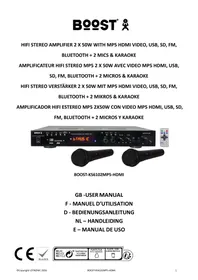
KS6102 MP5 - Karaoke BOOST - Free user manual and instructions
Find the device manual for free KS6102 MP5 BOOST in PDF.



| Product Type | Karaoke amplifier with multimedia player |
| Brand | BOOST |
| Model | KS6102 MP5 |
| Output Power | 2 x 50 W |
| Power Supply | 220-240 V ~ 50/60 Hz |
| Bandwidth | 20 - 20,000 Hz |
| Impedance | 8 ohms |
| Signal-to-Noise Ratio | > 76 dB |
| Line Input Sensitivity | 450 mV |
| Microphone Input Sensitivity | 20 mV |
| Dimensions (L x H x D) | 430 x 55 x 200 mm |
| Weight | 2.0 kg |
| Inputs | 2 microphones (6.35 mm), USB, SD, AUX, DVD, Bluetooth |
| Outputs | HDMI, RCA video, line, headphone, speakers |
| Main Functions | Karaoke, Bluetooth, FM Tuner, USB/SD/MP5 (HD video), recording, robot/high effects |
| Included Accessories | 2 microphones, remote control |
| Cleaning | Dry, clean cloth, no solvents |
| Safety | Do not open the case, avoid liquids and flames, use grounded outlet |
| General Information | CE certified, recycling at end of life |
Frequently Asked Questions - KS6102 MP5 BOOST
User questions about KS6102 MP5 BOOST
0 question about this device. Answer the ones you know or ask your own.
Ask a new question about this device
Download the instructions for your Karaoke in PDF format for free! Find your manual KS6102 MP5 - BOOST and take your electronic device back in hand. On this page are published all the documents necessary for the use of your device. KS6102 MP5 by BOOST.
USER MANUAL KS6102 MP5 BOOST
- Before using the device, please check it for any possible damages. In case of damage do not operate it.
- Unplug the UNIT if you do not use it for a certain time.
- Do not expose the unit to mechanical stress and humidity.
- Ensure sufficient ventilation around the unit. Do not cover the device and protect it from direct solar radiation.
- Clean the device with a dry and soft cloth only.
- Caution! Should the device itself get damaged, please let the repair to the manufacturer or to a qualified service agent.
- The unit must be connected to an earthed mains outlet only.
- Keep out of the reach of children
- DISCONNECT DEVICE
Where the MAINS plug or an appliance coupler is used as the disconnect device, the disconnect device shall remain readily operable.
Features
- Black piano finish
- Bluetooth, FM tuner, USB, SD, MP3 & MP5 (sound & HD picture)
REC function - LCD displays the track, track number and elapsed play time
- 2x mic inputs with echo & volume control
LINE output for an active box or another amplifier
HDMI output - Headphone output
- 2x microphones
Remote control
Front panel
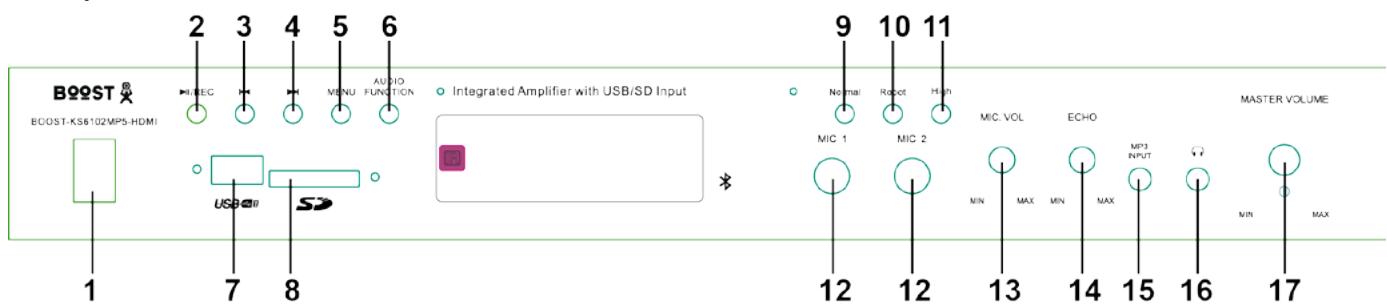
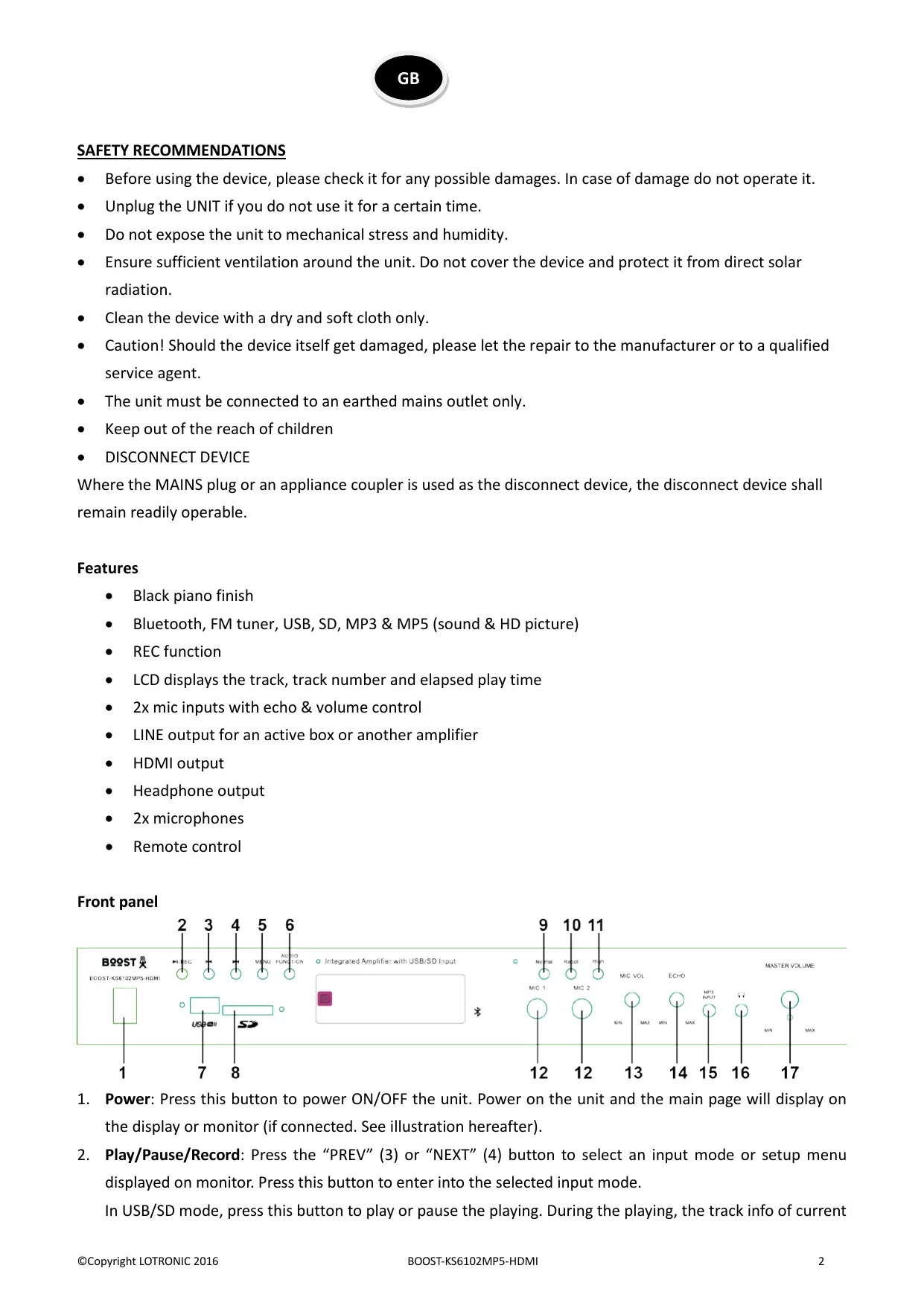
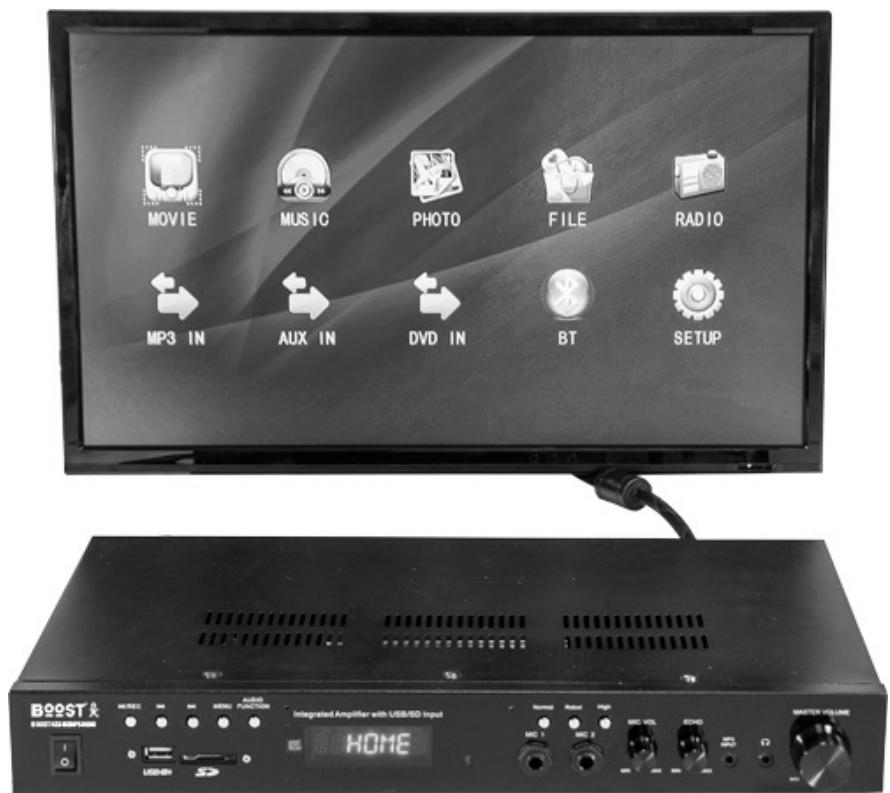
- Power: Press this button to power ON/OFF the unit. Power on the unit and the main page will display on the display or monitor (if connected. See illustration hereafter).
- Play/Pause/Record: Press the "PREV" (3) or "NEXT" (4) button to select an input mode or setup menu displayed on monitor. Press this button to enter into the selected input mode.
In USB/SD mode, press this button to play or pause the playing. During the playing, the track info of current
track will be displayed on the monitor or display.
In tune mode, press this button to activate the automatic search and storage of all found stations (on first use). Press the “PREV” OR “NEXT” button to select desired station you want to listen to and then press this button again to confirm.
In AUX/DVD/MP3 input mode, press this button to make a recording. Press again to stop recording.
- Previous: On the main menu page, press this button to select previous icon and then press "Play/Pause/Record" button to confirm.
In USB/SD & tuner mode, press this button to go to previous track or station. - Next: On the main menu page, press this button to select next iron and then press "Play/Pause/Record" button to confirm. In USB/SD & tuner mode, press this button to go to next track or station.
- MENU: Press this button to quickly go back to the main menu page
- AUDIO function: Press this button to select the control mode among bass, treble and balance. The control mode will display on the monitor. Then use the Master volume knob to adjust.
- USB Input: Connect your USB flash drive here to play music, video or pictures.
- SD Card input: Connect your SD card here to play music, video or pictures.
- Normal: Press this button to adjust the tone of microphone to be normal
- Robot: Press this button to adjust the tone of microphone to be robot
- High: Press this button to adjust the tone of microphone to be higher frequency.
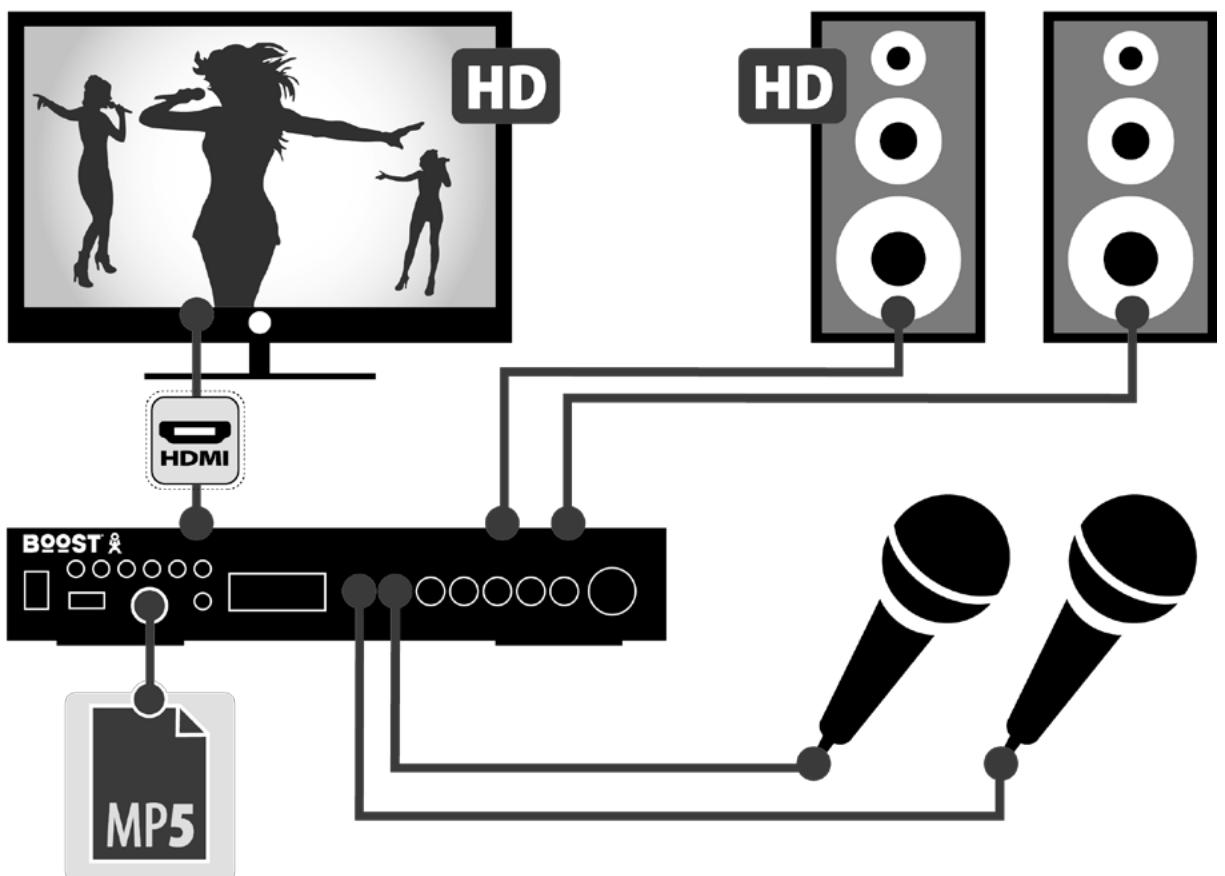
- MIC1& MIC2: Connect your microphone here
- MIC VOL: Use this knob to adjust the volume of microphones
- ECHO: Use this knob to adjust the echo of microphones
- MP3 Input: Connect your mp3 here and then select MP3 input mode to play signal from MP3.
- Headphone Output: Connect your headphone here.
- Master Volume: Use this knob to adjust the master volume. On the menu page, use this knob to quickly go to a specific iron and then press "Play/Pause/Record" button to confirm.
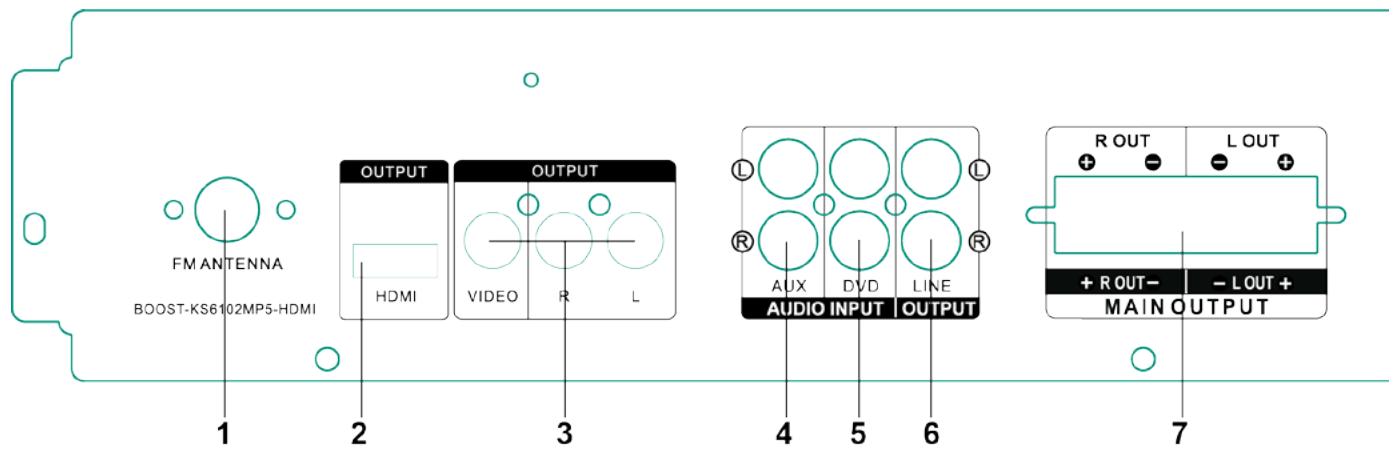
- FM Antenna: Connect your FM antenna here
- HDMI Output: Connect the monitor to this output via a HDMI cable.
- Video RCA Outputs: Connect the monitor to these outputs via RCA cables. It's yellow, red and white cables.
- AUX Input: Connect the AUX signal here
- DVD Input: Connect the DVD signal here
- Line Output: Connect this output to the AUX or DVD input of another amplifier
- Main Speaker Outputs: Connect the speakers to these outputs.
Bluetooth Connection
To play Bluetooth signal, enable the Bluetooth function on a Bluetooth device like cell phone and set the amplifier to Bluetooth input mode and then search for available Bluetooth devices nearby on cell phone. The Bluetooth name of the amplifier is "BOOST-KS6102MP5-HDMI". Pair and connect. There is no pairing code.
Note: The amplifier is only discoverable when input is set to Bluetooth.
REMOTE CONTROL
- Mute: Press this button to mute the volume output level
- Mode: Press this button to switch among all the input modes
- Power: Press this button power ON/OFF the function part of the unit
- Photo: Press this button to start playing photos on USB flash drive or SD card
- Music: Press this button to start playing tracks on USB flash drive or SD card
- Movie: Press this button to start playing videos on USB flash drive or SD card
- Play/Pause: Press this button to play the tracks or videos. Press again to pause
- Menu: Press this button to quickly go back to the main menu page
- UP/DOWN/LEFT/RIGHT: Use these buttons to quickly go to a specific icon and press “ENTER” to confirm
- AUDIO: Press this button to confirm the audio playing
- HDMI: Press this button to cut off the HDMI output.
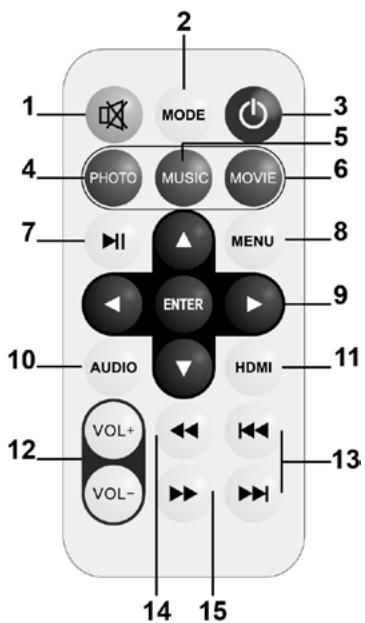
- VOLUME: Use these buttons to turn up or down the volume
- Fast rewind/Forward: Use either of these buttons to fast rewind or fast forward within the tracks or video.
- Previous: On the main menu page, press this button to select previous icon and then press "Play/Pause/Record" button to confirm. In USB/SD & tuner mode, press this button to go to previous track or station.
- Next: On the main menu page, press this button to select next icon and then press "Play/Pause/Record" button to confirm. In USB/SD & tuner mode, press this button to go to next track or station.
OPERATION
Select a central location for the amplifier.
Connect the speaker wires (red & black) to the + and - terminals on the rear panel of the amplifier.
Connect the audio signal to the relevant sockets with the correct polarity.
Plug the mains lead in and switch the amplifier on once you have checked all connections.
Switch the audio sources on and adjust the master volume to the required level.
Karaoke: Plug a mic into MIC1 or MIC2 socket on the front panel. Before you use the mic, make sure that it is switched off and the MIC volume button is set to the minimum. Connect the microphone, switch it on and adjust slowly the volume and the echo.
If you don't use the unit any longer, switch the amplifier off and disconnect it from the mains.
Signal Sources and their Connections:
- Connect a DVD-player or a CD-player to the terminal AUDIO INPUT or a data storage unit to the USB-interface or insert a SD-memory card in the suitable slot or activate the Bluetooth function on your smartphone.
- Select the active signal source by pressing the MODE button until the desired input source is displayed.
- Use the MP3 CONTROL-function for controlling the files on a connected data storage unit.
- If you wish to use the karaoke function of this device, insert one or two microphones into MIC1 and MIC2. Their signals are going to the signal output too.
Specifications:
Output power. 2 x 50 W
Power supply. AC 220-240 V ~ 50/60 Hz
Frequency range. 20 - 20000 Hz
Input sensitivity. 450 mV
S/N ratio . >76 dB
Impedance 8 Ohms
Mic input sensitivity 20 mV
Dimensions. 430 x 55 x 20mm
Weight 2.0kg

Electric products must not be put into household waste. Please bring them to a recycling centre. Ask your local authorities or your dealer about the way to proceed.
Imported from China by
LOTRONIC SA
Avenue Zénobe Gramme, 9
1480 SAINTES
Belgium
Hereby we,
LOTRONIC SA
Avenue Zénobe Gramme, 9
1480 SAINTES
Belgium
+32.2.390.91.91
Certify and declare under our sole responsibility that the following product:
Trade name:
BOOST
Product name:
KARAOKE AMPLIFIER WITH VIDEO - USB - BLUETOOTH - FM
Type or model:
BOOST-KS6102MP5-HDMI
conforms with the essential requirements of the:
LVD directive 2014/35/EU - EMC directive 2014/30/EU - RED directive 2014/53/EU - ROHS directive 2011/65/EU - ERP directive 2009/125/EC
based on the following specifications applied:
EN60065:2014
EN55032 :2012 + AC :2013
EN55020: 2007 + A11: 2011
EN61000-3-2: 2014
EN61000-3-3:2013
EN62479:2010
EN301 489-1 V1.9.2
EN301 489-17 V2.2.1
EN300 328-1 V1.8.1
IEC62321:2015 / IEC62321:2013
EN50564:2011
Place and date of issue: Saintes (Belgium), on 23/11/2016
AKBAR Guive
Technical Manager
CE
EN55020: 2007 + A11: 2011
EN61000-3-2:2014
EN61000-3-3:2013
EN62479:2010
EN301 489-1 V1.9.2
EN301 489-17 V2.2.1
EN300 328-1 V1.8.1
IEC62321:2015 / IEC62321:2013
EN50564:2011
Responsible technique