PERFORMER TFT auto-alimenté - CARE - ergomètre connecté - Exercise bike CARE FITNESS - Free user manual and instructions
Find the device manual for free PERFORMER TFT auto-alimenté - CARE - ergomètre connecté CARE FITNESS in PDF.



| Product type | Connected ergometer exercise bike |
| Brand | CARE FITNESS |
| Model | PERFORMER TFT self-powered |
| Power supply | Self-powered (dynamo) |
| Screen | TFT color touchscreen |
| Resistance | 32 magnetic levels |
| Training programs | Quick start, Goal (time/distance/calories), 32 preset programs, 4 user programs, 3 HRC (60%, 80%, target), Fitness test |
| Connectivity | Bluetooth (speaker/headset), Wi-Fi, USB port (music/video) |
| Heart rate sensors | Hand grip sensors + optional chest strap |
| Displays | Time, distance, calories, heart rate, RPM, speed, watt, resistance |
| Time display range | 00:00 ~ 99:59 minutes |
| Distance display range | 0.0 ~ 99.9 km/miles |
| Calories display range | 0 ~ 9999 cal |
| Heart rate range | 40 ~ 220 BPM |
| Resistance range | 1 ~ 32 |
| Sleep mode | After 5 minutes of inactivity |
| Software update | Via Wi-Fi (settings > wireless > update) |
| Interface languages | Multilingual (adjustable in settings) |
| Maximum user weight | 120 kg (standard estimate) |
| Approximate dimensions | 100 x 50 x 130 cm (estimate) |
| Device weight | 35 kg (estimate) |
| Maintenance | Clean with a soft, dry cloth; regularly check screw tightness |
| Safety | Automatic shutdown when not in use; heart rate sensors with alert if no detection |
| Spare parts | Available through CARE after-sales service (contact details in the manual) |
| After-sales service | Tel: +33(0)148436720, address: 18/22 rue Bernard-Z. L. Les Vignes, 93012 BOBIGNY Cedex |
Frequently Asked Questions - PERFORMER TFT auto-alimenté - CARE - ergomètre connecté CARE FITNESS
User questions about PERFORMER TFT auto-alimenté - CARE - ergomètre connecté CARE FITNESS
0 question about this device. Answer the ones you know or ask your own.
Ask a new question about this device
Download the instructions for your Exercise bike in PDF format for free! Find your manual PERFORMER TFT auto-alimenté - CARE - ergomètre connecté - CARE FITNESS and take your electronic device back in hand. On this page are published all the documents necessary for the use of your device. PERFORMER TFT auto-alimenté - CARE - ergomètre connecté by CARE FITNESS.
USER MANUAL PERFORMER TFT auto-alimenté - CARE - ergomètre connecté CARE FITNESS
Connection application Kinomap
https://cloud.carefitness.com/index.php/s/E2WD22KMNBQzERL
E mail : https://www.carefitness.com/sav

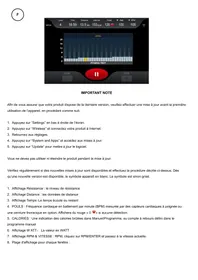
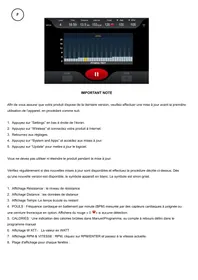
IMPORTANT NOTE
In order to ensure that your product has the latest version, please perform a updated before the first use of the device, in proceeding as following:
- Press on "Settings" at the bottom right of the screen .
- Press on "Wireless" and connect your product on the Internet.
- Return to settings.
- Press on "System and Apps" and access updates .
- Press Press "Update" to update the software.
You must not use neither Turn off the product during the update .
Check regularly for new updates and follow the steps described above. As soon as a new version is available, the symbol appears in white. Otherwise, the symbol is grayed out.
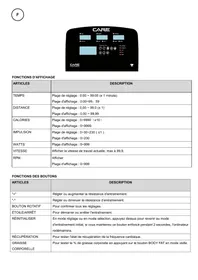
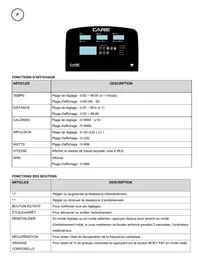
- Resistance Display : the resistance level
- Distance display: distance data
- Time Display: The elapsed or remaining time
- PULSE: Heart rate in beats per minute (BPM) measured by handgrip heart sensors or an optional chest strap. Will display red “0” if no detection.
- CALORIES: An indication of calories burned in Manual/Program, or countdown timer set in the manual program
- W ATT display : The value in WATT
- RPM & SPEED Display : RPM, click RPM/ENTER and change to current speed.
- Display range for each window:
| TIME | 00:00 ~ 99 9:59 (MIN) |
| DISTANCE | 0.0~99.9 (KM /MILE) |
| CALORIES | 0 ~ 999 9 (CAL) |
| PULSE | 40~220 (BPM) |
| RESISTANCE | 1~32 |
- PROGRAM: QUICK START, OBJECTIVE, PROGRAM (P1~P32), USER PROGRAM (USER1~USER4) 3 HRC (60%, 80%, Target), FITNESS TEST, MEDIA
10.SLEEP MODE: If no movement is made within 5 minutes, the display turns off, the computer is in shutdown mode. If the computer detects movement, the computer turns back on.
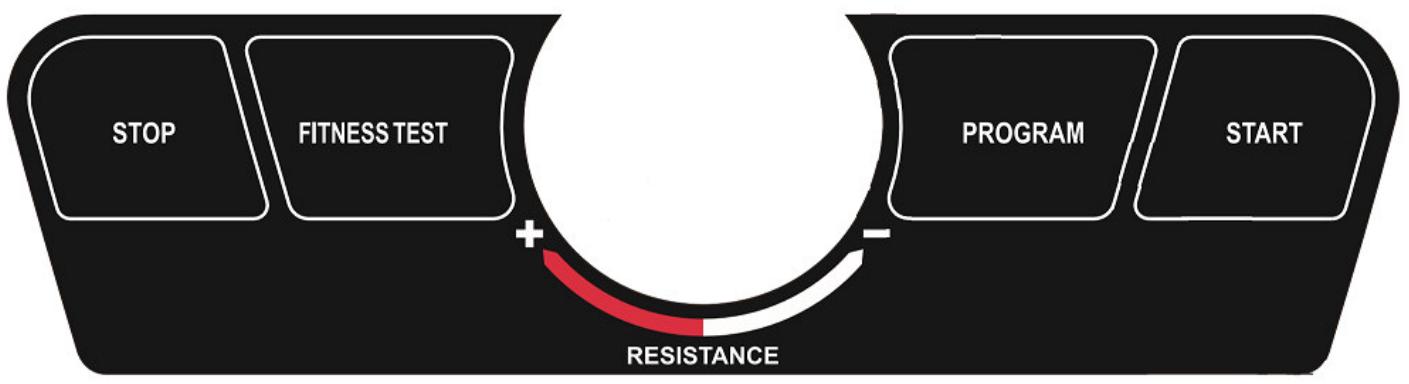
Button definition
- START KEY :
1.1 Press the key during setting, the setting data will be received and the training session will start.
1.2 Press the button to start the training session in PAUSE MODE.
2. STOP KEY
2.1 Press the key during adjustment, enter the "PAUSE" mode, and the resistance returns to "0".
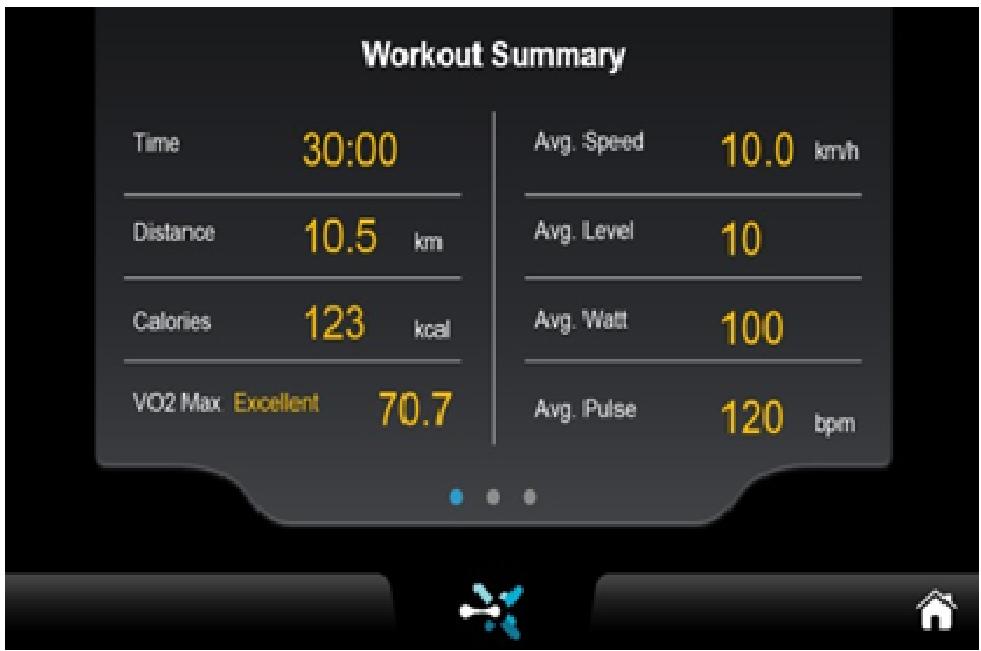
2.2 Press the key again and enter the END MODE, the console displays the statistics page, press the STOP key again and return to standby mode.
5.1: Turn the button: Adjusts the resistance. Clockwise you increase the resistance, counterclockwise you decrease it.
5.2 ENTER KEY: Press the "ENTER" key and change the RPM and speed.
Function :
1 QUICK START
Press START key on the screen, the computer will start QUICKLY, adjust time, distance and other data from 0, resistance from 1.
2 GOAL
2.1 Select GOAL mode, select one of your goals: TIME, CAL or DISTANCE, then press the START button to start training.
2.2 NOTE: You can only set one of these as your goal: TIME, CAL or DISTANCE.
After setting, press START to begin.
3 PROGRAM
3.1 32 PROGRAM PROFILES
3.2 Select the PROGRAM (P1~P32), on the screen, show the program name [PXX], graphic image LEVEL PROFILE
3.3 You can set your gender, age, weight and time.
3.4 You can also press START directly to start training with the default P1.
3. 5 During training, you can adjust the resistance according to your personal needs, but only adjust your profile to the current level.
3. 6 Stop the workout by pressing the STOP button, the resistance returns to 0, the display shows [PAUSE]. You can restart your workout by pressing the START button
PROGRAM LEVEL Table
| Stage Program | Setting time / 30 = time for each section | ||||||||||||||||||||||||||||||
| 1 | 2 | 3 | 4 | 5 | 6 | 7 | 8 | 9 | 10 | 11 | 12 | 13 | 14 | 15 | 16 | 17 | 18 | 19 | 20 | 21 | 22 | 23 | 24 | 25 | 26 | 27 | 28 | 29 | 30 | ||
| P1 | EVEL | 2 | 2 | 4 | 4 | 3 | 3 | 4 | 3 | 5 | 4 | 2 | 2 | 5 | 5 | 3 | 3 | 2 | 2 | 4 | 4 | 5 | 5 | 5 | 6 | 5 | 6 | 3 | 3 | 3 | 3 |
| P2 | LEVEL | 2 | 2 | 5 | 5 | 4 | 4 | 6 | 4 | 6 | 4 | 2 | 2 | 4 | 4 | 2 | 2 | 2 | 2 | 4 | 4 | 6 | 6 | 8 | 7 | 8 | 6 | 2 | 2 | 3 | 3 |
| P3 | LEVEL | 2 | 2 | 5 | 5 | 4 | 4 | 5 | 4 | 5 | 4 | 2 | 2 | 3 | 3 | 2 | 2 | 2 | 2 | 4 | 4 | 5 | 5 | 5 | 6 | 5 | 6 | 3 | 3 | 3 | 3 |
| P4 | LEVEL | 3 | 3 | 6 | 6 | 7 | 7 | 5 | 8 | 5 | 9 | 6 | 6 | 4 | 4 | 3 | 3 | 4 | 4 | 2 | 2 | 6 | 6 | 8 | 6 | 3 | 2 | 6 | 6 | 2 | 2 |
| P5 | LEVEL | 3 | 3 | 6 | 6 | 7 | 7 | 5 | 8 | 6 | 7 | 6 | 6 | 4 | 4 | 3 | 3 | 2 | 2 | 5 | 5 | 5 | 5 | 4 | 4 | 6 | 4 | 2 | 2 | 3 | 3 |
| P6 | LEVEL | 5 | 5 | 1 | 11 | 9 | 9 | 7 | 8 | 2 | 10 | 8 | 8 | 7 | 7 | 6 | 6 | 7 | 7 | 5 | 5 | 7 | 7 | 9 | 11 | 10 | 11 | 9 | 9 | 5 | 5 |
| P7 | LEVEL | 5 | 5 | 9 | 9 | 10 | 10 | 7 | 7 | 10 | 7 | 5 | 5 | 7 | 7 | 5 | 5 | 6 | 6 | 8 | 8 | 7 | 7 | 7 | 6 | 7 | 6 | 5 | 5 | 5 | 5 |
| P8 | LEVEL | 5 | 5 | 7 | 7 | 9 | 9 | 11 | 10 | 11 | 9 | 5 | 5 | 6 | 6 | 5 | 5 | 6 | 6 | 8 | 8 | 7 | 7 | 7 | 6 | 7 | 6 | 5 | 5 | 5 | 5 |
| P9 | LEVEL | 5 | 5 | 7 | 7 | 8 | 8 | 8 | 9 | 8 | 9 | 6 | 6 | 6 | 6 | 5 | 5 | 6 | 6 | 7 | 7 | 7 | 7 | 6 | 8 | 8 | 9 | 6 | 6 | 6 | 6 |
| P10 | LEVEL | 5 | 5 | 6 | 6 | 8 | 8 | 6 | 6 | 8 | 8 | 9 | 9 | 6 | 6 | 6 | 6 | 7 | 7 | 6 | 6 | 7 | 7 | 7 | 6 | 7 | 5 | 6 | 6 | 5 | 5 |
| P11 | LEVEL | 7 | 7 | 11 | 7 | 7 | 11 | 7 | 7 | 11 | 7 | 7 | 11 | 7 | 7 | 11 | 7 | 7 | 11 | 7 | 7 | 11 | 7 | 7 | 11 | 7 | 7 | 11 | 7 | 7 | 11 |
| P12 | LEVEL | 7 | 7 | 10 | 10 | 10 | 12 | 12 | 12 | 15 | 15 | 15 | 17 | 17 | 20 | 20 | 20 | 20 | 17 | 17 | 15 | 15 | 15 | 12 | 12 | 12 | 10 | 10 | 10 | 7 | 7 |
| P13 | LEVEL | 7 | 7 | 7 | 10 | 10 | 10 | 12 | 12 | 12 | 15 | 15 | 15 | 17 | 17 | 17 | 20 | 20 | 22 | 22 | 22 | 20 | 20 | 20 | 17 | 17 | 17 | 15 | 15 | 15 | |
| P14 | LEVEL | 7 | 7 | 7 | 10 | 10 | 10 | 15 | 15 | 15 | 17 | 17 | 20 | 20 | 20 | 20 | 20 | 20 | 20 | 17 | 17 | 15 | 15 | 15 | 10 | 10 | 10 | 7 | 7 | 7 | |
| P15 | LEVEL | 7 | 7 | 7 | 7 | 12 | 12 | 12 | 12 | 12 | 15 | 15 | 15 | 15 | 15 | 17 | 17 | 17 | 17 | 17 | 20 | 20 | 20 | 20 | 20 | 15 | 15 | 15 | 15 | 15 | |
| P16 | LEVEL | 7 | 7 | 7 | 10 | 10 | 12 | 15 | 17 | 20 | 20 | 17 | 15 | 12 | 10 | 10 | 10 | 10 | 12 | 15 | 17 | 20 | 20 | 17 | 15 | 12 | 10 | 10 | 7 | 7 | |
| P17 | LEVEL | 8 | 11 | 16 | 21 | 21 | 13 | 8 | 8 | 11 | 16 | 21 | 21 | 13 | 8 | 8 | 11 | 16 | 21 | 21 | 13 | 8 | 8 | 11 | 16 | 21 | 21 | 13 | 8 | 8 | 11 |
| P18 | LEVEL | 8 | 11 | 13 | 18 | 21 | 8 | 11 | 13 | 18 | 21 | 8 | 11 | 13 | 18 | 21 | 8 | 11 | 13 | 18 | 21 | 8 | 11 | 13 | 18 | 21 | 8 | 11 | 13 | 18 | 21 |
| P19 | LEVEL | 8 | 21 | 18 | 13 | 11 | 8 | 8 | 21 | 18 | 13 | 11 | 8 | 8 | 21 | 18 | 13 | 11 | 8 | 8 | 21 | 18 | 13 | 11 | 8 | 8 | 21 | 18 | 13 | 11 | 8 |
| P20 | LEVEL | 13 | 21 | 21 | 13 | 21 | 21 | 13 | 21 | 21 | 13 | 21 | 21 | 13 | 21 | 21 | 13 | 21 | 21 | 13 | 21 | 21 | 13 | 21 | 21 | 13 | 21 | 21 | 13 | 21 | 21 |
| P21 | LEVEL | 13 | 21 | 13 | 21 | 13 | 21 | 13 | 21 | 13 | 21 | 13 | 21 | 13 | 21 | 13 | 21 | 13 | 21 | 13 | 21 | 13 | 21 | 13 | 21 | 13 | 21 | 13 | 21 | 13 | |
| P22 | LEVEL | 8 | 8 | 11 | 11 | 16 | 16 | 16 | 18 | 18 | 21 | 23 | 21 | 18 | 18 | 18 | 18 | 18 | 21 | 23 | 21 | 18 | 18 | 16 | 16 | 16 | 11 | 11 | 8 | 8 | |
| P23 | LEVEL | 14 | 14 | 23 | 23 | 20 | 20 | 23 | 20 | 23 | 20 | 23 | 23 | 17 | 17 | 14 | 14 | 17 | 17 | 23 | 23 | 26 | 26 | 26 | 27 | 23 | 25 | 23 | 26 | 20 | |
| P24 | LEVEL | 17 | 17 | 26 | 26 | 23 | 25 | 23 | 26 | 23 | 27 | 26 | 26 | 20 | 20 | 20 | 20 | 14 | 14 | 26 | 26 | 26 | 26 | 23 | 23 | 26 | 25 | 26 | 23 | 20 | |
| P25 | LEVEL | 20 | 20 | 26 | 26 | 25 | 25 | 23 | 26 | 26 | 25 | 26 | 26 | 23 | 23 | 17 | 17 | 20 | 20 | 14 | 14 | 23 | 26 | 26 | 25 | 26 | 26 | 23 | 20 | ||
| P26 | LEVEL | 14 | 14 | 26 | 26 | 26 | 23 | 23 | 23 | 26 | 25 | 23 | 23 | 20 | 20 | 17 | 17 | 14 | 14 | 23 | 23 | 23 | 20 | 20 | 20 | 26 | 20 | 14 | 14 | 17 | |
| P27 | LEVEL | 14 | 14 | 26 | 26 | 25 | 25 | 20 | 20 | 25 | 20 | 17 | 17 | 20 | 20 | 14 | 14 | 20 | 20 | 23 | 23 | 26 | 26 | 26 | 26 | 26 | 26 | 26 | 26 | ||
| P28 | LEVEL | 21 | 21 | 15 | 15 | 24 | 27 | 27 | 26 | 27 | 27 | 24 | 21 | 18 | 18 | 15 | 15 | 24 | 24 | 18 | 18 | 21 | 21 | 21 | 18 | 21 | 15 | 24 | 24 | ||
| P29 | LEVEL | 15 | 24 | 27 | 27 | 18 | 21 | 18 | 21 | 24 | 27 | 18 | 18 | 18 | 15 | 15 | 21 | 21 | 18 | 18 | 21 | 18 | 24 | 21 | 15 | 15 | 24 | 24 | |||
| P30 | LEVEL | 18 | 24 | 18 | 18 | 24 | 24 | 21 | 21 | 24 | 18 | 27 | 27 | 18 | 21 | 18 | 15 | 18 | 18 | 21 | 21 | 18 | 18 | 21 | 18 | 24 | 21 | 15 | |||
| P31 | LEVEL | 18 | 18 | 24 | 24 | 27 | 27 | 27 | 28 | 24 | 26 | 24 | 27 | 21 | 21 | 15 | 15 | 21 | 21 | 24 | 24 | 27 | 27 | 27 | 28 | 28 | 29 | 27 | 27 | ||
4. USER PROGRAM
4.1 Total 4 USERS
4.2 Select USER mode (U1- U4), the chosen USER displayed in the left input field, click it to re-edit the user name.
4.3 Configure all the necessary information in the USER PROGRAM, there are 30 pieces of information available to set Press START to start the workout at any time, even if you have not completed all settings.
4.4 You can also start the workout without any changes. The default is USER 1.
4.5 Adjust the resistance, only the current section will be adjustable. The other sections of this PROGRAM will be retained.
4.6 Press STOP key, resistance returns to 0, display shows "PAUSE", press START key to restart.
- HRC (THR 60 PCT, THR 80 PCT, THR):
5.1 THR 60 PCT means THR = (220 - AGE) × 60% , this is the default value and no adjustment is possible.
5.2 THR 80 PCT means THR = (220 - AGE) × 80% , this is the default value and no adjustment is possible.
5.3 In THR, the default THR is 80, the adjustable range is : 72 168 .
5.4 Select and change HRC basic parameter: gender, age, weight, time, press NEXT to choose HRC mode, then press START key to start training.
5.5 You can also start the workout without any changes. The default is THR 60 PCT. - 6 If you fail to detect heart rate during training for 15 seconds, the main window “NO HR DETECTED” will display, If still no heart rate input after 30 seconds, stop working. main window display SUMMARY
5.7 The default is the lowest level. Resistance cannot be adjusted during training.
5.8 Press the STOP key, the resistance returns to 0 , the main window displays “ PAUSE ” , press the START button to restart.
6.Physical CONDITION TEST
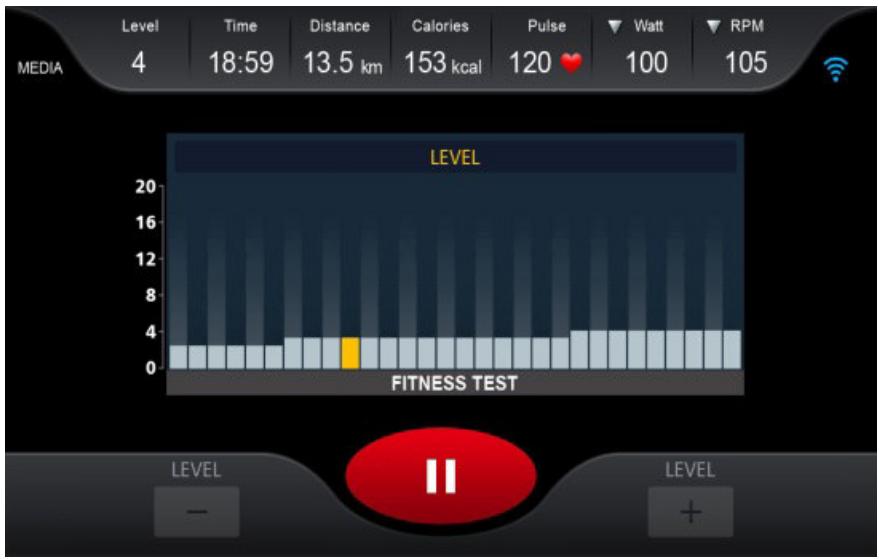
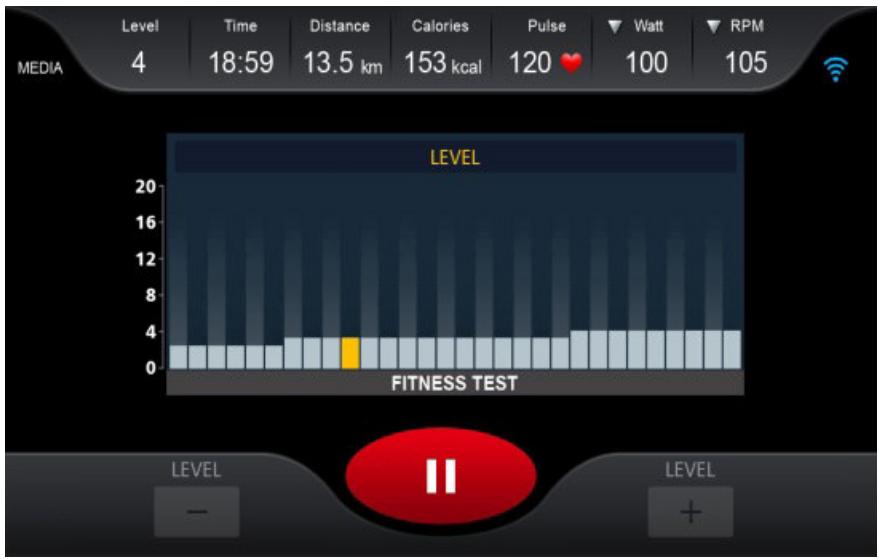
6.1 Select FITNESS TEST mode, set gender, age and weight, then press START to start training. Your heart rate will be detected, if no heart rate is detected within 15 seconds, "NO HR DETECTED" will appear. If the heart rate is too high during training, the display will show "OVER PULSE".
After 30 seconds, stop the workout, the screen displays the SUMMARY page.
6.2 If no heart rate is detected within 30 seconds, a hint will appear “[NO RPM Please check and restart the machine for 10 seconds.
6.3 Enter the workout, the RPM range will be detected for 30 seconds, if it exceeds the range, then the screen will display [Invalid Test - RPM OUT OF RANGE]
6.4 Enter workout, the RPM range will be detected for 30 seconds, if the range is lower, then the screen will show [Invalid Test - LOW RPM]
6.5 During training, resistance is adjusted based on the user's heart rate
6.6 FITNESS TEST included two main sections: warm-up and testing. Suggest doing a 3-minute warm-up before the formal test. Press the SKIP WARM UP button, then you can compulsively skip the warm-up procedure, enter directly into the testing procedure.
6. 7 FITNESS TEST The default age is 30 years old, the FITNESS TEST test conditions are based on “Target Heart Rate”. The duration of the test depends on the body condition of different people. After the test is completed, the screen displays the test result.
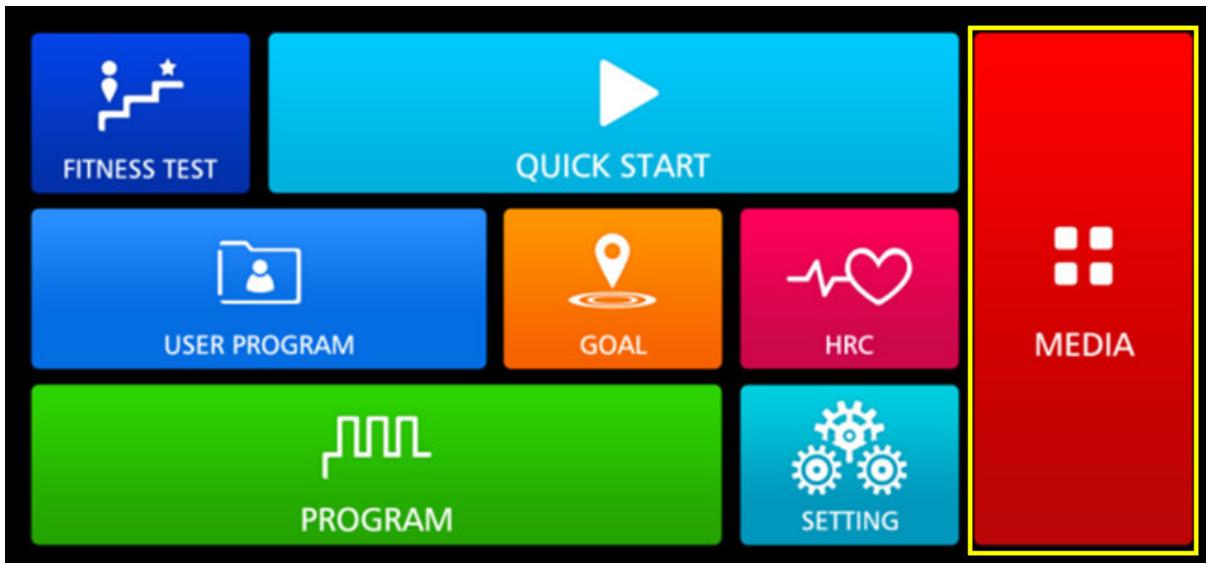
- MEDIA mode
7.1 It provides two ways to access the installation media by default.
※ On the main window, click the M EDI A icon
※ During training, on the operation interface , click the MEDIA icon
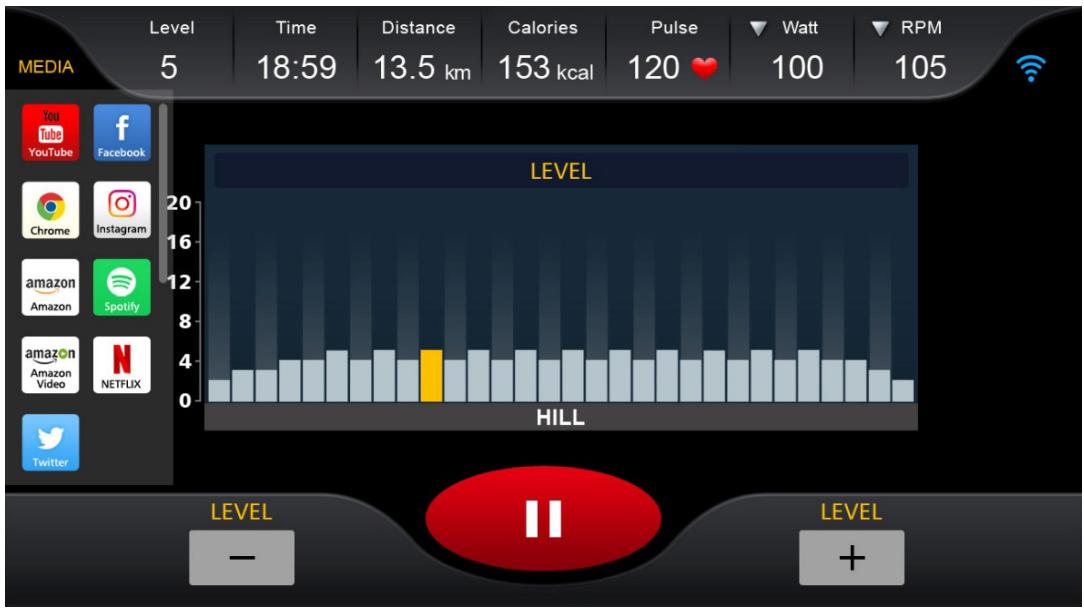
7.2 Description of the MEDIA icon
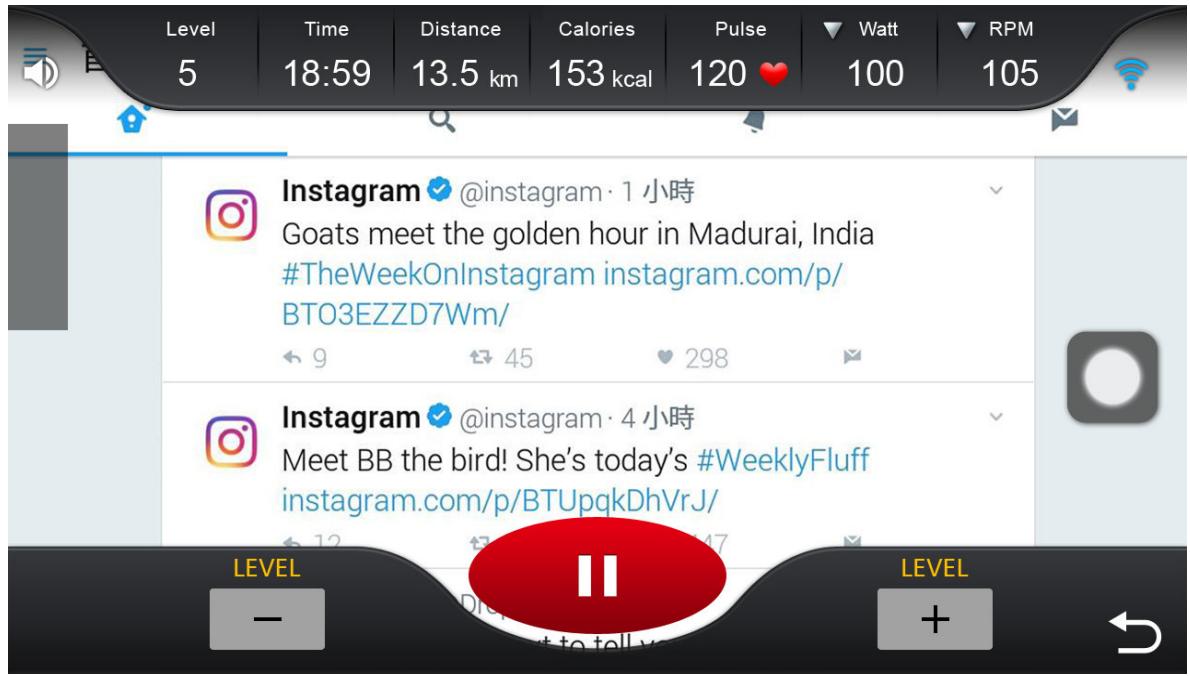
7.2.1 Click the icon , you can switch between Media and machine operation screen, click the icon once , can open or close the machine operation.
7.2.2 Click the icon to adjust the sound volume
7.2.3 User can copy the music or video to USB disk , insert the USB into the USB port of the console, chooseMUSIC or VIDEO to play (Support wav / wma / aac / ogg /mp3/flac music format, mp4/ avi video format )
PARAMETER :
- SYSTEM
1.1 LANGUAGE : you can change the system display language
1.2 BRIGHTNESS : you can adjust the screen brightness
1.3 SOUND : You can adjust the sound volume
- BLUETOOTH : It provides Bluetooth speaker and Bluetooth headset connections, which can be searched/ paired in this option
- WIRELESS : This option defines the WIFI connection
Application connection
Copy the link here under to your brower (Edge, Firefox, Chrome, Safari etc)
https://cloud.carefitness.com/index.php/s/E2WD22KMNBQzERL
And Followw the detailed instruction
Cardio - Training:
Before programming your training, it is essential to take account of your age, particularly for people of more than 35 years of age, as well as your physical condition. If you have a sedentary lifestyle without regular physical activity, it is vital that you consult your doctor to determine the level of
intensity of your training. Once determined, do not attempt to achieve your maximum during the first training sessions. Be patient; your performance will quickly improve.
This enables you to develop your cardiovascular system (fitness of the heart / blood vessels). During Cardio-Training, the muscles need a supply of oxygen and nutritive substances. They also need to liminate waste. Our heart increases its rhythm and sends a larger amount of oxygen to the body by means of the cardiovascular system.
The more often you exercise regularly and repetitively, the more your heart will develop, just like any other muscle. In daily life, this translates into the ability to bear greater physical effort and improve your intellectual faculties.
Definition of your work Zone:
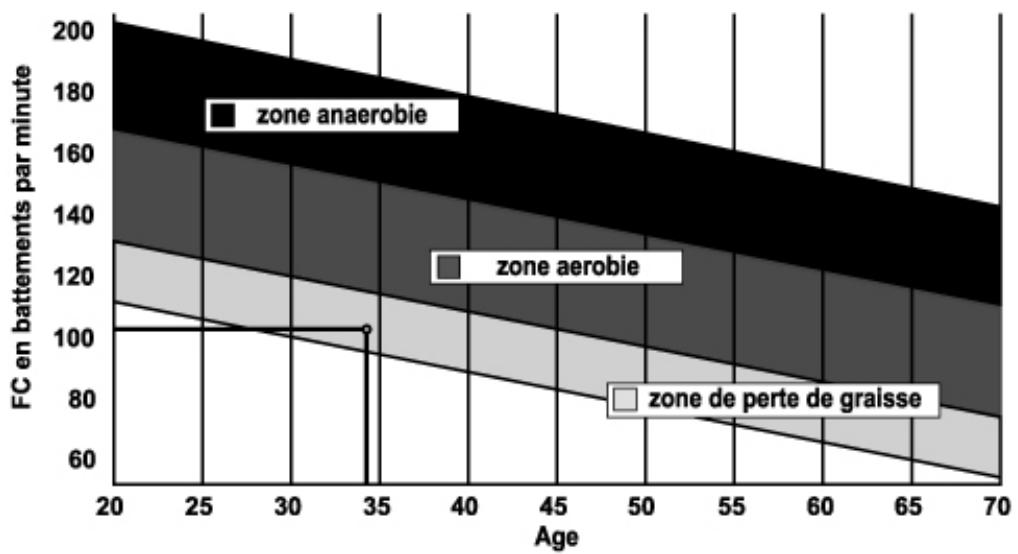
The Maximum Heart Rate (MHR) = 220 - age (180 - age for sedentary people).
The Warming Up Zone and Cooling Down Zone are equal to 55% of your MHR.
The Fat Loss Zone is between 55 / 65% of your MHR.
The Aerobic Zone is between 65 / 85% of your MHR.
The Anaerobic Zone is between 85% of your MHR and your MHR.
Make a diagram of the target zones
The progressive training stages:
A warming up phase:
Start each training session by warming up progressively (10-20 min, more if you are over 50) which will put your muscles on standby and gently increase your heart rate. Gently increase your pulse to 55% of your MHR (Maximum Heart Rate).
Keep your Heart Rate at this level for the duration of the warming up time. If you
begin your training too quickly, you are in danger of increasing the risk of tendon or muscle injury.
2) A work phase:
This is the main part of the training session. Depending on your specific goals and your initial physical condition, weight loss, improvement of cardiovascular resistance (aerobic work), development of stamina (anaerobic work), it is possible to choose the appropriate target zone.
The Fat Loss Zone, 55 - 65%
The heart rate must be low and the duration of the exercise quite long. This zone is advised for people resuming physical activity after a long period of idleness, who
are trying to eliminate excess weight or are susceptible to cardiac problems. Do not forget that for this type of training the duration of the exercise must be at least 30 minutes and the Heart Rate (HR) between 55 and 65% of the MHR. - Gradually increase from 30 to 60 minutes per session.
- Exercise 3 or 4 times a week.
The Aerobic Zone, 65 - 85%
This zone is recommended for those who are in good physical condition who train
regularly. By training in this zone, you will improve your physical condition but avoid overworking.
- Duration: 20 to 30 minutes per session.
- Frequency: At least 3 or 4 times a week.
The Anaerobic Zone, 85% - MHR
This zone is exclusively for experienced athletes and is never recommended
without medical approval and supervision. This zone is designed only for very fit people. It is used for interval training (or for short sprints) to help you to improve or measure your level of stamina.
The time spent in this zone must be brief to avoid the risk of accident.
3) A cooling down phase:
This entails a reduction of exertion (10 to 20 min). It enables you to return your cardiovascular system to normal (55% of your MHR) and prevent or reduce muscular pain such as cramp and stiffness. You must follow the training with a session of stretching exercises while your joints
are still warm. This relaxes the muscles and helps to prevent stiffness. Stretch slowly and gently. You must never stretch until you reach the pain threshold. Hold each stretch for 30 to 60 seconds while breathing out.
Check your progress
As it improves, your cardiovascular system will have an HR which will be lower when at rest. You will take longer to reach your target zone and it will be easier for you to maintain it. Sessions will seem easier and easier and you will have more stamina in your daily life.
If, on the other hand, your HR is higher than usual when at rest, you will have to rest or reduce the intensity of your training.
Do not be discouraged by the initial sessions. Motivate yourself by scheduling specific training times. Work hard!
To order spare parts
To guarantee an efficient service, make sure you have the following items before you
contact our After Sales Service:
The name or reference of the product.
WICHTIGER HINWEIS
https://cloud-carefitness.com/index.php/s/E2WD22KMNBQzERL
https://cloud-carefitness.com/index.php/s/E2WD22KMNBQzERL
00:00 ~ 99 9:59 (MIN)
0,0~99,9 (KM/MIGLIA)
| CALORIE | 0 ~ 999 9 (CAL) |
| IMPULSO | 40~220 (BPM) |
| RESISTENZA | 1~32 |
- PROGRAMMA: AVVIO RAPIDO, OBIETTIVO, PROGRAMMA (P1~P32), PROGRAMMA UTENTE (UTENTE1~UTENTE4) 3 HRC (60%, 80%, Target), TEST FITNESS, MEDIA
- HRC (THR 60 PCT, THR 80 PCT, THR):
https://cloud.carefitness.com/index.php/s/E2WD22KMNBQzERL
E-mail: service-it@carefitness.com
NL
BELANGRIJKE NOTITIE
https://cloud.carefitness.com/index.php/s/E2WD22KMNBQzERL
De harttraining (cardiotraining):
Dagelijke training = circa 10 minutes per keer.
2 tot 3 trainingen per week = circa 30 minutes per keer.
1 tot 2 trainingen per week = circa 50 minutes per keer.