USER MANUAL CT-5584 - 18km/h - Kinomap CARE FITNESS
Important: Read these instructions before using the equipment!
Safety
- Read this user manual and keep it in a safe place. Use this product exclusively in the manner indicated.
- This equipment must be assembled and used by adults.
- The equipment complies with the EN-957 standard, classification HC for use in the home. It must not be used in a sports center or any other public, associative or rented space.
- For totally safe use, a stable, level surface is required. Protect your floor covering with a mat. Do not use the equipment in damp areas (swimming pool, sauna, etc.).
- Do not allow children to play with this equipment. CARE declines all responsibility for any injuries they may incur. Do not allow children close to this equipment when you are training.
- CARE declines all responsibility if technical modifications are made to any of its products by the user.
Maximum weight of user: 125kg
- Dimensions : 165 x 75 x 145 cm (1.24 m²)
- The sound emission without user is 72db. The sound emission during exercise is greater than the sound emission without user.
Before you start training, it is essential that you consult your doctor to determine the intensity level of the program you use.
WARNING! Heart rate monitoring systems may be inaccurate. THE overtraining can lead to serious injury or death. If you feel unwell, stop training immediately.
CAUTION: Heart rate monitoring systems may be faulty, the excessive exercise can cause serious injury or death. If you feel unwell, stop exercising immediately.
- Excessive or badly programmed training can damage your health.
- Keep your back straight when exercising.
- It is strongly recommended that your wear suitable clothing and footwear.
- For adjustable parts, bear the maximum positions in mind.
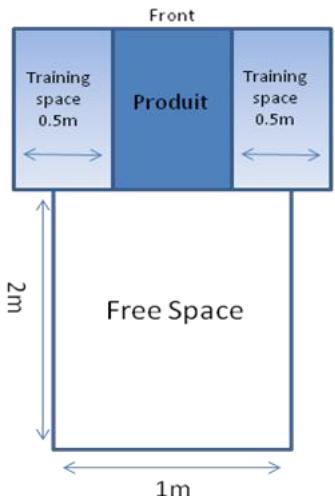
Make sure the installation base is level and stable. Make sure there is at least 2m^*1m of free space at the rear of the machine (see image below - the rectangle indicates the dimensions of the free area) and at least 0.5m of free space on each side of the machine (see image below)
Maintenance
- Regularly check that elements fastened with nuts and bolts are correctly tightened.
- To maintain the level of safety, the equipment must be regularly checked. It is vital that any faulty parts are replaced and that it is not used until completely repaired. Remember regularly to grease moving parts.
- As sweat is very corrosive, do not allow it to come into contact with the enameled or chromed parts of the equipment, particularly the computer. Immediately wipe the equipment after training. The enameled parts can be cleaned using a damp sponge. All aggressive or corrosive products should be avoided.
Guarantee: the chassis is guaranteed for 5 years. Moving parts are guaranteed for 2 years. The guarantee applies to normal use by a private individual in his home. Validate your product warranty on line www.carefitness.com
Recycling : The « crossed out dustbin » sign means that this product and its batteries cannot be thrown out whit domestic waste. They should be treated apart. When you have finished with them, drop them at an authorised collection point so they can be recycled. This gesture will go towards protecting the environment and your health.

To adjust incline when treadmill running, the stepping is 1 level / time.
Press the button more than 2 seconds, will be up or down automatic.
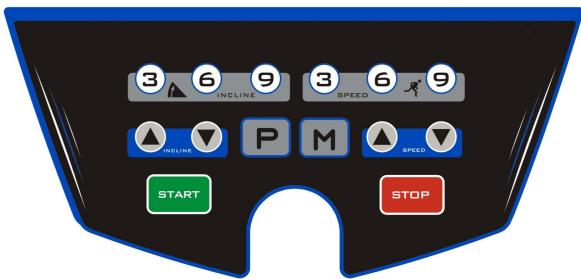
Also have shortcut key 3, 6, 9,
PIC I shows incline "0",
PIC II shows incline "18".
AFB I toont hellen "0",
AFB II toont hellen "18".
F
Connection application
E mail: https://www.carefitness.com/sav
Computer instruction
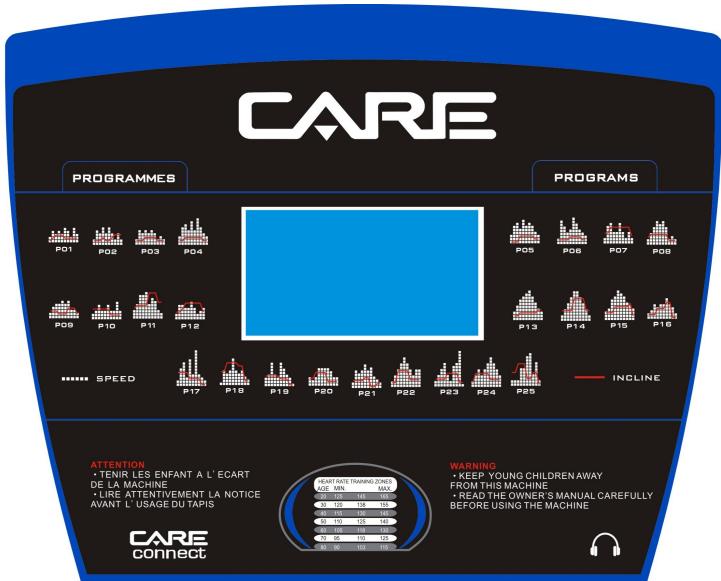
2. WINDOW
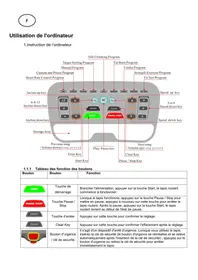
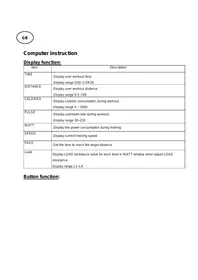
2.1 "SPEED" window: display the current speed, speed range: 1.0-18.0 km/h.
When use the pre-set programs, will display "P01-P02-...-P25-U01-U02-U03-HP1-HP3-FAT".
2.2 "TIME" display: display exercise time, positive timing from 0:00-99:59.
2.3 "DISTANCE." Display the running distance, count forward from 0.00-99.9
2.4 "CAL/PULSE "window : movement burns calories consumed calorie value from 0-99.
Display hand pulse from 50-200
2.5 "INCLINE" window : Displays the current incline levers, range 0-18 levels
3. KEY FUNCTION
3.1 "START" start the machine, "STOP" stop the treadmill.
3.2 SPEED" + / - : at the running state, press it will be add or decrease 0.1 km/h every time, press it for a long time, it will add or decrease the speed constantly.
3.3 SPEED"-": speed - button, at the running state, press it will decrease 0.1km/h every time, press it for a long time, it will decrease the speed constantly.
3.4 "INC +/-", increase or decrease the incline levels during running, press it a long time, it will Increase or decrease the incline levels constantly.
3.5 MODE: mode button at the stopping state, select the countdown time, countdown distance and countdown calories circularly.
3.7 Bluetooth speaker: Connect the MP3 for play the music with bluetooth.
3.8 Quickly Speed buttons: 4, 8, 12 km/h
3.9 Quickly Incline buttons: 4, 8, 12 %
3.10 PROG: Use this button to choose the programs.
P01-P25 are pre-set programs
U01-U02-U03 are user program
HP1-HP2-HP3 are heart rate programs
FAT: test the body fat
4. QUICK START (manual mode):
4.1 turn on the power switch, the magnetic security lock properly absorbed in the panel below the safety lock position.
4.2 press "START" start button, the system enters three seconds of the countdown, the buzzer sounds, the time display countdown, 3 second countdown after treadmill running speed of 1.0km / h.
4.3 after the start needed, use the "SPEED+/ -" keys to adjust the speed of the treadmill; "INC+/-" keys to adjust the slope of the treadmill.
5 DURING THE MOVEMENT OF OPERATION:
5.1 "Speed - " key will reduce the operating speed of the treadmill.
5.2 "Speed +" key will increase the operating speed of the treadmill.
5.3 Press "Stop" button, treadmill will stop running.
5.4 Press incline keys to adjust the incline levels of the treadmill
5.5 About five seconds when the movement with both hands heartbeat hand grip heartbeat data.
6.PRE-SET PROGRAMS.
| PROGRAM LIST |
| Time program | Set time/ 10 = every period time |
| 1 | 2 | 3 | 4 | 5 | 6 | 7 | 8 | 9 | 10 |
| P01 | SPEED | 2 | 4 | 3 | 4 | 3 | 5 | 4 | 2 | 5 | 3 |
| INCLINE | 1 | 2 | 3 | 3 | 3 | 2 | 2 | 2 | 2 | 2 |
| P02 | SPEED | 2 | 5 | 4 | 6 | 4 | 6 | 4 | 2 | 4 | 2 |
| INCLINE | 2 | 2 | 2 | 3 | 2 | 2 | 3 | 4 | 4 | 4 |
| P03 | SPEED | 2 | 5 | 4 | 5 | 4 | 5 | 4 | 2 | 3 | 2 |
| INCLINE | 2 | 2 | 2 | 3 | 3 | 3 | 3 | 2 | 2 | 2 |
| P04 | SPEED | 3 | 6 | 7 | 5 | 8 | 5 | 9 | 6 | 4 | 3 |
| INCLINE | 2 | 2 | 3 | 3 | 3 | 3 | 3 | 3 | 2 | 2 |
| P05 | SPEED | 3 | 6 | 7 | 5 | 8 | 6 | 7 | 6 | 4 | 3 |
| INCLINE | 1 | 1 | 1 | 3 | 3 | 3 | 3 | 3 | 2 | 2 |
| P06 | SPEED | 2 | 8 | 6 | 4 | 5 | 9 | 7 | 5 | 4 | 3 |
| INCLINE | 2 | 2 | 2 | 2 | 3 | 3 | 3 | 3 | 2 | 2 |
| P07 | SPEED | 2 | 6 | 7 | 4 | 4 | 7 | 4 | 2 | 4 | 2 |
| INCLINE | 4 | 4 | 6 | 6 | 6 | 6 | 6 | 6 | 6 | 3 |
| P08 | SPEED | 2 | 4 | 6 | 8 | 7 | 8 | 6 | 2 | 3 | 2 |
| INCLINE | 3 | 4 | 4 | 4 | 4 | 4 | 4 | 3 | 3 | 3 |
| P09 | SPEED | 2 | 4 | 5 | 5 | 6 | 5 | 6 | 3 | 3 | 2 |
| INCLINE | 3 | 3 | 3 | 2 | 2 | 2 | 4 | 4 | 4 | 2 |
| P10 | SPEED | 2 | 3 | 5 | 3 | 3 | 5 | 3 | 6 | 3 | 3 |
| INCLINE | 4 | 4 | 4 | 4 | 4 | 4 | 2 | 2 | 2 | 2 |
| P11 | SPEED | 3 | 5 | 8 | 8 | 9 | 5 | 7 | 6 | 3 | 2 |
| INCLINE | 4 | 5 | 5 | 5 | 5 | 9 | 9 | 9 | 6 | 6 |
| P12 | SPEED | 2 | 5 | 5 | 4 | 4 | 6 | 4 | 2 | 3 | 4 |
| INCLINE | 3 | 3 | 4 | 6 | 6 | 6 | 6 | 6 | 6 | 3 |
| P13 | SPEED | 3 | 5 | 7 | 8 | 9 | 10 | 8 | 6 | 4 | 3 |
| INCLINE | 2 | 2 | 2 | 3 | 3 | 3 | 3 | 3 | 4 | 4 |
| P14 | SPEED | 2 | 4 | 6 | 8 | 10 | 10 | 8 | 6 | 4 | 2 |
| INCLINE | 4 | 4 | 4 | 4 | 8 | 8 | 8 | 8 | 4 | 4 |
| P15 | SPEED | 3 | 4 | 7 | 8 | 10 | 9 | 8 | 6 | 5 | 4 |
| INCLINE | 3 | 3 | 3 | 5 | 5 | 5 | 5 | 5 | 6 | 2 |
| P16 | SPEED | 2 | 3 | 5 | 4 | 5 | 5 | 7 | 5 | 4 | 2 |
| INCLINE | 2 | 2 | 2 | 4 | 4 | 4 | 6 | 6 | 1 | 1 |
| P17 | SPEED | 2 | 6 | 8 | 3 | 9 | 4 | 12 | 4 | 3 | 2 |
| INCLINE | 5 | 5 | 5 | 5 | 3 | 3 | 3 | 3 | 1 | 1 |
| P18 | SPEED | 1 | 5 | 4 | 5 | 9 | 5 | 4 | 5 | 3 | 2 |
| INCLINE | 5 | 5 | 8 | 8 | 8 | 8 | 7 | 7 | 2 | 2 |
| P19 | SPEED | 3 | 4 | 8 | 4 | 3 | 8 | 6 | 4 | 3 | 1 |
| INCLINE | 4 | 4 | 4 | 4 | 4 | 3 | 3 | 3 | 1 | 1 |
| P20 | SPEED | 3 | 2 | 3 | 6 | 6 | 6 | 6 | 5 | 3 | 3 |
| INCLINE | 3 | 3 | 5 | 5 | 5 | 5 | 2 | 2 | 2 | 2 |
| P21 | SPEED | 2 | 6 | 5 | 6 | 8 | 6 | 7 | 4 | 3 | 2 |
| INCLINE | 3 | 3 | 3 | 3 | 4 | 4 | 1 | 1 | 2 | 2 |
| P22 | SPEED | 2 | 4 | 6 | 8 | 10 | 8 | 6 | 4 | 6 | 6 |
| INCLINE | 2 | 2 | 6 | 6 | 6 | 6 | 3 | 3 | 3 | 3 |
| P23 | SPEED | 2 | 4 | 6 | 8 | 4 | 2 | 7 | 8 | 12 | 1 |
| INCLINE | 3 | 3 | 3 | 3 | 5 | 5 | 5 | 5 | 2 | 2 |
| P24 | SPEED | 2 | 4 | 6 | 4 | 6 | 8 | 10 | 8 | 6 | 4 |
| INCLINE | 2 | 5 | 5 | 5 | 5 | 5 | 3 | 3 | 3 | 3 |
| P25 | SPEED | 2 | 2 | 2 | 6 | 6 | 10 | 11 | 4 | 8 | 2 |
| INCLINE | 5 | 5 | 8 | 8 | 8 | 3 | 3 | 5 | 5 | 1 |
7. HRC PROGRAMS
7.1 At the stop state and use the "PROG" button to choose the "HR1-HR2-HR3.Press START" to start.
"HR1" program, max speed is 8.0km / h , age 30/deault heart rate 124.
"HR2" program, max speed is 9.0km / h , age 30/deault heart rate 143.
"HR3" program, max speed is 10.0 km/h, age 30/ default heart rate 162.
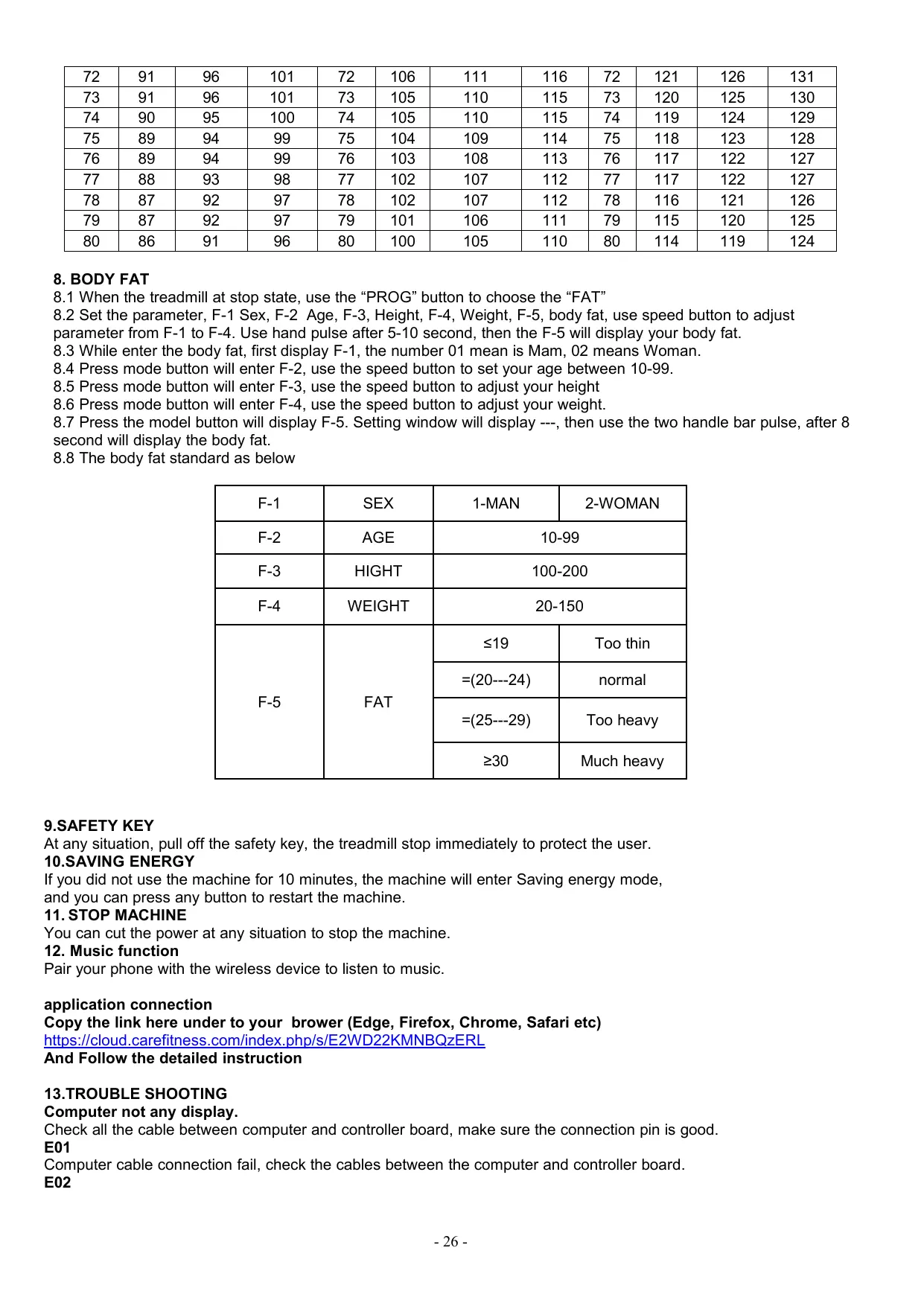
7.2 If use the Mode button enter the age setting, the speed window will display 30,and user can use incline button to change the age as you want, setting age from 15-80.
7.3 After setting the age, use the Mode button, the system will recommend a hart rate goal and display on the window. But just for reference, the use can set the heart rate according to their body situation to increase the heart rate or reduce the heart rate. Can set heart rate from 86-179.
7.4 After user set the age and heart rate, press the MODE button to enter the time setting, Time window will display 10:00 as default. User can use the incline or speed button to adjust the running time. Time setting can be between 5-99 minutes.
7.5 Press mode button to enter the waiting state, or press the Start button to start.
7.6 While using HRC program, you can use incline/speed button to adjust the speed/incline to close your heart rate goal.
7.7 The first 1 minute is warm up time. Then the system will adjust speed by 0.5km/h every time to close your goal. When at the max speed and still not reach your goal, the system will increase incline to increase your exercise. If the heart rate is more than your goal, system will reduce incline level by 1 level/10 second till to 0, if your heart rate still higher than the goal, it will reduce 0.5km/h every 10 second.
Remark: Must use the wireless chest belt for the HRC programs.
| HRC1 program | HRC2 program | HRC3program |
| Age | Target zone (L-H) | Age | Target zone (L-H) | Age | Target zone (L-H) |
| Lowest | Default | Highest | Lowest | Default | Highest | Lowest | Default | Highest |
| 15 | 128 | 133 | 138 | 15 | 149 | 154 | 159 | 15 | 169 | 174 | 179 |
| 16 | 128 | 133 | 138 | 16 | 148 | 153 | 158 | 16 | 168 | 173 | 178 |
| 17 | 127 | 132 | 137 | 17 | 147 | 152 | 157 | 17 | 168 | 173 | 178 |
| 18 | 126 | 131 | 136 | 18 | 147 | 152 | 157 | 18 | 167 | 172 | 177 |
| 19 | 126 | 131 | 136 | 19 | 146 | 151 | 156 | 19 | 166 | 171 | 176 |
| 20 | 125 | 130 | 135 | 20 | 145 | 150 | 155 | 20 | 165 | 170 | 175 |
| 21 | 124 | 129 | 134 | 21 | 144 | 149 | 154 | 21 | 164 | 169 | 174 |
| 22 | 124 | 129 | 134 | 22 | 144 | 149 | 154 | 22 | 163 | 168 | 173 |
| 23 | 123 | 128 | 133 | 23 | 143 | 148 | 153 | 23 | 162 | 167 | 172 |
| 24 | 122 | 127 | 132 | 24 | 142 | 147 | 152 | 24 | 162 | 167 | 172 |
| 25 | 122 | 127 | 132 | 25 | 141 | 146 | 151 | 25 | 161 | 166 | 171 |
| 26 | 121 | 126 | 131 | 26 | 141 | 146 | 151 | 26 | 160 | 165 | 170 |
| 27 | 120 | 125 | 130 | 27 | 140 | 145 | 150 | 27 | 159 | 164 | 169 |
| 28 | 120 | 125 | 130 | 28 | 139 | 144 | 149 | 28 | 158 | 163 | 168 |
| 29 | 119 | 124 | 129 | 29 | 138 | 143 | 148 | 29 | 157 | 162 | 167 |
| 30 | 119 | 124 | 129 | 30 | 138 | 143 | 148 | 30 | 157 | 162 | 167 |
| 31 | 118 | 123 | 128 | 31 | 137 | 142 | 147 | 31 | 156 | 161 | 166 |
| 32 | 117 | 122 | 127 | 32 | 136 | 141 | 146 | 32 | 155 | 160 | 165 |
| 33 | 117 | 122 | 127 | 33 | 135 | 140 | 145 | 33 | 154 | 159 | 164 |
| 34 | 116 | 121 | 126 | 34 | 135 | 140 | 145 | 34 | 153 | 158 | 163 |
| 35 | 115 | 120 | 125 | 35 | 134 | 139 | 144 | 35 | 152 | 157 | 162 |
| 36 | 115 | 120 | 125 | 36 | 133 | 138 | 143 | 36 | 151 | 156 | 161 |
| 37 | 114 | 119 | 124 | 37 | 132 | 137 | 142 | 37 | 151 | 156 | 161 |
| 38 | 113 | 118 | 123 | 38 | 132 | 137 | 142 | 38 | 150 | 155 | 160 |
| 39 | 113 | 118 | 123 | 39 | 131 | 136 | 141 | 39 | 149 | 154 | 159 |
| 40 | 112 | 117 | 122 | 40 | 130 | 135 | 140 | 40 | 148 | 153 | 158 |
| 41 | 111 | 116 | 121 | 41 | 129 | 134 | 139 | 41 | 147 | 152 | 157 |
| 42 | 111 | 116 | 121 | 42 | 129 | 134 | 139 | 42 | 146 | 151 | 156 |
| 43 | 110 | 115 | 120 | 43 | 128 | 133 | 138 | 43 | 145 | 150 | 155 |
| 44 | 109 | 114 | 119 | 44 | 127 | 132 | 137 | 44 | 145 | 150 | 155 |
| 45 | 109 | 114 | 119 | 45 | 126 | 131 | 136 | 45 | 144 | 149 | 154 |
| 46 | 108 | 113 | 118 | 46 | 126 | 131 | 136 | 46 | 143 | 148 | 153 |
| 47 | 107 | 112 | 117 | 47 | 125 | 130 | 135 | 47 | 142 | 147 | 152 |
| 48 | 107 | 112 | 117 | 48 | 124 | 129 | 134 | 48 | 141 | 146 | 151 |
| 49 | 106 | 111 | 116 | 49 | 123 | 128 | 133 | 49 | 140 | 145 | 150 |
| 50 | 106 | 111 | 116 | 50 | 123 | 128 | 133 | 50 | 140 | 145 | 150 |
| 51 | 105 | 110 | 115 | 51 | 122 | 127 | 132 | 51 | 139 | 144 | 149 |
| 52 | 104 | 109 | 114 | 52 | 121 | 126 | 131 | 52 | 138 | 143 | 148 |
| 53 | 104 | 109 | 114 | 53 | 120 | 125 | 130 | 53 | 137 | 142 | 147 |
| 54 | 103 | 108 | 113 | 54 | 120 | 125 | 130 | 54 | 136 | 141 | 146 |
| 55 | 102 | 107 | 112 | 55 | 119 | 124 | 129 | 55 | 135 | 140 | 145 |
| 56 | 102 | 107 | 112 | 56 | 118 | 123 | 128 | 56 | 134 | 139 | 144 |
| 57 | 101 | 106 | 111 | 57 | 117 | 122 | 127 | 57 | 134 | 139 | 144 |
| 58 | 100 | 105 | 110 | 58 | 117 | 122 | 127 | 58 | 133 | 138 | 143 |
| 59 | 100 | 105 | 110 | 59 | 116 | 121 | 126 | 59 | 132 | 137 | 142 |
| 60 | 99 | 104 | 109 | 60 | 115 | 120 | 125 | 60 | 131 | 136 | 141 |
| 61 | 98 | 103 | 108 | 61 | 114 | 119 | 124 | 61 | 130 | 135 | 140 |
| 62 | 98 | 103 | 108 | 62 | 114 | 119 | 124 | 62 | 129 | 134 | 139 |
| 63 | 97 | 102 | 107 | 63 | 113 | 118 | 123 | 63 | 128 | 133 | 138 |
| 64 | 96 | 101 | 106 | 64 | 112 | 117 | 122 | 64 | 128 | 133 | 138 |
| 65 | 96 | 101 | 106 | 65 | 111 | 116 | 121 | 65 | 127 | 132 | 137 |
| 66 | 95 | 100 | 105 | 66 | 111 | 116 | 121 | 66 | 126 | 131 | 136 |
| 67 | 94 | 99 | 104 | 67 | 110 | 115 | 120 | 67 | 125 | 130 | 135 |
| 68 | 94 | 99 | 104 | 68 | 109 | 114 | 119 | 68 | 124 | 129 | 134 |
| 69 | 93 | 98 | 103 | 69 | 108 | 113 | 118 | 69 | 123 | 128 | 133 |
| 70 | 93 | 98 | 103 | 70 | 108 | 113 | 118 | 70 | 123 | 128 | 133 |
| 71 | 92 | 97 | 102 | 71 | 107 | 112 | 117 | 71 | 122 | 127 | 132 |
| 72 | 91 | 96 | 101 | 72 | 106 | 111 | 116 | 72 | 121 | 126 | 131 |
| 73 | 91 | 96 | 101 | 73 | 105 | 110 | 115 | 73 | 120 | 125 | 130 |
| 74 | 90 | 95 | 100 | 74 | 105 | 110 | 115 | 74 | 119 | 124 | 129 |
| 75 | 89 | 94 | 99 | 75 | 104 | 109 | 114 | 75 | 118 | 123 | 128 |
| 76 | 89 | 94 | 99 | 76 | 103 | 108 | 113 | 76 | 117 | 122 | 127 |
| 77 | 88 | 93 | 98 | 77 | 102 | 107 | 112 | 77 | 117 | 122 | 127 |
| 78 | 87 | 92 | 97 | 78 | 102 | 107 | 112 | 78 | 116 | 121 | 126 |
| 79 | 87 | 92 | 97 | 79 | 101 | 106 | 111 | 79 | 115 | 120 | 125 |
| 80 | 86 | 91 | 96 | 80 | 100 | 105 | 110 | 80 | 114 | 119 | 124 |
8. BODY FAT
8.1 When the treadmill at stop state, use the "PROG" button to choose the "FAT"
8.2 Set the parameter, F-1 Sex, F-2 Age, F-3, Height, F-4, Weight, F-5, body fat, use speed button to adjust parameter from F-1 to F-4. Use hand pulse after 5-10 second, then the F-5 will display your body fat.
8.3 While enter the body fat, first display F-1, the number 01 mean is Mam, 02 means Woman.
8.4 Press mode button will enter F-2, use the speed button to set your age between 10-99.
8.5 Press mode button will enter F-3, use the speed button to adjust your height
8.6 Press mode button will enter F-4, use the speed button to adjust your weight.
8.7 Press the model button will display F-5. Setting window will display ---, then use the two handle bar pulse, after 8 second will display the body fat.
8.8 The body fat standard as below
| F-1 | SEX | 1-MAN | 2-WOMAN |
| F-2 | AGE | 10-99 |
| F-3 | HIGHT | 100-200 |
| F-4 | WEIGHT | 20-150 |
| F-5 | FAT | ≤19 | Too thin |
| =(20---24) | normal |
| =(25---29) | Too heavy |
| ≥30 | Much heavy |
9.SAFETY KEY
At any situation, pull off the safety key, the treadmill stop immediately to protect the user.
10.SAVING ENERGY
If you did not use the machine for 10 minutes, the machine will enter Saving energy mode, and you can press any button to restart the machine.
11. STOP MACHINE
You can cut the power at any situation to stop the machine.
12. Music function
Pair your phone with the wireless device to listen to music.
application connection
Copy the link here under to your brower (Edge, Firefox, Chrome, Safari etc)
https://cloud.carefitness.com/index.php/s/E2WD22KMNBQzERL
And Follow the detailed instruction
13.TROUBLE SHOOTING
Computer not any display.
Check all the cable between computer and controller board, make sure the connection pin is good.
E01
Computer cable connection fail, check the cables between the computer and controller board.
E02
Check if your power voltage is under 50% of standard power voltage. Check if the controller board with smell, or check the motor connection cable.
E03
No speed sensor, check the speed sensor if in right position or dirty or broken. If clean and re-assemble, still not repair, the replace speed sensor
E04
Incline issue. Check the incline motor cable or reset the incline motor
E05
Over power current or something was fixed cause the motor not working. Clean the running board and whole machine, add the silicon oil under the running belt, then re-start the machine.
E08
the controller board 24C02 broken, replace or re-assemble the 24C02 or replace the whole controller board. If star the machine, but motor not working, then check the motor connection cable, or check the IGBT from controller board or replace the controller board.
14. CALORIE
The incline at 0 level, run 1km consume 70.3 Calorie.
70.3 x Speed(km/h) x Time(hour) x (1+ incline level%)
Adjustment
- Ask the authorized service representative or professional technician to check if the voltage is suitable, and if the grounded wire is reliable. Pull the running belt by your hand and check if it turns freely, without screech.
- Insert one end of the power line into the socket at the forepart of treadmill; plug the other end in the electrical outlet. Put the emergency stop key on to the corresponding place on the computer.
- Turn on the switch from "0" to "1", the computer displays zero, the running belt do not move.
- Press the "START" key, the treadmill runs slowly, check if the computer and running belt work normally.
- Press the "SPEED" key, and observe the status of the running belt and display on the computer. Please turn off the machine if the belt runs defectively, adjust it following the rules in "MAINTENANCE AND MALFUNCTION TREATMENT".
- Check all the functions keys on the computer.
- Pull out emergency stop key, the treadmill should stop immediately; it'll work when you put it on again.
- Press the "STOP" key, the treadmill will stop, and then turn off the switch if you want to finish your exercise.
- Press "Incline +/-", it will have some change for the incline. Press program key and it will should the instruction. The incline will return zero when you stop treadmill.
Folding, Moving and Unfolding Instruction
1) Folding: The treadmill is foldaway. Lift the end of the main frame and fold upwards until the connecting bar rebound to the cover of cylinder tube. (See figure a)
2) Moving: Press the handrails to make the front base foot away from the ground then push the treadmill after folding.
3) When you want to put the treadmill to the work position, please lift the end of main fame (end cap) a little to make the foldaway support tube higher than the cylinder cover (see figure a-1), tip the foldaway support tube with your foot slightly (see figure a-2), press the end of main fame (end cap) forcibly, remove your foot and keep on pressing the end of main fame for a while. The cylinder will shrink under the weight of itself (see figure b) and the main fame goes flat.
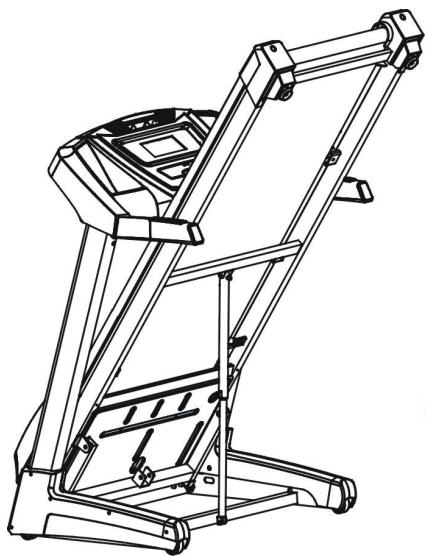
Figure a
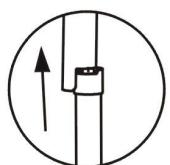
Figure a-1
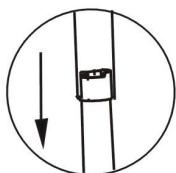
Figure a-2
Figure b
Maintenance and Malfunction Treatment
1) The surface of the treadmill should be kept clean, pull out the power line before cleaning. You can clean the running belt and the surface of the treadmill with a soft and wet cloth.
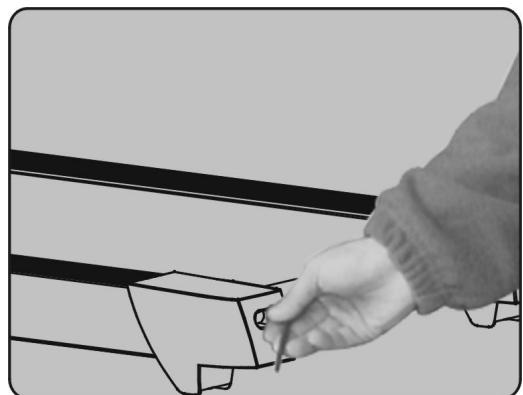
2) The running belt is adjusted at factory; it may runs defectively after transportation and use. Turn off the treadmill before adjusting, pull the belt in the center, and then adjust the left and right bolts in rear roller with hex spanner (See figure ) it is better to adjust 1/2 circle once. Then turn on the switch, check if the belt
10 runs defectively when the running speed is 4 5km / h
3) After using over 100 hours or the lubricant between the running board and the running belt is used up, please lubricate the running board and adjust the running belt well.
4) After a long time of running, the belt may be longer and stuck. You should turn the left and right adjustor bolt in rear roller clockwise at same position till the runs smoothly and freely.
Warning:
To order spare parts
To guarantee an efficient service, make sure you have the following items before you contact our After Sales Service:
The name or reference of the product.
The manufacturing number shown on the main chassis and on the packing box.
The number of the missing or faulty part shown on the exploded view of the product described in this manual.
After Sales Service
Email: service-uk@carefitness.com
E mail : service-de@carefitness.com
COMO LUBRICAR EL MARCO (DECK)?
https://cloud.carefitness.com/index.php/s/E2WD22KMNBQzERL
E mail: service-it@carefitness.com
https://cloud-carefitness.com/index.php/s/E2WD22KMNBQzERL
E-mail: service-nl@carefitness.com
CARE
FITNESS