
bah5S 70-2004 - Camera lens PANASONIC - Free user manual and instructions
Find the device manual for free bah5S 70-2004 PANASONIC in PDF.



| Product Type | Interchangeable lens for digital camera |
| Brand | PANASONIC |
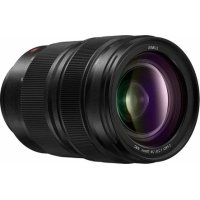
| Model | LUMIX S PRO 70-200 mm F4 O.I.S. (S-R70200) |
| Mount | L-Mount (Leica Camera AG) |
| Focal Length | 70 mm to 200 mm |
| Maximum Aperture | F4.0 |
| Minimum Aperture | F22 |
| Optical Construction | 23 elements in 17 groups (1 aspherical lens, 1 UED lens, 3 ED lenses, 1 UHR lens) |
| Diaphragm Type | 9 blades, circular aperture |
| Angle of View | 34° (wide-angle) to 12° (telephoto) |
| Minimum Focusing Distance | 0.92 m (from the reference line) |
| Maximum Magnification | 0.25× |
| Image Stabilizer | Yes (O.I.S.) |
| Filter Diameter | 77 mm |
| Maximum Diameter | 84.4 mm |
| Total Length | Approx. 179 mm (from tip to mount base) |
| Weight | Approx. 985 g (without tripod mount) |
| Dust and Splash Resistance | Yes |
| Operating Temperature | -10 °C to 40 °C |
| Allowable Relative Humidity | 10% to 80% |
| Supplied Accessories | Case, lens hood, front and rear caps, tripod mount |
| Warranty (Canada) | 1 year parts and labor |
| Care and Cleaning | Use a soft, dry cloth. Do not use benzene, thinners, or alcohol. Gently clean optical surfaces. |
| Safety | Do not expose to strong shocks. Do not point at the sun. Avoid extreme temperatures and excessive humidity. |
| Spare Parts and Repairability | Contact Panasonic after-sales service. The rubber seal on the mount is replaceable. |
Frequently Asked Questions - bah5S 70-2004 PANASONIC
User questions about bah5S 70-2004 PANASONIC
0 question about this device. Answer the ones you know or ask your own.
Ask a new question about this device
Download the instructions for your Camera lens in PDF format for free! Find your manual bah5S 70-2004 - PANASONIC and take your electronic device back in hand. On this page are published all the documents necessary for the use of your device. bah5S 70-2004 by PANASONIC.
USER MANUAL bah5S 70-2004 PANASONIC
If you have any questions, visit: USA: http://shop.panasonic.com/support Canada: www.panasonic.ca/english/support
The warranty is valid only in Japan.
Help desk for foreign residents in Japan
Tokyo (03) 3256-5444 Osaka (06) 6645-8787
Open: 9:00 - 17:30 (closed on Saturdays / Sundays / national holidays)

Repair consultation desk
For mobile phones and PHS
In Japanese
0120-878-554
If you cannot use the above phone number
03-6633-6700
FAX for repair requests
0120-878-225
Convenient repair service guide
Convenient repair service side
http://club.panasonic.jp/repair/
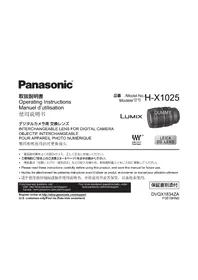
Operating Instructions
INTERCHANGEABLE LENS FOR DIGITAL CAMERA
Thank you for purchasing Panasonic product.
Please read these instructions carefully before using this product, and save this manual for future use.
This lens can be attached to a 35 mm digital camera that complies with the Leica Camera AG L-Mount standard and that is equipped with a full-frame image sensor.
- L-Mount is a trademark or registered trademark of Leica Camera AG.
- Other names, company names, product names mentioned in this document are trademarks or registered trademarks of the companies concerned.
Contents
Information for Your Safety 19 Precautions 20 Supplied Accessories. 21 Names and Functions of Components 22 Attaching the Lens 23 Switching AF/MF 24 Using the Tripod Mount. 24 Cautions for Use 26 Troubleshooting 26 Specifications 27 Limited Warranty (ONLY FOR U.S.A.). 28 Limited Warranty (ONLY FOR CANADA) 30
Information for Your Safety
Keep the unit as far away as possible from electromagnetic equipment (such as microwave ovens, TVs, video games, radio transmitters, high-voltage lines etc.).
- Do not use the camera near cell phones because doing so may result in noise adversely affecting the pictures and sound.
- If the camera is adversely affected by electromagnetic equipment and stops functioning properly, turn the camera off and remove the battery and/or the connected AC adaptor. Then reinsert the battery and/or reconnect the AC adaptor and turn the camera on.
THE FOLLOWING APPLIES ONLY IN THE U.S.A. FCC Note:
This equipment has been tested and found to comply with the limits for a Class B digital device, pursuant to Part 15 of the FCC Rules. These limits are designed to provide reasonable protection against harmful interference in a residential installation. This equipment generates, uses, and can radiate radio frequency energy and, if not installed and used in accordance with the instructions, may cause harmful interference to radio communications. However, there is no guarantee that interference will not occur in a particular installation. If this equipment does cause harmful interference to radio or television reception, which can be determined by turning the equipment off and on, the user is encouraged to try to correct the interference by one or more of the following measures:
- Reorient or relocate the receiving antenna.
- Increase the separation between the equipment and receiver.
- Connect the equipment into an outlet on a circuit different from that to which the receiver is connected.
- Consult the dealer or an experienced radio/TV technician for help.
Any unauthorized changes or modifications to this equipment would void the user's authority to operate this device.
This device complies with Part 15 of the FCC Rules. Operation is subject to the following two conditions: (1) This device may not cause harmful interference, and (2) this device must accept any interference received, including interference that may cause undesired operation.
Supplier's Declaration of Conformity
Trade Name: Panasonic
Model No.: S-R70200
Responsible Party: Panasonic Corporation of North America Two Riverfront Plaza, Newark, NJ 07102-5490
Support Contact: http://shop.panasonic.com/support

THE FOLLOWING APPLIES ONLY IN CANADA.
CAN ICES-3(B)/NMB-3(B)
-If you see this symbol
Disposal of Old Equipment
Only for European Union and countries with recycling systems

This symbol on the products, packaging, and/or accompanying documents means that used electrical and electronic products must not be mixed with general household waste.
For proper treatment, recovery and recycling of old products, please take them to
applicable collection points in accordance with your national legislation.
By disposing of them correctly, you will help to save valuable resources and prevent any potential negative effects on human health and the environment.
For more information about collection and recycling, please contact your local authority.
Penalties may be applicable for incorrect disposal of this waste, in accordance with national legislation.
Precautions
Lens care
- Do not subject to strong vibration, shock, or pressure. These may cause malfunction or damage.
- Don't press hard on the lens.
- Take care not to drop or bump the lens when carrying it.
- When carrying the digital camera with the lens attached, hold both the lens and the digital camera to carry them.
- Take care not to drop or bump the bag in which you have put the lens.
- When there is dirt (water, oil, and fingerprints, etc.) on the surface of the lens, the images may be affected. Lightly wipe the surface of the lens with a soft, dry cloth before and after recording.
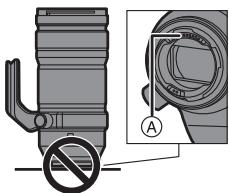
- When the lens is not in use, be sure to attach the lens cap and lens rear cap to prevent dust and other particles from accumulating on or entering the lens. To protect the lens contact points (A), do not do the following. These may cause malfunction.
- Touch the lens contact points.
- Allow the lens contact points to become dirty.
- Place the lens with its mount surface facing down.
Dust and splash resistant
- The dust and splash resistant of the camera will not prevent the entry of dust or water droplets completely. Take the following precautions to provide satisfactory dust and splash resistant performance. If the lens is not working properly, consult the dealer or your nearest Service Center.
- Attach to attach a digital camera that is dust and splash resistant.
- When attaching or removing the lens, be careful so that foreign objects such as sand, dust, and water droplets do not adhere to or enter the lens mount rubber, contact points, digital camera and lens.
- If the lens is exposed to water droplets or other liquids, wipe them off with a soft, dry cloth.
- To improve the dust and splash resistant performance of the lens, a lens mount rubber is used in the mount.
- The lens mount rubber will leave scuff marks on the digital camera mount, but this does not impact performance.
- For information on changing the lens mount rubber, contact your nearest Service Center.
Condensation (when the lens is fogged up)
- Condensation occurs when the ambient temperature or humidity changes. Please be careful, as it may cause lens stains, mold and malfunction.
- If condensation occurs, turn off the digital camera and leave it for approx. 2 hours. The fog will disappear naturally when the temperature of the digital camera becomes close to the ambient temperature.
- The appearance and specifications of products described in this document may differ from the actual products you have purchased due to later enhancements.
Supplied Accessories
Product numbers correct as of January 2019. These may be subject to change.
SFC0360
DVZE1035Z
1GE1Z276Z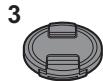
RGE1Z276Z
DVYE1130Z
1 Lens pouch 2 Lens hood 3 Lens cap 4 Lens rear cap 5 Tripod mount*
- Fitted to the lens at the time of purchase.
Names and Functions of Components
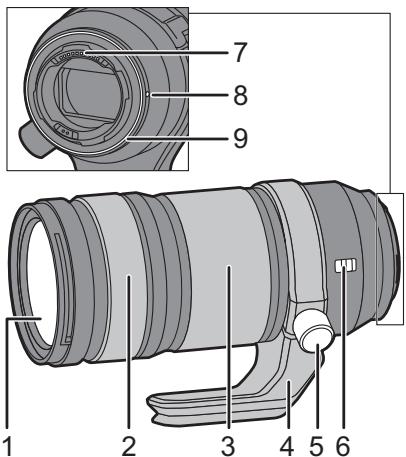
1 Lens surface 2 Focus ring Switches between AF (auto focus) and MF (manual focus) by sliding the focus ring forwards or backwards. (→ 24) Rotates the focus ring to focus when set to MF.
3 Zoom ring Zooms to telephoto or wide-angle. 4 Tripod mount (→ 24) 5 Tripod mount locking knob 6 O.I.S. switch The stabilizer function is set to activate if the O.I.S. switch is set to [ON]. We recommend setting the O.I.S. switch to [OFF] when using a tripod. 7 Contact points 8 Lens fitting mark 9 Lens mount rubber

Note
- There may be differences in focus when you use zoom after focusing. Focus again.
- If the sound of AF operation and stabilizer operation bothers you during video recording, it is recommended to record as follows:
- Slide the focus ring to the MF side to record.
- Set the O.I.S. switch to [OFF] and use a tripod to record.
Attaching the Lens
For information on how to attach the lens, refer to the operating instructions for your digital camera.
- Attach the lens after turning off the digital camera.
- Attach the lens after removing the lens rear cap. After removing the lens from the digital camera, be sure to attach the lens cap and lens rear cap to prevent dust and other particles from accumulating on or entering the lens.
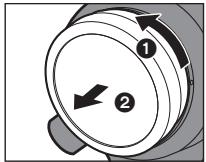
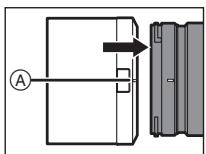
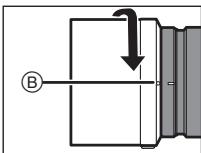
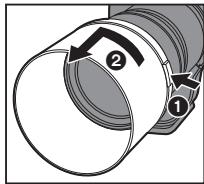
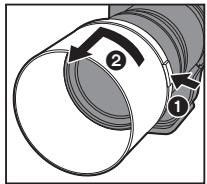
Attaching the lens hood 1 Align mark (A) on the lens hood with the mark on the tip of the lens. 2 Rotate the lens hood in the direction of the arrow to align mark ⑧ (○) on the lens hood with the mark on the tip of the lens. - Attach the lens hood by rotating it until it clicks.
Removing the lens hood
While pressing the lens hood button, rotate the lens hood in the direction of the arrow and then remove it.

Note
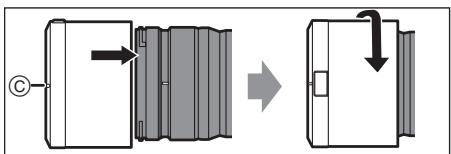
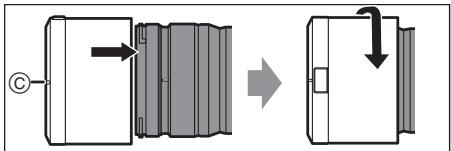
- When carrying, the lens hood can be attached in the reverse direction.
1 Remove the lens hood. 2 Align mark (O) on the lens hood with the mark on the tip of the lens. 3 Attach the lens hood by rotating it in the direction of the arrow until it clicks.
- It is recommended to remove the lens hood during flash photography as the lens hood can block the light from the flash.
- To prevent dropping of the lens, you should never carry the lens by just holding the lens hood.
Notes on filter use
- It is possible to attach the lens cap or the lens hood with the filter already attached.
- If you use two or more filters at the same time, part of a recorded image may darken.
- It is not possible to attach any items other than filters such as a conversion lens or adaptor to the front of the lens and use it in combination with this lens. Lens damage may result if such items are attached.
Switching AF/MF
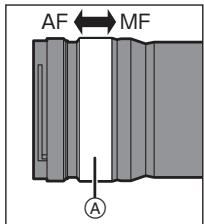
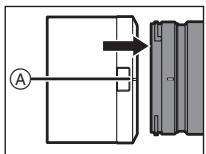
Switch AF/MF by sliding the focus ring (A) forwards or backwards (focus clutch mechanism).
- When the digital camera is set to MF, the operation will be MF irrespective of the position of the focus ring.
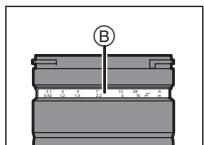
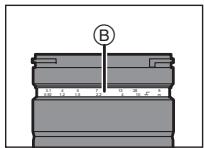
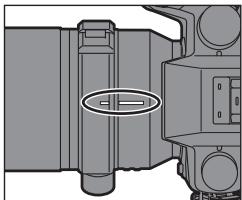
- Check the length indication (B) when using MF. Use it as a guide for focusing.
- You can set the amount that the focus moves with the focus ring using menu settings in compatible digital cameras. Switch the lens to AF and set
the digital camera to MF. Refer to the operating instructions for the digital camera for details.
Using the Tripod Mount
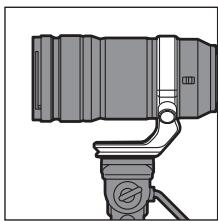
When using a tripod, attach it to the tripod mount of the lens.
- When a tripod is attached to the tripod mount of the digital camera, damage to the lens may result when carrying.
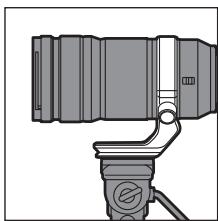
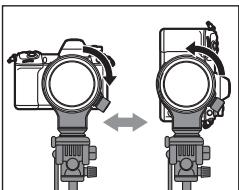
Changing the vertical/horizontal orientation
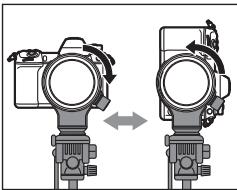
This way, you can quickly switch between the vertical and horizontal orientation of the digital camera while the tripod is in use.
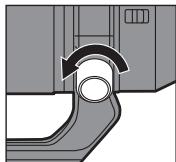
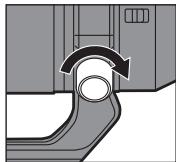
1 Rotate the tripod mount locking knob in the direction indicated by the arrow to loosen.
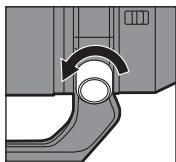
2 Rotate the digital camera and lens to change the position.
3 Rotate the tripod mount locking knob in the direction indicated by the arrow to tighten firmly.
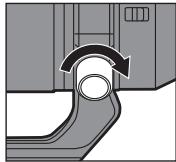
Detaching the tripod mount
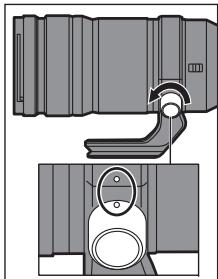
1 Rotate the tripod mount locking knob in the direction indicated by the arrow to loosen. 2 Match the marks on the tripod mount and the tripod mount locking knob.
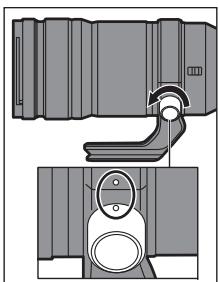
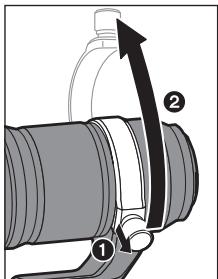
3 While pulling out the tripod mount locking knob, open and remove the tripod mount.
- When detaching the tripod mount, support the lens and digital camera to ensure they do not fall.
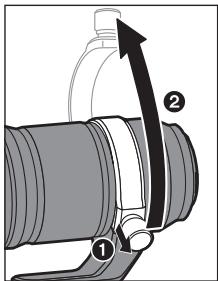
Attaching the tripod mount
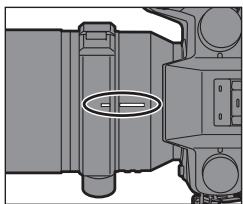
Attach by reversing the steps used to detach.
- Match the marks on the tripod mount and the lens.
- When attaching the tripod mount, pull out the tripod mount locking knob first and then close the tripod mount.
- Be careful not to pinch your fingers between the tripod mount and the lens.
Cautions for Use
- Do not spray the lens with insecticides or volatile chemicals.
- If such substances get onto the lens they can damage the exterior case or cause the paint to peel.
- Do not point the lens at the sun or other strong light sources.
- This may cause the lens to collect an excessive amount of light, resulting in fire and malfunction.
- Do not use while directly touching the lens at low temperatures for a long period of time.
In cold places (environments below 0°C (32°F) such as ski slopes), prolonged direct contact with the metal parts of the lens may cause skin injury. Use gloves or similar when using the lens for long periods.
- Use a soft, dry, dust-free cloth to clean the lens.
- Do not use benzine, thinner, alcohol or other similar cleaning agents to clean the lens. Using solvents may damage the lens or cause the paint to peel.
- Do not use a household detergent or a chemically treated cloth.
- Do not keep products made of rubber, PVC or similar materials in contact with the lens for a long period of time.
- Do not disassemble or alter this product.
- When the lens is not going to be used for a prolonged period, we recommend storing it with a desiccant (silica gel).
- Check all the parts before recording when you have not used the lens for a long period of time.
- Avoid using or storing the lens in any of the following locations as this may cause problems in operation or malfunctioning:
- In direct sunlight or on a beach in summer
- In locations with high temperatures and humidity levels or severe changes in temperature and humidity
- In sandy or dusty locations - Where there is fire
- Near heaters, air conditioners or humidifiers
- Where water may make the lens wet
- Where there is vibration
- Inside a vehicle
- Refer also to the operating instructions for the digital camera.
Troubleshooting
A rattling sound, etc. is heard when the digital camera is turned on or off or the lens is shaken.
There is a sound from the lens when taking pictures.
- This is the sound of the lens moving and aperture operation. It is not a malfunction.
The specifications are subject to change for performance enhancement.
| INTERCHANGEABLE LENS FOR DIGITAL CAMERA “LUMIX S PRO 70-200 mm F4 O.I.S.” | |
| Mount | Leica Camera AG L-Mount |
| Focal length | f=70 mm to 200 mm |
| Lens construction | 23 elements in 17 groups (1 aspherical lens, 1 UED lens, 3 ED lenses, 1 UHR lens) |
| Aperture type | 9 diaphragm blades/Circular aperture diaphragm |
| Maximum aperture | F4.0 |
| Minimum aperture value | F22 |
| Angle of view | 34° (Wide) to 12° (Tele) |
| Recording range | 0.92 m (3.02 feet) to ∞ (from the focus distance reference line) |
| Maximum image magnification | 0.25× |
| Image stabilizer | Yes |
| Filter diameter | 77 mm |
| Maximum diameter | ∅84.4 mm (3.3") |
| Overall length | Approx. 179 mm (7.0") (from the tip of the lens to the base side of the lens mount) |
| Mass (Weight) | Approx. 985 g (2.17 lb) (excluding the external tripod mount) |
| Dust and splash resistant | Yes |
| Recommended operating temperature | -10 °C to 40 °C (14 °F to 104 °F) |
| Permissible relative humidity | 10%RH to 80%RH |
Panasonic Products Limited Warranty
Limited Warranty Coverage (For USA Only)
If your product does not work properly because of a defect in materials or workmanship, Panasonic Corporation of North America (referred to as "the warrantor") will, for the length of the period indicated on the chart below, which starts with the date of original purchase ("warranty period"), at its option either (a) repair your product with new or refurbished parts, (b) replace it with a new or a refurbished equivalent value product, or (c) refund your purchase price. The decision to repair, replace or refund will be made by the warrantor.
| Product or part name | Parts | Labor |
| Interchangeable Lens for Digital Camera | 1 Year | 1 Year |
| All included Accessories (Except Non-Rechargeable Batteries) | 90 Days | Not Applicable |
| Only Non-Rechargeable Batteries | 10 Days | Not Applicable |
During the "Labor" warranty period there will be no charge for labor. During the "Parts" warranty period, there will be no charge for parts. This Limited Warranty excludes both parts and labor for non-rechargeable
batteries, antennas, and cosmetic parts (cabinet). This warranty only applies to products purchased and serviced in the United States. This warranty is extended only to the original purchaser of a new product which was not sold "as is".
Mail-In Service--Online Repair Request
Online Repair Request
To submit a new repair request and for quick repair status, visit our Web Site at http://shop.panasonic.com/support.
When shipping the unit, carefully pack it, include all supplied accessories listed in the Owner's Manual, and send it prepaid, adequately insured, and packed well in a carton box. When shipping Lithium Ion batteries, please visit our Web Site at http://shop.panasonic.com/support as Panasonic is committed to providing the most up-to-date information. Include a letter detailing the complaint, a return address, and provide a daytime phone number where you can be reached. A valid registered receipt is required under the Limited Warranty.
IF REPAIR IS NEEDED DURING THE WARRANTY PERIOD, THE PURCHASER WILL BE REQUIRED TO FURNISH A SALES RECEIPT/PROOF OF PURCHASE INDICATING DATE OF PURCHASE, AMOUNT PAID, AND PLACE OF PURCHASE. CUSTOMER WILL BE CHARGED FOR THE REPAIR OF ANY UNIT RECEIVED WITHOUT SUCH PROOF OF PURCHASE.
Limited Warranty Limits and Exclusions
This warranty ONLY COVERS failures due to defects in materials or workmanship, and DOES NOT COVER normal wear and tear or cosmetic damage. The warranty ALSO DOES NOT COVER damages which occurred in shipment, or failures which are caused by products not supplied by the warrantor, or failures which result from accidents, misuse, abuse, neglect, mishandling, misapplication, alteration, faulty installation, set-up adjustments, misadjustment of consumer controls, improper maintenance, power line surge, lightning damage, modification, introduction of sand, humidity or liquids, commercial use such as hotel, office, restaurant, or other business or rental use of the product, or service by anyone other than a Factory Service Center or other Authorized Servicer, or damage that is attributable to acts of God.
THERE ARE NO EXPRESS WARRANTIES EXCEPT AS LISTED UNDER "LIMITED WARRANTY COVERAGE". THE WARRANTOR IS NOT LIABLE FOR INCIDENTAL OR CONSEQUENTIAL DAMAGES RESULTING FROM THE USE OF THIS PRODUCT, OR ARISING OUT OF ANY BREACH OF THIS WARRANTY.
(As examples, this excludes damages for lost time, travel to and from the servicer, loss of or damage to media or images, data or other memory or recorded content. The items listed are not exclusive, but for illustration only.) ALL EXPRESS AND IMPLIED WARRANTIES, INCLUDING THE WARRANTY OF MERCHANTABILITY, ARE LIMITED TO THE PERIOD OF THE LIMITED WARRANTY.
Some states do not allow the exclusion or limitation of incidental or consequential damages, or limitations on how long an implied warranty lasts, so the exclusions may not apply to you.
This warranty gives you specific legal rights and you may also have other rights which vary from state to state. If a problem with this product develops during or after the warranty period, you may contact your dealer or Service Center. If the problem is not handled to your satisfaction, then write to:
Consumer Affairs Department
Panasonic Corporation of North America
661 Independence Pkwy
Chesapeake, VA 23320
PARTS AND SERVICE, WHICH ARE NOT COVERED BY THIS LIMITED WARRANTY, ARE YOUR RESPONSIBILITY.
Shop
Accessories!
for all your Panasonic gear
Go to
http://shop.panasonic.com/support
Get everything you need to get the most out of your Panasonic products
Accessories & Parts for your Camera, Phone, A/V products, TV, Computers & Networking, Personal
Care, Home Appliances, Headphones, Batteries, Backup Chargers & more...
Customer Services Directory
For Product Information, Operating Assistance, Parts, Owner's Manuals, Dealer and Service info
go to http://shop.panasonic.com/support
For the hearing or speech impaired TTY: 1-877-833-8855
As of July 2015
Limited Warranty (ONLY FOR CANADA)
Panasonic Canada Inc.
5770 Ambler Drive, Mississauga, Ontario L4W 2T3
PANASONIC PRODUCT - LIMITED WARRANTY
Panasonic Canada Inc. warrants this product to be free from defects in material and workmanship under normal use and for a period as stated below from the date of original purchase agrees to, at its option either (a) repair your product with new or refurbished parts, (b) replace it with a new or a refurbished equivalent value product, or (c) refund your purchase price. The decision to repair, replace or refund will be made by Panasonic Canada Inc.
Interchangeable Lens for Digital Camera
One (1) year, parts and labour
This warranty is given only to the original purchaser, or the person for whom it was purchased as a gift, of a Panasonic brand product mentioned above sold by an authorized Panasonic dealer in Canada and purchased and used in Canada, which product was not sold "as is", and which product was delivered to you in new condition in the original packaging.
IN ORDER TO BE ELIGIBLE TO RECEIVE WARRANTY SERVICE HEREUNDER, A PURCHASE RECEIPT OR OTHER PROOF OF DATE OF ORIGINAL PURCHASE, SHOWING AMOUNT PAID AND PLACE OF PURCHASE IS REQUIRED
LIMITATIONS AND EXCLUSIONS
This warranty ONLY COVERS failures due to defects in materials or workmanship, and DOES NOT COVER normal wear and tear or cosmetic damage. The warranty ALSO DOES NOT COVER damages which occurred in shipment, or failures which are caused by products not supplied by Panasonic Canada Inc., or failures which result from accidents, misuse, abuse, neglect, mishandling, misapplication, alteration, faulty installation, set-up adjustments, misadjustment of consumer controls, improper maintenance, improper batteries, power line surge, lightning damage, modification, introduction of sand, humidity or liquids, commercial use such as hotel, office, restaurant, or other business or rental use of the product, or service by anyone other than a Authorized Servicer, or damage that is attributable to acts of God. Dry cell batteries, printer ink cartridge and paper are also excluded from coverage under this warranty. Rechargeable batteries are warranted for ninety (90) days from date of original purchase.
THIS EXPRESS, LIMITED WARRANTY IS IN LIEU OF ALL OTHER WARRANTYES, EXPRESS OR IMPLIED, INCLUDING ANY IMPLIED WARRANTYES OF MERCHANTABILITY AND FITNESS FOR A PARTICULAR PURPOSE. IN NO EVENT WILL PANASONIC CANADA INC. BE LIABLE FOR ANY SPECIAL, INDIRECT OR CONSEQUENTIAL DAMAGES RESULTING FROM THE USE OF THIS PRODUCT OR ARISING OUT OF ANY BREACH OF
ANY EXPRESS OR IMPLIED WARRANTY.
(As examples, this warranty excludes damages for lost time, travel to and from the Authorized Servicer, loss of or damage to media or images, data or other memory or recorded content. This list of items is not exhaustive, but for illustration only.)
In certain instances, some jurisdictions do not allow the exclusion or limitation of incidental or consequential damages, or the exclusion of implied warranties, so the above limitations and exclusions may not be applicable.
This warranty gives you specific legal rights and you may have other rights which vary depending on your province or territory.
WARRANTY SERVICE
For product operation, repairs and information assistance, please visit our Support page:
www.panasonic.ca/english/support
For the U.S.A.
Panasonic Corporation of North America
Two Riverfront Plaza, Newark, NJ 07102-5490
http://shop.panasonic.com
For CANADA
Panasonic Canada Inc.
5770 Ambler Drive, Mississauga, Ontario L4W 2T3
www.panasonic.com
Printed in Japan
Panasonic Warranty
- Subject to the conditions of this warranty, Panasonic or its Authorised Service Centre will perform necessary service on the product, without charge for parts or labour, if in the opinion of Panasonic the product is found to have a manufacturing defect within one (1) year or (12 months) (the "warranty period") from the date of purchase appearing on your purchase receipt.
- This warranty only applies to Panasonic products purchased in Australia and sold by Panasonic Australia, its Authorised Distributors, or Dealers, and only where the products are used and serviced within Australia or its territories. Warranty cover only applies to the services that are carried out by a Panasonic Authorised Service Centre and only if valid proof of purchase is presented when the warranty service is requested.
- This warranty only applies if the product has been installed and/or used in accordance with the manufacturer's recommendations (as noted in the operating instructions) under normal use and reasonable care (in the opinion of Panasonic). The warranty does not cover damage, malfunction or failure resulting from use of incorrect voltages, incorrect installation, accident, misuse, neglect, build-up of dirt or dust, abuse, maladjustment of customer controls, maintenance problems, or other term activity, infestation by insects or vermin, tampering or repair by unauthorised persons (including unauthorised alterations), exposure to abnormally corrosive conditions, or any foreign object or matter having entered the product.
- This warranty does not cover the following items unless the fault or defect existed at the time of purchase:
(a) Consumable parts (c) Worn or damaged parts (d) Information stored on Hard Disk Drives, Optical Disks, USB Devices, SD Cards, Tapes (e) DTV reception issues caused by TV Aerial / Cabling / Wall socket(s) Some products not covered: (a) Internet and/or DLNA connection / setup related problems (b) Access fees and/or charges (c) Incompatible software (d) Any indirect or consequential costs associated with the incorrect use or misuse of the hardware, its connection to the internet or any other device. 6. To claim warranty service, when required, you should:
- Contact Panasonic's Customer Care Centre on 132 600 for Service Centre information.
Any freight and insurance costs associated with the transport of the product to and/or from your nearest
Authorised service centre must be arranged and paid for by you.
The warranties hereby conferred do not extend to, and exclude any costs associated with the installation, de-installation, re-installation, screen, (and any other ancillary activities), delivery, handling, freighting, transportation or insurance of the product or
screen, (and any other ancillary activities), delivery, handling, freight, transportation, or insurance of the product or
any part thereof or replacement of, and do not extend to, and exclude, any damage or loss occurring by reason of, during, associated with, or related to such installation, de-installation, re-installation, or transit.
Jasonic Authorised Service Centres are located in major metropolitan areas and most regional centres of Australia.
However, coverage will vary depending on the product. For advice on exact Authorised Service Centre locations for your product, please telephone our Customer Care Centre on 131600 or visit our website and use the Service Centre Locator.
In addition to your rights under this warranty, Panasonic products come with consumer guarantees that cannot be excluded under the Australian Consumer Law. If there is a major failure with the product, you can reject the product and
to have a refund or to have the product replaced, or if you wish, you may elect to keep the goods and be compensated for the drop in value of the goods. You are also entitled to have the product repaired or replaced if the product fails to be
acceptable quality and the failure does not amount to a major failure.
not by contacting the Panasonic Customer Care Centre. If the failure in the product is not a major failure then Panasonic will choose to repair or replace the product and will do so in a reasonable period of time from receiving notice from you.
THIS WARRANTY CARD AND THE PURCHASE DOCKET OR SIMILAR PROOF OF PURCHASE
are assistance regarding warranty conditions of any other enquiries, please visit the
Australia website www.panasonic.com.au or contact by phone on 13260
Panasonic Australia Pty. Limited
ACN 001 592 187 ABN 83 001 592 187 1Innigation Reel, Maaquarie Park, NSW 21113
1 Innovation Road, Macquarie Park NSW 2113
23-01-2018
PRO-031-F11 Issue: 5.0
Commutation AF/MF (MPA/MPM)
Panasonic Canada Inc.
5770, Ambler Drive, Mississauga (Ontario) L4W 2T3
PRODUIT PANASONIC - GARANTIE LIMITEE
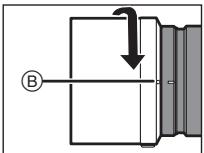
1 Align the mark (A) on the lens barrel with the mark on the lens. 2 Turn the lens barrel in the direction indicated by the arrow, aligning the mark (O) on the lens barrel with the mark on the lens. Attach the lens by turning it until it clicks.
Removing the lens barrel
While holding the button on the lens barrel, turn the lens barrel in the direction indicated by the arrow, and then remove it.

Note
The lens can be attached in the reverse direction.
1 Remove the lens barrel. 2 Align the mark (O) on the lens barrel with the mark on the lens. 3 Attach the lens barrel, turning it in the direction indicated by the arrow, until it clicks.
When taking pictures with the flash, it is recommended to remove the lens barrel, as the lens barrel may block the light from the flash. To avoid damaging the lens, never touch it, holding only the lens barrel.
Using the filter
With the filter installed, you can attach the lens cap or the lens barrel. If using two or more filters at the same time, part of the recorded image may be darkened. Besides filters, no other accessories, such as converters or adapters, can be attached to the front of the lens or used with the lens. Attaching such accessories may damage the lens.
AF/MF switch
AF/MF switch
Performed
By rotating the ring
Focusing forward and
Camera (mechanism
for switching
focus modes).
If the digital camera is set to manual focus mode, this mode will operate
regardless of the position of the focus ring.
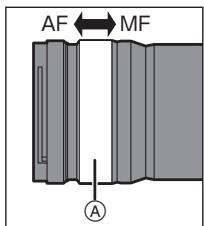
- When using manual focus, check the distance indication. Use it as a guide for focusing. The degree of focus shift can be set with the ring
focusing can also be set in the menus of compatible digital cameras. Rotate the lens, and set the digital camera to manual focus mode. For detailed information, see the instruction manual for the digital camera.
Using the tripod collar
When using the tripod collar, attach it to the tripod collar on the lens.
If the digital camera is attached to the tripod collar when carrying it, this may cause damage to the lens.
Changing the vertical/horizontal orientation
When using the tripod collar, you can quickly switch between vertical and horizontal orientation of the digital camera.
1 Turn the tripod collar lock knob in the direction indicated by the arrow to loosen it. 2 To change the position, rotate the digital camera and the lens. 3 Turn the tripod collar lock knob in the direction indicated by the arrow to tighten it.
Removing the tripod collar
1 Turn the tripod collar lock knob in the direction indicated by the arrow to loosen it.
2 Align the marks on the mount for the flash and the lock lever of the flash mount.
3 Open and remove the flash mount by pulling out the lock lever of the flash mount.
Remove the flash mount while supporting the camera with your hand to prevent it from falling.
Attaching the flash mount
To attach, perform the steps in reverse order.
Align the marks on the flash mount with the camera's accessory shoe. First, insert the lock lever, then close the flash mount. Make sure the accessory shoe is fully inserted into the flash mount.
Precautions when using the camera
- Do not allow liquids or foreign objects to enter the camera. This could cause fire or electric shock. Do not expose the camera to direct sunlight or other strong light sources. This may cause excessive light to enter and cause malfunction or damage. If using in cold temperatures for a long time, do not touch the camera directly. In cold places (with temperatures below 0°C, for example, outdoors in winter), direct contact with metal parts of the camera may cause skin injury. When using the battery for a long time, the battery may heat up.
When using the camera, use a dry cloth to wipe off any dirt.
Do not use benzene, thinner, alcohol, or other similar volatile substances to clean the camera. Using such solvents may damage the camera or cause a fire. It is prohibited to use strong cleaning agents.
Do not allow prolonged contact with the camera's rubber, plastic, or leather parts. It is prohibited to disassemble or modify the camera. If the camera will not be used for a long time, it is recommended to store it with a desiccant (silica gel). If the camera has been used for a long time, check it periodically for proper operation. Avoid storing the camera in any of the following places, as this may cause problems in operation or malfunction:
- Under direct sunlight or in a car in summer in places with high temperature and humidity, or in places with extreme temperature and humidity changes - In places with a lot of dust or sand
- Near heaters, humidifiers, or dehumidifiers - In places near water where the camera may get wet - Where vibration is present - In a car
- See also the instruction manual for the digital camera.
Troubleshooting
When turning the digital camera on or off, a rattling sound is heard from the lens.
A sound is heard from the lens during shooting.
This sound is caused by the movement of the lens and the aperture diaphragm. It does not indicate a malfunction.
Technical specifications
The technical specifications of the product may be changed without notice.
Manufactured by: Panasonic Corporation
Kadoma, Osaka, Japan
Importer for Europe: Panasonic Marketing Europe GmbH
Panasonic Testing Centre
Winsbergring 15, 22525 Hamburg, Germany
Panasonic Corporation
Web Site/Site Web: http://www.panasonic.com
© Panasonic Corporation 2019
- HELP DESK FOR FOREIGN RESIDENTS IN JAPAN
- REPAIR CONSULTATION DESK
- CONVENIENT REPAIR SERVICE SIDE
- HTTP://CLUB.PANASONIC.JP/REPAIR
- OPERATING INSTRUCTIONS
- INTERCHANGEABLE LENS FOR DIGITAL CAMERA
- CONTENTS
- INFORMATION FOR YOUR SAFETY
- THE FOLLOWING APPLIES ONLY IN THE U.S.A. FCC NOTE
- SUPPLIER'S DECLARATION OF CONFORMITY
- THE FOLLOWING APPLIES ONLY IN CANADA
- IF YOU SEE THIS SYMBOL
- DISPOSAL OF OLD EQUIPMENT
- ONLY FOR EUROPEAN UNION AND COUNTRIES WITH RECYCLING SYSTEMS
- PRECAUTIONS
- LENS CARE
- DUST AND SPLASH RESISTANT
- CONDENSATION (WHEN THE LENS IS FOGGED UP)
- SUPPLIED ACCESSORIES
- NAMES AND FUNCTIONS OF COMPONENTS
- NOTE
- ATTACHING THE LENS
- NOTES ON FILTER USE
- SWITCHING AF/MF
- USING THE TRIPOD MOUNT
- CHANGING THE VERTICAL/HORIZONTAL ORIENTATION
- ATTACHING THE TRIPOD MOUNT
- CAUTIONS FOR USE
- TROUBLESHOOTING
- PANASONIC PRODUCTS LIMITED WARRANTY
- LIMITED WARRANTY COVERAGE (FOR USA ONLY)
- MAIL-IN SERVICE--ONLINE REPAIR REQUEST
- ONLINE REPAIR REQUEST
- LIMITED WARRANTY LIMITS AND EXCLUSIONS
- SHOP
- ACCESSORIES
- CUSTOMER SERVICES DIRECTORY
- LIMITED WARRANTY (ONLY FOR CANADA)
- PANASONIC PRODUCT - LIMITED WARRANTY
- LIMITATIONS AND EXCLUSIONS
- WARRANTY SERVICE
- PANASONIC WARRANTY
- PANASONIC AUSTRALIA PTY. LIMITED
- COMMUTATION AF/MF (MPA/MPM)
- PANASONIC CANADA INC
- PRODUIT PANASONIC - GARANTIE LIMITEE
- REMOVING THE LENS BARREL
- USING THE FILTER
- AF/MF SWITCH
- USING THE TRIPOD COLLAR
- ATTACHING THE FLASH MOUNT
- PRECAUTIONS WHEN USING THE CAMERA
- A SOUND IS HEARD FROM THE LENS DURING SHOOTING
- TECHNICAL SPECIFICATIONS
Brand : PANASONIC
Model : bah5S 70-2004
Category : Camera lens