AQUA CONNECT X550 - Cleaning robot EZICLEAN - Free user manual and instructions

Find the device manual for free AQUA CONNECT X550 EZICLEAN in PDF.

📄 21 pages PDF ⬇️ English EN 💬 AI Question 🖨️ Print
Notice EZICLEAN AQUA CONNECT X550 - page 12
View the manual : Français FR English EN
Manual assistant
Powered by ChatGPT
Waiting for your message
Product information

Brand : EZICLEAN

Model : AQUA CONNECT X550

Category : Cleaning robot

Download the instructions for your Cleaning robot in PDF format for free! Find your manual AQUA CONNECT X550 - EZICLEAN and take your electronic device back in hand. On this page are published all the documents necessary for the use of your device. AQUA CONNECT X550 by EZICLEAN.

USER MANUAL AQUA CONNECT X550 EZICLEAN

Welcome to EZI® - Make it easy Thank you for the trust you place in our EZIclean® range. We hope you are satisfied with this product and now let you take note of the following instructions for use. Precautions for use - Only authorized technicians can disassemble this product. Users are not recommended to disassemble this product themselves. - Use only the original power adapter supplied. Other adapters may damage this product. - Do not touch the wires, plugs or power adapters with wet hands. - Keep the cur tains away from the robot so that it does not suck them up. - Clean the product without charge. - Do not bend the wires and do not place heavy and / or sharp objects on the machine. - This product is an indoor household product. Do not use it outdoors. - Do not sit on the product. - Do not use this product in a humid environment (eg bathroom). - Before using the product, remove all fragile items (eg glasses, lamps, etc.) which may become tangled in the side brushes, the wheels and the main brush. - Do not place this product in a place where it is easy to fall (eg desk or chairs). - Turn off the switch on the side of the machine during transport or if you do not intend to use it for a long time. - Check that the AC adapter is properly plugged into the outlet before use. - To avoid tripping, infor m other members of the household when this product is working. - If it is full, empty the dust container before using the product. - Keep the product between 0 and 40 ° C. - Do not use the product in an environment above 40 ° C. - Remove the battery from the robot before putting it to recycle. - Make sure that the product is not energized when removing the battery. - Recycle the battery. - Use only the original rechargeable battery and the charging base supplied by the manufacturer. - Non-rechargeable batteries are strictly prohibited. - Do not use the product in environments close to flames or fragile objects. - Keep hair, clothing, fingers and other par ts of the body away from the robot’s openings, otherwise they will be absorbed. - Do not use the product on damp or stagnant ground. - Make sure that the robot does not absorb stones and / or old paper that can obstruct it. - Do not expose the robot to flammable substances such as petrol, toner and toner for printers or photocopiers. - Do not expose the robot to burning articles, such as cigarettes, matches, ashes and other articles which may cause a fire. - Do not place items near the suction nozzles. - Do not use the product when the suction nozzle is blocked. - Clean dust, cotton, hair, etc. which are in the suction nozzle to ensure good air circulation. - Use the power cable carefully to avoid damage. - Do not use the power cord to slide or pull the robot and the charging station. - Do not trap the power cable in the doors. - Do not pull on the power cable. - Keep the power cable away from heat sources. - Do not use the charging station if it is damaged. - Even if the product has been severely damaged, combustion of this product is prohibited, this may cause the product battery to explode. Please read the following information carefully before using your robot vacuum cleaner or its accessories. Do not disassemble the device and do not try to repair it yourself. In the event of a malfunction, please contact your dealer for professional advice. Stairs: The device uses sensors to avoid falling on steps, on stairs or over an edge. In some situations, the sensors may malfunction. This device cannot detect steps that are less than 8 cm high. Steps less than 8 cm high can cause the robot to fall. Highly reflective or very dark surfaces on certain steps or stairs, such as glass or polished ceramic can cause the device to fall. If available, use the virtual wall or place a carpet on the bottom step to prevent your robot from falling. Avoid using your robotic vacuum cleaner on mezzanines, landings or elevated, undefined surfaces. The symbol on this appliance indicates that it cannot be disposed of with household waste. You must deposit it in an electrical and electronic waste recycling center. Disposal must be carried out in accordance with local waste regulations. For further information on the treatment, recovery and recycling of this appliance, please contact your municipality, the local household waste disposal service or the retailer of the appliance.

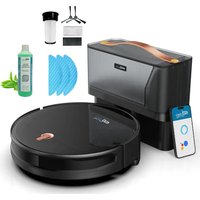
Your device Return to charge Start/Stop WIFI indicator Dustbin button Bumper Light switch Connection socket Charging connectors Left side brush Right side brush Battery Left wheel Right wheel Main brush and suction nozzle Dustbin HEPA filter Primary filter Lid filters Cover dust bin Signal indicator Charging socket Charging connectors

Installing your device To install your device, follow these instructions :

1. Assemble the dust bin cover by

5. Place the charging base at 50 cm

from any obstacle and connect it

6. Install the side brushes

according to the L & R instructions Note: - It is also possible to recharge the robot by directly connecting the power cable to the robot. - Make sure that the switch is on «I» before recharging the robot. If the switch is on «O», the robot cannot be recharged.

7. Set the switch to «I».

To switch off the robot, set the switch to «O»

8. Place the robot to be

charged by placing it on the charging base - During cleaning, the robot may feel that its battery is insufficient and automatically return to its charging base. - You can also ask it to return to its charging base by pressing the robot button or from your application. Pay attention to the charge:

1. The charging base should not be placed in highly reflective environments such as direct sunlight or near mirrors.

This could distort the robot’s navigation and it could get lost.

2. In order to ensure the proper functioning of the robot, it is advisable to recharge it for 6 hours the first time.

Start cleaning The different cleaning modes: Auto mode The robot performs the planned cleaning by automatically adapting to its environment. - Turn on the main switch, when the light is on, it means that the robot is on. - Then briefly press the robot button, the button on the remote control or from the application. Focus mode Adapted to the soil where the garbage is concentrated, the robot cleans the soil “spirally” and intensively. - Then briefly press the robot button, the button on the remote control or from the application. Border mode Pour le nettoyage des plinthes, le robot nettoie le long des murs. - Appuyer ensuite brièvement sur le bouton du robot, sur le bouton de la télécommande ou depuis l’application. Manual control Control the robot by hand by selecting the directional arrows. - Press the directional arrows on the remote control or the application. Suction power control Adjust the suction power according to the different types of soil. - Press the buttons on the remote control or from the application. Please note: The suction power can only be adjusted in auto mode. Stop cleaning Standby While the appliance is running, press the «Start / pause» button on the robot or the pause button on the remote control or the application to stop cleaning. Start-up The robot goes into standby mode after 10 minutes of inactivity and all the lights go out. Use any button on the robot or application to restart the robot. Switch off Once the device has stopped working, press the «start» button for a few seconds and all the indicators will go out. If you no longer wish to use your robot for an extended period of time, set the switch to «O». If you want to use it regularly, leave the switch on «I» so it can charge properly. Caring for your device To clean the dust container, follow the instructions below :

1. Press the dust bin button to

remove it from the robot.

4. Open the cover of the HEPA filter

5. Remove the pre-filter and

the robot’s HEPA filter.

7. Clean the dust container with a

cloth or brush. Do not put it in the water.

9. Replace the pre-filter and the HEPA filter in the dust

container Notes: - Before installing the filters, make sure that the HEPA filter and the pre-filter are completely dry.

6. Gently clean the HEPA filter and

the pre-filter with water.

8. Let the various elements

dry before reinserting them. - Do not expose the filters to the sun.

10. Close the dust bin cover and install the dust bin in

the robot. Please note: the dust container and the HEPA filter must not be washed with water. To clean the main brush, follow the instructions below :

1. Open the passenger compartment

2. Remove the main brush

To clean the side brushes, run them under water or clean them with a cloth

3. Use the cleaning brush to remove dirt.

To clean the sensors, follow the instructions below: The charging base, robot and bumper sensors contain sensitive electronic components. Use a dry cloth to clean them and be careful not to moisten them as this may cause damage.

1. Clean the sensors

3. Clean the central wheel