H11 - Stick vacuum DREAME - Free user manual and instructions
Find the device manual for free H11 DREAME in PDF.



| Product Type | Cordless Stick Vacuum |
| Brand | DREAME |
| Model | H11 |
| Rated Voltage | 21.6 V DC |
| Rated Power | 170 W |
| Battery Capacity | 2300 mAh (Li-ion) |
| Charging Time | Approx. 3 hours |
| Clean Water Tank Capacity | 900 mL |
| Dirty Water Tank Capacity | 500 mL |
| Power Supply Type | AC Adapter 100-240 V ~ 50/60 Hz, Output 26 V / 0.9 A |
| Main Functions | Wet and dry cleaning, adjustable suction (Standard/Turbo), self-cleaning, voice control |
| Display Screen | Yes, with battery indicator and error messages |
| Brush Type | Motorized Roller Brush |
| Maintenance | Regular cleaning of brush, filter, tanks; filter replacement every 3-6 months |
| Safety | Overheat protection, auto shut-off, secure battery |
| Included Accessories | Charging station, adapter, cleaning brush, accessory holder, spare filter |
| Weight | Approx. 4.5 kg |
| Dimensions (L x W x H) | Approx. 300 x 250 x 1100 mm |
| Warranty | 2 years (depending on country) |
Frequently Asked Questions - H11 DREAME
User questions about H11 DREAME
0 question about this device. Answer the ones you know or ask your own.
Ask a new question about this device
Download the instructions for your Stick vacuum in PDF format for free! Find your manual H11 - DREAME and take your electronic device back in hand. On this page are published all the documents necessary for the use of your device. H11 by DREAME.
USER MANUAL H11 DREAME
FOR PURCHASING THIS DREAM WET AND DRY VACUUM.
Registration Quick Start
Welcome to register a Dreame account by scanning the QR code. You are available for the User Manual and Special Offers.

With it you are obtaining a high quality product that is engineered for optimal performance.
If you have any questions on the product, please contact us: aftersales@dreame.tech.
Contents
EN Dreame H11 Wet and Dry Vacuum User Manual 001
DE Dreame H11 Kabellos Nass-Trockensauger 021 Bedienungsanleitung
FR Dreame H11 Aspirateur eau et poussière sans fil 041 Manuel d'utilisation
IT Dreame H11 Aspirapolvere Secco Umido alla Fili 061 Manuale d'Uso
ES Manual de Nombre de Aspirador Inalámbrico Seco-Húmedo 081
Dreame H11
RU BeecnpoBODHn nbIeCoc dJa BnaJHo n cyXoYbOpKn 101 Dreame H11 INcTpyKuNo no ekpnyatauN
PL Instrukcja obstugi Bezprzewodowej Odkurzacza do pracy 121 na sucho i mokro Dreame H11
HE nnwnn Dreame H11 141
SA 161
Safety Information
EN
Important Safety Instructions For Household Use Only
- When using an electrical appliance, basic precautions should always be followed, including the following:
- READ ALL INSTRUCTIONS BEFORE USING (THIS APPLIANCE). Failure to follow the warnings and instructions may result in electric shock, fire and/or serious injury.
WARNING- To reduce the risk of fire, electric shock, or injury:
- Use only as described in this user guide. Use only manufacturer's recommended attachments.
- Use indoors only, on non-carpeted floor surfaces such as vinyl, tile, sealed wood, etc. Be careful not to run over loose objects or edges of area rugs. Stalling the brush may result in premature belt failure.
- Do not allow to be used as a toy. Close attention is necessary when used by or near children, pets or plants.
- Do not use a flammable or combustible liquid to clean a floor./Do not use to pick up flammable or combustible liquids, such as gasoline, or use in areas where they may be present.
- For the purposes of recharging the battery, only use the detachable supply unit provided with this appliance. Use only with YLS0251B-E260090 (EU) / YLS0251A-A260090 (AU) supply unit.
- Recharge the vacuum only with the charger specified by the manufacturer. A charger that is suitable for one type of battery pack may create a risk of fire when used with another battery pack.
- Do not immerse the vacuum in liquid. Use only on floor moistened by cleaning process.
- This appliance can be used by children aged from 8 years and above and persons with reduced physical, sensory or mental capabilities or lack of experience and knowledge if they have been given supervision or instruction concerning use of the appliance in a safe way and understand the hazards involved. Children shall not play with the appliance. Cleaning and user maintenance shall not be made by children without supervision.
- This appliance is not intended for use by persons (including children) with reduced physical, sensory or mental capabilities, or lack of experience and knowledge, unless they have been given supervision or instruction concerning use of the appliance by a person responsible for their safety.
Children should be supervised to ensure that they do not play with the appliance. - Plastic film can be dangerous. To avoid the danger of suffocation, keep it away from children.
- Keep hair, loose clothing, fingers, and all parts of the body away from openings and moving parts of the appliance and its accessories.
Safety Information
- Only use the type and amount of liquids specified under the operations section of this guide. Liquid must not be directed towards equipment containing electrical components.
- Do not put any object into openings. Do not use the vacuum when any opening is blocked; keep free of dust, lint, hair, and anything that may reduce air flow.
- Do not use it without filters in place.
- Do not use the vacuum with damaged cord or plug. If the cord or plug is damaged, it must be replaced by the manufacturer, its service agent or similarity qualified persons in order to avoid a hazard.
- Do not use the vacuum to pick up flammable or combustible liquids, such as petroleum, or use the vacuum in areas where they may be present.
- Do not pick up toxic material (chlorine bleach, ammonia, drain cleaner, etc.). Do not pick up hard or sharp objects such as glass, nails, screws, coins, etc..
- Do not use the appliance in an enclosed space filled with vapour given off by oil-based paint, paint thinner, some moth-proofing substances, flammable dust, or other explosive or toxic vapour. Do not pick up anything that is burning or smoking, such as cigarettes, matches or hot ashes.
- Do not charge the unit outdoors. Do not recharge, disassemble, heat above 60^ C, or incinerate
- Charger base output terminals should not be short-circuited. Do not use it with damaged cable or charger. If the appliance has been dropped, damaged, left outdoors, dropped into water, or is not working as it should, return it to a service center.
- Keep the charger cable away from heated surfaces. Do not handle the charger plug or appliance with wet hands. To unplug, grasp the charger plug, rather than the cable.
- Do not pull or carry charger by cable, use cable as a handle, close door on cable, or pull cable around sharp edges or corners.
- Switch off when not in use, before cleaning, maintaining or servicing the appliance, and before connecting or disconnecting the tool with a moving brush.
- The appliance must be disconnected from the power supply when removing the battery. Keep batteries out of the reach of children. Never put batteries in mouth. If swallowed, contact your physician or local poison control.
- Do not use appliance that is damaged or modified. Damaged or modified batteries may exhibit unpredictable behavior resulting in fire, explosion or risk of injury.
- Do not expose the appliance to fire or excessive temperature. Exposure to fire or temperature above 130^ may cause an explosion.
- Follow all charging instructions and do not charge the appliance outside of the temperature range specified in the battery and increase the risk of fire.
- Do not incinerate the appliance even if it is severely damaged. The battery must be disposed of safely, and it must be removed from the appliance before it is scrapped to avoid an explosion in the fire.
- Under abusive conditions, never contact the battery from which the liquid may be ejected. If contact accidentally occurs, rinse with water. If liquid contacts eyes, seek medical help immediately. Liquid ejected from the battery may cause irritation or burns.
- Ensure that the appliance is placed on a horizontal surface. Do not use the appliance
Safety Information
EN
at the same position if the appliance is equipped with a brush roller and the handle is not completely upright. Do not store the appliance in a place where it may freeze.
- Use extra care when cleaning on stairs.
- Prevent unintentional starting. Ensure the switch is in the OFF-position before picking up or carrying the appliance. Carrying the appliance with your finger on the switch or energizing appliance that have the switch on invites accidents.
- This appliance contains batteries that are only replaceable by skilled persons.
SAVE THESE INSTRUCTIONS IMPORTANT SAFEGUARDS
- Have servicing performed by a qualified repair person using only identical replacement parts. This will ensure that the safety of the product is maintained.
- Do not modify or attempt to repair the appliance excepts as indicated in the instructions for use and care.
- Do not use and store in extremely hot or cold environments (below 0^ / 32^ or above 40^ / 104^ ). Please charge the cordless vacuum in temperature above 0^ / 32^ and below 40^ / 104^ .
- If appliance has been dropped, damaged, left outdoors, dropped into water, or is not working as it should, never attempt to operate it. Please have it repaired at an authorized service center.
We, Dreame Trading (Tianjin) Co., Ltd., hereby, declares that this equipment is in compliance with the applicable Directives and European Norms, and amendments. The full text of the EU declaration of conformity is available at the following internet address: www.dreme-technology.com
For detailed e-manual, please go to https://www.dreame-technology.com/pages/user-manuals-and-faqs
EN Product Overview
Packing List
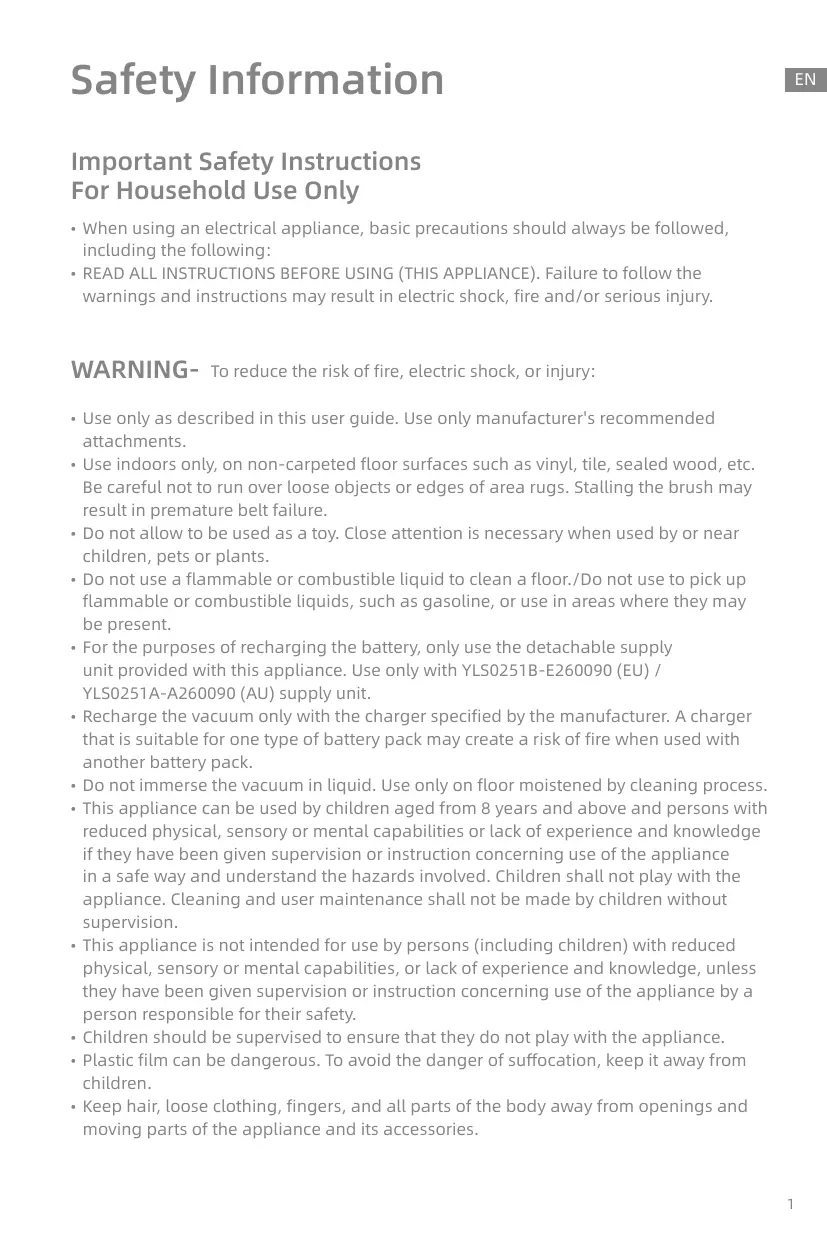
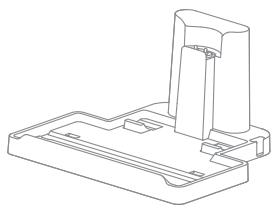
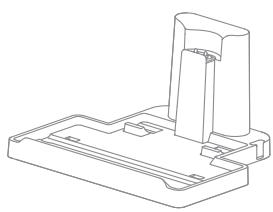
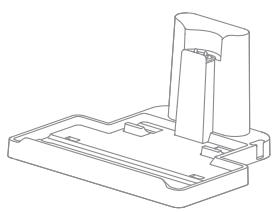
Charging Base
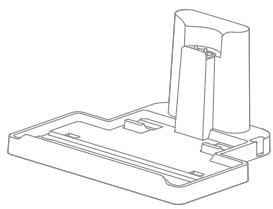
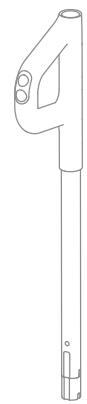
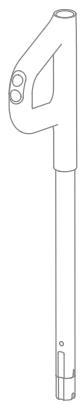
Handle Assembly
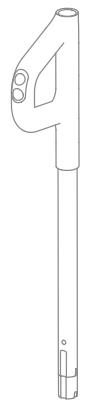
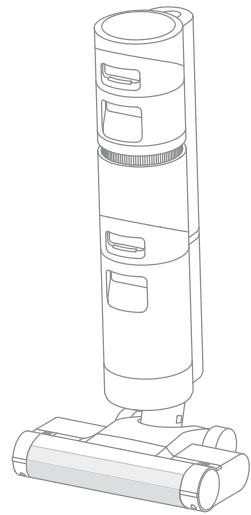
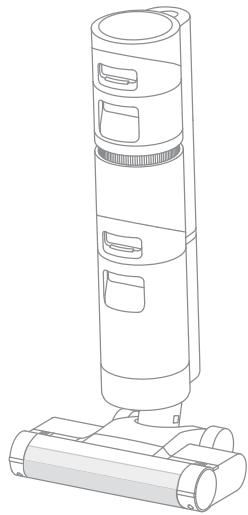
Main Body

Back-up Filter

Cleaning Brush
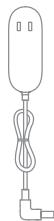
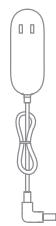
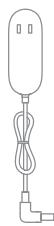
Power Adapter

Accessory Holder
Note: The images in this manual are for illustrative purposes only. The actual product may differ.
Product Overview
EN
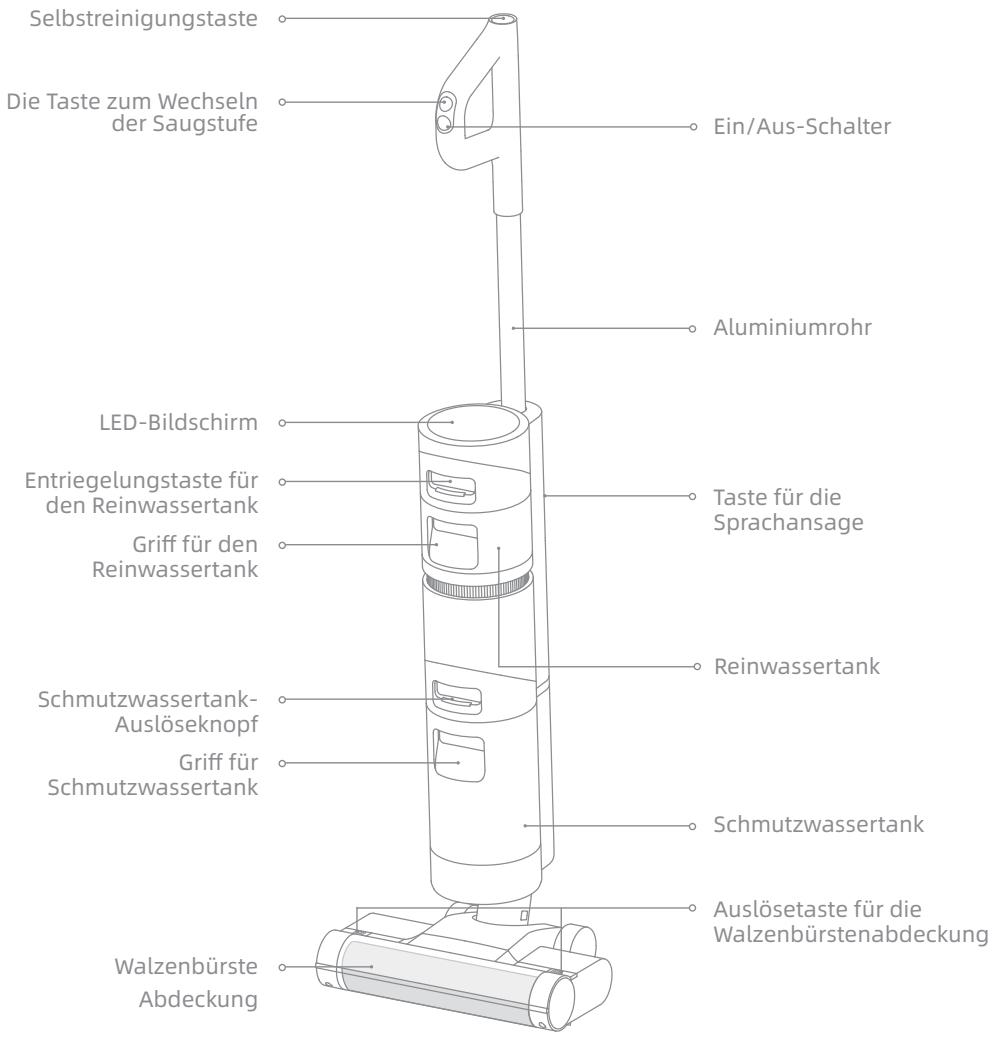
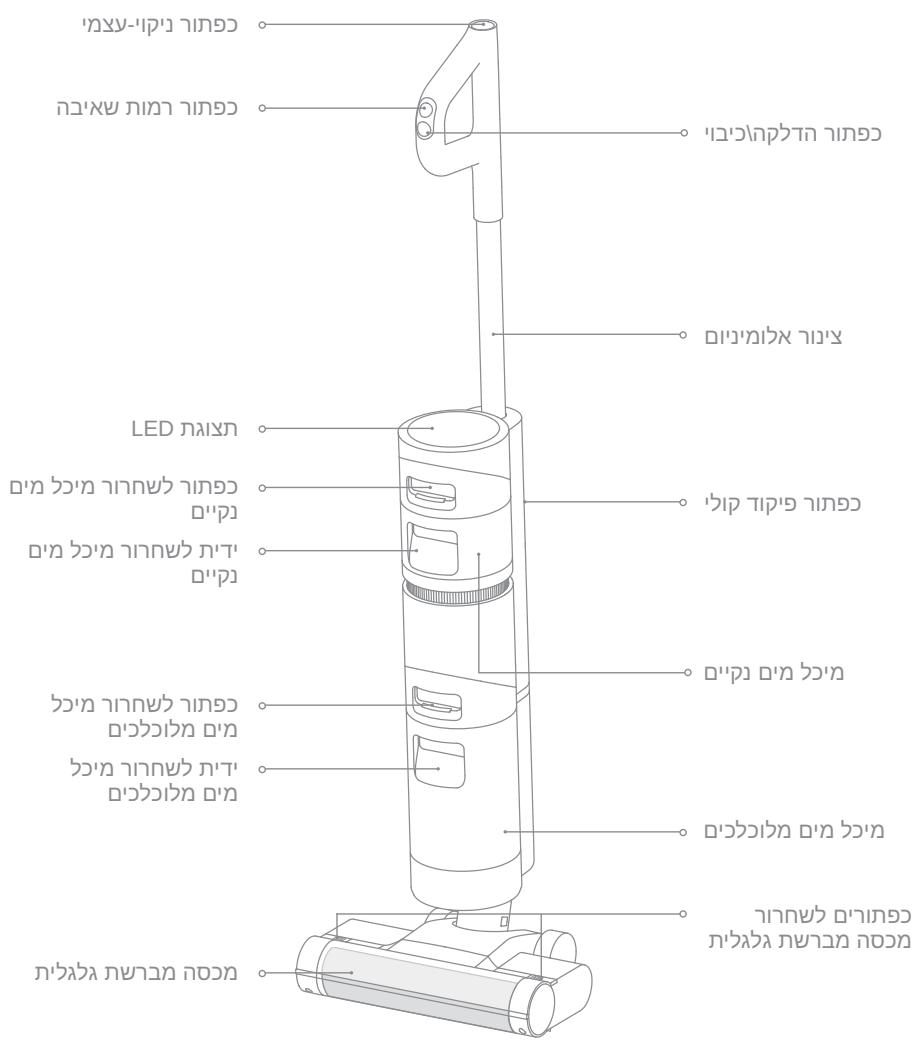
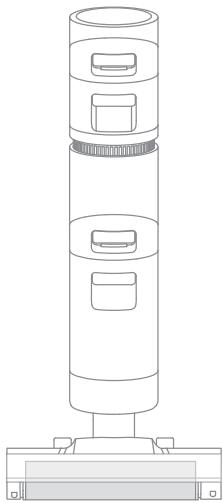
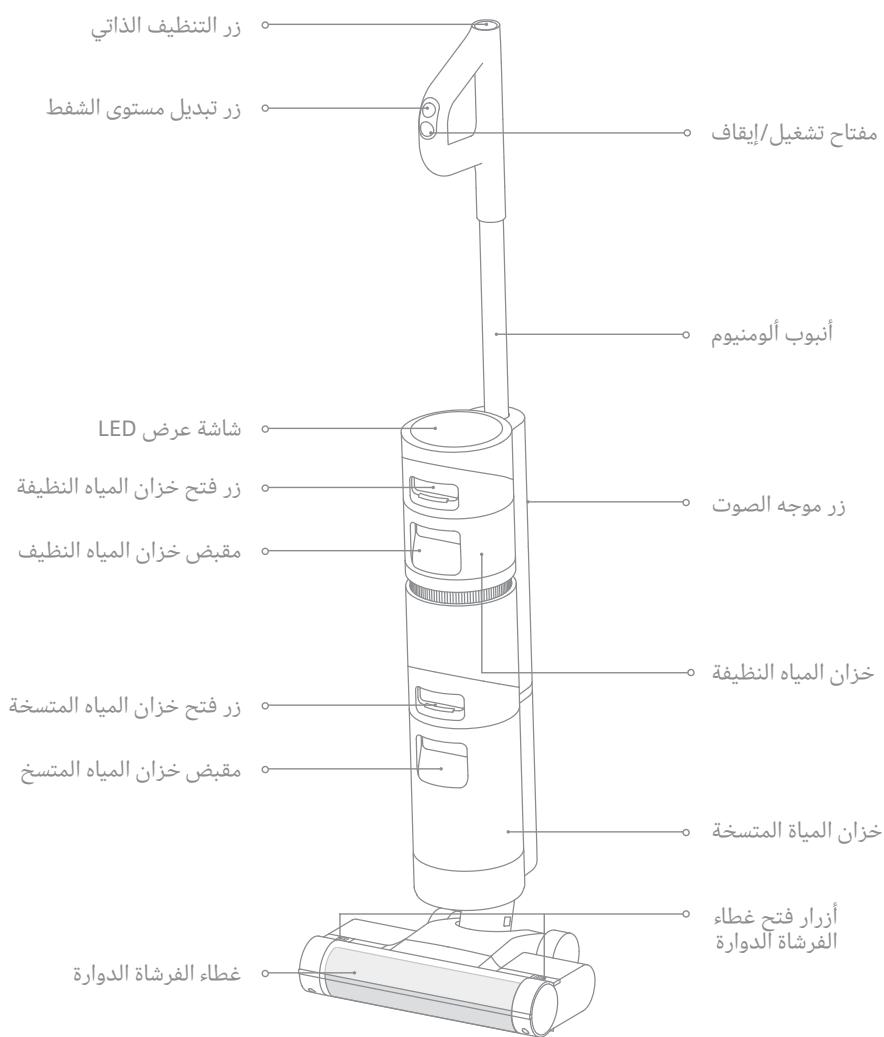
Vacuum
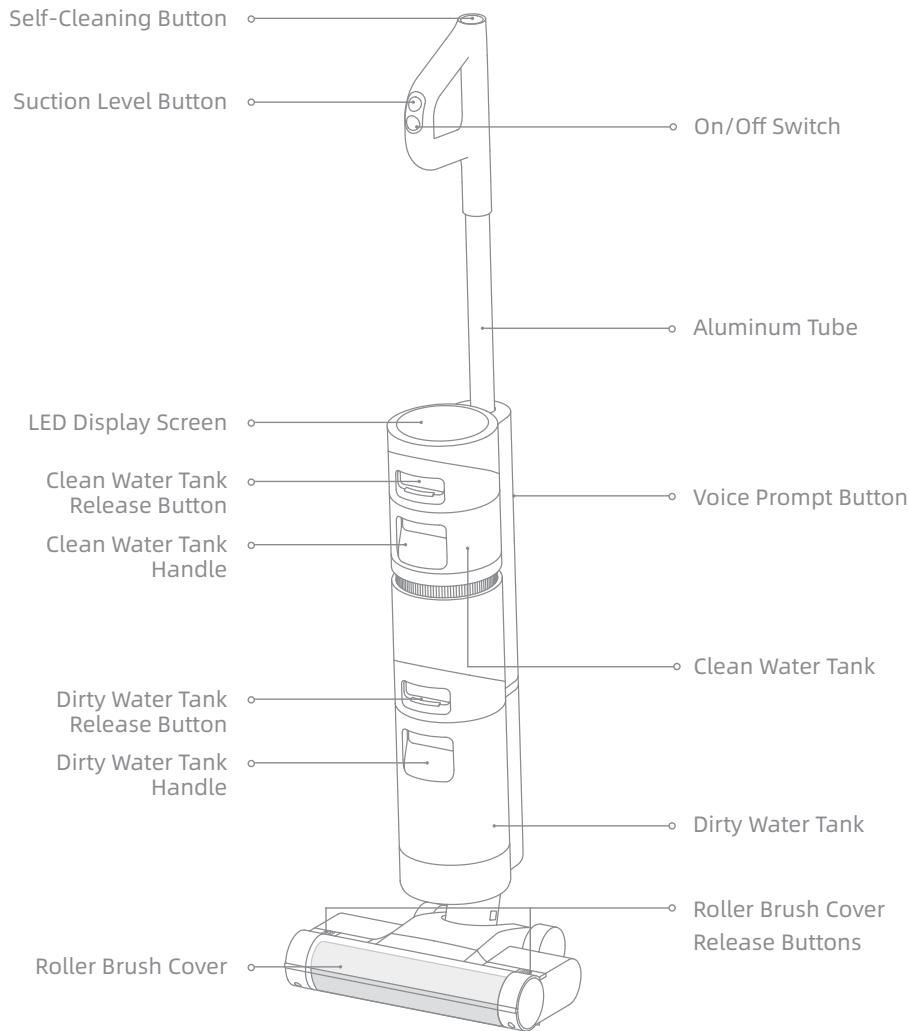
EN Product Overview
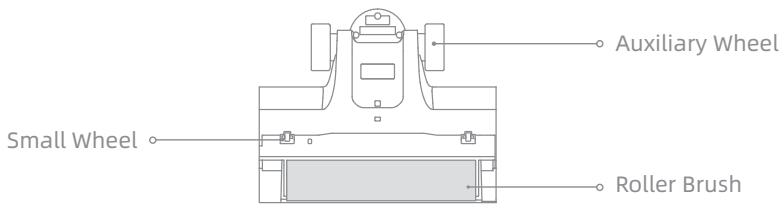
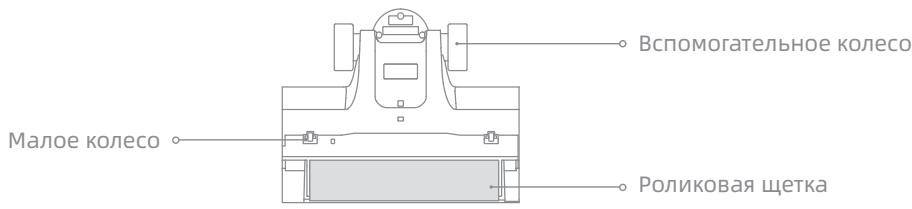
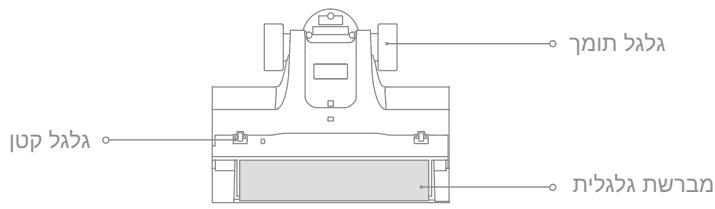
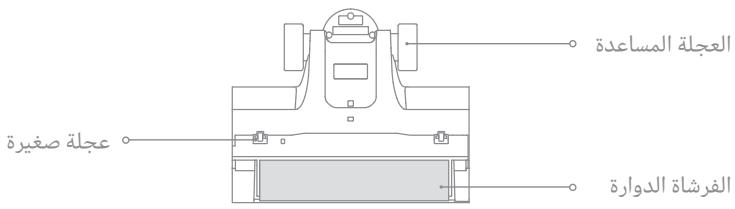
Roller Brush Assembly
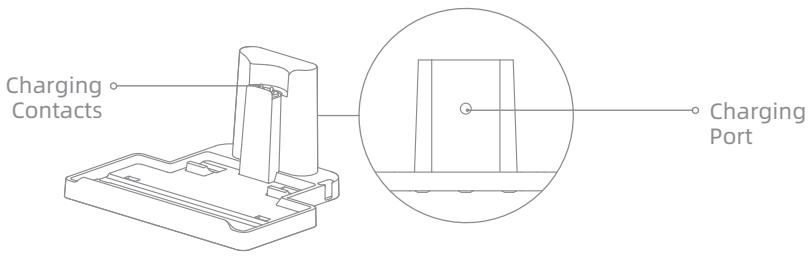
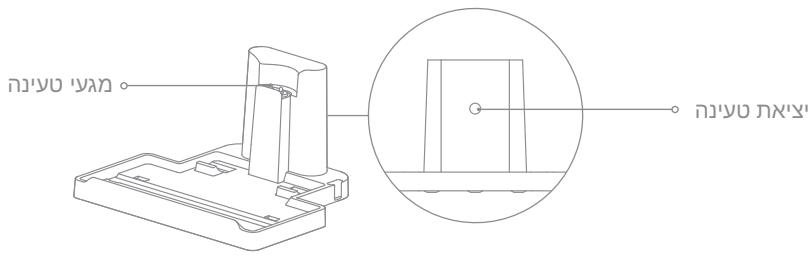
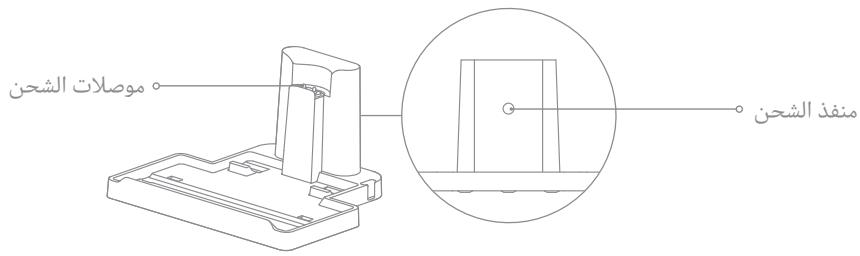
Charging Base
Product Overview
EN
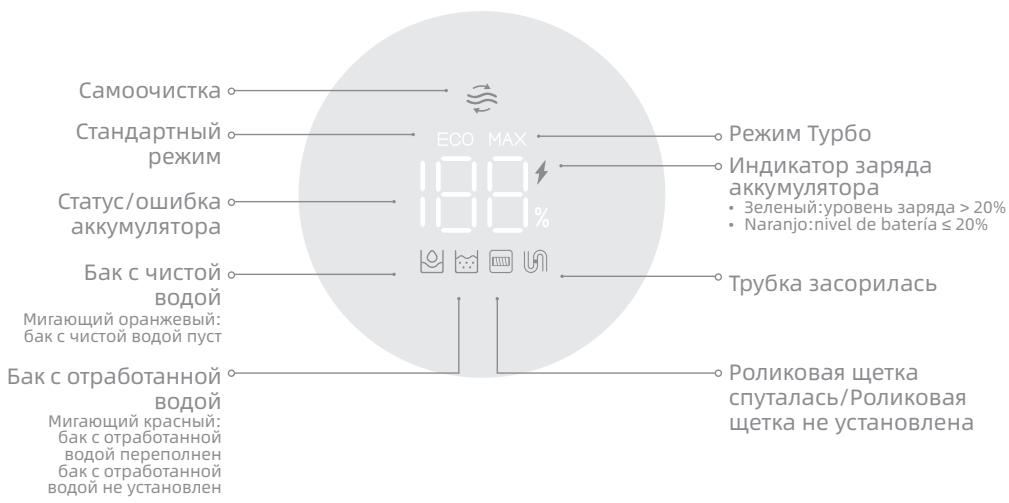
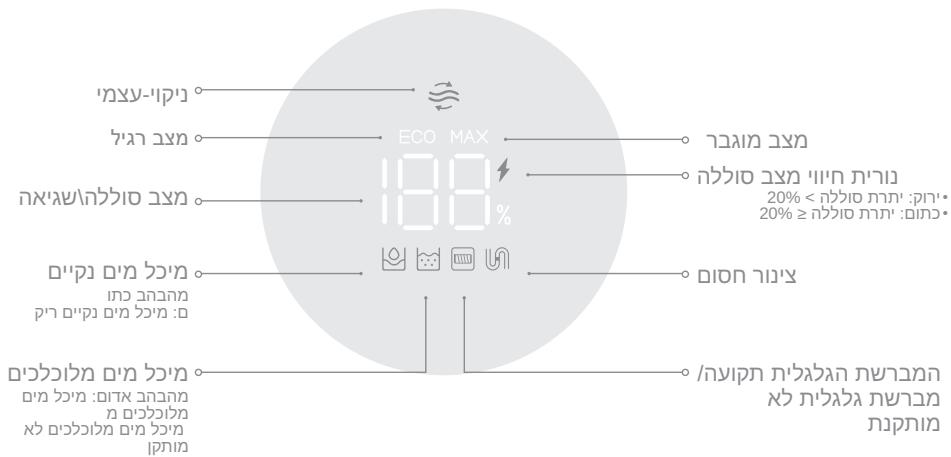
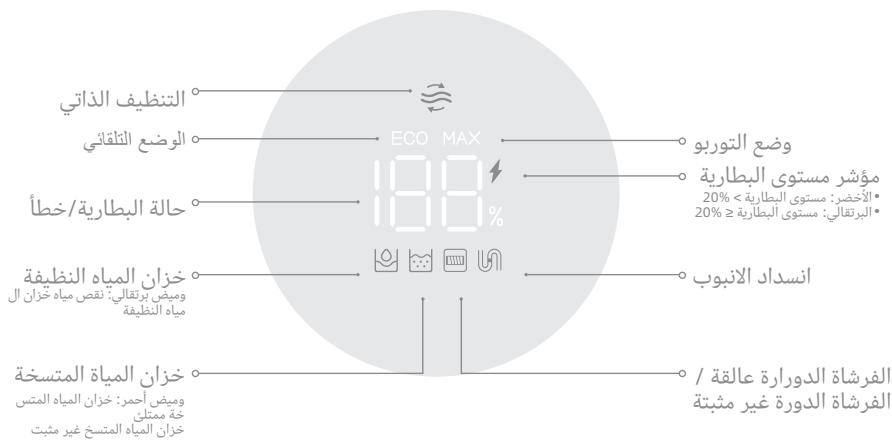
Display Screen
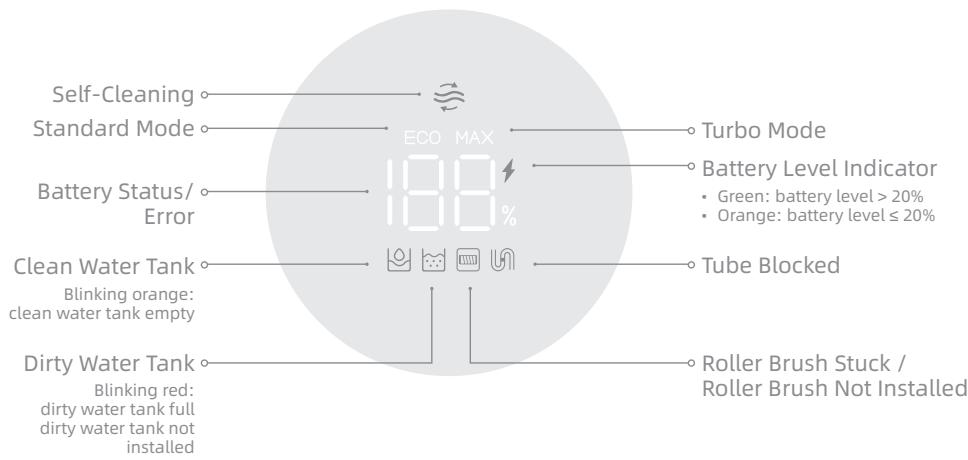
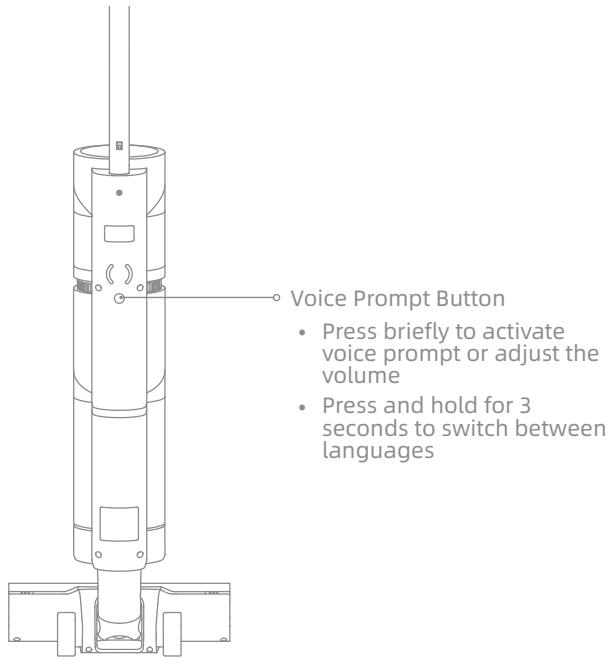
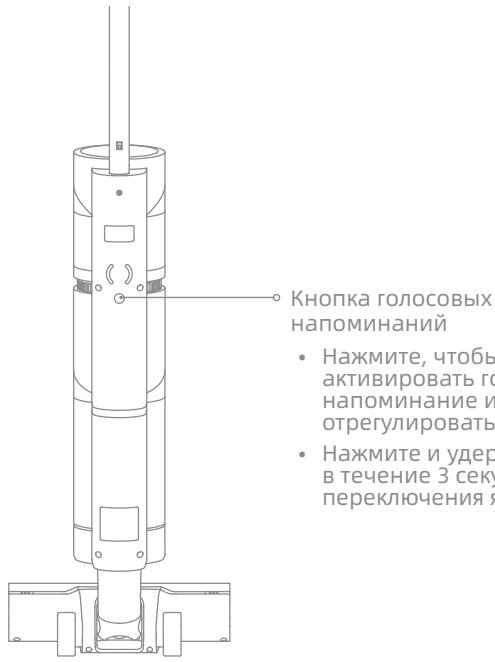
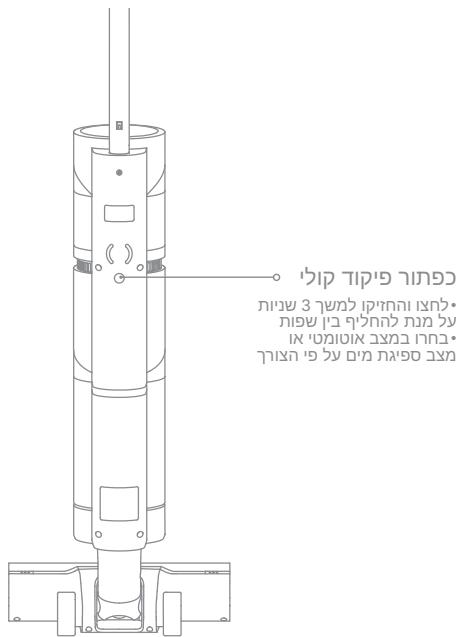
Voice Prompt Button
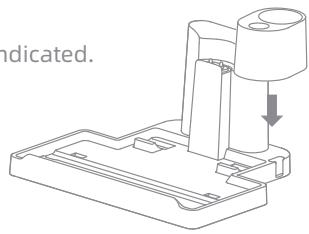
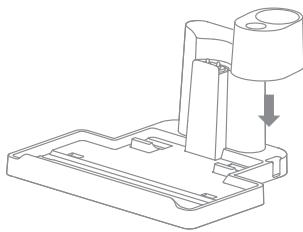
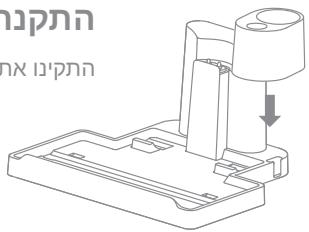
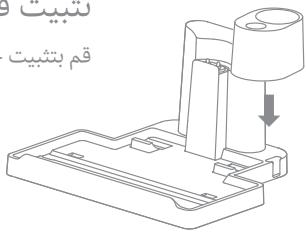
Charging Base Installation
Install the accessory holder into the charging base as indicated.
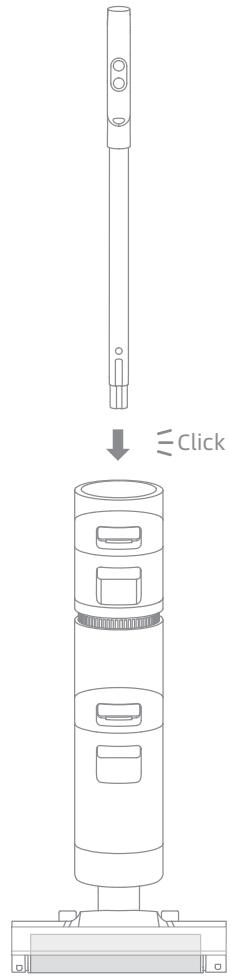
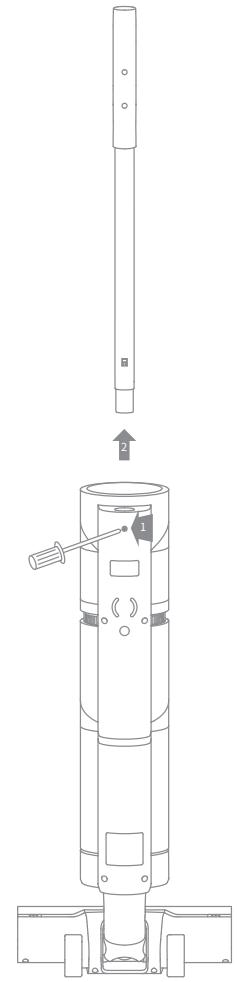
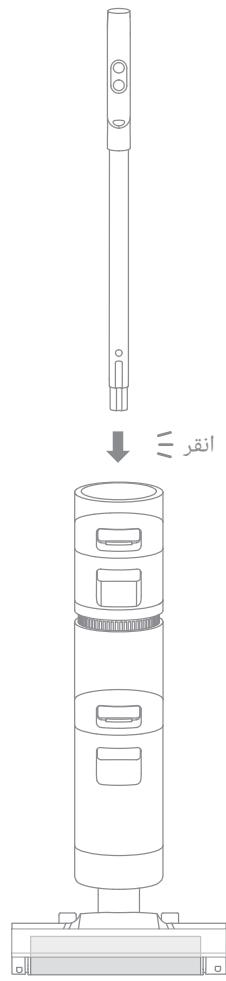
Vacuum Installation Diagram
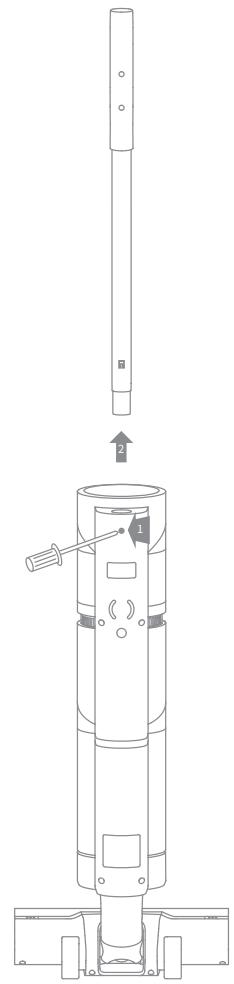
Insert the end of the handle assembly vertically into the port on the top of the vacuum as indicated, you will feel it click in place.
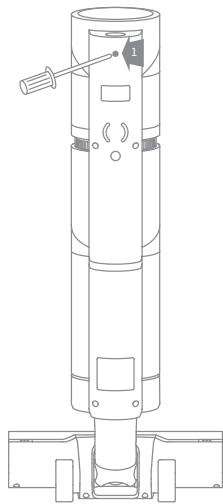
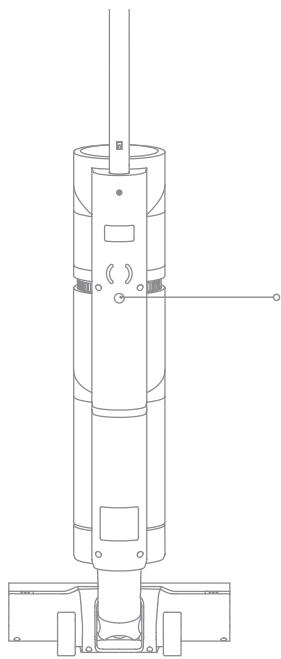
Note: To disassemble the handle, please use a hard object to reach into the hole on the back of the vacuum to press the contacts, and at the same time pull the handle upwards.
Charging
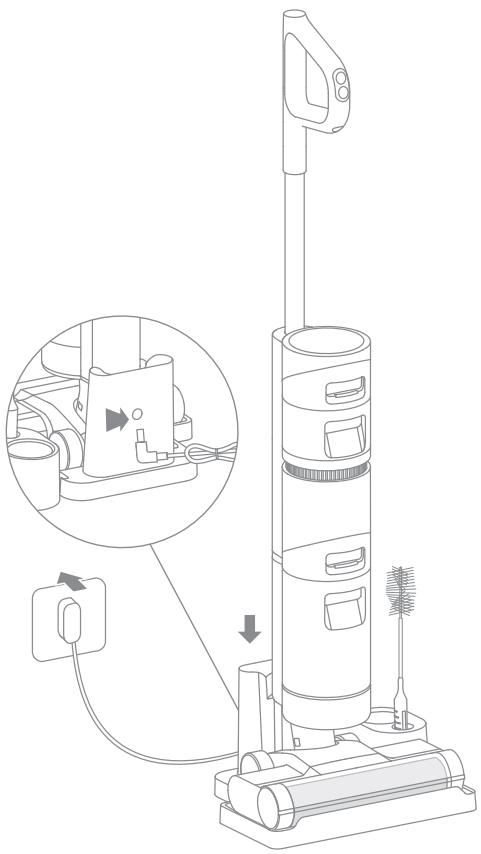
Note: Fully charge the vacuum before using it for the first time.
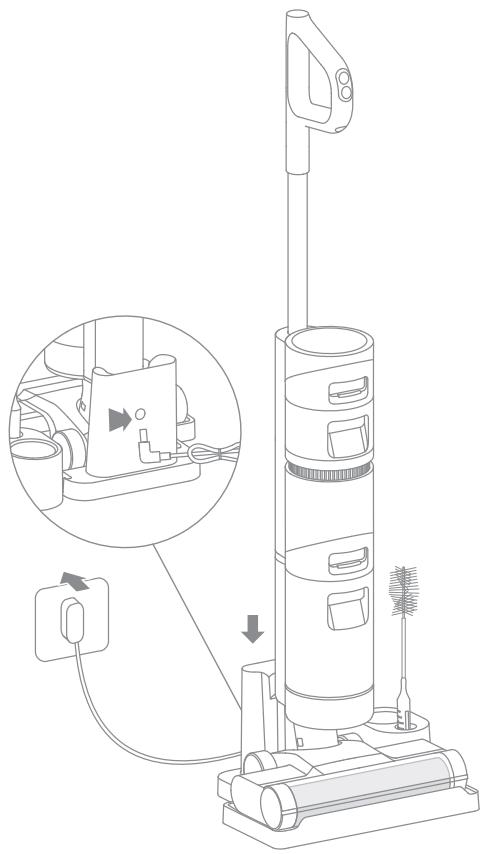
- Place the charging base on the level ground against a wall. Connect one end of the power adapter to the charging base and another end to a home socket.
- Place the vacuum on the charging base, the on the screen lights up to indicate the charging status. The number on the display screen represents the current battery level in a percentage during charging. When the number is at 100, the battery is fully charged. Once the vacuum is fully charged, the indicator will turn off after 10 seconds.
Note: No operation for 15 minutes after being fully charged, the vacuum begins sleeping.
Fill the Clean Water Tank
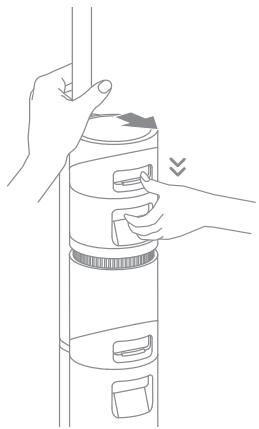
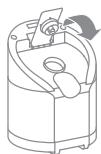
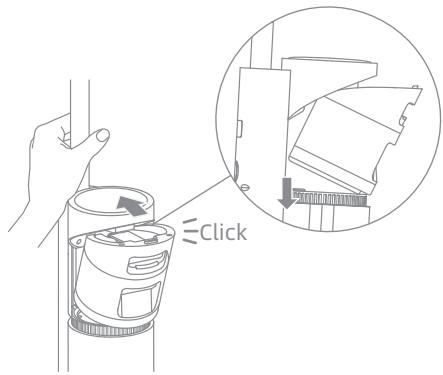
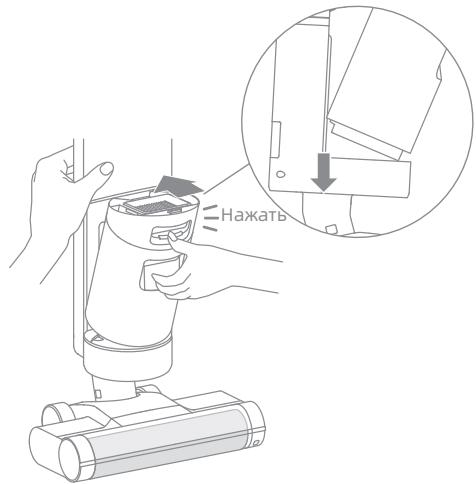
- Press the clean water tank release button and pull the tank outward to remove it.
-
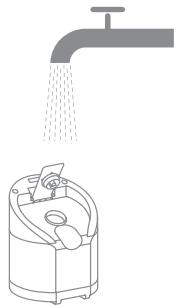
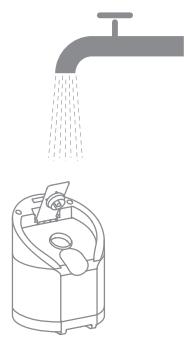
Tightly close the tank cover after the water has been added.
-
Open the tank cover and add enough clean water to the clean water tank.
- Install the clean water tank into the main body until you hear a click.
How to Use
EN
Start Cleaning
The vacuum is equipped with an upright/tilt switch. Please use it at an angle after turning it on.
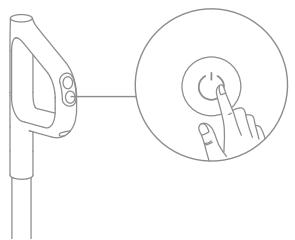
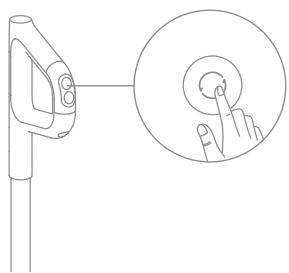
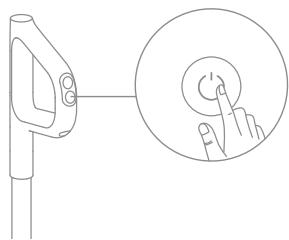
Short press the to power on and the vacuum starts cleaning. Press again to stop working.
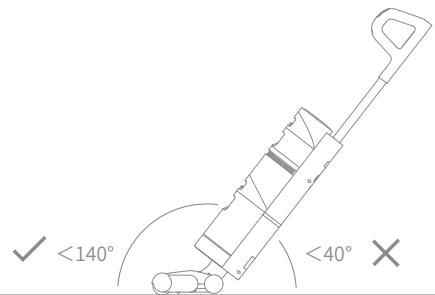
Note: When the vacuum is working, do not lift it up and down or move it, and do not tilt the vacuum to one side or lay it flat to protect against the dirty water back into the vacuum.
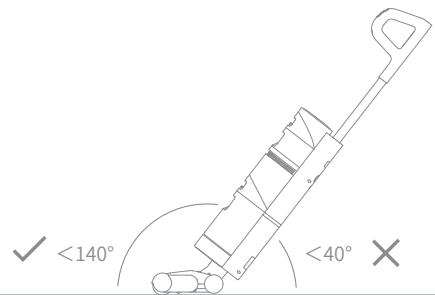
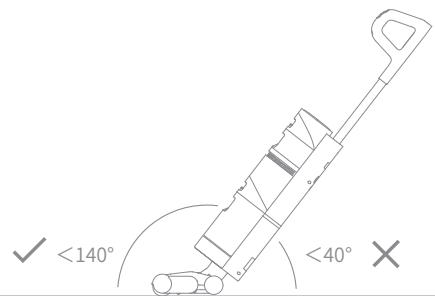
Do not recline the vacuum more than 140^ to protect against water leakage.
Switch Suction Level
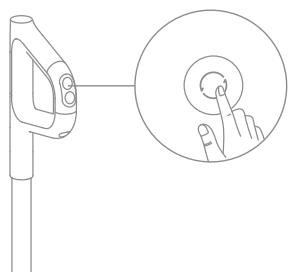
The vacuum is powered on by default in Standard mode. You can press the suction level button to enter the Turbo mode according to actual needs.
Tips:
- Make sure the vacuum is unplugged in and not working.
- Parts need to be replaced if necessary. Please use the parts designated by the original factory to avoid damage to the product due to unsuitability.
- If the vacuum is not used for an extended period, fully charge it, unplug its charger, and store it in a cool, low-humidity environment away from direct sunlight. To avoid over-discharge of the battery, recharge the vacuum at least once every 3 months.
One-Click Self-Cleaning
-
The self-cleaning function can be enabled only when the vacuum is charged and the battery level is more than 10% .
-
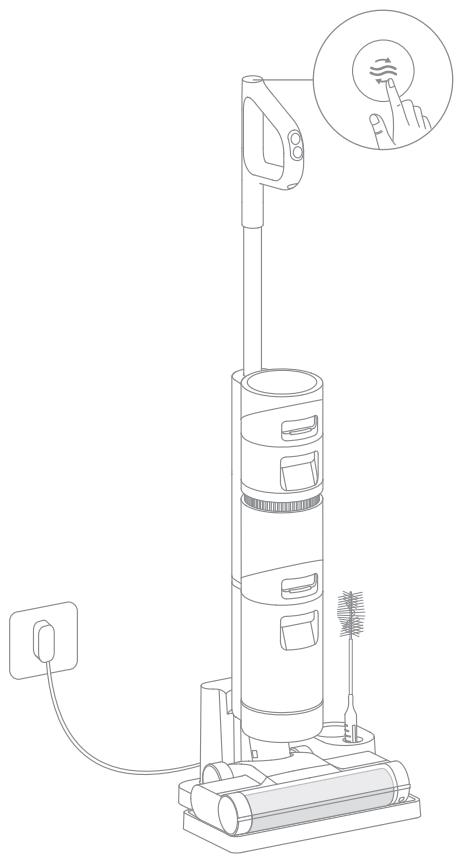
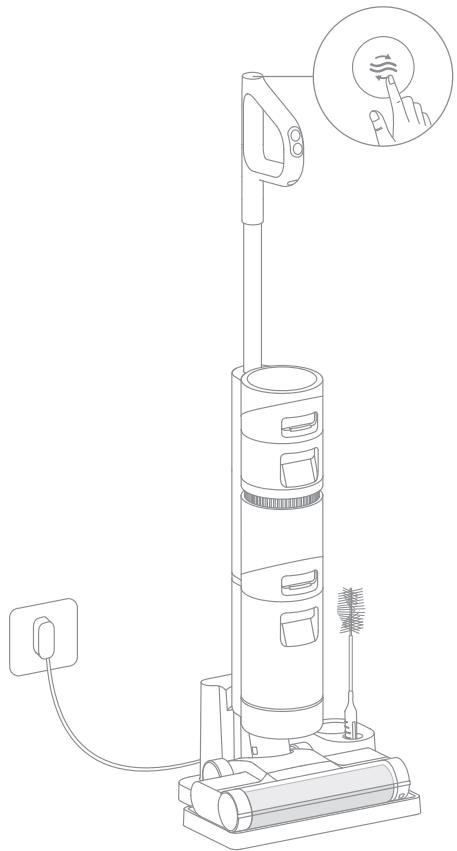
Place the vacuum upright on the charging base after designated cleanups and make sure the clean water tank is full.
- Press the self-cleaning button on the top of the handle briefly, the self-cleaning indicator lights up on the screen and the self-cleaning starts.
- The vacuum will continue to recharge after the self-cleaning is finished.
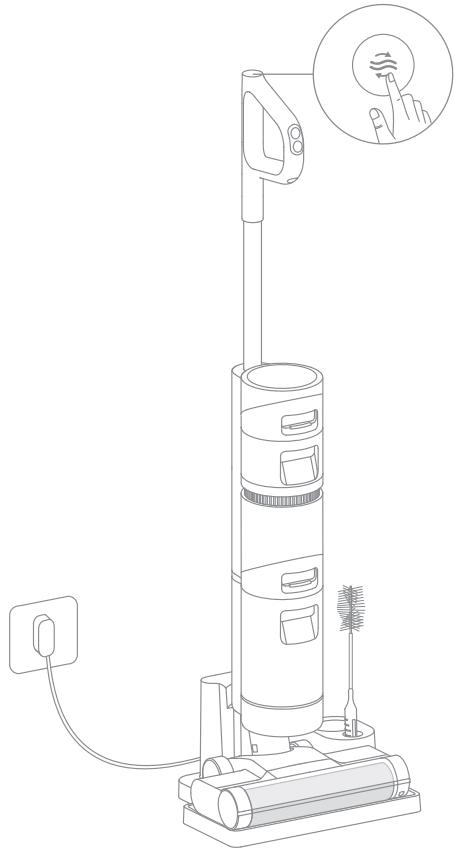
Note:
- If the deep self-cleaning is needed, press and hold the 32 button to activate the deep self-cleaning function. Please fill the clean water tank and empty the dirty water tank before activation, and this function can be activated only when the vacuum is charged and the battery level is more than 30% .
- After self-cleaning is completed, clean the dirty water tank in time. If there are residual stains on the base, please clean up the base in time.
Care & Maintenance
Clean the Roller Brush Cover
-
Clean it as needed.
-
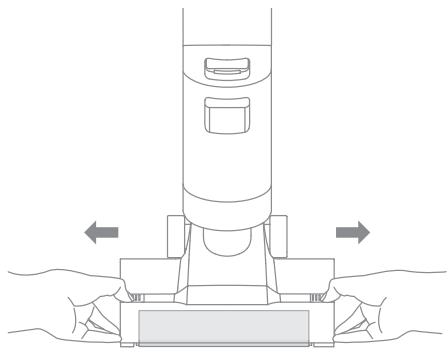
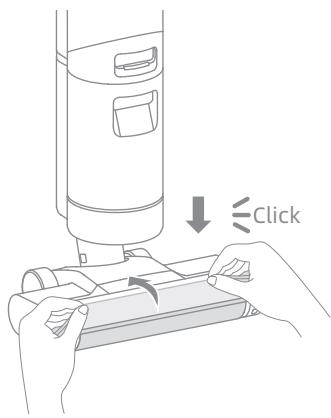
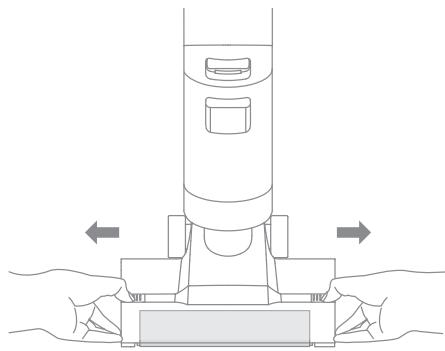
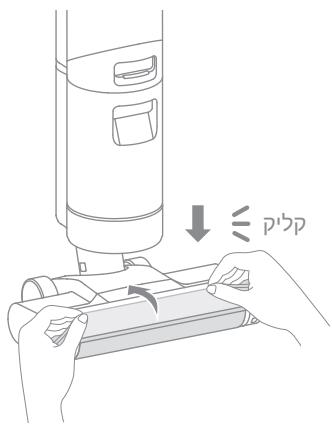
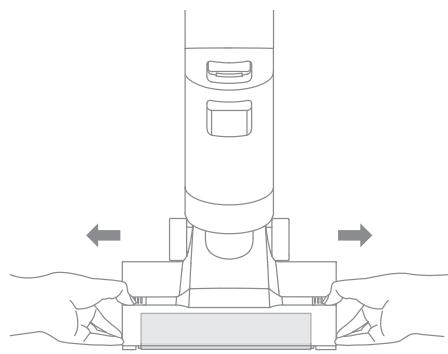
As shown in the figure, press the roller brush cover release buttons on both sides outward to remove the roller brush cover.
-
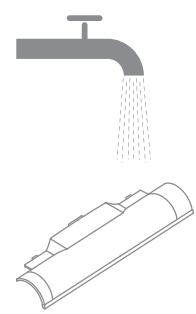
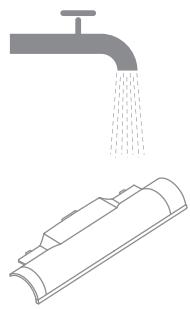
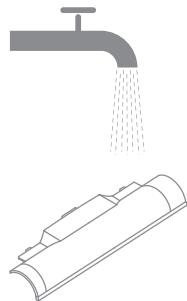
Rinse the roller brush cover with clean water until it is clean.
-
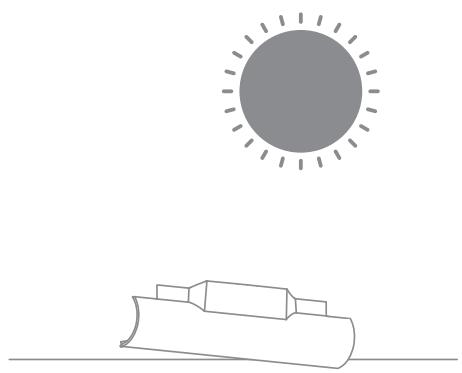
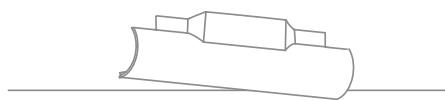
The cover must be thoroughly dried before use.
-
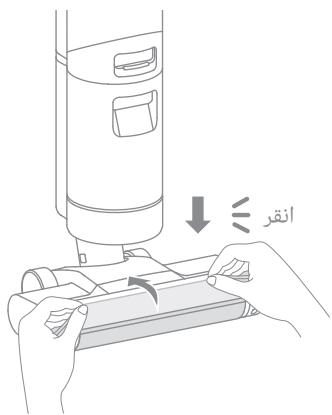
Align the brush cover with the right slot on the vacuum and press the cover down until you hear a click.
Care & Maintenance
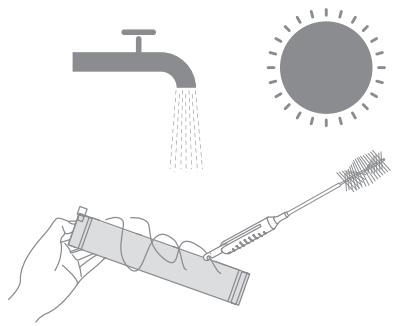
Clean the Roller Brush
-
Clean it as needed, it is recommended to replace it every 3 to 6 months.
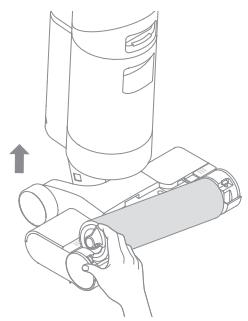
-
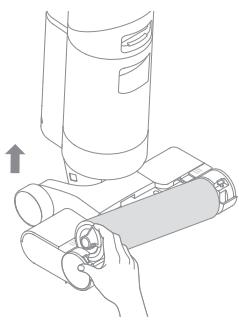
Pull up the left handle of the roller brush and take it out.
-
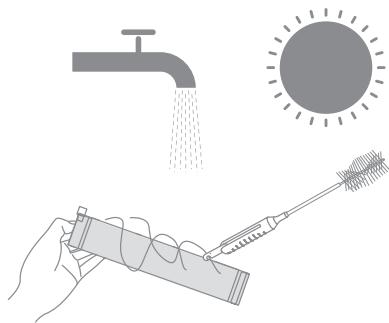
Use the included cleaning brush to remove hairs and debris that get stuck in the roller brush and rinse it with clean water. The roller brush must be thoroughly dried before use.
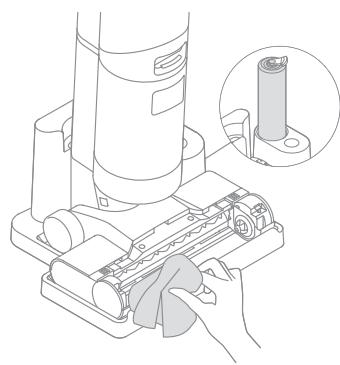
-
Wipe the dust from the dust intake with a dry cloth or paper towel. Never rinse it with water.
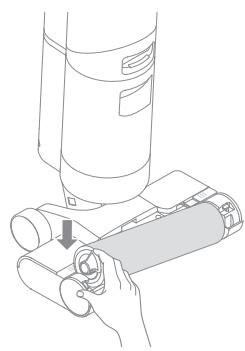
-
After cleaning is completed, align the right end of the roller brush with the right slot on the vacuum and push the left end into the left slot on the vacuum until it clicks into place.
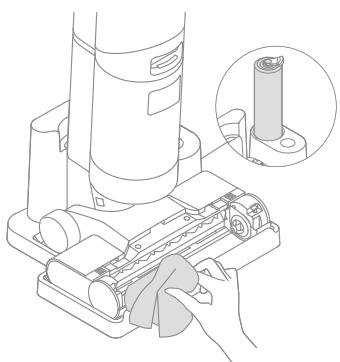
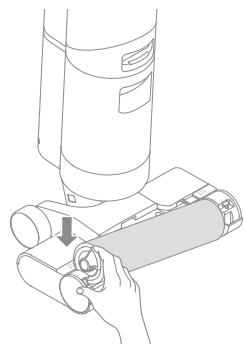
Care & Maintenance
Clean the Dirty Water Tank
-
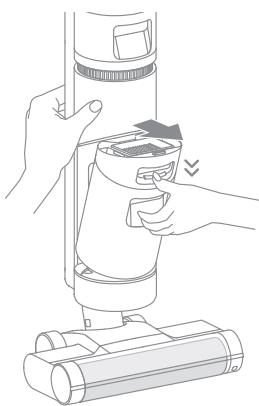
It is recommended to empty the dirty water tank after each use, and before and after the self-cleaning function is enabled.
-
Press the dirty water tank release button and pull it out as indicated.
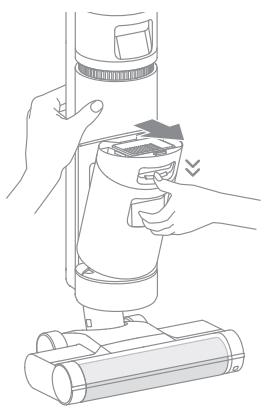
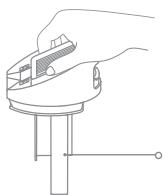
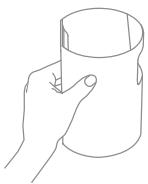
- Hold the tank with one hand and pull up the tank cover with another hand to pour out the dirty water.
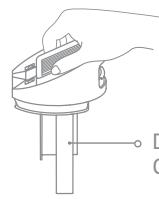
Dirty Water Tank Cover
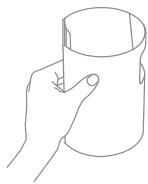
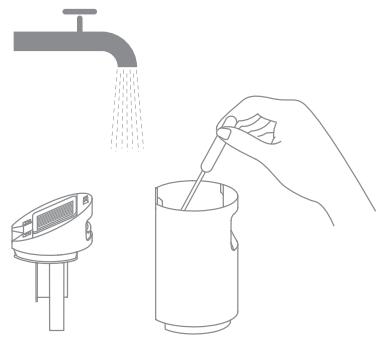
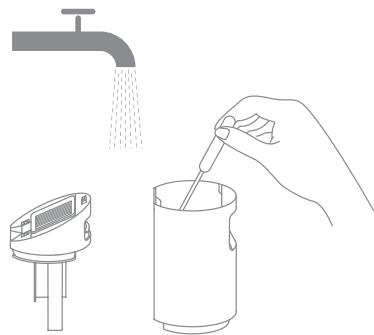
- Rinse the tank and tank cover with clean water. Clean the inner wall of the tank with the included cleaning brush.
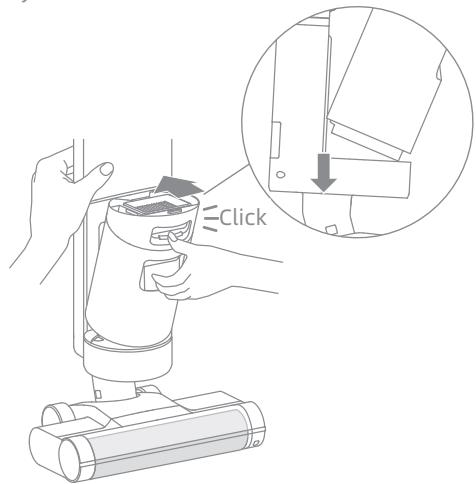
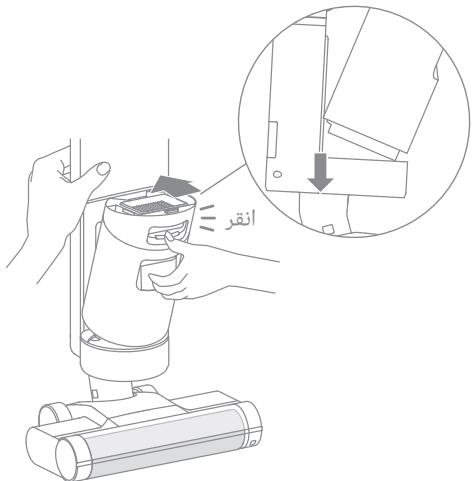
- After the cleaning is completed, close the tank cover, snap the bottom of the tank into the support position of the vacuum, and gently push the tank until you hear a click.
Care & Maintenance
Clean the Filter * It is recommended to clean it after each use and replace it every 3 to 6 months.
-
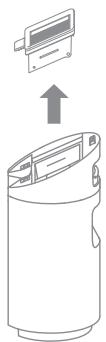
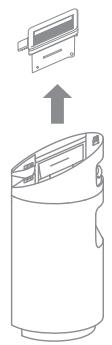
Remove the filter from the top of the dirty water tank.
-
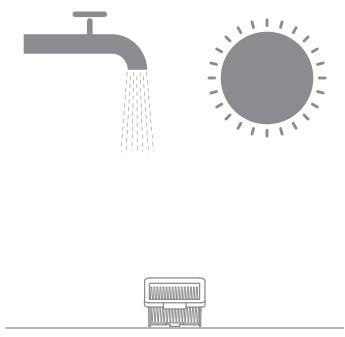
Rinse the filter with clean water.
Thoroughly dry it before re-installing it.
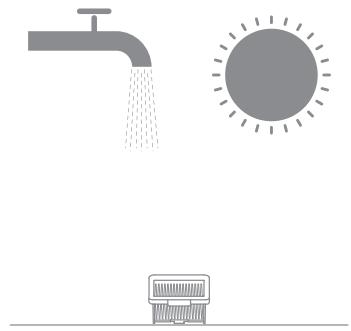
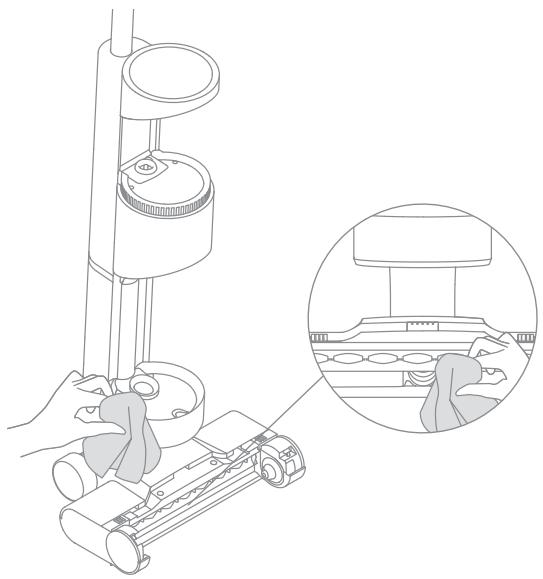
Clean the Tube
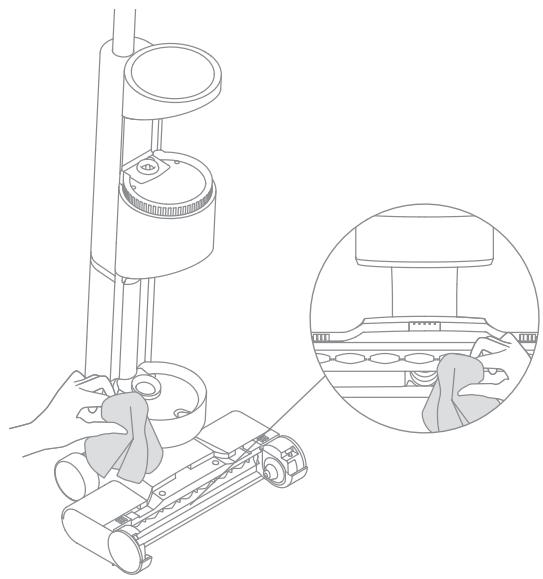
Remove the dirty water tank, wipe it with a damp cloth to clean up the dirt in the tube before use.
| Error | Possible Cause | Solution |
| The vacuum does not work. | The handle assembly has not been installed in place. | Reinstall the handle assembly. |
| The vacuum is out of battery or low on power. | Fully charge the vacuum, then continue to use it. | |
| The vacuum is upright. | Recline the vacuum. | |
| The roller brush has not been installed in place, or the roller brush is stuck. | Reinstall or clean the roller brush. | |
| The dirty water tank has not been installed in place. | Reinstall the dirty water tank. | |
| The dirty water tank is full. | Empty the dirty water tank. | |
| Weak suction force. | The filter is clogged. | Clean the filter. |
| The roller brush cover, filter, and clean water tank have not been installed in place. | Make sure the parts have been installed in place before use. | |
| The roller brush is entangled by hairs. | Refer to the maintenance manual [Clean the Roller Brush] section. | |
| There are some foreign objects in the tube or the tube is blocked. | Clean the tube. | |
| The motor is making a strange noise. | Too much dirty water in the dirty water tank. | Empty the dirty water tank. |
| The main suction opening is blocked. | Clear any blockage in the main suction opening. | |
| The battery status indicator does not light up while charging. | The power adapter is not plugged into the electrical outlet. | Make sure the power adapter is plugged in properly. |
| The power adapter is not connected to the charging base properly. | Make sure they are connected properly. | |
| The battery status indicator does not light up while charging. | The charging base is not connected to the vacuum properly. | Make sure the vacuum is in place. |
| No water flow comes out of the vacuum. | The clean water tank has not been installed in place, or the clean water tank is empty. | Reinstall or fill the clean water tank. |
| Water leakage from the top of the dirty water tank. | A collision or a sharp pull causes water to enter the motor. | Move gently back and forth when the vacuum is turned on. |
| The filter is not completely dry after being cleaned. | Thoroughly dry the filter before use. | |
| Self-cleaning failed. | The roller brush may be jammed by large particles. | Open the brush cover to check and clean the roller brush. |
| The vacuum is not being charged. | Make sure the vacuum is charged before activating the self-cleaning function. | |
| The self-cleaning cannot be started if the battery level is less than 10%. | The self-cleaning function can be enabled only when the vacuum is charged and the battery level is more than 10%. | |
| The dirty water tank has not been installed in place, or the dirty water tank is full. | Reinstall or empty the dirty water tank. | |
| The clean water tank has not been installed in place, or the clean water tank is empty. | Reinstall or fill the clean water tank. |
Troubleshooting
If the vacuum is not working properly, the screen display will show an error message. Please refer to the troubleshooting table to find your solution.
| Error Icon | Possible Cause | Solution |
| Clean water tank empty | Fill the clean water tank. | |
| Dirty water tank not installed | Install the dirty water tank. | |
| Dirty water tank full | Empty the dirty water tank. | |
| Roller brush stuck | Clean the roller brush with the included cleaning brush. | |
| Roller brush not installed | Install the roller brush. | |
| Tube blocked | Check whether the filter is clogged. | |
| Refer to the maintenance manual [Clean the Tube] section. |
| Troubleshooting Code | Possible Cause | Solution |
| E1/EE/EF | Motor error | Please contact customer service. |
| E2/E3/E7/E8/E9 | Battery failure | Please contact customer service. |
| E4/E5 | Power adapter incompatible | Please use the original power adapter, or contact customer service. |
| E6 | Battery overheating | Wait until the battery's temperature returns normal, then continue to use the vacuum. |
| Vacuum | |||
| Model | VWV7 | Charging Time | Approx. 3 hours |
| Rated Voltage | 21.6 V --- | Charging Voltage | 26 V --- |
| Rated Power | 170 W | Rated Capacity | 2300 mAh |
| Nominal Capacity | 2500 mAh | Dirty Water Tank Capacity | 500 mL |
| Clean Water Tank Capacity | 900 mL | ||
| Power Adapter | |||
| Model | YLS0251B-E260090 (EU) / YLS0251A-A260090 (AU) | Average Active Efficiency | 87.28% |
| Input | 100-240 V ~ 50/60 Hz 0.8 A Max | Efficiency at Low Load (10%) | 79.74% |
| Output | 26 V --- 0.9 A | No-Load Power Consumption | 0.08 W |
- This product contains batteries that can only be replaced by qualified technicians or after-sales service.
- This product contains batteries that are non-replaceable.
-
The lithium-ion battery pack contains substances that are hazardous to the environment. Before disposing of the vacuum, please follow the below instructions:
-
Before removing the battery, disconnect the power and run out the battery as much as possible, then remove the bottom cover of the device by unscrewing the screws.
- Disconnect the terminals to remove the battery. To avoid the risk of hazard, do not damage the battery cover.
- Then discard, or recycle the battery in accordance with local laws and regulations of the country or region it is used in.
WEEE Information

All products bearing this symbol are waste electrical and electronic equipment (WEEE as in directive 2012/19/EU) which should not be mixed with unsorted household waste. Instead, you should protect human health and the environment by handing over your waste equipment to a designated collection point for the recycling of waste electrical and electronic equipment, appointed by the government or local authorities. Correct disposal and recycling will help prevent potential negative consequences to the environment and human health. Please contact the installer or local authorities for more information about the location as well as terms and conditions of such collection points.
Nass- & Trockensauger
DE Produktübersicht
HE BbIbPacbIBaIte PYKOBOIDCTBOBAKHbIE MEPbl IpeIOCTOPOXHOCTN
- BbIOnHnTe TexO6cLyKuBaHne ToIbKO c NOMoUbK bAInΦnUPOBaHHOrToTexNepcoHaJa n IcNoJIb3yIe ToIbKO nDEHTUChIe DeTaJIn dJa 3aMeHbI. 3TO n03BOJNT rapaHTnpOBaTb 6e3ONaCHOCTb n3dJIeJIa.
3aPpeaaetcMoDnOuNtropoBaT JI60 YHHTb np6Op cncO6aMn,OTJNUHbIMN OYka3aHHbIX B pyKOBODCTBE NO IcNoJIb3OBAHnU n yxoJe. - 3aπpezaetcncnolb30BaTb IIn6o xpaHnTB n3dJIe ne pnp 3KCTpeMaIbHOI TeMnepatype (HnJke 0^ n BbIwe 40^ ). BbIIOJIHnIte 3apJky 6ecnpoBODHorO nblncocApno TemnepaType Bblwe 0^ n HnJke 40^ .
3aPpeaetcnybItatcncnoIb3OBaTbp6Op,ecnOn6blNoBpeJdeH,poDBepranCnaednmaNb6blOCTabHeHa yInue,paDAnBvOByIb60He pa6TaET naIeXaunm 6pa3om.PpOBoInte peMOHT B aBTOpN3OBaHHOM cepBnCHOM ceHTpe.
ДаанhoeизделиnpedHa3HaueHoToIbKOДЯДOMaш HeroИспльЗовая.МерыnpedoctoPOxHOCtI npi xpaHeHHI n TpaHCnOpTIpOBKe:
- He tpaçncpotnpуnte po60T-nyleocspn tempepatye blyse 50^ nlln hnxke -20°C.
Bcnyae kpaTkocpOuro xpaHeHnaPmep oDHoro Mecaa,blneocpekomehdyetcXpaHnTb npi Tempepatye ot-20°Cdo 50°C nOTHOCTbHOBlaJxHocn 60% ± 5%. Bcnyae dIInTeIbHoro xpaHeHnaPteKOMeHdyetcXpaHnTb npi Tempepatye OkpykaIouee cpebl ot 0°C do 25°C. - YtNiI3npyIte nbIleCoc HndIeXaIIm o6pa3OM. IIO OKOHuaHIn cPoka Cnyk6blyTtN3npyIte nbIleCOC B COOTBeCTBUN C MeCThBiIM N 3aKOHaM N HOPMaTbHBiIMN aKTAmC tPaHbI/perNoHa IcNoJIb3OBaHnJ. DaTy npOn3BODC Ba CM. Ha 3tIKeKcO WtPrx-KoDM.
Mbl, kompania Drame Trading (Tianjin) Co., Ltd., Hactoizm 3aaybme, yto daHHoe n3dene cootBeCTBye Tpe6oBaanm Bcex DeiCTByuOxn DupeKTHB EC n eBponecknx CTaHapTOB CO BCEMN i3MeHeHNMy N doOpJHEnHMyn. PoiHbI TeKCT deKlapaun o COOTBeCTBnH HopMaTINBbIM Tpe6oBaanm EC doctyneH no aDpecy: www.dreametechnology.com
Побhoeэлкронhoe ркововсвсм.паорecy https://www.dreame-technology.com/pages/user-manuals-and-faqs
YnakoBoHybI JNCT
Ba3a dny 3ap4kN
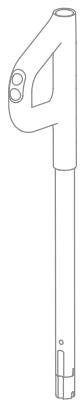
Pyuka
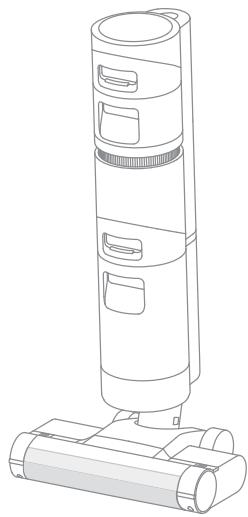
Kopnyc

Дононтульныефуньт

UcTsaA 1
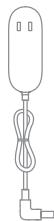
Aaannep nntanhy

Держателдяakceccyapa
IpimechaHne. IJIIOCTpaCIN B daHHo INHCTpyKcIN ppeCDaBHeHb i NCKInOHTeJIbHO BCnpaBOUHbIX CEJx. FakTNueckoe IN3dJeNMe MOKeT IMetb OTNIuYn.
0630р n3деля
Пылесoc

UctahOBka polnKOBoI 5eTKI
БаЗа Для 3арядки
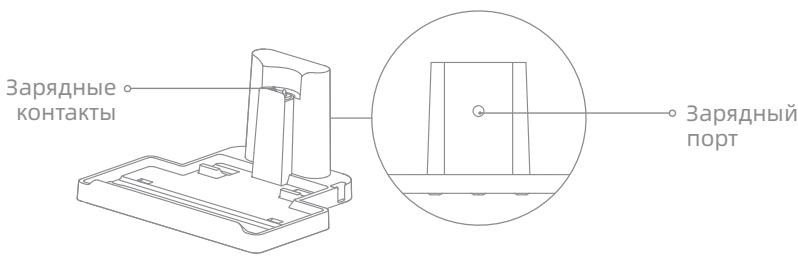
Овзор n3дени
Ducnnei
KhONka TOLOCOBbIX HaONHaHn
UctaHOBKa 6a3bI dIy 3aprKn
UctaHOBtTe dePjKataJIb IJRA akceccyapa Ha 6a3eIJIa 3apJKe corJaCHO INHCTpyKcIyM.
* PekomeHdyetc ydaIaTb Otra6oTaHHyO BODy 36aKa nepei KaJdbIn NCNoJIb3OBaHNEM, a TaKKe Do I NocLe BKNIOUeHnEpyHKUIN CaMOOuNCTKn.
- Haxmnte Ha KhoNky 6aka dny Otpa6oTaHHo BOpbl N3BLeKnTe erO cOrnaCHOHCTpyKUJyM.
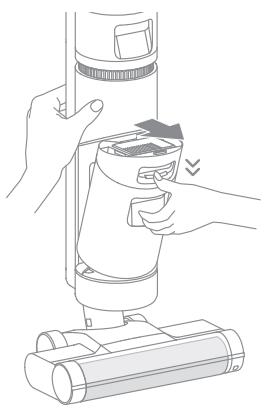
2.ПидерхиBaTe Oнн руко 6ak,a dpyroynpoknotHnKpbIshky BBepx. BbIeTe Otpa60taHny BoY.
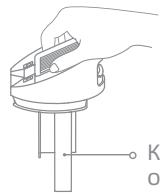
Kpbiuka 6aka c oTra6oTaHHoB BDOI
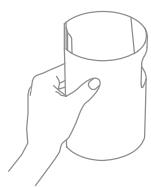
3.ПROMOTe 6ak IN KpbIshky uNCTOJ BOIOJ.ДЯ OUnCTKN BHyTpeHNeI NOBepxHOCTN 6aka INCPOJIb3yInTe UNCTAUYU ⅢETKY B KOMPJIeKTe.
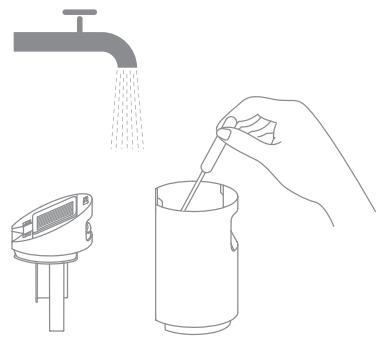
4.ПослезавершениочисткимakpoiteKpbiшky baka,HaBeДиTe dno bakaK pOДСТАВКпьИЕСОСи AkkypaTHOBCTaBbTe bakdo UeJUka, KOTOpbI O3NaHаeT,чTo bak yctahOBlen.
YctpaHHe HeNCpBHOCTe
Ecn nIbIeoc pa6oTaET HeKOppeKTHO,Ha dncnlee OTo6pa3ntc coo6uene 06 ow6ke. Cm. Ta6nUy yctpaHEnHne HncnpaBHOCTeI dny noncka peweHna.
X, pT JI, DpT T X 1000000000000000000000000000000000000000000000000000000000000000000000000
iNninn nnnn nn nnnn nn nnnn nn nnnn nn nnnn nn nnnn nn nnnn nn nnnn nn nnnn nn nnnn nn nnnn nn nnnn nn nnnn nn nnnn nn nnnn nn nnnn nn nnnn nn nnnn nn nnnn nn nnnn nn nnnn nn nnnn nn nnnn nn nnnn nn nnnn nn nnnn
.
1 1 1 1 1 1 1 1 1 1 1 1 1 1 1 1 1 1 1 1 1 1 1
n nn nnnnnnnnnnnnnnnnnnnnnnnnnnnnnnnnnnnnnnnnnnnnnnnnnnnnnnnnnnnnnnnnnnnnnnnnnnnnnnnnnnnnnnnnnnnnnnnnnnnnnnnnnnnnnnnnnnnnnnnnnnnnnnnnnnnnnnnnnnnnnnn
y by ynnn n nn y,ynnnn n nn on .nynnnn n nn on .nynnnn n nn on .nynnnn n nn on .nynnnn n nn on .nynnnn n nn on .nynnnn n nn on .nynnnn n nn on .nynnnn n nn on .nynnnn n nn on .nynnnn n nn on .nynnnn n nn on .nynnnn n nn on .nynnnn
IN DnDnNnNnNnNnNnNnNnNnNnNnNnNnNnNnNnNnNnNnNnNnNnNnNnNnNnNnNnNnNnNnNnNnNnNnNnNnNnNnNnNnNnNnNnNnNnNnNnNnNnNn
...11,1111111111111111111
1
nniin ninn nn nnnn nnnn nnnn nnnn
.1N IN,IN,IN,IN,IN
.1n 60 ynn n nn n nn n nn
n nn n nn nn nn nn nn nn nn nn nn nn nn nn nn nn nn nn nn nn nn nn nn nn nn nn nn nn nn nn nn nn nn nn nn nn nn nn nn nn nn nn nn nn nn nn nn nn nn nn nn nn nn nn nn nn nn nn nn nn nn nn nn nn nn nn nn nn nn nn nn nn nn nn nn nn nn nn nn nn nn nn nn nn nn nn
nniin ninnnnnnnnnnnnnnnnnnnnnnnnnnnnnnnnnnnnnnnnnnnnnnnnnn
Dyuyun yonixdyovnnx.ynynnyonipinn
.
Dyuyonynnynixdyoynnn1x.ynynynynynynn
n nn nnnnnnnnnnnnnnnnnnn
ywnn nn nnnnnnnnnnnnnnnnnnnnnnnnnnnnnnnnnnnnnnnnnnnnnnnnnnnnnnnnnnnnnnnnnnnnnnnnnnnnnnnnnnnnnnnnnnnnnnnnnnnnnnnnnnnnn
.
by oni nn nnnn npnn .nbnn nn na bn nnnn nn nnn by
y
nipn bynna
D. D. D. D. D. D. D. D. D. D. D. D. D. D. D. D. D. D. D. D. D. D. D. D. D. D. D. D. D. D. D. D. D. D. D. D. D. D. D. D. D. D. D. D. D. D. D. D. D. D. D.
i 1
.
ywn yynn nnynnnynnnynnnnnnnnnnnnnnnnnnnnnnnnnnnnnnnnnnnnnnnnnnnnnnnnnnnnnnnnnnnnnnnnnnnnnnnnnnnnnnnnnnnnnnnnnnnnnnnnnnnnn
yNINNINNNN NNNNNNNNNNNNNNNNNNNNNNN
.
.
n 1001 . wnn n nn nnn nnn "n" nnn nnn nnn nnn nnn nnn
n nn nn nn nn nn nn nn nn nn nn nn nn nn nn nn nn nn nn nn nn nn nn nn nn nn nn nn nn nn nn nn nn nn nn nn nn nn nn nn nn nn nn nn nn nn nn nn nn nn nn nn nn nn nn nn nn nn nn nn nn nn nn nn nn nn nn nn nn nn nn nn nn nn nn nn nn nn nn
yipn yin by pnnnnnnnnn nn nnnn
bNnIn by nW
D'IVN nn nn N
n nnnnnnnnnnnnnnnnnnnnnnnnnnnnnnnnnnnnnnnnnnnnnnnnnnnnnnnnnnnnnnnnnnnnnnnnnnnnnnnnnnnnnnnnnnnnnnnnnnnnnnnnnnn
.
. npnniin nnnn nn nnnnnnnnnnnnnnnnnnnnnnnnn
(40^ / 104^ by IN F 32^ / ^0 -nnnn) nn n nn nn nn nn nn nn nn nn nn nn
.40°C /104° F- nnnnF 32°/C0 yyn nnnynnn nn nn nn nn
.
nni nnn
#
y0
ninnnnnn

197n non

n nn
wnnn

T
X
yuyo
TIP TIP
yun o npnn
n nn nnnnnnnnnnn
JINN NNN
y
.
ninn nnnnnnnnnnnnnnnnnnnnnnnnnnnnnnnnnnnnnnnnnnnnnnn
nyn nnn nn nn nn nn nn nn nn nn nn


三 p>p

2
iinnnnn nn nnnn nn nnnn nn nn nn nn nn
o'ennnnn nn nnnn nn nnnn nn nnnn nn nnnn nn nnnn .1
ywnnniyn
y 2
nbn 100- y nn nnnn nn nn nn nn nn nn nn nn nn nn nn nn nn nn nn nn nn nn nn nn nn nn nn nn nn nn nn nn nn nn nn nn nn nn nn nn nn nn nn nn nn nn nn nn nn nn nn nn nn nn nn nn nn nn nn nn nn nn nn nn nn nn nn nn nn nn
10nnn nn n nn nn nn nn nn nn nn nn nn nn nn nn nn nn nn nn nn nn nn nn nn nn nn nn nn nn nn nn nn nn nn nn nn nn nn nn nn nn nn nn nn nn nn nn nn nn nn nn nn nn nn nn nn nn nn nn nn nn nn nn nn nn nn nn nn nn nn nn nn
Dn nn nn nn nn
n nn nnnnnnnnnnnn .2
nnnnn nn nnnnnnnnnnnnnnnnnnnnnnnnnnnnnnnnnnnnnnnnnnnnnnnnnnnnnnnnnnnnnnnnnnnnnnnnnnnnnnnnnnnnn

ninn nnn nnn nnn nn nnn nnn nnn nnn nnn nnn nnn nnn nnn nnn nnn nnn nnn nnn nnn nnn nnn nnn nnn nnn nnn nnn nnn nnn nnn nnn nnn nnn nnn nnn nnn nnn nnn nnn nnn
n nn nnnn nn by nnn 140-n nn nn nn nn nn nn nn
nnu nnn
9 1
:1
.1
nnn nn nnnnnnnnnnnnnnnnnnnnnnnnnnnnnnnnnnnnnnnnnnnnnnnnnnnnnnnnnnnnnnnnnnnnnnnnnnnnnnnnnnnnnnn
.
JONN JUON N PnB,NNN Nn BnONy T y UON W,NNN NnipnWnXnNnN .3
yinyin yuyun yin bion yinyi yuanyu by iipn i
.
TNN p'p'ny-1p
.10% by n nn nbion nn ynnn nn nynnn nn n nn n nn n nn
n nn nnnnnnnnnnnnnnnnnnnnnnnnnnnnnnnnnnnnnnnnnnnnnnnnnnnnnnnnnnnnnnnnnnnnnnnnnnnnnnnnnnnnnnnnnnnnnnnnnnnnnnnnnnnnnnnnn
.
.0nonnny-1nnny 1ywn nnyn .3
yynnynnn nn yynny n 1n nn npinnn n, pny ny -n nn n y. n n n n n n n n n n n n n n n n n n n n n n n n n n n n n n
.30% -n nnnn nn nnnn nn nnnn nn nnnn nn
y,nnn nn nn nn nn nn nn nn nn nn nn nn nn nn nn nn nn nn nn nn nn nn nn nn nn nn nn nn nn nn nn nn nn nn nn nn nn nn nn nn nn nn nn nn nn nn nn nn nn nn nn nn nn nn nn nn nn nn nn nn nn nn nn nn nn nn nn nn nn nn nn nn nn nn nn nn nn nn nn
.
.
nbnnnnnnnnnnnnnnn
D'pOyNnNnNnNnN2. .P
nnnnnnnnnnnnnnnnnnnnnnnnnnnnnnnnnnnnnnnnnnnnnnnnnnnnnnnnnnnnnnnnnnnnnnnnnnnnnnnnnnnnnnnnnnnnnnnnnnnnnnnnn
ynn nn nn nn nn nn nn nn nn nn nn nn nn nn nn nn nn nn nn nn nn nn nn nn nn nn nn nn nn nn nn nn nn nn nn nn nn nn nn nn nn nn nn nn nn nn nn nn nn nn nn nn nn nn nn nn nn nn nn nn nn nn nn nn nn nn nn nn nn nn nn nn nn nn nn nn nn nn nn nn nn nn nn nn nn nn nn nn nn nn nn nn nn nn nn nn nn nn nn nn nn
ybn nn noyn by .3


n nn nnn nnn nnn nnn nnn nnn nnn nnn nnn nnn nnn nnn nnn nnn nnn nnn nnn nnn nnn nnn nnn nnn nnn nnn nnn nnn nnn nnn nnn nnn nnn nnn nnn nnn nnn nnn nnn nnn nnn nnn nnn nnn nnn nnn nnn nnn nnn nnn nnn nnn nann
i 1000 1111 1111 1111 1111
n nn nnnn nn nnnn nn nnnnnnnnnnnnnnnnnnnnnnnnnnnnnnnnnnnnnnnnnnnnnnnnnnnnnnnnnnnnnnnnnnnnnnnnnnnnnnnnnnnnnnnnnnnnnnn
nnnnn nn nnnn nn nnnnnn nn
n nn nn nn nn nn nn nn nn nn nn nn nn nn nn nn nn nn
. nnnn nn by ,nssion by iinn
.
aolo laole
baa jiaol pduuU
: aJll aoXuul oIgbs e Jull LsU yuoyj 10 uuauiu .
aodoo 1000
S AOB = S AOB
:laolglaLgSdoosogcgrgablo-
aiaai a 10 yagolal adgolal
g g aal bllg jai jia jauwly obaa jcw laojla
jolal jolagoljol aogjll gajd. jolalgolgolgolgolgolgolgolgolgolgol
.
Igulgulj JlalbJ no jurally aeg oag lge yogol plaiuill sie g. auiSaly wllly JlaBll pae
L
Jl aaii iaii oaii g /.aaiyjai jaii jaiyai yoi g / JaiuXu Xu oai u
gge gge gge gge gge gge gge gge gge gge gge gge gge gge gge gge gge gge gge gge gge gge gge gge gge gge gge gge gge gge gge gge gge gge gge gge gge gge gge gge gge gge gge gge gge gge gge
pduu. laa jaglgl go yll Jauaull aalall aellal alao! oogduduol, ailll lnnj
. YLS0251B-E260090 (EU) / YLS0251A-A260090 (AU)
jol oolw ool wol d. aeiaal aS wll J no uauuall jolullaayyul
. 5
.aaaiia aiaa aaiiia jai iie lae gaoai. Jilai ai aiaiai
jll 4yall sglg lal all yall g aagg gllg alall g aal
.ajlo
gJlal Jlll aJgj pJc Jlll ldd jdlalalpaae oJdaxaJglal aasG gJbBd pdd
aLgS UgSo UcUgOu
jll no loglglde lalb: aicg jll slln ic ayolqall aaii
aagllgjjjooJy
-
-
-
-
-
-
-
-
-
-
-
-
-
-
-
-
-
-
-
-
- 1.
-
-
-
-
-
-
-
-
-
-
-
-
-
-
-
-
-
-
-
p dssss sssss g 1111 1111 1111 1111 1111 1111 1111 11
jzjj jzjj jzjj jzjj jzjj jzjj jzjj
AaAsoll pddssg, Jgjll Jao gJoo U ayall gJlauu U ayall Jglawl Ilaea AasSoll
ED = 1
. 1
ydi 12g yjlll jdyjdl a jzj jai jai jai jai jai jai
.
jooallll jaaikoll no lallgaylaibn no jaoalllll
.
Jog JIe. slall aalw, oer wuLi uo du alu. Jilw Ioo
i 1
.0g>9
j 1 j 1 j 1 j 1 j 1 j 1 j 1 j 1 j 1 j 1 j 1 j 1
A. a. a. a. a. a. a. a. a. a. a. a. a. a. a. a. a. a. a. a. a. a. a. a. a. a. a. a. a. a. a. a. a. a. a. a. a. a. a. a. a. a. a. a. a. a. a. a. a. a. a.
aalll aaiii dic jaiy gji
y. alg jlll bll l J aaiil 1aaii 1 1 1 1 1 1 1 1 1 1 1
Jg 1 J 1 1 1 1 1 1 1 1 1 1 1
.
do10 log120
aolo aIoo 1s1
pallw lall w jaww adol jie gab pluulw yloj aowg ayll all sly
.
aieiig piae iiaoe j aie glo slu wly jglal ylaogjduy pa
jglg32/aj0 jal) 1 g aiaa
/00000000000000000000000000000000000000000000000000000
104/20 40 32
y. alaiw lglj x, lae b jgsl jg a sbgaw g c jdy d jg jlgjlogaw all
.aa 100ds jy do ydo
jouill ool

yululjil

ailllU20

Cldall Jda
J
all 100
2^2 + ( 3 - x) ^2 = 5
gauo lao gj Jatui jyuaa yjai laol
gwal
jaxd dcl
jowl oxla lgl 1aol Jolo
JolS JIJI 1
WJ LJI I I JI JI JI JI JI JI JI JI JI JI JI JI JI JI JI JI JI JI JI JI JI JI JI JI JI JI JI JI JI JI JI JI JI JI JI JI JI JI JI JI JI JI JI JI JI JI JI JI JI JI J1
.0oJgJgLoJauwU JJJolKUy AyyuJlu:aa
Jg jaxll sclay aal Jgfo gfo sb Jgogg pag blll ayjgo aggaae oJc jxlls cLg .1
Laiuai Jaiyaiolaiyaiolaiyaiyaiyaiyaiyaiyaiyai
cIaoll I 1 a a b aol. caii w g aayy aai Soll wg Jauu w
即为 1 - S2S1 + S2 =
Jxg golg jI aissall lolpa2g,gsjgl Jaxg Jg Jaoi Iocic:aaai
.0aal 140 joo aai 1
biul 5 giua
A 3 J 5 J 1 1 1 1 0 0 0 0 aaiSall jaoa
oofojoojj
.10% joojaiylll gssgag yllsall jow sie jilldal aalaaabn jao
ololljol jol oJ 1og oJooall aaiiull lIac Jy jooall oJcLg paaaag g adaiisoll
.aa
1wog:awlglcJdlalabllwzgfoaagw;Jaaalallclj jlllalbllj jlc
aaii iiaai iiaai
ab = 10
jlll laii i aabg jaiis 1 jlljlejaiaybalei , qaiell jlllaiaiaiaiaiaiaiaiaiaiaiaiaiaiaiaiaiaiaiaiaiaiaiaiaiaiaiaiaiaiaiaiaiaiaiaiaiaiaiaiaiaiaiaiaiaiaiaiaiaiaiaiaiaiai
aag aagaaagaaagaaagaaagaaagaaagaaagaaagaaagaaagaaagaaagaaagaaagaaagaaagaaagaaagaaagaaagaaagaaagaaagaaagaaagaaagaaagaaagaaagaaagaaagaaagaaagaaagaaagaaagaaagaaagaaagaa
.30% joojaiJlauIgssuog jgsuio Jgssyloic I
aagaiiis 1j. waii i g aaiia oai jz ai jilai joi slqai
aaii i aaii
aJ111
s G a bll slly oJgU Ua jll sllac Jalw.2 .
Jj jilao Jc laol Jsll g zgo go las.1
Jj jzJuJJnjjJL 5 Jc oJgJU Lw sIbac .JgJU Lw sIb
jwslg oolwll sbc o1lsw 4
Jawl jslbll lc bclg ayryssll wssll
.aae e gao elaw
.15u 1 J 1 1 1 1 1 1 1 1 1 1 1 1 1 1 1 1 1 1 1 1 1 1 1 1 1 1

6 135 allalall alal
Jg jwll aIj yllal lal wol 2 J slaly IaIbawlg oJgwl olwrall aIe Iclwg IuOJgwl olwali Oxag JUcAai J .
1g 125 1gJU 10uJU uJU JuaJU.7
p 111 111 111 111 111 111 111 111 111 111 111 111 111 111 111 111 111 111 111 111 111 111 1
iAol jwla jll Jdo jwl 3.1y slly adai 2g, g adiaio g
aaiolol jzjz
111 111 111 111 111 111 111 111 111 111 111
Jzjzllsblg zolg jzoll 2 .
Jdaxwgl xuall oall jjg jjjl aol .1. 1000 gosLc
allololl j
gJgJgJgJgJgJgJgJgJgJgJgJgJgJgJgJgJgJgJgJgJgJgJgJgJgJgJgJgJgJgJgJgJgJgJgJgJgJgJgJgJgJgJgJgJgJgJgJgJgJg
slll 100000000000000000000000000000000000000000000000000000000000000000000
6 13 JS aalwgl wol J5 ay aaiy
Jd 1 aaege, caiuill slly juiil calai.2
..
aaiolol oolol jzj zcl jno jull all jy.1
1 1
j 1
.