
NAIL PEN - Manicure device LANAFORM - Free user manual and instructions
Find the device manual for free NAIL PEN LANAFORM in PDF.



| Product type | Manicure and pedicure device |
| Brand | LANAFORM |
| Model | NAIL PEN |
| Power | Lithium rechargeable battery via USB (USB cable included) |
| Charging time | Approximately 2.5 hours |
| Battery life | 90 minutes |
| Rotation speed | Adjustable with speed control |
| Rotation direction | Reversible (selectable by button) |
| Included accessories | 6 attachments: pointed bit, abrasive cone, polishing cone, fur cone, cylindrical bit, sleeve + travel case + storage box |
| Max continuous use | 20 minutes, then 15-minute pause |
| Application areas | Hands (manicure) and feet (pedicure) |
| Weight | Approximately 150 g (estimated) |
| Dimensions | Approximately 15 x 3 x 3 cm (estimated) |
| Housing material | Plastic |
| Warranty | 2-year limited (material and manufacturing defects) |
| Maintenance | Clean with a slightly damp cloth, do not immerse, do not use abrasive products |
| Safety | Do not use in water, keep away from heat sources, monitor temperature, keep out of reach of children |
Frequently Asked Questions - NAIL PEN LANAFORM
User questions about NAIL PEN LANAFORM
0 question about this device. Answer the ones you know or ask your own.
Ask a new question about this device
Download the instructions for your Manicure device in PDF format for free! Find your manual NAIL PEN - LANAFORM and take your electronic device back in hand. On this page are published all the documents necessary for the use of your device. NAIL PEN by LANAFORM.
USER MANUAL NAIL PEN LANAFORM
EN ENGLISH MANICURE-PEDICURE SET
FR FRANÇAIS MANUCURE-PEDICURE SET
NL NEDERLANDS MANICURE-PEDICURESET
RO ROMÁNÁ SET DE MANICHIURA-PEDICHIURA
SL SLOVENSCINA KOMPLET
ZA MANIKIRO/PEDIKURO
BG bJIAPCKN KOMJIJEKT
3A MAHUKOP IN PEDIKOP
11
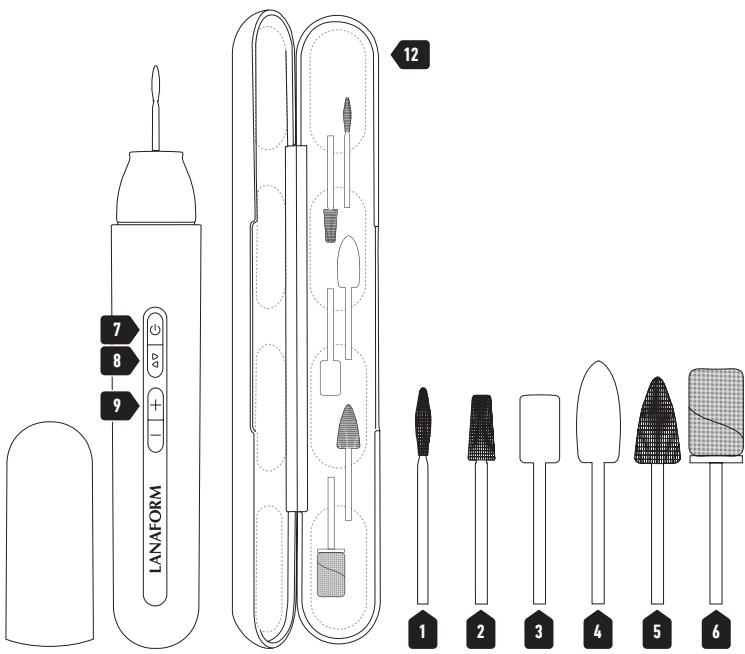
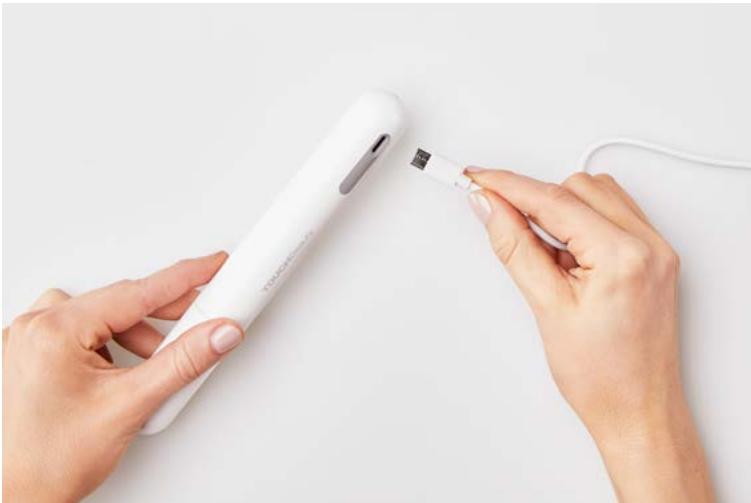
图2.1
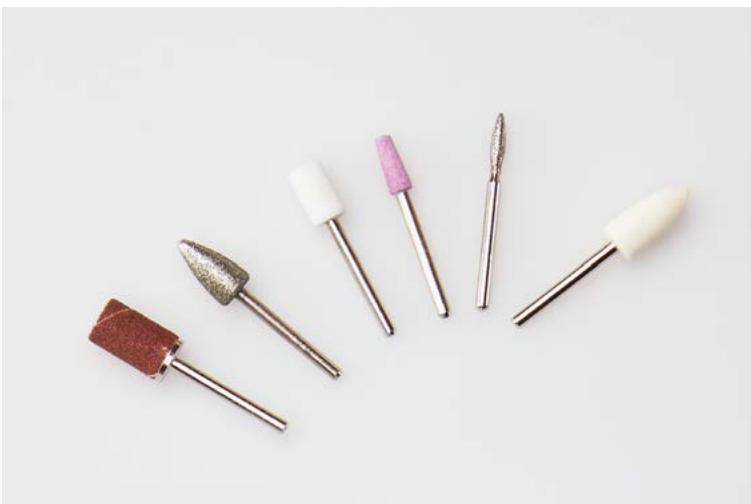
2.2
Introduction
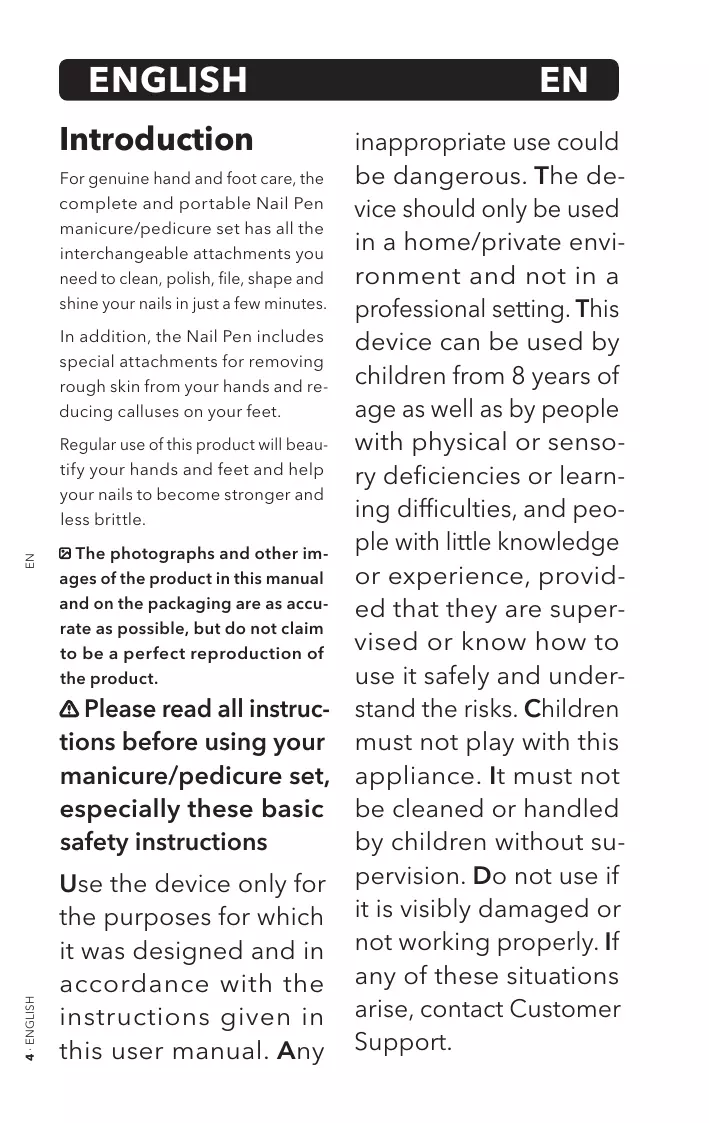
For genuine hand and foot care, the complete and portable Nail Pen manicure/pedicure set has all the interchangeable attachments you need to clean, polish, file, shape and shine your nails in just a few minutes.
In addition, the Nail Pen includes special attachments for removing rough skin from your hands and reducing calluses on your feet.
Regular use of this product will beautify your hands and feet and help your nails to become stronger and less brittle.
The photographs and other images of the product in this manual and on the packaging are as accurate as possible, but do not claim to be a perfect reproduction of the product.
Please read all instructions before using your manicure/pedicure set, especially these basic safety instructions
Use the device only for the purposes for which it was designed and in accordance with the instructions given in this user manual. Any
inappropriate use could be dangerous. The device should only be used in a home/private environment and not in a professional setting. This device can be used by children from 8 years of age as well as by people with physical or sensory deficiencies or learning difficulties, and people with little knowledge or experience, provided that they are supervised or know how to use it safely and understand the risks. Children must not play with this appliance. It must not be cleaned or handled by children without supervision. Do not use if it is visibly damaged or not working properly. If any of these situations arise, contact Customer Support.
This device is designed to be used for short periods only. Do not use this device for more than 20 minutes at a time. You must wait 15 minutes between each use. Under no circumstances should you open or repair the device; it would no longer be possible to guarantee that the device would work properly. Failure to comply with this instruction will void the warranty. Store this device out of the reach of children. During use, monitor the results regularly. This advice applies to diabetics in particular, because they are less sensitive to pain and can injure themselves more easily. Always use the device with great care. If in doubt, ask your doctor for advice. In the event of prolonged intensive use of
the device, for example when scrubbing calluses on the feet, the device may get significantly hotter. To avoid burning the skin, longer breaks should be observed between each use. For your own safety, continuously check the heat being generated by the device. This advice is especially intended for people who are sensitive to heat. The manufacturer cannot be held responsible for damage caused by inappropriate or improper use. Keep the packaging out of the reach of children. They could suffocate. If the device is faulty or breaks down, switch it off immediately. Use the device only with the accessories provided. Do not use the device on animals. Avoid contact with water (except when cleaning with
a slightly damp cloth!).
Under no circumstances should water get in-
side the device. Never
immerse the device. Do not use the appliance in
the bath, in the shower,
in a swimming pool orabove a washbasin filled
with water. If water enters the casing, unplug
the device immediatelyand contact your e-sell-
er or customer supportdepartment. Make sure
that the rotating attachments are not likely to
catch hair when using the device. To avoid this, keep your hair tied back.
Your hands should always be dry when using
the device. This device is intended for use on
hands (manicure) and feet (pedicure). Keep the
device away from sources of heat. Do not use
under blankets, cushions, etc.
Battery notes
If the liquid from the battery cell comes into contact with your skin or eyes, rinse the area affected with water and consult a doctor. Keep the batteries away from excessive heat. They are an explosion hazard! Do not throw batteries on a fire. Do not disassemble, open or break the batteries. The batteries must be properly charged before use. To charge the device, always follow the manufacturer's instructions or the information contained in this user manual. Charge the battery fully before first use. Recharge the battery fully at least twice a year to reach its maximum service life.
Recommendations for a power supply via USB
When you connect a device via the USB port on your computer, make sure that it can provide the electrical power required. Always use USB ports 3.0 or higher and connect laptops to the mains supply. Otherwise the device might not work or work with impaired performance. Use of a USB power adapter capable of delivering at least 1.0A is recommended for optimum performance.
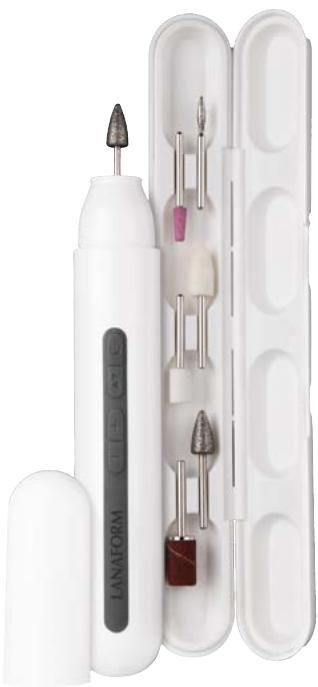
Description of the manicure/pedicure set 1
01 Pointed bit
02 Abrasive cone
03 Polishing cone
04 Felt cone
05 Cylindrical bit
06 Sanding band
07 ON/OFF button
08 Direction button
09 Speed +/-
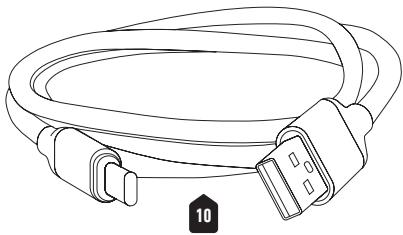
10 USB cable
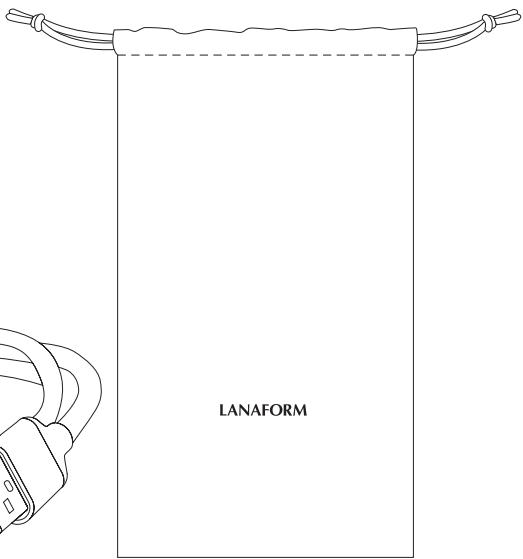
11 Carry case
12 Storage box
Instructions for use 2
Charging the device
You can charge your device using the USB cable provided. Connect the USB charger cable to a suitable mains adapter and the device (2.1). Then plug the mains power adaptor into a suitable mains socket. You can also recharge the device with the USB charging cable via the USB plug on your computer.
The charging LED indicator flashes red while the device is charging and turns blue when the battery is charged.
When the battery is low, the charge indicator flashes red. When the battery is empty, the device automatically switches off.
The charging time is approximately 2.5 hours and the device's battery life is 90 minutes once charged.
Using the device
01 Remove the USB cable from the device after charging it.
02 Open the attachment compartment. Choose the desired treatment attachment and insert it into the notch on the main unit (2.2).
03 Press the ON/OFF button for a few seconds.
04 Select the direction of rotation and the desired rotation speed using the relevant
buttons. Please select a lowspeed to start your treatment.
05 To turn off the device, press the On/Off button.
The manicure and pedicure box includes 6 interchangeable attachments for professional standard of treatment at home (1.2)
01 Pointed bit: This cleans the natural nail on the sides and pushes the cuticles back gently, without damaging them. Use at low speed for precision work. It also releases ingrown nails.
02 Abrasive cone: This is intended to prepare the natural nail before varnishing. Helps remove cuticles, small areas of dead skin, etc.
03 Polishing cone: This polishes and files the surface of the nail. Slide it over the entire surface to buff the nail without harming it.
04 Felt cone: Polishes your nails for a perfect, shiny finish. This helps nail varnish application and enables it to hold for longer. If used regularly, it can make nails less brittle.
05 Cylindrical bit: Removal of dry skin, calluses and corns on the soles of the feet and heels.
06 Sanding band: This tip is used with abrasive bands. It
is used to restore and refine modelling on false nails made from UV gel or acrylic resin. It should be used carefully.
Maintenance and storage
Maintenance
Make sure the device is switched off and disconnected from the USB cable before cleaning.
- Be sure to remove the batteries from the device before cleaning.
- Do not immerse the device in liquid to clean it.
- Use mild detergent. Pat dry with a clean, dry cloth.
- Never use abrasive cleaners, brushes, petrol, kerosene, glass or furniture cleaning products, paint thinner or water to clean the appliance.
Storage
- Store the device in its box in a secure, dry and cool place.
- The device uses a lithium battery. Do not store the device in a hot or humid environment for long periods of time. If you want to store the device for a long time, make sure the battery is charged.

Advice regarding the disposal of waste
All the packaging is composed of materials that pose no hazard for the environment and which can be disposed of at your local sorting centre to be used as secondary raw materials. The cardboard may be disposed of in a paper recycling bin. The packaging film must be taken to your local sorting and recycling centre.
When you have finished using the device, please dispose of it in an environmentally friendly way and in accordance with the law.
Limited warranty
LANAFORM guarantees this product against any material or manufacturing defect for a period of two years from the date of purchase, except in the circumstances described below.
The LANAFORM guarantee does not cover damage caused as a result of
normal wear to this product. In addition, the guarantee covering this LANAFORM product does not cover damage caused by abusive or inappropriate or incorrect use, accidents, the use of unauthorized accessories, changes made to the product or any other circumstance, of whatever sort, that is outside LANAFORM's control.
LANAFORM may not be held liable for any type of circumstantial, indirect or specific damage.
All implicit guarantees relating to the suitability of the product are limited to a period of two years from the initial date of purchase as long as a copy of the proof of purchase can be supplied.
On receipt, LANAFORM will repair or replace your appliance at its discretion and will return it to you. The guarantee is only valid through LANAFORM's Service Centre. Any attempt to maintain this product by a person other than LANAFORM's Service Centre will render this guarantee void.
Introduction
Remarques relatives aux batteries
He n3noJ3BaIte ypeJa POn OJeJa, Bb3rJaBnCn I dp.
Белеки за батерпente
Ako TeuhoCT OTo 6aTeepnnte nonaHne Bbpxy Koxata nnB Oounte, n3PnaKhete oBnno 3aceHaTaTa oBlaact CBoDa n Notbpcete Jekap.
He Xbpynte 6aTeepnTe BOrhJ.
He pa3rno6yBaIte, OTBaRpaIte n He pa3bNAIte 6aTepeInTe.
Ipeyn ynoTppe6a 6aTeepnnte Tpr6Ba da 6bDaT 3apeHn npabnilho. 3a Da
3apeiTe ypeia, BnHaI cIeDbaTte
HnhtpykunnteHa npOn3BODnteIyIu HhOpMaucnraB
TOBa pBkoBOndTO.
PpeiPiBpBaTa ynoTpe6a 3apeTe HanbIHo 6aTepeyra.
Ppe3apejdaηte HanbIHo 6aTeepnraTa nOHe 2 nbTn rOdiuHoo, 3a da noCTnrgheTe MaKcMmaJIHHy JxVBOT.
Пpenopьки 3a 3axpaHbaHe npe3 USB
Korato cBb3BaTe yctpoiCTBO KbM USB npTa ha KOMnIOTpBp, yBepete ce ye, KOMnIOtBpbT MoKe Da ocNrgyn Heo6xOaIMata eJeKTPnuCeKa moHocT. BnHaRn no3BaIte USB 3.0 nIn no-HOBa MOINΦkaUa. IN BnHaRn CbBp3BaIte JaPTOnITe KbM eJeKTPnuCeKn KOHTAKT. B npOTnbEn Cnyauy yCTPOIcTBOTo MoKe da He pa6oTN iIN da pa6oTIc HamaJIeHn TexHnueCkn NOKa3aTeJI. 3a ONTMaJIHa pa6ota ce npenOpbYBa u3noJ3BaHeTo Ha 3axpaHbAùs USB aadantep, KoITo MoKe Da ocNrgypm MInHMym 1.0A.
Описни КOMПлекТа 3a MaHнкюр/педникop 图1
01 ToykoB HOX
02 A6pa3nBEN KOHyc
03 PoinpuaKoHyc
04 ΦιЛIOB KOHYC
05 LInnHnpuHa ppe3a
06 MaHsOH
07 BytoH BKJI./I3KJI.
08 BytoH 3a nocKa Ha opneHTaun
09 CkopocT +/-
10 USB ka6eJ
11 YuHTnUka 3a HocHe
12 Kytna 3a cbxpanenne
Hnctpykun 3a ynoTppe6a 2
3apekdaheHa ypeda
Mokjete da 3apejdaTe ypeJa cn c npedoctabenra USB ka6eJ. CBbprkete USB ka6eJa 3a 3apejdaHe c noxodja3axpaHbaa aanTep n ypeJa (2.1). CneT oBa BkIouhe 3aXpaHbaaun aanTep B noxodJa eektpnueckn kOHTaK. Mojete cbso da 3apeJnte ypeJa c USB ka6eJa 3a 3apejdaHe npes USB nopTa ha Ba7nKaomnToBp.
CBeToIONoBt 3a 3apeKdaHe mura B ueRbeHo,doKaTo ypeJa ce 3apeXda n cTaba CnH, KOraTo 6aTePnraTa e 3apeDeHa.
Korato 6aTepeyra e n3ToSeHa, CBeTOIOoBt 3a 3apejdahe MnRa B cepBeHo. Korato 6aTepeyra ce n3ToU, ypeBt ce n3KlOuBa aBTOMaTNoHO.
BpemeTo 3a 3apeXdaH e np6n3ntenHo2,5uaca,aXNBOtBt
Ha 6aTepeNaTa cIeI 3apeKdaHe e 90 MNHTN.
Използваны урEDA
01 N3bAeTe USB ka6eIa ot ypeIa, cIeI KaTo ro 3apeIte.
02 OToBopeteOToJIeHHeNTo 3a akcecoapn. N36peTe XeJaanHaKcceCoap 3a rpnka I rnoocTaBeT B rHe3dOTO Ha oCHOBHN Moyn (2.2).
03 HatncheTe npoDbJxuTeHNo 6yToHa 3a BkJIouBaHe/ n3KJIIOUBAHe.
04 N36epete nocokata Ha Bbptene HKeJahata ckopocT Ha Bbptene, KaTo n3noJ3BaTe CbOTBeTHnte 6ytoHn. MoJia, N36epete HnCKa ckopocT, 3a Da 3anOpHe TpeTnpaHeto.
05 3a da n3KJIIOUHTe ypeda, haTnCSHete 6yToHa 3a BKJIIOUBAHe/nu3KJIIOUBAHe.
KoMnJIeKbTb3aMaHnKIOp n neDnKIOp ce npedna c 6 B3aIMO3aMeHЯeMn akcecoapa 3a KaueCTBeHa npofoecnoHaHa rpnka y doma (1.2)
01 ToKOB HOK: IOncTba eCTeCTBeHnI HOKbT OTcTaHn I HexHo n36yTBa KoxnKnte, 6e3 da rnu yBpeXda. N3noJ3BaIte npn Hncka ckOpocT 3a npeuN3Ha pa6Ota. Toi cbIo TaKa ocbo6oJdAba ot BrpaChaJIH OKtI.
02 A6pa3nBEn KOhyc:
IpeHa3NaueH e 3a
IOJrTOtOBKa Ha eCTeCTBeHnHa
HOKbT IpeDn HaHaacRHe
HaJaK. C Hero MoKeTe Da
IpemaxHeTe KOKnCKeTe,
MaJIKNTe MbPTBn KOKNKn...
03Полирац конус:ПОЗВOLЯВa Bnда поларе И n3плияbaTe NOBbpxHOCCTTa Ha HOKTITE.Да ce пьзга поцлata NOBbpxHOCt,3a Да npindade 6ляськ Ha HOKTITE, 6e3 DA rN NaHakbpHЯBa.
04ФИЛЦОВИТКOHУС: ПОЛИРаTe HOKTInTe Cn 3a 6e3yUnpeUeHи 6JIeCTA 3aBbPseK.TObA yIeChraBa HaHaCЯHTo HaJaKa 3a HOKTu Iro npaBnNo-ДbIroTpaEn. Ako ce n3noJ3Ba peDobHo, ToI NOMara N 3a HAmJIaBaHe NaЧуЛINBOcTTa Ha HOKTInTe.
05 LInnHdpnHa hpe3a: PpemaxBaHe Ha cyxa Koxa, MaOJIu HaJIeIN NO CTbNaJaTa N neITte.
06 MaHsOHT:To3n HakpaHnK ce n3noJ3Ba c a6pa3NBn IeHTn. N3noJ3Ba ce 3a oΦopMraHe nIoo6pRaBeHa hΦopMaTa Ha n3KycTBeHn HokTu c UV reI nn akpnJHa cmOJa.Tpr6Ba da ce n3noJ3Ba BHIMaTeJHo.
PoiDpBxKKa ncbxpaHHe PoiDpBxKka
- YBepete ce, ye ypeDbTe en3KJIoucen I USB ka6eIbTe en3BaJeH npedi nOuNCtBaHe.
He 3a6paBraIte da n3BaIuTe 6aTeepnIte oT ypeDa npedeN nouchTaBe.
He notanraIte ypeda B HnkaKbA TeuHocT, 3a da FO NOUcHtNe. - Използваим мек поочьвашиpenapat. Рдсушавайтecчеса и суха кьрna.
- Hnkora He n3noJ3BaIte a6pa3nBn noUcTbau npenapatn, qeTKa, beH3n, KepocnH, noUcTbaun npenapatn 3a cTBKIo nIi Me6eJI, pa3peDntel 3a 6oJ IIN BOda 3a noUcTbaHe Ha ypeJa.
CbxaheHne
- Пoctabe Te ypeda B HeROBaTa Kytna I Go octabete Ha cnrgpHo, cyxo n IpoxJaIHO MxCTO.
- UpeBt n3nOJ3Ba JInTneBa 6aTepeNa. He cxbxpaHaNbIe Te yPeDa B ropeuca Nlln BlaJXHa CpeDa 3a DblrN nepNoiOn ot BpeMe. Ako nckate da CbXpaHaNbTe yPeDa 3a Dblro BpeMe, yBepTe ce, Ye 6aTepeNraTa e 3apeDeHa.

CbBETN OTHOCHO N3XBbPJIaHETO Ha OTpaDbUHTe
O NaKOBkata e HappaBeHa n3zrao OT MaTePnaJIn, KOnTo He npedctabIaBat OnacHoc 3a OKoJIHaTa CpeDa N KOtO MoRaT da6bDat npedaenu B ceHTbpa 3a npepa6otBaHe Ha otNaIbCuN BvB BaShaTa ObuHa, 3a Da 6bDat N3IOJ3BaHn KaTO BTOpUHn CypOBuHn. Moxete Da ocTabnte KaWoHa B KOhteHep 3a Cb6npaHe Ha xapTna.
Onapobchoto oolno Tp86Ba da npedaetebu cehbpa 3a npepa6oTbahe npueknipaHe ha OTnabcn BbB Baaata o6unha.
OrpaHnueHa rapaHcIa
LANAFORM rapaHTnpa,YeTo3n npoayKHe npitexaba MaepnaHn n fo6pnuHn DeqekTn, CHTaHO ot DaTata Ha 3akynybaHeto My 3a nepnoD OT DBe rOuHn, C n3KJIouHne Ha yTOUHeHnraNo-doJy.
ГаранцятALANAFORM He noKpmba ьетиTe, KOnTo ca npuHneHn OT HOpMaJHOTo n3HocBaHe Ha npOdykta. ГаранцятHa npOdykTa
LANAFORM He nokpmba cbio n ⅢeHTe, KOIto ca npuHHeHn OT HnnpabInHoto nIi HnOdoXoJIoTO My n3IOn3BaHe, KaKTo n OT BCraJa pyra HnnpabUHa yNoTpe6a, 3IOnOlyka, 3aKpeBbAne Ha Hepa3PeWeHn aKceCoapn, I3MeHenHe, N3BbPSeHo Bbpxy npOdykTa, IIN npn BcRAKO dpyro ycNoBHe, He3aBNCmO OT HerOBOTO eCTeBO, KoEtO He MoKe da ce konTpoJnpa ot LANAFORM.
LANAFORM He hocn oTROBOpHocT 3a HnKaKbA dOnbJHnTeJHa, nocJeBaWa aIy cneuaJaHa ueta.
BcKaIpyraIMnIINHTaIrapaHcna 3a roJHOCT Ha npOdykTa ce orpaHnUcBa 3a nepNoD OT DBe roDInH, CHTaHOOT DaTata Ha nbPBOHaJHOTo My 3akynyBaHe, C n3NCKBaHe 3a npedCTabYeHa KOnne OT DOKymeNTa, yOocToBepraBaI npOdaJbata.
Cne KaTo noJuyn Baun ypei, LANAFORM ige ro nonpaBn IINIOmEn, B 3aBncmocT OT o6ctOraTeIcTBata, n ige Bn ro BbPhe. TapaHuaTae ce npInaraga eDInHCTBeHO nocpeDCTBOM CepBn3Nna CEHTbp Ha LANAFORM.BcKa daHocT no NOdpBxKkaTa Ha To3n npOdyKT, KOaTO e Vb3NoXeHa Ha dpYro, pa3JIuHNO OT CepBn3Nna CEHTbp Ha LANAFORM, liue, anyInpa HactoUaTa rapaHcn.
LANAFORM
Nail Pen
LA130514 / LOT 001
Manufacturer & Importer
Lanaform SA
Postal Address
RuedelaLegende,55
4141 Louvigné, Belgium
+3243609291
info@lanaform.com
www.lanaform.com


- Introduction
- Please read all instructions before using your manicure/pedicure set, especially these basic safety instructions
- Battery notes
- Recommendations for a power supply via USB
- Description of the manicure/pedicure set 1
- Instructions for use 2
- Charging the device
- Using the device
- Maintenance and storage
- Maintenance
- Storage
- Advice regarding the disposal of waste
- Limited warranty
- Remarques relatives aux batteries
- Белеки за батерпente
- Пpenopьки 3a 3axpaHbaHe npe3 USB
- Описни КOMПлекТа 3a MaHнкюр/педникop 图1
- Hnctpykun 3a ynoTppe6a 2
- 3apekdaheHa ypeda
- Използваны урEDA
- KoMnJIeKbTb3aMaHnKIOp n neDnKIOp ce npedna c 6 B3aIMO3aMeHЯeMn akcecoapa 3a KaueCTBeHa npofoecnoHaHa rpnka y doma (1.2)
- PoiDpBxKKa ncbxpaHHe PoiDpBxKka
- CbxaheHne
- CbBETN OTHOCHO N3XBbPJIaHETO Ha OTpaDbUHTe
- OrpaHnueHa rapaHcIa
- LANAFORM
- Manufacturer & Importer
- Postal Address
Brand : LANAFORM
Model : NAIL PEN
Category : Manicure device