
DPK5960B - Cordless vacuum AEG - Free user manual and instructions
Find the device manual for free DPK5960B AEG in PDF.
 FR
FR
 AR
AR
 BG
BG
 CS
CS
 DA
DA
 DE
DE
 EL
EL
 EN
EN
 ES
ES
 ET
ET
 FI
FI
 HU
HU
 IT
IT
 KK
KK
 LT
LT
 LV
LV
 MK
MK
 NL
NL
 NO
NO
 PL
PL
 PT
PT
 RO
RO
 RU
RU
 SK
SK
 SL
SL
 SQ
SQ
 SR
SR
 SV
SV
 TR
TR
 UK
UK
| Product type | Extractor hood |
| Brand | AEG |
| Model | DPK5960B |
| Power supply | 220-240 V, 50/60 Hz |
| Number of speeds | 4 speeds |
| Lighting | Integrated LED, separate control |
| Delayed shut-off function | Yes, timer based on speed (8-20 min) |
| Control type | Touch panel |
| Grease filter | Dishwasher safe (short cycle, low temperature) |
| Charcoal filter | Replaceable, saturation after 160h (varies by usage) |
| Filter alarm | Red flashing LED: grease filter (40h) or charcoal (160h) |
| Filter counter reset | Long press on specific button (3 seconds) |
| Bulb type | LED, replacement by technician |
| Maintenance | Soft cloth, warm water, mild detergent; monthly cleaning |
| Environmental protection | Recycling of packaging and appliance at end of life |
| Customer service | www.aeg.com/support, spare parts at www.aeg.com/shop |
| Weight | Not specified |
| Dimensions | Not specified |
Frequently Asked Questions - DPK5960B AEG
Caution: do not use abrasive detergents.
User questions about DPK5960B AEG
0 question about this device. Answer the ones you know or ask your own.
Ask a new question about this device
Download the instructions for your Cordless vacuum in PDF format for free! Find your manual DPK5960B - AEG and take your electronic device back in hand. On this page are published all the documents necessary for the use of your device. DPK5960B by AEG.
USER MANUAL DPK5960B AEG
Please read the original spare parts.
When contacting our after-sales service department, you should have the following information at hand: model, serial number.
The information can be found on the data plate.
Warning/Caution - Safety information and environmental information
We reserve the right to make changes.
1. SAFETY INFORMATION FOR INSTALLATION

WARNING!
Read the entire manual
Installation instructions
Installation for
Standard
Safety and installation.
Read carefully
Safety chapters
2. DESCRIPTION OF THE DEVICE
2.1 Before first use
| Функция | Описане | |
| 1 | Освétлениe | Вкlioочан e Изкlioочан e на сbeltлии. |
| 2 | Бутон c Функция 3a 3a-6авено ИЗкlioочанe | Функцията 3ада ватоматчно 3абавян e на ИЗ-Кlioочанeto. |
| 3 | Инданатор 3a Функция-Ta 3a 3abавен o ИЗлочанe | Покаиза далу Функцията e akтувирана. |
| 4 | Бутон Plus (Плюс) | Увелоча в Новото на скоростта на В entnilатора. |
| 5 | Сбетонддни Инданатор-pи | Покаиза Новata на скоростта на В entnilатора. |
| 6 | БутонMinus (Минус) | Намалая Новото на скорosttega на В entnilатора. |
| 7 | Инданатор 3a Функция-Ta 3a anapma на Флты-ра | Покаиза далу anapmaда на Флтыba e Вкlioочena. |
3. DAILY USE
3.1 Using the absorber
Check the recommended speed according to the table.
| 1 | При за��пяные нахрана; roтve themselves可以没有 |
| 2 | При за�� themselves可以没有 |
3
When using large quantities without a cap, turn on the device a few minutes before use.
4
When using large quantities without a cap, high humidity. After a few minutes, the device will return to the preset setting.
i
It is recommended to let the absorber work for approximately 15 minutes after turning on.
To work with the absorber:
Press the button until the aspirator fan stops or until the moving part closes.
The aspirator switches off automatically after the last adjustment of the fan speed when the movable part is closed. The aspirator will operate at this fan speed level when the movable part is opened again.
3.2 Function for delayed switch-off
This function allows the fan to be switched off automatically after a set operating time.
- Set the desired fan speed.
- Press the button
The indicator on the panel lights up. To switch off the function, press the button again.
Changing the fan speed level of the aspirator when closing the cover of the aspirator, when the function is activated, will lead to deactivation of this function.
The time is set as the switch-off delay of the fan:
| Иbero на скорoc- Та на мотopa | Вреme (мен.) |
| 1 | 20 |
| 2 | 15 |
| 3 | 10 |
| Иbero на скорoc't- Ta на motopa | Вреme (мен.) |
| 4 | 8 |
3.3 Filter change indicator
The filter alarm reminds you to clean the activated carbon filter, as well as to clean the grease filter.
The indicator light flashes once every 30 seconds if the grease filter needs to be cleaned. The filter indicator flashes twice every 30 seconds if the activated carbon filter needs to be replaced or cleaned.

The activated carbon filter must be replaced independently after 40 hours of operation for the grease filter and after 160 hours of operation for the activated carbon filter.

The ventilator does not work during the alarm time. The ventilator will start working after the last replaced filter history after 30 seconds.

Refer to the instructions for replacing the grease filter in the chapter "Replacement and Care".

Refer to the instructions for replacing the activated carbon filter in the chapter "Replacement and Care".

The function for the activated carbon filter is deactivated by default.
To activate or deactivate the function for the activated carbon filter:
1. Select the absorber drawer. 2. Make sure the ventilator is switched off. 3. Press for 3 seconds. The function is activated if two indicator lights flash for 3 seconds. The function is deactivated if only one indicator light flashes for 3 seconds.
To reset the function counter during the warning period:
1. Select the absorber drawer. 2. Press for 3 seconds.
To reset the function counter outside the warning period:
1. Select the absorber drawer. 2. Make sure the ventilator is switched off. For the grease filter: press for 3 seconds. For the activated carbon filter: press for 3 seconds.
The indicator light shows the correct setting.
4. CLEANING AND MAINTENANCE
4.1 NOTES ON CLEANING
The appliance must be set to the desired temperature and short cycles. The grease filter may lose its color, but this does not affect the operation of the appliance.
- To mount the filter back, perform the reverse steps. Press the filter until it clicks into place.
4.3 Replacing the filter with activated carbon (optional)


WARNING!
Depending on the type, the filter may or may not be regenerable. Follow the instructions provided with the filter.
To replace the filter:
1. Remove the grease filter.
See "Removing the grease filter" in this chapter.
2. Pull out the locking part of the filter.
- Tilt the front part of the filter downwards, then pull it out.
- To mount the new filter, perform the reverse steps. In any case, it is necessary to replace the filters at least every six months.
4.4 Replacing the lamp
This appliance is equipped with LED lamps and a separate control board (locking mechanism and light). These parts can only be replaced by a technician. In case of malfunction, see "Service" in the chapter "Safety Instructions".
5. ENVIRONMENTAL PROTECTION
Recycle materials with the symbol . Dispose of packaging in the appropriate recycling containers. Help protect the environment and public health, as well as recycle waste.
Electrical and electronic appliances. Do not dispose of appliances marked with the symbol with household waste. Return the appliance to your local recycling point or contact your local council.
CONTENTS
- SAFETY INFORMATION AND INSTALLATION 8
- PRODUCT DESCRIPTION 9
- DAILY USE 9
- CLEANING AND MAINTENANCE 11
- ENVIRONMENTAL CONCERNS 12
FOR PERFECT RESULTS
Thank you for choosing this AEG product. We have created it to give you impeccable performance for many years, with innovative technologies that help make life simpler – features you might not find on ordinary appliances. Please spend a few minutes reading to get the very best from it.
Visit our website to:

Get usage advice, brochures, trouble shooter, service and repair information:
www.aeg.com/support

Register your product for better service:
www.registeraeg.com

Buy Accessories, Consumables and Original spare parts for your appliance:
www.aeg.com/shop
CUSTOMER CARE AND SERVICE
Always use original spare parts.
When contacting our Authorised Service Centre, ensure that you have the following data available: Model, PNC, Serial Number.
The information can be found on the rating plate.
Warning / Caution-Safety information
General information and tips
Environmental information
Subject to change without notice.
1. SAFETY INFORMATION AND INSTALLATION

WARNING!
Refer to the separate
Installation Instructions
booklet for Safety
Information and Installation.
Read carefully the Safety
chapters before any use or
maintenance of the
appliance.
2. PRODUCT DESCRIPTION
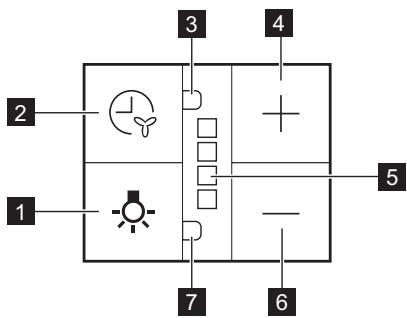
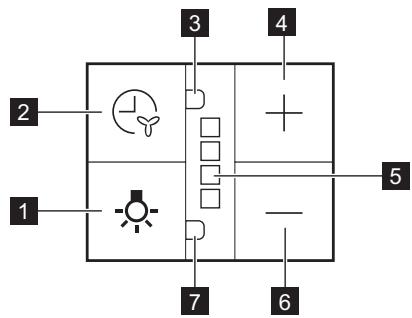
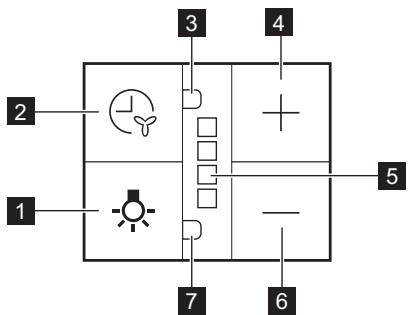
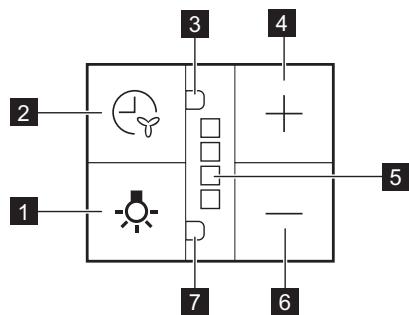
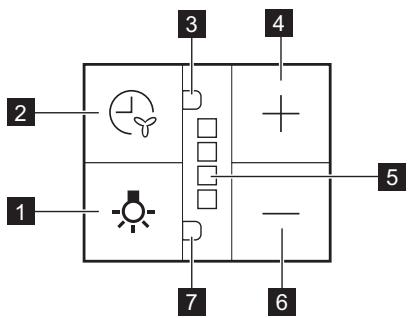
2.1 Control panel overview
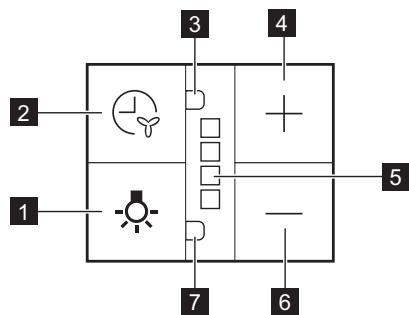
| Function | Description | |
| 1 | Lamp | Turns the lights on and off. |
| 2 | Delayed switch off func- tion button | The function sets automatic switch off delay. |
| 3 | Indicator for delayed switch off function | Indicates if function is activated. |
| 4 | Plus button | Increases the fan speed level. |
| 5 | LED indicators | indicates fan speed levels. |
| 6 | Minus button | Decreases the fan speed level. |
| 7 | Indicator for filter alarm function | Indicates if filter alarm is on. |
3. DAILY USE
3.1 Using the hood
Check the recommended speed according to the table below.
| 1 | While heating up food, cooking with covered pots. |
| 2 | While cooking with covered pots on multiple cooking zones or burners, gentle frying. |
| 3 | While boiling and frying big quantities of food without a lid, cooking on multi-ple cooking zones or burners. |

While boiling and frying big quantities of food without a lid, big humidity. After 8 minutes the appliance returns to previous setting.
It is recommended to leave the hood operating for approximately 15 minutes after cooking.
To operate the hood:
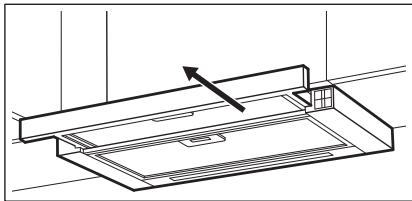
- Pull out the drawer of the hood more than 5 cm.
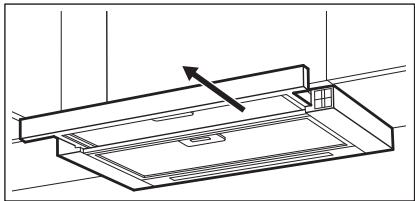
The control panel is exposed.
- Press the + button to switch on the hood.
To increase the fan speed level, press the button again. Press to decrease the fan speed level.
The LED indicators on the panel switch on according to the selected fan speed level.
The hood's light works independently of other hood functions. To illuminate the cooking surface, touch the light symbol. Closing the drawer has no effect on the hood light.
To turn off the fan, continue to press until the hood fan stops or close the hood drawer.
The hood remembers the last setting of fan speed on closing the drawer. The hood will operate on this fan speed level when the drawer is pulled out again.
3.2 Delayed switch off function
This function allows you to automatically turn off the fan after a specific time of operation.
- Set the desired fan speed.
- Press the 心 button.
The indicator on the panel turns on. To turn off the function, press the button again.

Changing the hood fan speed level or closing the hood drawer when the function is activated will result in deactivation of this function.
The time after which the function switches off the fan:
| Motor Speed level | Time (min) |
| 1 | 20 |
| 2 | 15 |
| 3 | 10 |
| 4 | 8 |
3.3 Filter notification
Filter alarm reminds to change or clean the charcoal filter and clean the grease filter. The LED indicator blinks red regularly for 30 seconds if the grease filter must be cleaned. The LED indicator blinks red twice per every second for 30 seconds if the charcoal filter must be replaced or cleaned.

This function activates independently after 40 hours of operation for grease filter and 160 hours of operation for charcoal filter.

The fan does not operate during the alarm. Fan starts to operate on last remembered setting after 30 seconds.

Refer to cleaning the grease filter in care and cleaning chapter.

Refer to cleaning the charcoal filter or replacing the charcoal filter in care and cleaning chapter.

The function counter for charcoal filter is disabled by default.
To activate or deactivate the counter for charcoal filter:
- Pull out the hood drawer.
- Make sure that the fan is turned off.
- Press for 3 seconds.
The function is activated if two white LED indicators flashes for 3 seconds. The function is deactivated if only one LED indicator flashes for 3 seconds.
To reset the function counter in the notification period:
- Pull out the hood drawer.
- Press for 3 seconds.
To reset the function counter out of the notification period:
- Pull out the hood drawer.
- Make sure that the fan is turned off.
- For grease filter press for 3 seconds.
- For charcoal filter press — for 3 seconds.
The indicator blinks once for correct reset.
4. CARE AND CLEANING
4.1 Notes on cleaning
| Cleaning Agents | Do not use abrasive detergents and brushes. Clean the surface of the appliance with a soft cloth with warm water and a mild detergent. |
| After cooking some parts of appliance can get hot. To avoid stains appliance must be cooled down and dried with clean cloth or paper towels. | |
| Clean stains with a mild detergent. | |
| Keep the hood clean | Clean the appliance and grease filters each month. Clean the interior and grease filters carefully from fat. Fat accumulation or other residue may cause fire. |
| Grease filters can be washed in a dishwasher. The dishwasher must be set to a low temperature and a short cycle. The grease filter may discolour, it has no influence on the performance of the appliance. | |
| Charcoal filter | The time of saturation of the charcoal filter varies depending on the type of cooking and the regularity of cleaning the grease filter. |
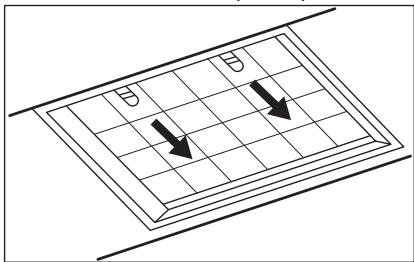
4.2 Cleaning the grease filter
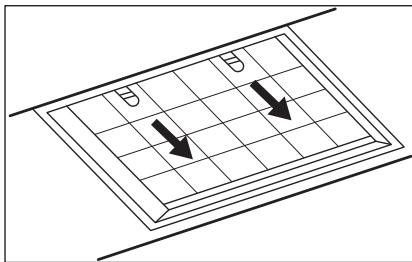
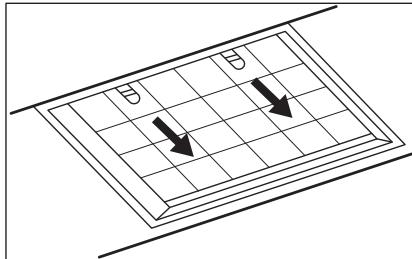
Filters are mounted with the use of clips and pins on the opposite side.
To clean the filter:
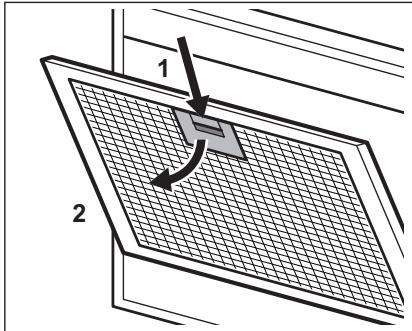
- Press the handle of the mounting clip on the filter panel underneath the hood.
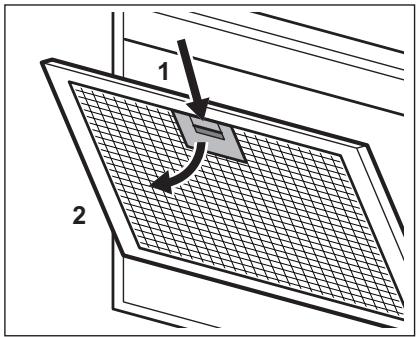
- Slightly tilt the front of the filter downwards, then pull. Repeat the first two steps for all filters.
- Clean the filters using a sponge with non abrasive detergents or in a dishwasher.

The dishwasher must be set to a low temperature and a short cycle. The grease filter may discolour, it has no influence on the performance of the appliance.
- To mount the filters back follow the first two steps in reverse order.
Repeat the steps for all filters if applicable.
4.3 Replacing the charcoal filter - optional

WARNING!
Depending on type, filter can or cannot be regenerated. Refer to the leaflet provided with the filter.
5. ENVIRONMENTAL CONCERNS
Recycle materials with the symbol

Put the packaging in relevant containers
To replace the filter:
- Remove the grease filters from the appliance. Refer to "Cleaning the grease filter" in this chapter.
- Pull the tabs towards the bottom part of the filter.
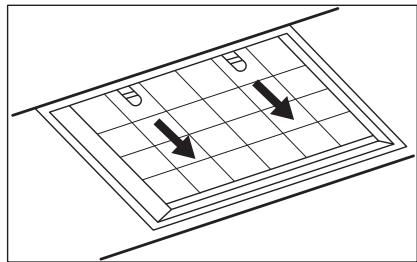
- Slightly tilt the front of the filter downwards, then pull.
- To install a new filter, perform the same steps in reverse order.
In any case, it is necessary to replace the filters at least every four months.
4.4 Replacing the lamp
This appliance is supplied with a LED lamp and separate control gear (LED driver). These parts can be replaced by a technician only. In case of any malfunction refer to "Service" in the "Safety Instructions" chapter.
to recycle it. Help protect the environment and human health by
recycling waste of electrical and electronic appliances. Do not dispose of appliances marked with the symbol
with the household waste. Return the product to your local recycling facility or contact your municipal office.
3. DAILY USE
3.1 Using the hood
Check the recommended speed according to the table below.
| 1 | Prilikom zagrijavanja hrane, kuhanja sPokrivenim posudama. |
| 2 | Prilikom kuhanja sPokrivenim posudama na više zona kuhanja ili plamenika, lagano prženje. |
| 3 | Prilikom ključanja i prženja velikh količina hrane bezPoklopca, kuhanja na više zona kuhanja ili plamenika. |

When boiling and frying large quantities of food without a lid, high humidity. After 8 minutes, the appliance returns to the previous settings.
It is recommended to leave the hood running for about 15 minutes after cooking.
To operate the hood:
- Pull out the hood drawer more than 5 cm.
2. Safety Instructions
2.1 Control panel operation
| Функция | Сиалтамасы | |
| 1 | Шam | Шamдарды косады кэне ошipeidi. |
| 2 | Кeuшикторин ошipy функцияльк туймeci | Бул ФункцияавTomаTTы ош ipуdi keшikтор di ophaТады. |
| 3 | Кeuшиктор ошipy функцияльсынIH инданakotры | ФункциянынбелсандірілгіннHe banelsan'dipinmereін кэрсетedi. |
| 4 | Плioc туймeci | Желдітkiштін кылдандік DeнгінApTTbIPа'dы. |
| 5 | Ж上诉инданakotрпары | Желдітkiштін кылдандік Deнгінрінkэрсетedi. |
| 6 | Минус туймeci | Желдітkiштін кылдандік Deнгін Temeндәтeti. |
| 7 | Сузгі дабыны функцияльсынIH инданakotры | Сузгі дабынын КосылfaнВИн He Косылmafahын кэрсетedi. |
3. Operating Modes
3.1 Air filter replacement
Temperature checker cable and LCD display.
| 1 | Тамаксы кылытkaнда, кakпak кабылган bдыICTы колданыniciprenecke. |
| 2 | Бірnevші nicipy aiMaКтарында hemece oTTыктарда кakпаыл kабыл bдыICTа ТамакNICIPREн ded, bannen Kуырfaнда. |
| 3 | Көн мөлшердэрі тɑfamdapды кakпakсыз кайнатkaнда кэн He Kуырfaнда, бірnevші nicipy aiMaFbHda hemece oTTыктарда niciprenecke. |
| 4 | Улken мөлшердэрі тɑfamdapды кakпakсыз кайнатkaнда кэн He Kуырfaнда, bɪnfaɪdəblɪk kən. 8 mɪnɪtɪaɪn KeɪɪN Kурыlflы aɪdɪbɪfblɪnapaMeTpre kaɪta opana[dɪ]. |
The device is designed for use at temperatures up to 15 minutes after switching on.
For the device to operate:
- Press the power button for more than 5 seconds to turn on.
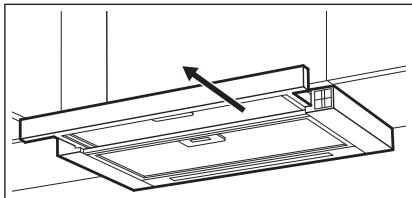
The control panel is open.
- To turn off the device, press the button.
To increase the temperature, press the button repeatedly.
To decrease the temperature, press the button.
The temperature indicators show the current temperature.
The device can be used independently of other devices. To avoid damage, do not expose it to moisture.
If the device is not used for a long time, press the button to turn it off or unplug it.
The device's temperature is controlled by the built-in thermostat. When the temperature is set, the device will maintain it.
3.2 Cleaning and maintenance
Before cleaning, make sure the device is turned off and unplugged.
The automatic can be cleaned with a damp cloth.
- Kanafan XeIeTkiJXbIaMdbIfbH opHaTbIHbI3.
- Tymecin 6acbHb3.
PanaJIbIderi INdHKaTOp KocblJaDbI. FyHKnIaHbI cEHdipy ywiH TyMeWirIH KaIra 6acblbI3.

Функцябелсеньдірулі Ke3de TtTIN WbIFapFbIw KJIeNTkiUHIn KbIJaMDbIK DeHreI e3repIce HemeCte TtTIN WbIFapFbIW TapTnacbl Ka6bInca,ocblФункцяныH eSuYiHe eKeNeDi.
Функцяжелдтkiшт ewipetih yaкыт:
| Козгалтуksьштbing Жылдандык Дech grei | Уakсы (MHN) |
| 1 | 20 |
| 2 | 15 |
| 3 | 10 |
| 4 | 8 |
3.3 Cy3ri TpyaIbI xa6apHaHdbIpy
Cy3rHIn eckepTy cHnAbI KEmip cy3ricH aybictbype Ta3anay XaHe MaM cy3ricH Ta3anay kaxet ekeHH ecke canadbl. MaM cy3ricH ta3anay kepek 6oNca, JXUd INndkaTOpbl 30 cekyHd 6oBbl KJyEJI Tpyde Kb3bl TycTe KblnbIKTaTdb. KEmip cy3ricH aybictby Hemece Ta3anay Kepek 6oNca, JXUd INndkaTOpbl 30 cekyHd 6oBbl cekyHd caibH eki peT Kb3bl TycTe KblnbIKTaTdb.

MaCy3rici40 cafA t 6oBbI naJaIaIahyDAn KeiH XeHe KEmip cy3rici160 cafT 6oBbI naJaIaIahyDAn KeiH OcbI cyHKnra Teyenci3 Type6beJIceHdiipineDi.

Ja6bIJI Ke3iHne XeNDeTkiU JyMbIC iCTemEnDi.
KeincoHbCaKaTaNFaH npaMeTpdeKymbICTb 6actaDbI.

«KyTim Kepcety XeHeta3anay» TapaybIHdafbi «MaCy3ricIH Ta3anay» TapMaFbIH KapaHbI3.

Kytim MeH Ta3anay TaaybIHa Kaemip Cy3rici H Ta3anay HeMece KEmip Cy3rici aybICTbpy TypaBkapaHbI3.

品 deNki BoBbHwa, Kemip cy3ricinH fynKcunecenteriwi eWipyni 6oJabl.
Kemip cy3ricih ecnteriin 6eIceHipy hemec eWipy:
- TyTih wblfapfbli Taptnacbih tapTbIn wblfapblHbI3.
- Press and hold the button for 3 seconds.
- Press and hold for 3 seconds. If both indicators flash 3 times, the function is enabled. If both indicators flash 3 times, the function is disabled. During the warning period, the function can be turned off.
- Press the button to turn on the device.
- Press and hold for 3 seconds.
During the warning period, the function can be turned off.
- Press the button to turn on the device.
- Press and hold the button for 3 seconds.
- For water supply, press and hold for 3 seconds.
- For water supply, press and hold for 3 seconds. To reset, press the indicator once.
4. MAINTENANCE AND DISASSEMBLY
4.1 Tools required for disassembly
| Журыз 3атар | Жemіріш журыз 3атуарды кәніе щөтkenірпді naïдаләнбүл. |
| Курсынгьндіаʌдьнгьі Кɑясын жумсak журыз 3аТ KOCсынfaHжыны cyfa 6batырсынfaH жумсak šуberекпен таэлалыз. | |
| Таfram Nicip'reннені кійн журсынгьндікійбір әліктэрі bісын кетуі му'mkin. Дɑксын 6ол'dырмас ушін курсынгьнді cyы'tын, таэз šуberекпен Нemece kafas зул'imен курfaту kepek. | |
| Да択арді жумсak журыз 3атун таэлалыз. |
| Aya tarTkblu KypaIbI Ta3a yctaIbI3 | КурьлгынblжэHe май сузгileрін ai саын ta3аJaHaBl3. Курьлгынbliш iшin xэHe май сузгileрін майдан ta3apтынbl3. Май кинhalЯнда Hemece baska kaIdblk kynHaNlaC, орт kayин Tydblpybl MymKlH. Майblсузгileрін bldlcЖуflш машинада кууfa boJanaBl. bldlic Kурьлш машинafа төmen TemпepаТура кэдka üncnOpHaTy kepek. Май сузriciHIn Tyci e3repyi MymKlH, buyl Kурьлгынbliнжмblc icteyihe acep etnejiDi. |
| Kemip cy3ricihi TONY yakbItb TaFAM nicipydiH Typi MeH MaH cy3riciH KaHsAnbIKTb JxN Ta3aHaHFaHbHa 6aIaNbICTb 6oJaDbI. |
4.2 Disassembly of the water supply
To replace the seals, the rings and gaskets are arranged in reverse order.
Wash the filter:
- Do not use abrasive cleaning agents or sharp objects to clean the filter.
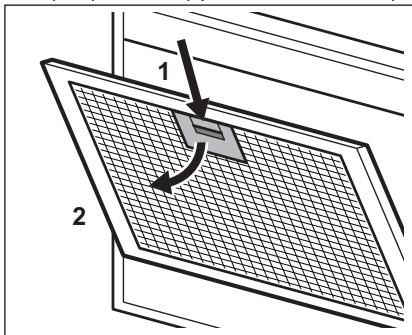
- Remove the filter from the bottom and top guides, then pull it out.
For stubborn dirt, use a soft brush.
- If the filter is heavily soiled, clean it with a mild detergent solution and rinse thoroughly with clean water.

Do not use hot water or dry the filter near a heat source. This may deform the filter and affect its performance.
- To reinstall the filter, insert it into the guides and push it in.
If necessary, repeat the cleaning steps for all filters.
4.3 Replacing the filter - not applicable

WARNING!
The type of filter may vary depending on the model. Refer to the instructions provided with the filter.
To replace the filter:
- Remove the old filters from the unit. See the section "Removing the old filters".
- Insert the new filters into the guides until they click into place.
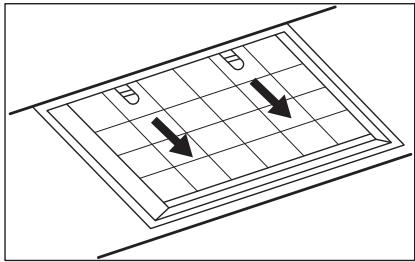
- Remove the filter from the bottom and top guides, then pull it out.
- Before using the device, read the instruction manual carefully. If any malfunctions occur, contact a specialist for repair.
4.4 Cleaning and maintenance
The device is equipped with a filter and a grease filter (for the hood). You can clean the technical channel yourself. For any malfunctions, refer to the "Troubleshooting" section in the "Service" chapter.
5. ENVIRONMENTAL PROTECTION
Dispose of the packaging materials in an environmentally friendly manner. Place the packaging materials in the appropriate containers for recycling. The recycling of electrical and electronic devices contributes to the protection of the environment and human health.
Do not dispose of the device with household waste. Do not dispose of the device with other waste. Take it to a local collection point for recycling or contact your local authorities for disposal instructions.
CONTENTS
- SAFETY INFORMATION AND INSTALLATION. 85 2. PRODUCT DESCRIPTION. 86
- DAILY USE 86
- CLEANING AND MAINTENANCE 88 5. ENVIRONMENTAL PROTECTION. 89
FOR BEST RESULTS
The LED lights will turn on automatically according to the selected speed of the fan.

The light of the hood operates independently of the other functions of the hood. To illuminate the cooking surface, press the light button. The closing of the hood has no effect on the light of the hood.
To turn off the fan,
press the fan button again. The fan of the hood will not turn off if you close the hood.

The aspirator will automatically switch off after the last dish has been placed in the dishwasher. The aspirator will operate at two power levels of the fan when the dishwasher is closed and will switch off when the dishwasher is opened.
3.2 Function for delayed switch-off
This function enables the automatic switch-off of the fan after a set operating time.
- Set the desired fan speed.
2. Press the button until the indicator light on the panel turns on. To deactivate the function, press the button again.

The fan speed and the aspirator operation when the dishwasher is closed will be deactivated if this function is activated.
The time after which the fan switches off:
Register your product to benefit from extended service possibilities:
www.promo.electrolux.ru

Accessories, consumables, and original spare parts for your appliance:
www.electrolux-1.ru
CUSTOMER SUPPORT AND SERVICE
Always use original spare parts.
We recommend that you
perform any actions
device operation
CAREFULLY READ
the chapters related to
safety engineering.
2. DESCRIPTION OF THE DEVICE
2.1 General view and control panel
- Pull the knob out more than 5 cm.
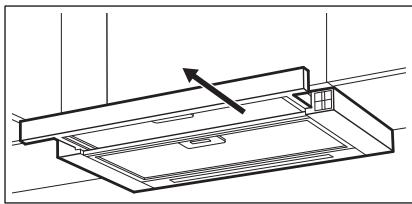
The control panel opens.
- Press the + button to turn on the hood.
To increase the fan speed, press the button again.
Press - to decrease the fan speed.
The indicator lights on the panel turn on according to
the selected fan speed level.
The exhaust hood operates independently of other exhaust functions. To turn on the hood, press the closed damper switch; it does not affect the lighting.
To turn off the fan, continue pressing until the exhaust fan stops or closes.
The hood remembers the last fan speed setting when the damper is closed. The hood will operate at that fan speed level when the exhaust damper is opened again.
3.2 Off-delay function
This function automatically turns off the fan after a set period of operation.
- Set the desired fan speed.
- Press the button.
The indicator lights up. To turn off the function, press the button again.

Changing the fan speed level of the exhaust hood or closing the exhaust hood turns off this function.
Fan off-delay time:
USER INSTRUCTIONS AND SERVICE
Always use original spare parts.
Each authorized service center has a service center. Enter the model, serial number, and service number to have the necessary information at hand.
The product is manufactured in accordance with technical specifications.
Suspicion/Defect - Safety information, information and advice on environmental protection.
The right to make changes is reserved.
1. SAFETY INFORMATION FOR INSTALLATION

WARNING!
Switch off the appliance
Before cleaning, always switch off the appliance.
To disconnect the appliance from the power supply, pull the plug out of the socket. Do not pull the cable, and do not close the flap of the appliance.

The appliance must be switched off before cleaning the fan.
The fan does not operate at this speed when the flap is closed.
3.2 Function of the delayed switch-off
This function allows the fan to switch off automatically after a set period of time.
Repair information:
www.aeg.com/support
Register your product for better service:
www.registeraeg.com


3 INSTALLATION. I
2. DESCRIPTION OF THE PRODUCT
2.1 Control panel
Depending on the type, the filter may or may not be included with the product.
See the booklet,
which is supplied with the filter.
To replace the filter:
- Remove the filter cover from the device. See the section "Replacing the filter" in this chapter.
- Press the latch on the handle and pull the filter out.
- Gently press the front part of the filter down, then pull it out.
- To install a new filter, repeat the same steps in reverse order.
5. ENVIRONMENTAL PROTECTION
3. Dispose of the material in accordance with the symbol shown. Dispose of the packaging in the appropriate recycling containers. Help protect the environment and the health of others and ensure the recycling of electrical and electronic waste.
Any filter must be replaced at least every six months.
4.4 Replacing the lamp
The lamp must be replaced by a qualified specialist using the appropriate mechanism (lamp changer). For any malfunction, refer to the "Service" section of the "Safety Instructions" chapter.
Device. Do not dispose of the device marked with the symbol together with other household waste. Return the product to the factory for recycling in your area or contact local municipal authorities.
| . . . . . . . . . . . . . . . . . . . . . . . . . . . . . . . . . . . . . . . . . . . . . . . . . . . . . . . . . . . . . . . . . . . . . . . . . . . . . . . . . . . . . . . . . . . . . . . . . . . . .. . . . . . . . . . . . . . . . . . . . . . . . . . . . . . . . . . . . . . . . . . . . . . . . . . . . . . . . . . . . . . . . . . . . . . . . . . . . . . . . . . . . . . . . . . . . . . . . . . . . ? . . . . . . . . . . . . . . . . . . . . . . . . . . . . . . . . . . . . . . . . . . . . . . . . . . . . . . . . . . . . . . . . . . . . . . . . . . . . . . . . . . . . . . . . . . . . . . . . . . . - . . . . . . . . . . . . . . . . . . . . . . . . . . . . . . . . . . . . . . . . . . . . . . . . . . . . . . . . . . . . . . . . . . . . . . . . . . . . . . . . . . . . . . . . . . . . . . . . . . . - - - - - - - - - - - - - - - - - - - - - - - - - - - - - - - - - - - - - - - - - - - - - - - - - - - - - - - - - - - - - - - - - - - - - - - - - - - - - - - - - - - - - - - - - - - - - - - - - - - - - - . . . . . . . . . . . . . . . . . . . . . . . . . . . . . . . . . . . . . . . . . . . . . . . . . . . . . . . . . . . . . . . . . . . . . . . . . . . . . . . . . . . . . . . . . . . . . . . . . . . 2 3 4 5 6 7 8 9 10 11 12 13 14 15 16 17 18 19 20 21 22 23 24 25 26 27 28 29 30 31 32 33 34 35 36 37 38 39 40 41 42 43 44 45 46 47 48 49 50 51 52 53 54 55 56 57 58 59 60 61 62 63 64 65 66 67 68 69 70 71 72 73 74 75 76 77 78 79 80 81 82 83 84 85 86 87 88 89 90 91 92 93 94 95 96 97 98 99 100 101 102 103 104 105 106 107 108 109 110 111 112 113 114 115 116 117 118 119 120 121 122 123 124 125 126 127 128 129 130 131 132 133 134 135 136 137 138 139 140 141 142 143 144 145 146 147 148 149 150 151 152 153 154 155 156 157 158 159 160 161 162 163 164 165 166 167 168 169 170 171 172 173 174 175 176 177 178 179 180 181 182 183 184 185 186 187 188 189 190 191 192 193 194 195 196 197 198 199 200 201 202 203 204 205 206 207 208 209 210 211 212 213 214 215 216 217 218 219 220 221 222 223 224 225 226 227 228 229 230 231 232 233 234 235 236 237 238 239 240 241 242 243 244 245 246 247 248 249 250 251 252 253 254 255 256 257 258 259 260 261 262 263 264 265 266 267 268 269 270 271 272 273 274 275 276 277 278 279 280 281 282 283 284 285 286 287 288 289 290 291 292 293 294 295 296 297 298 299 300 301 302 303 304 305 306 307 308 309 310 311 312 313 314 315 316 317 318 319 320 321 322 323 324 325 326 327 328 329 330 331 332 333 334 335 336 337 338 339 340 341 342 343 344 345 346 347 348 349 350 351 352 353 354 355 356 357 358 359 360 361 362 363 364 365 366 367 368 369 370 371 372 373 374 375 376 377 378 379 380 381 382 383 384 385 386 387 388 389 390 391 392 393 394 395 396 397 398 399 400 401 402 403 404 405 406 407 408 409 410 411 412 413 414 415 416 417 418 419 420 421 422 423 424 425 426 427 428 429 430 431 432 433 434 435 436 437 438 439 440 441 442 443 444 445 446 447 448 449 450 451 452 453 454 455 456 457 458 459 460 461 462 463 464 465 466 467 468 469 470 471 472 473 474 475 476 477 478 479 480 481 482 483 484 485 486 487 488 489 490 491 492 493 494 495 496 497 498 499 500 501 502 503 504 505 506 507 508 509 510 511 512 513 514 515 516 517 518 519 520 521 522 523 524 525 526 527 528 529 530 531 532 533 534 535 536 537 538 539 540 541 542 543 544 545 546 547 548 549 550 551 552 553 554 555 556 557 558 559 560 561 562 563 564 565 566 567 568 569 570 571 572 573 574 575 576 577 578 579 580 581 582 583 584 585 586 587 588 589 590 591 592 593 594 595 596 597 598 599 600 601 602 603 604 605 606 607 608 609 610 611 612 613 614 615 616 617 618 619 620 621 622 623 624 625 626 627 628 629 630 631 632 633 634 635 636 637 638 639 640 641 642 643 644 645 646 647 648 649 650 651 652 653 654 655 656 657 658 659 660 661 662 663 664 665 666 667 668 669 670 671 672 673 674 675 676 677 678 679 680 681 682 683 684 685 686 687 688 689 690 691 692 693 694 695 696 697 698 699 690 691 692 693 694 695 696 697 698 699 690 691 692 693 694 695 696 697 698 699 690 691 692 693 6 |



a>g aacw gssu 2 i albaIglaI aaJgabgll baw .aagb0d :ggall aabgll aaj
aal .2
ρS > 2.1
o 1d l d j 1i a o .AEG 1d J
-1JgWgWgWgWgWgWgWgWgWgWgWgWgWgWgWgWgWgWgWgWgWgWgWgWgWgWgWgWgWgWgWgWgWgWgWgWgWgWgWgWgWgWgWgWgWgWgWgWgWgWg
g 10000000000000000000000000000000000000000
aio olaawl jg> S aclj
j>1 j0 gJyI liqg o JyI glaa
aagaaag aasssaaag aagg jll aasll gol dai jle Jgdo
:2x, ylg aIaI I log12og
www.aeg.com/support
jie jiaoi aovc ie Jgaoall jw
www.registeraeg.com
jLgJ aJl JgJ glg g asllalglg alg
www.aeg.com/shop


- SAFETY INFORMATION FOR INSTALLATION
- WARNING
- DESCRIPTION OF THE DEVICE
- BEFORE FIRST USE
- DAILY USE
- USING THE ABSORBER
- TO WORK WITH THE ABSORBER
- FUNCTION FOR DELAYED SWITCH-OFF
- FILTER CHANGE INDICATOR
- CLEANING AND MAINTENANCE
- NOTES ON CLEANING
- REPLACING THE FILTER WITH ACTIVATED CARBON (OPTIONAL)
- REPLACING THE LAMP
- ENVIRONMENTAL PROTECTION
- CONTENTS
- FOR PERFECT RESULTS
- CUSTOMER CARE AND SERVICE
- SAFETY INFORMATION AND INSTALLATION
- PRODUCT DESCRIPTION
- CONTROL PANEL OVERVIEW
- USING THE HOOD
- TO OPERATE THE HOOD
- DELAYED SWITCH OFF FUNCTION
- FILTER NOTIFICATION
- CARE AND CLEANING
- CLEANING THE GREASE FILTER
- TO CLEAN THE FILTER
- REPLACING THE CHARCOAL FILTER - OPTIONAL
- ENVIRONMENTAL CONCERNS
- SAFETY INSTRUCTIONS
- CONTROL PANEL OPERATION
- OPERATING MODES
- AIR FILTER REPLACEMENT
- CY3RI TPYAIBI XA6APHAHDBIPY
- KEMIP CY3RICIH ECNTERIIN 6EICEHIPY HEMEC EWIPY
- DURING THE WARNING PERIOD, THE FUNCTION CAN BE TURNED OFF
- MAINTENANCE AND DISASSEMBLY
- TOOLS REQUIRED FOR DISASSEMBLY
- DISASSEMBLY OF THE WATER SUPPLY
- WASH THE FILTER
- REPLACING THE FILTER - NOT APPLICABLE
- FOR BEST RESULTS
- CUSTOMER SUPPORT AND SERVICE
- GENERAL VIEW AND CONTROL PANEL
- OFF-DELAY FUNCTION
- USER INSTRUCTIONS AND SERVICE
- FUNCTION OF THE DELAYED SWITCH-OFF
- DESCRIPTION OF THE PRODUCT
- CONTROL PANEL
Brand : AEG
Model : DPK5960B
Category : Cordless vacuum