CREATIX 800 - Range hood ROBLIN - Free user manual and instructions
Find the device manual for free CREATIX 800 ROBLIN in PDF.


| Product type | Extractor hood |
| Brand | ROBLIN |
| Model | CREATIX 800 |
| Estimated width | 80 cm |
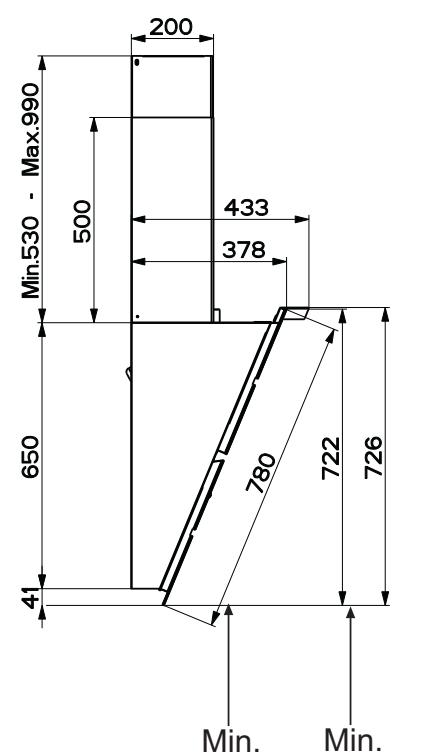
| Minimum safety distance to hob | 650 mm |
| Air outlet diameter | 150 mm (reduction possible to 120 mm) |
| Electrical supply | 230 V / 50 Hz (check rating plate) |
| Number of motor speeds | 3 speeds + 1 intensive speed (10 min) |
| Special functions | 24H function (extraction 100 m³/h for 10 min/h), delayed stop 30 min, optional remote control |
| Lighting | White LED class 1M (7 μW at 439 nm) |
| Grease filters | Metallic, dishwasher safe |
| Activated carbon filter | Not washable, replace every 4 months (recirculation version) |
| Maintenance alarm | Yes, visual indicator for grease filter cleaning (100h) and carbon filter replacement (200h) |
| Estimated weight | 15-20 kg |
| Protection class | Class I (earthing required) |
Frequently Asked Questions - CREATIX 800 ROBLIN
User questions about CREATIX 800 ROBLIN
0 question about this device. Answer the ones you know or ask your own.
Ask a new question about this device
Download the instructions for your Range hood in PDF format for free! Find your manual CREATIX 800 - ROBLIN and take your electronic device back in hand. On this page are published all the documents necessary for the use of your device. CREATIX 800 by ROBLIN.
USER MANUAL CREATIX 800 ROBLIN
natural_image
Technical line drawing of a chimney structure with mounting brackets (no text or symbols)Instructions Manual
RECOMMENDATIONS AND SUGGESTIONS 4
CHARACTERISTICS 5
INSTALLATION....7
USE 11
MAINTENANCE 12
SOMMAIRE
FR
CONSEILS ET SUGGESTIONS....14
CARACTERISTIQUES....15
INSTALLATION....17
UTILISATION 21
ENTRETIEN 22
INHALTSVERZEICHNIS
DE
⚠ The Instructions for Use apply to several versions of this appliance. Accordingly, you may find descriptions of individual features that do not apply to your specific appliance.
INSTALLATION
- The manufacturer will not be held liable for any damages resulting from incorrect or improper installation.
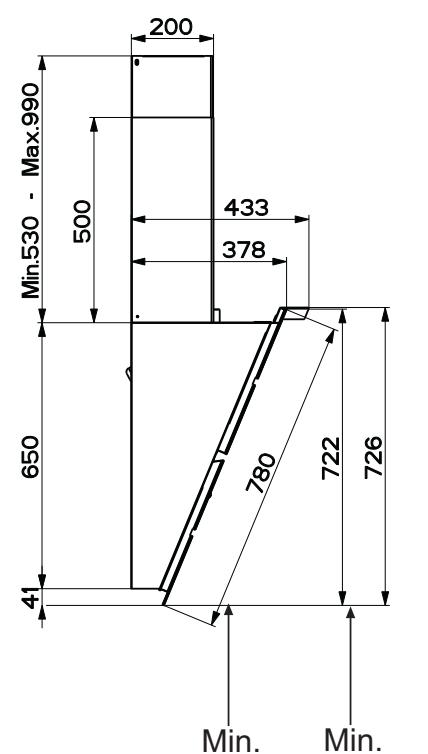
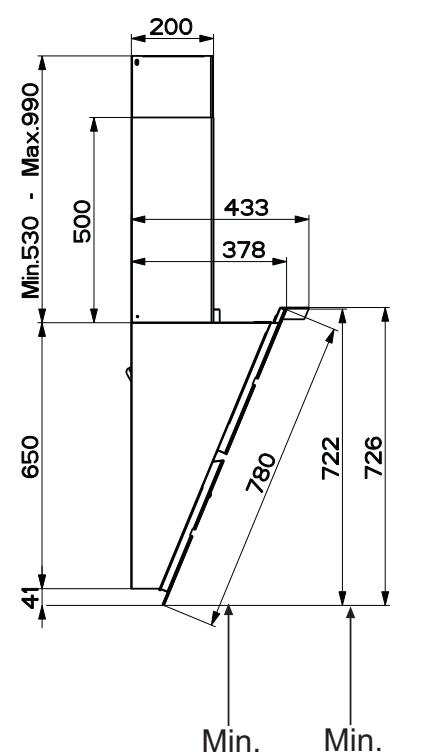
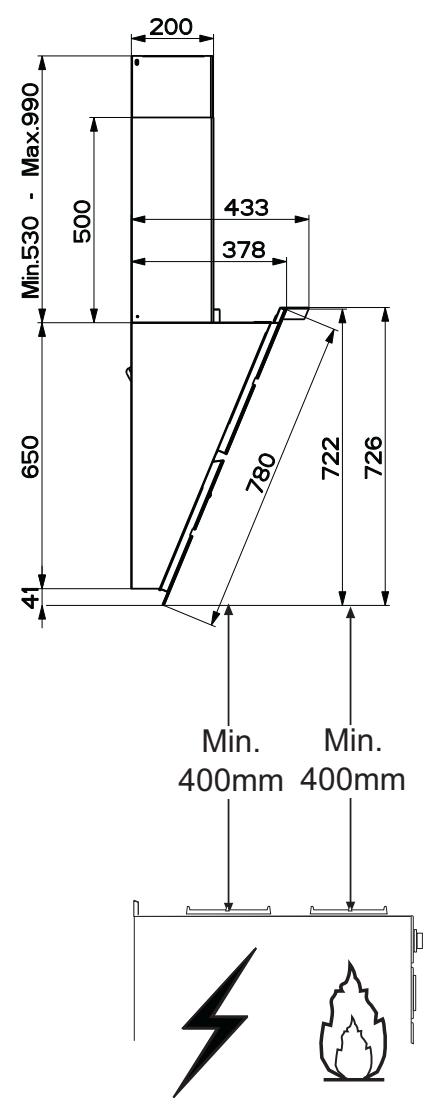
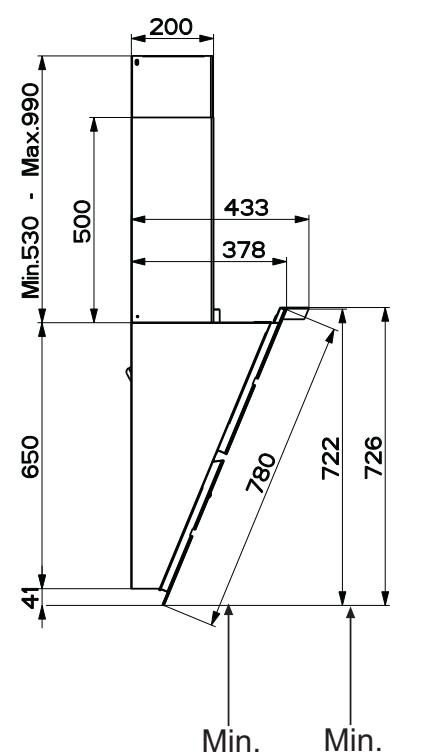
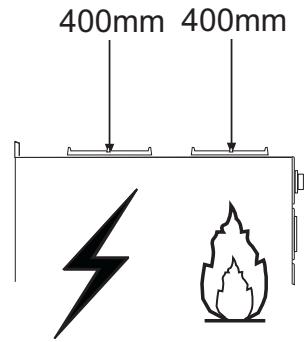
- The minimum safety distance between the cooker top and the extractor hood is 650 mm (some models can be installed at a lower height, please refer to the paragraphs on working dimensions and installation).
- Check that the mains voltage corresponds to that indicated on the rating plate fixed to the inside of the hood.
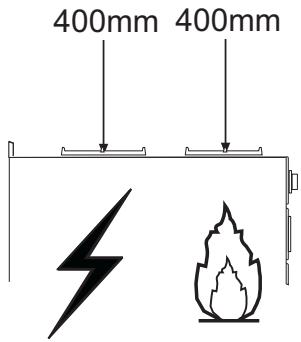
- For Class I appliances, check that the domestic power supply guarantees adequate earthing. Connect the extractor to the exhaust flue through a pipe of minimum diameter 120 mm. The route of the flue must be as short as possible.
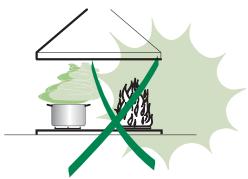
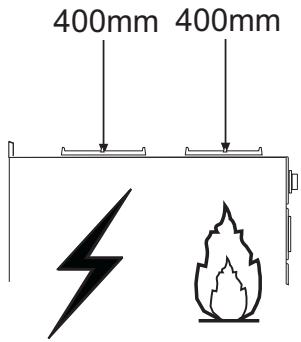
- Do not connect the extractor hood to exhaust ducts carrying combustion fumes (boilers, fireplaces, etc.).
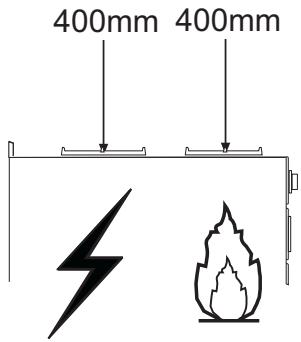
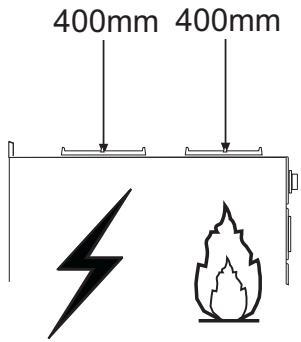
- If the extractor is used in conjunction with non-electrical appliances (e.g. gas burning appliances), a sufficient degree of aeration must be guaranteed in the room in order to prevent the backflow of exhaust gas. The kitchen must have an opening communicating directly with the open air in order to guarantee the entry of clean air. When the cooker hood is used in conjunction with appliances supplied with energy other than electric, the negative pressure in the room must not exceed 0,04 mbar to prevent fumes being drawn back into the room by the cooker hood.
- In the event of damage to the power cable, it must be replaced by the manufacturer or by the technical service department, in order to prevent any risks.
• All air ducting regulations must be complied with.
USE
- The extractor hood has been designed exclusively for domestic use to eliminate kitchen smells.
- Never use the hood for purposes other than for which it has been designed.
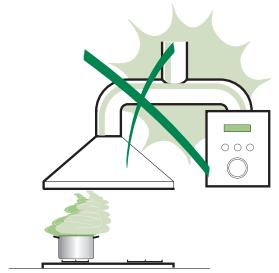
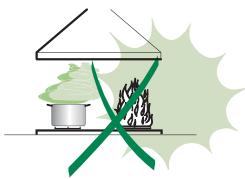
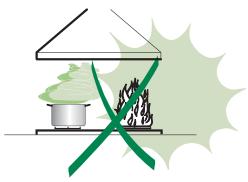
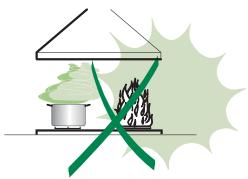
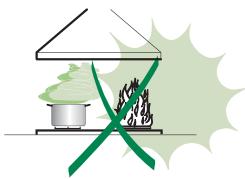
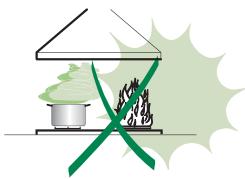
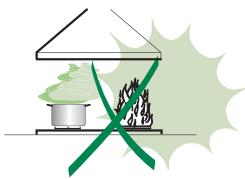
- Never leave high naked flames under the hood when it is in operation.
- Adjust the flame intensity to direct it onto the bottom of the pan only, making sure that it does not engulf the sides.
- Deep fat fryers must be continuously monitored during use: overheated oil can burst into flames.
• Do not flambè under the range hood; risk of fire - This appliance is not intended for use by persons (including children) with reduced physical, sensory or mental capabilities, or lack of experience and knowledge, unless they have been given supervision or instruction concerning use of the appliance by a person responsible for their safety.
• Children should be supervised to ensure that they do not play with the appliance. - "CAUTION: Accessible parts may become hot when used with cooking appliances."
MAINTENANCE
- Switch off or unplug the appliance from the mains supply before carrying out any maintenance work.
- Clean and/or replace the Filters after the specified time period (Fire hazard).
- Clean the hood using a damp cloth and a neutral liquid detergent.
natural_image
Illustration of a chemical experiment setup with a conical flask, thermometer, and smokestack (no text or symbols)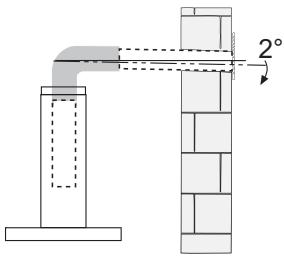
natural_image
Illustration of a cooking setup with a pot, stove, and firecracker (no text or symbols)The symbol 📁 on the product or on its packaging indicates that this product may not be treated as household waste. Instead it shall be handed over to the applicable collection point for the recycling of electrical and electronic equipment. By ensuring this product is disposed of correctly, you will help prevent potential negative consequences for the environment and human health, which could otherwise be caused by inappropriate waste handling of this product. For more detailed information about recycling of this product, please contact your local city office, your household waste disposal service or the shop where you purchased the product.
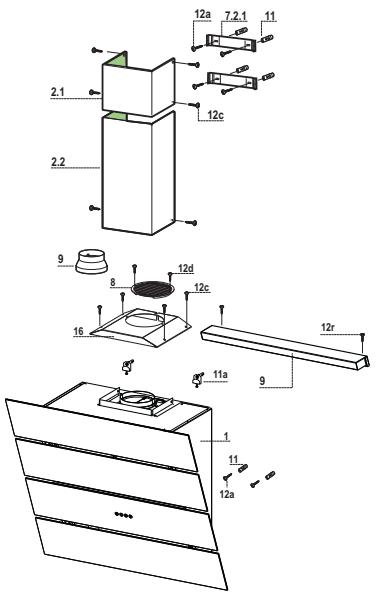
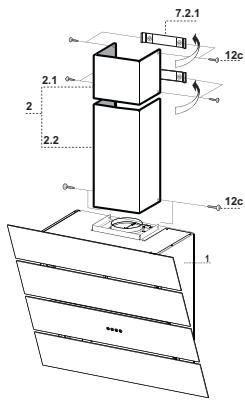
Components
| Ref. | Q.ty | Product Components |
| 1 | 1 | Hood Canopy complete with: Controls, Light, Fan unit, Filters |
| 2.1 | 1 | Upper chimney |
| 2.2 | 1 | Lower chimney |
| 5 | 1 | Lighting unit |
| 8 | 1 | Directional air outlet grille |
| 9 | 1 | Reduction flange 150-120 |
| 16 | 1 | Filter cover |
| Ref. | Q.ty | Installation Components |
| 7.2.1 | 2 | Upper chimney fixing brackets |
| 11 | 6 | Plugs |
| 11a | 2 | SB 12/10 Wall Plugs |
| 12a | 6 | Screws 4.2 x 44.4 |
| 12c | 10 | Screws 2.9 x 6.5 |
| 12r | 2 | Screws 2.9 x 6.5 |
| 12d | 2 | Screws 2.9 x 9.5 |
| Q.ty | Documentation | |
| 1 | Instruction Manual |
Wall drilling and bracket fixing
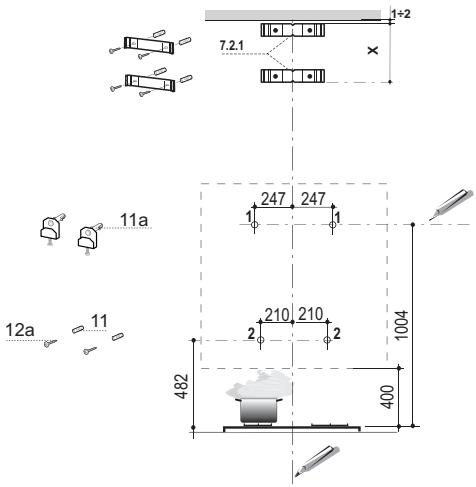
As a first step, proceed with the following drawings:
- a vertical line up to the ceiling or up to the upper limit, at the centre of the area in which the hood is to be fitted;
- a horizontal line at a minimum 1004 mm above the cooker top.
- Mark a point (1) on the horizontal line, 247 mm to the right of the vertical reference line.
- Repeat this operation on the other side, checking that the two marks are levelled.
- Mark a reference point (2) as indicated at 210mm from the vertical reference line and 482 mm above the cooker top.
- Repeat this operation on the other side, checking that the two marks are levelled.
- Drill at the marked points (1), using a 12 mm drill bit.
- Drill at the marked points (2) using a 8 mm drill bit.
- Insert the bracket plugs 11a into the holes (1) and tighten the screws.
- Insert plug 11 into holes (2).
To install a decorative chimney (optional)
- Place bracket 7.2.1 on the wall, about 1-2 mm from the ceiling or from the upper limit, aligning the centre (notch) with the vertical reference line.
• Mark the wall at the centres of the bracket holes. - Place the bracket 7.2.1 on the wall at X mm below the first bracket (X = height of the upper chimney section), aligning the centre (notch) with the vertical line.
- Mark the wall at the centres of the bracket holes.
- Drill 8 mm holes at all the marked centre points.
- Insert the wall plugs 11 in the holes.
- Fix the brackets using the 12a screws (4,2 x 44,4) supplied with the hood.
Fitting the hood body
- Open the doors/the door (See section Open Panels).
- Remove the Metal grease filters using the handles provided.
- Adjust the two screws Vr, in the brackets 11a, so that they are at the start of their travel.
- Hook the hood body to the two brackets 11a.
- From the inside of the hood body, turn screws Vr to level the hood body itself.
- Fasten the safety screw 12a.
- Close the doors/the door again.
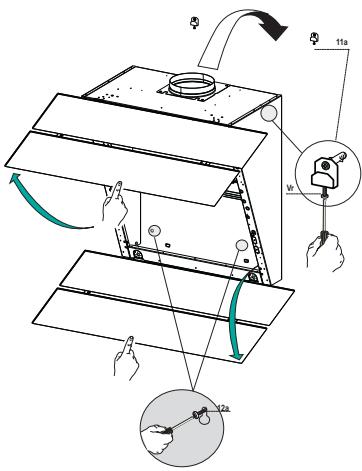
Connections
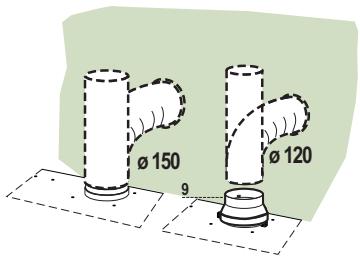
DUCTED VERSION AIR EXHAUST SYSTEM
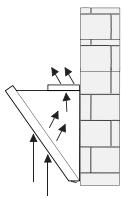
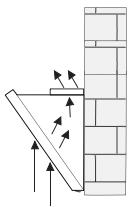
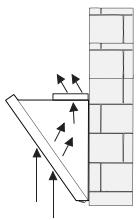
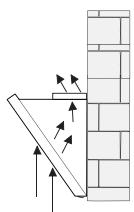
When installing the ducted version, connect the hood to the chimney using either a flexible or rigid pipe 150 or 120 mm, the choice of which is left to the installer.
- To install a 120 mm air exhaust connection, insert the reducer flange 9 on the hood body outlet.
- Fix the pipe in position using sufficient pipe clamps (not supplied).
- Remove possible charcoal filters.
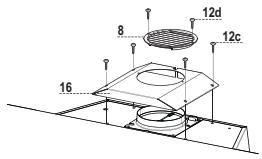
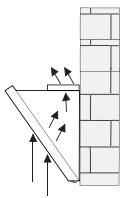
RECYCLING VERSION AIR OUTLET
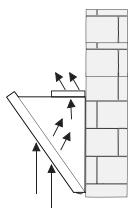
To install the hood in recycling version, the optional charcoal filter kit must be purchased.
- Remove the chimney angle bracket.
- Screw the filter cover onto the air outlet, using four screws 12c (2.9 x 12.5).
- Fix the air outlet grid 8 on the recirculation air outlet using the 2 screws 12d (2,9 x 9,5) provided.
natural_image
Diagram showing a wooden beam leaning against a brick wall, with arrows indicating force direction (no text or symbols)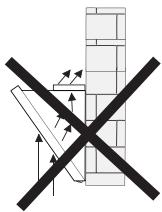
natural_image
Diagram of a construction or scaffolding structure with no visible text, numbers, or symbolsFitting the Lighting Unit
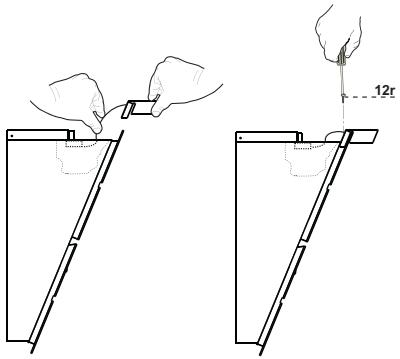
- Insert the Lighting unit cable into the opening.
- Rest the Lighting unit 9.
• Fix it using the Screws 12r provided. - Remove grease filters.
- Inside the hood canopy there is a wiring box for connection of the lighting unit.
- Open the box and connect the wires to the terminal inside it, checking that the colours are combined properly.
- Close the wiring box, replace the grease filters and close the doors.
natural_image
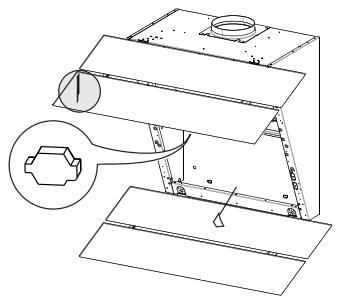
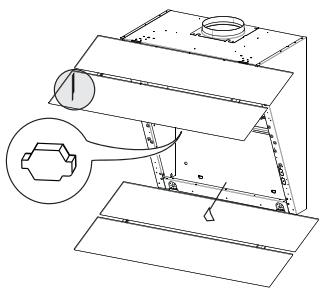
Technical line drawing of a mechanical assembly with a magnified inset showing a hexagonal component (no text or symbols)ELECTRICAL CONNECTION
- Connect the hood to the mains through a two-pole switch having a contact gap of at least 3 mm.
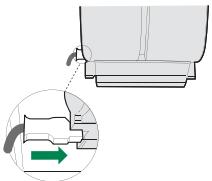
- Remove the grease filters (see paragraph Maintenance) being sure that the connector of the feeding cable is correctly inserted in the socket placed on the side of the fan.
natural_image
Diagram showing a mechanical component with a highlighted section and directional arrow (no text or symbols)Chimney assembly
Upper exhaust Chimney
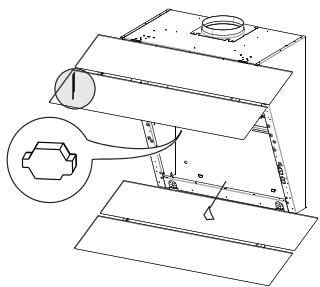
- Slightly widen the two sides of the upper chimney and hook them behind the brackets 7.2.1, making sure that they are well seated.
- Secure the sides to the brackets using the 4 screws 12c (2,9 x 9,5) supplied.
Lower exhaust Chimney
- Slightly widen the two sides of the chimney and hook them between the upper chimney and the wall, making sure that they are well seated.
- Fix the lower part laterally to the hood body using the 2 screws 12c (2,9 x 9,5) supplied.
| 1 | 2 | 3 | i | 24_F | |||
| A | B | C | D | E | F | G | H |
Control panel
| Button | Function | Led |
| A | Turns the Motor off. | The Leds indicating the Speed of the motor turn off. |
| Enables / Disables Keyboard Lock mode if pressed and held for 5 seconds. | All the Leds light up in cycle. | |
| B | Activates speed one. | The Leds indicating Speed one and Motor Off turn on. |
| C | Activates speed two. | The Leds indicating Speed two and Motor Off turn on. |
| D | Activates speed three. | The Leds indicating Speed three and Motor Off turn on. |
| E | Activates Intensive speed. This speed is timed to run for 10 minutes. At the end of this time the system will automatically return to the speed set before.It is disabled by pressing the Button or turning the Motor off. | Flashes once a second. |
| Press and hold the button for approximately 5 seconds, with all the loads turned off (Motor and Lights), to turn the Activated Charcoal Filter alarm on.To turn it off, press and hold the button again for 5 seconds. | Button A Led flashes twice.Button A Led flashes once. | |
| F | Starts the 24H function, in which the motor starts at a speed that allows suction of 100 m^3/h for 10 minutes per hour. This mode cannot be activated if Intensive or Delay modes are active.To turn it off, press the button again. | The Leds indicating 24H speed and Motor Off turn on. |
| When the filters alarm is triggered, the alarm can be reset by pressing and holding this button for approximately 5 seconds. These indications are only visible when the motor is turned off. | When the procedure terminates, the indication shown previously turns off:24H FlashingIndicates the need to wash the metal grease filters. The alarm is triggered after the Hood has been in operation for 100 working hours.24H FlashingIndicates the need to change the activated charcoal filters, and also to wash the metal grease filters. The alarm is triggered after the Hood has been in operation for 200 working hours. | |
| G | Activates Delay mode, with automatic shutdown of the Motor, the Fans and the Lighting with a 30' delay.It is disabled by pressing the button or turning the motor off. | The Delay Led lights up. |
| Pressing and holding the button for 5 seconds enables the remote controlPressing and holding the button for 5 seconds disables the remote control | Button A Led flashes twice.Button A Led flashes once. | |
| H | Press briefly to turn the lighting system on and off at maximum intensity. | The Lighting Led lights up. |
| Press and hold the button for 2 seconds to turn the Courtesy Lights On (if provided). |
REMOTE CONTROL (OPTIONAL)
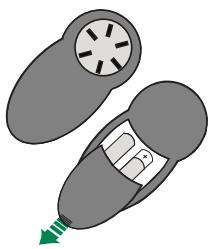
The appliance can be controlled using a remote control powered by a 1.5 V carbon-zinc alkaline batteries of the standard LR03-AAA type (not included).
- Do not place the remote control near to heat sources.
• Used batteries must be disposed of in the proper manner.
natural_image
Diagram of a car interior with a fan and exhaust pipe, no text or symbols presentMetal grease filters
These can also be washed in the dishwasher, and need to be cleaned whenever the 24H Led flashes or at least once every 2 months use, or more frequently if use is particularly intensive.
Resetting the alarm signal
- Turn the Lights and the Suction Motor off.
- Press and hold button F (24H) for 5 seconds.
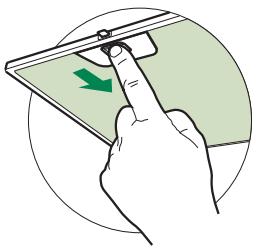
Cleaning the Filters
- Remove the Filters one at a time, pushing them towards the back of the unit and at the same time pulling downward.
- Wash the Filters without bending them, and leave them to dry completely before replacing. (If the surface of the filter changes colour as time goes by, this will have absolutely no effect on the efficiency of the filter itself.)
- Replace, taking care to ensure that the handle faces forwards.
natural_image
Illustration of a hand pressing down on a smartphone screen with a green arrow indicating the touch point (no text or symbols present)The Activated Charcoal Filter is only present on the Hoods in Recirculation version, and has the job of retaining smells in the flow of air that passes over it, until reaching saturation. This cannot be washed or regenerated, and must be changed when the 24H led on the display starts to flash, or at least once every 4 months. The Alarm signal, if it has been activated, only appears when the Suction motor is turned on.
Activating the alarm signal
- In Recirculation Version Hoods, the Filter Saturation Alarm must be activated on installation or at a later date.
- Turn the Lights and the Suction Motor off.
- Press button E (Intensive) until confirmation is given:
- Motor Off Leds flash twice – Activated Charcoal Filter saturation alarm ACTIVATED.
- Motor Off Leds flash once – Activated Charcoal Filter saturation alarm DEACTIVATED.
CHANGING THE ACTIVATED CHARCOAL FILTER
Resetting the alarm signal
- Turn the Lights and the Suction Motor off.
- Press and hold button F (24H) for 5 seconds.
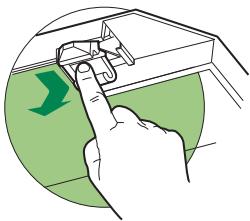
Changing the Filter
- Remove the Metal grease filters.
- Remove the saturated Activated charcoal filter, using the hooks provided.
• Fit the new Filter, hooking it into place. - Replace the Metal grease filters.
natural_image
Illustration of a hand using a finger to press a device on a green surface, with a green arrow indicating direction (no text or symbols)Lighting unit
Warning: This appliance is fitted with a white LED lamp classed as 1M according to EN 60825-1: 1994 + A1:2002 + A2:2001 standards; maximum optical power emitted @439nm: 7μW. Do not look directly at the light through optical devices (binoculars, magnifying glasses...).
- For replacement contact technical support. ("To purchase contact technical support")
natural_image
Illustration of a chemical experiment setup with a conical flask, thermometer, and smokestack (no text or symbols)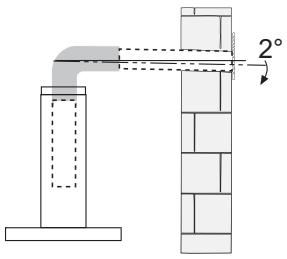
natural_image
Illustration of a cooking setup with a pot, steaming green liquid, and a crossed-out pan (no text or symbols)
other
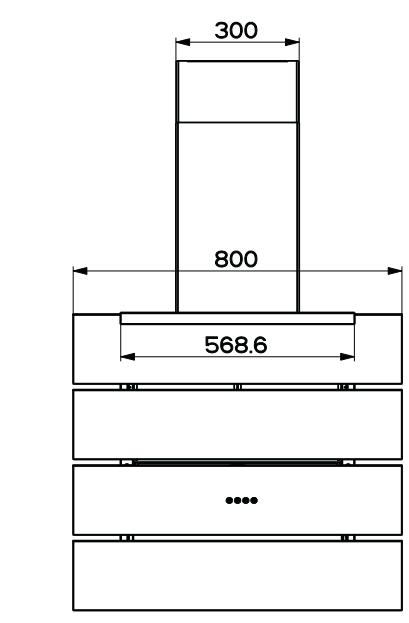
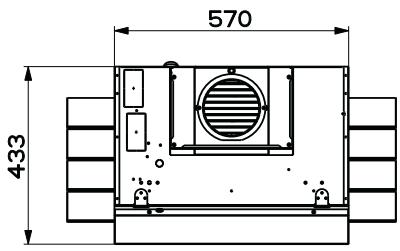
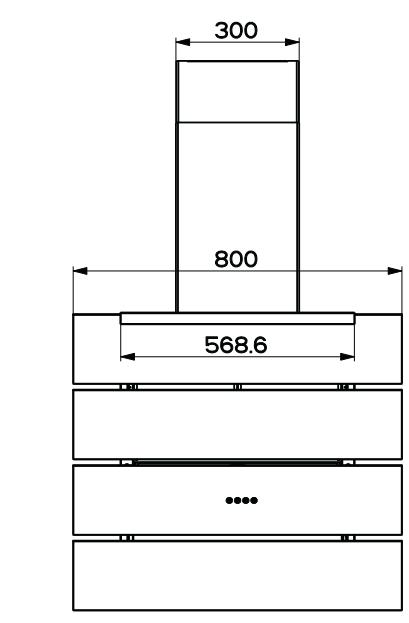
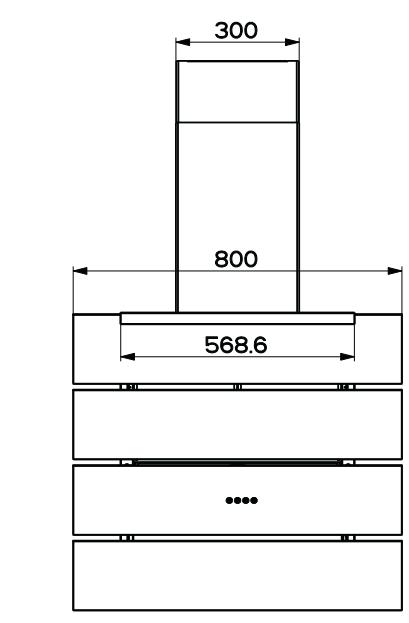
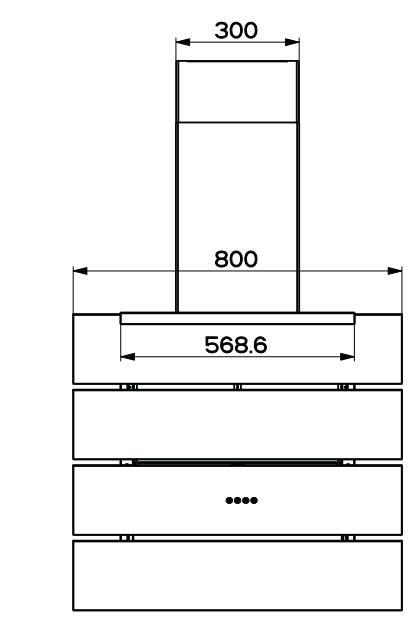
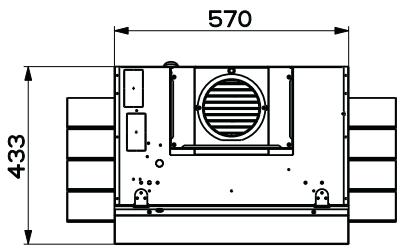
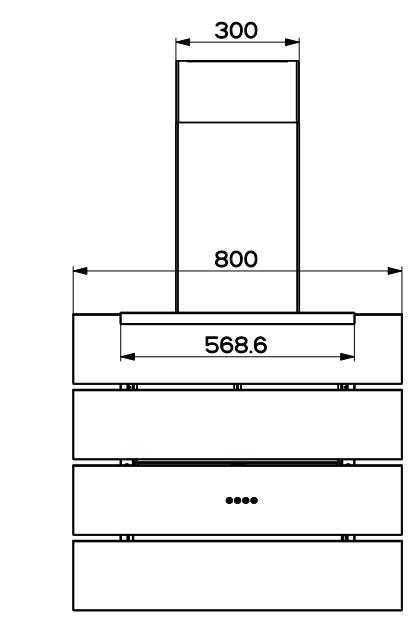
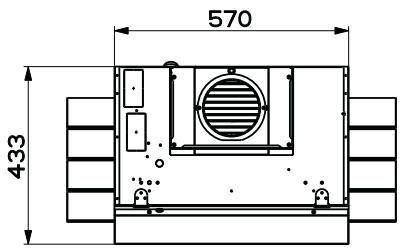
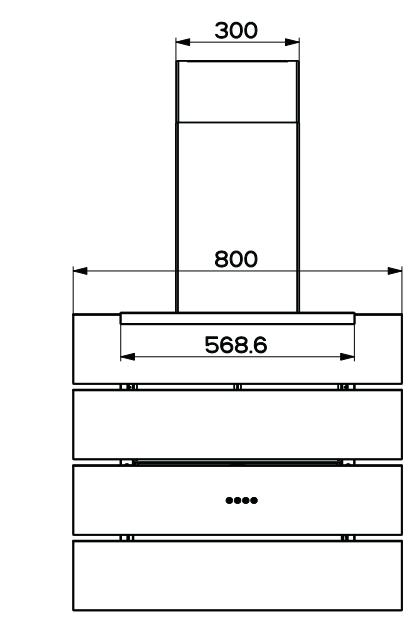
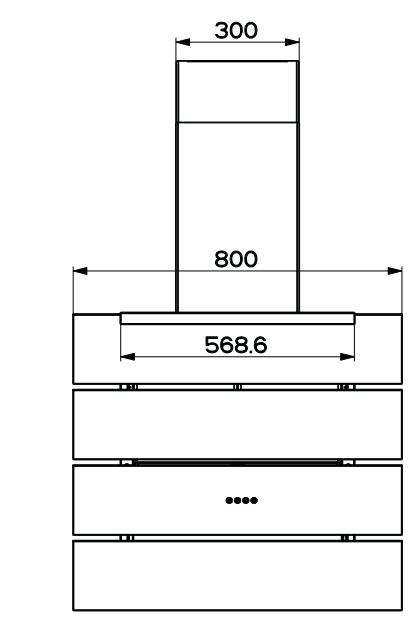
| Dimension | Value | | --------- | ----- | | Height | 300 | | Width | 800 | | Base | 568.6 | | Bottom | 1 |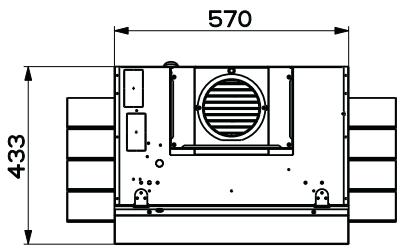
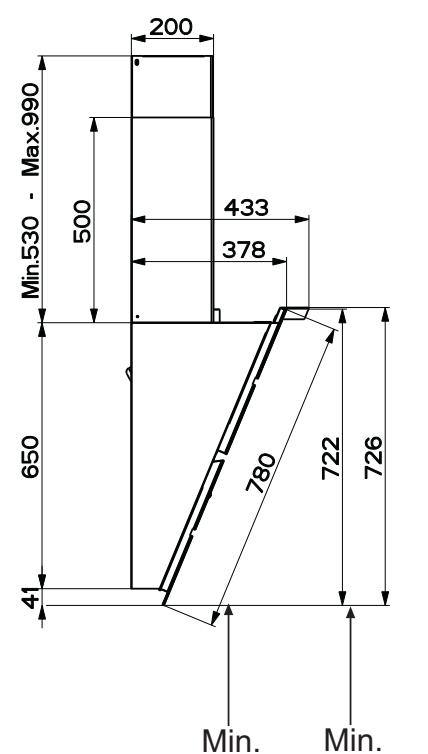
other
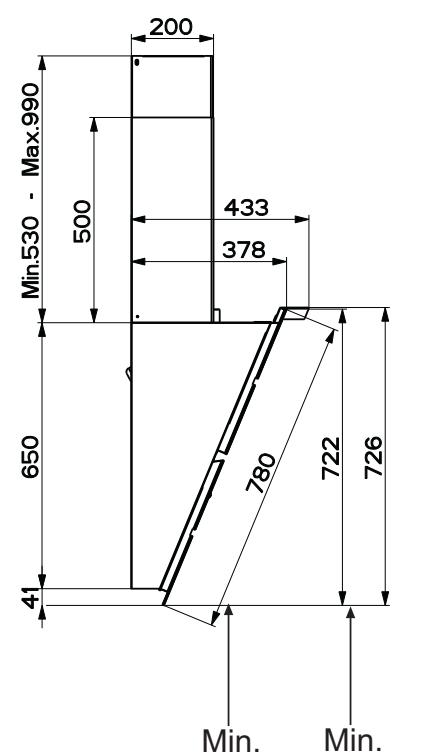
| Dimension | Value | | ----------------- | ----- | | Width (Left) | 200 | | Width (Right) | 500 | | Height (Center) | 433 | | Base Width (Center)| 378 | | Total Width (Center)| 650 | | Total Height (Center)| 780 | | Total Height (Center)| 722 | | Total Height (Center)| 726 | | Minimum Width (Bottom) | 41 | | Minimum Height (Top) | 200 |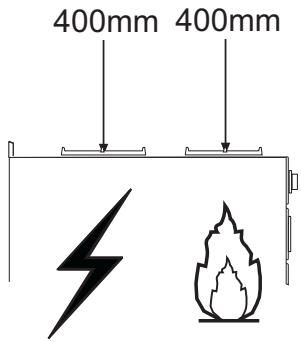
Branchements
SORTIE AIR VERSION ASPIRANTE
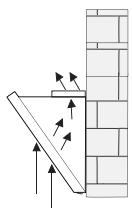
natural_image
Diagram showing a wooden beam leaning against a brick wall, with arrows indicating force direction (no text or symbols)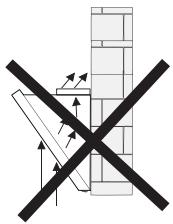
natural_image
Diagram showing a crossed-out construction site with directional arrows and brickwork (no text or symbols)natural_image
Technical line drawing of a mechanical assembly with no visible text or symbolsBRANCHEMENT ELECTRIQUE
natural_image
Diagram showing a mechanical component with a highlighted section and directional arrow (no text or symbols)Montage Cheminée
Cheminée supérieure
natural_image
Diagram of a car interior with a fan and exhaust pipe, no text or symbols presentnatural_image
Illustration of a hand interacting with a smartphone screen showing a green directional arrow (no text or symbols)natural_image
Illustration of a hand using a finger to press or install a device on a green surface, with no visible text or symbols.Éclairage
natural_image
Illustration of a chemical experiment setup with a conical flask, thermometer, and smokestack (no text or symbols)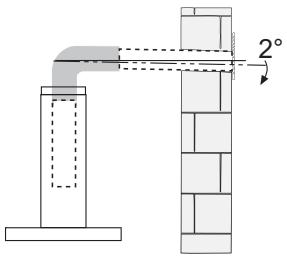
natural_image
Illustration of a cooking setup with a pot, steaming green liquid, and a crossed-out tool (no text or symbols)Komponenten
other
| Dimension | Value | | --------- | ----- | | Height | 300 | | Width | 800 | | Base | 568.6 | | Bottom | 1 |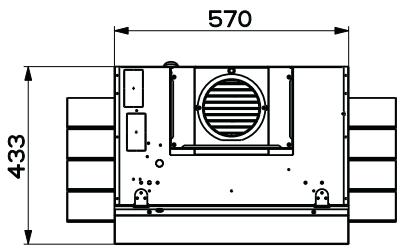
Anschlüss in abluftversion
natural_image
Diagram showing a wooden beam leaning against a brick wall, with arrows indicating force direction (no text or symbols)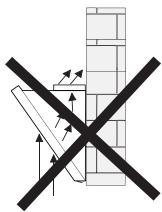
natural_image
Diagram showing a crossed-out construction section with arrows indicating direction (no text or symbols)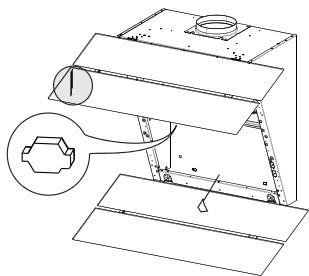
natural_image
Technical line drawing of a mechanical assembly with no visible text or symbolsELEKTROANSCHLUSS
natural_image
Diagram showing a mechanical component with a green arrow indicating direction, no text or symbols presentKaminmontage
Oberer Kaminteil
natural_image
Diagram of a car interior with a fan and exhaust pipe, no text or symbols presentMetallfettfilter
natural_image
Illustration of a hand pressing a green arrow on a smartphone screen (no text or symbols)natural_image
Illustration of a hand using a finger to press or install a device on a green surface, with no visible text or symbols.Beleuchtung
LED-Strahler
natural_image
Illustration of a chemical experiment setup with a conical flask, thermometer, and smokestack (no text or symbols)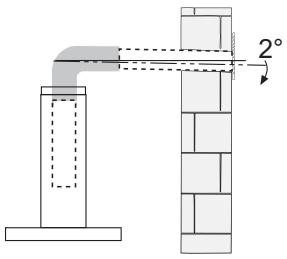
natural_image
Illustration of a cooking setup with a pot, steam rising, and a crossed green ribbon (no text or symbols)
Conexiones
natural_image
Diagram showing a wooden beam leaning against a brick wall, with arrows indicating force direction (no text or symbols)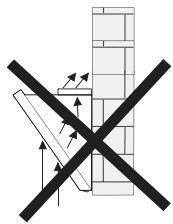
natural_image
Diagram showing a crossed-out brick wall with directional arrows, no text or symbols presentnatural_image
Technical line drawing of a mechanical assembly with no visible text or symbolsCONEXIÓN ELÉCTRICA
natural_image
Diagram showing a mechanical component with a green arrow indicating direction, no text or symbols presentnatural_image
Diagram of a car interior with a fan and exhaust pipe, no text or symbols presentnatural_image
Illustration of a hand pressing a green arrow on a smartphone screen (no text or symbols)natural_image
Illustration of a hand using a finger to press or install a component on a green surface, with no visible text or symbols.Iluminación
natural_image
Illustration of a chemical experiment setup with a conical flask, thermometer, and smokestack (no text or symbols)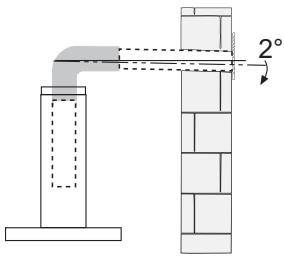
natural_image
Illustration of a cooking setup with a stove and fire, featuring a green smokestack and crossed ribbon (no text or symbols)Εξαρτήματα
Συνδέσεις
natural_image
Diagram showing a wooden beam leaning against a brick wall, with arrows indicating force direction (no text or symbols)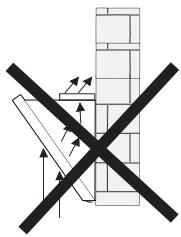
natural_image
Diagram showing a cross-shaped construction or reinforcement with arrows indicating direction, no text or symbols present.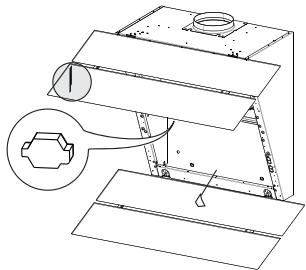
natural_image
Technical line drawing of a mechanical assembly with a magnified inset showing a hexagonal component (no text or symbols)ΗΛΕΚΤΡΙΚΗ ΣΥΝΔΕΣΗ
natural_image
Diagram showing a mechanical component with a highlighted section and directional arrow (no text or symbols)natural_image
Diagram of a car interior with a fan and exhaust pipe, no text or symbols presentnatural_image
Illustration of a hand pressing a green arrow on a smartphone screen (no text or symbols)natural_image
Illustration of a hand inserting a component into a device (no text or symbols visible)Φωτισμός
natural_image
Illustration of a chemical experiment setup with a conical flask, thermometer, and smokestack (no text or symbols)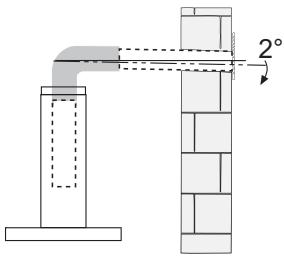
natural_image
Illustration of a cooking setup with a stove and fire, featuring a green smokestack and crossed ribbon (no text or symbols)Части
other
| Dimension | Value | | --------- | ----- | | Height | 300 | | Width | 800 | | Base | 568.6 | | Bottom | 1 |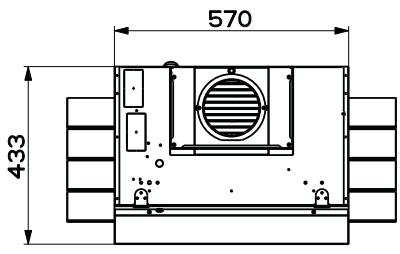
Соединения
natural_image
Diagram showing a wooden plank leaning against a brick wall, with arrows indicating force or movement (no text or symbols)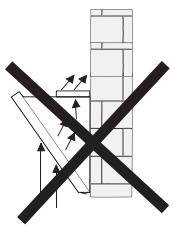
natural_image
Technical line drawing of a mechanical assembly with a magnified inset showing a hexagonal component (no text or symbols)natural_image
Diagram showing a mechanical component with a highlighted section and directional arrow (no text or symbols)Установка дымохода
Верхний дымоход
natural_image
Diagram of a car interior with a fan and exhaust pipe, no text or symbols presentnatural_image
Illustration of a hand pressing a green arrow on a smartphone screen (no text or symbols)natural_image
Illustration of a hand inserting a device into a device with a green arrow indicating direction (no text or symbols)Освещение
natural_image
Illustration of a chemical experiment setup with a conical flask, thermometer, and smokestack (no text or symbols)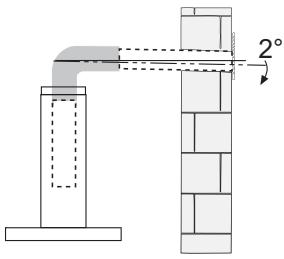
natural_image
Illustration of a cooking setup with a stove and fire, featuring a green smokestack and crossed ribbon (no text or symbols)Onderdelen
Aansluitingen
LUCHTUITLAAT AFZUIGVERSIE
natural_image
Diagram showing a wooden beam leaning against a brick wall, with arrows indicating force or movement (no text or symbols)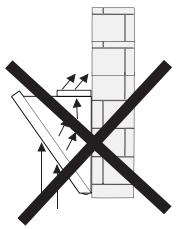
natural_image
Diagram showing a brick wall with a black X-shaped symbol indicating no movement or force, surrounded by arrows (no text or labels)