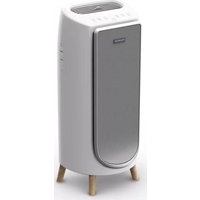
PU3080F0 - Air purifier ROWENTA - Free user manual and instructions
Find the device manual for free PU3080F0 ROWENTA in PDF.



| Brand | Rowenta |
| Model | PU3080F0 |
| Product type | Air purifier |
| Power supply | Mains socket, suitable voltage (see rating plate) |
| Maximum power | 20 dBm (Wi-Fi) |
| Filtration | 4 levels: pre-filter, activated carbon and Allergy+ filter, NanoCaptur+ filter, anti-formaldehyde filter |
| Operating modes | Auto day, Auto night, Silent, Turbo |
| Air quality indicator | LED: blue (excellent), green (slight), yellow (moderate), orange (strong), red (extreme) |
| Connectivity | Wi-Fi 2.4 GHz, Pure Air by Rowenta app |
| Child lock | Yes, activation by long press 3 seconds |
| Filter reset | Mode button (3 seconds) |
| Charcoal + Allergy+ filter | Code XD6231, change every 12 months |
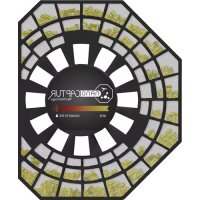
| NanoCaptur+ filter | Code XD6082, change based on color or 12 months |
| Pre-filter | Clean every 2 months (vacuum or water) |
| Sensor cleaning | Every 2 months, slightly damp cotton swab |
| Safety | Class II (double insulation), circuit breaker in case of fault |
| Warranty | International, see provided card |
| Ambient temperature | Below 35 °C, RH < 70% |
| Repairability | Authorized center only, do not disassemble |
| Country of origin | Not specified in the manual |
Frequently Asked Questions - PU3080F0 ROWENTA
User questions about PU3080F0 ROWENTA
0 question about this device. Answer the ones you know or ask your own.
Ask a new question about this device
Download the instructions for your Air purifier in PDF format for free! Find your manual PU3080F0 - ROWENTA and take your electronic device back in hand. On this page are published all the documents necessary for the use of your device. PU3080F0 by ROWENTA.
USER MANUAL PU3080F0 ROWENTA
PURE AIR GENIUS PU3080
SUMMARY
PRODUCT OVERVIEW 3
SAFETY TIPS 3
VERY IMPORTANT 4
INSTRUCTIONS 4
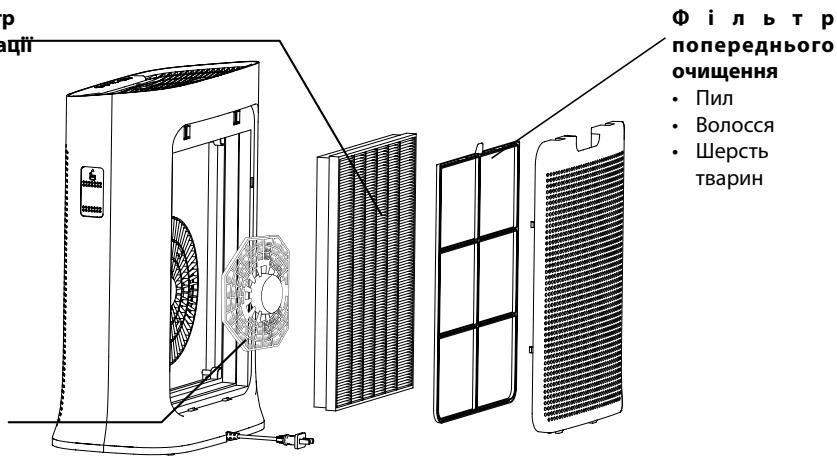
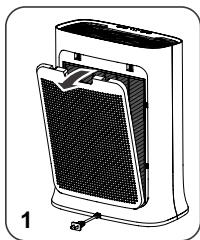
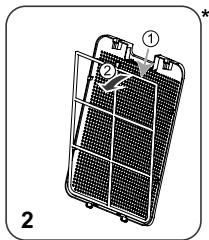
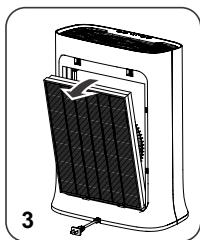
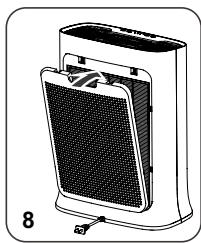
DISASSEMBLING/REASSEMBLINGFILTERS 5
WHERE TO INSTALL THE APPLIANCE 6
BEFORE FIRST USE 6
OPERATION 6
HOW TO CONNECT YOUR PURIFIER TO INTERNET 7
8
STORAGE 9
IN THE EVENT OF A PROBLEM 9
WARRANTY 10
HELP PROTECT THE ENVIRONMENT! 10
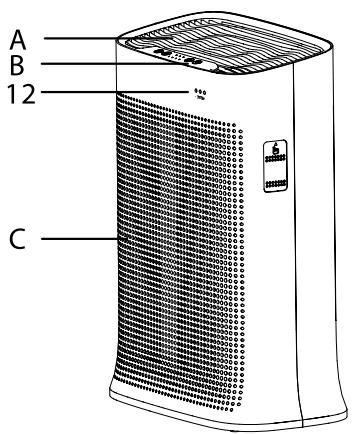
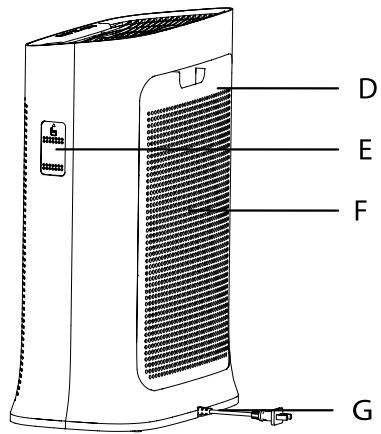
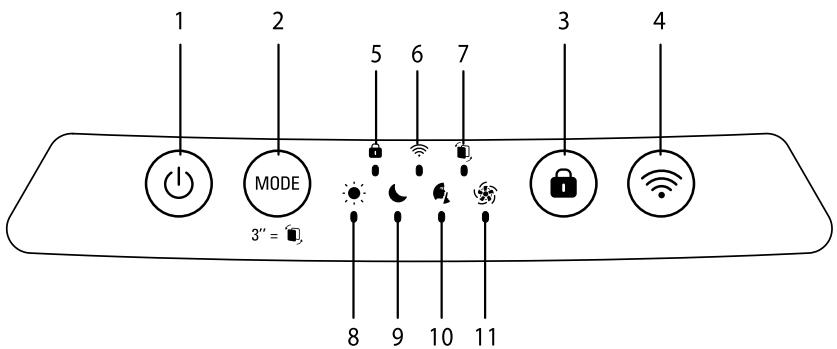
PRODUCT OVERVIEW
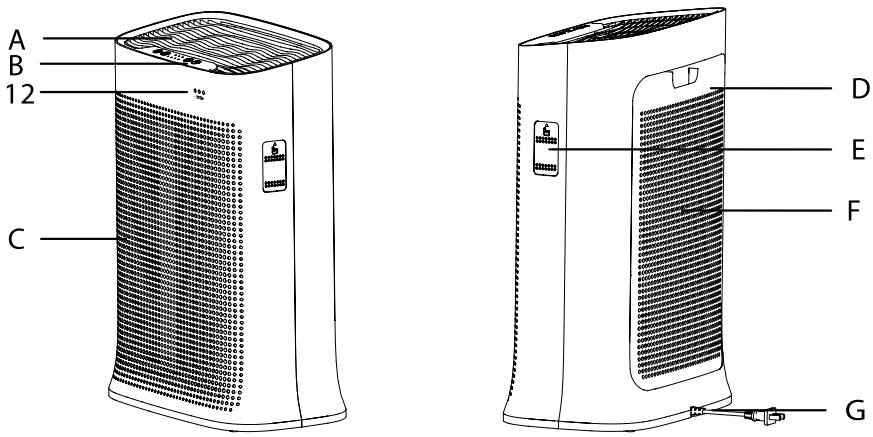
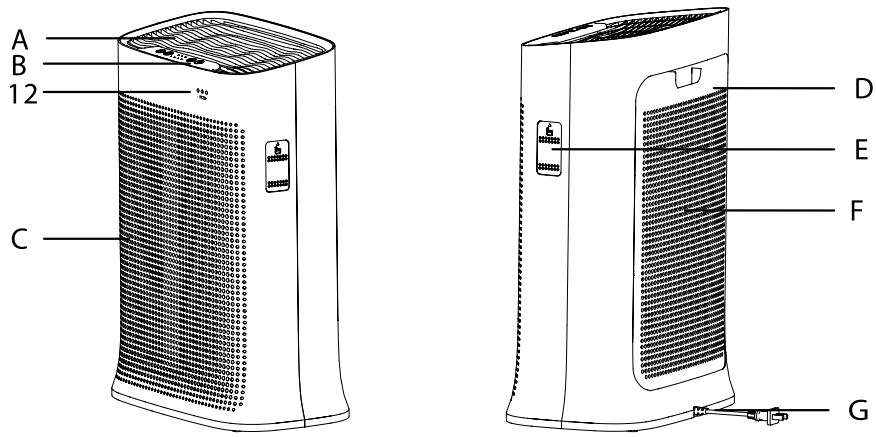
Main Unit
A Air outlet
B Control panel
C Front panel
D Rear panel
E Sensor cover
F Air inlet
G Mains cable
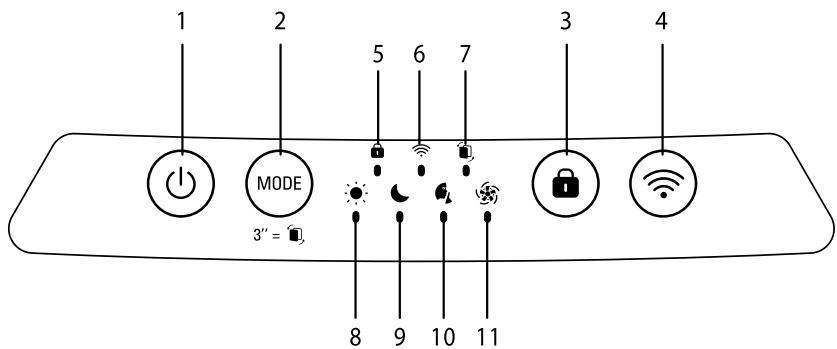
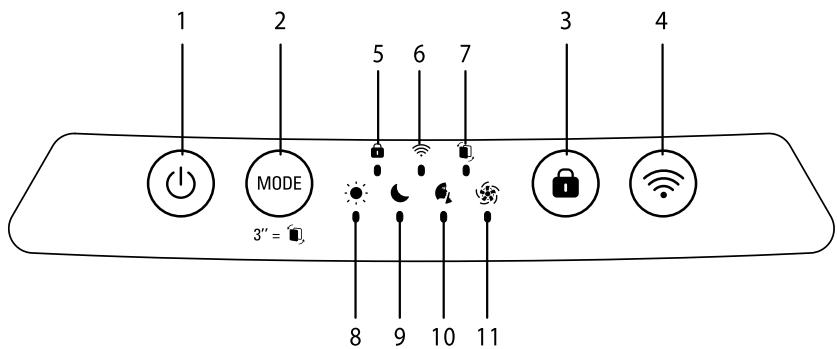
Control buttons
1 On/off button
2 Mode/Reset filter button
3 Child lock
4 Wi-Fi button
Indicators
5 Child lock indicator
6 Wi-fi connection indicator
7 Replace filter indicator
8 Day time Auto mode indicator
9 Night time Auto mode indicator
10 Quiet mode indicator
11 Turbo mode indicator
12 Air quality indicator
SAFETY TIPS
It is essential that you read these instructions carefully and observe the following recommendations:
- For your safety, this appliance complies with the applicable standards and regulations (low voltage, electromagnetic compatibility, environmental directives, etc.).
- This appliance should not be used by persons (including children) with reduced physical, sensory or mental capacities or lack of experience and knowledge, unless they are supervised or have been given instructions beforehand concerning use of the appliance by a person responsible for their safety.
- Children should be supervised to ensure they do not play with the appliance.
- The appliance can be used by children aged 8 and over and persons with a lack of experience or knowledge or reduced physical, sensory or mental capacities, provided they are supervised, have been trained on the safe use of the appliance and are aware of the risks involved. Children must not play with the appliance.
- If the power cord is damaged, it must be replaced by the manufacturer, by its after-sales service or a similarly qualified person so as to avoid any danger.
- Children should not clean or perform maintenance on the appliance without being supervised.
- For maintenance operations, please refer to the "Maintenance" section.
- Keep the appliance and its power cord out of the reach of children aged under 8.
-
This appliance is designed for domestic use only. It should not be used for industrial purposes.
-
The warranty will be voided if damage occurs due to incorrect use.
- Do not operate this appliance in a very dusty and/or humid place or in a location with fire hazards.
- Before use, always make sure that the appliance, plug and power cord are in good condition.
- Never insert objects into the appliance (e.g. needles, etc.).
- Do not pull on the power cord or the appliance, even to unplug it from the wall power outlet.
- Unroll the full length of the cord before use.
VERY IMPORTANT
- Do not cover the air inlets or the outlet grid.
- Do not touch the appliance with wet hands.
- Never allow any liquid to enter the appliance.
- Never use the appliance in a humid place.
- Never use the appliance close to a heat source.
- Do not use the appliance close to flammable objects or products (curtains, aerosols, solvents, etc.).
-
Never use the appliance in an inclined or horizontal position. Place the appliance on a flat, stable surface.
-
In the case of prolonged absence: switch the appliance off using the on/off button (1) and unplug it.
- Switch off and unplug your appliance before moving it.
- Unplug the air purifier during assembly and cleaning.
INSTRUCTIONS
Rowenta Pure Air Genius enables you to breathe pure air in your home and protects your health with up to 4 filtration levels as described below. Each level is essential and traps specific pollutants :
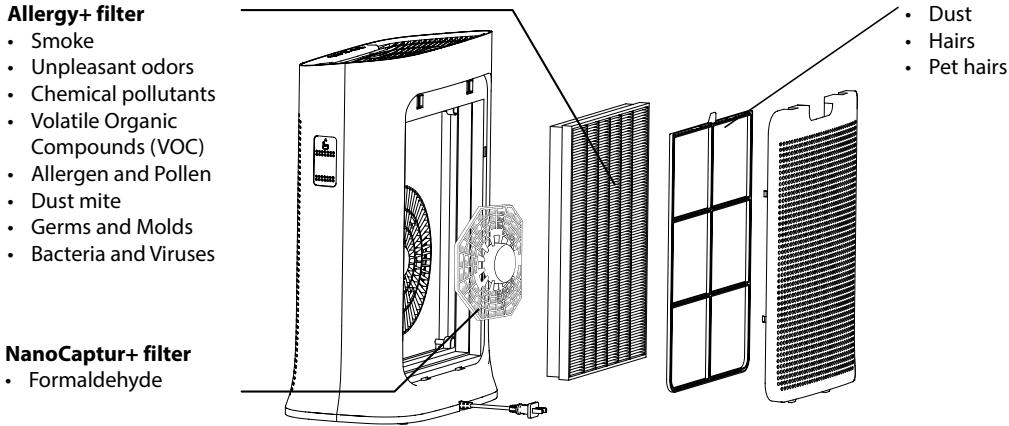
2in1 Active Carbon &

«HOW TO ACHIEVE CLEANER INDOOR AIR»
In addition to using your Pure Air Genius, here are some tips on how to improve the quality of your indoor air:
- Ventilate the rooms for at least 10 min. every day, in summer and winter.
- Maintain your ventilation system.
- Limit the use of household products.
- Do not smoke indoors.
- Avoid home fragrances, incense sticks, scented candles, etc.
- Ventilate whenever any work is being conducted in your home and for several weeks afterwards.
- Avoid green plants that are allergenic or need frequent watering.
DISASSEMBLING / REASSEMBLING FILTERS
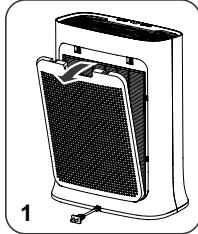
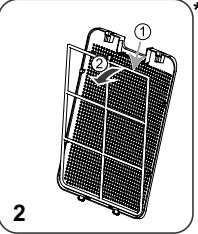
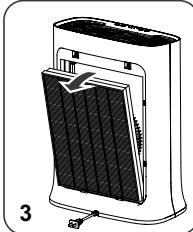
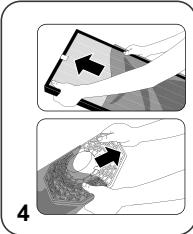
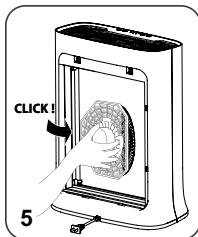
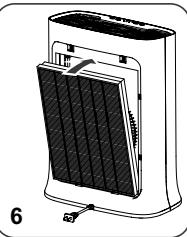
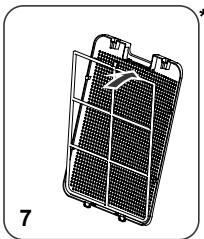
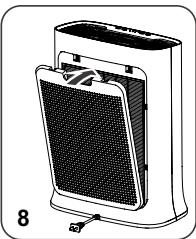

- Avoid handling used filters if you suffer from allergies or asthma.
- Wear gloves when changing the filters, or wash your hands well afterwards.
- Put used filters directly into a closed, air-tight bag before throwing them away to avoid spreading pollutants.
WHERE TO INSTALL THE APPLIANCE
Place the purifier on a flat, stable surface in the room requiring treatment.
To allow the air to circulate freely, avoid placing the appliance behind curtains, below a window, item, furniture, or shelf unit, or close to any other obstacle, and leave at least 50~cm of free space on each side of the appliance. Recommended to be used in ambient conditions lower than 35^ 70% RH (95^)
BEFORE USING THE APPLIANCE FOR THE FIRST TIME
Make sure that the plastic packaging protecting the filters has been removed before using the appliance.
Before the first use, ensure the voltage, frequency and power of your appliance suit your electric supply. Your appliance can operate using an unearthed plug. It is a class II (double electrical insulation). Before switching on your appliance, ensure that:
- the appliance is completely assembled as described in the safety instructions,
- the appliance is placed on a stable, horizontal surface,
- the appliance is positioned in accordance with the instructions given in this manual,
- the air inlets and the outlet grid are completely unobstructed,
- the filters and panel have been correctly installed (See section "Disassembling / Reassembling filters")
IMPORTANT: You are advised to switch off and unplug the appliance when not in use.
OPERATION
Power button (1)
- Press this button to turn the air purifier on/off.
Mode button (2) MODE
- AUTODAY and AUTONIGHT mode: if the air quality level is excellent then the device does not run.
-
Press this button to select one of the four modes. The corresponding indicator will turn on to indicate the selected mode.
-
Daytime auto mode: the fan speed is set to 1,2,3 or 4.
- Nighttime auto mode: The fan speed is set to 1 or 2.
- Quiet mode: The fan speed is set to minimum. Use this mode in quiet environments.
- Turbo mode: The fan speed is set to maximum. Use this mode when air quality is poor.
Child lock (3)
- The lock system prevents the purifier from being accidentally mis-set during operation.
- To activate it, press the button (3) for 3 sec until the locked control panel indicator turns on. To exit this mode, press the button (3) again for 3 seconds, until the indicator turns off. When selected, the other buttons are locked.
Wi-Fi button (4)
Frequency band operated : 2400-2483,50 MHz
Maximum radio-frequency power : 20 dbm
- To turn on or off the Wi-Fi function on your purifier, hold simultaneously the Wi-Fi button and the child lock button during 3 seconds.
- When the Wi-Fi connection indicator flashes it means that the purifier lost its connection.
HOW TO CONNECT YOUR PURIFIER TO INTERNET
HOW TO CONNECT YOUR PURIFIER TO INTERNET ?
Download the app "Pure Air by Rowenta" & follow the instructions on your smartphone :
-
Sign in to create your Rowenta account if you are new. Or log in the app if you already have an account.
-
Make sure to stand close to the purifier during the pairing (2 meters maximum) and make sure the purifier is located near a strong Wi-Fi signal.
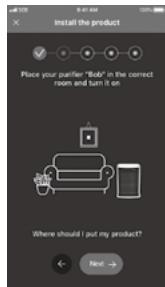
- Make sure your phone is connected to your local Wi-Fi network (you'll hear a "ding" sound and the Wi-Fi indicator will flash to indicate that your mobile device is successfully connected to Wi-Fi.)
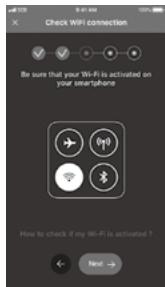
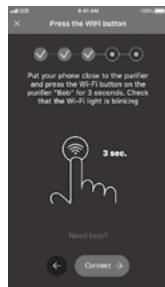
- Turn your purifier on & hold the Wi-Fi button for 3 seconds (you'll hear a "ding" sound and the Wi-Fi indicator will flash to indicate that your purifier is successfully connected to Wi-Fi.)
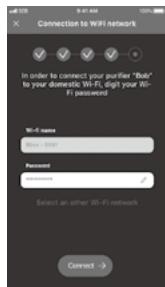
- Choose your Wi-Fi network and enter the network password to connect to your local Wi-Fi network.
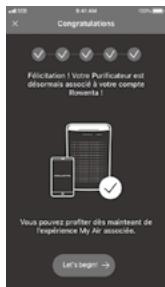
- And you're done!
The Wi-Fi indicator lights to indicate that your purifier is successfully connected to Internet.
What to do if you have trouble with the installation of the application:
Check compatibility on the website https://www compatibility.groupseb.com/CompatibilityList-Pureair-Rowenta.pdf
Can multiple users pair to one device?
Of course! New users just need to download the App « Pure Air by Rowenta », create an account and do the pairing.
If the Wi-Fi in my home shuts off for a brief period will I lose control of my purifier via the app?
If the product lost its connection, the product will stop automatically after 24h.
- Indication of air quality
Air quality indicator (12) is located at the front panel (C) of the appliance. The 3 LED will indicate the air quality level:
| Air Quality | Air quality indicator color |
| Excellent | Blue |
| Slight pollution | Green |
| Moderate pollution | Yellow |
| High pollution | Orange |
| Extreme pollution | Red |
CARE AND MAINTENANCE
Before performing any maintenance work, switch off the air purifier using the on/off button (1).
Use a damp cloth to clean the surface of the product.
Important: Do not use any abrasive materials, as these may damage the surface of the product.
Frequency of cleaning/replacing the filters :
| Filter | Clean/replace | Frequency | Filter codes |
| Pre filter | Clean | Every 2 months | |
| 2in1 Active Carbon & Allergy+ filter | Replace | Every 12 months | XD6231 |
| NanoCaptur+ filter | Replace | Color changing (see color chart on filter) or every 12 months in case of no saturation. | XD6082 |
These figures are based on tests in which the air purifier is used for 8 hours per day in quiet mode.
You may need to replace the filters more often depending on the air quality and how often the air purifier is used. The filter replacement indicator (7) will turn on when the filters need to be replaced and you will receive a notification on your mobile application. To replace the filters, please refer to the section "Disassembling / Reassembling filters".
Important! When the filter replacement indicator (7) turns on, please check on the mobile application in order to know which filter has to be replaced. If two filters must be changed, please change them one by one. Change the second filter only after changing the first one and after resetting the first filter.
- The pre-filter can be cleaned with a vacuum cleaner or rinsed in water.
Important: Resetting the filter
After replacing the filter, press the mode button (2) for 3 seconds to reset the filter settings.
Performing a force reset:
If you replace a filter before the end of its lifespan, press the mode button (2) MODE for 3 seconds to reset the filter settings.
Caution :
If the granules become "white opaque", filter needs to be removed from the purifier until the granules become transparent again.
If the opaque aspect persists, filter need to be changed.
If the granule become "crumbly", filter need to be changed.
The appliance efficiency can be reduced if the pre-filter is not cleaned regularly.
Never use a pre-filter that is still damp.
The pre-filter is the only filter which can be re-used and washed with water. The 2in1 Active Carbon & Allergy+ filter cannot be cleaned and re-used. Never wash with water. The 2in1 Active Carbon & Allergy+ filter must be replaced after the end of its lifespan. For optimum performance of the appliance, only use filters provided by Rowenta. If the Nanocaptur+ filter granules become opaque white or/and crumbly, the filter needs to be changed.
Please note: certain filters may emit a temporary slight odour, due to the transport and storage conditions. This odour will vanish and is not dangerous for people.
Pollution sensors
The particle sensor need to be cleaned regularly (every 2 months) and appropriately.
Make sure you turn off and unplug the appliance before cleaning the pollution sensors and follow the recommendations below:
- Clean the air inlet and outlet using a soft brush or cloth.
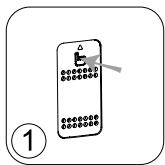
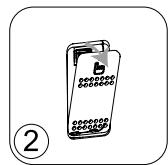
- Open the sensor cover located on the left hand side of the appliance.
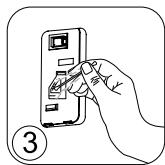
- Lightly wet a cotton swab and remove any dust from the lens and the inlet/outlet. Wipe using a dry cotton swab.
- Clean the sensor using a soft brush or vacuum cleaner.
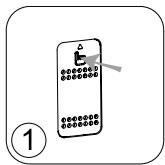
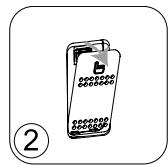
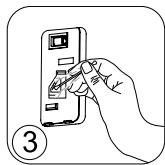
IMPORTANT:
Never use a detergent or metal object to clean the sensors.
The efficiency of the sensors may be reduced if not cleaned regularly.
Cleaning frequency varies depending on the operating environment of the appliance. If it is used in a dusty environment, clean the sensors more frequently.
STORAGE
When you are not using the appliance, store it in a cool, dry place with ambient conditions no higher than 35^ C (95°F) 70 % RH.
IN THE EVENT OF A PROBLEM
- Do not disassemble the appliance yourself. A poorly repaired appliance may be dangerous for the user.
- Check the troubleshooting table below before contacting an Approved Service Center:
| Problem | Check | Solution |
| The appliance does not switch on. | Is the power cord connected? | Connect the power cord to a plug with the correct voltage. |
| Are all the display elements off? | Press the on/off button and select the required function. | |
| Is there a power outage? | You can use your purifier once the power turns on again. | |
| The air flow does not change automatically. | Is the appliance in manual mode? | Select the correct operating mode. |
| The flow is a lot weaker than before. | Does the filter need to be cleaned or replaced? | Check the filter cleaning and replacement frequencies and clean/ replace the filter(s) if necessary. |
| There is an unpleasant smell coming from the air outlet. | Does the light still indicate poor air quality? | Check the filter cleaning and replacement frequencies and clean/ replace the filter(s) if necessary. |
| The air quality indicator does not change color. | Is the sensor lens covered with dust? | Clean the sensor lens. |
EN
| Problem | Check | Solution |
| The purifier doesn't connect | Is your phone connected to your personal Wi-Fi network at the beginning of the process? | Verify that you are conneted to your personal Wi-Fi network. |
| The purifier doesn't seem to connect? | Check that your purifier is plugged in and turned on. | |
| The Wi-Fi led of your purifier is not flashing? | Hold the Wi-Fi button for 3 seconds. | |
| The first pairing didn't work? | Restart the product to retry. | |
| My phone is connected to the Wi-Fi but not the purifier? | Make sure the two devices are in close enough proximity to one another and close to the WIFI router. | |
| My phone isn't connecting to the Wi-Fi? | Check that your Wi-Fi router is connected to the Internet Check that the Wi-Fi password didn't change | |
| Why did the pairing not work? | Check the compatibility | Supported encryption type: WPA_1/WPA_2, TIPK; PSK, AES Supported networks: 2,4 GHz (not 5Ghz) |
WARRANTY
Do not use the appliance and contact an Approved Service Centre if:
- your appliance has been dropped;
- your appliance or its power cord are damaged;
- your appliance no longer functions properly.
You can find a list of Approved Service Centres on the Rowenta international warranty card.
HELP PROTECT THE ENVIRONMENT!


our appliance contains many materials which can be recovered or recycled.
leave it at a local waste collection point or take to an approved service center so that it can be processed.
These instructions can also be found on our internet site, at www.rowenta.com.
SOMMAIRE
DESCRIPTION DU PRODUIT 12
CONSEILS DE SECURITE 12
TRES IMPORTANT 13
PRINCIPLE DE FONCTIONNEMENT 13
DÉMONTER / CHANGER LES FILTRES 14
OU INSTALLER L'APPAREIL 14
AVANT LA PREMIÈRE UTILISATION DE L'APPAREIL 15
UTILISATION 15
COMMENT CONNECTER VOTRE PURIFICATEUR À INTERNET ? 16
ENTRETIEN ET NETTOYAGE 17
RANGEMENT 18
EN CAS DE PROBLEMES 18
GARANTIE 19
AIDEZ À PROTEGER L'ENVIRONNEMENT! 19
DESCRIPTION DU PRODUIT
Unité principale
BEI EINEM PROBLEM 27
GARANTIE 28
WAAR HET APPARAAT INSTALLEREN 50
VOORDAT U HET APPARAAT VOOR DE EERSTE KEER GEBRUIKT 51
BEDIENING 51
HOE UW LUCHTREINIGER MET HET INTERNET VERBINDEN? 52
REINIGING EN ONDERHOUD 53
OPSLAG 54
ALSER EEN PROBLEM OPTREEDT 54
GARANTIE 55
DRAAG BIJ AAN DE BESCHERMING VAN HET MILIEU! 55
BESCHRIJVING VAN DE ONDERDELEN
Apparaat
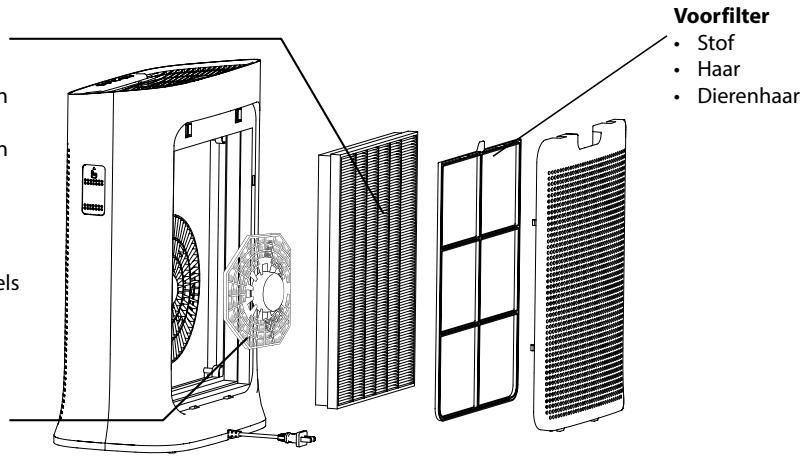
2in1 Active Carbon & Allergy+ filter
Rook
- Onaangename geuren
Chemische verontreinigende stoffen
- Vluchtige organische stoffen
- Allergenen en pollen
Stofmijt
- Microben en schimmels
- Bacteriën en virussen
NanoCaptur+ filter
- Formaldehyde
"HOE SCHONERE BINNENLUCHT KRIJGEN"
WAAR HET APPARAAT INSTALLEREN
ALSEREENPROBLEEMOPTREEDT
OCHOBHN CBEDEHNA 3A IPIOyKTA
Главно устpoисто
BytoHn 3a ynpabIeHne
UHdkaTopu
A Bb3duyxOoTBoD
1 BytoH 3a BkN./n3Kn.
5 INdikKaTOp 3a 3akIIOvBaHHeTo 3a npedna3BaHe Ha deca
B Kontrponen nahen
2 HacpoKaHapeKIM/HynipaHeHa 1nTbpa
6 INHdkaTop HaWi-fi Bpb3KaTa
C Ppeen nanei
3 3aKJIIOUBaHe 3a npEpa3BaHe Ha deua
7 INdikatop 3a cMaHa Ha fHJTbpa
D 3aen nahan
4 Wi-Fi 6ytoh
E KaNAK Ha ceH3Opa
F BxoJ3aBb3dyx
G Ka6eI3a3axpaHbHeTo OTMpexKaTa
8 INdkaTop 3a aBTOMaTnueH dHeBHe npKIM
9 INdikKaTOp 3a aBtOMaTnueH HOUeH peKIM
10 INdukatop 3a Tnx pexim
11 INdikaTop 3a pekIM Typ6o
12 INHnKaTOp 3a KaueCTBOTo Ha Bb3Dyxa
CbBETN 3A BE30IACHOCT
Ot oco6eHa BaXhoCT e da npoyetete HactoIHTe IHcTpyKuIN BHNMaTeHNO n da cna3BaTe CneDnTe npenopbkn:
3a Basha 6e3oNaChocT, To3n ypeD OTROBapr Ha npNIOxIMnte cTaHdapTu n perIaMeHTn (DInpeKTHBNTe 3a HnCKO HnpeXeHne, eJeKTPOMarHHTHa CbBMeCTMmOcT, OKoJHa CpeDa n Dp.).
To3n ypei cIeIbA da He ce n3noJI3Ba OT Xopa (BkIIOuHTeJIHO deca) C HamaJIeHn 0n3nueckn, CeTINBHN IIn yMCTBeHn CnOCo6HocTn IIn C IInIcHa OINIT N 3HaHnJ, OCBeH aKO He 6bDaT HaD3npaBAHn IIn INHCTpyKTIpaHn OTHOCHO yIpOTpe6aTa Ha ypeHa OT IInZe, OTROBOPHO 3a TExHaTa 6e3OJaNacHOCT.
- DeçaTa TpЯБа Да ce HaбЛюДаВaT, 3a Да He CSИграЯТС MaшинаТa.
- UpeiBt MoKe Da Ce I3NoJ3Ba OT Dea Ha Bb3pAcT 8 rOdHn IN PO-ROJIeMn, KOnTO HAmAT OINr IIN 3HaHnI IN TaKINBa C HAmJIeHn ΦI3NueCKn, CetINBn IIN yMCTBeHn CnOCo6HocTn, pIn ycIOBne, Ye IM e POKa3aHO KaK Da I3NoJ3BaT UpeDa 6e3OpaCHO n Ca HArCHO c npncbIte pIcKOBe. DeaTa He Tpr6Ba Da cn IrpaarT cypeDa.
- Ako 3axpaHbauT Ka6eI e NOBpeH, 3a Da N36eHHe T BcKaKbU pNCKOBe, Toi Tp8Ba Da 6bJe CMeHEn OT npOn3BOdntEJI, OT cepBn3a 3a rapaHcuHNOHO o6cnykBaHe Ha npOn3BOdntEJI nII ON JInCe CbC CXoDHa KBaINΦnKaζIa.
- Побдрьжкataи поочствано на урEDA-he 6иВа да се ИЗВьршВат ot Deца 6e3 Надзор.
3a noDbpxaun deHocTn, moJ, pa3rpeaTe pa3dJI "POndpbXka".
- Дръжte урEDA и HerOBnia 3axpaHbAùk Ka6eJ n3BbH O6cera Na Deça noD 8-rocnHa Bb3pact.
To3n ypeE npedna3haueH 3a ynoTpe6a camo B domaunu ycnoBna. He 6n trpa6BaNo da ce n3non3Ba 3a npofoecnoHaJIHn ceni.
- TapaanuTa cneBda da ce aHynipa, aKO ce noaBn nobpeDa nopadn HnpabunHa ynOte6a.
- He n3no13BaIte To3n ypeB npeKomepHOn ppaHNo I/IIIN BnaXHO MRCTO IIN Ha MRCTo, KbJeTO mAm OnaCHOCT OT IOJkap.
- Ппеси улnotрба винаги се уberяbaite, че ъсеньт на урда и неюраз захранвац кабел са визправно сьстонни.
- Hukora He BkapBaiTe ppeMeTu Bypea (HaPpImepu ngn np..)
- He nbpnaite 3axpaHbaua nka6e nn ypea, dopn n 3a da ro n3KIOUHTe OT KOHTaKaTa.
- Празу уnotpe6а разитte сени ka6e.
BAJKHANHΦOPMAZIHA
He nokpnbaiTe BXoJa nnn 3XoHaTa peweTka Ha Bb3dyxa.
He ninnai Te ypea c Mokpn pbue.
- Hnkora He no3BovlaBte B ypeda da HabIeze TeuHOCT.
- HnKora He n3non3BaIte ypeDa Ha BlaJxHo MЯCTO.
- HnKora He n3non3BaIte ypeDa 6n3o Do n3TOUHk Ha TOPiHa.
- He n3non3BaIte ypeDa B 6n3OcT do 3anAaMm npedMeTu nn npoDyKTu (3abecu, aepo3oN, pa3TbOpntenu n dp.).
- HnKora He n3nO3BaIte ypeDa B hakIoHeNo nnXOpu3oHTaIIHO nOIOKeHne. NocTabeyepeDa Bbpxy paBHa, cta6UnHa nobbpxHoct.
B cnuyaHa npodbIKNITHe OTCbCTBue: n3KnIOUeTe ypeDa, KaTo n3non3BaTe 6yToHa 3a BkN./n3Kn. (1) n n3BaTe uencela My OT KOHTaKTA.
- Ппедида мостите урEDA, Тразба ду ro ИЗКЛЮЧITE ot 6уToHA n OT KOТAKTA.
- ПО ВЕME на моHTиран e И почИствае ИЗКлIOуTeпpeuNTBaTeЯ 3a ВьзДух OT KOHTaKТa.
ПИИЦИН HA PABOTA
Rowenta Pure Air Genius Bn daBa Bb3MoXHocT da dIwate YCT Bb3dYx B CBOY IOM n da npedna3BaTe 3dpaBTo cn c nomoUta Ha do 4 HnBa Ha fInTPaZn, KaKTo e OINCAHO NO-dOly. BcAko HnBO e BaxHo yIaB a KOnKpeTHN 3AmbpcITeI:
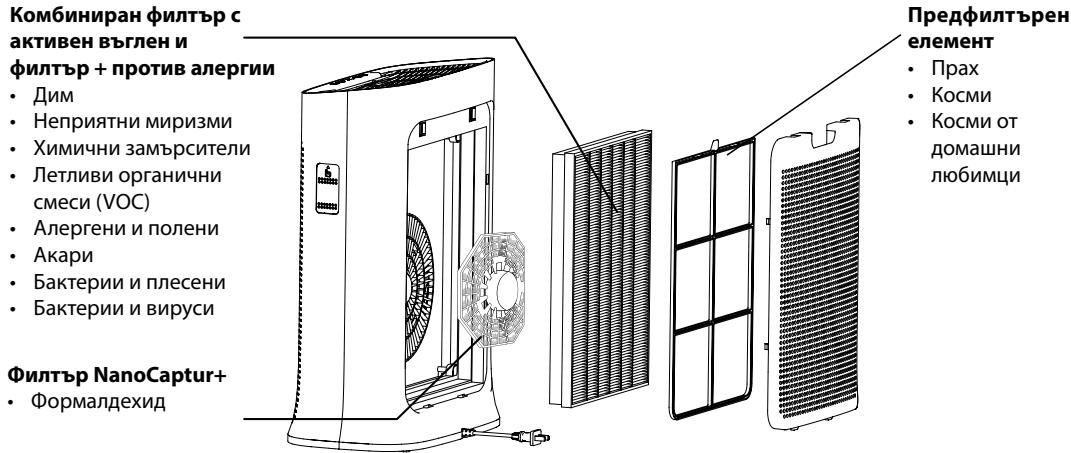
"KAK DA NOCTI RHEM IO- YNCT Bb3dYX HA 3AKPNTO"
BdonbInHeHneKbMa6oTataHa BaaHnIpeuNCTBaTeJ Pure Air, eTo n HAnKoJIko CbBeta 3a ToBa, KaK da NDo6pnte KaueCTBOTO Ha B3dUxa BvB BaaHnI Dom:
-Пюветраваяte сапente 3а поны 10 минуten BCEки Deн, пез Лято И пез ЗИмата.
-ПодьржайтEBHTиlaционнотасистema.
- OtrpauHueyIyOTpe6aTaHa IOMaKInHcN KIpOdyKTn.
- HenyuweTe BbTpe.
-Избягваite apomatn3aTOpN 3a Вьздух, apomatnKneчк, apomatn3upaHn CBeuNi Idp.
-Пюоветраваite BINAн, KORAto n3BbPbBaTe dAdeHa peMOHTHa pa6Ota y Doma, KaKTo nВ npoDbJIxHHe Na HЯКОЛКо ceMnUc cIeT TOBa.
- 1364BaTte 3eIeHOLINCTHn pactehn, KOITc a aIepreHn IIn TaKIBa, KOITc ce HxJdaT OT YecTO nONBAHe.
I3TerIe npInoxKeHneTo "Pure Air by Rowenta" n cIeBaiTe INCTpyKUnITE Ha cBOA cMaprTfoH:
| 1.Влесные в"Сьздайто свая Rowenta akaynt",ако сту Нови.Или Влесные приложения,ако Вechу имате akaynt. | 2.Уberete се,чe се 6ил�о до урада за пруcentвае по врeme на свьрзва themselves в дvoюка (нa 2 метра макиму)и чe се поставли урада за пруcentвае 6ил�о до Wi-Fi. | 3.Уberete се,чe телфоньт Ви e сььрзан кьm Вашата домаша Wi-Fi мржka (иче учete „Звн"и инданкторьт на Wi-Fi顺着 mira,зa на уразе,чe Wi-Fi усpenho вьлочен.) |
IImam npo6JIemc c HnHCTaIIpaHeTo Ha IIpNIJoxKeHNeTo:
Поберете съвмecимоста на щeбайтаб https://www compatibilitiy.groupesb.com/CompatibilityList-Pureair-Rowenta.pdf
I3BbPwBaHe Ha npHydntelHo HynipaHe:
Ako smeHnte fHnTbP npEiKpaHa eKcnIHOaTaunOHnMy JxNBoT, HATNCHeTe 6yToHa 3a peXmHa (2) MODE 3a 3 cekyndn, 3a da Hnynpate NaCTpOJKeNa HfHnTbpa.
BHMaHHe:
Ako rpaynite ctahat nIbTHo 6eH, fIITbPbT Tp86Ba da ce n3BaHn ot npueHCTBaTeJ,doKaTo rpaynite OTHOBO cTaHAT npO3paHn.
Ako Te He cTaHaT npO3paHn, fNITbPbT Tp86Ba da ce CmeHn.
Ako rpaHylata cTaHe, TpOuIbBa", hNITbpbT Tp8Ba da ce cmEn.
EeKTHBHOCTT ha ypea moKe da hamalee, aKO npedHtbpHnT eJeMeHT He ce nouctBa peIOBHO.
HnKora He n3noJ3BaIte npedunTbpeH enemeHT, aKO e Bce Oue BlaJKeH.
To3n npedhntbpehen eeneMeTe eEINHCTBENrT, KOITo MOKe Da ce n3no3Ba MHorokpTaHO u da ce npommba CBoDA. Kom6HHnpAHHT hnnTbp cakTNBeH BByIeH N hnnTp + npOTNB aIepnH He MoKe Da ce noHCTBa u 3nON3BA NOBTOPOH.NHKORA He MNte CBODA. Kom6HHnpAHHT hnnTp cakTNBeH BByIeH N hnnTp + npOTNB aIepnH Tp86Ba Da ce cMeHc cIe KpaHa ekCnloatauOnHHMy JxNBOt. 3a ONTMaHa pa6ota Ha ypeDa n3no3BaIte camo hnnTp, npOn3BeHn ot Rowenta. Ako ZBeTbHa rpaHynite 3a hnnTbPa Nanocaptur+ cTaneMbTHO 6an/In/ Te cTahat POnHBn, hnnTpBt Tp86Ba Da ce cMeHN.
Mon, o6bphete BnmaHne: hKoN fItpn MoKeJa OTeJIaBpeMeH JeK Mnpnc npaui yCNOBA, pni KOnTO ca 6nn TpaHcnpTnpaHn n CbXpaHbAHn. Ta3n Mnpu3Ma ue n3ye3Ne H e ena Ch a Xopata.
Cen3opn 3a 3ambpcBaHe
Cen3opnte 3a fnnu qactnui Tpr6Ba da ce nouchTba peoBHO n npabunlo (Ha BCEkn 2 meceua).
Ipeu da nouchte 3aMbpceHte ceH3Opn ce yBepTe, ye cTe n3KIOUHNypeDa ot 6yToHa n OT KOHTAKTa n CneBaTne npenopbKnte no-dony:
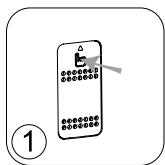
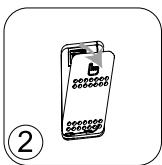
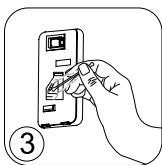
1.Почире Te OTBOPHTe 3a BXODиИЗXODHa Bb3dUshHaTcTpy, KaTOи3NoJ3BaTe MeKa YeTkai NkBpna.
2. ÖtbopeTe KaNaKa Ha ceH3opa, KoToCe HaMnpa OT JЯBaTa CTpaHa Ha ypeJa.
3. JIeKo HABJXHeTn NaMyHa KbpNa I npEmaxHeTe npaxa OT Jeuata N OT OTBopa 3a BXoN/INxOJa Ha Bb3NyHHaTa CTpy. IV36bPwTe CbC cyxa naMyHa Kbpna.
4.Почирсте сензога с мека четка плп ралхocmykaчka.
BAKHO:
Hnkora He n3noI3BaIte nooNCTBaU npenapat mIIM MeaIIH npedMeTu 3a NOuNCTBaHe Ha ceH3OpIte.
EeKTHBHOCTTa Ha ceH3OpUte MOKe Da haMaJee, aKO He ce NOuNCTBaT peoBHO.
YeCTOTATA Ha NOUcTBAHe 3aBmCn ot pa6oTHata cpeHa ypeHa. Ako ce n3non3Ba B npauHa cpeHa, NOuCTBAHte CEH3OpHTe No-yeCTO.
CbXPAHEHNE
Korato He n3nol3BaTe ypeda, cxbxaHraBaiTe ro Ha cyxo I npoxlaIHO macto npu ycIOBna Ha OKoJIHaTa CpeDa C noHNsCKn CTOnHOCTn OT 35 ^ C n OTHOCIneJIHa BLnaxHoCT 70%.
B CJUyA H A IPOBJIEM
- He pa3rno6raBte ypea cam. EHN Heo6pe pemontpan h ype moke da 6bde onaceh 3a notpe6nteHte.
- Hapabete cnpabka c Ta6nlaata no-dony 3a OTcpaHbAhe Ha Heu3npaBHOCTN, npedn da ce Cbpxe otopun3pauh cepBn3en ueHTbp:
HactoIHTe INCTpyKunMOxTe da HamePte N B HauNya Ye6 caT Ha aDpec www.rowenta.bg.
| Декларачnia HA EC 3A ONPROCTEO CbOTBETCTBVE |
| Долуюписаняг GROUPE SEВ дeklарupa, че радиocьорьжениeto OT тип "PU3080F0" сбOTBETCTBa на Директува 2014/53/EC. |
| Пън就近 Текст Ha EC дeklарачnia за сбOTBETCTBVEе дocstbvен Ha сдедnia ИNTepнет adPEC: |
| https://www(rowenta.bg/eu-declaration-of-conformity |
PREHLAD
PREHL'AD VYROBKU 94
BEZPECNOSTNÉ RADY 94
VELMIDOLEZITÉ 95
POKYNY 95
https://www compatibility.groupseb.com/CompatibilityList-Pureair-Tefal.pdf
BBIMKHeHHBUMKHeHH (1) i BNTaRHiB BuNKy 3 pO3eTKN.
-Перш 키пенисту пилад, ВIMКИт b ИОТа витагнITb BUNKy 3 pOZETK.
- Nepu hix 36nputn a6o uctntn npunad, BuntnBnky 3 po3kN.
IHCTPYKUJA
3aBdAnOnncaHm HxJy 4 pIBHm fIbIbTaIiTefal Pure Air Genius ouHxue nobITpaB Tefal Pure Air Genius ouHxue nobITpaB Tefal Pure Air Genius ouHxue nobITpaB Tefal Pure Air Genius ouHxue nobITpaB Tefal Pure Air Genius ouHxue nobITpaB Tefal Pure Air Genius ouHxue nobITpaB Tefal Pure Air Genius ouHxue nobITpaB Tefal Pure Air Genius ouHxue nobITpaB TefAL Pure Air Genius ouHxue nobITpaB TefAL Pure Air Genius ouHxue nobITpaB TefAL Pure Air Genius ouHxue nobITpaB TefAL Pure Air Genius ouHxue nobITpaB TefAL Pure Air Genius ouHxue nobITpaB TefAL Pure Air Genius ouHxue nobITpaB TefAL Pure Air Genius ouHxue nobITpaB TefAL Pure air 3a6pyndHIOUxpeOuHN:
AntnaIepriHnΦiNbTp
i3TexHonorieoΦinbtpaft
2B13aKtmboBaHm
Byrinnam
- HenpnemHi 3aapanx
Ximiuhi 3a6pudHIOUpeoBHH - JeTIOUoi opraHuiHJI peuOBNH (JLOP)
- Alepren ta nnilok
Пиювійцi
Mikpo6n Ta ubiB - BaKTepi Ta Bipycn
Φinbtp NanoCaptur +
-OpmaIbderi

«ДОДATKOBI 3AXODI 3 OUYISEHHЯ NOBITРВ ПРIMIULEHHI»
Okprim BnKopnctaHnn Pure Air Genius, € KInbKa DoaTkOBnx cnocob INOKpaueHHra Kocsti nobITprB nPmIeHHi.
- LioDnhy, yniTy Ta B3mKny, npoBtprOte npmiueHn npoTARom npuHaUMHI 10 xBNiINH.
-Пювовьтобслуровыанн сисм Вьентлияц.
-06MexTe BnKOpNCTaHHI No6yTOBnX IpOdyKTtIB.
-He naJIbY npMIMiueHHi.
-He BnKOpncTObyIte OcbixyBaui nobITpApoMaTuHni naJIuKu Ta cbUKn ToIO.
-Писla завершенибудь-якпpe moentнхpo6it y baii ocei cnid peryЯрно npobitpiobatnpimiielenn npotrayom kilbkox hactynhns TIXHIB. - He trpmaite B npimiuiehhi posinHn, kni notpe6yioTB qactoro noiBaHHa, a6o moxytB cnpruHnT aIepriHni peakii.
ДЕMOHTАЖ / YCTAHOBKA ΦΙЛьТПВ
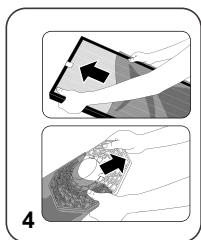
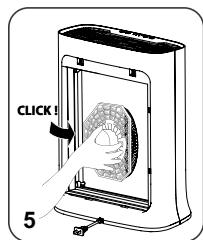
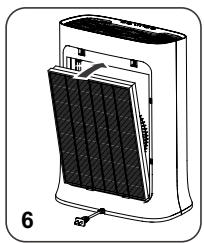
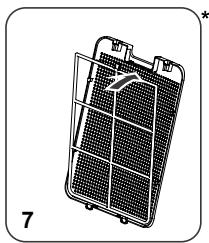

YAKNX MICZAX CJIID YCTAHOBJIOBATN IPIPNJIAI
Pomictb ouuuyBaHa CTiKy Pnacky NOBepxHIO B npmiiueHH i 3a6pydneHMM nobitpM.
Ja 6e3peewkoHoi cnpkynlaui nobitpr 3 koxhoro 6oky npnaady Ma 6ytn He MeHwe 50 cm BinbHoro npoctopy. He BCTahOBNIte npnad 3a 3aHabicKaMn, nD bIKOM, Me6IaMn a6o NOLIcMn, a TAKOJnporj3 iHIMN ppeMeTAMn, kki MoKytb nepewkoJXaTN pyxu nobitpr. BnkopncTOByte npnaad y npmiueHHax i3 tempeatypopo nobitpr He Bnue 35^ (95^) i BIDHOCHO BOIoricHe Bnue 70%
IIO NOTPIIBHO 3P0BHTN IPEEd IEPShIM BVKOPNUCTAHNREM PUNJADY
IpepeBnKOpncTaanHm npuJaMy 3Himt b 3axnchy nnaCTNKOBy ynaKOBky 3 fJbTpib.
Ipeep nepuim BnKOpncTaHnHm nepekoHaTeC, 0o DkepeNo eNeKtpnUHOro XnBHeHHaE Happy3i, cactoti n otuykHOCTi npnaJy.
Ipiuad MOKHa NiikNIOUaTn Do po3eTKn 6e3 3a3eMneHn. BiD HaneKntb Do KnaCy II (pnuad i3 noDbIiHO eNEKTpuHIO iOJIaIcIIO
IpepeyBimKHeHHaMepekoHaTeCe,io:
- npnlaonOBHicTIO 3i6paHnI, kA3a3HaueHO B iNCTpyKcii 3 6e3neKn;
- npnilad yctaHOBJIeHn Ha cTIiKl rOpI3OHTaJbHi NOBepxHi;
- npnlaud yctahOBleny uypaBnIbHomy noLoJKeHHi, k3a3HaueHo B IHCTpyKuii cIbO rno Noci6Hnka;
- BxidHn OToBip Ia nOBiTp Ta pewiTka Ha OTbopi nOaui NobiTp He 3aropodxeHi;
- iInbTptn Ta naneB yctaHOBneHO npabNBJHO (iINB. po3dI IN «DemOHtax / yCTaHOBnHnHnEiNbTpB»).
BAJKIIBO!KoII npuaH He BnKOpncTOByeTbcra,peKOMHeNyEbCBA BMNKaTN
Moro Ta BnMaTn BnIky 3 po3eTKn.
ФУнкцПРИЛАДУ
-
KhoNka XmBJIeHHa (1)
-
HaTnchItb 90 KhoNkKy, 906 yBIMKHyTu / BUMKHyTu OUYuBaay nobitpy.
-
Khonka Bn6opy pexumy (2) (MODE)
-
DeHn i HnHn aBtOMaTnHn pexm: kio kicb noBITpra cAe 6e3DoraHNO, npuIad nepexoHTb y peKIM OUYBaHHa.
-
HatncHtB zu KhoNkU, 06 Bn6paTn oINH i3 OHTnpbOx peKmIB. 3aROpntbca iHdkaTOp Bn6paHOro peKmMy.
-
DeHHn aBTOMaTHHn pexm: BeHTNJATOp npauoHe 1, 2, 3 a6o 4 pIBhi WbNdkocti.
-
Hiunn abTomatnunn npexm: BeHTnIaTOp npaioe Ha 1 a6o 2 pBHi wBndkocti.
Tnxn pexim: BeHTnlaTOp npaioe Ha miHimaBni WBnKoCTi. BnKOpuctobyTe ue pexim, KOnn noTpi6Ho 36epiratTu Tnuy.
-ПиСКОпЕн рекIM:ВЕТИЛТOP npaцюЕ Ha MaKcIMmaIbHi I WbIκkOci. ВИКОрИстовуTe cei рекIM,Якso NOBITРДУже 3a6pydHeNe. -
Pexim6lOkyBaHnIdoctynIaTei(3
Cnctema 6IokyBaHHa 3axuaaOuyBaB bI d 3iHcHHeHb BnnaKOBHX HaJauTByBaHb ni d acp o60tn.
- yIyIyIyIyIyIyIyIyIyIyIyIyIyIyIyIyIyIyIyIyIyIyIyIyIyIyIyIyIyIyIyIyIyIyIyIyIyIyIyIyIyIyIyIyIyIyIyIyIyIyIY I yIyIyIyIyIyIyIyIyIyIyIyIyIyIyIyIyIyIyIyIyIyIyIyIyIyIyIyIyIyIyIyIyIyIyIyIyIyIyIyIyIyIyIyIyIyIyIyIyIy
Khonka πidklioueHHa do Wi-Fi (4) (C)
-Пдтримуванчас�ТнДiana3OH:2400-2483,50Mg
- MaKcMaJbHa nOTyXHicTb B4-cuHaNy: 20 dM
- Ⅲo6 yBIMKHyTn a60 BvIMKHyTn ΦyHkciio Wi-Fi Ha oUHcYBaui, ODHouacHOHaTNCiHb KONKy iDKNIOueHHa Do Wi-Fi i KONky 6IOKyBaHHaOCTuPy dTee Ta yTpmyte ix npOTraOM 3ceKYnd.
-Якiosoндikatop πidклioуеняdo Wi-Fi 📞очав 6лимати,3'\'eнанняз мерекeo 6уно nepebahe.
-
CKNDAHNAHAUTYBAHb (5)
-
Ondohaycho HaTnchItb KhoNky Bn6opy pexmMy MODE i KhoNky niKJIoueHna do Wi-Fi iBtpmYte ix npotrarom 5 cekynd
- Cnoatky npolyaek Kopotkni cnHan, kyn cnoBicntb Bac npo Te, 10c kndaHnHa hanaTByaHb 6yIopo3noato. Picna bOro 6yDytB BndaJIeHI Bci dani npi ndkJIOUeHHn npuIaNy.
-Дani npolyhaIOb IBa KOpOTKINx CnHAnI.
ЯКПДКЛЮЧNTОчИЦУВАДОИTHEPHTY
YAKIINKJIIOHTN OUYUBAUYIO INTEPHETY?
3aBaHTaKTe nporpaMy Pure Air by Tefal iDtoTpMmYntecnIHctpyKciH na CbOeMy cMapTfoHi.
1.Якwo y Bac ue HeMae oBnkoboro 3ancy Tefal, 3apectpyntecBa cnctemi. 阿么y Bac yke E obnikobni 3annc,Bbiindtb nporpamy.
2.Пдчac niklnouhenn nidiinbTB 6linxue do ouniybaa (makcimalbHa BiDCTaHb - 2 metpu), kyn noBHeH 6yt nporj i3 dkepenom Cunhany Wi-Fi.
https://www.compatibility.groupseb.com/CompatibilityList-Pureair-Tefal.pdf
Yn moKytb DekeIbKa KopncTyBauchiNikKluOHTnca Do OndHoro npunctpo?
3BvauHoi! Hobi KopncTyBaCi MaIoTb 3aBaHTaKNTn nporgamy Pure Air by Tefal, cTbOpntu o6NIkOBni 3anic i BVKOHATn NiDkJIoueHnR.
JrKo rpaHyn He cTaIOb npO3OpMn, fIbTp notpe6ye 3amHn.
Akuo rpaHyn cTnn KpnXkmm, fInbTp notpe6ye 3amHn.
Heperynpe ouuieHHa iIbtpa nonepeHbOro ouuieHHa MOKe npu3BecTu DO 3HxueHH a eKtNBHOcti po60tu npuiaNy.
Ipeed BnKOpNCTaHHm fInbTpa nonepdHbOro OunuEHHnepeKoHaTeCra, 0o Bin NobHicTo BnCOx.
ΦiNbTp nonepednboro OunueneHЯ - ue eDInHm φiNbTp, kAn MoXHa BnKOpNCTOByBatn NOBtOPO Ta MmTN y BoDi. AHTnaneprinHm φiNbTp i3 texhonorieo φiNbtpaui 2 B 1 3 AKTnBOBaHM ByrillnMa He MOxHa YcHTnTa BnKOpNCTOByBatn NOBtOHO. Y JoDHomy pa3i He MoUIt b cei φiNbTp. Iicna 3akIyuHHe TepmiHy ekCnnyataui aHTnaneprinHoro φiNbtpa 3 texhonorieo φiNbtpaui 2 B 1 3 AKTnBOBaHM ByrillnMa Noro cni 3aminiHm.Дя ONTmAbHoI po6Ot npuaDy BnKOpNCTOBuyTe Nmue φiNbTp, kAn BuROTOBIAOTBCa KOMnaiHcE ToFal. JkIo rpaHyn φiNbtpa Nanocaptur + ha6ynn HnpOzoporo 6inoro KOnbopy Ta / a60 CTann KpNxKMM, φiNbTp notpe6e zAmHN.
Ybara: deiki fiibtpn MOxyb Tmucabo BndaBatn Ierkn 3anax, o6ymoBleny yMOBaMTrpaHcnpotybaHHra Ta 36epiraHHa. Lcien 3anax, knn i3 Yacom BnuBtPioetbcra, e nobHicTIO 6e3neuHMM dIy 3dopOB'JIouHHN.
DatuKn3a6pydHeHHa
DaTnK qactOK Heo6xIDHO peYyIaRPhO Ta HaneXHM YHOM YNCTITN (KOxHi 2 MicaJI).
Ipeed ouHneHHaDatUHKIB 3a6pydHeHHB BUMKHiTb npuHa, BNTaRHiTb BUNky 3 pO3eTKn Ta doTpmyTeCb HaBeDeHNx HNXy peKomeHdaui.
- OuICTbTe OTBOpn BXOy / noaui nobITpr3a donomoroIO M'raKOi a6o cepBeTkn.
- BiKpnIte KpIuKy DaTUnKa, Ya Ka pO3TaUoBaHa 3 NIBoro 60ky npInaNy.
- 3nerka haMoOHTb BAtHy pAnuKy Ta BnDaJIitb BeCb Nn 3i cKnla Ta OTBOpIB BxOy / noaui nobitpy. Ipoptipb cyXoIO BaTHOIO pAnuKoIO.
- OuICTbTe DaTUnK 3a DOnOMoROU M'JAKOUI a60 Nnloocca.
BAJKINBO!
Hikon He BnKOpNCTOByIe MmOci peYOBHNu MeTaeBi npedMeTn dJa OunueHHaTUnkIB.
HeperyIaRpe ouHueHH daTunKIB MOKe 3HN3NTn eEeKTHBHiCTb po6OTn.
Yactota ouhiennha 3anexitb BiD 30Bhihix yMOB, y knx BnKOpncTOBYeTbCpnpnaI.
Akuo BIn BnKOpncTOBByEbCBAzHnneHomy cepeOBnui, uNCTbTe DaTuNKuactiwe.