
ZINO PRO FPV - Drone HUBSAN - Free user manual and instructions
Find the device manual for free ZINO PRO FPV HUBSAN in PDF.



User questions about ZINO PRO FPV HUBSAN
0 question about this device. Answer the ones you know or ask your own.
Ask a new question about this device
Download the instructions for your Drone in PDF format for free! Find your manual ZINO PRO FPV - HUBSAN and take your electronic device back in hand. On this page are published all the documents necessary for the use of your device. ZINO PRO FPV by HUBSAN.
USER MANUAL ZINO PRO FPV HUBSAN
Download the X-Hubsan application for free by scanning the code on the right or by finding it on the App Store (iOS) and Google Play (Android).

X-Hubsan
The Battery
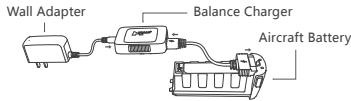
While charging, the balance charger LEDs will be solid red. When charging is complete, the LEDs will be solid green.
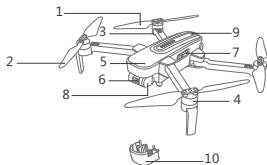
Aircraft Component Breakdown
- Propeller A
- Propeller B
- LED
- Motor
- Body Shell
6.4K HD Camera - Micro-SD / TF Slo
- Gimbal
- Power
- Gimbal Protection Guard
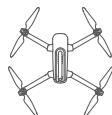
Unfolding The Legs: In order to fly the aircraft properly and safely, pilots must first completely unfold the aircraft's legs. Please expand the front arms first then expand the rear arms to the maximum angle as the illustration on the right. Gimbal Protection Guard: Locate the guard's recesses in the aircraft frame to install / uninstall the guard. 01
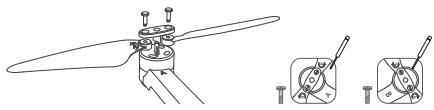
Propeller Installation
Before installing propellers for the first time, please check that each Propeller A is matched with motor A and each Propeller B is matched with motor B. Then use the provided screws to secure each propeller. Tighten the screws clockwise to install them. When the propellers need to be replaced, unscrew the propellers by loosening the screws counterclockwise and then removing the damaged propellers.
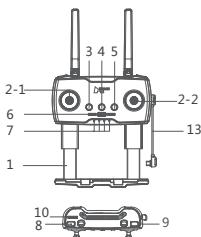
Getting To Know The Transmitter (Mode 2)
- Mobile Device Frame
2-1. Throttle / Rudder Joystick
2-2. Elevator / Aileron Joystick - Return to Home (Aircraft Returns To Takeoff Point)
- Power (Long press)
- Auto Takeoff / Land
- Expert / Normal Mode
- Power Status LEDs
- Photo
- Video
- Gimbal Adjustment Wheel
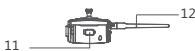
- Charging / Adapter Port
12.WIFI Antenna - Adapter Cable
When installing the mobile device, place the device in its dedicated frame and avoid pressing the device's buttons with the frame.
This manual shows operations in Mode 2.
Transmitter Cable Connection
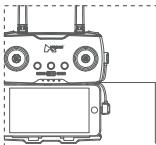
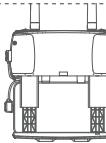
A compartment for extra cables
Connecting Devices
- Open X-Hubsan APP, select aircraft model.
- Long press the power button on the aircraft.
- Long press the power button on the transmitter, connect the transmitter and the mobile device with the adapter cable.
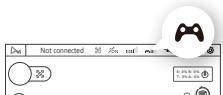
Before Pairing
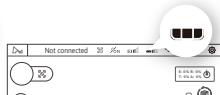
After Pairing
- Open the binding mode (this step is only needed when binding for the first time or switching to a different transmitter. Must be done manually).
1) Go to APP settings - transmitter, transmitter connection method: Leas
| Controls | Transmitter model |
| Transmitter connection ☐ Bluetooth ☐ Leas > | |
| Set up transmitter connection to aircraft > | |
| Transmitter hardware version | |
| Transmitter firmware version |
2) Select "Set the Connection Between the Transmitter and the Aircraft" to search for the aircraft
3) Short press the power button of the aircraft 3 times to enter binding mode
4) Select the detected aircraft and establish a connection
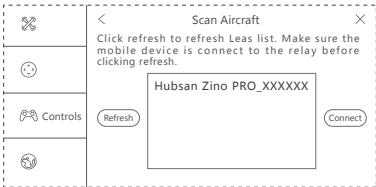
Tips :
① The binding process is completed in the factory. Generally, the user only needs to perform the first 3 steps.
② After the aircraft entered binding mode, the 4 LED and the video LED (by the TF card slot) will turn into flashing green lights. After the binding is completed, the LED will turn into solid green.
③ During binding, please keep the distance between the aircraft and the transmitter less than 1 meter.
Compass Calibration
Follow the APP's prompting to complete compass calibration.
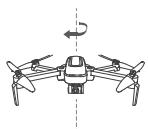
Compass 1
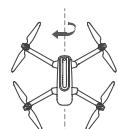
Compass 2
Flight


Arming / Disarming Motors


Landing (Mode 2)
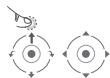
Takeoff (Mode 2)
Auto Takeoff / Land / Return To Home

Auto Takeoff

Auto Land

Return To Home
Aircraft LED Indications
Zino PRO has 4 LEDs; the fore / frontal LEDs are blue and the rear LEDs are red. The LED status indications are defined as follows:
| Function | LED status indication | |
| Power On And Start Up Horizontal Calibration | All 4 LEDs flash slowly | |
| All 4 LEDs flash slowly | ||
| Compass Calibration | Calibrate Compass 1 Calibrate Compass 2 | LEDs flash in vertical pairs, alternately All 4 LEDs flash simultaneously |
| Flight mode | All 4 LEDs are solidly lit | |
| Low Power | Fore / frontal blue LEDs stay solidly lit and the rear red LEDs flash rapidly | |
| Headless Mode | Fore / frontal LEDs are solid blue and rear red LEDs flash alternately | |
| Return To Home | Fore LEDs are solid blue and rear LEDs slowly flash red | |
| Photo | Rear red LEDs flash once | |
| Video | Rear red LEDs flash alternately | |
| Flight Control Connection Status | When the aircraft is not connected to a transmitter or has been disconnected from a transmitter, the fore LEDs will flash blue. Upon connection with a transmitter, the fore LEDs will turn solid. |
Frequently Asked Questions
1. Transmitter and aircraft are not pairing
Reinitialize the aircraft and transmitter.
2. Cannot arm motors
Make sure that you have completed compass calibration.
3. Weak or nonexistent GPS signal / few or no GPS satellites
Check the surrounding environment for sources of high frequently signal interference.
4. The aircraft does not return to the home point
When the aircraft takes off, be sure that the aircraft has received 6 or more satellites.
5. Aircraft / video feed is shaking / shaky
③ Check if the aircraft propellers or motor shafts are deformed / broken. Please replace if applicable.
② Check that all aircraft body screws are firmly in place.
6. Cannot take videos or pictures
③ Check to see that the TF card is installed in the aircraft prior to power on.
② Make sure the TF card is formatted to FAT32 (Recommended TF cards: SanDisk, Kingston, Samsung, U1 and 32GB or higher).
③ Check if the TF card storage is full.
Please read the operating instructions carefully before use!
- Never leave units unattended when charging
- Unplug the charging cable immediately after charging
- Propellers may cause injury
- This product is not a toy and is not suitable for children under 14 years of age
Product name: Zino PRO
Product Standard Number: Q/HBS 001-2017
Vendor: Shenzhen Hubsan Technology Co., Ltd
Address: 13th Floor, Block C, Shenzhen Software Industrial Base,
Xuefu Road, Nanshan District, Shenzhen, Guangdong Province, China
Email: service@hubsan.com
X-Hubsan App
Adresse: 13th Floor, Block C, Shenzhen Software Industrial Base,
Xuefu Road, Nanshan District, Shenzhen, Guangdong Province, China
Email: service@hubsan.com
X-Hubsan App
Address: 13th Floor, Block C, Shenzhen Software Industrial Base,
Xuefu Road, Nanshan District, Shenzhen, Guangdong Province, China
Email: service@hubsan.com
X-Hubsan App
Address: 13th Floor, Block C, Shenzhen Software Industrial Base,
Xuefu Road, Nanshan District, Shenzhen, Guangdong Province, China
Email: service@hubsan.com
1) Go to APP settings - transmitter, transmitter connection method: Leas
Address: 13th Floor, Block C, Shenzhen Software Industrial Base,
Xuefu Road, Nanshan District, Shenzhen, Guangdong Province, China
Email: service@hubsan.com
All users must read product operating instructions as well as this liability disclaimer before using any Hubsan product. By using a Hubsan product(s), users are accepting the terms and conditions of Hubsan liability and operational guidelines. This product is not suitable for minors under 14 years of age. While operating a Hubsan product(s), users also accept all liability and responsibility for their own behavior, actions as well as any consequences resulting thereof while using a Hubsan product(s). These products may only be used for purposes that are proper and in accordance with local regulations, terms and any applicable policies / guidelines Hubsan may make available. Users agree to comply with these terms and conditions, along with any and all relevant policies / guidelines set forth by Hubsan.
Instructions
Some product flight functions are restricted in certain areas. Once you use this product, you are deemed to have read carefully the relevant ICAO regulations, local airspace control provisions and the regulations governing UAVs. You assume all liability for any non-compliance with the foregoing, are responsible for the consequences for your actions as well as any indirect and / or direct liability that arises as a result of these limitations.
Flight Environment Requirements
(1) Select an open environment devoid of high rise buildings and tall obstructions (such as trees and poles). Near buildings and obstacles, flight control signals and GPS signals can be severely weakened; GPS functions such as GPS mode and Return to Home may not function properly.
(2) Do not fly in bad weather conditions (such as in wind, rain or fog).
(3) Fly the drone in ambient temperatures of 0 - 40^
(4) When flying, please stay away from obstructions, crowds, high voltage lines, trees, water, etc.
(5) To avoid remote control signal interference, do not fly in complex electromagnetic environments (such as venues with radio stations, power plants and towers).
(6) The Zino cannot be used in or near the Arctic circle or Antarctica.
(7) Do not fly in no fly zones.
(8) Do not operate the aircraft near high pressure lines, airports or areas with severe magnetic interference.
Limitation Of Liability
Hubsan accepts no liability for damages, injuries or any legal responsibilities incurred directly or indirectly from the use of Hubsan products under the following conditions:
- Damages, injuries or any legal responsibilities incurred when users are drunk, under the influence of drugs or anesthesia, dizzy, fatigued, nauseous and / or affected by other conditions both physical and mental that could impair sound judgment and / or personal ability.
- Subjective misjudgment and / or intentional mis-operation of products.
- Any and all mental damage, trauma, impairment, illness, compensation caused / solicited by accidents involving Hubsan products.
- Product operation in no-fly zones (i.e. natural reserves).
- Malfunctions or problems caused by modification, refit, replacement or use with non-Hubsan accessories / parts, failure to follow the guidance of the manual in assembly or operation.
- Damages, injuries or any legal responsibilities caused by mechanical failures due to natural wear and tear (aircraft flight time clocking in 100 hours or above), corrosion, aging hardware, etc.
- Continued flight after low voltage protection alarms are triggered.
- Knowingly flying aircraft under abnormal conditions (such as when water, oil, soil, sand or other unknown material are inside the X4, the aircraft and / or transmitter are incompletely assembled, the main components have obvious faults, obvious defect or missing accessories, etc).
-
Flying in the following situations and / or environments: areas with magnetic interference (such as high voltage lines, power stations, broadcasting towers and mobile base stations), radio interference, government regulated no-fly zones, if the pilot loses sight of the X4, suffers from poor eyesight or is otherwise unsuited for operating Hubsan products.
-
Aircraft use in or exposure to bad weather, such as a rain, wind, snow, hail, lighting, tornadoes and hurricanes.
- Products are involved in / exposed to collisions, fire, explosions, floods, tsunamis, manmade and / or natural structure collapses, ice, avalanches, debris, landslides, earthquakes, etc.
- The acquisition, through use of Hubsan products (specifically but not limited to aircraft), of any data, audio, video that results in infringement of law and / or rights.
- Misuse and / or alteration of batteries, product / aircraft circuits, hardware protections (including protection circuits), RC model and battery chargers.
- Any malfunction of equipment or accessory, including memory cards, that results in the failure of an image or video to be recorded or to be recorded in a way that is machine readable.
- Users who engage in reckless, unsafe flying (with or without sufficient training).
- Noncompliance with precautions, instructions, information and operation guidelines / methods given through official Hubsan website announcements, product quick start guides, user manuals, etc.
- Other losses, damages, or injuries that are not within the boundaries of Hubsan responsibility.
RISK OF EXPLOSION IF BATTERY IS REPLACED BY AN INCORRECT TYPE. DISPOSE OF USED BATTERIES ACCORDING TO THE LOCAL REGULATIONS. HAZARDOUS MOVING PARTS KEEP FINGER AND OTHER BODY PARTS AWAY.
Declaration of Conformity
Hereby, SHENZHEN HUBSAN TECHNOLOGY CO., LTD., declares this product is in compliance with the essential requirements and other relevant provisions of Directive 2014 / 53 / EU. A copy of the original Declaration of Conformity can be obtained at the following address: 13th Floor, Bldg 1C, SHENZHEN NANSHAN SOFTWARE INDUSTRY BASE, Xuefu Road, Nanshan District, Shenzhen, China This product bears the selective sorting symbol for waste electrical and electronic equipment (WEEE). This means that this product must be handled pursuant to European Directive 2012 / 19 / EU in order to be recycled or dismantled to minimize its impact on the environment. For further information, please contact your local or regional authorities. Electronic products not included in the selective sorting process are potentially dangerous for the environment and human health due to the presence of hazardous substances.
FCC INFORMATION
This equipment has been tested and found to comply with the limits for a Class B digital device, pursuant to Part 15 of the FCC Rules. These limits are designed to provide reasonable protection against harmful interference in a residential installation. This equipment generates, uses, and can radiate radio frequency energy and, if not installed and used in accordance with the instructions, may cause harmful interference to radio communications. However, there is no guarantee that interference will not occur in a particular installation. If this equipment does cause harmful interference to radio or television reception, which can be determined by turning the equipment off and on, the user is encouraged to try to correct the interference by one or more of the following measures:
- Reorient or relocate the receiving antenna.
- Increase the separation between the equipment and receiver.
- Connect the equipment into an outlet on a circuit different from that to which the receiver is connected.
- Consult the local dealer or an experienced radio / TV technician for help.
Changes or modifications not expressly approved by the party responsible for compliance could void the user's authority to operate the equipment.
This device complies with Part 15 of the FCC Rules. Operation is subject to the following two conditions: (1) this device may not cause harmful interference, and (2) this device must accept any interference received, including interference that may cause undesired operation.
Electrical and electronic equipment that are supplied with batteries (including internal batteries) WEEE Directive & Product Disposal
At the end of its serviceable life, this product should not be treated as household or general waste. It should handed over to the applicable collection point for the recycling of electrical and electronic equipment, or returned to the supplier for disposal.
Internal / Supplied Batteries.
This symbol on the battery indicates that the battery is to be collected separately. This battery is designed for separate collection at an appropriate collection point.

Declaration of Conformity
Par la presente, SHENZHEN HUBSAN TECHNOLOGY CO., LTD.
HUBSAN is obligated to offer all-way customer service for all clients. Any questions or problems on operation, please feel free to email at: service@hubsan.com. Or Dial at: US: (909)444-0555 EU:+31 181317828