
T-D500 - Radio tuner YAMAHA - Free user manual and instructions
Find the device manual for free T-D500 YAMAHA in PDF.



| Product type | Radio tuner with DAB/DAB+, FM and AM tuning |
| Brand | YAMAHA |
| Model | T-D500 |
| Dimensions (W × H × D) | 435 × 87 × 306 mm |
| Weight | 3.3 kg |
| Power supply | AC 230 V, 50 Hz |
| Power consumption | 10 W |
| FM tuning range | 87.50 to 108.00 MHz |
| AM tuning range | 531 to 1611 kHz |
| DAB tuning range | Band III (174-240 MHz), Band L (1452-1492 MHz) |
| Number of presets | 40 DAB stations, 30 FM stations and 30 AM stations |
| Output level / impedance | FM: 1.0 V / 1.2 kΩ, AM: 0.36 V / 1.2 kΩ, DAB: 1.5 V / 1.2 kΩ |
| Signal-to-noise ratio | DAB: 95 dB, FM: 80 dB (mono) / 75 dB (stereo), AM: 50 dB |
| Total harmonic distortion | DAB: 0.01%, FM: 0.3% (mono) / 0.5% (stereo), AM: 1.0% |
| Stereo separation (1 kHz) | DAB: 77 dB, FM: 43 dB |
| Frequency response (DAB) | 20 Hz to 20 kHz, +0.5 dB / -1.0 dB |
| Antenna inputs | FM: 75 Ω unbalanced, AM: loop antenna, DAB: indoor antenna |
| Supplied accessories | Remote control, CR2025 battery, FM indoor antenna, AM loop antenna, DAB indoor antenna, RCA stereo cable |
| Main functions | Automatic DAB/FM/AM scan, manual tuning, preset, RDS (FM), TP search, brightness adjustment, Auto Power Down, DAB Tune Aid, dynamic range compression |
| Cleaning | Use a dry and clean cloth; do not use chemical solvents |
| Safety instructions | Do not expose to moisture, do not obstruct ventilation, unplug during storms, do not open the casing |
| Warranty | 2 years (parts and labor) in the EEA and Switzerland |
Frequently Asked Questions - T-D500 YAMAHA
User questions about T-D500 YAMAHA
0 question about this device. Answer the ones you know or ask your own.
Ask a new question about this device
Download the instructions for your Radio tuner in PDF format for free! Find your manual T-D500 - YAMAHA and take your electronic device back in hand. On this page are published all the documents necessary for the use of your device. T-D500 by YAMAHA.
USER MANUAL T-D500 YAMAHA
1 To assure the finest performance, please read this manual carefully. Keep it in a safe place for future reference.
2 Install this unit in a well ventilated, cool, dry, clean place away from direct sunlight, heat sources, vibration, dust, moisture, and/or cold. For proper ventilation, allow the following minimum clearances.
Top: 10cm (4 in)
Rear: 10cm (4 in)
3 Locate this unit away from other electrical appliances, motors, or transformers to avoid humming sounds.
4 Do not expose this unit to sudden temperature changes from cold to hot, and do not locate this unit in an environment with high humidity (i.e. a room with a humidifier) to prevent condensation inside this unit, which may cause an electrical shock, fire, damage to this unit, and/or personal injury.
5 Avoid installing this unit where foreign objects may fall onto this unit and/or this unit may be exposed to liquid dripping or splashing. On the top of this unit, do not place:
- Other components, as they may cause damage and/or discoloration on the surface of this unit.
- Burning objects (i.e. candles), as they may cause fire, damage to this unit, and/or personal injury.
- Containers with liquid in them, as they may fall and liquid may cause electrical shock to the user and/or damage to this unit.
6 Do not cover this unit with a newspaper, tablecloth, curtain, etc. in order not to obstruct heat radiation. If the temperature inside this unit rises, it may cause fire, damage to this unit, and/or personal injury.
7 Do not plug in this unit to a wall outlet until all connections are complete.
8 Do not operate this unit upside-down. It may overheat, possibly causing damage.
9 Do not use force on switches, knobs and/or cords.
10 When disconnecting the power cable from the wall outlet, grasp the plug; do not pull the cable.
11 Do not clean this unit with chemical solvents; this might damage the finish. Use a clean, dry cloth.
12 Only voltage specified on this unit must be used. Using this unit with a higher voltage than specified is dangerous and may cause fire, damage to this unit, and/or personal injury. Yamaha will not be held responsible for any damage resulting from use of this unit with a voltage other than specified.
13 To prevent damage by lightning, keep the power cable and outdoor antennas disconnected from a wall outlet or the unit during a lightning storm.
14 Do not attempt to modify or fix this unit. Contact qualified Yamaha service personnel when any service is needed. The cabinet should never be opened for any reasons.
15 When not planning to use this unit for long periods of time (i.e. vacation), disconnect the AC power plug from the wall outlet.
16 Install this unit near the AC outlet and where the AC power plug can be reached easily.
17 Be sure to read the "TROUBLESHOOTING" section on common operating errors before concluding that this unit is faulty.
18 Before moving this unit, press to set this unit to the standby mode, and disconnect the AC power plug from the wall outlet.
19 Condensation will form when the surrounding temperature changes suddenly. Disconnect the power cable from the outlet, then leave this unit alone.
20 The batteries shall not be exposed to excessive heat such as sunshine, fire, or the like. When you dispose of batteries, follow your regional regulations.
WARNING
TO REDUCE THE RISK OF FIRE OR ELECTRIC SHOCK, DO NOT EXPOSE THIS UNIT TO RAIN OR MOISTURE.
As long as this unit is connected to the AC wall outlet, it is not disconnected from the AC power source even if you set this unit to standby mode by . In this state, this unit is designed to consume a very small quantity of power.
For U.K. customers
If the socket outlets in the home are not suitable for the plug supplied with this appliance, it should be cut off and an appropriate 3 pin plug fitted. For details, refer to the instructions described below.
Note
The plug severed from the mains lead must be destroyed, as a plug with bared flexible cord is hazardous if engaged in a live socket outlet.
Special Instructions for U.K. Model
IMPORTANT
THE WIRES IN MAINS LEAD ARE COLOURED IN ACCORDANCE WITH THE FOLLOWING CODE:
Blue: NEUTRAL
Brown: LIVE
As the colours of the wires in the mains lead of this apparatus may not correspond with the coloured markings identifying the terminals in your plug, proceed as follows:
The wire which is coloured BLUE must be connected to the terminal which is marked with the letter N or coloured BLACK. The wire which is coloured BROWN must be connected to the terminal which is marked with the letter L or coloured RED.
Making sure that neither core is connected to the earth terminal of the three pin plug.
CONTENTS
PREPARATION
REMOTE CONTROL AND FRONT PANEL....2 CONNECTIONs 4
OPERATIONS
DAB TUNING. 5
Preparing the DAB tuning 5
Manual tuning 6
Presetting DAB stations. 7
Using the DAB functions. 8
DAB station information 10
DAB frequency information 10
FM/AM TUNING 11
Automatic and manual tuning. 11
Presetting stations 12
Receiving Radio Data System information (FM stations only) 13
TP Search function (FM stations only). 15
Using the FM/AM functions. 15
Features
DAB (Digital Audio Broadcasting)/DAB+ tuner
Automatic scanning function to locate all DAB stations in your area
DLS (Dynamic Label Segment) information display
Tuning aid function to optimize DAB reception
40 DAB/DAB+ station preset tuning
Coaxial and optical digital audio output capability for DAB audio signals
Supplied accessories
Please check that you have received all of the following parts.
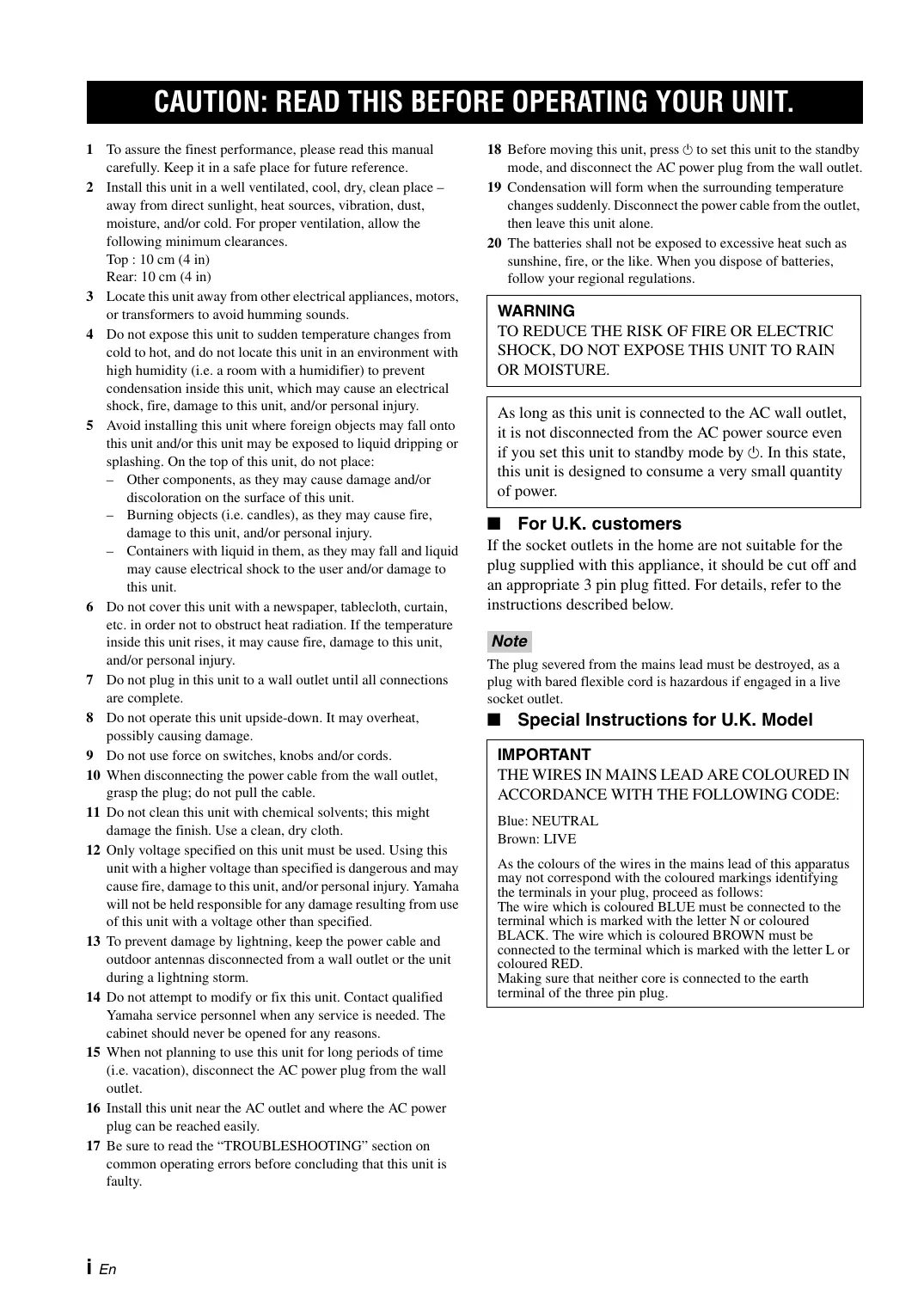
Remote control
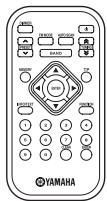
Indoor FM antenna
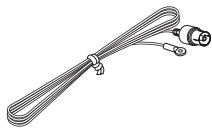
AM loop antenna
Battery (CR2025)
RCA stereo cable
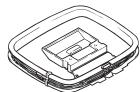
Indoor DAB antenna

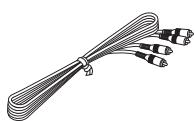
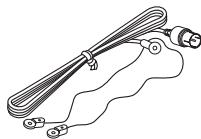
About this manual
- indicates a tip for your operation.
- This manual describes how to operate this unit using a remote control except when it is not available. Some of these operations are also available using the front panel.
- This manual is printed prior to production. Design and specifications are subject to change in part as a result of improvements, etc. In case of differences between the manual and the product, the product has priority.
ADDITIONAL INFORMATION
TROUBLESHOOTING 16
SPECIFICATIONS. 18
Sophisticated FM/AM tuner
30-station (each band) FM/AM preset tuning
Automatic preset tuning
Radio Data System text information display capability
REMOTE CONTROL AND FRONT PANEL
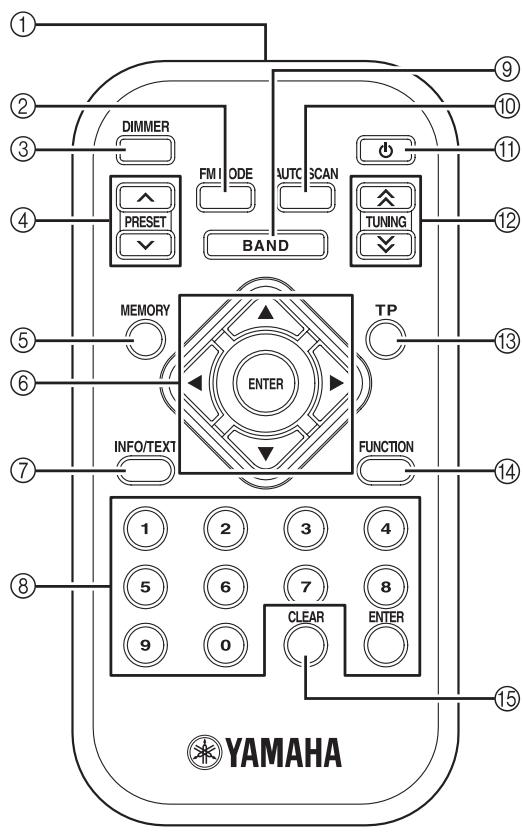
① Infrared transmitter
Outputs infrared controls signals. Aim this transmitter at the component you want to operate.
② FM MODE
Switches the FM radio wave reception mode (stereo or monaural) when this unit is in the FM tuning mode (see page 11).
③ DIMMER
Changes brightness level of the front panel display. Choose brightness from 3 levels by pressing this button repeatedly.

This setting is retained even if you turn off this unit.
(4) PRESET /
Switches the preset stations.
⑤ MEMORY
Sets this unit to the preset station memory mode (see pages 7, 12).
(6) / / / , ENTER
Selects and confirms an item.
⑦ INFO/TEXT
Turns on and changes the DAB station information (see page 10) or Radio Data System display mode (see page 13) on the front panel display.
⑧ Numeric buttons, ENTER
Selects the desired preset stations (see pages 7, 12).

To enter number less than 10 (i.e. 1 to 9), press the desired number and then ENTER, or press 0 and then enter the desired number.
BAND
Selects the reception band (DAB, FM, or AM).
10 AUTO SCAN
Starts the automatic scanning function (see pages 6, 12).
(standby/on)
Turns on this unit. Press this button again to set this unit to the standby mode.
The standby/on indicator lamp above lights up when this unit is turned on.
Note
In the standby mode, this unit consumes a small amount of power in order to receive infrared signals from the remote control.
⑫ TUNING 公 / 公
- Selects the desired frequency when you press this button.
- Searches the next FM or AM station when you press and hold this button for more than 2 seconds.
13 TP
Searches automatically for a station broadcasting a traffic program (TP) (see page 15).
14 FUNCTION
Activates the function set up menu (see pages 8, 15).
15 CLEAR
- Clears a preset station (see pages 8, 13).
- Clears all station information and preset settings in the DAB tuning mode when you press and hold this button for more than 3 seconds (see page 9).
- Clears all preset stations in the FM or AM tuning mode when you press and hold this button for more than 3 seconds (see page 13).
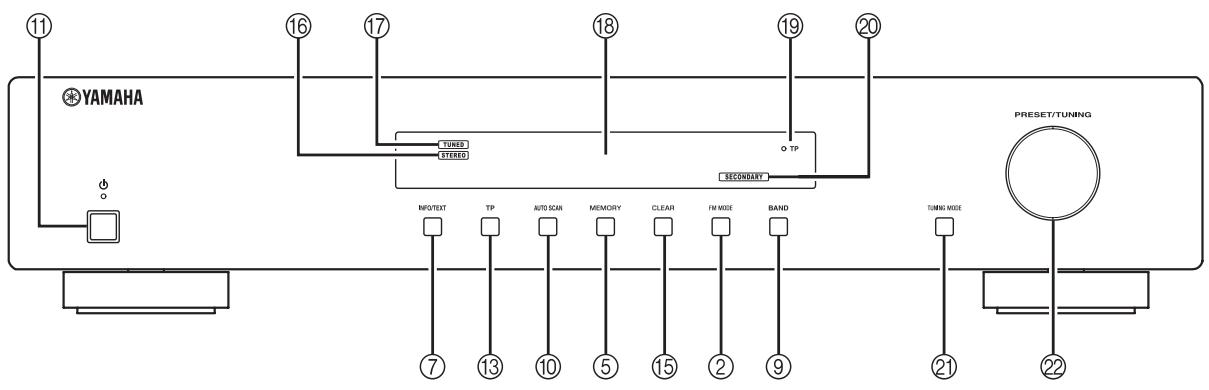
STEREO indicator
Lights up when this unit is in the stereo playback.
TUNED indicator
Lights up when this unit is tuned into a station.
18 Multi-information display
Displays tuning status messages and the DAB station or Radio Data System information.
TP indicator lamp
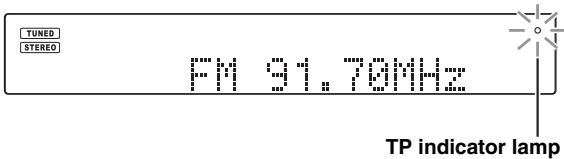
Lights up when a Traffic Program (TP) station is received (see page 15).
SECONDARY indicator
Lights up when this unit is in the DAB tuning mode and receiving a secondary station.
2 TUNING MODE
Selects the tuning mode (automatic, manual, or preset tuning).
2 PRESET/TUNING
- Searches the next FM or AM station when this unit is in the automatic tuning mode.
- Selects the desired frequency when this unit is in the manual tuning mode.
- Switches the preset stations when this unit is in the preset tuning mode.
Using the remote control
Use the remote control within 6m (20 ft) of this unit and point it toward the remote control sensor. It receives signals from a remote control provided with a Yamaha amplifier or AV receiver.
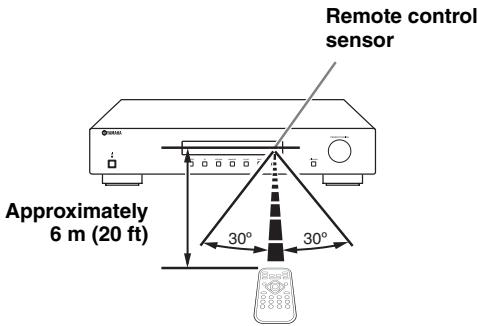
Notes
- Do not spill liquid on the remote control.
- Do not drop the remote control.
- Do not leave the remote control in the following places:
- hot or humid places such as a bathroom or near heater
- extremely cold places
- dusty places
■ Installing the battery in the remote control
Change the battery when the operation range of the remote control decreases.
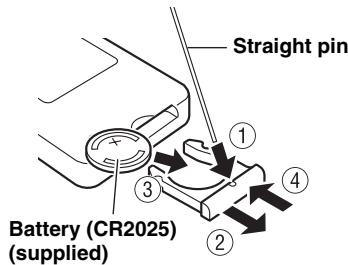
CAUTION
- Keep the battery out of the reach of children, so that it is not mistakenly swallowed.
- Insert the battery according to the polarity markings.
CONNECTIONS
Note
If you experience poor reception quality, install an outdoor antenna. Consult the nearest authorized Yamaha dealer or service center about outdoor antennas.
AM loop antenna (supplied)
- The AM loop antenna should always be connected, even if an outdoor AM antenna is connected to this unit.
- The AM loop antenna should be placed away from this unit.
Indoor DAB antenna (supplied)
Stretch out the antenna and place it to find the best reception position then fix it.
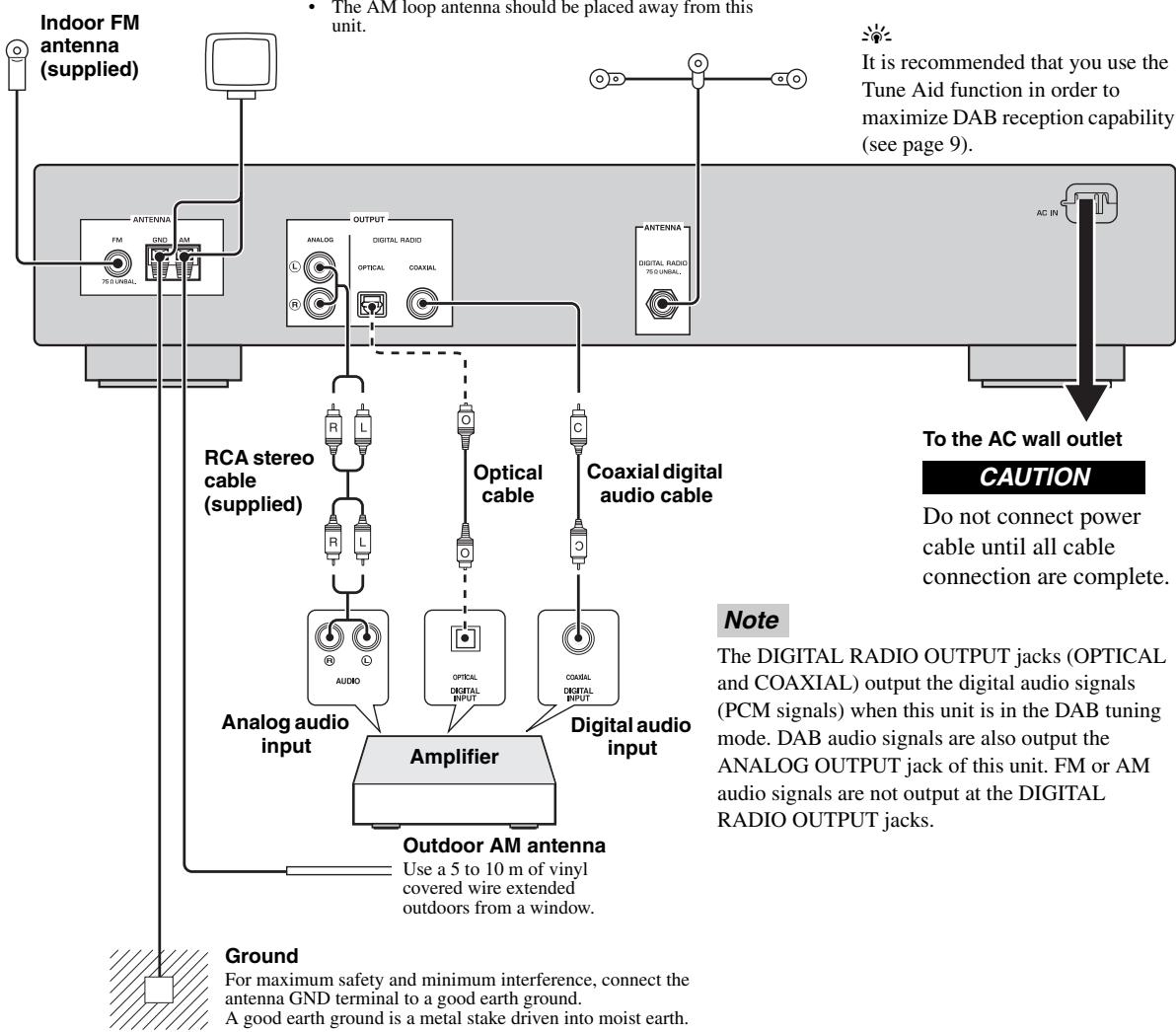
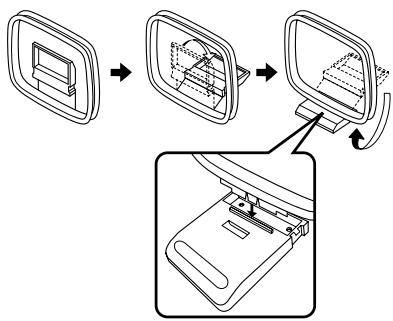
Assembling the supplied AM loop antenna
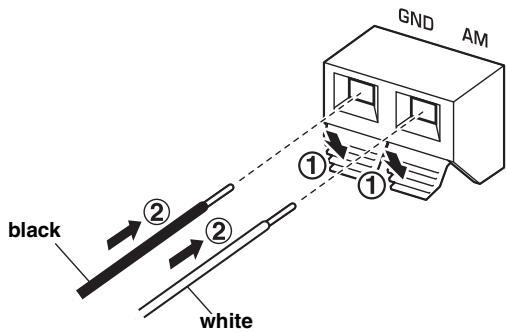
Connecting the wire of the AM loop antenna
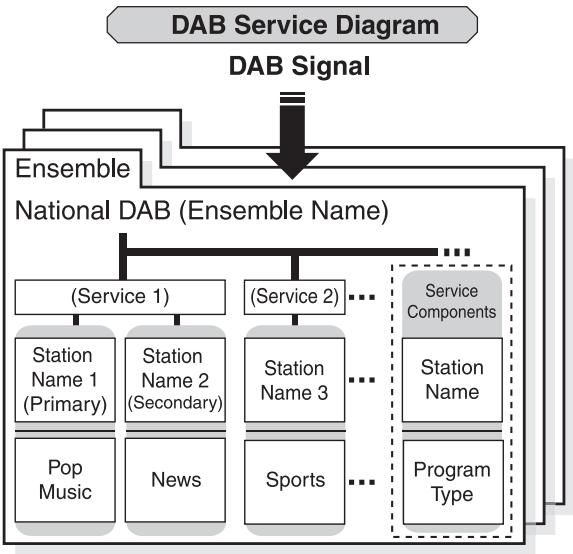
DAB (Digital Audio Broadcasting) uses digital signals for clearer sound and more stable reception compared to analog signals.
DAB is broadcasted in blocks of data called "ensembles" containing up to several radio stations that are simultaneously broadcasted.
DAB can also include an extensive amount of text information - called DLS (Dynamic Label Segment, see page 10) - which is displayed on the front panel display of the unit, enabling you to select a station by name.
DAB+ is a standard for digital radio broadcasts that uses the MPEG4 HE-AAC v2 audio format and provides higher quality sound than DAB.
Notes
- Be sure to check the DAB coverage in your area in that not all areas are currently being covered. For a list of nationwide DAB statuses and worldwide DAB frequencies, check WorldDMB online at http://www.worlddab.org/.
- The sound quality and station information are controlled by the DAB broadcaster, not this unit. Not all DAB broadcasters transmit station information.
- DAB signals are broadcast in Band III (174 - 240 MHz) and L Band (1452 - 1492 MHz).
Preparing the DAB tuning
Before tuning into DAB stations, you must perform the automatic scanning. The scanning starts automatically when you select DAB as the input source for the first time.
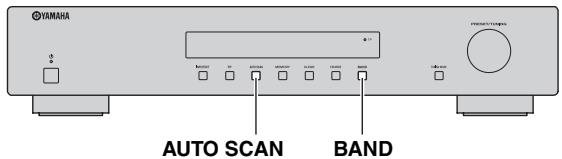
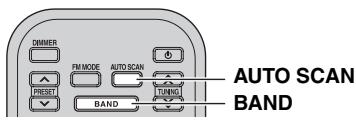
Press BAND repeatedly to select DAB as the reception band.
The scanning starts automatically.
The number of channels found is displayed on the front panel display.

Once the scanning is complete, this unit is tuned into the first DAB station in the registry list.
If the automatic scanning operation is not successful...
"No stations Available" and then following is displayed on the front panel display.

1 Press / to select "Tune Aid" or "Autoscan".
2 Press or ENTER.
The selected function ("Tune Aid" or "Autoscan") starts.
#
- For details on the Tune Aid function, see page 9.
- For details on the Autoscan Full function, see page 6.
- For further details about problems and their remedies, see page 16.
Using the automatic scanning function
Use the automatic scanning function to scan the DAB station again.
Autoscan Full (Full range scanning)
This unit scans the entire range of Band III and L Band (see page 10).
Press and hold AUTO SCAN for more than 2 seconds.
This unit starts the full range scanning. "Autoscan Full" is displayed on the front panel display.
Once this unit has finished scanning, this unit is tuned into the first DAB station in the registry list.
Autoscan Local (Local range scanning)
This unit scans the limited range of Band III.
Press AUTO SCAN.
This unit starts the local range scanning. "Autoscan Local" is displayed on the front panel display.
Once this unit has finished scanning, this unit is tuned into the first DAB station in the registry list.
Manual tuning
Use this feature to select the desired DAB station by browsing the registry list.
Note
Once you have performed the automatic scanning, the registry list of available stations is updated automatically as long as this unit is in the DAB tuning mode. To register new ensembles, use the automatic scanning function (see page 5).
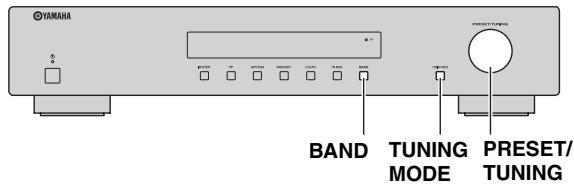
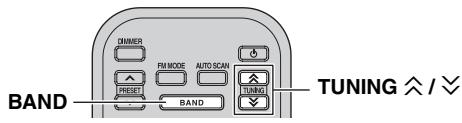
1 Press BAND repeatedly to select DAB as the reception band.
2 Press TUNING 公 / 公 to select the desired DAB station.
When this unit tuned into a station, the TUNED indicator lights up.

On the front panel, press TUNING MODE repeatedly to select "Manual tune" and then rotate PRESET/TUNING.
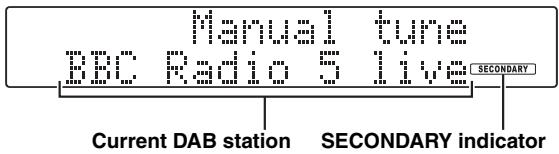
If the selected DAB station is a secondary station, the SECONDARY indicator lights up.
Note
"Off air" is displayed when this unit can not receive the specified DAB station.

You can change the order of the DAB stations listen in the registry listed by using the "Station order" function (see page 8).
Presetting DAB stations
You can tune into stations easily by storing (presetting) and recalling them. This function enables this unit to preset up to 40 DAB stations.
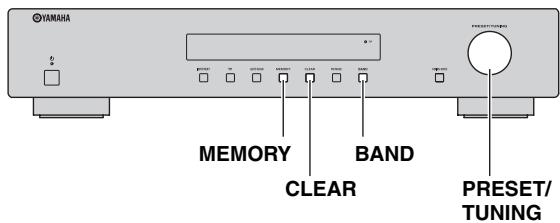
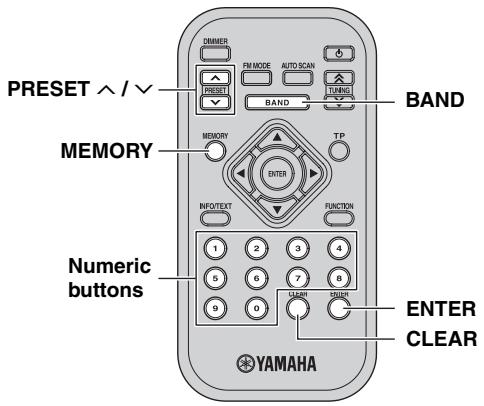
Storing DAB stations
1 Tune into the desired DAB station.
See page 6 for tuning instructions.
2 Press MEMORY.
The preset number blinks on the front panel display for 10 seconds.
Note
Perform the next operation within 10 seconds after pressing MEMORY.
3 Press PRESET / or the numeric buttons to select the desired preset number while the preset number blinks.
中
On the front panel, rotate PRESET/TUNING.
Note
Perform the next operation within 10 seconds after selecting the preset number.
4 Press MEMORY or ENTER to confirm the preset.
Note
When you preset a new station to an existing preset number, new preset data will overwrite the existing preset data.
中
To clear the preset DAB station, see "Clearing the preset DAB station" on page 8.
Recalling the preset DAB stations
You can tune into any desired station simply by selecting the preset number.
1 Press BAND repeatedly to select DAB as the reception band.
2 Press PRESET / or the numeric buttons to select the desired preset number.
When this unit is tuned into the selected station, the TUNED indicator lights up.
中
- On the front panel, press TUNING MODE repeatedly to select "Preset tune" and then rotate PRESET/TUNING.
- "CHXX Empty" (XX indicates the preset number) is displayed briefly when no preset DAB station is assigned to the corresponding preset number. The DAB station currently being received is then displayed on the front panel display.
Clearing the preset DAB station
Follow the steps below to clear a preset DAB station one at a time.
1 Select the desired preset number.
See "Recalling the preset DAB stations" on page 7.
2 Press CLEAR.
The selected preset number blinks on the front panel display.

Note
If you do not perform the next operation within 10 seconds, the clearing is canceled.
3 Press CLEAR again to confirm.
"CHXX cleared" (XX indicates the preset number) is displayed on the front panel display.
#
- To clear all preset DAB stations, press and hold CLEAR for more than 3 seconds. After all preset DAB stations are cleared, the Autoscan Full function starts automatically (see page 6).
- You can also clear all preset DAB stations by using the DAB functions. See "DAB Clear" on page 9.
Using the DAB functions
Use this feature to set the DAB functions.
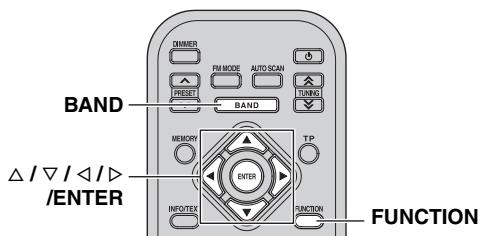
1 Press BAND repeatedly to select DAB as the reception band.
2 Press FUNCTION.
The DAB function menu is displayed on the front panel display.
3 Press / to select the desired DAB function and then press or ENTER.
You can select the following functions.
- Station Order (see page 8)
Tune Aid (see page 9)
Dynamic Range (see page 9)
DAB Clear (see page 9) - Auto Power Down (see page 9)
#
To exit from the DAB function menu, press FUNCTION again or press
Station Order
You can change the order of the registered DAB stations.
1 Select "Station Order" in the DAB function menu.
2 Press / to select the desired station order setting and then press ENTER.
| Choice | Description |
| Alphanumeric | Default setting. Stations are listed in the alphanumeric order. |
| Active | This unit lists the currently active DAB stations first, and then other DAB stations in the alphanumeric order. |
| Ensemble | Select this setting to browse through the registered DAB stations from the lowest to the highest channel labels (see page 10). |

While pressing / to select the desired setting, " ^* " is displayed next to the current setting.
Tune Aid
Measure reception strength of the received signal (from 0 (none) to 100 (best)).
1 Select "Tune Aid" in the DAB function menu.
2 Press / to select the desired DAB channel.
The strength of the selected DAB channel signal is displayed on the front panel display. Adjust the orientation of the DAB antenna so that the strength of the selected DAB channel signal gets stronger.
Dynamic Range
You can change the dynamic range compression setting. This is especially useful when you listen to a DAB station in a noisy environment or at a low volume at night.
1 Select "Dynamic Range" in the DAB function menu.
2 Press / to select the desired dynamic range compression setting and then press or ENTER.
| Choice | Description |
| AUTO | Default setting. This unit utilizes the dynamic range compression automatically if it is transmitted. |
| OFF | This unit does not utilize the dynamic range compression. |

While pressing / to select the desired setting, " ^* " is displayed next to the current setting.
DAB Clear
Cleared all DAB station information and preset settings stored in the unit.

You can also perform DAB Clear by pressing and holding CLEAR for more than 3 seconds in the preset tuning mode. See "Clearing the preset DAB station" on page 8.
Note
Once DAB Clear is performed, the deleted information and preset settings cannot be restored.
1 Select "DAB Clear" in the DAB function menu.
2 Press / to select "OK" and then press or ENTER.
After DAB Clear is complete, the Autoscan Full function starts automatically (see page 6).

To cancel the operation, select "CANCEL".
Auto Power Down
This unit automatically enters standby mode if it is not operated for specified amount of time. This setting is effective for all tuning modes.
1 Select "Auto Power Down" in the DAB function menu.
2 Press / to select the desired auto power down setting and then press or ENTER.
| Choice | Description |
| OFF | This unit will not be set to standby mode automatically. |
| 4 Hours,8 Hours,12 Hours | This unit is set to standby mode automatically after the specified amount of time passes.Default setting is “8 Hours”. |

While pressing / to select the desired setting, " ^* " is displayed next to the current setting.
DAB station information
Use this feature to display various information about the current DAB station.
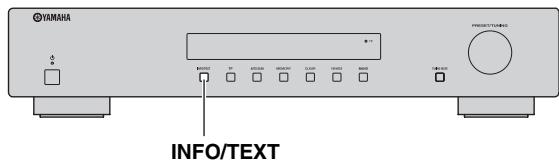
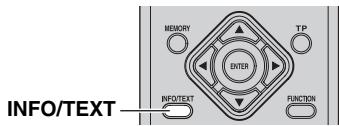
1 Tune into the desired DAB station.
2 Press INFO/TEXT repeatedly to display information about the current DAB station.
DLS (Dynamic Label Segment)
Displays information about the current DAB station, such as the name of the song, artist and speaker, etc. This data is continuously updated by the DAB broadcaster, thus changing often with every new song or program. Other data, such as news, weather, and sports headlines, may be broadcast as well.
Audio mode
Displays bit rate and digital radio format (DAB or DAB+).
Program type
Displays the genre of the current DAB station.
Ensemble label
Displays the name of the current ensemble.
Date & time
Displays the current date and time.
Channel & frequency
Displays the channel label and frequency of the current DAB station (See page 10).
Signal quality
Displays the signal reception quality (from 0 (none) to 100 (best)) of the current DAB station.
#
The front panel display can display up to 16 alphanumeric characters at once. The dynamic label segment scrolls in a continuous manner.
DAB frequency information
Band III
Note
When you perform the local range scanning, this unit scans only within the frequencies marked with an asterisk (^*) in the following table (see page 6).
| Frequency | Channel label | Frequency | Channel label |
| 174.928 MHz | 5A | * 208.064 MHz | 9D |
| 176.640 MHz | 5B | * 209.936 MHz | 10A |
| 178.352 MHz | 5C | * 211.648 MHz | 10B |
| 180.064 MHz | 5D | * 213.360 MHz | 10C |
| 181.936 MHz | 6A | * 215.072 MHz | 10D |
| 183.648 MHz | 6B | * 216.928 MHz | 11A |
| 185.360 MHz | 6C | * 218.640 MHz | 11B |
| 187.072 MHz | 6D | * 220.352 MHz | 11C |
| 188.928 MHz | 7A | * 222.064 MHz | 11D |
| 190.640 MHz | 7B | * 223.936 MHz | 12A |
| 192.352 MHz | 7C | * 225.648 MHz | 12B |
| 194.064 MHz | 7D | * 227.360 MHz | 12C |
| 195.936 MHz | 8A | * 229.072 MHz | 12D |
| 197.648 MHz | 8B | * 230.784 MHz | 13A |
| 199.360 MHz | 8C | * 232.496 MHz | 13B |
| 201.072 MHz | 8D | * 234.208 MHz | 13C |
| * 202.928 MHz | 9A | * 235.776 MHz | 13D |
| * 204.640 MHz | 9B | * 237.488 MHz | 13E |
| * 206.352 MHz | 9C | * 239.200 MHz | 13F |
L Band
| Frequency | Channel label | Frequency | Channel label |
| 1452.960 MHz | LA | 1473.504 MHz | LM |
| 1454.672 MHz | LB | 1475.216 MHz | LN |
| 1456.384 MHz | LC | 1476.928 MHz | LO |
| 1458.096 MHz | LD | 1478.640 MHz | LP |
| 1459.808 MHz | LE | 1480.352 MHz | LQ |
| 1461.520 MHz | LF | 1482.064 MHz | LR |
| 1463.232 MHz | LG | 1483.776 MHz | LS |
| 1464.944 MHz | LH | 1485.488 MHz | LT |
| 1466.656 MHz | LI | 1487.200 MHz | LU |
| 1468.368 MHz | LJ | 1488.912 MHz | LV |
| 1470.080 MHz | LK | 1490.624 MHz | LW |
| 1471.792 MHz | LL |
Automatic and manual tuning
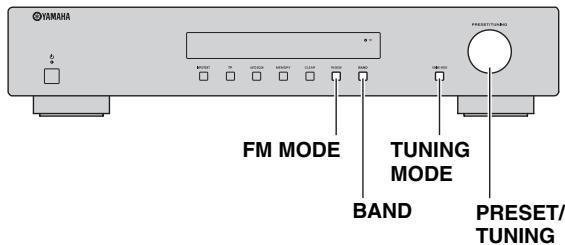
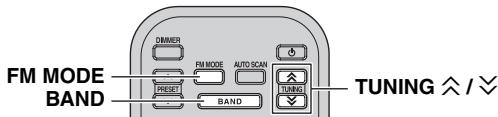
Automatic tuning
Automatic tuning is effective when station signals are strong and there is no interference.
1 Press BAND repeatedly to select FM or AM as the reception band.
2 Press and hold TUNING / for more than 2 seconds to begin automatic tuning.
When this unit is tuned into a station, the TUNED indicator lights up and the frequency of the station is displayed on the front panel display.

#
- On the front panel, press TUNING MODE repeatedly to select "Auto tune" and then rotate PRESET/TUNING.
- If the station provides Radio Data System information, the program service information will be displayed on the front panel display (see page 13).
Manual tuning
If the signal from the station you want to select is weak, tune into it manually.
1 Press BAND repeatedly to select FM or AM as the reception band.
2 Press TUNING / to select the desired frequency.
When this unit is tuned into a station, the TUNED indicator lights up.
中
On the front panel, press TUNING MODE repeatedly to select "Manual tune" and then rotate PRESET/TUNING.
Improving FM reception
If the signal from the station is weak and the sound quality is not good, set the FM radio wave reception mode to the monaural tuning mode to improve reception.
Press FM MODE repeatedly to select "AUTO STEREO" (stereo mode) or "MONO" (monaural mode) when this unit is tuned into an FM radio station.
- When this unit is in the stereo tuning mode, the STEREO indicator lights up on the front panel display.
- When this unit is in the monaural tuning mode, the STEREO indicator goes off.
Note
Even if this unit is in the stereo tuning mode, the STEREO indicator does not light up when the current program is monaural.
Presetting stations
You can tune into stations easily by storing (presetting) and recalling them. This function enables this unit to preset up to 30 stations for each band.
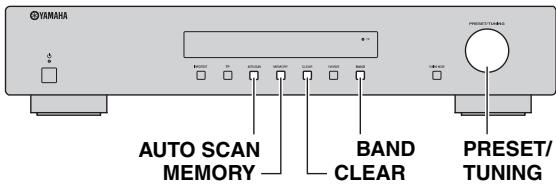
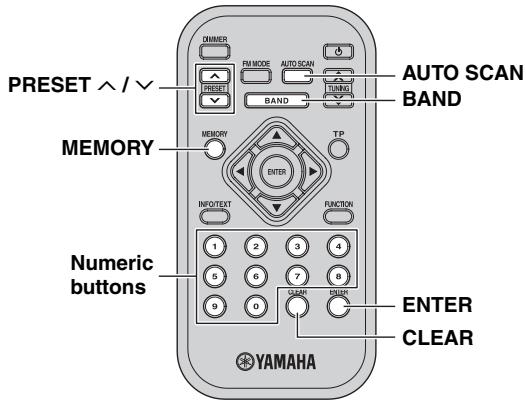
Automatic station preset
1 Press BAND repeatedly to select FM or AM as the reception band.
2 Press AUTO SCAN.
"Auto Preset" blinks on the front panel display. This unit starts searching the stations with strong signals and stores them automatically.

When automatic station preset is completed, this unit tunes into the station preset to "01".
Notes
- FM or AM with sufficient signal strength are stored automatically. To store a station with weak signal strength, store it manually. See "Manual station preset" below.
- When you rerun "Automatic station preset", all of the preset data will be deleted and new preset data will be set to each preset number.
- If no station is found, the search ends and this unit returns to the previous station tuned in before the search.
Manual station preset
1 Tune into the desired FM/AM station.
See page 11 for tuning instructions.
2 Press MEMORY.
The preset number blinks on the front panel display for 10 seconds.
Note
Perform the next operation within 10 seconds after pressing MEMORY.
3 Press PRESET / or the numeric buttons to select the desired preset number while the preset number blinks.
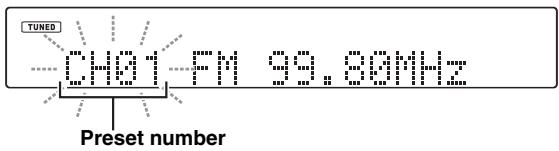

On the front panel, rotate PRESET/TUNING.
Note
Perform the next operation within 10 seconds after selecting the preset number.
4 Press MEMORY or ENTER to confirm the preset.
Notes
- When you preset a new station to an existing preset number, new preset data will overwrite the existing preset data.
- The reception mode (stereo or monaural) is stored along with the station frequency.
Recalling preset stations
You can tune into any desired station simply by selecting the preset number.
1 Press BAND repeatedly to select FM or AM as the reception band.
2 Press PRESET / or the numeric buttons to select the desired preset number.

- On the front panel, press TUNING MODE repeatedly to select "Preset tune" and then rotate PRESET/TUNING.
- "CHXX Empty" (XX indicates the preset number) is displayed briefly when no preset FM or AM station is assigned to the corresponding preset number. The FM or AM station currently being received is then displayed on the front panel display.
Clearing the preset FM or AM station
Follow the steps below to clear a preset FM or AM station one at a time.
1 Select the desired preset number.
See "Recalling preset stations" on page 12.
2 Press CLEAR.
The selected preset number blinks on the front panel display.

Note
If you do not perform the next operation within 10 seconds, the clearing is canceled.
3 Press CLEAR to confirm.
"CHXX cleared" (XX indicates the preset number) is displayed on the front panel display.

- To clear all preset FM or AM stations, press and hold CLEAR for more than 3 seconds.
- You can also clear all preset FM or AM stations, by using the FM/AM functions. See "Presents Clear" on page 15.
Receiving Radio Data System information (FM stations only)
Radio Data System is a data transmission system used by FM stations in many countries. This unit can receive four types of Radio Data System data information: Program Service, Program Type, Radio Text, and Clock Time.
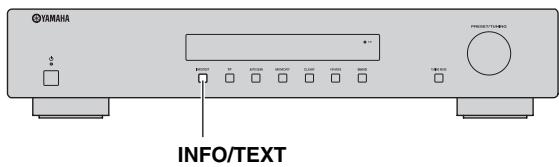
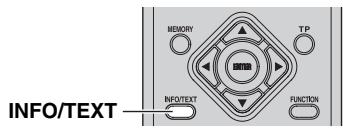
1 Tune into the desired Radio Data System broadcasting station.
2 Press INFO/TEXT repeatedly to select the desired Radio Data System display mode.
| Choice | Description |
| PROGRAM SERVICE | Default setting. This unit displays the name of the Radio Data System program currently being received. |
| PROGRAM TYPE | This unit displays the type of the Radio Data System program currently being received. |
| RADIO TEXT | This unit displays the information on the Radio Data System program currently being received. |
| CLOCK TIME | This unit displays the current time. |
When you select "PROGRAM TYPE", the following program type names are displayed.
| Program type | Description |
| News | News |
| Current Affairs | Current Affairs |
| Information | General Information |
| Sport | Sports |
| Education | Education |
| Drama | Drama |
| Cultures | Cultures |
| Science | Science |
| Varied Speech | Varied Speech |
| Pop Music | Pop Music |
| Rock Music | Rock Music |
| Easy Listening | Easy Listening |
| Light Classics M | Light Classical Music |
| Serious Classics | Serious Classical Music |
| Other Music | Other Music |
| Weather & Metr | Weather & Meteorology |
| Finance | Finance |
| Children's Progs | Children's Program |
| Social Affairs | Social Affairs |
| Religion | Religion |
| Phone In | Phone In |
| Travel & Touring | Travel & Touring |
| Leisure & Hobby | Leisure & Hobby |
| Jazz Music | Jazz Music |
| Country Music | Country Music |
| National Music | National Music |
| Oldies Music | Oldies Music |
| Folk Music | Folk Music |
| Documentary | Documentary |
| Alarm Test | Alarm Test |
| Alarm-Alarm! | Alarm-Alarm! |
Notes
- It may take a while for this unit to receive all of the Radio Data System data from the station.
- If the signals being received are not strong enough, this unit may not be able to utilize the Radio Data System data. In particular, the "RADIO TEXT" mode requires a large amount of data and may not be available even when the other Radio Data System display modes are available.
- In case of poor reception condition, press FM MODE to select the monaural reception mode (see page 11).
- If the signal strength is weakened by external interference while this unit is receiving the Radio Data System data, the reception may be cut off unexpectedly.
- When the "RADIO TEXT" mode is selected, this unit can display the program information by a maximum of 128 alphanumeric characters, including the umlaut symbol. Unavailable characters are displayed with the "_"(underscore). The displayed information scrolls continuously.
TP Search function (FM stations only)
This unit can automatically search Radio Data System stations that are broadcasting a traffic program (TP).
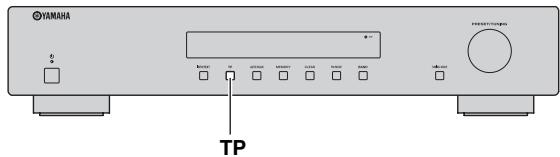
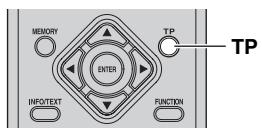
Press TP.
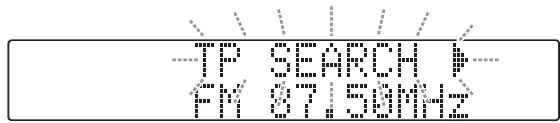
"TP SEARCH "blinks on the front panel display for 3 seconds and search starts automatically.
When a TP station is received, TP indicator lamp lights up and TP search finishes.
#
If the station provides Radio Data System information, the program service information will be displayed on the front panel display.
To search the next TP station, press TP.
Notes
- Press TP during TP search to cancel.
- If no TP Stations are found, "NO TP STATION" is displayed on the front panel display and this unit returns to the state before searching.
Using the FM/AM functions
Use this feature to set the FM/AM functions.
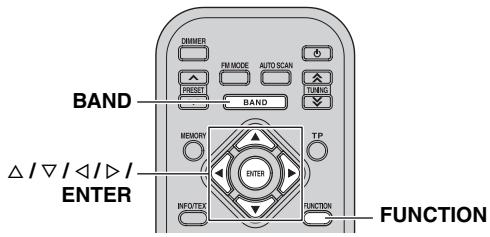
1 Press BAND repeatedly to select FM or AM as the reception band.
2 Press FUNCTION.
The FM/AM function menu is displayed on the front panel display.
3 Press / to select desired FM/AM function and then press or ENTER.
You can select the following functions.
- Presets Clear (see page 15)
- Auto Power Down (see page 15)

To exit from the FM/AM function menu, press FUNCTION again or press
Presets Clear
Cleared all preset settings stored in the unit for the current tuning mode.

You can also perform Presets Clear by pressing and holding CLEAR for more than 3 seconds in the preset tuning mode. See "Clearing the preset FM or AM station" on page 13.
Note
Once Presets Clear is performed, the deleted preset settings cannot be restored.
1 Select "Presents Clear" in FM/AM function menu.
2 Press / to select "OK" and then press or ENTER.

To cancel the operation, select "CANCEL".
Auto Power Down
This unit automatically enters standby mode if it is not operated for specified amount of time.
This setting is effective for all tuning modes. See "Auto Power Down" on page 9 for detail.
TROUBLESHOOTING
Refer to the table below when this unit does not function properly. If the problem you are experiencing is not listed below or if the instruction below does not help, set this unit to the standby mode, disconnect the power cable, and contact the nearest authorized Yamaha dealer or service center.
Tuner
| Problem | Cause | Remedy | See page | |
| DAB | Cannot tune into any DAB stations. | The automatic scanning operations were not performed, or the DAB registry list needs to be updated. | Perform the automatic scanning operations. | 6 |
| There is no DAB coverage in your area. | Check with your dealer or WorldDMB online at “http://www.worlddab.org” for a listing of the DAB coverage in your area. | — | ||
| The DAB signals are too weak. | Use a high-quality outdoor DAB antenna. | — | ||
| The automatic scanning operations are not successful. | The DAB antenna may not be connected. | Make sure the DAB antenna is firmly connected. | 4 | |
| The DAB signals are too weak. | Use a high-quality outdoor DAB antenna. | — | ||
| There is no DAB coverage in your area. | Check with your dealer or WorldDMB online at “http://www.worlddab.org/” for a listing of the DAB coverage in your area. | — | ||
| The DAB station reception is weak. | The positioning of the indoor DAB antenna and/or this unit is not optimal for DAB reception. | Use the tuning aid feature to locate the best positioning of the DAB antenna and this unit for optimal DAB reception. | 9 | |
| The DAB signals are too weak. | Use a high-quality outdoor DAB antenna. | — | ||
| There is noise interference (e.g. hiss or crackle). | The indoor DAB antenna needs to be repositioned. | Readjust the position of the indoor DAB antenna. | — | |
| The DAB signals are too weak. | Use a high-quality outdoor DAB antenna. | — | ||
| The DAB station information does not appear or is inaccurate. | The DAB station may be temporarily out of service, or the DAB station information is not provided by the DAB broadcaster. | Contact the DAB broadcaster. | — | |
General
| Problem | Cause | Remedy | See page | |
| FM | FM stereo reception is noisy. | The characteristics of FM stereo broadcasts may cause this problem when the transmitter is too far away or the antenna input is poor. | Check the antenna connections. | 4 |
| Try using a high-quality directional FM antenna. | — | |||
| There is distortion, and clear reception cannot be obtained even with a good FM antenna. | There is multi-path interference. | Adjust the antenna position to eliminate multi-path interference. | — | |
| The desired station cannot be tuned into with the automatic tuning method. | The signal is too weak. | Use a high-quality directional FM antenna. | — | |
| Use the manual tuning method. | 11 | |||
| The Radio Data System information does not appear. | The Radio Data System information is not provided by the radio station. | |||
| The signal is too weak. | Use a high-quality directional FM antenna. | — | ||
| AM | The desired station cannot be tuned into with the automatic tuning method. | The signal is weak or the antenna connections are loose. | Tighten the AM loop antenna connections and orient it for the best reception. | — |
| Use the manual tuning method. | 11 | |||
| There are continuous crackling and hissing noises. | Noise can result from lightning, fluorescent lamps, motors, thermostats and other electrical equipment. | Use an outdoor antenna and a earth ground. This will help somewhat, but it is difficult to eliminate all noise. | — | |
| There are buzzing and whining noises. | A TV set is being used nearby. | Move this unit away from the TV set. | — | |
| Problem | Cause | Remedy | See page |
| This unit fails to turn on when ⊙ is pressed. | The power cable is not connected or the plug is not completely inserted. | Connect the power cable firmly. | 4 |
| This unit has been exposed to a strong external electric shock (such as lightning or strong static electricity). | Disconnect the power cable, plug it back in after 30 seconds, then use it normally. | — | |
| A “humming” sound can be heard. | Incorrect cable connections. | Firmly connect the audio connection cord plugs. If the problem persists, the cables may be defective. | — |
| This unit does not operate properly. | The internal microcomputer has been frozen by an external electric shock (such as lightning or excessive static electricity) or by a power supply with low voltage. | Disconnect the AC power plug from the outlet and then plug it in again after about 30 seconds. | 4 |
| This unit suddenly turns off. | The Auto Power Down function has turned this unit off. | Change the auto power down setting. | 9 |
SPECIFICATIONS
DAB SECTION
Output Level/Impedance 1.5 V/1.2 kΩ
Tuning Range (Band III) 174 to 240MHz (L-Band) 1452 to 1492MHz
Sensitivity (Band III) -98 dBm (L-Band) -93 dBm
- Selectivity (for adjacent channel)
(Band III) 40 dB
(L-Band) 40 dB
- Signal to Noise Ratio 95 dB
Total Harmonic Distortion 0.01%
- Stereo Separation (1 kHz) 77 dB
Frequency Response 20 Hz to 20 kHz, +0.5 dB/-1.0 dB
- Antenna Input (unbalanced) 75Ω
FM SECTION
Output Level/Impedance 1.0 V/1.2 kΩ
- Tuning Range 87.50 to 108.00 MHz
- 50 dB Quieting Sensitivity (IHF, 100% mod.)
Mono 3 V (20.2 dBf)
- Usable Sensitivity (Signal to Noise Ratio, 30 dB, Mono) ... 1.0 V
- Image Rejection Ratio 80 dB
IF Rejection Ratio 70 dB
- Selectivity (400 kHz) 70 dB
- Signal to Noise Ratio (IHF)
Mono/Stereo 80 dB/75 dB
Harmonic Distortion (1 kHz)
Mono/Stereo 0.3%/0.5%
- Stereo Separation (40 kHz Dev.)
1 kHz 43 dB
Frequency response (20Hz to 15kHz) . 3 dB
- Antenna Input (unbalanced) 75Ω
AM SECTION
Output Level/Impedance 0.36 V/1.2 kΩ
Tuning Range 531 to 1611kHz
- Usable Sensitivity 300 μV/m
- Signal to Noise Ratio 50 dB
Harmonic Distortion 1.0%
GENERAL
- Power Supply AC 230 V, 50 Hz
Power Consumption 10 W -
Dimensions (W × H × D) 435 × 87 × 306 ~mm (17 1/8 × 3 3/8 × 12 in)
Weight 3.3 kg (7.3 lbs) -
Specifications are subject to change without notice.

Digital Audio Broadcasting

Digital Audio Broadcasting
This receiver supports DAB/DAB+ tuning.
Limited Guarantee for European Economic Area (EEA) and Switzerland
Thank you for having chosen a Yamaha product. In the unlikely event that your Yamaha product needs guarantee service, please contact the dealer from whom it was purchased. If you experience any difficulty, please contact Yamaha representative office in your country. You can find full details on our website (http://www.yamaha-hifi.com/ or http://www.yamaha-uk.com/ for U.K. resident).
The product is guaranteed to be free from defects in workmanship or materials for a period of two years from the date of the original purchase. Yamaha undertakes, subject to the conditions listed below, to have the faulty product or any part(s) repaired, or replaced at Yamaha's discretion, without any charge for parts or labour. Yamaha reserves the right to replace a product with that of a similar kind and/or value and condition, where a model has been discontinued or is considered uneconomic to repair.
Conditions
- The original invoice or sales receipt (showing date of purchase, product code and dealer's name) MUST accompany the defective product, along with a statement detailing the fault. In the absence of this clear proof of purchase, Yamaha reserves the right to refuse to provide free of charge service and the product may be returned at the customer's expense.
- The product MUST have been purchased from an AUTHORISED Yamaha dealer within the European Economic Area (EEA) or Switzerland.
- The product must not have been the subject of any modifications or alterations, unless authorised in writing by Yamaha.
- The following are excluded from this guarantee:
a. Periodic maintenance and repair or replacement of parts due to normal wear and tear.
b. Damage resulting from:
(1) Repairs performed by the customer himself or by an unauthorised third party.
(2) Inadequate packaging or mishandling, when the product is in transit from the customer. Please note that it is the customer's responsibility to ensure the product is adequately packaged when returning the product for repair.
(3) Misuse, including but not limited to (a) failure to use the product for its normal purpose or in accordance with Yamaha's instructions on the proper use, maintenance and storage, and (b) installation or use of the product in a manner inconsistent with the technical or safety standards in force in the country where it is used.
(4) Accidents, lightning, water, fire, improper ventilation, battery leakage or any cause beyond Yamaha's control.
(5) Defects of the system into which this product is incorporated and/or incompatibility with third party products.
(6) Use of a product imported into the EEA and/or Switzerland, not by Yamaha, where that product does not conform to the technical or safety standards of the country of use and/or to the standard specification of a product sold by Yamaha in the EEA and/or Switzerland.
- Where the guarantee differs between the country of purchase and the country of use of the product, the guarantee of the country of use shall apply.
- Yamaha may not be held responsible for any losses or damages, whether direct, consequential or otherwise, save for the repair or replacement of the product.
- Please backup any custom settings or data, as Yamaha may not be held responsible for any alteration or loss to such settings or data.
- This guarantee does not affect the consumer's statutory rights under applicable national laws in force or the consumer's rights against the dealer arising from their sales/purchase contract.
Information for Users on Collection and Disposal of Old Equipment and Used Batteries
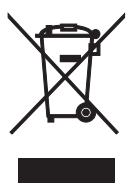
These symbols on the products, packaging, and/or accompanying documents mean that used electrical and electronic products and batteries should not be mixed with general household waste.
For proper treatment, recovery and recycling of old products and used batteries, please take them to applicable collection points, in accordance with your national legislation and the Directives 2002/96/EC and 2006/66/EC.
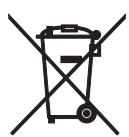
By disposing of these products and batteries correctly, you will help to save valuable resources and prevent any potential negative effects on human health and the environment which could otherwise arise from inappropriate waste handling.
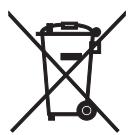
For more information about collection and recycling of old products and batteries, please contact your local municipality, your waste disposal service or the point of sale where you purchased the items.
[Information on Disposal in other Countries outside the European Union]
These symbols are only valid in the European Union. If you wish to discard these items, please contact your local authorities or dealer and ask for the correct method of disposal.
Note for the battery symbol (bottom two symbol examples):
This symbol might be used in combination with a chemical symbol. In this case it complies with the requirement set by the Directive for the chemical involved.
ATTENTION : VEUILLEZ LIRE CE QUI SUIT AVANT D’UTILISER L’APPAREIL.
(stations FM uniqueness) 15
DLS (Dynamic Label Segment)
DLS (Dynamic Label Segment)
Digital Audio Broadcasting

Digital Audio Broadcasting
Manuell stationsinstalling
DLS (Dynamic Label Segment)
Manuell stationsinstalling
Digital Audio Broadcasting

Digital Audio Broadcasting
Den har radiodelen stoder DAB/DAB+-stationsinstallning.
Specifications of the Buses
10 AUTO SCAN
DLS (Dynamic Label Segment)
Digital Audio Broadcasting

Digital Audio Broadcasting
DLS (Dynamic Label Segment)
Paraoculars: Paraoculars are used to measure the retinal thickness. The retinal thickness is measured using a laser scanning system (LSS) and an objective lens (EL).
Notas
Digital Audio Broadcasting

Digital Audio Broadcasting
Este receptor admite sintonizacion DAB/DAB+.
DLS (Dynamic Label Segment)
Digital Audio Broadcasting

Digital Audio Broadcasting