
CM4-1-6ST - Coffee machine AEG-ELECTROLUX - Free user manual and instructions
Find the device manual for free CM4-1-6ST AEG-ELECTROLUX in PDF.



| Product type | Filter coffee machine |
| Brand | AEG-ELECTROLUX |
| Model | CM4-1-6ST |
| Capacity (cups) | 2-10 large cups / 3-15 small cups |
| Carafe type | Glass (and thermal depending on model) |
| Hot plate | Yes, keeps warm |
| Auto shut-off | After 40 minutes |
| Aroma function | Yes (Aroma button) |
| Drip-stop valve | Yes |
| Power supply | 220-240 V, 50/60 Hz |
| Filter type | Paper (filter holder included) |
| Carafe cleaning | Dishwasher safe (carafe and lid) |
| Descaling | Recommended regularly |
| Safety | Do not immerse, auto shut-off, hot surface |
| Included accessories | Measuring spoon |
| Recommended use | Household, offices, hotels |
| Internal battery | Yes (compliant with regulations) |
| Automatic frequency adaptation | Yes (50/60 Hz) |
Frequently Asked Questions - CM4-1-6ST AEG-ELECTROLUX
User questions about CM4-1-6ST AEG-ELECTROLUX
0 question about this device. Answer the ones you know or ask your own.
Ask a new question about this device
Download the instructions for your Coffee machine in PDF format for free! Find your manual CM4-1-6ST - AEG-ELECTROLUX and take your electronic device back in hand. On this page are published all the documents necessary for the use of your device. CM4-1-6ST by AEG-ELECTROLUX.
USER MANUAL CM4-1-6ST AEG-ELECTROLUX
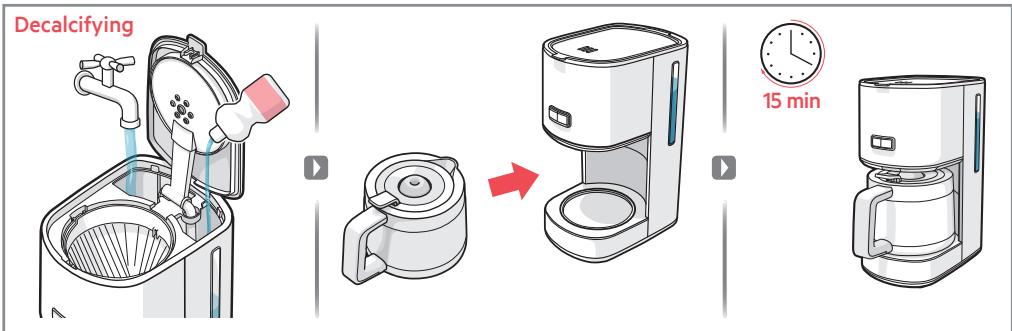
Decalcifying: Recommended 1x every 3 months With decalcifying agent
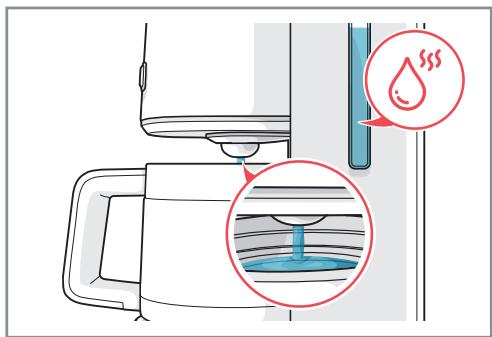
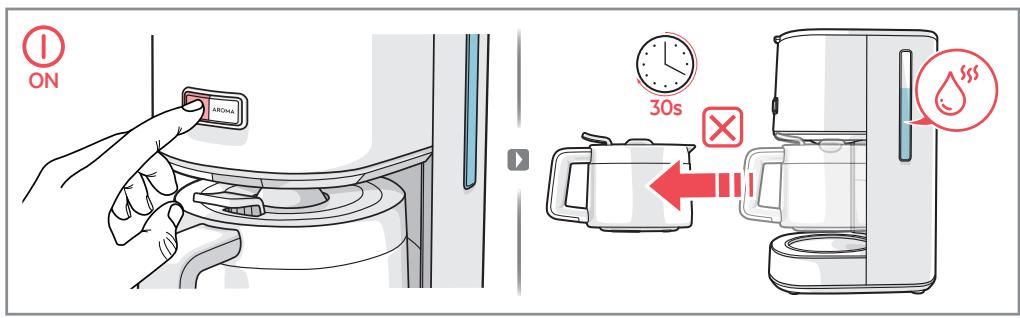
Warning!
While boiling, the jug must not be removed for longer than
30 seconds or the filter will overflow.

Cleaning
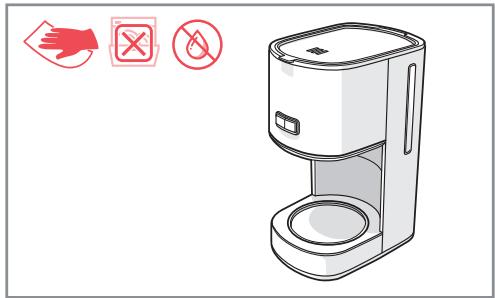
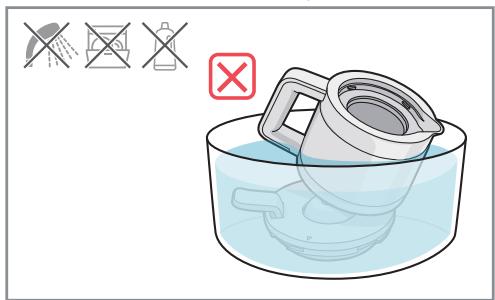
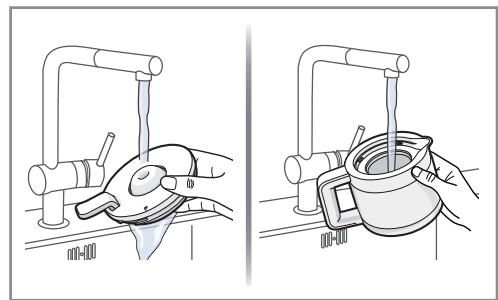
Never immerse the thermo jug in liquid or wash it in dishwasher.* It can only be washed under running water
Thank you for choosing an AEG product. In order to ensure the best results, always use original AEG accessories and spare parts. They have been designed especially for your product. This product is designed with the environment in mind. All plastic parts are marked for recycling purposes.
Visit our website to:
Get usage advice, brochures, trouble shooter, service information:
www.aeg.com/webselfservice
Register your product for better service:
www.registeraeg.com
Buy Accessories and Consumables for your appliance:
www.aeg.com/shop
CUSTOMER CARE AND SERVICE
When contacting Service, ensure that you have the following data available.
The information can be found on the rating plate.
Model, PNC, Serial Number.
Warning / Caution-Safety information
General information and tips
Environmental information
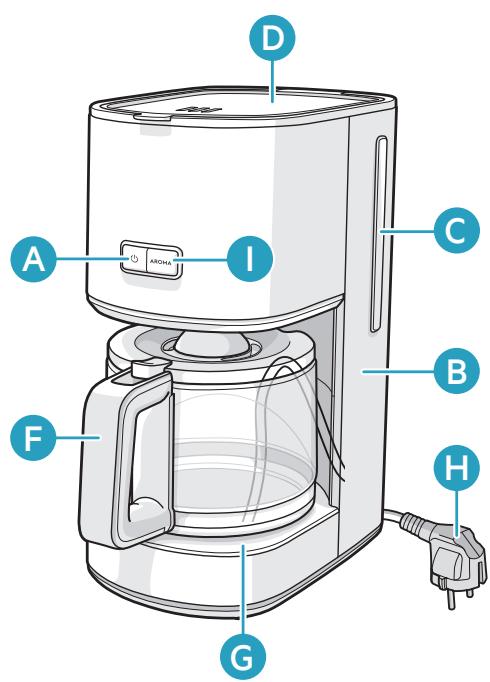
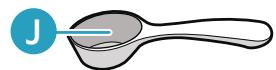
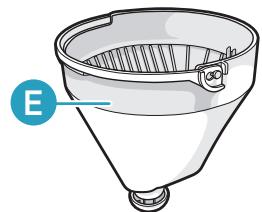
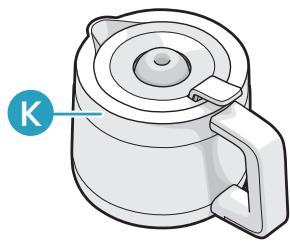
A ON/OFF switch with power indicator light
B Water tank
C Water level indicator
D Hinged lid
E Filter holder with anti-drip valve
F Glass coffee jug
G Warming plate
H Power cord & plug
I Aroma button
J Measuring spoon
K Stainless steel thermo jug*
*depending on model
GETTING STARTED
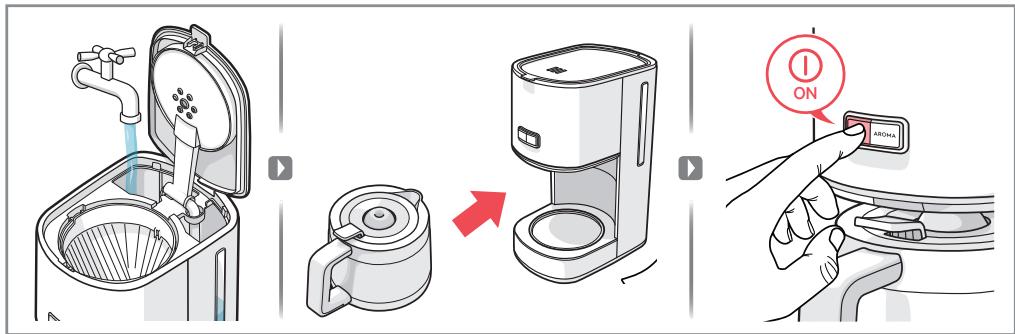
1 Place the machine on a flat surface. When starting the machine for the first time, fill the tank with cold water. Start the machine with the ON/OFF switch. Let a full tank of water pass through the machine once or twice to clean it, without using paper filter or coffee.
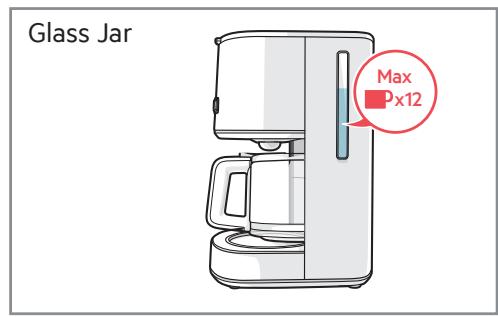
2 Making coffee: open the lid and fill the water tank with fresh cold water up to the desired level. There is a water-level indicator for 2-10 big cups / 3-15 small cups inside the water tank.
3 Insert paper filter into filter basket and fill it with ground coffee. There is a gauge for recommended number of spoons of coffee next to the water gauge. For medium-strength coffee, one measuring spoon (approx. 6-7 g) per cup is sufficient. Close the water tank lid and place the jug (complete with lid) onto the warming plate.
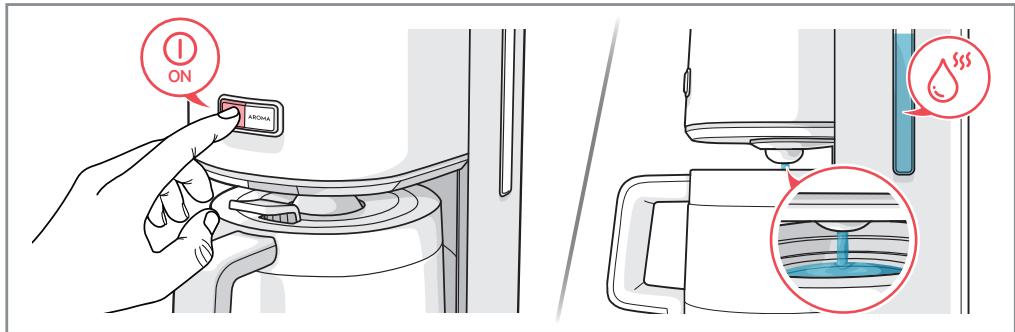
4 Start the machine with the ON/OFF switch. The power indicator light will come on and hot water will flow into the filter. When water has stopped flowing, the warming plate keeps the coffee hot until the machine is turned off with the ON/OFF switch. If the machine is not turned off manually, the Safety Auto-Off function turns it off after 40 minutes.
5 If the jug is removed, the filter valve prevents coffee from dripping onto the warming plate. While boiling, the jug must not be removed for longer than 30 seconds or the filter will overflow.
6 The Aroma Selector extends the brewing time to maximize the flavour extraction and get a stronger coffee for a small number of cups (normally less than 6). Press the Aroma button, and the aroma icon will turn on.
CLEANING AND CARE
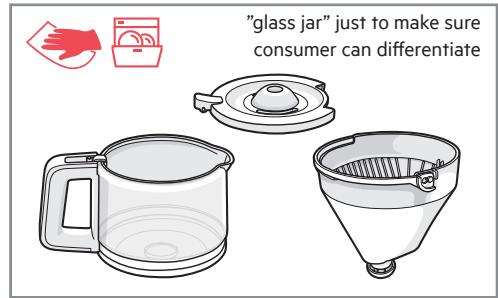
1 Switch the machine off and unplug the power cord. Wipe all outer surfaces with a damp cloth. Coffee jug (F) and jug lid are dishwasher proof. Never use caustic or abrasive cleaners, and never immerse the machine in liquid!
2 To clean the filter holder (E), lift up the handle and remove the filter holder. To clean the filter valve thoroughly, rotate it several times while it is being rinsed.
3 Decalcifying is recommended regularly, depending on water hardness. Fill the tank with water and decalcifier according to product instructions, then follow steps 9 and 10.
4 Place the coffee jug (F) with its lid onto the warming plate (G). Allow the decalcifier to take effect for about 15 minutes, then switch the machine on. Switch it off when the solution has finished flowing through. If necessary repeat the decalcifying process.
5 Allow the machine to run at least twice with plain water. Then thoroughly rinse the coffee jug (F), jug lid and filter holder (E) under running water, activate the filter valve repeatedly during the rinse process.
SAFETY ADVICE
This appliance is not intended for use by persons (including children) with reduced physical, sensory or mental capabilities, or lack of experience and knowledge, unless they have been given supervision or instruction concerning use of the appliance by a person responsible for their safety.
Children should be supervised to ensure that they do not play with the appliance.
This appliance can be used by children aged from 8 years and above and persons with reduced physical, sensory or mental capabilities or lack of experience and knowledge if they have been given supervision or instruction concerning use of the appliance in a safe way and understand the hazards involved. Children shall not play with the appliance.
Cleaning and user maintenance shall not be made by children without supervision.
The appliance may only be connected to a power supply whose voltage and frequency comply with the specifications on the rating plate! Never use or pick up the appliance if - the supply cord is damaged, - the housing is damaged. The appliance must only be connected to an earthed socket.
If necessary an extension cable suitable for 10 A can be used. If the appliance or the supply cord is damaged, it must be replaced by the manufacturer, its service agent or similarly qualified person, in order to avoid hazard.
Always place the appliance on a flat, level surface.
Never leave the appliance unattended while connected to the supply mains.
The appliance must be switched off and the mains plug withdrawn each time after use, before cleaning and maintenance.
The appliance and accessories become hot during operation. Use only designated handles and knobs. Allow to cool down before or storage. The mains cable must not come into contact with any hot parts of the appliance.
Do not immerse the appliance in water or any other liquid. Do not exceed the maximum filling volume as indicated on the appliances. Do not use or place the appliance on a hot surface or near source of heat.
This appliance is intended to be used in household and similar applications such as:
- staff kitchen areas in shops, offices and other working environments;
-farm houses; - by clients in hotels, motels and other residential type environments;
- bed and breakfast type environments.
The coffee maker shall not be placed in a cabinet when in use.
No action is needed to adapt the product to 50 or 60Hz
The product will adjust itself.
DISPOSAL
Recycle the materials with the symbol. Put the packaging in applicable containers to recycle it. Help protect the environment and human health and to recycle waste of electrical and electronic appliances.
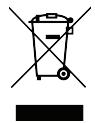
This symbol on the product indicates that this product contains a battery which shall not be disposed with normal household waste. This symbol on the product or on its packaging indicates that the product may not be treated as household waste. To recycle your product, please take it to an official collection point or to an AEG service center that can remove and recycle the battery and electric parts in a safe and professional way. Follow your country's rules for the separate collection of electrical products and rechargeable batteries.
AEG reserves the right to change products, information and specifications without notice
TROUBLESHOOTING
| Symptoms | Possible causes | Solution |
| Coffee is not brewing. | The power supply is not connected or the ON/OFF switch is not turned on. | Connect the power plug into an earthed wall socket and turn on the ON/OFF switch. |
| No water in the water tank. | Fill the water tank with cold water. | |
| Too much lime scale is formed in the water tank. | Perform the decalcifying procedure. | |
| Filter holder is leaking. | The anti-drip valve in filter holder is obstructed by residual coffee powder. | Remove the obstructing particles and clean the anti-drip valve. |
| Coffee powder found in the coffee jug. | No paper coffee filter in the filter holder. | Always use a new paper coffee filter in the filter holder when brewing coffee. |
www.aeg.com/webselfservice
PernctpaIte cBor npOyKr 3a no-do6po o6cIyXBaHe:
www.registeraeg.com
3aKyIeTe npHaJdxJxHOctn KOHCymTaNb 3a ypeJa Cn Ha:
www.aeg.com/shop
ГРИЖИ OБСЛУЖBAHE HA KЛЕHTNTE
Korato ce obpbuatake bM cepBn3a ce yBepTe, ye pa3noIarate cbc
cneHnte daHHn: HOpMaunraMoKe da ce hamepHa Ta6enata C
HomHaHn cToHocTn. MoDen, PNC (Homep Ha npOyKT), cepHeH Homep.
PpeDynpexkdeHne/BHmAmHne - HOpMaun 3a 6e3oNaChocT
Bnuharn noctabraiye ypea Bbpxy paBaHa nIIOcka NOBbpxHOCT.
Hnkora He octabryte ypea 6e3 ha3Op,doKaTo e Cbbp3aH KbMeleKtpnueckaTa Mpeka.
UpeBt Tp86Ba Da ce N3KlOuN I 9eIcEJIbT Da ce N3BaIIN BCEKN PbT CneI yNoTpe6a, npei NouchTBaHe N NOdIpBXKa.
UpeiBt n akcecoapnte ce HarpBaT no BpeMe Ha pa6oTa. I3noI3BaIte cAmO onpeJeHn 3a ZeI Ta dpbJxKn N KOnyTe. OcTabeTe da Ce oxlaDi npEi Da npi6epeTe 3a CbxpaHHe. IpaBnIaT Ka6eN He Tpr6Ba Da BIn3a B KOHTaKT C ropeu N acTn Ha ypeA.
He notapny Te ypea BbB BODa IIN B Dpyra TeuHocT. He npebuaBaIte MaKcmaHnO6em Ha NblHeNe, KaKTo e yka3aHO Ha ypeiTe. He n3noJ3BaIte H He noCTabraiTe ypea Bbpxy ropeu a NobbpxHOCT IIN 6IIN3O Do n3TOUHK Ha TOJIInHa.
To3n ypeE npedHa3HaueH 3a ynoTpe6a B domaunn n noo6n ycNoBna:
- KuxHeNCKn 30Hn 3a nepcoHaB V MaRa3HH, Ofncn N npyIn pa6OTHm MeCTa;
-Φepm;
-OT KJIeHTN B XOTeJI, MOTeJI N Ipyr BnД JIJIuIHO HaCTaHЯBaHe;
-XOTeI, KOITo npeIaRaT HOUIvBka I 3aKyCsKa.
KaΦe MaunHaTa He Tp86Ba Da ce NocTabB WkaΦOBe, DOKaTo pa6OTn.
He ca Heo6xOIMM DeiCTBnA 3a aIaPTnPaHe Ha npOyKtA KbM 50 nnn 60 Hz. PpOyKTBt ige ce perynpa cam.
www.aeg.com/webselfservice
www.aeg.com/webselfservice
PROBLÈME CAUSE POSSIBLE SOLUTION MISE AU REBUT
www.aeg.com/webselfservice
www.aeg.com/webselfservice
KataxwpioeTo npoiov oac, wote va exete kautepeo epic:
www.registeraeg.com
AyopaoTE AEsouap kai Avawoiya yia tn ouokeun oac:
www.aeg.com/shop
YIIOSTHPIEH IENATQN KAI ZEPBIZ
'Otav eikovwveitee to oepic, bepaiwtheta otiyexte diathetaa ta akoloua otoixia. Ta otoixia auta theta pere tntv nivakida texvikwv
Xapaktnpiotikw.MovTeLo,Kwδ.πpoióvtoC(PNC),Aρtμoçσεipac.
Ppoeiioin / Ppoox - Pnnpoopiec yia tnv aovpaleia
www.aeg.com/webselfservice
POSIBLE CAUSA/SOLUCION DEL PROBLEMA DESECHO
- Decalcifying: Recommended 1x every 3 months With decalcifying agent
- Warning!
- Cleaning
- Visit our website to:
- CUSTOMER CARE AND SERVICE
- GETTING STARTED
- CLEANING AND CARE
- SAFETY ADVICE
- DISPOSAL
- TROUBLESHOOTING
- ГРИЖИ OБСЛУЖBAHE HA KЛЕHTNTE
- PROBLÈME CAUSE POSSIBLE SOLUTION MISE AU REBUT
- YIIOSTHPIEH IENATQN KAI ZEPBIZ
- POSIBLE CAUSA/SOLUCION DEL PROBLEMA DESECHO
Brand : AEG-ELECTROLUX
Model : CM4-1-6ST
Category : Coffee machine