
INTUITION PREFERENCE EA873810 - Automatic coffee machine KRUPS - Free user manual and instructions
Find the device manual for free INTUITION PREFERENCE EA873810 KRUPS in PDF.



| Product Type | Automatic coffee machine with grinder |
| Brand | KRUPS |
| Model | INTUITION PREFERENCE EA873810 |
| Origin | Made in France (Mayenne) |
| Dimensions (H x W x D) | 365 x 240 x 400 mm |
| Weight | 8.2 kg |
| Power supply | 220-240 V~ / 50 Hz, 1450 W |
| Pump pressure | 15 bars |
| Coffee bean container capacity | 250 g |
| Water tank capacity | 3 L |
| Display | Intuitive touchscreen (smartphone type) |
| Light indicator | Intuitive Light Indicator (customizable color) |
| Grinder | Conical metal burrs, grind adjustment (6 levels) |
| Milk system | One Touch Cappuccino, removable unit for milk foam |
| Available beverages | Ristretto, Espresso, Lungo, Doppio, Long Coffee, Americano, Espresso Macchiato, Cappuccino, Flat White, Caffè Latte, Latte Macchiato, Frothed Milk, Green Tea, Black Tea, Herbal Tea |
| Double cup function | Yes (for selected coffee beverages) |
| Customizable profiles | 2 profiles, up to 7 favorite beverages per profile |
| Settings | Water hardness, coffee/tea temperature, auto on/off, screen brightness, volume unit (ml/oz) |
| Maintenance | Auto rinse, machine cleaning (tablet), descaling (pack), milk nozzle cleaning |
| Water filter | Claris Aqua Filter System (cartridge, lasts 2 months) |
| Included accessories | 2 cleaning tablets, 1 descaling pack, milk tube, cleaning needle, 1 filter cartridge, 1 water hardness test strip, cleaning brush, milk jug (dishwasher safe) |
| Safety | Auto shut-off, surge protection, detailed electrical instructions |
Frequently Asked Questions - INTUITION PREFERENCE EA873810 KRUPS
User questions about INTUITION PREFERENCE EA873810 KRUPS
0 question about this device. Answer the ones you know or ask your own.
Ask a new question about this device
Download the instructions for your Automatic coffee machine in PDF format for free! Find your manual INTUITION PREFERENCE EA873810 - KRUPS and take your electronic device back in hand. On this page are published all the documents necessary for the use of your device. INTUITION PREFERENCE EA873810 by KRUPS.
USER MANUAL INTUITION PREFERENCE EA873810 KRUPS
FR. P. 11-23
EN. P. 24-36
DE. P. 37-49
NL. P. 50-63
DA. P. 64-76
NO. P. 77-89
SV. P. 90-102
FI. P. 103-115
ES. P. 116-128
IT. P. 129-141
PT. 142-154
EL. P. 155-168
CS. P. 169-181
SK. P. 182-194
HU .P. 195-207
PL. P. 208-220
RU .P.221-234
UK. P. 235-248
RO 249-261
BG. P. 262-275
HR .P. 276-288

8020005357
KRUPS EA875 INTUITION PREFERENCE+

EA875 INTUITION PREFERENCE+
1 1st USE

FR - 1ÈRE UTILISATION
NL - 1STE GEBRUIK
NO - FØRSTE GANGS BRUK
FI - ENSIMMÄINEN KÄYTTÖKERTA
IT - PRIMO UTILIZZO
EL - INPQTH XPH2H
SK - PRVÉPOUZITIE
PL - PIERWSZE UZYCIE
UK- INPELIJE BHKOPMCTAHHRA
BG - IN3I0JI3BAHE 3A 1BNIPTbT
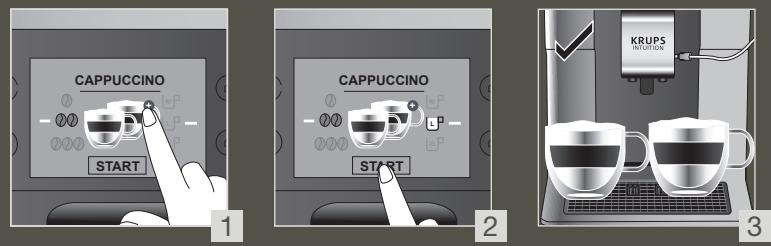
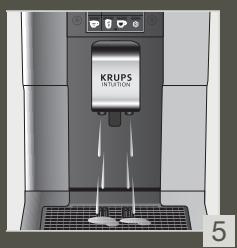
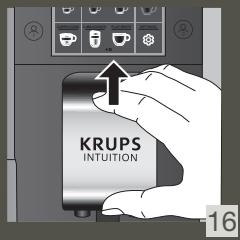
3 MAKE 2 CUPS OF A MILK RECIPE AT ONCE

FR - POUR 2 TASSES INSTANTANÉES D'UNE RECETTE AVEC DU LAIT
NL - MAAK ONMIDDELLUK 2 KOPJES VAN EEN MELKRECEPT
NO - LAG 2 KOPPER MED EN MELKEOPPSKRIFT P A EN GANG
FI - TEE 2 KUPILLISTA MAITOKAHVIA KERRALLA
IT - PREPARAZIONE DI 2 BEVANDE A BASE DI LATTE CONTEMPORANEAMENTE
EL -IAPAZKEYH 2 ΦΑΙTZANIΩN MIAZ ΣΥNTΑΓΗ ΜE ΓΑΑ ΣΤΗ ΣΤΙΜΗ PRIPRAVTE
SK - PRIPRAVTE NARAZ 2 SÁLKY MLIEČNEHO RECEPTU
PL - PRZYGOTOWANIE 2 FILIZANEK NAPOJU Z MLEKIEM NA RAZ
UK - TOTYUME 2 YAUSHI HANOIO 3 MOJOKOM 3A ODNH PA3
BG -ИЗПьЛНЯBAHE HA PELДТА C MЛЯКО 3A 2.YALIN HABEДнБЖ
DE - 2 TASSEN EINES MILCHREZEPTES AUF EINN ZUBEREITEN
DA - OPSKRIFT TIL AT LAVE 2 KOPPER MÄLK PÁ SAMME TID
SV - TILLAGA 2 KOPPAR AV ETT MJÖLKRECEPT I TAGET
ES - HAGA 2 TAZAS DE UNA BEBIDA CON LECH A LA VEZ
PT - PREPARE 2 CHAVENAS DE UMA RECEITA D LEITE NUMINSTANTE
CS - NAJEDNOU 2 SÁLKY MLEČNÉ RECEPTURY
HU - EGYSZERRE 2 CSESZE TEJITALT KESZITSEN
RU - TOTOBbTE 2 YAIIKIMOJIOnHOTO HAPIN OJHOBPEMEHNO
RO - PREPARAREA SIMULTANÁ A 2 CEŞTI DE BÄUTURA CU LAPTE
HR - NAPRAVITE 2 SALICE NAPITKAS MLIJEKOM ODJEDNOM
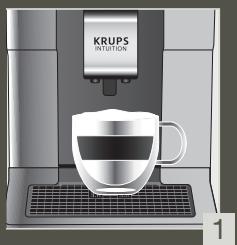
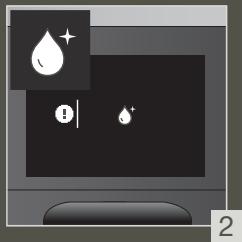
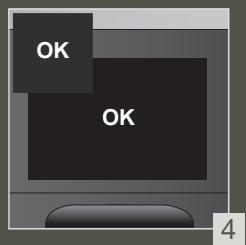
4 QUICK MILK RINSING AFTER A CAPPUCCINO
FR - RINCAGE RAPIDE DU LAIT APRÈS UN CAPPUCCINO
NL - SNELLE MELKSPOELING NA EEN CAPPUCCINO
NO - HURTIG MELKESKYLLING ETTER EN CAPPUCCINO
FI - NOPEA MAIDON HUHTELU CAPPUCCINON JALKEEN
IT - RISCIACQUO RAPIDO DEL CIRCUito DEL LATTE DOPO UN CAPPUCCINO
EL - ΓΡΗΓΟΡΗ ΕΚΠΑΥΣΗ ΓΑΑΚΤΟΣ META ΑΝΟ KANOΥΤΣΙΝΟ
SK - RYCHLE OPLACHOVANIE MLIEKA PO CAPPUCCINE
PL - SZYBKIE PLUKANIE SYSTEMU MLEKA PO CAPPUCCINO
UK - USBIVDKE 3MVBAHHJ MOJOKA TICJIY IPINIGOTYBAHHK KANYUHO
BG -БьрЗОИЗПЛAKBAHEHAМЛЯКOTOСЛЕД KAPIУЦИНО
DE - SCHNELLE MILCHSPÜLUNG NACH EINEM CAPPUCCINO
DA - HURTIG MAELKESKYLNING EFTER EN CAPPUCCINO
SV - SNABB MJÖLKSÖLJING EFTER EN CAPPUCINO
ES - ENJUAGUE RAPIDO DE LA LECHE DESPUÉS DE HACER UN CAPPUCCINO
PT - LAVAGEM RAPIDA DO LEITE APOS PREPARACÇÃO DE UM CAPPUCCINO
CS - RYCHLE OPLACHOVÁNÍ MLEKA PO CAPPUCCINU
HU - A TEJ GYORS KIMOSASA CAPPUCCINO KESZITÉSE UTÁN
RU - ьICTPЯР ПОМБИКА MONOЧОн CNTSTEMblIPOCSLE PПИТOTOBLEHIN KANYUHNO
RO - CLÂTIREA RAPIDÄ A LAPTELUI DUPÄ UN CAPPUCCINO
HR - BRZO ISPIRANJE MLIJEKA NAKON CAPPUCCINA
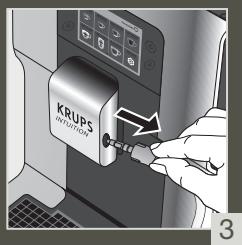
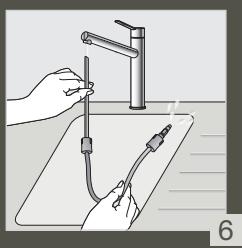
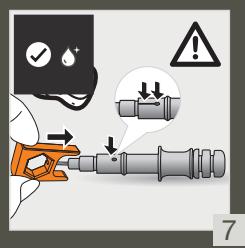
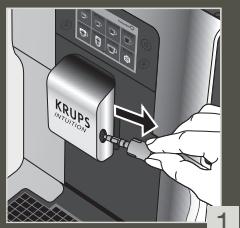
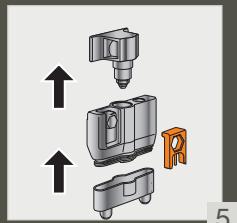
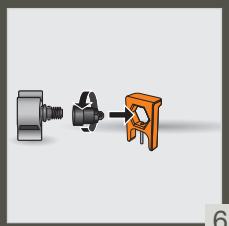
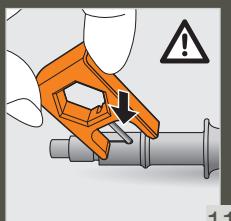
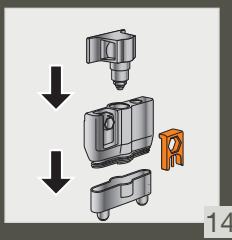
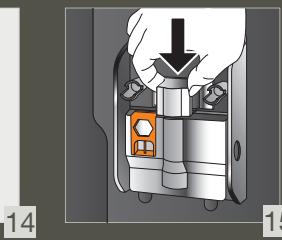
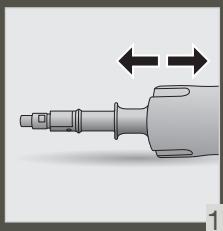
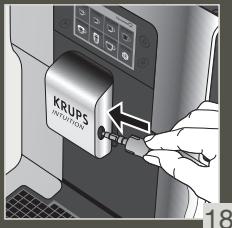
5 MANUAL DEEP CLEANING OF MILK SYSTEM - 5 MIN
FR - NETTOYAGE MANUEL APPROFONDI DU LAIT - 5 MIN
NL - HANDMATIGIE DIEPE REINIGING VAN HET MELKSYSTEEM - 5 MIN
NO - MANUELL ORDENTLIG RENGJORING AV MELKESYSTEMET - 5 MIN
FI -MANUAALINEN MAITOJARJESTELMANSYVAPUHDISTUS-5MIN
IT - PULIZIA PROFONDA MANUALE DEL CIRCUito DEL LATTE - 5 MIN
EL - XEIPOKINHTOZ BAOYZ KAOAPIZMOZ TOY ΣYΣTHMATO ΣΓΑΑΚΤΟZ - 5 ΛΕΠTA
SK - MANUALNE HLBKOVE CISTENIE MLIECNEHO SYSTEMU-5 MIN
PL -RECZNE SZCZEGOLOWE CZYSZCZENIE SYSTEMU MLEKA-5 MIN
UK - TINISOKE PUYHE OUYIUEHHN CNTTEMMOJIOKA-5XB
BG-PbUHOIbJIbOKOIOUHCTBAHE HACNCTEMATA3A MJIKO
DE - MANUELLE TIEFENREINIGUNG DES MILCHSYSTEMS - 5 MIN.
DA - MANUEL HOVEDRENSNING AF
MELKESYSTEMET - 5 MIN.
SV - MANUELL DJUPRENGÖRING AV MJÖLKSYSTEMET - 5 MINUTER
ES - LIMPIEZA PROFUNDA MANUAL DEL SISTEMA DE LECHE - 5 MINUTOS
PT - LIMPEZA MANUAL PROFUNDA DO SISTEMA DO LEITE - 5 MIN
CS - RUCNI HLOUBKOVÉ CISTÉN I MLEÇNEHO SYSTEMU - 5 MIN
HU - A TEJRENDSZER MANUALIS MÉLYTISZTITÁS – 5 PERC
RU - 3APYCKAEMAR BPYUHYIO TJIYBOKAR OUYCTKA MOJIOYHOM CINCTEMbl - 5 MHN.
RO - CLÂTIREA MANUALÄ IN PROFUNZIME A SISTEMULUI DE LAPTE - 5 MIN
HR - RUCNO DUBINSKO CICSCENJE SUSTAVA MLJKEA - 5 MIN.
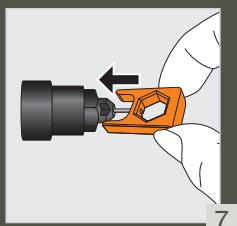
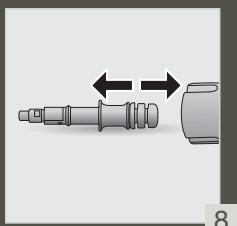


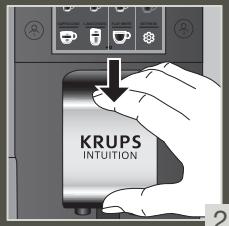

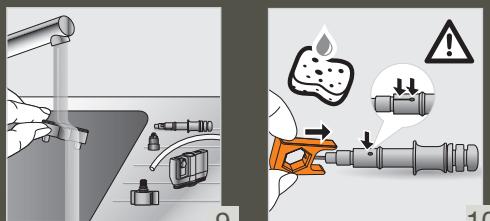



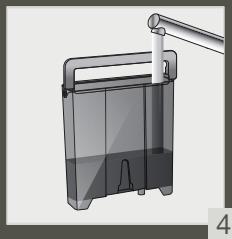
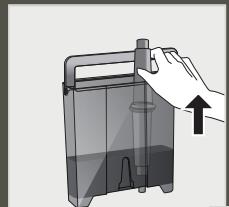
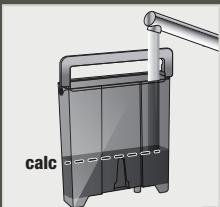
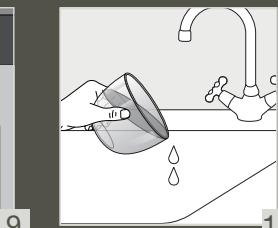
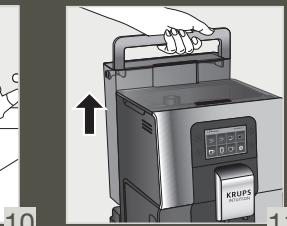
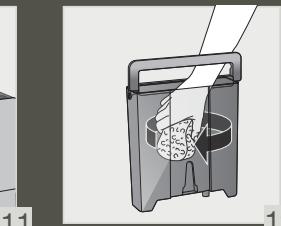
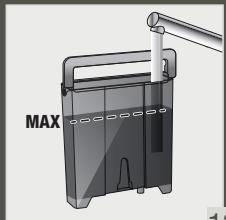
8 CLEAN THE WATER TANK REGULARLY

FR - NETTOYER LE RÉSERVOIR D'EAU RÉGULIERÉMENT
NL - MAAK HET WATERRESERVOIR REGELMATIG SCHOON
NO - RENGJØR VANNTANKEN REGELMESSAGE
FI - PUHDISTA VESISÄLIO SÄANNÖLLISESTI
IT - PULIRE REGOLARMENTE IL SERBATOIO DELL'ACQUA
EL - KAOAPIZETE TAKTIKA TO Δ OXE1O NEPOY
SK - NÁDRŽNA VODU PRAVIDELNE CISTITE
PL -PAMIETAJOREGULARNYM CZYSZCZENIU POJEMNIKA NA WODE
UK-PEYJIARPHO OCHIJAITE PE3EPBYAP IJIABOJN
BG-IOUHCTBAIPEEOBHOPE3EPBOAPA 3A BOIDA
DE - REINIGEN SIE DEN WASSERTANK REGELMÄSSIG
DA - RENGØRVANDBEHOLDEREN REGELMæSSIGT
SV - RENGÖR VATTENBEHÄLLAREN REGELBUNDET
ES - LIMPIA CON FRECUENCIA EL DEPOSITO DE AGUA
PT - LIMPE O RESERVATÓRIO DE ÁGUA REGULARMENTE
CS - PRAVIDELNÉ CISTÊTE NÁDRŽKU NA VODU
HU - RENDSZERESEN TISZITITSA MEG A VIZTARTÁLYT
RU-PEYJIARPHO OCHIJAITE PE3EPBYAP DJIABOДbl
RO - CURATATI REZERVORUL DE APA IN MOD REGULAT
HR - REDOVITO CISTITE SPREMNIK ZA VODU
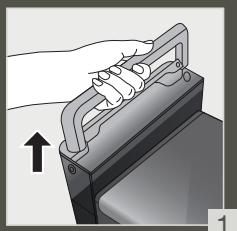
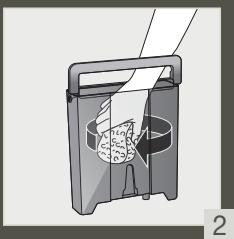
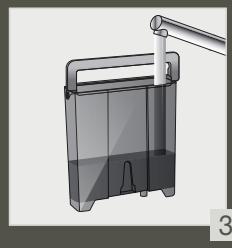

FR - NETTOYAGE AUTOMATIQUE COMPLET DE LA MACHINE 3 x / ANNEE - 13 MIN
NL - VOLLEDIGE AUTOMATISCHE REINIGING
VAN DE MACHINE 3 x - JAAR - 13 MIN
NO-FULLFOR MASKINENS AUTOMATISKRENS 3x/ARET-13MIN
FI - KEITTIMEN PERUSTEELLINEN AUTOMAATTINEN PUHDISTUS 3 KRT VUODESSA - 13 MIN
IT - PULIZIA AUTOMATICA COMPLETA DELLA MACCHINA (3x ANNO) - 13 MIN
EL - OAKAHPQMENOYAYTOMATOKAGAPIMOZTHZYEKEYH3 FOPEZTON XPONO-13 AENTTA
SK - REALIZÁCIA AUTOMATICKÉHO CISTENIA ZARIADENIA 3x/ROK-13 MIN
PL - PRZEPROWADZANIE AUTOMATYCZNEGOCZYSZCZENIA EKSPRESU 3x/ROK - 13 MIN
UK - IIOBHE ABTOMATUNHE OUYUENHKA BOMAUNHN 3 PA3N HA PIK - 13 XB
BG - ITbJIHO ABTOMATNUHNO IIOHCTBAHE HAKAΦEMAUHATA 3x/TOJNUH0-13 MNH
DE - KOMPLETTE AUTOMATISCHE REINIGUNG DER MASCHINE 3 x / JAHR - 13 MIN
DA - GENNEMFØR AUTOMATISK RENSNING AF MASKINEN 3 x OM ÅRET - 13 MIN
SV - AUTOMATISK RENGÖRING AV HELAMASKINEN 3 ggr / AR-13 MIN
ES - COMPLETAR LA LIMPIEZA AUTOMÁTICA DE LA MAQUNA 3 x / ANO - 13 MIN
PT - LIMPEZA AUTOMATICA COMPLETA DA MAQUINA 3 x / ANO - 13 MIN
CS - KOMPLETENÍ AUTOMATICKÉ ČISTěNÍ STROJE 3 X / ROK - 13 MIN
HU - A GÉP TELJES AUTOMATIKUS TISZTITÁSA
ÉVENTE HÁROMSZOR - 13 PERC
RU -ПОГРAMMA ABTOMATИЧЕСКОУСТКИ
UCTPOICTBA 3 PA3A B ГД - 13 MИN
RO-CURATAREA AUTOMATA COMPLETA A MASINII 3x/AN-13MIN
HR - SPROVEDITE AUTOMATSKO CIscENJE UREDAJA 3 x / GODISNJE - 13 MIN

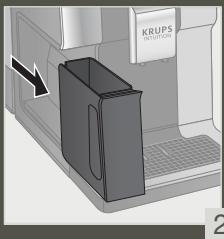
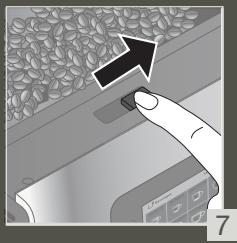
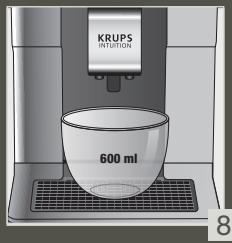
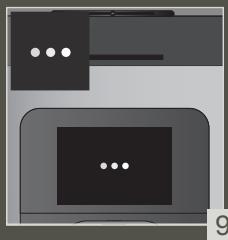
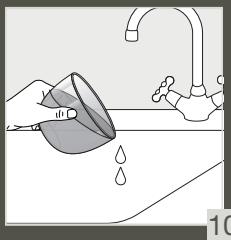
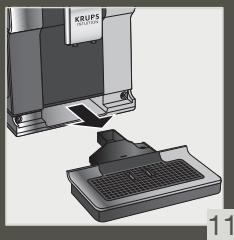
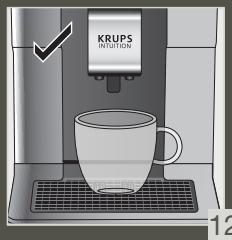
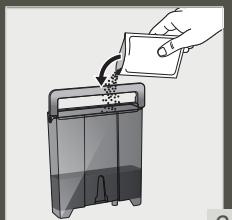
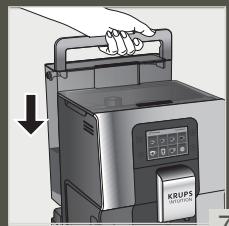
10 DESCALING PROGRAM - 20 MIN
FR - PROGRAMME DE DÉTARTRAGE - 20 MIN
NL - ONTKALKINGSPROGRAMMA - 20 MIN
NO - AVKALKNINGSPROGRAM - 20 MIN
FI - KALKINPOISTO-OHJELMA - 20 MIN
IT - PROGRAMMA DI DECALCIFICAZIONE - 20 MIN
EL - ΠΡΟΓΑΜΜΑ ΑΦΑΛΤΟΣΗΣ - 20 ΛΕΙΝΑ
SK - PROGRAM NA ODSTRÁNENIE VODNÉHO KAMENA-20 MIN
PL - PROGRAM ODKAMIENIANIA - 20 MIN
UK - PIOPTPAMABINDAJIENEHHA HAKINY - 20XB
BG - IPOIPTAMA 3A OTCTPAHBAHE HA KOTJIEH KAMbK - 20 MInH
DE -ENTKALKUNGSPROGRAMM - 20 MIN
DA - AFKALKNINGSPROGRAM - 20 MIN
SV - AUTOMATISKT AVKALKNINGSPROGRAM - 20 MIN
ES - PROGRAMA DE DESCALCIFICADO - 20 MIN
PT - PROGRAMA DE DESCALCIFICAÇÃO
CS - OVDAPNOVACI PROGRAM - 20 MIN
HU - VIZKÖMENTESİTO PROGRAM - 20 PERC
RU - ПОТРМАУДAJЕHИН HAKINПИ - 20 MИH
RO - PROGRAM DE DETARTRARE - 20 MIN
HR - PROGRAM ZA UKLANJANJE KAMENCA - 20 MIN
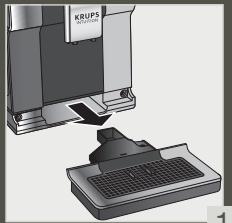
1
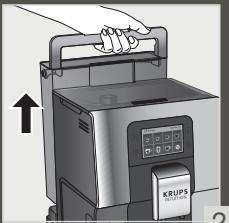
乙
3
3

5
6
7

4
15
16
Chere cliente, cher client,
INFORMATIONS IMPORTANTES SUR LE PRODUIT
ACCESSIONS FOURNIS AVEC VOTRE MACHINE
MISE SOUS TENSION DE LA MACHINE

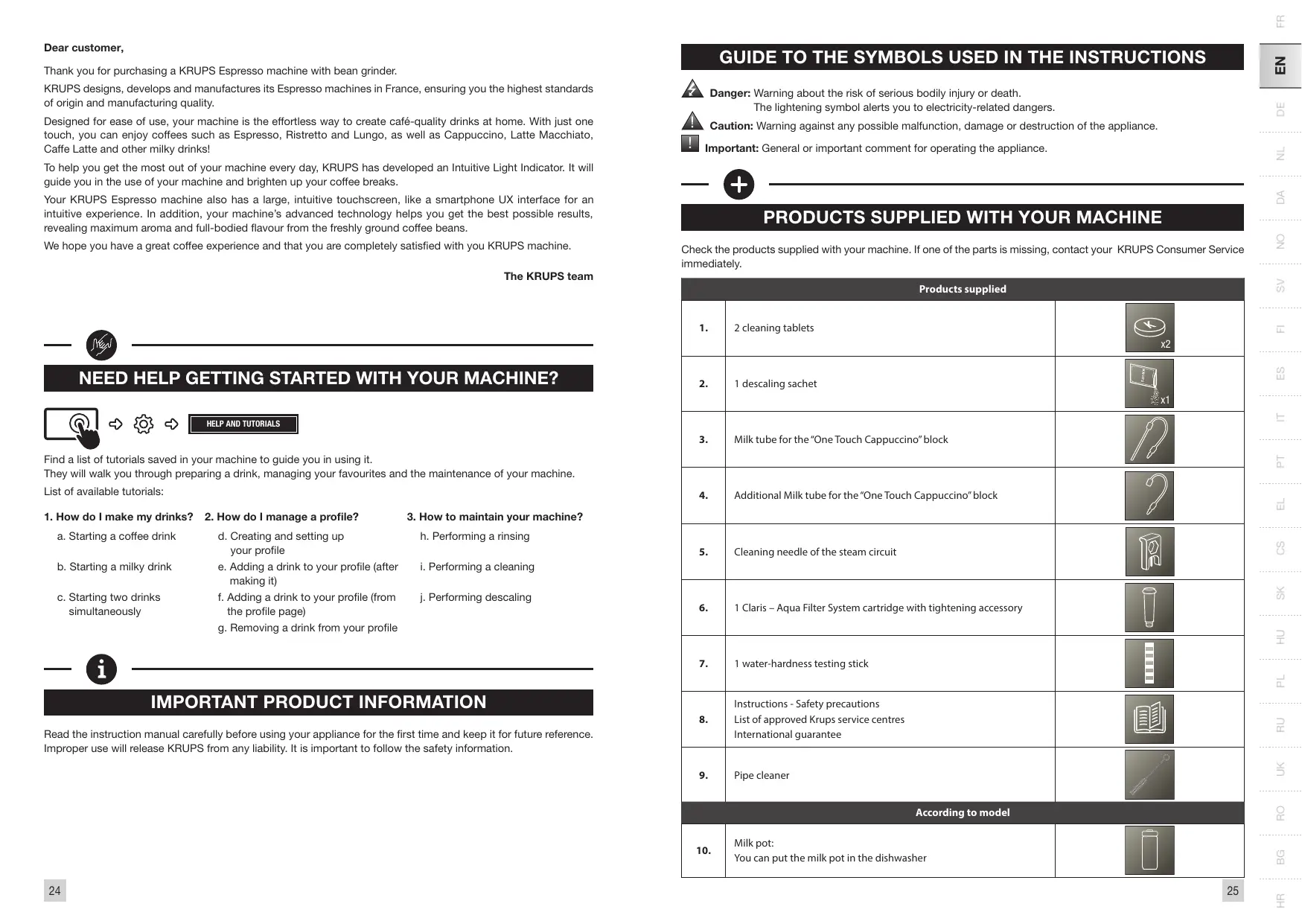
Thank you for purchasing a KRUPS Espresso machine with bean grinder.
KRUPS designs, develops and manufactures its Espresso machines in France, ensuring you the highest standards of origin and manufacturing quality.
Designed for ease of use, your machine is the effortless way to create café-quality drinks at home. With just one touch, you can enjoy coffees such as Espresso, Ristretto and Lungo, as well as Cappuccino, Latte Macchiato, Caffe Latte and other milky drinks!
To help you get the most out of your machine every day, KRUPS has developed an Intuitive Light Indicator. It will guide you in the use of your machine and brighten up your coffee breaks.
Your KRUPS Espresso machine also has a large, intuitive touchscreen, like a smartphone UX interface for an intuitive experience. In addition, your machine's advanced technology helps you get the best possible results, revealing maximum aroma and full-bodied flavour from the freshly ground coffee beans.
We hope you have a great coffee experience and that you are completely satisfied with you KRUPS machine.
The KRUPS team

NEED HELP GETTING STARTED WITH YOUR MACHINE?



HELP AND TUTORIALS
Find a list of tutorials saved in your machine to guide you in using it.
They will walk you through preparing a drink, managing your favourites and the maintenance of your machine.
List of available tutorials:
-
How do I make my drinks?
-
How do I manage a profile?
a. Starting a coffee drink
d. Creating and setting up your profile
b. Starting a milky drink
e. Adding a drink to your profile (after making it)
c. Starting two drinks simultaneously
f. Adding a drink to your profile (from the profile page)
g. Removing a drink from your profile
- How to maintain your machine?
h. Performing a rinsing
i. Performing a cleaning
j. Performing descaling

IMPORTANT PRODUCT INFORMATION
Read the instruction manual carefully before using your appliance for the first time and keep it for future reference. Improper use will release KRUPS from any liability. It is important to follow the safety information.
GUIDE TO THE SYMBOLS USED IN THE INSTRUCTIONS

Danger: Warning about the risk of serious bodily injury or death.
The lightening symbol alerts you to electricity-related dangers.

Caution: Warning against any possible malfunction, damage or destruction of the appliance.

Important: General or important comment for operating the appliance.

PRODUCTS SUPPLIED WITH YOUR MACHINE
Check the products supplied with your machine. If one of the parts is missing, contact your KRUPS Consumer Service immediately.
| Products supplied | ||
| 1. | 2 cleaning tablets | x2 |
| 2. | 1 descaling sachet | x1 |
| 3. | Milk tube for the "One Touch Cappuccino" block | |
| 4. | Additional Milk tube for the "One Touch Cappuccino" block | ? |
| 5. | Cleaning needle of the steam circuit | |
| 6. | 1 Claris - Aqua Filter System cartridge with tightening accessory | |
| 7. | 1 water-hardness testing stick | |
| 8. | Instructions - Safety precautions List of approved Krups service centres International guarantee | |
| 9. | Pipe cleaner | |
| According to model | ||
| 10. | Milk pot: You can put the milk pot in the dishwasher | |
TECHNICAL DATA
| Appliance | Automatic Espresso EA87 |
| Power supply | 220-240V~ / 50 Hz |
| Pump pressure | 15 bar |
| Coffee bean container | 250 g |
| Energy consumption | When operating: 1450 W |
| Water container | 3 L |
| Getting started and storage | Inside, in a dry place (away from ice) |
| Dimensions (mm) H x I x P | 365 x 240 x 400 |
| Weight EA87 (kg) | 8.2 |
Subject to technical modifications. Place the appliance on an horizontal, stable, heat-resistant, clean and dry work surface

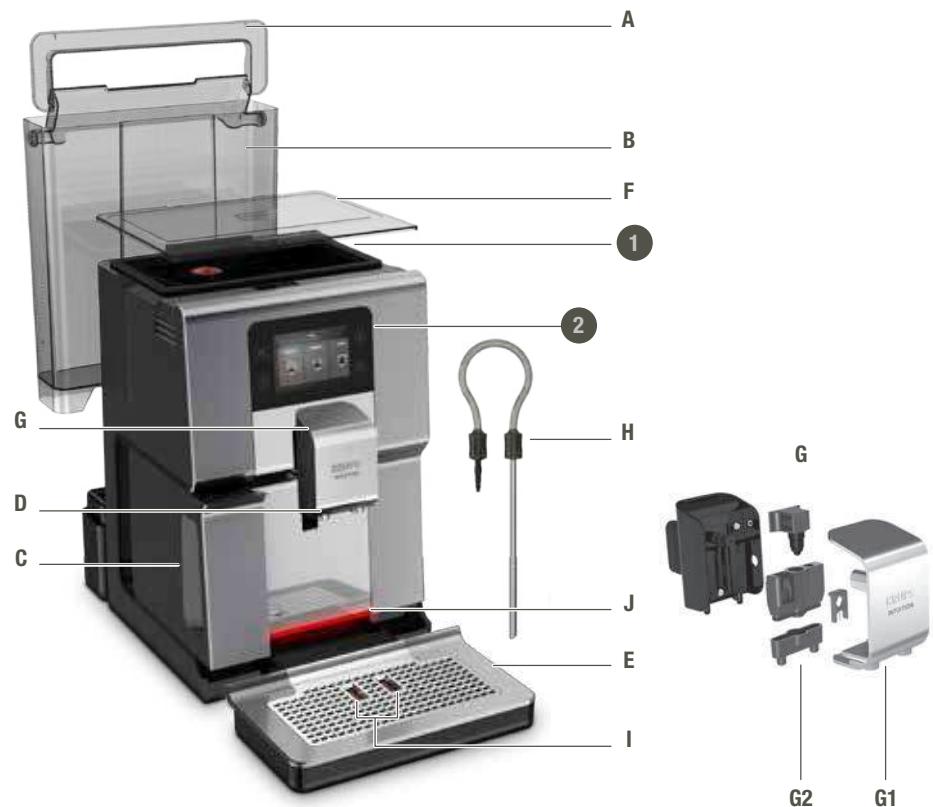
APPLIANCE DESCRIPTION
A. Handle for water container cover
B. Water container
C. Coffee grounds collector
D. Height-adjustable coffee nozzles
E. Grid and removable drip tray
F. Coffee bean container lid
G. "One Touch Cappuccino" block
G1. Accessory for cleaning the milk system,
2 in 1: disassembly tool
+ cleaning needle
G2 . Removable one touch cappuccino block
H. Milk tube and connector
I. Water-level floats
J. Intuitive Light Indicator
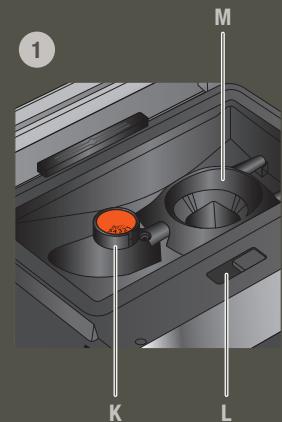
- Coffee bean container
K. Grinding fineness adjustment button
L. Cleaning tablet funnel
M. Metal conical grinding mill
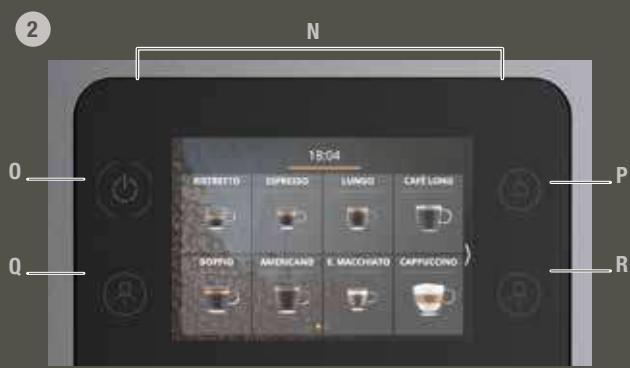
- Display panel
N. Navigation touchscreen
0. ON/OFF
P. Home screen shortcut
Q. Profile 1
R. Profile 2
S. Milk Pot

GETTING STARTED & APPLIANCE SETUP
TURNING THE MACHINE ON

Danger: Connect the appliance to a grounded 230V socket. Not following this instruction puts you at risk of fatal injuries due to the presence of electricity!
Respect the safety information in the "Safety precautions" booklet.
GETTING STARTED (SEE 1.1ST USE)
When using the machine for the first time, you will be asked to select various settings.
Follow the directions that appear on the screen.
Priming the machine allows the water circuits to be filled, so that the machine can operate. Preheating and automatic rinsing will take place.
PUTTING THE MACHINE ON STANDBY
Depending on the preparation, the machine performs automatic rinsing while on standby. The cycle only lasts a few seconds and stops automatically.

TIPS AND TRICKS
Water quality has a strong influence on the quality of the aromas. Limescale and chlorine can alter the taste of coffee. To preserve the aromas of your coffee, we recommend you to use the Claris - Aqua Filter System cartridge, or bottled water with dry residues below 800 mg / L (look on the bottle's label). See the "FILTER AND WATER HARDNESS" section.
When preparing drinks, we recommend using preheated cups (by running them under hot water) of an appropriate size for your desired quantity.
The roasted coffee beans can lose their aroma if they are not protected. We advise that you use an amount of beans equivalent to your consumption over the next 2-3 days and that you choose 250g bags.
The quality of the coffee beans is variable and tastes are subjective. Arabica will give you fine, floral aromas, while Robusta, which has a higher caffeine content, is more bitter and full-bodied. It is common to mix the two types of coffee to get a more balanced coffee. Contact your roaster for further advice.
We do not recommend using oily and caramelised beans as these can damage the machine.
The fineness of the ground beans influences the strength of the aromas and the quality of the crema. The more finely ground the beans, the smoother the crema. Grinding can also be adapted for the desired drink.

INTUITIVE LIGHT INDICATOR
WHAT DOES THE INTUITIVE LIGHT INDICATOR DO?
Your Intuition machine features smart, bright technology to make your day easier: Intuitive Light Indicator (J). This technology has a dual functionality:
- The machine automatically detects and controls the levels of coffee beans, water and coffee grounds. When you need to fill or empty your containers, or when maintenance is required, the red light alert comes on, signalling you to follow the information on the screen.
- You can also customise your experience using the Intuitive Light Indicator. You can choose a colour for each profile. When a profile has been selected, the Intuitive Light Indicator will change to the colour belonging to that profile, making everything simple to understand and ensuring super-fast and intuitive navigation. See the chapter entitled "MY PROFILE".
LET YOURSELF BE GUIDED.
| Colour | Status | Explanation |
| Red | Fixed | Alert |
| Other colours and white | Breathing | In progress |
| Fixed | Recipe complete |
FILTER AND WATER HARDNESS
WHAT IS THE PURPOSE OF THE WATER HARDNESS SETTING?
In order to avoid scale build-up in your machine and to optimise the quality of your coffee, we advise you to adjust the water hardness setting on your machine.
HOW TO SET THE WATER HARDNESS ON YOUR MACHINE?



ETTINGS
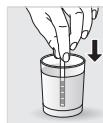
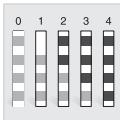
. Fill a glass of water.
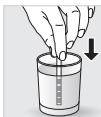
. Dip the water-hardness testing stick (8) supplied with the machine in your glass of water.
. Wait for 1 minute. The squares on the stick will change colour.
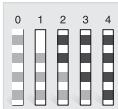
- Count the number of coloured squares. This indicates the hardness of the water, from 0 to 4.
. In the "Water Hardness" menu, press the corresponding number between 0 and 4.
Press OK.
IF YOU RUN OUT OF WATER-HARDNESS TESTING STICKS
If you need to repeat this operation, remember to adjust the water hardness setting according to the location of use or information provided by your local water company, using the table below:
| Degree of hardness | Classe 0 Very soft | Classe 1 Soft | Classe 2 Average hardness | Classe 3 Hard | Classe 4 Very hard |
| ° dH | < 3° | > 4° | > 7° | > 14° | > 21° |
| ° e | < 3.75° | > 5° | > 8.75° | > 17.5° | > 26.25° |
| ° f | < 5.4° | > 7.2° | > 12.6° | > 25.2° | > 37.8° |
| Appliance setting | 0 | 1 | 2 | 3 | 4 |
WHY INSTALL A FILTER CARTRIDGE?
The Claris Aqua Filter System cartridge optimises the taste of coffee, and reduces scaling and maintenance.
WHEN SHOULD I CHANGE THE CLARIS AQUA FILTER SYSTEM CARTRIDGE?
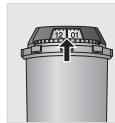
- Two months after set-up or when your machine notifies you.
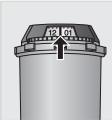
- When changing the cartridge, we recommend that you turn the grey ring on the top of the filter cartridge to indicate the date + two months.
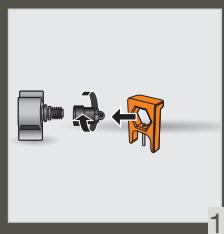
HOW DO I INSTALL THE CLARIS AQUA FILTER SYSTEM CARTRIDGE?



MAINTENANCE
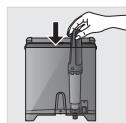
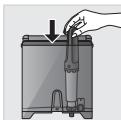
. Place the cartridge in the water container.
Position the cartridge, numbered ring facing up.
. Use the black tightening accessory, supplied with the cartridge, to position and screw the cartridge in place.
GRINDER: ADJUSTING THE FINENESS OF THE GROUND COFFEE
WHY SHOULD I ADJUST THE FINENESS OF THE GROUND COFFEE?
You can choose the strength of your coffee by adjusting how finely the coffee beans are ground.
Varying the fineness of the grinding enables you to adapt to the different types of bean:
. Darkly roasted and oily beans require coarse grinding,
. A more lightly roasted bean will be drier and will require finer grinding.
Note: the more finely the beans are ground, the more powerful the aroma.
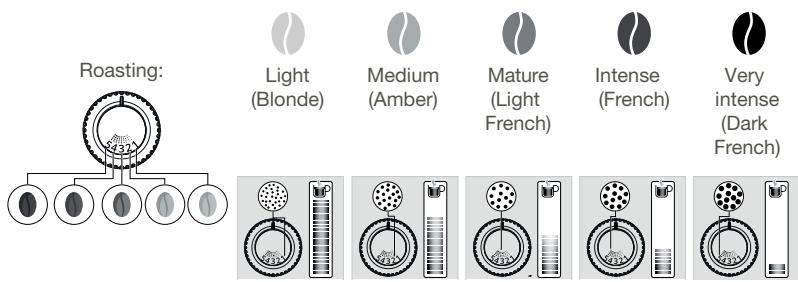
HOW DO I ADJUST THE FINENESS OF THE GROUND COFFEE?
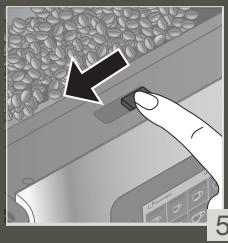
Turn the grinding fineness adjustment button (K) located in the bean container, depending on the type of bean and the desired strength of aroma. This adjustment must be performed when the mill is in operation, notch by notch. After three preparations, you will notice a distinct difference in taste.
HOW DO I KNOW WHEN THERE ARE NO MORE BEANS IN THE CONTAINER?
Your Intuition machine has a sensor to warn you when the level of coffee beans in the container is running low. A message will appear on the screen and the Intuitive Light Indicator (J) will display red light.
WHAT IF THE ALERT APPEARS WHILE I'M MAKING A DRINK?
Fill the coffee bean container, press OK and the recipe will resume. So no coffee is wasted!
WHAT DO I DO IF I WANT TO CHANGE MY COFFEE OR IF I HAVE RUN OUT OF COFFEE?
If you press OK without adding coffee beans, the machine will try to restart and alert you again. If you press OK again, the machine will make the recipe using all of the remaining coffee. The grinder will then be empty.

Caution: We do not recommend using oily and caramelised beans that are difficult for the grinder to process.
These can damage the machine and prevent the intuitive system from functioning correctly.
If an alert message appears on your screen and the red light comes on when there are enough beans:
Press the OK button to continue the recipe.
. Or, turn off the "no bean" alert to prevent detection while there is still coffee in the coffee bean container.



SETTINGS
PREPARED OTHER DRINKS
DRINKS THAT CAN BE PREPARED WITH THIS MACHINE:
| Drinks | Approximate size | Possible volumes | Coffee strength | X2 |
| Ristretto Short Espresso with body | 25 ml | 20 - 40 ml | ✓ | ✓ |
| Espresso The full-bodied Espresso with pronounced aromas is covered with a slightly bitter caramel coloured crema | 40 ml | 40 - 70 ml | ✓ | ✓ |
| Lungo Long Espresso with caramel crema | 70 ml | 70 - 100 ml | ✓ | ✓ |
| Doppio Double Espresso with amber crema | 100 ml | 40 - 140 ml | ✓ | |
| Long Coffee Higher in caffeine but lighter on the palate. Very popular in the morning | 120 ml | 80 - 180 ml | ✓ | ✓ |
| Americano Double long Espresso combined with hot water | 120 ml | 90 - 150 ml | ✓ | |
| Espresso Macchiato Espresso with a thin layer of frothed milk | M = 60 ml L = 80 ml XL = 100 ml | 60 - 100 ml | ✓ | ✓ |
| Cappuccino A balance between milk, foam and coffee | M = 120 ml L = 180 ml XL = 240 ml | 120 - 240 ml | ✓ | ✓ |
| Frothed Milk A large dose of milk with its milk froth | M = 120 ml L = 160 ml XL = 200 ml | 120 - 200 ml | ✓ | |
| Flat White Coffee made with steamed milk and foam | M = 160 ml L = 200 ml XL = 240 ml | 160 - 240 ml | ✓ | |
| Caffe Latte Foam with a subtle coffee flavour | M = 200 ml L = 280 ml XL = 350 ml | 200 - 350 ml | ✓ | ✓ |
| Latte Macchiato A gourmet Espresso with milk foam | M = 190 ml L = 250 ml XL = 340 ml | 190 - 240 ml | ✓ | ✓ |
| Infusion Water heated to the perfect temperature for an infusion | 200ml | 20 - 300 ml | ||
| Black Tea Water heated to the perfect temperature for black tea | 200ml | 20 - 300 ml | ||
| Green Tea Water heated to the perfect temperature for green tea | 200ml | 20 - 300 ml |
FOR INFORMATION, TO PREPARE YOUR DRINK, YOUR MACHINE AUTOMATICALLY PERFORMS THE FOLLOWING STEPS:
| For coffee recipes | For milky recipes other than Caffe Latte, Flat White and Espresso Macchiato | For the Caffe Latte, Flat White and Espresso Macchiato recipes |
| 1. Grinding coffee beans2. Tamping the ground coffee3. Pre-infusion (a few drops may fall into your cup at this point)4. Percolation | 1. Pre-heating phase2. Frothing milk3. Grinding coffee beans4. Tamping the ground coffee5. Pre-infusion (a few drops may fall into your cup at this point)6. Percolation | 1. Grinding coffee beans2. Tamping the ground coffee3. Pre-infusion (a few drops may fall into your cup at this point)4. Percolation5. Pre-heating phase6. Frothing milk |
HOW DO I ADJUST THE HEIGHT OF THE COFFEE NOZZLES?
For all drinks, you can adjust the coffee nozzles according to the size of your cup(s).
HOW DO I PREPARE MY DRINK?
Refer to the "How to make drinks?" tutorial saved in your machine


HELP AND TUTORIALS
DIFFERENT SETTINGS ARE AVAILABLE, DEPENDING ON THE DRINK:
One or two cups: to start the double recipe, select the drink and press
. Coffee strength: to increase or decrease the strength of the coffee by changing the amount of ground coffee, select your drink and choose between 1 and 3 beans, with 1 being the softest and 3 being the most full-bodied 00
. Cup volume: to increase or decrease the cup volume, scroll up or down the list of volumes and select the one you want.
For more information, see the drinks table in the instructions.

To select the coffee strength and cup volume, you can navigate up/down or press directly on your choice.
HOW DO I STOP A DRINK MID-PREPARATION?
Warning: You can stop the preparation of a drink at any time by pressing the button. When a cycle is interrupted, it does not stop immediately. The machine will be unavailable for a time, as indicated by a message on the screen.
MILK-BASED DRINKS

TIPS
For frothed milk, use pasteurised UHT milk straight from the fridge (3 - 5°C) . It is possible to use special milks (micro filtered, raw, fermented, enriched) or plant-based milks (rice, oat or almond milk), but this can give less satisfactory results in terms of quality and quantity of the froth.
HOW DO I START THE PREPARATION OF A MILK-BASED DRINK?
Refer to "2 PREPARING A MILK-BASED RECIPPE" earlier in the instructions, or see the "Starting a milky drink" tutorial stored in your machine.



HELP AND TUTORIALS
TEAS AND INFUSIONS
For your teas and infusions, there are three selection buttons so that you can choose the temperature best suited to each type of tea. The temperature used for green tea will be lower than that used for black tea or infusions.
HOW DO I SET THE WATER TEMPERATURE?




Go to Settings > Water temperature. You can choose between T1, T2 and T3, where T1 is the coolest and T3 is the hottest.
When you decrease/increase the temperature, this will decrease/increase the temperature for each type of tea but the temperature used for green tea will always be lower than that used for black tea or infusions.
MY PROFILE
WHAT DO I USE THE PROFILE FUNCTION FOR?
The Profile function grants you access to a customised space where you can store and save your favourite drinks. You can easily access it by pressing a button on the machine's control panel.
Faster and perfect for everyday use, the drinks you have saved in your profile will start to pour with just one touch; no adjustments necessary. You can save as many as seven recipes for each profile.
The profile function also allows for a much more personalised interface and settings:
| First name | You can add your first name for greater personalisation. |
| Colour | You can choose a colour for the Intuitive Light Indicator, to help your profile stand out. |
| Display | Here, you can set how your drinks are displayed on the Profile screen. They can be displayed in either “slider” or “tile” mode. |
| Programming | With the “Profile” function, you can also set a time of day for each drink. This will make it even easier to find your drink at any given moment. |
| Brightness | This allows you to enable or disable the Intuitive Light Indicator. |
HOW DO I CREATE A PROFILE?

Press the Profile 1 or Profile 2 icon and follow the on-screen instructions or watch the tutorials saved in your profile.



HOW DO I MANAGE THE FAVOURITE DRINKS SAVED TO MY PROFILE?
There are two ways to add a drink to a profile:

will appear on screen.
-
After you make a drink, a button
-
Directly in the profile.
If i stop my favorite drink in progress, this length will be saved
HOW DO I ORGANISE/ORDER/REMOVE MY FAVOURITE DRINKS?
Press and hold a drink icon for a few seconds. A cross will appear in the top right-hand corner of each drink icon. Press and drag to rearrange drinks, press the cross to remove a drink.

GENERAL MAINTENANCE
Carrying out proper maintenance will optimise the life of your machine and preserve the authentic taste of your coffee.
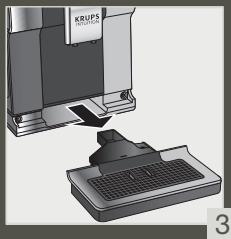
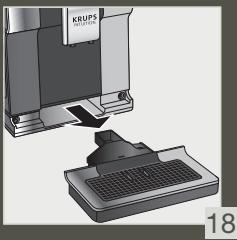
The drip tray collects the used water and the coffee grounds collector collects the used ground coffee.
Important: For hygienic reasons, as this container is in contact with milk and coffee, we recommend that you fully dismantle and clean daily each element under hot water. It is recommended that you let it air dry before you put it back in the appliance. It is important to always leave it in place and to empty it regularly. You can put the drip tray in the dishwasher. You can put the drip tray in the dishwasher but without its cover.
WHEN SHOULD I EMPTY THE DRIP TRAY?
When the floats are in the raised position, indicating that it is too full.
When the machine notifies you or more regularly but when the machine is turned on so that it can register that the bin has been emptied.

Important: Not emptying the coffee grounds collector and drip tray regularly as shown above may damage your machine. Do not put it in the dishwasher. For hygienic reasons, we recommend that you clean the coffee ground container daily under hot water with soap and sponge. It is recommended that you let it air dry before you put it back in the appliance.
MAINTENANCE OF WATER TANK AND COFFEE BEAN CONTAINER
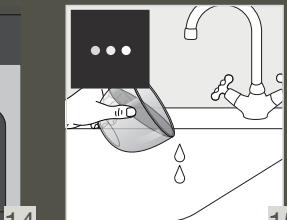
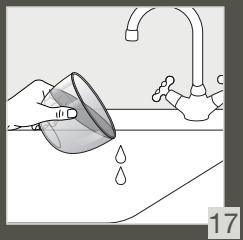
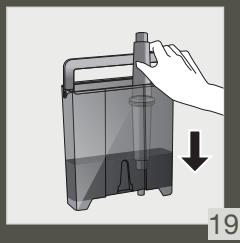
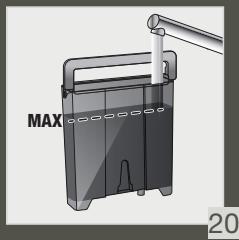
For the preservation of best coffee flavor impacted by the quality of the water and hygienic reasons, we advise you to use only fresh water and to daily clean the water tank with hot water and a bottle brush.
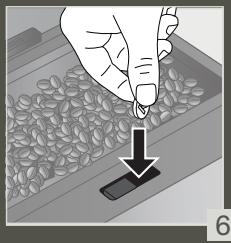
Coffee beans can leave greasy residue on the tank that can affect the quality of the coffee. For the preservation of best coffee flavor and hygienic reasons we recommend you to wipe it with a dry, soft cloth each time it needs to be refilled.

Important: Do not clean with water, the presence of water in the bean hopper could damage the machine

It is recommended that you let it air dry before you put it back in the appliance
WHY AND HOW DO I MAINTAIN THE MILK SYSTEM AFTER MAKING MILKY DRINKS?

Important: In order to obtain a consistent foam quality, we recommend that you:



D TUTORIALS
| Maintenance | When? | Explanation | Accessories required |
| Milk rinsing 30 s / 20 ml | After each milky drink, when the machine notifies you | Allows you to rinse the machine's milk system. You can start a milk system rinsing at any time. | |
| Milk tube, nozzle rinsing and milk pot cleaning | After each milky drink | We recommend you to clean with hot water and soap the milk pot after each use. we recommend you to replace the milk tube approximately every three months. You will find these accessories available on the KRUPS.com website. | Hot water + soap + pipe cleaner |
| Milk accessory cleaning 5 min | When the machine notifies you or at any time | This involves removing and cleaning the removable "One Touch Cappuccino" block. For optimum milk frothing, clean this regularly. See above in the instructions: 5. MANUAL DEEP CLEANING OF THE MILK DISTRIBUTION SYSTEM – 5 MIN. | Cleaning needle (n°5) |
OTHER MAINTENANCE
| Maintenance | When? | Explanation | Accessories required |
| Coffee rinsing 45 s / 30 ml | At any time | For hygienic reasons, it is recommended to rinse the coffee system daily or when not used for a longer period (more than 2 days). | |
| Tea rinsing 30 s - 20 ml | Before the drink starts flowing | Allows you to rinse with hot water to ensure an authentic taste of your tea or infusion. | |
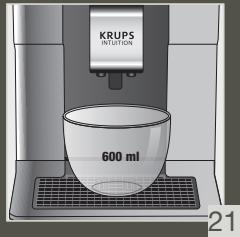
| Coffee system cleaning 13 min / 600 ml | When the machine notifies you or at any time | For the preservation of best coffee flavor and hygienic reasons we recommend you to clean the coffee system 3 times a year. | 1 KRUPS cleaning tablet (n°1) |
| Descaling 20 min / 600 ml | When the machine notifies you or at any time | The appliance notifies you when it is necessary to run a descaling program. This step is very important to ensure the proper functioning and longevity of your appliance. | 1 sachet of KRUPS descaler (n°2) |

Important: You do not have to run the cleaning program as soon as the appliance notifies you, but you should do it reasonably soon after. If the cleaning is postponed, the alert message will remain displayed until the operation has been performed.

Important: If you unplug your machine during cleaning or in the event of electrical failure, the cleaning program will restart. It is not possible to postpone this operation: it is mandatory in order to rinse the water system. In this case, a new cleaning tablet may be necessary.
For further explanations, please see the tutorials available in your machine's settings.



HELP AND TUTORIALS

Want to know when you should perform the maintenance operations above?
An alert message will appear on the screen as soon as there is an action you need to take.

OTHER FUNCTIONS
Your KRUPS Intuition machine has a range of settings - check them out! They let you create a more personalised experience.
HOW DO I ACCESS MY MACHINE'S SETTINGS?



SETTINGS
LIST OF SETTINGS:
| Language | Select from 21 languages. |
| Date and time | You must set the date, particularly if using an anti-limescale cartridge. Time setting and 12 or 24 hour clock display. |
| Screen brightness | Adjusts the screen backlight. |
| Light | Turns the Intuitive Light Indicator on and off. |
| Display | Choose whether drink options are displayed as slides or tiles. |
| Auto-stop | Sets the period of time after which your appliance will stop automatically. This function lets you reduce your energy consumption. |
| Auto-start | Turns on the machine and automatically starts preheating the appliance at a chosen time. Do you have your coffee at the same time every day? This function is for you! By setting the auto-start, you can save time and no longer have to manually start your drink. |
| Volume unit | Selects the unit of measurement: ml or oz. |
| Auto-rinsing | You can choose whether or not to activate automatic rinsing of the coffee nozzle when starting the machine. |
| Water hardness | Set the hardness of the water between 0 and 4. For more information, see the “Water hardness measurement” chapter. |
| Coffee temperature | Is your coffee too hot? You can use this function to reduce the temperature. The machine has three temperature settings for your coffee drinks. |
| Tea temperature | Is your tea too hot? With this function, you can choose a lower temperature. This machine has three temperature adjustment levels for your tea drinks. |
| Type of coffee | Turns off the ‘No beans’ function. This function indicates a lack of coffee beans in the container and resumes a recipe which is in progress. See the GRINDER paragraph. |
| Factory reset | Resetting clears your preferences and settings and restores the default settings. Your favourites will also be deleted. |

TROUBLESHOOTING
OPERATION
- The machine has a fault, the software is frozen OR the machine has a malfunction.
Turn off and unplug the machine, remove the filter cartridge, wait one minute and then restart the machine. Press and hold the ON/OFF button for at least three seconds to start the machine. - The appliance does not turn on after pressing the ON/OFF button (for at least three seconds).
Check the fuses and the electrical power socket. Check that the plug is correctly inserted into the socket. - A power failure has occurred during a cycle.
The device will reset automatically when it turns back on. - The grinder is running empty.
This is normal if it is occasional and there are no or few coffee beans left. It can run empty for up to ten seconds to determine its consumption and ensure that it is working properly.
There are still coffee beans in the container:
. The coffee may be too oily and is not drawn into the machine properly. You can try encouraging the beans to fall and see if it works again. However, we recommend changing the coffee (see the bean type function).
. It is my usual coffee that has worked well up until now: please contact your contact KRUPS Consumer Service.
USE
- The grinder makes an abnormal noise.
There are most probably foreign bodies in the grinder. Try to clear it with a vacuum cleaner, otherwise contact your KRUPS Consumer Service.
- There is water under the appliance.
Before removing the drip tray, wait for 15 seconds after the coffee has flowed so that the machine finishes its cycle correctly.
Check that the drip tray is positioned properly on the machine. It must always be in place even when the machine is not in use.
Check that the drip tray is not full.
- The adjustment button for the grinding fineness is difficult to turn.
Only turn the grinding fineness adjustment button when the grinder is running.
- The appliance has not produced any coffee.
An incident has been detected during preparation.
The appliance resets automatically and is ready for a new cycle.
- You have used ground coffee instead of coffee beans.
Use your vacuum cleaner to clear the ground coffee from the bean container.
6. Water flows from the coffee nozzles when the machine is stopped.
This is normal. This is an automatic rinse to clean the coffee nozzles and prevent them from getting clogged.
STEAM AND MILK
-
The milk flow from your machine appears to be partially or completely blocked.
An alert message will appear on the screen if the nozzle is blocked. Clean the «One Touch Cappuccino» block. Refer to point 5 earlier in the instructions. MANUAL DEEP CLEANING OF THE MILK DISTRIBUTION SYSTEM - 5 MIN, or see the tutorial stored in your machine “Cleaning the milk nozzle”. -
No steam comes out.
a. During the first use of a steam cycle, if no steam comes out correctly:
Check that the hole in the tip is not clogged. See section above: "The steam nozzle of your machine appears to be partially or completely clogged".
Ô Carry out the following protocol once and only once:
Empty the water tank and temporarily remove the Claris Aqua Filter System cartridge. Fill the tank with mineral water high in calcium ( >100mg/L ) and make successive steam cycles (5 to 10 cycles) in a container until a continuous jet of steam is obtained. Put the cartridge back in the tank.
b. The steam nozzle had already worked:
Check that the hole in the tip is not clogged. See section above: "The steam nozzle of your machine appears to be partially or completely clogged".
If after performing the above steps, the steam Nozzle still doesn't work, please contact KRUPS Consumer Service.
- Steam escapes from the grid of the drip tray.
Depending on the type of preparation, steam may escape from the grid of the drip tray. - Steam appears under the bean container lid.
Check that the cleaning tablet funnel under the cover (L) is closed.
MAINTENANCE
- The machine does not request descending.
The descending cycle is requested following preparation of a large number of milky or hot water-based drinks. If you only make coffee, descending will not be required frequently.
-
Some grounds are in the drip tray.
A small amount of ground coffee can get into the drip tray. The machine is designed to clear any excess ground coffee so that the percolation area remains clean. -
The Intuitive Light Indicator remains lit after you have emptied the coffee grounds collector.
Refitting the coffee grounds collector.
- After filling the water container, the Intuitive Light Indicator stays on.
Check the container is positioned correctly in the appliance.
The floats at the bottom of the tank must move freely. Check and dislodge the floats if necessary.
DRINKS
- The coffee flows too slowly.
Turn the grinding fineness button to the right for a coarser grind (depending on the type of coffee used).
Perform one or several rinse cycles.
Change the Claris Aqua Filter System cartridge.
- The coffee is too light or not full-bodied enough.
Check that the bean container contains coffee and that it is moving down correctly.
Avoid using oily, caramelised or flavoured coffees that may not be drawn into the machine correctly.
Decrease the preparation volume and increase the strength using the coffee strength function. Turn the grinding fineness button to the left for a finer grind. Make your drink in two cycles using the two-cup function.
- The Espresso or coffee is not hot enough.
Increase the coffee temperature in the machine settings. Heat the cup by rinsing it in hot water before preparing the drink.
Perform a coffee system rinse before starting your coffee. A coffee rinse on start function can be activated in settings/auto-rinse.
- Clean water flows through the coffee nozzles before each coffee.
At the start of the recipe, there is a pre-infusion of coffee which can cause a small amount of water to flow from the coffee nozzles.
If one of the problems outlined in the table persists, contact KRUPS Consumer Service.

Important: Manufacturer:
SAS GSM
BESCHRIJVING VAN HET APPARAAT
HOE BEREID IK MIJN DRANKJE VOOR?
KOM GODT I GANG OG OPSTILLING AF APPARATET
SÄDAN TÄNDER DU FOR MASKINEN

HVORNAR SKAL DRYPBAKKEN TOMMES?
HVIS DU GÄR TOM FOR TESTPINNER FOR VANNHARDHET
GENERELT VEDLIKEHOLD
Hvis du utforer riktig vedlikehold, farnaskinen optimal levetid og bevarer den autentiske kaffesmaken.
VEDLIKEHOLDE OPPSAMLEREN FOR KAFFEGRUT OG DRYPPEBRETET
VEDLIKEHOLD AV MELKESYSTEM
HVORFOROG HVORDANVEDLIKEHOLDER JEG MELKESYSTEMETTERA HA LAGET MELKEBASERTE DRIKKER?
Viktig: Vi anbefaler at du qjør følgende for Å oppna en konsekvent skumkvalitet:



HJELPGOPLAERING
UDRZBA NADRZKY NA VODU A NADOBY NA ZRNKOVOU KAVU
WAZNE INFORMACJE O PRODUKCIE
SKAD MAM WIEDZIEC, ZEW POJEMNIKU NIE MA JUZ ZIAREN?
INNE CZYNNOSCIXKONSERWACYJNE
TEXHUNCHECKNE XAPAKTEPNUCTNIK
HauJIO PA6OTbI HACTPOIKA INPUBOPA
BKJIIOUYEHNE IPIPUBOPA

OcToPoxH! PoiKJIouHTe pIi6Op K 3a3eMJIeHHo Po3eTke 230 B. HecO6JIIOJeHne EToTO Tpe6OBaHnA MoJET npuBecTI K npopaxHeHIO 3JIeKTPuYeCKm TOKOM!
Ozhakombtecb c nHOpmaunei, npBedeHHoB 6yKneTe «PpabnTaTexnKn 6e3onacHOCTM».
HAAYALO PA50Tbl (cm. pa3dien 1.1-e ucnnoB3oBaHne)
Pn npBOM nCnoJIb3OBAHn np6opa Bam 6ydt npedeNoKeHO BbIpaTb pa3nUHbIe NaCTPOKn.
CneyuTe HNcTpyKuYMaH Ha 3kpaHe.
Дяправиьно рабову усточва HeобхODIMо 3aONHNTb BCE KOHTypb BODо. Hauнетс abTomatueckn nporpeB nnpomblka усточва.
IPEB0D IPIPUBOPA B PEXIM OXINDAHNA
B 3aBcIMOCTN OHTaCPOIKN KoΦeMaUHb BblONHReA BtOMaTnueckyIO npOMbIBKy B pexime OXuHaHna. LInKl dInTcra BCEr HeCKoJIbKO CEkyHd N OCTaHaBJIBaetcA BtOMaTnueckn.
KauecTBo BObl Oka3bIbAet CnIbHoe BInaHHe Ha apomat HauNTka. Hakinb I xNop Moryt n3MeHntB Bkyc Koef. Jln coxpaHEnia apomata Kofope peKoMeHdyetc nCNoIb3ObaTb Claris - Kaptnix CnCTembl fNbIbTaPun BObl - nn 6byuHnpOBaHHyIO BOy c cyxMm OCTaKamn Hnke 800 Mr/n (CM. 3TNKeTKy 6ByIkn). CM. pa3dien «ΦUbTP IN JXECTKOCTB BObl>.
PnnpiroTOBHeHn HApNTKOB peKOMeHnyETcN cNoIb3OBAbT npeBaRHTelbHO hArpeTbe (noD rOpaye BDO) aAaKN noDxOJaero pa3Mepa.
Ecnn 6xapenHbIe KofeiHbIe 3epHa He 3aunuHbI, OHN MOryT UtpaNTb CBOJ apOMaT. PekomeHdyem NcNoJIb3OBA Tb KOJueCTBO KofeiHbIX 3epH, paBHOe KOnuYeCTBy, KOtOpoe Bbl MoKeTe yIpOTpe6ntb B TeueHne cNeNyUoXn 2-3 dHei, n BblnpaTb NaKetb IIO 250 r.
KaueCTBO KoFeHbIX 3epeH MoKeT 6bIb, a BcKc - HnDnBnDyalbHbM. Apa6Nka Daet TOHKne CBeToCHbe apomatbl, a pObycta c 60lee BbcOKIM codepxahmE KOFeHna IMeET 60lee rOpkIn n HacbIeHHb BKyc. IJn polyeHnC6aHaCnPOBaHORO KoFe o6bUHO CMeuHBAIO T Dba 3tNx BnDa. Jn polyeHn DOnonHntbHo INΦopMaunOBpatntecb K BaAeMy O6Xapuzky.
He peKoMeHEnyTeTc NcIOnJIb3OBoAtb 3epHa, CoIepKaUne MHOrO MaCna I KApAmeJIN3uPObaHHbIe, TAK KaK OHN MOrYT nobpeDITb KoΦemaunHy.
CTepeHb pOMoJa 3eep H bInaTe Ha KpEnocTb apomata Na KauecTBO peKn. Yem TohSe nOmoJ 3eep, TEm 60Je eHeKHO 6ydt PeHa. POMoJI MoXHo TaKxe OTpErpyIinPoBaT B COOTBETCBn C HAnITKOM.

YMHbI CBETOBOH INDOKATOP
ДячERO HYЖЕн YMHь CBETOBОИнДИКATOP?
KoΦemauHa Intuition ochaeta HnHOBaunOHn ToxHONrne, KOTOPa ynpOaet pa60Tu: Ymbl CBtOBoi nHnKaTOp (J). 3Ta texHONrna IMeET Dbe φ yHKuIN:
- Kofemaunha abTomatnueckn onpeenelnet nperynpetyu yobbeh KofoeHbIX 3epen, B0bl n KofoeHno ryun. Ecn Heo6xOIMo 3aONHnTb nn OnopoxHnTb KOhtneHepb, a TAKke ecnn Tpe6yetc TeXnueckoe 6cbnykBaHne, 3aRopaetc KpaChbIn HnIkaTop, CnHaJIImNpUoyuOnm O heo6xOIMocTn CneoBabY kzaAHm Ha 3kpaHe.
- Bb taKHe MoXeTe Bb6paTb NepcoHaJIbIhBe HAcTPOKn C NOMOJIbU YMHOro CBToBOr UHdNkAtopA. MoXHo Bb6paTb cBET dJa KaJdOro npOphiJIa. IocNe Bb6opa npOphiJIra y MhBIy CBTOBOH INDnKaTOp I3MeHInTCa Ha cBT, OTHOcIuNC K 3ToMy npOphiJIIO. TaK Bbl CMOXeTe 6bIcTpeE uYIO6Hee npriTOOBtB CBOI YIO6MlbH HAnITOK. Cm. rIaby [MOI]PNOOINb ^
CLEDEYTEYKA3AHNIMHUNKATOPA.
YTo6bI n36eKaTb cKoJIeHnHaKnIN B KoΦeMaUHHe N NOBicNTb KaueCTBO KoΦe, peKoMeHnyETcH NaCTpOHTb yPoBeH JxctKOCTN BObl.
KAK YCTAHOBINTb JECTKOCTb BOdBi B KOΦEMAUHHe?



∴ m = 3/11 ;
HACTPOI KI
HANOJIHNTeCTaKaHBOJIOI.
-Погуztte пплагаemук пибору тectobую поlockу ќесTKOCTN BODI (8)Встан C BOДОИ.
IIOJOKJNTe 1 MNHTy. KBaJaPaTbHa noJIOCKe I3MeHrT cBET.
I.ПОДСИТайе КОЛУСЕТВО CBETHBIX KBaДРАТВ.Оно указыBaET Ha ZeCTKOCtв BODь BДипаЗоне ot 0do4.
B MeHIO «KecTKOCTb BOdbI» HauKMITE COOTBeTCTByIOUe ee YnCNO OTO 4
HaXMMTe OK.
ECN N BAC 3AKOHyINcB TECTOBbIe NOJOCKN JXECTKOCTN BOdBi
Ecn Heo6xOIMO NOBtOpntb 3Ty OpeaumIO, OtperyIpyuTe HAcTpoKy JcckTOCTN BOdy IIO MeC TY KcKnIyataum ININ B COOTBETCBM C NHOOPMaueNe, PpeOCTabHEnHO MeCTHOH BOJONPOBOHOKOMPaHne, IcPOnb3y TaBnUy HnKe:
ПИГOTOBLENHUEДPyTNX HANITKOB
HANITKIN, KOTOPBIE MOXHO IPIIROTOBNTC IOMOUI 3TOTO IPIPUBOPA:
HaKMMTe Ha 3HaQoPnOoPnIb 1 nI I PooPnIb 2 n CneIyIe INCTpyKzIaM Ha 3KpaHe IIN O3HaKOMbTecb CpyKOBOCTBOM NOJIb3OBaTeIa.



CIPABKA N PYKOBOCTBO TIOJIb3OBATEJIA
KAK HACTPANBATb JIOBIMbIE HANITKN, COXPAHEHHbIE B MOEM IPOΦNJIe?
KOrIa CJIeIyET ONyCTOwATb KOHTeHep IJIa KOFeiHOHrIyU?
KoJ4aONBJIETcRAyBdOMnHHe INI DaXe YauE, HO BaxHo, YoTObI KoFEMAuHa 6bIa BNIOUeH aMOrJa 3aOHKCuPOBaTb OTOUYSEHNE KOHTeHepa.

BaxHo! HepyIaHn aOcHTKa KOHTHepe IaKoKeHoi ryuN IIOdoHa IaKanB, KaK yka3aHO BbIe, MoKet npHeCTn KOBpexdHnIO KOeMaHInh. 3aIpeueHO MbTb IVb NocypDoMeOH MaHIne. Po rHneHueckm CO6paJeaHn okeOMeHdyTeC MaTb KOHTHePn IaKoKeHoi ryuN kakDaIbeN IOp ropey BoDor yboKoI mOIOUIm cpeCTbOM. PekOMeHdyTeC DaT b EmY bblCOxHYb Ha BO3dyXpepey UctahOBKO6bHIO
OBCLNYXUBAHNE KOHTENHEPOB DIA BODbI KOFEHbIX 3EPEH
Дя coханен Haunnyuwo Bkyca Kofoe, KOTOpbI 3aBnCIT O KaueCTBa BObl u NcHToHepa, peKOMeHnyetcNcNoIb3OBAbT TOIbKO CBexyUo BDOu n exeJeHBeHNO OOnuAtpe3epByap dЯ BObl ropayeB BOOIn UTeTOOKJ DЯMbIbY6TyIJK.
KoefeHbte 3epHa MOrTgOCTABnBa HcTeHkAaPee3epByapa OctaKn Jnpa, KOToPbIe CHNkaOT KaHeCTBO KoFe. JIa COxpaHEnHnHaIIyUHero Bkyca uApomata KoFe n IOrIeHmueckm CoOpbaKeHnMaPeKoMeHdyTc npOTnPbT b KOnTeHep cyXoM MaRKOJI TKAhBIOpepe KaoDbim 3aONJHeHnEM.

Baxho! He nCpOJIb3yIe BoDy IaI OUcIcTK, TaK KaK HAIuYMe BOdBi B KOHTeHepE IaI KofoeHbIX 3epeH MoKeT npIBecTI bPexJeHIO KofoemaunHbI

PekomeHdyTc TaTb Emy BbCOxHyTb Ha Bo3dyXe nepeD yctaHOKo 6paTHO
O6CLJYXNBAHNE MOJOUHON CNUCTEMbl
KAKI 3AUYEM OUYIATb CNTEMY IOJAAH MOJOKA IOCJI EPNIOTOBIEHNA HANITKOB CMOJOKOM?

Baxho!ДЯpoIyueHnOdHOpOHDnIeHbI peKOMeHdyTeTcA:


δ ⇒
CTIPAB
1 PYKOBODCTBO NIOB3OBATEJI
CIPABKA N PYKOBOCTBO I0Nb3OBATEJIA

Xotute y3nhatb, korga cneyet bblonHrtb onepaunn 06cnyykmbaHna, onncahhble Bblie?
Pn Heo6xOaIMoCTn XbIOnHeHna 3KpaHe nOBuTc npEynpeXdaUoee coooieHne.

DPyTNEΦYHKUIN
Koфемашина KRUPS Intuition codepknT MHOxEcTBO HAcTPOeK - O3HaKOMbTeCb C HIMN! OHN IOn3BOJIaOT cIeNaTb pa60Ty c np6bopom yDObHne.
KAKIOLyuHTbIOCTUKNHACTPOIKAMIPUBOPA?



HACTPOIKN
CINCOK HACTPOEK:
4.Пибор He npiroTOBIN Kofoe.
Bo Bpem npnroTOBneHn 6bIa o6hApyXeHa npo6Iema.
PpI6Op aTOMaTnueckn nepe3arpyuIcna I rToTOB K HOBOMy ZKny.
- BmecTo KofoeHbIX 3epeH nCnOJIb3OBAIcR MoNtBIOKoFe.
C NOMOJIbIbIEcOCA OYCTNE KOHTeHep DJIKoFeeHbIX 3epeH OT MONOTORO KoFe. - Korga npnbop octaHabnBaetc, n3 conna noctynaet Boda.
3TO HOPMaIbHo. 3To aBOMaTnueckoe OONaCKBaHne IJN ONUCTKN CONJI N pIpeOToBpauSeHnE rO zAcOpHnE.
IAP MOLOKO
- Conno nla noaun moIoka n3 np6opa qactnHOn nn noJIHOCTbIO nepeKpbIto.
Ecnn cno 3acopeho,Ha 3kpane noBtca npdeynpekdao0ee coo6zne. Ounchite 6Iok «One Touch Cappuccino CM.nyHKT 5 BbSe B nHCTpyKuXnX.«PYHAR IYBOKA OCHCTKA CNCTEMbl IODAUY MOLOKA -5 MNHYT" mC. pykoBOdCTBO, COxpaHeHHoe B nampTn npi6opa, «Ounchka conna dnyndaun monoka
- Nap He BbIXOJIaT.
a. Ecni npri nepbOM nCnoJIb3OBAHm cIknla noJaU npa nap He BbIXoJIT dONJXhbIM 6pa30M:
U 6eHntecb, tOTo OTBepTcB HacJaKe He 3aCopeHo. Cm. pa3dEn BbIe: «HacaKa Iy Ipa Ipa Ha yCTpoiCTBe qactuHOn IINI PONHOCTbIO 3aCopeHa>.
BbIOnHnTe cneJyUOyI npOeJpy OunHa3:
CneIe BOy n3 peseBpyaRa u BpeMeHNo I3BNeKIne KApTpiJx CnCTEmbI PhInbTpaunu BOdy Claris. HanOnHte pe3epByap MHePaeBHO BDOc m BcICOKIM CODepXaHmE KALbYra (> 100 MR/n) u BblONHte NOcJIeDobATEbHO HeCKoNtBO ZIKIOB NOaDa npa (OT 5 do 10 UKNIOB) B KOHTeHepe Do tex nop, noka He bytet NpUyeHen HnppeBbHbI noTOK npa. UCTaHOBte KApTpiJx o6bPaTHo B peseBpyap.
- HacdaKaIy Iopau npa yke nCnoB3ObaNac paHee:
6eHITcB,чTo OTBepCTHe B HacaKe He 3acopeHo.CM.pa3JeN BbIe: HacaKa IJI NaOauN npa qactuHNo IJI NIOHocTbIO 3acopeHa>.
Ecn nocne BbIOpINHeHy kA3aHNbX bIeJe DeCTBn HacaKa nJa npa no-tpexHemy He pa6oTaT, 6paTntecb B ceTp oCnkyKbAHn KJIeHToB KRUPS.
3.ИЗpeшETКипдОнAДЯкANEьВБIXOДNTnap.
B 3aBcIMoCTn OT TnIa nprirotOBHeHn I3 peWeTkn NpOHa Ira KaIeIb MoKeT BbXODITb nap.
4. Пов Кршков Контейнера за Косянны зерп появаятс нар.
6y6eDNTcB,HTOOTBepCTneTa6nTKnIJN OUcNTKNIOKpbIkoK (L)3aKpbIto.
OBCJLYKUBAHNE
- KoΦemaunHa He 3a npaaBaeT OuchkTy OT haknI.
LcNkI ONUCTKn OT hAKINI 3aPauINBaTc TnOe NpIROTOBHeHg 6oJIbUoro KOJNUeCTBa HAnITKOB C MOJOKOM IINI rOpAey BOIo. EcIn BbI rTOBITE ToJIbKO KoE, ONUCTKa OT hAKINI Tpe6yETc Heuacto. - B noDIOHe Ia KaIeNb HaxOOnTC HeMHOrO MONOTOr KoFe.
He6oJIe KOJIHcTBO MOJOTOr KOfE MoKET nonaCTb B nOДн dЯ KaIeJIb. KoHCTpyKUra KOfEmaUNHb I IO3BOJIaTe ydaJIITb ⅢJIIMU KMOJOTOr KOfE, YTO6JI bOHa fINJIbTaUIN OCTaBalaC bYICToI. - YMHbI CBETOBIO INHnDKaTOP npOdoJNkaet rOpeTb nocne ONUCTKN KOHTeHepa dJI KOFeHNoI rUuN.
UctaHOBKa KOnTeHepa dIa KoFeHHOI rUuN. - Tocne hanoHHeHnpe3epByapa IJy BODby UMHbI CBeTOB OINHdkaTOp npOdoNkaet ropeTb.
6eTeCb, tO pe3epByap npabInbNo yctaHOBnE B npi6Op.
PonlalbKn B HnKHe JuaCTn pe3epByapa dOJXHbI Cbo6oHIO nepemeaTbcra. PpOBepbTe n npri Heo6xOIMocTn nepeDbHbTe
nonlalbKn.
HANITKU
- KoΦe noctynaet CInuKOM MeDneHNO.
巧 ПовернITE nepekeKJIUpaTeN bTeNEH NOMOnA BnPaBO, YTo6bI bYb6paTb 6OJee KpyNHbI NOMON (B 3aBcIMOCTN OT nCNoJIb3yEMORo TnIa KoΦe).
BbIIOJIHNTe OINH INI HECKOBKO UIKJIOB IPOMbIKN.
3aMeHnTe KaPTpIzX CNTeMbI ΦIbIbTaun BOIb Claris.
- Kofoe cIINsKOM MArkN IIN HeOCTaTOUHO HacbIeHHbI.
y6e nTeCb,TO KOHeHep Ia KoeHbIX 3epeH coepKt Koae n npabunho yCTaHOBnEh.
He nIcnoJIb3yIte JxnpHbIe, KapaMeIIN3nIpOBaHHbIe IIN apOMaTn3nIpOBaHHbIe copTa Kofoe, KOtOpblc pIoXO npoxoJrT BHytpb KofoemaunHbI.
UMeHbIeO6bEmNyBEnuYteKpeIOCTbHaNTkCnOMoUsbOfHyHKUINKpeOCTnKOfe.POBepHITepeKJIouaTeIbCTeNEH NmOJaBVeBOdIg6OJeTcOHKOroNOMoJa.PnIroTOBbTeHaNTIOK3aDbaUKNkaCnOMoUsbOfHyHKUINpRINOToBHeHNAByXaIEK.
- KoΦe nIи 3cnpecco HeoctatoTuO ropaui.
Y Benvipty TempepaTy Kofoe B hactpoikax KofoemaunHb.Ipeed nprirotoblenm Harnitka HarpTe yauki, ononochy ee B ropaey BOe.
們 Перед Началов Рпог罗вке Кофе пRomоITE КофемашиHy.Функцию пRombIKи Кофемашины прзларуcke можно BKJIOUHTB в MEHIO «HactpoKIN/ABOMATuYeCKaя пOMbIKBa».
- Ipeed kajdbim npirotoBlenHem Kofoe uepe3 cOnIO noCTynaet uCTaR B0da.
B hauaane npiroTOBNEHn BbIOnHReTcnpEdbapntbHoe 3KCTparNPOBaHne,piu 3Tom n3 cOIIa MoKeT hauatbIOCTyNaTb He6oJIbOe KOJIueCTBO BObl.
Ecn kakay-nio 13 npo6nem, onncanhbyix b tabiune, he yctpaneHa, obaPATteb C zentp ocbnykBaHn KnehtOB KRUPS.

Baxho!Ponuzbodntelb:SAS GSM-Rue Saint-Lessonard F-53104 Mayenne -Ppauz
UaHOBnKJIeHTe!
G1.AKcecyapnIyOuHJHMOUHOICCTEMN,
2B1:InctpymentDnpo3bnpaHH+ tonkaIpyuH
G2.3HIMn6LOK«KanyuHoOdHM DOTIKOM
H. Tpy6ka dIy moIoka Ta 3'ENHyBaIbHi NtUyeP
I. Nonnabzi KOHTPOJIO pIBH BOIN
J. IHTyITNBHnCBITNOBn iHNkATOp
- KoHTeINHeP Ia KaBOuX 3epeH
K. Khonka perylloBaHHn dpi6hOci tomeJy
L. Byнкер дя табл致电ок дя очишени.
M.MetaJIiHa KOHYCha KaBOMOJIka
2.Диспел
N. Habiraçühi Nm ceHcOpHn ekpan
O.KhONka BBIMKHeHHBUMKHeHH
P. Japnik NOBepHeHHa RaJIOBHNekpaH
Q.ПpoФиB1
R. IpoΦinb
S.Глейндя MONOKA

Mn He peKoMeHdyEmo BnKOpNtOByBaTn MaclIaHncti Ta KapaMeJI3ObaHI 3epHa, 6O BOHNI MoKyTu N ONUKOJITN MaUHNy.
KOLI CIIID 3AMIHHTN KAPTPINX CNTTEM BOJHOO FJIbTPA CLARIS?
- Upe3 dBa mci ci nCBACTAHOBLeHn a6o nicra noBn Ha ekpaHm Maunn BiNobiHorO cnoiueHHa.
2.Пид уас замини Kaptrudжа pekomehуем noberpHTи cipe kiNbue 3berpxy Kaptrudжа, Bn6paBsh n daty uepe3 dBa micaui nicra notouhoi dATN.
YAK YCTAHOBUTN KAPTPUIX CNUCTEMN BOJHORO ΦJIbTPA CLARIS?



OBCNYROBYAHN
BcTaHObitKapTpnuJx ype3epByap Ira BOn.
IIOBepHItb KapTpndx HymepoBaHm KInbceM Doropn.
CkOpNCTaTtecA OOpHm akceCyapom dIy 3aTayBaHHra, kIyI HadaeTbcra i3 KapTpUdxKem, IIO6 HaleXHM YHOM UCTaHOBUTn 3akpyTtIN KApTpUdx.
KABOMOLKA: PEGYUIOBAHHЯ DIP6HOCTI IOMEJY KABN
HABIULOPEGYLIOBATN DIPIBHICTb NOMEJIY KABIN?
Bn moKeTe Bn3Naatn, HacKiIbKn MiIOHO Ma 6ytN Kaba, peryIIOUOn npI6HicTb nOmeNy KabOBnx 3epeH.
3mHIOUOn pI6Hicb nomEny, MoXHa OTPMaTHn ONTImaJIbHi pe3yJIbTaTI dny pi3Hx TNiB 3epeH:
. MacnaHncti 3epHa Ta 3epHa TemHoro 06cmaXyBaHnnoTpe6yOtB 6InbI rpy6oR o nomeLy.
3epHa 3IeIiIMo6cmaJyBaHnEM c cyixiIMm NOTpe6yIoT bpi6HiioTO nOmeNy.
Ppimitka. lo di6hiu m € nomei Kaobux 3epeh, To iHTeHcBHIuM € apomat KaBn.
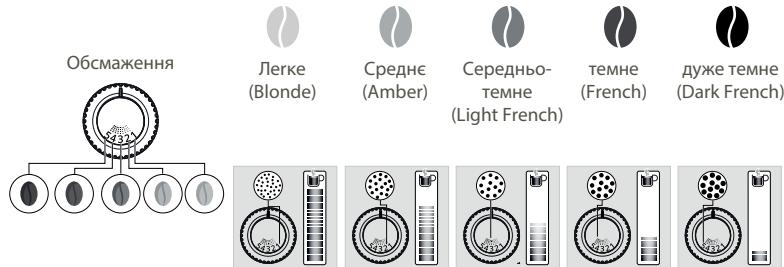
AK PERYNIOBATN DPIBHICTb NOMEJY KABN?
Iobertai KhoNky perynobhaHn dpi6hocti nomeny (K) y KOhteiHepi dny kABOBx 3epeh BiDnoBIDno do Tmny 3epeh i 6axaHOi iTeHCNBHOCTi apomaty. Lc peynobHn cniBnKohyBaTu n iD ac pObTo n KabOMOnKn, nocTynpo 3miHIOU npomei. Picna Tpbox npiroTaybaH Kabu BN nOmITne, 0C mAk HanoIO 3NaHOp 3MiHB.CR.
JAKI3HATNCRA, YN E IEE 3EPHA B KOHTENHEPI?
Maunna cepii Intuition obnadnana cneuiabHm daTynkom, 06 cnobiataBac, kOnPi pBeHb KabOBnx 3epen y KOHTeHepi CTaHe 3aHn3bkM.
Ha ekpani 3'Явпьая BiДиовду NOВIDOMЛЕнг, a iHTyITINBHy CBITIOBn iHdNKaTOp (J) noUHe CBITINcB chePBOHm CBITlOM.
A IIO YK ONOBIUeHHN 3'ABUTbc NID YAC PNIOTYBAHNA HANOIO?
3aONBHTb KONTeHep dIy KabOBnX 3epeH, HATNCHTb «OK», i npriroTyBaHHra HanoIO 3a peceTOM 6yde npodObxHo. OTke Bn He 3MapHyTe aHI rpaMa KaBN!
IIOPOBNTI,RAKTO TPEBA3MIHHTN KABY ABO KABA 3AKIHUYJAC?
JaKIO haTnCHyTN «OK», He DoIaBwN B KOHTeHep KabOBuX 3epeH, MaunHa 3dIiChNtB cnpo6y nepe3anycky i 3HOY BBIMKHe onOBIeHNH. JaKIO haTnCHyTN «OK» ue pa3, MaunHa BnKOpNCtaE dIЯ npiroTyBaHHa HanoIO BeCb 3aIIwok KabN. PicJIa cboTO kabOMONka 6bye nopoXhboIO.

Ponepejxehn! Mn He peKoHdyeMo BnKOpNCTOByaTm MaclHnCTI Ta KapaMei3ObaHi 3epHa, kki KabOMolJI baxkO nepemolOTn. Taki 3epHa MOxyTB NOWKOHTM MaunHy I nepeWKoJkaIOb I npabINbHOMy fHKUohyBaHHIO CNTEMI INTYITNBHOrO KepyBaHHra.
Kjso onoBiuueHHa 3'YbntcH a ekpani iHnukatop 3arOpntbc cepBOHM, KOJI KJIbKICTbepeH y MaunHi E doCTaTHbOIO:
HaTnCHiB KhoNkY OK, 06 npoOdbXHTn npiroToyBaHnaHOIO.
A60 BvMkhItb onoBiiueHn pno BiCyTHicTb 3epeH, 1O6 BiKIOuHTn KOHTpOJIb Ha lac, NOKI B KOHTeHepi Jn KaOBHX 3epe H e Kaba.



HAJAWTYBAHH
ПРИГOTУBAHЯ ИШИХ HANOIB
HANOI, RIKMOXHA INPUGOTYBATN 3A DOJONOMOIOU LIEIMAUHH:
AK BIDPERGYIIOBATN BNCOTY CONEL IODABAHHAKABN?
BIMoKeTe BIDperyIIOBaTn cOIIa NODaBaHNa KABN BIDNOBIDNo Do po3MIPy yauok dJa 6ydu-akoro HanoJ.
YK TOTYBATN HANOI?
Ipeperhhe HauabHnH noci6HnK «Ak roTyBaTn Hanoi?》,36epeXeHn y naTm MaunHn.



DONOMORA HABCAJIbHI NOCIBHKNK
3AJEJKHO BID HANOIO DOCTYNIHI PI3HI HAIJAHTYBAHHA:
OHa YI DByaAsKn: IJn npriToYBaHnN PoBbHoiNtnpu HAnIO BbepiB hani i HATNCHTb

Miucht Kabn: 36iibuunn a60 3meuunu MiucHcTB Kabn 7xom 3mHeHHa KInbKocTI MeheHOi Kabn, Bn6epitb Hani i Bn6epitb BiD 1 do 3 epeh, de 1 3epHo BiNobiae hainMeuui MiucHocti, a 3 3epHa - hai6ilbuin miuHocTi HanoIO
.06'em qaushn: 36iibuHTn a6o 3MeHunTn 06'Em qaushn, npokpytItb Bropy a6o BHN3 cnncOK doctynHX 06'EMiB i Bn6epitb notpi6hni.
Iodatkoby iHopmaizIO MoXHa 3HaHTN B Ta6nzi HanoB I HcTpyKuii.

IOPADA
YK 36EPErTI NLIObJIeHI HANOI Y CBOEMY NPOΦJIJI?
IChye Dba cnooc6n doaTu Hani Do npofoiio:

Ha ekpaHi 3'YABITbC KHOIIKa.
- Be3nocepedHbO y Bauomy npophiNi.
IpeepnbHnA cuy npiroToyBaHH yIIO6JeHOro HAnOIO ABOMaTHNo 36epeXe HOi HanaTbAHnA cacy.
YK UCTAHOBUTN / YNOPRAKBYATN / BUDAJIHTM MOI YIIOBJEH I HANOI?
HaTnCHiB i UypmUyTe 3NaOc HanoIO npoTAROM DeKInbKOx CekYHd. Y BepXbOMy npabOMy KytI KOxHOrO 3NaKa HanoIO3'ABtBcX pectNK. TopKHITbc3NaKa NpeTARHbIOrO, 06 3MiHNTn nopAIOK HanoIB,a6o TOpKHITbcXpctNkA, 06 BuDAnITn Hani.

3AFAJIbHE OBCJLYTOBYAHH
HaJIeXHe 6OcIyroBvBaHHaMaHINI DOnOMOKe IIOBxHTN TePmIH II cLyXbI i 36epeRTHn HEnOBTOPHn CMAK KaBn.
OBCLNYTOBYYAHH BYICIKY DIA MELEHOI KABN TA JOTKA DIA KPANEJIb
KOLN CNIID CNPOOXHRTN BIDCIK DJIY MEJEHOI KABN?
KoI npuaad cnobictnbac, a60, Habitb 6inb puerynapHO, u KOI anapaat yBIMKHeHO, KOIN BIn cam MoKe Bu3HaHTN, OO KOhteHep dIy JxMxMy MaE 6ytn cnpoxHeHH.

Baxnbo! Raio He CnpoknHnTpeyIepHO BIDcK dNRA MeNEHO KABn Ta NTOK dNRA KpaneB, AK 3a3NaueHO BIIe, CE MoKe np3BecNT Do nOsiKOJekHe MauHNI. BIKOPcIOCTOBaYbAT NOCyDMNH YMAuHNy DnA ONUeHNe TcE i ChAtnH N3abOpoeH0. 3iriciHmX mIpkyBaH bM paIMo UoHdN CYtNTN EMIChT DnMaNEHO KabN pIg rAPAOHO BOIOY M1NOAN TA y6koIO. TAKoX paIMo BVCsUHTn cei enEmeHT Na nobITpi, nepu HIX BCTaONIOBAtno Ioro HA MicE B npCrtpi.
OBCLNYROBYAHNAEMHOCTI JLBAOITAKOHTEHNEKJIAKABOBNX3EPEH
Дял забзпецннаий Крацогсmaку Kabи, на якьи Врлмвают якICTь Oюгriэна, ми радимо сюденho Oчишвати pezeервардя вори за далочипялшок i rapячоВОю т використовыоти tinьки CBixу body dlya npirotovyання Kabи.
KabOBi 3epHa Moxyb 3aJIuMaTn Ha CTINKax pe3epByapa MaCLIHNCTH HaJI, 0O BvIIBaE HA JIKCTb KabN. IJIa 3a6e3neueHH NaI KpaIIO rMaky N 3 MIPkyBaHb ririEHN Mn paIDMO BvdaJIaTI NcE H aJIIT cyXIO M'AKOIO raHvIpKOIO KoxHO rpa3y, KOJI Bn HAnOBHIOTe pe3epByap.

Baxnbo! He nctb BOIO, npucyHcTB BOIN 6yHKepi Iner 3epeH MoKe noKoHTM MaunHy

Takox padimo BucybaTu nei enemnt Ha nobitpi, nepw hix BCTaHOBbAtu Noro Ha Micce B npunctpi.
OBCLIYROBYAHHMOJIOHOICCTEMN
YOMY I YK CJIД OBCIYROBYBATU MOLOCHNY CNTTEMU PICJI YPNIROTYBAHHA HANOIB I3 MOJOKOM

Baxnbo!IJIa363neueHHcT6iNbHOJAKOCTiNINKpeKOMeHDOBaHO BVKOHyBaTn Taki iii:



DOTOMOFAHABVAJIbHI NOC1BHKI
UCYHEHHH HECNPABHOCTE
ФУHKUIOHYBAHHA
Piiuc npiroToyBaHn6yNo BnBVeNo kKycb npo6neMy.
Ppuiad aBtOMaTHNO nepe3anyckaTbCra i6yde roTOBm do HOBOrO uKny.
- Bn BnKOpNtAnI MJeHcy KaBy 3aMCTb KaBOvX 3epeH.
BnidaHbMeHcyKaby3KOHTHeHepaDnI KaBOvHXepeH3doNOMOTIO NINOOCa.
6.Пися зушик Maшшии i3 conen noidaBaHЯ KaBn BntiKaE BOda.
⇔ Lc HOpMaIbHO. BiD6yBaEtBCa ABTomaTnUHe npOMBaHHa 3 MeTOIO OUnIeHHa CONeI NpOaBaHHa KaBn Ta 3aNo6irHaHia ix 3acMIueHHIO.
IAPA MOLOKO
1.Подавань MONOKAЗmaинчаctKOBOЧИ nobHICTO3a6JOKOBaHO.
Y pa3i 3acmieHHa cOnla ha ekpaH i'ABtbcB biIDOBiDhe OIOBIeHN. OcNtib 6NoK KanyuH OndHM DOTOKOM. IpeerIbte HabeHenn BnIe npHT 5 iNCTpykuii 广 IIN5OKE OUYIeHHB PByH CyCTEMI NODABAHH MOLOKA-5 XB a6o 36epexhen y nam'pi MaunHn HauNbHn Noci6Hn 一 O u i n e h e H cOnla noDaBHn MOJoka).
- MaunHa He notpe6ye BuaJaleHna HauNpy.
IicnI pInrOryBaHnB eNkoi KjIbKocTi HAnoIB i3 MoJIOKOM a6o Ha OCHOBI rApaQIo BDOI nOTPi6HO BVKOHaTI cIKKn BvdaJIeHNHa KaNpy. RaIoo BN roTyTe JInse KabY, MaunHa He BmMaRaTUME BiD Bac BVdAJeHNHa KaNpy TaK YaCTO.
-
Bnotokdny kpanelb notpapanna Meheha KaBa.
YIOTOKIJKpAeJIbMOKeIOTpaNTnHeBEnIKA KInbKiCTbMeJeHOi KaBN. KOHcTpyKciJaMaunHn 3a6e3neUyE BuaJIeHHa 3aiBoI MeJeHOi KaBN IJN 3a6e3neueHHaJeKHOi UcHTOn 30HJphiIbTaPJIi. -
lHTyITINBnC BtIOBn iHnKaTOp He rache nICJIa CNopoXHeHHa BiDcIky dIy MeJeHOi KaBn.
Μe pa3 yctahOBiB BiCik dIЯ mJeHOi KaBn Ha HajeXHe Micse. - IHTyITNBHn CBITIOBn IHdNkATOp He rache nicIaZanOBHeHHpe3epByapa dIra BOnI.
Переконайся упразвильноcti встановleteни розеры.apа у рпунадi.
PonlaBci Bn3y pe3epByapa mIoTb 6e3peewkoJHO pyxaTcra. PpeBipTe nonlaBci 3a notpe6n 3miHt bix noLoxehna.
HANOI
- Recipient de cafe boabe
K. Buton de reglare a finetii rasnirii
L. Pälnie tabletă de curățare
M. Rasnita conica metalica
- Panou de afisaj
CUM STIU CAND NU MAI SUNT BOABE IN RECIPIENT?
B 3ABNCIMOCT OT HAPITKATA CA HAIUHN PA3JIUYH N HACTPOIKN:
EJaHnI DBe ChaSi: 3a Da CTaptnapeDboHnatapeuentTa, n36epeTe HAnitkata n Hatnche
CnlaHa Kafo:3a Da yBemuHte Nn HaMaHInTe CnTaHa KafoTo, Kato npOMEHNe KOJUYeCTBOTo HA MmAHOTo Kafe, 136epete HAnNTkata u n36epete MeJky 1 n 33bpHa, KaTO e hAI-CsA0To, a 3 e hAI-HaCnHTeHO TO
.Obem ha yaataa: 3a da ybeimnte nnn Ha marnite o6ema Ha yaaata, ppeBbptete Harope nn Hndony cncsbka c obemn n36epete To3n, KOITTO NCKate.
3a noBuee INHOpMaunia BnXTe Ta6nIaTa C HAnITKIN B INCTpykUnite.

CbbET
3a da n36epeTe cunata Ha KafoTo I o6ema Ha yaaTa, MoKeTe Da ce DnKInTe HaroPe/HaOny NIn Da HATNCHeTe DupeKTHO Ba7na n36op.
KAK DA CnPA PIPNIGOTBRAHETO HA HANITKA IIO CPEDATA?

Korato
IpeynpexdneHme: Mokete da cnpete npiroTbHeto Ha hAnitka no BcKo Bpeme, KaTo hAtncHete 6yToHa KoraTo daenuKbI 6bJe pKeBcHAT, Toi He cnipa MOMeHTaJIHO. MaunHata ige 6bJe HeIOCTbNHa 3a N3BeCTHO Bpeme, KoEto ce yKa3Ba OT cbO6eHne Ha ekpaHa.
HANITKUMJIAKO

CbBETN
3a pa3neHNO MnIko N3non3BaTne NaCTbOpN3npaHO UHT MlyKO HnPaBO O T XnaIINHka (3 - 5°C) .Bb3moJHO e da ce nI3no3BaT cneuaAnHMIneKIA (MkPoPnItnPraHn, CypOBi, fepMeNTpAIO, o6OraTeHN) IINI MlyKO Ha pacttEnHa OCHOBa (op3OBO, OBeceHO IIn b4eMoEO MlyKO), HO TOBA MoJE DaJaNe IO-MaJIKO 3aDOBoNITeHN pe3yIaTn o OTHOWeHne HA KeCTBOTO IN KONUeCTBOTo H NAHata.
KAK DA CTAPTIPAM PPNOTBARE HA HANITKA C MJIKO?
Hapabete cnpbka C,2 PNPOTBBAHE HA PELENTA C MJIKO" B npexdoHNTE mHcTpyKuIN uIN BuxTe mHcTpyKUra Ta, "PnIPOTBHe Ha HAnITKa C MJIKO", 3aNaMeTeHa BbB BaWata MaUnHa.

YAHOBEN3ANAPKIN
3a Baunite yainobe n 3anapkn mHa hannuHn Tpi 6bytoHa 3a n36op, 3a da moKeTe da n36peTe temepaTpata, koTo e Hau-noDxOJa 3a BCEKn TnI qai. TemepaTpata, n3nonBaHa 3a 3eien qai, ue 6bJe no-HnCKa OT n3non3BaHata 3a uepeh qai nn 3a 3anapkn.
KAKДAЗДAM TEMПЕРATYPATA HA BOДATA?



M
OtnndeHa Settings (Hactrok) > Water temperature (TemnepaIpya Ha BOda).Mochete da n36mpate mekdy T1,T2 nT3,KbdeTo T1e haN-xlaJHo,aT3e hau-ropeio.
Korato HamaJIne/YbENUHTE Tempepatypata, TOBa 1e HamaJIy/YBEnUHc TEMpepatypata 3a BcEKN TnN qA, HO TEMpepatypata, nI3PON3BaHa 3a 3eJen Yai, BInaRn 1e 6bJe no-HnCKa OT N3PON3BaHaTa 3a uepe Yai INN 3anapKn.
MOYT PPOΦNJI
3A KAKBO DA IN3IIOJI3BAM ΦYHKUNRA 3A IPOΦNJ?
Функцята Profile (Пюфи) Ви дава достьп до порсонанзигарно място, Кьдeto можete на сьхранbaе и заэвate Лобимite си наитк. Можete lecho на визате в нея, кato hatichete 6утон ha контponня панел ha мшинata.
Iop6b3n n iJeanH0 3a eJxHHeBHa yOnTe6a, HAnITKInTe, KOINTcTe 3aana3uIN B CBOY npoFIn, ue 3anoHAT da ce npiroTBA t cAmO c ENo DOKocBaHc; He ca Heo6xoDmM KopekU. MoKeTe Da 3ana3BaTe do cEeM peeentn 3a BceKn npoFIn.
Функцята зпофил сьто таKa NOЗВОЛЯБА NO-нерСОнИЗИРAN ИНТЕЧЕС И国有资产:
KORA TPRBBA DA U3NPA3HRA TABATA 3A OTUEXDAHE?
Korato nonlaBvnte ca B rohpno noJoxHe, KoTo noka3Ba, Ye T e npkeKaJIeHO TbJIHa.
KORA TPRABBA DA U3NPA3HRA KOJELKTOPA 3A YTAIKA?
Korato Maunihata Bny beDomra uHnno-peDobHO, HO KORATO Maunihata e BKNIOUeHa, 3a da MOKe da perNCTpnpa, ye KOHTB e n3paa3He.

Baxho: Ako He m3npa3BaTe KOleKToPa 3a yTaKa n TaBaTa 3a oTuexJaHe peOBoH, KaKTo e NOKa3aHO no-rope, MoKe da nobpeJnte MaunHata. He rnoctabTBe B cTOMmaHn MaunHa. Ox xmIeHn Cb6paXeHHa BN npenOpbUbaMe da noocCTBaTe KOtheHepa 3a MnaH Kafe eJeDHeBNO ropeuza Boa cbcanyn r6ba. PpenOpbYBaMe BN da ro octabTe da 13c5bXHe Na b3dux, pdei Da ro noctabTe oepatho Ybpea.
IODIbXKA HA PE3EPBOAPA 3A BOIDA KOHTHEPA 3A KAΦE HA 3bPHA
3a da 3ana3nte Hau-do6pna Bkyc Ha Kafo, NOBnH ON KAueCTBOTo HA BoDAta, n OT XINrEHNn CbOpaKeHHN, Bu CbBETBaMe da N3No13BaTe caMo npraChA BOHa n EgeJeHBeHNO Da NoUcHbATE pe3epBoapa 3a BOda C rOpEuCA BOda u Yetka 3a 6yTnIKN.
3bPHTa KaFeorat MaOCTABR Ma3Hn OCTaBtBu N IO KOHTeHepa, KONTO MOrat Da NobmIaR Ha KaHeCTBOTo Ha KaTeo. 3a da 3an3nTE Hau-Bo6pn BcKu HA KaFIO n OT XINMeHN Cbo6paKeHHa, Bn PnpOpBvBaMe da ro I36bpcBaTe cbc cyxa MEka KbPna BCEk nTb, KORATO Tp8Ba Da ce HAnbHIn OHTOBO.

Baxho: He NOUHCTBaIte C BOa, HAIuHHeTo HA BOa B KOHTeHepa 3a Kafe MoKe Ja NOBpeDu MaunHaTa

IpenopbUbaMe Bn da n octabnte da n3cbxhe Na Bb3dyx, npedn da n noctabnte o6paTHo BVpeda
ПОДРБЖKA HA CNTECTMATA 3A MЛЯКО
3AùO I KAK ΑA ΠΟДΙbPχAM CNTECTMATA 3A MЛЯΚO CJIΕД ПИΓΟΓΒΑΥΗ A MЛΕΥΗ HΑΠΤΚΗ?

Baxho:3a da noIyabate nocToHHo KaueCTBO Ha IraHaT, npenOpbUBaMe Bu:



NOMOUI NHCPTPKUIN
OTCTPAHRABE HA HEN3PABHOCTN
PABOTA
- MaunHaTa e noBpeHa, coTyePbTe 6Iokpan IIN B MaunHaTa IMa HEn3npaBHOCT.
念 N3KJIouheTe MaunHATA n 13BaIeTe Icncena OT KOHTaKaTa, OTCTpaHete fNITbPHaTa KAcetA, N3UkaJaTe eHa MInHyTa n pectapTnPaIte MaunHata. HatncHeTe n 3aIpbXte 6yToHa 3a BKn/Un3Kn Hau-MaIko 3a TpN CeKyHdu, 3a da cTaptnpate MaunHata. - YpeBbT He Ce BkIIOUba CneI HaNTsCKaHe Ha 6yToHa 3a BkN/IN3Kn (3a Hau-MaIKo TpI cKeYHn).
Поберете пебдаителпи секг Котак.T. Поберете дади сencьт e noctавен npabinno B KOTaKaT. - Bb3HnKHaJI eIeKTpUcEcka HEn3PpABHOCT NO BpeMe Ha ZIKbJL.
UCTPOIcTBOTO 1e CE HUNIPA aBTOMATUHOO, KOraTO CE BKNIOU OHBO. - KaΦeΜηαύκατa paδθι πρa3ha.
ToBa e HOpMaJIHo, aKo e CnyaHIO u Ako Hama IINu IMA mAnKO oCTaHaI N3bPNa Kafe. MoKeJa pa60tN npa3Ha B npOdbJIxHeH Na Decet cekyHdN, 3a Da onpeDeJeNOTpe6BeHneHTo cN i da rapaHTnpA, Ye pa60tN npabunHNo.
Bce OUsE mHa 3bPHa Kafe B KOhteHHepa:
KaΦeTO MoKeJa d e TbPdE MaHNo I Da He Ce OTBeKJa PnPaBnHO B MaUHnata. MoKeTe Ja OnITate Ja NOMOrHeTe Ha 3bPnHa da NaHnat I Da BnITe OTHOBo DaJI pa60Tn. IppeOpnbVbme Obaue da CmEHNTe KaΦeTo (BnXte CyHKnIraTa 3a BnDa ha KaΦeTo).
Toba e MoTo o6uayHn KaFe, KoTo e 6nIIO nOxOJaIoo Docera: MOnJ, CbPjKeTe ce c cHeHTbpa 3a 06cnyKBaHe Ha KIneHTn Ha KRUPS.
U3I0JI3BAHE
- KaΦeMaŋaKaTa n3dαBa Heo6uαeH ψM.
Hai-BepoTHO B KaFemEnaKaTa Ima YUxJn Tena. OInuTaIe Ce da I n3yNCTnTe C npaxocMykaKa, B npOTINbEN cnyaI ce CBpKTe C eHTbpa 3a 06cIyXbaHe Ha KJIeENTn HA KRUPS.
- YpeBt He npabn kafe.
Пов体现在 на пи�оггеляно установен поблел.
YpeBt ce e pectaptnpaI abTOMaTHUHO I e rTOB 3a HOB uKbI.
5.ИЗПОЛЗВАЛСТМЛЯноКафe,ВМЕСТОЗьрна Кафe.
13noI3BaIte npaxocmykaKa, 3a da OTCpaHIne MmHOTo Kafoe OT KOHTeHepa 3a 3bphA.
6. Korato Maunnata e cnpra, ot IIO3nte 3a KafoTeue BOda.
ToBa e HopMaJIHo. ToBa e aBTOMaTmUHO n3nlaKBAHe 3a nouNCtBaHe Ha IIO3nTe 3a Kafe N ppeDOrbpaTBAHe Ha TReXHOTO 3anyuBaHe.
IAPA MJIKO
- IOTOKbT OT MIAKo OT MaunHata N3rIeJda qaCTnH0 nIN HAnbJHo 6JoknpaH.
念 AkoIIO3atae6IIOKIPaHa,HaekPbAHa 1e Ce IIOBnpeDpynpEINTeHNO CbO6ueHne.IoNCTe6I0Ka KAnyUHO c EdoIOIOKOCBAHe).HapabeteCnpBaKa CTOKA5 B npExDOHNTE HNCTpykUn. PbHIO OCHOBOHIOIOHCTBAHE HA CNTEMATA 3A MJIKO- 5MNI INI BIXte NIOCTpykUHTa,POIOCTBAHe HaIO3ata 3MaJIPO"3aNaMeTeHa B MaSiHnAta.
- He n3n3a npa.
a.Пи nbpBOTo n3non3BaHe NaKbI c npa, aKO npaTa He n3n3a npaBnH0:
巧 Поверете далл OTврьт Вь Вьрха He e 3anyшen. ВькTe pa3dela nO-rope:"ДIO3ata 3a npa Ha MaunHaTa N3rIeJda 即CTNHO uHn HnBnHO 3anyShena".
U3nblHete CneHnI npOTOKoI CaMo BeHbK:
I3npa3hepe3epboapa 3a BOa I BpemEnHO 3BaDepe fHNTbPnHa T KacTea 3a CnCTema Claris Aqua. HantbnHepe3epboapa c MInepalna BOa c BncoKo CbIbPkaHne Ha KaLm (>100 mg/L) nycHete nocJeobateHNuKKn c npap(5do10)B hKaKbB cbD,doKato NocturnHete noctOHHa CTpy OT npa. NocTabe Kacetata o6paTHo B pe3epboapa.
b.ДиэтаЗа napa Beue e pa6OTnla:
巧 PpOBepe TaIIN OTBOpBbT BvB BByPxA He e 3aunuHn. BxKTe pa3eJa nO-rope: "IO3ata 3a npa Ha MaunHaTa I3rJekDa
haCTnUHO uN HApBnHO 3aunuHe".
Ako CneI IN3BbPbBaHe Na rOpHnTE CTbKnI dIO3aTa 3a npa BCE oSe He pa6OTn, CBbPxTe Ce c ceHTbpa 3a 06CnyXbaHe Ha
KIneHTn HA KRUPS.
3.Излза паорпшетката на tabata з OTцжданe.
B 3aBcIMoCT OT BnDa Ha npriroTbHe OTEpeTeKaTa Ha TaBaTa 3a OTeJkaHe MoKe Da n3JIa 3a npa.
4. Поваяс сапа поkanaka на контунера за зрна.
巧 PpOBepeTe daHnФyHnTa 3a Ta6bNETKn 3a nouchTBAne NOk KaNaKa (L) e 3aTBopeHa.
IOndPbXKA
- MaunHata He nCKa npemaxBaHe Ha BapOBVK.
⇔ LInkbnbt 3a npemaxbaHe Na KOTnien KaMbk Ce 3aBBA CneI npinotBHe Na roJm 6pOi HanNTkn Ha 6a3aTa Ha MlAko NIpnopeuza Boda. Ako npabnte camo Kafe, npemaxbaHeTo Na KOTnien KaMbk He e HEOxOIMO da ce npabn YecTo. - B Tabata 3a OTeJdHe mMa MaJIKO MJIHO Kafe.
V B Tabata 3a oTuEJaHe MoKeJa nONaHHe MaNko KOnIYeCTBO MJIHO KaFe. MaUHATA e npOeKTIpaHa TaKa, Ye Da n3YnCTBa U3JIuHOTo KOJIYeCTBO MJIHO KaFe, 3a Da OCTaHc 3OHaTa 3a fNITpnpaHe YnCTa. - INHTyTNBHNAT CBETINHEN INHdNkATOP OCTaBA Ja CBETN, CNeI KaTO IN3npa3HNTE KOLEKTOPa 3a yTaNka.
IOCTaBete o6paTHo KOleKTopa 3a yTaika. - CnEi HapIbIbAHe Ha KOHTeHepa C BOa INHTyNTBHNAT CBETINHEH INDkaTOP OCTaBA BKIOUeyH.
巧 Поверете дали контейнерът e noctaben npabunno b ypeda. Пплавьцит ha nbHOTa Ha pe3epBoapa Tp86Ba da ce DBnJxat Cb6oJHO. Поверетe n ocbo6oJTe nonlaBbUte, ako e Heo6xoJIMO.
HANITKU
- Kafo Teue npkekaneno 6aBHO.
3aBbptete 6yToHa 3a peryInpae Ha CTeneHtHa CMnlaHe HAdcHcO 3a No-tpy6o CMnlaHe (B 3aBmmoCT OT BnDa Ha n3non3BaHOTo Kape).
NtBnHeTe eIN HrKoNk ZKbNa Ha 3nJaKBaHe.
CmHeTe mntbphata kacetaa cnctema Claris Aqua.
- KaΦeTo e npeKaJIeHo CBETNo IINI He e JOcTaTbUHO HAcNTeHO.
Поберете дами в Контейнера за зрна за и дами TO спухся павлино.
N368raBaiTe 3n013BaHeTo Ha Ma3Hn, KapaMeJIn3uPaHn IIn apOMaTn3uPaHn KaΦeTa, KOITo MOKe Da He Ce OTBeXdaT npaBnIHO B MaUnHaTa.
HamaneTe o6ema Ha nprirotBnHe i yBeneHc Tc nOmoUta Ha fynKuTAta 3a cNlaHa Kafo.3abpTeTe 6yToHa 3a peryIinaPeHa CTeNEHTa Ha cmIaHe HAnBO 3a No-phiHO cmIIaHe. PpirotBeTe HAnITkata B Dba CInkbla, KATO I3POnl3BaTe FynKUraTa 3a Dbe YauSi.
- Ecnpecoto nnn KafoTo He ca doctatbnuo ropeun.
Ybenuye TemnepaTypata Ha Kafo To HactpoKInTe Ha MaunHata. Ctonne Te aHaata, KaTo I3nJaKHeTe C ropeua Boga, npedn da npiroTbITE HanNTkata.
√N3nBnHETe ZnKbJ 3a N3nJaKBAHe Ha CnCTeMaTa 3a Kafe, npei Da nprirotBnte KaFeTo Cn. ΦyHKuTAta 3a N3nJaKBaHe Ha CnCTeMaTa 3a KaFe npi CTapTnpaHe MoKe Da 6bJe AKTNbPaHa B HAcTPOkN/ABTOMaTHO N3nJaKBAHe.
4.П repdИ BcЯко Kaфе пeз ДIOЗИTe 3a Kaфe Teue YIcSta BOda.
B HauaIOTo Ha peeTATA mHa pEaBapITeH O 3aIapBaHe Ha Kafe, KOEt MOKe Ia IOBeEe DO IN3TuHa He MaJIKO KOIuYeCTBO BOJa OTIO3NtTe 3a KaFe.
Ako NkOJ OT np6JIemITE, OINCAHn B Ta6JIucaTApnpDJIKAba, Ce CBpJxTe C oTJeIa 3a 06cnyKBaHe Ha KIneHTn HA KRUPS.

Baxho: PpOu3BoDHTeN: SAS GSM - Rue Saint-Léonard F-53104 Mayenne - Opaunzia
Dragi korisnicke,
- 1 1ST USE
- 3 MAKE 2 CUPS OF A MILK RECIPE AT ONCE
- 4 QUICK MILK RINSING AFTER A CAPPUCCINO
- 5 MANUAL DEEP CLEANING OF MILK SYSTEM - 5 MIN
- 8 CLEAN THE WATER TANK REGULARLY
- 10 DESCALING PROGRAM - 20 MIN
- CHERE CLIENTE, CHER CLIENT
- INFORMATIONS IMPORTANTES SUR LE PRODUIT
- ACCESSIONS FOURNIS AVEC VOTRE MACHINE
- MISE SOUS TENSION DE LA MACHINE
- NEED HELP GETTING STARTED WITH YOUR MACHINE
- IMPORTANT PRODUCT INFORMATION
- GUIDE TO THE SYMBOLS USED IN THE INSTRUCTIONS
- PRODUCTS SUPPLIED WITH YOUR MACHINE
- TECHNICAL DATA
- APPLIANCE DESCRIPTION
- GETTING STARTED & APPLIANCE SETUP
- TURNING THE MACHINE ON
- GETTING STARTED (SEE 1.1ST USE)
- PUTTING THE MACHINE ON STANDBY
- TIPS AND TRICKS
- INTUITIVE LIGHT INDICATOR
- WHAT DOES THE INTUITIVE LIGHT INDICATOR DO
- FILTER AND WATER HARDNESS
- WHAT IS THE PURPOSE OF THE WATER HARDNESS SETTING
- HOW TO SET THE WATER HARDNESS ON YOUR MACHINE
- IF YOU RUN OUT OF WATER-HARDNESS TESTING STICKS
- WHY INSTALL A FILTER CARTRIDGE
- WHEN SHOULD I CHANGE THE CLARIS AQUA FILTER SYSTEM CARTRIDGE
- HOW DO I INSTALL THE CLARIS AQUA FILTER SYSTEM CARTRIDGE
- GRINDER: ADJUSTING THE FINENESS OF THE GROUND COFFEE
- WHY SHOULD I ADJUST THE FINENESS OF THE GROUND COFFEE
- HOW DO I ADJUST THE FINENESS OF THE GROUND COFFEE
- HOW DO I KNOW WHEN THERE ARE NO MORE BEANS IN THE CONTAINER
- WHAT IF THE ALERT APPEARS WHILE I'M MAKING A DRINK
- WHAT DO I DO IF I WANT TO CHANGE MY COFFEE OR IF I HAVE RUN OUT OF COFFEE
- PREPARED OTHER DRINKS
- HOW DO I ADJUST THE HEIGHT OF THE COFFEE NOZZLES
- HOW DO I PREPARE MY DRINK
- DIFFERENT SETTINGS ARE AVAILABLE, DEPENDING ON THE DRINK
- HOW DO I STOP A DRINK MID-PREPARATION
- MILK-BASED DRINKS
- HOW DO I START THE PREPARATION OF A MILK-BASED DRINK
- TEAS AND INFUSIONS
- HOW DO I SET THE WATER TEMPERATURE
- MY PROFILE
- WHAT DO I USE THE PROFILE FUNCTION FOR
- HOW DO I CREATE A PROFILE
- HOW DO I MANAGE THE FAVOURITE DRINKS SAVED TO MY PROFILE
- HOW DO I ORGANISE/ORDER/REMOVE MY FAVOURITE DRINKS
- GENERAL MAINTENANCE
- WHEN SHOULD I EMPTY THE DRIP TRAY
- MAINTENANCE OF WATER TANK AND COFFEE BEAN CONTAINER
- WHY AND HOW DO I MAINTAIN THE MILK SYSTEM AFTER MAKING MILKY DRINKS
- OTHER FUNCTIONS
- HOW DO I ACCESS MY MACHINE'S SETTINGS
- TROUBLESHOOTING
- OPERATION
- USE
- STEAM AND MILK
- MAINTENANCE
- DRINKS
- BESCHRIJVING VAN HET APPARAAT
- HOE BEREID IK MIJN DRANKJE VOOR
- KOM GODT I GANG OG OPSTILLING AF APPARATET
- SÄDAN TÄNDER DU FOR MASKINEN
- HVORNAR SKAL DRYPBAKKEN TOMMES
- HVIS DU GÄR TOM FOR TESTPINNER FOR VANNHARDHET
- GENERELT VEDLIKEHOLD
- VEDLIKEHOLDE OPPSAMLEREN FOR KAFFEGRUT OG DRYPPEBRETET
- VEDLIKEHOLD AV MELKESYSTEM
- HVORFOROG HVORDANVEDLIKEHOLDER JEG MELKESYSTEMETTERA HA LAGET MELKEBASERTE DRIKKER
- UDRZBA NADRZKY NA VODU A NADOBY NA ZRNKOVOU KAVU
- WAZNE INFORMACJE O PRODUKCIE
- SKAD MAM WIEDZIEC, ZEW POJEMNIKU NIE MA JUZ ZIAREN
- TEXHUNCHECKNE XAPAKTEPNUCTNIK
- HAUJIO PA6OTBI HACTPOIKA INPUBOPA
- BKJIIOUYEHNE IPIPUBOPA
- HAAYALO PA50TBL (CM. PA3DIEN 1.1-E UCNNOB3OBAHNE)
- IPEB0D IPIPUBOPA B PEXIM OXINDAHNA
- YMHBI CBETOBOH INDOKATOP
- ДЯЧERO HYЖЕН YMHЬ CBETOBОИНДИКATOP
- KAK YCTAHOBINTB JECTKOCTB BODBI B KOΦEMAUHHE
- ECN N BAC 3AKOHYINCB TECTOBBIE NOJOCKN JXECTKOCTN BODBI
- ПИГOTOBLENHUEДPYTNX HANITKOB
- KAK HACTPANBATB JIOBIMBIE HANITKN, COXPAHEHHBIE B MOEM IPOΦNJIE
- KORIA CJIEIYET ONYCTOWATB KOHTEHEP IJIA KOFEIHOHRIYU
- OBCLNYXUBAHNE KOHTENHEPOB DIA BODBI KOFEHBIX 3EPEH
- O6CLJYXNBAHNE MOJOUHON CNUCTEMBL
- KAKI 3AUYEM OUYIATB CNTEMY IOJAAH MOJOKA IOCJI EPNIOTOBIEHNA HANITKOB CMOJOKOM
- DPYTNEΦYHKUIN
- KAKIOLYUHTBIOCTUKNHACTPOIKAMIPUBOPA
- IAP MOLOKO
- OBCJLYKUBAHNE
- HANITKU
- UAHOBNKJIEHTE
- KOLI CIIID 3AMIHHTN KAPTPINX CNTTEM BOJHOO FJIBTPA CLARIS
- YAK YCTAHOBUTN KAPTPUIX CNUCTEMN BOJHORO ΦJIBTPA CLARIS
- OBCNYROBYAHN
- KABOMOLKA: PEGYUIOBAHHЯ DIP6HOCTI IOMEJY KABN
- HABIULOPEGYLIOBATN DIPIBHICTB NOMEJIY KABIN
- AK PERYNIOBATN DPIBHICTB NOMEJY KABN
- JAKI3HATNCRA, YN E IEE 3EPHA B KOHTENHEPI
- A IIO YK ONOBIUEHHN 3'ABUTBC NID YAC PNIOTYBAHNA HANOIO
- IIOPOBNTI,RAKTO TPEBA3MIHHTN KABY ABO KABA 3AKIHUYJAC
- ПРИГOTУBAHЯ ИШИХ HANOIB
- AK BIDPERGYIIOBATN BNCOTY CONEL IODABAHHAKABN
- YK TOTYBATN HANOI
- 3AJEJKHO BID HANOIO DOCTYNIHI PI3HI HAIJAHTYBAHHA
- IOPADA
- YK 36EPERTI NLIOBJIEHI HANOI Y CBOEMY NPOΦJIJI
- YK UCTAHOBUTN / YNOPRAKBYATN / BUDAJIHTM MOI YIIOBJEH I HANOI
- 3AFAJIBHE OBCJLYTOBYAHH
- OBCLNYTOBYYAHH BYICIKY DIA MELEHOI KABN TA JOTKA DIA KPANEJIB
- KOLN CNIID CNPOOXHRTN BIDCIK DJIY MEJEHOI KABN
- OBCLNYROBYAHNAEMHOCTI JLBAOITAKOHTEHNEKJIAKABOBNX3EPEH
- OBCLIYROBYAHHMOJIOHOICCTEMN
- YOMY I YK CJIД OBCIYROBYBATU MOLOCHNY CNTTEMU PICJI YPNIROTYBAHHA HANOIB I3 MOJOKOM
- UCYHEHHH HECNPABHOCTE
- ФУHKUIOHYBAHHA
- IAPA MOLOKO
- HANOI
- CUM STIU CAND NU MAI SUNT BOABE IN RECIPIENT
- B 3ABNCIMOCT OT HAPITKATA CA HAIUHN PA3JIUYH N HACTPOIKN
- CBBET
- KAK DA CNPA PIPNIGOTBRAHETO HA HANITKA IIO CPEDATA
- HANITKUMJIAKO
- CBBETN
- KAK DA CTAPTIPAM PPNOTBARE HA HANITKA C MJIKO
- YAHOBEN3ANAPKIN
- KAKДAЗДAM TEMПЕРATYPATA HA BOДATA
- MOYT PPOΦNJI
- 3A KAKBO DA IN3IIOJI3BAM ΦYHKUNRA 3A IPOΦNJ
- KORA TPRBBA DA U3NPA3HRA TABATA 3A OTUEXDAHE
- KORA TPRABBA DA U3NPA3HRA KOJELKTOPA 3A YTAIKA
- IODIBXKA HA PE3EPBOAPA 3A BOIDA KOHTHEPA 3A KAΦE HA 3BPHA
- ПОДРБЖKA HA CNTECTMATA 3A MЛЯКО
- 3AÙO I KAK ΑA ΠΟДΙBPΧAM CNTECTMATA 3A MЛЯΚO CJIΕД ПИΓΟΓΒΑΥΗ A MЛΕΥΗ HΑΠΤΚΗ
- OTCTPAHRABE HA HEN3PABHOCTN
- PABOTA
- U3I0JI3BAHE
- IAPA MJIKO
- IONDPBXKA
- DRAGI KORISNICKE
Brand : KRUPS
Model : INTUITION PREFERENCE EA873810
Category : Automatic coffee machine