
UW8 F1C XB N - Fridge WHIRLPOOL - Free user manual and instructions
Find the device manual for free UW8 F1C XB N WHIRLPOOL in PDF.

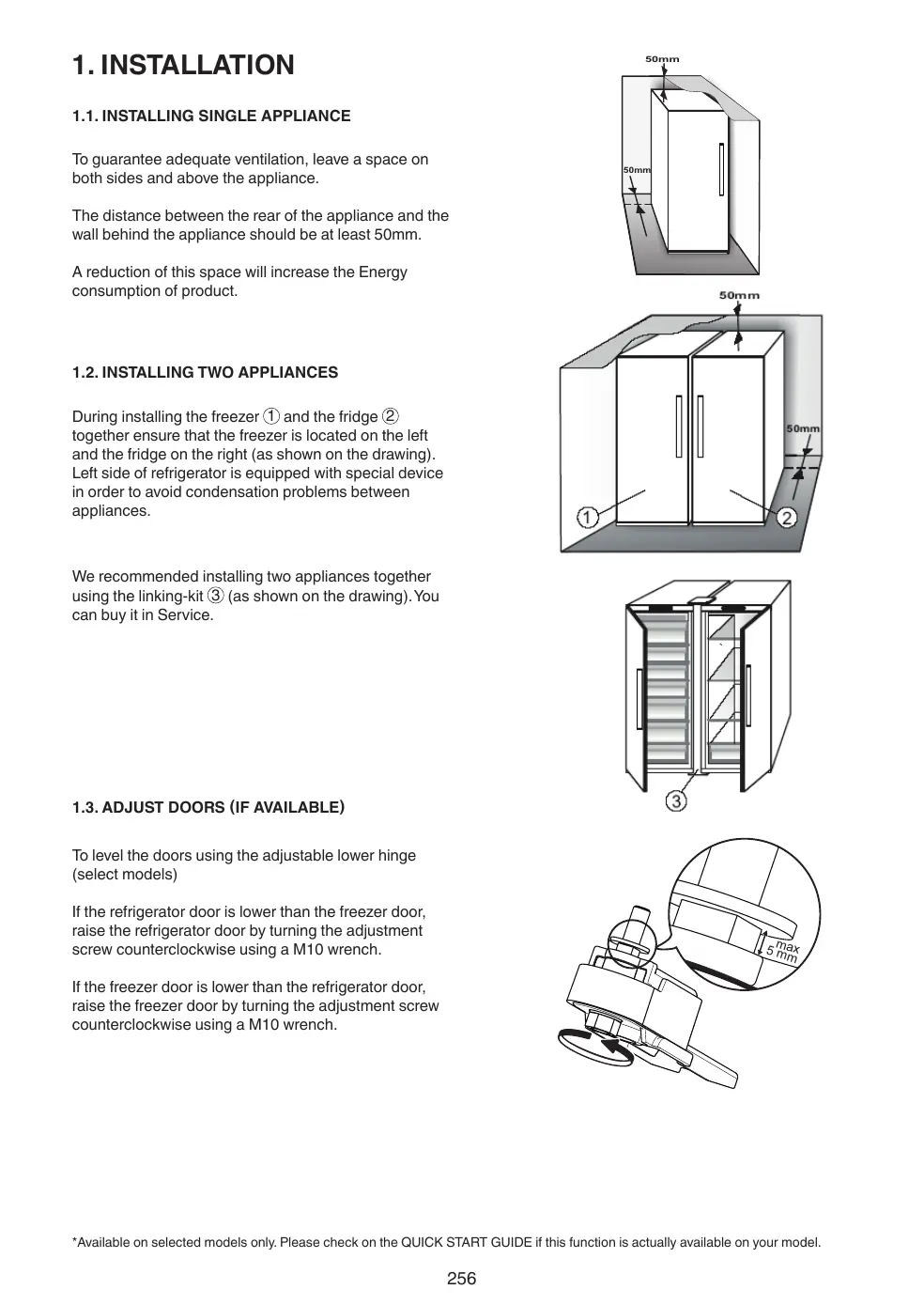


| Product type | Refrigerator-freezer |
| Brand | Whirlpool |
| Model | UW8 F1C XB N |
| Defrost technology | Automatic frost-free (No Frost) |
| Freezing functions | Quick freezing, Shock Freeze, 6th Sense/ProFreeze freezing control |
| Smart display | Yes (reduces energy consumption) |
| Eco Night function | Yes (shifts consumption to off-peak hours) |
| Ice maker | Yes (removable) |
| Interior lighting | LED |
| Alarms | Open door, temperature, power failure |
| Door adjustment | Yes (adjustable height via lower hinge) |
| Reversing door opening direction | Possible (two versions described) |
| Power supply | 220-240 V, 50 Hz |
| Installation | Minimum rear space 50 mm, sides free |
| Cleaning | Damp cloth and neutral detergent, no steam cleaner |
| Condenser maintenance | Regular vacuum cleaning |
| After-sales service | Contact for LED replacement, spare parts |
Frequently Asked Questions - UW8 F1C XB N WHIRLPOOL
User questions about UW8 F1C XB N WHIRLPOOL
0 question about this device. Answer the ones you know or ask your own.
Ask a new question about this device
Download the instructions for your Fridge in PDF format for free! Find your manual UW8 F1C XB N - WHIRLPOOL and take your electronic device back in hand. On this page are published all the documents necessary for the use of your device. UW8 F1C XB N by WHIRLPOOL.
USER MANUAL UW8 F1C XB N WHIRLPOOL
4k = 3
.()aagill aay iagai gie ayllg jygl lgl yj. cldiyj gij 1g jdyg oge gl cayll g jy
j 3 3 3 3 3 3 3 3 3 3 3 3 3 3 3 3 3 3 3 3 3 3 3 3 3 3 3 3 3 3 3 3 3 3
aal gall jgll gll gll gll gll gll gll gll
50 jie 50
blll alll aullll alalil lalil (aee
y s s s s s s s s s s s s s s s s s s s s s s s s s s s s s s s s s s s s s s s s s s s s s s s s s s s s s s s s s s s s s s s s s s
y y s s s s s s s s s s s s s s s s s s s s s s s s s s s s s s s s s s s s s s s s s s s s s s s s s s s s s s s s s s s s s s s
BLACK OUT ALARM 2.4
12 100000000000000000000000000000000000000000000000000000000000000000000000000000000000
2.5
jaiy jaiy jaiy.(0)oJr Jn nn nnnnnnnnnnnnnnnnnnnnnnnnnnnnnnnnnnnnnnnnnnnnnnnnnnnnnnnnnnnnnnnnnnnnnnnnnnnnnnnnnnnnnnnnnnnnnnnnnnnnnnnnnnnnnnnnnnnnnnnnnnnnnnnnnnnnnnnnnnnnnnnn nn nn nn nn nn nn nn nn nn nn nn nn nn nn nn nn nn nn nn nn nn nn nn nn nn nn nn nn nn nn nn nn nn nn nn nn nn nn nn nn nn nn nn nn nn nn nn nn nn nn nn nn nn nn nn nn nn nn nn nn nn nn nn nn nn nn nn nn nn nn nn nn nn nn nn nn nn nn nn nn nn nn nn nn nn nn nn nn nn nn nn nn aan annannn anan anan anan anan anan anan anan anan anan anan anan anan anan anan anan anan anan anan anan anan anan anan anan anan anan anan anan anan anan anan anan anan anan anan anan anan anan anan anan anan anan anan anan anan anan anan anan anan anan anan ananae aee
2.6
aill 6th Sense 6ll aill j 60
a aalaae aee aee eae aee aee aee aee aee aee aee aee aee aee aee aee aee aee aee aee aee aee aee aee aee aee aee aee aee aee aee aee aee aee aee aee aee aee aee aee aee aee aee aee aee
"ac wll gaiyill"gbiyol y. (j)cll jiall "e wll ayibg jaii pi 11. .ciit gai i"zwl lll" ((zwll) "ac wll gaiyill" gaiyol gaii Iqil jiai
J 150
J 150
J 150
J 150
J 150
J 150
jaii dll giay aagaiy lseal jil gbc bainall ay i li jiaaill" aaiaiy aaiiy algbs jial jil bc bainall jaiu 10) jusll aaiill aaiii aaiie y jaiie aaii jil ge baiiail ai jgiy taiy jil gbc bainll
24 1jgl jgl jgl jgl jgl jgl jgl jgl jgl jgl jgl jgl jgl jgl jgl jgl jgl jgl jgl jgl jgl jgl jgl jgl jgl jgl jgl jgl jgl jgl jgl jgl jgl jgl jgl jgl jgl jgl jgl jgl jgl jgl jgl jgl jgl jgl jgl jgl jgl jgl jgl
4
e cie Iue eae aee aee aee ae aee aee
Aaobj1 joo o0o CuiS y
30 20000000000000000000000000000000000000000000000000000000000000000000000000000000000

\*SHOCK FREEZE 2.8
J 2 J L a y la yail laiaa paa "ae jull gilgill" jia
jaiy "ae yall gillaaill" ayb, pao. ails ae yay a jlll aably
yail lglil yaiy iaiy caiy taal bbl yll lal y ssi
gilaill "aib, u Sisi ic. dgiinl jia kao jiai
jz jial gulll aagill jai jali plalnol nSag qia "ae yall
sajll aably
"ae jll gil yjill" aie, jn sLi oiae jiu b uai i aai i aai 100000000000000000000000000000000000000000000000000000000000
gaii gaiy jgiy
"ae dla aiee" 12 1
oJg 12 Js s
J 2
aill qll g"glll lllll" 4llll
"ac wll gil yzill" jzj 3
jll jll jll jll jll jll jll jll jll jll jll jll jll jll jll jll jll jll jll jll jll jll jll jll jll jll jll jll jll jll jll jll jll jll jll jll jll jll jll jll jll jll jll jll jll jll jll jll jll jll jll
aai 6
*FREEZE CONTROL 2.11
a y a 10000000000000000000000000000000000000000000000000000000000000000000000000000000000000000000000000000
y a 111111111111111111111111111111111111111111111111111111
y a 1111111111111111111111111111111
y a 1111111111111111111
y a 2222222222222222222222222222222222222222222222222222222222222222222222222222
y a 455555555555555555555555555555555555555555555555555555555555555555555555555555555555555555
y a 466666666666666666666666666666666666666666666666666666666666666666666666666666666666
y a 47333333333333333333333333333333333333333333333333333333333333333333333333333333333
LsIaSgJdAJI.2.12
a a a a a a a a a a a a a a a a a a a a a a a a a a a a a a a a a a a a a a a a a a a a a a a a a a a a a a a a a a a a a a aaa
"ae yagglg 1yag g
"ac wll gil yassill" gialb plalid uay L jyol clyl jnaiol "gwl lssill" aibg biai pi i11. ciisall gai "gwl lssill" .(jwos) (aoc wll gil yassill" aibg biai Iegil pia jldy

Jg 2.10
*(1
J 24 J 24/25... ) 1000000000000000000000000000000000000000000000000000000000
aal aal jjai j.4.1
a aal a jll aabul ay gaaal yj jil l j j j
a a a a a a a a a a a a a a a a a a a
aeg aatg 1d d gall gell gall
aebbl ybjil aywiall jyjll
Jusll aia 1i jai i jia jia jia jia jia
.022 1
g llll 1 1 1 1 1 1 1 1 1 1 1 1
aill joll gall llll llll a
a
边
jlaa jaa aaiia aaiia aaiia aaiia
a 1
gaii iiaii ai jai jai aai bai (jai jai) laaai oaley
aill iclll plalbll jol ool
Jilu 1e ayjiaolll jla jll aaiy
\*gill gge alal.4.3
aai jaiiaaii aaiaiaiyaiie biall gaiyaiil ciie palui ai jaiaiaiaiaiiyaiigai iai kai yaiyaiiyaiyaiyai
jssll jssg sall
gillai:Jalal pabll.4.4
:doall aoeblcljuiic
jS 1s aell s gic Jls dall plabll) aill jg s gnnn j
si 1110 15 1 1
ailll llll llll lllllllllllllllll
Jally
aai jai jai aai ai jai jai gail
.1J 1Jle 5
Jzjz jzjjz 1
g a 1 g.0a2a2a2a 1a 1a j aalbll 1 a
Ae 24 u
aaiial ayaiial jyjiali iiaiaiaiaiaia
a1g 451
glll 1ySll g y kay Jull gllg ll jll lall
Jill Eulal gaiu wll all jie
jzll jolal sall jly jy plabally jilal j j sii:
.
aillg 7
a a a a a a a a a a a a a a a a a a a a a a
J 1
jlll jlll jlll jlll jlll jlll jlll
a a a a a a a a a a a a a a a a a a a
aocli
jlll lill l jai
aikkoalily aolilia jglall galsgall kall
S BCD = S COD + S BDO - S BOC
P_ A = 2
aall j 105 111 111 111 111 111
Ako HndnHaTopbT He CBetHe
Ako cIeH hATnCkHe Ha 6yToHa nKoHata CBETHE: B TO3N cIyauh 6yTOHbT e 6nil HATnCHaT 3a npEkaJIeHO dIgIO. 3a da aKTINBnPATE yHKUHTA "Shock Freeze", nbpBO deAKTNBUPaIte fYHKUHTA "Fast Freeze"(KATO 3aIbprHnTe 6yToHa 3a 3 ceHydN, cIeD KOEt HO HATnCHete eDHOKpaTHO 6yToHa , 6e3 da ro IbprHnTe HATnCHat 3a NOBeue ot 1 ceHynda.
2.9.FAST FREEZE\*
KohnuechtBoto Ha npechnte xpaHn (B kg), KOHTo MOrat da 6bDat 3ampa3EH 3a 24 Yaca, e Nocoueho Ha ta6eIkata C OCHOBHTe daHHN.
Ta3nФyHKUЯ MOne Da ce n3nOJ3Ba 3a onTImaJIHa
pa6oTa Ha ypeDa, 24 caca npEi Da noCTaBInTe
npEcnH xpaHn BtB φpN3epa CLeDbaIte yka3aHnIa,
daDeHn B PbKOBOcTBOTo 3a 6bP3 cTApT, 3a da
aKTINbPaTe/deAaKTHbIpaTe ΦyHKUЯTA. Kato npaBINO
3a yCkOpEno 3aMpa3aBaHe ca doCTaTbUHN OKOLO 24
vaca CneI NOCTaBHeTo Ha xpaHnte ΦyHKUЯTa Fast
Freeze ce n3KJIuOyBa ABTomATuHNo CNeI dOKOLO 50
vaca.
BHHMaHHe:
3a da ce cnectn eheprna, koraTo ce 3ampa3raBaT MaJIKN KOJIuYeCTBa XpaHIn, fYHKUraTa 3a 6bP3O 3aMpa3raBaHe MoKe Da ce DeaKTbBpA CLeed HAKOLKO Yaca.
- HecbBmectHMOCT c yHKnIyTa „Shock Freeze"
3a da ce rapaHTnpa ONTmMaJIHa pa6Ota, fynHKnHrTe "Shock Freeze" n,Fast Freeze" He MOrat da ce n3noBbAT eNHOBpeMeHNo. IpopaTTOBa, aHO fynKcIyra, Fast Freeze" Beue e BKnIOyeHa, T rPra6Ba IIpbBO da ce DeakTNbIpa, 3a da ce aKTNBipa fynKcIyra, Shock Freeze"(n o6paTHOTO).
1.2. OPSTILLING AF TO APPARATER
8. HANDLEIDING VOOR PROBLEEMOPLOSSING
8.1.VOORDAT U CONTACT OPNEEMT MET DE CONSUMENTENSERVICE
Luku 2: TOIMINNOT 65
2.1.SMART-NAYTTO* 65
2.2.6TH SENSE FREEZE CONTROL / PROFREEZE FREEZE CONTROL 65
2.3.VIRTA-/VALMIUSTILA 65
2.4.SAHKOKATKOHALYTYS 65
2.5.LAMPOTILAHALYTYS 65
2.6. OVI AUKI-HALYTYS 65
2.7.PARTY-TILA* 66
2.8.SHOCK FREEZE -PAKASTUDOIMINTO* 66
2.9.PIKAPAKASTUS* 66
2.10. ECO NIGHT -TOIMINTO (YOSAHKÖTAKSA) * 67
2.11.PAKASTUKSEN HALLINTA* 67
2.12.AUTOMAATTINEN HUURTUMISENSTO (NO FROST) 67
2.13. ICE MATE* 68
2.14.LED-VALOJARJESTELM* 68
Luku 3: KÄYTTÖ 68
3.1.PAKASTEIDEN SÄILTYSMÄRÄN LISAÄMINEN 68
3.2.HUOMAUTUKSA 68
Luku 4: VINKKEJÄ RUOAN SÄILTYKSEEN 69
4.1.PAKASTEIDEN SÄILTYSAIKA 69
4.2. PAKASTAMISEN JA TUORETUOTTEIDEN SÄILTYKSEN VIHJEITÄ 70
4.3.JAAPAKETTIEN KAYTTO* 70
4.4.PAKASTEET:OSTOSVINKKEJÄ 70
Luku 5: TOIMINTAAANET. 71
Luku 6: SUOSITELTAVAT TOIMENPITEET, JOS LAIETTA EI KAYTETÄ.72
6.1.PITKÄ POISSAOLO / LOMA-AIKA 72
6.2.MUUTTAMINEN 72
6.3.SAHKOKATKO 72
Luku 7: LAITTEEN HUOLTO JA PUHDISTUS. 72
Luku 8: VIANMAÄRITYSOPAS 73
8.1. ENNEN KUIN OTAT YHTEYTTA HUOLTOON 73
8.2.VIAT 74
Luku 9: HUOLTOPALVELU. 74
Muut:
OVEN KATISYYDEN VAIHTAMINEN (VERSION_1) 267
OVEN KATISYYDEN VAIHTAMINEN (VERSION_2) 269
PAKASTIMEN SISÄOSIEN IRROTUS/ASENNUS 271
HUOM.:
TnV npiTTwn ouvayepou'diaKoTnic pUaTOC, Ouviotwai npakatw EvpeyIEc:
Eav ta trophiu oToV katauuktn exouv Eetaywoei aalaaival akopa kpu,ola ta trophiu oToV katauuktn npentla va kaatavaawoov evtoc tweovwv 24 owv.
Eav ta trophiu oToV katauuktn eivai naywueva, auto onmaive ot ta trophiu Eetaywoav kai katauuxkav Eaov anokataotadke n tropodooia. TnV nepiinwn autn, aalowvteai n yevn, n toiotnra kai ngerttka aia kai ta trophiu mtopeei erionc va mye iai aoaaln. Sa cuviatoume va nyn kataavaawote ta trophiu aalva aediae olo to tepiexoevo tou katauuktn ota okounlbia. O ouvayepuc diakomic pejmuoc eivai oxediauevoc yia va oac napexi kaohobynon wpcnTv noitnta twpnpoiuw otov katauuktn, oe nepiinwn diakotnc nlektpkou pejmuoc To ouotnua auto dev diaoapalevi tv noitnta nTnv aoafaleia twv trophiuw kauviotoue OTouc katavaawtec v xponaiotiouv twv kpion touc kat aIoloyon nTc noitntacTwv trophiuw otov katauuktn.
2.5.ΣYNAIEPMO ΕOEPMOKPAZIAZ
Ako'yTeai o nyntikoc ouvayepuck aiavaBoaBHyevi nEvdiEh 0ePkuapiaic (^) .O uovayepuc6 EvpyoToieiTai otav:
H ouakeun ouvde8ei otmv npoxn peuatoa e ta nopataetauevn axpoia
H 0epuokpaia tou 0a1ou Tou katayuktn Eiva uepoikau yn
HnooTnTa φpεakwv TPOΦiμwv Tou exouv ToTOnθeI OTov katauuknt unepbaivc Tnv nooTnTa Tou UTOBekVUETa OTy ETKETA TxVKwXapAKTpiOTIKWv
H npotaou katauuktnnapaueiveiaovikntyiaeyalo diaoTma.
Tia oyaon Tou nynikou ouvayepou natnote ia fopato koumi diakotnc ouvayepou . H evdeiog ouvayepou 2
oynve auotua otav ngepokpaia oto gnalao katauukntn
meiwke katw anto touc-10C kai nauxvia eepokpaiaac (C)
Otaqata va avaboanve kui untoeikvuei tny enileyevn puoion.
2.6. ΣYNATEPMOZ ANOIXTHZ IIOPTA
To ekovidio ouvayepuou avaboosjvai kai akoyetai O nynikoc ouvayepuc. O ouvayepuc, evpyoitietar otav n npota napaeeiv aovxtiyia npanavw an2 2eTTa. Na va antevepyoioiote to ouvayepuipntac, kLeot mV npota n patnote ia fopatao koumtdiakomnc ouvayepuou yia oyaon tou nynikou ouvayepuou.
4-TAPAY: TAFAMdbI CAKTAY KEHECTEPI 141
4.1.MY3DAbIJIFAH A3bIK-TYJIKTI CAKTAY YAKbITbl 141
4.2.BAJFbIH TAFAMdbI MY3dATy XOHE CAKTAY BOBbIHUA KEHCTEP. 142
4.3.MY3IAPETTEPIH PAnDALAHY* 142
4.4.MY3DAbIINFAH TAFAM: CATbI IN ABy BOBbIHSHA KEHECTEP 142
5-TAPAY:ФУHKUHOHAJIbIKДыIbIbICTAP. 143
6-TAPAY: KYPbIINFbIHbI PAIDAIAHBAY XAFDAIBHDAfBi YCbIHbIC.144
6.1.YAKbITWA JOK BOJY/ DEMAJBIC 144
6.2. OPHbIH AYbICTbIPY 144
6.3.KYAT IPKIJICI 144
7-TAPAY: KYPbIJIfBIfA TEXHnKAJIbIK KbI3MET KOPCETY XΘHE TA3AJAY ....144
8-TAPAY: AKAYIbIKTAPDbI UeUHYCKAYIbIFbl 145
8.1.KENJIINIK BOYBIHSHA Kbl3MET KOPCETU BOLIMIHE XABAPLACyBIn AJdbIHDA... 145
8.2.AKAYJIbIKTAP 146
9-TAPAY: KENIIIK BOIbIHJKA KbI3MET KOPCETY 146
Backanap:
ECIKTIH ALIbJIY BAFblTbIH AYbICTbIPY (1 HYCKA) 267
ECIKTH AWHBIV BAFbITbIH AYbICTbIPY (2 HyCKA) 269
KATbIPfblIHTbIH IUKI BJIITIH ANY/CAJY. 271
ECKEPTNE:
Byn Hcyaynap 6iphewe ynrinep ywiin KOndaHbnaDb, coHdbkTah OHa e3reweNikTeP 6onyi Mymki. Beirini 6ip KpybInfBnapra fana KaTbICTb KOndaHbNaTbIH 6eimdep xynNbI3wameH (^*) Kepcetinei. KaHa catbn anbHafn KpybInf bYriri3re apHaflanf H cyHKunnapdb KblCKAUA ICKE KOCY HYCKAYlbIFbIHAH Tabyfa 60nabI.
1. OPHATY
1.1.BIP KYPbIJIfBiHbl OPHTAY
KypbIbIbHbI KTeKIiIKTi KEnDiTjIyIH KaMTaMaCbI3 ety yuIH, OHbIH eki XaftbHaH XHe YCTiHeOpbIH KaIdbIpbHbI3.
KypblfblHbH apTkbl KaFbl MeH Kypblfbl apTbHdaFbl Ka6bipraHbH apacblHaDaFbl KaWbIKTBk 50 MM 60Nybl Tnic.
OcbIboc opbIHbI a3aIyTu eHIMHIn KyaT TyTBHybIH KyuWeItei.
1.2. EKI KYPbIJIbIbHIbI OPHATY
KaTbIPbIi ①KHe TOHa3bITKbIiTbI ②6ipre opHAty 6apbICbIHda KaTbIPbIi COJ KafBInDa KHe TOHa3bITKbIH OH JxafBInDa (cypETe KepCetINReHdei) opHAnackaHbHa K03 XeTki3iHi3. KypbIJFbInap apacbIHDAfBI KOHeHCAuN MaCeJepePi6OJIbIPMay YsiH, TOHa3bITKbIiTbIH CON JxafBI apHaBI KypalMeH Ka6DbIKTaIFaH.
Eki KpyblfBhlb 6aJIJaHbIcTbIpy XINHaFbIMeH ③ (cpeTTE KePceTIrrHeJe) bIpRe opHaTkaH JeH. Ohbl KbI3MeT KePcTeOpTaJIbFbIHaNcTbIn anyFa 6oNaIbI.
1.3. ECIKTEPDI PETTEY (BAP BOJCA)
TemeHri peTTeJI mJI toncaHbI naJdaJIaHbIn ecikTepei peTey (KeBip yIrrine)
ErepToHa3bITKbIe eciri KaTbIPfblEcirHeH TeMeH 6oIcA,peTey bypaHdacblh cafat tinihe KapcbM10 KInIH naIdaIahBn bypay apkblbToHa3bITKbIe ecirH KeTepiH3.
Erep kaTbipfbiw eciri ToHa3bItkbiw ecirHeH TeMeH 6oIca, pettey bpaHdacbH cafat tiInhe Kapcbi M10 kiTIN naJaIaNbHbN bypay apKbIbI KaTbipfbiW ecirH KTepePi3.
2.ФУнкцялар
2.1.SMART DISPLAY (CMAPTДИСПЛЕN)
BynФункиянbl KyaTbI caKay yuHn naHdanaHyra
6oanbl.Функиянbl Kocy/ewipy yuHn, KbIckaHa icKe
KocY HcKayIbIbIbHaBfHyckaynapDbI opbIHDaHbI3.
Smart Display (Cmapt dncInei) iKe KocSydAn KeiH
eki cekyHdTah coN dncInei eWeDi. TempepatypaHbI
peTey Hemece backaФункиянapDbI naDanahy
yuH, dinCIneI Ke3 KeIReH TyMeMeiKti B6cy apKbIbI
6bcenEhpipy kaxet.15 cekyHd epekeTc3 TpyFaHnAn KeiH,
dncInei kaTadaH eWeDi.Функия n eWipinreHEn KeiH,
kablITb I dnCIne NocbIaNbl. Kyat ipKicIneH KeiH
Smart Display (Cmapt dncIneI) abOMaTbI TpyDe eWeDi.
BynФункия NcPbIbIbHI Kyat Ke3iHeN akbIpTaNa,
TEK cbiptKbl DncInei TaPaNbIH aTybIHbIaNbIH KyaTTbI
a3aiTaTBHbIH eCTe CaKaTaHbI3.
Eckertne: KpbJfBtHbIH KepCetIInre KyaT TyTbHybI Smart Display (Cmap TnCIne) fynKuscBtHbH 6bnceHdiipinre Kyderi JxMblcBHa 6aJIaHbictb. Byn fynKzua TeK ecirHe naJaanahuBbI INTepeeiCi bap yIri de konkeimdi.
2.2.6TH SENSE KATbIPyIbI BACKAPY senso/ PROFREEZE KATbIPyIbI BACKAPY
6th Sense KaTbIpydbI bAckapy/ProFresh KaTbIpydbI bAckapyfynKlMcybKeNeciKaTaIaNapdaDypbic TemnepaTypaHbCaTayra apHaIraH:
-Ecik 6ipa3 yaKbITka aWbJnca
Функия eciktih aubinyi iki TemnepaTypa TaFamapdbIH Kayinci3 caTaNyibH kAMTaMaCbI3 eTe aImaiTbIH MmHepre KeTepiyiH TybHaTkaH XaJaIa Icke KocBlaDbI JxHe OHtaNbI cKaTay wapTapbl KaanblaHa KeTIpiJIreHHe 6encHdi BoJbIN kaNaDbI.
-БанфынТаразмУздатКьшт calTalca
Функлгьбангытafam My3daTbIbIka caIbIHraHda icKe KocblnI, KyaTbIbI TEmeH TyTbIbIJy DeHreiiHde EHaKcbl My3dAty canaCbH KaMTaMaCbI3 etetIH, OHTaJIbI My3dAty KaFdaBbIHa JeTKeHlle BeIceHdi BoJbIN KaIaNbl.
Eckenptne: My3daTkbIwka caIbIHraH TaFAMhbIH MeJIWeipHeH backa, KOp7aHaH opta TemnepaTypacbl JeHe My3daTkbIwTa 6ypbIHHNbap TaFAMhbIH MJIWepi 6th Sense KaTbIPyDbI backapy/ ProFresh KaTbIPyDbI backapy fyHKUINcbiHBiH y3aKtBfBiHa ecep eteIi. CoNdbIKTah y3aKtBkTBiH aITapNbIKTai E3reWeJeHy i KaIbITb 60bnI caHaJaDbI.
2.3.KOCY/KYTY
Byf yHKUy My3daTbIb6eimepiHIn On/Stand-by pexmihicke KocabIb. HImdi kytpexmime aybictbpy yuih,On/Stand-by tyMeuirih 3cekynd6oBbl 6acbIb3.KypbIbIb Kytpexmimde6oHaHa, My3daTbIb6eimihderi wam kymbc icTeMeenDi.Byn onepauny KypbIbIHbKyat Ke3iHeh axbIpaTnaTbIHbIH ecte caKaTaHb3.KypbIbIHb KaTta icKe Kocy yuiH,On/ Stand-By tyMeuirih 6acbHb3.
2.4.KYATTbI OUIPY DA6blJIbI
KyaTeUkeHHeKeiH,3NEKTPTOBtKaTtKaMTamacbI3
etIInReHe eHIM My3daTkblTAfBf TEMNepaTypaHbI
ABTomATbTyTpde BakbIaNbIHdAeITXkAcKaTaNFaH.
My3daTkblTAfBf TEMNepaTypa My3daTkblDeHreHIneH
XOFapbKETepiCne,KaTbIeUJPy INDnKATOpbIK
KocblIN,Da6blINHnKATOpbIKXbINblIKTaIDbl
XHE Kyat KaTbEepiRHe DblbICTbIK Da6bl DaYbcbl
UbifaBl.
Da6blblKaIIbHa KeTIpy YiwH,Da6blblTOKTAty
TyMeWiiH 6ip pet Bacblb3.
KyaTbIeUjpy Da6blblXafDaaiBlnDa,KeNeci apeKeTTepdi
OpbHdaHJKeH:
My3daTbIbTaBf TaFAM My3daTbIma,6ipak eni caikbH 6oNca,My3daTbIbTaBf 6apbIK TaFamDbI 24 cafatbH iHne TybHy Kepek.
My3daTbIUtTaBf TaFAM My3daTbIurHan 60nca, 6yT TafAMHbIH epin, Kyat KaTaNBeepiInreHde My3daTbIUtFaHbIH KepCteDi, ON e3 Ke3erHHe TaFAMHbIH DeMIH, CanacbIH XeHE KyHbIUtBfIH HauapnatBtIN, Kayinti BoNby MyMkIH. TaFAMdbI TyTbIH YCbIHbIMaDbI, My3daTbIUtBtIH iUih TObnIFbIMe HocatKah XeH. KyATbIb Ewipy DaBbIb IeNekTp KAtbI eUkeHne My3daTbIUtTaFbTAfam CanacbI BoBbIHua HcKaynapDbI KAMTaMaCbI 3 etYe apHaHFaH. ByJ Kyue TaFAMhBuH CanacbI MeH KayincdiRiHe KeiNdik BepMeiDjXeHE TyTbIHuBnAPdbIH My3daTbIu BemimHderi Taram CanacbIH e3 BeTIHue BaFanaRaHbI XeH.
2.5. TEMNEPATYPA DAbbIbl
IbIbIcTbIK dAb6bl DayIbCbl IbIfaBl XeHe TemnepaTypa INHdNkAtOpbl (^) XbIbIbIbKtaiBbI. Da6bl KeNeci KaJaNapda Icke KocblJaBl:
KypbIyfby 3aK yaBt NaJdaNaHbImaHaHH KeiH Kyat Ke3iHe KocblraHaJa
KaTbIpFbIi 6eJIIMiHi, TEmnepaTypacbl TbIM XOFapbl 6oJrHaHda
My3daTbIiuka caIbIHfAH 6aIbIH TaFAMHbIH MeIiuepi TexHnKaNbIK DepeKeTp TaKTacbIHJa KepcTeITReH MeJIiuepDeH acca
KaTbIPfblE ciri y3ak yakbl t aUbIK kani ca.
IbIbIcTBk CnHAnDb l eJpy YuH, DaBbIbIb TOKtatyuMeuH 6ip pet bAcblb3. My3aTbIb6enimi -10°C TEmeH Temnepatypara JekTeKeHne, opHaTbIaNFaH Temnepatypa INHnKATOpbl (°C) XbInblbIKTaydbI TOKtTaKaHJa KHe TaHdAflan Napametpdi KepcTeKeHde DaBbl INHnKATOpbl ABTomATTb Type de EweJI.
2.13.MY3XACAYKAJIbIbI\*
MY3 KECEKTEPIH KACAY KOblI
KbIJaM My3 Jacay HayacbH cybipy apKblbI aJIbIbI3.
ECKEPTY: TeK aybI3 cyMeH fAHa TOJIbIbIbI3 (MaKcIMaJIbI DeHRei = KaJIbIcBbIMDbIbIKTbIH 2/3 6eJIiri).
Hemece
M3JacayKaIb6bIHKaTbIpFbIb6eJIirHe KaTa KOJIbHbI3 HEmecE My3 KeceKTePiHe aHaIFaH KaTaNapbl My3 JAcay KaIb6bHa KaTa eHri3iHi3. Cybl Tein anMaHbI3.
My3 kecekepei KaJIbIITackaHua KytiHi3 (JAmameH 4 carat KytKeH XeH).
ECKEPTNE: My3 kacay KaIbIbH IbIbFapbl anlya 60anaJI. OHI KeIeHeH KyIe My3aTbIb 6bnimderi Ke3 KeIreH xepre KoIOFa 60anaJI hemec e My3 kacay KaKet 60nMaC, KpybIbIdaH IbIbFapbl anlya 60anaJI.
3. Пайдалану
3.1.M¥3DATKbIITbIH CAKTAY CbIbIMdbIbIFbIH APTTbIPY KOJIbl
MzdaTbIb6eimHderi caKay cbibIMdbJIbIFbIH keneci apkblnapTTbipyfa 6oNaBb:
- yIkeH eHIMdePdi caKtay yuHin ce6eTepdi / kAnKbIHTapDbI any.
Tafam eHIMdepiH TiKeNei My3daTkblc cepenepine KOIO.
M3 hayacbH any*. - 6eTeIke yCTaFbIuBih any*.
M¥3 KECEKTEPIH AJY KOJIbI
My3HayaCbIHbI actbIHdafbI caKTay yAdbIbI opHbIHda ekeiHe Ke3 xetki3iH3. Onai BoJIMaca,OpbHa cbIPfblTbHbI3.
Haya cən 6ypanfraHsa, TetikTepei caFat tinihe Kapcbl 6aftta 6epik 6ypanbI3. My3 KeceKtepi caTay
YyBbIfbHa Tycedi.
KaKet 60nca, HayaHbIH 6acKa JkapTbcbl yuH 2-Kaamdbi KaTanaHbI3.
My3blany yuhi, caTay yuubIbIH cJI KeTepiH3 JHe e3iH3re KapaTapTbHbI3.
ECKEPTNE: KanacaHbI3, My3 KeceKTepiH bIHaIbI Jkepe any yuSiH, My3 Kacay KaNbIbIH KypbIbIdaH TyreIeJe WbIFapBn anyra 6oJaB (MbICaJIb: YCTenDiH yCTiHne).
2.14. JAPbIK DINOITbI JAM KYJECI*
My3daTbIb6eImiHderi JxapbIKTaHdbIpy Kyneci
JxapbIK dIOtBtI bAm KxyneciIN naIaIaNbIIN, KaKcbI
JxapbIKTaHdbIpY MeH KyaATbIH TEmeH DeHreIe
TyTbIbIbYbHa MymKiHdIK bepei. JxapbIK dIOd
IaMbIbIH Kxyneci Kymbcic ictMece, Obl aybICTbpY
yuiH, Kb3Met KepcTeOpTaIbIFbIMeXabapnacBbI3.
3.2.ECKEPTNIENEP
Aya ubyrapy aimafbiH (ehiMHin iuiHderi aptkbl ka6bprada) taram eHIMdepimen 6yfatTamaHbI3.
My3daTbIiX kAnKbIuHn KaMTaMaCbI3 etInce, KAnKbIuTbI aNy apKbIbI caTay KeNemH 6apbIHwa apTTbpyFa 60naBbl.
BapIbIK cepenep, xanKbIITap XHe tapTbIn aIbHaTbIN ce6etepdi anyfa 6oanabl.
KypbIbHbIH iKi TemnepaTypapbHa KopwaFaH opTa TemnepaTypacbl,ecik aUydbH Xnijiri XaHE KypbIbHbIH opHaNaCkAnOpHbI cep etyi MyMKiH. TemnepaTypaHbI opHaty Ke3iHde OcbI qakTopnapdbI eckepy KaXeT.
- BackacbI KepeCtiIMMeC, KypblfblKepeK- kapaKaTapbIH bIDbc Xyy MaShuHaCbIHda XyyFa 60ImaMdbI.
4. TAFAMdbI CAKTAY KEHECTEPI
KaTbIpBfIi KaTbIpBfIaH TaFAm, My3 KeceKTepiH
Kacay KHe 6aJIbH TaFAMbl My3daTkbl 6eJIIMHe
CaKTayFa apHaIFaH TamaaOpbH.
24cafattbIKKe3eHdCaKayfa60nataBbIb6aJfblTHaFAMbIH KNIJLorpamMbIK MeJIwepi TexHNKanbIKdepeKTeP TaKTacbIHDa KepcTeTInReh (...Kr/24 car).
My3daTbIwTa caKaTaNtBHa 3bIK-TyNlKtIH MeIepi a3 60nca, My3daTbIw 6eimH ynire 6aIaNbIcTbI Kofapfbl Hemece opTaHfbI aIMakKa cKeC eH caKbIH aMafBn IaJaNaHFaH XeH (BaJIbH TaFamDbI My3daTyfa apHaJFaH aIMaKTbI aHbIKTay YwIH eHIM CnIaTTMaCbH KapaHbI3).
4.1.M¥3ДATbIJIFAH A3bIK-TYJIKTICAKTAY YAKblTbl
KecTe My3daTbIiFaH 6aIbIh a3bIK-TyNkTI YcbIbJIaTbIH caTay yaKbITbIH KepceTei.
MzdaTbJFaH eHIMdepdi catbiny aIy ke3iHne:
- OpaMHbIh 3aKbIMdaJMaFahbHa Ke3 KeTki3iH3 (3aKbIMdaJFaH opaMdaFbMy3DaTbJFaH TaFaM haWaplan KeTyi MyMKiH).Erep opam icin Ketce Hemece akKaHc cybIKbIK i3epi 6aKaIca, ON KOnaJIbI KaFdai Napda cKaTaJMaBy IKeHe epyi eJaekaaHbGactaJFaH bonyi MyMKiH.
- CatbI any Ke3iHne, My3daTbIrfaH TaFamdapdbI canapbIHb3dbH COhBHa aNbIHb3 XHe OJapDbI Kblny eTk36eHTIH cEMKe-TepMOCTa TacbIManDaHbI3.
YIre KeIreHHeN KeiH, My3DaTbIJaHaT TaFaMdApDbI Depey My3aTkbIiKa caJIbIbI3.
Erep TaFAMHbIH 6ip 6eJIiri 6y3blnca, OHbl KaTAt KaTbIPMaHbI3.24 cafat iwiHne naJdaHaBIn TaCTaHbI3.
TemnepaTpaHbIH MHNImMaIbI DeHreIe DeIH e3repYiH 60nIbIPMaHbI3 Hemece a3aIbIbI3. OpaMaIbI JkapamblbIK Mep3IMHe deIH naJaHaHaHbIH3. - OpamdaftbTaFamdbCaKdTayXeHiHderiaknapaTbI ePKaWanKaDaFaJaHaB3.
5.ФУнкцИОHAДыК ДыБыICTAP
KypbInfbInapdAn WbIfaTbIn Dbl6bICTap KaJbINTbI 60bn caHanaDbI,ce6eBi KypbInfbI aBTOMaTTbI Type Kocy XHe eWipy XMybICTapBn peTeiTH XeJNTekiTep XHe MOTOpnapMeH KaMTbINFaH.
Kei6ip fynKuOnHaNdbIK dbIbICTapdbI KeNeciJe a3aayra 60naDbI:
Kypblfblhl terictey xhe teric 6etke opHaJIaCTbIpy
KypbIJIbI MeH XnHa3 apacBIn 6eNy XeHe 6ip-6ipiHiN TnIOHe XoJ 6epMey.
Iwki KypamdaTapdbH DypbIC opHaTbINFaHbIH Tekcepy.
- Беелкелер мен контейнерацдіпбірінітімeyинTekсу.
KeleciEeФyHKUHOHaIbIK dIbIbICTapbl ectyiH3 MYMKH:
KpyblfblHb6ipihpi pet Hemece y3ak ipkijlcteh Kein Kocy KeiHderi bICblJaFaH dbl6bc.
Hisss
XnaadareHT cybIKTbIbI TyiKTepre Kipreh Ke3deri 6ynkIndereh Dlb6bc.
Kymblc icten typran KOMnpcecoppaH wlbifaTbIH "6ppp"dbiobcbl.
Brrn
Cy kpaHbI Hemece XeNDeTkiU XMbICbIb6BaTaHaN Ke3deri 6bIXbIJaFaH Dbl0bcI.

KOMnpeccop icke KocblfHaHaIaFbI Hemece daBH M3 6eNikTepi My3 KopaBbHbI iwiHe KEHe TBIPC etKeHderi, KOMnpeccop KocblbIN KAnHe eWKeHderi UbPT etKeH dblbIC.
CbPTbIJaFaH dbIbIC KOMPpeCCOPdbIH KaHuaJIbIKtBi JxN JxMbIC ICTeTIHH peTteTIH TepMOCTaTTAH bIfaDbI.



6. KYPbIINFbIHbI PAIDAJIAHbAY XAFDAIbIHDAfbl YCbIHbIC
6.1.YAKbITWA JOK BOJY/DEMJIbIC
¥3a¥akbl JOK 60JFANFAH XaJaIa a3bIK-TYNIKTI TyTbHbIN, KyaTbI YHEmDey UShI KpybJfBhl bAxbipaTkah XeH.
6.2. OPHbIH AYbiCTbIPY
- Bapnbik iuki 6eIwseKTepiH uBIFapbIbI3.
- Onapbl opan, bip-bipine cofbmaTbHdA Hemece KofamTbHdA etin, kabicak TacnAmen 6ektiH3.
- PeTeneiHaKapbl Tipey 6eIHe TImeiTiHdE erin 6ypaHbI3.
- EciKiXaybIn, Xa6bIckakTacnAmeh 6ekitiH3XeHe Xa6bIckak TACnAhBIn KEMerImeh Kyat Ka6enIH KpyblfBIFA 6ekitiH3.
6.3.KYAT IPKINICI
Kya tipkiinici opbH anca, 3neKtp KyaTbImeH
ka6bikTaHbIH KOMpHaHnRbH,KepriniKi KeHceCimEH
xa6apnacBn, ipkiciTih y3aKtBfbl TypaNb cypaHbI3.
Eckenptne:Tobnik KpybIbfI iHnapa TOnTbipBlnFaH KpybIbfIg KaPafHaJa y3ak yaKbIT 6oNbl CaIKbIH 6oNbl TpaTbHbIH eCte caKaTaHbI3.
A3bIK-TyIKeMy3 KpIcTaNapbl aIi De 6oNca KePInCe, ObI KaIaTaN My3DaTyra 6oNabl, bipak dAmi MeH NiciHe eCep etYi MyMkiH.
TaramhbH KyhHaap 60nca,OhbI NaKtbipbT Tactaeh
24 cafatake deinco3bnaTbH KyaT ipkiliCTepi yuiH.
- KypbIfnbIHbH ecirih kaa6bIK Kynde yctahb3. Byn caKTanraH TaraMdapdbH MymkiHdiHHe caJIkbH 6onybHa MyMKiHdkepei.
24 cafattah aca co3bJnatbH Kyat ipknicTepi yih.
-
My3daTbIb6eimH6oCaTbIb3xHe TaFambl TaBImaIb My3daTbIbkaOpHaNactbIbIb3 My3daTbIbTHbOcblTypiKolJekTimDi 60Imaca, XHe Jkacahbl My3Ka6bl Da KOnJKeTimCi3 BoJcA, Te3 6y3bIaNbIH eHIMdepNi naJaIaNHyfTa IbPCbHbI3.
-
My3 HayacbH 60CaTbHbI3.
7. KYPbIINFbIFA TEXHnKAJIbIK KbI3MET KOPCETY XHE TA3AJAY
Ke3 KeIreH Ta3anay HEmece KbI3MeT KepeCteY KyMbICbIHbIH aIbIHDa KpybIbIHbI 3JIeKtp JKeIciHeH HEmece 3JIeKtp KyaTbIHbIK Ke3iHeH axbipaTbIHbI3.
KypbIbHbJxmyi Tpye MaTa JxHe TOHa3bITkbIuKa
apHaIaH 6eTapan Ta3aay 3aTb KocbIFaH XbIbCy
epitHicMeH Ta3aIahB3. bckIbI 3aTapDb IeKaIaH
naIaHaHbIbI. ToHa3bITkbIb6eJIWeKTEpIH eKuAuaH
XaHbIc CByIKbTKApMeH Ta3aIaMaHbI. By ept HemeC
XapbIbIC KayTIH TydbipYbMyMKIH. KypbIbHbIH cbiptKbI
XaBH XHe ecIK TbIFb3DaTkbIbIH DblIMKbl MatameH
Ta3aJIan, XyMCak MatameH KeTIpiH3.
By ta3aIarfbIITapdbI naIdaIaNHbI3.
KypbIbIbIH apTkbl XaFbIHda opHaIacKaH KOHeHcATOp Bakyym Ta3anaFbIbTI bI naJaIaNbIN KyyenI TypDe Ta3aJIaHybl TNC.
MaHbI3DbI:
TMyMeuikTepi XeHe B6ackapy naHeniIerI dncnnei aIKORonb Hemece KypamblHa aIKORonb 3aTTapMeH Ta3apBjIMaybl Tnic, TEK KypFaK MaTaHbl naDaanHbHb3.
TohaBtBbIu KyneCinH TyIKTepi epity NoDOnHbIHbKacbHda opHaNackaH KHe bCTbIK 6Olybl MyMKiH. OnapbI kyyeni Typde Bakyym Ta3aNaftlbHbIH Kemerimeh Ta3apTbHbI3.
- Θинк сеperi any HeMece opHaTy Ke3iHne
- WekteriHTen eTKi3y YUuH cpeeriH anDbHbI 6eTirH
- KTeepin XbJIbKbITbIHbI3.
8. AKAYIbIKTAPdbI XOIO HYCKAYIbIFbl
8.1. KENJIJIIK BOJBIHWA KbI3MET KOPCETY BOLIMHE XABAPNACyBih AJIDbIHDA...
7. LIMPEZA E MANUTENÇÂO
EcnBENTnIaTOpbI BOTdJIeHmN 3Kcnpcc-3amOpO3KN He BHIOUaOTC
После akTиBaциФункци 3KcIpecc-3amOpO3kn BO3MOxH0, 3aRopITcra INdikKatop , HO npi 3TOM BEHTnJIrTOpbl He NaHyT pa6oTaTb. 3To BNoJIne HOPMaJbHo N yHa3bIBaet Ha To, YTO pOnCxOJIT pa3MOpaHnBaHne MOpO3nJIbHO Kn KamepbI. Пocle OKOHuaHn 3TaTaNpa3MOpaHnBaHnna (MaKcImaJIbNa nipOdoJIHnTeJIbHOCTb:1,5ч) BeHTnJIrTOpbl aBtOMaTHueCKN BkLIQUaOTcR, IФyHKnZ 3KcIpecc- 3AmOpO3KN NaHnHaET pa6oTaTb B HopMaJIbHOM peHnime.
- Eczn uHdNkHatop He 3aropaeTc
EcInI nocIe HauKaTnHa KhoHky 3aRopaetc
NHTOrpaMMA 3TO O3HaayAeT, YTO KHOHa 6bJa
HaKaTc CImuKOM DoJrO. 4To6bl AKTNBPOBaTB FyHKUIO
3HCnPecC-3AmOpO3Kn, ChaJaA De3aKTNBpyuTe
FyHKUIO 6bICTPoro 3AmopAuaHBnA DInr 3TOrO
HaKMITE n 3ceHyndbl yapedHNBaTIe KHOHky 3aTeM
HaKMITE n ONyCTnTE KhoHky , He yapedHNBaA ee
doJIbIe 1 ceHyndbl).
2.9.БbvICTPOE 3AMOPAHINBAHNE (FAST FREEZE)*
HOLINCTBO CBEHXN INPOyHTOB (B Hr), HOTOPOE MOXHO 3aMOpO3nTb B TeueHne 24 YacOB, yHa3aHO Ha NaCnOpTHo T6NIuHe.
3TyФункию MOHHO HcnoIb3ObaTbДЯdoCTNKeHnI ONTImaJIbHbIX TempeTaypHbIX xapaKTePrcNTIK npi6oPa 3a24 caca do nOmeUeHnB MpoOp3nJIbHnC BcEJHX npOdyKTOB.PoKaIyIcTa, CJeDyIte IHCTpyuIqM, npiVeBeHbIM B KpaTHOM CnpaBOChm pyKOBoDCTBE dJaANTBaUcn/DeakTNBaUcn 3ToI ΦyHKUn. Ka npaBnIO, Noce 3aHaIadKn npOdyKTOB DOCTaTOHO 24 caca dJa bIcTpRoINx 3aMOpO3Kn B 3TOM peKHMseФyHKUn 6bICTpOrO 3aMopAuaHBaHn ABOTMaTNUeCKn BBkIIouaETcY uepe350acOB.
BHMaHHe:
YTo6bI c3KOHOMHTb 3JIeKtPo3HeprNIO pRn
3aMopaaHbAHn H6oJbWoro KOLNuEcTBa npOdyKTOB,
fYHKUHO bICTpRo 3aMopaaHbAHn MOxHo OTHIOHTb
Yepe3 HeCKoJIbKO YacOB.
3TaФУнкцИH HECOBMeCTmMa CФУнкцIeN 3HCnpecc-3aMOpO3H
Yt06bl o6ecneuTb MaHCmMaJIbHyU 3ΦΦeKTHBHOCTb pa60bl np6bopa, He nolb3yItec b fyHKUaRMn 3Kcnpcec-3amOpO3Kn I 6bICTpOro 3amopaxHBaHn OndHOBpeMeHHo. EcIn yHKUa 6bICTpOro 3amopaxBaHn 6blna akTNBupOBAHa, OTKLIQUHTe ee nepeD Tem KaK aKTHBupOBAb Tb fyHKUIO 3Kcnpcec- 3amOpO3Kn (N haO6oPoT).
HHTeHCNBHOCTb HEKOTOpbIX 3BYKOB MOHHO yMeHbWNTb 3a Cuet
- UctahOBKn PnIbOpa B CTrpO rOpu3oHTaIbHOn I03uIN Ha TBepDoN NOBepxHOCTn
Co6IIODeHnI npOMeKHTHa MeJy npi6Opom nIpeDMeTAMn Me6JI. - Правьнboro paconoloxhenBHyTppeHHNX KOMnoHEHTOB.
- UctahOBKn 6TyblIOH N EMHOCTeN C npOdyKTAMn Ha pacCToAHn Dpyr OT dpyra.
Bot HeKOTOpbIe 3ByKN, HOTOpbIe MoXeT n3daBaTb pa6oTaIoUm npu6op:
Cbnta3yBk npn BkIuOeHnn npnbopa BnepBbIe NIn nocne dTeNoHOpepeBa.
Hissss
He nCnoB3yIte npOoUcHtTeJI.
KoHdEHCatOp C TbIbHNo CTopoHb I npIbopa cIeJeT peYIrpHO YIcHTNb TbIeNecOcom.
BaHHo:
KHONNIN DnCnIe IaHeIynpaBLeHnI HeIb3Y CHCTNTcInrTOM NII INCnPTOCOepKaUIMN HNDKOCTAMN: INX HEo6xOJIMO TOJIbKO npOTnpaTb cyXoI caIΦeTKoI.
Tpy6HxXIoOyNbHOChCTeMbI paCnOlaAOTcB6In3n pa3MopaHbAIOJero 06OrpeBaTeJI N MOrytHaRpeBaTbcr.PegyIrpHo OOnuaiTe IN PbIEcoCOM.
- EcHn HeoXoNMO CHrTb HJIN yCTaHOBNTb CTeHNJIHHyIO pOJIky, POnHMIMTe BBePx npeDHiOu qAcTb POJIKN, YTO6bl npOItn OgrpAHHTeIb.
EcnHa npOyKtax BCE eue BnHbI KpNCTaJIInKn Ibda, IN MOxHO 3amOpO3ntb CHOba, XOTBkyc N apomat npOyKTOB MOxET yxuINtbcr.
IpoodyKtbl, HaxoJauHecB pIOXOM COCTOHN, LyuHSe BbI6pocHTb.
EcnI OTKIOUOHe NPOdNtCMeHee 24 YacOB:
1.ДержпгдеверухолдьнkaЗакртов. 3TO NO3BOJNTdoJIbSe COxpaHnTB npOdyKТБI B OXlaJKeHHOM BnDE.
EcnOTHKluoyehne npoDnTc8 60lee 24 yacob:
- Pa3rpy3nTe Mopo3nHbHoe OTeJeHHeN I NomeCTnTe npOdyKTbI B npeHoCHyIO Mopo3nHbHyO kAmepy.EcIn y Bac noP pyKo HET npeHoCHOH Mopo3nHbHO KAMepbl ININ NCHycCTBeHHOrO lBda,IO BO3MOxHOCTHnyOTpe6nTe B INuCy CKOpONOPTAAUncEa NpOdyKTbI.
- OnopokHHte opMy nla bda.
8. ПОИСК И YYSTPAHEHNE HENCSРABHOCTEŠ
8.1.IPEKJDE YEM O6PAUATbCBA CEPBNCbIy CEHTP
He6oJIbIe HeNoJaIbN B pa6Ote npI6opa 3aacTyO MoJHo yCTpaHITb cAmocToTaeJIbHO 6e3 IcIIOJIb3OBAHnKaKHX-JIb6 IHCTpyMeHTOB.
INNEHÄLLSFÖRTECKNING
Kapitel 1: INSTALLATION 232
1.1. INSTALLERA EN APPARAT 232
1.2. INSTALLERA TVA APPARATER 232
1.3.JUSTERA LUCKORNA (IFOREKOMMANDE FALL) 232
Kapitel 2: FUNKTIONER 233
2.1.SMART DISPLAY* 233
2.2.6TH SENSE FRYSKONTROLL / PROFREEZE FRYSKONTROLL 233
2.3.ON/STANDBY 233
2.4.STROMAVBROTTLARM 233
2.5.TEMPERATURLARM 233
2.6.LARMFOROPPENDORR 233
2.7.PARTYLAGE* 234
2.8.SHOCK FREEZE* 234
2.9.SNABBINFRYSNING* 234
2.10. ECO NIGHT-FUNKTION (NATTLAGE) * 235
2.11. FRYSKONTROLL 235
2.12.AUTOMATISKAVFROSTNING(NO FROST) 235
2.13. ICE MATE 236
2.14.LED-BELYSNING* 236
Kapitel 3: ANVÄNDNING 236
3.1.ÖKA FÖRVARINGSUTRYMMET I FRYSEN 236
3.2.ANMARKNINGAR 236
Kapitel 4: TIPS FÖR LIVSMEDELSFÖRVARING 237
4.1. FÖRVARING AV FRYST MAT 237
4.2.TIPS FÖR INFRYSNING OCH FÖRVARING AV FÄRSK MAT 238
4.3.ANVANDAFRYSKLAMPARNA* 238
4.4. FRYST MAT: SHOPPINGTIPS 238
Kapitel 5: FUNKTIONSLJUD 239
Kapitel 6: OM APPARATEN INTE ANVÄNDS 240
6.1.FRANVARO/SEMESTER 240
6.2. VID FLYTT 240
6.3.STROMAVBROTT 240
Kapitel 7: RENGÖRING OCH UNDERHÄLL 240
Kapitel 8: FELSÖKNINGSGUIDE 241
8.1. INNAN DU KONTAKTAR SERVICEORGANISATIONEN 241
8.2.FELFUNKTION 242
- Ikhpo iHnHaTop \* He 3acBiyeTbca
JHKUO nICJI HAITNCKAHH NKHONK 3acBHyETbC3 HauOK #: HaneBHO, KHNKy yTPMByBaIacr HaTNCHYTOI npTAROM HAITOPTRBaIoro Yacy. LIO6 aHTNBvBATn FynKuio *Shock Freeze", cnoaTHy BmMHItb fynKcio *LWBnke 3amopOxyBaHHra. IJa IBOrO HAtNCiTB i yTPMMyTe pOraTROM 3ceHyd KHNHy ,notIM WBNIDHO HAITCHIB KHNKy , He yTPMMyOHn II HAtNCHeHO 6JIbSe 1 ceHydN.
2.9.UBNIDKE3AMOPOKYBAHH\*
06cargcbixnX npodyktiv (yH),rHi MoHHa 3amOpO3HTn npOTAROM 24 roDHN,3a3HaYeHO Ha Ta6JIuCi 3TexHInHMn DaHIMn pIJaLy.
LJyHKnjMoKe 3aCTOCOBvBaTHcNJaIdoCnHHeHH
OTTImMaJIbHO npOyKtNBHOcTI npINaY 3a 24 roHNH
DO TOrO,AK CBIHN pOyHT bYe noknaeHo DO
MOPo3NlBHO BIDIneHn. DOpHMnTec BkA3iBOK,
IO MicrTaBcry H KopOTHom y Noc6Hnky 3 NoaTky
pOBoT N ODo YFKNuIK aKTNByBaHN/DeaKTNByBaHN.
PiCIA BMIIeHN CBIHO pOyHTy DO MOpO3NlBHNHa,
24 RoHNy peHmI «UbnHe zAmOpOHyBaHn»
JHK npABInO DoCTaTHbO; FynKuJy «UbnDke
3AMOpOHyBaHN» BmNHaCTbCS ABTOMaTHHO nicJra
piN6ln3No 50 roDNH pOboTn.
ybara!
Ypa3i 3amopohybaHH HeBeliKHX o6cRIB npOdyHTB BV MoXeTe BmHKHyTN FyHKUIO WbNdkoro 3amOpohyBaHH Hepe3 DeKiIbKa rOdiH, Uo6 3MeHUnTn CTOHnBaHH eJeKTPoHeprii.
Hecymichictb i3 yHHciioo "Shock Freeze"
Lio6 3a6e3neuHTOnTnMaJIbHy po60Tu npIaNdu, He
BnKOpNCtOByIte OndHocHo yHHcIIOo "Shock Freeze"
i yHHcIIOo "UWBnDke 3amOpOxyBaHnra. Tomy, RaIIO aKTINBOBaHO yHHcIIOo "UWBnDke 3amOpOxyBaHnra,
BmKNHITb II, nepHIk akTINByBatn oYHHcIIOo "Shock Freeze" (i HabNaKn).
2.10.ФУнкцЯECO NIGHT (HИЧИМ TAPИФ HA EЛЕKTPOEHEPTEI) \*
3aBdHn FyHKuii «Eco Night» cnoHNBaHHn
eJeKTPoepreii npilaDm MOHn npin3HaHTn Ha
vac 3meHneHOI tapnphiKauii (3a3Bnuai, HiHa nopa),
KoIN eJeKTPoepreia NOCTaue6Tbcra WbNDwe Ta
kOwTyE MeHne, HIX npOTAROM DeHNO terpoidy
(1nIe dIra KpaIH, y kNx dIe 6araTOrapnHa
cnCTema. 3BepHITbcra Do CBOei MICeEOI KOMNaII 3
eJeKTPoONocTauHHN, Uo6 di3HaNTcRA DOKlaNDHIu
iHOFmaiuio).
UO6 aKTbByBaTH FoynKciIO, HATNCHTb KhoNHy y
vac noaTHky II 3nHexeHX tapnphiIB (3aJIeKHO BID
OCOBNbOCTe IPLAHy tapnphiKauii). HanpNKlad,
RAIO 3nHexeHH tapnfo H aKeTPOepriIO Ha6yBaec
uHHNcTi o 20:00, 3 hactaHNNM zboro OACy HAncHtB
KHONKy .FyHKciIO aKTbOBaHO, KOIN CBiTbCBA
iDNkATop «Eco Night» .PiCIA aKTbAuaIy FyHKii
pnlnd ABTomatNUHO HANLTOBYe CNOXHNBaHH
eJeKTPoepreii BiNoBIHO Do NbboPAHO Yacy Do6n,
HanpNKlad 3MeHsuye cnoKNBaHHr eJeKTPoepreii niD
vac DeHNO nepIOdy nopIBHAHO 3 HiHNM.
BAHXINBO: 36abe3neuHTn HOpMaJIbHy po60Ty npInaLy, fyHKiMa 6yTu aKTHBOBaHa npOTrOM ycieI do6n. FyHKiJa iO, oHKi He BmKHyTu (a6o DOKH II ABTomTuHO He BmKHyTO B pa3i 36oU B eJeKTPomepeXi a6o BmKHeHHa npInaLy). 56B MKNHTy FyHKiIO, 3HOBy HaTNCiTB KhoNky .Rkuoi IHdkatop «Eco Night» He Cbitntbc, ue O3Naue, 10 cyfHKiIO HeAKTINBO.
PpimrHa: OroIoWeHe cnoHnBaHHe eIeKtpoeHepri npiladom nob'3aHe 3po6ToIO npilady, KoII BmKnHyTO fynkciio «Eco Night».
2.11. PEGYIIOBAHHA MOPO3y*
Функця рergуюнг мороуссuaCHO TeXHOLIOIyo,Яka 3MeHsuYe KOLINBaHnTeMpepaTpyu BCbOMy MOpOzHbHOMy BiДлileHnI Do MINiMy 3aBdAnI nepeoBiy NOBITpAHI CnCTeMl, NOBHCtU He3aJIeKHi BID XLODInbHOrO BiDIIJIeHnH. HeraTbHni HaCNIkN 3amopoxhenr 3NaHcHO 3MeHsuYOTbcR, iJka 36epirae CbiI npriopndHoi KOnip i JIKICTb.
ДяakTNBaJIpeKIMy «PerynIOBaanHMyo3y» Bn6epiTBI0ФункiiOвMeHIO,Bn6epiTB>ON< (YbIMKnHTN)TaHaTNCHITb KhoNkOyOKДЯ NiTBePdJKeHNy Bn6Opy.Ⅲo6BmMKNHTNc0ФункiiO, NOBtropNo BnHOHaJIte cIPO npOeDpy,Bn6pabWNI >OFF<(BmKnHTN). ΦuHKzIpaQIOE HaleJHHM YHINOM y 3aDaHOMy diana3oHi Tempepatyrn: BiD 22^ do 24^ KoIINФункiIa3actOCOByETbCry,ИуМор3nIbHOMy BiDiJIeHNi BCTAHOBJIeHa nOTOnHa Tempepatya BnSe 22°C,ДЯДOTpIMaHnRpo6Oro Diia3aOHy ABTomATNuHO BCTaHOBJIIOeTbCry Tempepatya 22°C. RaIooФункiIa3actOCOByETbCry,ИkpNcTByBaU 3MiHOe Tempepaty MOp3nIbHOrO BiDiJIeHNr TaK,IIO BOHA BVxODnTb 3a MeKlpo6Oro Diia3aOHy,TOФункiIa ABTomATNuHO BmNKaETbCra. V pasi 3aOCTocyBaHNHФункii WbNDkoR OZamopoJxBuHAnH,BnHOHaHNHФункii «PerynIOBaHNH MOpO3y"3aTpIMyETbCry,IOKN bSyde BmKHeHOФункiiO «LbNDke ZAMopoJxBuHnR".
2.12.ABTOMATUHEPO3MOPOKYBAHH
Ley npoaykT po3p6bIeH 3 MoJINBicTHO aBTOMaTHUHOPO3MOPOxyBaHHa3JIeKHO BiD yMOB BnKOpNCTaHH Ta BOIOROTi HABKOINHbOFO cepeoBnuHa
Y MOpO3nIbHnX BiDJIeHNHx No Frost zIpKHyJNciJx OLOHOro NOBITPra Bi6yBaETcR HABKOI dIJIHOK 36epirAHnI npOdyKTiB, IpeuKoJHaIOUyTbOpEHIO IbOy Ta 3BiNbHnOuN KOpNCtBuAa BiD nOTpeSi pO3MOpOxyBaTu npIJaN.
3amopojhenipoDKTHne npimep3aIOTb do CTiHOK npilady,MapkyBaHHn pOdyKTtB 3aJIIMsAeTbc8 qHTa6eJbHM, a dJIaHHN 36epirAHn npOdyKtB- qCTHMn OXAHNM.
YnoeHaHHI 3ФyHKUJIeO «6th Sense Freeze Control/ ProFreeze Freeze Control» 3a6e3neUeTbcr He IINiue KepyBaHnJaTCHKOM, aN CnpraMyBaHHN OXoJIoDHyBaJIbHOrO NobITprB NOTpi6HI DiJIaHNK, 3aBdAKN YOMy ONTmIM3yETbcr eFeKTNBHicTb eJEKTPocNOxHBaHH.
2.13. JIOTOKДЛЯлбOу\*
ПРИГOTУВАНHA KБИКIB ЛБОДY
BIMOKeTe BITaRHTN ILOTOKIJI Ky6uKIBIbOy, NOTARHyBUn NOro Do ce6e.
PONEPENHEH:3aONBHOBATNIIWNEIHTHOBODO(MaKcImaJIbHI pIBeH=2/3BCeiΦoPMN).
ПокладитбзовулOTOKдлЯlbODYdoMOPO3nIbHOro BiДiJIeHнЯabo3HOByyCTaHOBiTbLOTOKdIЯ K6nKIBlbOdyycpeEINHyLoTKdIЯlbody.БydTe 6epeKHNm,Io6Hepo3XIIOnaTnBOy.
3aHdItb,doHN cfoOpmyoTbcKy6nHnIbOdy (pekomehndyeMo 3aueKaTu 6n3bko 4rOuH).
IPMMITHA: JIoToK dIJI lybOy MoJHa BnMaTn. NOro MoJHa rOpN3OHTaJIbHo pO3MiUyBaTn B 6ybJ-Rkiy aCtHi MOpO3nJIbHOro BiIdJIeHnA aBO BnMaTn, KOni HemaE nOtpe6n y npiroToYBaHHi Ky6NKiB IbOy.
3. BHKOPNCTAHH
3.1.3bJIbIeHHI NPOCTOPY M0P03NJIbHOrO BIDIIeHHI IIA 3BEPiAHHI PNOyKTIB
Lio6 36iIbIuHTn IpoCTip MOpO3HbHO BIdIneHn DJI 36epirHH npOdyKtIB, BIKHOaIte II, JKI HabeDeHO HNKe:
BITaHnHbIyHn/HbIDHnHnHIOHnHn,UO6pO3McTHTN BMOPO3HbHOMyBIDJINeHHBeNkipOdyHTN.
P03tauOByIte npOdykTN 6e3IOcepeHbNo Ha noJIuaX MOpO3nIbHOro BiDJIeHHe.
BHTaHnHbItoKdIyIbOy.
BHTAHTbIOTOKIINPIJIAWOK
BNTAYBAHHH KUHKIB JbOdy
IpekoHaTeCz, 10 KoUHK dJa 36epirAnHn po3TaWObaHO nD opMOu dJa Ky6Kiv NbOdy. Y npOTnJIeXHOMy BnauNDy BCTaBte uei KoUHK.
IobepHtB 3a roDHHNKOBIO CTpiKIOO OINi3 BaKeiIB Ha NotKy. Ky6nKn IbOy BnAduTb y KOnIK
ДЯЗБЕРИАнHA.
3a notpe6n BHKoHaTe dii Ha Kpoci 2 dJa iHoiI NOJOBHH JOTKa.
UoB BHTHyN K6nN IbOy, 3JIeHa NiHIMITb KOINI DIA 36epirAHn Ta NotarHITb NOrO B HAprrMky do ce6e.
IPNIMITHA:3a NOTpe6n MOKHa NOBHCtTO BnHrTn IOTOK dIy IbOy 3 MOpO3nIbHOrO BiDJIeHnH, 0o6 DICTATn KByKn IbOy B IHsI 3pyHn CnOci6 (HaPknKaIad, NoCTaBnBUn IOTok 6e3nocepEnhbo Ha CTin).
2.14.CNCTEMAOCBITJIENHH3I CBITJIOIDHIMNIHINKATOPAMN\*
OcbITIeHHMOPo3HbHOBOiDIIeHH3dINCHIOETBC 3a DOnOMOrO CBITIOIDHnIX INHkAToPIB,IO He IInIe CIPnRE KpaOmyOCBITIeHHIO,aJ3aoUaDHye cNoKbAHN ENEKTPOEHeprII.JKIO CnCTema CBITIOIDHOROOCBITIeHHHE npaOe,3BepHiTbcr DO CEHTpy O6cIyROyBaHHKJIeHTIB,IO6 Bam II 3amHNI.
3.2. NIPMITHN
He 6IohyIte npOdyKtAmn XapUyBaHna 3Ony NoBITpHaIO BENTINJIaII (3aIHO CTiHKy BCEpeNHI npInaNy).
KIO MOpO3INbHe BiINJIneHHa OblaHaHO BIKnHIOHO NOIuHKOIO,MOHnA 36IbUHTn IpocTip BiINJIneHHa DIA 36epirAHn PNOyNTIB,BINHARbIN BIKnHny NOIuHcy.
YciIoiJIci, BiDHIndHIOJIiHKn Ta KOJINMOKHABINHRTN.
Ha tempepatypy BCEpeiHnI npuiaNy MOHe BnInBaTHemepaTpa HABKOLINHbOro CEpeoBnuIa, YacToTaBiDkPnBaHHN DaBepaT, a TaHOJ pO3TaUyBaHHnpuiaNy. YcTaHOBJIIOUHn TEMpepatypy, cIiD 3BeptaTnyBaIHy Na iΦaKTOpN.
- Akcecyapn npnilaNy He cnld MNTN B nocydomnHi MaunH, RaHcO He HadaHO IHsIX BkazIBOK.
KnyuOHi 3amOpOHeH IpOdyKTn, DToPmMyItec HabeDeHnx HnKHe BkA3iBOK:
- IpeBipIte, YH He NoIshKdoHeO ynaKOBky (3amopKeHJI npOdyKTNI MOHyTB 3iCyBaTnCJ y noIshKdoHJIeHNI ynaKOBUJI).RHIo ynaKOBka 3dYta a60 MaE BOIorI dIJIaHHN,MOHJIbBO,Yepe3 nOrahi yMOBNI 36epirAHn pOdyKTNI B ynaKOBU iNoaII n po3MOpOHyBaTnCJ.
-ДоавайтzeзаморонипюдуктуdoКОшИнahашикii CBORO Kynibelhoro MapupyTu Ta nepehoCbteixyTeIIO3OLauiHcymu,so yTpmyeXoIoHy TemnepaTpy.
Пися NOВЕРHEнHAДОМУ HeaHIO NOMICTITb 3amopoXHeHIpOdyKTHB MOpOzHJIbHe BiDJIeHnH. - JHKU pOdyHTN HabiTb YacTHOBo PO3MOP03NIINcH, He 3AMOPOHyTe ix NIOBtropHo. TaKi pOdyHTN IOTpi6HO CNOJHTN IPO7rOM OdHiEi Do6n.
- YHnKaIte a6o 3BObTe Do MIHmMy 3MiHeHHa TeMnpepatypu. YHnBaIte npOyKT npOTraGM nepIOy HnOHaNkpaUoi JHOCTi, TepMIh 3aBepSeHHa HorOBAka3aHO Ha yPakOBuJi.
3aBKnDIOtPmMyTEcY mOB 36epiraHnI npOyKtIB, 3a3HaueHnx Ha ynaKoBci.
5. 3BYH N PNIJADU PIД YAC ΦYHKIIOHYBAHЯ
3Byk, 00 lynae nizac fynkiohybaHH npnlaNy, - 9e HopmaIbHe ABNue, aJHe npnlaMae neBHy kIbKICTb BEHTNIArTopiB i DBNyHIB, 00 ABTomATNUHO BMKAIOBTcra TBA MKNaIOTBcR.
Cnoc6n 3MeHSeHHr rYHocTi DeaKHX 3BykIB, zo LyHaKoTB nID qac FyHnIOHyBaHNr npHaJADy
-Пидимить пилад i BCTaHOBiTB НOrO ha pIBHy NOBepxHIO.
He bCTaHOBJIIOIte npuJaad HaJTO 6n3bKO do HABKoINsHIX Me6JIb.
-ПepeBipTe,чппавиьноВстановлени
КOMПОненти Всретаду.
- PepeBipTe, YI NIIaIshKIn Ta KOHTeHepn He KOHTaHTyIOb OINH 3 ODNHM.
DeaKi 3ByKn, 0o MoKyb LyHaTn iD qac yHKnioHyBaHH npnaLy
LnniHnna nia cac nepworo yBIMKHeHH npnilaay a6o BBIMKHeHHn icJIa TpIbAloro nepioy npocToIO.
Hissss
3Byk 6yIbKoTIHH, KOJI pIiKIn XOLOJNbHn aReHT HaXoJNTb y Tpy6n XOLOJNbHNka.
3ByK 6p-p- p' LyHae nIac po6oTn KOMnpecopa.
Brrr
Дзнчань, коли пони працовати Воронровдни BEHTиь abo BEHTиятOP.

Tpiuahnra, KOJI npo3noHnae pO60Tu KOMnPecOp a60 KOJI n roTOBNIiI naaE B IOTOK nla JbOy. KOJI BMnKaETbcA 60 BVIMNkaETbcKOMPecOp, CyTHo pi3Ke KlaaAHn.
KlaaHnTepMoCTata,Ann peRyIIOe yactOTy po60tn KOMnpecopa.



6. PEHOMEHNDAU Y BUNAДну HEBNHOCTAHNYI PRNJADY
6.1.BIDCYTHICTb/BIDNYCTHA
Y BnnaIky DOBROTPnbAloi BiDcyTHOCTi peKoHmDoBaHO 3BilbHTN XOLONDIbNHK BiD npOdyKTIB xapHyBaHHa Ta BIMKnHTNi OIO, 063aOuaDNt CTOHNBaHH eJeKTpoeHepri.
6.2. INPEE3A
- BnIMiTb yci BHyTpiliHi cactHnH XIoJIoNbHnKa.
2.Добpe obrophitbчacTHHxOJIoMbHnKa napePOM Ta 3aΦiKcIyTe IX 3a DonomorHO KJIeHKO tCpiHn Ta,IO6 BOHn He CTyKaIINCb OHa OBnOgHy Ta He 3aYbMIncR. - 3aHpyTb HIXKnpeRyIbOBaHOI BnCOTN, IIO6 BOHn He TopKaJIncs ONpHOI NOBepXHi.
- 3aKnpiTe DBepuTa Ta 3a afikcyte ix 3a DonomorOIO KneiKOCTpIcHn, a TAOK3a DonomorOIO KneiKOICTpIcHn pNkPinitb Ka6eIb HmBLeHHNdo npNlaNy.
6.3.3bI B EJEKTPOMEPEXH
Ypa3i BnHHHeHn 36oB EeIeKIpomepehi 3aTeIePhOHyTe Do MiCueBoI KOMNaHII, IIO NoCTaAe eIeKTPoeHepriio, Ta 3aNtaiTe, KOIN Byde BiDHO HeoCTaHaHHe IeKTPoeHeprii.
Примпта: 3Верніть увагу, пio nobHicTIO 3aIOBHeHn XapamXOJIoДиЛьнКпДТрIMyBaTHme HN3bHy TEMpepaTyDIOBE, HIX YAcTkoBO 3aIOBHeHn XOLOДиЛьнИK.
JaKuoHa npOdykTax cNoctepiraIbCkPnCTaIiHIN IbOy, ue O3NaHuAe, 10 BOHn BCE 1e 3amOpOHeHi, aIe ixHi cMaKoBi BlaCTNBOCTI Ta 3anax MoHe 6yTHBpauHeHO.
Kpue BnHn.
JHKUO 36iB EeHTpomepeHt PnBaE Do 24 roDnH, BnHOHaIte HabeHeHi HnHcYe II.
- He BiKpBaiTe DBePcTa npIaLy. Lc 3a6e3neHt b NiTprMaHnHa Hn3bKoI TeMnepaTypn B XoIoNlbHnky npOTraFOM TpBaJIiUO racy.
JHKUo 36iB eIeHTpOmepeHI tPnBaE noHaJ 24 roHnH, BnHOHaTe HabeHeHi HnHcye II.
- PpeeknlaTb npodykTN xapuyBaHn 3 Mopo03nIbHoro BiiDJIeHNrdo npepeHOCHOrO XoJIoNlBnHaKa. JKUcIO DIO HEMOJINBO BVKOHaTn Ta JHKUcIO BIDCYTHI UTyHi pAnETn 3 IbOdom, y nepuSy eprpy Notpi6Ho CTOHNTi TnpodykTN xapuyBaHHa, 0U WBnDIO NcYIOTBcra.
- CnpoxxHITb foOpMy dIa Hc6nKIB IbOy.
7.ObcIyROvBAHnI OuNueHHa
IepiH NIK BHKOHyBaTN YIeHnA bO texHiye
0cNlyROByBaHHa, BiEJaHne PpIaD BiEJeKTPomepexi
aBO BNTrHiTb BILKy 3 pOeTHN.
PepioHNO MInTe npilad 3a DOnOMoTO raHcipKn Ta pO3HnHy TeIIOI BOJN 3 HeITpaJIbHIM MIOUcHIM 3acO6OM (OC6JIbBO, RAIO MOBA Ie pno BHTpiHI qAcTNIH XIoDIIbHNka). HIKOI HE BVKOpNCtOBuTE a6pa3INBHi MIOUcI 3ACo6N. HIKOI HE BVKOpNCtOBuTE 3aMmCTI pIDHN DIA MNTTRXLODIIbHNKa. BnaprMoMOHy t CnpHnHTN TPOKeHcy a60BvX. 3OBHIISIO NOBepxHIO npiHaJy N uijlbHOBa dJRA DBepzT OCHTBte 3a DOnOMoTO BOLOI rAHHIPKn, a NOT IM BHTpITb cyxoIO.
He 3aCTOCOByIte npICTpoI qUeHnnaPaoIO.
Piotpi6HO peYyIaRHO YnCTHTN KOHeHCATOp,
po3aUoBaHn Ha 3aJHi CTIni npVlaNy,
BHKOPCTOByIOH nIIIOOC.
Baxnbo!
KhoNkTa Daicnle NaHeli KepyBaHHa He MoHHa npOTnpaTH pDHHAMn, Aki MiCTTb CnIPT, a LInue CyXIO raHcipKOIO.
Tpy6n cnCTeMn oxoIoJHHeHHa PO3TaUObaHi NIO6IIN3y NiDOnHy dIra 36Op0y pO3MOpOHeHO rIbOy Ta MoHyTB HarpIBaTcN.PepioDnuHNo UcHbTe ci Tpy6n 3a DOnOMOrOIO nnIOocca.
Lio6 BnHrtn a6o BCTaBHTN cHJIHy nOIIuO, NiHIMiTb nepeHIO uactInHy nOIuI, IO6 He 3aueHITN npo6Hy.
8. ПОСIBИК 3 УCYHEHHЯ HECПРABHOCTeI
8.1.IEPUHIX3BEPTATNCA B CEHTP IICJIAPDAXHORO OBCJYTOBYBAHH,03HAOMTECR 3 IHΦOPMAUCI,RYH HABEDHOHNXUE
Ipo6lemn 3 efeHTNBHicTIO pO6ToN npInaLy MOHyTB 6yTu cAto CnpuHHei He3HaHmN HeNoJaKaMn, Aki MoKHa BnPabNTn CaMOCTiHo Ta 6e3 BnKOpNCtAHN DoaTHOBNX IHCTpyMeHTB.
Chapter 1: INSTALLATION 256
1.1 INSTALLING SINGLE APPLIANCE 256
1.2 INSTALLING TWO APPLIANCES 256
1.3.ADJUSTDOORS(IFAVAILABLE) 256
Chapter 2: FUNCTIONS 257
2.1.SMART DISPLAY* 257
2.2.6TH SENSE FREEZE CONTROL / PROFREEZE FREEZE CONTROL 257
2.3.ON/STAND BY 257
2.4. BLACK OUT ALARM 257
2.5.TEMPERATUREALARM 257
2.6.DOOR OPEN ALARM 257
2.7.PARTY MODE* 258
2.8.SHOCK FREEZE* 258
2.9.FAST FREEZE* 258
2.10.ECO NIGHT FUNCTION (NIGHT TIME RATE) * 258
2.11. FREEZE CONTROL 258
2.12.AUTOMATIC NO FROST 258
2.13. ICE MATE 260
2.14. LED LIGHT SYSTEM* 260
Chapter 3: USE 260
3.1. HOW TO INCREASE FREEZER STORAGE CAPACITY 260
3.2 NOTES 260
Chapter 4: FOOD-STORAGE TIPS .261
4.1. STORAGE TIME OF FROZEN FOODS 261
4.2.TIPS FOR FREEZING AND STORING FRESH FOOD 262
4.3. USING ICE PACKS* 262
4.4.FROZENFOOD:SHOPPINGTIPS 262
Chapter 5: FUNCTIONAL SOUNDS 263
Chapter 6: RECOMMENDATION IN CASE OF NO USE OF THE APPLIANCE.264
6.1.ABSENCE/VACATION 264
6.2.Moving 264
6.3. POWER FAILURE 264
Chapter 7: MAINTENANCE AND CLEANING 264
Chapter 8: TROUBLESHOOTING GUIDE 265
8.1.BEFORE CONTACTING AFTER-SALES SERVICE 265
8.2. FAILURES 266
Chapter 9: AFTER-SALES SERVICE 266
Others:
REVERSE DOOR SWING (VERSION_1) 267
REVERSE DOOR SWING (VERSION_2) 269
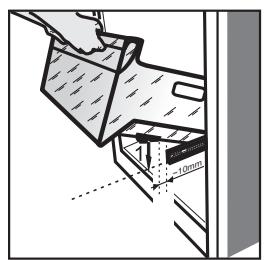
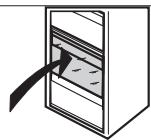
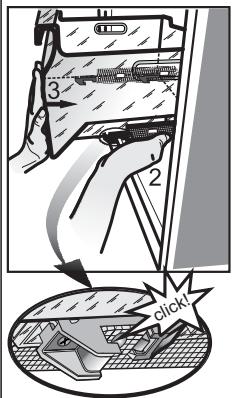
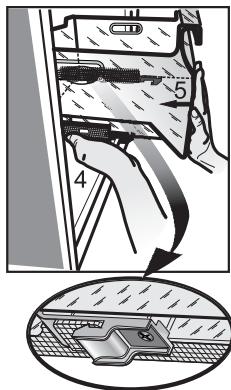
REMOVING/INSERT THE FREEZER INTERIOR 271
NOTE:
The instructions apply to several models, so there may be differences. Sections which only apply to certain appliances are indicated with an asterisk (*)
Functions which are dedicated specially for your already bought model of product you will find in QUICK START GUIDE.
1. INSTALLATION
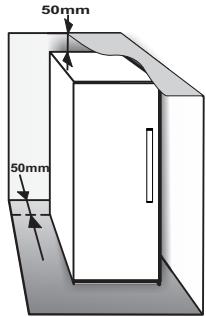
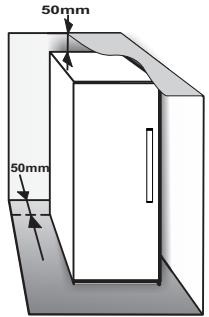
1.1. INSTALLING SINGLE APPLIANCE
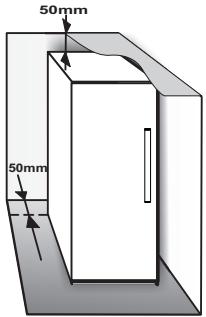
To guarantee adequate ventilation, leave a space on both sides and above the appliance.
The distance between the rear of the appliance and the wall behind the appliance should be at least 50mm.
A reduction of this space will increase the Energy consumption of product.
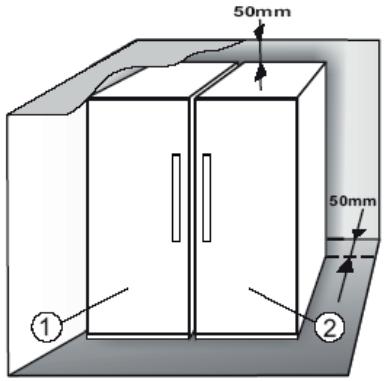
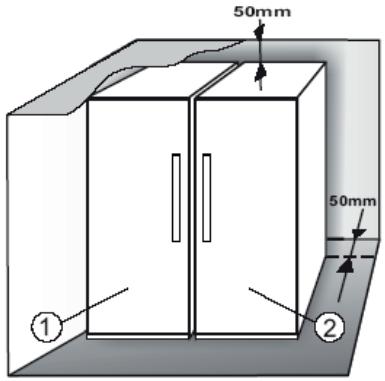
1.2. INSTALLING TWO APPLIANCES
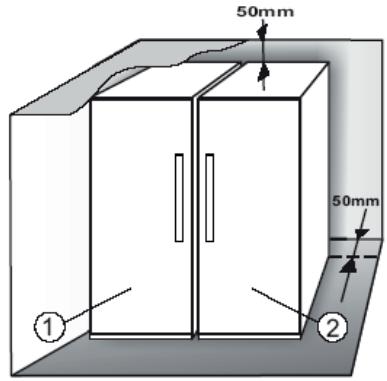
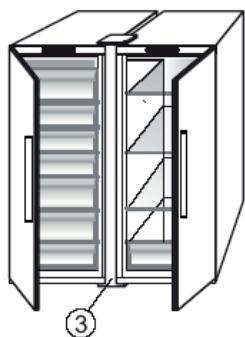
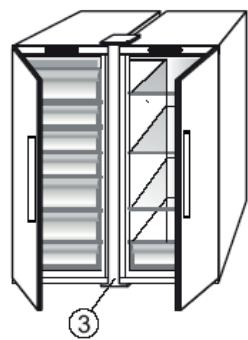
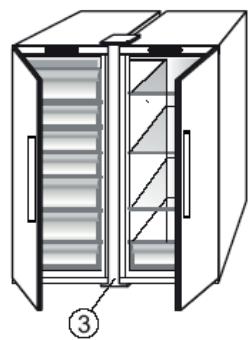
During installing the freezer ① and the fridge ② together ensure that the freezer is located on the left and the fridge on the right (as shown on the drawing). Left side of refrigerator is equipped with special device in order to avoid condensation problems between appliances.
We recommended installing two appliances together using the linking-kit ③ (as shown on the drawing). You can buy it in Service.
1.3. ADJUST DOORS (IF AVAILABLE)
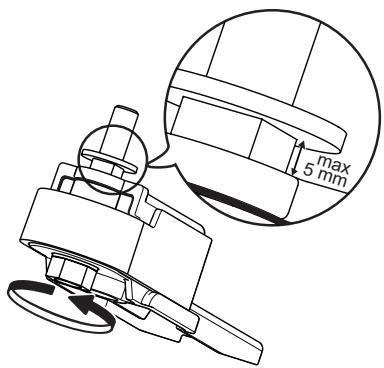
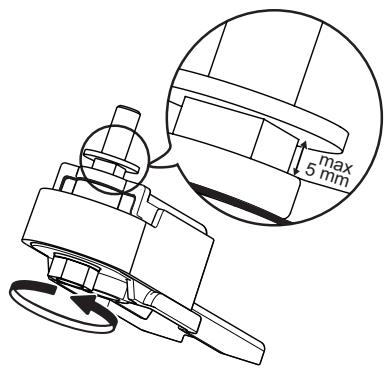
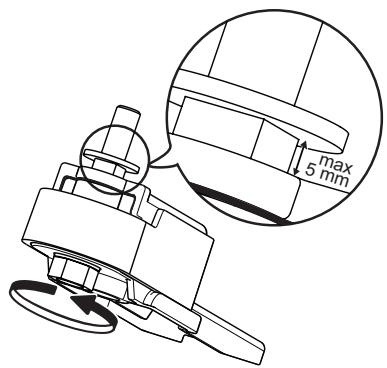
To level the doors using the adjustable lower hinge (select models)
If the refrigerator door is lower than the freezer door, raise the refrigerator door by turning the adjustment screw counterclockwise using a M10 wrench.
If the freezer door is lower than the refrigerator door, raise the freezer door by turning the adjustment screw counterclockwise using a M10 wrench.
2. FUNCTIONS
2.1.SMART DISPLAY*
This function can be used to save energy. Please follow the instructions contained in the Quick Start Guide to activate/deactivate the function. Two seconds after activation of the Smart Display, the display goes off. To adjust the temperature or use other functions, it is necessary to activate the display by pressing any button. After about 15 seconds without performing any action, the display goes off again. When function is deactivated the normal display is restored. The Smart Display is automatically disabled after a power failure. Remember that this function does not disconnect the appliance from the power supply, but only reduce the energy consumed by external display.
Note: The declared appliance energy consumption refers to operation with the Smart Display function activated. This function is available only on the model with User Interface on the door.
2.2.6TH SENSE FREEZE CONTROL 6th / PROFREEZE FREEZE CONTROL
The 6th Sense Freeze Control/ ProFreeze Freeze Control function works to maintain the right temperature in the following cases:
- Door opened for a while
The function activates when door opening causes the internal temperature to increase to values that do not ensure safe storage of food and remains active until optimal storage conditions have been restored.
- Fresh food stored in the freezer
The function activates when fresh food is placed in the freezer and remains active until optimal freezing conditions are reached so as to ensure the best freezing quality with the lowest power consumption.
Note: Besides the quantity of food loaded into the freezer, ambient temperature and the quantity of food already inside the freezer affect the duration of the 6th Sense Freeze Control/ ProFreeze Freeze Control function. Therefore significant duration variations are quite normal.
2.3. ON/STAND BY

This function turns On/Stand-by the freezer compartments. To put the product in Stand-by, press & hold the On/Stand-by button for 3 seconds. When the appliance is in Stand-by, the light inside the freezer compartment does not work. Remember that this operation does not disconnect the appliance from the power supply. To switch the appliance On again, simply press the On/Stand-By button .
2.4. BLACK OUT ALARM
After a power blackout, your product is designed to automatically monitor the temperature in the freezer when electricity is resupplied. If the temperature in the freezer rises above freezing level, the Black Out indicator turns on, the Alarm indicator blinks and the acoustical alarm sounds when electricity is resupplied.
To reset the alarm press the Stop Alarm button just once.
In case of Black Out Alarm, the following actions are recommended:
-
If the food in the freezer is unfrozen but still cold, all the food in the freezer should be eaten within the next 24 hours.
-
If the food in the freezer is frozen, this indicates the food was thawed and then refrozen when electricity was re-supplied which degrades taste, quality and nutritional value and also could be unsafe. It is recommended to not consume the food but to dispose of the entire content of the freezer. The Black Out Alarm is designed to provide guidance on food quality in the freezer in the event of electricity black out. This system does not guarantee food quality or safety and consumers are advised to use their own judgment in evaluating food quality in freezer compartment.
2.5.TEMPERATURE ALARM
The acoustic alarm sounds and temperature indicator (^) blinks. The alarm is activated when:
- The appliance is connected to the power supply after prolonged disuse
- The freezer compartment temperature is too high
- The quantity of fresh foods loaded into the freezer exceeds that indicated on the rating plate
- The freezer door has been left open for a long time. To mute the alarm buzzer press Stop Alarm button just once. The Alarm indicator is automatically turned-off as soon as the freezer compartment reaches a temperature below -10^ and the temperature set indicator (^) stop blinking and shows the chosen setting.
2.6. DOOR OPEN ALARM
The Alarm icon lights up blinking and the acoustic alarm sounds. The alarm is activated when the door is left open for more than 2 minutes. To disengage the door alarm close the door, or press once Stop Alarm button to mute the acoustic alarm.
2.7.PARTY MODE\*
Use this function to chill drinks inside the freezer compartment. 30 minutes after selection (the time required to chill a 0.75 I bottle without the glass breaking), the symbol flashes, an acoustic alarm sounds: remove the bottle from the freezer compartment and press the Stop Alarm button to disable the alarm.
Important: do not leave the bottle inside the freezer compartment longer than the time necessary for chilling.
2.8.SHOCK FREEZE\*
The "Shock Freeze" compartment is specifically designed to freeze up to 2kg of fresh food extremely quickly. The ultra-fast "Shock Freeze" function minimizes the formation of ice crystals inside the food as it freezes, thus ensuring it is of the best possible quality when defrosted prior to consumption. When the "Shock Freeze" function is not active, the compartment can be used as normal for traditional freezing or for the storage of already frozen foods.
Note: When the Shock Freeze function is active you may hear a humming sound. This is absolutely normal and is caused by airflow that permits optimum cold distribution inside compartment.
Activating and deactivating the "Shock Freeze" function:
- Make sure at least 12 hours have passed since the last time the "Shock Freeze" function was activated (if at all). Do not activate the function more frequently than once every 12 hours.
- Make sure that the "Fast Freeze" function is not active: "Shock Freeze" and "Fast Freeze" functions cannot be active together at the same time.
- Empty the "Shock Freeze" compartment.
- Activate the "Shock Freeze" function by briefly touching the button on the control panel: the icon lights up and the fans on the bottom of the compartment come on, increasing the flow of cold air and accelerating the freezing process as a result.
- Place the food to be frozen inside the compartment, a few centimeters (min. 2 cm) away from the fans on the back of the compartment, so that cold air can circulate.
-
To achieve maximum freezing speed, we recommend not to deactivate the "Shock Freeze" function until its automatic deactivation, keeping closed the door
-
The "Shock Freeze" function is automatically deactivated 4-5 hours after its activation: the indicator switches off and the fans are deactivated. The "Shock Freeze" function may nevertheless be switched off at any time as desired, by briefly pressing the button on the control panel: the indicator switches off and the fans are deactivated.
Attention:
- Incompatibility with the "Fast Freeze" function
- To guarantee optimal performance, the "Shock Freeze" and "Fast Freeze" functions cannot be used at the same time. Therefore, if the "Fast Freeze" function has been already engaged, it has to be disengaged first to activate the "Shock Freeze" function (and vice-versa).
- If the fans in the Shock Freeze compartment do not start working
After the "Shock Freeze" function has been activated, it may happen that the indicator lights up as expected, but the fans do not start working. This is normal and means that freezer defrosting is in progress. At the end of the defrosting phase (maximum duration: 1.5 hours), the fans will automatically start working and the "Shock Freeze" process will begin as normal.
- If the indicator does not light up
If, after the button is pressed, the icon lights up: in this case the button has been pressed for too long. To activate the "Shock Freeze" function, first deactivate the Fast Freeze function (holding the button for 3 seconds, then briefly touch the button, without keeping it pressed for more than 1 second.
2.9.FAST FREEZE\*
The amount of fresh food (in kg) that can be frozen in 24 hours is indicated on the appliance rating plate.
This function can be used for optimum appliance performance, 24 hours before placing fresh food in the freezer Please follow the instructions contained in the Quick Start Guide to activate/deactivate the function. After placing fresh food in the freezer, 24 hours on Fast Freeze function is generally sufficient; After 50 hours the Fast Freeze function automatically deactivates.
Attention:
In order to save energy, when freezing small amounts of food, the fast freeze function can be deactivated after a few hours.
- Incompatibility with the "Shock Freeze" function
To guarantee optimal performance, the "Shock Freeze" and "Fast Freeze" functions cannot be used at the same time. Therefore, if the "Fast Freeze" function has been already engaged, it has to be disengaged first to activate the "Shock Freeze" function (and vice-versa).
2.10. ECO NIGHT FUNCTION (NIGHT TIME RATE)
The Eco Night function enables appliance energy consumption to be concentrated in the reduced rate hours (generally at night), when electricity is readily available and costs less than during the daytime (only in countries that utilise a time based multi-rate system - check energy rates with the local electricity company). To activate the function, press the button at the reduced rate start time (depending on the specific rates plan). For example, if the reduced rate starts at 8 p.m., press the button at that time. When the Eco Night indicator is ON, the function is ON. Once the function is activated, the appliance automatically adapts energy consumption according to the time selected, i.e. consuming less energy during the day than at night.
IMPORTANT: To operate properly, the function must be on during the night and day. The function remains on until deactivated (or it is deactivated in case of a power failure or appliance switch-off). To deactivate the function, press the button again. When the Eco Night indicator is OFF, the function is OFF.
Note: The declared appliance energy consumption refers to operation with the Eco Night function deactivated.
2.11. FREEZE CONTROL*
Freeze Control is an advanced technology that reduces temperature fluctuations in the whole freezer compartment to minimum, thanks to an innovative air system, totally independent from the fridge. Freeze burns are significantly reduced and food preserves its original quality and color.
To activate the Freeze Control choose the function from the menu, set to >ON< and press OK button to confirm the selection. To deactivate this function repeat the same procedure setting to >OFF< .
The function works properly in a defined range of temperature: between -22^ and -24^ .
When the function is engaged and the current temperature in the freezer is set to the warmer set point than -22^ , the temperature is automatically set to -22^ to match the working range.
If the function is engaged and the user modify the freezer temperature out of the working range, the function is automatically switched off.
In case of Fast freezing is engaged, the function "Freeze control" is inhibited until the Fast Freezing function switched off.
2.12.AUTOMATIC NO FROST
This product is designed to defrost automatically according to conditions of use and ambient humidity No Frost freezers provide chilled air circulation around the storage areas and prevent the formation of ice, thereby completely eliminating the need for defrosting. Frozen items don't stick to the walls, labeling stays legible and storage space remains neat and clear. In combination with the 6th Sense Freeze Control/ ProFreeze Freeze Control, not only does it control the sensor, but directs the cooling power exactly where it is needed, optimizing energy efficiency.
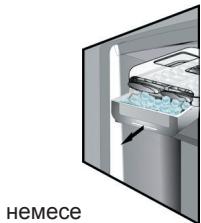
2.13. ICE MATE*
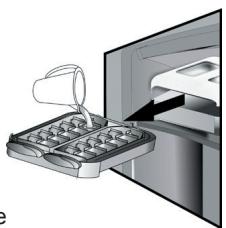
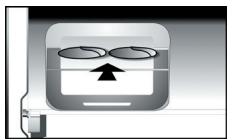
HOW TO MAKE ICE CUBES
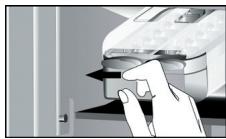
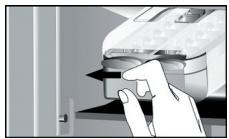
You can remove the ice cube tray by pulling it towards you.
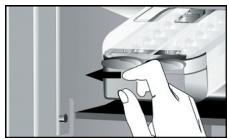
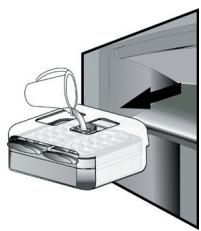
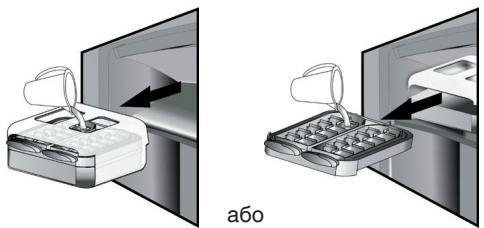
WARNING: fill with potable water only (maximum level = 2/3 of the overall capacity).
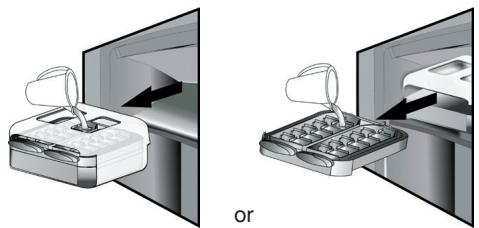
Place again the Ice Mate in freezer compartment, or reinsert the ice cube tray within the Ice Mate. Take care not to spill water.
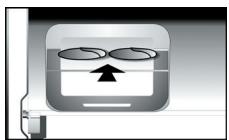
Wait until the ice cubes are formed (it is recommended to wait for about 4 hours).
NOTE: Ice Mate is removable. It can be placed in horizontal position anywhere in the freezer compartment or taken out of the appliance when ice-making is not required.
3. USE
3.1. HOW TO INCREASE FREEZER STORAGE CAPACITY
You can increase storage capacity in the freezer compartment by:
- removing the baskets / flaps* to allow the storage of big products.
- placing the food products directly on the freezer shelves.
- removing the Ice Mate*.
- removing bottle rack*.
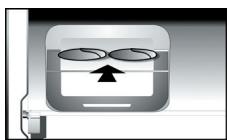
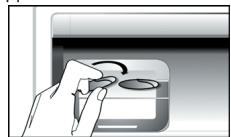
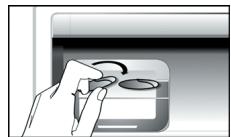
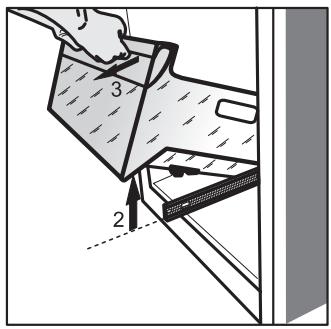
HOW TO TAKE ICE CUBES
Make sure that the storage bin is in place under the ice tray. If not, slide into place.
Twist one of levers firmly in the clockwise direction until the tray twists slightly. The ice cubes fall into the
storage bin.
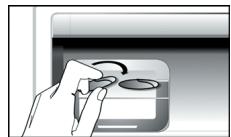
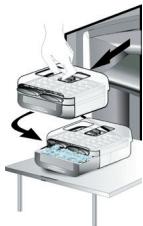
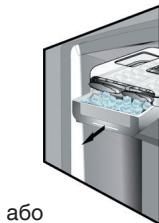
Repeat Step 2 for the other half of the tray, if necessary. To get ice, slightly lift up the storage bin and pull it towards you.
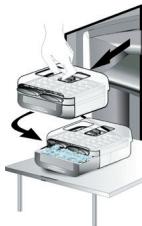
NOTE: if you prefer, you can remove the entire Ice Mate from the appliance, to take the ice cubes wherever is convenient for you (for example: directly on the table).
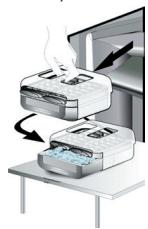
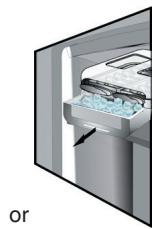
2.14. LED LIGHT SYSTEM*
The light system inside the freezer compartment uses LEDs light, allowing a better lightning as well as very low energy consumption. If the LED light system does not work, please contact the Service to replace it.
3.2. NOTES
- Do not block the air outlet area (on the back wall inside the product) with food products.
- If the freezer is provided with a flap, it is possible to maximize the storage volume by removing the flap.
- All shelves, flaps and pull-out baskets are removable.
- The internal temperatures of the appliance may be affected by the ambient temperature, frequency of door opening, as well as location of the appliance. Temperature setting should take into consideration these factors.
- Unless otherwise specified the appliance accessories are not dishwasher safe.
4. FOOD-STORAGE TIPS
The freezer is the ideal storage location for store frozen food, make ice cubes and freeze fresh food in the freezer compartment.
The maximum number of kilograms of fresh food that can be frozen within a 24-hour period is indicated on the rating plate ( kg / 24 ~h ).
If you have a little quantity of food to store in the freezer, we recommend to use the coldest areas of your freezer compartment, corresponding to the upper or the middle area, depending on your model (see the product sheet to know which is the area where is suggested to freeze fresh food).
4.1. STORAGE TIME OF FROZEN FOODS
The table shows the recommended storage time for frozen fresh foods.
| FOODS | STORAGE TIME (months) |
| Meat | |
| Beef | 8 – 12 |
| Pork, veal | 6 – 9 |
| Lamb | 6 – 8 |
| Rabbit | 4 – 6 |
| Mince / offal | 2 – 3 |
| Sausages | 1 – 2 |
| Poultry | |
| Chicken | 5 – 7 |
| Turkey | 6 |
| Giblets | 2 – 3 |
| Crustaceans | |
| Molluscs creab, lobster | 1 – 2 |
| Creab, lobster | 1 – 2 |
| Shellfish | |
| Oyster, shucked | 1 – 2 |
| Fish | |
| “fatty” (salmon, herring, mackerel) | 2 – 3 |
| “lean” (cod, sole) | 3 – 4 |
| Stews | |
| Meat, poultry | 2 – 3 |
| Dairy products | |
| Butter | 6 |
| Cheese | 3 |
| Double cream | 1 – 2 |
| Ice-cream | 2 – 3 |
| Eggs | 8 |
| Soups and sauces | |
| Soup | 2 – 3 |
| Meat sauce | 2 – 3 |
| Pate | 1 |
| Ratatouille | 8 |
| Pastry and bread | |
| Bread | 1 – 2 |
| Cakes (plain) | 4 |
| Gateaux (cakes) | 2 – 3 |
| Crepes | 1 – 2 |
| Uncooked pastry | 2 – 3 |
| Quiche | 1 – 2 |
| Pizza | 1 – 2 |
FRUITS AND VEGETABLES
| FOODS | STORAGE TIME (months) |
| Fruits | |
| Apples | 12 |
| Apricots | 8 |
| Blackberries | 8 – 12 |
| Blackcurrants / Redcurrants | 8 – 12 |
| Cherries | 10 |
| Peaches | 10 |
| Pears | 8 – 12 |
| Plum | 10 |
| Raspberries | 8 – 12 |
| Strawberries | 10 |
| Rhubarb | 10 |
| Fruit juices (orange, lemon, grapefruit) | 4 – 6 |
| Vegetables | 8 – 10 |
| Asparagus | 6 – 8 |
| Basil | 12 |
| Beans | 8 – 10 |
| Artichokes | 8 – 10 |
| Broccoli | 8 – 10 |
| Brussels sprout | 8 – 10 |
| Cauliflower | 10 – 12 |
| Carrots | 6 – 8 |
| Celery | 8 |
| Mushrooms (champignons) | 6 – 8 |
| Parsley | 10 – 12 |
| Peppers | 12 |
| Peas | 12 |
| Runner-beans | 12 |
| Spinach | 8 – 10 |
| Tomatoes | 8 – 10 |
| Zucchini |
We recommend to label and date all your frozen food. Adding a label will help you to identify foods and to know when they should be used before their quality deteriorates. Do not re-freeze defrosted food.
4.2. TIPS FOR FREEZING AND STORING FRESH FOOD
- Before freezing, wrap and seal fresh food in: aluminium foil, cling film, air and water-tight plastic bags, polythene containers with lids or freezer containers suitable for freezing fresh food.
- Food must be fresh, mature and of prime quality in order to obtain high quality frozen food.
- Fresh vegetables and fruit should preferably be frozen as soon as they are picked to maintain the full original nutritional value, consistency, colour and flavor.
Some meat, especially game, should be hung before it is frozen.
Note:
Always leave hot food to cool before placing in the freezer.
Eat fully or partially defrosted foods immediately. Do not refreeze unless the food is cooked after it has thawed. Once cooked, the thawed food can be refrozen.
- Do not freeze bottles with liquid.
4.3. USING ICE PACKS*
Ice packs helps in keeping frozen the foodstuffs in case of power failure. For the best usage of them, place them above food stored in the top of compartment.
4.4. FROZEN FOOD: SHOPPING TIPS
When purchasing frozen food products:
- Ensure that the packaging is not damaged (frozen food in damaged packaging may have deteriorated). If the package is swollen or has damp patches, it may not have been stored under optimal conditions and defrosting may have already begun.
- When shopping, buy frozen foods at the end of your trip and transport them in a thermally insulated cool bag.
- Once at home, place the frozen foods immediately in the freezer.
If food has defrosted even partially, do not re-freeze it. Consume within 24 hours. - Avoid or reduce temperature variations to the minimum. Respect the best-before date on the package.
Always observe the storage information on the package.
5. FUNCTIONAL SOUNDS
Sounds coming from your appliances are normal since it has a number of fans and engines to regulate performances that switch on and off automatically.
Some of the functional sounds can be reduced through
- Leveling the appliance and installing it on an even surface
- Separating and avoiding contact between the appliance and furniture.
- Checking if the internal components are correctly placed.
- Checking if bottles and containers are not in contact with each other.
Some of the functional sounds you might hear:
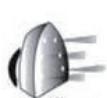
A hissing sound when switching on the appliance for the first time or after a long pause.
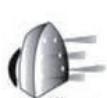
Hissss
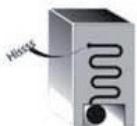
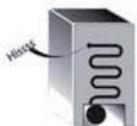
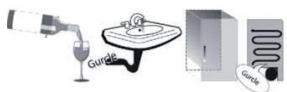
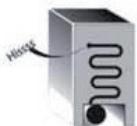
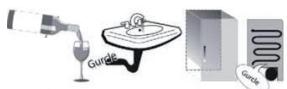
A gurgling sound when refrigerant fluid enters into the pipes.
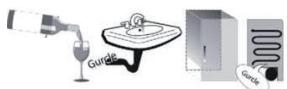
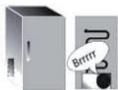
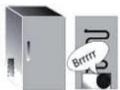
BRRR sound is from the compressor running.
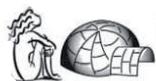
Brrr
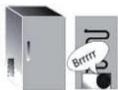
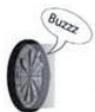
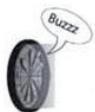
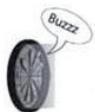
Buzzing sound when water valve or fan start working.

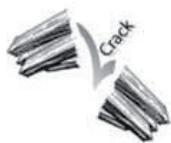
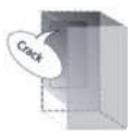
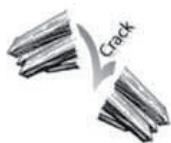
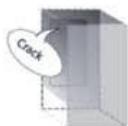
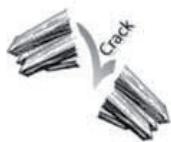
A cracking sound when compressor starts or when ready ice drops into ice box abrupt clicks when compressor switches on and off.
The CLICK is from the thermostat which adjusts how often the compressor is running.



6. RECOMMENDATION IN CASE OF NO USE OF THE APPLIANCE
6.1.ABSENCE/VACATION
In case longer absence its recommended to use up food and to disconnect the appliance to save energy.
6.2. MOVING
- Take out all internal parts.
- Wrap them well, and fix them together with adhesive tape so that they do not bang together or get lost.
- Screw the adjustable feet so that they do not touch the support surface.
- Close and fix door with adhesive tape and, again using adhesive tape, fix the power cable to the appliance.
6.3. POWER FAILURE
In the event of a power failure, call the local office of your electricity supply company and ask how long it is going to last.
Note: Bear in mind that a full appliance will stay cold longer than a partially filled one.
If ice crystals are still visible on the food, it may be frozen again, although flavour and aroma may be affected.
If food is found to be in a poor condition, it is best to throw it away.
For power failures lasting up to 24 hours.
- Keep the door of the appliance closed. This will allow the stored food to stay cold as long as possible.
For power failures lasting more than 24 hours.
-
Empty the freezer compartment and arrange the food in a portable freezer. If this type of freezer is not available and, likewise, no artificial ice packs are available, try to use up the food, which is more easily perishable.
-
Empty the ice tray.
7. MAINTENANCE AND CLEANING
Before any cleaning or maintenance operation, unplug the appliance from the mains or disconnect the electrical power supply.
Periodically clean the appliance with a cloth and a solution of lukewarm water and neutral detergent specifically for refrigerator interiors. Never use abrasives. Never clean refrigerator parts with flammable fluids. The fumes can create a fire hazard or explosion. Clean the outside of the appliance and the door seal with a damp cloth and dry with a soft cloth.
Do not use steam cleaners.
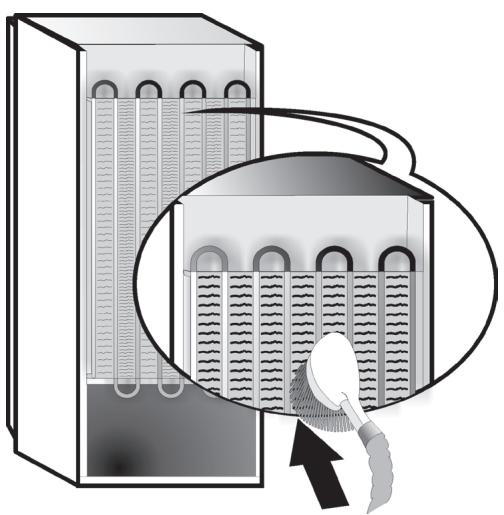
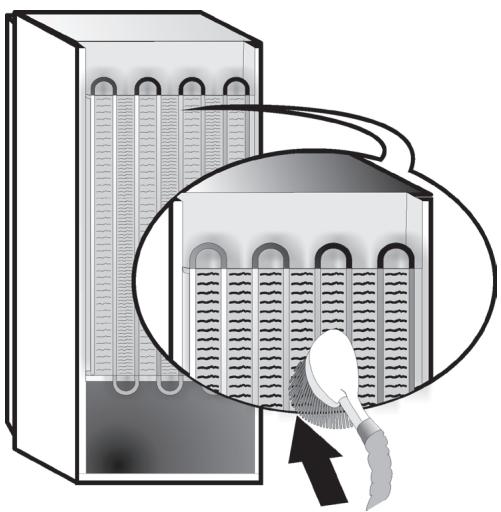
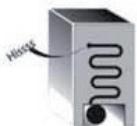
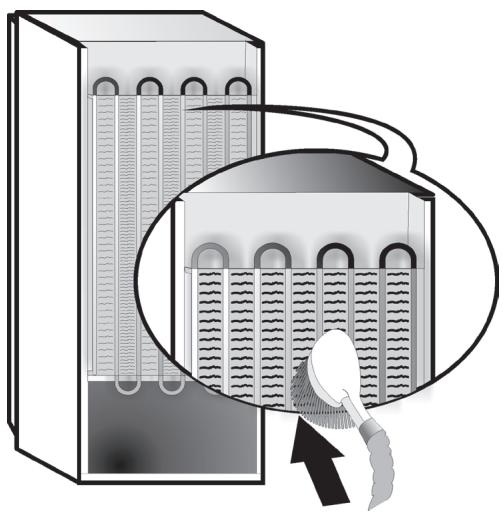
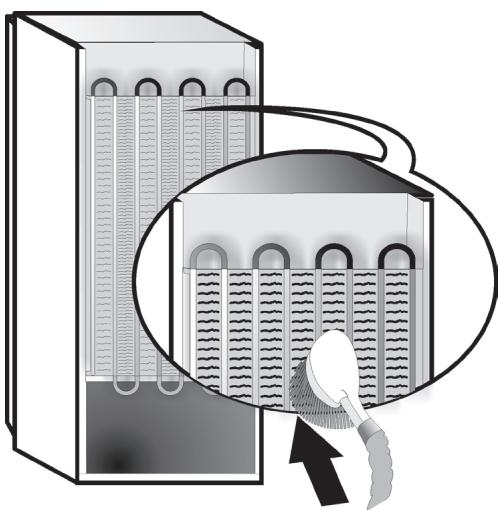
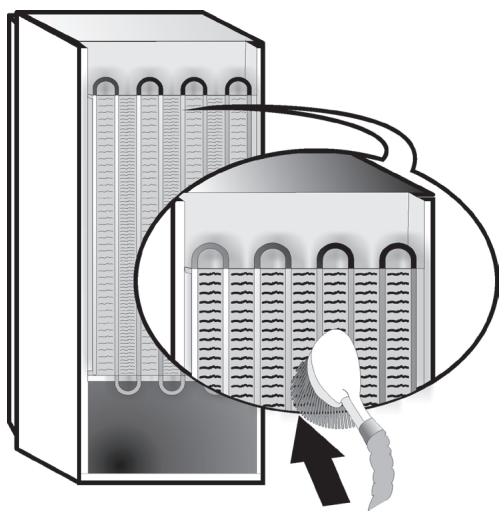
Condenser placed in the rear of the appliance should be cleaned regularly using a vacuum cleaner.
Important:
- The buttons and control panel display must not be cleaned with alcohol or alcohol-derived substances, but with a dry cloth.
- The refrigeration system pipes are located near the defrost pan and can become hot. Periodically clean them with a vacuum cleaner.
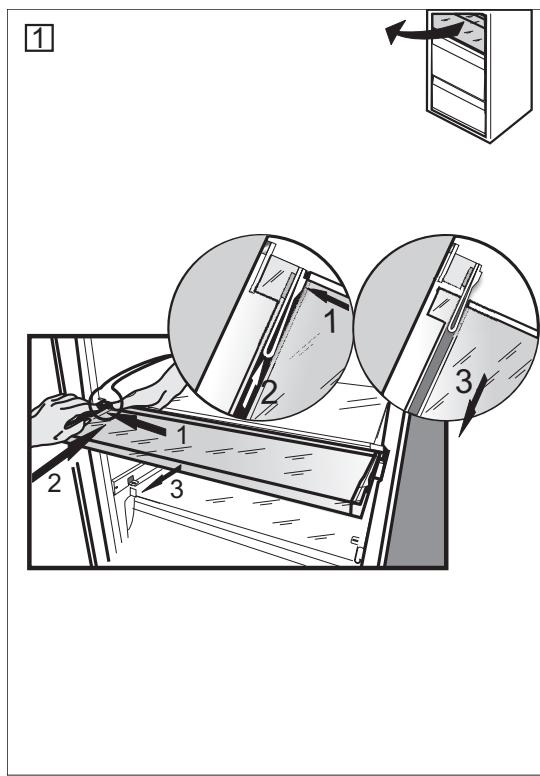
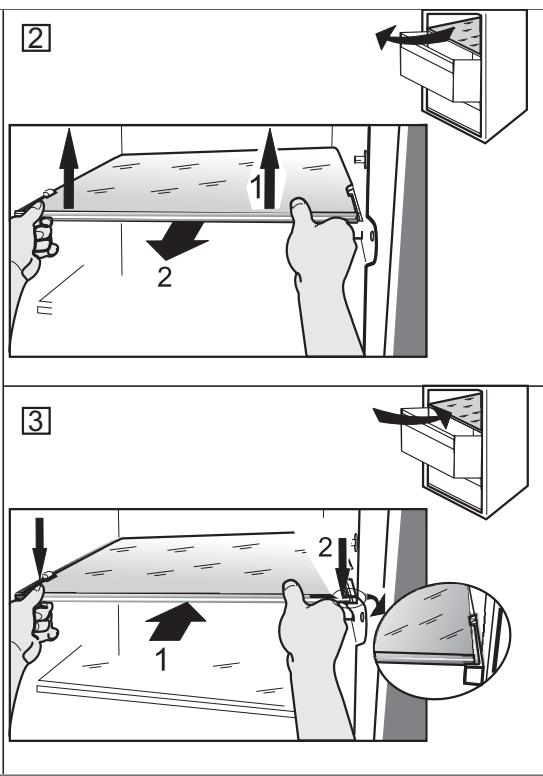
- To remove or insert the glass shelf, move up the front part of the shelf to pass the stopper.
8. TROUBLESHOOTING GUIDE
8.1. BEFORE CONTACTING AFTER-SALES SERVICE...
Performance problems often result from little things you can find and fix yourself without tools of any kind.
| PROBLEM | SOLUTION |
| The appliance is not working: | Is the power cable plugged into a live socket with the proper voltage? Have you checked the protection devices and fuses of the electrical system in your home? |
| If there is water in the defrost pan: | This is normal in hot, damp weather. The pan can even be half full. Make sure the appliance is level so that the water does not overflow. |
| If the edges of the appliance cabinet, which come in contact with the door seal, are warm to the touch: | This is normal in hot weather and when the compressor is running. |
| If the light does not work: | Have you checked the protection devices and fuses of the electrical system in your home? Is the power cable plugged into a live socket with the proper voltage? In case the LEDs are broken the user must call the Service for exchange of the same type available only at our After-sales Service Centers or authorized dealers. |
| If the motor seems to run too much: | Motor running time depends on different things: number of door openings, amount of food stored, temperature of the room, setting of the temperature controls. Is the condenser (back the appliance) free of dust and fluff? Are the door properly closed? Are the door seals properly fitted? On hot days or if the room is warm, the motor naturally runs longer. If the appliance door has been left open for a while or if large amounts of food have been stored, the motor will run longer in order to cool down the interior of the appliance. |
| If the appliance temperature is too high: | Are the appliance controls correctly set? Has a large amount of food been added to the appliance? Check that the door is not opened too often. Check that the door close properly. |
| If the doors do not open and close properly: | Check that food packages are not blocking the door. Check that the internal parts or automatic ice maker are not out of position. Check that the door seals are not dirty or sticky. Ensure the appliance is level. |
8.2. FAILURES
In the event of operation alarms, they will also be displayed in the digits LEDs, (e.g. Failure1, Failure 2, etc...) call After-sales Service and specify the alarm code. The acoustic alarm sounds, the Alarm icon lights up and the F letter on the digit display blinks according to failure code described below:
| Failure code | Visualization | |
| Error 2 | F letter blink on/off at 0,5 sec. Blinks ON 2 times then remain off for 5 seconds. Pattern repeats. | -88 x2 |
| Error 3 | F letter blink on/off at 0,5 sec. Blinks ON 3 times then remain off for 5 seconds. Pattern repeats. | -88 x3 |
| Error 6 | F letter blink on/off at 0,5 sec. Blinks ON 6 times then remain off for 5 seconds. Pattern repeats. | -88 x6 |
9. AFTER-SALES SERVICE
Before contacting After-Sales Service:
Switch the appliance on again to see if the problem has been solved. If it has not, disconnect the appliance from the power supply and wait for about an hour before switching on again.
If, after performing the checks described in the Troubleshooting Guide and switching the appliance on again, your appliance still does not work properly, contact the After-sales Service, explain the problem.
Specify:
the model and appliance serial number (stated on the rating plate),
the nature of the problem,
SERVICE
0000 000 00000

- the Service number (the number after the word SERVICE on the data plate on the inside of the appliance),
- your full address,
- your telephone number and area code.
Note:
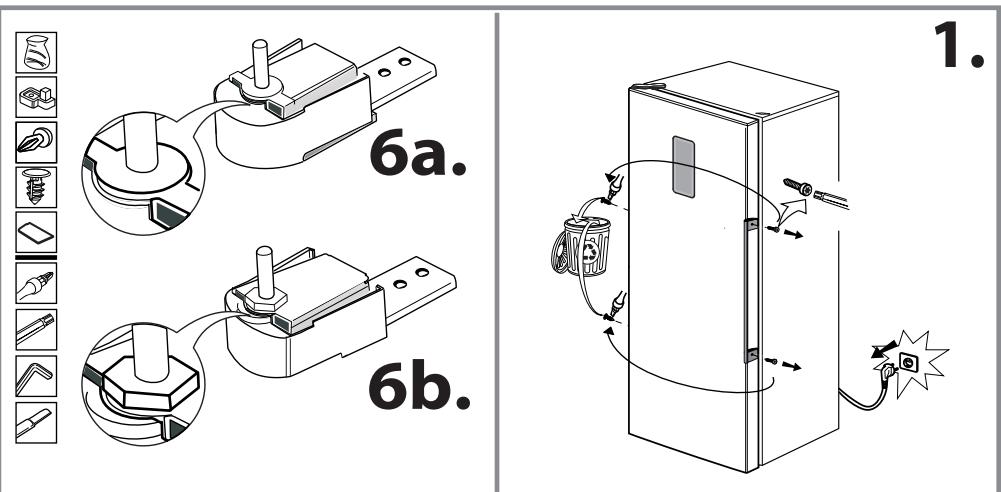
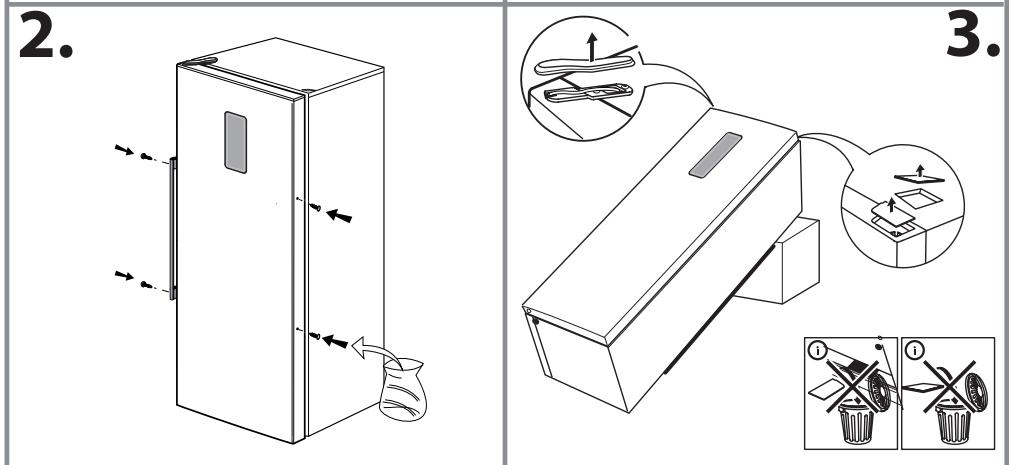
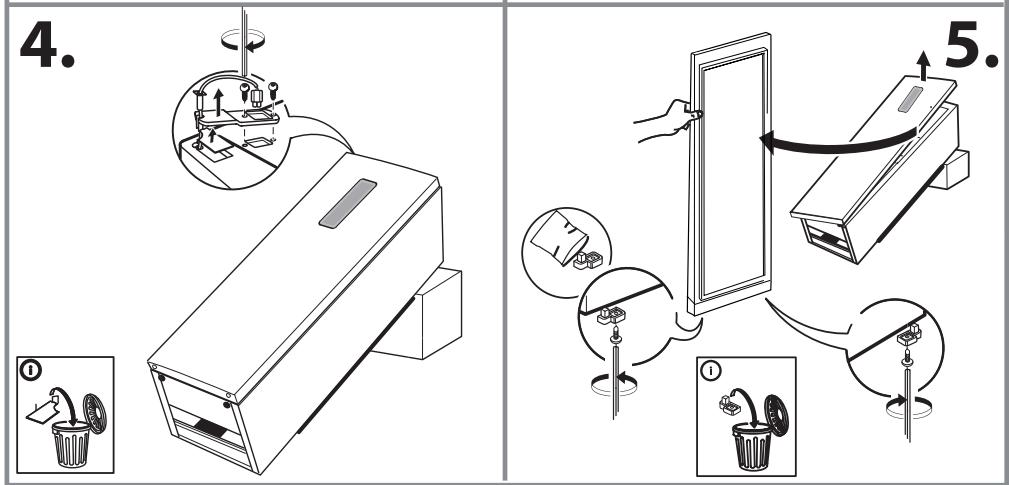
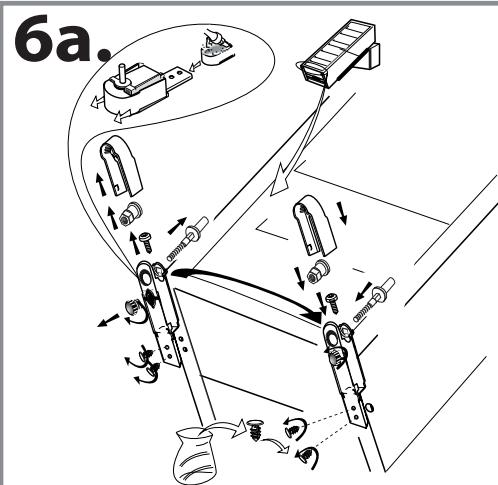
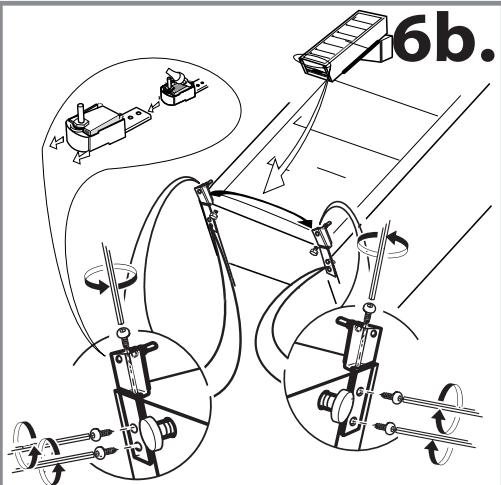
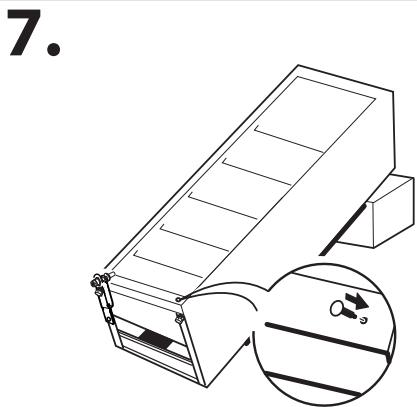
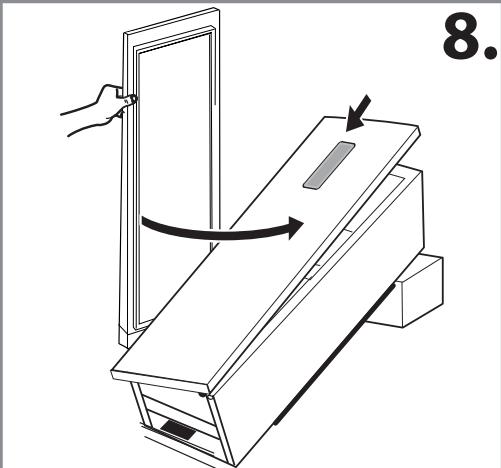
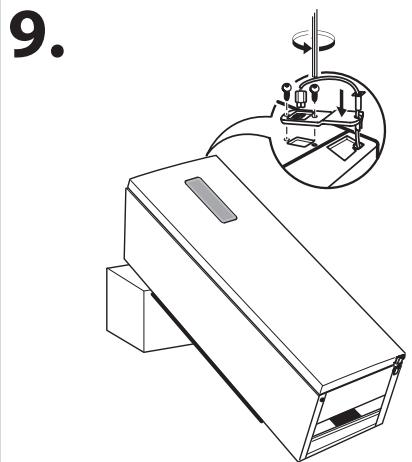
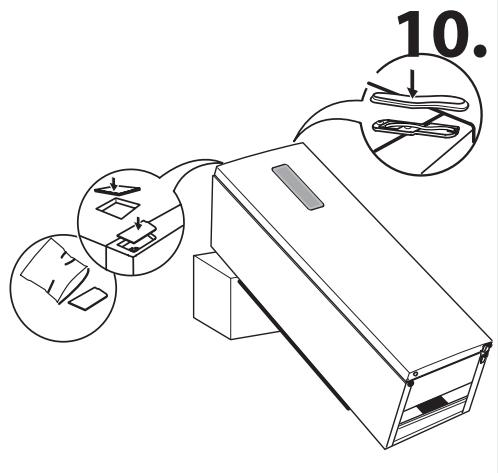
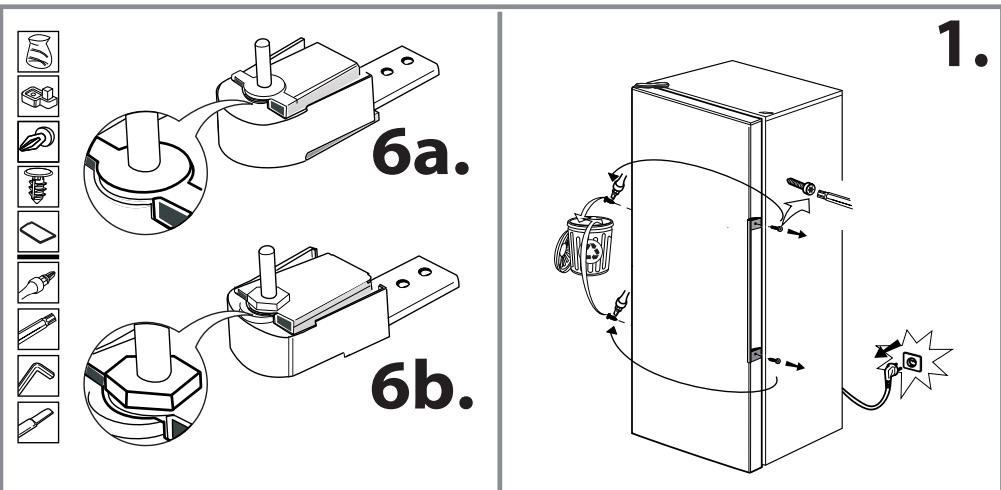
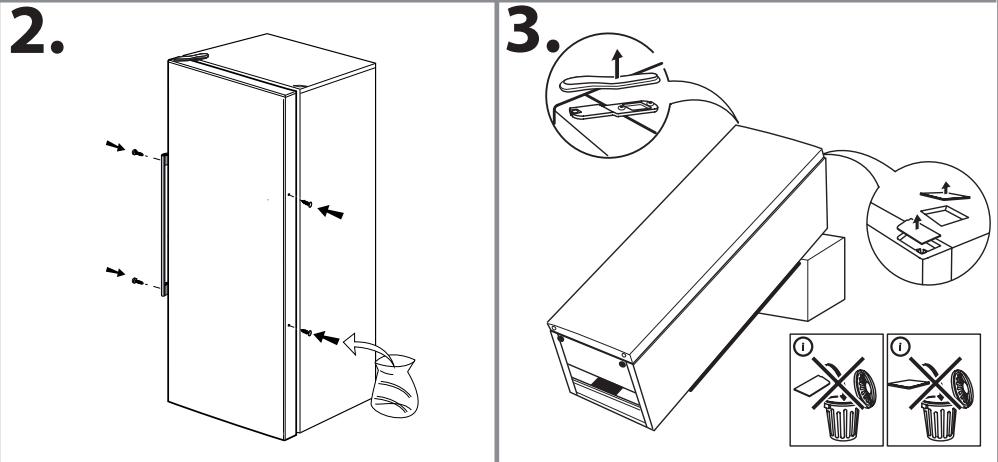
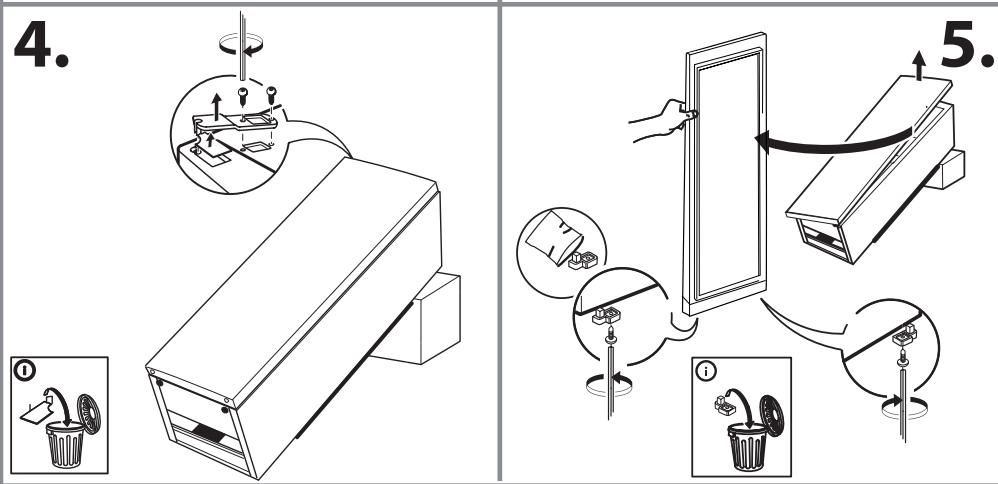
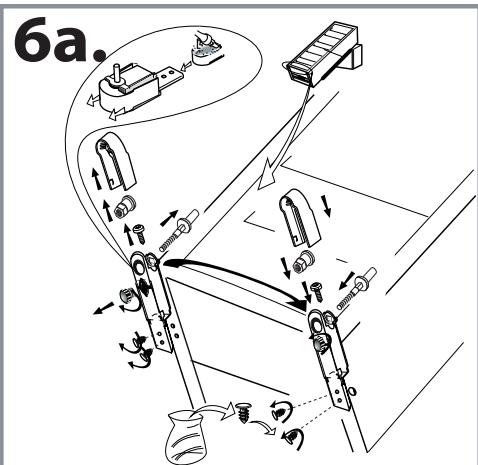
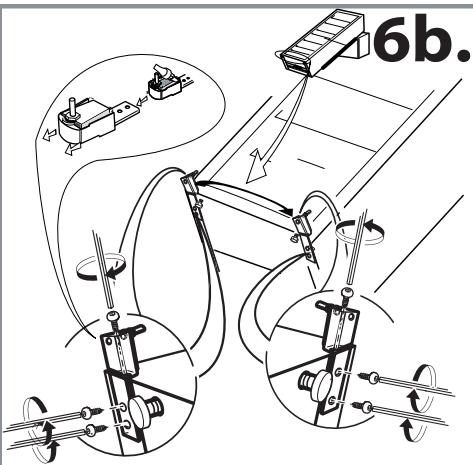
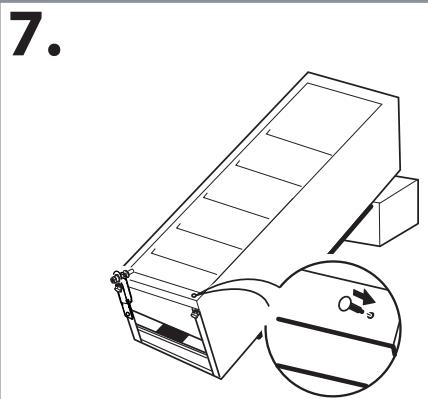
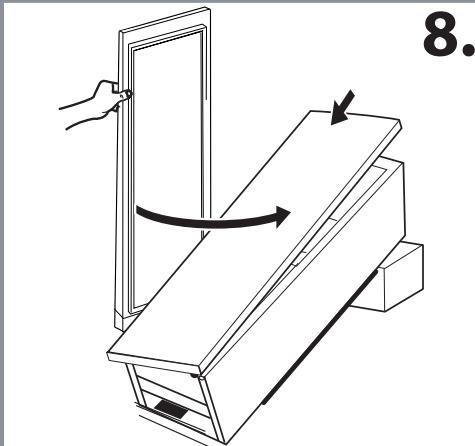
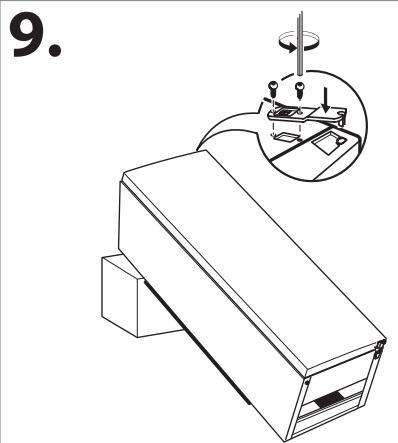
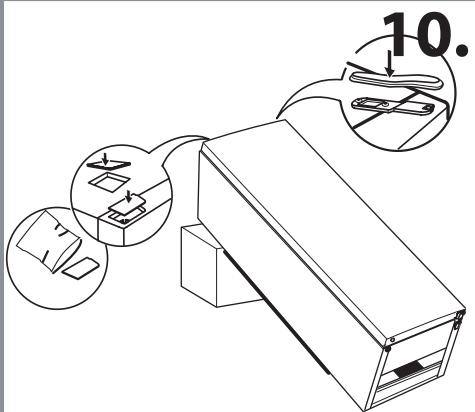
The direction of door opening can be changed. If this operation is performed by After-sales Service it is not covered by the warranty.
(1)
(2)
1
3
4
2


01/16
01/16
400010844785
195138713.00
AR BG
CZ DA
NL FI F
R DE GR
HU IT
KZ NO
PL PT
RO RU S
K ES SV
UK GB
- BLACK OUT ALARM 2.4
- 2.5
- 2.6
- \*SHOCK FREEZE 2.8
- gaii gaiy jgiy
- *FREEZE CONTROL 2.11
- LsIaSgJdAJI.2.12
- "ae yagglg 1yag g
- 边
- \*gill gge alal.4.3
- gillai:Jalal pabll.4.4
- aillg 7
- Ako HndnHaTopbT He CBetHe
- 2.9.FAST FREEZE\*
- KohnuechtBoto Ha npechnte xpaHn (B kg), KOHTo MOrat da 6bDat 3ampa3EH 3a 24 Yaca, e Nocoueho Ha ta6eIkata C OCHOBHTe daHHN.
- BHHMaHHe:
- - HecbBmectHMOCT c yHKnIyTa „Shock Freeze"
- OPSTILLING AF TO APPARATER
- HANDLEIDING VOOR PROBLEEMOPLOSSING
- 8.1.VOORDAT U CONTACT OPNEEMT MET DE CONSUMENTENSERVICE
- Luku 2: TOIMINNOT 65
- Luku 3: KÄYTTÖ 68
- Luku 4: VINKKEJÄ RUOAN SÄILTYKSEEN 69
- Luku 5: TOIMINTAAANET. 71
- Luku 6: SUOSITELTAVAT TOIMENPITEET, JOS LAIETTA EI KAYTETÄ.72
- Luku 7: LAITTEEN HUOLTO JA PUHDISTUS. 72
- Luku 8: VIANMAÄRITYSOPAS 73
- Luku 9: HUOLTOPALVELU. 74
- Muut:
- HUOM.:
- 2.5.ΣYNAIEPMO ΕOEPMOKPAZIAZ
- ΣYNATEPMOZ ANOIXTHZ IIOPTA
- OPHATY
- 1.1.BIP KYPbIJIfBiHbl OPHTAY
- EKI KYPbIJIbIbHIbI OPHATY
- ECIKTEPDI PETTEY (BAP BOJCA)
- 2.ФУнкцялар
- 2.1.SMART DISPLAY (CMAPTДИСПЛЕN)
- 2.2.6TH SENSE KATbIPyIbI BACKAPY senso/ PROFREEZE KATbIPyIbI BACKAPY
- -Ecik 6ipa3 yaKbITka aWbJnca
- -БанфынТаразмУздатКьшт calTalca
- 2.3.KOCY/KYTY
- 2.4.KYATTbI OUIPY DA6blJIbI
- TEMNEPATYPA DAbbIbl
- 2.13.MY3XACAYKAJIbIbI\*
- MY3 KECEKTEPIH KACAY KOblI
- Пайдалану
- 3.1.M¥3DATKbIITbIH CAKTAY CbIbIMdbIbIFbIH APTTbIPY KOJIbl
- M¥3 KECEKTEPIH AJY KOJIbI
- JAPbIK DINOITbI JAM KYJECI*
- 3.2.ECKEPTNIENEP
- TAFAMdbI CAKTAY KEHECTEPI
- 4.1.M¥3ДATbIJIFAH A3bIK-TYJIKTICAKTAY YAKblTbl
- 5.ФУнкцИОHAДыК ДыБыICTAP
- Kei6ip fynKuOnHaNdbIK dbIbICTapdbI KeNeciJe a3aayra 60naDbI:
- KYPbIINFbIHbI PAIDAJIAHbAY XAFDAIbIHDAfbl YCbIHbIC
- 6.1.YAKbITWA JOK BOJY/DEMJIbIC
- OPHbIH AYbiCTbIPY
- 6.3.KYAT IPKINICI
- cafatake deinco3bnaTbH KyaT ipkiliCTepi yuiH.
- cafattah aca co3bJnatbH Kyat ipknicTepi yih.
- KYPbIINFbIFA TEXHnKAJIbIK KbI3MET KOPCETY XHE TA3AJAY
- MaHbI3DbI:
- AKAYIbIKTAPdbI XOIO HYCKAYIbIFbl
- KENJIJIIK BOJBIHWA KbI3MET KOPCETY BOLIMHE XABAPNACyBih AJIDbIHDA...
- LIMPEZA E MANUTENÇÂO
- EcnBENTnIaTOpbI BOTdJIeHmN 3Kcnpcc-3amOpO3KN He BHIOUaOTC
- - Eczn uHdNkHatop He 3aropaeTc
- 2.9.БbvICTPOE 3AMOPAHINBAHNE (FAST FREEZE)*
- HOLINCTBO CBEHXN INPOyHTOB (B Hr), HOTOPOE MOXHO 3aMOpO3nTb B TeueHne 24 YacOB, yHa3aHO Ha NaCnOpTHo T6NIuHe.
- BHMaHHe:
- 3TaФУнкцИH HECOBMeCTmMa CФУнкцIeN 3HCnpecc-3aMOpO3H
- HHTeHCNBHOCTb HEKOTOpbIX 3BYKOB MOHHO yMeHbWNTb 3a Cuet
- BaHHo:
- EcnI OTKIOUOHe NPOdNtCMeHee 24 YacOB:
- EcnOTHKluoyehne npoDnTc8 60lee 24 yacob:
- ПОИСК И YYSTPAHEHNE HENCSРABHOCTEŠ
- 8.1.IPEKJDE YEM O6PAUATbCBA CEPBNCbIy CEHTP
- INNEHÄLLSFÖRTECKNING
- Kapitel 1: INSTALLATION 232
- Kapitel 2: FUNKTIONER 233
- Kapitel 3: ANVÄNDNING 236
- Kapitel 4: TIPS FÖR LIVSMEDELSFÖRVARING 237
- Kapitel 5: FUNKTIONSLJUD 239
- Kapitel 6: OM APPARATEN INTE ANVÄNDS 240
- Kapitel 7: RENGÖRING OCH UNDERHÄLL 240
- Kapitel 8: FELSÖKNINGSGUIDE 241
- - Ikhpo iHnHaTop \* He 3acBiyeTbca
- 2.9.UBNIDKE3AMOPOKYBAHH\*
- 06cargcbixnX npodyktiv (yH),rHi MoHHa 3amOpO3HTn npOTAROM 24 roDHN,3a3HaYeHO Ha Ta6JIuCi 3TexHInHMn DaHIMn pIJaLy.
- ybara!
- 2.10.ФУнкцЯECO NIGHT (HИЧИМ TAPИФ HA EЛЕKTPOEHEPTEI) \*
- PEGYIIOBAHHA MOPO3y*
- 2.12.ABTOMATUHEPO3MOPOKYBAHH
- JIOTOKДЛЯлбOу\*
- ПРИГOTУВАНHA KБИКIB ЛБОДY
- BHKOPNCTAHH
- 3.1.3bJIbIeHHI NPOCTOPY M0P03NJIbHOrO BIDIIeHHI IIA 3BEPiAHHI PNOyKTIB
- BNTAYBAHHH KUHKIB JbOdy
- 2.14.CNCTEMAOCBITJIENHH3I CBITJIOIDHIMNIHINKATOPAMN\*
- NIPMITHN
- 3BYH N PNIJADU PIД YAC ΦYHKIIOHYBAHЯ
- Cnoc6n 3MeHSeHHr rYHocTi DeaKHX 3BykIB, zo LyHaKoTB nID qac FyHnIOHyBaHNr npHaJADy
- PEHOMEHNDAU Y BUNAДну HEBNHOCTAHNYI PRNJADY
- 6.1.BIDCYTHICTb/BIDNYCTHA
- INPEE3A
- 6.3.3bI B EJEKTPOMEPEXH
- JHKUO 36iB EeHTpomepeHt PnBaE Do 24 roDnH, BnHOHaIte HabeHeHi HnHcYe II.
- JHKUo 36iB eIeHTpOmepeHI tPnBaE noHaJ 24 roHnH, BnHOHaTe HabeHeHi HnHcye II.
- 7.ObcIyROvBAHnI OuNueHHa
- Baxnbo!
- ПОСIBИК 3 УCYHEHHЯ HECПРABHOCTeI
- 8.1.IEPUHIX3BEPTATNCA B CEHTP IICJIAPDAXHORO OBCJYTOBYBAHH,03HAOMTECR 3 IHΦOPMAUCI,RYH HABEDHOHNXUE
- Chapter 1: INSTALLATION 256
- Chapter 2: FUNCTIONS 257
- Chapter 3: USE 260
- Chapter 4: FOOD-STORAGE TIPS .261
- Chapter 5: FUNCTIONAL SOUNDS 263
- Chapter 6: RECOMMENDATION IN CASE OF NO USE OF THE APPLIANCE.264
- Chapter 7: MAINTENANCE AND CLEANING 264
- Chapter 8: TROUBLESHOOTING GUIDE 265
- Chapter 9: AFTER-SALES SERVICE 266
- Others:
- NOTE:
- INSTALLATION
- INSTALLING SINGLE APPLIANCE
- INSTALLING TWO APPLIANCES
- ADJUST DOORS (IF AVAILABLE)
- FUNCTIONS
- 2.1.SMART DISPLAY*
- 2.2.6TH SENSE FREEZE CONTROL 6th / PROFREEZE FREEZE CONTROL
- - Door opened for a while
- - Fresh food stored in the freezer
- ON/STAND BY
- BLACK OUT ALARM
- 2.5.TEMPERATURE ALARM
- DOOR OPEN ALARM
- 2.7.PARTY MODE\*
- 2.8.SHOCK FREEZE\*
- Activating and deactivating the "Shock Freeze" function:
- Attention:
- - If the fans in the Shock Freeze compartment do not start working
- - If the indicator does not light up
- The amount of fresh food (in kg) that can be frozen in 24 hours is indicated on the appliance rating plate.
- - Incompatibility with the "Shock Freeze" function
- ECO NIGHT FUNCTION (NIGHT TIME RATE)
- FREEZE CONTROL*
- 2.12.AUTOMATIC NO FROST
- ICE MATE*
- HOW TO MAKE ICE CUBES
- USE
- HOW TO INCREASE FREEZER STORAGE CAPACITY
- HOW TO TAKE ICE CUBES
- LED LIGHT SYSTEM*
- NOTES
- FOOD-STORAGE TIPS
- STORAGE TIME OF FROZEN FOODS
- TIPS FOR FREEZING AND STORING FRESH FOOD
- USING ICE PACKS*
- FROZEN FOOD: SHOPPING TIPS
- FUNCTIONAL SOUNDS
- Some of the functional sounds can be reduced through
- Some of the functional sounds you might hear:
- RECOMMENDATION IN CASE OF NO USE OF THE APPLIANCE
- 6.1.ABSENCE/VACATION
- MOVING
- POWER FAILURE
- For power failures lasting up to 24 hours.
- For power failures lasting more than 24 hours.
- MAINTENANCE AND CLEANING
- Important:
- TROUBLESHOOTING GUIDE
- BEFORE CONTACTING AFTER-SALES SERVICE...
- FAILURES
- AFTER-SALES SERVICE
- Before contacting After-Sales Service:
- Specify:
- (1)
- (2)
Brand : WHIRLPOOL
Model : UW8 F1C XB N
Category : Fridge