
CBM25S - Microwaves PROLINE - Free user manual and instructions
Find the device manual for free CBM25S PROLINE in PDF.



| Brand | PROLINE |
| Model | CBM25S |
| Product Type | Microwave |
| Power Supply | 230-240 V~, 50 Hz |
| Input Power (Microwave) | 1400 W |
| Output Power (Microwave) | 900 W |
| Grill Power | 1000 W |
| Convection Power | 1950 W |
| Microwave Frequency | 2450 MHz |
| Main Functions | Microwave, Grill, Convection, Combined, Defrost, Auto Menu, Sequential Cooking, Child Lock, Auto Cooling |
| Number of Microwave Power Levels | 10 (according to power setting) |
| Convection Temperatures | 10 settings from 110°C to 200°C |
| Automatic Programs | 9 (potato, coffee, popcorn, reheat, spaghetti, pizza, chicken, cake, express defrost) |
| Maximum Timer | 95 minutes (microwave/grill), 9h30 (convection) |
| Recommended Utensils | Heat-resistant glass, ceramic, microwave-safe plastic, no metal except grill/convection |
| Cleaning | Interior: soapy water, exterior: damp cloth. Do not use abrasives or steam cleaner. Do not immerse. |
| Door Seal Maintenance | Clean regularly with a damp cloth to avoid sparks |
| Safety | Door locks, automatic stop when door open, overheat protection (code E-01), child lock |
| Installation - Clearance | At least 7.5 cm on sides and rear, 30 cm above |
| Included Accessories | Glass tray, guide ring, cooking rack (not confirmed) |
| Repairability | Repair by qualified professional only, do not remove the cover |
Frequently Asked Questions - CBM25S PROLINE
User questions about CBM25S PROLINE
0 question about this device. Answer the ones you know or ask your own.
Ask a new question about this device
Download the instructions for your Microwaves in PDF format for free! Find your manual CBM25S - PROLINE and take your electronic device back in hand. On this page are published all the documents necessary for the use of your device. CBM25S by PROLINE.
USER MANUAL CBM25S PROLINE
IMPORTANT SAFETY INSTRUCTIONS 2
- COOKING UTENSILS 4
OVEN OVERVIEW 25
TURNTABLE INSTALLATION 6
COUNTERTOP INSTALLATION 5
CLEANING AND MAINTENANCE 12
SPECIFICATIONS. 13
TROUBLESHOOTING 13
IMPORTANT SAFETY INSTRUCTIONS READ CAREFULLY AND KEEP FOR FUTURE REFERENCE
PRECAUTIONS TO AVOID POSSIBLE EXPOSURE TO EXCESSIVE MICROWAVE ENERGY
The oven cannot be operated with the door open due to the safety interlocks built in the door mechanism which switch off cooking functions when the door is opened. Operating the oven with the door open could result in harmful exposure to microwave energy. It is important not to tamper with the door mechanism.
- Do not let water or any other liquid enter the oven through the ventilation slots.
- Do not place any object between the oven front face and the door or allow soil or cleaner residue to accumulate on sealing surfaces.
Do not operate the oven if it does not work as expected or the mains lead is damaged or the unit is damaged in any way.
It is particularly important that the oven door closes properly and that there is no damage to the door (bent), or hinges and latches (broken or loosened), or the door seals and sealing surfaces.
The oven should not be adjusted or repaired by anyone except qualified personnel.
This product is intended to be used free standing.
Only use utensils that are suitable for use in microwave ovens.
When heating food in plastic or paper containers, keep an eye on the oven due to the possibility of ignition..
If smoke is observed, switch off or unplug the appliance and keep the door closed in order to stifle any flames.
Microwave heating of beverages can result in delayed eruptive boiling; therefore care must be taken when handling the container.
The contents of feeding bottles and baby food jars shall be stirred or shaken and the temperature checked before consumption, in order to avoid burns;
Eggs in their shell and whole hard-boiled eggs should not be heated in microwave ovens since they may explode, even after microwave heating has ended.
The oven should be cleaned regularly and any food deposits removed.
Failure to maintain the oven in a clean condition could lead to deterioration of the surface that could adversely affect the life of the appliance and possibly result in a hazardous situation.
Only use a temperature probe recommended for this oven.
Avoid using straight-sided containers with narrow necks.
Stir the liquid before placing the container in the oven and again halfway through the heating time.
After heating, allow to stand in the oven for a short time. Stir or shake the contents (especially feeding bottles and baby foods) and carefully check the temperature before use.
The microwave oven shall not be placed in a cabinet unless it has been tested in a cabinet.
The appliance is not intended to be operated by means of an external timer or separate remote-control system.
This appliance is intended for domestic / household use only, and should not be used for any other purpose. Any other use may invalidate the warranty and might be dangerous.
This appliance is not intended for use by persons (including children) with reduced physical, sensory or mental capabilities, or lack of experience and knowledge, unless they have been given supervision or instructions concerning use of the appliance by a person responsible for their safety.
Children should be supervised to ensure that they do not play with the appliance.
If the supply cord is damaged, it must be replaced by the manufacturer, its service agent or similarly qualified persons in order to avoid a hazard.
WARNING: MICROWAVE ENERGY. DO NOT REMOVE THIS COVER.
WARNING: If the door or door seals are damaged, the oven must not be operated until it has been repaired by a competent person.
WARNING: It is hazardous for anyone other than a competent person to carry out any service or repair operation that involves the removal of a cover which gives protection against exposure to microwave energy.
WARNING: Liquids and other foods must not be heated in sealed containers since they are liable to explode.
WARNING: Only allow children to use the oven without supervision when adequate instructions have been given so that the child is able to use the oven in a safe way and understands the hazards of improper use.
Warning: When the appliance is operated in the combination mode, children should only use the oven under adult supervision due to the temperatures generated.
Warning: This product is intended to be used free standing only
COOKING UTENSILS
Utensils should be checked to ensure that they are suitable for use in the microwave oven.
- The ideal material for a microwave utensil is transparent to microwave, it allows energy to pass through the container and heat the food.
- Microwave cannot penetrate metal, so metal utensils or dishes with metallic trim should not be used.
- Do not use recycled paper products when microwave cooking, as they may contain small metal fragments which may cause sparks and/or fires.
- Round/oval dishes rather than square/oblong ones are recommended, as food in corners tends to overcook.
- Narrow strips of aluminium foil may be used to prevent overcooking of exposed areas. But be careful not to use too much and keep a distance of 1 inch (2.54cm) between foil and cavity.
| Cookware | Microwave | Grill | Convection | Combination* |
| Heat-Resistant Glass | Yes | Yes | Yes | Yes |
| Non Heat-Resistant Glass | No | No | No | No |
| Heat-Resistant Ceramics | Yes | Yes | Yes | Yes |
| Microwave-Safe Plastic Dish | Yes | No | No | No |
| Kitchen Paper | Yes | No | No | No |
| Metal Tray | No | Yes | Yes | No |
| Metal Rack | No | Yes | Yes | No |
| Aluminium Foil & Foil Containers | No | Yes | Yes | No |
Combination*: The mode is applicable for microwave+grill and microwave+convection cooking.
NOTES:
Care should be taken when removing utensils or the glass turntable, as they may become hot during cooking.
Only use a thermometer that is designed for use in the microwave oven.
Ensure the turntable is in place when you operate the oven.
OVEN OVERVIEW
Names of Oven Parts
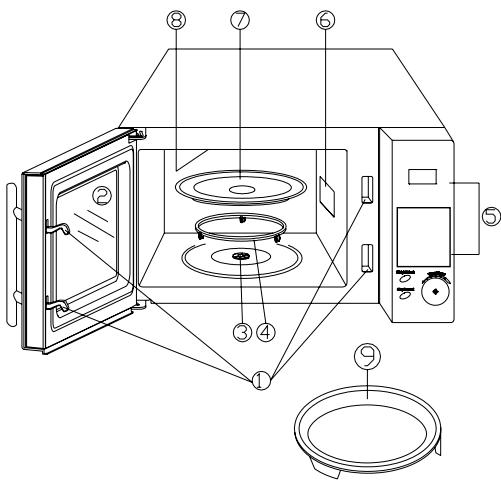
- Door safety locks
- Oven window
- Turntable shaft
- Turntable ring
- Control panel
- Wave guard cover
- Glass tray
- Grill heater
- Baking plate
TURNTABLE INSTALLATION
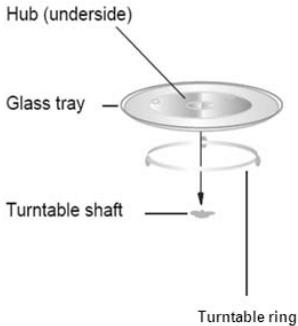
a. Never place the glass tray upside down. The glass tray should never be restricted.
b. Both glass tray and turntable ring must always be used during cooking.
c. All food and containers of food are always placed on the glass tray for cooking.
d. If glass tray or turntable ring cracks or breaks, contact your nearest authorised service centre.
COUNTERTOP INSTALLATION
Remove all packing material and accessories. Examine the oven for any damage such as dents or broken door. Do not install if the oven is damaged.
Cabinet: Remove any protective film found on the microwave oven cabinet surface.
Do not remove the light brown Mica cover that is attached to the
- Select a level surface that provides enough open space for the intake and/or outlet vents.
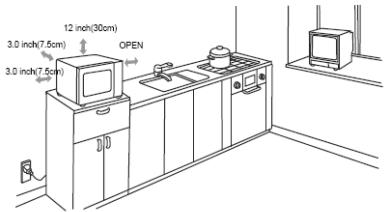
A minimum clearance of 3.0 inches (7.5cm) is required between the oven and any adjacent walls. One side must be open.
(1) Leave a minimum clearance of 12 inches (30cm) above the oven.
(2) Do not remove the feet from the bottom of the oven.
(3) Blocking the intake and/or outlet openings can damage the oven.
(4) Place the oven as far away from radios and TV as possible. Operation of microwave oven may cause interference to your radio or TV reception.
- Plug your oven into a standard household outlet. Be sure the voltage and the frequency is the same as the voltage and the frequency on the rating label.
WARNING: Do not install the oven over a range cook top or other heat-producing appliance. If installed near or over a heat source, the oven could be damaged and the warranty would be void.
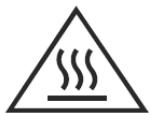
CAUTION: Outer surface gets hot.
CONTROL PANEL
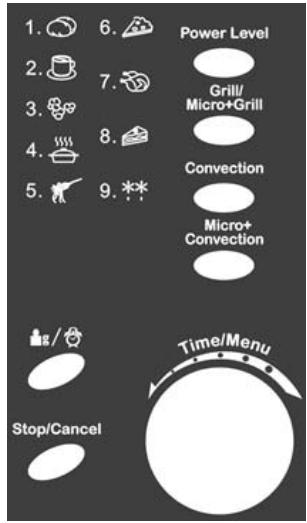
Power Level
Press to set microwave power level.
Grill/Micro+Grill
Press to set a grill cooking program or to select one of two combination cooking settings.
Convection
Press to program convection temperature.
Micro+Convection
Press to select one of four combination cooking setting.
Time/Menu
Turn the dial to set cooking time or select auto-menu.
Press to start or quick start a cooking program.

Weight/Clock
Press to set clock time or to select the amount of food.
Stop/Cancel
Press to stop cooking program or clear all previous settings before setting a cooking program.
OPERATION
Setting the Clock
- In standby mode, press to set the clock in 24-hour cycle.
- Turn the dial until the correct hour is displayed.
- Press
- Turn the dial until the correct minutes are displayed.
- Press to confirm.
NOTE: You can check the clock time during cooking by pressing
Speed Cooking
The longest cooking time is 10 minutes.
In standby mode, repeatedly press Time/Menu to set the desired cooking time.
The oven will start speed cooking at 100% power level.
Microwave Cooking
The longest cooking time is 95 minutes (95:00).
You can select a power level by pressing Power Level.
| Press Power Level | Cooking Power |
| once | 100% (P100) |
| twice | 90% (P-90) |
| 3 times | 80% (P-80) |
| 4 times | 70% (P-70) |
| 5 times | 60% (P-60) |
| 6 times | 50% (P-50) |
| 7 times | 40% (P-40) |
| 8 times | 30% (P-30) |
| 9 times | 20% (P-20) |
| 10 times | 10% (P-10) |
| 11 times | 0% (P-00) |
Suppose you want to cook for 5 minutes at 60% microwave power.
- Press Power Level until "P-60" shows on the display.
- Turn the dial to 5:00.
- Press Time/Menu to start cooking.
NOTE:
- If you want to temporarily stop a cooking session, press Stop/Cancel once and then you can start cooking again by pressing Time/Menu, or press Stop/Cancel twice to cancel the cooking program altogether.
- After the cooking time ends, the system will beep four times and "END" shows on the display. Before starting another cooking session, press any button or open the door to clear the display and reset the system.
Grill
The longest cooking time is 95 minutes (95:00). Grill cooking is particularly useful for thin slices of meat, steaks, chops, kebabs, sausages and pieces of chicken. It is also suitable for hot sandwiches and au gratin dishes.
Suppose you want to program the grill cooking for 12 minutes.
- Press Grill/Micro+Grill.
- Turn the dial to 12:00.
- Press Time/Menu to start cooking.
Microwave + Grill
The longest cooking time is 95 minutes (95:00). This feature allows you to combine grill and microwave cooking on two different settings.
Combination 1
30% time for microwave cooking, 70% for grill cooking. Use for fish, potatoes or au gratin.
Suppose you want to set combination 1 cooking for 25 minutes.
- Press Grill/Micro+Grill twice.
- Turn the dial to 25:00.
- Press Time/Menu to start cooking.
Combination 2
55% time for microwave cooking, 45% for grill cooking. Use for puddings, omelettes, baked potatoes and poultry.
Suppose you want to set combination 2 cooking for 12 minutes.
- Press Grill/Micro+Grill three times.
- Turn the dial to 12:00.
- Press Time/Menu to start cooking.
Convection
The longest cooking time is 9 hours and 30 minutes (9H:30). During convection cooking, hot air is circulated throughout the oven cavity to brown and make crisp foods quickly and evenly.
This oven can be programmed for ten different cooking temperatures (110°C ~200°C).
Suppose you want to cook at 180^ for 40 minutes.
- Repeatedly press Convection to select the desired cooking temperatures.
- Turn the dial to 0H:40.
- Press Time/Menu to start cooking.
NOTE: You can check the convection temperature during cooking by pressing Convection.
Preheating and Cooking with Convection
Your oven can be programmed to combine preheating and convection cooking operations.
Suppose you want to preheat to 170^ and then cook for 35 minutes.
- Repeatedly press Convection until "170C" is shown on the display.
- Press Time/Menu to start preheating.
Beeps will sound when the selected temperature is reached.
- Open the door and place food into the oven.
-
Turn the dial to 0H:35.
-
Press Time/Menu to start cooking.
Microwave + Convection
The longest cooking time is 9 hours and 30 minutes (9H:30). This oven has four pre-programmed settings that make it easy to cook with both convection heat and microwave automatically.
Repeatedly press Micro+Convection to program convection temperature:
| Temperature(℃) | |
| COMB1 | 110 |
| COMB2 | 140 |
| COMB3 | 170 |
| COMB4 | 200 |
Suppose you want to bake food for 24 minutes on COMB3.
- Press Micro+Convection until the temperature 170C is shown on the display.
- Turn the dial to 0H:24.
- Press Time/Menu to start cooking.
NOTE: You can check the convection temperature during cooking by pressing Micro+Convection.
Menu Cook
For the food in the following table, it is not necessary to program the cooking power and time. Take the following steps:
- Turn the dial anticlockwise to select the desired food code.
- Press to enter weight.
- Press Time/Menu to start cooking.
| Code | Menu | Notes |
| 1 | Baked potato(each 230 g) | 1. For popcorn and cake, there is only one choice. 2. For chicken, beeps will be heard in half cooking time to remind user of turning over food for uniform cooking. 3. Power fluctuation and other factors may cause the auto cooking not done exactly to your taste. The user may adjust cooking time accordingly. 4. For spaghetti add boiling water before cooking. |
| 2 | Coffee(each 200 ml) | |
| 3 | Popcorn (99 g) | |
| 4 | Auto reheat (g) | |
| 5 | Spaghetti (g) | |
| 6 | Pizza (g) | |
| 7 | Chicken (g) | |
| 8 | Cake (475 g) | |
| 9 | Jet defrost |
Defrosting by Weight
The oven can be used to defrost meat, poultry and seafood.
Suppose you want to defrost frozen meat.
- Turn the dial anticlockwise to select code 9.
- Press to confirm.
- Turn the dial to enter defrosting time. The longest defrosting time is 95 minutes (95:00).
- Press Time/Menu to start defrosting.
NOTE: The oven pauses and beeps during defrosting to remind you of turning food over then press Time/Menu to resume defrosting.
Multi-Stage Cooking
Your oven can be programmed for up to 3 automatic cooking sequences.
Suppose you want to set the following cooking program:
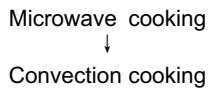
- Repeatedly press Power Level to set power level.
- Turn the dial to program cooking time.
- Repeatedly press Convection to set convection temperature.
- Turn the dial to program cooking time.
- Press Time/Menu to start cooking.
Child Lock
The child lock prevents unsupervised operation by children.
To set the child lock, press and hold Stop/Cancel until a beep sounds and the "LOCK" is shown on the display. In the lock state, all buttons are disabled.
To cancel the child lock, press and hold Stop/Cancel until a beep sounds and the "LOCK" goes off.
Cooling Feature
The controlling system of the microwave oven has the feature of cooling. When in any cooking mode cooking time is longer than 2 minutes, after finishing cooking the oven fan will work for about 3 minutes automatically to cool the oven for prolonging the life of the oven.
Automatic Protection Mechanism
- During all cooking modes, when the oven cavity temperature reaches over 300^ , the error code "E 01" will be shown on the display and the oven will automatically enter into self-protection mode until Stop/Cancel is pressed.
- If the sensor is short circuited, the system will enter into protection mode while the error code "E 03" will be shown on the display until Stop/Cancel is pressed.
CLEANING AND MAINTENANCE
Disconnect the electrical supply to the oven before cleaning.
General Advice
Frequent cleaning prevents smoke and bad odours during cooking and also sparking in the oven cavity and around the door seal.
Do not let food deposits or grease accumulate inside the oven cavity or on the door seal.
If your microwave oven is fitted with a waveguide cover (usually located inside the oven cavity on the right side wall) it must be kept clean at all times, should food deposits or grease be allowed to accumulate on the cover, sparking will occur and may damage your oven invalidating the warranty.
Before any maintenance or cleaning, disconnect the oven from the mains supply and wait for it to cool to room temperature.
Oven Door
Remove any food deposits and grease between the door seal and oven cavity using a damp cloth, it is important to keep this area clean at all times.
Interior Walls
Remove any grease splashes from the oven cavity walls with soap and water, then rinse and dry.
The door seal and oven cavity have to be particularly well cleaned to ensure the door will close properly and to avoid sparking between the oven cavity and door assembly.
Do not use abrasive products such as scouring pads which will damage the surfaces of the oven cavity and door.
Only warm soapy water must be used to clean stainless steels surfaces.
Outer Surfaces
To clean the outside surface, use a damp cloth.
Avoid using abrasive products such as scouring pads that may damage the cosmetic surfaces. Make sure water does not seep into the ventilation slots.
Accessories should be washed in warm soapy water by hand.
CAUTION
Some waveguide covers can be easily damaged take care when cleaning.
Do not wash accessories in a dishwasher.
WARNING:
If the inside of the oven cavity and door seal are not kept scrupulously clean there is a danger of damage due to sparking inside the oven cavity invalidating the warranty.
Never scrape the oven cavity walls with sharp objects.
Never immerse the appliance, its cord or plug in water or any other liquid.
Never clean this product with a steam cleaner.
SPECIFICATIONS
| Power Consumption: | 230-240V~, 50Hz |
| Rated input power (Microwave): | 1400W |
| Rated output power (Microwave): | 900W |
| Grill power: | 1000W |
| Convection: | 1950W |
| Microwave Frequency: | 2450MHz |
TROUBLESHOOTING
| Normal | |
| Microwave oven interfering TV reception | Radio and TV reception may be affected when the microwave oven is operating. It is similar to the interference of small electrical appliances, like mixer, vacuum cleaner and electric fan. It is normal. |
| Dim oven light | In low power microwave cooking, the oven light may become dim. It is normal. |
| Steam accumulating on door, hot air out of vents | In cooking, steam may come out of food. Most will escape from the vents. But some may accumulate on a cool place like the oven door. It is normal. |
| Oven started accidentally with no food in. | It is forbidden to run the unit without any food inside. It is very dangerous. |
| Trouble | Possible Cause | Remedy |
| Oven cannot be started. | (1) Power cord not plugged in tightly. | Unplug. Then plug in again after 10 seconds. |
| (2) Fuse blowing or circuit breaker works. | Replace fuse or reset circuit breaker (repaired by professional personnel of authorised agent) | |
| (3) Trouble with outlet. | Test outlet with other electrical appliances. | |
| Oven does not heat. | Door not closed well. | Close door well. |
| Glass turntable makes noise when microwave oven operates. | Dirty roller rest and oven bottom. | Refer to ‘CLEANING AND CARE’ to clean dirty parts. |
We apologise for any inconvenience caused by minor inconsistencies in these instructions, which may occur as a result of product improvement and development.
Kesa Electricals © UK, HU1 3AU 08/08 / 2011
FR
Table des Matieres
INSTRUCTIONS DE SECURITES IMPORTANTES LIRE AVEC ATTENTION ET GARDER
POUR DE FUTURES UTILISATIONS 2
NETTOYAGE ET ENTRETIEN 25
USTENSILES DE CUISSON 6
DESCRIPTION DU FOUR. 7
TURNTABLE INSTALLATION 7
INSTALLATION DU PLAN DE TRAVAIL 8
INSTALLATION DU FOUR 8
PANNEAU DE CONTROL 8
UTILISATION 9
SPécifications 15
Dépannage 16
INSTRUCTIONS DE SECURITES IMPORTANTES LIRE AVEC ATTENTION ET GARDER POUR DE FUTURES UTILISATIONS
INSTALLATION DU FOUR
| Touche Puissance | Puisance de cuisson |
| 1 pression | 100% (P100) |
| 2 pressions | 90% (P-90) |
| 3 pressions | 80% (P-80) |
| 4 pressions | 70% (P-70) |
| 5 pressions | 60% (P-60) |
| 6 pressions | 50% (P-50) |
| 7 pressions | 40% (P-40) |
| 8 pressions | 30% (P-30) |
| 9 pressions | 20% (P-20) |
| 10 pressions | 10% (P-10) |
| 11 | 0% (P-00) |
Micro-ondes + Convection
Kesa Electricals © UK, HU1 3AU 08/08/2011
Downloaded from www.vandenborre.be
NL
Contents
IBELANGRIJKVEVELIGHEIDSINSTRUCTIES 2
KEUKENGEREI 2.5
OVERZICHT VAN DE OVEN
INSTALLATIE VAN HET DRAAIPLATEAU 6
INSTALLATIE OP HET AANRECHT 7
INSTALLATIE VAN DE MAGNETRONOVEN. 7
BEDIENINGSPANEEL 8
WERKING 9
SPECIFICATIONS. 15
PROBLEEMOPLOSING 15
IBELANGRIJKVEVELIGHEIDSINSTRUCTIES
LEES ZORGVULDIG EN BEWAAR VOOR LATERE RAADPLEGING
VOORZORGSMAATREGELEN
OM
MOGELIJKE
BLOOTSTELLING
AAN
OVERDREVEN MAGNETRONENERGIE TE VOORKOMEN
Grill/Micro+Grill (Grill/Magnetron+Grill)
Kesa Electricals © UK, HU1 3AU 08/08 / 2011
SK
Obsah
DOLEZITE BEZPECNOSTNÉ POKNY. 1
KUCHYNSKÉ RIADY 3
PREHLAD RURY 4
INSTALÁCIA TOČNE 4
INSTALÁCIA PROTILAHLEJ VRCHNEJČASTI. 5
INSTALACIA MIKROVLNNEJ RURY 5
OVLADACI PANEL 6
PREVÁDZKA 7
RIESENIE PROBLEMOV 13
DOLEZITÉ BEZPECNOSTNÉ POKNY
DÖKLADNE SI PRECİTAJTE TENTO NÁVOD A UCHOVAJTESI HO PRE BUDÜCE POUZITIE.
BEZPECNOSTNÉ OPATRENIA NA PREDCHÁDZANIE NADMERNEJ EXPOZÍCII MIKROVLNNÉHO ZIARENIA
Kesa Electricals © UK, HU1 3AU 08/08/2011
Downloaded from www.vandenborre.be
Indices
Kesa Electricals © UK, HU1 3AU 08/08 / 2011
Downloaded from www.vandenborre.be
ES
Indices
Micro+Convection (microondas+ convecction)
Kesa Electricals © UK, HU1 3AU 08/08/2011
CS
Obsah
DULEZITÉ BEZPEÇNOSTNI POKNY
KUCHYNSKE NADOBI 4
NAZVY SOUCASTI 5
TURNTABLE INSTALLATION 6
MONTAZ NA VOLNO. 6
INSTALACE MIKROVLNNÉ TROUBY 7
OVLADACI PANEL 8
OBSLUHA MIKROVLNNÉ TROUBY 9
CISTENIA UDRZBA 14
TECHNICKE UDAJE 14
RESENI PROBLEMU 15
DULEZITÉ BEZPECNOSTNI POKNY
PRECTETESI TYTO POKNYA USCHOVEJTE JE PROBUDOUCIPOUZITI
BEZPECNOSTNI OPATRENI PRO VYVAROVÁNÉ SE VYSTAVENÍ NADMÉRNÉ
MIKROVLNNÉ ENERGII
INSTALACE MIKROVLNÉ TROUBY
- Vyberte vodorovny povrch, kde bude dostatek mista pro privod vzduchu k vetracim otvorum.
Kesa Electricals © UK, HU1 3AU 08/08/2011
Downloaded from www.vandenborre.be
Downloaded from www.vandenborre.be
- IMPORTANT SAFETY INSTRUCTIONS READ CAREFULLY AND KEEP FOR FUTURE REFERENCE
- PRECAUTIONS TO AVOID POSSIBLE EXPOSURE TO EXCESSIVE MICROWAVE ENERGY
- COOKING UTENSILS
- NOTES:
- OVEN OVERVIEW
- Names of Oven Parts
- TURNTABLE INSTALLATION
- COUNTERTOP INSTALLATION
- CONTROL PANEL
- Power Level
- Grill/Micro+Grill
- Convection
- Micro+Convection
- Time/Menu
- Weight/Clock
- Stop/Cancel
- OPERATION
- Setting the Clock
- Speed Cooking
- Microwave Cooking
- NOTE:
- Grill
- Microwave + Grill
- Combination 1
- Combination 2
- Preheating and Cooking with Convection
- Microwave + Convection
- Menu Cook
- Defrosting by Weight
- Multi-Stage Cooking
- Child Lock
- Cooling Feature
- Automatic Protection Mechanism
- CLEANING AND MAINTENANCE
- General Advice
- Oven Door
- Interior Walls
- Outer Surfaces
- CAUTION
- WARNING:
- FR
- Table des Matieres
- INSTRUCTIONS DE SECURITES IMPORTANTES LIRE AVEC ATTENTION ET GARDER
- INSTALLATION DU FOUR
- Micro-ondes + Convection
- NL
- Contents
- Grill/Micro+Grill (Grill/Magnetron+Grill)
- SK
- Obsah
- DOLEZITÉ BEZPECNOSTNÉ POKNY
- BEZPECNOSTNÉ OPATRENIA NA PREDCHÁDZANIE NADMERNEJ EXPOZÍCII MIKROVLNNÉHO ZIARENIA
- Indices
- ES
- Micro+Convection (microondas+ convecction)
- CS
- DULEZITÉ BEZPECNOSTNI POKNY
- PRECTETESI TYTO POKNYA USCHOVEJTE JE PROBUDOUCIPOUZITI
- MIKROVLNNÉ ENERGII
- INSTALACE MIKROVLNÉ TROUBY
Brand : PROLINE
Model : CBM25S
Category : Microwaves