
MOULIN THE SMART GRINDER PRO - Coffee grinder SAGE - Free user manual and instructions
Find the device manual for free MOULIN THE SMART GRINDER PRO SAGE in PDF.




| Product type | Coffee grinder |
| Brand | Sage |
| Model | The Smart Grinder Pro |
| Burr material | Hardened stainless steel conical burrs |
| Number of grind settings | 60 (from 1 to 60) |
| Display | Backlit LCD screen |
| Grinding container capacity | Approximately 150 g (estimate) |
| Included portafilter holders | 2 holders: 50-54 mm and 58 mm |
| Main functions | Automatic and manual grinding, pause, programming, automatic shutoff after 5 minutes of inactivity |
| Power supply | 220-240 V, 50/60 Hz |
| Power | 200 W (estimate) |
| Maintenance and cleaning | Do not put in dishwasher. Clean burrs with the provided brush; wash accessories in warm soapy water. |
| Safety | Hopper lock required for operation; automatic shutoff in case of overheating. |
| Included accessories | Cleaning brush, 50-54 mm portafilter holder, 58 mm portafilter holder, grinding container with lid and cover |
| Warranty | 2-year limited |
Frequently Asked Questions - MOULIN THE SMART GRINDER PRO SAGE
User questions about MOULIN THE SMART GRINDER PRO SAGE
0 question about this device. Answer the ones you know or ask your own.
Ask a new question about this device
Download the instructions for your Coffee grinder in PDF format for free! Find your manual MOULIN THE SMART GRINDER PRO - SAGE and take your electronic device back in hand. On this page are published all the documents necessary for the use of your device. MOULIN THE SMART GRINDER PRO by SAGE.
USER MANUAL MOULIN THE SMART GRINDER PRO SAGE
the Smart Grinding™ Pro
BCG820/SCG820
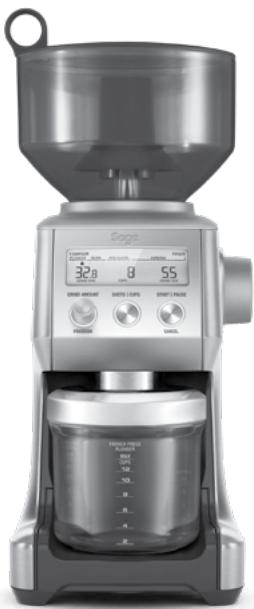
EN QUICK GUIDE
FR GUIDE RAPIDE
ITGUIDARAPIDA
PT MANUAL RAPIDO
2 Sage® Recommend Safety First
5 Getting To Know Your New Appliance
6 Operating Your New Appliance
11 Care, Cleaning & Storage
12 Troubleshooting
13 Guarantee
- Before using the first time ensure your electricity supply is the same as shown on the label on the underside of the appliance.
- Remove and safely discard any packaging materials before first use.
- To eliminate a choking hazard for young children, safely discard the protective cover fitted to the power plug.
- This appliance is for household use only. Do not use the appliance for anything other than its intended use. Do not use in moving vehicles or boats. Do not use outdoors. Misuse may cause injury.
- Fully unwind the power cord before operating.
- Position the appliance on a stable, heat resistant, level, dry surface away from the edge and do not operate on or near a heat source such as a hot plate, oven or gas hob.
- Do not let the power cord hang over the edge of a bench or table, touch hot surfaces or become knotted.
- Do not leave the appliance unattended when in use.
Always ensure the appliance is turned OFF, unplugged at the power outlet and has been
SAGE® RECOMMENDS SAFETY FIRST
At Sage® we are very safety conscious. We design and manufacture appliances with your safety foremost in mind. In addition, we ask that you exercise a degree of care when using any electrical appliance and adhere to the following precautions.
IMPORTANT SAFEGUARDS
READ ALL INSTRUCTIONS BEFORE USE AND SAVE FOR FUTURE REFERENCE
- A downloadable version of this document is also available at sageappliances.com
WE RECOMMEND SAFETY FIRST
allowed to cool before cleaning, attempting to move or storing.
- Always turn the appliance to the OFF position, switch off at the power outlet and unplug at the power outlet when the appliance is not in use.
- Do not use the appliance if the power cord, plug, or appliance becomes damaged in any way. If damaged and maintenance other than cleaning is required please contact Sage Customer Service or go to sageappliances.com
- Any maintenance other than cleaning should be performed by an authorised Sage® service centre.
Children should not play with the appliance. - Cleaning of the appliance should not be carried out by children unless they are 8 years or older and supervised.
- The appliance and its cord should be kept out of reach of children aged 8 years and younger.
- The installation of a residual current safety switch is recommended to provide additional safety when using all electrical appliances. Safety switches with a rated operating current not more
than 30mA are recommended. Consult an electrician for professional advice.
- Do not use attachments other than those provided with the appliances.
- Do not attempt to operate the appliance by any method other than those described in this booklet.
- Do not move the appliance whilst in operation.
- Do not touch hot surfaces. Allow the appliance to cool down before moving or cleaning any parts.
- This appliance shall not be used by children. Keep the appliance and its cord out of reach of children.
- This appliance can be used by persons with reduced physical, sensory or mental capabilities or a lack of experience and knowledge, only if they have been given supervision or instruction concerning use of the appliance in a safe way and understand the hazards involved.
- Do not operate the grinder without the hopper lid in position. Keep fingers, hands, hair, clothing and utensils away from the hopper during operation.
The symbol shown indicates that this appliance should not be disposed of in normal household waste.
It should be taken to a local authority waste collection centre designated for this purpose or to a dealer providing this service. For more information, please contact your local council office.

To protect against electric shock, do not immerse the
power plug, cord or appliance in water or any liquid.
FOR HOUSEHOLD USE ONLY SAVE THESE INSTRUCTIONS
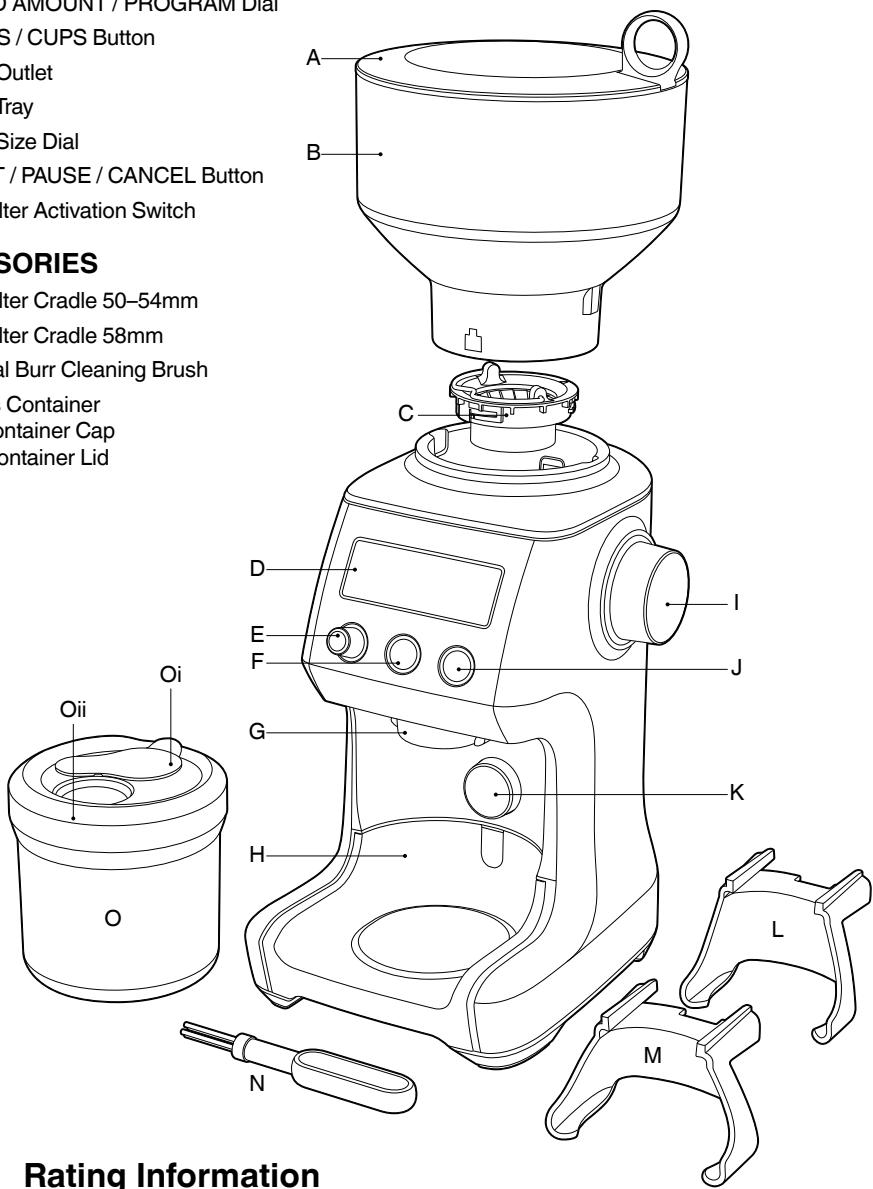
GETTING TO KNOW YOUR NEW APPLIANCE
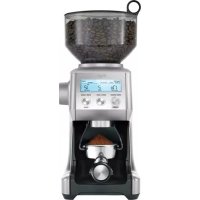
A. Bean Hopper Lid
B. Bean Hopper
C. Hardened Stainless Steel Conical Burrs
D. Backlit LCD Screen
E. GRIND AMOUNT / PROGRAM Dial
F. SHOTS/CUPS Button
G. Grind Outlet
H. Grind Tray
I. Grind Size Dial
J. START / PAUSE / CANCEL Button
K. Portafilter Activation Switch
ACCESSORIES
L. Portafilter Cradle 50-54mm
M. Portafilter Cradle 58mm
N. Conical Burr Cleaning Brush
O. Grinds Container Oi-Container Cap Oii-Container Lid
BEFORE FIRST USE
Remove and safely discard all promotional labels and packing materials attached to your Sage® product.
Wash hopper, cradles, grind container, container lid and cleaning brush in warm soapy water and dry thoroughly. Wipe exterior of grinder with a soft damp cloth and dry thoroughly. Place grinder on flat level surface and plug power cord into 220-240V outlet and switch Power 'ON'.
ENERGY SAVING FEATURE
The grinder will automatically switch off if not used after 5 minutes.
ASSEMBLING YOUR SAGE SMART GRINDER™ PRO
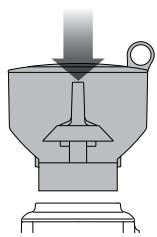
Bean Hopper
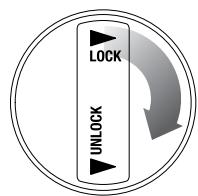
Align tabs on the base of the bean hopper and insert hopper into position. Turn the bean hopper dial 90^ to lock into position. Fill with fresh coffee beans and secure lid on top of bean hopper.
GRINDING FOR ESPRESSO COFFEE
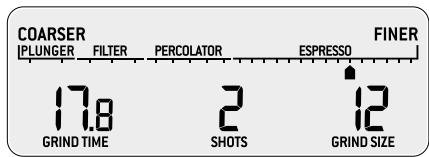
Use single wall filter baskets when grinding fresh coffee beans. Use the finer 1-30 settings in the ESPRESSO range.
STEP1:
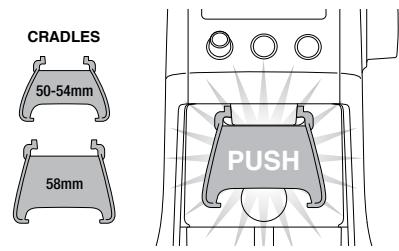
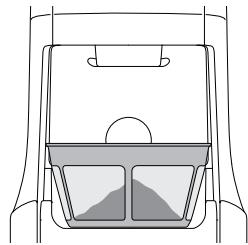
Insert the appropriate portafilter cradle size. Insert your portafilter into the cradle.
NOTE
Maximum number of shots with the cradle inserted is 2.
COFFEE CHART
| BREW METHOD | ESPRESSO | PERCOLATOR | DRIP FILTER | PLUNGER |
| GRIND SETTING | FINE | MEDIUM | MEDIUM COARSE | COARSE |
| GRIND SIZE | 1-30 | 31-45 | 46-54 | 55-60 |
| AMOUNT | 1 UP TO 8 SHOTS | 1 UP TO 12 CUPS | 1 UP TO 12 CUPS | 1 UP TO 12 CUPS |
OPERATING YOUR NEW APPLIANCE
STEP2:
Selecting your SHOTS / CUPS
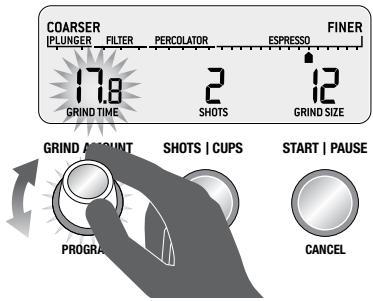
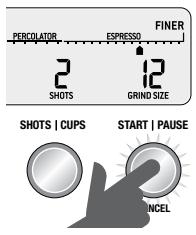
Select the desired amount of ground coffee required by pressing the SHOTS / CUPS button.
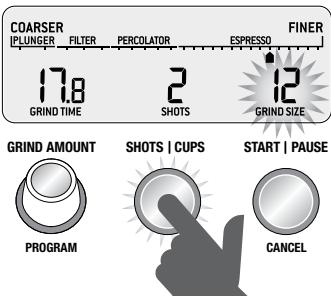
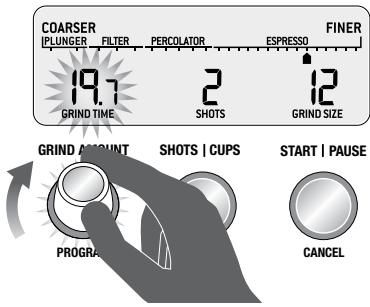
Rotate the Grind Amount Dial to adjust the grinding time to achieve the correct amount of coffee.
STEP 3:
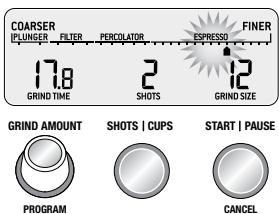
Select your grind size
For espresso, we recommend selecting Grind Size setting 12 as a starting point and moving the Grind Size dial Coarser or Finer to adjust the flow of espresso as required.

NOTE
If the Grind Size Dial is tight, run the grinder by pressing the START / PAUSE / CANCEL button while turning the Grind Size Dial. This will release coffee grounds caught between the burrs.
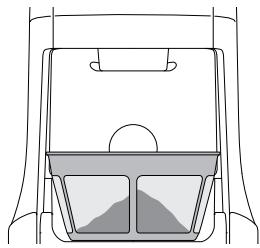
GRINDING INTO GRINDS CONTAINER OR COFFEE FILTER
STEP 1:
Remove cradle by sliding out from under the grind outlet.
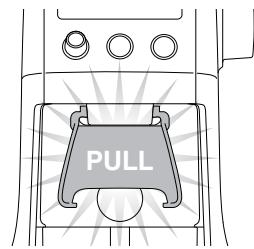
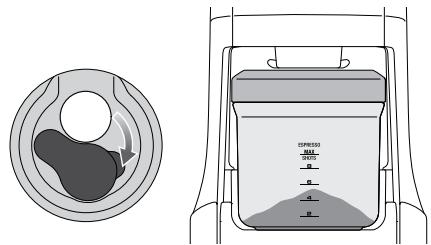
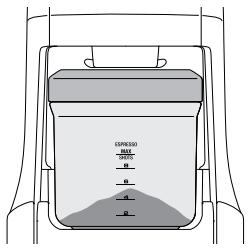
Slide in grinds container with cap open or coffee filter directly under grind outlet.
OPERATING YOUR NEW APPLIANCE
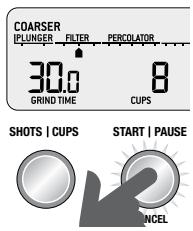
- Select the required amount of ground coffee by pressing the SHOTS / CUPS button.
- Press the START / PAUSE / CANCEL button to start grinding operation.
FEATURES OF YOUR SAGE SMART GRINDER™ PRO
Automatic Grinding
Grinding automatically allows you to grind hands-free.
- Press and release either the START / PAUSE / CANCEL button or push the handle of your portafilter once. This will activate the PORTAFILTER SWITCH.
- Grinding will automatically stop when the preset amount is dispensed.

START | PAUSE
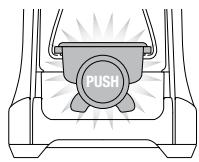
PORTAFILTER SWITCH
PRESS & RELEASE
NOTE
Programming a custom grind amount/time only sets it for that particular brew method. This will not change the other Shots or Cups settings.
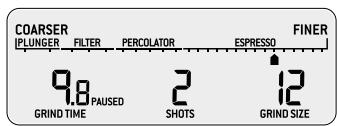
Pause Function
You can pause the grinder during operation allowing you to collapse or settle the coffee in the portafilter.
- Press and release the START / PAUSE / CANCEL button to start the grinding operation.
- During grinding, press the START / PAUSE / CANCEL button again to pause the operation for 10 seconds.
- Press again within this time to resume grinding the remaining dose.

GRIND AMOUNT SHOTS | CUPS START | PAUSE
PROGRAM


OPERATING YOUR NEW APPLIANCE
Program Function
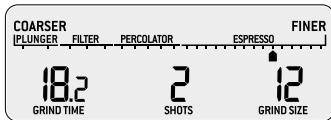
Once you have set your required dose, you can program this time into the number of shot(s) currently displayed on the LCD. Press and hold the PROGRAM button, grinder will beep twice to confirm. Only the shot displayed will be programmed, all other shots will remain unchanged.
START | PAUSE

GRIND AMOUNT SHOTS | CUPS


CANCEL
PRESS & HOLD
Manual Grinding
Grinding manually allows you to have complete control over how much coffee is dispensed.
- Press and hold either the START / PAUSE / CANCEL button or push the handle of your portafilter to activate the PORTAFILTER SWITCH for as long as you require.
- Release START / PAUSE / CANCEL button or PORTAFILTER SWITCH and grinding will stop.

START | PAUSE
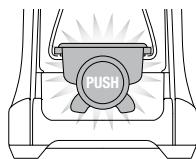
PORTAFILTER SWITCH
PRESS, HOLD & RELEASE
ADJUSTING YOUR GRIND AMOUNT
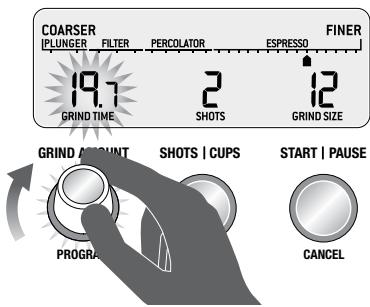
Increasing the Grind Amount
To increase the grind amount selected, turn the GRIND AMOUNT dial to the right.
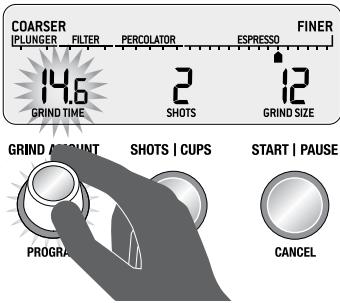
Decreasing the Grind Amount
To decrease grind amount selected, turn the Grind Amount Dial to the left.
NOTE
To RESET the grind amount/time to the default settings, press and hold the SHOTS / CUPS button until a long beep sounds.
OPERATING YOUR NEW APPLIANCE
ADJUSTING CONICAL BURRS
Some types of coffee may require a wider grind range to achieve an ideal extraction or brew.
A feature of your Smart Grinding™ Pro is the ability to extend this range with an adjustable upper burr.
We recommend making only one adjustment at a time.
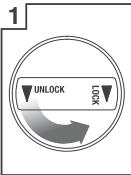
Unlock hopper
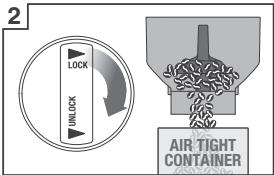
Hold hopper over container & turn dial to release beans into container
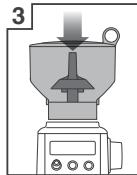
Align hopper into position
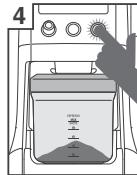
Run grinder until empty
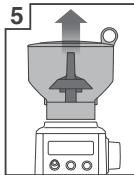
Remove hopper
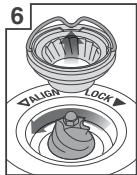
Remove upper burr
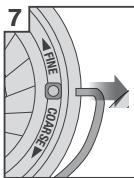
Remove wire handle from both sides of the burr
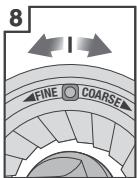
Move adjustable top burr, 1 number, coarser or finer
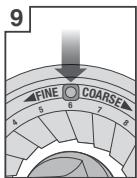
Align the number with the handle opening
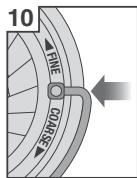
Insert wire handle from both sides of the burr
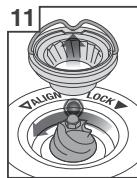
Push upper burr firmly into position
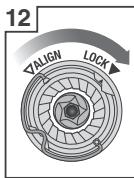
Lock upper burr
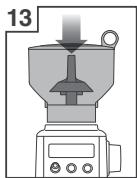
Align hopper into position
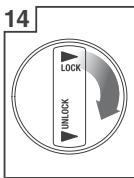
Lock hopper
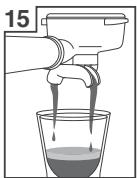
Check your extraction
CARE, CLEANING & STORAGE
CARE, CLEANING & STORAGE
- Empty beans from the hopper and grind out any excess beans (see below).
- Unplug power cord from power outlet before cleaning.
- Wash the grind container and lid, bean hopper and lid in warm soapy water, rinse and dry thoroughly.
- Wipe and polish exterior of appliance with a soft damp cloth.
NOTE
Do not use alkaline or abrasive cleaning agents, steel wool or scouring pads, as these can damage the surface.
NOTE
Please do not clean any grinder parts or accessories in the dishwasher.
CLEANING CONICAL BURRS
Regular cleaning helps the burrs achieve consistent grinding results which is especially important when grinding for espresso coffee.
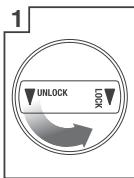
Unlock hopper
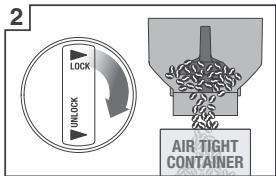
Hold hopper over container & turn dial to release beans into container
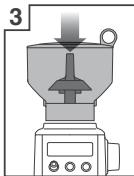
Align hopper into position
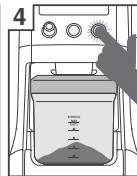
Run grinder until empty
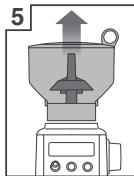
Remove hopper
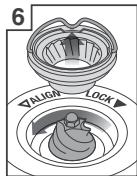
Remove upper burr
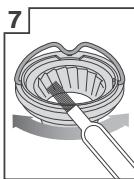
Clean upper burr with cleaning brush
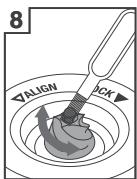
Clean lower burr with cleaning brush
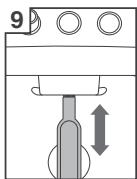
Clean grind outlet with brush
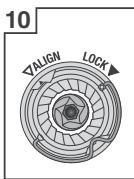
Push upper burr firmly into position
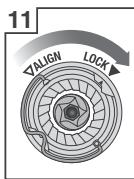
Lock upper burr
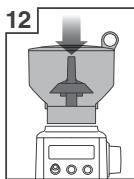
Align hopper into position
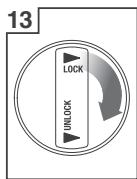
Lock hopper
TROUBLESHOOTING
| PROBLEM | POSSIBLE CAUSE | WHAT TO DO |
| Grinder does not start after pressing START / PAUSE / CANCEL button | •Grinder not plugged in. •Grinder has overheated. •Bean hopper not attached correctly. 'PLEASE LOCK HOPPER' will be displayed on LCD screen. | •Plug power cord into power outlet. •Remove power plug from power outlet. Leave for 20 minutes to cool down before using again. •Lock bean hopper into position. |
| Motor starts but no ground coffee coming from grind outlet | •Incorrect button pressed. •No coffee beans in bean hopper. •Grinder/bean hopper is blocked. | •Press START / PAUSE / CANCEL or PORTAFILTER SWITCH to activate. •Fill bean hopper with fresh coffee beans. •Remove bean hopper. Inspect bean hopper and burrs for blockage. Replace parts and try again. |
| Motor starts but operates with a loud 'racket' noise | •Grinder is blocked with foreign item or chute is blocked. •Moisture clogging grinder. | •Remove bean hopper, inspect burrs and remove any foreign body. •Clean burrs and chute (refer to Care & Cleaning on page page 11). •Leave burrs to dry thoroughly before re-assembling. You can use a hair dryer to blow air into grinder inlet (lower burr) to dry. |
| Unable to lock bean hopper into position | •Coffee beans obstructing bean hopper locking device. | •Remove bean hopper. Clear coffee beans from top of burrs. Re-lock hopper into position & try again. |
| Not enough/ too much coffee grind | •Grind amount requires adjustment. | •Press SHOTS / CUPS button to change grind amount. •Use Grind Amount Dial to fine tune the amount 'more' or 'less'. |
| Portafilter overfills | •It is normal for the correct amount of coffee to appear overfilled in your portafilter. Untamped coffee has approximately three times the volume of tamped coffee. | |
| Emergency stop? | •Press START / PAUSE / CANCEL button to stop operation. •Unplug power cord from power outlet. |
GUARANTEE
2 YEAR LIMITED GUARANTEE
Sage Appliances guarantees this product for domestic use in specified territories for 2 years from the date of purchase against defects caused by faulty workmanship and materials. During this guarantee period Sage Appliances will repair, replace, or refund any defective product (at the sole discretion of Sage Appliances).
All legal warranty rights under applicable national legislation will be respected and will not be impaired by our guarantee. For full terms and conditions on the guarantee, as well as instructions on how to make a claim, please visit www.sageappliances.com.
INHALTE

GRIND AMOUNT
PROGRAM

SHOTSCUPS

START | PAUSE
CANCEL
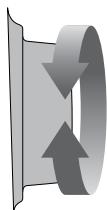
REMARQUE

GRIND AMOUNT SHOTS | CUPS START | PAUSE
PROGRAM


UTILISATION DE VOTRE NOUVEL APPAREIL

GRIND AMOUNT SHOTS | CUPS


START | PAUSE
CANCEL
PRESS ET HOLD
Mouture manuelle

GRIND AMOUNT SHOTS | CUPS START | PAUSE
PROGRAM


UW NIEUWE APPARAAT GEBRUIKEN
Programmafunctie

GRIND AMOUNT SHOTS | CUPS


CANCEL
DRUK OP EN Houd
Handmatig malen

GRIND AMOUNT SHOTS | CUPS START | PAUSE


UTILIZZO DEL NUovo APPARECCHIO
Funzione Programma

GRIND AMOUNT SHOTS | CUPS


CANCEL
TIENI PREMUTO
Macinatura manuale

GRIND AMOUNT SHOTS | CUPS START | PAUSE
PROGRAM


MANEJO DE TU NUEVO ELECTRODOMESTICO
Función de programa

GRIND AMOUNT SHOTS | CUPS


CANCEL
PRESIONY MANTENGAA
Molido manual
Paraacularly, the word "grind" is used to describe a particular thing or place. For example, "the ground" is used to describe the ground under the trees.
MOER PARA CAFÉ ESPRESSO

GRIND AMOUNT SHOTS | CUPS START | PAUSE
PROGRAM


www.sageappliances.com
Registered in Germany No. HRB 81309 (AG Düsseldorf).
Registered in England & Wales No. 8223512.
Due to continued product improvement, the products illustrated or photographed in this document may vary slightly from the actual product.


- the Smart Grinding™ Pro
- SAGE® RECOMMENDS SAFETY FIRST
- IMPORTANT SAFEGUARDS
- READ ALL INSTRUCTIONS BEFORE USE AND SAVE FOR FUTURE REFERENCE
- WE RECOMMEND SAFETY FIRST
- FOR HOUSEHOLD USE ONLY SAVE THESE INSTRUCTIONS
- GETTING TO KNOW YOUR NEW APPLIANCE
- ACCESSORIES
- BEFORE FIRST USE
- ENERGY SAVING FEATURE
- ASSEMBLING YOUR SAGE SMART GRINDER™ PRO
- Bean Hopper
- GRINDING FOR ESPRESSO COFFEE
- STEP1:
- NOTE
- OPERATING YOUR NEW APPLIANCE
- STEP2:
- Selecting your SHOTS / CUPS
- STEP 3:
- Select your grind size
- GRINDING INTO GRINDS CONTAINER OR COFFEE FILTER
- STEP 1:
- FEATURES OF YOUR SAGE SMART GRINDER™ PRO
- Automatic Grinding
- Pause Function
- Program Function
- Manual Grinding
- ADJUSTING YOUR GRIND AMOUNT
- Increasing the Grind Amount
- Decreasing the Grind Amount
- ADJUSTING CONICAL BURRS
- CARE, CLEANING & STORAGE
- CLEANING CONICAL BURRS
- TROUBLESHOOTING
- GUARANTEE
- YEAR LIMITED GUARANTEE
- INHALTE
- REMARQUE
- UTILISATION DE VOTRE NOUVEL APPAREIL
- PRESS ET HOLD
- Mouture manuelle
- UW NIEUWE APPARAAT GEBRUIKEN
- Programmafunctie
- DRUK OP EN Houd
- Handmatig malen
- UTILIZZO DEL NUovo APPARECCHIO
- Funzione Programma
- TIENI PREMUTO
- Macinatura manuale
- MANEJO DE TU NUEVO ELECTRODOMESTICO
- Función de programa
- PRESIONY MANTENGAA
- Molido manual
- MOER PARA CAFÉ ESPRESSO
Brand : SAGE
Model : MOULIN THE SMART GRINDER PRO
Category : Coffee grinder