
IKB84431XB - IKB84431IB - Hob AEG - Free user manual and instructions
Find the device manual for free IKB84431XB - IKB84431IB AEG in PDF.



| Brand | AEG |
| Model | IKB84431XB / IKB84431IB |
| Product type | Built-in induction hob |
| Heating technology | Induction |
| Number of cooking zones | 2 (front center, rear center) |
| Power supply | 220-240 V, 50-60 Hz |
| Total power | 3.65 kW |
| Nominal power per zone | 2300 W (max) |
| PowerBoost per zone | 3200 W for max 10 min |
| Main functions | Bridge, PowerBoost, Pause, Timer (countdown and count up), Lock, Child safety, Automatic shut-off, Power management |
| Safety | OptiHeat Control (3-level residual heat indicator), Automatic shut-off, Child safety device, Lock keys |
| Cooking surface | Ceramic glass |
| Cleaning | Special scraper and non-abrasive cleaner recommended |
| Installation | Built-in (worktop) |
| Energy consumption | 182.4 Wh/kg (cooking surface) |
| Repairability | Original spare parts available, authorized after-sales service |
Frequently Asked Questions - IKB84431XB - IKB84431IB AEG
User questions about IKB84431XB - IKB84431IB AEG
0 question about this device. Answer the ones you know or ask your own.
Ask a new question about this device
Download the instructions for your Hob in PDF format for free! Find your manual IKB84431XB - IKB84431IB - AEG and take your electronic device back in hand. On this page are published all the documents necessary for the use of your device. IKB84431XB - IKB84431IB by AEG.
USER MANUAL IKB84431XB - IKB84431IB AEG
FOR EXCELLENT RESULTS
1 Induction hob 2 Control panel
4.2 Control panel overview
6.2 Sound during operation
If you can hear:
6.3 Öko Timer (Eco Timer)
5.5 OptiHeat Control (3-step residual heat indicator)

WARNING!
5.13 Power management
6.3 Öko Timer (Eco Timer)
8. TROUBLESHOOTING

WARNING!
Thank you for choosing this AEG product. We have created it to give you impeccable performance for many years, with innovative technologies that help make life simpler – features you might not find on ordinary appliances. Please spend a few minutes reading to get the very best from it.
Visit our website to:

Get usage advice, brochures, trouble shooter, service and repair information:
www.aeg.com/support

Register your product for better service:
www.registeraeg.com

Buy Accessories, Consumables and Original spare parts for your appliance:
www.aeg.com/shop
CUSTOMER CARE AND SERVICE
Always use original spare parts.
When contacting our Authorised Service Centre, ensure that you have the following data available: Model, PNC, Serial Number.
The information can be found on the rating plate.
⚠ Warning / Caution-Safety information
i General information and tips
Environmental information
Subject to change without notice.
CONTENTS
- SAFETY INFORMATION....77
- SAFETY INSTRUCTIONS....80
- INSTALLATION....82
- PRODUCT DESCRIPTION....85
- DAILY USE....86
- HINTS AND TIPS......89
- CARE AND CLEANING....91
- TROUBLESHOOTING....91
- TECHNICAL DATA....93
- ENERGY EFFICIENCY....93
- ENVIRONMENTAL CONCERNS....94
1. SAFETY INFORMATION
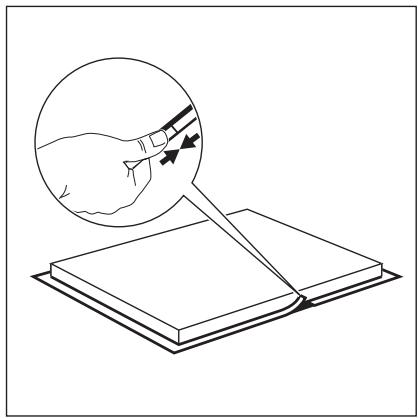
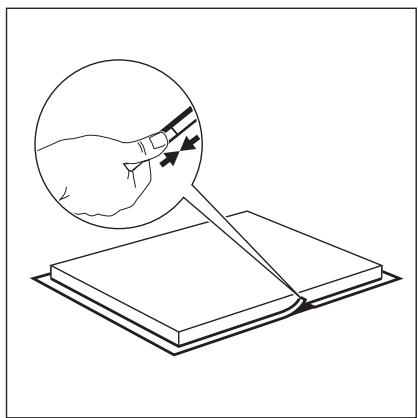
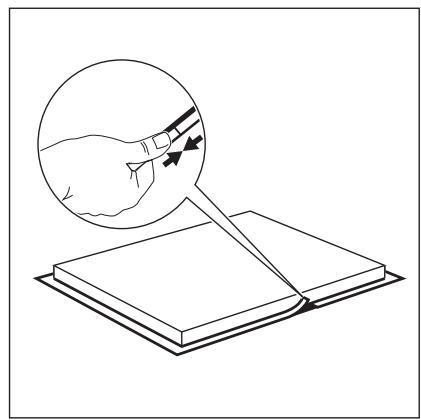
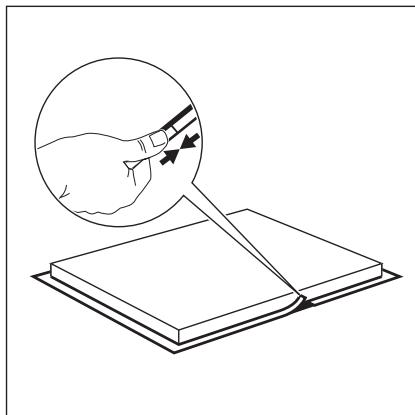
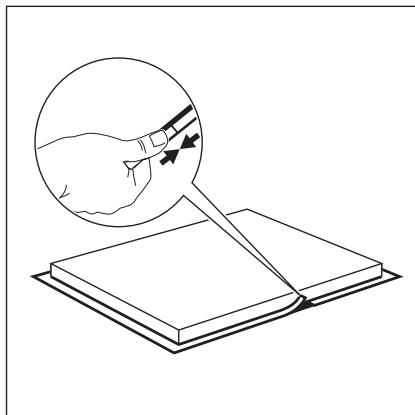
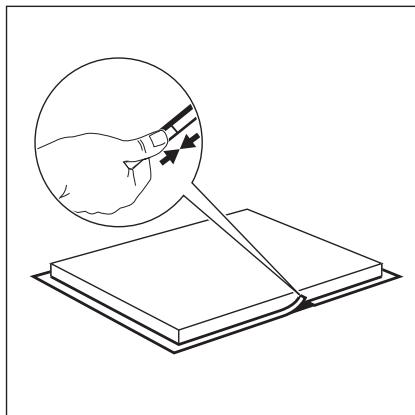
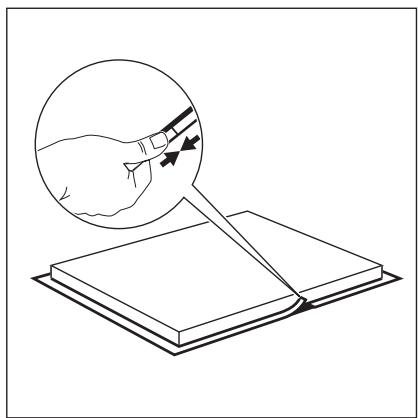
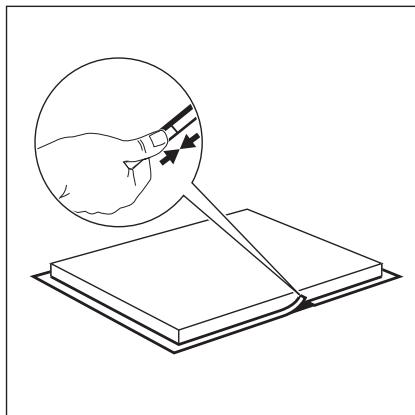
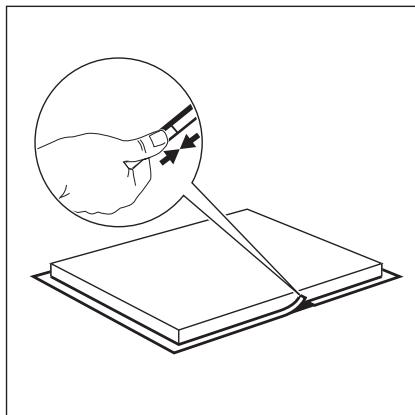
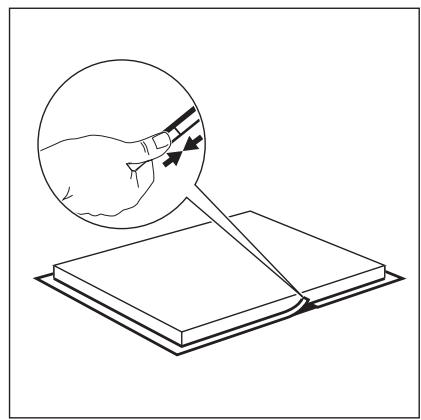
Before the installation and use of the appliance, carefully read the supplied instructions. The manufacturer is not responsible for any injuries or damage that are the result of incorrect installation or usage. Always keep the instructions in a safe and accessible location for future reference.
installation or usage. Always keep the instructions in a safe and accessible location for future reference.
This appliance can be used by children aged from 8 years and above and persons with reduced physical, sensory or mental capabilities or lack of experience and knowledge if they have been given supervision or instruction concerning the use of the appliance in a safe way and understand the hazards involved. Children of less than 8 years of age and persons with very extensive and complex disabilities shall be kept away from the appliance unless continuously supervised.
- This appliance can be used by children aged 8 years and above and by persons with reduced physical, sensory, or mental capabilities, or lack of experience and knowledge, if they have been given supervision or instruction concerning the use of the appliance in a safe way and understand the hazards involved. Children under 8 years of age and persons with very extensive and complex disabilities shall be kept away from the appliance unless continuously supervised.
- Children should be supervised to ensure that they do not play with the appliance.
- Keep all packaging away from children and dispose of it appropriately.
- WARNING: The appliance and its accessible parts become hot during use. Keep children and pets away from the appliance when in use and when cooling down.
- If the appliance has a child safety device, it should be activated.
- Children shall not carry out cleaning and user maintenance of the appliance without supervision.
1.2 General Safety
- This appliance is for cooking purposes only.
- This appliance is designed for single household domestic use in an indoor environment.
- This appliance may be used in offices, hotel guest rooms, bed & breakfast guest rooms, farm guest houses and other similar accommodation where such use does not exceed (average) domestic usage levels.
- WARNING: The appliance and its accessible parts become hot during use. Care should be taken to avoid touching heating elements.
- WARNING: Unattended cooking on a hob with fat or oil can be dangerous and may result in fire.
- Never use water to extinguish the cooking fire. Switch off the appliance and cover flames with e.g. a fire blanket or lid.
- WARNING: The appliance must not be supplied through an external switching device, such as a timer, or connected to a circuit that is regularly switched on and off by a utility.
- CAUTION: The cooking process has to be supervised. A short term cooking process has to be supervised continuously.
- WARNING: Danger of fire: Do not store items on the cooking surfaces.
- Metallic objects such as knives, forks, spoons and lids should not be placed on the hob surface since they can get hot.
- Do not use the appliance before installing it in the built-in structure.
- Do not use a steam cleaner to clean the appliance.
- After use, switch off the hob element by its control and do not rely on the pan detector.
- If the glass ceramic surface / glass surface is cracked, switch off the appliance and unplug it from the mains. In case the appliance is connected to the mains directly using junction box, remove the fuse to disconnect the appliance from power supply. In either case contact the Authorised Service Centre.
- If the supply cord is damaged, it must be replaced by the manufacturer, an authorized Service or similarly qualified persons in order to avoid a hazard.
- WARNING: Use only hob guards designed by the manufacturer of the cooking appliance or indicated by the manufacturer of the appliance in the instructions for use as suitable or hob guards incorporated in the appliance. The use of inappropriate guards can cause accidents.
2. SAFETY INSTRUCTIONS
2.1 Installation

WARNING!
Only a qualified person must install this appliance.

WARNING!
Risk of injury or damage to the appliance.
- Remove all the packaging.
- Do not install or use a damaged appliance.
- Follow the installation instructions supplied with the appliance.
- Keep the minimum distance from other appliances and units.
- Always take care when moving the appliance as it is heavy. Always use safety gloves and enclosed footwear.
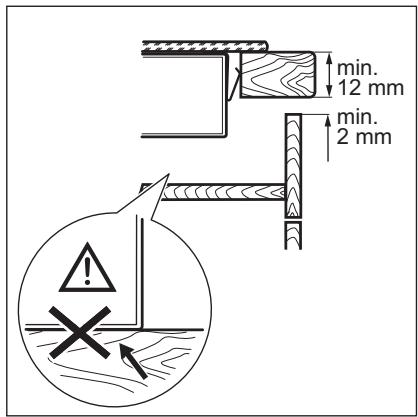
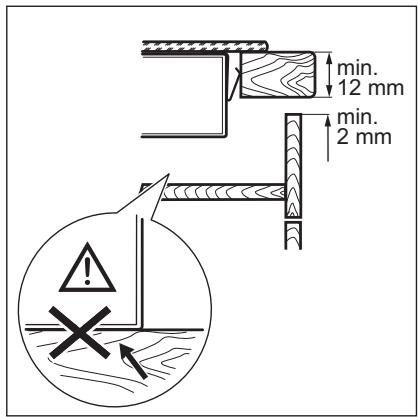
- Seal the cut surfaces with a sealant to prevent moisture from causing swelling.
- Protect the bottom of the appliance from steam and moisture.
- Do not install the appliance next to a door or under a window. This prevents hot cookware from falling from the appliance when the door or the window is opened.
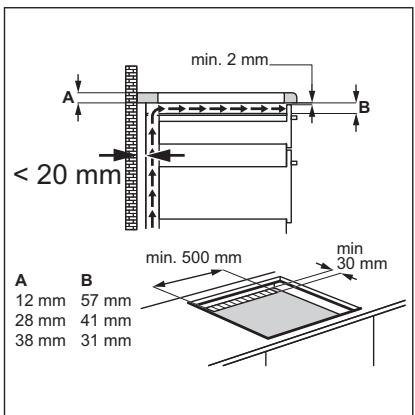
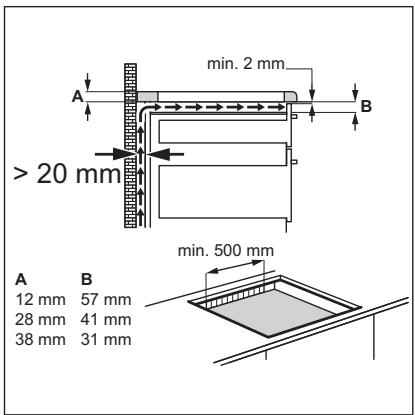
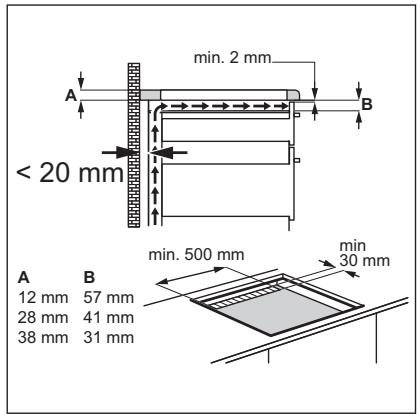
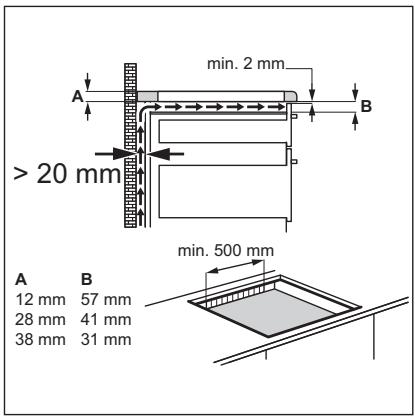
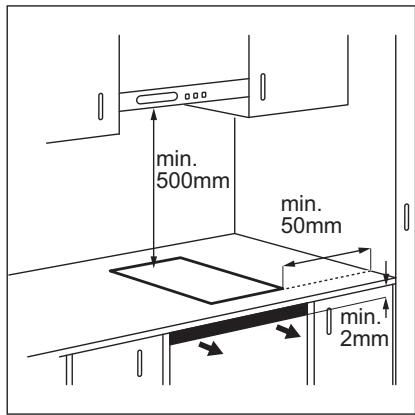
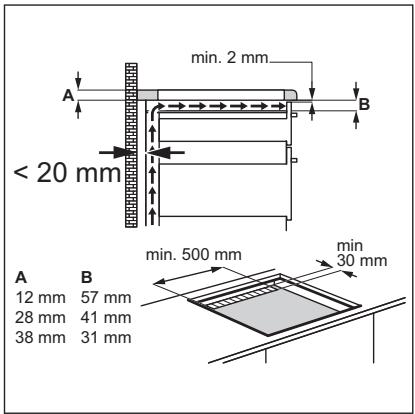
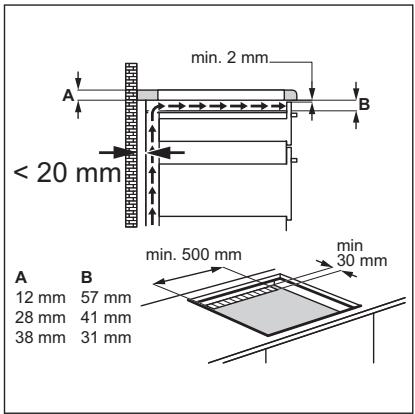
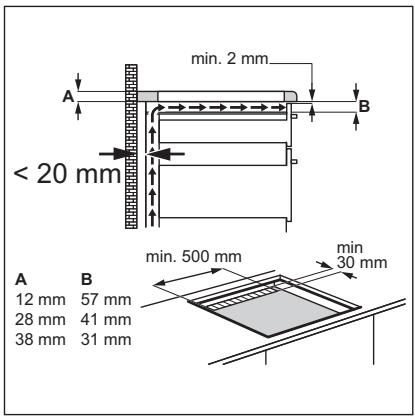
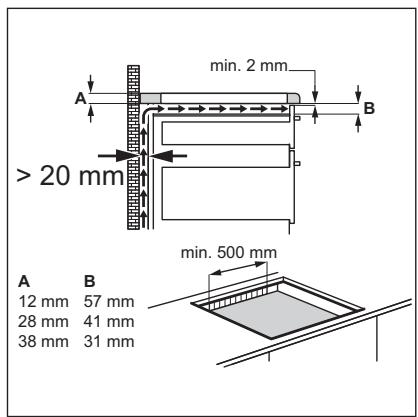
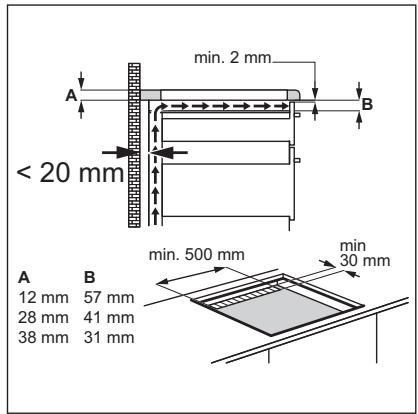
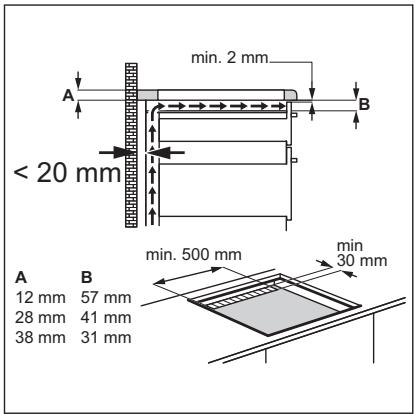
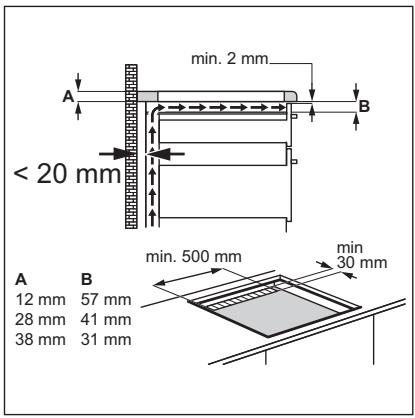
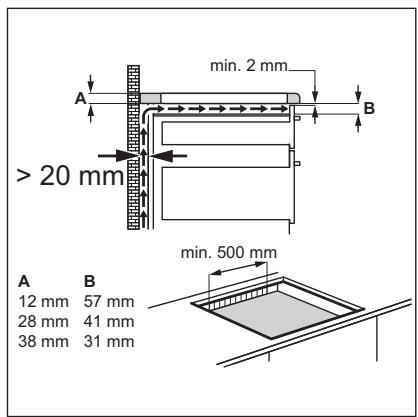
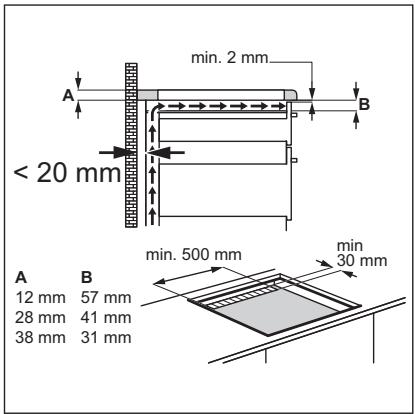
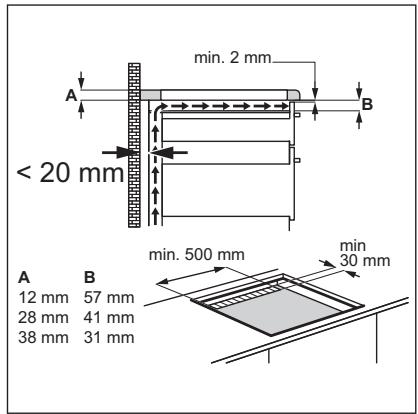
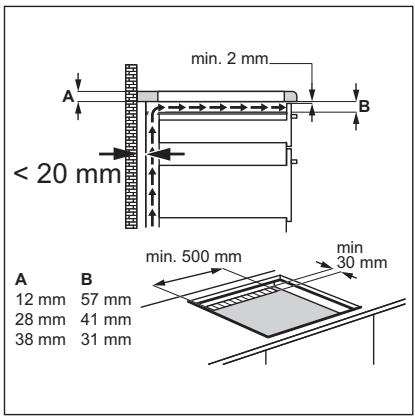
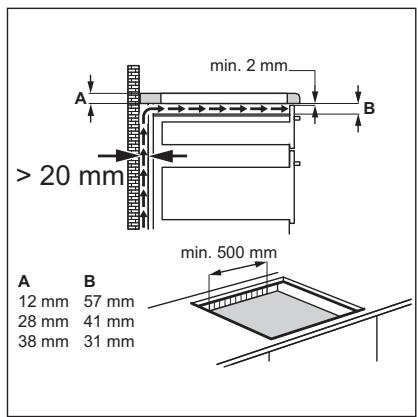
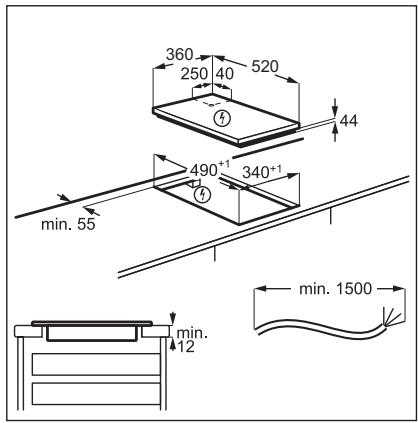
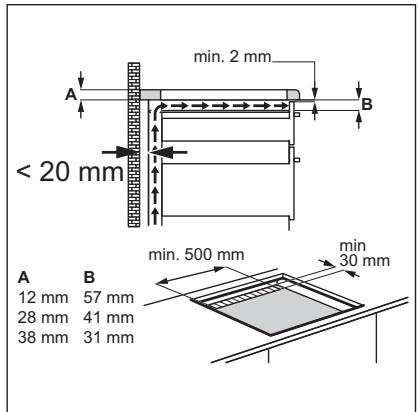
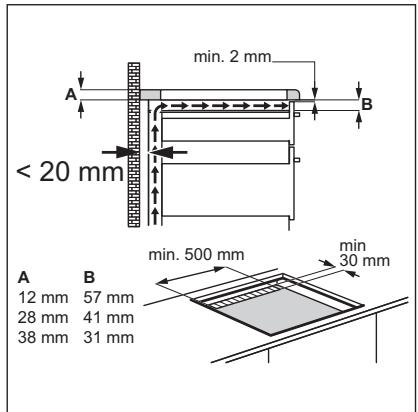
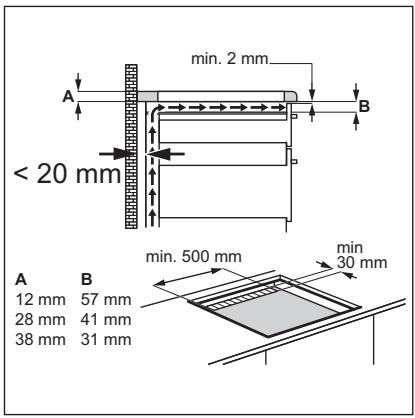
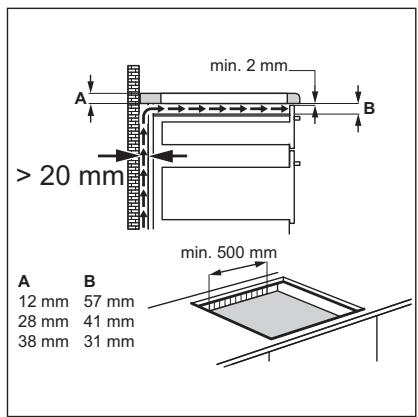
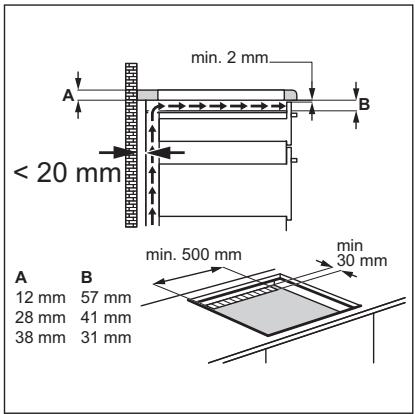
- If the appliance is installed above drawers make sure that the space, between the bottom of the appliance and the upper drawer is sufficient for air circulation.
- The bottom of the appliance can get hot. Make sure to install a separation panel made from plywood, kitchen carcass material or other non-flammable materials under the appliance to prevent access to the bottom.
- The separation panel has to cover the area under the hob completely.
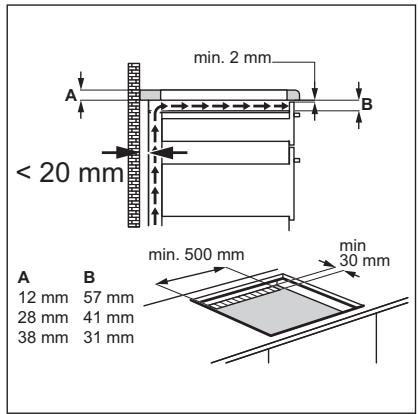
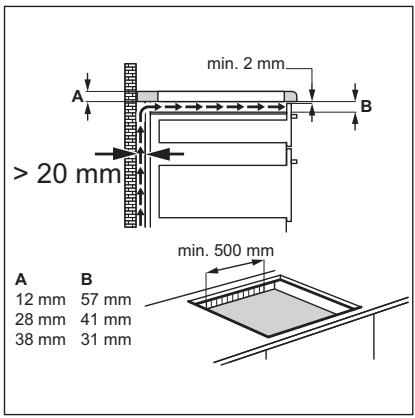
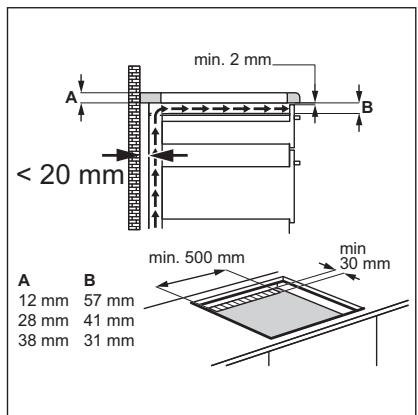
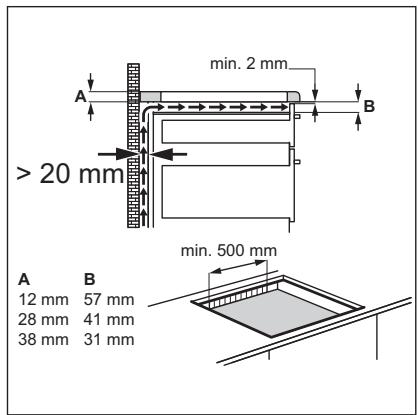
- Make sure that the ventilation space of 2 mm, between the worktop and the front of the below unit, is free. The warranty does not cover damages caused by the lack of an adequate ventilation space.
2.2 Electrical Connection

WARNING!
Risk of fire and electric shock.
- All electrical connections should be made by a qualified electrician. • The appliance must be earthed.
- Before carrying out any operation, make sure that the appliance is disconnected from the power supply.
- Make sure that the parameters on the rating plate are compatible with the electrical ratings of the mains power supply.
- Make sure the appliance is installed correctly. Loose and incorrect electricity mains cable or plug (if applicable) can make the terminal become too hot.
- Use the correct electricity mains cable.
- Do not let the electricity mains cable tangle.
- Make sure that a shock protection is installed.
- Use the strain relief clamp on the cable.
- Make sure the mains cable or plug (if applicable) does not touch the hot appliance or hot cookware, when you connect the appliance to a socket.
- Do not use multi-plug adapters and extension cables.
- Make sure not to cause damage to the mains plug (if applicable) or to the mains cable. Contact our Authorised Service Centre or an electrician to change a damaged mains cable.
- The shock protection of live and insulated parts must be fastened in such a way that it cannot be removed without tools.
- Connect the mains plug to the mains socket only at the end of the installation. Make sure that there is access to the mains plug after the installation.
- If the mains socket is loose, do not connect the mains plug.
- Do not pull the mains cable to disconnect the appliance. Always pull the mains plug.
- Use only correct isolation devices: line protecting cut-outs, fuses (screw type
fuses removed from the holder), earth leakage trips and contactors.
- The electrical installation must have an isolation device which lets you disconnect the appliance from the mains at all poles. The isolation device must have a contact opening width of minimum 3 mm.
2.3 Use

WARNING!
Risk of injury, burns and electric shock.
- Do not change the specification of this appliance.
- Remove all the packaging, labelling and protective film (if applicable) before first use.
- Make sure that the ventilation openings are not blocked.
- Do not let the appliance stay unattended during operation.
- Set the cooking zone to "off" after each use.
- Do not put cutlery or saucepan lids on the cooking zones. They can become hot.
- Do not operate the appliance with wet hands or when it has contact with water.
- Do not use the appliance as a work surface or as a storage surface.
- If the surface of the appliance is cracked, disconnect immediately the appliance from the power supply. This to prevent an electrical shock.
- Users with a pacemaker must keep a distance of minimum 30 cm from the induction cooking zones when the appliance is in operation.
- When you place food into hot oil, it may splash.

WARNING!
Risk of fire and explosion
- Fats and oil when heated can release flammable vapours. Keep flames or heated objects away from fats and oils when you cook with them.
- The vapours that very hot oil releases can cause spontaneous combustion.
- Used oil, that can contain food remnants, can cause fire at a lower temperature than oil used for the first time.
- Do not put flammable products or items that are wet with flammable products in, near or on the appliance.

WARNING!
Risk of damage to the appliance.
- Do not keep hot cookware on the control panel.
- Do not put a hot pan cover on the glass surface of the hob.
- Do not let cookware boil dry.
- Be careful not to let objects or cookware fall on the appliance. The surface can be damaged.
- Do not activate the cooking zones with empty cookware or without cookware.
- Do not put aluminium foil on the appliance.
- Cookware made of cast iron or with a damaged bottom can cause scratches on the glass / glass ceramic. Always lift these objects up when you have to move them on the cooking surface.
2.4 Care and cleaning
- Clean the appliance regularly to prevent the deterioration of the surface material.
- Switch off the appliance and let it cool down before cleaning.
- Do not use water spray and steam to clean the appliance.
- Clean the appliance with a moist soft cloth. Use only neutral detergents. Do not use abrasive products, abrasive cleaning pads, solvents or metal objects.
2.5 Service
- To repair the appliance contact the Authorised Service Centre. Use original spare parts only.
- Concerning the lamp(s) inside this product and spare part lamps sold separately: These lamps are intended to withstand extreme physical conditions in household appliances, such as temperature, vibration, humidity, or are intended to signal information about the operational status of the appliance. They are not intended to be used in other applications and are not suitable for household room illumination.
2.6 Disposal

WARNING!
Risk of injury or suffocation.
- Contact your municipal authority for information on how to dispose of the appliance.
- Disconnect the appliance from the mains supply.
- Cut off the mains electrical cable close to the appliance and dispose of it.
3. INSTALLATION

WARNING!
Refer to Safety chapters.
3.1 Before the installation
Before you install the hob, write down the information below from the rating plate. The rating plate is on the bottom of the hob.
Serial number ....
3.2 Built-in hobs
Only use the built-in hobs after you assemble the hob into correct built-in units and work surfaces that align to the standards.
3.3 Connection cable
- The hob is supplied with a connection cable.
- To replace the damaged mains cable, use the cable type: H05V2V2-F which withstands a temperature of 90 °C or higher. Contact an Authorised Service Centre. The connection cable may only be replaced by a qualified electrician.
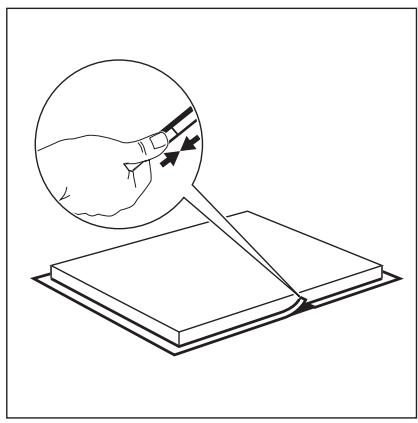
3.4 Attaching the seal - On-top installation
- Clean the worktop around the cut out area.
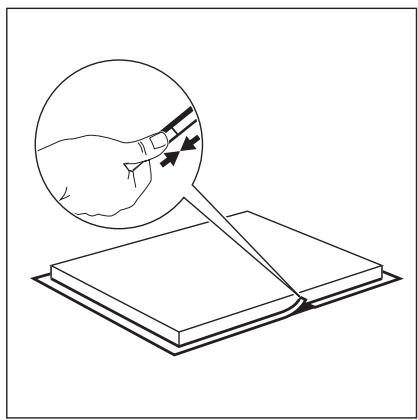
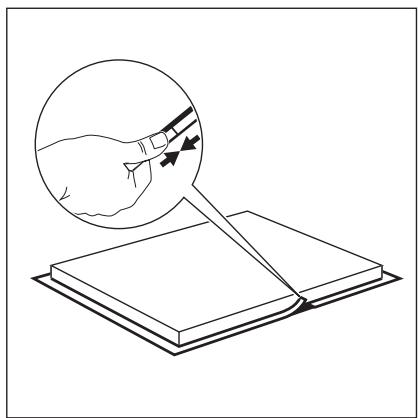
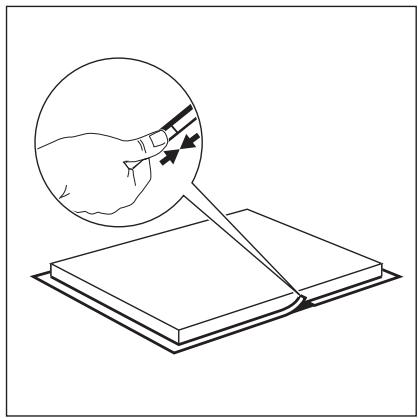
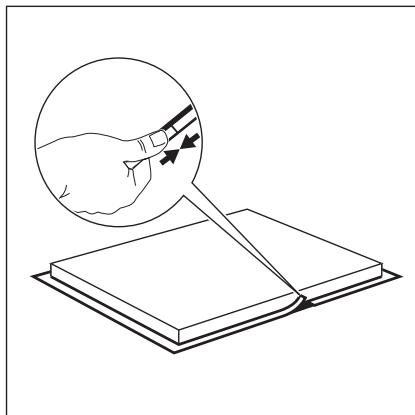
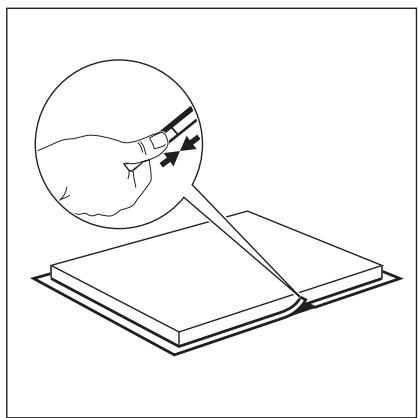
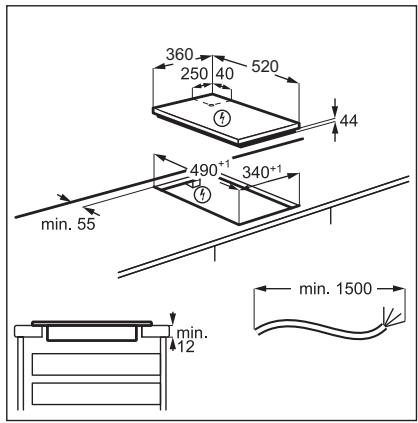
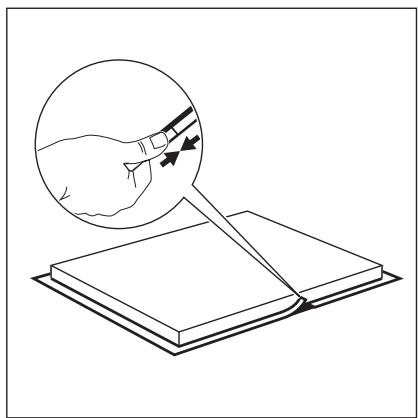
- Attach the supplied 2x6mm seal stripe to the lower edge of the hob, along the outer edge of the glass ceramic. Do not stretch it. Make sure that the ends of the seal stripe are located in the middle of one side of the hob.
- Add a few millimeters to the length when cutting the seal strip.
- Join the two ends of the seal strip together.
3.5 Assembly
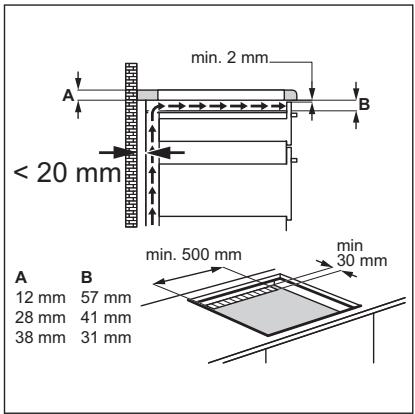
3.6 Installation of more than one hob
Supplied accessories: connection bar, sealing strip.

Use only a special heat-resistant silicone.
The worktop cutout
| Distance from the wall | minimum 50 mm |
| Length | 490 mm |
| Width | the sum of all widths of appliances that you install minus 20 mm |
Example:
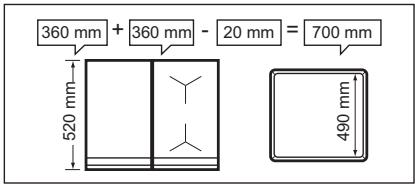
Assembly
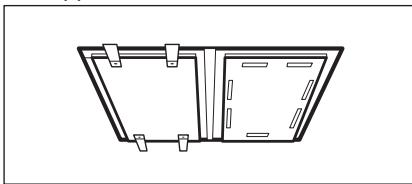
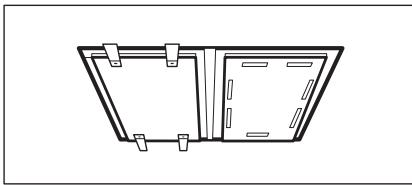
• Calculate correct cutout dimensions. • Prepare the worktop cutout. - Place the appliances on a soft surface (e.g., a blanket) with the bottom side up. - In the case of the Teppan Yaki, attach the supplied seal strip to its lower edge, along the outer edge of the glass ceramic. Loosely screw the fixing plates into the correct holes in the protection casing. - Insert the first appliance into the worktop cutout. Mount the connection bar under the appliance so that half of its width is still visible - it will support the next appliance.
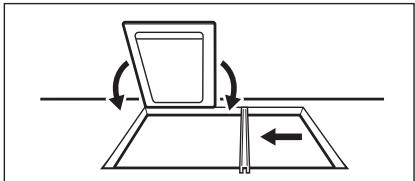
- For the Teppan Yaki, loosely screw in the fixing plates to the worktop from below (at the front and the rear of the appliance).
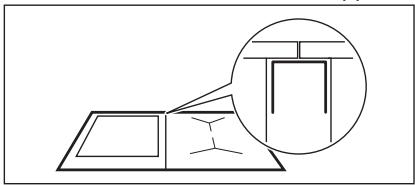
- Insert the next appliance into the worktop cutout. Make sure that the front edges of the appliances are on the same level.
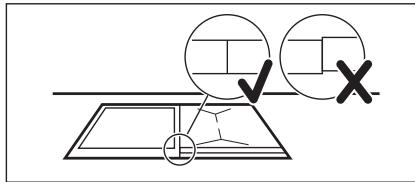
- Fix appliances other than Teppan Yaki with the use of snap-in springs.
- At the end, tighten the screws of the Teppan Yaki.
- Use silicone to seal the gaps between the appliances and those between the appliances and the worktop.
- Press the rubber shape firmly against the glass ceramic and move it slowly along the edges to squeeze out excess silicone.
- Put some soapy water on the silicone and smoothen out the edges with your finger.
- Do not touch the silicone until it hardens, it can last for about a day.
- Carefully remove the silicone squeeze-out with a shaving razor.
- Clean the glass surface.
4. PRODUCT DESCRIPTION
4.1 Cooking surface layout![graph TD A["1"] --> B["2"] C["1"] --> B["2"]](/content/2024/11/215801/images/f027a857345faa96a2eef1d893309bfe6a30c2d9bc5636fe036b720a11b1e840.jpg)
1 Induction cooking surface 2 Control panel
4.2 Control panel layout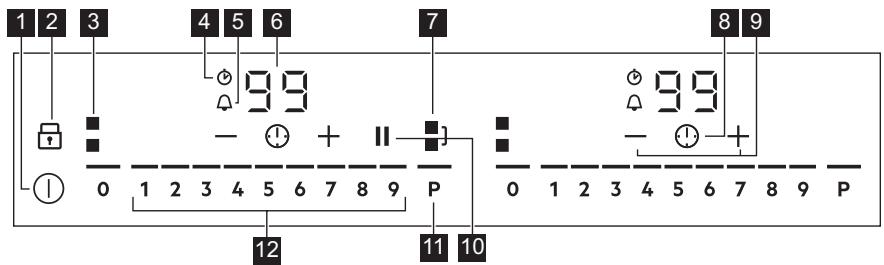
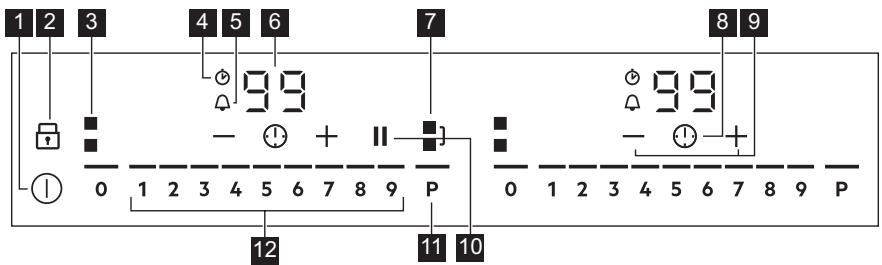
Use the sensor fields to operate the appliance. The displays, indicators and sounds tell which functions operate.
| Sensor field | Comment | |
| 1 | ➊ | To activate and deactivate the hob. |
| 2 | ➁ | To activate and deactivate Lock or Child Safety Device. |
| 3 | ➂ | To show the active zone. |
| 4 | ➍ | CountUp Timer indicator. |
| 5 | ➎ | Count Down Timer indicator. |
| 6 | - | Timer display: 00 - 99 minutes. |
| 7 | ➌ | To activate and deactivate Bridge and to switch between the modes. |
| 8 | ➌ | To select Timer functions. |
| 9 | +/- | To increase and decrease the time. |
| 10 | || | To activate and deactivate Pause. |
| 11 | P | To activate PowerBoost. |
| 12 | - | To set a heat setting: 0 - 9. |
5. DAILY USE

WARNING!
Refer to Safety chapters.
5.1 Activating and deactivating
Touch ① for 1 second to activate or deactivate the hob.
The control panel comes on after you activate the hob and goes off after you deactivate the hob.
5.2 Automatic Switch Off
The function deactivates the hob automatically if:
- you do not place any cookware on the hob for 50 seconds,
- you do not set the heat setting for 50 seconds after you place the cookware,
- you spill something or put something on the control panel for more than 10 seconds (a pan, a cloth). When you hear the acoustic signal, the hob deactivates. Remove the object or clean the control panel.
- the hob gets too hot (e.g. when a saucepan boils dry). Let the cooking zone cool down before you use the hob again.
- you do not deactivate a cooking zone or change the heat setting. After some time, the hob deactivates.
The relation between the heat setting and the time after which the hob deactivates:
| Heat setting | The hob deactivates after |
| 1 - 2 | 6 hours |
| 3 - 4 | 5 hours |
| 5 | 4 hours |
| Heat setting | The hob deactivates after |
| 6 - 9 | 1.5 hours |
5.3 Using the cooking zone

CAUTION!
Do not place hot cookware on the control panel. There is a risk of damage to the electronic parts.
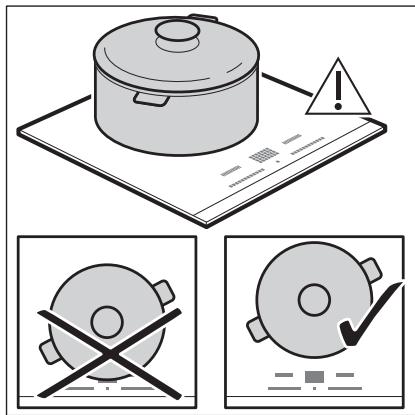
Place the cookware in the centre of the selected zone.
Induction cooking zones adapt to the dimension of the bottom of the cookware automatically.
When you place the cookware in the correct position, the hob recognizes it and the appropriate control bar comes on. A red cooking zone indicator appears above the
control bar and indicates the position of the pot.
Each square on the control panel represents one cooking zone on the induction cooking surface. Zone indicators show which cooking zone is controlled by the appropriate control bar.
5.4 Heat setting
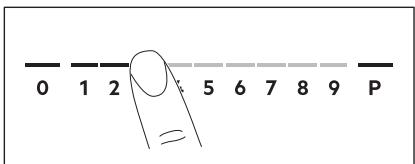
- Press the desired heat setting on the control bar. You can also move your finger along the control bar to set or change the heat setting for a cooking zone.
- To deactivate a cooking zone, press 0. Once you place a pot on the cooking zone and set the heat setting, it remains the same for 2 minutes after you remove the pot. The control bar and the cooking zone indicator blink for 2 minutes. If you place the pot on the cooking zone again within this time, the heat setting reactivates. Otherwise the cooking zone deactivates.
5.5 OptiHeat Control (3 step Residual heat indicator)

WARNING!
There is a risk of burns from residual heat.
The indicators show the level of the residual heat for the cooking zones you are currently using. When the hob is deactivated, the indicators are still visible. When the hob is cold enough, they disappear. The indicators may also come on for the neighbouring cooking zones even if you are not using them.
The induction cooking zones produce the heat necessary for the cooking process directly in the bottom of the cookware. The glass ceramic is heated by the heat of the cookware.
5.6 Bridge
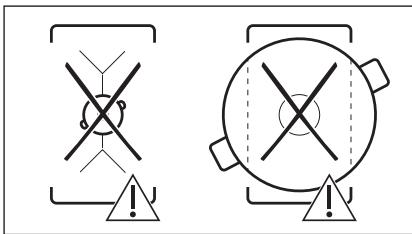
This function connects two cooking zones and they operate as one. You can use the function with large cookware.
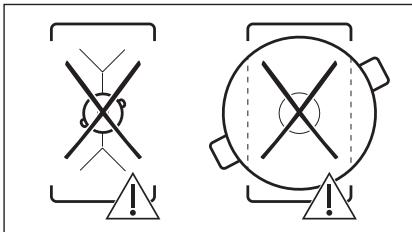
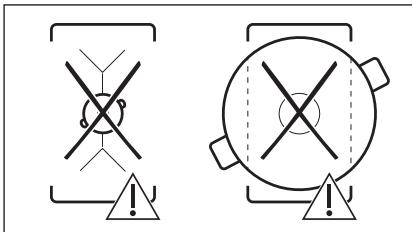
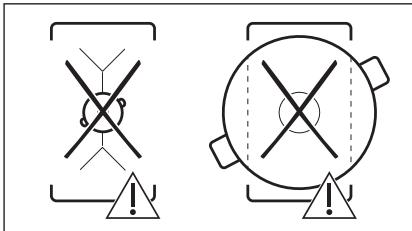
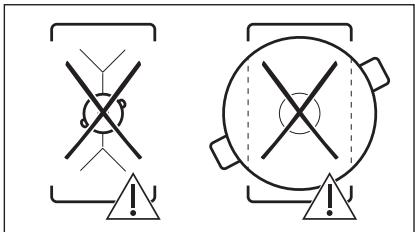
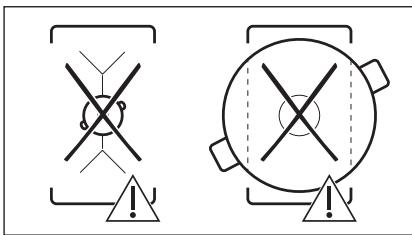
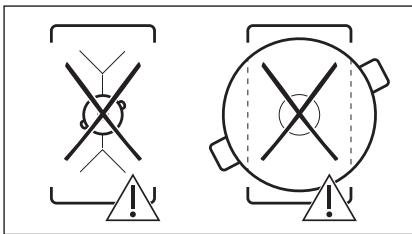
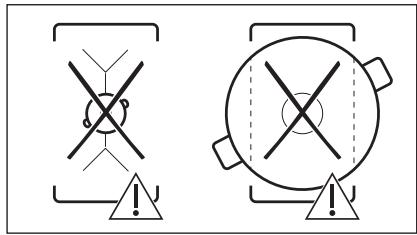
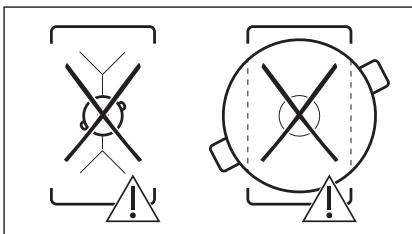
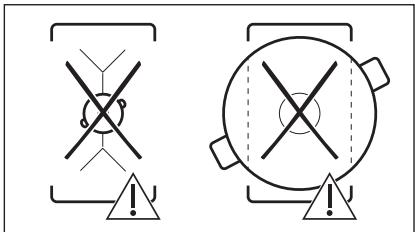
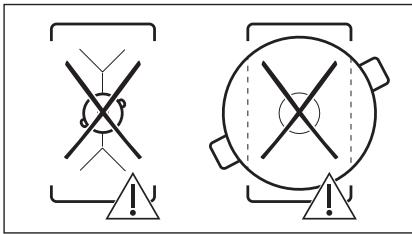
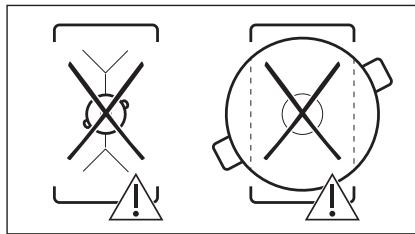
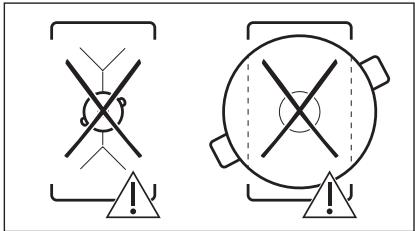
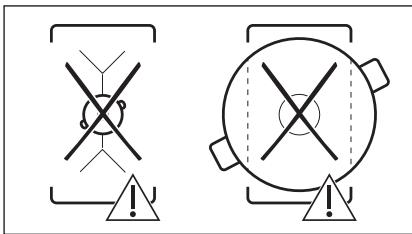
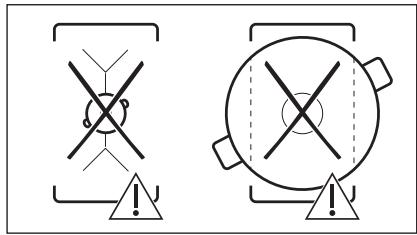
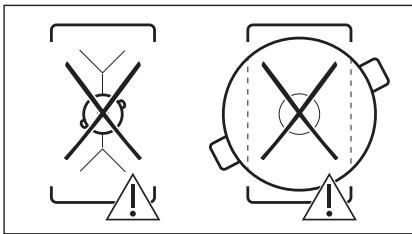
- Place the cookware on two cooking zones. The cookware must cover the centres of both zones.
■] turns white.
- Touch ■] to activate the function.
- Set the heat setting.
The cookware must cover the centres of both zones but not go beyond the area marking.
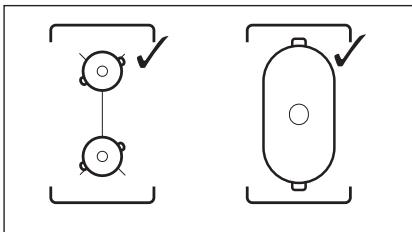
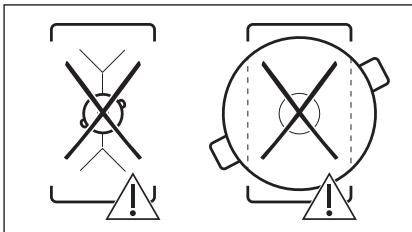
To deactivate the function, touch ■]. The cooking zones operate independently.
5.7 PowerBoost
This function activates more power for the appropriate induction cooking zone, depending on the cookware size. The function can be activated only for a limited period of time.
Touch P to activate the function for the cooking zone.
The symbol turns red.
The function deactivates automatically.

For maximum duration values, refer to "Technical data".
5.8 Pause
This function sets all cooking zones that operate to the lowest heat setting.
When the function operates, ① and || can be used. All other symbols on the control panels are locked.
The function does not stop the timer functions.
- To activate the function: press ||. The symbol turns red. The heat setting is lowered to 1.
- To deactivate the function: press ||. The symbol turns white. The previous heat setting comes on.
5.9 Timer
Count Down Timer
Use this function to specify how long a cooking zone should operate during a single cooking session.
First set the heat setting, then set the function.
- Touch ⚠️ to activate the function or change the time.
The timer digits 00 and the indicators + and — come on the display. 🧑 turns red, and ⏻ turns white.
If the timer is not set, all indicators disappear after 4 seconds.
- Touch + or — to set the time (00 - 99 minutes).
After 3 seconds, the timer starts to count down automatically. The indicators ⏻, +, and — disappear. 🔊 stays red.
When the time comes to an end, a signal sounds and ☐ flashes. To stop the signal, touch ⏻.
To deactivate the function: touch Ⓐ. The indicators + and — come on. Use — or + to set □□ on the display. Alternatively, set the heat level to 0. As a result, a signal sounds and the timer is cancelled.
CountUp Timer (The count up timer)
You can use this function to monitor how long a cooking zone operates.
Touch ⚠ twice to activate the function.
The indicator ⏻ turns red, the timer starts to count up automatically.
To deactivate the function: touch Ⓐ. When the indicators light up, touch —.
Minute Minder
You can use this function when the hob is activated but no cooking zone operates.
To see the control panel, place a pot on a cooking zone.
- Touch ⏻, until the indicator ⏱ turns red, to activate the function.
- Touch + or — to set the time.
The function starts automatically after 4 seconds. The indicators ⏻, +, and — disappear. ⏱ stays red.
When you set the function, you can remove the pot.
When the time comes to an end, a signal sounds and ☐ flashes. Touch ⏻ to stop the signal.
To deactivate the function: touch Ⓐ. The indicators + and - light up. Use - or + to set ☐ on the display.
The function has no effect on the operation of any cooking zone.
5.10 Lock
You can lock the control panel while the hob operates. It prevents an accidental change of the heat setting.
You need to activate the function for each appliance separately.
Set the heat setting first.
Touch 🔒 to activate the function.
The symbol turns red and blinks.
To deactivate the function, touch 🔒. The symbol turns white.

When you deactivate the hob, you also deactivate this function.
5.11 Child Safety Device
This function prevents an accidental operation of the hob.

You need to activate the function for each appliance separately.
Activate the hob first and do not set the heat setting.
Touch ☐ until it turns red to activate the function.
The control bars disappear. Deactivate the hob.

When you deactivate the hob, the function is still active.
To deactivate the function for only one
cooking time: Activate the hob with Ⓐ. comes on. Touch ⏻ until it turns white. The control bars appear. Set the heat setting within 50 seconds. You can operate the hob. When you deactivate the hob with Ⓐ the function is still active.
To deactivate the function permanently:
Activate the hob and do not set the heat setting. Touch 🔊 until it turns white. The control bars appear. Deactivate the hob.
5.12 OffSound Control
(Deactivating and activating the sounds)
Deactivate the hob first.
- Touch Ⓐ for 3 seconds to activate the function.
The display comes on and goes out.
- Touch ☐ for 3 seconds.
b0 or b1 comes on.
- Touch + of the timer to choose one of the following:
- b1 - the sounds are off - b0 - the sounds are on
- Wait until the hob deactivates automatically to confirm your selection.
When the function is set to b | you can hear the sounds only when:
- you touch ① • Minute Minder comes down • Count Down Timer comes down
- you put something on the control panel.
5.13 Power management
If multiple zones are active and the consumed power exceeds the limitation of the power supply, this function divides the available power between all cooking zones. The hob controls heat settings to protect the fuses of the house installation.
- If the hob reaches the limit of maximum available power (refer to the rating plate), the power of the cooking zones will be automatically reduced.
- For cooking zones that have a reduced power, the control panel shows the maximum possible heat settings.
- If a higher heat setting is not available reduce it for the other cooking zones first.
- The activation of the function depends on the number and size of pots.
6. HINTS AND TIPS

WARNING!
Refer to Safety chapters.
6.1 Cookware

For induction cooking zones, a strong electro-magnetic field creates heat in the cookware very quickly.
Use the induction cooking zones with suitable cookware.
- The bottom of the cookware must be as thick and flat as possible.
- Ensure pan bases are clean and dry before placing them on the hob surface.
- To avoid scratches, do not slide or rub the pot across the ceramic glass.
Cookware material
- Correct: cast iron, steel, enamelled steel, stainless steel, multi-layer bottom (with a correct marking from a manufacturer).
- Not correct: aluminium, copper, brass, glass, ceramic, porcelain.
Cookware is suitable for an induction hob if:
• Water boils very quickly on a zone set to the highest heat setting. • A magnet pulls onto the bottom of the cookware.
Cookware dimensions
- Induction cooking zones adapt to the dimension of the bottom of the cookware automatically.
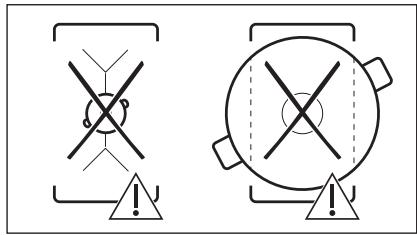
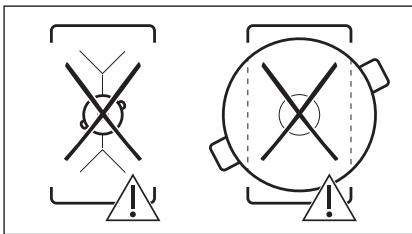
- The cooking zone efficiency is related to the diameter of the cookware. Cookware with a diameter smaller than the minimum receives only a part of the power generated by the cooking zone.
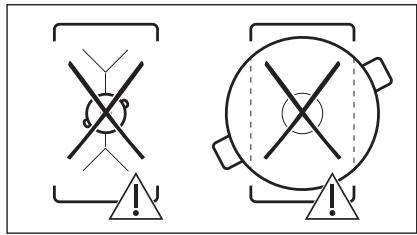
- For both safety reasons and optimal cooking results, do not use cookware larger than indicated in "Cooking zones specification". Avoid keeping cookware close to the control panel during the
cooking session. This might impact the functioning of the control panel or accidentally activate hob functions.

Refer to "Technical data".
6.2 The noises during operation
If you can hear:
- crack noise: cookware is made of different materials (a sandwich construction).
- whistle sound: you use a cooking zone with a high power level and the cookware is made of different materials (a sandwich construction). • humming: you use a high power level.
- clicking: electric switching occurs. • hissing, buzzing: the fan operates.
The noises are normal and do not indicate any malfunction.
6.3 Öko Timer (Eco Timer)
To save energy, the heater of the cooking zone deactivates before the count down timer sounds. The difference in the operation time depends on the heat setting level and the length of the cooking operation.
6.4 Examples of cooking applications
The correlation between the heat setting of a zone and its consumption of power is not linear. When you increase the heat setting, it is not proportional to the increase of the consumption of power. It means that a cooking zone with the medium heat setting uses less than a half of its power.

The data in the table is for guidance only.
| Heat setting | Use to: | Time (min) | Hints |
| 1 | Keep cooked food warm. | as necessary | Put a lid on the cookware. |
| 1 - 2 | Hollandaise sauce, melt: butter, chocolate, gelatine. | 5 - 25 | Mix from time to time. |
| 1 - 2 | Solidify: fluffy omelettes, baked eggs. | 10 - 40 | Cook with a lid on. |
| 2 - 3 | Simmer rice and milkbased dishes, heat up ready-cooked meals. | 25 - 50 | Add at least twice as much liquid as rice, mix milk dishes halfway through the procedure. |
| 3 - 4 | Steam vegetables, fish, meat. | 20 - 45 | Add a couple of tablespoons of liquid. |
| 4 - 5 | Steam potatoes. | 20 - 60 | Use max. 1/4 I of water for 750 g of potatoes. |
| 4 - 5 | Cook larger quantities of food, stews and soups. | 60 - 150 | Up to 3 l of liquid plus ingredients. |
| 6 - 7 | Gentle fry: escalope, veal cordon bleu, cutlets, rissoles, sausages, liver, roux, eggs, pancakes, doughnuts. | as necessary | Turn halfway through. |
| 7 - 8 | Heavy fry, hash browns, loin steaks, steaks. | 5 - 15 | Turn halfway through. |
| 9 | Boil water, cook pasta, sear meat (goulash, pot roast), deep-fry chips. | ||
| P | Boil large quantities of water. PowerBoost is activated. | ||
7. CARE AND CLEANING

WARNING!
Refer to Safety chapters.
7.1 General information
- Clean the hob after each use. Always use cookware with a clean base.
- Scratches or dark stains on the surface have no effect on how the hob operates.
- Use a special cleaner suitable for the surface of the hob. Use a special scraper for the glass.
7.2 Cleaning the hob
- Remove immediately: melted plastic, plastic foil, sugar and food with sugar,
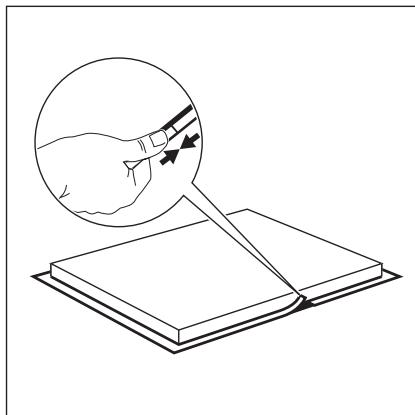
Otherwise, the dirt can cause damage to the hob. Take care to avoid burns. Use a special hob scraper on the glass surface at an acute angle and move the blade on the surface.
- Remove when the hob is sufficiently cool: limescale rings, water rings, fat stains, shiny metallic discoloration. Clean the hob with a moist cloth and a non-abrasive detergent. After cleaning, wipe the hob dry with a soft cloth.
- Remove shiny metallic discoloration: use a solution of water with vinegar and clean the glass surface with a cloth.
WARNING!

Refer to Safety chapters.
8.1 What to do if...
8.2 If you cannot find a solution...
| Problem | Possible cause | Remedy |
| You cannot activate or operate the hob. | The hob is not connected to an electrical supply or it is connected incorrectly. | Check if the hob is correctly connected to the electrical supply. |
| The fuse is blown. | Make sure that the fuse is the cause of the malfunction. If the fuse is blown again and again, contact a qualified electrician. | |
| You touched 2 or more sensor fields at the same time. | Touch only one sensor field. | |
| Pause operates. | Refer to "Daily use". | |
| There is water or fat stains on the control panel. | Clean the control panel. | |
| You can hear a constant beep noise. | The electrical connection is incorrect. | Disconnect the hob from the electrical supply. Ask a qualified electrician to check the installation. |
| You cannot select the maximum heat setting for one of the cooking zones. | The other zones consume the maximum available power. Your hob works properly. | Reduce the heat setting of the other cooking zones connected to the same phase. Refer to "Power management". |
| An acoustic signal sounds and the hob deactivates. An acoustic signal sounds when the hob is deactivated. | You put something on one or more sensor fields. | Remove the object from the sensor fields. |
| The hob deactivates. | You put something on the sensor field ➊. | Remove the object from the sensor field. |
| Residual heat indicator does not come on. | The zone is not hot because it operated only for a short time or the sensor is damaged. | If the zone operated sufficiently long to be hot, speak to an Authorised Service Centre. |
| There is no sound when you touch the panel sensor fields. | The sounds are deactivated. | Activate the sounds. Refer to "Daily use". |
| Comes on. | Child Safety Device or Lock operates. | Refer to "Daily use". |
| The control bar blinks. | There is no cookware on the zone or the zone is not fully covered. | Put cookware on the zone so that it fully covers the cooking zone. |
| The cookware is unsuitable. | Use cookware suitable for induction hobs. Refer to "Hints and tips". | |
| The diameter of the bottom of the cookware is too small for the zone. | Use cookware with correct dimensions. Refer to "Technical data". | |
| And a number come on. | There is an error in the hob. | Deactivate the hob and activate it again after 30 seconds. If comes on again, disconnect the hob from the electrical supply. After 30 seconds, connect the hob again. If the problem continues, speak to an Authorised Service Centre. |
8.2 If you cannot find a solution...
If you cannot find a solution to the problem yourself, contact your dealer or an Authorised Service Centre. Give the data from the rating plate. Make sure you operated the hob correctly. If not, the
servicing by a service technician or dealer will not be free of charge, even during the warranty period. Information about the guarantee period and Authorised Service Centres is in the guarantee booklet.
9. TECHNICAL DATA
9.1 Rating plate
Model IKE42640KB
Typ 61 A2A 00 AD
Induction 3.65 kW
Ser.Nr. ....
AEG
PNC 949 597 552 00
220 - 240 V 50 - 60 Hz
Made in: Germany
3.65 kW

9.2 Cooking zones specification
| Cooking zone | Nominal power (maximum heat setting) [W] | PowerBoost [W] | PowerBoost maximum duration [min] | Cookware diameter [mm] |
| Middle front | 2300 | 3200 | 10 | 145 - 265 |
| Middle rear | 2300 | 3200 | 10 | 145 - 265 |
The power of the cooking zones can differ slightly from the data in the table. It changes with the material and dimensions of the cookware.
For optimal cooking results, use cookware no larger than the diameter specified in the table.
10. ENERGY EFFICIENCY
10.1 Product information*
| Model identification | IKE42640KB | |
| Type of hob | Built-In Hob | |
| Number of cooking areas | 1 | |
| Heating technology | Induction | |
| Lenght (L) and width (W) of the cooking area | Middle | L 36.5 cmW 27.5 cm |
| Energy consumption of the cooking area (EC electric cooking) | Middle | 182.4 Wh / kg |
| Energy consumption of the hob (EC electric hob) | 182.4 Wh / kg | |
* For European Union according to EU 66/2014. For Belarus according to STB 2477-2017, Annex A. For Ukraine according to 742/2019.
EN 60350-2 - Household electric cooking appliances - Part 2: Hobs - Methods for measuring performance
The energy measurements referring to the cooking area are identified by the markings of the respective cooking zones.
10.2 Energy saving
You can save energy during everyday cooking if you follow the hints below.
- When heating up water, use only the amount you need.
- If possible, always put the lids on the cookware.
- Before you activate the cooking zone, put the cookware on it.
- Put the smaller cookware on the smaller cooking zones.
- Put the cookware directly in the centre of the cooking zone.
- Use the residual heat to keep the food warm or to melt it.
11. ENVIRONMENTAL CONCERNS
Recycle materials with the symbol 📋. Put the packaging in relevant containers to recycle it. Help protect the environment and human health by recycling waste of electrical and electronic appliances. Do not dispose of
appliances marked with the symbol 📄 with the household waste. Return the product to your local recycling facility or contact your municipal office.
FOR BEST RESULTS
220–240 V \~ 50–60 Hz
FOR PERFECT RESULTS
3.6 Installation of more than one hob
Included accessories: connection bar, sealing strip.

CountUp Timer (Stopwatch)
220–240 V \~ 50–60 Hz
Touch the selected zone.
3.6 Installing multiple hobs
- Other appliances such as the Teppan Yaki grill should be fixed using the snap-on springs.
- Finally, tighten the screws of the Teppan Yaki grill.
1 Induction hob cooking surface 2 Control panel

- FOR EXCELLENT RESULTS
- CONTROL PANEL OVERVIEW
- SOUND DURING OPERATION
- IF YOU CAN HEAR
- ÖKO TIMER (ECO TIMER)
- OPTIHEAT CONTROL (3-STEP RESIDUAL HEAT INDICATOR)
- WARNING
- POWER MANAGEMENT
- TROUBLESHOOTING
- CUSTOMER CARE AND SERVICE
- CONTENTS
- SAFETY INFORMATION
- THIS APPLIANCE CAN BE USED BY CHILDREN AGED FROM 8 YEARS AND ABOVE AND PERSONS WITH REDUCED PHYSICAL, SENSORY OR MENTAL CAPABILITIES OR LACK OF EXPERIENCE AND KNOWLEDGE IF THEY HAVE BEEN GIVEN SUPERVISION OR INSTRUCTION CONCERNING THE USE OF THE APPLIANCE IN A SAFE WAY AND UNDERSTAND THE HAZARDS INVOLVED. CHILDREN OF LESS THAN 8 YEARS OF AGE AND PERSONS WITH VERY EXTENSIVE AND COMPLEX DISABILITIES SHALL BE KEPT AWAY FROM THE APPLIANCE UNLESS CONTINUOUSLY SUPERVISED
- GENERAL SAFETY
- SAFETY INSTRUCTIONS
- INSTALLATION
- ELECTRICAL CONNECTION
- USE
- CARE AND CLEANING
- SERVICE
- DISPOSAL
- BEFORE THE INSTALLATION
- BUILT-IN HOBS
- CONNECTION CABLE
- ATTACHING THE SEAL - ON-TOP INSTALLATION
- ASSEMBLY
- INSTALLATION OF MORE THAN ONE HOB
- PRODUCT DESCRIPTION
- DAILY USE
- ACTIVATING AND DEACTIVATING
- AUTOMATIC SWITCH OFF
- THE FUNCTION DEACTIVATES THE HOB AUTOMATICALLY IF
- THE RELATION BETWEEN THE HEAT SETTING AND THE TIME AFTER WHICH THE HOB DEACTIVATES
- USING THE COOKING ZONE
- CAUTION
- HEAT SETTING
- OPTIHEAT CONTROL (3 STEP RESIDUAL HEAT INDICATOR)
- BRIDGE
- POWERBOOST
- PAUSE
- TIMER
- COUNT DOWN TIMER
- MINUTE MINDER
- LOCK
- CHILD SAFETY DEVICE
- TO DEACTIVATE THE FUNCTION FOR ONLY ONE
- TO DEACTIVATE THE FUNCTION PERMANENTLY
- OFFSOUND CONTROL
- (DEACTIVATING AND ACTIVATING THE SOUNDS)
- HINTS AND TIPS
- COOKWARE
- COOKWARE MATERIAL
- COOKWARE IS SUITABLE FOR AN INDUCTION HOB IF
- COOKWARE DIMENSIONS
- THE NOISES DURING OPERATION
- THE NOISES ARE NORMAL AND DO NOT INDICATE ANY MALFUNCTION
- EXAMPLES OF COOKING APPLICATIONS
- GENERAL INFORMATION
- CLEANING THE HOB
- REFER TO SAFETY CHAPTERS
- IF YOU CANNOT FIND A SOLUTION
- TECHNICAL DATA
- RATING PLATE
- COOKING ZONES SPECIFICATION
- ENERGY EFFICIENCY
- PRODUCT INFORMATION
- ENERGY SAVING
- ENVIRONMENTAL CONCERNS
- FOR BEST RESULTS
- FOR PERFECT RESULTS
- COUNTUP TIMER (STOPWATCH)
- INSTALLING MULTIPLE HOBS
Brand : AEG
Model : IKB84431XB - IKB84431IB
Category : Hob