
CR 66 M BK/F - Sink FRANKE - Free user manual and instructions
Find the device manual for free CR 66 M BK/F FRANKE in PDF.



| Product type | Built-in oven |
| Brand | Franke |
| Model | CR 66 M BK/F (and compatible models CM, CR, CS, SG, SM) |
| Power supply voltage | 220/240 V ~ 50/60 Hz |
| Maximum current | 16 A |
| Total power | 2300 W |
| Top heating element | 1000 W |
| Bottom heating element | 1250 W |
| Grill element | 2250 W |
| Electric fan | 30 W |
| Tangential fan | 15 W |
| Light bulb (standard) | 15 W, E14 socket |
| Light bulb (_/F models) | 25 W, G9 socket |
| Cooking modes | Natural convection, Fan-assisted, Bottom fan-assisted, Top fan-assisted, Grill, Turbo grill |
| Temperature range | 50 °C to 260 °C (275 °C for _/F models) |
| Timer | Mechanical (timer 1-120 min), Analog (clock with functions), Digital (display with delayed programming) depending on model |
| Cleaning | Special enamel, manual cleaning; removable door and inner glass panes |
| Safety | Automatic shut-off at end of cooking, cooling ventilation |
| Supplied accessories | Grid, drip tray |
| Installation | Built-in, requires appropriate cabinet opening |
Frequently Asked Questions - CR 66 M BK/F FRANKE
User questions about CR 66 M BK/F FRANKE
0 question about this device. Answer the ones you know or ask your own.
Ask a new question about this device
Download the instructions for your Sink in PDF format for free! Find your manual CR 66 M BK/F - FRANKE and take your electronic device back in hand. On this page are published all the documents necessary for the use of your device. CR 66 M BK/F by FRANKE.
USER MANUAL CR 66 M BK/F FRANKE
EN Installation and user manual
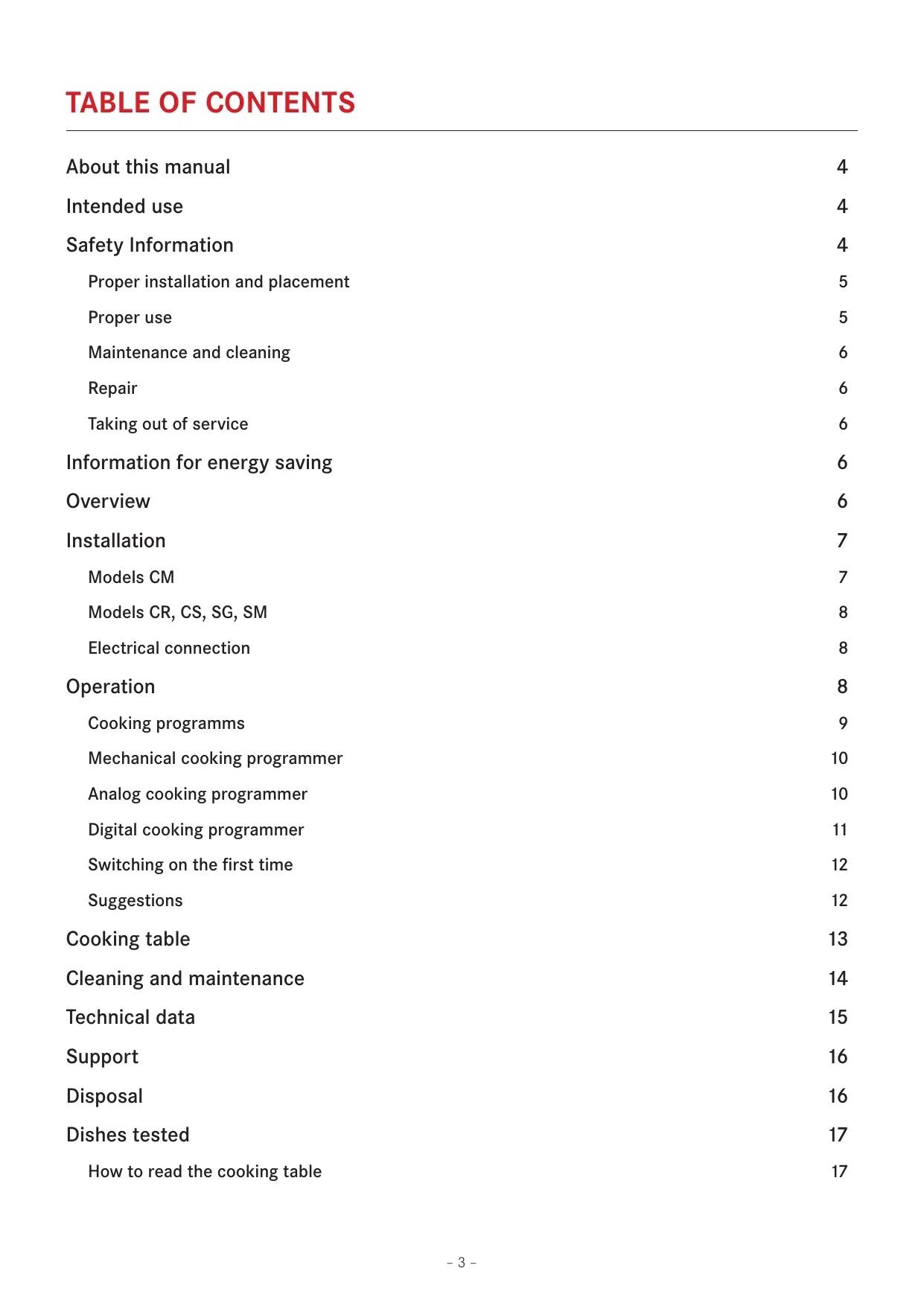
About this manual 4
Intended use 4
Safety Information 4
Proper installation and placement 5
Proper use 5
Maintenance and cleaning 6
Repair 6
Taking out of service 6
Information for energy saving 6
Overview 6
Installation 7
Models CM 7
Models CR, CS, SG, SM 8
Electrical connection 8
Operation 8
Cooking programs 9
Mechanical cooking programmer 10
10
Digital cooking programmer 11
Switching on the first time 12
Suggestions 12
Cooking table 13
Cleaning and maintenance 14
Technical data 15
Support 16
Disposal 16
Dishes tested 17
How to read the cooking table 17
ABOUT THIS MANUAL
This user manual applies to several models of the device. Thus it may be possible that some of the described features and functions are not available on your specific model.
The explanatory images and figures, described in the various sections, are available at the end of the manual.
FRANKE reserves the right to make modifications to the product without prior notice. All information correct at time of issuance.
- Carefully read the user manual before using the device.
-
Keep the user manual.
-
Use the device described in this user manual only according to the intended use.
Symbol Meaning

Warning symbol. Warning against risks of injury.
Actions in safety and warning notes to avoid injury or damage.
Action step. Specifies an action to be done.
Result. Result of one or more action steps.
√
Precondition that has to be fulfilled before performing the following action.
INTENDED USE
The oven was developed exclusively for nonprofessional, domestic use in the household.
The oven is designed to offer professional performance in the household. It is a highly versatile appliance enabling safe and easy selection of different cooking methods.
SAFETY INFORMATION
Read the user manual and the safety information carefully before using the oven.
Keep the manual for future reference.
The manufacturer can not be made liable for possible damage which may occur due to incorrect installation and incorrect, improper or unreasonable use of the device.
The electrical safety of the oven is guaranteed only when it is connected to an earthing system in compliance with the valid regulations.
To ensure safe and efficient operation of this electrical device:
Only contact authorised service centres.
Do not modify any features of the device.

This appliance is not intended for use by persons (including children) with reduced physical, sensory or mental
capabilities, or lack of experience and knowledge, unless they have been given supervision or instruction concerning use of the appliance by a person responsible for their safety.
Children should be supervised to ensure that they do not play with the appliance.
This device is not a toy.
- Keep children away from the device and the packaging material.
Do not leave children near the device unattended.
Do not let children play with the device.
Do not allow children to touch the device or its controls during and immediately after using it.
Proper installation and placement
If the oven is to be permanently connected to the power supply:
Ensure that the device is installed only by the customer service, an electrician or trained personnel with the appropriate knowledge/education.
Ensure that the device is installed in a way that allows to disconnect it from the power supply, with a contact opening distance that ensures complete disconnection in category III overvoltage conditions.
Ensure that the device is connected directly to the mains socket.
- Ensure that no adapters, no multi-sockets and no extension cables are used to connect the device.
Ensure that the device is not exposed to atmospheric agents (rain, sun).
Proper use
Only use the device to prepare and cook food.
Use oven gloves when placing containers in the oven or when taking containers out of the oven.
Observe the manuals of the cooking devices that are used with the oven when using the device.
Do not place power cables of other electric appliances on hot parts of the oven.
Do not use the oven chamber to store any objects.
Do not use flammable liquids near the oven.
Only use the temperature probe recommended for this oven.
Risk of overheating and malfunction of the oven due to blocked ventilation!
Never cover the inside walls of the oven with aluminium foil, especially the lower part of the oven chamber.
Do not block the ventilation of the fan or the cooling openings above the oven door.
The appliance shall not be installed behind a decorative door in order to avoid overheating.
Damage to the enamel in the oven due to wrong handling of pots or containers!
During cooking, never place pots or containers directly on the floor of the oven chamber.
Place pots and containers only on the racks or enamel trays provided on one of the five shelves available in the oven chamber.

Risk of burns!
During use the appliance becomes hot. Care should be taken to avoid touching heating elements inside the oven.
WARNING: Accessible parts may become hot during use. Young children should be kept away.

Risk of burns!
The end of the door handle may be hotter due to hot air being vented.
When opening or closing the door, always hold the door handle in the middle.
Always make sure that the control knobs are in the off position when the oven is not in use.

Risk of electric shock due to damaged device!
Do not switch on a damaged device.
Switch off the fuse in the fuse box.
Contact the customer service.

Risk of electric shock!
Do not touch the device with wet parts of your body.
Do not use the device when barefoot.
Do not pull on the device or power cable to unplug it from the socket.
WARNING: Ensure that the appliance is switched off before replacing the lamp to avoid the possibility of electric shock.
Maintenance and cleaning
Before maintenance or cleaning:
Disconnect the device from the power supply, e.g., switch off the fuse in the fuse box. The oven uses a special enamel which is easy to keep clean. However, FRANKE recommends to clean it frequently in order to avoid baking on grime and previous cooking residues.
Do not use harsh abrasive cleaners or sharp metal scrapers to clean the oven door glass/ the glass of hinged lids of the hob (as appropriate), since they can scratch the surface, which may result in shattering of the glass.
Do not use steam cleaners or direct jets of water.

Risk of electric shock due to entering liquid!
The device contains electrical components.
Make sure that no liquid enters the interior of the device.
Do not use pressurised steam to clean the device.
Do not use a wet cloth to clean the operating elements.
Repair
Do not allow anyone except qualified personnel to install or repair the appliance.
Contact a service centre authorised by the manufacturer or qualified personnel in the following cases:
- Immediately after unpacking, in the event of doubts regarding the integrity of the device
- During installation (according to the manufacturer's instructions)
- Doubts regarding the correct operation of the device
- Malfunction or poor operation
- Replacing the power socket if incompatible with the power plug of the device
- If the supply cord is damaged, it must be replaced by the manufacturer, its service agent or similarly qualified persons in order to avoid a hazard
Taking out of service
If the oven is no longer to be used, call the service centre or qualified personnel to disconnect it from the power supply.
INFORMATION FOR ENERGY SAVING
The operating mode TOP FAN ASSISTED COOKING consume less energy than the other cooking functions available.
Avoid frequent door opening.
Preheat as rapidly as possible.
Preheat the oven chamber only if the baking results depend on this operation.
If a recipe for a gratin uses residual heat for longer than 30 minutes, turn the appliance off 5-10 minutes before the end of cooking.
OVERVIEW
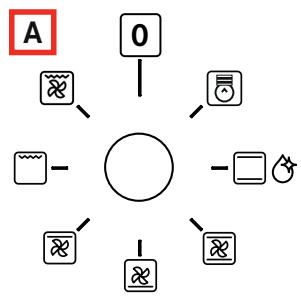
A. Programme selector knob
For selecting the oven mode according to the type of cooking required. When the knob is set to any programme, the oven light comes on indicating that the oven is switched on.
B. Programmer
FRANKE ovens have various cooking time management and control systems; refer to page 9 for specific detailed instructions. Just identify the type of control your oven is equipped with, to be guided in correct use of the function.
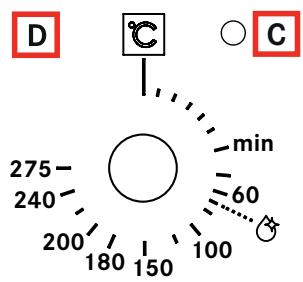
C. Thermostat indicator
Indicated by the symbol , it signals that the oven heating elements are on. It goes off when the set temperature has been reached, and comes on again whenever oven heating is reactivated. It is useful for checking if the temperature has been reached, before introducing the food.
D. Temperature control knob (Thermostat)
Used to set the temperature required for the type of food being cooked, keeping it constant during cooking. To select the required temperature, turn the knob clockwise, bringing the pointer to the corresponding number. Max. temperature is approx. 275° C .
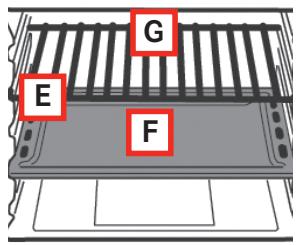
E. Rack and drip-tray runners
Used for correctly positioning the racks and driptrays in 5 predetermined positions (1 to 5 starting from the bottom); the cooking table (page 13) indicates the best position for each type of cooking.
F. Drip-tray
Normally used for collecting juices from grilled food or for cooking food directly; the drip-tray must be removed from the oven if not used. The drip-tray is in "AA" food-grade enamelled steel.
Note: To achieve optimal cooking results it is advisable to insert the drip-tray with the inclined part towards the rear wall of the oven compartment.
G.Rack
Used for supporting pans, pastry moulds and any containers other than the drip-trays provided, or for cooking meat and fish mainly with the grill and turbo grill functions, toasting bread, etc. Direct contact of the rack with food is not recommended.
INSTALLATION
Important: Installation (Fig. 5) must be carried out in compliance with current standards and regulations. It must be only be carried out by specialised and licensed personnel.
Cabinet requirements
For fitted units, the components (plastic materials and veneered wood) must be assembled with heat-resistant adhesives (min. 100°C ):
unsuitable materials and adhesives can result in warping and ungluing.
- The cabinet must allow sufficient room for the electrical connections.
- The cabinet in which the oven is fitted must be strong enough to take the weight of the equipment.
The oven must be securely installed in the recess.
The oven can be installed in a column cabinet or under the top of a modular unit, provided sufficient ventilation is guaranteed.
Models CM
(Fig. 6a/6b/6c)
Measure the width of the cabinet shoulder (S), which normally can be 16, 18 or 20 mm .
- 16 mm shoulder: on each fixing bracket (F) position 2 lugs (T) marked with the number 16.
- 18 mm shoulder: on each fixing bracket (F) position 2 lugs (T) marked with the number 18.
- 20 mm shoulder: the 20 mm shoulder does not require the use of lugs.
Position the brackets (F) against the cabinet shoulder and at the bottom on the oven support top.
Secure the brackets (F) with the screws (V).
Position the oven inside the cabinet, open the door fully and fix it to the brackets (F) using the 4 screws (U) and the 4 plastic spacers (D).
Models CR, CS, SG, SM
(Fig. 6d)
- Fit the appliance in the compartment; fix the oven to the cabinet with the 4 screws and the 4 bushings provided, using the holes prepared in the side panels (Fig. 6d).
Note: Applies to all models (Fig. 6e) if the oven is to be fitted under a cooktop, firstly turn the top connection (R) to the right or left so that the oven fits properly (Fig. 6e).
Electrical connection
FRANKE ovens are supplied with a three-pole power cable with free terminals. If the oven is permanently connected to the power supply, install a device that ensures disconnection from the power supply, with a contact opening distance (at least 3mm ) enabling complete disconnection in category III overvoltage conditions.
Make sure:
The plug and socket are suitable for a 16 A current.
- Both can be easily reached and are positioned so that no live part is accessible when inserting or removing the plug.
The plug can be easily inserted.
- The oven does not rest against the plug when installed in the cabinet.
- The terminals of two appliances are not connected to the same plug.
A 3 × 1.5 mm2 cable type H05VV-F is used when replacing the power cable.
Make sure you observe the polarities of the free terminals.
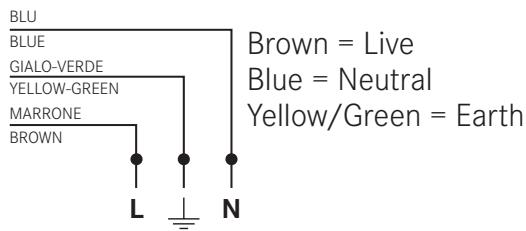
Note:
Make sure the characteristics of the household electrical system (voltage, maximum power and current) are compatible with those of your FRANKE oven.
The mains frequency is established at switching on.
OPERATION
This oven combines the advantages of "static" natural convection ovens with those of modern "fan" ovens. It is a very versatile appliance which enables safe and easy selection of 6 different cooking methods. Use knobs (A) and (D) on the control panel to select the required programmes and temperature. For best use of your FRANKE oven, consult the cooking table on page 13.
Cooling fan
In order to reduce the temperature at the door, control panel and sides, the FRANKE oven is equipped with a cooling fan which is automatically activated when the oven is hot. When the fan is on, air blows from the front of the oven between the front panel and oven door; special attention has paid to ensure that the exiting air does not disturb the kitchen environment and that noise is kept to a minimum.
To protect kitchen units, the fan keeps running after cooking until the oven has cooled down sufficiently.

Oven light
This symbol corresponds to switching on of the oven light without activation of any type of heating. This option is useful for cleaning the oven when it is switched off, to see the cooking compartment.
| Cooking programmes | |
| NATURAL CONVENTIONAL COOKING The heat source is from above (roof heating element) and below (floor heating element). This is the conventional cooking function which ensures even cooking using a single shelf. | |
| FAN-ASSISTED COOKING The top (roof) heating element, bottom (floor) heating element and fan inside the oven are activated. The constant and uniform heat cooks and browns the food evenly. Various dishes can be cooked at the same time, using a maximum of 2 shelves. | |
| BOTTOM FAN-ASSISTED COOKING The bottom (floor) heating element and fan are activated. Ideal for cooking fish and frozen and precooked products in general. Its use with patisserie products is very effective. | |
| TOP FAN-ASSISTED COOKING The top (roof) heating element and the fan are activated. The low power and the fan allow very gentle and even cooking. Ideal for dry pastry and certain types of baked pasta. | |
| GRILLING The grill heating element at the top of the oven switches on. In this case the fast infrared surface cooking keeps the meat tender on the inside; the grill can also be used to quickly toast up to 9 slices of bread. The FRANKE oven is designed to grill food with the oven door completely closed. Note: The grill heating element is very hot when in use; be careful not to touch it accidentally when handling food to be grilled. In any case, FRANKE has designed the oven opening to protect hands as much as possible. | |
| TURBO GRILL COOKING The grill heating element at the top of the oven and the fan are activated. It combines one-way heat radiation with forced air circulation inside the oven. This prevents the surface of the food from burning and increases heat penetration. Excellent results are obtained using the turbog Grill for mixed meat and vegetable kebabs, sausages, spare-ribs and lamb chops, broiled chicken, quail with sage, pork fillets, etc. | |
Mechanical cooking programmer
(Fig. 1d)
The end of cooking timer is a practical device that turns the oven off automatically at a set time in an interval of 1 to 120 minutes.
To use the end of cooking timer, the ringer must be wound up by turning the knob (B) almost one full turn clockwise; then, turning back, set the required time by aligning the number corresponding to the minutes with the fixed reference on the front panel.
At the end of the set time, the ringer sounds and the oven is automatically switched off.
Note: The oven stays hot at around the set cooking temperature for a long time after it has been switched off; therefore to avoid overcooking or burning the food, it is advisable to remove it from the oven.
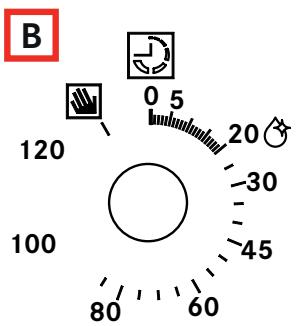
Note: To use the oven in manual mode, i.e. without using the end of cooking timer, align the knob pointer with the fixed symbol on the front panel. When the oven is turned off, the end of cooking programmer can be used as a normal timer.
Analog cooking programmer
(Fig. 1a)
This clock is already set for manual oven use, therefore cooking is possible even without adjusting it.
Right knob
Press the right knob to select in sequence the functions to be activated (timer, end of cooking, cooking start, time setting), signalled by the respective LED blinking.
Press this knob briefly to
check already programmed settings (Query), or press it for about 2 seconds to cancel settings (Reset).
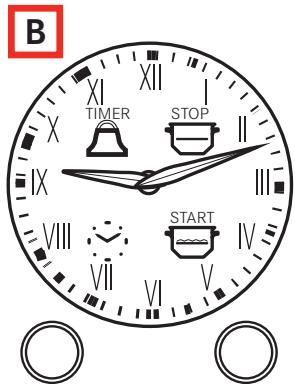
Left knob
- Turn the left knob to set the hands of the time clock relevant to the activated function (LED blinking).
LEDs
Blinking: ready for setting or signalling end of function (together with the ringer).
Lit: function running.
Timer
-
To set the timer, press the knob on the right once (the corresponding LED begins to blink); then turn the knob on the left to move the hands in order to set the timer duration.
Press the right knob again to confirm the setting; the corresponding LED changes from blinking to steady. -
The hands will then return to their original position to indicate the current time: when the set time is reached, the ringer sounds. This sound can be stopped by pressing the right knob.
The timer does not control oven heating.
End of cooking
To set the end of cooking time, press the right knob twice (the LED for the symbol begins to flash); then turn the knob on the left to move the hands in order to set the end of cooking time.
The LED will blink for the next 10 seconds (for possible adjustments), after which the setting will be acquired and the LED becomes steady.
- The same effect is obtained by pressing the right knob twice during blinking. At the end of cooking, oven heating will be deactivated and the ringer will sound for 1 minute; this sound can be stopped by pressing the right knob.
Note: At the end of cooking, the oven remains at a temperature close to the previously set value for several minutes; it is therefore wise to remove the food from inside so as to avoid overcooking it.
End of cooking with delayed start
Delayed start of cooking can only be activated following the end of a cooking process; when set, pressing the right knob confirms the „stop“, and at the same activates the blinking LED for the symbol .
- Turn the left knob to also set the start of cooking time (naturally this will be before the end, therefore the hands can only be moved back).
Confirm by pressing the right knob again.
The data can also be automatically acquired by allowing the blinking to continue for 10 seconds.
- The LEDs for symbols and will remain lit and the oven will switch on at the set time, when only the LED for the symbol will remain lit.
At the end of cooking, the ringer will sound for 1 minute; this sound can be stopped by pressing the right knob.
Setting the time of day
- To set the correct time, just press the right knob three times (the LED for the clock symbol starts blinking), then turn the left knob.
After setting the right time, press the right knob to confirm.
Digital cooking programmer
(Fig. 1b, 1c)
It enables oven programming in the following modes:
- delayed start of cooking with set duration,
- immediate start of cooking with set duration;
- timer.
Setting the digital clock
When the appliance has been connected to the mains or after a power failure the display will flash on: „0.00“.
Press the + and - buttons together for a few seconds. The time of day can be adjusted with the + and - buttons, while the dot between the hours and minutes flashes.
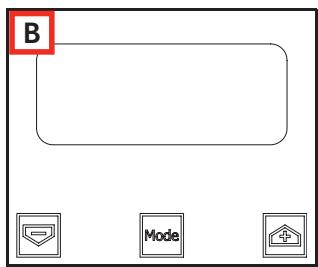
If the time setting mode is selected when an automatic programme is active, the automatic programme is cancelled.
Possible time adjustments can be made by repeating the steps described above.
Acoustic signal frequency modification
The frequency of the acoustic signal can be changed if a cooking cycle is not programmed (therefore the display shows the time of day).
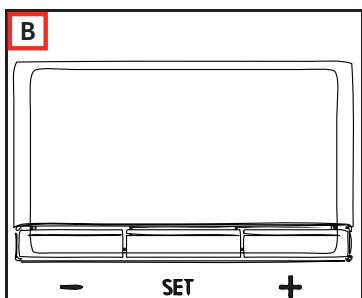
Press the + and - buttons (from the time modification menu) together.
Press Mode or Set to select the menu for modifying the acoustic signal frequency.
The acoustic signal frequency can be modified by repeatedly pressing the Mode or Set button; ,ton1", ,ton2", ,ton3" will appear on the display.
Manual oven operation
Once the time has been set, the programmer automatically switches to manual mode.
Starting delayed cooking with set duration
- When the time of the day is displayed, press the Mode or Set button twice to set a duration.
Then press it again to set the end of cooking time.
Set the required time with the + and - buttons.
During duration or end time adjustment mode selection, the Auto symbol remains lit.
Once a programme duration is set, the end time cannot be decreased.
- Likewise, the duration of a programme cannot be prolonged once the end time is set.
The end time and duration settings define programme start time as follows: start time = end time - duration.
After setting the duration and end time, the display still shows the end time.
The programme starts when the time of day coincides with the start time: the Auto symbol lights up steadily and the symbol starts flashing.
After the start of cooking, the display shows the countdown. If only the end of cooking time is selected (the duration is = 0 ), cooking starts and the display shows the countdown.
- The Auto symbol remains lit during the wait for delayed start and for the entire duration of cooking.
The symbol flashes during the wait for delayed start and remains fixed when cooking starts.
An acoustic signal sounds at the end of cooking; to silence it, press any button or allow the signal to continue for its duration.
Semiautomatic programme with duration or end time
Programme time setting
To select the programme duration or end time press the Mode or Set button twice and set the required time with the + and - buttons.
During duration or end time adjustment mode selection, the corresponding Auto symbol flashes.
- Once a programme duration is set, the end time cannot be decreased. Likewise, the duration of a programme cannot be prolonged once the end time is set.
Programme run
- When the automatic programme is in progress (and therefore the cooking function is active), the Auto symbol remains lit and the remaining cooking time appears on the display in countdown form. The symbol also remains lit.
Automatic programme end
At the end of the programme duration or when the end time is reached, the corresponding symbol goes off.
At the end of the automatic programme, the Auto symbol flashes, the display shows "End" and an intermittent acoustic signal (which can be stopped by pressing any button) sounds.
Timer function
The timer allows the setting of a time from which a countdown begins. This function does not turn the oven on or off, but only sounds an audible alarm when the time has elapsed.
Press the Mode or Set button once; the display shows:

- The bell symbol flashes, then the alarm duration can be set with the + and - buttons. When this function is active, the bell symbol remains lit and the display shows the remaining time (countdown).
At the end of the time an acoustic signal (which can be stopped by pressing any button) sounds.
Modifying/deleting data
The set data can be changed at any time by pressing the + and - buttons together.
- Cancelling the cooking duration automatically ends the function, and vice versa.
In case of programmed operation, the appliance will not accept end of cooking times prior to those of start of cooking proposed by the appliance itself.
Note: The oven stays hot at around the set cooking temperature for a long time after it has been switched off; therefore to avoid overcooking or burning the food, it is advisable to remove it from the oven.
Switching on the first time
-
When using the oven for the first time, operate it empty with the temperature knob set to maximum for at least 40 minutes, keeping the door completely closed and airing the room.
-
The odour noticed during this operation is due to the evaporation of substances used to protect the oven during the period between manufacture and installation.
After the 40 minutes, the oven stops automatically and will be ready for use after cooling down the oven.
Suggestions
For successful cooking, never place your dishes in the oven when it is cold; wait until it has reached the set temperature.
During cooking, never place pots or containers directly on the oven floor;
place them above the grills or drip-trays provided, on one of the 5 shelves available;
- failure to do so could damage the oven enamel.
Never cover the walls of the oven with aluminium foil, especially in the lower part of the cooking compartment.
Any repairs must be carried out by specialised, licensed personnel. Contact our nearest service centre and demand only original spare parts.
Your FRANKE oven uses a special enamel which is easy to keep clean, however it is advisable to clean it frequently to avoid baking on grime and previous cooking residues.
Any self-cleaning panels (if provided) can be cleaned with soap and water (see cleaning instructions).
Note: Before switching the oven on, read the timer instructions (see page 10).
COOKING TABLE
| Selection knob setting | Type of food | Weight (kg) | Shelf position* | Preheating time (min.) | Thermostat knob setting | Duration (min.) |
| NATURAL CONVENTIONAL COOKING | Roast pork | 1 | 3 | 9.5 | 180 °C | 65-75 |
| Omelettes | 1.5 | 2 | 10.5 | 200 °C | 25-30 | |
| Cod-gilthead-turbot | 1 | 3 | 9.5 | 180 °C | 15 | |
| Bread rolls | 1 | 2 or 4 | 9.5 | 175 °C | 25-30 | |
| Pies | 1 | 2 | 10.5 | 200 °C | 40-45 | |
| Freshwater fish | 1.5 | 3 | 10.5 | 200 °C | 35-40 | |
| Polenta with sauce | 0.5 | 2 | 9.5 | 180 °C | 25-30 | |
| Cheesecakes | 1.5 | 2 | 9.5 | 180 °C | 25-30 | |
| FAN-ASSISTED COOKING | Roast pork | 1 | 3 | 9 | 180 °C | 60-70 |
| Baked rabbit | 1 | 2 | 9.5 | 190 °C | 55-65 | |
| Crescia Marchigiana (quick flat bread) | 1.5 | 2 | 10 | 200 °C | 25-30 | |
| Baked crayfish | 0.5 | 3 | 10 | 200 °C | 30-40 | |
| Cod-gilthead-turbot | 2 | 2 or 4 | 7.5 | 150 °C | 25-30 | |
| Bread rolls | 2 | 2 or 4 | 9 | 180 °C | 25-30 | |
| Fruit tarts | 1.5 | 2 | 9 | 175 °C | 30-35 | |
| Meat & veg pies | 2 | 3 or 5 | 9 | 180 °C | 40-45 | |
| BOTTOM FAN-ASSISTED COOKING | Chicken breast | 1 | 2 or 3 | To speed up preheating | 170 °C | 20 |
| Veal slices | 1 | 2 | the Fan- Assisted | 180 °C | 20 | |
| Roast beef | 1 | 3 | Cooking function. | 170 °C | 60 | |
| Tuna steaks | 1 | 2 | 160 °C | 20 | ||
| Swordfish fillets | 1 | 3 | 160 °C | 20 | ||
| Crayfish | 1 | 2 | 180 °C | 30 | ||
| Meringues | 0.8 | 2 | 90 °C | 120 | ||
| Butter biscuits | 1 | 2 | 160 °C | 30 | ||
| Raised cakes | 0.8 | 2 | 170 °C | 40 | ||
| Almond pies | 1 | 2 or 3 | 160 °C | 35 | ||
| TOP FAN-ASSISTED COOKING | Tortellini au gratin | 0.5 | 3 | To speed up preheating | Max | 25-30 |
| Potato dumplings | 0.5 | 3 | time, use the Fan- Assisted | Max | 25-30 | |
| Swordfish | 0.5 | 5 | the Fan- Assisted | 200 °C | 12-15 | |
| Mussels | 1 | 4 | Max | 10-12 | ||
| Scallops | 1 | 4 | 200 °C | 10-12 | ||
| Roast potatoes | 0.5 | 4 | Cooking function. | 200 °C | 18-20 | |
| Cannelloni | 1 | 3 | Max | 25-30 | ||
| GRILLING | Chicken wings | 1 | 4 or 5 | 7 | Max | 25-30 |
| Chops | 0.8 | 3 | 7 | Max | 25-30 | |
| Scallops | 0.5 | 3 or 4 | 7 | Max | 14-16 | |
| Roast potatoes | 1 | 3 | 7 | Max | 25-30 | |
| Freshwater fish | 1 | 3 or 4 | 7 | Max | 25-30 | |
| Tomatoes au gratin | 0.4 | 2 or 3 | 7 | Max | 25-30 | |
| Eel kebabs | 0.5 | 3 | 7 | Max | 25-30 | |
| Turkey kebabs | 0.5 | 4 | 7 | Max | 25-30 | |
| TURBO GRILL COOKING | Chicken legs | 1 | 4 or 5 | 9.5 | Max | 25-30 |
| Spare-ribs | 0.5 | 4 | 14 | Max | 40-45 | |
| Guinea fowl (pieces) | 1.2 | 4 | 14 | Max | 30-35 | |
| Gilthead en papillote | 1 | 3 | 8 | Max | 20-25 | |
| Chicken (pieces) | 1.5 | 3 | 14 | Max | 35-40 | |
| Quails | 0.8 | 4 | 14 | Max | 30-35 | |
| Sausages | 1 | 4 | 14 | Max | 20-25 | |
| Vegetables | 1 | 4 or 5 | 14 | Max | 10-15 |
Note: The indications given in the table are the result of cooking tests carried out by a team of professional chefs. They are provided as a guide only, and can be changed according to personal tastes.
CLEANING AND MAINTENANCE
The oven can be cleaned in conventional manner (with detergents, oven spray), but only when it is very dirty and when the stains are particularly stubborn.
For regular cleaning of your oven (after each use), the following procedure is recommended:
Rotate the operation mode selection knob to the position „Natural Conventional Cooking“
Set the temperature selection knob/dial to 70°C .
Pour 0.6 liter of water into a baking tray and insert it into the lowermost guide.
After about twenty minutes, the food residues on the enamel will have softened, allowing you to wipe them with a damp cloth.
Important
Before servicing the oven, always unplug it or disconnect the power at the main electrical system switch. Appliance operation is safe with and without tray guides.
- The stainless steel and enamelled parts of the oven will stay as good as new if regularly cleaned with water or special detergents. Take care to dry them thoroughly after cleaning.
- Never use scouring pads, steel wool, muriatic acid or other products which could scratch or mark the surface. Do not use steam cleaners or direct jets of water.
-
Stains on the base of the oven, due to various cooking products (saues, sugar, egg white and fat) are always produced by spills and splashes.
-
Splashes occur during cooking and are the result of cooking at too high a temperature, while spills are due to the use of cooking dishes which are too small, or an incorrect estimate of increases in volume during cooking.
These two problems can be solved by using cooking pots with high rims or using the drip-tray supplied with the oven. -
To clean the lower part of the oven, it is advisable to remove any stains while the oven is still warm; stains are easy to deal with when fresh.
Cleaning the oven door
- The oven door must be cleaned (internally and externally) when the oven is completely cold, using hot water. Do not use abrasive cloths. Clean the glass using special detergents.
- Clean the enamelled surfaces with hot water and non-abrasive detergent, just as for the oven interior itself.
Models CR 66 and CS 66 only
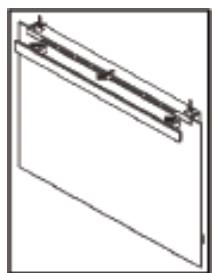
The oven door decorative plastic panel can be removed for more thorough cleaning.
- With the door open, press at the sides and remove the panel, as shown in the figure.
To refit the panel in the oven door, just slide it in place and press lightly to engage the side fastenings.
Removing the oven door internal glass (models CR, CS, SM, SG only) (Fig. 2)
The glass of the oven door can be removed to enable thorough cleaning of the internal glass, by proceeding as follows:
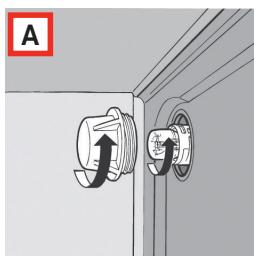
- With the door completely open, turn the two black blocks (with the word „CLEAN“) at the bottom of the door 180° so that they fit into the seats in the oven structure.
Note: Make sure you turn them fully (the blocks will click into this position).
- Carefully lift the internal glasses: the two blocks will prevent the door from closing (if the blocks are not turned fully, removing the glass will cause immediate closing of the door).
After carrying out the cleaning operations, refit the internal glass (the correct position is indicated by the words „TEMPERED GLASS“ which must be perfectly legible) and turn the two glass retaining blocks back to their original position.

Never try closing the door when only one or both blocks have partially or completely freed the internal glass panels. After
cleaning, always remember to turn both blocks before closing the door.
Removing the oven door internal glass (models CM only) (Fig. 3)
The glass of the oven door can be removed to enable thorough cleaning of the internal glass, by proceeding as follows:
With the door completely open, turn the two black blocks at the bottom of the door 180° (fig. 3a and 3b).
Note: Make sure you turn them fully (the blocks will click into this position).
- Carefully lift the internal glass (Fig. 3c): the two blocks will prevent the door from closing (if the blocks are not turned fully, removing the glass will cause immediate closing of the door).
To remove the glass in between, slide out the two side gaskets (Fig. 3d) and then lift out the glass (Fig. 3e).
After carrying out the cleaning operations, refit the intermediate glass (Fig. 3f) (the correct position is indicated by the wording „TEMPERED GLASS“ which must be perfectly legible) by inserting it carefully into the relevant grooves located at the top of the door and pushing it all the way to the end of the groove. - Then replace both gaskets (Fig. 3g), taking extra care to ensure they are inserted as far as possible, until they come into contact with the upper edge of the door.
Finally, refit the internal glass (Fig. 3h) and turn the two glass retaining blocks back to their original locking position.

Never try closing the door when only one or both blocks have partially or completely freed the internal glass. After cleaning,
always remember to turn both blocks before closing the door.
Removing the oven door (Fig. 4)
To facilitate oven cleaning, the oven door can be removed by operating on the hinges as follows:
The hinges are equipped with two moveable locks (A). Lift the lock (A) to release the hinge.
Then lift the door up and pull it outwards; to do this, hold the door at the sides near the hinges.
To refit the door, first slide the hinges into their grooves.
Before closing the door, remember to turn the two locks (A) used as hinge attachments.
Refer to the pictures at the end of this manual.
Replacing the oven lamp
FRANKE ovens are equipped with a circular lamp positioned in the top left area at the back of the compartment. To replace the oven lamp, proceed as follows:
- Turn off the power to the appliance by means of the omnipolar switch used for connecting it to the electrical system, or disconnect the plug if accessible.
Unscrew the glass cover (A). -
Unscrew the lamp and replace it with one resistant to high temperatures (300°C) , with the following characteristics:
-
Voltage: 220 / 240 V 50 - 60 Hz
- Power: 15 W
- Connection: (E14) small.
For models with _ /F
- Power: 25 W
- Connection: G9
Refit the glass cover (A) and reconnect the power supply.
TECHNICAL DATA
| Power supply voltage and frequency | 220-240 V, 50/60 Hz |
| Total power and fuse rating | 2300 W ~ 16 A |
Power and heating elements
| Upper | 1000 W |
| Lower | 1250 W |
| Grill | 2250 W |
| Fan | 30 W |
| Tangential fan | 15 W |
| Oven lamp | 1 x 15 W |
| Oven lamp | 1 x 25 W for models with _/F |
SUPPORT
In the event of any operation problems, contact a FRANKE Technical Service Centre (refer to the attached list).
Never use the services of unauthorised technicians.
Specify:
- the type of fault;
- the appliance model (Art.);
- the serial number (S.N.).
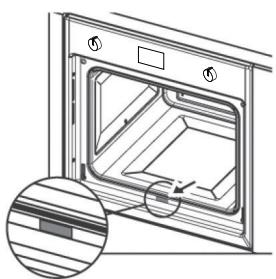
This information is given on the appliance dataplate on the warranty certificate.
DISPOSAL
Information for users
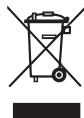
The symbol on the product or on the packaging indicates that the device must not be disposed of in the domestic waste.
By disposing of the device in a proper way you help to avoid harmful consequences to environment and health.
Further information about recycling the device is available from the competent authority, the local refuse disposal service or the vendor of the device.
Dispose of the device, which is to be discarded, via a specialised waste collection point for electronic and electrical devices.
In accordance with the Directive 2012/19/EU, regarding the reduction of the hazardous substances used in electrical and electronic appliances, and waste disposal.
The barred dustbin symbol on the appliance indicates that at the end of its working life the product must not be disposed of as household waste.
Consequently, when the appliance has reached the end of its working life the user must take it to a suitable recycling centre for electronic and electrotechnical waste, or return it to the dealer when purchasing a new appliance of equivalent type.
Proper separate waste collection of the scrapped appliance for subsequent recycling, treatment and environmentally-friendly disposal helps prevent a potentially negative impact on the environment and health and facilitates recycling of the materials used in appliance construction.
Information for test institutes
To calculate the volume, remove the internal wire side runners, if present (according to standards 2009/60350-50304/EN).
In accordance with the Standard EN / IEC 60350 These tables have been created for the controlling authorities in order to facilitate the examination and testing of the various devices.
How to read the cooking table
The table suggests the ideal function to use for a particular food cooked on one or more shelves simultaneously.
The cooking times refer to the introduction of the food in the oven, excluding preheating (if required). Temperatures and cooking times are approximate values and depend on the quality of food and the type of accessory.
Initially use the recommended values and if the firing result is not as expected, increase or decrease the time. We recommend using the supplied accessories, cake tins and tray made of dark metal. Follow the selection table which lists the supplied items to be placed on different shelves.
The indicated levels refer to the shelves without sliding guides (please remove).
Cooking different foods at the same time
Using the recommended ventilated functions, it is possible to cook on different shelves simultaneously. When cooking on a single shelf you can also use the static function.
| Recipe | Function | Pre-heating | Level (from bottom to top) | Temperature (°C) | Time (minutes) | Accessories / Notes |
| Shortbread | CONVENTIONAL | ✓ | 4 | 160 | 18-25 | Level 4: flat drip tray |
| FAN-ASSISTED | ✓ | 3-4 | 160 | 20-27 | Level 4: flat drip tray Level 3: deep drip tray | |
| Small Cakes | CONVENTIONAL | ✓ | 3 | 160 | 20-30 | Level 3: flat drip tray |
| FAN-ASSISTED | ✓ | 3 | 160 | 20-30 | Level 4: flat drip tray | |
| FAN-ASSISTED | ✓ | 3-4 | 160 | 20-30 | Level 4: flat drip tray Level 3: deep drip tray | |
| Fatless Sponge Cake | CONVENTIONAL | ✓ | 2 | 160 | 43-48 | Level 2: cake tin on rack |
| FAN-ASSISTED | ✓ | 2 | 170 | 28-32 | Level 2: cake tin on rack | |
| Apple Pie | CONVENTIONAL | ✓ | 1 | 180 | 60-70 | Level 1: cake tin on rack |
| FAN-ASSISTED | ✓ | 1 | 180 | 50-60 | Level 1: cake tin on rack | |
| Two Apple Pies | FAN-ASSISTED | ✓ | 1-3 | 180 | 80-90 | Level 1: 2 cake tins on rack Level 1: cake tins Level 3: cake tins |
| Leavened Cakes | CONVENTIONAL | ✓ | 2 | 165 | 25-30 | Level 2: cake tin on rack |
| FAN-ASSISTED | ✓ | 2 | 165 | 28-35 | Level 2: cake tin on rack | |
| Grill cooking | If you cook the food directly on the grill, also introduce the drip pan on the bottom shelf. In this way you can collect cooking residues and keep the oven clean. When grilling, it is advisable to leave 3-4 cm free at the front edge of the rack to facilitate pulling it out. | |||||
| Toast* | GRILL | ✓ (5 min.) | 4 | 200 | 3-5 | Level 5: rack |
| Burger** | TURBO GRILL | NO | 4 | 200 | 30-40 | Level 4: rack Level 3: drip tray |
- keep the door closed for the duration of the cooking.
** once it reaches 10'min, turn it.
INHALTSVERZEICHNIS
E. Rack and drip-tray runners
Desmontagem do vidro interno da porta doorno (apenas modelos CR, CS, S, SG) (Fig. 2) The glass of the oven door can be removed to enable thorough cleaning of the internal glass, by proceeding as follows:
The glass of the oven door can be removed to enable thorough cleaning of the internal glass, by proceeding as follows:
Consulte as imagens no final除去 manual.
Franke Kindred Canada Limited
Midland, ON L4R 4K9
Phone +1 866 687 7465
China
Franke (China) Kitchen Systems Co., Ltd.
Heshan, Guangdong, 529700
Hotline 400 882 9898
Czech Republic
Franke s.r.o.
190 00 Praha 9
Phone +420 281 090 411
Denmark
Franke Kitchen Systems Denmark
8520 Lystrup
Phone +45 8624 9024
Egypt
Franke Kitchen Systems Egypt S.A.E.
6th of October City
Hotline 16828
Finland
Franke Finland Oy
76850 Naarajärvi
Phone +358 15 341 11
France
Franke France S.A.S.
60230 Chambly
Phone +33 130 289 400
Germany
Franke GmbH
79713 Bad Säckingen
Phone +49 7761 520
Greece
Franke Hellas S.A.
19003 Markopoulos Attikis (Athens)
Phone +30 22991 500 00
Hong Kong SAR
Franke Asia Hong Kong Office
Causeway Bay
Phone +852 3184 1900
India
Franke Faber India Limited
Aurangabad-431136
Phone 1800 209 3484
Italy
Franke S.p.A.
37019 Peschiera del Garda
Numero Verde 800 359 359
Kazakhstan
Franke Kazakhstan Ltd.
040918 Almaty City
Phone +7 7272973812
Morocco
Franke Kitchen System SARL
21 000 Casablanca
Phone +212 522 674 200
Norway
Franke Kitchen Systems Norway
8520 Lystrup, Denmark
Phone +47 35 566 450
Poland
Franke Polska Sp. z o.o.
05-090 Raszyn
Phone +48 22 711 6700
Portugal
Franke Portugal S.A.
2735-531 Cacém
Phone +351 21 426 9670
Romania
Franke Romania SRL
Pantelimon 077145
Phone +40 21 350 1550
Russia
Franke Russia GmbH
199106 St. Petersburg
Phone +7 812 703 1540
Slovak Republic
Franke Slovakia s.r.o.
010 01 Žilina
Phone +421 41 733 6200
South Africa
Franke South Africa
Durban 4052
Phone +27 31 450 6300
Spain
Franke Espana S.A.U.
Phone +46 912 405 00
Switzerland
United Arab Emirates
Franke LLC
Ras Al Khaimah
Phone +971 7 203 4700
United Kingdom
Franke UK Ltd.
Manchester M22 5WB
Phone +44 161 436 6280
USA
Franke Kitchen Systems LLC
Smyrna, TN 37167
Phone 800 626 5771
- ABOUT THIS MANUAL
- SYMBOL MEANING
- INTENDED USE
- SAFETY INFORMATION
- PROPER INSTALLATION AND PLACEMENT
- PROPER USE
- RISK OF OVERHEATING AND MALFUNCTION OF THE OVEN DUE TO BLOCKED VENTILATION
- DAMAGE TO THE ENAMEL IN THE OVEN DUE TO WRONG HANDLING OF POTS OR CONTAINERS
- RISK OF BURNS
- RISK OF ELECTRIC SHOCK DUE TO DAMAGED DEVICE
- RISK OF ELECTRIC SHOCK
- MAINTENANCE AND CLEANING
- RISK OF ELECTRIC SHOCK DUE TO ENTERING LIQUID
- REPAIR
- TAKING OUT OF SERVICE
- INFORMATION FOR ENERGY SAVING
- OVERVIEW
- PROGRAMME SELECTOR KNOB
- PROGRAMMER
- THERMOSTAT INDICATOR
- TEMPERATURE CONTROL KNOB (THERMOSTAT)
- RACK AND DRIP-TRAY RUNNERS
- DRIP-TRAY
- G.RACK
- INSTALLATION
- CABINET REQUIREMENTS
- MODELS CM
- (FIG. 6A/6B/6C)
- MODELS CR, CS, SG, SM
- (FIG. 6D)
- ELECTRICAL CONNECTION
- NOTE
- OPERATION
- COOLING FAN
- OVEN LIGHT
- MECHANICAL COOKING PROGRAMMER
- (FIG. 1D)
- ANALOG COOKING PROGRAMMER
- (FIG. 1A)
- RIGHT KNOB
- LEFT KNOB
- LEDS
- TIMER
- END OF COOKING
- END OF COOKING WITH DELAYED START
- SETTING THE TIME OF DAY
- DIGITAL COOKING PROGRAMMER
- (FIG. 1B, 1C)
- SETTING THE DIGITAL CLOCK
- ACOUSTIC SIGNAL FREQUENCY MODIFICATION
- MANUAL OVEN OPERATION
- STARTING DELAYED COOKING WITH SET DURATION
- SEMIAUTOMATIC PROGRAMME WITH DURATION OR END TIME
- PROGRAMME TIME SETTING
- PROGRAMME RUN
- AUTOMATIC PROGRAMME END
- TIMER FUNCTION
- MODIFYING/DELETING DATA
- SWITCHING ON THE FIRST TIME
- SUGGESTIONS
- COOKING TABLE
- CLEANING AND MAINTENANCE
- IMPORTANT
- CLEANING THE OVEN DOOR
- MODELS CR 66 AND CS 66 ONLY
- REMOVING THE OVEN DOOR INTERNAL GLASS (MODELS CR, CS, SM, SG ONLY) (FIG. 2)
- REMOVING THE OVEN DOOR INTERNAL GLASS (MODELS CM ONLY) (FIG. 3)
- REMOVING THE OVEN DOOR (FIG. 4)
- REPLACING THE OVEN LAMP
- TECHNICAL DATA
- SUPPORT
- SPECIFY
- DISPOSAL
- INFORMATION FOR USERS
- INFORMATION FOR TEST INSTITUTES
- HOW TO READ THE COOKING TABLE
- COOKING DIFFERENT FOODS AT THE SAME TIME
- INHALTSVERZEICHNIS
- CHINA
- CZECH REPUBLIC
- DENMARK
- EGYPT
- FINLAND
- FRANCE
- GERMANY
- GREECE
- HONG KONG SAR
- INDIA
- ITALY
- KAZAKHSTAN
- MOROCCO
- NORWAY
- POLAND
- PORTUGAL
- ROMANIA
- RUSSIA
- SLOVAK REPUBLIC
- SOUTH AFRICA
- SPAIN
- SWITZERLAND
- UNITED ARAB EMIRATES
- UNITED KINGDOM
- USA
Brand : FRANKE
Model : CR 66 M BK/F
Category : Sink