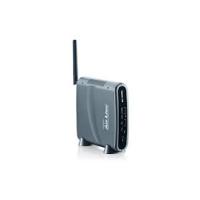
WL-1600GL - Wireless Router AIRLIVE - Free user manual and instructions
Find the device manual for free WL-1600GL AIRLIVE in PDF.



| Product Type | Wireless Router |
| Brand | AIRLIVE |
| Model | WL-1600GL |
| Wireless Standard | IEEE 802.11g/b |
| Frequency Band | 2.4 GHz |
| Maximum Wireless Speed | Up to 54 Mbps |
| LAN Ports | 4 x 10/100 Mbps Ethernet ports |
| WAN Port | 1 x 10/100 Mbps Ethernet port |
| Antenna | 1 external 2 dBi antenna |
| Default IP Address | 192.168.1.254 |
| Subnet Mask | 255.255.255.0 |
| Default Username | admin |
| Default Password | airlive |
| Default SSID | airlive |
| Default Channel | 6 |
| Wireless Security | WEP, WPA/WPA2 |
| Key Features | DHCP Server, NAT, Firewall, Installation Wizard |
| LED Indicators | Power, WLAN, Internet, WAN, LAN (10/100) |
| Buttons | Reset, WPS |
| Power Supply | Included power adapter |
| Maintenance | Clean with a soft, dry cloth |
| Safety | Do not expose to moisture or extreme temperatures |
| Repairability | 2-year manufacturer warranty, repairs by manufacturer |
| Operating Temperature | 0°C to 40°C |
| Operating Humidity | 10% to 90% non-condensing |
Frequently Asked Questions - WL-1600GL AIRLIVE
User questions about WL-1600GL AIRLIVE
0 question about this device. Answer the ones you know or ask your own.
Ask a new question about this device
Download the instructions for your Wireless Router in PDF format for free! Find your manual WL-1600GL - AIRLIVE and take your electronic device back in hand. On this page are published all the documents necessary for the use of your device. WL-1600GL by AIRLIVE.
USER MANUAL WL-1600GL AIRLIVE
Powered by OvisLink Corp.
WL-1600GL
802.11g Wireless Broadband Router
www.airlive.com
Quick Setup Guide
Table of Contents
List of Languages
English 1 Italiano 38
Cesky 8 Magyar. 44
Deutsch. 14 Polski 50
Espanol 20 Portuguese. 56
Slovensky 26 Pycckn 62
32
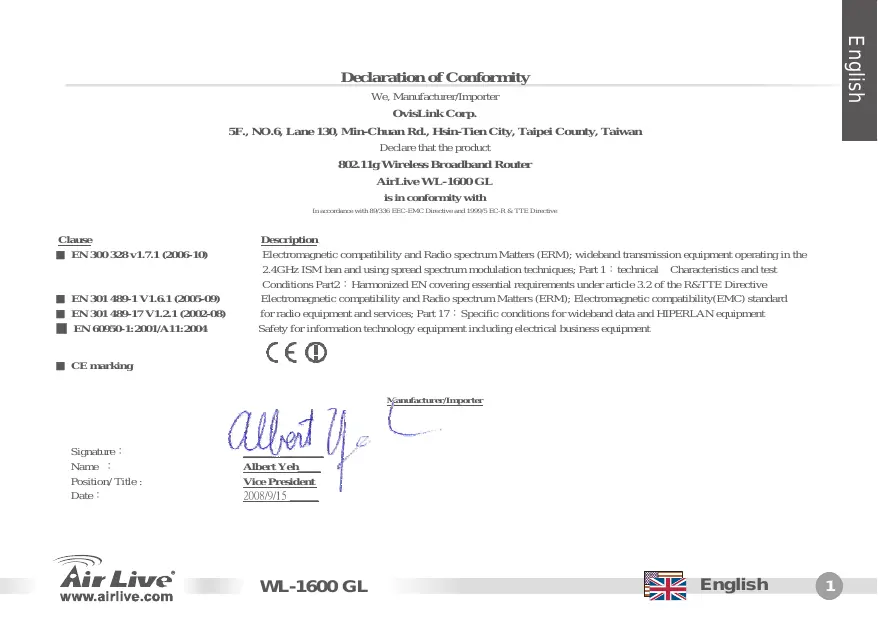
Declaration of Conformity
We, Manufacturer/Importer
OvisLink Corp.
5F., NO.6, Lane 130, Min-Chuan Rd., Hsin-Tien City, Taipei County, Taiwan
Declare that the product
802.11g Wireless Broadband Router
AirLive WL-1600 GL
is in conformity with
In accordance with 89/336 EEC-EMC Directive and 1999/5 EC-R & TTE Directive
Clause
EN 300 328 v1.7.1 (2006-10)
EN 301 489-1 V1.6.1 (2005-09)
EN 301 489-17 V1.2.1 (2002-08)
EN 60950-1:2001/A11:2004
CE marking
Description
Electromagnetic compatibility and Radio spectrum Matters (ERM); wideband transmission equipment operating in the 2.4GHz ISM ban and using spread spectrum modulation techniques; Part 1: technical Characteristics and test Conditions Part2: Harmonized EN covering essential requirements under article 3.2 of the R&TTE Directive Electromagnetic compatibility and Radio spectrum Matters (ERM); Electromagnetic compatibility(EMC) standard for radio equipment and services; Part 17: Specific conditions for wideband data and HIPERLAN equipment Safety for information technology equipment including electrical business equipment

Signature :
Name :
Position/ Title :
Date:

Manufacturer/Importer
Note on the FCC standard
This equipment has been tested and found to comply with the limits for a Class B digital device pursuant to Part 15 of the FCC Rules. These limits are designed to provide reasonable protection against harmful interferences when the equipment is operating in a commercial area. This equipment generates uses and may radiate radio frequency energy, and if not installed in accordance with the user guide, may cause interference in the transmission of radio communications. If operating in a residential area, it is probable this equipment will cause harmful interference, in which case the user will be required to try to correct this interference using his own means.
Note on CE Marking
This is a Class B product. In a residential area this product may cause radio interference, in which case the user can be required to take the appropriate measures. OvisLink Corp. hereby declares that AirLive WL-1600 GL meets the basic requisites of directive 99/05/CE, and is therefore liable for the accuracy of these data:
OvisLink Corp.
5F, No.6 Lane 130
Min-Chuan Rd, Hsin-Tien City,
Taipei, Taiwan
TEL: +886-2-2218-6888
Warranties
This product has undergone various quality controls to ensure proper operation.
This product is covered by a two-year warranty for countries inside European Union. For other countries, the warranty period is one year only. In the event of any manufacturing fault or breakdown, it will be repaired by OvisLink Corp. Please contact your supplier for details on the procedure to follow. This warranty shall not be applicable in the event of damage caused by improper use of the product, accidents, faulty handling or manipulation nor any future incompatibility with third party products.
Basic Information
Default Setting:
IP Address: 192.168.1.254
- Subnet Mask: 255.255.255.0
- Login admin
- Password: airlive
Default SSID: airlive
Default Channel: 6
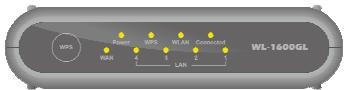
LED Indicators
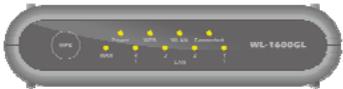
Power LED On - Power on.
Off - No power.
WLAN LED On - Idle.
Flashing - Data is being transmitted or received via the Network.
Internet LED On - Internet connection is available.
Off - non Connection.
Flashing - Data is being transmitted or received.
WAN LED On - Connection to the Broadband Modem attached to the WAN (Internet) port is established.
Off - non Connection.
Flashing - Data is being transmitted or received via the WAN port.
LAN LEDs For each port, there are 1 LED
10 (Orange)/100 (Green)
- On - Corresponding LAN (hub) port is active.
- Off - non Connection.
- Flashing - Data is being transmitted or received via the corresponding LAN (hub) port.
Press for the WPS Connection
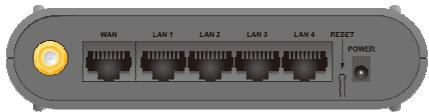
Real Panel
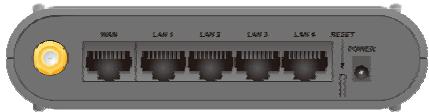
Antenna
WAN
LAN
Reset Button
One 2 dbi antenna.
Connect the DSL or Cable Modem here. If your modem came with a cable, use the supplied cable. Otherwise, use a standard LAN cable.
Use standard LAN cables (RJ45 connectors) to connect your PCs to these ports.
This button has two (2) functions:
Reboot. When pressed and released, the Wireless Router will reboot (restart).
- Clear All Data. This button can also be used to clear ALL data and restore ALL settings to the factory default values.
To Clear All Data and restore the factory default values:
- Power Off.
- Hold the Reset Button down while you Power On.
- Keep holding the Reset Button for a few seconds, until the RED LED has flashed TWICE.
- Release the Reset Button. The Wireless Router is now using the factory default values.
Power port
Connect the supplied power adapter here.
Hardware Installation
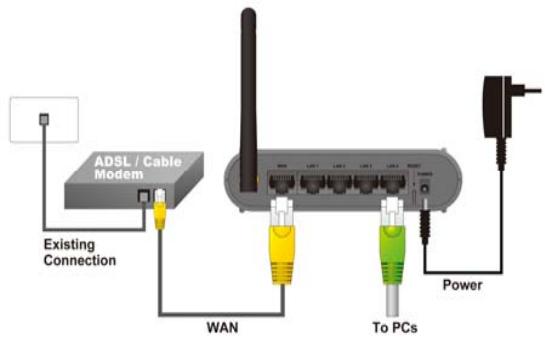
- Setup LAN connection: connect an Ethernet cable from your computer's Ethernet port to one of the LAN ports of this product.
- Setup WAN connection with your router: connect the network cable from your cable (xDSL) modem to the WAN port of this product.
Network Setup
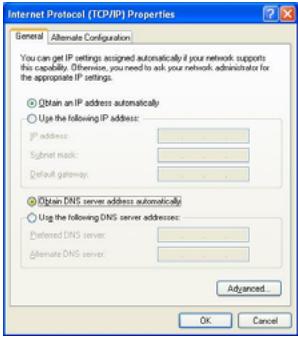
Point the cursor and click the right button on the "My Network Place" icon.
Select "properties" to enter the TCP/IP setting window.
- Set "IP address" to "Obtain an IP address automatically."
- Set "DNS" to "Obtain DNS server address automatically.
Auto Setup Wizard
- Open Internet Explorer 5.0 or above Internet browser.
- Enter IP address http://192.168.1.254 (the factory-default IP address setting) to the URL web address location.
Address

http://192.168.1.254
- When the following dialog box appears, enter the user name and password to login to the main configuration window, the default username is admin and password is "airlive"
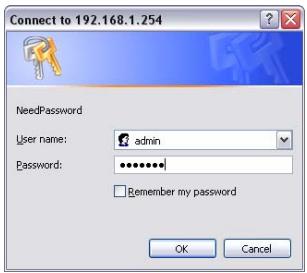
Note: If needed to set a password, then refer to the System - Password Setting.
After entering the password, the main page comes up, the screen will display the device information
- Once you login to router please click the Setup Wizard and Step through the Wizard until finished.
Min-Chuan Rd, Hsin-Tien City,
Taipei, Taiwan
TEL: +886-2-2218-6888
Záruka
Tento produit by podrobeny Rozlichnym kontrolam kvality k zajisteni vsech funkci.
Min-Chuan Rd, Hsin-Tien City,
Taipei, Taiwan
TEL: +886-2-2218-6888
Garantiebestimmungen
Hardware Installation
Min-Chuan Rd, Hsin-Tien City,
Taipei, Taiwan
TEL: +886-2-2218-6888
Garantías
Min-Chuan Rd, Hsin-Tien City,
Taipei, Taiwan
TEL: +886-2-2218-6888
Záruky
Min-Chuan Rd, Hsin-Tien City,
Taipei, Taiwan
TEL: +886-2-2218-6888
Garanties
LED On - Alimentation branchee.
Min-Chuan Rd, Hsin-Tien City,
Taipei, Taiwan
TEL: +886-2-2218-6888
Garanzia
Min-Chuan Rd, Hsin-Tien City,
Taipei, Taiwan
TEL: +886-2-2218-6888
Jotallas
Min-Chuan Rd, Hsin-Tien City,
Taipei, Taiwan
TEL: +886-2-2218-6888
Gwarancje
Min-Chuan Rd, Hsin-Tien City,
Taipei, Taiwan
TEL: +886-2-2218-6888
Garantias
PnmeaHne K 3NaKy COOTBeTCTBnE eBponeckm CtaHapTaM
YcTpoCTBO OTHOCITCR KKnaccy B. PnI NcNIOb3OBaHm YcTpoCTBa B XJINOM paHOe, cyueCTByET BepoRTHOCTb CO3dAHAH KpnTneCcknx NOMex. B DaHOM CnYae, NOB3OBaTeNb DOJNXEN CAMOCTOReTbHO yctPAnHb Co3daBaembIe Nomexn. OvisLink Corp. HactoZIM 3aBnIeT, YTO AirLive WL-1600 GL OTBeaet OCHOBHbIM O63aTeBbHM Tpe6OBaHnM DnpeKtNBbl 99/05/Ce, n CNeDObaTeNbHO o63aHn COOTBECTBOBaTb CJeDyUOIm DaHHbIM:
OvisLink Corp.
5F, No.6 Lane 130
Min-Chuan Rd, Hsin-Tien City,
Taipei, Taiwan
TEL: +886-2-2218-6888
TapaHTnHbIe 06a3aTeJIbCTBa
UcTpoICTBO npoIIO pa3nHbIe TceI bKaueCTBa, YTO6bI rapaHTnpOBaB HopMaIbHOe FyHKnOHIPOBAHne. Ha npOyIK TpEOCDtABmIEcTa Dba Ora daPapAHnD IINr CTpaH-NeHOB EC. IINr CTpaHne B XdoAIMe B EC - rapaTHnOdnrO. B CnuYae npoN3BDCTBeHHORO 6paka IINr NOnOMKn, OVisLink Corp npoN3BeTeR pemont H3dJIeNl.PoXaNyIcTc, CBXNTecB C NOCTABuINKOM DnONyEHNO BooNE IOnpoBHO INHΦOpAMUN O npOceIype rapaHTnHOrO o6CnykIBaHnI. PpO3BOJnteJIb He MoKET HeCTN OTBeTCTBeHHOCb 3a yUeep6 BO3NKIIb WpeynbTaTE HEnADNeXaUeO MCONb3OBAHnE, HecACTHO rclyAur INHepABINbHO O6paIeHNI. PpO3BOJnteJIb TaKke He HecET OTBeTCTBeHHOCb 3a DaJIbHeNHy HECOBMeCTMMOCTB C uCTpoIcTBAmiOT cToPOOHNX npO3BOJnteJIeN.
OchobhajnHΦopMaçú
3aBODCKne HacTPOIKN:
IP aDpec: 192.168.1.254
Macka noDceTn: 255.255.255.0
- Napojb: admin
Pernctpa: airlive
3aBODsKo SSID: airlive
3aBODCKoKaHaJ: 6
HdkaTop CBeTOn3JyuChaIOseRo
Power LED
WLAN
CBeToH3JnyauoI nnO
UHTepHET
CBeTON3nyauHouN INoD
WAN CBeTo3JnyaIoUnn
CBeTo3IyauOuHne IaDObI
KhoNka WPS
Air Live® www.airlive.com
BKn.-BknHoueH.
BbIKN. - BbIKIOueH.
BKn.-He3aHrTbI.
BbIKJ.-He NOJKJIIOUeH
Miranhe -Hnopmaunnapeepaetcaepe3 cetb.
BKn. - POnkHoueK cTeN INHTepHeT.
BbIKn.-He noDknIOueH.
Murahe - HOpmaunpeepaetc.
BKn. - yOtaHOBHeNo pKfKnIyueHMe K npCSoeINHeHHOMy K WAN (InHTepHET) nOpTy 1uKoIOHOco MOdema.
BbIKn.-He noDknIOueH.
Mirahané -Инфорmaцяпесдаетсая чешет WAN.
Ia KaKdoRo npTa PO ONDHOMy CBETOn3JnuAHOUeMy DIOOy - 10 (opaHKeBbIx)/100 (3eNbeY)
Bkn.-COOTBeTCTByUoIiN LAN(xa6)nopT
AKTUBINPOBAH.
BbIK.- He NOdkJIOueH.
MnraHne - nHOpMaunna nepaetcyepe3 cooTBeTCTbUoiu LAN(xa6) npot.
HaxmteIg WPS noKlueyn
AHTeHHa WAN
LAN Reset Botao
Onda hantehna 2 dbi.
IopknloaetcK DSL nnn Ka6eHbHomy MoDemy.Ecnn Baush MoEm 6bl npodan C Ka6eHem, mCnoJIb3yIte 3aBOD- cKoJ Ka6eHb. Ecnn HET, nCnOlb3yIte cTaNapTbnL LAN Ka6eHb
IcnoIb3yTe cTaNapThbE LAN Ka6eJRA (KoHHeKToP RJ45) dIra NpOKnIOUeHnK 3TmN nopTAM.
3Ta KhoNka BbInoJHnReT 2ФyHKuIN:
- Ipepe3arpy3ka. HauKmTe n OTnycTnTe KhoNky n 6ecnpoBoHoi MapuTy3aTOp nepe3arpy3ntcra.
CTepetb BCIO INHOpmaun.3Ta KHONKa TaKooe MOKeT 6bITb NcNOb3ObaHa dIa CTnpaHn INHOpmaun n C6paCbIBaHnB BceX HAcTpoE Ha 3aBODcKne.
OvisLink Corporation declares that this device is in compliance with the essential requirements and other relevant provisions of directive 1999/5/EC.
RU
Kompanha OviLink Corporation 33A1B8T, CTO 370 UCTPOJTHO OBTBEAET OCHOBHBM TPEBOBAHIMN INPOUCHM POJCTDBEHBM YCLOBHBM,NJIOKHEHMB B DIIPEKTHBE 1999/EC.
SK
OviLink Corporation potvrdzuje, ze toto zariadenie vyhovju poziadavkam a'dalsim predispom smerince 1999/5/EC.
FR
5F, NO.6, LANE 130, MIN CHUAN RD., HSIEN-TIEN CITY, TAIPEI COUNTY, TAIWAN
This equipment may be used in AT, BE, CY, CZ, DK, EE, FI, FR, DE, GR, HU, IE, IT, LV, LT, LU, MT, NL,PL,PT, SK, SI, ES, SE, GB, IS, LI, NO, CH, BG, RO, TR

OvsLink Corporation declares that this device is in use and will continue to be used for other relevant provisions of directive 1999/5/EC.

Tested To Comply With the Requirements FOR HOME OR OFFICE USE



- Table of Contents
- Declaration of Conformity
- Clause
- Description
- Note on the FCC standard
- Note on CE Marking
- Warranties
- Basic Information
- Default Setting:
- LED Indicators
- Real Panel
- Hardware Installation
- Network Setup
- Auto Setup Wizard
- Záruka
- Garantiebestimmungen
- Garantías
- Záruky
- Garanties
- Garanzia
- Jotallas
- Gwarancje
- Garantias
- PnmeaHne K 3NaKy COOTBeTCTBnE eBponeckm CtaHapTaM
- TapaHTnHbIe 06a3aTeJIbCTBa
- OchobhajnHΦopMaçú
- HdkaTop CBeTOn3JyuChaIOseRo
- RU
- SK
- FR
Brand : AIRLIVE
Model : WL-1600GL
Category : Wireless Router