USER MANUAL A37 SONY
The model and serial numbers are located on the bottom.
Record the serial number in the space provided below.
Refer to these numbers whenever you call upon your Sony dealer regarding this product.
Model No. SLT-A37
Serial No.
WARNING
To reduce fire or shock hazard, do not expose the unit to rain or moisture.
IMPORTANT SAFETY INSTRUCTIONS SAVE THESE INSTRUCTIONS. DANGER - TO REDUCE THE RISK OF FIRE OR ELECTRIC SHOCK, CAREFULLY FOLLOW THESE INSTRUCTIONS.
If the shape of the plug does not fit the power outlet, use an attachment plug adaptor of the proper configuration for the power outlet.
Caution
Battery pack
If the battery pack is mishandled, the battery pack can burst, cause a fire or even chemical burns. Observe the following cautions.
- Do not disassemble.
- Do not crush and do not expose the battery pack to any shock or force such as hammering, dropping or stepping on it.
- Do not short circuit and do not allow metal objects to come into contact with the battery terminals.
- Do not expose to high temperature at 60°C (140°F) such as in direct sunlight or in a car parked in the sun.
- Do not incinerate or dispose of in fire.
- Do not handle damaged or leaking lithium ion batteries.
- Be sure to charge the battery pack using a genuine Sony battery charger or a device that can charge the battery pack.
- Keep the battery pack out of the reach of small children.
- Keep the battery pack dry.
- Replace only with the same or equivalent type recommended by Sony.
- Dispose of used battery packs promptly as described in the instructions.
Battery charger
Even if the CHARGE lamp is not lit, the battery charger is not disconnected from the AC power source (mains) as long as it is connected to the wall outlet (wall socket). If some trouble occurs while using the battery charger, immediately shut off the power by disconnecting the plug from the wall outlet (wall socket).
The power cord (mains lead), if supplied, is designed specifically for use with this camera only, and should not be used with other electrical equipment.
For Customers in the U.S.A. and Canada
RECYCLING LITHIUM-ION BATTERIES
Lithium-Ion batteries are recyclable.
You can help preserve our environment by returning your used rechargeable batteries to the collection and
recycling location nearest you.

For more information regarding recycling of rechargeable batteries, call toll free 1-800-822-8837, or visit http://www.rbc.org/
Caution: Do not handle damaged or leaking Lithium-Ion batteries.
Battery Pack and Lens
This device complies with Part 15 of the FCC Rules. Operation is subject to the following two conditions:
(1) This device may not cause harmful interference, and (2) this device must
accept any interference received, including interference that may cause undesired operation.
This Class B digital apparatus complies with Canadian ICES-003.
For Customers in the U.S.A.
UL is an internationally recognized safety organization.
The UL Mark on the product means it has been UL Listed.
If you have any questions about this product, you may call:
Sony Customer Information Center 1-800-222-SONY (7669)
The number below is for FCC related matters only.
Declaration of Conformity
Trade Name: SONY
Model No.: SLT-A37
Responsible Party: Sony Electronics Inc.
Address: 16530 Via Esprillo, San Diego, CA 92127 U.S.A.
Telephone No.: 858-942-2230
This device complies with Part 15 of the FCC Rules. Operation is subject to the following two conditions: (1) This device may not cause harmful interference, and (2) this device must accept any interference received, including interference that may cause undesired operation.
CAUTION
You are cautioned that any changes or modifications not expressly approved in this manual could void your authority to operate this equipment.
Note:
This equipment has been tested and found to comply with the limits for a Class B digital device, pursuant to Part 15 of the FCC Rules.
These limits are designed to provide reasonable protection against harmful interference in a residential installation. This equipment generates, uses, and can radiate radio frequency energy and, if not installed and used in accordance with the instructions, may cause harmful interference to radio communications. However, there is no guarantee that interference will not occur in a particular installation. If this equipment does cause harmful interference to radio or television reception, which can be determined by turning the equipment off and on, the user is encouraged to try to correct the interference by one or more of the following measures:
Reorient or relocate the receiving antenna. - Increase the separation between the equipment and receiver. - Connect the equipment into an outlet on a circuit different from that to which the receiver is connected. - Consult the dealer or an experienced radio/TV technician for help.
The supplied interface cable must be used with the equipment in order to comply with the limits for a digital device pursuant to Subpart B of Part 15 of FCC Rules.
For Customers in Europe
Notice for the customers in the countries applying EU Directives
The manufacturer of this product is Sony Corporation, 1-7-1 Konan Minato-ku Tokyo, 108-0075 Japan. The Authorized Representative for EMC and product safety is Sony Deutschland GmbH, Hedelfinger Strasse 61, 70327 Stuttgart, Germany. For any service or guarantee matters please refer to the addresses given in separate service or guarantee documents.
This product has been tested and found compliant with the limits set out in the EMC Directive for using connection cables shorter than 3 meters (9.8 feet).
Attention
The electromagnetic fields at the specific frequencies may influence the picture and sound of this unit.
Notice
If static electricity or electromagnetism causes data transfer to discontinue midway (fail), restart the application or disconnect and connect the communication cable (USB, etc.) again.
Disposal of Old Electrical & Electronic Equipment (Applicable in the European Union and other European countries with separate collection systems)


This symbol on the product or on its packaging indicates that this product shall not be treated as household waste. Instead it shall be handed over to the applicable collection point for the recycling of electrical and electronic equipment. By ensuring this product is disposed of correctly, you will help prevent potential negative consequences for the environment and human health, which could otherwise be caused by inappropriate waste handling of this product. The recycling of materials will help to conserve natural resources. For more detailed information about recycling of this product, please contact your local Civic Office, your household waste disposal service or the shop where you purchased the product.
Disposal of waste batteries (applicable in the European Union and other European countries with separate collection systems)

This symbol on the battery or on the packaging indicates that the battery provided with this product shall not be treated as household waste.
On certain batteries this symbol might be used in combination with a chemical symbol. The chemical symbols for mercury (Hg) or lead (Pb) are added if the battery contains more than 0.0005% mercury or 0.004% lead.
By ensuring these batteries are disposed of correctly, you will help prevent potentially negative consequences for the environment and human health which could otherwise be caused by inappropriate waste handling of the battery. The recycling of the materials will help to conserve natural resources. In case of products that for safety, performance or data integrity reasons require a permanent connection with an incorporated battery, this battery should be replaced by qualified service staff only. To ensure that the battery will be treated properly, hand over the product at end-of-life to the applicable collection point for the recycling of electrical and electronic equipment.
For all other batteries, please view the section on how to remove the battery from the product safely. Hand the battery over to the applicable collection point for the recycling of waste batteries.
For more detailed information about recycling of this product or battery, please contact your local Civic Office, your household waste disposal service or the shop where you purchased the product.
Notice for customers in the United Kingdom
A moulded plug complying with BS 1363 is fitted to this equipment for your safety and convenience.
Should the fuse in the plug supplied need to be replaced, a fuse of the same rating as the supplied one and approved by ASTA or BSI to BS 1362, (i.e., marked with an 空 or mark) must be used.
If the plug supplied with this equipment has a detachable fuse cover, be sure to attach the fuse cover after you change the fuse.
Never use the plug without the fuse cover. If you should lose the fuse cover, please contact your nearest Sony service station.
Notes on using your camera
Shooting procedure
- This camera has 2 modes for monitoring subjects: the LCD screen mode using the LCD screen, and the viewfinder mode using the viewfinder.
- The recorded image may be different from the image you monitored before recording.
Notes on the functions available with the camera
To check whether it is a 1080 60i-compatible device or 1080 50i-compatible device, check for the following marks on the bottom of the camera. 1080 60i-compatible device:60i 1080 50i-compatible device:50i - You may feel uncomfortable symptoms such as eyestrain, nausea, or a tired feeling while watching 3D-images recorded with the camera on 3D-compatible monitors. When you watch 3D-images, we recommend that you take a break at regular time intervals. Since the need for or frequency of break times varies among individuals, please set your own standards. If you feel sick, stop watching 3D-images, and consult a doctor as needed. Also, refer to the operating instructions of the connected device or the software used with the camera. A child's vision is always vulnerable (especially for children under 6 years of age). Before allowing them to watch 3D-images, please consult with an expert, such as a pediatric or ophthalmic doctor. Be sure to make sure your children follow the precautions above.
No compensation for contents of the recording
The contents of the recording cannot be compensated for if recording or playback is not possible due to a malfunction of your camera or a memory card, etc.
Back up recommendation
To avoid the potential risk of data loss, always copy (back up) data to other medium.
Notes on the LCD screen, electronic viewfinder, lens, and image sensor
- The LCD screen and electronic viewfinder are manufactured using extremely high-precision technology so over 99.99% of the pixels are operational for effective use. However, there may be some tiny black points and/or bright points (white, red, blue or green in color) that constantly appear on the LCD screen and electronic viewfinder. These points are normal in the manufacturing process and do not affect the images in any way.
- Do not hold the camera by taking hold of the LCD screen.
- Do not expose the camera to sunlight or shoot sunward for a long time. The internal mechanism may be damaged. If sunlight is focused on a nearby object, it may cause a fire.
- Images may trail across on the screen in a cold location. This is not a malfunction. When turning on the camera in a cold location, the screen may become temporarily dark. When the camera warms up, the screen will function normally.
Notes on long-time recording
- When you continue to shoot for a long time, the temperature of the camera rises. If the temperature reaches above a certain level, the [12] mark is indicated on the screen and the camera is turned off automatically. If the power is turned off, leave the camera for 10 minutes or longer to allow the temperature inside the camera to decrease to a safe level. Under high ambient temperatures, the temperature of the camera rises quickly.
- When the temperature of the camera rises, the image quality may deteriorate. It is recommended that you wait until the
temperature of the camera drops before continuing to shoot.
- The surface of the camera may get warm. This is not a malfunction.
Notes on importing AVCHD movies to a computer
When importing AVCHD movies to a computer, for Windows computers, use the "PlayMemories Home" software on the CD-ROM (supplied).
Notes when playing movies on other devices
- This camera uses MPEG-4 AVC/H.264 High Profile for AVCHD format recording. Movies recorded in AVCHD format with this camera cannot be played with the following devices.
- Other devices compatible with AVCHD format that does not support High Profile Devices incompatible with the AVCHD format
This camera also uses MPEG-4 AVC/ H.264 Main Profile for MP4 format recording. For this reason, movies recorded in MP4 format with this camera cannot be played on devices other than those that support MPEG-4 AVC/H.264.
- Disks recorded with HD image quality (high definition) can be played back only on AVCHD format-compatible devices. DVD-based players or recorders cannot play back HD image quality discs, as they are incompatible with the AVCHD format. Also, DVD-based players or recorders may fail to eject HD image quality discs.
Warning on copyright
Television programs, films, videotapes, and other materials may be copyrighted.
Unauthorized recording of such materials may be contrary to the provisions of the copyright laws.
The pictures used in this manual
The photographs used as examples of pictures in this manual are reproduced images, and are not actual images shot using this camera.
On the data specifications described in this manual
The data on performance and specifications is defined under the following conditions, except as described in this manual: at an ordinary ambient temperature of 25°C (77°F), and using a battery pack that is charged for about 1 hour after the CHARGE lamp goes out.
Model name
This manual covers several models supplied with different lenses.
The model name varies depending on the supplied lens. The available model varies depending on the countries/regions.
| Model name | Lens |
| SLT-A37 | - |
| SLT-A37K | DT18-55mm |
| SLT-A37M | DT18-135mm |
| SLT-A37Y | DT18-55mm and
DT55-200mm |
Checking the supplied items
First check the model name of your camera (page 7). The accessories supplied differ depending on the model.
The number in parentheses indicates the number of pieces.
Common accessories
- Camera (1)
- BC-VW1 Battery charger (1)
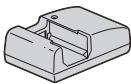
- Power cord (mains lead) (1)* (not supplied in the U.S.A. and Canada)

- Multiple power cords may be supplied with your camera. Use the appropriate one that matches your country/region.
- Rechargeable battery pack NP-FW50 (1)

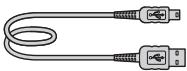
Shoulder strap (1)
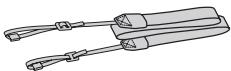
- Body cap (1) (Attached on the camera)
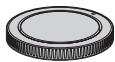
- Eyecup (1) (Attached on the camera) CD-ROM (1)
- Application Software for α camera -αHandbook
- Instruction Manual (1) (This manual)
SLT-A37K
- DT18-55mm zoom lens (1)/Front lens cap (1)/Packaging lid (1)
SLT-A37M
- DT18-135mm zoom lens (1)/Front lens cap (1)/Rear lens cap (1)/Lens hood (1)
SLT-A37Y
- DT18-55mm zoom lens (1)/Front lens cap (1)/Packaging lid (1)
- DT55-200mm zoom lens (1)/Front lens cap (1)/Rear lens cap (1)/Lens hood (1)
Identifying parts
See the pages in parentheses for details of operation.
Front side
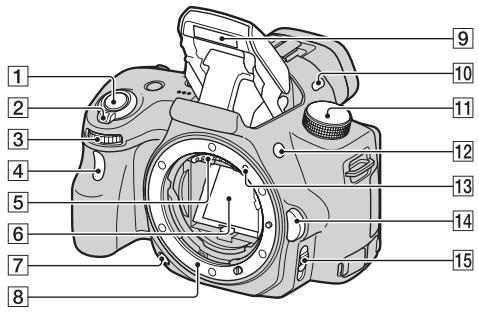
1 Shutter button (24) 2 Power switch (22) 3 Control dial 4 Self-timer lamp 5 Lens contacts 6 Mirror 7 Preview button 8 Mount 9 Built-in flash* 10 Microphone** 11 Mode dial (29) 12 (Flash pop-up) button
13 Mounting index (20) 14 Lens release button 15 Focus mode switch
- Do not directly touch these parts.
** Do not cover this part during movie recording. Doing so may cause noise or lower the volume.
Rear side
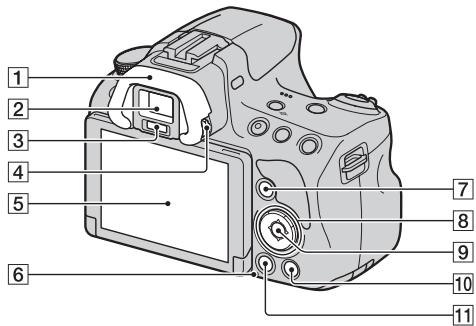
1 Eyecup 2 Viewfinder*
- When you look into the viewfinder, the viewfinder mode is activated, and when you take your face away from the viewfinder, the screen mode returns to the LCD screen mode.
3 Eyepiece sensors 4 Diopter-adjustment dial 5 LCD screen (38) 6 Access lamp (18) For shooting: Fn (Function) button (30) For viewing: (Image rotation) button
8 Control button / / / DISP (Display)/WB (White balance)/O (Drive)/ISO Control button (Enter)/AF button/Object Tracking button (30) 10 ? (In-Camera Guide) button (32)
For viewing: (Delete) button (28)
11 Playback button (27)
- Do not directly touch this part.
Top side
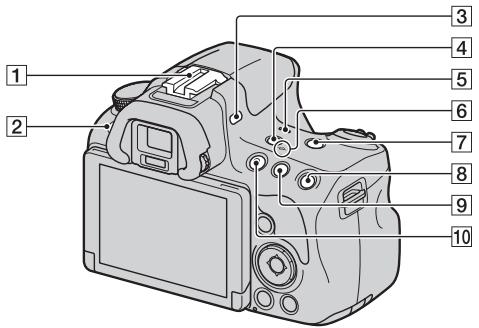
1 Auto-lock Accessory shoe 2 MENU button (31) 3 Microphone* 4 FINDER/LCD button 5 Speaker 6 Image sensor position mark 7 ZOOM button For shooting: AEL (AE lock) button For viewing: (Zoom in) button For shooting: (Exposure) button/AV (Aperture value) button For viewing: (Zoom out)
button/ (Image index) button
MOVIE button (26)
- Do not cover this part during movie recording. Doing so may cause noise or lower the volume.
Sides/Bottom
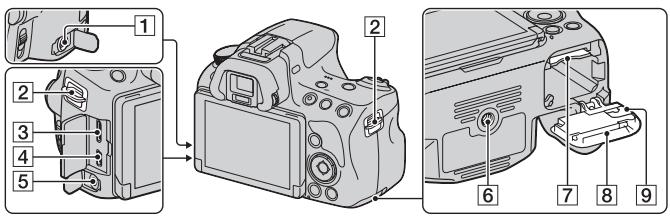
1 REMOTE terminal
- When connecting the RM-L1AM Remote Commander (sold separately) to the camera, insert the plug of the Remote Commander into the REMOTE terminal, aligning the guide of the plug with the guide of the REMOTE terminal. Make sure that the cord of the Remote Commander faces forward.
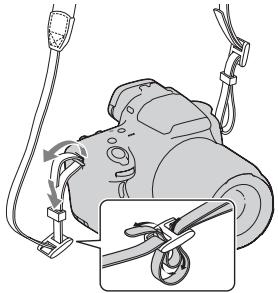
2 Hooks for shoulder strap
- Attach both ends of the strap onto the camera.
- When an external microphone is connected, the internal microphone is turned off automatically. When the external microphone is a plug-in-power type, the power of the microphone is supplied by the camera.
6 Tripod receptacle
- Use a tripod with a screw length of less than 5.5 mm (7/32 inch). You will be unable to firmly secure the camera to tripods with a screw length of 5.5 mm (7/32 inch) or longer, and attempting to do so may damage the camera.
7 Memory card insertion slot (17)
Battery/memory card cover (17)
9 Connection plate cover
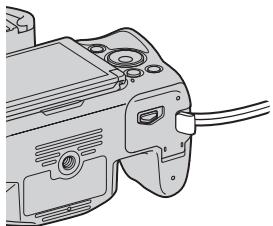
- For using the AC-PW20 AC Adaptor (sold separately) Be careful not to catch the cord of the AC Adaptor in the cover when you close the cover.
Lens
DT 18-55mm F3.5-5.6 SAM (Supplied with the SLT-A37K/A37Y)
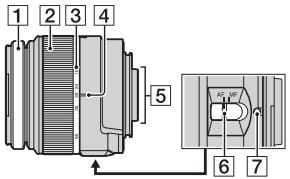
DT 55-200mm F4-5.6 SAM (Supplied with the SLT-A37Y)
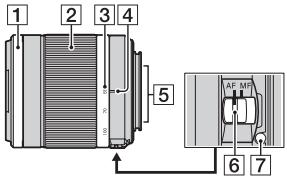
DT 18-135mm F3.5-5.6 SAM (Supplied with the SLT-A37M)
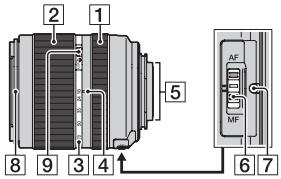
1 Focusing ring 2 Zoom ring 3 Focal-length scale 4 Focal-length index 5 Lens contacts 6 Focusing mode switch 7 Mounting index 8 Lens hood index 9 Zoom lock switch
- The DT 18-55mm F3.5-5.6 SAM/DT 55-200mm F4-5.6 SAM/DT 18-135mm F3.5-5.6 SAM are designed for Sony A-mount cameras (models equipped with an APS-C sized image sensor). You cannot use these lenses on 35mm-format cameras.
- For the lenses other than DT 18-55mm F3.5-5.6 SAM/DT 55-200mm F4-5.6 SAM/DT 18-135mm F3.5-5.6 SAM, refer to the operating instructions supplied with the lens.
Charging the battery pack
When using the camera for the first time, be sure to charge the NP-FW50 "InfoLITHIUM" battery pack (supplied).
The "InfoLITHIUM" battery pack can be charged even when it has not been fully depleted.
It can also be used when it has not been fully charged.
The battery pack is discharged little by little, even when you do not use it. To avoid missing an opportunity to shoot, check the remaining battery level before you shoot. If the battery level is low, charge it again.
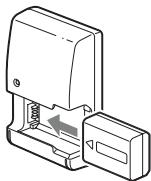
1 Insert the battery pack onto the battery charger.
Push the battery pack until it clicks.
2 Connect the battery charger to the wall outlet (wall socket).
Light on: Charging Light off: Charge completed
Charging time
About 250 minutes
- When charging a fully depleted battery pack at a temperature of 25°C (77°F) .
- The CHARGE lamp turns off when charging is completed.
For the U.S.A and Canada
Plug
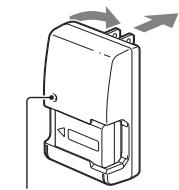
CHARGE lamp
For countries/regions other than the U.S.A. and Canada
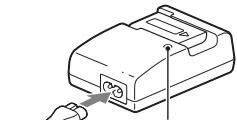
CHARGE lamp
- The charging time differs depending on the remaining capacity of the battery pack or charging conditions.
- We recommend charging the battery pack in an ambient temperature of between 10°C to 30°C ( 50°F to 86°F ). You may not be able to efficiently charge the battery pack outside of this temperature range.
- Connect the battery charger to the nearest wall outlet (wall socket).
Inserting the battery pack/memory card (sold separately)
1 While sliding the cover open lever, open the cover.
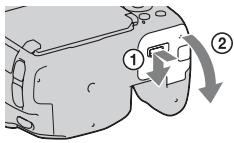
2 Firmly insert the battery pack all the way while pressing the lock lever with the tip of the battery.
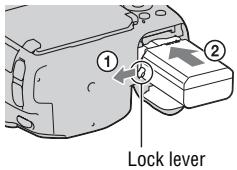
3 Insert a memory card.
- With the notched corner facing as illustrated, insert the memory card until it clicks into place.
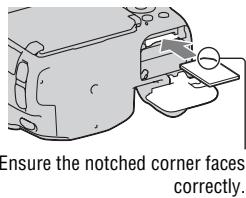
4 Close the cover.
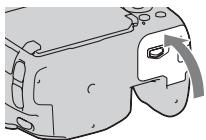
To remove the battery pack
Turn off the camera. Slide the lock lever in the direction of the arrow 10 seconds after turning off the camera, then remove the battery pack. Be careful not to drop the battery pack.
Lock lever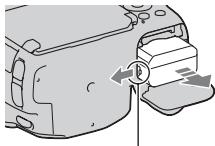
To remove the memory card
Check that the access lamp is not lit, then open the cover, and push the memory card once.
To check the remaining battery level
The supplied battery pack is a lithium-ion battery pack that has functions for exchanging information related to operating conditions with your camera. The remaining battery time in percent figures is displayed according to the operating conditions of your camera.
| Battery level | | | | | “Battery exhausted.” |
| High | Low | You cannot shoot any more pictures. |
Available memory cards
The following memory cards are compatible with this camera. However, all memory cards are not guaranteed to work with this camera.
| Types of memory card | Still images | Movies | In this manual |
| Memory Stick PRO Duo | ✓ | ✓ (Mark2) | Memory Stick PRO Duo |
| Memory Stick PRO-HG Duo | ✓ | ✓ |
| SD memory card | ✓ | ✓ (Class 4 or faster) | SD card |
| SDHC memory card | ✓ | ✓ (Class 4 or faster) |
| SDXC memory card | ✓ | ✓ (Class 4 or faster) |
- MultiMediaCard cannot be used.
Note
- Images recorded on an SDXC memory card cannot be imported to or played on computers or AV devices that are not compatible with exFAT. Make sure that the device is compatible with exFAT before connecting it to the camera. If you connect your camera to an incompatible device, you may be prompted to format the card. Never format the card in response to this prompt, as doing so will erase all data on the card. (exFAT is the file system used on SDXC memory cards.)
1 Remove the body cap from the camera and the packaging lid from the rear of the lens.
- When changing the lens, quickly change the lens away from dusty locations so as to keep dust or debris from getting inside the camera.
- When shooting, remove the front lens cap from the front of the lens.
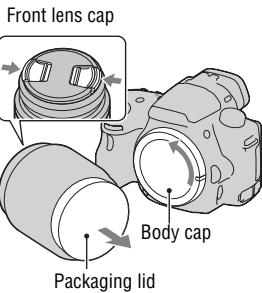
2 Mount the lens by aligning the orange index marks (mounting indexes) on the lens and camera.
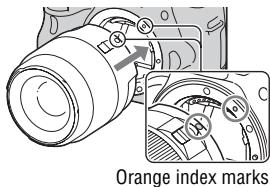
3 Turn the lens clockwise until it clicks into the locked position.
- Be sure to put the lens on straight.
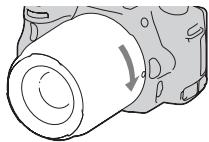
Notes
- When attaching a lens, do not press the lens release button.
- Do not use force when attaching a lens.
- E-mount lenses are not compatible with this camera.
- When you use a lens for which a tripod socket is provided, attach the lens onto the tripod using the tripod socket provided to help balance the weight of the lens.
- When carrying the camera with a lens attached, hold both the camera and the lens firmly.
- Do not hold the part of the lens that is extended for the zoom or focus adjustment.
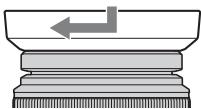
To attach a lens hood
It is recommended that you use a lens hood to reduce flare and ensure maximum image quality.
Fit the hood into the mount on the end of the lens barrel and rotate the hood clockwise until it clicks.
Notes
- A lens hood is not included with the DT 18-55mm F3.5-5.6 SAM. You can use the ALC-SH108 (sold separately).
- The lens hood may block the light of the flash. Remove the lens hood when using the flash.
- When storing, turn over the lens hood and place it onto the lens backwards.
Note on changing the lens
When changing the lens, if dust or debris gets inside the camera and adheres to the surface of the image sensor (the part that acts as the film), it may appear as dark spots on the image, depending on the shooting environment.
The camera is equipped with an anti-dust function to prevent dust from landing on the image sensor. However, quickly change the lens away from dusty locations when attaching/removing a lens.
Turning the camera on and setting the clock
When you turn the camera on for the first time, the date/time setup screen appears.
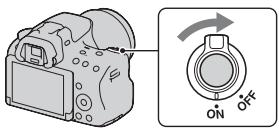
1 Set the power switch to ON to turn the camera on.
The screen used for setting date and time appears.
- To turn the camera off, set it to OFF.
![SONY A37 - Verify that [Enter] is selected on the LCD screen, then press the center of the control button. - 1](/content/2019/06/192612/images/157ddc229ca1f57134eee1445b65e8920a728b3512dd27ec9f8998c7c8ca22bd.jpg)
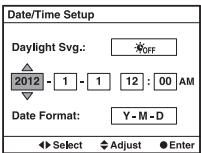
4 Select each item with the left/right buttons and set the numeric value with the up/down buttons.
[Daylight SVG.]: Turns on or off the daylight saving time setting.
[Date Format:]: Selects the format to display date.
- Midnight is indicated as 12:00 AM, and noon as 12:00 PM.
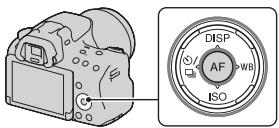
5 Repeat step 4 to set other items, then press the center of the control button. 6 Verify that [Enter] is selected, then press the center of the control button.
To cancel the date/time setting operation
Press the MENU button.
To set up the date/time again
When you turn the camera on for the first time, the date/time setup screen appears automatically. The next time, set up the date and time from the menu.
To set up the area again
You can set the area where you are using the camera. This allows you to set the local area when you use the camera abroad.
Maintaining the date and time setting
This camera has an internal rechargeable battery for maintaining the date and time and other settings regardless of whether the power is on or off, or the battery is installed or not.
Shooting still images
The "Intelligent Auto" mode allows you to easily shoot any subject under any conditions because the camera makes appropriate judgments on the situation to adjust the settings.
Select ⑤ when shooting in a location where the use of a flash is restricted.
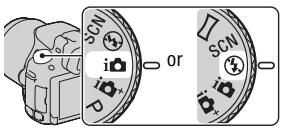
1 Set the mode dial to i or ④ (Flash Off).
2 Hold the camera, monitoring your shot with the LCD screen or viewfinder.
3 Overlay the AF area on the desired subject.
- If the (Camera shake warning) indicator flashes, carefully shoot the subject, holding the camera steady, or by using a tripod.
- When the camera recognizes the scene, the Scene Recognition icon appears on the screen and suitable settings for that scene will be put into effect.
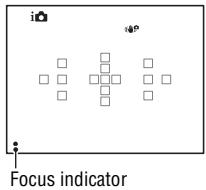
AF area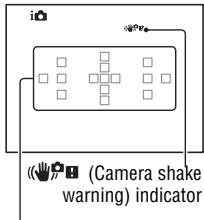
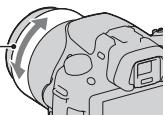
4 When using a zoom lens, turn the zoom ring, then decide on your shot.
Zoom ring
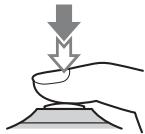
When the focus is confirmed, ● or
(Focus indicator) lights up.
- When the camera detects and shoots a face with [Auto Port. Framing] set to [Auto], the captured image is automatically trimmed into a suitable composition. Both the original and the trimmed images are saved (page 30).
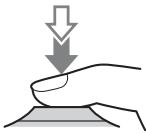
- Movie recording can be started from any exposure mode.
- The shutter speed and aperture are adjusted automatically. If you want to set them to particular values, set the mode dial to (Movie) (page 29).
- The camera continues to adjust the focus when it is in autofocus mode.
MOVIE button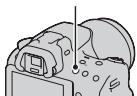
Notes
- The sound of the camera and the lens in operation may be recorded while recording a movie. You can disable sound recording by setting [Audio Recording] to [Off].
- The continuous recording time of a movie may be shorter, depending on the ambient temperature or the status of the camera. See "Notes on continuous movie recording."
- When the [E] mark is indicated, the temperature of the camera is too high. Turn the camera off and wait until the temperature of the camera drops.
Playing back images
Button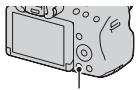
- To play back still images, select [Folder View(Still)], and to play back movies, select [Folder View(MP4)] or [AVCHD View] according to the file format.
- To play back movies, press the center of the control button.
| During movie playback | Control button/control dial operation |
| To pause/resume | ● |
| To fast-forward | ▶ |
| To fast-rewind | ▲ |
| To slow-forward | Rotate the control dial to the right during pause |
| To slow-reverse | Rotate the control dial to the left during pause
·The movie is played back frame-by-frame. |
| To adjust sound volume | ▼→▲/▼ |
| To display the information | ▲ |
Note
- Movies recorded with other devices may not be played back on this camera.
Deleting images (Delete)
Once you have deleted an image, you cannot restore it. Check whether to delete the image or not beforehand.
Note
- Protected images cannot be deleted.
Deleting the image that is currently displayed
1 Display the image you want to delete and press the button.
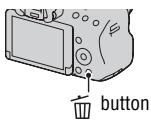
2 Select [Delete] with ▲ on the control button, then press the center of the control button.
Shooting with the various shooting modes
Set the mode dial to the desired mode.

The following shooting modes are provided with the camera:
| i (Intelligent Auto)/ ④ (Flash Off) | The "Intelligent Auto" mode allows you to easily shoot any subject under any conditions because the camera makes appropriate judgments on the situation to adjust the settings. Select "Flash Off" when you want to shoot without the flash. |
| i (Superior Auto) | The camera recognizes and evaluates the shooting condition, and appropriate settings are set automatically. The camera saves 1 appropriate image by combining or separating images, as necessary. |
| SCN (Scene Selection) | Selecting an appropriate mode for the subject or the shooting conditions allows you to shoot the image with a suitable setting for the subject. |
| Sweep Panorama | Allows you to shoot panoramic images. |
| 3D (3D Sweep Panorama) | Allows you to shoot 3D panoramic images for playback on a 3D compatible TV. |
| Tele-zoom Cont. Priority AE | The camera continues to shoot while the shutter button is pressed fully down. The center area on the screen is cropped and the camera records the images continuously at a maximum of about 7 images per second. |
| (Movie) | Allows you to shoot movies with the exposure adjusted manually (both the shutter speed and the aperture value). |
| (P Program Auto) | Allows you to shoot with the exposure adjusted automatically (both the shutter speed and the aperture value). The other settings can be adjusted manually. |
| (A Aperture Priority) | Allows you to shoot after adjusting the aperture value manually using the control dial. |
| (S(Shutter Priority) | Allows you to shoot after adjusting the shutter speed manually using the control dial. |
| M (Manual Exposure) | Allows you to shoot after adjusting the exposure manually (both the shutter speed and the aperture value) using the control dial. |
The functions that can be selected with the Fn button are as follows:
| Scene Selection | Selects an appropriate mode from among the Scene Selection preset settings to suit shooting conditions. (Portrait/Sports Action/Macro/Landscape/Sunset/Night Scene/Hand-held Twilight/Night Portrait) |
| Movie | Selects the exposure mode to suit your subject or your effect and records movies. (P/A/S/M) |
| Drive Mode | Sets the drive mode such as continuous shooting. (Single Shooting/Cont. Shooting/Self-timer/Bracket: Cont./ Single Bracket/WB bracket) |
| Flash Mode | Sets the flash mode. (Flash Off/Autoflash/Fill-flash/Slow Sync./Rear Sync./ Wireless) |
| Autofocus Mode | Selects the method for focusing according to movement of the subject. (Single-shot AF/Automatic AF/Continuous AF) |
| AF area | Selects the area of focus. (Wide/Zone/Spot/Local) |
| Object Tracking | Keeps the focus on a subject while tracking it. (On/Off) |
| Smile/Face Detect. | Automatically captures people's face(s) with the optimal focus and exposure./Shoots when a smile is detected. (Face Detection Off/Face Detection On (Regist. Faces)/Face Detection On/Smile Shutter) |
| Auto Port. Framing | Analyzes the scene when capturing face and automatically saves another image with well-balanced composition. (Auto/Off) |
| ISO | Sets the sensitivity to light. The larger the number, the faster the shutter speed. (Multi Frame Noise Reduct./ISO AUTO to 16000) |
| Metering Mode | Selects the method for measuring brightness. (Multi segment/Center weighted/Spot) |
| Flash Comp. | Adjusts the intensity of flash output. (+2.0EV to -2.0EV) |
| White Balance | Adjusts the color tone of images.
(Auto WB/Daylight/Shade/Cloudy/Incandescent/Fluor.):
Warm White/Fluor.: Cool White/Fluor.: Day White/Fluor.:
Daylight/Flash/C.Temp./Filter/Custom) |
| DRO/Auto HDR | Compensates for the brightness and contrast automatically.
(Off/D-RangeOptimizer/Auto HDR) |
| Creative Style | Selects your desired image processing.
(Standard/Vivid/Portrait/Landscape/Sunset/Black & White) |
| Picture Effect | Shoots with the desired effect filter to achieve more impressive expression.
(Off/Toy Camera/Pop Color/Posterization/Retro Photo/Soft High-key/Partial Color/High Contrast Mono./Soft Focus/ HDR Painting/Rich-tone Mono./Miniature) |
You can set up the basic settings for the camera as a whole or execute functions such as shooting, playback, or other operations.
Press the MENU button, then set up the desired item with the control button's up/down/left/right arrows, then press the center of the control button.
Select a page of the menu
Select an item on the menu
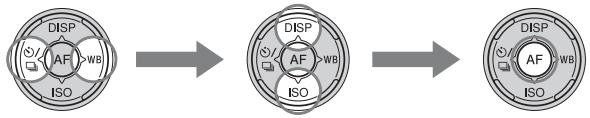
Using the guide function of the camera
In-Camera Guide
When you press the ? (In-Camera Guide) button on the Fn screen or menu screen, a guide in accordance with the currently selected function or setting appears automatically.
Select unavailable functions or settings on the Fn screen, then press the center of the control button, the appropriate setup is indicated in order to enable them.
? (In-Camera Guide) button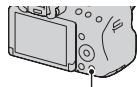
Shooting Tip
The camera displays the shooting tips in accordance with the shooting mode selected.
1 Press the ? (In-Camera Guide) button when the recording information display is displayed.
A shooting tip list in accordance with the current subject appears automatically.
2 Select the desired shooting tip with △/∇ on the control button, then press the center of the control button.
The shooting tip is displayed.
- You can scroll the screen with △ / ∇.
- You can select the item with ◁
To access all shooting tips
You can search through all the shooting tips from the menu.
Use this item when you want to read shooting tips you have seen before.
MENU button → 3 → [Shooting Tip List] → Select the desired shooting tip
Using with your computer
The following applications are contained on the CD-ROM (supplied) to allow more versatile use of images shot with your camera.
Image Data Converter
You can open RAW format image files.
"PlayMemories Home"
You can import still images or movies recorded with the camera to your computer so that you can view them, and use various convenient features to enhance the images you have shot.
For detailed notes on installation, also see page 35.
Notes
- Use "Image Data Converter" to play back RAW images.
- "PlayMemories Home" is not compatible with Mac computers. When you play back images on Mac computers, use the appropriate application software supplied with the Mac computer.
Recommended computer environment (Windows)
The following computer environment is recommended when using the supplied software and importing images via a USB connection.
| OS (pre-installed) | Microsoft Windows XP* SP3/Windows Vista** SP2/Windows 7 SP1 |
| “PlayMemories Home” | CPU: Intel Pentium III 800 MHz or faster(For playing/editing the High Definition movies: Intel Core Duo 1.66 GHz or faster/Intel Core 2 Duo 1.66 GHz or faster, Intel Core 2 Duo 2.26 GHz or faster (AVC HD (FX/FH)))Memory: Windows XP 512MB or more (1 GB or more is recommended), Windows Vista/Windows 7 1 GB or moreHard Disk: Disk space required for installation-approximately 500 MBDisplay: Screen resolution-1024 × 768 dots or more |
| “Image Data Converter Ver.4” | CPU/Memory: Pentium 4 or faster/1 GB or moreDisplay: 1024 × 768 dots or more |
- 64-bit editions and Starter (Edition) are not supported. Windows Image Mastering API (IMAPI) Ver.2.0 or later is required to use the function for creating discs. ** Starter (Edition) is not supported.
Recommended computer environment (Mac)
The following computer environment is recommended when using the supplied software and importing images via a USB connection.
| OS (pre-installed) | USB Connection: Mac OS X v10.3 – 10.7
“Image Data Converter Ver.4”: Mac OS X v10.5, 10.6
(Snow Leopard), 10.7 (Lion) |
| “Image Data Converter Ver.4” | CPU: Intel Core Solo/Core Duo/Core 2 Duo or faster
Memory: 1 GB or more is recommended.
Display: 1024 × 768 dots or more |
Notes
- Operation is not assured in an environment based on an upgrade of the operating systems described above or in a multi-boot environment.
- If you connect 2 or more USB devices to a single computer at the same time, some devices, including the camera, may not operate, depending on the types of USB devices you are using.
- Connecting the camera using a USB interface that is compatible with Hi-Speed USB (USB 2.0 compliant) allows advanced transfer (high speed transfer), as the camera is compatible with Hi-Speed USB (USB 2.0 compliant).
- When your computer resumes activity from suspend or sleep mode, communication between the camera and your computer may not recover at the same time.
Using the software
Installing the software (Windows)
Log on as Administrator.
1 Turn on your computer, and insert the CD-ROM (supplied) into the CD-ROM drive.
The installation menu screen appears.
- If it does not appear, double-click [Computer] (For Windows XP: [My Computer]) → (PMHOME) → [Install.exe].
- If the AutoPlay screen appears, select "Run Install.exe" and follow the instructions that appear on the screen to proceed with the installation.
2 Connect the camera to the computer.
3 Click [Install].
Make sure that both "Image Data Converter" and "PlayMemories Home" are checked and follow the instructions on the screen.
- When the restarting confirmation message appears, restart the computer following the instructions on the screen.
- DirectX may be installed depending on the system environment of your computer.
4 Remove the CD-ROM after the installation is complete.
The following software is installed and shortcut icons appear on the desktop.
"Image Data Converter"
"PlayMemories Home"
"PlayMemories Home Help Guide"
Note
- If "PMB" (Picture Motion Browser) supplied with a camera that was purchased before 2011 has already been installed on the computer, "PMB" is overwritten by "PlayMemories Home," and you may be unable to use some functions of "PMB."
Installing the software (Mac)
Log on as Administrator.
1. Turn on your Mac computer, and insert the CD-ROM (supplied) into the CD-ROM drive. 2. Double-click the CD-ROM icon. 3. Copy the [IDC_INST.pkg] file in the [MAC] folder to the hard disk icon. 4. Double-click the [IDC_INST.pkg] file in the copy-to folder.
Follow the instructions on the screen to complete the installation.
Using "Image Data Converter"
With "Image Data Converter" you can do the following, etc.:
- Edit images recorded in RAW format with various corrections, such as tone curve and sharpness.
- Adjust images with white balance, exposure, and creative style, etc.
- Save the images displayed and edited on a computer.
You can either save the image as RAW format or save it in the general file format.
- To display and compare RAW/JPEG images recorded with this camera. To rate the images on a scale of five.
- To set color labels.
To use "Image Data Converter," refer to Help.
Click [Start] → [All Programs] → [Image Data Converter] → [Help] → [Image Data Converter Ver.4].
"Image Data Converter" support page (English only)
Using "PlayMemories Home"
With "PlayMemories Home" you can do the following, etc.:
- To set images shot with the camera and display them on the computer.
- To organize images on the computer on a calendar by shooting date to view them.
- To retouch (red-eye reduction, etc.), print, send still images as e-mail attachments, and change the shooting date.
- To print or save still images with the date.
- To create Blu-ray discs or DVD discs from AVCHD movies imported to a computer. (An Internet connection environment is required when a Blu-ray disc/DVD disc is created for the first time.)
Notes
- "PlayMemories Home" is not compatible with Mac computers. When you play back images on Mac computers, use the appropriate application software supplied with the Mac computer.
- Movies recorded with the [60i 24M(FX)]/[50i 24M(FX)] or [24p 24M(FX)]/[25p 24M(FX)] setting in [Record Setting] are converted by "PlayMemories Home" in order to create an AVCHD recording disc. This conversion can take a long time. Also, you cannot create a disc with the original image quality. If you want to keep the original image quality, you must store your movies on a Blu-ray disc.
To use "PlayMemories Home," refer to "PlayMemories Home Help Guide."
Double-click the shortcut of "PlayMemories Home Help Guide" on the desktop. Or, click [Start] → [All Programs] → [PlayMemories Home] → [PlayMemories Home Help Guide].
"PlayMemories Home" support page (English only)
http://www.sony.co.jp/pmh-se/
List of icons on the screen
Graphic Display (LCD screen)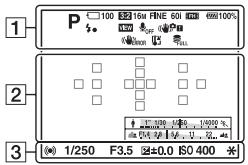
Display All Info. (LCD screen)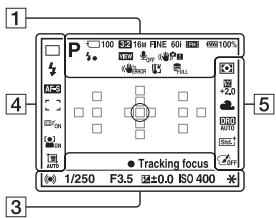
For playback (Basic information display) 1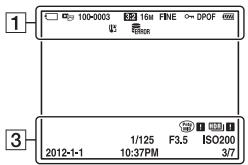
| Display | Indication |
| i0i+T P A S M 12345678901234567890123456789012345678901234567890123456789012345678901234567890123456789012345678901234567891012345678901234567890123456789012345678901234567890123456789012345678901234567890123456789012345678 | Exposure mode (29) |
| J 1 2 3 4 5 6 7 8 9 10 11 12 13 14 15 16 17 18 19 20 21 22 23 24 25 26 27 28 29 30 31 32 33 34 35 36 37 38 39 40 41 42 43 44 45 46 47 48 49 50 51 52 53 54 55 56 57 58 59 60 61 62 63 64 65 66 67 68 69 70 71 72 73 74 75 76 77 78 79 80 81 82 83 84 85 86 87 88 89 90 91 92 93 94 95 96 97 98 99 100 101 102 103 104 105 106 107 108 109 110 111 112 113 114 115 116 117 118 119 120 121 122 123 124 125 126 127 128 129 130 131 132 133 134 135 136 137 138 139 140 141 142 143 144 145 146 147 148 149 150 151 152 153 154 155 156 157 158 159 160 161 162 163 164 165 166 167 168 169 170 171 172 173 174 175 176 177 178 179 180 181 182 183 184 185 186 187 188 189 190 191 192 193 194 195 196 197 198 199 200 201 202 203 204 205 206 207 208 209 210 211 212 213 214 215 216 217 218 219 220 221 222 223 224 225 226 227 228 229 230 231 232 233 234 235 236 237 238 239 240 241 242 243 244 245 246 247 248 249 250 251 252 253 254 255 256 257 258 259 260 261 262 263 264 265 266 267 268 269 270 271 272 273 274 275 276 277 278 279 280 281 282 283 284 285 286 287 288 289 290 291 292 293 294 295 296 297 298 299 300 301 302 303 304 305 306 307 308 309 310 311 312 313 314 315 316 317 318 319 320 321 322 323 324 325 326 327 328 329 330 331 332 333 334 335 336 337 338 339 340 341 342 343 344 345 346 347 348 349 350 351 352 353 354 355 356 357 358 359 360 361 362 363 364 365 366 367 368 369 370 371 372 373 374 375 376 377 378 379 380 381 382 383 384 385 386 387 388 389 390 391 392 393 394 395 396 397 398 399 400 401 402 403 404 405 406 407 408 409 410 411 412 413 414 415 416 417 418 419 420 421 422 423 424 425 426 427 428 429 430 431 432 433 434 435 436 437 438 439 440 441 442 443 444 445 446 447 448 449 450 451 452 453 454 455 456 457 458 459 460 461 462 463 464 465 466 467 468 469 470 471 472 473 474 475 476 477 478 479 480 481 482 483 484 485 486 487 488 489 490 491 492 493 494 495 496 497 498 499 500 501 502 503 504 505 506 507 508 509 510 511 512 513 514 515 516 517 518 519 520 521 522 523 524 525 526 527 528 529 530 531 532 533 534 535 536 537 538 539 540 541 542 543 544 545 546 547 548 549 550 551 552 553 554 555 556 557 558 559 560 561 562 563 564 565 566 567 568 569 570 571 572 573 574 575 576 577 578 579 580 581 582 583 584 585 586 587 588 589 590 591 592 593 594 595 596 597 598 599 600 601 602 603 604 605 606 607 608 609 610 611 612 613 614 615 616 617 618 619 620 621 622 623 624 625 626 627 628 629 630 631 632 633 634 635 636 637 638 639 640 641 642 643 644 645 646 647 648 649 650 651 652 653 654 655 656 657 658 659 660 661 662 663 664 665 666 667 668 669 670 671 672 673 674 675 676 677 678 679 680 681 682 683 684 685 686 687 688 689 690 691 692 693 694 695 696 697 698 699 700 701 702 703 704 705 706 707 708 709 710 711 712 713 714 715 716 717 718 719 720 721 722 723 724 725 726 727 728 729 730 731 732 733 734 735 736 737 738 739 740 741 742 743 744 745 746 747 748 749 750 751 752 753 754 755 756 757 758 759 760 761 762 763 764 765 766 767 768 769 770 771 772 773 774 775 776 777 778 779 780 781 782 783 784 785 786 787 788 789 790 791 792 793 794 795 796 797 798 799 800 801 802 803 804 805 806 807 808 809 810 811 812 813 814 815 816 817 818 819 820 821 822 823 824 825 826 827 828 829 830 831 832 833 834 835 836 837 838 839 840 841 842 843 844 845 846 847 848 849 850 851 852 853 854 855 856 857 858 859 860 861 862 863 864 865 866 867 868 869 870 871 872 873 874 875 876 877 878 879 880 881 882 883 884 885 886 887 888 889 890 891 892 893 894 895 896 897 898 899 900 901 902 903 904 905 906 907 908 909 910 911 912 913 914 915 916 917 918 919 920 921 922 923 924 925 926 927 928 929 930 931 932 933 934 935 936 937 938 939 940 941 942 943 944 945 946 947 948 949 950 951 952 953 954 955 956 957 958 959 960 961 962 963 964 965 966 967 968 969 970 971 972 973 974 975 976 977 978 979 980 981 982 983 984 985 986 987 988 989 990 | |
| FX 1FH
5080 VCA | Image size of movies |
| 100% | Remaining battery (18) |
| Flash charge in progress | |
| VIEW | Setting Effect OFF |
| OFF | No audio recording of movies |
| SteadyShot/Camera shake warning | |
| SteadyShot error | |
| Overheating warning (6) | |
| Database file full/
Database file error | |
| View Mode | |
| Folder - file number | |
| Protect | |
| DPOF | DPOF set |
| Remaining battery warning (18) | |
2
| Display | Indication |
| ○ | Spot metering area (30) |
| = ∑ = ∑ = ∑ = | AF area (30) |
| S Q | Smart Zoom |
| C Q | Clear Image Zoom |
| D Q | Digital Zoom |
| [ ] = [ ] = [ ] = [ ] = [ ] = [ ] = [ ] = [ ] = [ ] = [ ] = [ ] = [ ] = [ ] = [ ] = [ ] = [ ] = [ ] = [ ] = [ ] = [ ] = [ ] = [ ] = [ ] = [ ] = [ ] = [ ] = [ ] = [ ] = [ ] = [ ] = [ ] = [ ] = [ ] = [ ] = [] = [ ] = [ ] = [ ] = [ ] = [ ] = [ ] = [ ] = [ ] = [ ] = [ ] = [ ] = [ ] = [ ] = [ ] = [ ] = [ ] = [ ] = [ ] = [ ] = [ ] = [ ] = [ ] = [ ] = [ ] = [ ] = [ ] = [ ] = [ ] = [ ] = [ ] = [ ] = [ ] = [ ] | |
| Aperture indicator |
3
| Display | Indication |
| REC 0:12 | Recording time of the movie (m:s) |
| ● (◎) (◎) | Focus (25) |
| 1/250 | Shutter speed (29) |
| F3.5 | Aperture (29) |
| -30-32-10-8-1-1-1-3+ | EV scale (Only for viewfinder) |
| +3.0 | Exposure compensation |
| * | AE lock |
| [0] [1] | Auto HDR image warning |
| [0] [1] [0] | Picture Effect error |
| ISO400 | ISO sensitivity |
| 3/7 | File number/Number of images in the view mode |
| 2012-1-1
10:37AM | Date of recording |
4
| Display | Indication |
| □ HI
10 S 0.3EV
Lb | Drive mode |
| ④ AUTO SLOW
RESAR WL
HSS | Flash mode/Red-eye reduction |
| AF-A AF-S
AF-C MF | Focus mode (30) |
| [ ] [ ] [ ] [ ] [ ] [ ] [ ] [ ] [ ] [ ] [ ] [ ] [ ] [ ] [ ] [ ] [ ] [ ] [ ] [ ] [ ] [ ] [ ] [ ] [ ] [ ] [ ] [ ] [ ] [ ] [ ] [ ] [ ] [ ] [ ] [ ] [ ] [ ] [ ] [ ] [ ] [ ] [ ] [ ] [ ] [ ] [ ] [ ] [ ] [ ] [ ] | AF area (30) |
| □ON □OFF | Object tracking (30) |
| OFFONONOFFONON | Face Detection (30)/Smile Shutter (30) |
| AUTOOFF | Auto Portrait Framing (30) |
| [ ] | Smile DetectionSensitivity indicator (30) |
5
| Display | Indication |
| +2.0 | Metering mode (30) |
| AWB
+1
+2
7500K
A5 G5 | White balance (Auto,
Preset, Custom, Color
temperature, Color filter) |
| DRO
AUTO | D-Range Optimizer (30)/
Auto HDR (30) |
| DRO
AUTO | Creative Style (30)/
Contrast, Saturation,
Sharpness |
| +3 +3 +3 | Picture Effect (30) |
Learning more about the camera (α Handbook)
"α Handbook," which explains how to use the camera in detail, is included on the CD-ROM (supplied). Refer to it for in-depth instructions on the many functions of the camera.
For Windows users
1 Turn on your computer, and insert the CD-ROM (supplied) into the CD-ROM drive. 2 Click [Handbook]. 3 Click [Install]. 4 Start "α Handbook" from the shortcut on the desktop.
For Mac users
1 Turn on your computer, and insert the CD-ROM (supplied) into the CD-ROM drive. 2 Select the [Handbook] folder and copy "Handbook.pdf" stored in the [GB] folder to your computer. 3 After copying is complete, double-click "Handbook.pdf."
Checking the number of recordable images/recording time
Once you insert a memory card into the camera and set the power switch to ON, the number of images that can be recorded (should you continue to shoot using the current settings) is displayed on the screen.
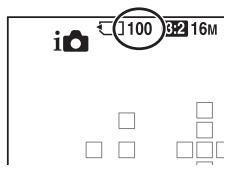
Notes
- When "0" (the number of recordable images) flashes in yellow, the memory card is full. Replace the memory card with another one, or delete images in the current memory card (page 28).
- When "NO CARD" (the number of recordable images) flashes in yellow, it means no memory card has been inserted. Insert a memory card.
The number of images that can be recorded on a memory card
The table shows the approximate number of images that can be recorded on a memory card formatted with this camera. The values are defined using Sony standard memory cards for testing. The values may vary depending on the shooting conditions and the type of memory card used.
Image Size: L 16M
Aspect Ratio: 3:2*
"Memory Stick PRO Duo"
(Units: Images)
| Capacity
Size | 2GB | 4GB | 8GB | 16GB | 32GB |
| Standard | 410 | 820 | 1650 | 3350 | 6700 |
| Fine | 295 | 590 | 1150 | 2400 | 4800 |
| RAW & JPEG | 80 | 160 | 325 | 650 | 1300 |
| RAW | 110 | 220 | 445 | 890 | 1750 |
- When [Aspect Ratio] is set to [16:9], you can record more images than the numbers shown in the table above (except when [RAW] is selected).
The number of images that can be recorded using a battery pack
The approximate number of images that can be recorded is as follows when you use the camera with the battery pack (supplied) at full capacity.
Note that the actual numbers may be less than those indicated depending on the conditions of use.
| LCD screen mode | Approx. 500 images |
| Viewfinder mode | Approx. 450 images |
- The number is calculated with a battery pack at full capacity and in the following situation:
- At an ambient temperature of 25°C (77°F)
- Using the battery pack that is charged for an hour after the CHARGE lamp goes out.
- Using Sony "Memory Stick PRO Duo" media (sold separately).
- [Quality] is set to [Fine].
- [Autofocus Mode] is set to [Automatic AF].
- Shooting once every 30 seconds.
- The flash strobes once every 2 times.
- The power turns on and off once every 10 times.
- The measurement method is based on the CIPA standard.
(CIPA: Camera & Imaging Products Association)
Available recording time for a movie
The table below shows the approximate total recording times using a memory card formatted with this camera.
"Memory Stick PRO Duo" (h (hour), m (minute))
| Capacity Record Setting | 2GB | 4GB | 8GB | 16GB | 32GB |
| 60i 24M(FX)/50i 24M(FX) | \( {10}\mathrm{\;m} \) | \( {20}\mathrm{\;m} \) | \( {40}\mathrm{\;m} \) | \( 1\mathrm{\;h}{30}\mathrm{\;m} \) | \( 3\mathrm{\;h} \) |
| 60i 17M(FH)/50i 17M(FH) | \( {10}\mathrm{\;m} \) | \( {30}\mathrm{\;m} \) | \( 1\mathrm{\;h} \) | \( 2\mathrm{\;h} \) | \( 4\mathrm{\;h}5\mathrm{\;m} \) |
| 24p 24M(FX)/25p 24M(FX) | \( {10}\mathrm{\;m} \) | \( {20}\mathrm{\;m} \) | \( {40}\mathrm{\;m} \) | \( 1\mathrm{\;h}{30}\mathrm{\;m} \) | \( 3\mathrm{\;h} \) |
| 24p 17M(FH)/25p 17M(FH) | \( {10}\mathrm{\;m} \) | \( {30}\mathrm{\;m} \) | \( 1\mathrm{\;h} \) | \( 2\mathrm{\;h} \) | \( 4\mathrm{\;h}5\mathrm{\;m} \) |
| \( {1440} \times {108012}\mathrm{M} \) | \( {20}\mathrm{\;m} \) | \( {40}\mathrm{\;m} \) | \( 1\mathrm{\;h}{20}\mathrm{\;m} \) | \( 2\mathrm{\;h}{45}\mathrm{\;m} \) | \( 5\mathrm{\;h}{30}\mathrm{\;m} \) |
| VGA 3M | \( 1\mathrm{\;h}{10}\mathrm{\;m} \) | \( 2\mathrm{\;h}{25}\mathrm{\;m} \) | \( 4\mathrm{\;h}{55}\mathrm{\;m} \) | \( {10}\mathrm{\;h} \) | \( {20}\mathrm{\;h}5\mathrm{\;m} \) |
Notes
- The recordable time of movies varies for the reason that the camera equipped with VBR (Variable Bit Rate) which automatically adjusts image quality depending on shooting scene. When you record fast-moving subject, the image is clearer but the recordable time is shorter because it spends much memory to record. The recordable time also varies depending on the shooting condition or subject or setting of image quality/size.
- The values shown are not the continuous recording time.
- Recording time may depend on shooting conditions and the memory card used.
- When [1/2] is indicated, stop recording the movie. The temperature inside the camera has increased to an unacceptable level.
- For details on movie playback, see page 27.
Notes on continuous movie recording
- It requires a lot of power to perform high quality movie recording or continuous shooting using the APS-C size image sensor. Therefore, if you continue to shoot, the temperature inside the camera will rise, especially that of the image sensor. In such cases, the camera is turned off automatically since higher temperatures affect the quality of the images or burden the internal mechanism of the camera.
- The duration of time available for movie recording is as follows when the camera starts recording after the power of the camera has been turned off for a while. (The
following values indicate the continuous time from when the camera starts recording until the camera stops recording.)
| Ambient temperature | Continuous recording time for movies |
| 20°C (68°F) | About 29 minutes |
| 30°C (86°F) | About 29 minutes |
| 40°C (104°F) | About 26 minutes |
- The duration of time available for movie recording varies with the temperature or condition of the camera before you start recording. If you frequently recompose or shoot images after the power is turned on, the temperature inside the camera rises and the recording time available is shorter than the values indicated in the table above.
- If the camera stops recording due to the temperature, leave it for several minutes with the power turned off. Start recording after the temperature inside the camera drops fully.
- If you observe the following points, the recording time is longer.
- Keep the camera out of direct sunlight.
- Turn the camera off when it is not being used.
- If possible, use a tripod and disable the SteadyShot function.
- The maximum size of a movie file is about 2 GB. When the file size is about 2 GB, the recording stops automatically when [File Format] is set to [MP4], and a new movie file is created automatically when [File Format] is set to [AVCHD].
- The maximum continuous recording time is 29 minutes.
Camera
[System]
Camera Type Interchangeable Lens Digital Camera
Lens A-mount lens
[Image sensor]
Image format 23.5 mm×15.6 mm (APS-C format) CMOS image sensor
Total pixel number of image sensor Approx. 16 500 000 pixels
Effective pixel number of camera Approx. 16 100 000 pixels
[SteadyShot]
For still images System: Image sensor-shift mechanism Effect: Approx. 2.5 EV to 4.0 EV in shutter speed (depending on shooting conditions and the attached lens)
For movies System: Electronic
[Anti-Dust]
System Charge protection coating on Low-Pass Filter and image sensor-shift mechanism
[Auto focus system]
System TTL phase-detection system, 15 points (3 points cross type)
Sensitivity Range -1 EV to 18 EV (at ISO 100 equivalent)
AF illuminator Approx. 1 m to 5 m (3.3 feet to 16.4 feet)
[Electronic viewfinder]
Type Electronic viewfinder (color)
Screen size 1.2 cm (0.46 type)
Total number of dots 1440000 dots equivalent
Effective number of dots When [Viewfinder Magnifi.] is set to [Maximum]: 1440000 dots equivalent When [Viewfinder Magnifi.] is set to [Standard]: 1253280 dots equivalent
Frame coverage 100%
Magnification When [Viewfinder Magnifi.] is set to [Maximum]:
1.19x with 50 mm lens at infinity, -1 m^-1 (diopter)
When [Viewfinder Magnifi.] is set to [Standard]:
1.09× with 50 mm lens at infinity, -1m-1 (diopter)
Eye Point When [Viewfinder Magnifi.] is set to [Maximum]:
Approximately 17mm from the eyepiece, 16mm from the eyepiece frame (at -1m-1 )
When [Viewfinder Magnifi.] is set to [Standard]:
Approximately 19mm from the eyepiece, 18mm from the eyepiece frame (at -1m-1 )
Diopter Adjustment -4.0m-1 to +4.0m-1 (diopter)
[LCD screen]
Type 2.7 type TFT drive/Clear Photo LCD screen
Total number of dots 230400 (320× 3 (RGB) × 240 )dots
[Exposure control]
Metering Cell "Exmor" CMOS sensor
Metering method 1200-zone evaluative metering
Metering Range -2 EV to +17 EV on Multi segment, Center weighted, Spot modes (at ISO 100 equivalent with F1.4 lens)
ISO sensitivity (Recommended exposure index)
Still images: AUTO (ISO 100 - 3200), ISO 100 to 16000 (1 EV step)
Movies: AUTO (ISO 100 - 3 200 equivalent), ISO 100 to 3 200 equivalent (1 EV step)
Exposure compensation ±3.0 EV (1/3 EV step)
[Shutter]
Type: Electronically-controlled, vertical-traverse, focal-plane type
Speed range: Still images: 1/4,000 second to 30 seconds, bulb
Movies: 1/4,000 second to 1/4 second (1/3 step), up to 1/60 in AUTO mode
Flash sync speed: 1/160 second
[Built-In-Flash]
Flash G.No.: GN 10 (in meters at ISO 100)
Recycling time: Approx. 3 seconds
Flash coverage
Covering 18mm lens (focal length that the lens indicates)
Flash compensation
±2.0 EV (1/3 EV step)
Flash range
| Aperture | F2.8 | F4.0 | F5.6 |
| ISO setting | 100 | 1 m – 3.6 m (3.3 feet – 11.8 feet) | 1 m – 2.5 m (3.3 feet – 8.2 feet) | 1 m – 1.8 m (3.3 feet – 5.9 feet) |
| 200 | 1 m – 5 m (3.3 feet – 16.4 feet) | 1 m – 3.6 m (3.3 feet – 11.8 feet) | 1 m – 2.5 m (3.3 feet – 8.2 feet) |
| 400 | 1.4 m – 7.1 m (4.6 feet – 23.3 feet) | 1 m – 5 m (3.3 feet – 16.4 feet) | 1 m – 3.6 m (3.3 feet – 11.8 feet) |
| 800 | 2 m – 10 m (6.6 feet – 32.8 feet) | 1.4 m – 7.1 m (4.6 feet – 23.3 feet) | 1 m – 5 m (3.3 feet – 16.4 feet) |
[Continuous shooting]
Continuous shooting speed
Tele-zoom continuous priority AE: Maximum 7 images per second / High: Maximum 5.5 images per second / Low: Maximum 2.5 images per second
- The speed of continuous shooting is estimated using our criteria. The speed of continuous shooting may be slower, depending on shooting conditions (Image size, ISO setting, aperture value, High ISO NR, or the setting of [Lens Comp.: Distortion]).
The maximum number of continuous shots
In Tele-zoom continuous priority AE mode
Fine: 17 images / Standard: 18 images
In Continuous shooting
Fine: 15 images / Standard: 16 images / RAW & JPEG: 6 images / RAW: 7 images
[Image zooming playback]
Scaling range
Image size: L: Approx. x1.0 - x15.4 / M: Approx. x1.0 - x11.2 / S: Approx. x1.0 - x7.7
File format
JPEG (DCF Ver. 2.0, Exif Ver. 2.3, MPF Baseline) compliant, RAW (Sony's exclusive ARW2.3 format)
3D still images
MPO (MPF Extended (Disparity Image)) compliant
| Movie (AVCHD format) | AVCHD format Ver. 2.0 compatible
Video: MPEG-4 AVC/H.264
Audio: Dolby Digital 2ch, equipped with Dolby Digital Stereo Creator
• Manufactured under license from Dolby Laboratories. |
| Movie (MP4 format) | Video: MPEG-4 AVC/H.264
Audio: MPEG-4 AAC-LC 2ch |
| [Recording media] | “Memory Stick PRO Duo” media, SD card |
| [Input/output terminals] | |
| USB | miniB, Hi-Speed USB (USB 2.0) |
| HDMI | HDMI minijack |
| Mic Terminal | Ø 3.5 mm Stereo minijack |
| REMOTE Terminal | |
| [Power, general] | |
| Used battery pack | Rechargeable battery pack NP-FW50 |
| [Others] | |
| Microphone | Stereo |
| Speaker | Monaural |
| Print features | Exif Print compatible, PRINT Image Matching III compatible, DPOF compatible |
| Dimensions | Approx. 124.4 mm × 92 mm × 84.7 mm
(4 7/8 inches × 3 5/8 inches × 3 1/3 inches) (W/H/D, excluding protrusions) |
| Mass | Approx. 506 g (1.12 lb 17.8 oz) (with battery and “Memory Stick PRO Duo” media)
Approx. 448 g (0.99 lb 15.8 oz) (body only) |
| Operating temperature | 0°C to 40°C (32°F to 104°F) |
On image data compatibility
- This camera conforms with DCF (Design rule for Camera File system) universal standard established by JEITA (Japan Electronics and Information Technology Industries Association).
- Playback of images recorded with your camera on other equipment and playback of images recorded or edited with other equipment on your camera are not guaranteed.
Design and specifications are subject to change without notice.
Battery charger/Battery
BC-VW1 Battery charger
Input rating 100 V - 240 V AC, 50 Hz/60 Hz, 4.2 W
Output rating 8.4 V DC, 0.28 A
Operating temperature range 0°C to 40°C (32°F to 104°F)
Storage temperature range -20°C to +60°C (-4°F to +140°F)
Maximum dimensions Approx. 63 mm × 95 mm × 32 mm (2 1/2 inches × 3 3/4 inches × 1 5/16 inches) (W/H/D)
Mass Approx. 85 g (3 oz)
Rechargeable battery pack NP-FW50
Used battery Lithium-ion battery
Maximum voltage DC 8.4 V
Nominal voltage DC 7.2 V
Maximum charge voltage DC 8.4 V
Maximum charge current 1.02 A
Capacity Typical 7.7 Wh (1080 mAh)
Minimum 7.3 Wh (1020 mAh)
Maximum dimensions Approx. 31.8 mm × 18.5 mm × 45 mm (1 5/16 inches × 3/4 inches × 1 13/16 inches) (W/H/D)
Mass Approx. 57 g (2.1 oz)
Lens
| Name (Model name) | DT 18-55mm
F3.5-5.6 SAM
(SAL1855) | DT 55-200mm
F4-5.6 SAM
(SAL55200-2) | DT 18-135mm
F3.5-5.6 SAM
(SAL18135) |
| Equivalent 35mm-
format focal length*
(mm) | 27-82.5 | 82.5-300 | 27-202.5 |
| Lens groups-elements | 7-8 | 9-13 | 11-14 |
| Angle of view* | 76°-29° | 29°-8° | 76°-12° |
| Minimum focus** (m (feet)) | 0.25 (0.82) | 0.95 (3.2) | 0.45 (1.48) |
| Maximum magnification (X) | 0.34 | 0.29 | 0.25 |
| Minimum f-stop | f/22-36 | f/32-45 | f/22-36 |
| Filter diameter (mm) | 55 | 55 | 62 |
| Dimensions (maximum diameter × height) (approx., mm (in.)) | 69.5×69 (2 3/4 × 2 3/4) | 71.5×85 (2 7/8 × 3 3/8) | 76×86 (3 × 3 1/2) |
| Mass (approx., g (oz.)) | 210 (7 4/8) | 305 (10 3/4) | 398 (14) |
- The values for equivalent 35mm-format focal length and angle of view are based on Interchangeable Lens Digital Camera equipped with an APS-C sized image sensor. ** Minimum focus is the shortest distance from the image sensor to the subject.
- This lens is equipped with a distance encoder. The distance encoder allows more accurate measurement (ADI) by using a flash for ADI.
- Depending on the lens mechanism, the focal length may change with any change of the shooting distance. The focal length assumes the lens is focused at infinity.
- The infinity position provides for some adjustment to compensate for focus shift caused by change in temperature. To shoot a subject at infinite distance in MF mode, use the viewfinder and set focus.
On focal length
The picture angle of this camera is narrower than that of a 35mm-format camera. You can find the approximate equivalent of the focal length of a 35mm format camera, and shoot with the same picture angle, by increasing the focal length of your lens by half.
For example, by using a 50mm lens, you can get the approximate equivalent of a 75mm lens of a 35mm-format camera.
Trademarks
- α is a trademark of Sony Corporation. "Memory Stick," "Memory Stick PRO," MEMORY STICK PRO, "Memory Stick Duo," MEMORY STICK DUO, "Memory Stick PRO Duo," MEMORY STICK PRO-HG DUO, "Memory Stick Micro," "MagicGate," and MAGICGATE are trademarks of Sony Corporation.
- "InfoLITHIUM" is a trademark of Sony Corporation.
- "PhotoTV HD" is a trademark of Sony Corporation.
- "AVCHD" and "AVCHD" logotype are trademarks of Panasonic Corporation and Sony Corporation.
- Blu-ray Disc™ and Blu-ray™ are trademarks of the Blu-ray Disc Association.
- Dolby and the double-D symbol are trademarks of Dolby Laboratories.
- Microsoft, Windows, DirectX, and Windows Vista are either registered trademarks or trademarks of Microsoft Corporation in the United States and/or other countries.
- HDMI, the HDMI logo and High-Definition Multimedia Interface are trademarks or registered trademarks of HDMI Licensing LLC. Mac and Mac OS are trademarks or registered trademarks of Apple Inc.
- PowerPC is a registered trademark of IBM Corporation in the United States.
- Intel, Intel Core, MMX, and Pentium are trademarks or registered trademarks of Intel Corporation.
- SDXC Logo is a trademark of SD3C, LLC.
- Eye-Fi is a trademark of Eye-Fi Inc.
- MultiMediaCard is a trademark of MultiMediaCard Association.
- "PlayStation" and "PlayStation" are registered trademarks of Sony Computer Entertainment Inc. Adobe is a registered trademark or a trademark of Adobe Systems Incorporated in the United States and/or other countries.
- In addition, system and product names used in this manual are, in general, trademarks or registered trademarks of their respective developers or manufacturers. However, the TM or ® marks are not used in all cases in this manual.

Works with PlayStation®3
- Add further enjoyment with your PlayStation 3 by downloading the application for PlayStation 3 from PlayStation Store (where available.)
- The application for PlayStation 3 requires PlayStation Network account and application download.
Accessible in areas where the PlayStation Store is available.

InfoLITHIUM

MEMORYSTICK TM

HIGHDEFINITION MULTIMEDIA INTERFACE

CLASS④

Additional information on this product and answers to frequently asked questions can be found at our Customer Support Website.
http://www.sony.net/
Printed using VOC (Volatile Organic Compound)-free vegetable oil based ink.
Mount A
Memory aid
Responsible party: Sony Electronics Inc.
Address: 16530 Via Esprillo,
San Diego, CA 92127 USA
Image deletion (Erase)
(CIPA: Camera & Imaging Products Association)
(h (hour), m (minute))
| Capacité Réglage d'enregistr. | 2 Go | 4 Go | 8 Go | 16 Go | 32 Go |
| 60i 24M(FX)/50i 24M(FX) | 10 m | 20 m | 40 m | 1 h 30 m | 3 h |
| 60i 17M(FH)/50i 17M(FH) | 10 m | 30 m | 1 h | 2 h | 4 h 5 m |
| 24p 24M(FX)/25p 24M(FX) | 10 m | 20 m | 40 m | 1 h 30 m | 3 h |
| 24p 17M(FH)/25p 17M(FH) | 10 m | 30 m | 1 h | 2 h | 4 h 5 m |
| 1440×1080 12M | 20 m | 40 m | 1 h 20 m | 2 h 45 m | 5 h 30 m |
| VGA 3M | 1 h 10 m | 2 h 25 m | 4 h 55 m | 10 h | 20 h 5 m |
Notes
6 images/RAW: 7 images
Rechargeable battery NP-FW50
Works with PlayStation®3
"Play Memories Home"
"Play Memories Home"
"Play Memories Home Help"
Note
Works with PlayStation®3
- NoAML can be used to create MultiMediaCard.
Note
"Image Data Converter"
"PlayMemories Home"
"Guide to PlayMemories Home"
Note
| Visualización | Indicación |
| ○ | Área de medicación pumentual (29) |
| = = = = = = = = = = = = = = = = = = = = = = = = = = = = = = = = = = = = = = = = = = = = = = = = = = = = = = = = = = = = = = = = = = = = = = = = = = = = = = = = = = = = = = = = = = = = = = = = = = = = = | |
| SQ | Zoom inteligente |
| CQ | Zoom deImagen clara |
| DQ | Zoom digital |
| L W H W A B C D E F G H I J K L M N O P Q R S T U V W X Y Z A B C D E F G H I J K L M N O P Q R S T U V W X Y Z A B C D E F G H I J K L M N O P Q R S T U V W X Y Z A B C D E F G H I J K L M N O P Q R S T U V W X Y Z A B C D E F G H I J K L M N O P Q R S T U | |
3
(CIPA: Camera & Imaging Products Association)
Works with PlayStation®3
"Image Data Converter"
"PlayMemories Home"
Works with PlayStation®3
Guide incorporated in the camera
"Image Data Converter"
"PlayMemories Home"
"PlayMemories Home Help Guide"
Note
(CIPA: Camera & Imaging Products Association)
Remaining time for recording this movie
Works with PlayStation®3
"Image Data Converter"
"PlayMemories Home"
"PlayMemories Home Help Guide"
Note
(CIPA: Camera & Imaging Products Association)
Works with PlayStation®3
Elementary apparatus
"Play Memories Home"
[System autofocususa]
Charger/Battery
Charger BC-VW1
Works with PlayStation®3
"Image Data Converter"
"PlayMemories Home"
"Help Guide for PlayMemories Home"
Note!
"Image Data Converter"
"Image Data Converter"
"Play Memories Home"
"PlayMemories Home Help Guide"
Note
"Image Data Converter"
"Image Data Converter"
"Play Memories Home"
"PlayMemories Home Help Guide"
Note
"Image Data Converter"
Installation of softwares (Windows)
"Image Data Converter"
"Play Memories Home"
"Play Memories Home Help Guide"
Note