
AS1110 - Digital Camera AGFAPHOTO - Free user manual and instructions
Find the device manual for free AS1110 AGFAPHOTO in PDF.



| Product Type | Digital photo scanner |
| Brand | AGFAPHOTO |
| Model | AS1110 |
| Dimensions (L × H × D) | 156 × 46 × 38 mm |
| Weight | 0.17 kg |
| Power supply | AC adapter 100-240 V~, 50/60 Hz, output 6 V / 1.5 A |
| Power consumption | Less than 9 W |
| Sensor type | Color contact image sensor (CIS) |
| Max. hardware resolution | 1800 × 1200 dpi |
| Color depth (input/output) | Color 48 bits / 24 bits, Grayscale 16 bits / 8 bits |
| Compatible paper sizes | Minimum: 42 × 20 mm, Maximum: 105 × 304.8 mm; weight 50-105 g/m² |
| Media types | Photos, documents, business cards, plastic cards (max. thickness 1.5 mm) |
| Document feeder capacity | Single sheet at a time |
| Supported memory cards | SD, xD, MMC, MS, CompactFlash (CF Type I) |
| Computer interface | Mini-USB 2.0 high speed (memory card reader) |
| Main functions | Scan to memory card or digital photo frame, auto crop, standby mode (15 min) |
| Maintenance and cleaning | Cleaning scanner glass with cleaning rod, cleaning input rollers with cleaning sheet, calibration with calibration sheet |
| Safety | Do not expose to moisture, strong vibrations, dust; unplug before cleaning; do not disassemble |
| Recommended ambient temperature | 15-35 °C |
| Package contents | Scanner, calibration sheet, cleaning sheet, cleaning rod, power adapter, USB cable, user guide |
| Warranty (France) | 12 months (3 months for accessories) |
| After-sales service (France) | 01 70 48 04 85 |
Frequently Asked Questions - AS1110 AGFAPHOTO
User questions about AS1110 AGFAPHOTO
0 question about this device. Answer the ones you know or ask your own.
Ask a new question about this device
Download the instructions for your Digital Camera in PDF format for free! Find your manual AS1110 - AGFAPHOTO and take your electronic device back in hand. On this page are published all the documents necessary for the use of your device. AS1110 by AGFAPHOTO.
USER MANUAL AS1110 AGFAPHOTO
Macintosh: Mass Storage Class Mac OS9.x or Mac OSX
Configuration minimum
20-70% (sans condensation)
Scanner
Noir-Blanc 1 bit (Trame)
With the purchase of this device, you have chosen a quality AgfaPhoto product brand. Their device fulfils the most varied requirements for private use or in your office and business everyday.
Scan photos or business cards and transfer the data automatically on to memory cards or onto compatible digital picture frames.
In addition, you also use the scanner as a memory card reader in combination with a computer.
We hope you enjoy your device and its many functions!
About this User Manual
With the installation guide on the following pages, you can start using your device quickly and easily. Detailed descriptions can be found in the following sections of this user manual.
Read the entire user manual carefully. Follow all safety instructions in order to ensure proper operation of your device. The manufacturer accepts no liability if these instructions are not followed.
Symbols Used
DANGER!

DANGER!
Warns about dangers for people, damage to the device or other objects as well as possible loss of data. Injuries or damage can result from improper handling.
Notice

Troubleshooting
This symbol designates tips that will help you to use your device more effectively and easily.
1 Introduction
Dear Customer 1
About this User Manual 1
General Safety Information
Device Overview
External View 4
Connections on the Rear Side 4
4 Initial Operation
Packing Contents 5
Connecting power supply 5
Inserting a Memory Card 5
Using the digital photo frame 5
5 Scanning
Loading Photos 6
Cleaning the Scanner Glass 7
Computer Connection 7
Service
Cleaning 8
Power Cycling 9
7 Appendix
Technical Data 11
Guarantee 11
General Safety Information
Read the following information before using the device in order to avoid or minimise any risk of injury or damage.
Setting Up the Device
Protect the device against direct sunlight, heat, large temperature fluctuations and moisture. Do not place the device in the vicinity of heaters or air conditioners. Observe the information on temperature and humidity in the technical data.
In the event that the device becomes too hot, or if you see smoke coming from the device, you must immediately pull the power cable out of the power socket. Have your device examined by trained professionals at a technical service location. To prevent the spread of fire, open flames should be kept away from the device.
Do not plug in the device in moist rooms. Never touch the mains cable or the mains connection with wet hands.
Under the following conditions, a layer of moisture can appear inside the device which can lead to malfunctions:
- if the device is moved from a cold to a warm area;
- after a cold room is heated;
- when this device is placed in a damp room.
Proceed as follows to avoid any moisture build-up:
1 Seal this device in a plastic bag for it to adapt to room conditions.
2 Wait one to two hours before you take the device from the plastic bag.
The device should not be used in a very dusty environment. Dust particles and other foreign objects may damage the unit.
Do not expose the device to extreme vibrations. It may damage the internal components.
Do not allow children to handle the device without supervision. The packing materials should be kept out of the hands of children.
Power Supply
Do use the AC adapter and USB cable provided with the scanner. When using other power supply units and cables, the device may not work.
Turn the device off using the on/off switch before you remove the plug from the socket.
Never touch the power cable if the insulation is damaged. Replace damaged wires immediately. Use suitable cables only; if necessary please contact our technical customer service or your retailer.
Set up your device so that the power socket is easily accessible. In an emergency, disconnect your device from the power supply by pulling the power plug.
Before cleaning the surface of your device, disconnect it from the power network. Use a soft, lint-free cloth. Never use liquid, gaseous or easily flammable cleansers (sprays, abrasives, polishes, alcohol). Do not allow any moisture to reach the interior of the device.
Remove the mains cable if you are not using the device for a long time to avoide the risk of fire.
Do not attempt to take the device apart. There is danger of an electrical shock. Opening the device voids the warranty.
Repairs
Do not make any repairs to the device yourself. Improper maintenance can result in injuries or damage to the device. Only have your device repaired by an authorised service centre.
Do not remove the type label from your device; this would void the warranty.
Device Overview
External View
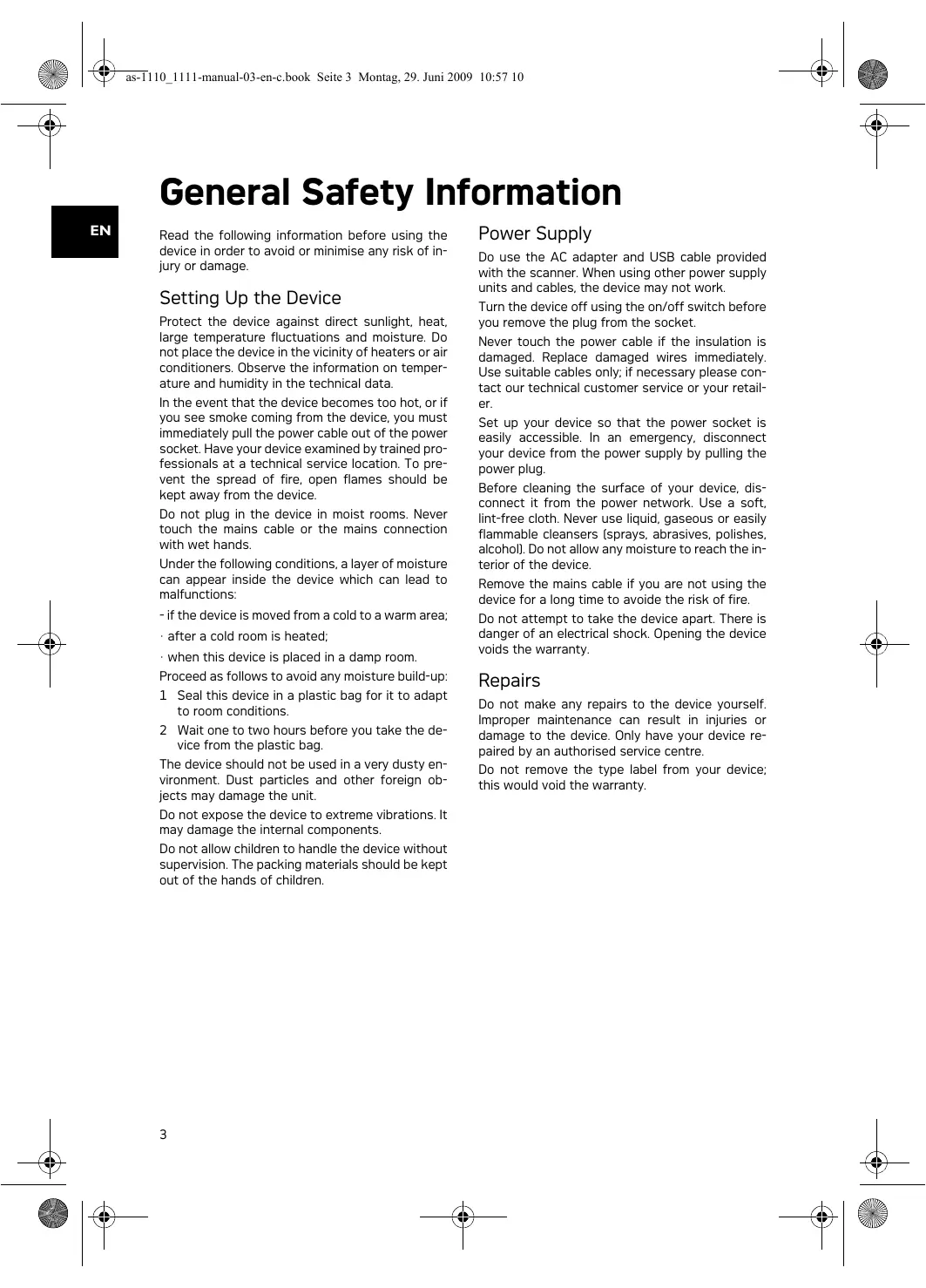
STATUS - status indicator - displays the device status
Lit: Scanner in cleaning mode
Flashing quickly: Document jam
Flashing slowly: Scans the document, saves data, sensor is being cleaned
-
switch the device on/off / press and hold for longer than 5 seconds to clean the feed roller with the cleaning sheet
-
POWER - Operating status indicator - displays the operating status of the device
Lit: Scanner ready, or scanning the document
Flashing quickly: Document jam, memory card error
Flashing slowly: Initialisation, saves data, sensor is being cleaned
4 Document guide - inserting the document/ remove the tape before using it for the first time
Markers for 10× 15cm photos
Document feed slot
Symbol for direction of feed - insert the document into the document feeder with the printed side facing up and the top edge facing the key
Connections on the Rear Side
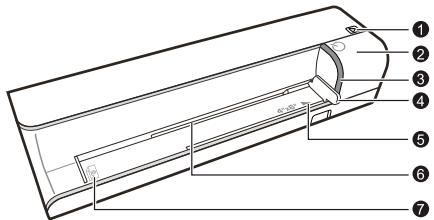
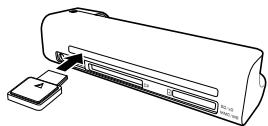
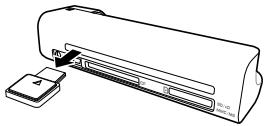
Slot for memory card - only insert the following memory cards here: SD/xD/MMC/MS
2 Document outlet
Slot for Compact Flash memory card Type 1
4 Mini USB connection - for connecting a computer (only as a memory card reader) or a digital photo frame
- Socket - Port for power supply
Initial Operation
Packing Contents
Photo scanner
Calibration sheet
Cleaning sheet for the feed rollers
Cleaning pen for scanner
Power supply
USB cable
User Manual
Notice

Missing Package Contents
If one of the parts is missing or damaged, please contact your retailer or our customer service.
Connecting power supply
CAUTION!

Mains Voltage at the Site of Installation!
Check whether the mains voltage of your device (indicated on the type label) matches the mains voltage available at the setup location.
1 Insert the small plug of the power supply into the socket on the rear side of your device.
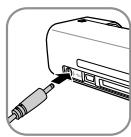
2 Insert the power supply unit into the socket.
Inserting a Memory Card
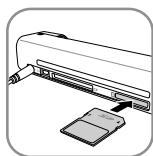
1 Insert a memory card which is not read-only into the appropriate card slot at the rear of the device. Your photo frame supports the following memory cards: SD, xD, MMC, MS, CF.
DANGER!

Inserting a Memory Card!
Only use storage media that are compatible with the device. In order to prevent damage to the card or the unit, please turn off the power before removing or inserting the card.
Never pull out the memory card while the device is accessing it. This could cause data to be damaged or lost.
Notice

Inserting a Memory Card
If both slots are occupied, the data is saved in the following sequence: SD (MMC) > CF > xD > MS.
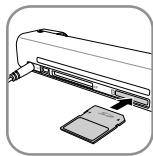
2 Press and hold the key until the control lamp for the device status is constantly on.
Notice

Control Lamp
If this control lamp flashes, this could stem from one of the following causes.
- no memory card inserted
- insufficient memory capacity available on the memory card (less than 1MB)
- The read-only option of the memory card is active
-memory card defective
Please note that the initialisation process of a memory card with a capacity of 2GB or more takes longer.
The control lamp can blink for up to 20 seconds
Using the digital photo frame
Notice

Using the digital photo frame
If the device is connected to a compatible digital photo frame, the scanned photos can be transferred directly to the memory of the digital photo frame.
1 Switch the device off using the on/off switch on the upper side.
2 Connect the digital photo frame to the Mini-USB of the device using a USB cable.
3 Switch the device on using the on/off switch.
Scanning
Loading Photos
You can insert different types of document into your device. Follow the specifications in the technical data.
You can scan documents using the protective cover to avoid the photo or document being damaged by scratches or creases.
Notice

Scanning documents with the protective cover
If smaller documents are scanned using the protective cover, in certain cases, the automatic cutting off function does not function properly. Either important parts of the image are cut off or too much edge remains around the document. In this case, scan the documents without using the protective cover.
CAUTION!

Unsuitable Documents!
No paper clips, staples, fixing pins or similar may be retained on the documents.
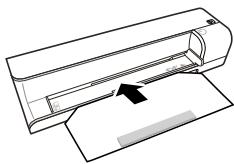
1 Open the protective cover and insert the document with the printed side facing up.
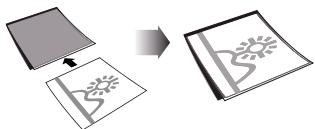
2 Lay the protective cover into the document feeder with the printed side facing upwards, the closed side of the page (black lines) forward and the page header in the direction of the button.
3 Align the protective cover to the left hand edge.
Fix the protective cover in place using the document guide on the right hand side. The document guide should lightly touch the protective cover.
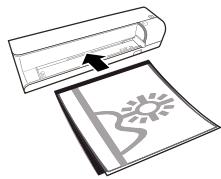
5 Slide the protective cover horizontally as far into the document feeder until it is automatically fed into the scanner and the scanning process is started. Ensure you do not bend the document. The control lamp POWER flashes during the scanning process.
DANGER!

Document Jam!
Do not insert documents into the feeder whilst the device is scanning. This can lead to a paper jam.
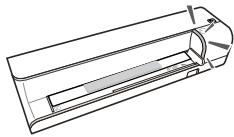
6 Wait until the control lamp POWER and the control lamp STATUS are no longer flashing and the control lamp STATUS is continually on. This means that the scanning process is completed and the data was saved onto the memory card.
DANGER!

Document Jam!
Wait until both control lamps are no longer flashing before you insert the next document in order to prevent a document jam.
7 The file name is assigned according to the DCF (Design Rule for Camera File System) standard.
Notice

Scanning documents with the protective cover
Remove the document from the protective cover after the scanning process in order to avoid the document sticking to the protective cover.
Notice

Stand-by Mode
If the scanner has not been used for approx. 15 minutes, it automatically switches off.
Cleaning the Scanner Glass
If lines appear on the scanned image or the image is not sharp, you need to clean the scanner glass.
1 Switch the device off.
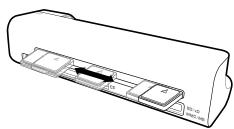
2 Insert the cleaning pen into the left hand end of the document ejector.
Notice

Instructions for Cleaning
The cleaning pen must be free of any dust.
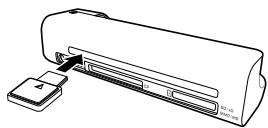
3 Move the cleaning pen carefully two or three times to the other end of the document ejector.
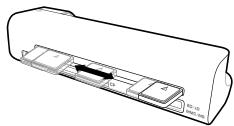
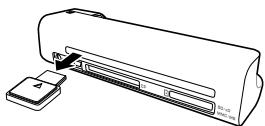
4 Move the cleaning pen to the left hand side of the document ejector again and then remove the cleaning pen.
Computer Connection
You also use the scanner as a memory card reader in combination with a computer.
Requirements
Your computer must meet the following minimum requirements:
Operating System
Windows: Windows 2000 · XP · Vista · or later versions
Macintosh: Mass Storage Class Mac OS9.x or Mac OSX
Connecting to the PC
The device is Hot-Plug-and-Play capable which means you can link your computer to the device, whilst its running. You do not need to close down your computer to link the device to it.
1 Connect the device to your PC by means of the USB cable.
2 If the USB is working correctly, the device is recognised automatically. A drive letter is assigned to each memory card slot.
Notice

Connecting to an USB hub
If you would like to connect the device to a USB hub = (USB distributor), ensure that the USB hub is connected to the computer before you connect the device to the USB hub.
3 You can access the memory card (drive) and edit the saved files.
Service
Cleaning
DANGER!

Switching off the device!
Turn the device off using the on/off switch before you remove the plug from the socket.
DANGER!

Instructions for Cleaning!
Use a soft, lint-free cloth. Never use liquid or easily flammable cleansers (sprays, abrasives, polishes, alcohol, etc.). Do not allow any moisture to reach the interior of the device. Do not spray the device with any cleaning fluids.
Wipe over the surfaces gently. Be careful that you do not scratch the surfaces.
Cleaning the feed rollers
1 Switch the device off.
2 Press and hold the key until the control lamp POWER light up.
3 The scanner is now in cleaning mode.
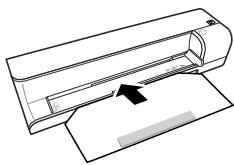
4 Push the cleaning sheet into the document feeder.
Notice

Instructions for Cleaning
Observe the direction of feed. The white sponge must be on the upper side.
Do not use any cleaning agents or cleaning fluids. Doing so can permanently damage the feed rollers.
5 The sheet is automatically fed and the cleaning process started. During cleaning, the control lamps POWER and STATUS flash.
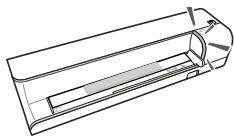
6 After cleaning is complete, the sheet is ejected and the control lamp POWER goes out.
Notice

Cleaning sheet for the feed rollers
Store the cleaning sheet in a dust-free location.
Calibrating the scanner
Calibrate the scanner if colors appear in areas that should be white, or colors of the scanned image and the original vary a lot. This allows you to adjust and compensate for variations that can occur in the optical component over time by its nature.
1 Clean the feed rollers and the scanner glass first before calibrating the scanner.
2 Insert a memory card which is not read-only into the appropriate card slot at the rear of the device.
3 Press and hold the key until the control lamp for the device status is constantly on.
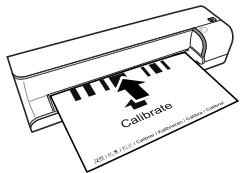
4 Place the calibrating sheet in the document feeder with the arrows facing the feed rollers.
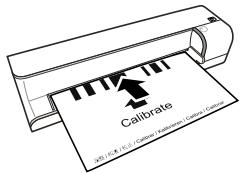
5 The sheet is automatically fed and the calibration process started.
Notice

Calibrating the scanner
Observe the direction of feed. If the calibration sheet is inserted incorrectly, the calibration process cannot be started.
Power Cycling
If a problem occurs that cannot be corrected with the instructions in this user manual (also see the help below), proceed as follows:
1 Disconnect the mains.
2 Wait at least ten seconds, then plug the power plug back into the socket.
3 If the problems repeats, please contact our technical customer service or your retailer.
| Problems | Solutions |
| The device cannot be switched on | Check that power supply is connected to the device properly. |
| The device feels warm | After a certain period of operation, the surface reaches approx. 30°C to 45°C. This is normal. If an unusual smell comes from the device or the surface becomes too hot, disconnect the scanner immediately from the power supply and/or the computer / digital photo frame. |
| Lines are present on the scanned picture or the image is not sharp | Check whether the document is dirty or scratched. Check whether the protective cover used is dirty or scratched. Clean and calibrate the scanner if it has not been used for a longer period. |
| With scanned images, parts of the image are cut off. | The scanner is equipped with a function for automatic cutting off of black edges. With small images, the image is only saved without the edge. When using this function, cutting off of important picture information can occur with images with a black background (e.g. night shot). In this case, rotate the image and scan it again. |
| The document is stuck in the feeder | Switch the device off using the ♂ button. You can now remove the document. |
| The control lamp STATUS flashes quickly, scanning not possible / memory card is not recognised | Check whether you have used a compatible memory card and whether you have inserted the memory card correctly. Remove the memory card and insert it into the slot again Switch any active read-only options on the memory card off. Make sure the memory card is not damaged. Check the available memory space on the memory card. If the available space is less than 1MB, the scanning process cannot take place Check the file format of the memory card Only memory cards with the FAT or FAT32 file format can be used. Check whether the next document was inserted too quickly. When scanning several documents, wait until the data transfer of the first scan has ended (status lamp continuously on) Check the document length (see technical data) |
| Transfer to a digital photo frame is not working | This function is only available with certain photo-to frames. |
| Photos with a grey or black back will not be scanned. | Place a white piece of paper over the back of the photo and put it into the protective cover. Place the protective cover into the document feeder. |
Appendix
Technical Data
Type.........Color Contact Image Sensor [CIS]
Dimensions (× × ) 156×46×38mm
Weight 0.17kg
Mains Connection ............Input: 100 - 240V ~ (±10%) / 50 - 60Hz ............Output: 6V--- / 1.5A
Power Consumption
Operation. <9W
Recommended Ambient. 15-35°C
Relative humidity 20-70% (non-condensing)
Scanner
Input format 48 bit colour
Output format. 24-Bit
Maximum hardware resolution ...1800×1200 Pixel
Document feed slot
Maximum thickness of cheque cards/plastic cards 1.5mm
Paper formats supported
Minimum (× ) 42x20mm
Maximum [B × L] 105×304.8mm
Paper Weight 50-105 g/m²
Computer connection
Connection Type....Compatible with USB 2.0 High Speed
Technical specifications subject to change without notice.
Guarantee
[Terms and Conditions for United Kingdom only]
In order to supply the guarantee, you should contact your dealer or Sagem Communications Helpdesk. The proof of purchase will be required.
Please make usage of your equipment for the purpose for which it was designed and under normal usage conditions. Sagem Communications do not accept any liability for any usage made out of the frame of its original designed purpose and any consequence that may arise from this usage.
Should any malfunctioning arise, the dealer or Sagem Communications Helpdesk will advise you what to do.
A) General Guarantee Conditions
Sagem Communications undertakes to remedy by repair or exchange at its own convenience, free of charge for labour and replacement parts, any defects in the equipment during the guarantee period of 12 -twelve- months (3 -three- months for accessories), from the date of original invoice of the Equipment, where those defects are a result of faulty workmanship.
Unless the customer has concluded with Sagem Communications a maintenance contract in respect of the equipment which specifically provides for repairs to be carried out at the customer's premises, the repairs will not be carried out on the equipment at the customer premises. The customer must however return the defective equipment at his/her own expense, to the address given by the dealer or Sagem Communications Helpdesk.
In case a product needs to be sent in for a repair, it always has to be accompanied by a proof of purchase (which is not altered, written on or in any way be made illegible) showing that the product is still under warrantee. In case no proof of purchase is enclosed, the Sagem Communications repair center will use the production date as a reference of establishing the warrantee status of the product.
Apart from all legal obligatory rules, Sagem Communications, do not give any Guarantee, either implicit or explicit which is not set force in the present section, and could not be hold responsible for any direct or indirect, material or immaterial damage, in or out of the frame of the present guarantee.
If any provision of this guarantee shall be held to be in whole or in part invalid or illegal due to an ob
ligatory rule applicable to consumers pursuant to their national legislation, such invalidity or illegality shall not impair or affect the remaining provisions or parts of this guarantee.
This guarantee does not affect the Customer statutory rights.
B) Exclusions From Guarantee
Sagem Communications shall have no liability under the guarantee in respect of:
- Damage, defects, breakdown or malfunction due to one or more of the following:
- Failure to properly follow the installation process and instructions for use
- An external cause to the equipment (including but not limited to: lightening, fire, shock, vandalism, inappropriate conditions of electrical network or water damage of any nature)
- Modifications made without the written approval of Sagem Communications
- Unsuitable operating conditions, particularly of temperature and humidity
- Repair or maintenance of the equipment by persons not authorized by Sagem Communications
-] Wear and tear from normal daily use of the equipment and its accessories - Damage due to insufficient or bad packaging of equipment when returned to Sagem Communications
- Usage of new versions of software without previous approval of Sagem Communications
-] Work on any equipment or software modified or added without the prior written consent of Sagem Communications - ] Malfunctions not resulting from the Equipment or from software installed in user workstations for the purpose of use of the equipment.
Communication problems related to an unsuitable environment including: - Problems related to access and/or connection to the Internet such as interruptions by access networks or malfunction of the line used by the subscriber or his correspondent
Transmission faults [for example poor geographical coverage by radio transmitters, interference or poor line quality] - The local network fault [wiring, servers, workstations] or the failure of the transmission network (such as but not limited to interferences, fault or poor quality of the network)
- Modification of the parameters of the cellular network carried out after the sale of the Product
-] The normal servicing (as defined in the user guide supplied with the equipment) as well as malfunctioning due to servicing not being carried out.
Servicing costs are in any event always borne by the customer.
- ] Malfunctions resulting from the usage of products, consumables or accessories not compatibles with the equipment.
C) Out of Guarantee Repairs
In the cases set forth in B) as well as after expiry of the guarantee period, the customer must ask the Authorized Sagem Communications Repair Centre for a cost estimation.
The repair and delivery costs will be invoiced to the customer.
The foregoing shall apply unless otherwise agreed in writing with the customer and only for the United Kingdom.
Helpdesk:0871-0752250
AgfaPhoto is used under license of Agfa-Gevaert NV & Co. KG or Agfa-Gevaert NV. Neither Agfa-Gevaert NV & Co KG nor Agfa-Gevaert NV manufacture this product or provide any product warranty or support.
For service, support and warranty information, contact the distributor or manufacturer.
Contact:AgfaPhoto Holding GmbH, www.agfaphoto.com
Manufacturer: Sagem Communications, www.sagem-communications.com

The CE symbol confirms conformity with the EU directives that apply to the device.
Preservation of the environment as part of a sustainable development logic is an essential concern of AgfaPhoto. The desire of AgfaPhoto is to operate systems observing the environment and consequently it has decided to integrate environmental performances in the life cycle of this products, from manufacturing to commissioning use and elimination.

Packaging: The presence of the logo [green dot] means that a contribution is paid to an approved national organisation to improve package recovery and recycling infrastructures to facilitate. Please respect the sorting rules set up locally for this kind of waste.
Batteries:If your product contains batteries, they must be disposed of at appropriate collection points.

Product: The crossed-out waste bin stuck on the product means that the product belongs to the family of electrical and electronic equipment. In this respect, the European regulations ask you to dispose of it selectively;
- At sales points in the event of the purchase of similar equipment.
- At the collection points made available to you locally[drop-off centre, selective collection, etc.].
In this way you can participate in the re-use and upgrading of Electrical and Electronic Equipment Waste, which can have an effect on the environment and human health.
The paper and cardboard packaging used can be disposed of as recyclable paper. Have the plastic wrapping and Styrofoam packaging recycled or dispose of it in the non-recyclable waste, depending on the requirements in your country.
Trademarks: The references mentioned in this manual are trademarks of the respective companies. The lack of the trademarks and T M does not justify the assumption that these dedicated terminologies are free trademarks. Other product names used herein are for identification purposes only and may be trademarks of their respective owners. AgfaPhoto disclaims any and all rights in those marks.
The reproduction of certain documents (e.g. by scanning, printing, copying) is prohibited in many countries. The list of such documents below is not intended to be complete, it only offers a general overview. In case of doubt, consult your legal advisor.
Passports (personal identification)
- Entrance and exit visa papers (immigration papers)
· Military service documents
Bank notes, travel checks, payment orders
- Postage stamps, tax stamps (stamped or unstamped)
- Loan papers, certificates of deposit, bonds
Documents protected by copyright
Follow the statutory regulations of your country with regard to the legal validity of fax transmissions—particularly in connection with the validity
of signatures, meeting delivery deadlines or disadvantages resulting from the loss of quality in the transmission, etc.
Take care to maintain the statutory regulations of your country regarding telecommunications secrecy and data privacy.
Neither AgfaPhoto nor its affiliates shall be liable to the purchaser of this product or third parties for damages, losses, costs, or expenses incurred by the purchaser or third parties as a result of accident, misuse, or abuse of this product or unauthorized modifications, repairs, or alterations to this product, or failure to strictly comply with AgfaPhoto operating and maintenance instructions.
AgfaPhoto shall not be liable for any damages or problems arising from the use of any options or any consumable materials other than those designated as original AgfaPhoto products or AgfaPhoto approved products.
AgfaPhoto shall not be held liable for any damage resulting from electromagnetic interference that occurs from the use of any interface cables other than those designated as AgfaPhoto products.
All rights reserved. No part of this publication may be reproduced, stored in a retrieval system or transmitted in any form or by any means, electronic, mechanical, photocopying, recording, or otherwise, without the prior written permission of AgfaPhoto. The information contained herein is designed only for use with this product. AgfaPhoto is not responsible, if this information is applied to other devices.
This user manual is a document that does not represent a contract.
Errors, printing errors and changes are reserved.
Copyright © 2009
Introduzione
Stimato cliente,
TipColor Contact Image Sensor (CIS)
Dimensioni (× × ) 156x46x38mm
Peso 0.17kg
Macintosh: Mass Storage Class Mac OS9.x or Mac OSX
Macintosh: Mass Storage Class Mac OS9.x o Mac OSX
TipColor Contact Image Sensor (CIS)
Dimensoes [L × A × P] 156×46×38mm
Gramagem. 0,17kg
Ligaçao à rede
......Entrada: 100 - 240V [± 10% ] / 50 - 60Hz
Saía: 6V---/1.5A
Consumo de energia
Operação. <9W
Vyrobce: Sagem Communications, www.sagem-communications.com

Symbol CE potvrzuje shodu tohoto vyrobku s naizeneni EU.
Producent: Sagem Communications, www.sagem-communications.com
C
Macintosh: Mass Storage Class Mac OS9.x or Mac OSX
Conectarea la un calculator
Max. hrubka šekovych/plastovych kariet 1.5mm
Macintosh: Mass Storage Class Mac OS9.x veya Mac OSX
Fabrikator: Sagem Communications, www.sagem-communications.com

Macintosh: Mass Storage Class Mac OS9.x n Mac OSX
YBaKaembln NOKyNaTeJIb,
Bbl Bb6paJI NaKeCTBeHHoe N3dJIne npOn3BODCTBa AgfaPhoto. Annapat COOTBEcTByeT caBbIM pAaJIuHbI Tpe6oBAHnM, YTO No3BOJnE rNcONJIb3ObaTb Ero KAK DOMA, TAK IN B OΦInce.
CkaHnpyIte foToIpaФmN IIN Bn3nTHbIe KaTocuN N nepeHocITe DaHbIe B aBtOMaTHcKOM pEcxIMe Ha KaTbI namrN IIN Ha CoBMecTmBle LcNΦpObIe foToPamkM.
Kpome TOnO, cKaHEM KOHHO IcNOpIb3OaBt N KAK CHTbIbAIOUeee yCTPOINCTBO JnKAPT PAmrTN, NOkDIKIOUVH ERO K KombIoTEpy.
MbHaedeemc, YTO BbI pOnyUHTe yDObOblCTBne O TpaobTb C annapaOM Iero MHOrOuNClenHHbIXФунки!
06 3TOM pyKOBOCTBE
Повьзователя
C nOmoBb npBBeHnHO danee pyKoOCTBa no yctaHOBe Bbl CMOXeTe 6bIcTpo npCTyNtB K kcnPlyatauB aWero annapata. POnp6Hoe onCaHne pYHKn npBVeHb B nocJeDyUxnx pa3dEax pyKoOCTBa nOp3bOaTeJnA.
BHHMaTeNbHO 03HakombTecb c pykoBoCTBOM nOJIb3OBaTeJIy.ДЯ obEneueHn6e3oNaCHO pa6Obl annapata Co6IIOdaIte BCE yka3aHnIe TEXHNK 6e3oNaCHocTn.N3rOToBInTeJ He Hecet OTBeTcBEHNOCTN B Cnyae Hec6IIODeHnI npabIN texHNK 6e3oNaCHOCTN.
IcnoIb3yEmble 0603NaYeHn
ONACHOCTb!

ONACHOCTb!
PnpDynpExdaet o6 onachOCTx DnIyIeN, BO3MOXHOCTN NOBpEXDeHn annapata INIIN dpTyNX yctpoCTb, a TaKKe O BO3MOXHO NOTEpe daHHbIX. HenpaBnIbHaN 3KcPnyataunia MOxET npBecTN K TpaBmAM INI INOBpEXDeHIO annapata.
3aMeuHaHua

Cobetbipekomehdaun
3TOT CUMBOI 063HauaET CObetbl, KOTOpBie NOMORAJHnH6OeJeNpCtOu HΦΦeKTHBNO HcNoJIb3OBaTbY cTPOICTBO.
1 BveeHne
Ybaxaembl nokyntel, 1
O6 3tOM pykoBODCTBe noJb3OBaTeJIa 1
O6sauHnΦopMaun oTexHnKe
6e3oNaChOCTn
3 063op annapata
Bud chapykn 4
UHyp cTeBoro 3JIeKtpoNTaHnI 4
A BvoD B əKcnJyatauio
KoMnJIeKT noCTaBKn 5
IopKJIuOHeHne cTeBOro aAnTepa 5
UctahOBka KapTbI namrtn 5
IcnoJIb3ObaHne uDpOBoB oToTopaMkn 6
5 CkaHnpoBaHne
3arpykaΦoTOrpaФn 7
OuNTka cTeKna cKaHepa 8
IoiKJIIOUeHHe K KOMNbIOTepy 8
6 Texnueeckoe 06cnykinaHne
OuInCTka 9
BbIKHoueHne IN BKJIIOUeHne NITaHnI 10
7 PnpIoJxKeHne
Texnueckne daHHbIe 12
TapaHTnHbIe o6aTeJIbCTBa 12
Tognt: ckahep roTOB K paOte uIN cKaHnpyeT DOKyMeHT
KaJIIN6pOBoUchbI JInCT
OuHuaUHmJINCTDnBbTBAUHxPONIKOB
UcTaaun kapaDau dna ckaHepa
3neKtpnueckoe nntaHne
USB-ka6eJb
PykoOCTBOI0b30BaTeJIa
3aMeuHaHua

HenoJIhBk KOMnJIeKr NoCtABKn
Ecnn OoHH n3 3Tnx npEMeTOB OTcYCTBYeT nnIN NOBPEXJDeH, 6obparntecb K BaWseMy NoCTabUKNy INN B cny6by noDdepKKn.
PoiKJIoueHne cTeBOro aanTepa
OCTOPOXHOCTb!

Hapnxene cetn B mectyctahOBkn!
IpoBepbTe, COOTBeTCTByET TIN 3eNkTpOtnTaHn BauEro annapata (yka3aH Ha WInbDnke) TnPy 3eNkTpOtnTaHn B MceTe yctaHOBKn annapata.
1 BCTaBbTe MaJIeHbKyU BnIky Ka6eIa CeTeBOrO aIaITepa B pa3bEm Ha 3aIHeI CTOpOHe ycTpoIcTBa.

2 Bctabte cetebo aanTp e C cetbyo po3eKy.
YctaHOBka KapTbI namrtn
1 BCTabbTe KapTy namrTn, He 3aunuHnHyo OT 3anCn, B COOTBeTCTBtuOeE rHe3Do Ha 3aDnei CTOpOHe yctpoIcTBa. OHO noDdepKInBaHT KaTbI namrTn CNeDuYooNx φopMaTob: SD, xD, MMC, MS, CF.
ONACHOCTb!

UctahOBITE KapTy nAmrTn!
IcnoIb3yIte ToJIbKO COBMeCTMlbIe C yctpoiCTBOM HOCINTEIIN INΦOpMaIaII. Bcerda OTKlIOUaIte 3eNkTPOPiNTaHIne yctpoiCTBa pexJe, cem N3BNeYb I3 HERO KapTy namrTn BO n36EzAHm nOBpeJdeHH KApTb namrTn JIb6O yctpoiCTBa.
HnKOrda He BbITackNBAJIte KapTy nAmTn, KOTOPaI NcNoNb3yETcB TeKyuSNI MOMENT. 3TO MOxET npIeBCTN K NOBpeXdEHNIO IIN K yTpAte DaHHbIX.
3aMeuHa

YcTaHOBka KapTbI nAmrTn
Ecnn 3aHraTbI o6a rHe3da, daHHbIe coxPhAnHOtCn B cneDuOcEi nocNepoBaTeJIbHoCTn: SD (MMC) > CF xd >MS.
2 YdepknBaTe HaxaToH KhoNkY Do tex np, noka KOHTpOblHbI INDnKaTOp COCToHnY cTPOJCTBa TropNT NOCToRHHO.
3aMeuHua

KoHTpoJIbHbI INHdNkaTOp
Ecnn 3OT KOHTPOBHLbI INHdNkATOp Mnraet, pnpuHbI MOrYt 6bITb cneJyUcMIM:
- He BCTabJIeHa KapTa nAmrTn
HeIOCTaTOUHO Mecta IJIA COxPAHEnIaHHbIX Ha KapTe NaMAYTN (Mehee 1 M6) - BKNIOUeHa 3aUNTa OT 3aINcN KapTbI NamrTi
- NOBpeKdHeHa KapTa namrTn
YuHTbIaIe To, QTO dJIa KAP TnAMrTn
EMKocTbIO 6Oee 2 F6 npouecc
HINUANNAZauo 3aHMaet 60JIbe
BVPemEn. KOHTpONbHn HNdkaTop
MOXET MIRATb Do 20 cekyHd.
IcnoJb3OBAHne ZnΦpOBoN
ΦOTOpamKn
3aMeuHaHua

IcnoJIb3OBAHne uΦpOBoΦOTopamKn
Pn npoknoeHm yctpoCTBa K
COBMEcTMMOu cnpoBOO FOToPAMe
OTCKAHNPoBAHHbIe FOToRpaDN
peheOocTc HEnocpeDCTBeHHO Ha
3aONMOHaOHuey yctpoCTBO cnpoBOO
FOToPAkMn.
PekomeHdaun no NcTke
Ha nictaem kapaHdaahe He doJxHo 6bItb NJIIN.
3 AkkypaTHO nepemecNTte YnCTraun KapaHdaaI DaBa-TPn pa3a K npryomy KpaHO OTBepctna BbIpy3KN DOKyMeHTOB.
4 B 3aBepseHne ChOba NpeMeCTnTe YnCTTsiN KapaHdaaK NLeBOMy KpaIO OTBepCTNa Bblpy3Kn DOKyMeHTOB IN3BNEKeNTe ERO.
IopKIIIOUeHHe K KOMMbIoTepy
Takke cKaHep MOxHo NcNoIb3OBaTb N KaCHTbIbAlOuEe yCTpoCTBO JnA KapT PAmrTIN, NOdkJIIOUHb Eero K KomblbOTepy.
Tpe6oBaHnIa
BaW KOMIbIyTeP DoJIxKeH yOBoJIeTBoPArTb CNeDyUoiM MInHMaJIbHbIM Tpe6oBaHnM:
OnepaounHna cnctema
Windows: Windows 2000 · XP · Vista · iPhone no3dHne Bercn
Macintosh: Mass Storage Class Mac OS9.x uM Mac OSX
IopKIIIOUeHHe K KOMMbIoTepy
YcTPOCTBO MOKET aBTOMaTHUeCKN KOHfMnpyPbOaTBcB B «FopraMe» pexJME, T.E., ycTPOCTBO MOKHO NpOKJIHOaTb K pa6oTaIOeMy KOMbIbTepy. DnI pOKJIHOeHnIA YcTPOCTBA HET HeO6XoDMOCtN BbIKLHOaTB KOMbIbOTep.
1 Плдклочente устороство к komпьотеру пиnomоши USB-kaбеля.
2 Ecnn noKnHoueHne no USB pa6oTaet HopMaJIbHo, yctPoIcTBo paCnOHaetcra abTomAtuHeck.CKaKdMrHE3dOM dJa KApTbI naMTtn COOTHeceHa 6yKbA DnCKa.
3aMeuHa

Подкlioчени к USB-КонцentpaTopy
Пи подклочени устюctва чered КонцentparOTP USB Heo6xodimo Счаяп подклочь КонцentparOTP USBКOMMbIoTepy,a3atem -yстюctBOKONцentparOpTyUSB.
3 Moxho OtkpbBaTb KapTu namrtn [nck] npedaktnpoBaTb coxpaHeHHbIe daHHbIe.
Texnueckoe obcnykBaHne
OuInCTka
ONACHOCTb!

OTKJIIOHTe annapaT!
BKnOHTyeCTPOIbPi NOMOUI BbIKIOUaTeN, IpexKe Ym 3BNEKaTb CETByO BVNKy n3 pO3eTKn.
ONACHOCTb!

PekomeHdaunn no uctke!
Длго уочтки IncnoьзуITE МяrkуTO cyxUTo 6e3BOPCBOY TKAHb. He римени.Tдг OЧNTКИ XJIDKIN, ra3006ра3hblx IN RopOHyO YOCHTEITENJI (a3pO30nI, a6pa3NHBIE N noInpyUOuIe cpeCTBA, cnrt n T.n.). He donyckaITE nonadHnaBn BAnr biHTpy bAnnapata. He Incnoь3yTe DлгУСТКИ yCTPoiSTBA uChT脊Ie cnpen. AkkypaTHO npotpaIte NOBEXHOCTN cHaJInciMm. CobioJaTe octOpoxHoCTb, YTO6bI He noцapanaTb NOBEXHOCTN.
YnCTka BTAIRNAIOUX BaJIIMKOB
1 BbIKHIOHTe ycTPOINCTBO.
2 YeDpKuBaIe KHOIky B HAnkatoM NOJIOKeHmI Do tex nop, noka He 3aIoparTcO hTOptbHbI INdikatop POWER.
3 CkaHep HaxoDHTcBpeXmE YnCTKn.
4 BCTaBbTe OuNuaHouN INCT B NOdAHTN K DOKyMeHToB.
3aMeuHua

Pekomehaunn no nctke
Yunbaiye HanpaBneHnne noa.
BeNa ry6ka DoJnxHa HxOoTbcN Ha
BeXhEn CTOpOHe.
He nCnoJb3yTe DnI yNCTKn paCTBOPHTEN NNI YNCTAUNe K Heo6PbTAMbIM NOBPEXDeHINM BTARBAUOxIN BANKOB.
5 Iuct aBTOMaTnueckn BTRAIBaETCR, n 3anYcKaeTc npOeDpya YNCTKn. Bo VpeM yNCTKm MIRaHO T KOHTpOJIbHbIe INHdNkaTopbl POWER N STATUS
6 Pocne 3abepeHnna npoceDpybI yNCTK nIcT Bbl6paBbAeTcN, I KOHTpOblbIy INDkaTOp POWER rachET.
3aMeuHaHua

OuHauoHnJIcTdIaB TaRbHaOxPonIKOB
XpaHnTe OuIaUoIIN IInCT B MeCTe, rHeT PbIIN.
KaII6poBka cKaHepa
KaIb6pOBkA cKaHepa Heo6xOdIma B TOM Cnyuae, ecn b6IbIe NOBepxHOCTN Ha npEdbAPntelbHOM npocmOTpe OkpaunBaHTCnB DpyTne ZcBtA nn OTo6paxaemblc ZbETa CNbHO OTnVauOTCn OT opRnHaJIbHbIX. PnPi NMOOni KaIb6pOBKn MOxHO KOMMeHCnPoBaTb OKIOHeHIn NOrpeHIOCTN n3MpeHIn, KOToPbIE BO3HNkaHOT BO BCEX ONTIeCKnx pnp6opax IO nCTeueHn HekOTopoRO BpEmH.
1Перед повьеним калбровки ВылonaHTe OYNTKy BTЯнВаюших ВалкOBИ CTekJa ckahepa.
2 BCTaBbTe KapTy pAmrTn, He 3aUuIeHHyO oT 3aIINc, B COOTBeTCTByIOUeE rHe3Do Ha 3aDHe CTOpOHe yCTpOJCTBa.
3 YdepeKbAte HAKato KNOKy Do Tex nop, NOKA KOHTpOblHbN INHdKnATOP COCTOHNH yctpoINCTBa rOpIT NoCTOHNHO.
4 BNoJHKe KaIb6pOBOUHbI JIcNCT CTePENKAMn B HAnpaBHeJeN B7RInBaHOuXIN BAIIKO B NODatYHK DOKUMEHTOB.
5 JIcT BTRnBaETc, n 3aynCkAETc npoueDypa KaII6pOBKn.
3aMeyuaHua

Kanib6pObKa cKaHepa
YuHbIbAitne HaprabNHeHne NpdaHc. Ecnn Kani6bpOboHy bIcst BnOxeh He npaeDpya Kani6bpObKHe 6ydt 3anyuSha.
BbiknoueHne n BkNIOUeHne nIITaHn
Ecnn Bo3nKna npo6nema, KOtopy He ydaetcyaYCTpaHNTb C NOMOuBIO ONCahhBx 3Decb YkA3AHN (CMOTpnte TaKke CnpaBOUHb TEKT HnKe),TO BbINONHTe cJeDyUOme DeECTBN.
1 OToCoEiHInTe 5Hyp 3NeKTpOnnTaHnO p03eTKn.
2IPOOKJNTe He MHee DecaTn CekyHd,3aTeM BHOBb NOKIIIOHTe UHyp 3NeKTporNTaHnK cTeEOB pO3eTke.
3 Ecni Oun6ka He ycTpaHe, To oBaIaIteCb BCny6by TeXHnuecko IOndepeKKn IIN K BaIeMy nocTabuNky.
BbIXoI: noCt. ToK 6B~/1.5Tc
Iotppe6nemam MouHocTb
Bpa6ooyempejxme. <9BT
PekomehnyembIe ycnobna 3Kcnpnyatau..15- 35^
OTHOCHTeJIbHaB BJIaXHOCTb BO3dYxa 20-70% (6e3 KOHNHeHcaUN)
CkaHep
ΦopMaT BVOda 486nt, CbETHOI
BbIXoHoiΦopMaT 246nt
ΦopMaT BBOda 16 6nt, OTteHKn ceporo
BbXoHNoΦopMaT. 86nt 16nt, YepHo-6eIbI [BeKToPHO n3O6p.]
Maximum hardware resolution .... 1800 x 1200 dpi
AbToIOnaTUnK DOKyMeHToB
MaKcImaJIbHa TOnIuHa YeKOBbIX/KpeiHTbIX KapT 1,5MM
Poipepkxnbaepepa3mepb6yma
MHHmym [Ux] 42×20MM
MaKcImyM [UxD] 105×304,8MM
ПлOTHOCьБумИ... 50-105r/M2
IopKIIIOueHHe K KOMnIbIOTepy
TnnpokJIuOeHnBbICOKoCkOpocTHoUSB2.0
Texnueckne xapaKtepcntkMoryt 6bItb N3MeHeHbI 6e3 npedBapntelbHoro yBeDOMJIeHn.
TapaHTnHbIe 063aTeNbCTBa
{obcnykmbaHne uycnoBnue NCKIOUHTeJIbHO dJa YcNoBnA DnPa PocCnn}
IcnoIb3yTe yCTpoICTBO B COOTBeTCTBnC hBa3NaHueHnEM n B HopMaJIbHbIX kCkPnIyATAuOHHbIX ycIOBnIX. Sagem Communications He HeceT HNKAKoI OTBeTCTBeHHOctn 3a IcNoIb3OBAHne He No Ha3NaHeHnIO n 3a Bo3NHKauOUIe B pe3yIbTaTakoro IcNoIb3OBAHnI NOcIeDCTBnI.
3a rapaHTnHbIM o6cnyxuBAHNEM obaaayTebc K BaIeMy npOdaBvU. Heo6xoDIMO npEdbyBNtB DOKyMeNT, noDTBePjDaIoUm foAKT coBepseHnna NOKyNk.
PnIJIb6OM c6oe npokOHcyIbTnpyIteCb C BaIIM npOaBc0M.
A)Оьие rapaHTиHbIe yCNoBnA
Sagem Communications He onnauHbAet B TeueHne cpoKa DeIcTBra rapaHTnn C 12 [DBeHaIaTb] MecaueB [12 [DBeHaIaTb] Mecaa DnI npInHaIeXhOCTe] C DaTb npOdaKn 6e3 KaIbKyIaIcn I no co6CTBeHNOMy YCMOTpeHIO pAcxOdbI NO pEmOnHY INpOboPeTeHIO 3aNaChbIX qacte Pnp ObHApUyKeHN B yCTPOICTBe HEnCnPabHObCTe, PmUHNo KOTOpBIX AIBNIOTC HennPabOMepHbIe NpeDeJIKN.
Kpome Tex cnyuaeB, KOrda KIneHT 3akNIOUaet C
Sagem Communications dorOBop o texHnueckOM
obcnyxmbannn, corgnacho KOTOPOMy peMOHT
bIbONHReTcna HnpednprrTHN KIneHTa, pEmoHT
ycTroponCTBa Ha npednprrTHN KIneHTa He
npobOnTc. KIneHT DoJnxen OTnpabNTb
ycTroponCTBO no aDpccy, KOTOpbl emy coo6uaet
npodabeu.
PnH Heo6xOIMOCtN OTnpaBkN yCTpoiCTBa dIpyeMOHTA K HEmy Heo6xOIMIO npIIOJXITb DOKyMeHT, NOITBepKdaIoUcII pAKT COBepSeHHN OOKynK [6e3 N3MeHEnH, PpIMeuaHn IHeuTIAeMbIX MecT], PO KOTOPOMy MOKHO npOBepNTb, DeIcTBeyET Ln eEpe rapaTHn. B cnyae OTCyTCTBn I DOKyMeHTA, NOITBepKdaIoUcIe O pAKT COBepSeHHN OOKynK, peMOHTHa MaCTepCKa Sagem Communications paccMatprBaet B kauCTBe DaIb NaIaNa deIcTBn rapaHTm DaIy BblNycka yCTpoiCTBa.
Hecmoptra Ha npabOBbIe 6o3aTeIbCTBa, Sagem Communications He codepKHT HkKaHXN oDpa3yMeBaEmbIX INJY RAHbIX rapaHTN, KOtOpBle He pINBeDeHb I DaHOM pa3dJe, IN He Hecet OTBETcBEHOCb 3a KAKO 6bl To HN 6bln PnpMOH INJIO KOCBeHbI, MATEpNaIbHbI INJI
HemaTepeNaJIbHbI yUeep6, KpOme TOrO, KOTOpbI OROBOpEH BpaMKaX daHHo rapaHTMn.
Ecnn kakoe-Jn60 noJoxKeHne daHHo rapaHTnN NOHNOCbIO NN YactNUHO HeJeCTBNTbHO NNN HnpanBOMepHO HA OCHOBAHn HApUeHnN 063aTeIbHorO K INcONHeHNo PpeDnSCAHN No 3aunTe npab NOTpeBnteNe HauNOHaJIbHorO 3aKHOdaTeJIbCTBa, OCTaJIbHeI ONpeDeHnN DaHHo rapaHTnN OCTaIOTCB CINNE.
OnpeJeHHeBie 3aKOHOM o83aTeJIbCTBa rapaHTnI npOu3BOUInTeJI He OTMeHReT.
B) NcKlIoueHnI3 rapaHTnn
Sagem Communications He npedocabnaet HnkaKoro rapaHTnHoro 06cnykBaHnB CneDyUOxN cNyuaX:
] NOBpeKdEHHa, DepeKtbl, POLOMKn INIc6oN IO OHOH INI HeCKOJIbKM IN3 CNeDyUOUXnPnUHN:
- Heco6JIIOJeHHe yKa3aHnI IIO MoHTaXy I 3KcIIpyTaIu;
-BHEUSHNE BO3dEiCTBnHa yCTPoIcTBO (BKIIIOUaY, NOMIMO npOHeFo: yDap MOINHn, NOXap, 3EMETPcEHeN, BANdaIIN3M, HEnoDxOJaIe/ PINOxo CeTeBOE PINTaHne IINIIO6e BO3dEiCTBn BODoJI)
- MOniΦnKaZnIyCTpOuCTB 6e3 NcMbEmHoRopazpeSeHnSagemCommunications;
- HEnoDxOJaIe 3KcNpyTaUHOnHbIe YcNoBn, B OocBeHHocTn Tempepatyau N BlaXHoCTb Bo3dyxa;
- pemOHn nn TeXOBcIyKImBaHne yCTPOiCTBa Sagem Communications Jnzamn, He MHeIOUmm COOTBCTByUoIero donycca;
]I3HOC yCTPOINCTB INPnHaJNEXHOCTe B XOJe HOpMaJIbHOI NOBCEdHeBHOI 3KcPiYatau;
] NOBpeKdEHHa, npuHnHO KOTopo RbIeTcH NHeOCTaTOUHNA Hnnn nloXa ynakobKa OtnpabReMbIX B Sagem Communications yctpoiCTB;
- I nCSNoIbTaOBAHHe NOBbIX BepnI npOrpAMMHoro
obecneuHnE 6e3 npEdbapntelbHoro corlacn
Sagem Communications;
] n3MeHEnn IINI DOJOpJIeHEnK KOHcTpyKcIIN yCtpoiCTB INI IporpAMMHorO oBecepeHEn 6e3 npedBapntelbHoro corlacn Sagem Communications;
]fynkuohhaIbHbIe c60n, npuHHbI KOtOpbIX He OTHOCA Tc H K CAMMIM yCTPOiCTBaM, HN K 3KcPnyatauny UtaHOBJIeHHORHa YCTPOiCTBax nporpaAMMHOoBeCneuehenia
Ipo6JIembl CB83n, pIpyHNOK KOtpbIX RAJIaTeCTc He6IaropnpraTHoe OKpyJKeHne,BOC6eHHoCTn:
Ipo6JIemblcB3aHbIe C doCTynOM n/INn OdkJIOUeHHeM K cETN INTEpHET, HAPPMep, c60n DOctyna K cETN INn HapuSeHnpi NOdkJIOUeHn ABOeHNTINr erO coBeCeDnHa;
-
npo6bnembl nepedauu daHbIx [hApnmuMp, HeoctatoUChoe reorpaunueckoe nokpbTne 3OnbI nepedaTuKOM, INTEppepepuu nn pLoxoe coeDInHeNHe);
-
Owln6Kn MeCTHOI CETn [npoknaJaKa Kabenei, cepBep, KOMNbTOEPIN3NPOBAHbIe paOohme MeCTa] nIn Owln6Kn B CETn pepeaun [He orpaHnuHBaerbc hTnerpepeHneiue, C6oAMn B fynKUHOHPOBAHn nIn pNOxIM KaecTBOM CETn];
-
n3MeHHeHne npaMepTOB 6ecnpoBoNDHO cTeN noCte npno6pTeHnry yCTpoICTBA;
] HEnCnpaBHOCTN BCNECTBNE npOBeHnna CTandapTHORo TekyUeero peMOHTa (kak OINcAHO B pInnaraeMOM pyKBOOCTBE NO 3KCNpyTAuIN), a TaKke C60, pInuHno KOTopbIX YABIeTcR OTKa3 OT npOBeHnna KaNTaNbHoro peMOHTa; paCXoDbI no TeKyuEmypeMOHTy B JIObOM cNyueae OTHCocTcRA h CCHET KJIHeHTa;
-] c60n, npuHINOH KOtOpbIX RBJIeTcNICNoJIb3OBAHHe HECOBMeCTIMbIX PNOyKTOB,pacXoDhblx MaTePnaIaOB NmPiNaHaIeJXHOCTei.
C) Pemont nocne ncteuehencspoka deiCTBnra papaTmN
B Na3BaHbIx noD nyHKToM B) cnyaex n no nctechyehm cspoka DeiCTBn rapaHTn KIneHTy Heo6xOIMO o6paTINbCer B aBTOpN3BaHbH SaGam Communications cepBncH b ceHTp dna COCTABHeHn npedBaPntelbHOJ cxMebl paXcOIOB.
PacxoDbI no pemOnTy npebcblke OTHocrTa Ha Cuet KIneHTA.
BbIeYka3aHHbIe YcNoBnJeIcTByOT BTex CnyaX, ECNI C KInEHTOM He 3akNIOHeHa INHAR NcMbENHAR DOrOBopeHHoCTb N ToIbKO B DeIcTByOT TOnIbKO B PocCIN.
I3diennoTropBooMapKo AgfaPhoto npon3B0aTcNoIinueHnnKoMaHnAgfa- Gevaert NV & Co.KG nIgAgaEvaert NV. Hn Agfa-Gevaert NV & Co.KG, Hn Agfa-Gevaert NV He npon3BOoNT daHHbIe yCTpoCTBa,a TAKKe He npedocTabraet rapaHTnHbIe ycnyr nn noDpekky.
Ib Bonpocam 6cbnykuaBaHna, noDeepKnn nI npaHTn obaaTneK nOCTaBnKy nI npOn3BODntTeNo.
KontakthaMHΦopMaζη: AgfaPhoto Holding GmbH,
www.agfaphoto.com
Поживоюпель: Sagem Communications, www.sagem-communications.com
C E
MapknpoBka CE noTBePxJaet, YTo 3To annapaT COOTBeCTByeT DeIcTByUOuM HOpMaM Ebponeckoro co103a.
OxpaHa OkpykaIoSei cpebl KaK YacTb paOnHaJIbHO pa3pa6oTaHnHO pIaHa YBaJIeTcB baxHoi coCTabJIHOsei pa6oTb AgfaPhoto. AgfaPhoto pa3pa6aTbIbAeT 3KJIOrUHbIe CNTEmbl. IToTOMy AgfaPhoto NHTerPnpyET DeICTBna NO 3aIHTe OKpykaIoSei cpebl B JxN3HeHHbI UIKI N3DeJIIN,OT IN PNO3BOCTBA DO BBODa B 3KcIIpyaTuIIO, IcN0JIb3OBaHnI yTNIIN3aIIN.

Ynakobka: HAnuHne DaHnHO nOrOTnna [3eHnHaT OTohka] O3NaHaeT, YTO BHeCeh BKnJaB HnOHaJIbHyO OprAHn3aUmO No yNPyUHeNIO INHpactpyKtypbl No BTOpNHUMO IcNoIb3OBaHnIO ynakobk. IloxanyCTa, CneJyTe MeCThbM npabnJAM NO yTNIn3aUmNynakOBkN.
AkkymyIaTOpbl: Ecnn B yctpoNCTBe nCNOJIb3yOTcAkkymyIaTOpbl,TO nOcNe IcTeueHnB cPoka INx 3KcPiNyatauINx Heo6XoDmO cDaBaTb B CneMaIbHbI pyHKbI pnpEma dJaIaNHeNWeyTtNi3aUIn.

IpojKT: I3o6paJHHe nepeepKHyToK oP3nHbI dJa MyCOpa O3NaueAet, YTO yCTpOCTBO OTHOCNTCA K kateropnn 3JeKTPnECKTOrO n 3JeKTPoHNHO 06OpyDOBaHn. CornAcho EbponeNcKm HOPmatNBAM yCTpOCTBO Heo6XoDMo yTININ3IPoBAbT CNeDuOuIMM O6pa3OM:
B ToproBbIX ToUkax npn npno6peTeHH anahorUmHoro o6opyDobAHn.
B MeCTbIx nyHKtax c6opa [HaNPIMep, ceHTpax npHema Otpa6oTaBwero 6opuyObaHnry, nHKtax Bbl6OpOHHoro npHema n dp].
IIOObHbIM Oba30M Bbl MoKTe yuAcTBoBaTb I
POrpamme No nepepa60tke I NOBtOPHomY
ICNoJIb3OBAHmIO 3JNeKTpnueckoro I 3NeKTPOHHORO
O6OpyDObAHn, HanpaBHeHnHa coXpaHeneHne OKpykaHOSeI cpeDbI n 3DoPoBBy IHOdeI.
IcnoIb3yeMyu ynaKOBky n3 bymn n KapToHa MoXHO cDaBaTb Ipa BTOpuHoi nepepa60TK.
Пл actOKOBуо nIeHky uYnakoBOUhIe 3IeMeHTbИЗ neHONIOINCTIpOla CneDyET CDabATB ДЯ NobTOrHOн Берap60TK ИИУtNiIM3nIPoBaTbВ COOTBECTBIVI C HauNoHaJIbHbIM 3aKOHODaTeNbCTBOM.
Toprobbie MapK: Pa3JnHbIe Ha3BaHnIy, yONMHaemBle B 3OTM yKOBoDCTBE, YABJHOTcT TopROBbIMN MapKaMN COBTBeTCTByUOxN KOMNaHn. OTCyTCTBne CmMBOnOB R n TM He O3HaayET, qTO daHNbIe 06O3HaueHn HE YABJHOTc3 aperNCtPnpOBaHHbIMN TopROBbIMN MapKaMN. Ha3BaHnIa DpyNix N3dIen I yka3aNbI 3Decb TOnbKO cIeBIO OTOXecTBJIeHnI, I OHN MOYr 6blTb TopROBbIMN MapKaMN COOTBeTCTByUOxN BlaedJeBeg. AgFaPhoto OTKa3bIbaeTcT o JIo6bIX n Bex npab Ha taKne Toprobbie MapKn.
Bocnpoun3BeDeHne HeKoTObpIx DOKymeTOB (Hapnmpem,nytem cKaHnPOBaHn,NechatN, KOnIpOBaHn) 3aPpeUeHO BO MHOrNX CTrpaHax. PInpBeHeHHb HmKe Cnncok TaXnx DOKymeTOB He AByIeTcA NOHbM, OH ToJIbKO DaET O6uee ONcAnHe TAKnx DOKymeTOB.B Csyueae COMHeHH npOKOHcyNbTupyITecb C BaIIM UOpICTOM.
- PáncopTa [DOKyMeHTbI IeHTnΦnKaaun InuHocTn]
- Pa3peSeHnHa Bbe3I I BbIe3I (mmrrpaunOHhIe DOKyMeNTbl)
Дokум entbIO BOHнскО сnyж6e
BaanKHOtbl, DOpOxHbIe Yekn, PnlaTeXHbIe npoyeuHn
-Почтовы Марки,наноговы Марки (ногашений ини сеньогашени)
ДOKUMEHTbI O 3aIMax,ДeNo3HTbIce cepTnФКaTbI, DOnIOBbI eOBaTeNbCTBa
Дokум entbI,3aunuueHHbIe ABTOpCKM npabOM
BbIOnHnIe BCE 3aKoHOdaTeIbHbIe Tpe6ObaHnI BaaIe cTpaHbI OTHOCINTeIbHO KOpDInueckOcNbl nepeDaHHbIX NO fAccy DOKyMeHTOB -B YactHOCTn OTHOCINHe DeJCTBnTeJIbHOCTn NOpDInceI, CObIIODeHn KpaHnIX CpOKOB DoCTabKn IIN NCKAKeHm, BO3NHKaIoUxN 13-3a UyXdEHN H KaecCTBa npn nepeDaHn I.T.D.
O63aTeIbHO cobJIOdaJIte BCE deIcTByUOJIne HOpMbI n npAIBNa BAWee CtpaHbI OTHOCHTeIbHO 3aUINbI cpeDCTB TeLEKOMMyHnKaUNn I 3aUINbI daHHbIX.
Hn KOMNaHn AgfaPhoto, HN ee OTDeHenHn He Hecyt HnKakOH OTBETCTBEHNCTn nepeD nOKynatelem 3TOrO N3DeHn IIN TpeTbei CTOPHOH 3a Uzep6, NOBpeXJdHne, PACxoDbI INI 3atPaTbI, NOHeCEHHBeI NGynatelem INI TpeTbeI CTOPHOH Be3yJIbTaTe HecCaTHorO CnyuaH, HnPabInbHorO INI HE NaDkexaJero IcNOJIb3oBaHnA 3TOrO IN3DeHn INI BHeCENHn BHERo HecAHKnOnHOpOBaHHbIX IN3MeHENH, PEMOHtA
nIINpepeIeN3TOrO nIeIeIeIeIeIeIeIeIeIeIeIeIeIeIeIeIeIeIeIeIeIeIeIeIeIeIeIeIeIeIeIeIeIeIeIeIeIeIeIeIeIeIeIeIeIeIeIeIeIeI eYkaaHAnmKoMaHAn AgfaPhoto no 3ekCpnyatauau nTexhueckOMy 6cbnykXbaHauio.
Kompania AgfaPhoto He Hecet NnkaKoI OTBETCTBEHNOCTN 3a IIO60yUepe6 nII npOBeMbI, BO3NnKAOUcne I3-3a IcNpONb3OBaHnI IO6bIX pInHaJdJIeXHOCTe INI pAcxOHDINb MaTePnAIOB, OITNIuHbYbOTex KOTOpBle 06O3NaueHbI KaK opINnHaJIbHbIe I3dEINa AgFaPhoto nII nI3dEINa peKomeHDoBaHHbIe KompanHne AgfaPhoto.
Kompania AgfaPhoto He Hecet Nkakoi OTBETCTBEHNOCT3a JIO60yUeep6, BO3NkaOuIIMn 13-3a 9NEKTPOMARHTbIX NOMex,C8Ba3AHHbIX CNCIOJIb3OBAHmEIMo6bIX INTEppeChbIX KaBeIe, OTNIUaOUIXcT OTe KOTpbie npedHa3NaHeHbI dny I3denn Kompania AgfaPhoto.
Bce npaba 3aunuHbI. Hnkakyo qacTb 3toi nybHKaunn HeJIb3 BOCnpOn3BOJNTb, XpaHInb T apxNBHO CnCTeMe INI nepeDaBaT B IIO60 fOpMaTe NIObIMn CpeCTBaMn, B TOM YNCne 3JeKtPOHNbIMn, MEXAHmECKMN, NYTEM fOTOKONIPOBAHN, 3aINCSn NIObIMn DpyHMn 6e3 npedBapntelbHorO nOlyueHn INcMbENHO p4zpeHEnn OT KomnaHn AgfaPhoto. YkazahnA 3deCb INHOFOPMaUN OTHOCITCR TOBko K DaHHOMY n3dEnINO. KomnaHn AgfaPhoto He Hecet OTBETCTBEHOctN B CnUyae npImeHEnH 3TOI INHOFOPMaUN K DpyHMn I3dEnIAm.
PykoBOdCTBO NoJIb3OBaTeNЯJIeTcO DOKyMeHToM, KOTOpBn HN KaKoI CTeNEH HeJIb3r paccMAtPnBaTb B KauCeTBe DOJOrOba.
Bo3MOxHn HAIINue Oeayok, TINpOrpaCnx OUI60K IN3MeHeHNI.
Copyright © 2009