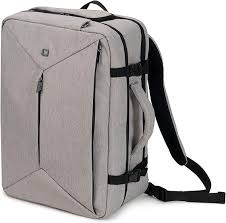
STOW - Backpack DICOTA - Free user manual and instructions
Find the device manual for free STOW DICOTA in PDF.



User questions about STOW DICOTA
0 question about this device. Answer the ones you know or ask your own.
Ask a new question about this device
Download the instructions for your Backpack in PDF format for free! Find your manual STOW - DICOTA and take your electronic device back in hand. On this page are published all the documents necessary for the use of your device. STOW by DICOTA.
USER MANUAL STOW DICOTA
Wireless Optical Notebook Mouse 3
deutsch
Bedienungsanleitung
*Under Mac OS X, 5th button will function as the "left mouse button" and 6th button will function as "expose" respectively.
deutsch
Thank you for purchasing the wireless optical mouse "Stow" of DICOTA.
System requirements:
- Windows® ME, 2000, XP & Vista; Mac OS X or later
Free USB port
Supplied with the product:
- Wireless optical Notebook mouse "Stow"
RF mini receiver - User manual
- 2 x AAA battery
To start using "Stow"
1. Battery installation
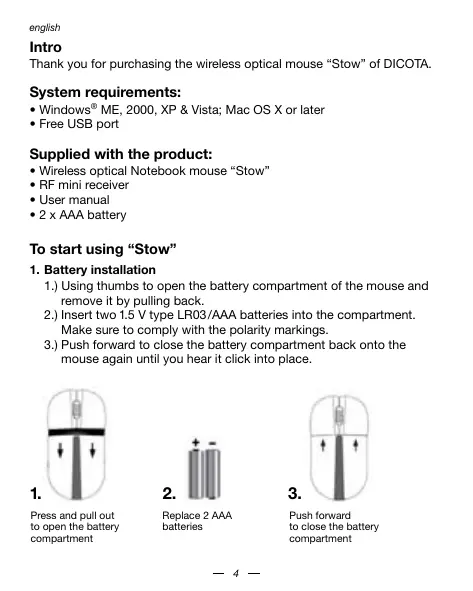
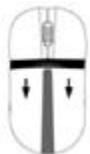
1.) Using thumbs to open the battery compartment of the mouse and remove it by pulling back.
2.) Insert two 1.5V type LRO3/AAA batteries into the compartment. Make sure to comply with the polarity markings.
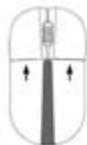
3.) Push forward to close the battery compartment back onto the mouse again until you hear it click into place.
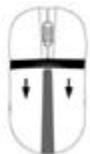
Press and pull out to open the battery compartment
Replace 2 AAA batteries

2.
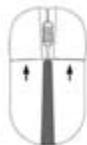
3.
Push forward to close the battery compartment
- Establishing a connection between the mouse and the RF receiver The following steps have to be carried out within 15 seconds if a successful connection is to be established between the mouse and the RF receiver. Ensure that the mouse is no further than 1.5m away from the RF receiver.
1.) Connect the RF receiver to any free USB port on your computer. The Plug & Play function of your system will automatically detect that a new device has been connected. The mouse will not yet be ready to use at this stage.
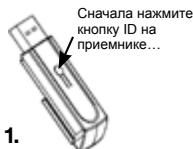
2.) First, press the Connect button on the receiver that shown as step 1.
3.) Then, press the Connect button on the bottom side of the mouse as step 2.
4.) After a few seconds your mouse will be ready for use.
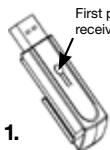
First press the receiver's ID button...
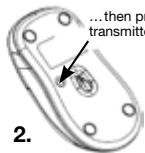
...then press the transmitter's ID button
3. Sleep mode
The mouse will switch to power saving mode after 3 seconds while working. If not used, it will power off automatically after 8 minutes to extend battery life. The mouse will be activated again with one mouse click.
Note on handling batteries
- Keep batteries out of children's reach.
- Do not mix old and new batteries or use different types of battery.
- Replace old or weak batteries promptly.
- Dispose of and recycle your old batteries in accordance with local regulation
Operating hints
For optimal performance and RF reception:
- Place the receiver at least 8 inches (20 cm) away from all electrical devices, such as your monitor, speakers or external storage devices.
- If necessary, use the three-inch extension cable to keep the receiver away from the computer. Plug the receiver into the extension cable, and the extension cable to the computer.
- Avoid using the mouse on a metal surface. Metals, such as iron, aluminum or copper, shield the radio frequency transmission and may slow down the mouse's response time or cause the mouse to fail temporarily.
- If your computer has a metal case that contains aluminum or magnesium, use the mouse to the side. The display panel may interfere with the radio frequency signal if you use the mouse directly in front of the computer.
- Never use the mouse on a glass or mirrored surface as these surfaces will cause the mouse to fail temporarily.
- To maximize battery life, use the mouse on a white, or light colored surface. Dark surfaces cause the mouse's light emitter diode (LED) light to glow brighter, which causes the battery to discharge more rapidly.
Disclaimer:
Information in this document is subject to change without notice. The manufacturer does not make any representations or warranties (implied or otherwise) regarding the accuracy and completeness of this document and shall in no event be liable for any loss of profit or any commercial damage, including but not limited to special, incidental, consequential, or other damage. No part of this document may be reproduced or transmitted in any form by any means, electronic or mechanical, including photocopying, recording or information recording and retrieval systems without the express written permission of the manufacturer.
Customer service:
If you encounter any problem with your Stow, please contact our local subsidiary, partner or dealer, or send us your inquiry to info@dicota.com.
2 years warranty. Please find the complete text in our guarantee on the internet: www.dicota.com.
All the products and software mentioned above are registered trademarks of their respective owners. Errors and omissions excepted.

N4029



This symbol (crossed out bin wheele symbol according to WEEE Directive 2002/96/EC and Battery Directive 2006/66/EC) indicates separate collection of waste electrical and electronic equipment as well as batteries in the EU countries. Please do not throw the equipment respectively the batteries into the domestic refuse. Please use the return and collection systems available in your country for the disposal.
deutsch
Einleitung
Kak haatab noIb30BaTbca Stow
1. YctaHObKa 6atapeek
1.) BoJIbIIMn pIaIeM OTKpOITe KpbIbUk 6aTapeEe, BbIaBnHtE ee n CHIMTE.
2. C subtbte Ie Dbe 6atapreKu 1,5 B Tuna LR03/AAA.CneHite 3a npabAVbHOI NpOPhRCtBu.
3. Bacteble 6abpatho KpbIky Do qenHka.Teneb 6atapeKn npaBnHO 3aKpblTbI.
ÖtändeneHneJn
Batapeek Örkprüke,
Hánekab H kspuikyu
bVdBnHyb ee
2.

NtBnEe2A 6BaTaeRi2
BCTabte Kpbiky 6bpatho
3.
2.YctaHOBHeHne CB3m MEXy MbIbIO n PnEmHHKOM P4
ДягTO rTO6bI obecneYHb YcNeuHoe coeINHeHneMbIa C npEMNHKOM P4Hne6OxIMoB TceHnE 15 cekyHd BbIPOHNTb cneDyUOHe Warr.
Y6eINTeB b TOM,чTO paCCTOHNHe MExdy MbIbIu n npEMNHKOM P4 He ppeBbIaet 1,5M.
1.)Пиноединпгпсьнмнк Pч CB606dнь пот USB habaшем KOMblbotepe.ФИнлдя「Пбдклочи и равотаи» ABOTMATYcheKIM yctahOBNT,То BotIoNoPknILOUeHOBOseOobopyDobAHme.МьшьВ 3TOT MOMENT,EUE He rTOBATAKINCnIb3OBAHInu.
2.) Chauhana HauKMITE ha KHONKI «Connect» Ha npniemHnke, KaK nOKa3aHO h pnc. 1.
3. () Oncne 3tOrO HAKMITE KONKY «Connect» Na HIXKHeJ TcHn Mblu, KAK yka3aH na puc. 2.
4.)Yepe3 HeckoIbKO CeKyHdMbIbTOBa K IcNoIb3OBAHnIO.
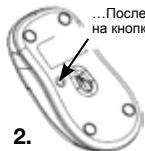
...Nocte storo hakimme HA konhony ID ha Mshiu
3. Pexim cHa
Mblb abOTOMATUeCKN nepeIETB PekmK KOHOMN,ecnH eNEonbl30BaTcBc T BceHeN 3 cekHyd. Cpe3g 8 MmHT nocle TORO, KaK bblpeTeAHTeNEONbl30BaTcBcMbblbIO, OHA ABOTOMATeCKN BkHKnOHTCn.
Kakpa6oTaTbC6aTapeiKaMa
-Берг范围内батарейкOTдTei.
He KomhInHpyte CTAPBle 6aTapeKn C HOBIMn, A Toakhe pa3hBe TNblb6aTapeek dpyr c Dpyrom.
- CtapbIe IIN pa3pIaIBuIeCe 6bTapeKn HEmeIeHNO nOmeHryTe.
-БатAPEйклКВДиPyIteВ COOTBETCTBnC MeCTHbIMN ppeDINSCaHЯMn.
CobetbIO npabunbHOMy nCnoJIb3ObaHIO DnONTINMABHOH MOUHOCTHN NEpeaH N P:
PacnoonaraiTe npHmNHk Ha pacctoHHn, KaK MHNHMym, 20 CM ot BCero 3eKeTPOOboUPoBDAHn, HAnpIMep, MOHITop, rPoMKOrOBOpTeIN mH BHeUHRA NAMTb.
B CNYaee Heo6xOdMnOCTN IcNoIb3yIe TKe Ka6eNb- yDlnHInTeIb Ipn 6CIOJIoEHHIO DaSToTOHOro PaCCToHMy MekIy PrNeEMNHKOM IN KOMMbIOTOpM. PnIcooeiHNHe TpeNemHK K Ka6eNIO-yDlnHInTeIIO, a TOT K KOMMbIOTepY.
IiHaTe IcNpObTaB Mblu Ha metaJIuueCKOM NOKpbITIN. TaKMe MTaJIbI kai KeJe3o, aIIOHMn Hm MeB pIePnTCTBYOT nepeDaayepaIOHAcTeMIOyMTaeJPeAKUIOMbIIHmHn DaXe npIBcTm K eepxJDeBpeMeHOMBy BbXOy H3 CTPOr.
EcnB KOMbIbOTE IMeTcA MetaJIuYeCKAe NOBepXHOCTb C codejBaHmEiAMOHMNINI MAnMnHIn, INOJN3yIeMbIa H CTOpOHe. PAnEnHIO6pakEnHMOKETC OoTaDabTbpneTCTBHe CmHany paHIOAcTObI, eCNl IcNOJb3OBaTb MbIb HENOCpeDCTBeHHNo PepeD KOMbIbOTePOM.
HnKoJa He IcNOpIb3yIte MbIb Ha cTeKJIINHO HIn 3epKaIbHO NOBepXHOCt, TAK K3To MOrIO b6bl npKeJdEpeMeHNO NOBpeNTb fYHKUOHaIBNbTb MIIu.
Дял мадимально уBERMENHЯ срOKA cnykbbl MblsIM nCnObl3yIte ee ha 6eNoI chBtNoI NOBepxHOctn. Ha temNoI NOBepxHOctn CBEToIOD (LED) 6bET cbETb8crape, YTO npBBeTeK 60lee b6ICTpoI pa3rpaKe 6batapeek.
CcbiJNK:
MImehembe H INHOFOPMAIIO B HACTOJEEM DOKUMMEHE MOYT 6b1b BHECHeBb 6e3 npedynpekdeHN. IPOIN3BOIDENTBE He bpa3Nn NIKAKHX JAAIOB IIN rapAHNTN (NOpda3yMeAEBmIX INI pnoH) C yETOM TOHOCTN i NIOHTbI hACTOJIEO DOKUMHTA H NBI KCOE CNyae HE HecET OTBETCBHEHOCT 3a KAKUYIO-NIOBO NOTEPLO pnpbIbn INI MATEPAIbHbN YUePb (To eCTb, N Uyepe IPOFECECNHOJIbHb, CNyaue HE HecET OTBETCBHEHOCT 3a KAKUYIO-DOKUMHTA HE DONKHA BOCNPON3BOIDCTBcI CNI NEpEOBABATCbB KAKOI-NIOBOΦOpme INI KAKIMN-NIOBO cpeDCTBaMn (ENKTPOHHbIMN INI MEXANHYCKIM), pnpomou KNIPoBOAHN, COXPAHEHNI INI NEpENICBBAHNN INHOFOPMAIIO A, TAKKE NONCBA K INHOFOPMAIOHNbIX CTCTMeMa6 E03 npedEnHHO RNCMBEHORO CORNAHSC PNO3BOIDNTeR.
KIneHTckn cepBnc:
B TOM CNYae ecn H3dEIne nepectaHET pa6OtaB, Heo6XdIMO 6pbATbC K npdeCTaBtTeTmФpMbI DICOTA" no aDpcy: dicota@dicota.cz.
Garantina: 2 roda co dHra npioobetehna. Bonoee noDpo6Hyu INHofpmaHQ Haidete Ha caite B INTheperte www.dicota.cz. Garantna He pacnpoctpaaretca ha obhuiy M3HOC iAednien.
BcnpoDyKuN npOpRaMMHoe oEbcNeHMe, yka3aHHe BbIe, 3apeRnCTpnoBaHbI kak ToproBle MapKn COOTBeTcByUoxn BnaDeIbIeB. Co xopanaHem npaba Ha oOn6Ky.

N4029



Hactoynu CnBON (H36bpaXeHNe NEpeyepckHTOrO MycOpHO 6aka - cOrnaHoc DnKeTbNE WEE 2002/96/EC n DuKeTbNE 2600/66/EC o 6batapeKax) O3haaert Bo3MOxKnOCT cbptnoBaHBO c604 bTOxODB 3eKTPNCeCKnx IeKTKPOHbIX KOMNoHEOB, a Toakse 6batapeek B cTpaHx EAponeKcKOco33a. PoXanyIcTa, cO5bIouaIte NtCtpykunm no c60py H 803pATy OTxODB cOrnaCHO pEINICAHNcMooBTETCTBuIOeTo RocSydApc7Ba.
magyar