STORE - Computer Mouse DICOTA - Free user manual and instructions
Find the device manual for free STORE DICOTA in PDF.



| Product type | Computer mouse |
| Brand | DICOTA |
| Model | STORE |
| Sensor technology | Class 1 laser |
| Resolution | 1600 dpi |
| Connection type | Wired USB with automatic retractor |
| Compatible with | PC and Mac (requires USB port) |
| Required operating system | Windows 98 or later, Mac OS |
| Scroll wheel | Yes, for vertical scrolling |
| Cable length | Approximately 80 cm (retractable) |
| Dimensions (approx.) | 100 x 60 x 35 mm |
| Weight (approx.) | 80 g |
| Power supply | Via USB port (bus-powered) |
| Power consumption | Low, typical of wired mice |
| Safety standards | CE, FCC, IEC 60825-1 (Class 1 laser) |
| Warranty | 2 years |
| Care and cleaning | Clean with a soft, dry cloth. Do not use chemicals. |
| Recycling | Do not dispose of with household waste. Follow WEEE directive. |
| Spare parts | Not available individually. Contact customer service. |
| Repairability | Product not user-serviceable. Contact after-sales service. |
| General information | Laser mouse with automatic retractor, ideal for laptops. Combines the advantages of a wired and wireless mouse. |
Frequently Asked Questions - STORE DICOTA
User questions about STORE DICOTA
0 question about this device. Answer the ones you know or ask your own.
Ask a new question about this device
Download the instructions for your Computer Mouse in PDF format for free! Find your manual STORE - DICOTA and take your electronic device back in hand. On this page are published all the documents necessary for the use of your device. STORE by DICOTA.
USER MANUAL STORE DICOTA
Laser USB Notebook Mouse with embedded-retracting cable deutsch
Bedienungsanleitung
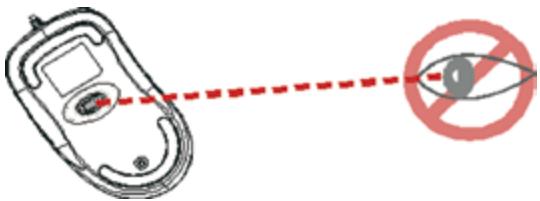
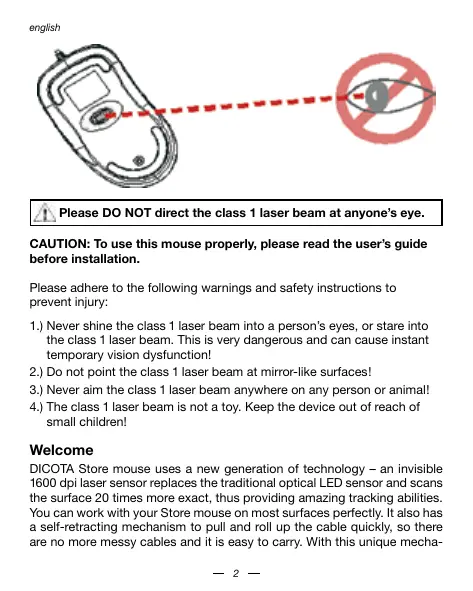
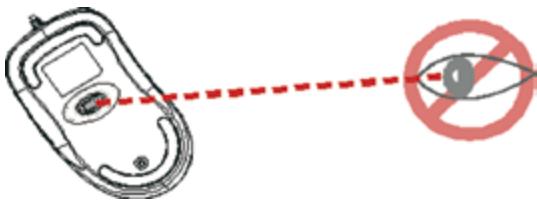
Please DO NOT direct the class 1 laser beam at anyone's eye.
CAUTION: To use this mouse properly, please read the user's guide before installation.
Please adhere to the following warnings and safety instructions to prevent injury:
1.) Never shine the class 1 laser beam into a person's eyes, or stare into the class 1 laser beam. This is very dangerous and can cause instant temporary vision dysfunction!
2.) Do not point the class 1 laser beam at mirror-like surfaces!
3.) Never aim the class 1 laser beam anywhere on any person or animal!
4.) The class 1 laser beam is not a toy. Keep the device out of reach of small children!
Welcome
DICOTA Store mouse uses a new generation of technology - an invisible 1600 dpi laser sensor replaces the traditional optical LED sensor and scans the surface 20 times more exact, thus providing amazing tracking abilities. You can work with your Store mouse on most surfaces perfectly. It also has a self-retracting mechanism to pull and roll up the cable quickly, so there are no more messy cables and it is easy to carry. With this unique mecha
nism, the mouse can work as easily as wired mice and as conveniently as wireless mice and is perfect for your Notebook or laptop.
Safety notice
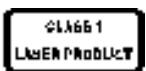
- This product complies with IEC 60825-1, class 1 laser product.
- Your product complies with FCC and CE rules.
- This product has no serviceable parts. Use of controls or adjustments of procedures other than the user guide may result in danger.
CAUTION:
Change or modifications not expressly approved by the manufacturer responsible for compliance could void the user's authority to operate the equipment.
Setting up the mouse
Store is connected to your computer via a USB cable, which needs to be plugged into your computer's USB port.
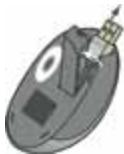
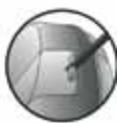
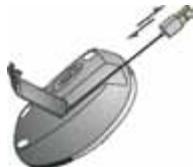
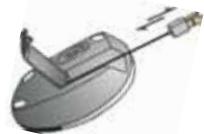
Flip over the mouse and open the cap on the bottom. Hold the mouse in one hand, pull out the USB cord and adjust it to your desired length. Make sure to place the cord into the hold properly and lock the cap. Finally, plug the USB connector into the USB port of your computer.
USB Port
For USB port installation
Windows 98 (or higher) is required for USB port installation. Connect the receiver cable to the USB port on the computer. For Windows,
you may be prompted to insert the Windows software CD. Insert the Drivers' CD into the computer's CD-ROM driver when asked to do so and follow the instructions steps.
Using your mouse
How to use the wheel
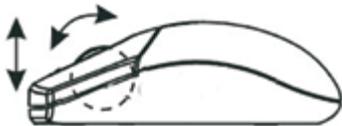
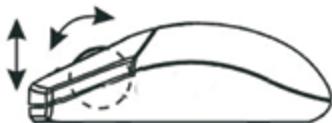
Your mouse has a wheel that functions as a wheel for Windows scrolling. To scroll the screen, simply move the wheel.
How to extend the USB cord
Flip the mouse over and open the cap on the bottom. Hold the mouse in one hand, pull out the USB cord and adjust it to your desired length.
How to retract the USB cord
Open the cap on the bottom of the mouse. Slightly pull out the USB cord and the embedded reel will wind the cord automatically.
Troubleshooting
Mouse does not work upon installation
Try one or more of the following:
- Make sure you have installed the driver correctly.
- Make sure the cable is plugged into the right mouse port.
- Unplug the mouse and then plug the mouse in again. Make sure that the mouse has been properly detected by the operating system.
- Make sure your mouse port has the proper configuration. Refer to your computer documentation for the correct port configuration.
USB cord is unable to retract
- Please pull the cord out again and be sure not to stop/pause while retracting.
Disclaimer
Information in this document is subject to change without notice. The manufacturer does not make any representations or warranties (implied or otherwise) regarding the accuracy and completeness of this document and shall in no event be liable for any loss of profit or any commercial damage, including but not limited to special, incidental, consequential, or other damage. No part of this document may be reproduced or transmitted in any form by any means, electronic or mechanical, including photocopying, recording or information recording and retrieval systems without the express written permission of the manufacturer.
Customer Service:
If you encounter any problem with your Store mouse, please contact our local subsidiary, partner or dealer, or send us your inquiry to info@dicota.com.
2 years warranty. Please find the complete text in our guarantee on the internet: www.dicota.com.
All the products and software mentioned above are registered trademarks of their respective owners. Errors and omissions excepted.


This symbol (crossed out bin wheelie symbol according to WEEE Annex IV) indicates separate collection of waste electrical and electronic equipment in the EU countries. Please do not throw the equipment into the domestic refuse. Please use the return and collection systems available in your country for the disposal of this product.

NcNoJIb3OBAHHeMbIiHN
Kak noJIb3OBAtbcra KOJecnKOM
Baua MbIbI MHeT KONEcIKO, KOtOpoe PneDaHa3HaeTcIЯ nIpnKpyTKI Windows.ДЯ npKpyuBaHnI N3o6paXeHnI Ha 3kpaIe npCTo nepeD-BrAraTe KONEcIKO.
Kak ydnnnntb whyp USB
IpepeepHnTeMbIbNtOKPoiTeKpIiueyKaHmKHeTcTOPOHe.OJHOI pyKO depKeTIeMbIb,aBTOPO TAnHTe 3a SHyp USB n pepynpyte Heo6OxOIMyU BAMdINHy.
Kak ykopotnb shyp USB
OTxpOIte KpbIeKHe Na HIXHKe CTOpOHe Mblu. HeMHoro NotaHnTe 3a Whyp USB, N BCToepHNa KaTuXa ABToMaTneCeck CkpyTNT Whyp.
BbIaJIeHHe N yCtpaHHe HeNCpPaBHOCTe MbIb He pa6oTaET nOcye YcTahOBKn.
BbInonHnTe OndHy nIIN HeckoNbKO n3 CneDyUOx Onepaun:
- Y6eINTEcB TOM, YTO Bbl npabInbHO INHCTaJIINPOBaJIN dpaiBep.
• Y6eMDTeB B TOM, ΚTO Ka6eBb BCTaBnE H BPaBnIbHbIpa3bEm IЯJIbIMI.
BbIbTe pa3eM MbUH, n 3aTeM bCTABTE eO e6oTHo. Y6eJIeTbc B TOM,TOMbMbIbS bJa pRaBPbIbHO pao3N03Ha onePaOpunHOHN CNTeMOI.
· Y6eDnTeC B TOM, YTO p3aBemMbIu IMeET npABINbHyo KOHpyrpaIuIIO. 3a INHΦopMaIeN B OTHOHN IIpABINbHOI KOHpyrpaIuN nOPTa 6obatneB DOKyEMtauHIO CBOERO KOMNbIOTepa.
UHyp USB He y6bnpaTcra
- ПotingHTe 3a UNHу[e pa3 n He denaJIte OCTa HOBOK/nay3 B TO BPMe, KOrdAn O b6yET CBOpaYHBtCBsC.
CcbiInka
HnΦopMaunB 3OTM DOKyMeHTe MOYT 6bMb NcnpaBHeB 6e3 npedynpexdEnHn. POn13BoDntEnb HeBbck3aHn NKaKxN pTeHN3a H n RaPahNT C B3rTJDMo HA TOCHOCTb KOMNPekTHOCTb 3TORE DOKyMeHTa, Hne HeCet OTBeTcBHeHOCht 3a KaKyIO Np60 NToEPO npIb6bln INm MaTepeMaHbN b yuepeb (CneUaHbN b yuepeb, CUYaHbN, HnepRMO, n T. d.) Hn Oda cactb ETO DOKMeHTa HemOKeT 6bMb KONIpOBaHa, nepeCbIHaNa,pepeDaHa, Hn B kakoi FOpme N HnkAkIMn CpeCDtBaMn (B E eNEKtPOHOM BVDn IIN MEXaHNeCK), BKNUOy KONIpOBaHne, 3aNcSbBaHnE, NIo6 pepeNcBbAHHe HnΦopMaunN m BvInckBaHne B HnΦopMaOHNoHbX CNTeMAX, 63 nprrMO NcSbMeHOrHO cornaCian.
KnneHTckn cepBnc:
Ecnj 6bnde imtbe Kankne npo6nmbi c npodyktoM Store, Kohtakniyute hao nokyancta h: dicota@dicota.cz iNiz H Sta crpanu xw dicota.com
Гаран'tи 2 за. Боже пообна инфомраза на Исторг net phanuzak: www.dicota.com.
Bce npOkyTbI mOcTePBy kya3aHbHe bIiuee RaJIIOCTaERIMCTpOBAHHoMKoopCoBTCTBtuOikn coC6TBENHKoK.


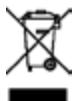
This symbol (crossed out bin wheelie symbol according to WEEE Annex IV) indicates separate collection of waste electrical and electronic equipment in the EU countries. Please do not throw the equipment into the domestic refuse. Please use the return and collection systems available in your country for the disposal of this product.