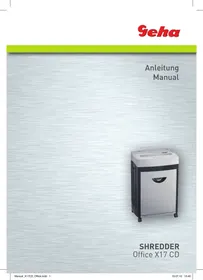
OFFICE X17 CD - Shredder GEHA - Free user manual and instructions
Find the device manual for free OFFICE X17 CD GEHA in PDF.



| Product type | Document shredder |
| Brand | GEHA |
| Model | OFFICE X17 CD |
| Cut type | Cross-cut |
| Cut dimensions | 3 × 25 mm |
| Cutting capacity (paper) | Up to 17 sheets (70 g/m², A4) |
| Cutting capacity (CD/DVD) | 1 CD or DVD |
| Cutting capacity (credit cards) | 1 credit card |
| Cutting speed | 3 m/min |
| Feed width | 310 mm |
| Power supply voltage | 220-240 V ~ 50/60 Hz |
| Power consumption | 700 W |
| Dimensions (W × D × H) | 450 × 325 × 675 mm |
| Net weight | 26.5 kg |
| Noise level | ~58 dB |
| Duty cycle | 10 min operation / 45 min rest |
| Display | LCD screen |
| Functions | Manual forward/reverse, time setting, automatic paper detection, auto stop, overload and overheating protection, full bin detection and bin missing detection |
| Safety | Not for children, do not insert hands, remove paper clips and staples, avoid flammable liquids |
| Maintenance | Clean the exterior with a damp cloth; do not use solvents |
| Warranty | 24 months |
Frequently Asked Questions - OFFICE X17 CD GEHA
User questions about OFFICE X17 CD GEHA
0 question about this device. Answer the ones you know or ask your own.
Ask a new question about this device
Download the instructions for your Shredder in PDF format for free! Find your manual OFFICE X17 CD - GEHA and take your electronic device back in hand. On this page are published all the documents necessary for the use of your device. OFFICE X17 CD by GEHA.
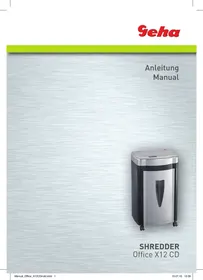
USER MANUAL OFFICE X17 CD GEHA
Thank you for purchasing this Geha quality product. Please read this user manual carefully before commissioning the device. Take particular note of the safety instructions, as noncompliance may lead to injury!
WARNING SYMBOLS
The warning symbols used in this manual and on the machine are meant to help you avoid hazards and use the device correctly.

This device may not be operated by children!

Never reach into the cutting mechanism!

Ensure that all clothing is kept well away from the paper feeder!

Ensure that long hair is kept well away from the paper feeder!

Never spray any flammable gas or liquid into the device!

Remove all staples before shredding!
IMPORTANT NOTES ON SAFETY
Please read the user manual carefully and in its entirety before commissioning the file shredder.
When using electric devices, always take basic precautions to eliminate any risk of injury. Always comply with the following basic precautions.
- This file shredder has been designed specifically for the shredding of paper and CDs. Never use it for any other purpose.
- Do not attempt to feed foils, adhesive labels, clothing, or plastic materials into the file shredder.
- Remove all paper clips before shredding paper.
- You are not permitted to modify or retrofit the device in any way, and may not carry out any repairs yourself.
- Never place any objects on or leaning against the device.
- Do not spray water on the device.
-
Remove the mains power plug from the wall socket before emptying the waste paper container, when finished using the device, or if you wish to reposition it.
Always pull on the plug and not on the power cable. -
Ensure that the correct voltage is used.
- Never use several extension cords.
- In case the device displays any unusual characteristics (e.g. strange smell or smoke), immediately stop operating the device and remove the mains power plug from the wall socket.
SETTING UP THE FILE SHREDDER
- The centre of gravity is located in the top part of the device. Make sure to position the file shredder on an even surface to prevent it from toppling over.
- Never operate the device near sources of heat or cold, or in an overheated, moist or dusty environment.
- Place the device close to a wall socket and ensure easy access to the wall socket, in case the device needs to be deactivated.
- Make sure that the waste paper container is pushed all the way into the device.
- Connect the mains power plug to a regular 220-240 V AC wall socket.
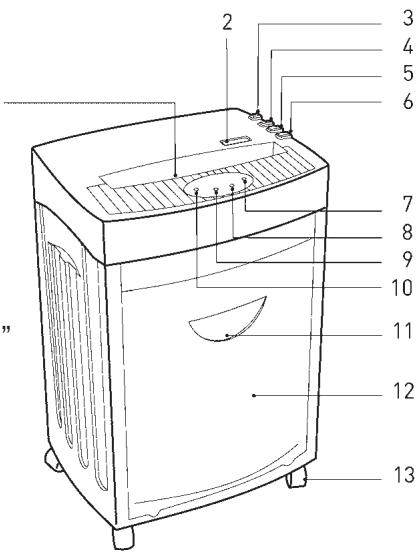
STRUCTURE AND FUNCTION
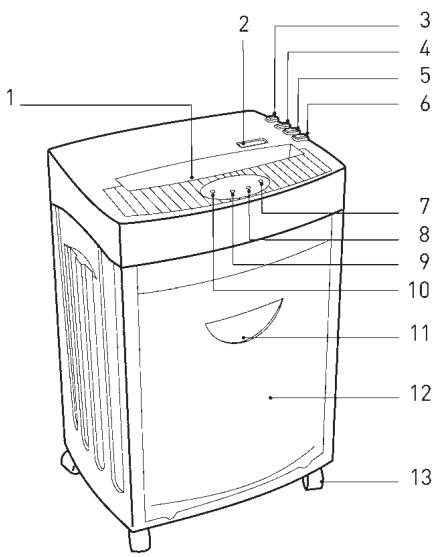
1 Paper/CD, credit card slot
2 LCD display
3 ON/OFF - switch
4 Button for forward operation/ time + (FWD)
5 Button for reversed operation/ time - (REV)
6 Button for setting the time
7 Display 'Basket Full'
8 Display 'Overheat'
9 Display 'Basket missing'
10 Display 'Power'
11 Viewing window
12 Waste paper container
13 Rollers
A. Feeding Paper into the Device
The device can shred a maximum of 17 sheets (A4, 70g / m2 ) simultaneously. Switch on the file shredder by pressing the ON/OFF button. The green LED 'Power' lights up, and the operating mode (Ready) and current time are shown in the LED display. (See section C for setting the current time)
Any paper in the feeder is detected automatically and the device starts operating; the operating mode (In Use) and the current time are shown in the LCD display. Once all paper has been shredded and no additional paper is fed into the machine, the device stops automatically (Standby Mode).
An automatic reverse and stop function prevents a paper jam when the device is overloaded with too much paper in the feeder. Should a paper jam occur, remove all paper from the feeder and wait until the device has finished its automatic cleaning process and has stopped operating. Only insert a maximum of 17 sheets A4, 70g / m2 into the feeder.
'FWD' If you place a narrow piece of paper (< 14 cm) into the feeder sideways, then the photoelectric barrier may not detect it and thus not start the device automatically. In that case, press and hold the button 'FWD' until the paper has been drawn in completely.
'REV' By pressing the button 'REV', you can initiate the reversed operation of the cutting mechanism in case of a paper jam.
When the sensor detects that the waste paper container is full, the device stops automatically and the red LED 'Full' lights up, and the LCD display will show 'Basket Full'. First remove all paper from the feeder, and then empty the waste paper container. Please note the instructions in the section 'Maintenance'.
B. Feeding CDs/DVDs and Credit Cards into the Shredder
This device can also shred CDs/DVDs and credit cards. Make sure that only 1 CD/DVD or 1 credit card is fed into the device at a time! If you would like to utilise this function, proceed as follows:
- Switch on the file shredder by pressing the power button on the rear of the device. The green LED 'Status' lights up, and the operating mode (Ready) and current time are shown in the LED display.
- Any CDs/DVDs and credit cards in the slot are detected automatically, the device starts up and the operating mode 'In Use' is shown on the LCD display.
CDs/DVDs and credit cards are shredded into particles. Make sure to keep your face well away from the feeder slot when shredding CDs/DVDs, since these types of material always pose a hazard of splintering!
The shredded material will not be collected in a separate container. Remove the shredded material before changing the to a different medium in order to facilitate an environmentally friendly disposal!
C. Setting the Current Time
Press the button 'Setup' once. By pressing the button 'FWD', you can now increase the hour displayed, and by pressing the button 'REV' you can decrease the hour displayed.
Press the button 'Setup' twice. By pressing the button 'FWD', you can now increase the minutes displayed, and by pressing the button 'REV' you can decrease the minutes displayed.
Important note:
The device will switch off automatically if the motor temperature increases too much. The red LED 'Overheat' lights up and signals that the overheat protection of the device has been activated - the LCD display shows 'Please Wait'. If that is the case, the device will not react when you press the button 'REV' or 'FWD'. The device switches back into normal operation as soon as the motor has cooled sufficiently.
D. Functions of the LCD Display
| Display | Status | Description |
| 89:38 Ready... | The device is ready for operation. | The device can now be used. |
| 89:42 In Use... | The device is working. | ----- |
| 89:34 Manual Forward | Manual forward operation. | The button 'FWD' is being pressed. |
| 89:33 Manual Reverse | Manual reversed operation. | The button 'REV' is being pressed. |
| 89:37 Basket full | The waste paper container is full. | Please empty the waste paper container. |
| 89:28 Safe door open | The waste paper container is missing. | Please insert the waste paper container. |
| 89:48 Overload! | The number of sheets fed in is too high. | Remove the paper! |
| 89:48 Paper Jam | A paper jam is caused. | Remove the paper! |
| 89:28 Self Cleaning | The cutting mechanism is performing a self-cleaning operation. | Please wait until the display shows 'Ready'. |
| 89:28 Please Wait | The motor is overheated. | Wait at least 20 minutes. Continue operation when the display shows 'Ready'. |
Important:
Pull the mains power plug from the wall socket before carrying out any maintenance tasks on the file shredder!
When the waste paper container is full, shredded material can be pushed upwards into the cutting mechanism. Make sure to empty the waste paper container before it is filled completely.
Clean the exterior of the file shredder with a moist cloth. Ensure that the cloth is kept well away from the paper feed. This cleaning step is suitable only for the exterior of the device.
The exterior of the device is made of plastic. That is why no solvents like benzene or benzole, or any organic solvents (e.g. thinner) may be used to clean the exterior of the device. Never clean the device with a stain remover - this may cause the casing to fade, crack, dissolve or graze.
Caution:
Make sure that no water gets into the device while cleaning the casing.
TECHNICAL DATA
Model:
Cut type:
Cut size:
Cutting capacity:
Cutting speed:
In-feed width:
Input voltage:
Power consumption:
Dimensions:
Noise level:
Waste paper container - volume:
Operating cycle:
Net weight:
Shredder Office X17 CD
Particles
3 × 25 mm
17 sheets (A4, 70 g/m²), 1 CD or 1 credit card
3 m/min
310 mm
220-240 V AC/50-60 Hz; 3.0A/640W
700W
450 × 325 × 675 mm
approx. 58 dB
33 L
| Faults | Causes | Remedy |
| The device won’t start, after paper has been fed in. | 1. The mains power plug was not plugged into the wall socket correctly. 2. The paper is too thin. 3. Paper jam. | 1. Replace the mains power plug in the wall socket, ensuring proper seating. 2. Fold the paper over and feed it into the file shredder again. 3. Activate the ‘REV’ function and pull out any jammed paper. |
| The device does not switch off automatically after the paper has been shredded. | The in-feed sensor is covered with dust or paper. | Wipe off the dust or remove the paper. |
| The device is very loud. | The device is not standing on a hard, level surface. | Reposition the device to stand on a hard, level surface. |
| The device is not working. | 1. The amount of paper in the feeder surpasses the capacity of the file shredder. 2. The paper is larger than the width of the feeder. 3. The paper was not fed in vertically. | 1. Make sure that the amount of paper in the feeder does not surpass the file shredder’s capacity. 2. Remove surplus paper and/or activate the ‘REV’ function if required. Fold the paper and insert it into the feeder again. 3. Insert the paper into the feeder vertically. |
If the device is still not working after you have tried the above solutions, please remove the mains power plug from the wall socket and consult your retailer.
DISPOSAL
The symbol depicting a crossed-out rubbish bin means that electrical devices may not be disposed of with regular household waste. Please bring the device to an approved recycling centre for environmentally firendly disposal.
GARANTIE
The warranty period for your device is 24 months.
Make sure to keep both your proof of purchase and the original packaging.
Please contact your retailer in case of any problems with the device.
INTRODUZIONE
WAARSCHUWINGSSYMBOLEN
LalaleleI Jg aaiSall Jg jiaJyaiyaiyaiyaiyaiyaiyaiyaiyaiyaiyaiyaiyaiyaiyaiyaiyaiyaiyaiyaiyaiyaiyaiyaiyaiyaiyaiyaiyaiyaiyaiyaiyaiyaiyaiyaiyaiyaiyaiyaiyaiyaiyaiyaiyaiyaiyaiyaiyaiyaiyAI
1jlll llll llll
e 1
J 1
JaiSLal Jaiyji Jabiu Clallie

jlll lal jall

Jgll Jz, g z, g 1 Jg, g o

Jg j 1

Jzj j +/ (FWD) 1000000000000000000000000000000000000000000
J (REV) 5.5
a 6
a 7
a a 8
grrll lal jla / c gao ai slal 9
/ 10
J 11
J 12
J.13
. 一 _ 一 ^ 一 ( 2 ) / 一 _ 一 ^ 一 ( 7 0 ) A4 aRg 17 bsl aSL all
JbI
ON/OFF Llq
Ready aK aL
Ll
.
.
.
.
.
.
.
.
.
.
.
.
.
.
.
.
.
.
.
.
.
.
.
.
.
.
.
.
.
.
.
.
.
.
.
.
.
.
.
.
.
.
.
,FWD" plou 4 gill ool
j 10 n j 10 10n j 10n j 10n j 10n j 10n j 10n j 10n j 10n j 10n j 10n j 10n j 10n j 10n j 10n j 10n j 10n j 10n j 10n j 10n j 10n j 10n
,REV" gse / 1eall Aegdo!
ailll gglgll alal .REV" jj gl baiall aal lal 100
le Bleet full" aaglae gglg yg yg yg yg yg yg yg yg yg yg yg yg yg yg yg yg yg yg yg yg yg yg yg yg yg yg yg yg yg yg yg yg yg yg yg yg yg
ig _ j j _ i i _ j i _ i i _ j i _ i i _ j i _ i i _ j i _ i i _ j i _ i il _ j i _ i i _ j i _ i i _ j i _ i i _ j i _ i i _ j il _ j i _ i i _ j i _ i i _ j i _ i i _ j i _ i i _ i i _ j i _ i i _ j i _ i i _ j i _ i i _ j
or " FWD , pallightofle ! jslebianll " Setup , bualljslebianlldic all 4 jgillofle ! jslebianlldic , clelallpalyibialljslebianllpalyibiallpalyibiallpalyibiallpalyibiallpalyibiallpalyibiallpalyibiallpalyibiallpalyibiallpalyibiallpalyibitallpalyibitallpalyibitallpalyibitallpalyibitallpalyibitallpalyibitallpalyibitallpalyibitallpalyibitAPREV "
bial bial bial bial bial bial bial bial bial bial bial bial 1 2 0 0 0 0 0 0 0 0 0 0 0 0 0 0 0 0 0 0 0 0 0 0 0 0 0 0 0 0 0 0 0 0 0 0 0 0 0 0 0 0 0 0 0 0 0 0 0 0 0 0 1
pland presention presention presention presention presention presention presention prescuring presention presention presention presention presention presention prespeciency prespeciency prespeciency prespeciency prespeciency prespeciency prespeciemy prespeciemy prespeciemy prespeciemy prespeciemy prespeciemy prespeciemy
LCD 1
Laiyii
a.sall
1
cIaIJIaIJIaIJIaIJIaIJIaIJIaIJIaIJIaIJIaIJIaIJIaIJIaIJIaIJIaIJIaIJIaIJIaIJIaIJIaIJIaIJIaIJIaIJIaIJIaIJIaIJIaIJIaIJIaIJIaIJIaIJIaIJIaIJIaIJI
a
89:30
Ready.
121 13
89:42
In Use...
"FWD" jglbeal pi
pLdU 1
89:34
Manual Forward
"REV" jj gl bai all
all 4y
09:33
Manual Reverse
a
12 a 1000
89:37
Basket full
aI 1
1
a
89,20
Safe door open
a
jolll jolll
aill
89:48
Overload!
aill luee 1 jil
jliu 1
89:48
Paper Jan
"Ready,"
20 2
aalrj
"Ready," 155
B9:28
Please Wait
aal aalee e 1j jaiil all ne gssll
aagaaagaaagaaagaaagaaagaaagaaagaaagaaagaaagaaagaaagaaagaaagaaagaaagaaagaaagaaagaaagaaagaaagaaagaaagaaagaaagaaagaaagaaagaaagaaagaaagaaagaaagaaagaaagaaagaaagaaagaaagaaagaaagaaagaa
Ldlaal lalall
120 1 1
jlll l) clllall and lllll aal d alllllllllll
Lg, gSllg Slll jblz qil aill lal (glljdo jdl jld jld jld jld
11
4
∴ 与 SU = P > 2
45/10
∴ 即 a = 1
26.5
:
ailll aaiy jll lal yj g jlll alllll
JSLIJIaIJIgAISLLALKgI 2
BVEDEHNE
Mby 6laoradapm Bac 3a npno6peTeHne 3TOrO BbICOKokaeCTBeHHORo npOdykTa ot KOMpaHnGeha. IoxaIyIcTa, nepei BBeJeHNEM B 3KcPnlyatauio BVHMATEJbHO npouHTaIte 3TO pyKOBOdCTBO. O6paTIne OC06oe BHNMaHne Ha yka3AHn IO Tex-Hnke 6e3OpacHoCTn, ux HecO6JIooDeHne MoKeT pNBeCTn K TeJeCHbIM NOBpeXdEHNAM!
PNEyPExKDAIOUINE CIMBOJIbI
PpeDynpexdaioune CmBOLbl, KOtOpbIe BbHaNdeTe B daHHOM pyKOBODCTBE no 3KcNpyatauun Ha np6ope, cnykaT dJa npedOTbpaueHn ONaCHOCTn n NOMoAOT npabulbHO nCNoJb3OBaTb np6op.

He 6pb3raTe Ha np6op BocnnaMeHJIOuIece ra3bI nn JxNdkoCTn!

YdaInte BcKaHcIepckne CkpenKn!
BAXHbIe YKA3AHnI NO TEXHnKE Be3OINACHOCTN
Ipeed BBODOM yHnUToKnteI 6yMaRn B 3KcNpyaTauNIO npOuHTaTe, noKaJyIcTa, yKa3AHnI dJIr NOLb3OBaTeJI.
Pn nCnObl3OBaHnn 3JeKtpOnpnp6OpOB CneJyET Bcerda npHnMaTb Mepbl npedocctopoxhOCTn, yTO6bl NCKLIOuHTb PnCK BO3HNKHOBeHn TpaBM. IooJaIyIcTa, co6JIIO-daTe dJIg 3TOrO CNeDyUoune OCHOBHbIe npabUNa:
- 3TOI npi6Op IyI yHnTuKHeHn 6yMaI cneuaJIbHO ppeHa3NaeH dJIy I3MeJIbUeHn 6yMaI INI KOMPaKT-DnCKOB. He nCNoJIb3yIte erO B dpyrnx UeJx.
- He 3aŋpykaɪte B yHnUToXnteJIb 6yMaɪn dɪnaNo3ɪNTuBHyI O pIeHky, 3TɪkeToUHуO 6ymary, oɒejʌd y nɪn n3dɛnɪya n3 pɪaCTmaccbl.
-пегд Tem кak Измьчать 6умагу, удаитЕ BCE kaнцелярскne ckpenkn. - BbHe nmeete npaba n3MeHЯTb, nepeJeIbIbA Tb nIIN peMOHTnpOBaTb np6Op.
- He klaɪnte hɪkakne npεdmetbɪ ha πριδopɪ n Húyero He πριcnoHЯ Te K hemy.
-
He 6pbu3rauTe Ha npu6op BoDoi.
-
BbTaunTe WTeNceB n3 po3eTKn, npexKe Yem ONOPOXHTb KOp3Hny dJa 6ymaRn, nnn ecnn Bbl He noIb3yeTecb npnbopom nn XOTnTe nepeCTaBNTb erO.
-Дя bblkluohn np60pa n3 cetn TaHnte TOnbKO 3a uTeNceIb, a He 3a ka6eJIb. - Y6eIntecb, yTO Bbl nCnOJIb3yTe BepHoe HapPjaKeHne.
He nCnoJb3yIte HeckoJIbKO ydInHnHTeJe. - Прн Heo6bHOM COCTOaHn np6opa (HaNPmEp, CTpaHHb 3aapanиIbIM) cIeJyET HemeJeHNo ppeKpaTntb NOJIb3OBaTbcra np6bOpom N BblTaUHTb ITeIeCJIb n3 pO3eTKn.
YCTAHOBKA IUPEDEPA
- 1.LeHTp TaeKecTn HaxOaNTcRa HBePxHeu cactn np6op. YctaHObTe np6Op Ha poBHyIO NobepxHOCTb, yTO6bl OH He nepeBepHyncra.
- He nCnoJb3yIte np6Op B6n3n nCTOuHnKa TeIa nn XoJOna nn B uepeCyprTopaye, BnaXHoN nn PbIbHOn cpeJe.
- Пocтавыт epn60р HeDAleko OT po3eTKn I He CTaBbTe HnKaKne IpeДMeTbI nepeIpo3eTKoI,ДЯТOrOчTo6bI n3 Hee MoJHo 6blNo JERKO BbITaUNTb WTeN-CEIb.
- y6eɪntecb, yTO KOHTeHep IЯ 6yMaIg Do yNopa 3aʌdBnHyT B npɪb6op.
- BCTaBbTe BnIky B O6bIHyIO HAcTeHHyIO pO3eTKy IepemEHOro Toka C HanpJxKeHEm B 220-240 B.
YCTPOICTBO I PPNHcII PABOTbI
1 PnpemHa anb Ia 6ymarn/KomnaKT-dnCKOB/KepeiHTbIX KaptoeK
2XnDkoKpncTaJInuCheckn DInCnIeN
3 KhoNka BkJIoueHn/ BbIKIoueHn
4 KhoPka IJIa IDbIkeHnBpeE/ByeM+ (FWD)
5 KhoIpaIyIbIaKeHnHa3aIbBpeMra-(REV)
6 KhoIka IJIa yCTaHOBKn BpeMeHn
7 INdinkaTOp 3anOpHeHHoK KOp3nHbI
8 INHnkaTop nepereBa
9 INHdNkAToP ,He BCtAbJeHa KOp3nHa dJa 6ymaRn ,
10 INdkaTOp nTaHn
11 CMOTPOBOE OKHO
12 Kop3nHa 6ymaru
13 Polnikn
BBEDEHNE UPEDEPA B 3KcPnIyATAUIO
A. 3arpy3ka 6ymaru
INDEPARTAREA CA DESEU

- WARNING SYMBOLS
- IMPORTANT NOTES ON SAFETY
- SETTING UP THE FILE SHREDDER
- STRUCTURE AND FUNCTION
- FEEDING PAPER INTO THE DEVICE
- FEEDING CDS/DVDS AND CREDIT CARDS INTO THE SHREDDER
- SETTING THE CURRENT TIME
- IMPORTANT NOTE
- IMPORTANT
- PULL THE MAINS POWER PLUG FROM THE WALL SOCKET BEFORE CARRYING OUT ANY MAINTENANCE TASKS ON THE FILE SHREDDER
- CAUTION
- MAKE SURE THAT NO WATER GETS INTO THE DEVICE WHILE CLEANING THE CASING
- TECHNICAL DATA
- DISPOSAL
- GARANTIE
- INTRODUZIONE
- WAARSCHUWINGSSYMBOLEN
- BVEDEHNE
- PNEYPEXKDAIOUINE CIMBOJIBI
- BAXHBIE YKA3AHNI NO TEXHNKE BE3OINACHOCTN
- YCTAHOBKA IUPEDEPA
- YCTPOICTBO I PPNHCII PABOTBI
- BBEDEHNE UPEDEPA B 3KCPNIYATAUIO
- 3ARPY3KA 6YMARU
- INDEPARTAREA CA DESEU
Brand : GEHA
Model : OFFICE X17 CD
Category : Shredder