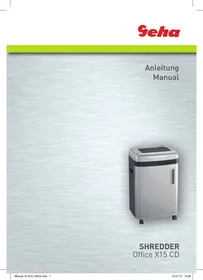
OFFICE X15 CD - Shredder GEHA - Free user manual and instructions
Find the device manual for free OFFICE X15 CD GEHA in PDF.



| Product type | Document shredder |
| Brand | GEHA |
| Model | OFFICE X15 CD |
| Cut type | Cross-cut |
| Cut dimensions | 2 × 15 mm |
| Paper cutting capacity | 15 sheets (A4, 70 g/m²) |
| CD/DVD/card cutting capacity | 1 CD, 1 DVD or 1 credit card |
| Cutting speed | 2.1 m/min |
| Feed width | 220 mm |
| Power supply | 220-240 V ~ 50/60 Hz, 3.0 A |
| Power consumption | 500 W |
| Dimensions (W × D × H) | 430 × 350 × 680 mm |
| Net weight | 23 kg |
| Noise level | Approx. 58 dB |
| Duty cycle | 10 min on / 45 min off |
| Display | LCD screen with clock and status |
| Special functions | Manual forward/reverse, auto stop, jam detection, overheat protection, bin full indicator |
| Safety | Not for children, remove staples before shredding, do not insert plastics |
| Maintenance | Clean exterior with damp cloth, avoid solvents and water inside the unit |
| Warranty | 24 months (keep proof of purchase) |
Frequently Asked Questions - OFFICE X15 CD GEHA
User questions about OFFICE X15 CD GEHA
0 question about this device. Answer the ones you know or ask your own.
Ask a new question about this device
Download the instructions for your Shredder in PDF format for free! Find your manual OFFICE X15 CD - GEHA and take your electronic device back in hand. On this page are published all the documents necessary for the use of your device. OFFICE X15 CD by GEHA.
USER MANUAL OFFICE X15 CD GEHA
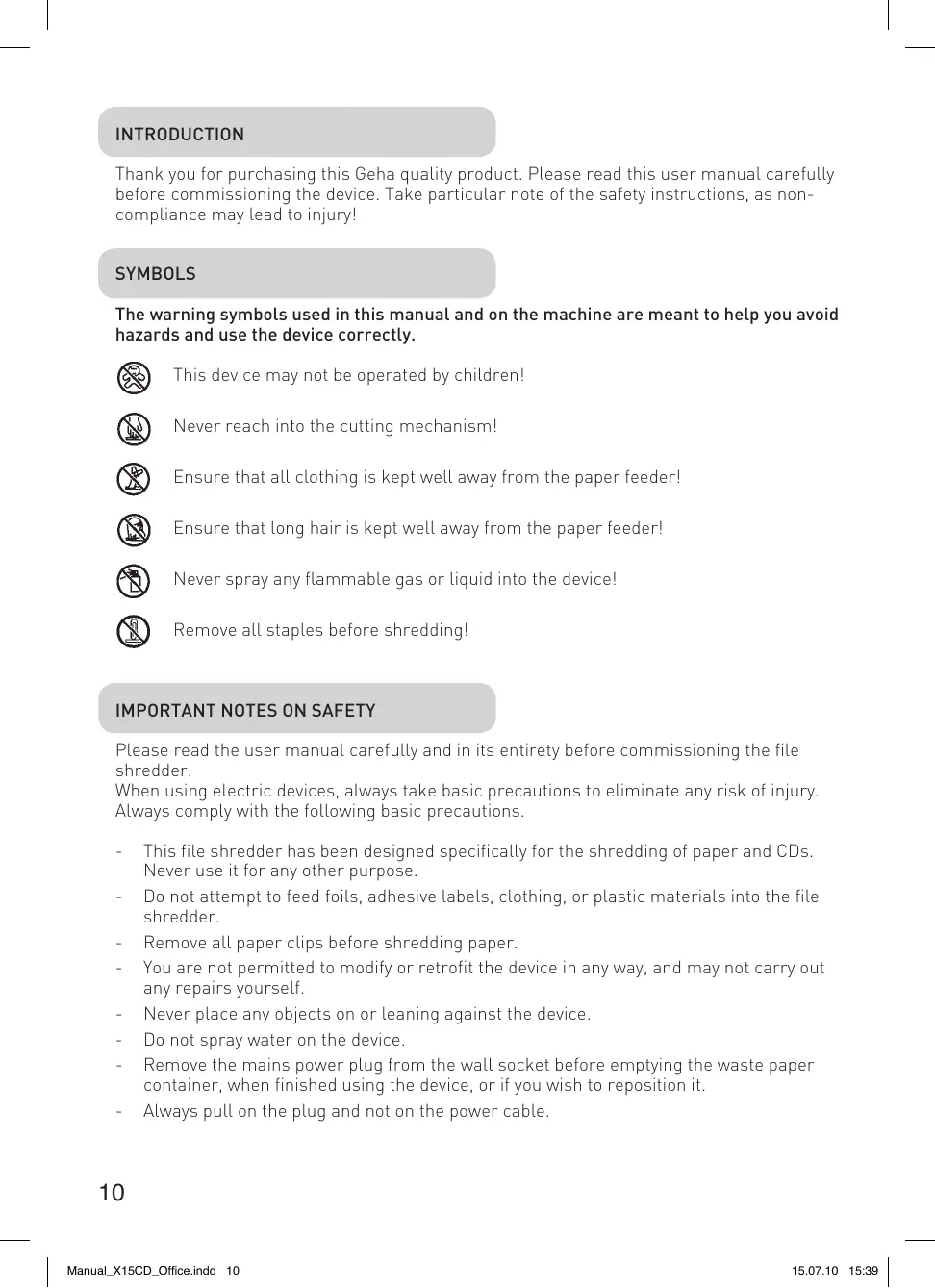
Thank you for purchasing this Geha quality product. Please read this user manual carefully before commissioning the device. Take particular note of the safety instructions, as non-compliance may lead to injury!
SYMBOLS
The warning symbols used in this manual and on the machine are meant to help you avoid hazards and use the device correctly.

This device may not be operated by children!

Never reach into the cutting mechanism!

Ensure that all clothing is kept well away from the paper feeder!

Ensure that long hair is kept well away from the paper feeder!

Never spray any flammable gas or liquid into the device!

Remove all staples before shredding!
IMPORTANT NOTES ON SAFETY
Please read the user manual carefully and in its entirety before commissioning the file shredder.
When using electric devices, always take basic precautions to eliminate any risk of injury. Always comply with the following basic precautions.
- This file shredder has been designed specifically for the shredding of paper and CDs. Never use it for any other purpose.
- Do not attempt to feed foils, adhesive labels, clothing, or plastic materials into the file shredder.
- Remove all paper clips before shredding paper.
- You are not permitted to modify or retrofit the device in any way, and may not carry out any repairs yourself.
- Never place any objects on or leaning against the device.
- Do not spray water on the device.
-
Remove the mains power plug from the wall socket before emptying the waste paper container, when finished using the device, or if you wish to reposition it.
Always pull on the plug and not on the power cable. -
Ensure that the correct voltage is used.
- Never use several extension cords.
- In case the device displays any unusual characteristics (e.g. strange smell or smoke), immediately stop operating the device and remove the mains power plug from the wall socket.
SETTING UP THE FILE SHREDDER
- The centre of gravity is located in the top part of the device. Make sure to position the file shredder on an even surface to prevent it from toppling over.
- Never operate the device near sources of heat or cold, or in an overheated, moist or dusty environment.
- Place the device close to a wall socket and ensure easy access to the wall socket, in case the device needs to be deactivated.
- 1.Make sure that the waste paper container is pushed all the way into the device and that the door is closed.
- Connect the mains power plug to a regular 220-240 V AC wall socket.
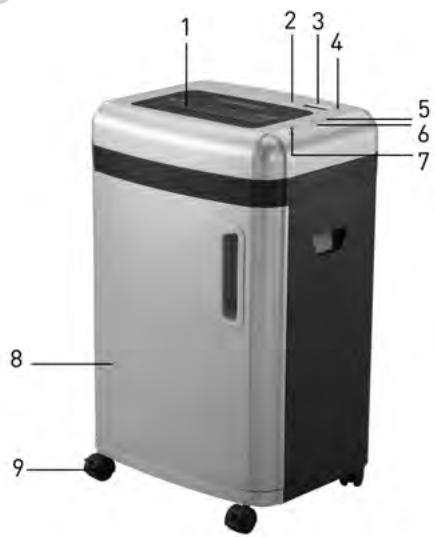
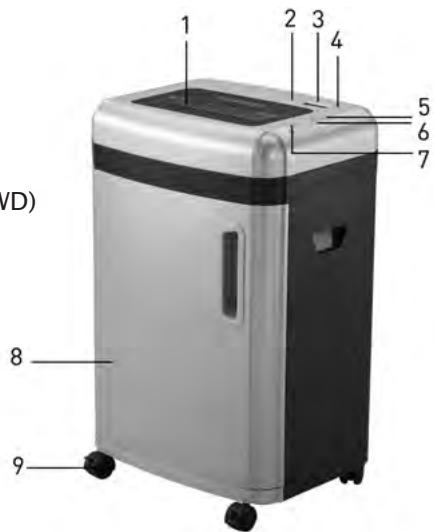
STRUCTURE AND FUNCTION
1 Paper/CD, credit card slot
2 Button for setting the time
3 LCD display
4 Display 'Status'
5 Button for reversed operation/ time - (REV)
6 Button for forward operation/ time + (FWD)
7 ON/ OFF - switch
8 Door for waste paper container
8 Viewing window
9 Rollers
COMMISSIONING THE FILE SHREDDER
A. Feeding Paper into the Device
The device can shred a maximum of 15 sheets (A4,70g / m2) simultaneously. Switch on the file shredder by pressing the ON/OFF button on the rear of the device. The green LED 'Status' lights up, and the operating mode (Ready) and current time are shown in the LED display. (See section C for setting the current time)
Any paper in the feeder is detected automatically and the device starts operating; the operating mode (In Use) and the current time are shown in the LCD display. Once all paper has been shredded and no additional paper is fed into the machine, the device stops automatically (Standby Mode).
An automatic reverse and stop function prevents a paper jam when the device is
overloaded with too much paper in the feeder. Should a paper jam occur, remove all paper from the feeder and wait until the device has finished its automatic cleaning process and has stopped operating. Only insert a maximum of 15 sheets A4, 70g / m2 into the feeder.
'FWD' If you place a narrow piece of paper < 10cm into the feeder sideways, then the photoelectric barrier may not detect it and thus not start the device automatically. In this case, press and hold the button 'FWD' until the paper has been drawn in completely.
'REV' By pressing the button 'REV', you can initiate the reverse operation of the cutting mechanism in case of a paper jam.
When the sensor detects that the waste paper container is full, the device stops automatically and the red LED 'Status' lights up, and the LCD display will show 'Basket Full'.
First remove all paper from the feeder, and then empty the waste paper container.
Please note the instructions in the section: 'Maintenance'.
B. Feeding CDs/DVDs and Credit Cards into the Shredder
This device can also shred CDs/DVDs and credit cards. Make sure that only 1 CD/DVD or 1 credit card is fed into the device at a time! If you would like to utilise this function, proceed as follows:
- Switch on the file shredder by pressing the ON/OFF button. The green LED 'Status' lights up, and the operating mode (Ready) and current time are shown in the LED display.
- Any CDs/DVDs and credit cards in the slot are detected automatically, the device starts up and the operating mode 'In Use' is shown on the LCD display.
CDs/DVDs and credit cards are shredded into particles. Make sure to keep your face well away from the feeder slot when shredding CDs/DVDs, since these types of material always pose a hazard of splintering!
The shredded material will not be collected in a separate container. Remove the shredded material before changing the to a different medium in order to facilitate an environmentally friendly disposal!
C. Setting the Current Time
Press the button 'Setup' once. By pressing the button 'FWD', you can now increase the hour displayed, and by pressing the button 'REV' you can decrease the hour displayed.
Press the button 'Setup' twice. By pressing the button 'FWD', you can now increase the minutes displayed, and by pressing the button 'REV' you can decrease the minutes displayed.
Important note:
The device will switch off automatically if the motor temperature increases too much. The LED 'Status' lights up in red and signals that the overheat protection of the device has been activated - the LCD display shows 'Please Wait'. If that is the case, the device will not react when you press the button 'REV' or 'FWD'. The device switches back into normal operation as soon as the motor has cooled sufficiently.
D. Functions of the LCD Display
| Display | Status | Description |
| 89:30 Ready... | The device is ready for operation. | The device can now be used. |
| 89:42 In Use... | The device is working. | ----- |
| 89:34 Manual Forward | Manual forward operation. | The button 'FWD' is being pressed. |
| 89:33 Manual Reverse | Manual reversed operation. | The button 'REV' is being pressed. |
| 89:37 Basket full | The waste paper container is full. | Please empty the waste paper container. |
| 89:48 Overload! | The number of sheets fed in is too high. | Remove the paper! |
| 89:48 Paper Jam | A paper jam is caused. | Remove the paper! |
| 89:28 Self Cleaning | The cutting mechanism is performing a self-cleaning operation. | Please wait until the display shows 'Ready'. |
| 89:28 Please Wait | The motor is overheated. | Wait at least 20 minutes. Continue operation when the display shows 'Ready'. |
| 89:28 Safe door open | The door for the waste paper container is not closed. | Please close the door. |
Important:
Pull the mains power plug from the wall socket before carrying out any maintenance tasks on the file shredder!
When the waste paper container is full, shredded material can be pushed upwards into the cutting mechanism. Make sure to empty the waste paper container before it is filled completely.
Clean the exterior of the file shredder with a moist cloth. Ensure that the cloth is kept well away from the paper feed. This cleaning step is suitable only for the exterior of the device.
The exterior of the device is made of plastic. That is why no solvents like benzene or benzole, or any organic solvents (e.g. thinner) may be used to clean the exterior of the device. Never clean the device with a stain remover - this may cause the casing to fade, crack, dissolve or graze.
Caution:
Make sure that no water gets into the device while cleaning the casing.
TECHNICAL DATA
Model:
Cut type:
Cut size:
Cutting capacity:
Cutting speed:
In-feed width:
Input voltage:
Power consumption:
Dimensions:
Noise level:
Waste paper container - volume:
Operating cycle:
Net weight:
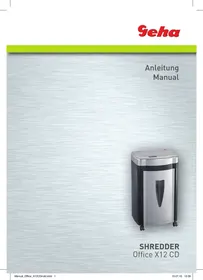
Shredder Office X15 CD
Particles (paper, CD and credit cards)
2 x 15 mm (paper, CD and credit cards)
15 sheets (A4, 70 g/m²), 1 CD or 1 credit card
2.1 m/min
220 mm
220-240 V AC/50-60 Hz; 3.0A/700W
500W
430 × 350 × 680 mm
approx. 58 dB
31.5 L
| Faults | Causes | Remedy |
| The device won’t start, after paper has been fed in. | 1. The mains power plug was not plugged into the wall socket correctly. 2. The paper is too thin. 3. Paper jam. | 1. Replace the mains power plug in the wall socket, ensuring proper seating. 2. Fold the paper over and feed it into the file shredder again. 3. Activate the ‘REV’ function and pull out any jammed paper. |
| The device does not switch off automatically after the paper has been shredded. | The in-feed sensor is covered with dust or paper. | Wipe off the dust or remove the paper. |
| The device is very loud. | The device is not standing on a hard, level surface. | Reposition the device to stand on a hard, level surface. |
| The device is not working. | 1. The amount of paper in the feeder surpasses the capacity of the file shredder. 2. The paper is larger than the width of the feeder. 3. The paper was not fed in vertically. | 1. Make sure that the amount of paper in the feeder does not surpass the file shredder’s capacity. 2. Remove surplus paper and/or activate the ‘REV’ function if required. Fold the paper and insert it into the feeder again. 3. Insert the paper into the feeder vertically. |
If the device is still not working after you have tried the above solutions, please remove the mains power plug from the wall socket and consult your retailer.
DISPOSAL
The symbol depicting a crossed-out rubbish bin means that electrical devices may not be disposed of with regular household waste. Please bring the device to an approved recycling centre for environmentally firendly disposal.
GARANTIE
The warranty period for your device is 24 months.
Make sure to keep both your proof of purchase and the original packaging.
Please contact your retailer in case of any problems with the device.
INTRODUZIONE
WAARSCHUWINGSSYMBOLEN
iLal Jia jia jiau clai

jlll jlll jlll

1j000000000000000000000000

Jg j 1

iLall llllallaa 1jle j jss

1111 1

aale aaii
aSLal jd jdojol dcll oJ
1i 1i i 1i i 1i i 1i i 1i i 1i i 1i i 1i i 1i i
ailllll aalwol 10100
a aal 111 111 111 111 111 111 111
(2)已知 | x - 1| = 1∴ x + 1 > 0 ,求
.015 11000000000000000
1 1
Lgic Jull Jnag aSLall p
Jellggyg aylll g
.1
+Jzj/ (FWD) 1uJy jzj 6
1/1jaii 7
8.8
10
Aaalaae aee aae ae eae aee aee aee
BAXHbIe YKA3AHnI NO TEXHnKE Be3OnACHOCTN
Ipeed BBODOM yHnTuToKnteI 6yMaRn B 3KcNpyaTauHIO npOuHTaTe, noKaJyIcTa, yKa3aHnI dIy IOnb3OBaTeJI.
Pn nCnoB3OBAHnn 3JeKtpoPnp6OpOB CneJyET Bcerda npHnMaTb Mepbl npedocctopoxhOCTn, yTO6bl NCKLIOuHTb PnCK BO3HNKHOBeHn TpaBM. IOnkaIyIcTa, co6JIIO-daTe dJa 3TOrO CNeDyUOune OCHOBHbIe npabNla:
- 3TOT npn60p dIy yHnTuToxKeHn 6yMa r CneuHaJbHO npeHa3HaueH dIy I3MeJIbUeHn 6yMa rN nn KOMNaKT-dNcKOB. He nCnoJIb3yIte erO B dpYrnx UeJIaX.
- He 3a rgykaIte B yHnUToXInTeIb 6ymar n DnaNo3nTnBHyIO PJIeHky, 3TNKeTOUHyO 6ymary, Odekdy nnn n3dennn n3 nlaactMaccbI.
- Ipeed Tem kak n3meIbauTb 6yMaIy, ydaJIInTe Bce kaHcIeJpCkne cKpeIKN.
- Bbl He ImMeTe npaBa n3MeHrTb,pepeJeBbA Tb nn peMOHTnPoBaT bpnp6Op.
- He klaadnte HnkaKne npedMeTb Ha np6Op n Hnueero He npncloHnTe K hemy.
-
He 6pbizraηte Ha npu6op Bdoi.
-
BbTaunTe wTeenCeb n3 po3eTkn, npexJe yem OnopoxHnTB KOp3nHy dJa 6ymaRn, nIe enn BbI He noJIb3yeteCb npnbopom nnXOTNe nepectabntb erO.
-ДЯ Bыкюецни рибoga n3 cetn TянITEToIbko 3a WTeNCEIb, a He 3a Ka6eJIb. - y6eɪntecb, yTO Bbl nCnoIb3yTe BepHoe HapnpxKeHne.
- He nCnoJb3yIte HeckoJIbKO ydJIHnHTeJIeN.
- При Нeo6ьчHOM COCTOЯни пибopa (HaPpIMep, CTpaHHb 3aapanx nIIN dblM) cIeJyET HemeJleHNO ppeKpaNTb NOJIb3OBaTbcr пи6opom N BbITaUHTb ITeIeCJIb n3 pO3eTKn.
YCTAHOBKA UPEDEPA
- 1.LeHTp TjaeeTn HaxoDntcHa BepxHeu qactn np6opy. UctahOBtpe np6op Ha poBHyIO NobepxHOCTb, yTO6bl OH He nepeBepHyIcra.
- He nCnoJb3yIe np6Op B6n3n nCTOuHnKa TeIa IIn XoJOna IIn B uepeCypropaye, BnaXHOI INI PbIbHOI cpeIe.
- Пocтавып рибор Ндалков OT po3etkn И He CTаьы Тнкakne пpeДмтblпердpo3etko,ДяТOrOчTo6blИЗ Hee moxHObblno JERKO BbITaunTb wTeICenb.
- Y6eIntecb, yTO KOHTeHep IJIa 6yMaRn Do yNopa 3aADBHyT B npi6Op, a DBepu3a3akpbTa.
- BCTaBbTe BnIky B O6bIHyIO HAcTeHHyIO pO3eTKy NepemEHORo TOKa C HApJxKeHEm B 220-240 B.
YCTPOICTBO IN PPNHcINPABOTbI
1ПиемнаяцельдяКOMпаKT-ДИСКOB/КрEDINTHbIX KapTOUEK
2 KhoNka IJIy yCTaHOBKn BpeMeHn
3 XndkokpnctaJInuCheckn DIncPnei
4 INHdNkaTOp cTaTyca
5 KhoIIka IJIa IDbIkeHn B O6paTHOM HappaBLeHn/BpeM - (REV)
6 KhoIpa IyIa DvIxKeHnBpePeI/BpeM + (FWD)
7 KhoNka BkIoueHn/ BbIKIOueHn
8Дьерцakop3инblДЯ6ymar
8 CMOTPOBOE OKHO
9 Polniku
BVEDEHNE UPEDEPA B 3KcPnIyATAuNIO
A. 3arpy3ka 6ymaru
Pn6bOp MoKet yHnUToXuNb MaKc. 15 nCtOB (fOpMaTa DIN A4, 70 r/M²) 3a OOnH pa3. BkIouHte wpeep npn pmounnepeKlOuataeB KJI/BblKJI. 3aRopntc 3eJeHbI CBeTOnoHDh mHdNkaTOp ,CTatyc", a Ha JxNdkokpncTalInueckOM dncPiee 6yDyT oTo6paKaTbcra KcPnyatauOnHbI peXm (Ready) n Bpem. (YcTaHOBka BpeMeHn cM. nyHKT C)
Бумага в пиемно сени распознаетсь АВТOMATUVECKN, И пибор начET pa6OTaTB, на кOKPncTaaluVECKOM dinCnlee 6ydyT OTObpaKaTbCS 3KcNpyaTaUNOHbI pexm (In use) n Bpem. Korda 6ymara 6ydet yHnTuToXeHa n B пиемно сени He 6ydet 06- HapyxeHo 6ymarn, пибор abTomatUVECKN OCTAHOBITcR (pexm OkndaHn).
AbTomatnuecka yHkun o6paTHoro DnBxKeHn nOCTaHOKn ppeDoTbpaAaeT 3a-ctpeBaHne 6ymar npn neperpy3ke.
B clyuae neperpy3kn ydaJIte 6bMaIg yI3 npneMHOJ eJI, IIOJokIte, noka np6Op 3aKOHHT aBTOMaTnueckn IpoUeCC OUnCTKn I OCTaHOBITc. IocIe 3TOrO 3aRpy3nte MaKcIMyM 15 IInCTOB fOpMaTa DIN A4, 70 r/M² B npneMHyI oJIeb.
"FWD" EcIn Bbl 3aRpyXaeTe y3kn JnCT 6yMaRn < 10 cm c6Oky B npneMHy oeJIb, To, BO3MOxHNO, YTO FOTo3JleKTPnueckn DaTuNK He pacno3Haet erO, n np6Op He CTapTyET. B 3tOM Cnyuae Haxmnte u ydepXnBaIte KhoNkY ,FWD", Noka 6ymara He 6yDet PONHOCTbIO B7ryTa.
B. Eloaywyn oTtikwv δiokwv CD/DVD KαI TlOTwtkwv kαptwv
H ouyekpIevn oukeun mTopei vα Teuaxicel kαl OTIKOUC δIOKouc CD/DVD kαl Tl-OTWtIeC KApTEc. IpooEgTe, wote navvα vα elayete 1 CD/DVD n 1 NiotwIkn KApTa Otn oukeun! EaV θEaTe vα xpnouonoe taut n Tnv λeIToupyia, evpynte wS Engs:
15 yaprak (DIN A4, 70 g/m²),
STRUCTURA §I FUNCTIIIE
INDEPARTAREA CA DESEU

- SYMBOLS
- IMPORTANT NOTES ON SAFETY
- SETTING UP THE FILE SHREDDER
- STRUCTURE AND FUNCTION
- COMMISSIONING THE FILE SHREDDER
- FEEDING PAPER INTO THE DEVICE
- FEEDING CDS/DVDS AND CREDIT CARDS INTO THE SHREDDER
- SETTING THE CURRENT TIME
- IMPORTANT NOTE
- IMPORTANT
- CAUTION
- TECHNICAL DATA
- DISPOSAL
- GARANTIE
- INTRODUZIONE
- WAARSCHUWINGSSYMBOLEN
- BAXHBIE YKA3AHNI NO TEXHNKE BE3ONACHOCTN
- YCTAHOBKA UPEDEPA
- YCTPOICTBO IN PPNHCINPABOTBI
- BVEDEHNE UPEDEPA B 3KCPNIYATAUNIO
- 3ARPY3KA 6YMARU
- ELOAYWYN OTTIKWV ΔIOKWV CD/DVD KΑI TLOTWTKWV KΑPTWV
- STRUCTURA §I FUNCTIIIE
- INDEPARTAREA CA DESEU
Brand : GEHA
Model : OFFICE X15 CD
Category : Shredder