
REVOLUTION85PLUS - Computer power supply ENERMAX - Free user manual and instructions
Find the device manual for free REVOLUTION85PLUS ENERMAX in PDF.


| Brand | ENERMAX |
| Model | REVOLUTION85+ Series (ERV850EWT, ERV950EWT, ERV1050EWT, ERV1250EGT) |
| Product Type | ATX Computer Power Supply |
| Power | 850 W, 950 W, 1050 W or 1250 W depending on model |
| Fan | 13.5 cm (135 mm) with speed control (700-1500 RPM or 800-1800 RPM depending on model) |
| Protections | PowerGuard (tri-color LED) and SafeGuard (short circuit, over temperature protection, etc.) |
| Special Functions | CordGuard (power cable fixation), HeatGuard (post-shutdown ventilation) |
| Modular Cables | Yes, with black sockets (5-pin) for 3.3V/5V/12V and red sockets (12-pin) for 12V |
| Main Connectors | 1x 24-pin ATX, 1x 8-pin (4+4) CPU +12V, 1x 8-pin (6+2) PCI-E, SATA cables, Molex, FDD |
| Compatibility | ATX, EEB, CEB motherboards; SSI PSDG 2008/2009, EPS12V v2.92, v2.91, v2.8 standards |
| Maintenance and Cleaning | Do not block air intakes/outlets; clean ventilation grilles regularly |
| Safety | Disconnect before handling; do not force connectors; do not use non-certified cables |
| Spare Parts and Repairability | ENERMAX certified modular cables available as option; contact customer service for any repairs |
| General Information | Indoor use; ambient temperature; do not expose to moisture or excessive heat |
Frequently Asked Questions - REVOLUTION85PLUS ENERMAX
User questions about REVOLUTION85PLUS ENERMAX
0 question about this device. Answer the ones you know or ask your own.
Ask a new question about this device
Download the instructions for your Computer power supply in PDF format for free! Find your manual REVOLUTION85PLUS - ENERMAX and take your electronic device back in hand. On this page are published all the documents necessary for the use of your device. REVOLUTION85PLUS by ENERMAX.
USER MANUAL REVOLUTION85PLUS ENERMAX
Only a technician, authorized by ENERMAX, is allowed to perform maintenance service! Warranty is subject to void under unauthorized attempt to open the power case or modification of any kinds, even attempted only, of the power supply or its components!
ENERMAX will not be responsible for damages caused by following situations:
- Opening of the PSU case and/or modification of any component or cable without ENERMAX' written authorization.
- Ignoring connector's wrong insertion prevention design by attaching a connector to a device in wrong orientation.
- Connecting too many devices to one cable unit by using additional adaptor (Y cables).
Usage of non-genuine ENERMAX modular cables. - Damage caused by natural phenomena or uncontrollable forces, such as lightning, flooding, fire, earthquake, etc.
This ENERMAX Technology Corporation product is warranted to be free from defects in material and workmanship for a period of five (5) years from the date of purchase.
ENERMAX Technology Corporation agrees to repair or replace the product, at its own option and at no charge, if, during the warranty period, it is returned to nearest ENERMAX
Technology Corporation subsidiary/agent with all shipping charges prepaid and bearing a return merchandise authorization (RMA) number, and if inspection reveals that the product is defective. Charges for removing or installing the product are excluded under the terms of this warranty agreement. This warranty shall not apply to any product, which has been subject to connection to a faulty power source, alteration, negligence, or accident, or to any product, which has been installed other than in accordance with these instructions. In no event shall ENERMAX Technology Corporation, or its subsidiaries, or agents be liable for damages for a breach of warranty in an amount exceeding the purchase price of this product!
If you are uncertain whether or not your ENERMAX PSU is defective, please contact your dealer/reseller for support!
Web Site: http://www.enermax.com
E-mail: enermax@enermax.com.tw
Forum: forum.enermax.com
ENERMAX Technology Corporation, 15F-2, No. 888, Jing-Guo Road, Taoyuan City (330), Taiwan (R.O.C.), Tel. +886-3-316-1675, Fax. +886-3-346-6640
©2009 ENERMAX Technology Corporation. All rights reserved. Specifications are subject to change without prior notice. Actual product and accessories may differ from illustrations. Omissions and printing errors excepted. Content of delivery might differ in different countries or areas. Some trademarks may be claimed as the property of others. Reproduction in any manner without the written permission of ENERMAX is strictly forbidden.
ENERMAX REVOLUTION85+ Series Power Supply Specification
| ERV850EWT | ERV950EWT | ERV1050EWT | ERV1250EGT | |||||
| AC Input Voltage | 115-240VAC, 50-60Hz(Maximum range: 100-264VAC, 47-63Hz) | 220-240VAC,50-60Hz | ||||||
| AC Input Current | 9 - 4.5A | 10 - 5A | 11 - 5.5A | 7.5 - 6A | ||||
| DC Output | ||||||||
| Rated | Combined | Rated | Combined | Rated | Combined | Rated | Combined | |
| 3.3V | 0-25A | 160W | 0-25A | 170W | 0-25A | 170W | 0-25A | 170W |
| 5V | 0-25A | 0-25A | 0-25A | 0-25A | ||||
| 12V1 | 0-30A | 840W(70A) | 0-30A | 948W(79A) | 0-30A | 1044W(87A) | 0-30A | 1248W(104A) |
| 12V2 | 0-30A | 0-30A | 0-30A | 0-30A | ||||
| 12V3 | 0-30A | 0-30A | 0-30A | 0-30A | ||||
| 12V4 | 0-30A | 0-30A | 0-30A | 0-30A | ||||
| 12V5 | 0-30A | 0-30A | 0-30A | 0-30A | ||||
| 12V6 | 0-30A | 0-30A | 0-30A | 0-30A | ||||
| -12V | 0-0.6A | 7.2W | 0-0.6A | 7.2W | 0-0.6A | 7.2W | 0-0.6A | 7.2W |
| 5Vsb | 0-5A | 25W | 0-5A | 25W | 0-5A | 25W | 0-5A | 25W |
| Total Power | 850W | 950W | 1050W | 1250W | ||||
| Peak Power | 1020W | 1140W | 1260W | 1500W | ||||
| Protection Circuit | ||||||||
| Over Current Protection | DC Rail | OCP trigger range | ||||||
| 3.3V | 30 - 45A | |||||||
| 5V | 30 - 45A | |||||||
| 12V1/2/3/4/5/6 | 34 - 45A | |||||||
| (DC)Under Voltage /Over Voltage Protection | DC Rail | UVP trigger range | OVP trigger range | |||||
| 3.3V | 2.0 - 2.4V | 3.9 - 4.5V | ||||||
| 5V | 3.3 - 3.7V | 5.7 - 6.5V | ||||||
| 12V1/2/3/4/5/6 | 8.5 - 9.5V | 13.3 - 14.5V | ||||||
| -12V | -8.5 - -9.5V | -13.3 - -14.5V | ||||||
| (AC)Under Voltage Protection | Activated when AC input voltage < 70VAC. | |||||||
| Over Power Protection | Activated when output power > 120 ~160% of rated max load. | |||||||
| Over Temperature Protection | Activated when PSU heat sink > 90 ~ 110°C. | |||||||
| Short Circuit Protection | Activated when any DC rails short-circuited. | |||||||
| Surge & Inrush Protection | Sustain 2KV surge stroke.Sustain up to 70A inrush current @ 240VAC at cold start. | |||||||
| ENVIRONMENT | ||||||||
| Temperature | Operation ambient: 0~50°C (for full rated output)Storage ambient: -40~70°C | |||||||
| Humidity | Operation: to 85% relative humidity, non-condensing at 25 °CStorage: to 95% relative humidity, non-condensing at 50°C | |||||||
| OTHERS | ||||||||
| Cooling | One 13.5cm two-ball bearing fan, speed auto controlled. | |||||||
| MTBF | > 100,000 hours at 70% of full rated load, 230VAC/50Hz, 25 °CC(MIL-HDBK-217F standard) | |||||||
| Dimension | 150 (w) x 86 (h) x 190 (d) mm | |||||||
| Weight | 2.95kg (without modular cables) ±50g | |||||||
| Safety | UL/cUL(Level 6), TUV, CCC, GOST, CB, BSMI(850/950w) | |||||||
| EMC | CE, FCC, KCC | |||||||
User's Manual
Dear customer,
Thank you for choosing this ENERMAX REVOLUTION85+ power supply unit (PSU)! Please read this manual carefully and follow its instructions before installing the PSU.
We would like to draw your attention that a computer required very specific conditions to work best for you without failing. To avoid failures and to increase lifetime of the system, we suggest that:
- Your system is NOT located near a radiator or any other heat producing device
- Your system is NOT located near a magnetic device
- Your system is NOT located in a moist and/or dusty and/or vibrating environment
- Your system is NOT exposed to direct sunshine
- Your system is sufficiently cooled by additional fans
- If you use AC extension cables, please make sure it can support all connected appliances' potential peak power draw. Or redistribute other high power consumption equipment, such as laser printers or monitors to other AC wall outlets. Exceeding the extension cable's loading capacity could trigger its circuit breaker and cut off the power.
- If you want to add the UPS (Uninterruptible Power Supply) for your system, please choose adequate Watts/VA capacity UPS. Ex.
| PSU Model | Suggested minimum UPS output power capacity (Based on efficiency & PFC at respective load) |
| ERV850EWT | 1000W / 1400VA |
| ERV950EWT | 1100W / 1600VA |
| ERV1050EWT | 1200W / 1700VA |
| ERV1250EGT | 1500W / 2100VA |
- If you intend to add other appliance powered by the same UPS, such as monitor or printer, please use higher capacity UPS according to all connected devices' rated power draw.
- Please do not mistake VA capacity as Watts, or use insufficient power UPS. This would result in less UPS battery runtime or the inability to power the system in battery mode.
COMPATIBILITY
- ENERMAX REVOLUTION85+ series is compliant with:
SSI PSDG 2008/2009 Power Supply Design Guide specification and downward compatible with SSI PSDG 2008 v1.0, EPS12V v2.92, v2.91 and v2.8
- This PSU does not support MB with ISA expansion slot, which might need -5V power. -5V has been cancelled from Intel ATX12V v1.3 specification onwards.
NAME OF PARTS
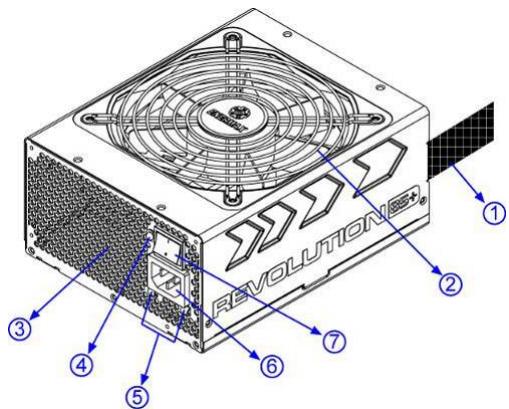
① Output cable: Please check "Cables & Connectors" section.
② 13.5cm fan #1
③ Honeycomb air vent #1
④ PowerGuard LED
⑤ CordGuard #3
⑥ AC Inlet #2
⑦ ON/OFF switch (I=ON, O=OFF) #2
1 To ensure best system cooling, do not block PSU fan's air in-take and air vent area.
This PSU offers a special HeatGuard function. When the system is turned off, or goes into ACPI S3/S4 sleep mode, the PSU fan will keep dissipating the remaining heat for 30 60 seconds and prolonging system lifetime.
2 When assembling or maintaining the system, please remove AC cord from AC inlet, or turn ON/OFF switch into "OFF" position, and wait PowerGuard LED light off. Then you can safely service the system.
3 AC cord can get loose in many ways. The ENERMAX CordGuard lock can fix your AC cord tightly to the PSU, so that it will not be easily detached and avoid shut-downs of your PC. The following is CordGuard installation:
① Set your PSU into the chassis, and please make sure the I/O switch is on “O” position.
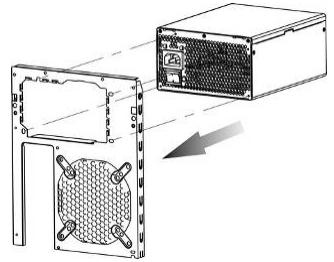
② Press two sides of the CordGuard lock together, and set it into CordGuard holder near the AC inlet.
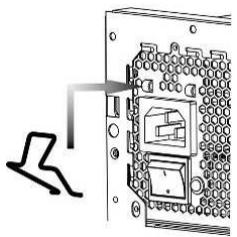
③ Plug the AC cord into your PSU.
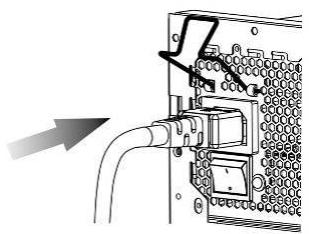
④ Lock CordGuard to latch onto AC cord.
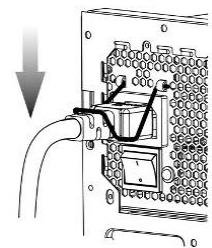
- CordGuard is for AC cords supplied with ENERMAX CordGuard-compatible PSUs. Other AC cords may be incompatible.
- When assembling or maintaining the system, please remove AC cord from AC inlet, or turn I/O switch into "O" position.
CABLES & CONNECTORS
All connectors are designed to prevent insertion in wrong orientation. If you cannot easily insert a connector, please check if you are inserting the connector in the right orientation. Do not try by force to insert it nor modify the connectors. This might damage power supply and system components, and warranty shall be void.
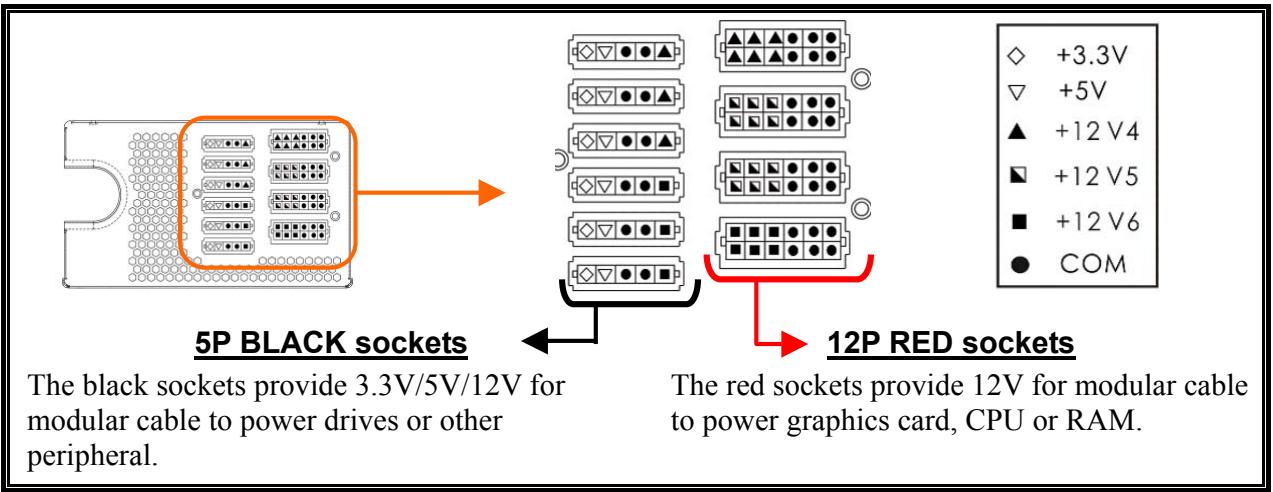
- CONNECTOR TYPES
| 24P Mainboard Native cable, 12V rail supplied by 12V1 For new generations of ATX/EEB/CEB server/workstation MB. | |
| 8P CPU +12V Native cable, 12V rail supplied by 12V1 & V2 Supports multi-CPU server/workstation systems and some single socket systems. | |
| 4+4P (8P) CPU +12V, in combined mode Native cable, 12V rail supplied by 12V1 & V2 8-pin configuration supports multi-CPU server/workstation systems and some single extreme CPU systems. | |
| 4+4P (8P) CPU +12V, in split mode Native cable, 12V rail supplied 12V1 & V2 4-pin configuration supports certain single CPU systems. Some multi-CPU workstation/server system might also need this extra 4-pin 12V connector. Please use the connector with “12V” marking. | |
| 6+2P (8P) PCI Express, in combined mode Native cable, 12V rail supplied by 12V3 8-pin configuration supports latest extreme graphic cards, which require 8-pin PCI-E connector. | |
| 6+2P (8P) PCI Express, in split mode / 6P PCI Express Native cable, 12V rail supplied by 12V3 6-pin configuration supports most performance PCI-E graphic cards, which require 6-pin PCI-E connector. | |
| SATA #1 For SATA/SAS drives. | |
| 4P Molex #2 For IDE/SCSI/SAS drives or some AGP graphic card with traditional 4P power in socket. | |
| FDD For floppy drive or certain add-on card. | |
| FM (FAN RPM MONITOR) #3 For 13.5cm fan RPM detection. Fan speed for 850 / 950 / 1050W models: 700-1500RPM (±10%). Fan speed for 1250W model: 800-1800RPM (±10%). |
1 Some SATA drives might accept SATA or 4P Molex power. Normally, use either one of power connector to power the driver, BUT NOT BOTH! Please check the drive's manual for details.
2 Some MB might require this connector to share the +12V current from 24-pin Mainboard connector to PCI-E slot. If your MB already supports 24-pin Mainboard connector, you may not need to add the 4P Molex connector on it. Please check the MB's manual for details.
3 Most MB offer 2 ~ 4 3-pin system/PSU fan power sockets, but only one or two socket(s) might support the fan RPM signal. If you connect the PSU FM connector on the MB, but BIOS or system monitor software cannot read the PSU fan RPM, please relocate the PSU FM connector to another socket.
- MODULAR CABLES SUPPLIED
Use ONLY genuine ENERMAX modular cables coming with ENERMAX PSU. Third party cables might not be compatible and might cause damage to your PSU and/or system, and use of third party cable shall void PSU warranty.
| EMC012: 3 x 4P Molex (IDE/SCSI) drives Modular cable for IDE/SCSI/SAS drives and other peripherals. | |
| EMC013: 3 x 4P Molex (IDE/SCSI) drives & 1 X FDD connector Modular cable for IDE/SCSI/SAS drives and peripheral, plus 1 FDD power connector. | |
| EMC014: 2 x 6+2P (8P) PCI-E 2.0 Modular cable for 1 or 2 performance PCI Express graphic cards, which needs 6P or 8P PCI-E connector. | |
| EMC017: 4 x SATA drives Modular cable for SATA/SAS drives like ODD and HDD. | |
| EMC018: 8P & 4P +12V CPU/RAM power (optional) Modular cable to support special heavy-duty workstation/server with more than 4 CPUs and 16 RAMs. |
Supplied modular cables might differ by models and in different region.
We offer more optional cables. Please visit our website for more information: www.enermax.com
Special note for System Integrators: If your system requires special modular cable configuration or design, please contact an ENERMAX sales representative.
- ATTACHING / DETACHING THE MODULAR CABLES
| Attaching the modular cable to PSU 5-pin / 12-pin connector on modular cable and PSU's modular socket has an arrow mark. To make correct connection is easy: 1. Black connector to black socket, and red to red. 2. Arrow mark to arrow mark. 3. Then you can easily plug in the connector. | |
| Detaching the modular cable from PSU 5-pin / 12-pin connector on modular cable has two hooks to lock with the PSU's modular sockets. When unplug the modular cable from PSU, please press two hooks together and gently pull out the cable. |
BOOTING YOUR SYSTEM
Before booting your system, please check that:
- Main power connector (24P) is properly connected.
- CPU +12V power connector (4 or 8-pin configuration), and/or a 4P Molex connector (if required by MB) is properly connected.
- All other needed connectors are properly connected.
- AC cord is properly connected to wall outlet and PSU AC inlet.
- Close your system chassis.
- Turn on the PSU by switching the ON/OFF switch to "ON", and your system is ready.
PROTECTION, SAFETY & SECURITY
This PSU features PowerGuard & SafeGuard function to monitor the PSU itself. With tri-color LED, PowerGuard tells you the current PSU status. In case of abnormal situations, the power supply will automatically turn off to avoid potential danger to itself and other system components.
PowerGuard indication
| LED | ON/OFF switch | Information & what to do |
| OFF | OFF | * No AC input - Turn the I/O switch to ON position. |
| OFF | ON | * No AC input or PSU malfunction - Check if AC cable is firmly plugged into wall outlet and AC inlet. If LED still does not turn to orange light, then - Contact ENERMAX service center. |
| Orange | ON | PSU normal and system in standby/ sleep mode |
| Green | ON | PSU normal and system in operation |
| Red | ON | * System abnormal, protection circuit activated. If you push the system power button, and PSU refuse to turn on, the LED turn from orange to red light: - Short-Circuit protection activated. - Completely check if all connectors are correctly inserted, and clean the chassis to prevent undesired objects, which might short circuit any device/terminal. If during system operation, the PSU suddenly shut down - Touch the PSU housing and check if it is hot. If yes, wait till it cool down and restart the system to see if all system fans and PSU fan are running. Add or replace the system fan if required. - If same situation repeat, recheck if all connectors are well connected to system, or redistribute certain drives/PCI-E power to different 12V rail connector. |
If you have any question or need support, please contact your reseller or nearest ENERMAX subsidiary/agent or ENERMAX headquarters service center.
©2009 ENERMAX Technology Corporation. All rights reserved. Specifications are subject to change without prior notice. Actual product and accessories may differ from illustrations. Omissions and printing errors excepted. Content of delivery might differ in different countries or areas. Some trademarks may be claimed as the property of others. Reproduction in any manner without the written permission of ENERMAX is strictly forbidden.
Benutzerhandbuch
Indications PowerGuard
ACCENSIONE DEL SISTEMA
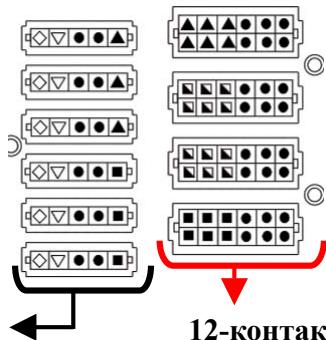
12-KoHTaKTbIe KPACHbIE pa3beMbI
Kpachbie pa3bembl o6ecIeunBaIoT IoJaCy HaprrjKeHH +12B Chepe3 MoJyHbH KabeJIb K rpaΦnueckOMy aHaItepy, IIpoIeessCopam HIN RAM.
BIVI IIOJKJIOUEHNI
| 24-koHTaKTHoe IOdkJIIOUeHne MaTeRnHcKoI IIaTbI BCTrhoENbI Ka6eJIb, +12B ⅢINHa, ΠIITaEmaJor OT 12V1 ДЯ HOBOrO ΠOKOJIeHnI MaTeRnHcKHX ΠIIaT cepBepOB/pa6OuHX cTaNlIeN ATX/EEB/CEB. |
| 8-koHTaKTbI pa3bEm CPU +12B BCTrhoENbI Ka6eJIb, +12B ⅢINHa, ΠIITaEmaJor OT 12V1 n 12V2 ПОДЕРЖИBaET HeCKOJIbKO IIPOUeCCOPOB B cepBepax/pa6OuHX cTaNlIeN . |
| 4+4-koHTaKTbI (8P) CPU +12B KOM6HnHpOBaHbI pa3bEm BCTrhoENbI Ka6eJIb, +12B ⅢINHa, ΠIITaEmaJor OT 12V1 n 12V2 8-koHTaTHa I KOHΦHpyaIIaIIpaIIePjKBaET cepBepa/pa6OuHe cTaNlIeN c MHOJKeCTBOM IIPOUeCCOPOB |
| 4+4-koHTaKTbI (8P) CPU +12B pa3deJIeHbI pa3bEm BCTrhoENbI Ka6eJIb, +12B ⅢINHa, ΠIITaEmaJor OT 12V1 n 12V2 4-koHTaTHa KONΦHpyaIIaIIpaIIePjKBaET yCTapeBIiNe cHCTeMbI c OINHM CPU. ДЯ HeKOTOpbIX pa6OuHX cTAHIIc/cepBepOB c HeCKOJIbKIMN CPU MoJcET ПОТAOБNTcI IOIOJIHNTeJIbHbI 4-koHTaKTHoe 12B ΠOKJIIOUeHne. IcNoJIb3yIte coEdNIHtEJIb c MapKnropOBKoi «12V». |
| 6+2-koHTaKTbI (8P) PCI Express KOM6HnHpOBaHbI pa3bEm BCTrhoENbI Ka6eJIb, +12B ⅢINHa, ΠIITaEmaJor OT 12V3 8-koHTaTHa KONΦHpyaIIaIIpaIIePjKBaET rpaΦHueCKHe KapTbI HOBOrO ПОКЛeHnI, ДЯ KOTOpbIX Tpe6yETcI 8-koHTaKTHoe ΠOKJIIOUeHne PCI-E. |
| 6+2-koHTaKTbI (8P) PCI Express, pa3deJIeHbI pa3bEm / 6P PCI Express BCTrhoENbI Ka6eJIb, +12 B ⅢINHa, ΠIITaEmaJor OT 12V3 6-koHTaTHa KONΦHpyaIIaIIpaIIePjKBaET δOJIbIIHNCTBO rpaΦHueCKHX kapT PCI-E, ДЯ KOTOpbIX Tpe6yETcI 6-koHTaKTHoe ΠOKJIIOUeHne PCI-E. |
| SATA #1 ДЯ ПИВODS SATA/SAS. |
| 4P Molex #2 ДЯ ПИВODS IDE/SCSI/SAS I NeKOTOpbIX rpaΦHueCKHX kapT c TpaDIHIOnHbIM 4-koHTaKTbIM pa3bEOM MIIaTAHIIa. |
| FDD ДЯ ДИСКВОДA ГбКИX ДИСКOB I NeKOTOpbIX ДИПОЛHITeJIbHbIX ПIaT pAcIINHpeHnI. |
| FM (MOHHTOPHHG OBOPOTOB BEHTNJIATOPA BII) #3 ДЯ MOHITOPINHra obopotOB 13,5cm BeHTNIJIaTopa. СkopocStb BvaIeHnI BeHTNJIATopa ДЯ мОдeJIeI 850/950/1050 Bt: 700-1500 RPM (±10%). СkopocStb BvaIeHnI BeHTNJIATopa ДЯ мОдeJIeI 1250 Bt: 800-1800RPM (±10%). |
1ДЯ HeKOTopbIX ПИВODOB SATA IOJXOINT SATA IOJKIHOueHne HIN 4-KoHTaKTbI Molex. KaK IpaBnIO, HcIIJIb3yeTcra TOLbKO OJNO HO IOIKJIIOUeHne IJIa IIITaHnI dpaIBepa, HO HE JBA PA3bEMA OJHOBPEMEHHO! IOpO6Hee cM. INHcTpkyuNIO K PpIBOy.
2 IJIa HeKOTOpbIX MaTePnHcKHX IIaT IOTpe6yETc8 3TO IIOKJIHOueHHe IJIa COBMeCTHOrO
IcIOJIb3OBaHHa TOKa +12 B O T 24-KoHTaKTHOro IIOKJIHOueHn MaTePnHcKOI IIaTbI K cIoTy PCI-E.
EcJIn MaTePnHcKaIIaTa yKe IIOJIepKNaBaET 24-KoHTaKTHOe IIOKJIHOueHne MaTePnHcKOI IIaTbI,
TO IJIa HrO He IOTpe6yETc8 IOIOJIHNTeJIbHbI 4-KoHTaKTTHbIMolex pa3bEm.IIOJpO6Hee cm.
HHCTpyKciuN K MaTePnHcKOI IIaTe.
3 B 60JIbHnHCTBe MaTePHNcKHX IIaT eCt b 2 ~ 8 3/4- KOHTaKTbIX pa3bEmOB IHTaHnBEHTHJrTopa, HO TOJIbKO HeCKOJIbKO pa3bEmOB MOrY IIOJIePjKBaTb MOHITOpHHr O6OpOTOB. BeHTHJIrTopa. EcJIN IIOJKIIOUeHne MOHITOpHHra o6OpOTOB BeHTHJIrTopa BII IIOJCOeDInHeHO K MaTePHNckOJIiATE, HO BIOS IJIIN cIcTeMHbI MOHITOp He MoKeT cHITaTB O6OpOTbI BeHTHJIrTopa BII, BCTaBBte pa3bEm MOHITOpHHra BII B IpyroI pa3bEm.
KOMIIJEKT MOJYJIbHbIX KABEJIEN
HcIOJIb3yIte TOJIbKO opHrHHaJIbHbIe MoJyJIbHbIe Ka6eJIa ENERMAX, IOcTaBJIaEmbIe BMeCTe c bII ENERMAX. Ka6eJIa IpyrHex IprOu3BOdHTeJIe MoYr 6bITb HecOBMeCTHMbI N IOBpeINb bII n/HJIi CNCTeMy, HcIOJIb3OBAHHe Ka6eJIe IpyrHex IprOu3BOdHTeJIe II prNBOdNT K IOTepe rapaHTnHa bII.
IIOKJIIOHHeMoUyJBHBxKabeJeIe K PSU
5-KoHTaKTHoe / 12-KoHTaKTHoe IIOKJIIOueHHe Ha MOyJIbHOM Ka6eJIe H MoIyJIbHbI pa3bEm BII o6O3HaueHbI cTpeJIkamn.
IIy npoHn npaBnIbHO IOKJIOeHn:
- UepHbI coeHHHTeJIb BCTaBJIaETcR B UepHbI pa3bEm, a KpaCHbI B KpaCHbI.
- CtrpeJIka IOJIJKHa HAppaBJIaTbc8c K CTpeJIke.
- TeIepb MoKHO JIeKIO BCTaBHTb pa3bem.
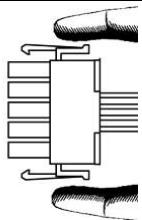
OrkJIOUeHHe MoyJbHbIX Ka6eJIeI oT BII
5-KoHTaKTHoE / 12-KoHTaKTHoE IOKJIIOueHHe OcHaIeHO IByMЯ ФИКcaTOPaMH, ФИКсИpyIOUIMHСЯ Ha MOДуЛьнБIx pa3bEmax BII. ДЯ OTCOeIINHeHЯ MOДуЛьНOrO Ka6JIЯ OT BII, COJKMITE, IOJkaJIyIcTa, ДЯ ФИКcaTOPa ПО NaIIpaBJIeHnIO ДPyT K ДPyTu И aKKypaTHO BbITЯHITe pa3bEm Ka6JIЯ.
CBOPKA CHCTEMBI
- JIaBHyb pa3bEm IINTaHnIpaBnJIbHo IOJKJIIOUeH (24-KOHrakTHa KOnΦnrypaa).
- Pa3bem IIHTaHnI IIT +12B (4- HJIN 8-KoHTaKTHaJa KOHfHypaIIH) n (HJIN) 4-KoHTaKTbIMolex-pa3bem (ecJIIN Tpe6yeTcraJI MaTePHNcKoi IIJAtBi) IIpaBNIbHO IOIOJIIOHeHbI
- Bce ocTaJIbHbIe Heo6xoIIMbIe pa3beMbI IpaBnJIbHO IOJKJIIOueHbI.
- Ka6eJIb IINTaHnI IepMeHHORO TOka HaJIeJkaIIHM O6pa3OM IIOJIKJIIOueH K 3JIeKTprUeCKoI pO3eTKe I BxOJHOMy THe3Iy IepMeHHORO TOka BII.
- Kopnyc ПК зakpbrt.
- Bклочи Te BП, yctahOBHB npeKJIIOUaTeJB «BкЛ./ВыКЛ.» B IIIOJOKeHne «ВКЛ.» - chCTema rOTOBa K pa6Ote.
3AIIHTA, MEPbI IPEJOCTOPOXHOCTN IIIPABUNIA TEXHNIK N E30JIACHOCTN
FM (MONITOR OBR/MIN. WENTYLATORA) #3
©2009 ENERMAX Technology Corporation. All rights reserved. Specifications are subject to change without prior notice. Actual product and accessories may differ from illustrations. Omissions and printing errors excepted. Content of delivery might differ in different countries or areas. Some trademarks may be claimed as the property of others. Reproduction in any manner without the written permission of ENERMAX is strictly forbidden.
使用说明书
亲爱的使用者:
PSU HeatGuard ACPI S3/S4 PNPSU 30-60
2 wuuswunwunwunwunwunwunwunwunwunwunwunwunwunwunwunwunwunwunwunwunwunwunwunwunwunwunwunwunwunwunwunwunwunw
3 3nauuueauuauuAC uuaaauauu PSU CndGuardanuauu AC 1PSU aunuuuuu uauauau AC uauauauauu PSU PC shut-down
3 uuuuauuunuunuunuunuunu unu PSU/uuuuu 3 pin a2~4 uuu uuuuuuuuuuuuuuuuuuuuuuuuuuuuuuuuuuuuuuuuuuuuuuuuuuuuuuuuuuuuuuuuuuuuuuuuuuuuuuuuuuuuuuuuuuuuuuuuuuuuuuuuuuuuuuuuuuuuuuuuuuuuuuuuuuuuuuuuuuuuuuuuuuuuuuuuuuuuuuuuuuuuuuuuuuuuuuuuuuuuuuuuuuuuuuu uu
#
ENERMAX wavn nwnw ENERMAX PSU uu uuuuauuauuauuuuuuuuuuuuuuuuuuuuuuuuuuuuuuuuuuuuuuuuuuuuuuuuuuuuuuuuuuuuuuuuuuuuuuuuuuuuuuuuuuuuuuuuuuuuuuuuuuuuuuuuuuuuuuuuuuuuuuuuuuuuuuuuuuuuuuuuuuuuuuuuuuuuuuuuuuuuuuuuuuuuuuuuuuuuuuuuuuuuuuuuuuuuuuuuuuuuuUU
PSU 100
PSU 100
PSU 100
PSU 100
PowerGuard indication
©2009 ENERMAX Technology Corporation. 2009 ENERMAX Technology Corporation.