EasyManual
YS1035 - Guitar amplifier TRAYNOR - Free user manual and instructions
Find the device manual for free YS1035 TRAYNOR in PDF.


User questions about YS1035 TRAYNOR
0 question about this device. Answer the ones you know or ask your own.
Ask a new question about this device
Download the instructions for your Guitar amplifier in PDF format for free! Find your manual YS1035 - TRAYNOR and take your electronic device back in hand. On this page are published all the documents necessary for the use of your device. YS1035 by TRAYNOR.
USER MANUAL YS1035 TRAYNOR
The Owner's Manuals should be read and understood before operation of your unit. Please, save these instructions for future reference.
Packaging
Keep the box and packaging materials, in case the unit needs to be returned for service.
Warning
When using electric products, basic precautions should always be followed, including the following:
Power Sources
Your unit should be connected to a power source only of the voltage specified in the owners manual or as marked on the unit. This unit has a polarized plug. Do not use with an extension cord or receptacle unless the plug can be fully inserted. Precautions should be taken so that the grounding scheme on the unit is not defeated.
Hazards
Do not place this product on an unstable cart, stand, tripod, bracket or table. The product may fall, causing serious personal injury and serious damage to the product. Use only with cart, stand, tripod, bracket, or table recommended by the manufacturer or sold with the product. Follow the manufacturer's instructions when installing the product and use mounting accessories recommended by the manufacturer.
The apparatus should not be exposed to dripping or splashing water; no objects filled with liquids should be placed on the apparatus.
Terminals marked with the "lightning bolt" are hazardous live; the external wiring connected to these terminals require installation by an instructed person or the use of ready made leads or cords.
Ensure that proper ventilation is provided around the appliance.
No naked flame sources, such as lighted candles, should be placed on the apparatus.
Power Cord
The AC supply cord should be routed so that it is unlikely that it will be damaged. If the AC supply cord is damaged DO NOT OPERATE THE UNIT.
Service
The unit should be serviced only by qualified service personnel.
INSTRUCTIONS RELATIVES AU RISQUE DE FEU, CHOC ÉLECTRIQUE, OU BLESSURES AUX PERSONNES
AVIS:
AFIN DE REDUIRE LES RISQUE DE CHOC ELECTRIQUE, N'ENLEVEZ PAS LE COUVERT (OU LE PANNEAU ARRIERE) NE CONTIENT AUCUNE PIECE REPARABLE PAR L'UTILISATEUR.
CONSULTEZ UN TECHNICIEN QUALIFIE POUR L'ENTRETIENT
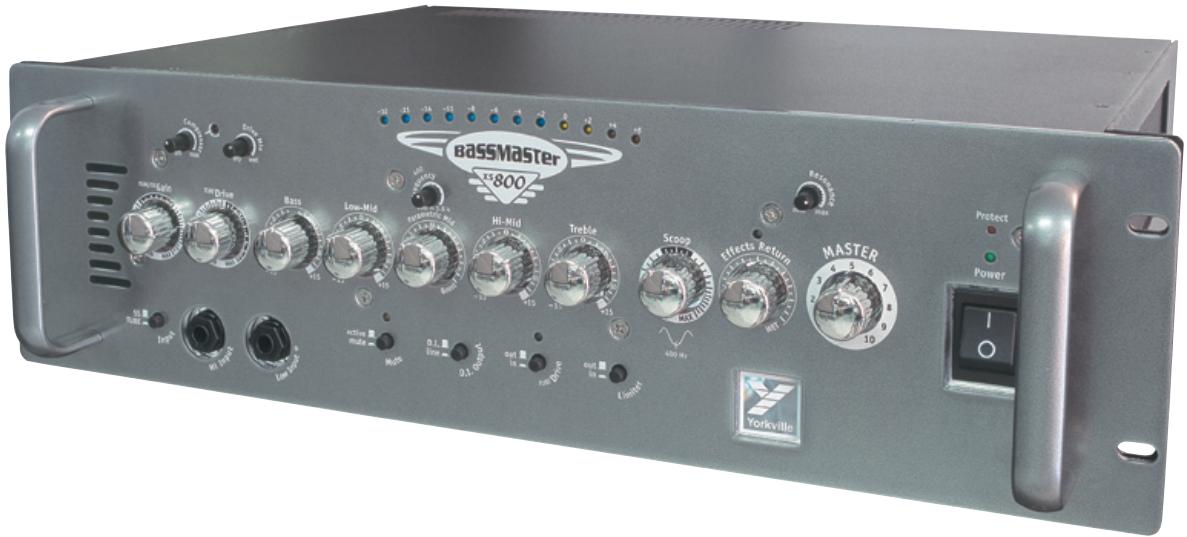
Thank you for choosing the Bassmaster XS800H. This advanced bass amplifier is extremely versatile, delivering a wide spectrum of tonal performance characteristics. More importantly, it has the ability to sound right with a minimum amount of knob twirling.
When you need the extras, they're all here:
- Selectable Solid-State or Tube input gain
- Inputs for either Passive (0 dB) or Active basses (-6 dB).
- A tube preamp, for warmth, and a solid-state output stage for definition.
- Gain and TUBEDrive controls let you dial-in the perfect blend of warmth and even overdrive.
- The TUBEDrive circuit can be activated by using the switch on the front panel or by using an optional footswitch.
- The Drive Mix control let's you dial-in the amount of tube drive.
- The Scoop control lets you tailor your sound precisely and uniquely.
- The Resonance control allows you to tweak the bass tone from tight to loose.
- Five-band, active tone shaping controls. Including a fine-tunable Parametric Mid
- External effects patching with an Effects Return level control and footswitch jack.
- An easy-to-use Compressor circuit provides even more detailed control of your tonal quality.
- A separate, selectable Limiter circuit helps prevent output-stage from clipping.
- A Tuner Out jack lets you keep your tuner connected (and always) available for quick reference and adjustments. The Mute button lets you ensure that the audience doesn't hear you tuning!
- Balanced 1/4 -inch TRS and XLR line outs selectable between DI or Line.
- Speakon™ and 1/4-inch speaker outputs (all jacks are in parallel, min 2-ohm load).
- Rack-mountable in any standard 3U (three space) rack case or rack-bag, like Yorkville's padded RACKBAG-3
Please take a little time to read the following instructions; then plug in, switch on, and enjoy your flight...
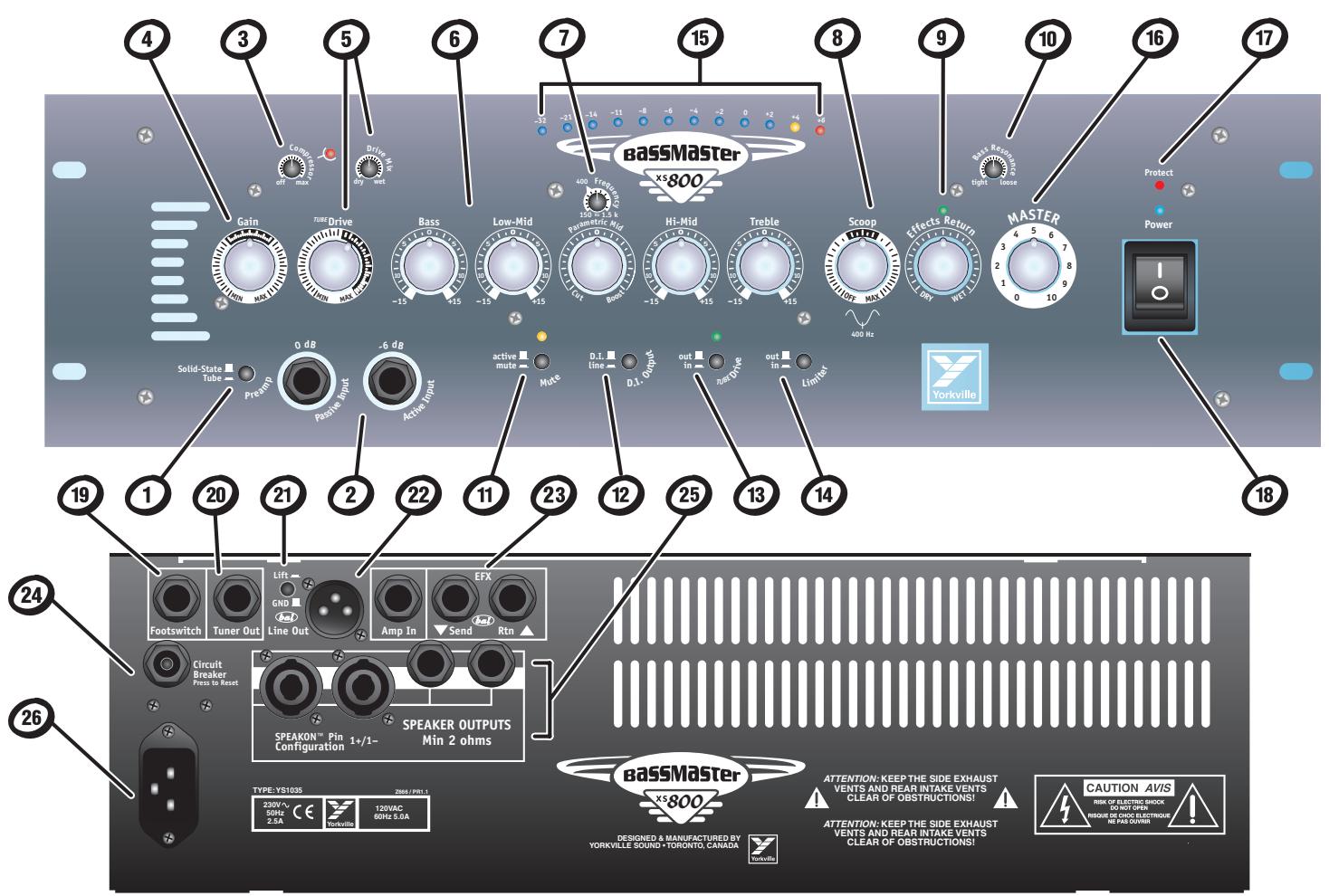
- Tube and Solid-State preamp mode switch
- Passive and Active input jacks
- Adjustable Compressor
- Gain Control
- TUBEDrive Mix and TUBEDrive Control
- 5-Band Tone Controls
- Semi-Parametric Mid Tone Control
- Scoop Control
- Effects Return Control and LED
- Bass Resonance Control
- Mute Switch
- D.I. / Line Selector Switch
- TUBEDrive Switch
-
Switchable Limiter
-
Blue-VU meter with peak hold.
- Master Control
- Protect LED
- Power LED and Power Switch
- TUBE Drive and Effects Return Footswitch
- Tuner Out
- Ground Lift Switch
- Amp In and Line Out Jacks
- Effects Send and Return Jacks
- Circuit Breaker
- 1/4-inch and Speakon™ Speaker Output Jacks
- AC Power connector
Blue-Power Switch & LED
The blue-Power LED will illuminate when the unit is turned on.
Preamp Select Switch
Depending on your preference, choose either solid-state or tube gain input for the preamp.
Passive 0dB & Active -6dB Input Jacks
Use the Passive Input (0 dB) for bass guitars that have passive electronics (such as single-coil, split-coil and Humbucking pickups). Use the Active Input (-6dB) for hot, or active pickups. These inputs are not intended for connecting more than one instrument at a time.
Tip: Using the -6dB input when playing your bass (passive or active) at full gain, and you pluck the strings hard will reduce the potential of input clipping.
Gain Control
The Gain control is a volume adjustment for the preamp, which is selectable between using solid-state or tube circuitry. The tube circuitry features a single 12AX7A, dual-triode preamp tube. The Gain control should normally be set around the middle, which should be the position for most basses. If your bass has an unusually low output, increase the Gain control to the desired level, conversely for higher output basses use a lower setting. Increasing the Gain control also affects the level of drive when the Tube-Drive feature is engaged.
Compressor
To increase the consistency of your tone and further the performance of the power amplifier, we have provided an adjustable compressor. This compressor is fairly simple to use, with only a simple threshold control to make adjustments. The compression ratio is 2:1 and the attack / release-time is preset for optimally.
Tip: To use the Compressor, rotate the control clockwise until the desired threshold is reached. It will be apparent to you audibly as well as visually; a red LED (located to the right of the control) will illuminate as the compressor limits the signal. The LED will also indicate the how much compression is being applied by its intensity and duration.
TUBEDrive Control
The TUBEDrive feature controls the amount of tube-overdrive, or saturation, in the signal. The tube-overdrive is powered by a 12AX7A, dual-triode preamp tube. Activate the circuit by depressing the TUBEDrive mode switch or using the optional footswitch. The green LED, above the TUBEDrive switch, will illuminate indicating TUBEDrive mode is active. To achieve higher levels of overdrive, increase the Gain control at the preamp stage. If you want your overdrive level to go beyond the usual threshold, into absolute meltdown, increase the TUBEDrive control fully clockwise. (Instead of stopping at 10 we made the TUBEDrive control go beyond, into uncharted territories of overdrive.) Nudge the knob just a little into the extreme of MAX, listen to the gain level take off. Naturally, there will be some extra noise coming out of the amplifier at this high setting. This is normal, and a perfectly acceptable tradeoff, when achieving so much overdrive.
Tip: Many unique sounds can be obtained by changing some controls in conjunction with the TUBE Drive control. Some bassists prefer minimal distortion with a lot of Scoop, some may prefer massive overdrive (and lots of midrange growl) and others may go for that deep dry bass. These sounds can be achieved easily by adjusting the Scoop, the Tube-Drive and the Tube-Drive's Mix controls in conjunction with each other.
Drive Switch
The TUBEDrive switch is located on the front panel and is used to activate the TUBEDrive overdrive circuit. The circuit can also be activated by an optional footswitch (AFS-2). A green LED, located directly above the TUBEDrive switch, will illuminate.
Drive Mix Control
The Drive Mix control becomes active when the TUBEDrive mode is activated. This control blends an underlying clean tone below the overdriven tone. In the Dry, counter-clockwise setting, clean signal is allowed to dominate the mix, with no overdrive. When rotated clockwise, into the Wet region, the overdriven sound becomes more apparent. The TUBEDrive overdrive will continue to increase until it is the dominant sound in the mix (fully Wet position). This helps you achieve a perfect Wet/Dry blend, between a completely clean and a completely saturated overdrive tone. This is a unique and handy feature that allows unheard of levels of tonal control.
Tone Controls
The five overlapping controls cover the entire audio spectrum. Each tone control permits a wide range of sonic adjustment. Each tone control has a variable boost and/or cut of 15 db. The center position denotes a neutral or nominal setting.
Tip: It's a good idea, when starting out, to center all tone controls. While playing, adjust them until you achieve the desired sound. Remember, if the Parametric Mid control is set at 0, rotating the Frequency control will have no effect. The Bass control adjusts the level of the lowest note frequencies, Low-Mid the next range up from that. The Parametric Mid allows more precise control for the mid frequencies - more on this below). The Hi-Mid covers the highest notes and middle harmonics and the Treble regulates the upper harmonic range.
Parametric Mid Control
The Parametric Mid control enables adjustments to be centered on frequencies ranging from 150Hz - 15kHz .

Tip: To use this control, set the position of the Parametric Mid level control to cut or boost. Rotate the Frequency control until the desired frequency range is found. Once the frequency range is chosen, adjust the Parametric Mid level until the desired cut or boost level is achieved.
Tip: Using the Parametric Mid in conjunction with the Scoop feature. When using the Parametric Mid, it's possible to enhance the Scoop's capabilities by letting the two tone-shaping controls work in tandem. If you like the added bottom of the Scoop but wish to soften the midrange at 1Kz (but still maintain the higher frequencies); adjust the Parametric Mid Frequency control to 1.0Kz and then use the Parametric Mid level control to cut as much as you need. The 400 Hz frequency has been conveniently marked on the Parametric Mid's Frequency control.
Scoop Control
The Scoop enhances the tone of the bass by shaping the mid frequencies around 400Hz . By shaping the bottom-end fundamentals, and high frequency brilliance, subtleties normally hidden are revealed. The Scoop shapes specific upper and lower frequencies while notching particular mid frequencies. It utilizes a variable tone curve that reacts differently depending on where it is set. The result is a greatly expanded tonal range and control over that tone. Its fundamental use is like the traditional Scoop control found on our other popular Yorkville Bassmaster amplifiers, but with greatly expanded dimension and tonal control. As shown on the front panel, the center frequency of the scoop is centered around 400Hz . If you desire more scoop, turn the parametric mid frequency control to 400 and the gain counter-clockwise until the desired amount is reached
Tip: As with the tone controls, it's recommended to set the Scoop control initially at the mid point. Adjust it slowly, either way, until the desired tone is achieved.
Tip: Combine the Scoop, the TUBE Drive and Drive Mix for unparalleled levels of tonal control. Set the TUBE Drive and the Drive Mix to their maximums and play your bass while slowly rotating the Scoop from its off position to its MAX position, you'll find the variation in the effect to be quite dramatic and yet very musical at the same time.
Effects Return Blend Control
A dry, un-affected signal is sent out through the EFX Send jack to external effects units, it then can return to the amplifier through the Effects Rtn jack. The Effects Rtn blend control regulates how
much of the wet (effected signal) is blended with the dry signal (un-effected signal). This can range from totally dry (without effects) to mostly wet (effects applied).
Tip: If a wetter signal is desired, set the output signal from the external effects processor to a high output.
Bass Resonance control
The Bass Resonance control adjusts the amount of low frequency damping of the amplifier. Turning the control clockwise towards loose reduces the damping factor and allows the resonance of the speaker cabinet to be more pronounced. Setting the control towards tight increases the damping factor to help achieve a punchier sound.
Selectable Limiter
In order to prevent hard clipping of the power amplifier, a selectable limiter is provided.
Master Volume Control
The Master volume control allows adjustment to the overall signal level of the amplifier.
Blue-VU Meter
The 12 LED VU-meter monitors the overall signal going into the power amplifier. The amber LED indicates that the signal is approaching maximum input to the power amplifier and a red LED indicates the signal has exceeded its maximum (and clipping may occur). A peak-hold function allows the highest signal LED, tracked by the VU meter, to remain momentarily lit allowing users to monitor the output while playing.
Protect LED
The red Protect LED displays the status of the internal protection circuitry. When the XS800HH is initially powered up internal protection circuits are activated, no output will be heard until the red Protect LED automatically shuts off. In a rare case of amplifier shutdown or if the output is shorted, the amplifier will take approximately 15-20 seconds to re-initialize and obtain full power.
Mute Switch
The Mute switch disengages the preamp signal from the Line Out and power amplifier, disabling signals sent to the mixing console and speaker cabinets. The Tuner Out jack is still enabled (see Tuner Out in the Rear Panel section).
Rear Panel
Dual Footswitch Jack (Tube-Drive and EFX-Return)
A dual footswitch jack can be used to switch the TUBEDrive and the external Effects on and off.
The footswitch uses a standard TRS 1/4 -inch based dual footswitch (AFS-2). When either effect is switched on, corresponding LED's on the amplifier and the foot switch will illuminate on and off together. The Effects are only switchable by the footswitch, but the TUBEDrive can be enabled/disabled by either the footswitch or the switch located on the front panel. The footswitch control will override the front panel switch.
Tuner Out
The Tuner Out 14 -inch jack sends the signal from your bass guitar to an outboard instrument tuner. Simply connect one end of a 14 -inch shielded cable to the Tuner Out jack and the other to the instrument tuner. Pressing in the Mute button will mute the output to the speakers as well as to the line out.
Tip: Leave your tuner connected to the Tuner Out jack and Mute the signal any time you wish to tune in silence. A very handy feature when onstage and the unpleasant sound of tuning is not something you wish the audience to hear amplified through your performance speakers or the sound system.

XLR Balanced Line Out Jack
Located at the rear, this jack is used to connect directly to mixing consoles. Use this when performing live or recording in the studio. Selecting the D.I. option in the D.I. Output mode selection switch (located on the front panel) provides a pre-EQ and pre-EFX signal while the Line option sends the signal post-EQ and post-EFX. A Ground Lift switch, located beside the XLR jack, lifts the balanced Line Out ground (pin1) when pushed in.
Note: When the Mute switch is engaged, a signal will not be sent to the mixing console through the XLR output.
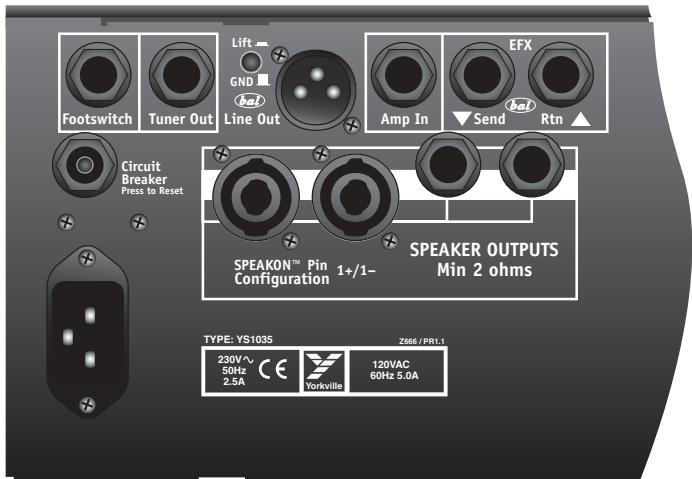
Ground Lift Switch
The Ground Lift switch is located next to the balanced Line Out XLR on the rear panel. If hum is detected, when connecting from the balanced Line Out XLR to a mixing console (or other audio device), lift the ground (pin 1) by pressing the Ground Lift switch in.
Amp In 1 / 4 -inch Jack
The balanced Amp In jack is located on the rear panel of the XS800H. The Amp In jack provides a direct path to the XS800H's power amplifier, bypassing the preamp. The Master control still controls the overall output level. Multiple XS800H's can be linked together by using the signal XS800H's balanced XLR Line Out to additional XS800H Line In jacks.

Effects Send 1 / 4 -inch Jack
External effects processors are provided with a balanced post-EQ signal from the Effect Send jack.
Note: This jack can also be used as additional line out for sending signals to another power amplifier. The output of this jack is not muted when the Mute switch is enabled.
Effects return 1 / 4 -inch Jack
This balanced jack is used to return effects processed audio signal back into the XS800H. The Effects Return control, located on the front panel, regulates the blend of effected and un-affected signal. This input can also be used as an auxiliary input for mixing in a secondary source of audio such as pre-recorded music.
Output Jacks
The 1/4 -inch and Speakon™ jacks are used to connect extension speaker cabinets. All speaker output jacks are in connected in parallel, minimum load impedance is 2-ohms (e.g. two 4-ohm or four 8-ohm cabinets).
Cooling System
Two 3-inch fans cool the XS800H. The fans are run at low speed, the speed increases depending on how hard the amplifier is working. The air intake vents are located at the rear of the amplifier and on the top (near the back). The exhaust vents are located at the sides.
Caution: The rear vent must be kept clear in order for the air to enter into the amplifier. The side vents are used to allow the warm air out of the unit. At least an inch clearance for each side should be allotted. The rear of the unit should always remain unobstructed. Rack-mounting the XS800H will not affect intake/exhaust airflow as long as the rear of the rack casing is open during operation.

Preamp Tube Replacement
Use only Yorkville Sound part number "12AX7SORTED" when replacing preamplifier tubes as they have been specifically selected for this product. Please refer to the Service Manual for more information.
baSSMaSTER
XS800
Specifications
Type Bass Head
Power @ min. impedance (Watts)
Minimum Impedance (Ohms)
Burst Power - 2 cycle
Frequency Response (Hz +/-3dB)
Hum and Noise (dB)
Input Channels
Channel 1 - inputs
Channel 1 - controls
Channel 1 - switches
Master Volume Control
Input Sensitivity (mV)
Master Outputs
Line Out (type / configuration)
Line Out Sensitivity (Vrms)
Effects Loop / Location
Effects Footswitch / Function
Effects Return Sensitivity (Vrms)
LED Indicators
Protection
Limiter / Switchable
External speaker output / location
Headphone Jack
Other Features
Dimensions (DWH, inches)
Dimensions (DWH, cm)
Weight (lbs / kg)
600 @8 ohms / 800 @4 ohms / 600 @2 ohms
2
1000 Watts
20hz - 20khz
-90dB Unweighted / -94db A weighted
1
2x 1/4 inch, 0dB / -6dB
5 Band EQ w/ parametric sweepable mid, Tube Gain
Limiter, Compressor, Tube Drive, Tuner Mute
Yes
80
SpeakonTM, 1/4 inch (x2)
Pre/Post EQ - XLR, Bal TRS
1
Rear
Tube Drive / Effects Loop
1
Power, Tube Drive, Compressor, Mute, EFX Rtn
Thermal, Short Circuit
Yes / Yes (Output Clip Limiter)
2 × 1/4 inch, 2 × Speakon™
N
Amp In (rear)
Parametric Mid
Wet/Dry Blend on EFX Return
Wet/Dry Control on Drive mode
Adjustable Compressor
Tuner mute switch and 1/4" tuner out jack
Bass Resonance
Tube/Solid State input selector switch
12 LED Output power display with Clip indicator
13 × 19 × 5
33 × 48 × 13
25/11.4
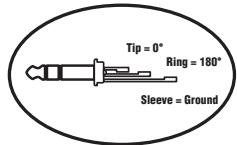
1/4-inch T.R.S.
Phone Plug
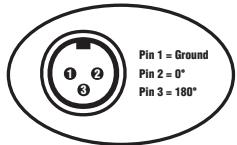
XLR Plug
(Male)

Le Bassmaster XS800H
Pre/Post EQ - XLR, Sym PBM
1
Arrière
Alimentation, Tube Drive, Compressor, Mute, retour EFX
Thermale, Court Circuit
Niagara Falls, New York
14305 USA
Voice: (716) 297-2920
Fax: (716) 297-3689