
YS1062 - Guitar amplifier TRAYNOR - Free user manual and instructions
Find the device manual for free YS1062 TRAYNOR in PDF.



User questions about YS1062 TRAYNOR
0 question about this device. Answer the ones you know or ask your own.
Ask a new question about this device
Download the instructions for your Guitar amplifier in PDF format for free! Find your manual YS1062 - TRAYNOR and take your electronic device back in hand. On this page are published all the documents necessary for the use of your device. YS1062 by TRAYNOR.
USER MANUAL YS1062 TRAYNOR
B A S S G U T A R A M P L I F I E R
IMPORTANT SAFETY INSTRUCTIONS

This lightning flash with arrowhead symbol, within an equilateral triangle, is intended to alert the user to the presence of uninsulated "dangerous voltage" within the product's enclosure that may be of sufficient
magnitude to constitute a risk of electric shock to persons.
RISQUE DE CHOC ELECTF NE PAS OUVRIR

S2125A

The exclamation point within an equilateral triangle is intended to alert the user to the presence of important operating and maintenance (servicing) instructions in the literature accompanying the appliance.
Instructions pertaining to a risk of fire, electric shock, or injury to a person
CAUTION: TO REDUCE THE RISK OF ELECTRIC SHOCK,DO NOT REMOVE COVER (OR BACK).
NO USER SERVICEABLE PARTS INSIDE.
REFER SERVICING TO QUALIFIED SERVICE PERSONNEL.
Read Instructions: The Owner's Manual should be read and understood before operation of your unit. Please, save these instructions for future reference and heed all warnings.
Clean only with dry cloth.
Packaging: Keep the box and packaging materials, in case the unit needs to be returned for service.
Warning: To reduce the risk or fire or electric shock, do not expose this apparatus to rain or moisture. Do not use this apparatus near water!
Warning: When using electric products, basic precautions should always be followed, including the following:
Power Sources
Your unit should be connected to a power source only of the voltage specified in the owners manual or as marked on the unit. This unit has a polarized plug. Do not use with an extension cord or receptacle unless the plug can be fully inserted. Precautions should be taken so that the grounding scheme on the unit is not defeated. An apparatus with CLASS I construction shall be connected to a Mains socket outlet with a protective earthing ground. Where the MAINS plug or an appliance coupler is used as the disconnect device, the disconnect device shall remain readily operable.
Hazards
Do not place this product on an unstable cart, stand, tripod, bracket or table. The product may fall, causing serious personal injury and serious damage to the product. Use only with cart, stand, tripod, bracket, or table recommended by the manufacturer or sold with the product. Follow the manufacturer's instructions when installing the product and use mounting accessories recommended by the manufacturer. Only use attachments/accessories specified by the manufacturer
Note: Prolonged use of headphones at a high volume may cause
health damage on your ears.
The apparatus should not be exposed to dripping or splashing water; no objects filled with liquids should be placed on the apparatus.
Terminals marked with the "lightning bolt" are hazardous live; the external wiring connected to these terminals require installation by an instructed person or the use of ready made leads or cords.
Ensure that proper ventilation is provided around the appliance. Do not install near any heat sources such as radiators, heat registers, stoves, or other apparatus (including amplifiers) that produce heat.
No naked flame sources, such as lighted candles, should be placed on the apparatus.
Power Cord
Do not defeat the safety purpose of the polarized or grounding-type plug. A polarized plug has two blades with one wider than the other. A grounding type plug has two blades and a third grounding prong. The wide blade or the third prong are provided for your safety. If the provided plug does not fit into your outlet, consult an electrician for replacement of the obsolete outlet. The AC supply cord should be routed so that it is unlikely that it will be damaged. Protect the power cord from being walked on or pinched particularly at plugs. If the AC supply cord is damaged DO NOT OPERATE THE UNIT. To completely disconnect this apparatus from the AC Mains, disconnect the power supply cord plug from the AC receptacle. The mains plug of the power supply cord shall remain readily operable.
Unplug this apparatus during lightning storms or when unused for long periods of time.
Service
The unit should be serviced only by qualified service personnel. Servicing is required when the apparatus has been damaged in any way, such as power-supply cord or plug is damaged, liquid has been spilled or objects have fallen into the apparatus, the apparatus has been exposed to rain or moisture, does not operate normally, or has been dropped.
SUVEZ TOUTES LES INSTRUCTIONS
DynaBass 300 Bass Guitar Amplifier
DynaBass 300/300T
Thank you for choosing the DynaBass 300. You will discover that this bass amplifier has the ability to sound "right" with a minimum amount of knob twirling and delivers great tone making it perfect for your any performance. Best of all its lightweight, compact design will make setups/teardowns a great deal easier.
When you need the extras, they're all here:
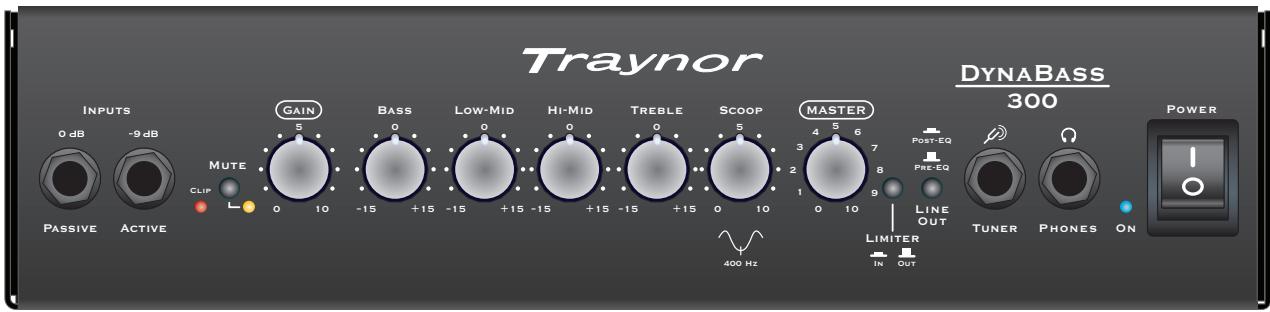
- Dual Inputs are provided for standard Passive pickups (0 dB) and extra-hot or Active pickups (-9 dB).
- An input Clip LED illuminates if the input signal is set too high on your bass.
- Gain and Master controls let you dial-in the perfect amount of clarity, warmth or even overdrive at the right level.
- The Scoop control lets you tailor your sound precisely and uniquely by emphasizing lows and highs while reducing the midrange.
Active Bass, Low-Mid, Hi-Mid and Treble tone controls provide up to 15dB of cut or boost - A separate selectable Limiter helps prevent output-stage clipping distortion when clarity is what you seek.
- A separate Tuner Out jack lets you keep your tuner connected without affecting your signal quality. This also makes tuning convenient since it's always available for quick reference and adjustments. Using the Mute button ensures that the audience doesn't hear you tuning.
- The balanced XLR Line Out is selectable via front-panel pushbutton between Pre-EQ (dry) or Post-EQ (wet).
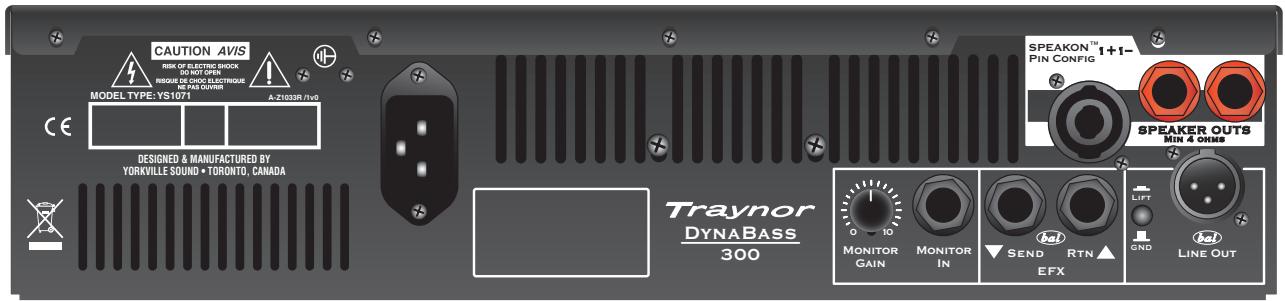
- A Speakon™ and two 1/4-inch Speaker Outputs are provided for your convenience. All jacks are in parallel and the overall minimum load is 4 ohms.
- The Phones jack permits connecting headphones for silent practicing, or monitoring yourself in the studio
- A unique Monitor In jack and Monitor Gain control on the back panel allows you to mix in a main or monitor line feed from the mixer. The line feed sent through the Monitor In jack does not get sent to the Line Output (DynaBass 300 and 300T Combos only)
Balanced 1/4 -inch Efx Send and Return jacks - A full-range speaker system with acoustically matched and precisely crossed-over low and high-frequency drivers (DynaBass 300 and 300T Combos only)
- A Tweeter Defeat/Active switch on the back of the cabinet allows you to pre-set the DynaBass 300 for higher note definition or a softer vintage sound (DynaBass 300 and 300T Combos only)
Please take a little time to read the following instructions; then plug in, switch on, and unleash your musical creativity!
Traynor
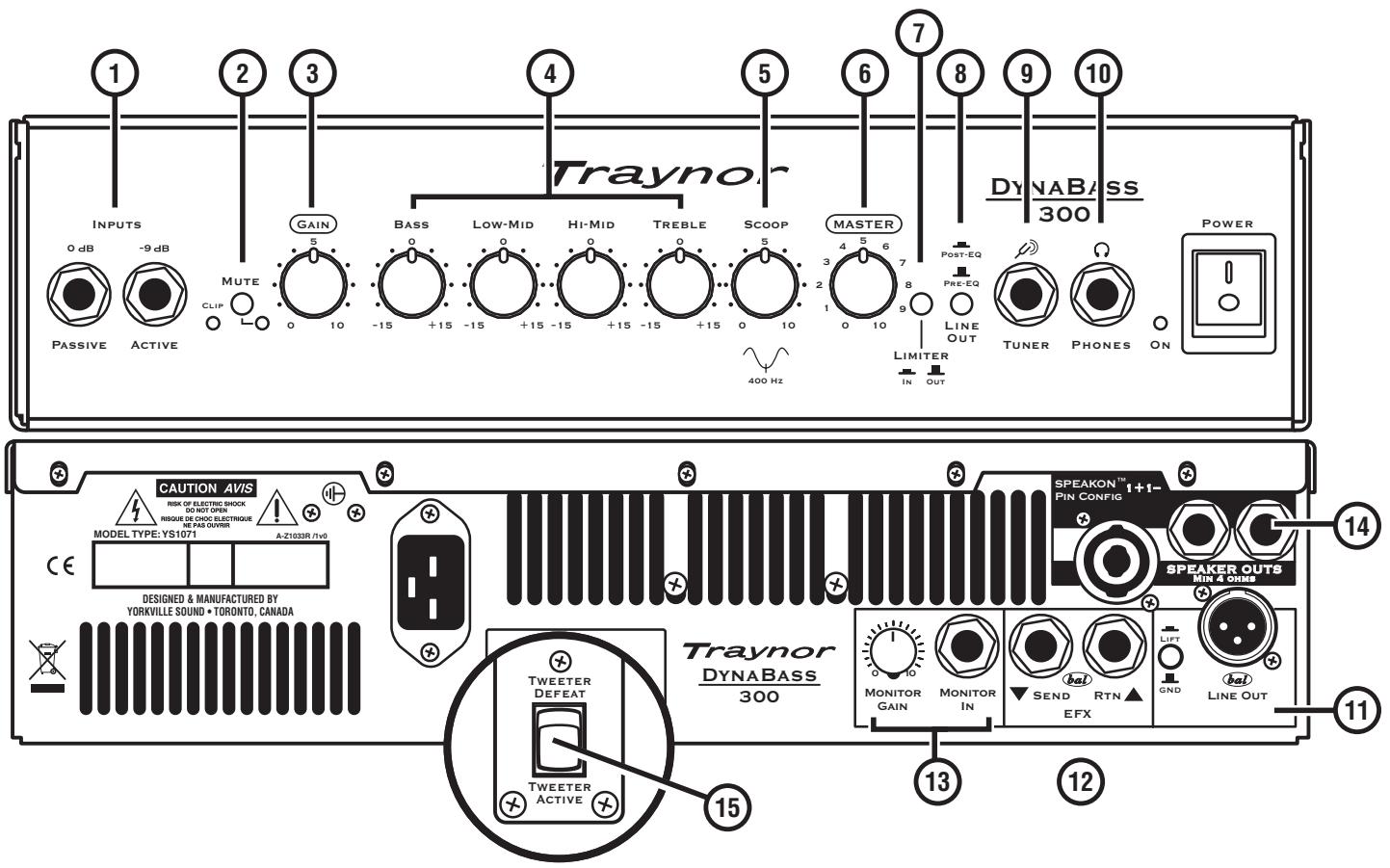

1. 0dB/Passive and -9dB/Active Inputs and Clip LED
For optimum clarity, use the 0dB input for bass guitars with standard single-coil pickups or the -9dB input for active or extremely 'hot' pickups such as humbuckers. For an overdriven edge or "crunch," use the 0dB input. In either case, the Gain control setting will be a factor in establishing the type of clean or overdriven sound you prefer.
User Tip: Do not use both inputs at the same time to connect a second bassist or other musician. The preamp is not designed for more than one instrument to be played at a time.
The DynaBass 300 input circuit has been designed for most basses but all basses have not been created equally. Some basses have higher signals while others have very low signals. The Clip LED on the DynaBass 300 illuminates when the input signal exceeds the amps input range. If the LED illuminates, lower the volume on the bass until the illumination ceases.
2. Mute Button
As an aid to tuning your bass silently, the mute function disengages the preamp signal from all outputs (Line Out, Efx Send, Phones and the amp's speaker) except the Tuner jack.
3. Gain Control
The DynaBass 300 Gain control allows you to set the level of the signal before it's sent to the tone controls. This allows control of the tonal 'sensitivity' or 'definition' of the amplifier. Higher Gain settings will give more 'grow' to your bass.

4. Tone Controls
The four overlapping tone controls cover the entire audio spectrum and permit a wide range of sonic adjustment. Each tone control has a range of ± 15 db. The center position denotes a neutral or nominal setting. The Bass control adjusts the level of the low frequency; Low Mid, the next frequency range up). Hi Mid covers a higher frequency range and the Treble control regulates the upper frequency range.
User Tip: When starting out, it's a good idea to center all tone controls. Adjust these controls while playing until you achieve the desired tone. Keep in mind that all tone and EQ circuits are gain-related, which means it may be necessary to re-adjust the Gain control once the desired tone is achieved. This will help you to retain the amount of clarity or 'grow' you desire.
5. Scoop Control
The Scoop modifies the tone of the bass by reducing the gain throughout the mid frequencies around 400Hz while slightly boosting the low and high-frequency gain. By re-shaping the frequency response in this manner, the Scoop provides an expanded tonal palette.

User Tip: The Scoop's midrange dip is actually at maximum with the control set at "0". There is no midrange response dip with Scoop set on "10" thus, if you prefer a more note-defined sound, use a higher Scoop setting. The lower settings would be for a deeper, more bass-heavy sound. Additional Gain and/or adjustments to the Master volume may be needed.
6. Master Volume Control
The Master volume adjusts the overall signal level of the amplifier. Consider it your "loudness" control.
7. Limiter In/Out Button
This feature activates a signal limiter circuit on the input of the DynaBass 300's power amp. In order to prevent hard clipping of the power amplifier and preserve speaker life, depress the Limiter button.
8. Line Out Button
This feature routes the preamp signal destined for the balanced Line Out XLR either through the amp's tone control and Scoop circuits, or around them. Depress the button (Post-EQ setting) to have the same sound as your amp going to the PA or recording mixer, or leave it in the out position (Pre-EQ setting) to send the instrument's original, non-EQ'd signal to the board.
9. Tuner Jack
Connect your instrument tuner here using a standard shielded (e.g. guitar) cable.
10. Phones Jack
Connect headphones here for practicing or recording. When you plug phones in, you mute the amplifier's speakers, however the XLR Line Out, Tuner jack and Efx Send jack will still work.
11. Line Out XLR and Lift/GND Button
This output allows the user to connect the DynaBass 300's preamp directly to a mixing console when performing live or recording in the studio. Use a standard XLR mic cable or an XLR female to a 1/4-inch TRS patch cable depending on the mixer's available inputs (it is usually best to use a 1/4-inch TRS line-level input on the board to match gain levels). In the Lift setting, the button disconnects Pin 1 of the XLR to help reduce ground loop hum when routing signals directly to other equipment or mixing consoles. However if ground loop hum is not audible, you may get superior shielding from outside noise sources with the button in the GND setting.

User Tip: When using the XLR Line out for recording direct-to-computer, we would recommend you insert a suitable device between the amp and computer such as A.R.T.'s TubeMP with USB for extra gain control and USB conversion.

12. Effects Send and Return 14 -inch Jacks
External effects processors can be connected here and are provided with a balanced post-EQ signal from the Effect Send jack. The balanced Return jack is used to return processed audio signals back into the DynaBass 300. Using balanced or unbalanced shielded cables, simply connect the Send to the input of your effects unit or pedal board, and the Return to its output.
User Tip 1: Although this is a balanced loop, you can connect unbalanced pedals with regular guitar cords. However you should probably not mix balanced and unbalanced devices in this or any effects loop.
User Tip 2: When not in use for patching-in effects, the Efx Send jack can alternatively be used as an extra line-level output perhaps for driving an additional amplifier or power amp and speaker.
13. Monitor In Jack and Monitor Gain Control (DynaBass 300 and 300T Combos only)
This useful feature permits the user to establish a personal monitor mix through the amp. Using an unbalanced shielded cable, simply connect the DynaBass 300's Monitor In jack to the monitor output of the mixer so that the studio or PA mix can be mixed down along with your bass through your DynaBass 300's speakers or headphones. Because the Monitor In jack bypasses the preamp and is wired directly to the input of the DynaBass 300's power amp, the incoming signal will not come out in the Line Out, Tuner output or Efx Send signals. It is only audible through your speakers or headphones. The Monitor Gain control enables you to regulate the incoming mix level. Start with it set at zero and adjust as required.

Note: The Monitor In jack does not accept stereo signals.
14. Speaker Outs
All three speaker outputs – two 14 -inch and one Speakon™ – are in parallel. The amp's minimum load is 4 ohms overall (not per-jack) therefore you can connect a total of one 4-ohm speaker cabinet, or two 8-ohm speaker cabinets, or four 16-ohm speaker cabinets to the DynaBass 300 head. The Speakon™ jack might be suggested if your speaker cabinet also has a Speakon™. Otherwise the 14 -inch Speaker Outs will work equally well.

User Tip 1: The DynaBass 300 combo's internal speaker load is 8-ohms therefore any extension cabinet should be no less than 8-ohms. (DynaBass 300 and 300T Combos only)
User Tip 2: The 350-Watt @ 4-ohms rated power output is measured with the amp's Gain, Master and tone controls adjusted for minimal distortion. When shopping for a single 4-ohm cabinet to use with the DynaBass 300 head, look for one with a program power rating of approximately 500 Watts to provide some added capacity for handling "crunch" distortion. Alternatively you could employ two 250-Watt (program) 8-ohm cabinets.
User Tip 3: Most speaker cabs with dual jacks have them wired together in parallel. When pairing two such cabinets with the DynaBass 300 head, you only need to use one Speaker Out, and then patch the cabs together. However if you prefer to run 2 cables, each from one of the amp's Speaker Outs, that would work equally well (it's really all the same thing, electrically).
15. Tweeter Defeat/Active Switch (DynaBass 300 and 300T Combos only)
In the Defeat position, this switch disconnects the internal tweeter for a softer, more classic bass amp tone. For more brightness set it in the Active position.
6. Commande Master Volume
| Model: | DynaBass 300 / 300T |
| Type: | DynaBass 300 combo with Celestion 12-inch Neo woofer |
| Type: | DynaBass 300T combo with Celestion 8-inch Neo woofer |
| Type: | DynaBass 300H Amplifier Head |
| Cabinet Impedance (ohms): | 8 ohms |
| Power @ min. impedance (Watts): | 350 ohms @ 4 ohms |
| Minimum Impedance (ohms): | 4 ohms |
| Burst Power - 2 cycle: | 700 |
| Speaker Configuration - LF (Size / Power): | 300 watts |
| Speaker Configuration - HF (Size / Power): | 30 watts |
| Frequency Response (Hz +/-3dB): | 20-20kHz |
| Hum and Noise (dBr): | -110@60 Hz, -110 db@1k Hz |
| Input Channels: | 2, Ch 1 and Monitor In |
| Channel 1 - inputs: | 2, 0 db, -9db |
| Channel 1 - controls: | Gain, Bass, Low Mid, High Mid, Treble, Scoop, Master |
| Channel 1 - switches: | Mute, DI / post eq, Ground Lift, Limiter |
| Channel 2 - inputs: | 1, Monitor Ch. |
| Channel 2 - controls: | Gain |
| Master Volume Control: | yes |
| Main Tone Controls: | Channel 1 only |
| Input Sensitivity (mV): | 80 mv |
| Line Out (type / configuration): | Balanced XLR |
| Line Out Sensitivity (Vrms): | 1 Vrms |
| Effects Loop / Location: | Rear |
| Effects Return Sensitivity (Vrms): | 1 Vrms |
| LED Indicators: | Power, Input Clip, Mute |
| Protection: | thermal, overcurrent |
| Limiter / Switchable: | yes |
| External speaker output / location: | 2 X 1/4-inch and SpeakonTM at back |
| Headphone Jack: | yes, located on the front panel |
| Dimensions (DWH, inches): | 300 (15, 20.5, 19) / 300T (15, 20.5, 16) / 300H (12.5x15x3.75) |
| Dimensions (DWH,CM): | 300 (38, 52, 49) / 300T (38.1, 52, 41) / 300H (31.75x38.1x9.5) |
| Weight (lbs / kg): | DynaBass 300 / 300T (45 / 20.4); 300H (5.9) |
Spécifications
Traynor Two Year Warranty
Unlimited Warranty
Your Traynor two year unlimited warranty on this product is transferable and does not require registration with Yorkville Sound or your dealer. If this product should fail for any reason within two years of the original purchase date, simply return it to your Traynor dealer with original proof of purchase and it will be repaired free of charge.
Freight charges, consequential damages, weather damage, damage as a result of improper installation, damages due to exposure to extreme humidity, accident or natural disaster are excluded under the terms of this warranty. Warranty does not cover consumables such as vacuum tubes, bulbs or batteries beyond 90 days of original purchase. See your Yorkville dealer for more details. Warranty valid only in Canada and the United States.
Garantie Illimitée
Voice: (905) 837-8481 Voice: (716) 297-2920
Fax: (905) 837-8746 Fax: (716) 297-3689

Yorkville
550 Granite Court 4625 Witmer Industrial Estate
Pickering, Ontario Niagara Falls, New York
L1W-3Y8 CANADA 14305 USA

WEB: www.yorkville.com
Niagara Falls, New York
14305 USA
Voice: (716) 297-2920
Fax: (716) 297-3689

Quality and Innovation Since 1963
Printed in Canada