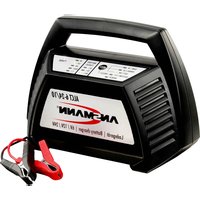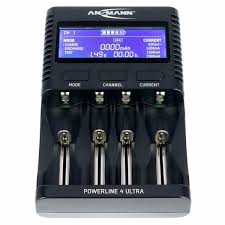
XMOVE DELUXE - Battery charger ANSMANN - Free user manual and instructions
Find the device manual for free XMOVE DELUXE ANSMANN in PDF.



| Product type | Universal battery charger |
| Brand | ANSMANN |
| Model | XMOVE DELUXE |
| Input voltage | 11-15 V DC |
| Compatible battery types | NiCd (1-14 cells), NiMH (1-14 cells), Li-ion (1-5 cells), LiPo (1-5 cells), Lead (1-6 cells) |
| Charge current | 0.1 A - 5.0 A (max. 50 W) |
| Discharge current | 0.1 A - 1.0 A (max. 5 W) |
| Maintenance charge current | 100 mA (NiCd/NiMH) |
| Display | LCD screen 2 lines × 16 characters |
| Dimensions (L x W x H) | 119 × 102 × 85 mm |
| Weight | 330 g |
| Main functions | Charge, discharge, cycle (charge/discharge or discharge/charge) |
| Protections | Reverse polarity, short circuit, over voltage, under voltage, safety timer |
| Required power supply | Car battery or 11-15 V DC power supply (not included) |
| Maintenance | Clean with a dry cloth; do not expose to moisture, rain, or high temperatures |
| Safety | Do not charge non-rechargeable batteries; monitor during charging; do not open the charger |
| Package contents | 1 xMove Deluxe charger, 1 instruction manual |
| Article number | 153000020 |
| Warranty and service | See manual; customer service: hotline@ansmann-energy.com |
Frequently Asked Questions - XMOVE DELUXE ANSMANN
User questions about XMOVE DELUXE ANSMANN
0 question about this device. Answer the ones you know or ask your own.
Ask a new question about this device
Download the instructions for your Battery charger in PDF format for free! Find your manual XMOVE DELUXE - ANSMANN and take your electronic device back in hand. On this page are published all the documents necessary for the use of your device. XMOVE DELUXE by ANSMANN.
USER MANUAL XMOVE DELUXE ANSMANN
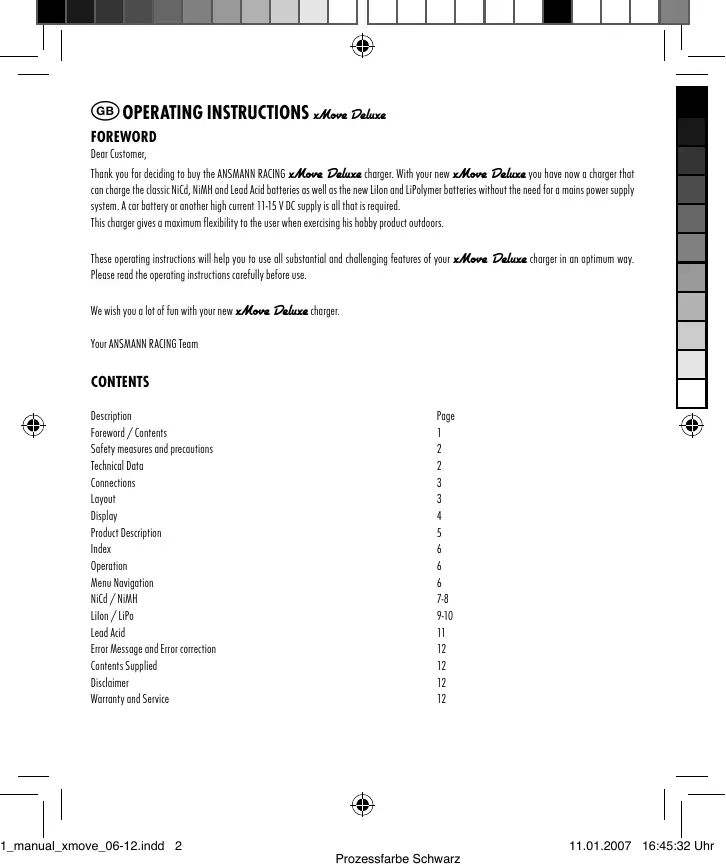
Thank you for deciding to buy the ANS MANN RACING xMove Deluxe charger. With your new xMove Deluxe you have now a charger that can charge the classic NiCd, NiMH and Lead Acid batteries as well as the new Lilon and LiPolymer batteries without the need for a mains power supply system. A car battery or another high current 11-15 V DC supply is all that is required.
This charger gives a maximum flexibility to the user when exercising his hobby product outdoors.
These operating instructions will help you to use all substantial and challenging features of your xMove Deluxe charger in an optimum way. Please read the operating instructions carefully before use.
We wish you a lot of fun with your new xMove Deluxe charger.
Your ANSMANN RACING Team
CONTENTS
| Description | Page |
| Foreword / Contents | 1 |
| Safety measures and precautions | 2 |
| Technical Data | 2 |
| Connections | 3 |
| Layout | 3 |
| Display | 4 |
| Product Description | 5 |
| Index | 6 |
| Operation | 6 |
| Menu Navigation | 6 |
| NiCd / NiMH | 7-8 |
| Lilon / LiPo | 9-10 |
| Lead Acid | 11 |
| Error Message and Error correction | 12 |
| Contents Supplied | 12 |
| Disclaimer | 12 |
| Warranty and Service | 12 |
SAFETY MEASURES AND PRECAUTIONS
! Read the operating instructions carefully before use
! Charge only NiCd / NiMH / Lead Acid or LiPo/Lilon batteries. NOT primary cells - Risk of Explosion and chemical danger
! Check the battery manufacturer's instructions. Do not charge batteries with too high charge current. - Risk of Explosion and chemical danger
! Connect the charger with right polarity to right DC power supply only. (11-15 V DC)
! Connect the batteries with right polarity to the charger.
! When not in use, disconnect the battery from the charger and the charger from the mains.
! Do not charge hot batteries. Batteries must be at ambient temperature before charging.
! Do not expose the battery charger to rain, damp or hot conditions.
! Do not charge the batteries twice. Charging is only allowed after a prior discharge.
! Do not leave the charger unattended during operation.
! Do not open equipment or carry out repairs. Authorized personnel may only carry out repairs.
! Do not cover equipment or obstruct ventilation, otherwise it may over-heat. Do not expose to direct sunlight.
! Do not charge more than one battery pack simultaneously.
! Charge only cells of the same type and capacity as a battery pack.
! Keep batteries, battery charger and cables away from combustible materials.
! Avoid sparking as there maybe gases present from the batteries.
! Never place the charger inside the engine compartment. Keep leads away from moving parts.
TECHNICAL DATA
| xMove Deluxe | Art. Nr. 153000020 |
| Input voltage: | 11-15 V DC |
| Battery Type's: | 1-14 NiCd cells |
| 1-14 NiMH cells | |
| 1-5 Lilon / LiPo cells | |
| 1-6 Lead Acid cells | |
| Charge current: | 0.1A ~ 5.0 A (max. 50 W) |
| Discharge current: | 0.1A ~ 1.0 A (max. 5 W) |
| Trickle charge (NiCd/NiMH): | 100 mA |
| Weight: | 330 gr |
| Dimensions L x W x H in mm: | 119 x 102 x 85 |
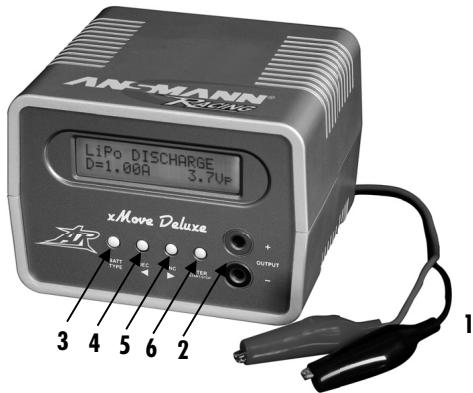
CONNECTIONS
- Input clips (Crocodile clips) red = plus, black = minus to connect to the 11 - 15 V DC power supply
- Output sockets (Banana Sockets) red = plus,black = minus to connect the batteries
LAYOUT
- Button "BATT / TYPE" To select the battery type; NiCd, NiMH, Lilon, LiPo or Lead Acid
- Button "DEC" (DECREASE) To decrease or change the charge current, voltage and number of cells
- Button "INC" (INCREASE) To increase or change the charge current, voltage and number of cells
- Button "ENTER / START / STOP" To set the adjustments, to Start / Stop the charge or discharge
DISPLAY
2 rows with 16 digits
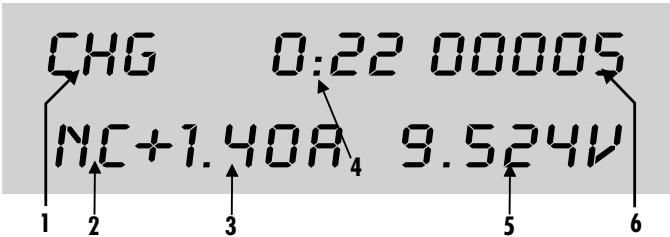
1. Shows the battery type and the different functions
NiCd NiCd battery
NiMH = NiMH battery
Lilo = Lilon battery
LiPo = LiPo battery
PB = Lead Acid battery
CH6 = Charge
DIS = Discharge
C D = Cycle Mode, first charge then discharge (NiCd and NiMAH batteries)
C←D = Cycle Mode, first discharge then charge (NiCd and NiMAH batteries)
2. Shows the battery type (Chemistry) during charge/ Capacity / charge or discharge current
NC = NiCd battery
NH = NiMH battery
LI =Lilon battery
LP = LiPo battery
PB = Lead Acid battery
CAP = capacity (at NiCd or NiMH)
C = capacity (at Lilon, LiPo or Lead Acid)
C = charge current
D = discharge current
3. Shows the adjusted charge or discharge current
+1.40 = charge current of 1.40 A
-1.00 = discharge current of 1.00 A
4. Shows the expired time of the adjusted charge or discharge mode, Format in MMM:SS (M=Minutes S=Seconds)
5. Shows the actual measured battery voltage in V
6. Shows the charged or discharged capacity in mAh
PRODUCT DESCRIPTION
The xMove Deluxe charger is an automatic charger, developed to charge NiCd / NiMH batteries packs from 1 to 14 cells (1.2-16.8V DC), Lilon / LiPo batteries from 1 to 5 cells (3.6-18.5V DC) or Lead Acid batteries from 1 to 6 cells (2.0-12.0V DC). Due to its DC input on the primary side this charge can be used connected to a car battery or another 11-15V DC high current supply and is independent from a mains power supply system.
The Micro controller inside the xMove Deluxe charger will ensure that all set modes; charge / discharge / cycle are controlled in a very precise way. The charge cut off for NiCd / NiMH battery packs is made with the "Minus Delta Peak" system. An additional safety timer where the time is automatically calculated due to the set battery capacity adjusted by the user is running in the background. A defined pre-charge, 3 minutes with IC, will make sure that the battery pack is recognized and charged correctly. After the fast charge cut-off a trickle charge current will compensate for the self discharge of the battery.
Lilon / LiPo and Lead Acid batteries are charged with the CCCV charge characteristic (Constant Current / Constant Voltage). First the batteries will be charged with a high constant current until the end charge voltage is reached. Afterwards the charge process changes to constant voltage. The charge current is reducing during this mode. When the charge current is lower than a pre-defined charge current the charger will switch off. This prevents any damage to the battery. A safety timer is working in the background.
For NiCd and NiMH battery packs a Cycle mode is available. In the first mode, to refresh batteries, the charger starts with a defined discharge and recharges afterwards until cut off. To define the battery capacity and get a statement about the quality of the battery, the charger will start and charge the battery first. Thereafter a discharge process will start. At the end the display will show the capacity in mAh which was inside the battery.
The charge current has a continuous adjustment from 0.1 to 5.0 A. As an option the batteries can be discharged with an adjustable current from 0.1 to 1.0 A. All procedures will be shown on a display with 2 lines and 16 digits. The input as well as the output circuit have a protection against wrong polarity. The output circuit is also short circuit protected.
INDEX
| Function | Parameter | Action |
| DC Input | 11 - 15 V DC | Normal function |
| under 11 V or over 15 V | Display: INPUT VOLTAGE ERROR | |
| Connected with wrong polarity | no function | |
| Charge sockets | After pushing the Button “ENTER / Start / Stop”: no battery connected | Display: NO BATTERY |
| Charge sockets | After pushing the Button “ENTER / Start / Stop”: Battery connected with wrong polarity | Display: WRONG POLARITY |
| Charge current | NiCd / NiMH / Lithon / LiPo / Lead Acid 0,1 - 5,0 A ± 10% max. 50 Watt | Display: Values will be displayed |
| Charge end voltage | Lilion 4,1 V / cell ± 1% • LiPo 4,2 V / cell ± 1% Lead Acid 2,45 V / cell ± 1% | Charge finished |
| Discharge current | NiCd / NiMH / Lithon / LiPo / Lead acid 0,1 - 5,0 A ± 10% max. 5 Watt | Display: Values will be displayed |
| Discharge end voltage | NiCd / NiMH 0,1 V - 16,8 V adjustable • Lithon 2,7 V / cell ± 10% LiPo 2,8 V / cell ± 10% • Lead Acid 1,8 V / cell ± 10% | Discharge finished |
OPERATION
Connect the xMove Deluxe charger with the crocodile clips to a 11-15VDC supply. Please take care to use the right polarity: red = plus, black minus. When the charger is connected in the right way you will get an audible signal and the display shows the charge menu. If the display doesn't show anything the power supply is not connected correctly. If the input voltage is under 11V or over 15V the display shows "INPUT VOLTAGE". Now connect the battery pack with a suitable cable to the charger (Banana sockets). Please take care to use the right polarity: red = plus, black minus. If the polarity of the battery is wrong the display shows "WRONG POLARITY". If there is no battery connected and the Button "START" is pushed the display shows "NO BATTERY". For further adjustments please follow the attached Menu Navigation.
MENUNAVIGATION
After you have connected the Move Deluxe charger the right way you have to choose right battery type by pushing the button "BATT TYPE". By pushing the button "BATT TYPE" once the displayed battery type will start flashing. By pushing "BATT TYPE" again the display changes between the battery types (NI=NiCd; NH=NiMH; LI=Lilon; LP=LeD Acid). Flashing of the battery type display will stop when pushing another button or after a short time if no button is pushed.
By pushing the button "INC or DEC" the charger will change between "CHARGE", "DISCHARGE" and "CYCLE".
The last used configuration will be saved.
NiCd-BATTERIES
NiCd CHARGE
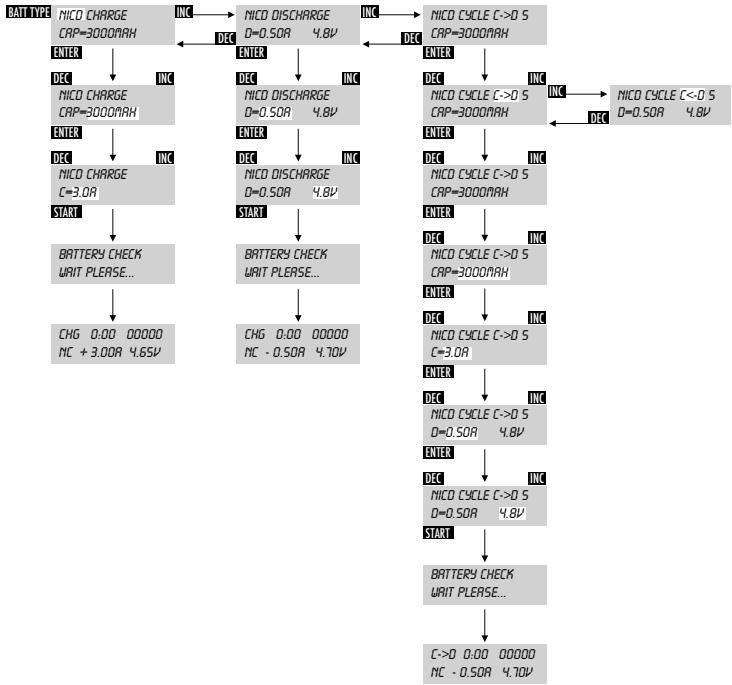
Push the button "BATT TYPE" until the display shows "NiCd". Now use the "INC" or "DEC" button to get to "CHARGE" and then push "ENTER" to confirm. After your confirmation the display will change to the capacity "CAP". Now please set the capacity of your battery with the buttons "INC" or "DEC" from 100 mAh to 5000 mAh and confirm with "ENTER". The display changes to the charge current "C" which can be set with the "INC" or "DEC" buttons from 0.1 A to 5.0 A. The parameters shown on the display are set and stop flashing if no push button is pressed for 3 seconds. To start charging, now push the "ENTER / START / STOP" button for 2 seconds. The display shows "BATTERY CHECK WAIT PLEASE". After a short check of all parameters the display shows the battery type "NC", the charge mode "CHG", the charge current e.g.: "+1.50A" and the actual measured battery voltage "V". The clock starts running in seconds and the display shows also the charged capacity. When the charging is finished you will get an audible signal. The display shows the trickle charge current and the capacity charged into the battery.
NiCd DISCHARGE
Push the button "BATT TYPE" until the display shows "NiCd". Now use the "INC" or "DEC" button to get to "DISCHARGE" and then push "ENTER" to confirm. After your confirmation the display will change to the discharge current "D". Now please set the discharge current with the buttons "INC" or "DEC" from 0.10 A to 1.00 A and confirm with "ENTER". The display changes to the discharge voltage "V" which can be set with the "INC" or "DEC" buttons from 0.1 V to 16.8 V. We recommend a discharge voltage of 0.9 V/cell. The parameters shown on the display, are set and stop flashing if no push button is pressed for 3 seconds. To start discharging, now push the "ENTER / START / STOP" button for 2 seconds. The display shows "BATTERY CHECK WAIT PLEASE". After a short check of all parameters the display shows the battery type "NC", the discharge mode "DIS", the discharge current e.g.: "1.00A" and the actual measured battery voltage "V". The clock starts running in seconds and the display shows also the discharged capacity. When the discharging is finished you will get an audible signal. The display shows the discharged capacity from the battery.
NiCd CYCLE
Within the CYCLE MODE you can choose between 2 options;
a) "C→D" to identify the battery capacity. The battery will be charged first and then discharged.
b) "C←D" as a Refresh-function. The battery will be discharged first and then charged.
Push the button "BATT TYPE" until the display shows "NiCd". Now use the "INC" or "DEC" button to get to "CYCLE" and then push "ENTER" to confirm. After your confirmation the display will change to the cycle mode. Now please set the cycle mode with the buttons "INC" or "DEC" from "C-D" or "C←D" and confirm with "ENTER". The display changes now to the number of cycles which can be set with the "INC" or "DEC" buttons from 1 to 5. After your confirmation the display will change to the capacity "CAP". Now please set the capacity of your battery with the buttons "INC" or "DEC" from 100 mAh to 5000 mAh and confirm with "ENTER". The display changes to the charge current "C" which can be set with the "INC" or "DEC" buttons from 0.1 A to 5.0 A. After your confirmation the display will change to the discharge current "D". Now please set the discharge current with the buttons "INC" or "DEC" from 0.10 A to 1.00 A and confirm with "ENTER". The display changes to the discharge voltage "V" which can be set with the "INC" or "DEC" buttons step less from 0.1 V to 16.8 V. We recommend a discharge voltage of 0.9 V/cell. The parameters shown on the display are set and stop flashing if no push button is pressed for 3 seconds.
Now push the "ENTER / START / STOP" button for 2 seconds. Within the cycle mode "C-D" the charger starts with discharge. The display shows "BATTERY CHECK WAIT PLEASE". After a short check of all parameters the display shows the battery type "NC", the cycle mode "C-D" (C-D), the discharge current e.g.: "+1.00A" and the actual measured battery voltage "V". The clock starts running in seconds and the display shows also the discharged capacity.
When the cycling is finished you will get an audible signal. Whether you used the mode "C→D" the display shows the discharged capacity or you used the mode "C→D" the display shows the charged capacity from or to the battery.
Adjustments and the associated display can be seen in the following chart:
NiMH-BATTERIES
The menu setup of NiMH is equivalent to NiCd.
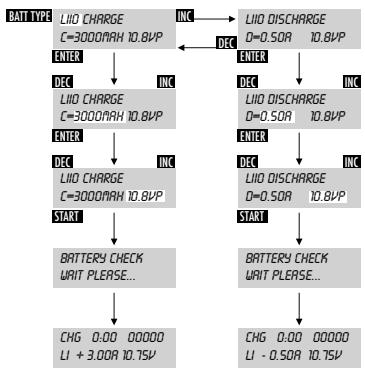
LiON-BATTERIES, Lilo CHARGE
Push the button "BATT TYPE" until the display shows "Lilo". Now use the "INC" or "DEC" button to get to "CHARGE" and then push "ENTER" to confirm. After your confirmation the display will change to the capacity "C". Now please set the capacity of your battery with the buttons "INC" or "DEC" from 100 mAh to 5000 mAh and confirm with "ENTER". The charge current is automatically set to 1C. The display changes to the no. of cells / cell voltage which can be set with the "INC" or "DEC" buttons from 1 cell = 3.6Vp; 2 cells = 7.2Vp; 3 cells = 10.8Vp; 4 cells = 14.4Vp to 5 cells = 18.0Vp. The parameters shown on the display are set and stop flashing if no push button is pressed for 3 seconds. To start charging, now push the "ENTER / START / STOP" button for 2 seconds. The display shows "BATTERY CHECK WAIT PLEASE". After a short check of all parameters the display shows the battery type "LI", the charge mode "CHG", the charge current e.g.: "3.00A" (if the battery capacity is set to 3000mAh) and the actual measured battery voltage "V". The clock starts running in seconds and the display shows also the charged capacity. When the charging is finished you will get an audible signal. The display shows the capacity charged into the battery.
Lilo DISCHARGE
Push the button "BATT TYPE" until the display shows "Lilo". Now use the "INC" or "DEC" button to get to "DISCHARGE" and then push "ENTER" to confirm. After your confirmation the display will change to the discharge current "D". Now please set the discharge current with the buttons "INC" or "DEC" from 0.10 A to 1.00 A and confirm with "ENTER". The display changes to the no. of cells / cell voltage which can be set with the "INC" or "DEC" buttons from 1 cell = 3.6Vp; 2 cells = 7.2Vp; 3 cells = 10.8Vp; 4 cells = 14.4Vp to 5 cells = 18.0Vp. The parameters shown on the display are set and stop flashing if no push button is pressed for 3 seconds. To start discharging, now push the "ENTER / START / STOP" button for 2 seconds. The display shows "BATTERY CHECK WAIT PLEASE". After a short check of all parameters the display shows the battery type "LI", the charge mode "DIS", the discharge current e.g.: -1.00A and the actual measured battery voltage "V". The clock starts running in seconds and the display shows also the discharged capacity. The batteries will be discharged to a preset discharge voltage of 2.7V ± 10% / cell. When the discharging is finished you will get an audible signal. The display shows the capacity discharged from the battery.
Adjustments and the associated display you can be seen in the following chart:
LiPO-BATTERIES
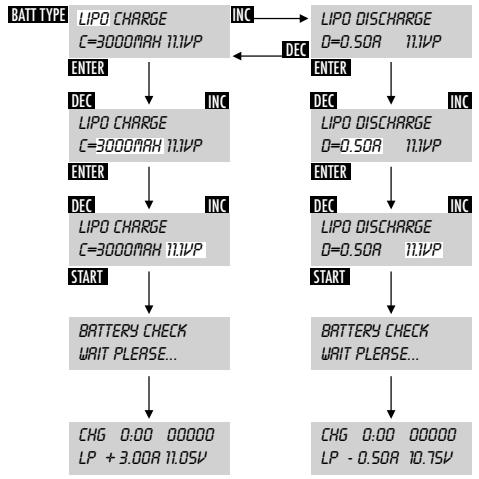
The menu setup of LiPo is equivalent to Lilon. There is only a difference in the charge and discharge voltage per cell.
CELL VOLTAGE:
Lilon = 3,6V / cell LiPo = 3,7V / cell
DISCHARGE END VOLTAGE:
Lilon = 2,6V / cell LiPo = 2,8V / cell
Adjustments and the associated display you can be seen in the following chart:
LEAD ACID BATTERIES, PB CHARGE
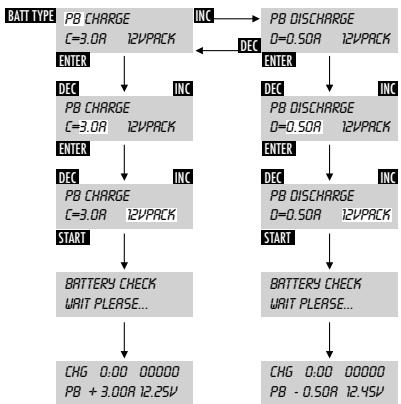
Push the button "BATT TYPE" until the display shows "PB". Now use the "INC" or "DEC" button to get to "CHARGE" and then push "ENTER" to confirm. After your confirmation the display will change to the charge current "C" which can be set with the "INC" or "DEC" buttons from 0.1 A to 5.0 A. After pushing "ENTER" again the display changes to the no. of cells / cell voltage which can be set with the "INC" or "DEC" buttons from 1 cell = 2V pack; 2 cells = 4V pack; 3 cells = 6V pack; 4 cells = 8V pack; 5 cells = 10.0V pack to 6 cells = 12V pack. The parameters shown on the display are set and stop flashing if no push button is pressed for 3 seconds. To start charging, now push the "ENTER / START / STOP" button for 2 seconds. The display shows "BATTERY CHECK WAIT PLEASE". After a short check of all parameters the display shows the battery type "PB", the charge mode "CHG", the charge current e.g. +3.00A and the actual measured battery voltage "V". The clock starts running in seconds and the display shows also the charged capacity. When the charging is finished you will get an audible signal. The display shows the capacity charged into the battery.
PB DISCHARGE
Push the button "BATT TYPE" until the display shows "PB". Now use the "INC" or "DEC" button to get to "DISCHARGE" and then push "ENTER" to confirm. After your confirmation the display will change to the discharge current "D" which can be set with the "INC" or "DEC" buttons from 0.10 A to 1.00 A. After pushing "ENTER" again the display changes to the no. of cells / cell voltage which can be set with the "INC" or "DEC" buttons from 1 cell = 2V pack; 2 cells = 4V pack; 3 cells = 6V pack; 4 cells = 8V pack; 5 cells = 10.0V pack to 6 cells = 12V pack. The parameters shown on the display are set and stop flashing if no push button is pressed for 3 seconds. To start charging, now push the "ENTER / START / STOP" button for 2 seconds. The display shows "BATTERY CHECK WAIT PLEASE". After a short check of all parameters the display shows the battery type "PB", the discharge mode "DIS", the discharge current e.g.: -1.00A and the actual measured battery voltage "V". The clock starts running in seconds and the display shows also the discharged capacity. The batteries will be discharged to a preset discharge voltage of 1.8V ± 10% / cell. When the charging is finished you will get an audible signal. The display shows the capacity charged into the battery.
Adjustments and the associated display you can be seen in the following chart:
ERRORMESSAGEANDERRORCORRECTION
| Error message | Possible reason | Possible Solution |
| INPUT BATTERY VOLTAGE ERROR | Input voltage under 11,0 V or over 15,0 V | Check input power supply adjust or change |
| NO BATTERY | No battery or broken battery connected when pushing the start button | Check battery or battery connection |
| OUTPUT BATTERY REVERSE POLARITY | Polarity of battery wrong | Check battery connection red = + plus block = - minus |
| OUTPUT CIRCUIT PROBLEM | Charger overloaded | Check battery connection, start again |
| CHECK THE BATT. OPEN CIRCUIT | Battery connection opened during charging | Check battery connections |
| CHECK THE BATT. OVER VOLTAGE | Battery voltage set to high | Check voltage/ cell setup |
| CHECK THE BATT. LOW VOLTAGE | Battery voltage set to low, battery broken | Check voltage/ cell setup Check battery pack |
CONTENTS SUPPLIED
1 x Charger xMove Deluxe
1x Operating Instructions
DISCLAIMER
Information in these operating instructions can be changed without prior notice. ANSMAHN ENERGY cannot accept liability for direct, indirect, accidental or other claims or consequential damages originated by using this charger and information given in these operating instructions.
ANSMANN ENERGY GMBH
Industriestrasse 10
D-97959 Assamstadt / Germany
e-Mail: hotline@ansmann-energy.com • www.ansmann-energy.com
Technical details subject to change without prior notice. No liability accepted for typographical errors or omissions. 01/2007
C = courant de charge