AES3.2 - Battery charger ANSMANN - Free user manual and instructions
Find the device manual for free AES3.2 ANSMANN in PDF.



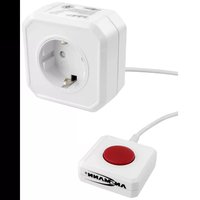
| Product type | Zero Watt standby cut-off socket |
| Brand | Ansmann |
| Model | AES3.2 |
| Power supply | 230 V AC / 50 Hz |
| Maximum power | 2500 W / 10 A |
| Maximum standby current | 70 W |
| Own standby consumption | 0 W (once turned off) |
| Main function | Elimination of standby power consumption |
| Technology | Zero Watt |
| Learning mode | Green "learn standby" button |
| Activation | Red button for 3 seconds |
| Use with power strips | Yes, as long as maximum power is not exceeded |
| Safety | Protection against humidity, heat and water; do not open |
| Maintenance | Unplug before cleaning, clean dry cloth |
| Warranty | 3 years |
| Environment | Do not dispose of with household waste, recycle |
Frequently Asked Questions - AES3.2 ANSMANN
User questions about AES3.2 ANSMANN
0 question about this device. Answer the ones you know or ask your own.
Ask a new question about this device
Download the instructions for your Battery charger in PDF format for free! Find your manual AES3.2 - ANSMANN and take your electronic device back in hand. On this page are published all the documents necessary for the use of your device. AES3.2 by ANSMANN.
USER MANUAL AES3.2 ANSMANN
Thank you for choosing to buy the ANSMANN AES3.2 PC
Energy Saving Mains Socket with Zero-Watt Technology. This AES3.2 prevents any unnecessary standby power consumption from your electronic devices. Thanks to the learning function, the device is suitable for almost all applications.
Please read the following instruction manual before use. We hope you will be happy with our product. Your ANSMANN Team
SAFETY INSTRUCTIONS
■ Please read the operating instructions carefully and observe the safety instructions!
- Do not use the PC Energy Saving Mains Socket if there are any signs of damage to the housing, mains pins or cable. Please contact an authorized dealer!
■ Keep the PC Energy Saving Mains Socket in dry places!
■ In order to avoid the risk of fire and/or electric shock, the PC Energy Saving Mains Socket must be protected against high humidity, water and excessive heat!
■ The maximum load of this PC Energy Saving Mains Socket is 2500 Watt or 10A. Make sure when connected to a device that this value is not exceeded!
■ Before cleaning the PC Energy Saving Mains Socket disconnect it from the mains and only use a dry cloth!
- Do not attempt to open the PC Energy Saving Mains Socket and keep it away from children’s reach!
■ Children should be supervised to ensure that they do not play with the appliance!
■ The appliance is not to be used by children or persons with reduced physical, sensory or mental capabilities, or lack of experience and knowledge, unless they have been given supervision or instruction!
■ If the safety instructions are not followed it may lead to damage to the PC Energy Saving Mains Socket and could cause injury!
■ Only plug the PC Energy Saving Mains Socket into a correctly fitting mains socket!
FUNCTIONAL OVERVIEW
■ Intelligent PC Energy Saving Mains Socket with Zero-Watt Technology
■ Flexible: avoid standby power consumption in almost all applications
■ Cuts-off standby devices automatically from the mains when not in use
■ Saves energy, money and the environment
■ No more unnecessary standby power consumption
■ 2500 Watt (10A) operating capacity
OPERATION
- Plug the PC Energy Saving Mains Socket into a suitable mains socket.
-
Connect the PC or another electronic device to the PC Energy Saving Mains Socket. Use an appropriate multiple socket if you would like to use several devices. Please always make sure that the maximum load of the PC Energy Saving Mains Socket will not be exceeded.
-
Press for approx. 3 seconds the red operating button to activate the PC Energy Saving Mains Socket. The power supply is now established for one minute.
- Please ensure that all connected devices are on standby. If necessary put the devices on standby manually. When connecting battery operated devices (e.g. Notebook, Netbook), the battery has to be fully charged.
- Press the green "learn standby" button for 3 seconds. The PC Energy Saving Mains Socket will then learn automatically the standby characteristics of the connected devices. This sequence of learning will be indicated by a fast blinking (approx. 2 times per second) of the red operating button. When the learning process is finished the PC Energy Saving Mains Socket automatically switches into disconnecting mode. This mode will be indicated by slow blinking (approx. 1 time per second) of the operating button. The connected devices will be cut-off from mains power after one minute in disconnecting mode. Thanks to intelligent Zero Watt Technology the PC Energy Saving Mains Socket disconnects itself from the mains and does
not waste any electricity (0 Watt).
- To use your device as usual press the red operating button for approx. 3 seconds. All devices connected to the PC Energy Saving Mains Socket are now ready for operation. The operating button lights permanently red as soon as one of the connected devices is taken from the standby mode into operation mode. After the device had been restored to standby mode, the PC Energy Saving Mains Socket recognizes this and switches into disconnecting mode, which means that the operating button is blinking red and after one minute there will be the automatically mains cut-off.
ENVIRONMENTAL NOTES
Do not dispose of this product into the normal household waste. Please return to your dealer or nearest recycling centre or collection point. Please note the current applicable regulations. In case of doubt contact your recycling centre. Please recycle all packing materials properly.
CARE & MAINTENANCE
To make sure the PC Energy Saving Mains Socket works properly, please keep the contacts free from dust and contamination. To clean the unit disconnect it from the mains and use only a dry cloth.
TECHNICAL DATA
Connection: 230V AC / 50Hz
Load: max. 2500W / 10A
Adaptive standby load: max. 70W
Power consumption: OW in standby mode (after power cut-off)
DISCLAIMER
Information in these operating instructions can be changed without prior notice. ANSMANN cannot accept liability for direct, indirect, accidental or other claims or consequential damages originated by not using this device as indicated by these operating instructions.
WARRANTY NOTICE
We hereby offer a 3 year warranty on this product. This does not apply to damages caused by non-observance of the operating instruction or physical damage due to lack of proper care.
Technical details are subject to change without prior notice. No liability accepted for typographical errors or omissions. 08/2018

natural_image
Empty black rectangle with corner markers, no text or symbols presentMODE M'EMPLOI AES3.2
Cher Client,
apprendibile: max. 70W
natural_image
Empty black rectangle with corner markers, no text or symbols present
text_image
ANSMANN®ANSMANN AG
Industriestrasse 10
97959 Assamstadt
Germany
Hotline: +49 (0) 6294 / 4204 3400
E-Mail: hotline@ansmann.de
ansmann.de