USER MANUAL AP818 YORKVILLE
OWNER'S MANUAL MANUEL DE L'UTILISATEUR


This lightning flash with arrowhead symbol, within an equilateral triangle, is intended to alert the user to the presence of uninsulated "dangerous voltage" within the product's enclosure that may be of sufficient
magnitude to constitute a risk of electric shock to persons.
The exclamation point within an equilateral triangle is intended to alert the user to the presence of important operating and maintenance (servicing) instructions in the literature accompanying the appliance.

Instructions pertaining to a risk of fire, electric shock, or injury to a person
CAUTION: TO REDUCE THE RISK OF ELECTRIC SHOCK,DO NOT REMOVE COVER (OR BACK).
NO USER SERVICEABLE PARTS INSIDE.
REFER SERVICING TO QUALIFIED SERVICE PERSONNEL.
Read Instructions: The Owner's Manual should be read and understood before operation of your unit. Please, save these instructions for future reference and heed all warnings.
Clean only with dry cloth.
Packaging: Keep the box and packaging materials, in case the unit needs to be returned for service.
Warning: To reduce the risk or fire or electric shock, do not expose this apparatus to rain or moisture. Do not use this apparatus near water!
Warning: When using electric products, basic precautions should always be followed, including the following:
Power Sources
Your unit should be connected to a power source only of the voltage specified in the owners manual or as marked on the unit. This unit has a polarized plug. Do not use with an extension cord or receptacle unless the plug can be fully inserted. Precautions should be taken so that the grounding scheme on the unit is not defeated. An apparatus with CLASS I construction shall be connected to a Mains socket outlet with a protective earthing ground. Where the MAINS plug or an appliance coupler is used as the disconnect device, the disconnect device shall remain readily operable.
Hazards
Do not place this product on an unstable cart, stand, tripod, bracket or table. The product may fall, causing serious personal injury and serious damage to the product. Use only with cart, stand, tripod, bracket, or table recommended by the manufacturer or sold with the product. Follow the manufacturer's instructions when installing the product and use mounting accessories recommended by the manufacturer. Only use attachments/accessories specified by the manufacturer
Note: Prolonged use of headphones at a high volume may cause health damage on your ears.
The apparatus should not be exposed to dripping or splashing water; no objects filled with liquids should be placed on the apparatus.
Terminals marked with the "lightning bolt" are hazardous live; the external wiring connected to these terminals require installation by an instructed person or the use of ready made leads or cords.
Ensure that proper ventilation is provided around the appliance. Do not install near any heat sources such as radiators, heat registers, stoves, or other apparatus (including amplifiers) that produce heat.
No naked flame sources, such as lighted candles, should be placed on the apparatus.
Power Cord
Do not defeat the safety purpose of the polarized or grounding-type plug. A polarized plug has two blades with one wider than the other. A grounding type plug has two blades and a third grounding prong. The wide blade or the third prong are provided for your safety. If the provided plug does not fit into your outlet, consult an electrician for replacement of the obsolete outlet. The AC supply cord should be routed so that it is unlikely that it will be damaged. Protect the power cord from being walked on or pinched particularly at plugs. If the AC supply cord is damaged DO NOT OPERATE THE UNIT. To completely disconnect this apparatus from the AC Mains, disconnect the power supply cord plug from the AC receptacle. The mains plug of the power supply cord shall remain readily operable.
Unplug this apparatus during lightning storms or when unused for long periods of time.
Service
The unit should be serviced only by qualified service personnel. Servicing is required when the apparatus has been damaged in any way, such as power-supply cord or plug is damaged, liquid has been spilled or objects have fallen into the apparatus, the apparatus has been exposed to rain or moisture, does not operate normally, or has been dropped.
SUIVEZ TOUTES LES INSTRUCTIONS
Your new AP812/818 Mixer/Amplifier is designed and built to provide long-term trouble free performance. Drawing on over thirty years of experience in the design and manufacture of powered mixing consoles, Yorkville engineers were able to optimize the design of the AP812/818. Including comprehensive features such as rack-mountability, quiet internal fan cooling, two stereo input-channels with cue buttons, headphone monitoring (of both the cue and monitor busses), phantom powering, dual 9-band EQ's, power amp channels and EQ's assignable to Left/Right stereo operation or Main/Monitor mono operation, 255-preset digital signal processing, dual level-meters, 800 watts of stereo power built-in, both 1/4-inch phone plugs and Speakon® output connectors.

Terminology
- 3-pin microphone inputs are referred to as XLR connectors.
1/4-inch jack sockets are called phone connectors.
- Balanced 1/4-inch inputs or outputs are called TRS or Tip-Ring-Sleeve
- Master control and mixing channels are called busses.
Overload indicators are called Clip LED's.
- Patch cables with dual conductors plus shielding and ring-tip-sleeve (stereo) 1/4-inch phone plugs are referred to as balanced patch cables.
Basic Features
Channels 1-8 (1-14)
- XLR MIC and balanced TRS LINE inputs with low-noise input circuit design.
- Balanced LINE inputs accept either balanced or unbalanced lines.
PHANTOM power (24 volts).
- Extremely wide input GAIN-adjustment.
- MONitor send controls are post-EQ and pre-fader.
- Three-band EQ with +/-15 dB of range and a sweepable mid (80 Hz - 8 kHz).
Post-EQ, post-fader, EFX (effects) send controls.
- PAN controls provide constant gain levels at all settings.
- Increased circuit headroom and gain for a more flexible mix.
- Gold internal bus-interconnects for long life and maximum signal integrity.
- CLIP LED's indicate even the briefest peaks, and fire at -3 dB, well before the onset of actual clipping, at any and all active channel stages.
Stereo Channels (9/10, 11/12, 15/16 & 17/18)
(see diagram on following page)
- Left and Right 1/4-inch balanced TRS LINE inputs accept either balanced or Unbalanced lines.
- The LEFT TRS input may be used for connecting a mono source and will internally patch it to the RIGHT channel input circuitry.
- LEFT and RIGHT RCA inputs.
- LOW, MID and HIGH frequency shelving EQ (+/- 15dB)
BALANCE control
- CUE buttons let you preview these channels through headphones with the level faders shut off.
Master Features
- SELECT and MODIFY masters provide up 255 presets of reverb, delay and other effects.
- Separate EFX TO MAIN and EFX TO MONitor masters.
- internal effects subsystem, based on the A.R.T. 16-bit digital effects processor, delivers crystal clear performance.
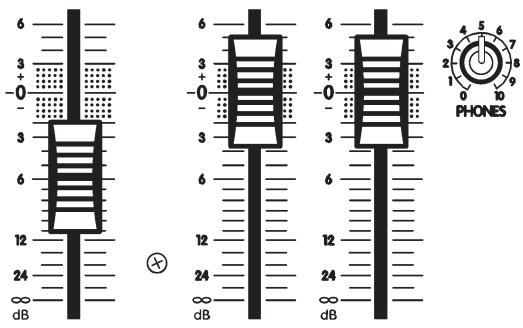
- MASTER EFFECTS fader lets you insert the internal effect quickly and easily.
- MASTER EFX SEND control with it's own CLIP LED to help prevent overloading the circuitry at this stage.
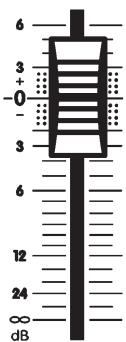
- LEFT and RIGHT MAIN faders - in fact all faders - feature 0 dB reference markings.
- MONitor master features its own CLIP LED to help you avoid monitor distortion.
- The PHONES level controls the headphone amplifier which monitors the CUE bus when a CUE button is depressed and the MONitor bus when it is not.
- The MAIN - MONitor EQ/AMP push-button lets you configure the AP812 as either left-right stereo with a separate nine-band EQ for each channel, or as a mono system with one amplifier channel and EQ for the MAIN PA speakers and the other amplifier channel and EQ for the MONITOR speakers.

MASTER EFX
Power Amplifier Features
- A total output of 800 watts with well-proven, reliable AUDIOPRO technology.
- Industry leading specifications for distortion, damping, and efficiency.
- Comprehensive protection against low or even shorted loads, overheating and DC damage to speakers.
- A combination of standard 1/4-inch and high-current Speakon® output connectors.

Feature Details & User Tips Channel Strips
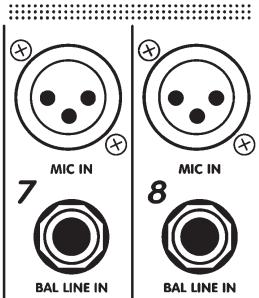
Each channel has both a MIC and LINE input (except for channels 9/10 & 11/12 (15/16 & 17/18) which have RCA type inputs as well as 1/4-inch TRS inputs). The LINE input will accept either balanced or unbalanced signals from all types of sources and the MIC input is optimized for low-impedance microphones. The LINE input is Tip-Ring-Sleeve balanced, with the Tip in phase, the Ring reverse phase and the sleeve, Ground. The XLR is wired Pin 1 = Ground, Pin 2 = in phase & Pin 3 = reverse phase. This configuration is the standard throughout the world.
User tip: Problem; Hum and Buzz When Source is Unbalanced...
Unbalanced connections may be made to the LINE input with an unbalanced shielded cable. However, field or leakage-induced ground currents between separate pieces of equipment can sometimes produce hum and buzz. Most electronic instruments, for example, still use unbalanced connections. If the equipment has more than one output feeding the mixer, even floating the circuit ground may not help.
CAUTION: We urge you to NEVER remove the ground-pin on the AC cord or otherwise disable the earth safety Ground connection as doing so can expose you to a serious shock hazard. Additionally, your radio interference problems will likely increase and in some cases your hum problems will get even worse.
What to do: Hum and buzz can be safely reduced or eliminated with the AP812/818's input balancing, even when the signal source is unbalanced, Simply use standard TipRing-Sleeve balanced patch cables. However, in some worst-case instances it may be necessary to create a special patch cable. In this case, use a 1/4-inch TRS (stereo) cable.
Attach a 1/4-inch TRS (stereo) plug to the end which will plug into the mixer's balanced-input as follows; 1) solder shield to Sleeve, 2) solder wire #1 to Tip, 3) solder wire #2 to Ring. Now attach the mono plug to the other end of the cable as follows: 4) solder the shield and wire #2 to the Sleeve, 5) solder wire #1 to the tip. Now connect this mono end to the output of the unbalanced piece of equipment and the stereo end to the AP812/818's LINE input.
This technique will always reduce hum, and it can be used to connect any equipment having a Balanced INPUT to any other equipment having an Unbalanced OUTPUT.
Located on the back panel near the SPEAKER outputs, this push-button activates the 24 Volt PHANTOM POWER feature built into the AP812/818. When the PHANTOM POWER is activated, the +24V LED on the front panel (just below the PHONES jack) will illuminate. Now you may connect condenser microphones to any channels without the need for external power supplies. You may also connect dynamic mics to any channels with the PHANTOM POWER activated without any problems or loss of sound quality.
Gain Control
With signal applied to the input, adjust this control so that occasional flashes of the CLIP LED are observed. This will ensure that the signal level fits comfortably within the channel strip's headroom low enough to prevent distortion, and yet high enough to preserve the signal to noise ratio. This control covers a wide range, so it may seem rather sensitive until you're used to it.
Monitor Send
The MON send control is post-EQ & pre-fader. This means that the bit of channel signal it sends to the MASTER MONitor bus is tapped off at a point after the channel EQ circuitry, and before the level fader. As a result it is not affected by the channel fader.

This means that you custom-equalize for the monitor system using the AP812/818's EQ2 equalizer or an external EQ patched between the AP812/818's MON OUT jack and the external power amp you are using for monitors.
User tip: In order to shut a channel off completely, it will be necessary to turn down the MON send, as well as the channel fader.
3-Band EQ
Equalization is varied by four controls labeled HIGH, MID, SWEEPABLE MID (variable from 80 Hz to 8 kHz), and LOW. Each control can either boost or cut the amplitude of its frequency band by 15 dB. This is a considerable amount of gain change, roughly equivalent to a 150% variation in audible loudness. It is therefore wise to use boost settings of not more than +3 dB to +6 dB in order to avoid feedback and/or distortion.
User tip: On the other hand, -15 dB of CUT-capability can come in handy for solving certain mic or line problems. For example, substantial LOW and HIGH cuts can help get rid of feedback plus puffing and thumping noises from harmonica mics. Flattop guitar mics or transducers can often benefit from a slight MID cut to fatten the sound, and direct or miked bass inputs usually benefit from a fairly substantial LO cut to avoid main system distortion.
3-Band EQ - Channels 9/10, 11/12, (15/16 & 17/18)
LOW, MID & HIGH shelving EQ is provided for the stereo channels. Here again, the gain range is plus/minus (+/-)15 dB. As a result, care should be taken in adjusting the EQ above center position as a small adjustment can represent a large gain change.
Effects Send
The EFX send control varies the amount of post-EQ, post-fader channel signal sent to the master EFX bus. The output of the EFX bus goes first to the EFX SEND / FOOTSWITCH jack and then to the internal 16-bit processor. The output of the effects processor then goes to the MAIN master section to be mixed with the signals going there direct from the input channels.
The CUE feature enables you to preview channel signals via headphones before they go to the main and/or MONitor bus. The CUE signal is post-EQ so that the channel equalization will be in effect through the headphones. However, it is pre-fader so you will need to shut the channel off through the mains and monitors when cueing. Use the PHONES LEVEL to adjust cueing volume.
To employ this feature, simply follow these steps:
a) Connect a tape or CD-player to channel 9/10 and/or 11/12 (15/16, 17/18).
b) Pull the channel fader all the way down and turn the MON send off.
c) Depress the CUE button. Now that channel will have prominence through your headphones.
d) Cue up your tape or CD track through the phones, then put it on play hold/ pause.
e) When you are ready to insert the recorded material, simply punch the CUE button into the up position, then take the recorded material off play hold/ pause and bring up the channel fader and MON send to the desired mix levels.
User tip: When you have inserted the cued material into the monitors, you will be able to adjust its monitor mix level via headphones since the monitor bus signals are always present through the phones when no channels are on CUE. The recorded material's main mix level will be audible to you through the main speaker system.
Pan or Balance Controls
This control directs the post-fader output of the channel between the LEFT and RIGHT MAIN masters. In a stereo setup, the PAN/BALance can be used to position the aural image of the channel left or right within the stereo listening field.

MASTER EFX

L MAIN R

Channel Faders
This adjusts the levels of both the post-EQ channel signal headed directly for the LEFT and RIGHT MAIN master bus (via the PAN/BAL pot), and the EFX send signal headed for the master EFX bus. The channel fader does not control the MONitor send level.
Clip LED
The channel CLIP LED watches all the active electronic stages in the channel circuit. Whenever any stage's signal peak approaches clipping to within 6 dB, the CLIP LED circuitry captures and displays this event. See under GAIN control for more about this feature.
Monitor Master & Clip LED
This control regulates the overall level of the master MONitor bus. The CLIP LED, like the others, fires at 6 dB below the onset of actual clipping so that a small amount of activity is quite acceptable. If the LED flashes frequently, reduce the MON MASTER setting, or possibly one or more of the channel MON send settings. The output of the MON MASTER bus goes to the MON OUT jack. It also goes to the EQ/AMP ASSIGN button where it can be directed to the EQ2 equalizer and then to the RIGHT-channel of the built-in stereo power amplifier. Regardless of the EQ/AMP ASSIGN button's operation, the MONitor signal remains available at the MON OUT jack so that it can be used to drive an additional amp/speaker system.
Mon Out Jack
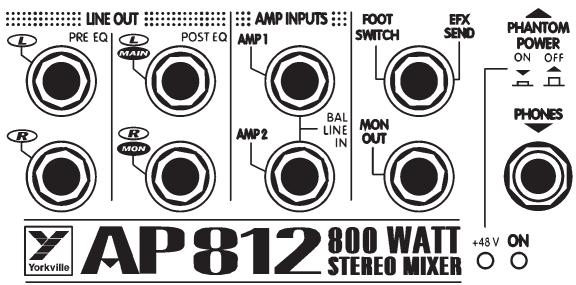
Located in the upper right area beside the PHONES jack, MON OUT is the output of the monitor bus. It is at line level (do not connect speakers to it directly) and unbalanced. Connect your monitor power amp or powered monitors here.
User tip: If another monitor system is in use, perhaps full-range enclosures running off the main PA mix as side-fills, you could connect a tape deck here to record live performances. Plug a single 1/4-inch male-to-dual 1/4-inch female Y adapter into the MON OUT jack. Now simply run two of the appropriate patch cables (probably 1/4-inch male-to-RCA male) into the tape deck's L & R line level inputs. You will now have the advantage of being able to mix for recording, independent of the PA mix.
Left & Right Main Masters
The MAIN master faders receive signals from the channel PAN/BAL controls and determine the output signal levels at the L & R PRE-EQ LINE OUTPUT jacks.
User tip: Regardless of the ASSIGN button's function, the PRE-EQ LINE OUTPUT jacks will always carry the unequalized L & R stereo mix. This can be useful if you are recording the live performance.
The MAIN faders also determine the signal levels destined for the EQ/AMP ASSIGN button where they are directed as follows:
a) Up in the L & R position, the ASSIGN button directs the Left & Right MAIN master signals to EQ1 and EQ2 respectively. Thereafter, they go in two directions at once to the L & R (AMP 1 and AMP 2) inputs of the built-in power amplifier and to the L & R POST EQ LINE OUTPUT jacks.
b) Down in the MAIN/MON position, the ASSIGN button also does two things. First, it sums some of the LEFT and RIGHT MAIN signals into a single mono signal and directs it to the input of EQ1, the output of which is then split and goes to both the LEFT power amp channel and to the POST EQ MAIN (L) LINE OUTPUT jack. Secondly, the button takes some of the MON MASTER's output signal and routes it to the input of EQ2, thereafter to be split and routed to the RIGHT channel of the built-in power amplifier and to the POST EQ MON (R) LINE OUTPUT jack.
User tip: The stereo operating mode of the AP812 would be with the EQ/AMP ASSIGN button up in the L & R position. This would supply up to 800 watts of stereo power (400 watts/channel) plus separate L & R 9-band EQ's for the main system speakers. Power and equalization for the monitors would come from a separate power amplifier and graphic EQ. With the EQ/AMP ASSIGN button down in the MAIN/MON position, you now have 400 watts of mono power @ 4 ohms plus a single 9-band EQ for the main PA speakers, also 400 watts @ 4 ohms and a single 9-band EQ for the monitors. Connect main PA speakers to the AMP 1 SPEAKER OUTPUT's and monitors to AMP 2 SPEAKER OUTPUTS. See under SPEAKER CONNECTIONS for suggested speaker impedances.
Pre & Post EQ Line Outputs
These are the outputs of the L & R main mixing busses. They are all at line level (do not connect speakers directly) and unbalanced. The PRE EQ outputs are not affected by either of the graphic equalizers. The stereo main mix is available from them at all times, regardless of the EQ/AMP ASSIGN button setting. These would be available for connecting a secondary mixer perhaps for a house PA, broadcast and/or recording purposes. These outputs, although not balanced, have been designed to supply the noise-canceling benefits of balanced outputs as long as the inputs of the unit (power
amp or mixer) you are connecting them to have balanced inputs, and you use TRS balanced cables.
The POST EQ output signals are affected by the graphic equalizers. They are also affected by the EQ/AMP ASSIGN button. With the button up in the L & R MAIN position, these jacks receive the output of EQ1 at the L

MAIN jack and EQ2 at the R MON jack. With the EQ/AMP ASSIGN button down in the MAIN/MON position, the L MAIN jack receives mono (left & right mixed together) main mix signal from EQ1 and monitor signals from EQ2. The POST EQ outputs are best for driving power amplifiers whether for main or monitor speaker systems.
EQ1 & EQ2 Graphic Equalizers
The Q factor is greater in cut-mode than in boost-mode, which is desirable when using the EQ for feedback control. Up to 12 dB of cut or boost is available. For more information about their internal routing, see under LEFT & RIGHT MAIN MASTERS and EQ/AMP ASSIGN BUTTON above.
User tip: As with all graphic EQ's, minimal variations above or below center settings are always recommended. The only exception to this rule might be in the fight against feedback, but even there the ideal solution is to separate the offending speaker from the offending mic or at least aim them in different directions. This way the whole system's natural frequency response does not have to be compromised because of one mic and one speaker. Ideally, a Real-time Frequency Analyzer and Pink Noise would be employed before the audience arrives to help you pre-adjust the EQ (s) to cut obvious system/room response spikes likely to cause feedback later on. Without such devices
you can achieve a vaguely similar result by simply turning up the level until a mic feeds back, then reacting accordingly (this may or may not involve the EQ's). In any case, the prime suspect whenever feedback starts is always a monitor. A graphic EQ with a MIC level input can be inserted between the offending mic and the mixer input to solve that channel's problem without altering the whole monitor system response.
Effects Bus Routing Overview
The AP812/818's effects bus receives and mixes down all the channel EFX SEND signals. Its output is regulated by the MASTER EFX SEND control and is internally routed, first to the EFX SEND / FOOTSWITCH jack. This is a switching jack which normally
allows the signal to proceed internally to the effects processor. But when a jack is inserted here, the switching function reroutes the effects bus signal out the jack to either an on/off footswitch or whatever you have patched it to, probably an external effects unit, or possibly something else if you have decided to do without effects and perhaps feed a broadcast transmitter or recording unit. In any case, the output of the internal digital effects processor is permanently routed to the MASTER EFX fader and thereafter to the LEFT & RIGHT MAIN MASTER buses, also to the EFX to MON master control and thereafter to the monitor bus.
Master EFX Send Control & Clip LED
For the quietest performance, you should run the MASTER EFX SEND level as high as possible without causing distortion. With the channel EFX SEND controls turned up roughly half-way and signals coming into the channels, increase the MASTER EFX SEND level until some EFX CLIP LED activity is observed, then turn it back down slightly until the flashing stops. You may now re-adjust the channels EFX levels as desired. The MASTER EFX SEND may now be used to tailor the EFX mix on all channels at once.
Digital Effects Processor
The internal Digital Effects Processor is a full 16 bit, 20kHz bandwidth DSP-based effects subsystem developed by Applied Research & Technology in Rochester, New York. It has been custom programmed with 255 effects ranging from reverb to echo and special effects.
The selection of effects was determined in collaboration with a panel of sound engineers experienced in live performance mixing. The panel was asked to choose effects which would be of the most practical use in actual live performance situations. As
a result you will find the internal system to be more than adequate for most applications.
A standard on/off footswitch (optional) plugged into this jack will enable you to turn the internal effects system

EQ2
on and off. Optionally, this jack may be employed to feed the EFX signal to an external effects unit the output of which could be returned via an input channel - perhaps channel 9/10 or 11/12 (15/16,17/18) if the effects unit is stereo. In this mode, the channel fader would become the master effects return control, therefore be sure to set that fader fairly low and adjust to desired levels. Be sure to turn the EFX send control off in order to avoid creating a loop. Also, be sure to pull the EFX MASTER fader down to the off position.
Phones Jack, Level Control & Sources
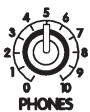
The PHONES jack accepts standard stereo headphones and is located in the upper right area of the panel. The PHONES level control is located in the lower right area. The source for all headphones signals is the MONitor bus until a CUE button is depressed at which time only the cued channel can be heard through the phones.
Level Meters
These meters follow either the Left and Right MAIN bus activities or a mono mix of the mains on the Left-meter and monitors on the Right-meter, all depending on the position of the EQ/AMP ASSIGN button. If either or both CLIP lights at the top of the level meters is flashing too much of the time, lower the appropriate MAIN MASTER level to avoid possible distortion on peaks.
These are switching jacks which enable you to directly access either or both channels of the built-in power amplifier while disconnecting them from normal internal functions. This permits you to insert an external-EQ, a processor /crossover (e.g. elite) or a compressor/limiter between the mixer section's POST EQ LINE OUTPUTS and the AMP 1 & AMP 2 INPUTS thus providing the 100% signal processing essential for these functions to work properly.
User tip: If you have an electronic-crossover or processor/crossover, you can drive subwoofoers and full-range cabinets in a
biamped system with the AP812/818. The hookup goes as follows:

255 PRESET 16 BIT DIGITAL EFFECTS PROCESSOR


A ROOMS
B HALLS
C CHAMBERS/PLATES
D SHORT DELAYS
E MEDIUM DELAYS
F LONG DELAYS
G GATES/REVERSE REVERB
H ROOMS PLUS THICKENING DELAYS
ROOMS PLUS REGEN DELAYS
J CHAMBERS/PLATES PLUS CHORUS
K ROOMS PLUS REGEN DELAYS
L HALLS PLUS REGEN DELAYS
M CHAMBERS/PLATES PLUS CHORUS
N ROOMS/HALLS PLUS CHORUS
O DELAYS PLUS CHORUS
P SPECIAL EFX
- With the EQ/AMP ASSIGN button down in the MAIN/MON position, run a patch cable from the POST EQ MAIN (L) LINE OUTPUT to the input on an electronic crossover/processor.
- Now run a second patch cable from the low-frequency or subwoofer output on the crossover to the AP812/818's AMP 1 INPUT and a third patch cable from the crossover's high-frequency or full-range output to the AP812/818's AMP 2 INPUT.
- Now connect two 8 ohm subwoofer or one 4 ohm subwoofer to the AMP 1 SPEAKER connector/s and two 8 ohm full-range cabinets to the AMP2 SPEAKER connector/s.
- The complete system is now functional, not including monitors. How-ever, if you need to vary the comparative volume levels of the subwoofer/s relative to the full-range cabinets, another setup will be required with an external power amp for the subwoofoers or employing powered subwoofoers. In that system, AMP 1 would be for full-range speakers and AMP 2 would be for monitors. In other words, this is a standard setup but with the MAIN (L) LINE OUTPUT going to the input of the processor/crossover and then to an external amp driving the subwoofer/s, or simply direct to the input of a powered subwoofer (ours have crossovers built in).
Power Amplifier - General
The AP812/818 has a built-in 800 watt stereo power amplifier. Each channel has an input sensitivity of +4 dBv (1.4 volts RMS) for full-power output and each can deliver over 400 watts into a 4 ohm speaker load. These amplifiers incorporate computer designed internal heatsinks and a variable-speed fan which automatically provides quiet operation consistent with cooling requirements. Cool air is drawn into the front of the mixer, and heated air is expelled along the bottom of the back. Even at maximum power, this arrangement results in quiet, dependable performance.
PLEASE NOTE: THE AIR VENTS AT THE FRONT AND BOTTOM REAR OF THE
MIXER ARE ESSENTIAL FOR PROPER
OPERATION. BLOCKING THE FREE FLOW OF AIR THROUGH THE MIXER WILL RESULT IN SYSTEM SHUT-DOWN DUE TO OVERHEATING. REPEATED OVERHEATING MAY EVENTUALLY CAUSE DAMAGE. PLEASE KEEP THE VENTS FREE OF OBSTRUCTIONS.

Speaker Connections
Two 1/4-inch jacks and one Speakon® connector are in parallel with each amp-channel output stage. This allows the use of speaker cables equipped with either type of connector. For full-power applications we recommend 14-gauge cables equipped with the Speakon® connectors. This will reduce risk of resistance buildup. The Speakon® system, developed in recent years by Neutrik in Switzerland, features block-style contacts capable of handling large amounts of power and the connectors lock down to prevent accidental kick-outs.
Connect one or two 8 ohm speakers or one (only) 4 ohm speaker to each channel. When connecting the Speakon's®, push them in firmly and twist in a clockwise motion. Push the tab and twist counter-clockwise to disconnect.
User tip: To connect two (8 ohm) speakers to one or both of the AP812's powered output channels via the Speakon® connectors, run a single Speakon® equipped cable, e.g. Yorkville model SP2-25SS or SP2-50SS with Speakons® at both ends (most higher-powered speaker enclosures now feature Speakons® as well) from the AP812/818 to one of the enclosures. Now run a second cable from one cabinet to the next via their dual, parallel inputs.
Power Amplifier Protection
The AP812/818's power amplifier is protected from damage due to open, shorted or excessively low speaker loads. It will continue to run into a low (less than 4 ohms) overall speaker impedance or even a total short-circuit for a brief time, however the amplifier's defense system will be activated. First, the built-in limiter will reduce output power levels and the fan speed may increase. Then, if the condition worsens, a thermal protection circuit will shut the power amplifier down. When this happens, check your system for restricted air intake/exhaust at the AP812/818. Also check for shorted cables or connectors and/or reduce the number of speakers being driven. In a few minutes when it has had a chance to cool down, power amp function will resume.
User tip:
a) If the power amplifier shuts down as above, the mixer section will continue to function. This means that, if the AP812/818's power amp fails to come back on (unlikely) and you have a spare power amplifier available, you can connect it to the AP812/818 via the LINE OUTPUT jacks. See under PRE and POST EQ LINE OUTPUTS for further information regarding connections.
b) Because the amplifier is also protected against open-circuit conditions, you may use the AP812/818 without any speakers connected, for example if you wanted to do some recording.

The AP812/818's power amplifier also features speaker protection in case of DC-offset. This is a very unlikely occurrence given the amp's inherently stable design, but should it happen, the output power is instantly shorted to ground and the speakers are saved. The AC mains breaker on the back panel will blow in response to this condition (among others). If your breaker blows more than once in a short space of time and the problem does not appear to be AC overload (see below), switch the power off and take your AP812/818 to a qualified technician.
AC Power Circuit-Breaker
Located on the back panel near the SPEAKER connectors, this circuit-breaker's main function is to shut the AP812/818 down completely in case of an AC power overload. If, for example, the unit were accidentally connected to a high-voltage power outlet, this breaker would open as soon as the AP812/818's POWER switch was flipped on. If this breaker opens more than once in a short space of time, try plugging the AP812/818 into another power outlet. Also, see above regarding DC-offset speaker protection.
Rack Mounting (applies to AP812 only)
To rack-mount the AP812 you will need to purchase a pair of the accessory model RK812 rack ears, then simply remove the three screws holding each of the AP812's two end moldings in place and use the screws to mount the rack ears to the sides of the mixer.
General Operating Instructions
- Connect the AC power cord to a 120 Volt AC grounded power outlet (220 to 240 Volts in export units).
- Switch on the POWER and turn the MAIN and MONITOR MASTER controls to OFF for now.
- Connect low-impedance microphones to the 3-pin XLR type MIC inputs.
- Connect high-impedance mics or mono line-level signal sources - i.e. amplifier line outputs, the output of a mono-mixer, an electric instrument, etc. to the 1/4-inch BAL LINE IN jacks. Do not connect more than one thing to any of these channels, that includes stereo outputs (if you try to connect a stereo source to a mono channel using a Y adapter, you may get distortion).
- Connect stereo sources - tape deck, CD-player, stereo keyboard, instrument, etc. - to channels 9/10 and 11/12 (15/16,17/18), either via the RCA (phono) type inputs or the 1/4-inch BAL LINE IN connectors. Once again, connect only one signal source per channel and use shielded patch cords for all pre-amp connections. Stereo sources may be connected to channels 1 through 8 if you use two of them, one panned left, the other right.
Note A: The following setup applies to the system with the EQ/AMP ASSIGN button down in the MAIN/MON position. This is with a mono main mix going to AMP 1 and the monitor mix going to AMP 2 so that the whole system is being powered by the AP812/818.
-
Using heavy-gauge speaker cables (see under SPEAKER CONNECTIONS) connect one or two 8 ohm main PA speakers to the AMP 1 SPEAKER outputs on the back panel. Similarly, connect one or two 8 ohm monitors, or one 4 ohm monitor to the AMP 2 SPEAKER outputs.
-
Position your main PA speakers at the front of the stage, pointing directly out at the audience and position your monitor speakers on the stage floor, in front of the mic stands, pointing up at the backs of the mics (remember to use cardioid or uni-directional mics to reduce the threat of monitor feedback).
-
During a sound check with the band playing or other sources feeding the mixer inputs, make the following control adjustments:
a) Set the channel LOW, MID & HIGH EQ controls and PAN or BAL controls at center. Now set the channel GAIN, MON and EFX controls to OFF, the channel fader all the way down, and the GRAPHIC EQ sliders at center position.
b) Set the MAIN faders at 0 dB, turn the MONITOR MASTER control up to approx. 8, the MAIN EFX master to around 7 and MONITOR EFX master to 5.
c) With the level faders still off, turn up the channel GAIN controls slowly until the CLIP LED's down beside the level faders begin to flash slightly. Now bring up the channel level faders slowly until each channel can be heard at the desired volume level through the main PA speakers.
d) Turn up the channel MON controls until the performers can hear themselves at adequate volume levels without feedback.
e) Turn up the EFX controls on those channels requiring reverb. Usually this would be the lead and harmony vocal channels. Reverb may be used on other channels or on recorded music, but at lower levels.
f) Set the EFX SELECT control to establish the basic type of reverb, delay or whatever you prefer, then adjust the MODIFY control to establish the final sound.
- Feedback during a performance is usually caused by one of the monitors. The main PA is less likely to feed back because the mics are so far away from the main PA speakers. Therefore, if one of the monitors and a mic are feeding back, try the following procedures:
a) Turn the MONITOR master down until the feedback stops.
b) Go to EQ 2 and pull down one or two (but not more) of the EQ sliders in the frequency range where the sound seems to be occurring.
c) Now turn the MONITOR master back up. If the feedback recurs, push the EQ slider/s back up to center position and try pulling down one or two others.
d) In the rare case of main system feedback, follow the above type of procedure, but using the MAIN master and the built in GRAPHIC EQ.
Note B: The following notes apply to the system with the EQ/AMP ASSIGN button up in the stereo L & R position.
If you are employing a separate power amplifier for the monitor speakers, connect the main speakers to the AMP 1 and AMP 2 SPEAKER OUTPUTS as in 6. above (also see SPEAKER CONNECTIONS). Now run a shielded patch cord from the MONITOR OUT jack to the input of the monitor power amp.
If you are employing a graphic equalizer for the monitors (a good idea - remember there is no channel-EQ on the monitor signals and the AP812's EQ 1 and EQ 2 are now dedicated to the main-PA sound), run a shielded patch cord from the MONITOR OUT jack to the input of the EQ, then another one from the EQ's output to the input of the monitor power amp (the Yorkville Beta-150EQ power amp has an EQ built-in). Follow the above steps in 7. and 8. to get the system ready to run. Now, take a moment to read the following tips on running the this, or any, system.
Tips on Getting a Good Mix
If you've never mixed at high power levels before, the following suggestions may help you to get a consistently good sound.
- When you have live microphones, don't run the volume level right up to the point of feedback! This is the most common mistake made by people mixing live events. We've all heard systems on the verge of feedback and they sounded terrible, even when no feedback was actually occurring! This happens because working at the feedback point warps the frequency response of the system.
- To understand how volume level can affect frequency response, let's look at what happens as you increase it to the point of feedback. Notice that feedback wants to occur at a certain frequency? This is because the entire system - the room, the microphones, the speakers, the people, everything - is showing a tendency to RESONATE at a particular frequency. The technical term for a system which shows a tendency to resonate is A HIGH Q FILTER. So by turning up to the feedback point, you are making the whole system behave like a high Q filter. This gives you the same sound as if you turned everything down a lot and then boosted, say, the 1 kHz graphic EQ to +12 dB!
This is why stage feedback can be controlled by cutting certain frequencies with the graphic EQ. However, using the graphic to control feedback means that, as the room changes, (more people come in, it gets hotter, the dance floor empties or fills up, etc.), the system's equalization will change. You'll be fighting the room all night.
- Having things loud doesn't make up for the poor sound produced by spurious response peaks. Fortunately, the Q of a system decreases rapidly as gain drops. The professional way to avoid resonance effects is to keep about 3 dB away from the first sign of feedback. The system will still be very loud, but it will sound a whole lot better. Ideally, the graphic EQ should be used to flatten the overall response, not to fix feedback.
- Use short reverb sounds and modest amounts of reverb. Long reverberation effects cause the music to smear and can make things sound out of tune, especially as the music goes through harmonic changes. Shorter reverb tails enhance the sound without spoiling definition. Having lots of dry in the mix keeps the kick in it. Don't forget that the room you are in may have lots of its own reverberation, and that you can't hear that in the headphones.
- Use tone controls sparsely; Most things sound great just as they are. A little high-end boost can bring vocals to life. If you have a mic on the bass drum, you can probably roll off most of the treble. (It's not useful to have mics listening for sounds that aren't there). Remember that making each instrument and voice sound full when heard alone, will make the mix sound like mush when everything is heard together. Experiment, but be conservative with tone controls.
- Keep the vocals up front. Microphones tend to feed back, but instruments can be turned up almost without limit. This fact biases volume in favor of the instruments. If you just follow what the mix seems to want, you may end up burying the vocals so that they can't be clearly heard. Most ears don't like that.
- Speaking of ears, don't forget yours. You've probably walked into a show late in the evening and had your ears blistered by screaming horns. "What's wrong with whoever is doing the mix?" you might have said with fingers in your ears. What was wrong was a technician with a dose of hearing fatigue and his/her unfortunate reaction to it. After a relatively short exposure to high sound pressure levels, the human ear shuts down somewhat, especially in the upper-midrange and high frequencies where it is most sensitive. This process reduces the immediate discomfort, but there is debate as to whether it protects the ear in the long term and much evidence that damage does occur. In any case, the technician notices that the horns sound muted and reacts by altering the EQ or the crossover to boost them (ouch!). Apart from long-term physical danger, this sounds bad and turns off at least some of the audience - especially the new arrivals. The solution - earplugs or other hearing protection. Afterwards, some quiet time is in order to give damaged eardrum tissue a chance to heal. Provided severe or repeated damage hasn't created a buildup of
scar tissue causing permanent hearing loss, you can return to hear your mix with fresh ears. The mix should sound invitingly loud, but not painful.
- In basic terms, if you find that you've turned up the high end since the night began and it still sounds the same to you as it did at the beginning, watch out. That's not "fatigued horns" or "changing room acoustics" rolling off the high end, it's your ears. Please do yourself and your audiences a favor - USE EARPLUGS! And if you can't bring yourself to do that, be considerate of your audiences and leave the high-end EQ or crossover at normal settings.
| Specifications |
| Number of Channels | 12 (AP818: 18) |
| Mono Channel EQ | (ch. 1 to 8) Low, Sweep Mid, High (AP818: Ch. 1 - 14)) |
| Stereo Channel EQ | (ch. 9/10 & 11/12) Low, Mid, High (AP818: Ch. 15/16 & 17/18) |
| Channel Effects | All Channels |
| Monitors Effects | Yes |
| Balance Controls | 9 to 12 (AP818: 15 to 18) |
| Pan Controls | 1 to 8 (AP818: 1 to 14) |
| Inputs - XLR (bal) | Ch. 1 - 8 (AP818: Ch. 1 to 14) |
| Inputs - 1/4-inch | Ch. 1 - 12 (AP818: 1 to 18) |
| Inputs - RCA (unbal) | 2 Stereo Sets |
| Clip /Mute LED | All Channels |
| Phantom Power | 24 V + LED indicator |
| VU Meter | 2 x 5 LED |
| Headphone Monitor Features | Cue, Volume |
| Internal Effects | Digital 16 Bit; 255 Effects |
| Effects Send | 1 Internal/External |
| Effects Return to Main | Yes |
| Effects Return to Monitor | Yes |
| Reverb / Effects Footswitch | Yes |
| Max Gain to Line Out -Mic Input (dB) | 63 |
| Max Gain to Line Out -Line Input (dB) | 45 |
| Master EQ -1 (type /Channels /Range - dB) | Graphic / Mono / 9 Band 63 Hz - 16,000 Hz |
| Master EQ -2 (type /Channels /Range - dB) | Graphic / Mono / 9 Band 63 Hz - 16,000 Hz |
| Main Outputs (Line Level) | 4, 1/4 inch (TRS) 2 pre, 2 post EQ |
| Main Amp Inputs (Line Level) | 2, 1/4 inch (TRS) |
| Monitor Outputs (Line Level) | 1, 1/4 inch (TRS) |
| Outputs - Amp A - 1/4-inch Jacks | 2 |
| Outputs - Amp A - Speakon 4-pin | 1(Euro only) |
| Outputs - Amp B - 1/4-inch Jacks | 2 |
| Outputs - Amp B - Speakon 4-pin | 1 (Euro only) |
| Mixer - Signal to Noise Ratio (dB) | greater than 100 |
| Mixer - Frequency Response (Tone and EQ Flat,+/-2dB) | 20 Hz - 20,000 Hz |
| Mixer - Input Referred Noise to line out, @ 150 ohms (dBv) | -117 |
| Mixer THD (Main out w/ -10dB input) | less than 0.03% |
| Amp A - Power Output @ 8 ohms (0%1"THD, 1kHz) | 240 |
| Amp A - Power Output @ 4 ohms | 455 |
| Amp A - Power Output -other | 315 @ 2 ohms |
| Amp B - Power Output @ 8 Ohms (0%1"THD, 1kHz) | 240 |
| Amp B - Power Output @ 4 ohms | 455 |
| Amp B - Power Output -other | 315 @ 2 ohms |
| THD - 1kHz (dB) | less than 0.03% |
| THD - 20Hz-20kHz (dB) | less than 0.1% |
| Hum and Noise (un / Aweight -dB) | -98 |
| Typical crosstalk -1 kHz (dB) | -66 |
| Input Impedance - Bal/Unbal (ohms) | 22,000 - 12,000 |
| Input Sensitivity (Vrms Sine) | 1.47 V |
| CMRR @ 60Hz (min/typ) | 54 dB / 66 dB |
| Max Voltage Gain (dB) | 29 |
| Power Consumption (typ/max) | 660 VA / 1200 VA |
| Protection | Thermal / Load / DC |
| Cooling | Variable Speed DC Fan |
| Transformer Type | Toroidal |
| Finish | Scratch Resistant Vinyl-Coated Aluminum |
| Chassis Construction | Steel |
| Rackmount | Yes (RK812) (AP818: NOT APPLICABLE) |
| Other Features | Selectable stereo mains or mono main & monitor. |
| Dimensions (DWH, inches) | 18 x 19 x 5.5 (AP818: 18 x 25.3 x 5.5) |
| Dimensions (DWH, cm) | 45.7 x 48.3 x 14 (AP818: 45.7 x 64.3 x 14) |
| Weight (lbs/kg) | 38 / 17.3 (AP818: 43 / 19.5) |
Addendum
EQ Sweep Control
Although frequency sweep controls have graced the channel-EQs of recording mixers for many years, they are only found on the more upscale PA mixers. As a result many PA users, even veterans, are unfamiliar with their function. The SWEEP control determines what range of frequencies is affected by the MID cut/boost. It moves or sweeps the MID control's peak or notch in response all the way up to several thousand Hertz or down to below 100Hz . As a result it can have quite a noticeable effect on the sound especially since the MID cut or boost will be interacting with whatever cuts or boosts you may have set with the LOW or HIGH EQ controls.
For example, if you have set a LOW boost, a MID boost swept all the way down to the lowest frequency setting will alter the sound of the lows and increase their volume. Be careful this doesn't damage your woofers. And watch out for your tweeters/horns if you sweep the boost up to the higher settings while the HI EQ is boosted.
Considering that the SWEEP control can alter everything you are accustomed to an EQ doing, it would be worthwhile to spend some time becoming acquainted with how it works. As music plays through a channel on the mixer and speakers, adjust that channel's MID, first for a boost then for a cut and SWEEP them back and forth. (If there is no MID cut or boost setting, i.e. if it is set at the center position, the SWEEP will have no effect at all). Now repeat the process with that channel's LOW and HIGH EQ controls at various settings (but with the volume at a safe level for the speakers).
Hint: The PowerMAX SWEEP has a home base setting marked with a triangle at the 2.5kHz mark. This approximately corresponds to the setting of the fixed mid controls on our other mixers. Set channels not requiring SWEEP equalization at 2.5kHz and the MID cuts or boosts will have more standard results.
Together, MID and SWEEP controls can be used to accomplish a variety of tasks from combating feedback to improving the way things sound through the PA or on recording. Here are some of those tasks & settings:
Note: These are approximate settings only. Use them as a starting point and tune around them.
- Killing feedback? Set MID at -6dB and slowly rotate SWEEP until the feedback stops. If needed cut the MID further.
- Bonky sounding snare drum? -6dB @ 200Hz (roll off LOW EQ -6dB)
- Boomy bass drum? -6dB @ 300Hz (LOW EQ @ +6dB & HIGH EQ @ +3dB)
- Fwashy sounding cymbals? -9dB @ 300Hz (roll off LOW EQ -15dB)
- Excessive hiss from guitar, bass or keyboard amp? +3dB @ 5kHz (HI EQ rolled off -9dB)
- Fading vocal range (notes too low for singer)? +3dB @ 80Hz (LOW EQ rolled off -6dB)
- Puffing on harmonica mic? -9dB @ 80Hz (LOW EQ rolled off -12dB)
- Rack Toms? -3dB @400 Hz
Floor tom? -6dB @ 200Hz
Generally speaking, you will probably end up with the MID in cut mode for most problem solving uses of the SWEEP control. In any case you will learn to use this feature judiciously. The best PA EQ setting is the one with the least adjustment, but when you need to solve a problem it's good to know how to use the tools.
Introduction
.
m = 311
HG,DELAYS
LAYS
CHORUS
LAYS
AYS
CHORUS
ORUS

A ROOMS
B HALLS
C CHAMB
D SHORT
E MEDIAN
F LONG G
G GATES/
H ROOMS
I ROOMS
J CHAMB
K ROOMS
L HALLS I
M CHAMB
N ROOMS
O DELAYS
P SPECIAL


MASTER EFX


Monitor Master & Clip LED
Montage en Rack (AP-812 only)
Entree-1/4-pouce Ch.1-12 (AP818:1a18)
Entres - RCA (asym) 2 Ensembles Stereo
Two & Ten Year Warranty
Two & Ten
Unlimited Warranty
Yorkville's two and ten-year unlimited warranty on this product is transferable and does not require registration with Yorkville Sound or your dealer. If this product should fail for any reason within two years of the original purchase date (ten years for the wooden enclosure), simply return it to your Yorkville dealer with original proof of purchase and it will be repaired free of charge. This includes all Yorkville products, except for the YSM Series studio monitors, Coliseum Mini Series and TX Series Loudspeakers.
Freight charges, consequential damages, weather damage, damage as a result of improper installation, damages due to exposure to extreme humidity, accident or natural disaster are excluded under the terms of this warranty. Warranty does not cover consumables such as vacuum tubes or par bulbs. See your Yorkville dealer for more details. Warranty valid only in Canada and the United States.
Garantie Illimitée
Voice: (716) 297-2920
Fax: (716) 297-3689

Yorkville Sound 550 Granite Court Pickering, Ontario
L1W-3Y8 CANADA
Yorkville Sound Inc. 4625 Witmer Industrial Estate
Niagara Falls, New York
14305 USA

WEB: www.yorkville.com
Niagara Falls, New York
14305 USA
Voice: (716) 297-2920
Fax: (716) 297-3689

Quality and Innovation Since 1963
Printed in Canada