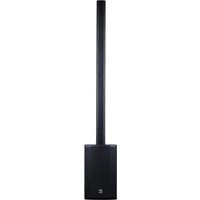
YXL Tower10 - Loudspeaker YORKVILLE - Free user manual and instructions
Find the device manual for free YXL Tower10 YORKVILLE in PDF.


| Product Type | Amplified tower speaker (column) with woofer, mid/high column and extension |
| Brand | Yorkville |
| Model | YXL Tower10 |
| Power | 1550 watts peak (1250 W LF, 300 W MF/HF) |
| Maximum sound pressure | 124.5 dB peak / 116.5 dB continuous at 1 m |
| Frequency response | 49 Hz – 20 kHz (-3 dB) |
| Speaker configuration | HF: 1 x 0.75" neodymium compression driver; MF: 4 x 3" neodymium; LF: 1 x 10" neodymium |
| Inputs | 3-channel mixer: Ch.1 Mic/Instrument (XLR+TRS), Ch.2 Mic/Line (XLR+TRS), Ch.3 Stereo Aux 3.5 mm, Bluetooth®, Main In balanced XLR |
| Outputs | Link Out XLR (to daisy chain up to 16 speakers) |
| Controls | Master Volume, Sub Level, Mode switch (Concert/Club/Speech), channel 1-3 levels, clip indicators |
| Bluetooth | Version not specified, range 10 m, button activation, wireless stereo mode (two speakers), pairing by long press 4 s |
| Operating modes | Concert (natural), Club (+3 dB bass, limiters), Speech (voice, anti-feedback) |
| Power supply | AC mains (IEC socket, voltage not specified – country adapted) |
| Dimensions (assembled) | Height 202.4 cm; Width 32 cm; Depth 40.6 cm (woofer); column: 9.1 x 9.1 x 83.3 cm (speaker) + 9.1 x 9.1 x 82.6 cm (extension) |
| Weight | 18.3 kg |
| Materials | Wood cabinet, ABS column, full-length metal grille |
| Warranty | 2 years unlimited (10 years for cabinet) – transferable |
| Maintenance and cleaning | Clean with a dry cloth only |
| Safety | Do not expose to rain or moisture; do not open; professional installation for suspended mounting; do not stack; hot surface |
| Operating temperature | 50 °C max; altitude 5000 m max |
Frequently Asked Questions - YXL Tower10 YORKVILLE
User questions about YXL Tower10 YORKVILLE
0 question about this device. Answer the ones you know or ask your own.
Ask a new question about this device
Download the instructions for your Loudspeaker in PDF format for free! Find your manual YXL Tower10 - YORKVILLE and take your electronic device back in hand. On this page are published all the documents necessary for the use of your device. YXL Tower10 by YORKVILLE.
USER MANUAL YXL Tower10 YORKVILLE
YXL SERIES
PORTABLE COLUMN PA
YXL Tower10
YXL Tower12
OWNER'S MANUAL
MANUEL DE L'UTILISATEUR
IMPORTANT SAFETY INSTRUCTIONS

This lightning flash with arrowhead symbol, within an
eculateral triangle, is intended to alert the user to the presence of uninsulated "dangerous voltage" within the product's enclosure that may be of sufficient magnitude to constitute a risk of electric shock to persons.
The DO NOT STACK symbol is intended to alert the user that the product shall not be
vertically stacked because of the nature of the product.
The exclamation point within an equilateral triangle is intended to alert the user to the presence of important operating and maintenance (servicing) instructions in the literature accompanying the appliance.
CAUTION: OVERHEAD LOAD
ATTENTION: CHARGE AÉRIENNE
FOLLOW ALL INSTRUCTIONS SUIVEZ TOUTES LES INSTRUCTIONS
Instructions pertaining to a risk of fire, electric shock, or injury to a person
CAUTION: TO REDUCE THE RISK OF ELECTRIC SHOCK, DO NOT REMOVE COVER (OR BACK). NO USER SERVICEABLE PARTS INSIDE. REFER SERVICING TO QUALIFIED SERVICE
PERSONNEL. THIS DEVICE IS FOR INDOOR USE ONLY!
INSTALLED BATTERY PACKS SHALL NOT BE EXPOSED TO EXCESSIVE HEAT SUCH AS SUNSHINE, FIRE OR THE LIKE.
Read Instructions: The Owner's Manual should be read and understood before operation of your unit. Please, save these instructions for future reference and heed all warnings.
Cleaning: Clean only with dry cloth.
Packaging: Keep the box and packaging materials, in case the unit needs to be returned for service.
Warning: To reduce the risk or fire or electric shock, do not expose this apparatus to rain or moisture. Do not use this apparatus near water! Warning: When using electric products, basic precautions should always be followed, including the following:
Power Sources
Your unit should be connected to a power source only of the voltage specified in the owners manual or as marked on the unit. This unit has a polarized plug. Do not use with an extension cord or receptacle unless the plug can be fully inserted. Precautions should be taken so that the grounding scheme on the unit is not defealed. An apparatus with CLASS I construction shall be connected to a Mains socket outlet with a protective arsthing connection. Where the MAINS plug or an appliance coupler is used as the disconnect device, the disconnect device shall remain readily operable.
Hazards
Do not place this product on an unstable cart, stand, tripod, bracket or table. The product may fall, causing serious personal injury and serious damage to the product. Use only with cart, stand, tripod, bracket, or table recommended by the manufacturer or sold with the product. Follow the manufacturer's instructions when installing the product and use mounting accessories recommended by the manufacturer. Only use attachments/accessories specified by the manufacturer.
Equipment that is suspended overhead must use a secondary safeguard to prevent personal injury in the event: the primary mounting mechanism fails. Safety eyelobls attached to the equipment and galvanized steel wire can be used together to implement a fallsafe mounting thus ensuring the safety of the equipment and anyone positioned below the equipment.
Improper installation can result in bodily injury or death. If you are not qualified to attempt the installation get help from a professional structural rigger. Note: Prolonged use of headphones at a high volume may cause health damage to your ears.
The apparatus should not be exposed to dripping or splashing water; no objects filed with liquids should be placed on the apparatus.
Terminals marked with the "lightning bolt" are hazardous live; the external wiring connected to these terminals require installation by an instructed person or the use of ready made leads or cords.
Ensure that proper ventilation is provided around the appliance. Do not install near any heat sources such as radiators, heat registers, stoves, or other apparatus (including amplifiers) that produce heat.
No naked flame sources, such as lighted candles, should be placed on the apparatus.
Power Cord
Do not defeat the safety purpose of the polarized or grounding-type plug. A polarized plug has two blades with one wider than the other. A grounding type plug has two blades and a third grounding prong. The wide blade or the third prong are provided for your safety. If the provided plug does not fit into your outlet, consult an electrician for replacement of the obsolete outlet. The AC supply cord should be routed so that it is unlikely that it will be damaged. Protect the power cord from being walked on or pinched particularly at plugs. If the AC supply cord is damaged DO NOT OPERATE THE UNIT. To completely disconnect this apparatus from the AC Mans, disconnect the power supply cord plug from the AC receptacle. The mains plug of the power supply cord shall remain readily operable.
Unplug this apparatus during lightning storms or when unused for long periods of time.
Service
The unit should be serviced only by qualified service personnel. Servicing is required when the apparatus has been damaged in any way, such as power-supply cord or plug is damaged, liquid has been spilled or objects have fallen into the apparatus, the apparatus has been exposed to rain or moisture, does not operate normally, requires battery pack replacement or has been dropped. Disconnect power before servicing!
IMPORTANT SAFETY INSTRUCTIONS

The Lightning Flash with arrowhead symbol within an equilateral triangle, is intended to alert the user to the presence of uninsulated "dangerous voltage" within the product enclosure that may be of sufficient magnitude to constitute a risk of shock to persons.

The exclamation point within an equilateral triangle is intended to alert the user to the presence of important operating and maintenance (servicing) instructions in the literature accompanying the product
-
Read these instructions.
-
Keep these instructions.
-
Heed all warnings.
-
Follow all instructions.
-
Do not use this apparatus near water
-
Clean only with dry cloth.
-
Do not block any ventilation openings. Install in accordance with the manufacturer's instructions.
-
Do not install near any heat sources such as radiators, heat registers, stoves, or other apparatus (including amplifiers) that produce heat.
-
Do not defeat the safety purpose of the polarized or grounding-type plug. A polarized plug has two blades with one wider than the other. A grounding type plug has two blades and a third grounding prong. The wide blade or the third prongs are provided for your safety. If the provided plug does not fit into your outlet, consult an electrician for replacement of the obsolete outlet.
-
Protect the power cord from being walked on or pinched particularly at plugs, convenience receptacles, and the point where they exit from the apparatus.
-
Only use attachments/accessories specified by the manufacturer.
-
Use only with the cart, stand, tripod, bracket, or table specified by the manufacturer, or sold with the apparatus. When a cart is used, use caution when moving the cart/apparatus combination to avoid injury from tip-over.
-
Unplug this apparatus during lightning storms or when unused for long periods of time.
-
Refer all servicing to qualified service personnel. Servicing is required when the apparatus has been damaged in any way, such as power-supply
cord or plug is damaged, liquid has been spilled or objects have fallen into the apparatus, the apparatus has been exposed to rain or moisture, does not operate normally, or has been dropped.
WARNING:
• To reduce the risk of fire or electric shock, do not expose this apparatus to rain or moisture and objects filled with liquids. such as vases, should not be placed on this apparatus.
• To completely disconnect this apparatus from the ac mains, disconnect the power supply cord plug from the ac receptacle.
• The mains plug of the power supply cord or appliance coupler shall remain readily accessible.

POUR PRÉVENIR LES RISQUES D'ÉLECTROCUTION,
NE PAS RACCORDER A L'ALIMENTATION ÉLECTRIQUE ALORS QUE LA GRILLE EST RETIRÉE.

Table of Contents
Important Safety Instructions - English......i
EMC Declaration TYPE B - English / Français......ii
Table of Contents......ii
YXL Tower10/12 Series Powered Speakers....1
Features ....1
Power Switch & Mode LED 1
Mode Switch....1
Master Control 2
Activity LED 2
Bluetooth®....2
Enabling Bluetooth 2
Pairing 2
Status 2
Level Control 2
Stereo Mode 2
Button Operation 2
Range 3
Mixer....3
-
Channel Level Controls & Clip LEDs ....3
-
Channel 1 Mic / Instrument In ....3
-
Channel 2 Mic / Line In ....3
-
Channel 3 Stereo Aux In ....3
Sub Level....3
Main In / Link Out ....3
Specifications - English 10
Warranty - English / Français 12
Rear Page 13
This equipment has been tested and found to comply with the limits for a Class B digital device, pursuant to part 15 of the FCC Rules. These limits are designed to provide reasonable protection against harmful interference in a residential installation. This equipment generates, uses and can radiate radio frequency energy, and if not installed and used in accordance with the instructions, may cause harmful interference to radio communications. However, there is no guarantee that interference will not occur in a particular installation. If this equipment does cause harmful interference to radio or television reception, which can be determined by turning the equipment off and on, the user is encouraged to try to correct the interference by one or more of the following measures:
- Reorient or relocate the receiving antenna.
- Increase the separation between the equipment and receiver.
- Connect the equipment into an outlet on a circuit different from that to which the receiver is connected.
- Consult the dealer or an experienced radio/TV technician for help.
CAUTION: Changes or modifications not expressly approved by the party responsible for compliance could void the user's authority to operate the equipment.
YXL Tower10/12 Series Powered Speakers
The YXL Series offers our best ratio of power, performance and value for full-range active loudspeaker enclosures. Providing 1550 watts peak with efficient speaker components, the YXL Series is extremely loud for their sizes. There are several different input options for connecting audio sources including Bluetooth®, microphones, musical instruments and other audio sources. While the onboard audio mixer may have a minimum of controls, it's tremendously useful and provides great versatility. With a sleek mid/high column, the YXL Towers can be easily used in any situation where a minimal aesthetic is required.
Up to 16 YXL Series Powered speakers can be linked together with a maximum of three 'mixers' active at any one time. This means up to 6 mic sources and 6 instrument/line sources are available in an array of three or more enclosures. The Master level controls are used to adjust the levels of individual powered enclosures. This is invaluable in applications where large numbers of enclosures are used such as in clusters or in trade show applications (or when YXL Series powered speakers are used as repeater enclosures or side-fill).
NOTE: Our Link system allows additional powered YXL Series powered speakers to be driven from a single source (up to a maximum of 16 YXL Series powered enclosures). A maximum of 3 mixers can be used when Linking YXL Series powered enclosures
USER TIP: When a pair of YXL Series powered speakers are Linked you can use both mixers integrated on each cabinet.
Features
• 1550 watts peak
- Superior DSP processing with loudspeaker thermal and over-excursion protection
- Low distortion and high power-handling 10, or 12-inch woofer
- 4 x 3-inch mid drivers
• 0.75-inch compression driver
- Ultra-clear reproduction throughout the whole audio bandwidth
• Lightweight and high efficiency bi-amped power module
- Recessed control panel
• Master Level control with LED Activity indicator
• 3 Performance modes, Concert, Club and Speech
- Toggleable 3 channel mixer with level controls and Clip indicators
- Bluetooth® input / streaming
• 2 Microphone Inputs with level control and phantom power
• 1/4-inch TRS Instrument and Line Inputs
• 1/8-inch Aux Input for connecting mono or stereo audio sources
- Main In / Link Out for connecting two or more YXL Series powered speakers
- Wood cabinet with ABS plastic construction for the column
- Tough, full length metal grille
Power Switch & Mode LED
The AC power switch on the rear panel turns the power On or Off. The Mode LED turns on to indicate power is supplied to the unit.
Mode Switch
The Mode Selector applies specific EQ and tone settings for the YXL Series powered enclosure, tailoring the unit for common use cases.
Concert: Allows instruments and vocals to be equally and naturally reproduced which is best for live performance.
Club: +3dB bass shelf and linked limiters between the woofer and mid/high drivers make this mode ideal for music playback.
Speech: Optimized for human voice while minimizing feedback.
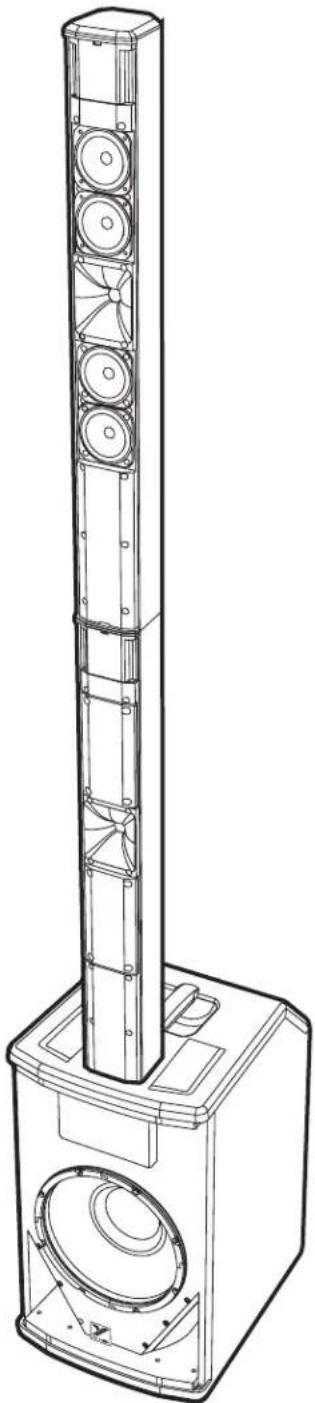
natural_image
Technical line drawing of a multi-tiered speaker tower with visible sound waves and components (no text or symbols)Master Control
The Master control sets the level of ALL sound coming out of the YXL Series enclosure. If there are multiple YXL Tower speakers in a system, the volume of each speaker is individually set by using each enclosure's Master control.
Activity LED
This LED illuminates when audio signal is present from all sources being sent to the Master.
NOTE: If the Master is turned to Min, the Activity LED will not illuminate.
Bluetooth®
The Yorkville YXL Tower is capable of Bluetooth audio streaming from devices such as smartphones, tablets and laptops. Pairing your device with a YXL Tower is simple and gives you the freedom to play your music wirelessly. The YXL Tower also supports wireless stereo pairing between two YXL Tower units. One unit will act as the "Primary" unit, playing the left channel of the audio and maintaining the connection to your device, while the other unit will act as a "Secondary" unit, playing the right channel. You only need to connect your device to the Primary YXL Tower unit to enjoy high quality wireless stereo playback. See "Stereo Mode" below.
Enabling Bluetooth
When the YXL Tower is powered on, Bluetooth will be disabled by default. To enable it and connect to your device, simply tap the Bluetooth button. If a device was previously connected to the YXL Tower, it will attempt to automatically reconnect. Similarly, if a wireless stereo connection was previously established, both YXL Tower units used will attempt to automatically re-establish the wireless stereo connection (in the same Primary or Secondary role they previously performed).
Pairing
To pair your device to a YXL Tower, simply press the Bluetooth button down and hold for 4 seconds, then release the button.
Status
The blue status indicator alerts let you know the current status of the Bluetooth connection as described in this chart:
| Mode | Linked | Link-Back | Standby | Pairing | Stereo Grouping | Grouped |
| Standalone | ON ON, blinks 1x every 2 seconds. | Flashes 1x every 2 seconds | Flashes 2x per second | N/A | ||
| Stereo Primary | N/A | ON, blinks 1x every 2 seconds. | Flashes 2x every 2 seconds | Flashes 3x per second | Double flash | O N |
| Stereo Secondary | N/A | N/A | N/A | N/A | Double flash | Slow flash |
Level Control
Streamed music volume can be changed via the connected Bluetooth device, or via the Channel 3 Level control on the YXL Tower. The Channel 3 Level will also control the maximum volume level a connected device can set.
Stereo Mode
The YXL Tower supports wireless stereo playback between two YXL Tower cabinets, for an enhanced listening experience. One cabinet will act as the Primary unit, while the other acts as a Secondary unit. The Primary unit will play the left audio channel of streamed music, and also maintain the Bluetooth connection with your device, while the Secondary unit will play the right audio channel. Your device only connects to the Primary unit, not the Secondary. To enable Stereo Mode, simply double tap the Bluetooth button on the YXL Tower that should act as the Primary unit (left channel), then double tap the Bluetooth button on the other YXL Tower (right channel). The order matters, as the first unit double tapped will become the Primary unit (left channel). Both YXL Tower units will automatically attempt to re-establish the Stereo Mode connection the next time they are powered on and enabled, with the same Primary and Secondary roles previously used. You can still pair new devices to a YXL Tower Primary unit if it is in Stereo Mode. Pairing a device to a YXL Tower that is in Secondary mode will end the stereo wireless connection.
Button Operation
Single Tap – Enables Bluetooth
Double Tap – Enter Stereo Mode
Press and Hold (4 seconds) – Enter Pairing Mode
Press and Hold (8 seconds) – Disables Bluetooth
Range
The YXL Tower's Bluetooth operating range is rated for 10 meters (33 feet) line of sight. The quality of the link can be affected by an excess of traffic in the 2.4 GHz bandwidth or structures between the Bluetooth unit and the streaming device.
NOTE: When connected with Bluetooth, ALL audio is streamed from your device. If you don't want your streaming music to be interrupted, turn off notifications on your device
Mixer
1. Channel Level Controls & Clip LEDs
The channel level controls adjust the input sensitivity and the level of the channel's signal being sent to the Master. The clip LEDs illuminate 3 dB before clipping and are affected by both the source's gain signals and each corresponding channel level control.
USER TIP: When using the mixer, the Master control should be adjusted to control the suitable overall level of the YXL Series Powered Enclosure for the application.
NOTE: Adjustments of the gain for the Bluetooth® source can be made on the source device.
2. Channel 1 Mic / Instrument In
Any standard dynamic, condenser or phantom powered microphone may be connected to the Mic input, phantom power is built-in. The 1/4-inch TRS Instrument input is optimized for instruments such as guitars, basses or keyboards. Do NOT use both XLR and 1/4-inch inputs simultaneously.
NOTE: Some condenser microphones, that don't use batteries, may require phantom power.
TECH NOTE: The function of the fixed 90Hz high pass filter on Channel 1 is to minimize low frequency rumble when an acoustic instrument is used. It also helps remove the boominess when using the Microphone for voice.
3. Channel 2 Mic / Line In
Any standard dynamic, condenser or phantom powered microphone may be connected to the Mic input, phantom power is built-in. The 1/4-inch TRS input can be used with any line source such as a CD player or an electronic instrument with a line output. It is always recommended to use balanced sources. This helps prevent the risk of hum or buzz associated with unbalanced connections, especially if the cable is long or the source is operated from a separate AC power connection. Do NOT use both XLR and 1/4-inch inputs simultaneously.
4. Channel 3 Stereo Aux In
The 1/8-inch Line input jack is a typical 'stereo' audio input which properly sums the left and right signals from stereo sources such as smartphones and laptops.
NOTE: Channel 3's 1/8-inch TRS Line input and Bluetooth® can be used simultaneously.
Sub Level
The sub level control sets the level of signal to the woofer, allowing for adjustable amounts of bass. This control only affects the signals going to the internal amplifier and does not affect signals going out through the Link connection.
Main In / Link Out
The Main In, and Link Out connectors allow additional powered enclosures to be driven from a single source. You can Link up to 16 YXL Series powered enclosures! The Main In jack is the correct input to use when driving the YXL Series Powered Speaker with an external mixer or from another YXL link output.
TECH NOTE: The Main In and Link Out jacks operate at line level (+4 dBu) to achieve full power. When operating from signals that are not as strong, use the Line inputs of the first cabinet in the chain. The Link Out jacks are high quality balanced inputs with very good common mode (hum) rejection. To ensure maximum hum rejection, proper balanced cables must be used.
natural_image
Technical line drawing of a tall vertical speaker tower with multiple circular speakers, mounted on a base (no text or symbols)3. Canal 2 Mic / Line In
YXL TOWER
ASSEMBLY
Single and Spacer

flowchart
graph TD
    A["Insert Speaker Array into Spacer"] --> B["Insert Spacer into Woofer / Control Unit"]
    B --> C["Final Audio System with Sensor Icon"]
YXL TOWER
ASSEMBLAGE
Entretoises Singulier

| Specifications | ||
| Model | YXL TOWER10 YXL TOWER12 | |
| Power (watts) | 1550 Peak (1250 Subwoofer, 300 Mid/High) | 1550 Peak (1250 Subwoofer, 300 Mid/High) |
| Max SPL (dB @ 1m) | 124.5 Peak (116.5 Continuous) | 126 Peak (119.5 Continuous) |
| Frequency Response (-3dB) | 49Hz-20kHz | 45Hz-20kHz |
| High Driver | 0.75" Exit Neodymium Compression Driver | 0.75" Exit Neodymium Compression Driver |
| Mid Driver | 4 X 3" Neodymium Mid Range Drivers | 4 X 3" Neodymium Mid Range Drivers |
| Subwoofer | 10" Neodymium Woofer | 12" Neodymium Woofer |
| Input Features | 3 Channel Mixer, 7 inputs | 3 Channel Mixer, 7 inputs |
| Input Types | Ch.1 Mic/Instrument, Ch.2 Mic/Line, Ch.3 3.5mm Aux In, Bluetooth®, Main In | Ch.1 Mic/Instrument, Ch.2 Mic/Line, Ch.3 3.5mm Aux In, Bluetooth®, Main In |
| Output Volume Controls | Master Level and Sub Level | Master Level and Sub Level |
| Main In/Link Out Connection | XLR | XLR |
| LED Indicators | Ch.1 Clip, Ch.2 Clip, Ch.3 Clip, Master Activity, Mode (Concert/Club/Speech), Bluetooth Status | Ch.1 Clip, Ch.2 Clip, Ch.3 Clip, Master Activity, Mode (Concert/Club/Speech), Bluetooth Status |
| Max Ambient Operating Temperature | 50°C | 50°C |
| Max Operating Altitude | 5000m | 5000m |
| Dimensions (inches) | Subwoofer: 16D x 12.6W x 22HExtension Column: 3.6D x 3.6W x 32.5HSpeaker Column: 3.6D x 3.6W x 32.8H(Assembled height: 79.7) | Subwoofer: 16D x 12.6W x 23.9HExtension Column: 3.6D x 3.6W x 32.5HSpeaker Column: 3.6D x 3.6W x 32.8H(Assembled height: 81.9) |
| Dimensions (cm) | Subwoofer: 40.6D x 32W x 55.9HExtension Column: 9.1D x 9.1W x 82.6HSpeaker Column: 9.1D x 9.1W x 83.3H(Assembled height: 202.4) | Subwoofer: 40.6D x 32W x 60.7HExtension Column: 9.1D x 9.1W x 82.6HSpeaker Column: 9.1D x 9.1W x 83.3H(Assembled height: 208.0) |
| Weight (lbs/kg) | 40.3 / 18.3 | 41.1 / 18.6 |
Specifications subject to change without notice
Yorkville's two and ten-year unlimited warranty on this product is transferable and does not require registration with Yorkville Sound or your dealer. If this product should fail for any reason within two years of the original purchase date (ten years for the wooden enclosure), simply return it to your Yorkville dealer with original proof of purchase and it will be repaired free of charge. This includes all Yorkville products, except for the YSM Series studio monitors, Coliseum Mini Series and TX Series Loudspeakers.
Freight charges, consequential damages, weather damage, damage as a result of improper installation, damages due to exposure to extreme humidity, accident or natural disaster are excluded under the terms of this warranty. Warranty does not cover consumables such as vacuum tubes or par bulbs. See your Yorkville dealer for more details. Warranty valid only in Canada and the United States.
Garantie Illimitée
natural_image
World map composed of black dots forming a grid pattern, no text or labels present
WEB: www.yorkville.com
WORLD HEADQUARTERS
CANADA
Yorkville Sound Limited
550 Granite Court
Pickering, Ontario
L1W 3Y8 CANADA
Voice: 905-837-8481
Fax: 905-839-5776
U.S.A.
Yorkville Sound Inc.
4625 Witmer Industrial Estate
Niagara Falls, New York
14305, USA
Voice: 716-297-2920
Fax: 716-297-3689

Quality and Innovation Since 1963
Manual-Owners-YXLTOWER-00-1v2 • October 16, 2025
REAR-PAGE-BLANK-00-5v2
- YXL SERIES
- PORTABLE COLUMN PA
- OWNER'S MANUAL
- MANUEL DE L'UTILISATEUR
- IMPORTANT SAFETY INSTRUCTIONS
- FOLLOW ALL INSTRUCTIONS SUIVEZ TOUTES LES INSTRUCTIONS
- Power Sources
- Hazards
- Power Cord
- Service
- WARNING:
- Table of Contents
- YXL Tower10/12 Series Powered Speakers
- Features
- Power Switch & Mode LED
- Mode Switch
- Master Control
- Activity LED
- Bluetooth®
- Enabling Bluetooth
- Pairing
- Status
- Level Control
- Stereo Mode
- Button Operation
- Range
- Mixer
- Channel Level Controls & Clip LEDs
- Channel 1 Mic / Instrument In
- Channel 2 Mic / Line In
- Channel 3 Stereo Aux In
- Sub Level
- Main In / Link Out
- Canal 2 Mic / Line In
- Garantie Illimitée
- WORLD HEADQUARTERS
- CANADA
- U.S.A.
- Quality and Innovation Since 1963
Brand : YORKVILLE
Model : YXL Tower10
Category : Loudspeaker