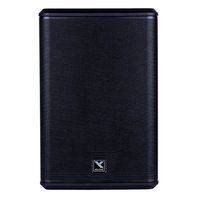
EXM Pro10 - Loudspeaker YORKVILLE - Free user manual and instructions
Find the device manual for free EXM Pro10 YORKVILLE in PDF.


Pick your language and provide your email: we'll send you a specifically translated version.
| Product Type | Active Speaker |
| Brand | Yorkville |
| Model | EXM Pro10 |
| Dimensions (W x H x D) | 330 x 510 x 310 mm |
| Weight | 14.5 kg |
| Power Supply | 100-240 V AC, 50/60 Hz |
| Total Power | 800 W (program) |
| Frequency Response | 55 Hz - 20 kHz |
| Woofer | 10 inch (254 mm) with 2.5 inch voice coil |
| Tweeter | 1 inch (25 mm) compression driver |
| Coverage Angle | 90° x 60° (H x V) |
| Audio Inputs | 2 x XLR/Jack combo, 1 x Bluetooth |
| Output | XLR (link) |
| Controls | Volume, 2-band EQ, low-cut filter |
| Enclosure | Molded polypropylene |
| Grille | Powder-coated steel |
| Maintenance and Cleaning | Clean with a dry, soft cloth. Do not use solvents or water. |
| Safety | Do not expose to moisture. Disconnect before cleaning. Use only with an approved power cord. |
| Spare Parts and Repairability | Parts available via authorized after-sales service. Repair by qualified technician recommended. |
| General Information | Designed for portable PA or fixed installation. Compatible with standard speaker stand (M20). |
Frequently Asked Questions - EXM Pro10 YORKVILLE
How do I connect a Bluetooth device to the EXM Pro10 speaker?
Enable Bluetooth on your source device. On the speaker, press and hold the Bluetooth button (located on the rear panel) until the indicator flashes. Select 'Yorkville EXM Pro10' from the device list. Connection is confirmed by a steady light.
What is the power rating of the EXM Pro10?
The total program power is 800 watts (400 W per amplifier for woofer and tweeter). Peak power reaches 1600 W.
What are the dimensions and weight of the speaker?
Dimensions are 330 mm width, 510 mm height, and 310 mm depth. Weight is 14.5 kg.
Can I use the EXM Pro10 as a floor monitor?
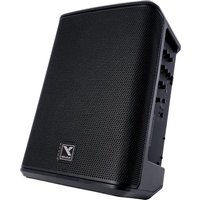
Yes, the enclosure is designed with a trapezoidal shape that allows monitor use. Place the speaker on its side; the 45° angle provided by the cabinet ensures good foldback.
How do I daisy-chain multiple EXM Pro10 speakers?
Use the XLR 'Link' output on the rear panel to send the signal to the input of another speaker. Ensure the source is set to an appropriate level to avoid clipping.
What cables are included with the speaker?
The speaker comes with a standard IEC power cable. No audio cables are included; you must use your own XLR or 1/4 inch cables.
What is the best placement for the speaker?
For optimal dispersion, place the speaker on a stand at ear height (about 1.8 m). Avoid corners and reflective surfaces. In monitor mode, place it on the floor in front of the musicians.
How do I clean the EXM Pro10 speaker?
Unplug the speaker. Use a dry, soft cloth to wipe off dust. Never use liquids, solvents, or abrasive cleaners. For the grille, a low-power vacuum cleaner may be used.
What is the warranty on the Yorkville EXM Pro10 speaker?
Yorkville offers a 2-year warranty on parts and labor (subject to terms and conditions). Keep your receipt and register your product online to activate the warranty.
How do I reset the speaker in case of malfunction?
Turn off the speaker. Wait 10 seconds, then turn it back on. If the problem persists, perform a factory reset by holding the 'Volume' and 'Bluetooth' buttons simultaneously while powering on for 5 seconds.
User questions about EXM Pro10 YORKVILLE
0 question about this device. Answer the ones you know or ask your own.
Ask a new question about this device
No questions yet. Be the first to ask one.
Download the instructions for your Loudspeaker in PDF format for free! Find your manual EXM Pro10 - YORKVILLE and take your electronic device back in hand. On this page are published all the documents necessary for the use of your device. EXM Pro10 by YORKVILLE.
USER MANUAL EXM Pro10 YORKVILLE
Manual assistant
Powered by Anthropic
Waiting for your message
Product information
Brand : YORKVILLE
Model : EXM Pro10
Category : Loudspeaker