USER MANUAL PULSE PS210P YORKVILLE
IMPORTANT SAFETY INSTRUCTIONS

INSTRUCTIONS PERTAINING TO A RISK OF FIRE, ELECTRIC SHOCK, OR INJURY TO PERSONS.
CAUTION: TO REDUCE THE RISK OF ELECTRIC SHOCK, DO NOT REMOVE COVER (OR BACK). NO USER SERVICEABLE PARTS INSIDE.
REFER SERVICING TO QUALIFIED SERVICE PERSONNEL.
Read Instructions:
The Owner's Manual should be read and understood before operation of your unit. Please, save these instructions for future reference.
Packaging:
Keep the box and packaging materials, in case the unit needs to be returned for service.
Warning:
When using electric products, basic precautions should always be followed, including the following:
Power Sources:
Your unit should be connected to a power source only of the voltage specified in the owners manual or as marked on the unit. This unit has a polarized plug. Do not use with an extension cord or receptacle unless the plug can be fully inserted. Precautions should be taken so that the grounding scheme on the unit is not defeated.
Hazards:
Do not place this product on an unstable cart, stand, tripod, bracket or table. The product may fall, causing serious personal injury and serious damage to the product. Use only with cart, stand, tripod, bracket, or table recommended by the manufacturer or sold with the product. Follow the manufacturer's instructions when installing the product and use mounting accessories recommended by the manufacturer.
The apparatus should not be exposed to dripping or splashing water; no objects filled with liquids should be placed on the apparatus.
Terminals marked with the "lightning bolt" are hazardous live; the external wiring connected to these terminals require installation by an instructed person or the use of ready made leads or cords.
No naked flame sources, such as lighted candles, should be placed on the apparatus.
Power Cord:
The AC supply cord should be routed so that it is unlikely that it will be damaged. If the AC supply cord is damaged DO NOT
OPERATE THE UNIT.
Service:
The unit should be serviced only by qualified service personnel.
INSTRUCTIONS RELATIVES AU RISQUE DE FEU, CHOC ÉLECTRIQUE, OU BLESSURES AUX PERSONNES.
AVIS: AFIN DE REDUIRE LES RISQUE DE CHOC ELECTRIQUE, N'ENLEVEZ PAS LE COUVERT (OU LE PANNEAU ARRIERÉ). NE CONTIENT AUCUNE PIECE REPARABLE PAR L'UTILISATEUR.
CONSULTEZ UN TECHNICIEN QUALIFIE POUR L'ENTRETIENT.
The Pulse Powered Subwoofer PS210P is a subwoofer with a built-in amplifier designed to drive the unit all in one easy-to-connect package. It is intended to be used to extend the bass of a typical sound system with a minimum of complication and hence is intended primarily to operate with speaker level signals.
FEATURES
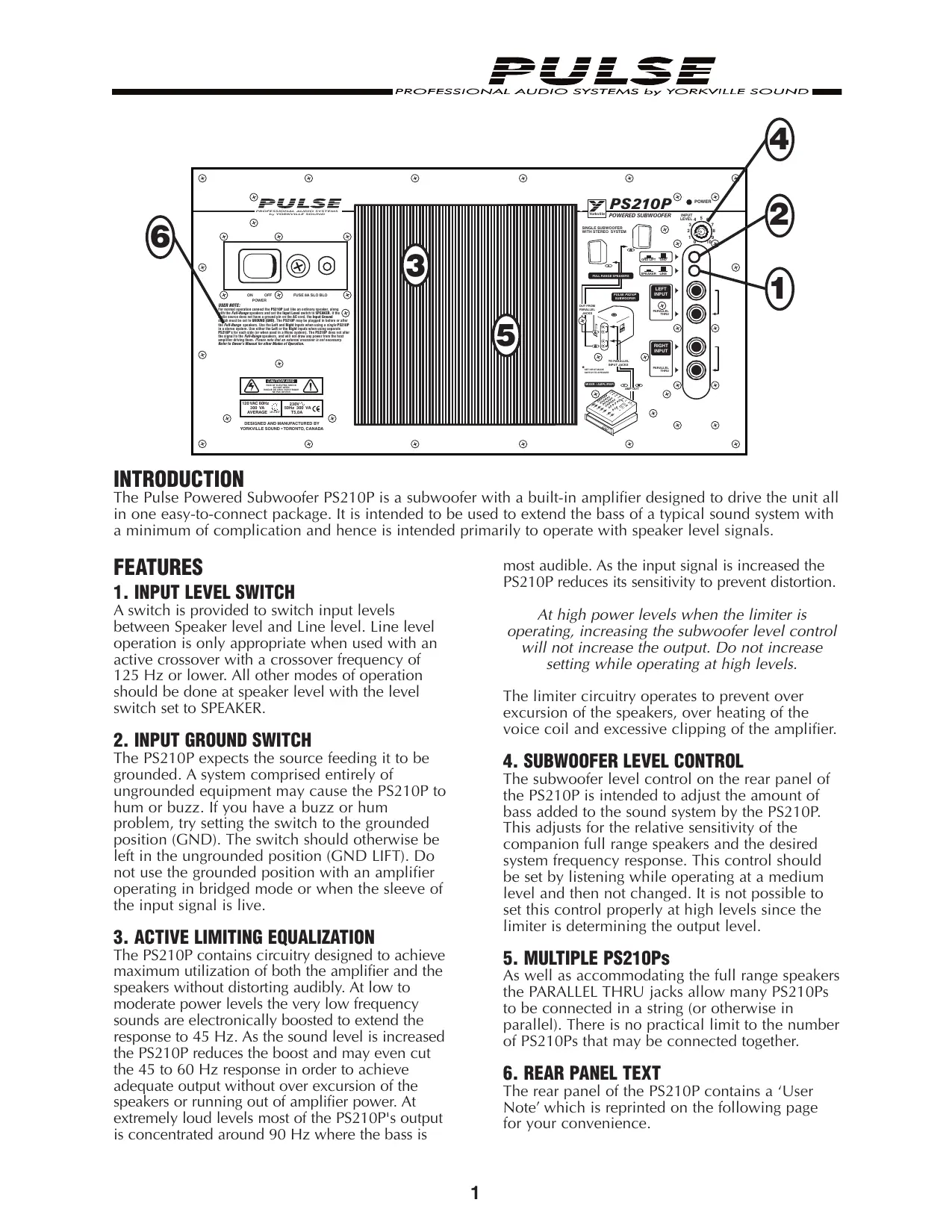
A switch is provided to switch input levels between Speaker level and Line level. Line level operation is only appropriate when used with an active crossover with a crossover frequency of 125Hz or lower. All other modes of operation should be done at speaker level with the level switch set to SPEAKER.
The PS210P expects the source feeding it to be grounded. A system comprised entirely of ungrounded equipment may cause the PS210P to hum or buzz. If you have a buzz or hum problem, try setting the switch to the grounded position (GND). The switch should otherwise be left in the ungrounded position (GND LIFT). Do not use the grounded position with an amplifier operating in bridged mode or when the sleeve of the input signal is live.
3. ACTIVE LIMITING EQUALIZATION
The PS210P contains circuitry designed to achieve maximum utilization of both the amplifier and the speakers without distorting audibly. At low to moderate power levels the very low frequency sounds are electronically boosted to extend the response to 45Hz . As the sound level is increased the PS210P reduces the boost and may even cut the 45 to 60Hz response in order to achieve adequate output without over excursion of the speakers or running out of amplifier power. At extremely loud levels most of the PS210P's output is concentrated around 90Hz where the bass is
most audible. As the input signal is increased the PS210P reduces its sensitivity to prevent distortion.
At high power levels when the limiter is operating, increasing the subwoofer level control will not increase the output. Do not increase setting while operating at high levels.
The limiter circuitry operates to prevent over excursion of the speakers, over heating of the voice coil and excessive clipping of the amplifier.
4. SUBWOOFER LEVEL CONTROL
The subwoofer level control on the rear panel of the PS210P is intended to adjust the amount of bass added to the sound system by the PS210P. This adjusts for the relative sensitivity of the companion full range speakers and the desired system frequency response. This control should be set by listening while operating at a medium level and then not changed. It is not possible to set this control properly at high levels since the limiter is determining the output level.
5. MULTIPLE PS210Ps
As well as accommodating the full range speakers the PARALLEL THRU jacks allow many PS210Ps to be connected in a string (or otherwise in parallel). There is no practical limit to the number of PS210Ps that may be connected together.
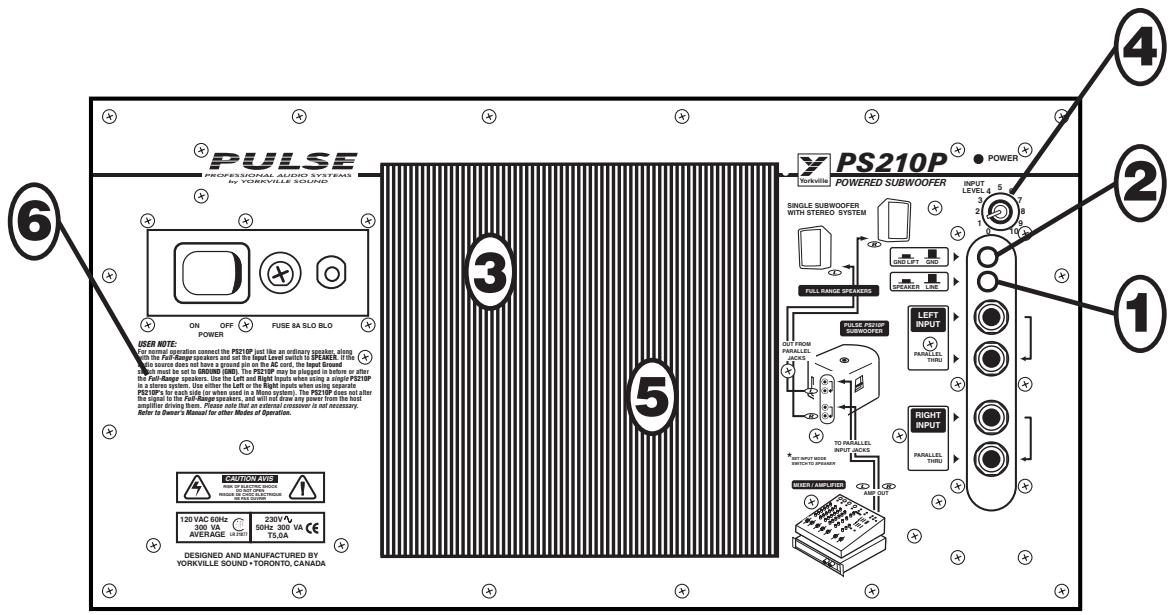
6. REAR PANEL TEXT
The rear panel of the PS210P contains a 'User Note' which is reprinted on the following page for your convenience.
USER NOTES
For normal operation connect the PS210P just like an ordinary speaker, along with the Full-Range speakers and set the Input Level switch to SPEAKER. If the audio source does not have a ground pin on the AC cord, the Input Ground switch must be set to GROUND (GND). The PS210P may be plugged in before or after the Full-Range speakers. Use the Left and Right Inputs when using a single PS210P in a stereo system. Use either the Left or the Right inputs when using separate PS210P's for each side (or when used in a Mono system). The PS210P does not alter the signal to the Full-Range speakers, and will not draw any power from the host amplifier driving them. Please note that an external crossover is not necessary.
Note: The PS210P built-in stand mounting adapter can be used with Yorkville SW-Teletube accessory to support our E160 cabinets. The support tube can be adjusted up to it's full 5^4^ extension safely as long as the PS210P is not inclined more than 10^ .
WARNING: Larger/heavier cabinets should not be used with the stand mount!
CONFIGURATION OPTIONS
The PS210P may be used in several different configurations. The minimum standard system is one PS210P used with a pair of full range speakers. The PS210P accepts separate left and right signals and combines them into one signal to drive the internal speakers.
When used in a setup where only one signal is provided to a speaker, such as a mono system (figure 2) or stereo with more than one PS210P, use either the left or right input (figure 3).
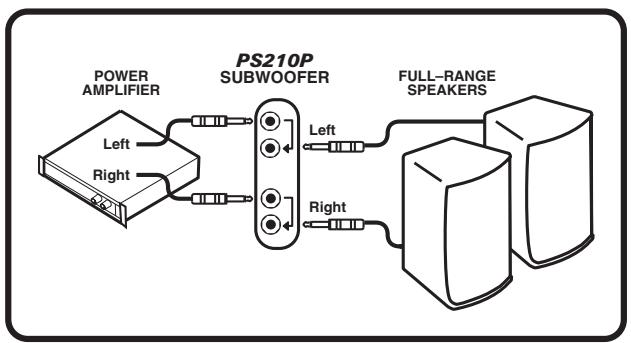
ONE SUBWOOFER, WITH STEREO SYSTEM
figure 1
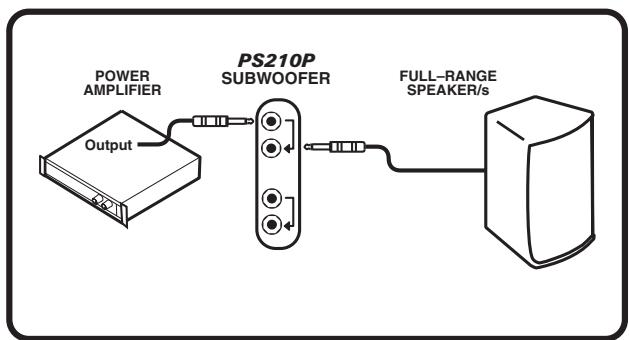
ONE SUBWOOFER, WITH MONO SYSTEM
figure 2
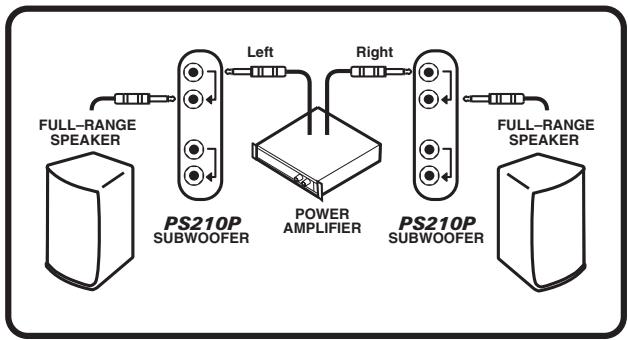
TWO SUBWOOFERS PER SYSTEM
figure 3
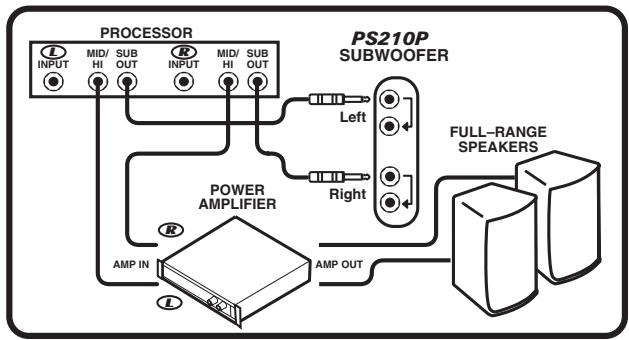
ONE SUBWOOFER USING A PROCESSOR
figure 4
OPERATION
- Plug the AC cord into a grounded outlet (120 VAC, 60 Hz in North America, 220-240 VAC, 50 Hz in export models). Switch the PS210P's POWER switch OFF for now. Make sure that the back of the PS210P is well clear of walls or anything which might restrict the flow of cool air to the heatsinks on the back panel.
2a. If you are using the MAIN, SUBMIX or another line-level output from your mixer to drive the PS210P, connect it to one of the INPUT jacks with a shielded patch cord. Once again we suggest that you employ balanced shielded patch cables for line-level connections to the PS210P, e.g. Yorkville model PC-6ST. Even if the mixer does not have balanced outputs, you will obtain some noise cancellation benefits with balanced lines. If the mixer has stereo line-level outputs, use two cables going to the LEFT and RIGHT INPUT jacks. Otherwise either jack will do; there is no need to patch over to the other INPUT jack (the gain will be 6dB higher if you energize both jacks, but a simple LEVEL control adjustment easily compensates for that).
2b. Set the INPUT LEVEL push-button up in the LINE position.
2c. If you are connecting the PS210P to the Speaker output of a mixer/amplifier (or power amp), or in parallel with a full-range speaker, plug a speaker cable into one of the 1/4-inch INPUT connectors. If the amplifier output is stereo, connect both outputs to the PS210P's LEFT and RIGHT INPUT jacks.
2d. Set the INPUT LEVEL push-button down in the SPEAKER position.
-
To interconnect additional PS210P's or other Yorkville powered speakers, plug one end of the appropriate type of cable, i.e. shielded or speaker-type, into the PS210P's PARALLEL THRU jack nearest the INPUT jack which is in use. Now connect the other end to the input of the other unit. Be careful not to connect speaker-level signals to the input of a powered subwoofer which is not designed to take them. If you are connecting an additional PS210P or other Yorkville powered subwoofer this way, make sure that the other powered subwoofer's push-button is also in the SPEAKER position.
-
Switch on the POWER, and with music playing through the system, adjust the PS210P LEVEL control for the desired mix of subwoofer and full-range sound. Remember that the subwoofer volume may not increase greatly at high settings due to the limiter. (see INTERNAL SUBWOOFER LIMITER and AUTOMATIC EQUALIZATION in the FEATURES sections).
- Should the fuse blow for any reason, replace with a similar type - 8 amp slo-blo (T4A export). Repeated blown fuses can be a sign that the AC line voltage is too high. Try another outlet. If this fails to solve the problem, take the PS210P to a qualified technician. DO NOT try to solve the problem by wrapping metal foil around the fuse. This can cause considerable damage to this or any electrical product.
In case of feedback
In case of low-frequency feedback when the mixer/amp or power amp is shut down:
The following applies where the PS210P, in SPEAKER LEVEL mode, and full-range speakers are interconnected to the PA amplifier and that amplifier has been switched off, but the PS210P left on.
With no power available at its inputs from the PA amplifier, the PS210P can receive random signals in its PARALLEL THRU jacks generated by the full-range enclosure's woofers responding to room sounds (remember that every speaker is like a dynamic microphone). If the PS210P is powered up and turned up high, it can see these signals as input signals and amplify them creating a possible feedback loop with the full-range woofers.
Solutions: If you are in the habit of switching your power off between sets, it is advisable to switch the PS210P off as well, or turn down its LEVEL control. Alternatively you might re-wire so that the PS210P is driven by line-level signals. Any one of these measures will avoid the above feedback potential.
Specifications
Power Requirements
North American: 120VAC 60 Hz
300 VA
European: 230VAC 50 Hz
300 VA
Power Amplifier
Power (Internal Amp): 600 Watts
Input Impedance: 80 kOhms or greater
Speakers
2 x 10" drivers, 2-Ohm, 600 Watts (total)
Maximum SPL: 126 dB
Frequency response: 45 Hz to 110 Hz
Inputs: 2 × 1/4 , Outputs: 2 × 1/4
Tip: Positive, Ring: Negative, Sleeve: Optional
Grounding
The sleeves of the inputs are not grounded except when the GROUND LIFT push-button is set to GND. Then grounding is done through a 100 ohm protection device in order to prevent damage due to miswiring.
Limiting
Clipping, Excursion, Average Voice Coil Current.
Weight
77 lbs. (35 kg.)
Dimensions
(HxWxD): 19.8" x 22.5" x 22.0"
50.3 x 57.1 x 55.9 cm
INTRODUCTION
2 x 10" drivers, 2-Ohm, 600 Watts (total)
Maximum SPL: 126 dB
Frequency response: 45Hz to 110Hz
Niagara Falls, New York
14305 USA
Voice: (716) 297-2920
Fax: (716) 297-3689

Quality and Innovation Since 1963
Printed in Canada