LINK - Computer accessory DICOTA - Free user manual and instructions
Find the device manual for free LINK DICOTA in PDF.



| Product type | USB 2.0 Data Transfer Adapter |
| Brand | DICOTA |
| Model | LINK |
| Main use | Data transfer between two computers via USB 2.0 |
| Operating system compatibility | Windows® 98SE, ME, 2000, XP |
| Connectivity | USB 2.0 (compatible with USB 1.1) |
| Transfer rate | Up to 480 Mbps (USB 2.0 high speed) |
| Power supply | USB bus (5 V, self-powered) |
| Cable length | Approximately 1 meter |
| Dimensions (approx.) | 50 x 20 x 10 mm |
| Weight (approx.) | 30 g |
| Package contents | LINK adapter, USB 2.0 cable, driver CD, user manual |
| System requirements | Available USB port, CD-ROM drive for driver installation |
| Driver installation | Required under Windows 98SE; automatically recognized under Windows ME/2000/XP |
| Transfer function | Drag & Drop between the two connected computers |
| Compliance standards | FCC Class B, CE (EN 55022 Class B) |
| Warranty | 2 years |
| After-sales service | Contact: info@dicota.com |
| Maintenance and cleaning | Wipe with a dry, soft cloth. Do not use chemicals. |
| Safety | Follow installation instructions to avoid radio interference. |
| Environmental information | Do not dispose of with household waste. Recycle according to local regulations (WEEE symbol). |
Frequently Asked Questions - LINK DICOTA
User questions about LINK DICOTA
0 question about this device. Answer the ones you know or ask your own.
Ask a new question about this device
Download the instructions for your Computer accessory in PDF format for free! Find your manual LINK - DICOTA and take your electronic device back in hand. On this page are published all the documents necessary for the use of your device. LINK by DICOTA.
USER MANUAL LINK DICOTA
USB 2.0 High-Speed Data Transfer Cable Adapter
deutsch
Bedienungsanleitung
- USB 2.0 high-speed data transfer adapter
- USB 2.0 high-speed data transfer cable
- Driver & Manual CD
System Requirements:
- Windows® 98SE*, ME, 2000, XP
An available USB Port -
CD-ROM drive (for driver installation)
-
Driver needed.
Driver Installation
Windows® 98SE
- Turn on your computer.
- Place the Driver CD into your CD-ROM drive.
- Click "Start", then "Run...", type "D:\T-bird Win98Driver.exe" into the dialog box (NOTE: "D:\") represents the drive letter assigned to the optical drive you are using. If D is not the letter assigned to your optical drive, replace D with the appropriate drive letter), then click "OK". Follow the onscreen instructions to complete the driver installation.
- After the driver installation is complete, restart your computer.
- After your computer has restarted, plug your Link into an available USB port. Windows® will install the driver for your Link.
- Restart your computer again if necessary.
- Your Link is now ready to be used.
Windows® ME, 2000, XP
- Turn on your computer.
- Plug your Link into an available USB port. Windows® will install the driver for your Link automatically.
- Your Link is now ready to be used.
Using the Link
- Make sure both computers you want to connect have the driver installed like in the following "Driver Installation" section of this manual.
- Connect the computers you want to link via the enclosed USB 2.0 cable and the Link.
- Double-click on "My Computer"; you will see a "Removable Disk" icon, double click it.

Removable
Disk[ ]
(Windows® 98SE, ME)
or

EasyCopyNet
(:)
(Windows® 2000, XP)
- Double-click on the "EasyCN.exe" icon.

EasyCN.exe
EasyCN MEC Application
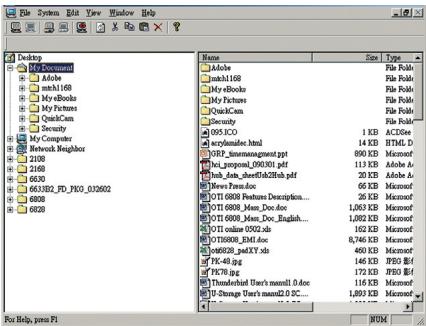
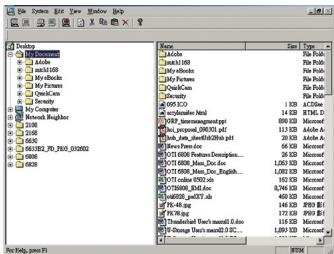
- The following screen will appear.
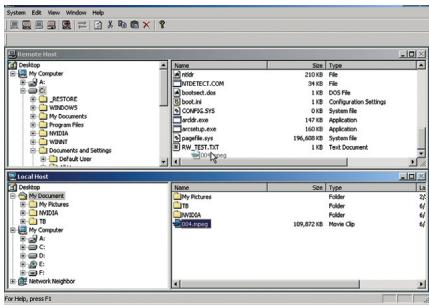
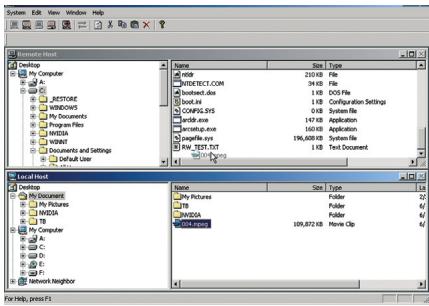
- Repeat steps 3-5 for the 2^nd computer you want to link. When the transfer program is complete you will see the following window:
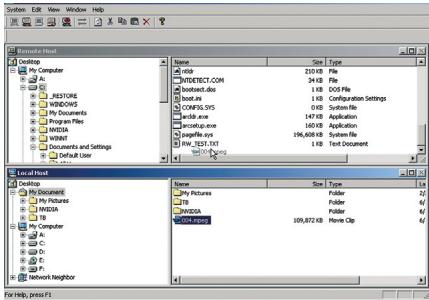
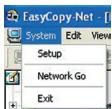
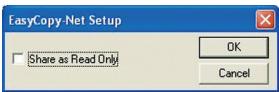
- Please make sure both computers have permission to access the other computer's files by clicking "System", and select "Setup".
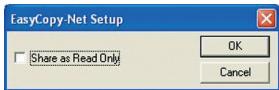
- Make sure the "Share as Read Only" checkbox is unchecked for both computers.
- You can now transfer files between your two computers by simply dragging and dropping files between the two linked computers.
FCC and CE Radiation Norm
FCC
This equipment has been tested and found to comply with limits for Class B digital device pursuant to Part 15 of Federal Communications Commission (FCC) rules.
CE
This equipment has been tested and found to comply with the limits of the European Council Directive on the approximation of the law of the member states relating to electromagnetic compatibility (89/336/EEC) according to EN 55022 Class B.
FCC and CE Compliance Statement
These limits are designed to provide reasonable protection against frequency interference in residential installation. This equipment generates, uses and can radiate radio frequency energy, and if not installed or used in accordance with the instructions, may cause harmful interference to radio communication. However, there is no guarantee that interference will not occur in television reception, which can be determined by turning the equipment off and on. The user is encouraged to try and correct the interference by one or more of the following measures:
- Reorient or relocate the receiving antenna.
- Increase the separation between the equipment and the receiver.
- Connect the equipment into an outlet on a circuit different from that to which the receiver is connected to.
CAUTION!
The Federal Communications Commission warns the user that changes or modifications to the unit not expressly approved by the party responsible for compliance could void the user's authority to operate the equipment.
Disclaimer
Information in this document is subject to change without notice. The manufacturer does not make any representations or warranties (implied or otherwise) regarding the accuracy and completeness of this document and shall in no event be liable for any loss of profit or any commercial damage, including but not limited to special, incidental, consequential, or other damage. No part of this document may be reproduced or transmitted in any form by any means, electronic or mechanical, including photocopying, recording or information recording and retrieval systems without the express written permission of the manufacturer.
Customer Service:
If you encounter any problem with your Link, please contact our local subsidiary, partner or dealer, or send us your inquiry to info@dicota.com.
2 years warranty. Please find the complete text in our guarantee on the internet: www.dicota.com.
All the products and software mentioned above are registered trademarks of their respective owners. Errors and omissions excepted.

N1879


This symbol (crossed out bin wheeile symbol according to WEEE Annex IV) indicates separate collection of waste electrical and electronic equipment in the EU countries. Please do not throw the equipment into the domestic refuse. Please use the return and collection systems available in your country for the disposal of this product.
deutsch
Lieferumfang:
- Double-cliquez I'icone "EasyCN.exe".

EasyCN.exe
EasyCN MFC Application
EasyCN.MEC.Application
- YBnnte CneJeIouoe DnaIaIorOBoE OKHO.
- 86ednttecs, TTO bI PO3nUIA "Share as See Only" B o6OHX KOMPbHO-terapx He6blya 3a-HeKHTya.
9.CeacMoKETeNeRIOpeNECTOnФaJIbMeKJyNoDJIIOHeHHbIMOMKbIOTepAMn nepetAcTbAHBmE C oHOrOHaNBAI yDPrO.
CeptnΦnkaT
FCC
Даимhoeусторьбл�иprotectropobanHпрзнаноCoOTBETCTBYUOIMFCCвачten15.PprnoIb3oBaHm Heo6xOdmoCo6hIoAdbcneDyOuOmeDbaYCNOBnI:
(1) YcTpoiCTBO HeoJXHO MewaTb DpyrIM YcTPOiCTBAM B PnneMe I,
(2)UcTpoCTBOIaNHOaIeNTIOBAPBATKaJQDoHApYHeNE B pIneME, BKJIouCA CINHAI, KOTOpB I DaHHeO HApYHeNE ONoJIek.
CE-CeptnuΦnKaT
ДаимhoeуctpoiIbTO COOBETCTBYET BCEM Tpe6oBAnHIM m ПпeДиСАнМ ECD, b COOBETCTBnC 3eNkTpOMaHHeTNeUeCKO CBMOeCTMocMbTO (89/336/ EEC) u EN 55 022: Kateropina B
FCC and CE Compliance Statement
These limits are designed to provide reasonable protection against frequency interference in residential installation. This equipment generates, uses and can radiate radio frequency energy, and if not installed or used in accordance with the instructions, may cause harmful interference to radio communication. However, there is no guarantee that interference will not occur in television reception, which can be determined by turning the equipment off and on. The user is encouraged to try and correct the interference by one or more of the following measures:
- Reorient or relocate the receiving antenna.
- Increase the separation between the equipment and the receiver.
- Connect the equipment into an outlet on a circuit different from that to which the receiver is connected to.
CAUTION!
The Federal Communications Commission warns the user that changes or modifications to the unit not expressly approved by the party responsible for compliance could void the user's authority to operate the equipment.
Ccbjka:
INHOpMaunB DAHHOM DOKUMHETE MOKET IN3MeHrTbC6e3 bYero-INO60 yBEOMJHnE. IpnO3BDOJNTBHe N He aet INHKaNX rapaHTN INI CBEHEnI (NOp43aYMBeaEMbX INI KAKNX IIO6 Dpynx) OTOHcTeBHO TOHOCTHN I NOHOTbI DAHHORO DOKUMETA H nPn PrkKAX o6CToRtEcbTx BHe Hecet OBTcTBHeHONCTa 3nepti Pnp6bInn INI MATEpnaIbnYupe6, BKIOHAY CnyauhN, npDeHamepeHNb INI KOCBeHNy Uyepe6 HOnDA h3acte DaHHORO DOKUMETA H Me KOET 6bITb BCNPo3MBDEHa INI nepeDaha B KAKOINIO6 FOpme INI Ha KAKNX-INO6 HocTeTEx, 3NeKTPOHNbIX INI FOPTorpaFmuneckx, YTO BKIOHaET B c68A KCEPOKONIPOBAHne, ZAnMb INHOpMaunn INCTeMcy ABOTaTHeCKrO NOvcka, 6e3 INbcMehHO RcNACsno pOIMBOIDTeJIe.
KInneHTckn cepBnc:
Ecn y bao B30NHHK TAKKHE-JIHOPOBEmbI C yCTPOJCTOBM, KOHTAKTHpyte hac: dicota@dicota.cz HnHa Nw www.dicota.com.
Papthtnia 2 roda. C 6 Bolee noPobsoh mHnΦoMaunm OMOke Te 03aKOMtBc h Hntpeht cTAPHuaXw: www.dicota.com.
Bcnpodukun nporpamHoe oecneuehne,ynomhytoe bIue,ABNIOCTa 3apeiNtprpoBaHbIMToproBbIMn MapkAm. Ouiokn nponpyck NCKNIQHeHs.

N1879


This symbol (crossed out bin wheeile symbol according to WEEE Annex IV) indicates separate collection of waste electrical and electronic equipment in the EU countries. Please do not throw the equipment into the domestic refuse. Please use the return and collection systems available in your country for the disposal of this product.