
RCD-1520 - CD Player ROTEL - Free user manual and instructions
Find the device manual for free RCD-1520 ROTEL in PDF.



| Product Type | CD Player |
| Brand | ROTEL |
| Model | RCD-1520 |
| Dimensions (W × H × D) | 431 × 99 × 320 mm |
| Front Panel Height (rack mount) | 2U / 88.1 mm |
| Weight | 6.5 kg |
| Mains Power Supply | 120 V AC 60 Hz (USA) / 230 V AC 50 Hz (Europe) |
| Maximum Power Consumption | 20 W |
| Digital-to-Analog Converter | Wolfson |
| Frequency Response (±0.5 dB) | 20 - 20,000 Hz |
| Signal-to-Noise Ratio | >100 dB |
| Dynamic Range | >96 dB |
| Total Harmonic Distortion + Noise | 0.0045% @ 1 kHz |
| Intermodulation Distortion | 0.0045% @ 1 kHz |
| Max. Line Output Level | 2 V RMS |
| Line Output Impedance | 100 Ω |
| Digital Output | Coaxial RCA, 0.5 V p-p, 75 Ω |
| Laser Safety | Class 1 Laser Product – Do not open |
| Special Features | Programming (20 tracks), random play, repeat, intro scan, time display |
| Compatible Formats | CD-DA, CD-R, CD-RW (MP3, WMA) |
| Maintenance and Cleaning | Dry cloth or vacuum – Do not use liquid |
| Spare Parts and Repairability | No user-serviceable parts – Contact an authorized Rotel repair center |
Frequently Asked Questions - RCD-1520 ROTEL
User questions about RCD-1520 ROTEL
0 question about this device. Answer the ones you know or ask your own.
Ask a new question about this device
Download the instructions for your CD Player in PDF format for free! Find your manual RCD-1520 - ROTEL and take your electronic device back in hand. On this page are published all the documents necessary for the use of your device. RCD-1520 by ROTEL.
USER MANUAL RCD-1520 ROTEL
Stereo Compact Disc Player
Important Safety Instructions
WARNING: There are no user serviceable parts inside. Refer all servicing to qualified service personnel.
WARNING: To reduce the risk of fire or electric shock, do not expose the unit to moisture or water. Do not expose the unit to dripping or splashing. Do not place objects filled with liquids, such as vases, on the unit. Do not allow foreign objects to get into the enclosure. If the unit is exposed to moisture, or a foreign object gets into the enclosure, immediately disconnect the power cord from the wall. Take the unit to a qualified service person for inspection and necessary repairs.
Read all the instructions before connecting or operating the component.
Keep this manual so you can refer to these safety instructions.
Heed all warnings and safety information in these instructions and on the product itself. Follow all operating instructions.
Clean the enclosure only with a dry cloth or a vacuum cleaner.
Do not use this unit near water.
You must allow a minimum 10cm or 4 inches of unobstructed clearance around the unit.
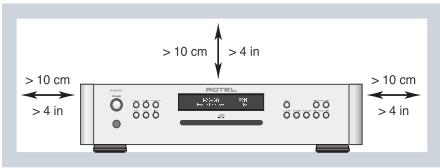
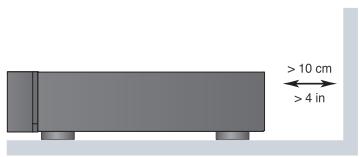
Do not place the unit on a bed, sofa, rug, or similar surface that could block the ventilation openings. If the unit is placed in a bookcase or cabinet, there must be ventilation of the cabinet to allow proper cooling.
Keep the component away from radiators, heat registers, stoves, or any other appliance that produces heat.
WARNING: The rear panel power cord connector is the mains power disconnect device. The apparatus must be located in an open area that allows access to the cord connector.
The unit must be connected to a power supply only of the type and voltage specified on the rear panel. (USA: 120 V/60Hz, EC: 230V/50Hz)
Connect the component to the power outlet only with the supplied power supply cable or an exact equivalent. Do not modify the supplied cable. A polarized plug has two blades, with one wider than the other. A grounding plug has two blades plus a third grounding prong. These are provided for your safety. Do not defeat grounding and/or polarization safety provisions. If the supplied plug does not fit your outlet, please consult an electrician for replacement of the obsolete outlet. Do not use extension cords.
The main plug of the power cordset is a disconnect device of the apparatus. In order to completely disconnect the apparatus from the supply mains, the main plug of the power cordset should be unplugged from the mains (AC) outlet. The stand-by LED indicator will not be lit up to show the power cord is unplugged. The disconnect device shall remain readily operable.
Do not route the power cord where it will be crushed, pinched, bent, exposed to heat, or damaged in any way. Pay particular attention to the power cord at the plug and where the cord exits the back of the unit.
The power cord should be unplugged from the wall outlet during a lightning storm or if the unit is to be left unused for a long period of time.
Use only accessories specified by the manufacturer.
Use only with a cart, stand, rack, bracket or shelf system recommended by Rotel. Use caution when moving the unit in a stand or rack to avoid injury from a tip-over.

Immediately stop using the component and have it inspected and/or serviced by a qualified service agency if:
- The power supply cord or plug has been damaged
- Objects have fallen or liquid has been spilled into the unit
The unit has been exposed to rain - The unit shows signs of improper operation
The unit has been dropped or damaged in any way

CAUTION
RISK OF ELECTRIC SHOCK DO NOT OPEN

CAUTION: TO REDUCE THE RISK OF ELECTRIC SHOCK, DO NOT REMOVE COVER, NO USER-SERVICEABLE PARTS INSIDE REFER SERVICING TO QUALIFIED SERVICE PERSONNEL.
APPLICABLE FOR USA, CANADA OR WHERE APPROVED FOR THE USAGE
CAUTION: TO PREVENT ELECTRIC SHOCK, MATCH WIDE BLADE OF PLUG TO WIDE SLOT, INSERT FULLY.
ATTENTION: POUR EVITER LES CHOCES ELECTRIQUES, INTRODUIRE LA LAME LA PLUS LARGE DE LA FICHE DANS LA BORNE CORRESPONDALE DE LA PRISE ET POUSSER JUSQU AU FOND.

This symbol is to alert the user to the presence of uninsulated dangerous voltages inside the product's enclosure that may constitute a risk of electric shock.

This symbol is to alert the user to important operating and maintenance (service) instructions in this manual and literature accompanying the product.

Rotel products are designed to comply with international directives on the Restriction of Hazardous Substances (RoHS) in electrical and electronic equipment and the disposal of Waste Electrical and Electronic Equipment (WEEE). The crossed wheelie bin symbol indicates compliance and that the products must be appropriately recycled or processed in accordance with these directives.

This symbol means that this unit is double insulated. An earth connection is not required.

IMPORTANT FOR LASER PRODUCTS
-
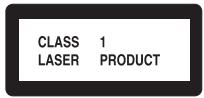
CLASS 1 LASER PRODUCT
-
DANGER:Visible laser radiation when open and interlock failed or bypassed.
Avoid direct exposure to beam.
- CAUTION: Do not open the top cover. There are no user serviceable parts inside the player; leave all servicing to qualified service personnel.
WARNING!
To reduce the risk of electrical shock, fires, etc.:
- Do not remove screws, covers or cabinet.
- Do not expose the unit to rain or moisture.
- Do not touch the power cord or plug with wet hands.
| CAUTION | -LASER RADIATION WHEN OPEN. DO NOT STARE INTO BEAM. |
| ATTENTION | -RAYONNEMENT LASER EN CAS D'OUVERTURE. NE PAS RAGDER DANG LE FAISCEAU. |
| VORSIGHT | -LASERSTRAHUNG, WENN ABDECKUNG GEÖFFENET. NIGHT IN DEN STRAHL BLUCKEN. |
| ADVARSEL | -LASERSTRAlingen VED ÅBNING. SE IKKE IND I STRALEN. |
| ADVARSEL | -LASERSTRAlingen NAR DEKSEL APNES. STIRR IKKE IINI I STRALEN. |
| WARNING | -LASERSTRAlingen NAR DENNA DEL AR ÖPPNAD. STRRA EJ IN I STRALEN. |
| VARO! | AVATTAESSA OLET ALTTINA LASERSATEILLYLLE. ALÀ TUIJOTA SATESEEEN. |
| 注意 | - 当打开这里会出现激光,请不要直视激光。 |
| 注意 | - ご本文開とレーサー光が出ます。レーサー光をのはんだきょうないてはさい。 |
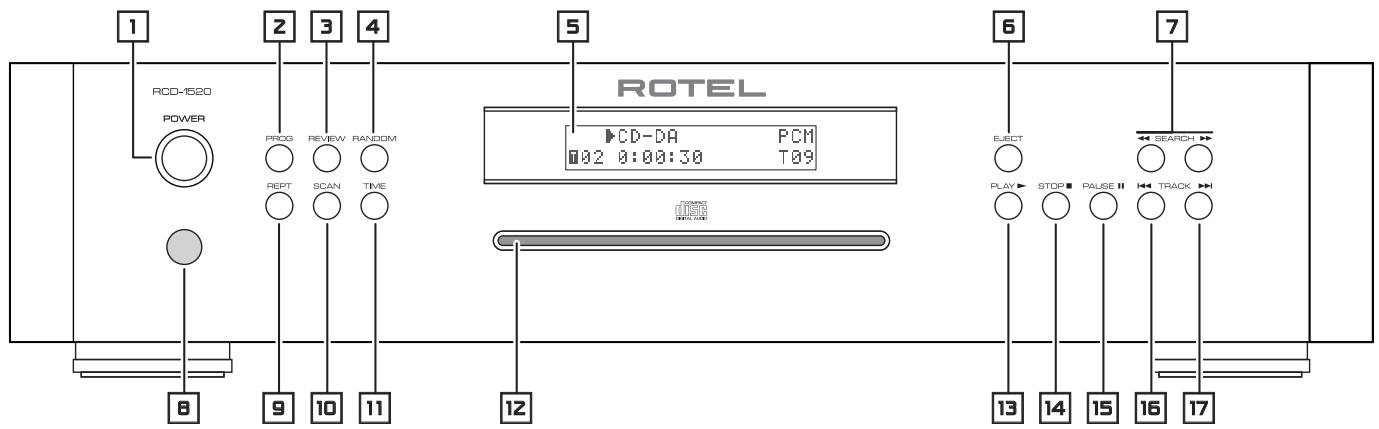
Figure 1: Controls and Connections
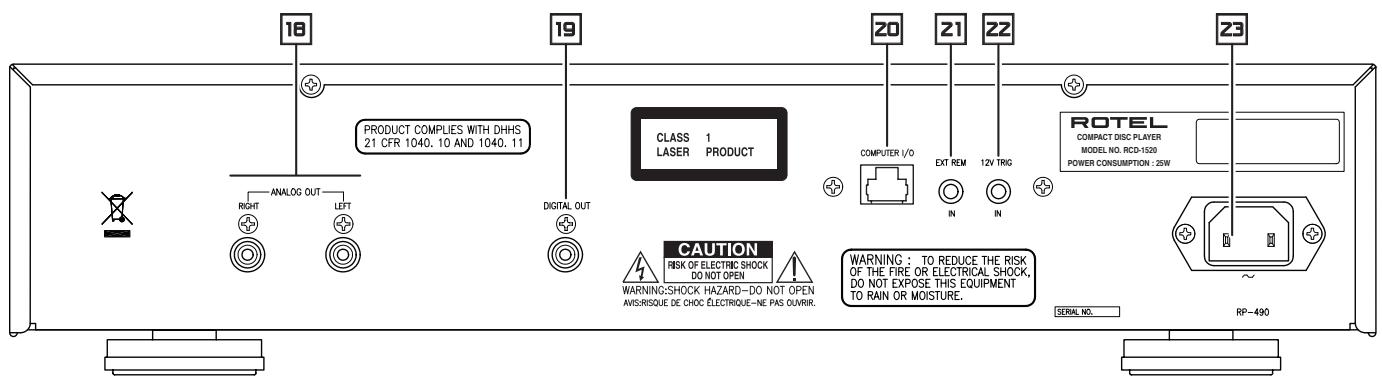
Figure 2: RR-D97 Remote Control
Telekomande RR-D97
When making connections be sure to:
Turn off all the components in the system before hooking up any components, including loudspeakers.
Turn off all components in the system before changing any of the connections to the system.
It is also recommended that you:
Turn the volume control of the amplifier all the way down before the amplifier is turned on or off.
Remarques importantes
Important Safety Instructions 2
Figure 1: Controls and Connections
Figure 2: RR-D97 Remote Control
Figure 3: Analog Outputs
Figure 4: Digital Outputs
Important Notes
About Rotel. 5
About the RCD-1520 6
Getting Started 7
A Few Precautions
Placement 7
Control Identification 7
AC Power and Control 7
AC Power Input
Power Switch and Power Indicator 1 and Remote On and Off Buttons A
Output Connections 8
Analog Outputs [18]
Digital Output [19]
12 Volt Trigger Input
EXT REMOTE IN Jack [21]
Computer I/O Connector 20 8
Infrared Remote Control
Display 5
Disc Slot 12
Transport Control Buttons 9
PLAY Button E
STOP Button 14①
PAUSEButton回
TRACK Buttons 18 17 M
DIRECT ACCESS Buttons F
SEARCH Buttons 7K
EJECT Button
Additional Features 9
PROGRAM Button 2J
REVIEWButton ①
CLEAR Button H
RANDOM Button 4①
REPEAT Button
SCAN Button
TIME Button ⑥
Troubleshooting 11
Power Indicator Is Not Lit
Fuse Replacement
No Sound
Specifications. 11
About Rotel
Our story began nearly 50 years ago. Over the decades, we have received hundreds of awards for our products and satisfied hundreds of thousands of people who take their entertainment seriously - like you!
Rotel was founded by a family whose passionate interest in music led them to manufacture high-fidelity components of uncompromising quality. Through the years, that passion has remained undiminished and the family goal of providing exceptional value for audiophiles and music lovers, regardless of their budget, is shared by all Rotel employees.
Rotel's engineers work as a close team, listening to, and fine tuning, each new product until it reaches their exacting musical standards. They are free to choose components from around the world in order to make that product the best they can. You are likely to find capacitors from the United Kingdom and Germany, semiconductors from Japan or the United States, while toroidal power transformers are manufactured in Rotel's own factory.
We all have concerns about our environment. And, as more and more electronics are produced and later discarded, it is especially important for a manufacturer to do all it can to engineer products that have a minimum negative impact on landfill sites and water tables.
At Rotel, we are proud to do our part. We have reduced the lead content in our electronics by using special ROHS solder, while our new Class D (not digital) amplifiers are up to five times more efficient than our legacy designs and still deliver power and performance. These products run cool, give minimum wasted energy, are good for the environment and give better sound too.
Finally, we have printed this brochure on recycled paper stock.
While we understand that these are small first steps, they are still important ones. And we continue to pursue new methods and materials for a cleaner and greener manufacturing process.
All of us at Rotel thank you for buying this product. We are sure it will bring you many years of enjoyment.
About the RCD-1520
Simply stated, the RCD-1520 is designed to do one thing—deliver the most detailed, nuanced sound from every disc. Whether it is a conventional CD, or an MP3 or WMA encoded disc, the RCD-1520 will faithfully reproduce all that is recorded on the disc.
While the RCD-1520 was under development. The design team went far beyond the usual measurable technical performance characteristics. Listening panels spent hundreds of hours fine tuning the audio performance, choosing the components that produced the best sound, that would "release the emotion in the music". Whatever the artist and recording engineers put on the disc, the RCD-1520 will deliver.
That said, the RCD-1520 does feature some impressive hardware. The digital-to-analogue converter is a state of the art DAC from the world renowned British manufacturer, Wolfson. This very high performance stereo DAC is specifically designed for audio applications such as CD, DVD, and home theatre systems.
All this, combined with Rotel's Balanced Design, ensures the RCD-1520 will deliver the highest level of audio performance. When used in a high-quality audio system, your Rotel CD player will provide years of enjoyment.
Getting Started
A Few Precautions
Please read this manual carefully. In addition to installation and operating instructions, it provides valuable information on various RCD-1520 system configurations as well as general information that will help you get optimum performance from your system. Please contact your authorized Rotel dealer for answers to any questions you might have. In addition, all of us at Rotel welcome your questions and comments.
Save the RCD-1520 shipping carton and all enclosed packing material for future use. Shipping or moving the RCD-1520 in anything other than the original packing material may result in severe damage that is not covered by the warranty.
Fill out and send in the owner's registration card packed with the RCD-1520. Also be sure to keep the original sales receipt. It is your best record of the date of purchase, which you will need in the event warranty service is required.
Placement
Use common sense when placing the RCD-1520 in a cabinet or when stacking other equipment. Make sure that the shelf or cabinet can support its weight. Do not stack components on top of the RCD-1520. Avoid placing the unit where it may be subject to excessive heat such as on top of a large power amplifier or near a heat register. For best performance, avoid placing the unit where it may be subject to vibration, such as near a speaker.
Control Identification
The cover of this manual has a fold out panel that shows illustrations of the front and rear panels and the RR-D97 remote control. Each item in the illustrations is identified with a call out. Throughout this manual the items referred to in the text are identified by the corresponding call out. The items on the front and rear panels are identified with a number call out, such a 1. The items on the remote control are labeled with a letter call out, such as A.
AC Power and Control
AC Power Input
Your RCD-1520 is configured at the factory for the proper AC voltage in the country where you purchased it, either 120 volts or 230 volts. The AC line configuration is noted on a decal on the back panel.
Note: Should you move your CD player to another country, it may be possible to reconfigure it for use on a different line voltage. Do not attempt to perform this conversion yourself. Opening the enclosure of the RCD-1520 exposes you to dangerous voltages. Consult a qualified service person or the Rotel factory service department for information.
The RCD-1520 should be plugged directly into a 2-pin polarized wall outlet or into the switched outlet on another component in your audio system. Do not use an extension cord.
Be sure the power switch on the front panel of the RCD-1520 is turned off (in the "out" position). Then, connect the supplied power cord to the AC power receptacle on the rear of the unit and the AC power outlet.
If you are going to be away from home for an extended period of time such as a month-long vacation, it is a sensible precaution to unplug your CD player (as well as other audio and video components) while you are away.
Power Switch and Power Indicator 1 and Remote On and Off Buttons A
The Power switch is located on the front panel of your CD player. To turn the CD player on, push the switch in. The ring around the switch and the Display will light up, indicating that the CD player is turned on. To turn the CD player off, push the button again and return it to the "out" position.
When the Power switch is in the On position, the remote control ON and OFF buttons may be used to activate the CD player or put it in Standby mode. In Standby mode the ring around the power switch remains lit, but the display is turned off.
Note: If you are using a switched outlet to turn on and off your CD player, you should leave the power switch in the "on" position. When AC power is applied to the unit, it will power up in fully active mode.
Output Connections
The RCD-1520 gives you a choice of two different kinds of outputs - an analog output signal from the built-in D/A converter for use with conventional analog audio components and a coax digital output which provides an unprocessed digital signal for use with outboard D/A converters or digital processors.
Note: To prevent loud noises that could damage your speakers, turn off all the system components when you make any signal connections.
Analog Outputs
[See Figure 3 for wiring illustration]
A pair of standard RCA jacks supplies an analog output signal from the RCD-1520 to the source inputs of an audio preamplifier, integrated amplifier, or receiver.
Select high quality audio interconnect cables. Connect the left and right channel outputs of the RCD-1520 to the corresponding inputs on the preamplifier or other component.
Digital Output
[See Figure 4 for wiring illustration]
If you are using an outboard D/A converter or other digital processor, you will need an unprocessed digital data stream from the RCD-1520. Using a standard 75 ohm coax digital cable, connect the RCD-1520's digital output to the digital input connector on the outboard D/A converter.
When playing CD-DA, MP3 and WMA discs the Digital Output provides a PCM data stream. When a dts-CD is played a dts data stream is provided.
Note: When an HDCD disc is played "HDCD" appears in the display. However the analog output is not HDCD decoded.
12 Volt Trigger Input
The RCD-1520 can be activated by a 12 volt trigger signal. The trigger input accepts any control signal (AC or DC) ranging from 3 volts to 30 volts. When a cable is connected to the 12V input and a trigger signal is present, the RCD-1520 is activated. When the trigger signal is turned off, the unit goes into standby mode. The front panel power indicator remains lit, but the display goes dark and the unit will not operate.
NOTE: When using the 12V Trigger feature, leave the POWER button in the ON position.
EXT REMOTE IN Jack [2]
This 3.5mm mini-jack receives command codes from industry-standard infrared receivers via hard-wired connections. This feature could prove useful when the unit is installed in a cabinet and the front-panel sensor is blocked. Consult your authorized Rotel dealer for information on these external repeaters and the proper wiring of a jack to fit the mini-jack receptacle.
Computer I/O Connector
The RCD-1520 can be operated from a personal computer running audio system control software from third-party developers. This control is accomplished by sending the operating codes normally sent by the RR-D97 remote control over a hard-wired network connection from the computer.
The COMPUTER I/O input provides the necessary connection on the back panel. It accepts standard RJ-45 8-pin modular plugs, such as those commonly used in 10-BaseT UTP Ethernet cabling.
For additional information on the connections, software, and operating codes for computer control of the RCD-1520, contact your authorized Rotel dealer.
Operation
The RCD-1520 can be operated using its front panel buttons or from corresponding buttons on the supplied infrared remote control. Specific instructions for each of these controls are detailed below. Most of the buttons are duplicated on the front panel and on the IR remote control. However, there are a few exceptions where the buttons are only available on one or the other. These exceptions are noted in the instructions.
Infrared Remote Control
Before using the IR remote control, it is necessary to install two "UM-4/ AAA" batteries (supplied). Remove the plastic cover on the back of the IR remote, install the batteries (observing the + and - polarity indications), and reinstall the cover.
To use the IR remote control, aim it at the IR sensor located in the lower left corner of the RCD-1520 front panel.
Display
A lighted Display on the front panel of the RCD-1520 provides useful information about the status of the unit, activation of special features, and track/time information for the disc being played. Each of these indicators is described in the detailed operating instructions that follow.
Disc Slot
A disc slot located in the center of the RCD-1520, accepts the disc and pulls it into the disc transport. Insert the disc label-side up. After the disc is loaded the display shows the number of tracks on the disc.
Transport Control Buttons
These buttons provide basic control functions for the disc transport mechanism. Except where noted, all functions are available on the RCD-1520 front panel and the IR remote control.
PLAYButton
After the disc is loaded, press the PLAY button to start playing the disc. The number of the track being played and the elapsed time will be shown in the display, along with the PLAY indicator. Normally, the disc will start playing with the first track. However, you can select a different track using the TRACK buttons or the DIRECT ACCESS buttons (see below) before pressing the PLAY button to start playing a different selection.
STOP Button ④
Press the STOP button once to stop disc play. Press the PLAY button to resume disc play where it was stopped. If the STOP button is press twice, disc play stops, the display shows STOP and programmed selections are deleted (see below). When the PLAY button is press after pressing the STOP button twice, the disc begins playing from the first track.
PAUSEButton
The PAUSE II button is used to temporarily suspend play. The disc continues to spin and play will be resumed from the current position. The PAUSE indicator will light in the Display. To resume playing the disc, press the PLAY button.
TRACK Buttons 16 17 M
These buttons are used to select tracks on the disc. When a disc is playing, pressing the▶TRACK button advances to the beginning of the next track. Pressing the▶TRACK button returns to the beginning of the current track. Pressing▶TRACK twice quickly in succession returns to the beginning of the previous track. The new track number appears in the Display.
These buttons are also used to select a track before pressing the PLAY button or when memorizing tracks for the PROGRAM play mode (see below). These selections are made by continuously pressing the TRACK buttons until the desired track is reached.
In PROGRAM mode, the TRACK buttons advance or reverse to the next track in the memorized selection list.
DIRECT ACCESS Buttons
(remotonly)
These eleven numeric buttons (labeled 1 through 0 and >10 ) are used to directly access a track from the IR remote control instead of stepping through the tracks using the TRACK buttons.
The first ten tracks on a disc can be selected by pressing the corresponding button. For example, to play the third track, press the 3 button on the remote control. To play track 10 press the 0 button.
To select track numbers greater than 10 use the >10 button. For example, to select track 14, press the >10 button followed by the 4 button. To select track 23, press the >10 button twice followed by the 3 button. The number of the selected track will appear in the main numeric area at the center of the Display.
The DIRECT ACCESS buttons may also be used to memorize tracks in PROGRAM mode (see PROGRAM Button section).
SEARCH Buttons
The and buttons fast forward or fast reverse through the disc that is playing. One press of the or button will fast forward or fast reverse at 2X normal speed. Pressing the or button repeatedly will fast forward or fast reverse at 4X, then 8X, 16X and 32X normal speed. One more press of the or button, or pressing the Play button, returns the RCD-1520 to normal speed play. While the buttons are pressed, you will hear high-speed audio.
EJECT Button
When a disc is inserted into the front panel Disc Slot it is pulled into the disc transport. To eject the disc press the EJECT button on the front panel or the remote control.
If you accidentally press either of these buttons, press the button again to re-load the disc.
Additional Features
These convenience features add extra functionality to the RCD-1520, including the ability to memorize a group of tracks to be played, to repeat a disc, a program, or a track over and over, to play the tracks on a disc in random order, to automatically play the first 10 seconds of each track, and to select from several available time displays.
PROGRAMButton
This button, labeled PROG, allows you to memorize more than 20 tracks on the current disc for playback in a specific order. For example, you could instruct the RCD-1520 to play track 5, followed by track 3, followed by track 8.
Note: Programmed play lists cannot be set up with MP3 and WMA discs.
To begin a program:
- Insert a disc in the front panel slot. The RCD-1520 will read the contents of the disc. You may press the PLAY button if you would like to listen to the tracks while you program them.
-
Press the PROGRAM button on the front panel or the remote control. The PROGRAM indicator will light up in the Display, along with "P:00" indicating that the unit is waiting for the first track to be memorized.
-
To program tracks from the handheld remote control, enter the first track number using the DIRECT ACCESS F buttons. Your selection will be memorized automatically and the Display indicator will change to "P:01", indicating that one track has been memorized. Continue entering the rest of your selections using the DIRECT ACCESS buttons. Note that there is no need to press the PROGRAM button as each selection is memorized as it is entered.
- To program tracks from the front panel, select the first track number using the TRACK [16] [17] buttons. To memorize additional tracks, select them with the TRACK buttons, pressing the PROGRAM button after each selection.
Once you have memorized a play list, the RCD-1520 remains in PROGRAM mode until you eject the disc or press the STOP button twice in succession. If you press the PLAY button, the memorized program will play instead of the entire disc, starting with the first selection in the memorized list.
When a PROGRAM has been memorized, most functions that would normally affect the entire disc operate on just the memorized program. For example, the TRACK buttons advance to the next track in the memorized program, not the next track on the disc. Likewise, the REPEAT button (see below) continuously plays the memorized program, not the entire disc.
Note: The Random Play feature cannot be used when using the Programmed Play feature.
REVIEWButton ①
This button is used to review the memorized tracks in Program Play mode. Press the button and the first memorized track number and "Prog Review" will appear in the Display. Pressing the REVIEW button again while the track number is displayed will continue the review sequence, showing the next memorized track. Continue pressing the REVIEW button to see the complete memorized track list.
If the REVIEW button is not press again, after 5 seconds the review process is terminated and the unit resumes whatever mode it was in before you started the review process or resumes Program Play with the current track.
You may remove a selection from the Program Play list during the review procedure using the CLEAR button, as described below.
CLEAR Button
(remotonly)
This button allows you to remove a track selection from the memorized program play list during the review procedure described above. Follow the review procedure until the desired track number appears. Then, instead of pressing the REVIEW button to continue, remove the track by pressing the CLEAR button while the track number is displayed. You may then continue the review procedure.
RANDOM Button 4⑩
This instructs the CD player to play tracks from the entire disc in random order. Once all of the selections have been played once, the disc will stop playing, unless the REPEAT Button (see below) has been engaged, in which case the random play will continue until the STOP button is pressed. When the RANDOM button is engaged, the icon appears in the Display.
REPEAT Button 9⑧
This button allows you to repeat the current track or the entire disc continuously until the feature is cancelled by disengaging the REPEAT button or pressing STOP. The REPEAT button steps sequentially through the available options. Press the button once and the RCD-1520 will repeat just the current track. The icon appears in the Display. Press the button a second time and the RCD-1520 will repeat the entire disc. A second icon appears in the Display. Press the button a third time to cancel the REPEAT function.
As noted above, REPEAT can be used in conjunction with the RANDOM play feature. The REPEAT and RANDOM play combination can also be used when playing CD-DA discs.
Note: The REPEAT function is automatically cancelled when the disc is ejected
SCAN Button
This feature automatically plays the first ten seconds of each track on the disc (or the memorized program). To activate the feature, press the SCAN button. The icon appears in the Display. To stop scanning and resume normal operation at the current track, press the SCAN button again or press the PLAY button.
The RANDOM and INTRO play combination can also be used when playing CD-DA discs.
TIME Button 116
Normally, the RCD-1520 displays the elapsed time of the currently playing track. The TIME button allows you to see alternative time displays. Pressing the button once displays the time remaining in the current track, which counts down as the track continues playing. Pressing the button a second time displays the time remaining on the entire disc (or memorized program). When the alternative time displays are selected an "R" icon appears in the display. Pressing the button a third time reverts to the standard elapsed time display.
Note: When playing MP3 and WMA discs, only the regular elapsed time and the time remaining in the current track can be displayed.
Troubleshooting
Most difficulties in audio systems are the result of incorrect connections, or improper control settings. If you encounter problems, isolate the area of the difficulty, check the control settings, determine the cause of the fault and make the necessary changes. If you are unable to get sound from the RCD-1520, refer to the suggestions for the following conditions:
Power Indicator Is Not Lit
The Power Indicator and the basic items in the Display window should be lit whenever the RCD-1520 is plugged into the wall power outlet and the Power button is pushed in. If it does not light, test the power outlet with another electrical device, such as a lamp. Be sure the power outlet being used is not controlled by a switch that has been turned off.
Fuse Replacement
If another electrical device works when plugged into the power outlet, but the Power Indicator and the Display still will not light when the RCD-1520 is plugged into the wall outlet, it indicates that the internal power fuse may have blown. If you believe this has happened, contact your authorized Rotel dealer to get the fuse replaced.
No Sound
Check the cables between the RCD-1520 and the amplifier inputs to be sure they are connected properly. Be sure the amplifier input that the RCD-1520 is selected. Be sure the tape monitor system of the amplifier has not been activated. Check the wiring between the amplifier and the speakers.
Specifications
| Total Harmonic Distortion + Noise | 0.0045% @ 1kHz |
| Intermodulation Distortion | 0.0045% @ 1kHz |
| Frequency Response (±0.5 dB) | 20-20,000 Hz |
| Channel Balance | ± 0.5 dB |
| Phase Linearity | ± 0.5 degree |
| Channel Separation | >98 dB @ 1kHz |
| Signal to Noise Ratio | >100dB |
| Dynamic Range | >96 dB |
| Digital to Analog Converters | Wolfson |
| Speed Accuracy, Wow & Flutter | Quartz Crystal Precision |
| Maximum Audio Line Output | 2V RMS |
| Output Impedance | 100 Ohms |
| Digital Output Level (coax) | 0.5 Volt, Peak to Peak |
| Digital Output Impedance | 75 Ohms |
| Power Requirements | |
| USA Version | AC 120V, 60 Hz |
| European Version | AC 230V, 50 Hz |
| Power Consumption | 20 Watts |
| Dimensions (W x H x D) | 17 x 4 x 125/8 inches |
| 431 x 99 x 320 mm | |
| Front Panel Height (for rack mount) | 2U / 31/2 inches / 88.1 mm |
| Weight (net) | 6.5 kg, 14.3 lb. |
All specifications are accurate at the time of printing. Rotel reserves the right to make improvements without notice.
Rotel and the Rotel HiFi logo are registered trademarks of The Rotel Co, Ltd., Tokyo, Japan.
Entree commutation " trigger" 12 V 22
Entree commutation " trigger " 12 V 22
Touched'éjection EJECT
ALGEMENE WAARSCHUWING!
Connectore Computer I/O
IopcoeHHe He BixOIOB. 56
AHaIaIorObIy BbIXoI 18
LHΦpOBoB BbHXoD 19 57
12-B TprnreepnbBxO. 57
Bxod3neKtpnckc0rCmHanaDnctanuOHoroynpablenEA EXTREMIN 21 57
Pa3bem Kommbiopteporo HHTepceca-Computer I/O [20] 57
IyblT dctaHOnHoro ynpablenna 57
Iucnnne 57
CnotIy3aRpy3kn DmckOB 12 57
KhoNkyn npablenna DnckOBblm pmbOdom. 58
Khonka PLAY E 58
Khonka STOP 14 D 58
Khonka PAUSE 15 L 58
KhoNkTRACK 1617M 58
KhoNkDIRECT ACCESS F 58
KhoNkN SEARCH 58
Khonka EJECT 6 N 58
IOnonHnTeJbHbIe FyHKcH 58
KHONKA PROGRAM ① 58
Khonka REVIEW ① 59
KhoNka CLEAR H 59
Khonka RANDOM 4 ① 59
Khonka REPT (REPEAT) 59
Khonka SCAN 10 C 59
KhoNka TIME 116 59
Дагноctmaнустра themselves . 60
He cBeTntc HnDnKATOp nHTaHn 60
3aMeHa npedoxpauHnteJ 60
Hert3byka 60
Texnueckne xapaKtepncTKKn 60
OKompanROTEL
NCTOPRA HAWEI KOMPAHNI HauaJIacb NOHTn 50 nET Ha3ad.3a npOweJWne DecaTINeTnaMbI NOLyUIn COTHn HARpaD 3a HAWI npOdyKTbI N CDELANI CCACTINBbIMn COTHn TBICrY IHOe, KOtOpBle OTHOCRTc K CBOIM PA3BNeueHnM BNOHHe cepBe3HO-TAK Ke,KAK Bbl!
KoMaHnra Rotel 6bIa OCHOBaHa CemeiCTBOM, y6r CTpactb K My3bIe npOuINa CTpeMneHne Co3dABaTb hi-ek KomnoHeHTbl 6eCKomnpomncchoro KaueCTBa. 3a MHOrne rOdbI 3Ta CTpactb HnHyTB He ocna, n no CeN deHb O6uaq ceNb - BbInyckatb npOdykTb NCKHouNTbHO uEHNOcHIOB n IIO6nteJe My3bIKu, He3abCmmo OT INx cHnHaHCOBbIX BO3MOXHOCTe, pa3deJIareTCBcEMn cotpydnkamn Rotel.
HJKeHepBo Rotel pa6oTaOT KAK eDunHa KOMaHa, npocnyuBnBa n TuaTeNbHO DObOJa KaKdbI HoBbI npOyKT Do TAKORO yPOBnA coBepWeHCTBa, KOrda OH 6ydt YUOBnETBOPaTb Nx CTpormM My3bKaJIbHbIM CTAHdApTAM. Im PpeOcTabNeHa CBO6Oa Bv6opa KOMnEeKtyUoUsN NO BCemy Mpy, UTo6bI CdeNaB annapat KAK MOKHO IyUwe. BepoTHo, Bbl CMOXeTe HauTN B Hauxn Annapatax OT6OpHbIe KOHehCatOpbI n3 BeNIko6pTuAHIN IgeMaHN, nonypobodnKn n3 JnoHN n CLJA, Ondako ToPOnDaJIbHBe CInOBbIe TpaHcΦopMaTopbI mbl n3rotabnBaem Ha Co6CTBeHHom 3aboDE ROTEL.
BceMb3a6otmcm6o oxpae Okpykaiouei cpebl. Mo mepe toro, KaK Bce 60bnse 3nektpoHHbix yctpoinCTB M mpe BbInyckaetc, a nocne OKOHauHnI CPOKa CNJxK6bl Bb6paCbIAeTc, dJI npOn3BOuNTeJI Oco6eHHo BaxHo pni KOHCTpyuPoBaHN IpoDyKTob CdelaTb BCE BO3MOXHoe, YTO6bl OHN HAHOCIN MNHMAMlbHbY uSeP6 ZemIe INCTOCHNKAM BODbl.
MblB KOMnHn Rotel, ropdmC BcOIM BknaDm B 6oee DeNo. Bo-nerbblx, Mbl COKpatnni coedjxahne CBNuCA B CBOe 3JIeKtpOnHe, 3a cet nCnoIb3OBAHn npinno, OTbeauoJeero Tpe6obAHnM ROHS, Bo-BTOpbX, HAsn HOBBe ycInTeIN, pa6otaioJne B KnaCse D, Imeot BnTepo 6Olee Blicokn K.I.N., Yem PpeBdyuJe p3pa6oTkn, pn OdnHakOBov BixOHO MoUHCTN KaeCTBe 3ByaHn. Ido6hble npOdykTBIpakTNueckn He BbiEJaHOT TeIIa, He pactpaunBaHT nonycty 3HeprnIO, XopoSi n C ToUKn 3peHn OxaHbI OkpykaIoSei cpebl N BDOabOK Lyuwe 3Byat.
HaKoHeu, daxe 3Tu INHCTpykUIOMbI OTneataiHa 6ymare, nOlyueHHoN u3 BTOpNUHbIX pecypcoB.
Mbl noHmAm, yTo 3To MaJIeHbKne WArn BNepea, Ho OHn OChb BaXhbl. BeB Mbl npOJOnJaem NOnCKN HOBX MeTOOB mATEpnaIOB dIy 6OJIee YcTbIX n DpyKjcTeBHeHbIX K OkpyKaIOSei CpeDe texHOJOrnueCkIX npOecCOB.
BceMb, cotpydnHKK KomnHNN ROTEL, 6naorapm Bac 3a nokyk yTOI3eINy. Mb yBepHe, yTO OHO DOCTABNT BAM MHoro neT yDOBOJbCTBnY.
O npoɪrpɒbɑtæne RCD-1520
RCD-1520 co3dah, npexde Bcero, nToro, yTo6bI C IIO6Oro DnCKa
uBNEkATb camoe DetalbHoe u 6oRaTOe HHOAHcAm 3ByaHne. ByIb
3TO o6bUHy CD, nn 3aAnncb, KoINPOBaHHa B MP3 nn WMA,
RCD-1520 npedeJIbHo TOUHO BOCPON3BeET BCE, yTo 6blNo Ha
Диcke.КогдаRCD-1520еши.Toькораза6aTBbIaIcя,KOMaHda ИнжehеровВьшпдалeко3a pamkn npocToО ueHKnИЗмepЯEMbIX Тхнческп napametров.Гупna спсuaлпстов no npocnyuWBANIO правел coTHnЧасов,TOнКн Hab相对较вая КачесТВ 3Byаня, OTбирak kompoHEntы,Дадошпг НИУчшп pe3yltat,CnocO6HbIe «ВьсбОБODNTЗmoци»,Сооржашпесь Музblke.Кakоь 6bl ИспОннтелн 6blЗancaH NaДиcke,RCD-1520 cymeetdohectn doBAC BCEmoци.
Bce 3TO roBOpNT O TOM,чTO BHyTpN RCD-1520 nCnoJIb3OBAHbI BneuATJIOUe KOMNoHEnTbI NDeTaN. UcfoaHaNoRObBiy KOHBepTeP (LAP) 3deCb CamoRo BvICOKOro KJIacCa,OT m3BeCTHOrO 6pHTAHCKOrO npOn3BOuNTeIN - Wolfson. 3TOT BvICOKoKauCTBeHHbI LAPcneuaHbNO cnpoeKTnPOBaH dIra ayDnO npImHeHn, TAKNX KAK CD,DVD n domaunHe TeatpbI.
Bce 3to coetaetcKoHueuie rapMOHnHOrO KOHCTpynpOBAHNA "Balanced Design" n rapaHTnpuyOT blicoyaUwee KaeeCTBO Bocnpoun3BeDnHn 3Byka. B coCTabe blicOKokaeCTBeHHoI aydnocntembl npoiRpbateJIb RCD-1520 6ydt cnykntb Bam mHorne robl.
Первbieшагn
Pekomehdauno6eero xapaKtepa
BhIMateJIbHO npOHTaTe 3To pyKOBoDCTBO. NOMMO OCHOBHbIX
HnCTpyKcIy mo yctAHOBKe n EKcnnyatauRn RCD-1520, B HEM
coJepXATcpeKOMeHndaUu, KOtOpIbe nomOryt Bam MaKcImaJIbHO
NCIOJIb3OBaTB BCE BO3MOxHocTn BaWei CnCTEmbl. No BCem
INTEpeCyIOUIM Bac Bonpocam o6paauTecb K yONHOMOeHHOMy
dInepy Rotel. BceMbI, cOTpydHnIKu Rotel, Bcerda rOtobbl OTBeNTb Ha
BaUN BonPoCbI npinraTb BaUn 3ameaHna.
CoxpaHnTe Kopo6ky N BeCy yNApKOBOHyMaTePnAn RCD-1520 nIy IcNoJIb3OBAHnB 6yDyuIeM. IpeCeblkA nIIN nepeBo3Ka annapata B IIO6oN yNApOBKe, KpOME 3aBOdCKoM, MoKet Bbl3bIBaTb cepbe3HbIe nobpeJckHeH, He NOKpbIABaEMble rapaHTnei.
CoxpaHnTe BbIaHaHb Bam npn NOKynKe Yek. 3To HanLyUeep noTBePckdEne DaBt NOKynB Cnyae, ecn nOtnpe6yETcra rapaHTnHb peMOHT.
PazmeuHne
UCTAHABINBA RCD-1520 B Wkafo By Hn CTOKe IJn annapatypbl,
pykoBDCTByuTEcb COo6paXeHnMn 3dpaBOrO CmBcna. Y6eHInTEcb, yTO
nonka WkaCba CnoCo6Ba BbIepKATb Bec annapata. He CTabTe Ha
npouRpbBatel bpyrue KOMNoHENTb. He pa3Meaute npouRpbBatel
tAm, rDe OH 6yDet NODBePraTbcra CnIbHOMy HARpeBy, HApnPmep, Ha
ycnInTeNe MoUHOCTH nHn PArDM C OTOnITbeHbIMn pN6Opam. Jnla
noLyHeHn LyuXnx Pa6OuHX xapakTepcnK He UCTAHABINBAJte
npouRpbBatel B MeCTax, rDe Ha Hero MoKet BO3deCTBOBAtb
Bn6paun, HApnPmep, OKoLo aKyCTnuecko CnCTembl.
06o3haeHnO praHOB ynpabHeHn
Ha 06noKke 3toi Nhtpykunmmeetc nllnoctpaunpepeHne i 3aHne naHEn, a taKxe npIbTa IV RR-D97. KaKdA deTaNb Ha ne Hne mMeet yKa3ateInb. IIO Bcei NhtpykunB daJIbHeuNX onNCAHnx CbIKn B VnDE uCp, TAKx KAK OTHOCATcK DeTaNmpepeHne i 3aHne naHEn, a CbIKN B VnDE 6yKB, TAKx KAK A, OTHOCATcK KHOKNAM HA pIbTe.
Khonka REPT (REPEAT) ②⑧
Iocne haxatna 3toi KhoKn noBtOpHoe BocnpOn3BeDeHne dopoKKn, ncka nn nporpammbl npoDOnJkaetcdoTex nop,noka he 6yedotMeHeNo KhoKo REPEAT nN STOP.HaxmHa Kaonky HeckoBko pa3 moKHO nepe6paTb BCE BapnAHTb noBtopa. NepBoe Haxatne KhoKn REPEAT BKIOUcaET pexm noBtopa teKyuei dopoKKn,BbIOBaHa dncnne NkTOrPamMy BToPoE haxatne BkIOUaET pexm NOBtopa BCero DNCKa C BbIOdom COOTBCTBYOuero CmB0Na TpeTbe Haxatne OTmeHre pexm noBtopa.
Kak otmeeyo Bblie, pexim noBtopa REPEAT moKet 6bItb nCnOlb3OBAH COBMeCTHO C pexHMOM BOCnpOn3BeDEHnB CnUyauHOM nopAKe RANDOM. KcM6Haunpe xKmOB REPEAT n RANDOM moKet 6bItb TaKxe nCnOlb3OBaHa npn BOCnpOn3BeDEHn DnCKOB CD-DA.
PIMMEAHHE: Pexn m noBtopa aBtOMaTHueckn OTMeHReTc npN BbIaOe nCKa.
Khoika SCAN
Пинхати Khonkn SCAN no oupeedi npoimrpbiaHOTc nepBbe DecaTb cekyHd kaxdoi dopoxKn DnCKa (nIn nporpaMbl,ecn B namrB BVEeHa nporpmaMa).Ha dinCnlee 3aropaetc CmBOn I cKaHnpOBaHn. YTo6bl npekpatntb cKaHnpOBaHne n npoDOnKtB BOCpnOIN3BeDeHHe TekuSei dopoxKn B HopMaIbHOM pexKmE, HxKMITE KhoNk SCAN nnn PLAY 13 E.
KoM6uHaaunpeXmMoB REPEAT INTRO MoXeT 6bItb TaKKe IcNoIb3OBAHa npn BocnpOn3BeDeHm DnCKOB CD-DA.
Khonka TIME ⑥
B npocece Bocnpon3BedeHn Ha nucnnee RCD-1520 oTo6paJaeTc Homepe TKuuei dopoxkN u Bpem, npoweJeee c hauana ee Bocnpon3BedeHn. KhONKa TImE no3BOJnEe NTMeHnB pexm OTo6paXeHn BpemHn. NepBoe Haxatne KhoNk TIme MeHn e TpoWeJHee Bpem HA octabweecdo KOHca DopoxkN. BToope Haxatne KhoNk TIme BbIOaHT ha dncnne Bpem, octabweecdo KOHca BOCnpon3BedeHn DCsKa (IInn nporpamMb, ecnB nAmrB BBeHa nporpamMa). Ppi CMehe pexKMa OT6paXeHn BpemHn Ha dncnne BbIOaNTc CmBOnl «R').TpeTbe Haxatne KhoNk BO3Ba7aet K o6bHuHM nokaAHHm dncnJIe.
North Reading, MA 01864-2699
USA
Phone: +1 978-664-3820
Fax: +1 978-664-4109
Rotel Europe
Dale Road
Worthing, West Sussex BN1 1 2BH
England
Phone: +44 (0)1903 221 761
Fax:+44(0)1903221525
Rotel Deutschland
- Important Safety Instructions
- APPLICABLE FOR USA, CANADA OR WHERE APPROVED FOR THE USAGE
- IMPORTANT FOR LASER PRODUCTS
- WARNING!
- When making connections be sure to:
- It is also recommended that you:
- Remarques importantes
- About Rotel
- About the RCD-1520
- Getting Started
- A Few Precautions
- Placement
- Control Identification
- AC Power and Control
- AC Power Input
- Power Switch and Power Indicator 1 and Remote On and Off Buttons A
- Output Connections
- Analog Outputs
- Digital Output
- Volt Trigger Input
- EXT REMOTE IN Jack [2]
- Computer I/O Connector
- Operation
- Infrared Remote Control
- Display
- Disc Slot
- Transport Control Buttons
- PLAYButton
- STOP Button ④
- PAUSEButton
- TRACK Buttons 16 17 M
- DIRECT ACCESS Buttons
- (remotonly)
- SEARCH Buttons
- EJECT Button
- Additional Features
- PROGRAMButton
- REVIEWButton ①
- CLEAR Button
- RANDOM Button 4⑩
- REPEAT Button 9⑧
- SCAN Button
- TIME Button 116
- Troubleshooting
- Power Indicator Is Not Lit
- Fuse Replacement
- No Sound
- Specifications
- Entree commutation " trigger " 12 V 22
- Touched'éjection EJECT
- ALGEMENE WAARSCHUWING!
- Connectore Computer I/O
- OKompanROTEL
- O npoɪrpɒbɑtæne RCD-1520
- Первbieшагn
- Pekomehdauno6eero xapaKtepa
- PazmeuHne
- 06o3haeHnO praHOB ynpabHeHn
- Khonka REPT (REPEAT) ②⑧
- Khoika SCAN
- Khonka TIME ⑥
Brand : ROTEL
Model : RCD-1520
Category : CD Player