
RA-06 - Audio Amplifier ROTEL - Free user manual and instructions
Find the device manual for free RA-06 ROTEL in PDF.


| Product Type | Stereo Integrated Amplifier |
| Brand | ROTEL |
| Model | RA-06 |
| Dimensions (W x H x D) | 437 x 92 x 342 mm |
| Front panel height (rack mounting) | 80 mm |
| Net weight | 7.7 kg |
| Mains power supply | 120 V / 60 Hz or 230 V / 50 Hz (depending on version) |
| Power consumption | 300 W max, 36 W idle, 3.7 W standby |
| Continuous output power | 70 W/channel into 8 ohms (20 Hz - 20 kHz, THD < 0.03%) |
| Total harmonic distortion | < 0.03% (20 Hz - 20 kHz, at rated power, half power or 1 W) |
| Frequency response - line inputs | 10 Hz - 100 kHz (+1, -3 dB) |
| Frequency response - phono input | 20 Hz - 15 kHz (± 0.3 dB) |
| Damping factor | 180 |
| Available inputs | Phono (MM), CD, Tuner, Aux (x2), Media Player (front), Tape |
| Available outputs | Speakers A and B, preamp output, headphone (6.35 mm jack), Tape out |
| Control functions | RR-AT94 remote, volume, balance, bass/treble controls, mute, monitor, source selector |
| Connectivity | IR input and output (3.5 mm), 12 V trigger (3.5 mm) |
| Maintenance and cleaning | Dry cloth or vacuum; do not use liquid products |
| Safety | Double insulation (Class II); do not expose to moisture; unplug in case of fault |
| Spare parts and repairability | Contact an authorized Rotel dealer; internal fuse replaceable by a professional |
Frequently Asked Questions - RA-06 ROTEL
User questions about RA-06 ROTEL
0 question about this device. Answer the ones you know or ask your own.
Ask a new question about this device
Download the instructions for your Audio Amplifier in PDF format for free! Find your manual RA-06 - ROTEL and take your electronic device back in hand. On this page are published all the documents necessary for the use of your device. RA-06 by ROTEL.
USER MANUAL RA-06 ROTEL
Important Safety Instructions
WARNING: There are no user serviceable parts inside. Refer all servicing to qualified service personnel.
WARNING: To reduce the risk of fire or electric shock, be sure that the apparatus shall not be exposed to dripping or splashing and that no objects filled with liquids, such as vases, shall be placed on the apparatus.
Do not allow foreign objects to get into the enclosure. If the unit is exposed to moisture, or a foreign object gets into the enclosure, immediately disconnect the power cord from the wall. Take the unit to a qualified service person for inspection and necessary repairs.
Read all the instructions before connecting or operating the component. Keep this manual so you can refer to these safety instructions.
Heed all warnings and safety information in these instructions and on the product itself. Follow all operating instructions.
Clean the enclosure only with a dry cloth or a vacuum cleaner.
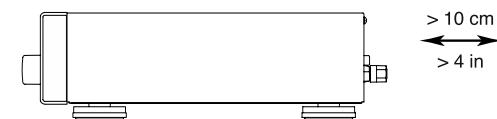
You must allow 10 cm or 4 inches of unobstructed clearance around the unit. Do not place the unit on a bed, sofa, rug, or similar surface that could block the ventilation slots. If the component is placed in a bookcase or cabinet, there must be ventilation of the cabinet to allow proper cooling.
Keep the component away from radiators, heat registers, stoves, or any other appliance that produces heat.
The unit must be connected to a power supply only of the type and voltage specified on the rear panel of the unit.
Connect the component to the power outlet only with the supplied power supply cable or an exact equivalent. Do not modify the supplied cable in any way. Do not attempt to defeat grounding and/or polarization provisions. Do not use extension cords.
Do not route the power cord where it will be crushed, pinched, bent at severe angles, exposed to heat, or damaged in any way. Pay particular attention to the power cord at the plug and where it exits the back of the unit.
Main plug is used as the mains disconnect device and shall remain ready accessible.
The power cord should be unplugged from the wall outlet if the unit is to be left unused for a long period of time.
Immediately stop using the component and have it inspected and/or serviced by a qualified service agency if:
- The power supply cord or plug has been damaged.
- Objects have fallen or liquid has been spilled into the unit.
The unit has been exposed to rain. - The unit shows signs of improper operation
- The unit has been dropped or damaged in any way
Please use Class 2 Wiring when connecting the speaker terminals of the unit to ensure proper insulation and minimize the risk of electrical shock.
Place the unit on a fixed, level surface strong enough to support its weight. Do not place it on a moveable cart that could tip over.


This symbol means that this unit is double insulated. An earth connection is not required.

CAUTION
RISK OF ELECTRIC SHOCK DO NOT OPEN

CAUTION: TO REDUCE THE RISK OF ELECTRIC SHOCK, DO NOT REMOVE COVER. NO USER-SERVICEABLE PARTS INSIDE REFER SERVICING TO QUALIFIED SERVICE PERSONNEL.
APPLICABLE FOR USA, CANADA OR WHERE APPROVED FOR THE USAGE
CAUTION: TO PREVENT ELECTRIC SHOCK, MATCH WIDE BLADE OF PLUG TO WIDE SLOT. INSERT FULLY.
ATTENTION: POUR EVITER LES CHOCSE ELECTRIQUES, INTRODUIRE LA LAME LA PLUS LARGE DE LA FICHE DANS LA BORNE CORRESPONDANTE DE LA PRISE ET POUSSER JUSQU AU FOND.

This symbol is to alert the user to the presence of uninsulated dangerous voltages inside the product's enclosure that may constitute a risk of electric shock.

This symbol is to alert the user to important operating and maintenance (service) instructions in this manual and literature accompanying the product.


Rotel products are designed to comply with international directives on the Restriction of Hazardous Substances (RoHS) in electrical and electronic equipment and the disposal of Waste Electrical and Electronic Equipment (WEEE). The crossed wheelie bin symbol indicates compliance and that the products must be appropriately recycled or processed in accordance with these directives.
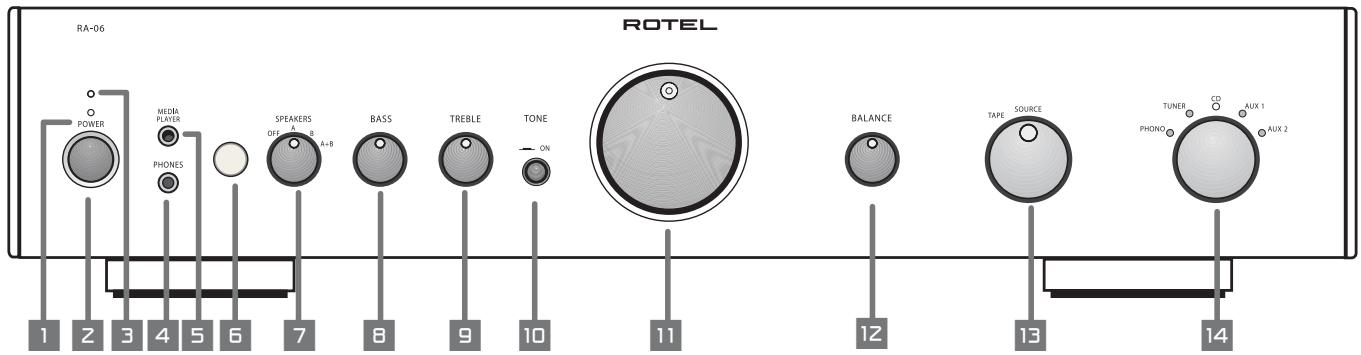
Figure 1: Controls and Connections
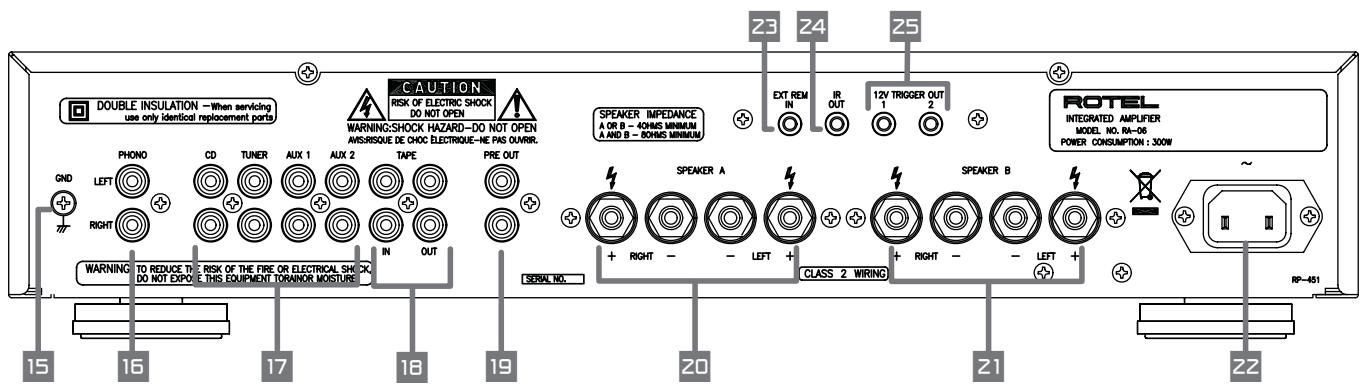
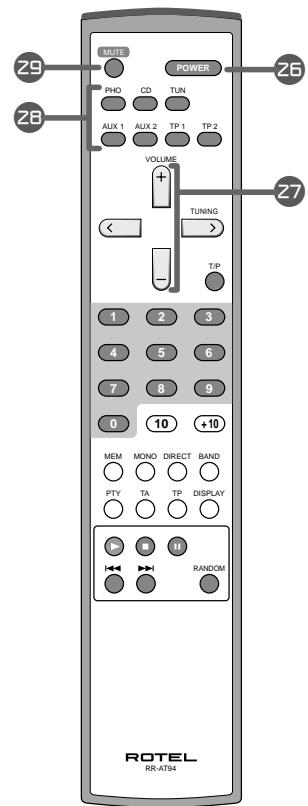
Figure 2: Signal Input and Speaker Output Connections
When making connections to the RA-06 be sure to:
- Turn off all the components in the system before hooking up any components, including loudspeakers.
- Turn off all components in the system before changing any of the connections to the system.
It is also recommended that you:
- Turn the volume control of the amplifier all the way down before the amplifier is turned on or off.
Contents
Important Safety Instructions 2
Figure 1: Controls and Connections 3
Figure 2: Signal Input and Speaker Output Connections 4
About Rotel 5
Getting Started. 5
The RR-AT94 Remote Control 5
Remote Sensor 6
A Few Precautions 6
Placement 6
Cables 6
AC Power and Control 6
AC Power Input 6
Power Switch 2 and Power Indicator 1
Input Signal Connections 7
Phono Input 15 and Ground Connection 15 7
Line Level Inputs 7
Recorder Connections 18
Preamp Outputs 19
Speaker Outputs 20 21 and
Speaker Selector Switch 7
Speaker Selection 7
Speaker Wire Selection 7
Polarity and Phasing 7
Speaker Connection 7
Phones Output 4 8
Media Player 5 8
Audio Controls 8
Volume Control 11 27 8
Balance Control 12 8
Tone On/Off Switch 8
Bass and Treble Controls 8
Function Control 14 26 8
Monitor Control 13 8
Mute Control 8
IR Inputs and Outputs 8
External Remote Input 23 8
IR Output 24 8
12 Volt Trigger Outlet 25 9
Protection Indicator 3 9
Troubleshooting 9
Power Indicator Is Not Lit 9
Fuse Replacement 9
No Sound 9
Specifications 9
About Rotel
A family whose passionate interest in music led them to manufacture high fidelity components of uncompromising quality founded Rotel over 40 years ago. Through the years that passion has remained undiminished and the family goal of providing exceptional value for audiophiles and music lovers regardless of their budget, is shared by all Rotel employees.
The engineers work as a close team, listening to, and fine tuning each new product until it reaches their exacting musical standards. They are free to choose components from around the world in order to make that product the best they can. You are likely to find capacitors from the United Kingdom and Germany, semi conductors from Japan or the United States, while toroidal power transformers are manufactured in Rotel's own factory.
Rotel's reputation for excellence has been earned through hundreds of good reviews and awards from the most respected reviewers in the industry, who listen to music every day. Their comments keep the company true to its goal - the pursuit of equipment that is musical, reliable and affordable.
All of us at Rotel, thank you for buying this product and hope it will bring you many hours of enjoyment.
Getting Started
Thank you for purchasing the Rotel RA-06 Stereo Integrated Amplifier. When used in a high-quality music audio system, it will provide years of musical enjoyment.
The RA-06 is a full featured, high performance component. All aspects of the design have been optimized to retain the full dynamic range and subtle nuances of your music. The RA-06 has a highly regulated power supply incorporating a Rotel custom-designed toroidal power transformer. This low impedance power supply has ample power reserves, which enables the RA-06 to easily reproduce the most demanding audio signals. This type of design is more expensive to manufacture, but it is better for the music.
The printed circuit boards (PCB) are designed with Symmetrical Circuit Traces. This insures that the precise timing of the music is maintained and faithfully recreated. The RA-06 circuitry uses metal film resistors and polystyrene or polypropylene capacitors in important signal paths. All aspects of this design have been examined to ensure the most faithful music reproduction.
The main functions of the RA-06 are easy to install and use. If you have experience with other stereo systems, you shouldn't find anything perplexing. Simply plug in the associated components and enjoy.
The RR-AT94 Remote Control
Some functions can be done with either the front panel controls, or the supplied RR-AT94 remote control. When these operations are described, the call out number for both controls is shown. For example, you can adjust the volume with either the front panel Volume control 1 or the remote control buttons 27
See the "IR Inputs and Output" section for more information on ways to expand the IR control capabilities of your system.
Note: Remove the batteries from the remote control if it will not be used for a long period of time. Do not leave run down batteries in the remote control. Exhausted batteries can leak corrosive chemicals which will damage the unit.
NOTE: The RR-AT94 can be used to operate the basic function of other certain other Rotel components, including Tuners, CD Players and DVD Players.
To operate a Rotel Tuner -
1) Select the tuner function of the RR-AT94.
2) Press "Power" and "1" (RT-06) or "2" (RT-940AX).
3) Press the key for Tuner operation.
To operate a Rotel CD Player -
Select the CD function of the RR-AT94
To operate a Rotel DVD Player -
Select the AUX 1 function of the RR-AT94.
Remote Sensor
The Remote Sensor picks up the infrared signals from the remote control. Do not cover or block the sensor. It must be unobstructed or the remote control will not work properly. The operation of the Remote Sensor can also be affected if it is exposed to bright light, particularly sunlight. Certain types of lighting, such as halogen lights, that emit a fair amount of infrared light, can also interfere with proper operation. In addition remote control functions may not work reliably if the batteries in the RR-AT94 are weak.
A Few Precautions
WARNING: To avoid potential damage to your system, turn off ALL the components in the system when connecting or disconnecting the loudspeakers or any associated components. Do not turn the system components back on until you are sure all the connections are correct and secure. Pay particular attention to the speaker wires. There must be no loose strands that could contact the other speaker wires, or the chassis of the amplifier.
Please read this manual carefully. It provides information on how to incorporate the RA-06 into your system as well as information that will help you get optimum sound performance. Please contact your authorized Rotel dealer for answers to any questions you might have. In addition, all of us at Rotel welcome your questions and comments.
Save the RA-06 shipping carton and all enclosed packing material for future use. Shipping or moving the RA-06 in anything other than the original packing material may result in severe damage to your amplifier.
Fill out and send in the owner's registration card packed with the RA-06. Also be sure to keep the original sales receipt. It is your best record of the date of purchase, which you will need in the event warranty service is ever required.
Placement
Like all audio components that handle low-level signals, the RA-06 can be affected by its environment. Avoid placing the RA-06 on top of other components. Also avoid routing audio signal cables near power cords. This will minimize the chance it will pick up hum or interference.
The RA-06 generates heat as part of its normal operation. The heat sinks and ventilation openings in the amplifier are designed to dissipate this heat. The ventilation slots in the top cover must be open. There should be 10cm (4 inches) of clearance around the chassis, and reasonable airflow through the installation location, to prevent the amplifier from overheating.
Remember the weight of the amplifier when you select an installation location. Make sure that the shelf or cabinet can support it. We recommend installing the RA-06 in furniture designed to house audio components. Such furniture is designed to reduce or suppress vibration which can adversely affect sound quality. Ask your authorized Rotel dealer for advice about component furniture and proper installation of audio components.
Cables
Be sure to keep the power cords, digital signal cables and regular audio signal cables in your installation away from each other. This will minimize the chance of the regular audio signal cables picking up noise or interference from the power cords or digital cables. Using only high quality, shielded cables will also help to prevent noise or interference from degrading the sound quality of your system. If you have any questions see your authorized Rotel dealer for advice about the best cable to use with your system.
AC Power and Control
AC Power Input 22
The RA-06 does not draw high levels of current from the power outlet. However, whenever possible, it should be plugged directly into a 2-pin polarized wall outlet. Do not use an extension cord. A heavy duty multi-tap power outlet strip may be used if it (and the wall outlet) can handle the current demanded by the RA-06 and all the other components connected to it.
Your RA-06 is configured at the factory for the proper AC line voltage in the country where you purchased it (either 120 volts AC or 230 volts AC with a line frequency of either 50Hz or 60Hz ). The AC line configuration is noted on a decal on the back panel.
NOTE: Should you move your RA-06 amplifier to another country, it is possible to reconfigure it for use on a different line voltage. Do not attempt to perform this conversion yourself. Opening the enclosure of the RA-06 exposes you to dangerous voltages. Consult a qualified service person or the Rotel factory service department for information.
If you are going to be away from home for an extended period of time such as a month-long vacation, it is a sensible precaution to unplug your amplifier (as well as other audio and video components) while you are away.
Power Switch 2 25 and
Power Indicator 1
Press the front panel Power Switch 2 button, to turn the RA-06 on. The Power Indicator light 1 is illuminated when the RA-06 is on. Press Power Switch button again to turn the RA-06 off.
Once the RA-06 has been turned on with the front panel power switch, it can be switched between normal operating mode and standby mode with the Power button 26 on the RR-AT94 remote control.
See the "12V Trigger Outlet" section for more information on ways you may be able to turn on and off other components in your system along with the RA-06.
Input Signal Connections
[See Figure 2.]
NOTE: To prevent loud noises that neither you nor your speakers will appreciate, make sure the system is turned off when you make any signal connections.
Phono Input 15 and Ground Connection 15
Plug the cable from the turntable into the appropriate left and right phono inputs. If the turntable has a "ground" wire connect it to the screw terminal to the left of the Phono inputs. It will help prevent hum and noise.
Line Level Inputs 17
The CD, Tuner, and Aux inputs of the RA-06 are "line level" inputs. These are for connecting components such as CD players, Hi Fi or NICAM Stereo video cassette recorders, tuners, Laser Disc players or the analog output from a CD ROM drive.
The Left and Right channels are labeled and should be connected to the corresponding channels of the source component. The Left connectors are white, the Right connectors are red. Use high quality RCA cables for connecting input source components to theRA-06. Ask your authorized Rotel dealer for advice about cables.
Recorder Connections 18
[See Figure 2.]
The Tape inputs and outputs can be connected to any record/playback device that accepts standard line level analog input and output signals. Typically that will be a conventional tape recorder.
When connecting a recorder to the RA-06 remember that the outputs of the recorder must be connected to the tape inputs of the RA-06. Similarly the tape outputs of the RA-06 must be connected to the inputs of the recorder. As with other sources be sure to connect the Left and Right channels of each device to the proper channels on the associated components. Use high quality connecting cables to prevent loss of sound quality.
NOTE: The Tape Outputs are not affected by the Volume, Balance or Tone controls. They receive a fixed level signal.
Preamp Outputs 19
The RA-06 has a set of preamp outputs. The signal from the source selected with the Function Selector is always available from these outputs. Typically these outputs are used to provide a signal to another integrated amplifier or power amplifier, which is used to drive remote speakers.
NOTE: Changes to the settings of the Volume, Balance or Tone controls affect the signal from the Preamp Outputs.
Speaker Outputs 20 21 Speaker Selector Switch
[See Figure 2.]
The RA-06 has two sets of speaker outputs, labeled "A" 20 and "B" 21. The speaker outputs are controlled by the switch 7 on the front panel.
Speaker Selection
If only one set of speakers will be used at any given time, the speakers may have an impedance as low as 4 ohms. If there are times when both the A and B speakers will be used, all the speakers should have an impedance of 8 ohms or more. Speaker impedance ratings are less than precise. In practice, very few loudspeakers will present any problems for the RA-06. See your authorized Rotel dealer if you have any questions.
Speaker Wire Selection
Use insulated two-conductor stranded wire to connect theRA-06 to the speakers. The size and quality of the wire can have an audible effect on the performance of the system. Standard speaker wire will work, but can result in lower output or diminished bass response, particularly over longer distances. In general, heavier wire will improve the sound. For best performance, you may want to consider special high-quality speaker cables. Your authorized Rotel dealer can help in the selection of cables for your system.
Polarity and Phasing
The polarity – the positive/negative orientation of the connections – for every speaker and amplifier connection must be consistent so all the speakers will be in phase. If the polarity of one connection is reversed, bass output will be very weak and stereo imaging degraded. All wire is marked so you can identify the two conductors. There may be ribs or a stripe on the insulation of one conductor. The wire may have clear insulation with different color conductors (copper and silver). There may be polarity indications printed on the insulation. Identify the positive and negative conductors and be consistent with every speaker and amplifier connection.
Speaker Connection
Turn off all the components in the system before connecting the speakers. The RA-06 has color-coded binding post type speaker connectors on the back panel (except in European Community countries where their use is not permitted). These connectors accept bare wire, connector lugs, or dual banana type connectors.
Route the wire from the RA-06 to the speakers. Give yourself enough slack so you can move the components to allow access to the speaker connectors. If you are using dual banana plugs, connect them to the wires and then plug into the backs of the binding posts. The thumbscrews of the binding posts should be screwed in all the way (clockwise).
If you are using terminal lugs, connect them to the wires. If you are attaching bare wires directly to the binding posts, separate the wire conductors and strip the insulation from the end of each conductor. Be careful not to cut into the wire strands. Unscrew (turn counterclockwise) the binding post thumbscrews. Place the connector lug or wire around the binding post shaft. Turn the thumbscrews clockwise to clamp the connector lug or wire firmly in place.
NOTE: Be sure there are no loose wire strands that could touch adjacent wires or connectors.
4
The Phones output allows you to connect headphones for private listening. This output accommodates standard stereo phone 3.5mm (1/8^) plugs. Plugging in a set of headphones does not cut off the signal to the outputs. Use the Speaker Selector to turn off the speakers. The settings of the Function Selector and the Tape Monitor Control determines which source is heard. To listen to or monitor the component connected to the Tape input set the Monitor Control to the Tape position. For all other inputs leave the Monitor Control in the Source position and select the source you want to listen to with the front panel Function Selector or press the corresponding source button on the remote control.
NOTE: Because the sensitivity of speakers and headphones can vary widely, always reduce the volume level before connecting or disconnecting headphones.
Media Player
A 3.5mm (1 / 8^ ) stereo input socket for a "Media Player" is provided on the front of the amplifier and is selected by setting the function control to (AUX2). Any portable stereo cassette, compact disc player or hard disc playback device can be connected via this input. If the device you are connecting has its output via the headphone socket then note that you must adjust the volume control on the player for sound to be heard. Should the sound be loud and distorted turn down the volume on the player and if it is only just audible through the speakers even when the amplifier volume control is turned up fairly high then adjust the volume control on the player.
NOTE: When the 3.5mm (mimi jack) is inserted into the Media Player socket the rear input called AUX2 is disconnected. Removing the 3.5mm plug from the Media player socket will allow the rear AUX2 input to function.
Audio Controls
Volume Control 11 27
Turn the control 11 clockwise to increase the volume, or counterclockwise to decrease the volume. Or use the remote control volume buttons 27. Press the button to increase the volume, or the button to decrease the volume.
Balance Control 12
The Balance Control adjusts the left-to-right balance of the sound output. Normally the control should be left in the center position. In some situations, typically when the main listening position is not ideally centered between the speakers, it may be necessary to adjust the control to achieve proper left-to-right balance. Turning the control counter-clockwise shifts the sound balance to the left. Turning the control clockwise shifts the sound balance to the right.
Tone On/Off Switch 10
When the Tone Switch is in the Off position the Bass and Treble Control (Tone Control) circuits are bypassed to ensure the purest possible sound. Leave the Tone Switch in the Off position unless you want to use the Tone Controls. Turn the Tone Switch to the On position if you want to adjust the Tone Controls.
Bass and Treble Controls 8 9
When the Tone Switch is in the On position, turning the Bass and Treble Controls adjusts the tone balance of the sound. Turn the Controls clockwise to increase the bass or treble output. Turn the Controls counterclockwise to decrease the bass or treble output.
A properly set up high-performance audio system produces the most natural sound with little or no adjustment of the tone controls. Use these controls sparingly. Be particularly careful when turning the controls up (clockwise). This increases the power output in the bass or treble range, increasing the load on the amplifier and speakers.
Function Control 14 26
The Function control selects the input signal source. The signal selected by the Function control is the one you hear, as long as the Monitor control is set to the Source position. (See the following section.) The signal selected by the Function control also goes to Preamp Outputs and the Tape Outputs. Turn the front panel Listening Selector to the source you want to listen to. Or press the corresponding source button on the remote control.
Monitor Control 13
When the Monitor Control is set to the Source position, the signal you hear, and which goes to the Preamp Outputs, is selected by the
Function Control. To listen to the signal from a recorder connected to the Tape Inputs, set the Monitor Control to the Tape position. When the Monitor Control is in the Tape position, the signal from the Tape Input also goes to the Preamp Outputs.
The signal that goes to the Tape Output is always selected by the Function Control. When you are recording with a unit that has monitoring capabilities, you can listen to the sound just recorded by setting the Monitor Control to the Tape position.
Mute Control
Remote Only
To temporarily mute the sound of the system press the Mute Button on the RR-AT94 remote. The volume Control LED blinks when the sound is muted. Press the button again to return the sound volume to the original level.
IR Inputs and Outputs
External Remote Input 23
This 3.5mm mini-jack (labeled EXT REM IN) receives command codes from an industry-standard infrared receivers (Xantech, etc.) located in the main listening room. This feature is useful when the unit is installed in a cabinet and the front-panel sensor is blocked. Consult your authorized Rotel dealer for information on external receivers and the proper wiring of a jack to fit the mini-jack receptacle.
NOTE: The IR signals from the EXTERNAL REMOTE IN jack can be relayed to source components using external IR emitters or hardwired connections from the IR OUT jacks.
IR Output 24
The IR OUT jack sends IR signals received at the EXTERNAL REM IN jack to an infrared emitter, or to Rotel CD players, cassette decks, or tuners with a compatible rear panel IR connector. The allows you to use IR control features to operate other components when the IR sensors on those components are blocked for obstructed by installation in a cabinet.
See your authorized Rotel dealer for information on IR repeater systems.
NOTE: The EXT REM IN jack located next to the IR OUTPUT jack is for use with an external IR sensor which duplicates the front panel IR sensor.
12 Volt Trigger Outlet 25
Some audio components can be turned on automatically when they receive a 12V turn on "signal". The 12V Trigger Outputs of the RA-06 provide the required signal. Connect compatible components to the RA-06 with a conventional 3.5mm miniplug cable. When the RA-06 is in Standby mode, the trigger signal is interrupted, so the components controlled by it are turned off.
Protection Indicator 3
The RA-04 has both thermal and over-current protection circuitry that protects the amplifier against damage in the event of extreme or faulty operating conditions. The protection circuits are independent of the audio signal and have no impact on sonic performance. Instead, the protection circuits monitor the temperature of the output devices and shut down the amplifier if temperatures exceed safe limits.
Most likely, you will never see this protection circuitry in action. However, should a faulty condition arise, the amplifier will stop playing and the LED indicator on the front panel will light up.
If this happens, turn the amplifier off. Let it cool down for several minutes, and attempt to identify and correct the problem that caused the protection circuitry to engage. When you turn the amplifier back on, the protection circuit will automatically reset and the indicator LED should go out.
In most cases, the protection circuitry activates because of a fault condition such as shorted speaker wires, or inadequate ventilation leading to an overheating condition. In very rare cases, highly reactive or extremely low impedance speaker loads could cause the protection circuit to engage.
If the protection circuitry triggers repeatedly and you are unable to isolate and correct the faulty condition, contact your authorized Rotel dealer for assistance in troubleshooting.
Troubleshooting
Most difficulties in audio systems are the result of incorrect connections, or improper control settings. If you encounter problems, isolate the area of the difficulty, check the control settings, determine the cause of the fault and make the necessary changes. If you are unable to get sound from the RA-06 refer to the suggestions for the following conditions:
Power Indicator Is Not Lit
The Power Indicator should be lit whenever the RA-06 is plugged into the wall power outlet and the Power Switch is pushed in. If it does not light, test the power outlet with another electrical device, such as a lamp. Be sure the power outlet being used is not controlled by a switch that has been turned off.
Fuse Replacement
If another electrical device works when plugged into the power outlet, but the Power Indicator of theRA-06 does not light when plugged into the same outlet and the Power Switch is pushed in, it indicates that the internal power fuse may have blown. If you believe this has happened, contact your authorized Rotel dealer to get the fuse replaced.
No Sound
Check the signal source to see if it is functioning properly. Make sure the cables from the signal source to the RA-06 inputs are connected properly. Be sure the Listening Selector is set to the proper input. Check the wiring between the RA-06 and the speakers.
Specifications
Continuous Power Output 70 watts/ch (20-20 kHz, < 0.03%, 8 ohms)
Total Harmonic Distortion (20Hz-20kHz)
Intermodulation Distortion (60 Hz: 7 kHz, 4:1)
< 0.03% at rated power, 1/2 power or 1 watt
< 0.03% at rated power, 1/2 power or 1 watt
Frequency Response - Phono Input 20Hz-15kHz, ±0.3dB - Line Level Inputs 10Hz-100kHz, +1, -3
Damping Factor (20-20,000 Hz, 8 ohms) 180
Input Sensitivity / Impedance
Phono Input 2.5mV / 47 kOhms
Line Level Inputs 150 mV / 24 kOhm
Input Overload
Phono Input 180mV
Line Level Inputs 5V
Premp Output / Impedance 1V/470 Ohms
Tone Controls - Bass / Treble ±6 dB at 100Hz / 10kHz
Signal to Noise Ratio (IHF "A" weighted)
Phono Input 80 dB
Line Level Inputs 100 dB
Power Requirements USA Version 120 Volts, 60 Hz European Version 230 Volts, 50 Hz
Power Consumption 300 W, 36 W - Idle, 1
Dimensions (W x H x D) 437 x 92 x 342 mm 171/8 x 35/8 x 131/2
Panel Height 80mm / 3^1 / 16^ Weight (net) 7.7kg,17lb
All specifications are accurate at the time of printing. Rotel reserves the right to make improvements without notice.
RISQUE D'ÉLECTROCUTION NE PAS OUVRIR

ATTENTION: POUR RÉDUIRE LE RISQUE D'ÉLECTROCUTION, NE PAS RETIRER LE CAPOT. IL N'Y A À L'INTERIEUR AUCUNE PIECE SUSCEPTIBLE D'ÊTRÉ MODIFIÉE PAR L'UTILISATEUR. EN CAS DE PROBLEMÉ, ADRESSEZ-VOUS À UN RÉPARATEUR AGRÉE.

Monitor control 13 38
De stiltefoets "MUTE" 38
half vermogen of 1 watt
half vermogen of 1 watt
20-15.000 Hz. ±0.3 dB
10-100.000 Hz. +1, -3 dB
180
2.5mV, 47k
150mV,24k
180 mV
5V
1V/470
± 6 dB bij 100Hz / 10kHz
80dB
100dB
230Volts/50Hz
Media Player-ingang 5 44
Ljudkontroller 44
Volymkontrollen 1127 44
Balans 12 44
Tonkontroller 44
Bos ochiskant 89 44
Baxkhble nHctpyKunn no
6e3oNaCHOCTN
ПЕДОCTEPEXKEHNE: Bnytpn Het qachei, doctynbix IaI o6cnyxmbHnI NOIb3ObATEIIO. DoBepaIte o6cnyxmbHne KBaIIHmUpOBAHHomY nepcoHany.
IPEIOCTEPEXHENE: IIN CHNXEHN ONACHOCTB O3ropaHn HIN NOPAXEHN 3NEKTPUeCKNM TOKOM He NODBepraTe daHbI annapat BO3deICTBNO DOJxA INN Bnarn. He donyckaTe nonadahnnoctopoHHnx PpeMetOB BHytpb Kopnyca. EcnBHytpb KOpnyca nonana Bnara INN noctopoHHn npedmet, HEMdJIENHO BbInbte BNkY shHpy pINTAHN h3 po3ETKn. DoCTabte annapat K KBANHPhiuropobAHHomc Cneunanmcty dna OCmToPa nBO3MOXHoro peMOHTa.
Ipejde yem nooCoeHNrTa annapat n npabnraHm, npouTne Bce HNCTpykun. CoxpaHnte pykoBOcTBO nO 3Kcnnyatau nn dnaaBHeJwero NCNoB3OBAHn.
O6paaTe BnMaHHe Ha npedoctepexeHna, yka3aHbIe Ha Kopnyce annapata n B daHHOM pykoBOcTBe. YnpabTne annapaTOM B COOTBeCTBnC INHCTpyKlmaHn.
NK BxObln BblXoBl 50
BxoIДЯ BHeHero IK-cnHaHa
ynpablenn 23 50
NK BbIXOa 50
12-B TpHrrepHbIe BbIXOJIbl 25 51
Cxembl 3aunTb1 51
IuaHIOCTNka HycTaPHeHne HenoJaok 51
He cBeHTTCaHdNkATOp NITAHNA 51
3aMeHa npeoXpaHnte 51
HeT 3Byka 51
Texnueckne xapaKtepncTKKn 51
OKompanHnROTEL
KOMPANHRAOTEL OCHOBaHa 6OJee 40 JET Ha3a CEMbe, KOTOPa H3-3a CTpACTHOJIIO6Bn K My3bKe 3AHJaIacbp Ipon3BODCTBOM hifi KOMNoHErTO. C rOamn 3ta CTpactb He yInxla, n CeoJdH cTpeMJIeHne CEMbN K O6eCneueHHo ayINoΦHIOB n MeIOMaHOB, He3ABHCmO To Nx φIHAHCOBOrO NIOXeHH, aIIapApTyPOB BbICOHaIWeFo KaueCTBa, pa3EJIaHT BCE cOTpyHNIKn RToL. DpyKHAkOMaHdAnHKeHepOBnPoCnyuINBaET HAcPTaHNBaET KAKdoE HOBOe H3JeHne, NOKA OHO He 6yDet COOTBeTcBOBat cMbIM BbICOKHM cTAHApTAM. Nm npEOCTABNeHa CBo6Oa Bb6Opa KOMPiNEKTUOnix NO BCemy MnpY, YTO6bl CedeIb anIcapat kak MoXHo LyuHe. BepoTHo, Bbl CMoxete HaITN OTbOpHbIe KOHNecATOpbl N3 BeNiKo6pItAHnn N TepMaHH, pONyPboBDnHKn N3 JaONHn N ClUA, a TaKxe TopoINaIbHbIe CINOBbIe TpaHCfOpMaTOpbl, N3rTOBnEHHbIe Ha Co6CTBeHHOM 3abOJe ROTEL..
Penytaun KOMnAHIN ROTEL KaK npOn3BODNTeI npEBOCXoHNO TeXnKNi NOtBepxJeHa COThAMN NIOJoxTeJIbHbIX OT3bIBOB HArpaD OT HAn6Oonee yBaXaEmbIX 3KcneptOB, KOtOpBie CnyuHaOT My3bIKy EKeJHeBHO. IVX KOMMeHTapHH NOMoAHT KOMnAHIN TOUHO pnpdepkxHBatcEe Kypca HA npOn3BODCTBO KauCteBENHO, HAdexHOrO nIOCTyHOrO o6OpYDoBAHnR.
Mbl, cotpydnHKK KOMpaHNN ROTEL, 6naorapm Bac 3a NOKyNkY 3tOrO n3dennn, H naedeemc, yTO OHO IOCTABNT BAM MHoro YacOB yIOBOJbCTBn.
PepBbIe war
Blaorapm Bac 3a NOKyKny HnterpnoBHOHO ycnHnTeR RoTe RA-06.B COCTabe BbICOKOAcYeCTBeHHo ayDIOOCHeMb OH 6yDet IOCTABNtB Bam yDObOBtBne MHOte rOdb. RA-06 -NoHOFyHKnOHALbHbI KOMTOHEC C OTNIuHBIM pa6OHHM XapaKTepnCTkAMn. Bce acNeKtI eTo KOHCTpyKUIN OITMNIm3nPOBaHbI DnIe NOnyEnH N PONHO TINHAMnueCKoT DnAan3OHa N nepeDaH ToCHauHnIX HNOAHCOB My3bIKN. BbICOKOCTaBnHbN IcTOOHNK nHTAnHra RA-06 BKlOuaet B ce6h fHPMeHNb TOPOdAIBHbI TpaHCfOpMatop RoTe, 6bIaTaET Hn3KHM BbIXODHbIM cOpOTNBHeHnEM 6ONbUHM 3Apacom No MOuHcTn, N03BOJHOUzHM RA-06 BocPnoBDOInb Camble CLOXHbIe ayDINOCHnAbI. CToHMOCT hBroTOBHeHn DAHHO KHCTpyKUIN BblSe, Ho OHa IMeet pEnMyuIecBa C TOUKN 3peHnE My3bIKN. IOpoxKn NeatBbIX PnAT yCNlNTeR paCnIOJxKeHbl CmmMeTpnuHo. 3to
06ecneueBaet TOUHoe co6IIOHeHne BpeMeHHbIX npaMeTPOB My3bIKaJIbHOrO CnIHana. B CnIHahbHom TpaKte npImeHbI MetaIIIOJIeHOuHbIe peNCTOpbl I IOINCTIpNOJIOBbIe HIN NOINIpONIIeHOBBIE KOHNcHcAToBp. KaXdbI 3IeMeHT cxEmbl IOIBepraCLT tIaTeJIbHOMy paccMOTpeHHo, YTO6bIIO6bITcMAKcIMaJIbHOIOCTOBePHOrO BOCnpOn3BeDEHnMy3bIK. RA-06 IpocB HAcTPOKe n EKcIIpyatauH. EcnB bI yKe HMeIIN DeLo cO CTpeOecNCTeMaMn, y Bac He BO3HKnHET BOpocOB. IpocTo NODKlIOuyte OCTaJIbHbIe KOMIOHEHTI H NaCIAxJaTecb.
Пульт RR-AT94
HeKOTOpbIe onepaunn ynpablenenm MoXHO BbINOHNb KaC pNbTa, TaK n c nepeHne naHEn. Pn OnncAHnn TaKnx onepaunyka3bIBaOTc CbIOuHbe Homepa 06oNX oprAnOB ynpablenenr. HanpImep, perynipOBaTb IpOMKOb TMOxHO pyKoTkoJ Volume 11 NIO KhoNkAMn Ha npblte 27.
Bpa3eNe"BxOJn BbXoN UKIY"OnncAo, KAK paacunpHTb BO3MOXHOCTIN DnCTAHUHOHOrO ynpabHeNa BaSei cnCTeMoI.
PIMMEYAHME: BbIbTe n3 nyIbTa 3JIeMeHTbl NITAHN, ecn OHn nCTOSeHbI nn ecn BbI He co6npaTeec nb3OBaTcBn TylbTom dINTEbHOe Bpem. IpoteUka pa3prJKeHHbIX 3JIeMeHTOB NITAHN MOKeT npBeCTN K Kopp0HN I NOBpeXJeHIO aannapata.
IPMMEAHHE: C nyIbTa RR-AT94
MOxHO ynpabTb HeKOTOpBIMn IpyrMM KOMnoHentAmRotel, BkIoua TIOhep, CD n DVD-IIeepbl.
BbIXoIbI ppeDyCnITeTae 19
RA-06 ochaueh Bixoamn npedycnnteHa Bixoax npedycnnte RA-06Bcerda npicytctbyet cnHann HCTouHnKa,Bl6paHHoro B daHHbIM MOMENTI npocnyuBaHHn CenekTOpom BXoOB.ObuHO 3TN BixOdbI NOCDoeHNHOTcK DpyROMy HHTerpnpobAHHom yCnuNTeIOH NIN yCnuNTeIO MOsHOCTH, NITaHOeMyKOJONHKN BdpYrO KOMHATE.
PIMMEYAHNE: PernylantopblrpoMkoCTn, 6ana hca n Tem6pa BInraHOT Ha cnHaJI, NoctynaouHn Ha BbIXOblppeycnHntenJ.
BbIXOdbI dJa AC 20 21
Cenektop AC 7 (cm.pnc.2)
RA-06 mMeet BbIXOJI bIJI NOIKHoueHn IByX KOMIIeKTOB AC, NOMEueHHbIe "A" 20 n"B" 21.CnHaI Ha 3TN BbIXOJI NODaETcB COOTBETCTBnC NIOJOKeHHeM PepeKlHOUaTeJIa 7 Ha nepeJNeI paHeJI.
Bbl6op AC
Ecn npednonaraetc, yTo B nIO60mOmeH BPemehn 6ydt pa6oTaTb TOnbKO OINH KOMPNEKT AC, MoXHO HCNoB3OBaTb AC C NIMpeHaHCOM 4 OMa. Ecn B KAKHeTO MOpEHb BPemehn 6yDyT OINHOBPemehno pa6oTaTb 06a KOMPNEKTA, BCE AC DoJXHBi NMeTB NIMpeHaC 8 OM HN 6OJIbIe. PAcnpOThIE 3HAueHn IIMpeHaHCA AC, KaK npABInO, OueHb Pn6n3HTeNBbl. Tem He Mehee, Ha npakTIke TObKO OueHb HemHOrne AC MOrT pPeIctabNITb Pp6JeMy dJaRA-04. IpokOHcyNbTpuyTeCb C BaAMM ABTopn3OBAHHbIM DInepom Rotel, ecn y Bac BO3HNKII BONIpocbl.
Bb16op KOJIOHOUHoro Ka6eIa
Для посоeнeнгь AC nCnoNb3yuTe nBONIOPOBAHbM MHOrOxHbI bKabEnb CDByMa npOBODNKAMn. Pa3Mep N KauceCTBO Ka6eIa MOryt 3aMeTHo BnIyrBa Hb 3ByuHHe NcCTeMbI. CTAnDapThbKOHOHChyKab6BnIOJeiT, HO eRO BnIAHHe MOKET BbIPa3NtCB B CHINKeHIn N 3ByKOBOro BbIXOJa INn yXdUeHNb 6acOBOn XapaKTePcHcTNk, Oco6eHNo pRn 6onblOoi IINHe Ka6eIa. O6bHuO qEm ToIe NpOBOD, TEM NyUWe 3ByK. ДЯ HANNUHcero pe3ynbTa T NcNOB3yIte CNeUAnbHbIe BbICOKOkaeeCTBeHNbIe KOHOHObE Ka6eII. O6patITecb K BaWSeMy ABTOPHOBAHOMY dInIepy Rotel 3a COBETAMn NO BbIbOpCy cambIX LyuWiX K6eIe NpIONB3OBAHNBA B BAWe ayDINO CNTeMe.
PonpaHocb nΦa3a
Плогнocь - Плкюочип ровониka K Пложntelhoи орпателhoи Кlemme - на BCex AC и усintе Должна 6ытб Однakobа.Tordа синан на BCex AC6ydETIMetb Однakobую Фаду.Есни рогocь odHOrO n3 CoedinHeHn nepenytah, to cysectbeHNO Снжaelы ВьхOD bacaиnpTITc STpeo O6pa3. Чтбь можно 6ылО OTПИNTB OdIN H pOBODNik OTДPyTORO, BCE Kolnochhble Ka6elen ИмeHOT MapKpOBKY: N3OLJUЯ OndHORO рpoBOnHnKa Mожет 6ылрбпсToI, pONocatoH nT.I.Тakke Быот Ka6elen C npO3paHNo N3OLJUeHn И ровOnHkAmn pa3HOrO zBeta (MeHbI и посepe6penhbl).Иногда на N3OLJUH HAHOCTS.NCTAHOBITE, KAKOH РовOnHk 6byet ПложntelbHbIM, a kakOH - OTPNUATElNbHbIM, IN npINepxNBAWTECEb 3TOrO правILA пri ПпОдcoEInHeHn BCex AC.
PoiocoeHHeHne AC
Chauana BbIKIouHte NITAHne BCex KOMHOENTOB CmTeMbI. KEmMbI Ha 3aDHei NaHei RA-06 HMeHOT CBeTHyO KoINPOBky IOnyCKAOT NOIcoEINHeHne 3aUnSeHHbx KOHIOB Ka6eJI, HAKOHEYHKnOB "NONATKa" IN "DBOHNO BaHAn".
IpoJoxHte npoBoda ot RA-06 K AC. OctabTe HeKOTOpbI 3aNac dInnHb, yTO6bl MoXHO 6bINO NOBepHyb KOMNoHEtbl dIy o6ecneueHHIOCTUpa K KJIeMMAM. EcNI HcONb3yIOTc HAKOHeuHHKn "DBOHOH 6aHaH", 3aKpeHnte IN HA KOHcAX npoBOnHKOB H BCTABBe TBOPBcTnKJIeMM. FOnOBKn KJIeMM DOJxKnHb 6bITb 3aKpyueHb Ido ynpa (no YacobO B cTpeKe).
Ecnn nCnoJb3yIOTc HakoHeuHnKn "nonatka", 3akpennte nx Ha KOHax npOBoHNKOB. Ecnn nCnoJb3yIOTc 3aunueHHbe KOHcyi Ka6en, pa3dennTe npOBoHNKn iCKpyTne Xnbl. CtapainTeCb He nepepe3aB xInbl npOBoHNKOB. OTBepHnTe rONOBKn Klemm (npOINB yacobon CTpeKN).Haedehe"nonATkn" Ha uTbipn Klemm nn o6epHnTe KOHcyi npOBoDA BOKpyr uTbipei. PInOTHO zAkpyTne rONOBKn KLEMm, YTO6bl o6ecneuHb npOuyhoe coeDInHeHne.
ПРМЕЧАН: Y6eДиТecь,чTO He OCTaJIоСь "pa3IoxMaueHHbIX"ЖИ, KOTOpbie MOrYT 3aMKHytbcr MekJy cO6oH,Ha cOceDHIJOKJIeMMy HnH a KopNyc.
THe3doIJaHayuHnKOB 4
K3OTMYIHE3NY NOCDOEINHJROTCAHTNtBHeIe CTpeoHayuHNKCo 0UTEKePOM 1/8IOuMa.Ecynu HauuHnKOB ppyroI uTEKeP,NCONb3yIte NepexoHnik. IOnCOeINHeHne HauuHnKOB He OTKIOUcaET 3ByK B KOLOHKax.ДЯ 3TOrO BOCNOB3yIteCb cENEKTOpOM AC.B HauuHnKNoCTyNaET CnIHAN, COOTBeTCTBHyUAni nnOJoxEHnO cENEKTOpOB FUNCTION nMONITOR. Yro6blnpocnyuHBaTB CNIHAN LIO6OIO npyTOrO hCTOuHHKa, yCTAOHbTe cENEKTOp MONITOR B noLoXeHne TAPE. Yro6blnpocnyuHBaTB CNIHAN LIO6OIO npyTOrO hCTOuHHKa, yCTAOHbTe cENEKTOp MONITOR B noLoXeHne SOURCE, a cENEKTOp FUNCTION - B noLoXeHne, COOTBeTCTBHyUooee HxKHOmy hCTOuHHKy (nnBbIbepnte hCTOuHHK C npylTa).
BASS u TREBLE (PergyIaTOpbl TeM6pa)
Korda BbIKNoateB Tone haxoHntcB nOIOXeHNn On, MoXHO OTOpeYIINPOBaT bToHaNbHi 6aJIaHc 3Byka peYIaTOpAMn Bass (YpOBeHb HN3KNx qactOT) n Treble (YpOBeHb BBICOKNX qactOT). YTO6bl NOBbICHTb yPObEh bHN3KNX (BBICOKNX) qactOT, NOBOPaUNBaIte peYIaTOp Bass (Treble) no vacBOI cTpeJIke. YTO6bl NoH3NtB yPObEh HN3KNX (BBICOKNX) qactOT, NOBOPaUNBaIte peYIaTOp Bass (Treble) nPoTINB YACOBON CTpeJIkn.
BbICOKOkaueCTBeHHaH INPabINbHO HAcTpoeHHaA yDIOscIcTeMa 3ByuHT HATypaIbHO N O6bUHO He Tpe6yET peYnnpOBKn TOHaJIbHO 6aIahCa. He cIeNyET 3NoTyntpe6NtBpeYnTpOpAMn TEM6pa. ByIte OOC6EHNO BHNMaTeNbHi, NObIIaHaa YpOBeHb HN3Knx INIbBcOKHX qACTOT, TAK KAK npI NTOM CO3JaEtCJ DOnONHInTebHaHarpzKa HA YCNITeJIb N KOJIOHKN.
FUNCTION (CeIeKTop BxoIOB) 1423
Korda cenektop MONITOR haoihtcB nojoxehnn SOURCE, cnHnI nI npocnyuBaHHa Bb6npaetc noBOPOTom cenektopa FUNCTION (cm. cneHyouoi a63au)Hn Haxatme COOTBeTCTByIOux KHOOK Ha nyltte. 3TOT JKe CnHnI NOCTyPaET Ha BbIXOblI ppeDcHInTeI N BbIXOblI dN 3aHNC.
Пepeкл equivatelb MONITOR
Korda cenektop MONITOR haojntcB noJoojeHHN SOURCE, cnHAn IINI pOscnyuBnHn Bb6HpaetcN nobopoToM cenektopa FUNCTION. Tto6bl npocnyuataB cnHAn C bixoDa 3aHncsblauoJeO yctpoCTBa, noCooeHNHeHHoro K bXoNy TAPE, ycTahOBHTe cenektop MONITOR B noJooxeHne TAPE. Korda cenektop MONITOR haojntcB noJoojeHHN MONITOR, cnHAn co BxOJa TAPE noctynaet TakKe Ha bixoDbI npeducnnteJI.
CnHan, noCTyNaOuHn Ha BbIXoTape, Bcerda 3aadaetcnoLoxHeHem perYIaTopa FUNCTION. Ecnn 3anncsbIaIOooee yctpoNCTBO donyckaet KOHTpOBB npocece 3anncn (MOHITOPINr 3anncn), To, yCTahOBnB ceneKtOp MONITOR B noLoXeHne MONITOR, MoXHo npocnyuWBatb TOnbKO qTo 3anncAHbI 3ByK.
MUTE (3aRnyuweHne 3Byka) 29
ToIbko c npIbTa
TRObI BPEMeHHO 3aIIyUINb 3ByK, HAXMnTe KHOJIky MUTE Ha IyIbTe RR-AT94. PIn 3aIIyUeHHOM 3ByKe CBeToIDoH Na perynltope rPoMKoCTn MInTaet. TRObI BOCCTaHOBnH CXOJNbI yPoBEh rPoMKoCTn, HAXMnTe Ty Jxke KHOJIky.
BxoI N BbIXoN IK IY
External remote input (Bxod 3nEkrpueeKoro CnHana DnCTaHcNoHHoro ynpabNeHna) 29
Ha 3o 3,5 MM rHe3do (nomeehhoe EXT REM IN) MoXHo nOdaTb cnHnAn ot BbIHeceHHoro ceHCopa dNCTaHUNOHHO ynpabJIeHHra (HapPIMep, MapKn Xantech n dp.), yCTaHOBHeHHoro B INaNBOH KOMHATE. 3To nOJe3HO, KOJa ycNInTeNb HAXODNTcR He B INaNBOH KOMHATE IpocnyuBaHHa, a TAKKe NOpMeUeB CCKpbITyU cToKy BMeCTe C DpyrHMN KOMNoHEtAMn DomauHei ABTomAtNK; IIN6O ycNInTeNb HAXODNTcR B KOMHate IpocnyuBaHHa, HO B WkaQy dJra Annapatypbl CTmHBIMC tEknAm - CNOBOM, ecn CnHnA1 C pynbTa He MOKeT POnactb npMo HA BCTPOeHHbI CEHCOP ycNInTeNA. O BbIHOCbIX ceHCopax INx POnCoEHNHeHHn PpOKOHcyNBtPyuTEcb Y abTopn3OBaHHoro dInepa Rotel.
INMOKET6bITbpeepaHdaneeHaIpynEM KOMPOHEHTb-NCTOUHNKn PnPiOMOuIN BHeuHHNIK3nyateneHnPiPOBOHbIM COeHHHeHemC rHe3Dm IR OUT.
IR OUT (BbIXoI cMnHaJIOB NIK IY) 24
CbIXOa IR OUTcHnA, noCTynAoHn Ha BxOd EXT REM IN, npepaetraHa HnΦpakpaChn H3nyaTeInb, NOMeHHBnpeep KOMnoHEhTOM-CTOHTHKOM, nHn HA CD-nponrpbIbATEnb, KaccETHyo DEky nHn TIOhep npOn3BOCTBa Rotel, ochaeeHHBe COBmecTHMbIM IK BXOJOM. TaKm 6pa3OM MOXHO OCUyecTBJIbT bIcTAHcHNOHoe UnpaBHeHne IpyTMM KOMnoHEtAMM, cEHcOpbl DY KOtopbIX HeNoctYHbI dIg PpAmoro ynpaBHeHn CpytBa. OINΦpakpaCHbX H3nyaTeInx IN X IOndCoEHNHeHHn pPOKOHcybTnpyTeCb y ABTopn3OBAHHO rDinepa Rotel.
PIMMEYAHHE: THe3IO EXT REM IN, pacnoIoxeHHoe pIOM C THe3IOM IR OUT, npEHa3NaueHo IINcNoIb3OBaHnC BHeuHm CeHCOPo M nCTaHcNtOHoro ynpabHeHn, dy6npyoHm CeHCop IK Dy Ha nepeHne naHenn.
12-B TpHITepHbIe BbIXoNbI 26
HeKOTOpbIe ayDIO KOMTOHENTBI MOYrABTOMATNUeCKIN BkNHOATbc npn NOnyehnn 12-BoJbTOBOrO "TPNItEPHOrO" ciHana. KaJbIu H3 bIXoOB RA-06 "12-VTRIGGER OUT" o6ecneuHBAet TAKoI cHnHAn. CoBMeCTMlbE KOMTOHENTBI NODCOeHNHJOrTC K3TNMBblXoDM Ka6eJIaMn C 3,5-MM MmHn-WTeKePom. KoJa RA-06 HaxoINTcB COCTOHN IOTOBHOCTn, TPNItEPHbI CNHAN ppepbIAeTcN I NOcEOUHeHHbIE KOMTOHENTBI BkNHOATOC.
CxembblauntbI
3TOT yCNHInTeB OCHaIeH CXeMaMn 3aUnHbI OT neperpy3Kn IIO TOky IOT neperpeBa, KOTOpbl e npedoxpanHOT erO OT NOBpeKJHeN B Clyuae 3KCTpeMaJIbHbIX INI HEnpabINbHbIX YCNoBNI 3KcPiYataUHN. Cxembl 3aUnHbI He3aBVCmbl O cTHAHbHO TpaTKA HNKAK HE BnHIOHT HA KaueCTBO 3ByaHNI. DAcTNueCKN OHN CNeIAT3a TempePAtypoB bXbODHbIX TPAH3NCTOPOB IN OKJIouaHOT yCNHInTeB, ecn OHa npeBbIshaet 6eONaChbIe npedebl.
Ckoope Bcero, BAM Hn pa3y He ylaactcna6bnoidatb cpa6abHnne 3Tnx cxem 3auntbI. Ondako kak TOIbKO BO3HNKHT ONACHA CNTyaUNa, ycINlTeNb OKJIIOUHTcN Ha erO nepedHe naneHIn 3aIropntc INHnKATOp (CBeToNDIO).
Ecni 3TO cnYnIOcB, BbIKIouHte ycNHTeB, daIte EMy OCTbITb B TeueHne HECKOJIbKx MNHyT, a 3aTeM nonItaIeTcB bIyBtB N yCTpaHNTb pNHyN, KOtopa MoJlA BbIBaTb Cpa6aTBiBaHne CXEM 3aIHTbl. PnIO NBTOPHom BKJIouHEN ycNHTeR cxEMA 3aIHTbl ABTomATuCeKn nepe3aIyCTHcR n CBtoNDIO norachet.
B60JIbIINHCTBe cnyaeb 3aunita cpa6abIbAet H3-3a TAKHX HeNcnpabHnOtei, KAK KOPOTKoe 3AmbIKAHne KOLOHOUhIX IPOBOIOB NIIJ Xe HeIOCTatoOHa BENTINIA (IOCTyN BO3dyxa), npINBOIAaB NpeperpeBy annapata. B OueHb peKHX cnyaay Xe cpa6abIHHe MoXET 6bIT bbl3BAHO CInlIKOM H3KNM MMPeDAHCOM KOLOHOK NIIJ Xe uepcyur peAKTINBHbIM XapakTePOM Harpy3Kn.
Ecni 3aunTa cpa6abBaet NOBTOPO, N BbI He Moxete o6hApyKInb N yCTpaHnTb pNHy 3TO, HEmeJIeHHO CBXJNTecb C BAIM ABTOPIN3OBAHHBIM dIinlepoM Rotel n OH OKaKeT Bam NOMoCb B yCTpaHeHHN HeHCnPABHOCTH.
Диагнoctикa Истранhoe HeNoJaIOK
BolbHnCTBO HeNoJaoK B ayuNocHCTeMAX npOnCxOoNT H3-3a HnePabNbHbIX coeHNHeH Nn HnePabNbHbIX yCTAHOBOK opraHOynpABNeH.N. Ecn, HecMOTpHa TtateJIbHyIO npOBepKy coeHNHeH N yCTAHOBOK,BbI He MoXeTe Do6Ntbc 3Byka OT RA-O6, npocMOTpTe PpeCTabHeHHbI Hnke CnCOK.
He cBeTntcHnDnKATOp nHTaHn
Korda Khonka nHTAHNA RA-06 Haukata, N BnIka ero Ihypa nHTAHNA BCTABNeHa B cTeByIO po3ETky, DOnJKeH CBeTbCSnHnKATOp nHTAHNA. EcIn OH He CBETTCs, POBeBte HAnuHne HApJxKeHnBA CTeBOB po3ETke pUyIM 3eKTPponpnpom, HApnPmep, lamno. Y6eJIntecb, yTO po3eTKa He KOHTPONpyETCA KAKM-N16O BbIKHOuATeMe, KOTOpB b DAHHb MOMENT BbIKHOueH.
3aMeHa npeDoXpaHHTeIa
Ecnpyto3neKtpponp6op,poKnIOUeHHbIK ToI Kpeo3Teke,p6oTaet,aRA-06-HET,BO3MOxHO, neperopen BHTpeHNn PnaBkn PneOxoPAHntEb. B 3tOM cnyae o6paTntecb ABTOPn3OBaHHyocepBcHcyo Cnyk6By Rotel IraerozamHebl.
Her 3Byka
OTHoWeHne CnHAn/whm (B3BeWeHHoe no KpHBoi "A") Bxod Phono
80dB
HHeBbE BXOdbI
100dB
Tpe6obAHnK 3neKtpoNTaHHIO
230B,50Γu
Norpe6nma MoHoctb
300 Bt, 36 Bt - B OTCYCTBHe CnIHana, 3,7 Bt - Standby
Ra6apntbI (LxxBxF)
437× 92× 342_MM
Bbicota nahen
80 MM
Macca HETTO
7,7 Kr
ROTEL
The Rotel Co. Ltd.
10-10 Shinsen-Cho
Shibuya-Ku
Tokyo 150-0045
Japan
Phone: +81 3-5458-5325
Fax: +81 3-5458-5310
Rotel of America
Concord Street
North Reading, MA 01864-2699
USA
Phone: +1 978-664-3820
Fax: +1 978-664-4109
Rotel Europe
Dale Road
Worthing, West Sussex BN1 12BH
England
Phone: +44 (0)1903 221 761
Fax: +44 (0)1903 221 525
Rotel Deutschland
Kleine Heide 12