
MCD 1.1 - Audio player JBSYSTEMS LIGHT - Free user manual and instructions
Find the device manual for free MCD 1.1 JBSYSTEMS LIGHT in PDF.


| Product Type | Professional Audio Player |
| Brand | JBSYSTEMS LIGHT |
| Model | MCD 1.1 |
| Dimensions (W x H x D) | 482 x 88.8 x 268 mm |
| Weight | 4.5 kg |
| Power Supply | AC 230 V, 50 Hz |
| Power Consumption | 14 W |
| Supported Disc Formats | CD-DA, CD-R, CD-RW |
| Supported MP3 Formats | MPEG1 Layer3 (32-320 Kbps), MPEG2 Layer3 (8-160 Kbps), MPEG2.5 Layer3 (8-160 Kbps) |
| Shock-proof Memory | 10 seconds |
| Speed Control (Pitch) | +/- 8%, 12%, 16% |
| Search Functions | Track search, frame search (1/75 s), 4-speed scanning |
| Programmed Playback | Up to 20 tracks |
| Loop Function | Yes, with short interruption |
| Digital Output | S/PDIF on RCA connector |
| Display | LCD with elapsed time, remaining time, total time, pitch, track indicator |
| Safety Instructions | Do not expose to moisture, do not open, for indoor use only |
| Cleaning | Soft cloth slightly damp, no volatile substances |
| Rack Installation | Yes, 19-inch, mounting with 4 front screws |
| Package Contents | MCD1.1 player, instruction manual, 2 RCA cables |
| Max. Ambient Temperature | 45 °C |
Frequently Asked Questions - MCD 1.1 JBSYSTEMS LIGHT
User questions about MCD 1.1 JBSYSTEMS LIGHT
0 question about this device. Answer the ones you know or ask your own.
Ask a new question about this device
Download the instructions for your Audio player in PDF format for free! Find your manual MCD 1.1 - JBSYSTEMS LIGHT and take your electronic device back in hand. On this page are published all the documents necessary for the use of your device. MCD 1.1 by JBSYSTEMS LIGHT.
USER MANUAL MCD 1.1 JBSYSTEMS LIGHT
Copyright © 2010 by BEGLEC NV
t Hofveld 2C ~ B1702 Groot-Bijgaarden ~ Belgium
Reproduction or publication of the content in any manner, without express permission of the publisher, is prohibited.

Version: 1.0
JBSYSTEMS
THE POWER SOURCE FOR DJ'S


EN - DISPOSAL OF THE DEVICE
Dispose of the unit and used batteries in an environment friendly manner according to your country regulations.
FR-DECLASSES L'APPAREIL
Thank you for buying this JB Systems® product. To take full advantage of all possibilities, please read these operating instructions very carefully.
FEATURES
This unit is radio-interference suppressed. This appliance meets the requirements of the current European and national guidelines. Conformity has been established and the relevant statements and documents have been deposited by the manufacturer.
Full MP3 Playback (max. 999 MP3-files / 255Folders on 1 CD)
MPEG1 layer3 (32 + 44,1 + 48kHz)
MPEG2 layer3 (16 + 22,05 + 24kHz)
MPEG2.5 layer3 (8 + 11,025 + 12kHz)
Supports both CBR and VBR bit rate modes.
- Reads CD-DA, CD-R, CD-RW
- Anti-shock Memory 10seconds
1/75sec Frame search, also on MP3
- Pitch ranges: +/-8% +/-12% +/-16%, also on MP3
- Pitch bend on jog wheel and buttons for perfect mixes
- Auto cue function (-48dB)
4 different speed scan
- Selectable elapsed, remain and total remain time display
- Pitch display.
- Single/continuous play
S/PDIF digital output on RCA/cinch
- 60 seconds Transport Protection
20 tracks program play
BEFORE USE
Check the contents:
Check that the carton contains the following items:
MCD1.1 player
- Operating instructions
- Pair of cinch cords
SAFETY INSTRUCTIONS:

CAUTION
RISK OF ELECTRIC SHOCK DO NOT OPEN

CAUTION: To reduce the risk of electric shock, do not remove the top cover. No user-serviceable parts inside. Refer servicing to qualified service personnel only.

The lightning flash with arrowhead symbol within the equilateral triangle is intended to alert the use or the presence of un-insulated "dangerous voltage" within the product's enclosure that may be of sufficient magnitude to constitute a risk of electric shock.

The exclamation point within the equilateral triangle is intended to alert the user to the presence of important operation and maintenance (servicing) instructions in the literature accompanying this appliance.

This symbol means: indoor use only.
This symbol means: Read instructions.

This symbol means: Safety Class II
appliance
- To prevent fire or shock hazard, do not expose this appliance to rain or moisture.
- To avoid condensation to be formed inside, allow the unit to adapt to the surrounding temperatures when bringing it into a warm room after transport. Condense sometimes prevents the unit from working at full performance or may even cause damages.
- This unit is for indoor use only.
- Don't place metal objects or spill liquid inside the unit. No objects filled with liquids, such as vases, shall be placed on this appliance. Electric shock or malfunction may result. If a foreign object enters the unit, immediately disconnect the mains power.
- No naked flame sources, such as lighted candles, should be placed on the appliance.
- Don't cover any ventilation openings as this may result in overheating.
- Prevent use in dusty environments and clean the unit regularly.
- Keep the unit away from children.
- Inexperienced persons should not operate this device.
Maximum save ambient temperature is 40^ . Don't use this unit at higher ambient temperatures. - Minimum distances around the apparatus for sufficient ventilation is 5cm .
- Always unplug the unit when it is not used for a longer time or before you start servicing.
- The electrical installation should be carried out by qualified personal only, according to the regulations for electrical and mechanical safety in your country.
- Check that the available voltage is not higher than the one stated on the rear panel of the unit.
- The socket inlet shall remain operable for disconnection from the mains.
- The power cord should always be in perfect condition. Switch the unit immediately off when the power cord is squashed or damaged. It must be replaced by the manufacturer, its service agent or similarly qualified persons in order to avoid a hazard.
- Never let the power-cord come into contact with other cables!
- When the power switch is in OFF position, this unit is not completely disconnected from the mains!
- In order to prevent electric shock, do not open the cover. Apart from the mains fuse there are no user serviceable parts inside.
- Never repair a fuse or bypass the fuse holder. Always replace a damaged fuse with a fuse of the same type and electrical specifications!
- In the event of serious operating problems, stop using the appliance and contact your dealer immediately
- Please use the original packing when the device is to be transported
- Due to safety reasons it is prohibited to make unauthorized modifications to the unit.
INSTALLATION GUIDELINES:
- Install the unit in a well-ventilated location where it will not be exposed to high temperatures or humidity.
- Placing and using the unit for long periods near heat-generating sources such as amplifiers, spotlights, etc. will affect its performance and may even damage the unit.
- The unit can be mounted in 19-inch racks. Attach the unit using the 4 screw holes on the front panel. Be sure to use screws of the appropriate size. (screws not provided) Take care to minimize shocks and vibrations during transport.
- When installed in a booth or flight case, please make sure to have good ventilation to improve heat evacuation of the unit.
- To avoid condensation to be formed inside, allow the unit to adapt to the surrounding temperatures when bringing it into a warm room after transport. Condense sometimes prevents the unit from working at full performance.
CLEANING THE APPLIANCE:
Clean by wiping with a polished cloth slightly dipped with water. Avoid getting water inside the unit. Do not use volatile liquids such as benzene or thinner which will damage the unit.
CONNECTIONS
Except for microphones, headphone and zone outputs, all connections are cinch. Use good quality cinch-cinch cables to prevent bad audio quality.
For more information on connections, please refer to the next chapter.
Be sure to turn off the mixer before you make changes to the different connections.
In this manual we talk about "line inputs". This is a global name for inputs with a level between 750mV and 2V. This includes tuners, videos, CD-players, etc.
CONTROLS AND FUNCTIONS
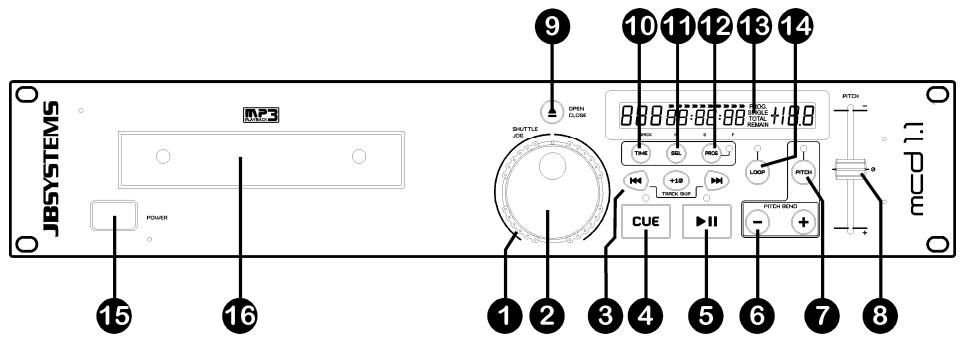
-
SEARCH WHEEL (OUTER RING): This wheel has 4 forward and 4 backward speed positions for searching through songs. The more you turn the wheel in either direction the faster you will search through the music.
-
JOG WHEEL (INNER RING): This jog wheel serves 2 functions depending on the mode you are working in.
-
The jog wheel acts as a slow frame search (1/75sec) control when the CD is not playing but either paused or set to a cue point. To set a new cue point, spin the wheel and press PLAY when you have determined the proper position. Press CUE to return to the "CUE POINT".
-
The jog wheel temporarily bends the pitch of the music up to + / - 16% if the song is already playing by rotating the wheel clockwise to speed up or counterclockwise to slow down. The amount of pitch change is determined by the speed of rotation.
-
TRACK SEARCH Buttons: These buttons are used to select the track to be played. Forward skip & back skip. Press the +10 button to skip 10 tracks at once.
-
CUE button: Pressing the CUE button during play provides an immediate return to the position at which play was started. Playback is started immediately from the programmed cue point for as long as the CUE button is pressed. The CD player jumps back to the cue point as soon as the CUE button is released. Also with the unit in pause mode (Play/Pause LED blinks) the search and/or jog wheel is used to set a different start point. By pressing "PLAY/PAUSE" button then "CUE", you can confirm this new cue point. The CUE LED will light up since the cue button is pressed until the CD has returned to the position at which play was started.
-
PLAY/PAUSE button: every time you press the PLAY/PAUSE button the CD player changes from play to pause or from pause to play.
-
PITCH BEND buttons: The speed rises while the "+" button" is pressed and return to the original pitch when the button is released. The pitch drops when the " - button" is pressed and returns to the original pitch when the button is released. These buttons can be used to synchronize the beats of 2 tracks.
-
PITCH button: This button is used to turn the Pitch function on and off. If you want to change the speed adjustment range (+/- 8%, +/- 12%, +/- 16%) , press and hold PITCH button then press the PITCH BEND+ to select.
-
PITCH slider: Press the PITCH button, the PITCH LED is on. The speed can be changed up to +/-16% by moving the sliding fader. The speed will not change if the PITCH LED is off.
-
OPEN/CLOSE button: press this button to open and close the disc tray in the front of the main unit. This button is disabled during playback. If the tray is not closed after 60sec. It will close automatically to prevent mechanical damage.
-
TIME Button: The TIME button switches between elapsed playing time, remaining time in a selection and total remaining time of the disc. (standard = remaining /track)
-
SGL/CTN Button: with this button you can choose between "single track mode" and "continuous play".
-
Continuous play: the complete CD will be played without interruption. (mostly used in pubs)
-
Single track: player stops at the end of each track and waits at the beginning of the next track. The player will wait at the first music note of each track.
-
PROGRAM Button: It is possible to program up to 20 tracks. After programming the tracks will be played in the order you programmed. Follow the steps below for programming:
-
Press the PROGRAM button once, the led next to it turns on and the display shows "-- P-01 00".
-
Choose the first track in your sequence and press the PROGRAM button. The first track is programmed, the display shows "--P-02 01"
- Choose the second track in your sequence and press the PROGRAM button. The second track is programmed, the display shows "-- P-03 02"
- Continue these steps until you are finished.
- Now simply press the "play/pause button" to start the sequence. The first track in your sequence starts playing while the display shows"* P-01"
The programmed sequence plays in an endless loop until you stop the program mode by pressing the PROGRAM button for about 2 seconds". The led next to the PROGRAM button turns off and the program memory is cleared.
- LCD DISPLAY: Shows all important information needed during playback. Refer to the next chapter for more information.
-
LOOP Button: Used to make the music play in a loop, follow the steps below to create a loop:
-
Make sure that the track is playing.
- Press the LOOP button to set the beginning of the loop: led starts flashing.
- Press the LOOP button again to set the end of the loop: led is on and the music starts playing in loop mode.
- Press the LOOP button again to stop the loop mode: the led turns off.
Note: the loop is not seamless so when the loop starts again, you will hear a small pause. This is normal while this CD-player doesn't use a buffer memory.
- POWER ON/OFF switch: switches the CD-player on and off.
- DISC TRAY: Use the OPEN/CLOSE buttons to open disc tray and put the CD in place.
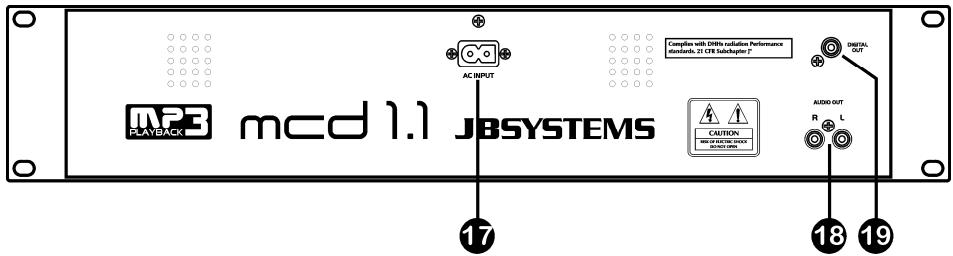
- MAINS input: connect the CD player to the 230V AC mains, using the supplied power-cord.
- AUDIO output: Output for the audio signals from the CD-player. Use the supplied cinch/cinch cable to connect this output to a CD/line input of your mixing unit.
- DIGITAL OUT socket: Use this connector to connect the digital signal (S/PDIF format) to the input of a digital amplifier or digital recorder (ex. Mini disc)
LCD DISPLAY
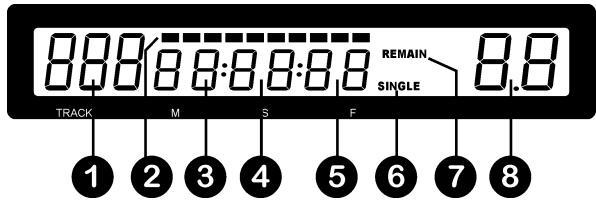
- TRACK: Shows current track number.
- TIME BAR: shows either time remaining or elapsed depending on the setting of the TIME button. Starts flashing at the end of each track to alert the user to take action.
- MINUTE: Shows "minutes" time information of current track.
- SECOND: Shows "seconds" time information of current track.
- FRAME: Shows "frame" time information of current track. (1 frame = 1/75th sec.)
-
SINGLE/CONTINUE: "single" appears when the unit is set to play just one track at a time. Otherwise the CD will play continuously through all tracks. This function is controlled by the SGL/CTN button.
-
ELAPSED, TOTAL REMAIN: indicates that the time shown on the display is the track elapsed, remaining or total remaining time.
- PITCH DISPLAY: Shows the percentage change in pitch (speed) of the song.
HOW TO USE …
Most of the common functions are explained in the previous chapter "controls and functions" In this chapter we talk about the functions that need a little more explanation.
- PLAYING MP3 FILES:
The CD player automatically detects if a CD contains MP3 files. The MCD1.1 is able to read several different MP3 formats but due to display limitations it can't show the ID3-tags (song title/performer/...). The CD may contain up to 999 MP3- files, spread over maximum 255 folders. When the MP3-files are sorted in separate folders, the MCD1.1 will list all files as if no folders exist.
The MP3-files may have the following file extensions: .mp3 ~ .MP3 ~ .mP3 ~ .Mp3
Check the technical specifications to see which MP3-files are allowed.
- PLAYING CD-R and CD-RW:
Apart from normal audio CD's the MCD1.1 can play both CD-R (CD recordable) and CD-RW (CD rewriteable). Please note that you should always use the "disc at once" and "track at once" disc writing options! If the disc is multi session, it will only play the first session:
if the first session is CD-DA you can only play CD-DA tracks.
if the first session is MP3 you can only play MP3 files.
- SLEEP MODE:
The CD player automatically shuts off the transport and laser after about 15 minutes (when in pause or cue mode). This extends the life of your motor drive and laser. During sleep mode the display shows the word "SLEEP". To wake up the player, just press the cue or play button, the display turns to normal and is ready to receive instructions.
STORING A CUE POINT:
Put the player in pause and use the jog/shuttle wheel to search the exact location for the cue point. Once this location is found, press the PLAY/PAUSE button to set the new cue point. (the cue led flashes 2 times to indicate that the new cue point is set and the track starts playing from this new cue point)
Once the cue point is programmed, just press the CUE button to recall it.
PITCH BENDING:
This function is used to put the beats of two tracks in perfect sync. This can be done in two ways:
- PITCH BEND buttons: The speed increases or decreases respectively as long as the PITCH BEND+ or PITCH BEND- button is pressed.
- JOG WHEEL: During play mode the JOG WHEEL will temporarily bend the pitch of the music by turning the JOG WHEEL clockwise to speed up or counterclockwise to slowdown. The rotation speed the JOG WHEEL determines the percent of pitch bend.
SPECIFICATIONS
| Power Supply: | AC 230 V, 50Hz |
| Power Consumption: | 14W |
| Output level: | 2.0Vrms +/-1dB @ 1kHz |
| Frequency response: | 20-20.000Hz (+/-0.4dB) |
| THD + noise: | 0.006% @ 1kHz, 0dB |
| S/N Ratio (IHF-A): | >102dB @ 1kHz. |
| Short access time (next track): | <2sec |
| Long access time (track 1 → 20): | <4sec |
| Laser Pickup: | Sony KSM-213CCM 3spot detection 780nm |
| Electronic tracking: | Full automatic digital tracking. |
| DISC FORMAT: | |
| Possible file extensions: | .mp3 ~ .MP3 ~ .mP3 ~ .Mp3 |
| ISO9660: | Level1 (max. 8"/8.3" character style) |
| Level2 (max. 31/30 character style) | |
| Joliet: | max. 64/64 character style |
| CD-ROM sector format: | mode-1 only |
| Max. Folders: | 255 |
| Max. Files: | 999 |
| Max. Files/Folder: | 255 |
| MP3 FORMATS: | |
| MPEG1 Layer3 (ISO/IEC11172-3): | mono / stereo sampled at: 32 - 44,1 - 48kHz |
| Bitrates: | 32 - 320 Kbps |
| Bitrate modes: | CBR (Constant Bitrate) or VBR (Variable Bitr |
| MPEG2 Layer3 (ISO/IEC13818-3): | mono / stereo sampled at: 16 - 22,05 - 24kH |
| Bitrates: | 8 - 160 Kbps |
| Bitrate modes: | CBR (Constant Bitrate) or VBR (Variable Bitr |
| MPEG2,5 Layer3: | mono / stereo sampled at: 8 - 11,025 - 12kH |
| Bitrates: | 8 - 160 Kbps |
| Bitrate modes: | CBR (Constant Bitrate) or VBR (Variable Bitr |
| Dimensions: | 482(W) x 88.8(H) x 268(D) mm |
| Weight: | 4.5Kgs |
Every information is subject to change without prior notice. You can download the latest version of this user manual on our website: www.beglec.com