BT-36LI - Professional spotlight JBSYSTEMS LIGHT - Free user manual and instructions
Find the device manual for free BT-36LI JBSYSTEMS LIGHT in PDF.


| Product type | Professional LED light projector |
| Brand | JBSYSTEMS LIGHT |
| Model | BT-36LI |
| Light source | 36 high-power 1W Luxeon® LEDs (Philips/Lumileds) |
| Beam angle | 25° (standard), 15° and 45° optional (interchangeable lenses) |
| Pan/Tilt movement | Pan 540°, Tilt 220° |
| DMX control | 8 or 15 DMX512 channels |
| Operating modes | Master/Slave, standalone, sound-activated, CA-8 controller |
| Special functions | Strobe, RGB color mixing, built-in programs, black-out |
| Power supply | AC 230V, 50Hz |
| Power consumption | Very low (LED), minimal heat |
| DMX connections | 3-pin male/female XLR |
| Remote control | 1/4" jack input for CA-8 controller (optional) |
| Protection rating | Indoor use only (IP20) |
| Maximum ambient temperature | 40°C |
| Minimum safety distance | 1 meter from illuminated surface |
| Dimensions (approx.) | Compact, stylish design (not exactly specified) |
| Weight (approx.) | Not specified, but typical for this type of device (~5-10 kg) |
| Supplied accessories | Power cable, Omega bracket, standard 25° lens |
| Maintenance and cleaning | Clean external lenses every 30 days, internal every 90 days; vacuum ventilation openings monthly |
| Safety | Do not look directly at the light source, installation at height by qualified personnel, use a safety cable |
| Spare parts and repairability | Interchangeable lenses available as option; no user-serviceable parts inside |
| General information | Compliant with European standards, no radio interference, ecological recycling |
Frequently Asked Questions - BT-36LI JBSYSTEMS LIGHT
User questions about BT-36LI JBSYSTEMS LIGHT
0 question about this device. Answer the ones you know or ask your own.
Ask a new question about this device
Download the instructions for your Professional spotlight in PDF format for free! Find your manual BT-36LI - JBSYSTEMS LIGHT and take your electronic device back in hand. On this page are published all the documents necessary for the use of your device. BT-36LI by JBSYSTEMS LIGHT.
USER MANUAL BT-36LI JBSYSTEMS LIGHT
Copyright © 2008 by BEGLEC cva.
Reproduction or publication of the content in any manner, without express permission of the publisher, is prohibited.
C
Version: 1.0



EN - DISPOSAL OF THE DEVICE
Dispose of the unit and used batteries in an environment friendly manner according to your country regulations.
FR-DECLASSES L'APPAREIL
Thank you for buying this BriteQ® product. To take full advantage of all possibilities and for your own safety, please read these operating instructions very carefully before you start using this unit.
FEATURES
This unit is radio-interference suppressed. This product meets the requirements of the current European and national guidelines. Conformity has been established and the relevant statements and documents have been deposited by the manufacturer.
- Powerful LED moving wash for use in discotheques, theater, studio and hiring companies
- Based on 36pcs high power 1Watt LUXEON® LEDs (Philips/Lumileds) for extremely high light output (1600 lux @ 5m)
- Infinite colors thanks to high frequency 400Hz RGB color mixing technology which makes it also a perfect choice in TV studios (no interferences with TV-cameras)
- Easy lens exchange for different beam angles (25° standard + 15° and 45° optional)
-
Switchable 8 or 15 DMX channels:
-
8 channels: pan * tilt * strobe * red * green * blue * master dimmer * special function
-
15 channels: pan * pan fine * tilt * tilt fine * pan/tilt speed * pan/tilt macros * macro speed * special function * master dimmer * strobe * red * green * blue * color chase/fade * chase/fade speed.
-
Can be used in Master/slave mode with music triggered integrated programs and optional CA-8 controller
- Smooth but very fast 540° panning and 270° tilt movements
- Extremely fast strobe function
- Low heat and very low power consumption
Built-in menus with 4digit LED display - Compact and stylish enclosure including 1 omega clamp
BEFORE USE
- Before you start using this unit, please check if there's no transportation damage. Should there be any, do not use the device and consult your dealer first.
- Important: This device left our factory in perfect condition and well packaged. It is absolutely necessary for the user to strictly follow the safety instructions and warnings in this user manual. Any damage caused by mishandling is not subject to warranty. The dealer will not accept responsibility for any resulting defects or problems caused by disregarding this user manual.
- Keep this booklet in a safe place for future consultation. If you sell the fixture, be sure to add this user manual.
Check the contents:
Check that the carton contains the following items:
- BT-36L1 unit
- Mains Cable
1 omega clamp - Operating instructions
SAFETY INSTRUCTIONS:

CAUTION
RISK OF ELECTRIC SHOCK DO NOT OPEN

CAUTION: To reduce the risk of electric shock, do not remove the top cover. No user-serviceable parts inside. Refer servicing to qualified service personnel only.

The lightning flash with arrowhead symbol within the equilateral triangle is intended to alert the use or the presence of un-insulated "dangerous voltage" within the product's enclosure that may be of sufficient magnitude to constitute a risk of electric shock.

The exclamation point within the equilateral triangle is intended to alert the user to the presence of important operation and maintenance (servicing) instructions in the literature accompanying this appliance.
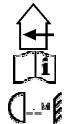
This symbol means: indoor use only
This symbol means: Read instructions

This symbol determines: the minimum distance from lighted objects. The minimum distance between light-output and the illuminated surface must be more than 1 meters
- To protect the environment, please try to recycle the packing material as much as possible.
- A new light effect sometimes causes some unwanted smoke and/or smell. This is normal and disappears after some minutes.
- To prevent fire or shock hazard, do not expose this appliance to rain or moisture.
- To avoid condensation to be formed inside, allow the unit to adapt to the surrounding temperatures when bringing it into a warm room after transport. Condense sometimes prevents the unit from working at full performance or may even cause damages.
- This unit is for indoor use only.
- Don't place metal objects or spill liquid inside the unit. Electric shock or malfunction may result. If a foreign object enters the unit, immediately disconnect the mains power.
- Locate the fixture in a well ventilated spot, away from any flammable materials and/or liquids. The fixture must be fixed at least 50cm from surrounding walls.
- Don't cover any ventilation openings as this may result in overheating.
- Prevent use in dusty environments and clean the unit regularly.
- Keep the unit away from children.
- Inexperienced persons should not operate this device.
Maximum save ambient temperature is 40°C . Don't use this unit at higher ambient temperatures. - Make sure the area below the installation place is free from unwanted persons during rigging, de-figging and servicing.
- Always unplug the unit when it is not used for a longer time or when you start servicing.
- The electrical installation should be carried out by qualified personal only, according to the regulations for electrical and mechanical safety in your country.
- Check that the available voltage is not higher than the one stated on the rear panel of the unit.
- The power cord should always be in perfect condition. Switch the unit immediately off when the power cord is squashed or damaged. It must be replaced by the manufacturer, its service agent or similarly qualified persons in order to avoid a hazard.
- Never let the power-cord come into contact with other cables!
- This fixture must be earthed to in order comply with safety regulations.
- Don't connect the unit to any dimmer pack.
- Always use an appropriate and certified safety cable when installing the unit.
- In order to prevent electric shock, do not open the cover. there are no user serviceable parts inside.
- Never repair a fuse or bypass the fuse holder. Always replace a damaged fuse with a fuse of the same type and electrical specifications!
- In the event of serious operating problems, stop using the fixture and contact your dealer immediately.
- The housing and the lenses must be replaced if they are visibly damaged.
- Please use the original packing when the device is to be transported.
- Due to safety reasons it is prohibited to make unauthorized modifications to the unit.
Important: Never look directly into the light source! Don't use the effect in the presence of persons suffering from epilepsy.
LENS (RE)PLACEMENT

Always unplug the unit before you replace the lenses! DO NOT TOUCH THE LED LAMPS! HIGH POWER LEDs ARE VERY SENSITIVE FOR ELECTROSTATIC ELECTRICITY!!! You can easily destroy the LEDs by simply touching them!
- Switch off the main supply and unplug the unit.
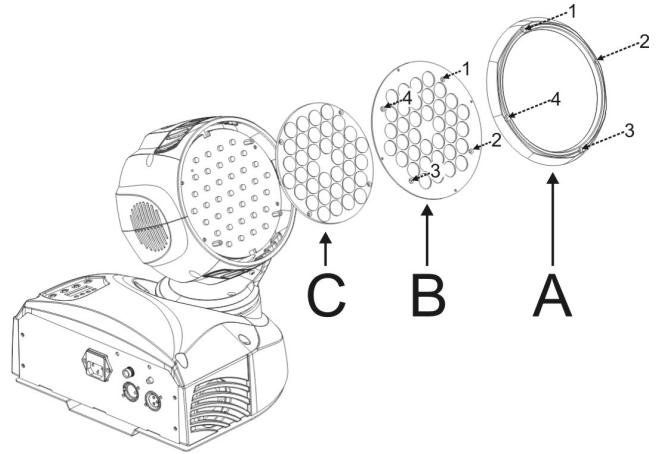
- Remove the 4 screws to open the lens compartment and protective glass (A on the picture below)
- Remove the 4 screws that keep the black lens cover plate in place and remove the metal plate. (B on the picture)
- GENTLY remove the original lens (C on the picture) DO NOT TOUCH THE LEDs!!!
- Put the lens with different beam angle gently in place. Please note that the beam angle is indicated in the center of the lens.
- Fasten the metal lens cover with the 4 screws.
- Put the protective glass back in place and fix it with the 4 screws.
- Done!
OVERHEAD RIGGING
- Important: The installation must be carried out by qualified service personal only. Improper installation can result in serious injuries and/or damage to property. Overhead rigging requires extensive experience! Working load limits should be respected, certified installation materials should be used, the installed device should be inspected regularly for safety.
- Make sure the area below the installation place is free from unwanted persons during rigging, de-rigging and servicing.
- Locate the fixture in a well ventilated spot, far away from any flammable materials and/or liquids. The fixture must be fixed at least 50cm from surrounding walls.
- The device should be installed out of reach of people and outside areas where persons may walk by or be seated.
- Before rigging make sure that the installation area can hold a minimum point load of 10 times the device's weight.
-
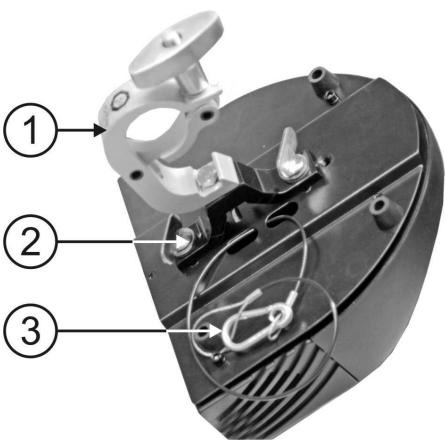
Always use a certified safety cable (number 3 on the picture) that can hold 12 times the weight of the device when installing the unit. This secondary safety attachment should be installed in a way that no part of the installation can drop more than 20cm if the main attachment fails.
-
The device should be well fixed; a free-swinging mounting is dangerous and may not be considered!
- Don't cover any ventilation openings as this may result in overheating.
-
The operator has to make sure that the safety-relating and machine-technical installations are approved by an expert before using them for the first time. The installations should be inspected every year by a skilled person to be sure that safety is still optimal.
-
Optional Quick Clamp
- Special omega clamp (included)
- Optional safety cable
HOW TO SET UP THE UNIT CONTROL PANEL:
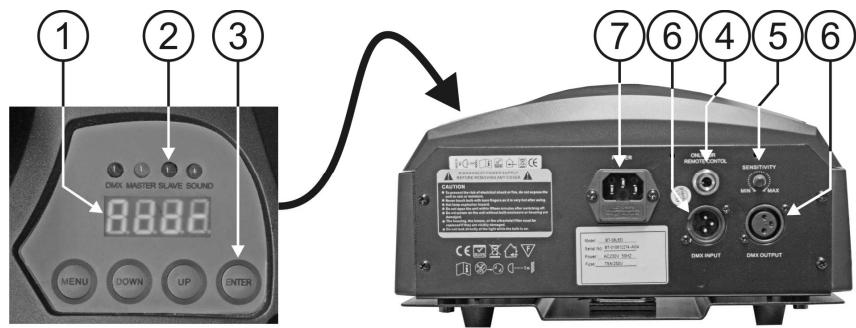
- DISPLAY shows the various menus and the selected functions.
- LEDs
| DMX | On | DMX input present |
| MASTER | On | Master mode |
| SLAVE | On | Slave mode |
| SOUND | Flashing | Sound activation |
- BUTTONS
| MENU | To select the programming functions |
| DOWN | To go backward in the selected functions |
| UP | To go forward in the selected functions |
| ENTER | To confirm the selected functions |
- REMOTE CONTROL INPUT: Used to connect a simple CA-8 hand controller while the unit is used in standalone or master/slave mode.
- SENSITIVITY: Used to adjust the sensitivity of the micro when the unit is used in standalone or master/slave mode.
- DMX INPUT/OUTPUT: used for DMX512 linking. Use good quality 3pin XLR M/F balanced cable to link the units together.
- MAINS INPUT: with IEC socket and integrated fuse holder, connect the supplied mains cable here.
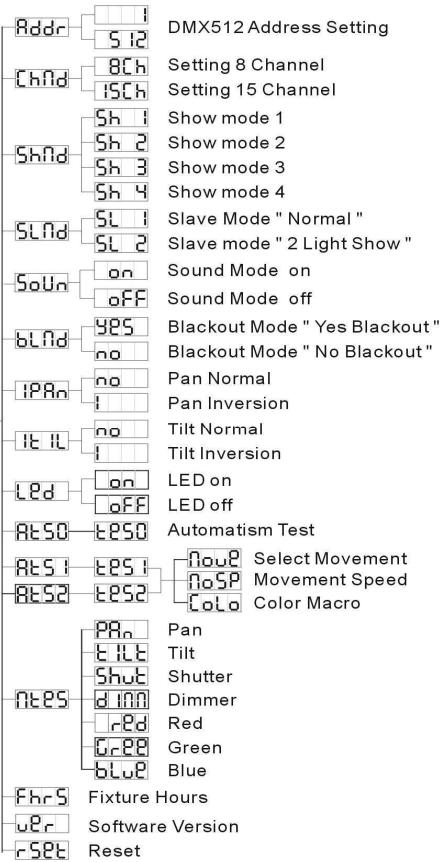
MAIN MENU:
- To select any of the pre-set functions, press the MENU button up to when the required one is shown on the display.
- Select the function with the ENTER button. The display will blink.
- Use DOWN and UP button to change the mode.
- Once the required mode has been selected, press the ENTER button to select. After 8 seconds the display will automatically return to the main functions without any change. To go back to the functions without any change press the MENU button. The main functions are shown on the right.

DMX512 Address Setting
Used to set the starting address in a DMX setup.
- Press the MENU button until Addr is shown on the display.
- Press the ENTER button, the display starts blinking.
- Use DOWN and UP buttons to change the DMX512 address.
- Once the correct address shows on the display, press the ENTER button to save it. (or automatically return to the main functions without any change after 8 seconds) To go back to the functions without any change press the MENU button again.

Channel Mode
- Press the MENU button until shown on the display.

- Press the ENTER button so the display starts blinking.
- Use DOWN and UP button to select the 16CH (15 Channel) or 8CH (8 Channel) mode.
- Once the mode is selected, press the ENTER button to setup (Or automatically return to the main functions without any change after 8 seconds.)
To go back to the functions without any change press the MENU button again.

Show Mode
Used to choose the Show mode when used in standalone or master/slave mode.
- Press the MENU button until ShnD is showing on the display.
- Press the ENTER button, the display starts blinking.
- Use DOWN and UP buttons to select 5h1 (show 1), 5h2 (show 2), 5h3 (show 3) or 5h4 (show 4) mode.
- Once the right mode shows on the display, press the ENTER button to save it. (or automatically return to the main functions without any change after 8 seconds)
To go back to the functions without any change press the MENU button again.

Show 1 mode- Fixture is placed on the
floor. Tilt movement angle 210° .

Show 2 mode-Fixture is fixed under ceiling. Tilt movement angle 90° .

Show 3 mode - Fixture is placed on a podium, in front of the audience
The spot is always projecting to the audience's direction; i.e. in front of the stage. Pan movement
MENU
angle (left to right to left): 160° . Tilt movement angle: 90° (60° above horizon; 30° below horizon.) Show 4 mode - Fixture is fixed under ceiling.
The spot is mainly projecting in front of the stage. Pan movement angle (left to right to left): 160° . Tilt movement angle: 90° (vertically, front 75° ; back 15° )

Slave Mode
Used to make the slave unit work in opposite to the master or to work in complete sync.
- Press the MENU button until Stnd is shown on the display.
- Press the ENTER button, the display starts blinking.
- Use DOWN and UP button to select SL (normal) or SL (2 light show) mode.
- Once the mode is selected, press the ENTER button to save it. (or automatically return to the main functions without any change after 8 seconds)
To go back to the functions without any change press the MENU button again.

Sound Mode
The unit works to rhythm of the beat when used in standalone or master/slave mode
- Press the MENU button until South is shown on the display.
- Press the ENTER button, the display starts blinking.
- Use DOWN and UP button to select on or off mode.
- Once the mode has been selected, press the ENTER button save it. (or automatically return to the main functions without any change after 8 seconds)
To go back to the functions without any change press the MENU button again.

Blackout Mode
Blackout mode: when no DMX-signal is detected, the unit goes in blackout and waits for the DMX-signal.
No blackout mode: when no DMX-signal is detected, the unit automatically switches to standalone mode.
- Press the MENU button until blnd is shown on the display.
- Press the ENTER button, the display starts blinking.
- Use DOWN and UP button to select 白 \ 白 (yes blackout) or 白 \ 白 (no blackout) mode.
- Once the mode has been selected, press the ENTER button to save it. (or automatically return to the main functions without any change after 8 seconds)
To go back to the functions without any change press the MENU button again.

Pan Inversion
Normal: Panning movement is not inversed.
Pan inversion: Panning movement is inversed
- Press the MENU button until Pn is shown on the display.
- Press the ENTER button, the display starts blinking.
- Use DOWN and UP button to select no (normal) or pan inversion) mode.
- Once the mode has been selected, press the ENTER button to save it. (or automatically return to the main functions without any change after 8 seconds)
To go back to the functions without any change press the MENU button again.

Tilt Inversion
Normal: Tilt movement is not inversed.
Tilt inversion: tilt movement is inversed
- Press the MENU button until TLE is shown on the display.
- Press the ENTER button, the display starts blinking.
- Use DOWN and UP buttons to select no (normal) or (tilt inversion) mode.
- Once the mode has been selected, press the ENTER button to save it. (or automatically return to the main functions without any change after 8 seconds)
To go back to the functions without any change press the MENU button again.
LED Led Display
Display on: display is always on.
Display off: display is off when not used.
- Press the MENU button until the display shows LED.
- Press the ENTER button, the display starts blinking.
- Use DOWN and UP buttons to select on (display always on) or OFF (display off when not used).
- Once the mode has been selected, press the ENTER button to save it. (or automatically return to the main functions without any change after 8 seconds)
To go back to the functions without any change press the MENU button again.
At50 At51 At52 Self-Test
Used to activate the 3 internal "self-test" programs which show all possibilities of the unit.
-
Press the MENU button until 50 or 52 is shown on the display.
-
At50 is a full automatic test program
-
[At51] and [At52] are test programs where you can manually set different parameters for movement, movement speed and color.
-
Press the ENTER button to start the internal self-test program.
- To go back to the functions press the MENU button.
NE85 Master Mode
Used to activate another test program where you can manually set all the parameters of the unit.
- Press the MENU button until H < 8S is shown on the display.
- Press the ENTER button, the display starts blinking.
- Use DOWN and UP buttons to select PA, E, I, E, S, H, I, M, R, D, E, B, L, U
- Once a mode is selected, press the ENTER button: the display starts blinking to indicate that you can set a value between 000 and 255.
Note: when no buttons are pressed for 8 seconds, the test program aborts automatically.
FrS Fixture Hours
Used to show the number of working hours of the unit.
- Press the MENU button until FrS is blinking on the display.
- Press the ENTER button to show the number of working hours in the display.
- To go back to the functions press the MENU button.
UER Software version
Used to show the software version that is installed in the unit
- Press the MENU button until [u8] is blinking on the display.
- Press the ENTER button to show the software version on the display.
- To go back to the functions press the MENU button.
Reset
Used to force a reset of the unit.
- Press the MENU button until -SEE is blinking on the display.
- Press the ENTER to reset all channels to their standard position.
- To go back to the functions press the MENU button.
Please also check the chapter about the DMX-channel configuration of the unit to find out how you can force a reset by DMX.
Home Position Adjust
Used to adjust the home position of these functions: Pan, Tilt, B-red, B-green, B-blue
- Press MENU button shortly to enter the main menu ("Addr" on the display)
- Now press the ENTER button for at least 5 seconds to go into offset mode.
-
Use DOWN and UP buttons to select the function that you want to adjust
-
Press the ENTER button, the display starts blinking.
- Use DOWN and UP buttons to adjust the home position
- Press the ENTER button to confirm your setting (or automatically return to the main functions without any change after 8 seconds)
To go back to the functions without any change press the MENU button again.
HOW TO CONNECT THE UNIT BY DMX
The DMX-protocol is a widely used high speed signal to control intelligent light equipment. You need to "daisy chain" your DMX controller and all the connected light effects with a good quality XLR M/F balanced cable. To prevent strange behavior of the light effects, due to interferences, you must use a 90Ω to 120Ω terminator at the end of the chain. Never use Y-splitter cables, this simply won't work!
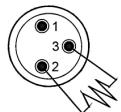
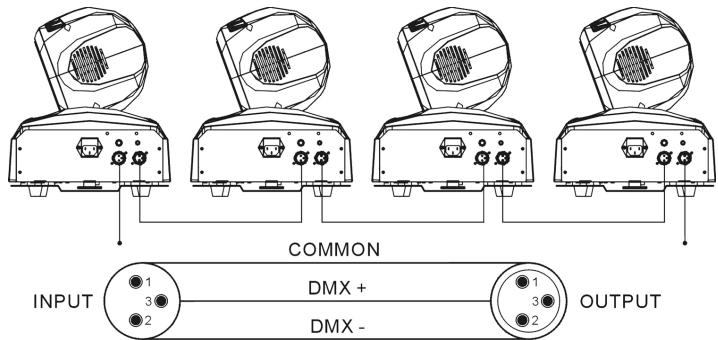
Each light effect in the chain must have its proper starting address so it knows which commands from the controller it has to decode.
HOW TO SET THE RIGHT STARTING ADDRESS:
Refer to the previous chapter (DMX-512 address setting) to learn how to set the starting address on this unit. The starting address of each unit is very important. Unfortunately it is impossible to tell you in this user manual which starting addresses you have to use because this completely depends on the controller you will use... So please refer to the user manual of your DMX-controller to find out which starting addresses you must set.
DMX-CONFIGURATION OF BT-36L1:
8 channel modus
| 8 Channels DMX-512 Configuration | ||||||||
| Ch1 | Ch2 | Ch3 | Ch4 | Ch5 | Ch6 | Ch7 | Ch8 | |
| Pan | Tilt | Strobe | Red | Green | Blue | Dimmer | Special Function | |
| 540° | 220° | 248-255 | No Function | 255 | 100% | 255 | 100% | 240-255 Stand alone |
| 240-247 | Strobe | 200-209 Reset | ||||||
| 232-239 | No Function | 80-89 Disable blackout while pan or tilt move | ||||||
| 190-231 | Fast Open | |||||||
| 182-189 | Slow Close | |||||||
| 140-181 | No Function | |||||||
| 132-139 | Slow Open | |||||||
| 16-131 | Fast Close | |||||||
| 0-15 | No Function | 0% | 0% | 0% | 0% | 70-79 Enable blackout while pan or tilt move | ||
| 270° | ||||||||
| 0° | ||||||||
15 channel modus
| 15 Channels DMX-512 Configuration | ||||||||
| Ch1 | Ch2 | Ch3 | Ch4 | Ch5 | Ch6 | Ch7 | Ch8 | |
| Pan | Pan movement fine | Tilt | Tilt movement fine | Pan/Tilt Speed | Pan/Tilt movement macro | Movement Speed | Special Function | |
| 540° | 255 | 255 | 255 | 255 | Slow | 236-255 Macro 12 | 255 | 240-255 Stand alone |
| 220° | 220° | 216-235 Macro 11 | ||||||
| 110° | 110° | 196-215 Macro 10 | 176-195 Macro 9 | |||||
| 156-175 Macro 8 | 136-155 Macro 7 | |||||||
| 116-135 Macro 6 | 096-115 Macro 5 | 200-209 Reset | ||||||
| 076-095 Macro 4 | 056-075 Macro 3 | 80-89 Disable blackout while pan or tilt move | ||||||
| 036-055 Macro 2 | 016-035 Macro 1 | 70-79 Enable blackout while pan or tilt move | ||||||
| 0° | OFF | 0° | 0° | 0° | Fast | 0° | 0° | 0° |
| Ch9 | Ch10 | Ch11 | Ch12 | Ch13 | Ch14 | Ch15 | ||
| Dimmer | Strobe | Red | Green | Blue | Color/Chase/fade | Chase/Fade Speed | ||
| 255 | 100% | 248-255 | No Function | 255 | 100% | 255 | 100% | 255 |
| 240-247 | Strobe | |||||||
| 232-239 | No Function | |||||||
| 190-231 | Fast Open | |||||||
| 182-189 | Slow Close | |||||||
| 140-181 | No Function | |||||||
| 132-139 | Slow Open | |||||||
| 16-131 | Fast Close | |||||||
| 0-15 | No Function | 0% | 0% | 0% | 0% | 0-7 No function | ||
HOW TO OPERATE THE UNIT
Every time you turn the unit on, it will show "LedU" on the display and move all the motors to their 'home' position and you may hear some noises for about 20 seconds. After that the unit will be ready to receive DMX signal or run the built-in programs.
YOU CAN OPERATE THE UNIT IN FOUR WAYS:
By master/slave built-in preprogram function
By CA-8 easy controller
By universal DMX controller (8 & 15 channel DMX mode)
BY MASTER/SLAVE BUILT-IN PREPROGRAM FUNCTION:
Select this function when you want an instant show. By linking the units in master/slave connection, the first unit will control the other units to give an automatic, sound activated, synchronized light show. Its DMX input will have nothing plugged into it, and its master-LED will be constantly on and sound-LED will flash to the music.
Important! This function only works when the blackout mode in the menu of the master is set to OFF, otherwise nothing will happen! Read more about this option in the "Main Menu" paragraph.
- MASTER has 4 built-in shows: You can select sh1 (show 1), sh2 (show 2), sh3 (show 3) or sh4 (show 4) directly in the menu of the master.
- SLAVES have 2 working options: The other units are set to slave mode (slave-LED is constantly on). In order to create a great light show you can introduce contrast movements (pan/tilt of slave is inversed) → In the menu of the slave units you can go to option SLND and select:
→ Normal slave: slave works in sync with the master.
513 → 2 light show: slave works in opposite with the master.
BY EASY CONTROLLER
When used in Master/slave mode we strongly advice you to use the CA-8 "Easy controller" Just connect this small controller to the 1/4 jack of the master unit, and you will be able to control the following FUNCTIONS:
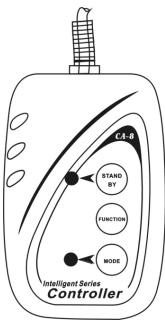
| Stand By | Blackout the unit | ||
| Function | 1. Sync. Strobe 2. Two-light strobe 3. Sound Strobe | Select Show 1-4 | Fade speed - fast Fade speed - middle Fade speed - slow |
| Mode | Sound (LED OFF) | Show (LED Strobe) | LED ON |
MAINTENANCE
- Make sure the area below the installation place is free from unwanted persons during servicing.
- Switch off the unit, unplug the mains cable and wait until the unit has been cooled down.
During inspection the following points should be checked:
- All screws used for installing the device and any of its parts should be tightly fastened and may not be corroded.
- Housings, fixations and installations spots (ceiling, truss, suspensions) should be totally free from any deformation.
- When an optical lens is visibly damaged due to cracks or deep scratches, it must be replaced.
- The mains cables must be in impeccable condition and should be replaced immediately when even a small problem is detected.
- In order to protect the device from overheat the cooling fans (if any) and ventilation openings should be cleaned monthly.
- The interior of the device should be cleaned annually using a vacuum cleaner or air-jet.
-
The cleaning of internal and external optical lenses and/or mirrors must be carried out periodically to optimize light output. Cleaning frequency depends on the environment in which the fixture operates: damp, smoky or particularly dirty surroundings can cause greater accumulation of dirt on the unit's optics.
-
Clean with a soft cloth using normal glass cleaning products.
Always dry the parts carefully. - Clean the external optics at least once every 30 days.
- Clean the internal optics at least every 90 days.
Attention: We strongly recommend internal cleaning to be carried out by qualified personnel!
SPECIFICATIONS
Mains Input: AC 230V, 50Hz
Sound Control: Internal microphone
Pan/Tilt: 540° / 220°
Beam angle: 25° (15° and 45° lenses optional)
DMX connections: 3pin XLR male / female
36 x LUMILED® 1Watt
Size: 266 x 276 x 302mm
Weight: 9 kg
Every information is subject to change without prior notice
You can download the latest version of this user manual on our website: www.beglec.com
MODE D'EMPLOI
Channel Mode (Mode canal)
Sound mode (mode son):
At50 At51 At52 Self-Test
Led: 36 x LUMILED® 1Watt
Taille: 266 × 276 × 302 mm
Poids: 9 kg
Home Position Adjust:
Led: 36 x LUMILED1Watt
Afmetingen: 266 × 276 × 302 mm
Gewicht: 9 kg
| Addr | DMX512 Address Setting |
| Chld | Setting 8 Channel |
| Setting 15 Channel | |
| Sh1 | Show mode 1 |
| Sh2 | Show mode 2 |
| Sh3 | Show mode 3 |
| Sh4 | Show mode 4 |
| SL1 | Slave Mode " Normal " |
| Slave mode " 2 Light Show " | |
| SoUn | Sound Mode on |
| Sound Mode off | |
| bLAd | Blackout Mode " Yes Blackout " |
| Blackout Mode " No Blackout " | |
| iPAn | Pan Normal |
| Pan Inversion | |
| ILIL | Tilt Normal |
| Tilt Inversion | |
| Led | LED on |
| LED off | |
| AESO | Automatic Test |
| Now Select Movement | |
| AES1 | NoSP Movement Speed |
| AES2 | Color Macro |
| NEES | Pan |
| Tilt | |
| Shutter | |
| Dimmer | |
| Red | |
| Green | |
| Blue | |
| FncS | Fixture Hours |
| uec | Software Version |
| rSET | Reset |

I I L T Inversao Tilt

- EN - DISPOSAL OF THE DEVICE
- FR-DECLASSES L'APPAREIL
- FEATURES
- BEFORE USE
- CHECK THE CONTENTS
- SAFETY INSTRUCTIONS
- CAUTION
- LENS (RE)PLACEMENT
- OVERHEAD RIGGING
- HOW TO SET UP THE UNIT CONTROL PANEL
- MAIN MENU
- DMX512 ADDRESS SETTING
- CHANNEL MODE
- SHOW MODE
- MENU
- SLAVE MODE
- SOUND MODE
- BLACKOUT MODE
- PAN INVERSION
- TILT INVERSION
- LED LED DISPLAY
- AT50 AT51 AT52 SELF-TEST
- NE85 MASTER MODE
- FRS FIXTURE HOURS
- UER SOFTWARE VERSION
- RESET
- HOME POSITION ADJUST
- HOW TO CONNECT THE UNIT BY DMX
- HOW TO SET THE RIGHT STARTING ADDRESS
- DMX-CONFIGURATION OF BT-36L1
- 15 CHANNEL MODUS
- HOW TO OPERATE THE UNIT
- YOU CAN OPERATE THE UNIT IN FOUR WAYS
- BY MASTER/SLAVE BUILT-IN PREPROGRAM FUNCTION
- BY EASY CONTROLLER
- MAINTENANCE
- DURING INSPECTION THE FOLLOWING POINTS SHOULD BE CHECKED
- SPECIFICATIONS
- MODE D'EMPLOI
- CHANNEL MODE (MODE CANAL)
- SOUND MODE (MODE SON)
- I I L T INVERSAO TILT
Brand : JBSYSTEMS LIGHT
Model : BT-36LI
Category : Professional spotlight