
LL300 - Laser level TRIMBLE - Free user manual and instructions
Find the device manual for free LL300 TRIMBLE in PDF.



| Brand | TRIMBLE |
| Model | LL300 |
| Product Type | Laser Level |
| Leveling Accuracy | < ± 18 arc seconds (< ± 2.6 mm at 30 m) |
| Rotation | 600 rpm |
| Laser Range | 400 m (diameter) |
| Laser Type | Red diode laser 635 nm, class 3R |
| Laser Power | < 5 mW |
| Self-Leveling Range | ± 8% (approx. ±4.8°) |
| Leveling Time | Approx. 30 seconds |
| Beam Diameter | 8 mm at device exit |
| Power Supply | 4 LR20 (D type) 1.5 V batteries or NiCd/NiMH rechargeable batteries |
| Battery Life (alkaline) | Approx. 90 h in rotation mode |
| Battery Life (NiCd rechargeable) | Approx. 45 h in rotation mode |
| Operating Temperature | -20°C to +50°C |
| Storage Temperature | -20°C to +70°C |
| Tripod Thread | 5/8" horizontal and vertical |
| Weight | 2.7 kg |
| Low Battery Indicator | Slow flashing then constant on before shutdown |
| Warranty | 12 months |
| Cleaning | Glass surfaces: cotton swab; bellows: damp soft cloth |
| Safety Precautions | Do not stare into the laser beam, do not point into eyes, class 3R |
| Main Functions | Self-leveling, manual mode, single axis tilt, height determination, vertical mode |
| Environmental Protection | Recycle device, accessories and packaging |
Frequently Asked Questions - LL300 TRIMBLE
User questions about LL300 TRIMBLE
0 question about this device. Answer the ones you know or ask your own.
Ask a new question about this device
Download the instructions for your Laser level in PDF format for free! Find your manual LL300 - TRIMBLE and take your electronic device back in hand. On this page are published all the documents necessary for the use of your device. LL300 by TRIMBLE.
USER MANUAL LL300 TRIMBLE
© 2004, Trimble Navigation Limited. All rights reserved PN Q102874

Trimble
Trimble Construction
Instruments Division
5475 Kellenburger Road
Dayton, Ohio 45424-1099
USA
+1-937-245-5600 Phone

Trimble
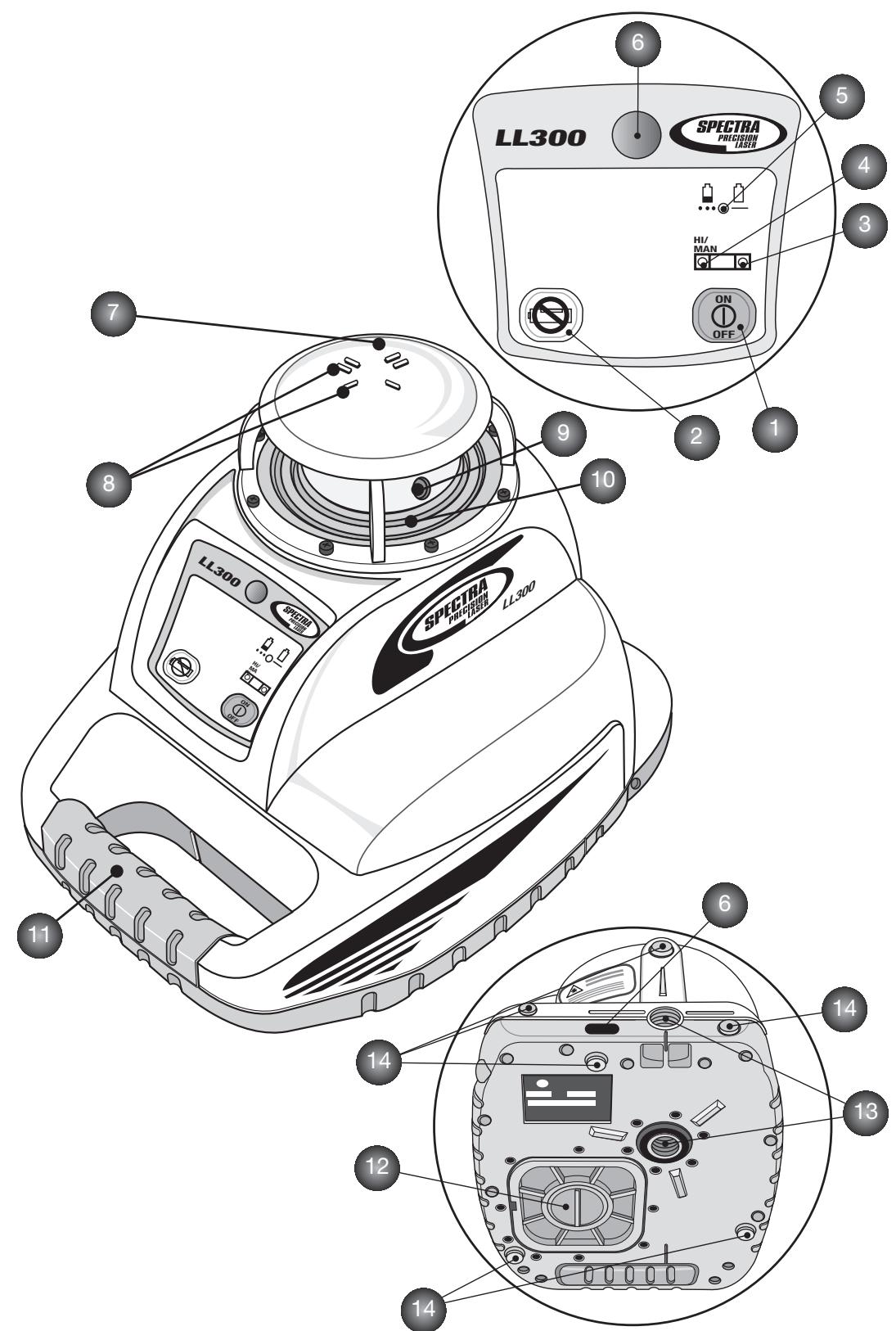
TABLE OF CONTENTS

FOR YOUR SAFETY 5
Important Information 5
COMPONENTS 6
POWER SUPPLY 6
Installing the Batteries 6
Operating Time 6
Charging the Batteries 7
HOW TO USE THE LASER 7
7
Self-leveling and Height (HI) Change Alert 7
Manual-/Single Slope Mode 7
Determining the Height of Instrument (HI) 8
8
Vertical Application 8
LEVELING ACCURACY 9
Influences on Leveling Accuracy 9
Checking Calibration 9
MAINTENANCE AND CARE 10
SYSTEM CLEANING 10
PROTECTING THE ENVIRONMENT 10
WARRANTY 10
SPECIFICATIONS 11
FOR YOUR SAFETY

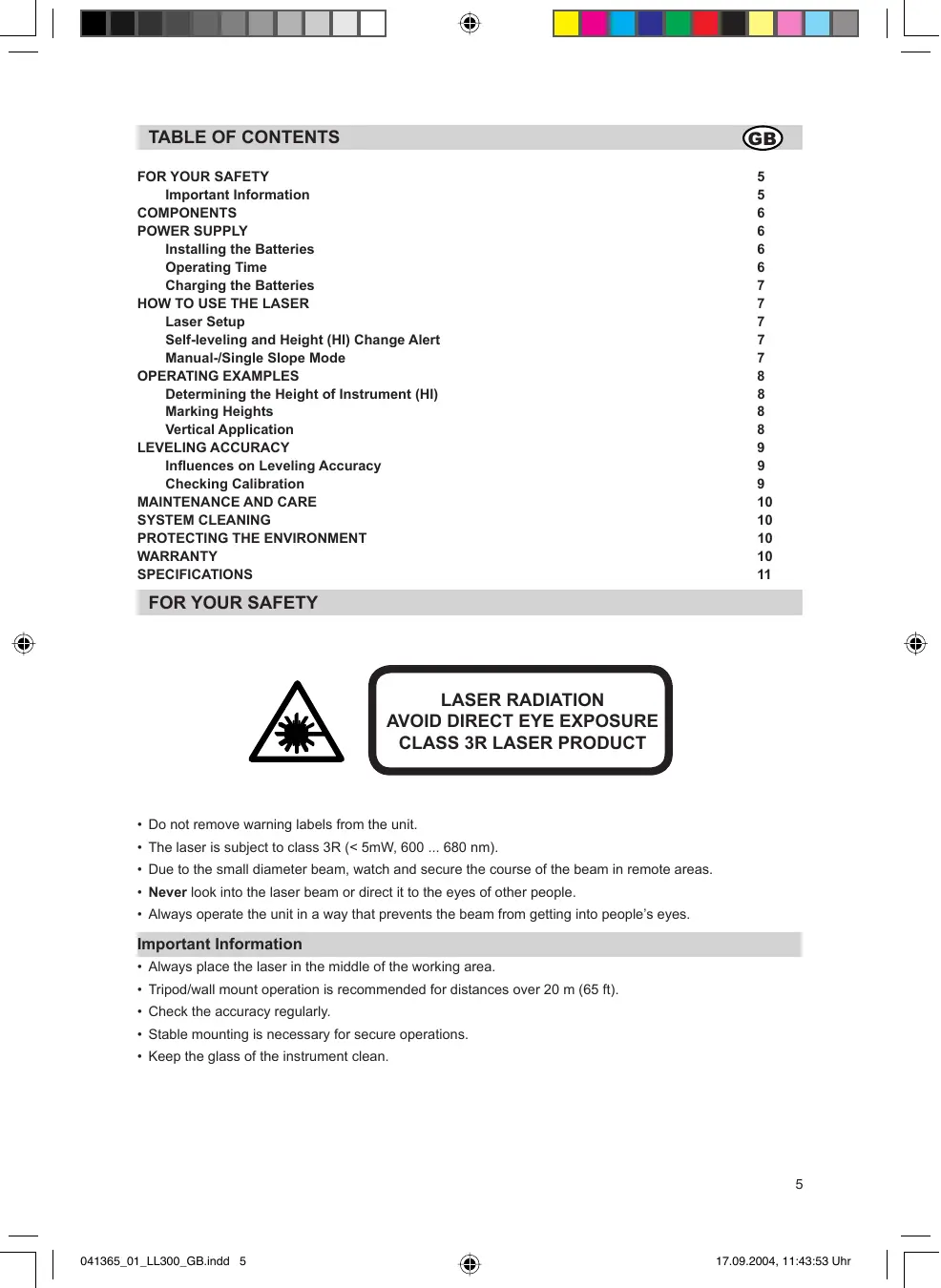
LASER RADIATION AVOID DIRECT EYE EXPOSURE CLASS 3R LASER PRODUCT
- Do not remove warning labels from the unit.
- The laser is subject to class 3R (< 5mW, 600 ... 680 nm).
- Due to the small diameter beam, watch and secure the course of the beam in remote areas.
- Never look into the laser beam or direct it to the eyes of other people.
- Always operate the unit in a way that prevents the beam from getting into people's eyes.
Important Information
Always place the laser in the middle of the working area.
- Tripod/wall mount operation is recommended for distances over 20m (65 ft).
- Check the accuracy regularly.
- Stable mounting is necessary for secure operations.
- Keep the glass of the instrument clean.
COMPONENTS
Buttons
1 Power Button
2 Manual Button
Control indicators
3 Leveling Indicator
4 Manual/HI-Warning Indicator
5 Battery Indicator
Elements of the unit
6 Infrared Receiver (for remote control)
7 Rotor Cage
8 Sighting Guides
9 Beam Aperture/Prism Cap
10 Elastic Rubber Boot
11 Handle
12 Battery Door
13 5/8x 11 Tripod Mounts
14 Rubber Feet
POWER SUPPLY
Before using the unit for the first time, install alkaline or rechargeable batteries. If Ni-Cads are used, first recharge the batteries. See battery section.

The Ni-Cad and Ni-MH batteries may contain small amounts of harmful substances.
Be sure to charge the battery before using it for the first time, and after not using it for an extended length of time. Charge only with specified chargers according to device manufacturer's instructions.
Do not open battery, dispose of in fire or short circuit; it may ignite, explode, leak or get hot causing personal injury.
Dispose in accordance with all applicable federal, state, and local regulations.
Keep the battery away from children. If swallowed, do not induce vomiting. Seek medical attention immediately.
Installing Batteries
Remove the battery door by turning the center screw 90^ counterclockwise. Insert batteries (or a rechargeable battery pack) into the housing so that the negative poles are on the bigger battery spiral springs.
Install the battery door and tighten it by turning the center screw 90^ clockwise.

A mechanical switch prevents alkaline batteries from being charged. Only the original rechargeable battery pack allows charging within the unit. Any other rechargeable batteries have to be charged externally.
Operating Time
Rechargeable batteries permit an operating time of approx. 45 hours in rotation.
Alkaline batteries (AIMn) permit an operating time of approx. 90 hours in rotation.
The following factors reduce the operating time:
- frequent self-leveling due to wind or vibration;
- extreme temperatures;
- old rechargeable batteries or rechargeable batteries with memory-effect;
- using batteries of different capacities.

Remove all batteries at the same time. Never use batteries with different capacities. Only use new (charged) batteries (rechargeable).
Low voltage is indicated by the slow flashing battery indicator (5).
Charging the batteries
The charger requires approx. 10 hours to charge empty rechargeable batteries. For this charging, connect the plug of the charger to the recharge jack of the unit. New or long-time out-of-use rechargeable batteries reach their best performance after being charged and recharged five times.

The batteries should only be charged when the laser is between 50^ F and 104^ F (10°C to 40°C). Charging at a higher temperature may damage the batteries. Charging at a lower temperature may increase the charge time and decrease the charge capacity, resulting in loss of performance and shortened life expectancy.
HOW TO USE THE LASER
Laser Setup
Position the unit horizontally (tripod mount and rubber feet downward!) on a stable platform, wall mount, or tripod at the desired elevation.
Press the power button (1) to turn on the unit. The LEDs (3, 4 and 5) are turned on for 3 seconds. Self-leveling will start at once. The unit is leveled when the leveling indicator (3) is no longer flashing (once every second). The rotor will not spin until the unit is leveled. For the first five minutes after the laser self levels, the LED lights solid then flashes every four seconds to let you know the laser is still level.
In order to switch the unit off, press the power button (1) again.
If the laser is positioned beyond its self-leveling range of ± 8% , the manual and leveling indicators flash simultaneously and a warning sound is emitted. Reposition the laser within its self-leveling range.
Self-leveling, Height Change (HI) Alert
Once turned on, the unit automatically levels itself in ranges of 8% ( ± 0.8 ~m / 10 ~m ). In order to recognize the leveling process at the measuring area and in order not to mark faulty heights during this operation, the rotation stops.
Once leveled, the unit constantly monitors its level condition. The height change (HI) alert is activated 5 minutes after self-leveling was performed and the laser is rotating at 600min^-1 .
Level errors >30~mm / 10~m put the unit into alert mode because they are generally caused by a disturbance that could lead to inaccurate measurements. When entering into alert mode, the prism stops, the laser beam turns off, a warning sound is heard and the HI Warning LED (4) flashes 2× per second. Turn the unit off and then on again. To ensure your former elevation, now you have to check or arrange the exact height.
Manual Mode/Single Slope Mode
When you press the 'M' button (2) on the laser, the remote control, or the receiver-remote control, the laser is set from automatic self-leveling mode to Manual mode. Manual mode is indicated by the flashing (once every second) red LED (4). In Manual mode, the Y-axis can be sloped by pressing the Up- and Down-Arrow buttons on the remote control. Additionally, the X-axis can be sloped by pressing the Left- and Right-Arrow buttons on the remote control.
When you press the 'M' button again on the remote control, the laser is set into Single Slope mode. This is indicated by the flashing red (4) and green (3) LEDs (once every second). In Single Slope mode, the Y-axis can be sloped by pressing the Up- and Down-Arrow Buttons on the remote control, while the X-axis remains in automatic self leveling mode (e.g. when setting up ramps or drive ways). The Height change (HI) alert is still active.
Pressing the manual button at the laser or remote control again, changes the laser back to automatic self-leveling mode as indicated by the flashing green LED (3).
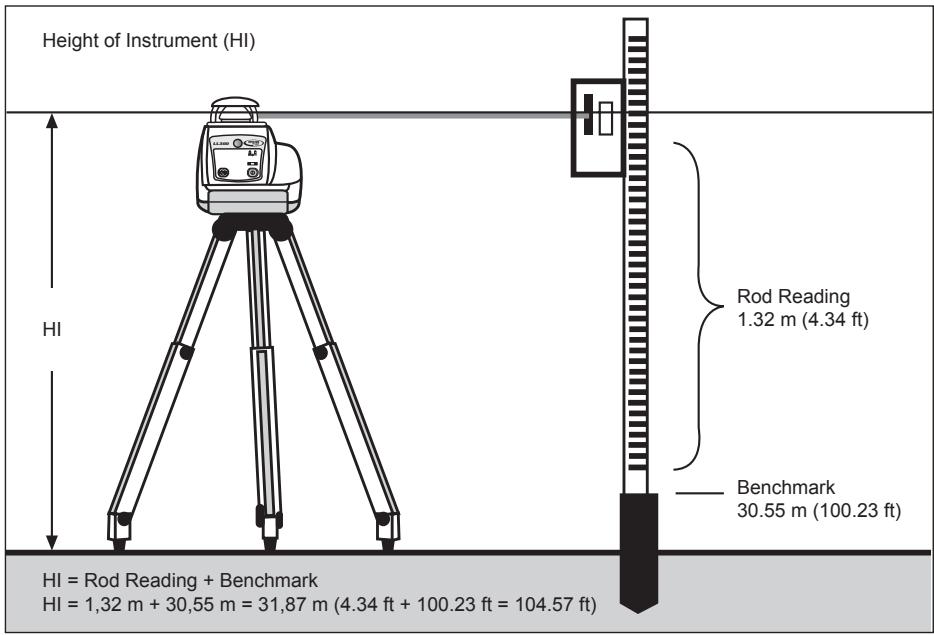
Determining the Height of Instrument (HI)
The height of instrument (HI) is the elevation of the laser's beam.
The HI is determined by adding the grade-rod reading to a benchmark or known elevation.
Set up the laser and place the grade rod on a job-site benchmark (BM) or known elevation.
Slide the receiver up/down the grade rod until it shows an on-grade reading.
Add the grade-rod reading to the benchmark to determine the height of instrument.
Example:
Benchmark = 30.55 m (100.23 ft)
Rod reading = +1.32m(+4.34ft)
Height of instrument = 31.87 m (104.57 ft)
Use this HI as a reference for all other elevations.
Marking Heights
Set up the laser in horizontal mode (e.g., using a tripod or wall mount) so that the laser beam is at the desired height.
When working without a tripod or wall mount, set up the laser on a stable surface and measure the height difference between laser beam and desired height by using a ruler and mark the measured height again.
Vertical Application
Level the tripod and allow the laser to level in automatic self-leveling mode.
Push the manual mode button and change the laser's position on the tripod for vertical alignment by using the vertical mounting thread.
Rotate the laser until the vertical laser plane aligns with the receiver's on-grade position.
In order to avoid offset errors, the receiver should be used close to the elevation where the laser has been set up.
If a remote control is available, the up and down arrow buttons can be used for fine adjustments.
LEVELING ACCURACY
Influences on the leveling accuracy
The overall accuracy of the unit can be influenced by many factors:
- factory accuracy;
temperature of the unit; - ambient influences like rain, wind and temperature.
The factor that influences on the unit's accuracy most is the ambient temperature. Vertical differences in temperature near the ground can divert the laser beam, similar to the heat waves seen on hot asphalt streets.

This factor also applies to all optical measuring devices such as automatic levels and theodolites.
Accuracy Check
To ensure job-site accuracy, you need a distance of 20m (65 feet) between two walls A and B, where you will execute 4 measuring operations on a tripod as follows (transit measurement).
Set the unit horizontally on a tripod near wall A and switch it on with the plus X-axis pointing towards wall A. After the unit is level, mark the height of the laser beam using a receiver at wall A. Turn the entire unit 180^ , let it self-level and mark the center of the laser beam at wall B.
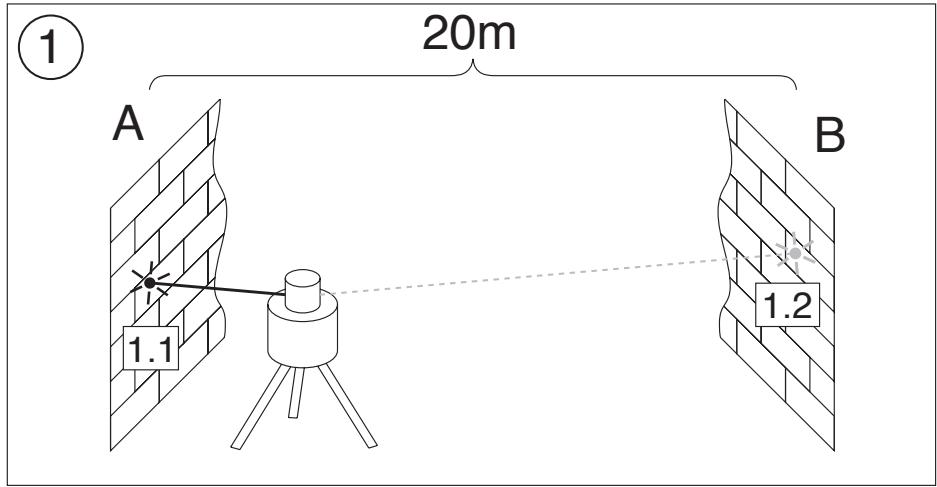
Now, place the unit near wall B with the plus X-axis pointing towards wall B. After the unit is level, mark the height of the laser beam at wall B. Turn the entire unit 180^ , let it self-level and mark the center of the laser beam at wall A. The difference (h) of the marked points at wall A shows the deviation.
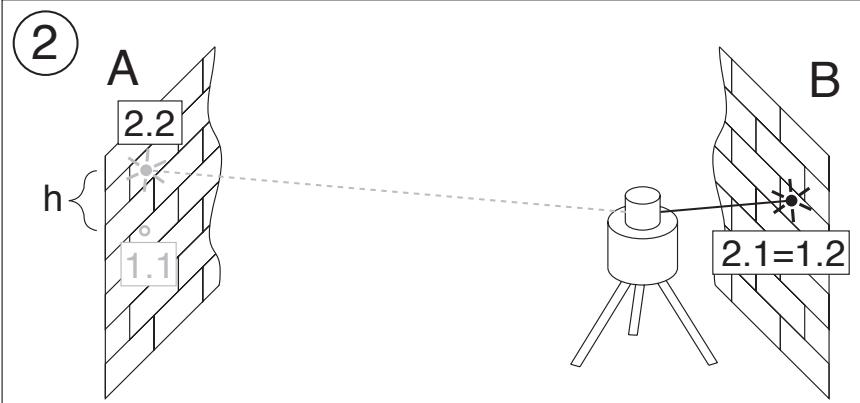
If the unit is within its working accuracy limits (± 20^ ) the maximum difference from true level at 20m (65 ft.) + 20m (65 ft.) = 40 m (130 ft.) is 4 mm (3/16 inch).
Repeat the above steps for "minus X " and for "plus-" and "minus Y ", so that a measurement for all four axes of the unit have been performed.
The accuracy of the detector has to be regarded.
PROTECTING THE UNIT
Do not expose the unit to extreme temperatures or temperature changes (do not leave inside the car).
The unit is very robust and can resist damage if dropped even from tripod height. Before continuing your work, always check the leveling accuracy. See Accuracy Check section.
The laser is water proof and can be used indoors and outdoors.
CLEANING AND MAINTENANCE
Dirt and water on the glass parts of laser or prism will influence beam quality and operating range considerably. Clean with cotton swabs.
Remove dirt on the housing with a lint-free, warm, wet and smooth cloth. Do not use harsh cleansers or solvents. Allow the unit to air dry after cleaning it.
PROTECTING THE ENVIRONMENT
The unit, accessories and packaging should be recycled.
This manual is made of non-chlorine recycling paper.
All plastic parts are marked for recycling according to material type.

Do not throw used batteries into the garbage, water or fire. Remove them in compliance with environmental requirements.
WARRANTY
According to legal regulations, the warranty-period for this unit is 12 months for material and manufacturing defaults.
We do not take any liability for damages caused by a non-accurate unit.

Before starting to work, always carry out the Accuracy Check according to the corresponding chapter.
This warranty is no longer valid if the unit is opened or the labels are removed.
SPECIFICATIONS
Leveling Accuracy1, 3:
< ± 18 arc seconds, < ± 2.6 mm/30 m
< ± 3 / 32in. / 100ft)
Rotation Speed:
600 rpm
Operating Range (Diameter)
400 m (1315 feet)
Laser Type:
635 nm
Laser Class:
Class 3R, < 5mW
Self-Leveling Range:
approx. ± 8% (approx. ± 4,8°)
Leveling Time:
approx. 30 sec
Leveling Indicators:
LED flashes
Laser Beam Diameter1:
approx. 8mm at the laser
Power Source:
4 x D-cell NiCad or alkaline batteries (LR20)
Operating Temp.:
5/8 x 11 horizontally and vertically
Weight:
2,7 kg
Low voltage indication:
flashing/shining of the battery indicator
Low voltage disconnection:
unit shuts off
1) at 21^ Celsius
2) under optimal atmospheric circumstances
3) along the axis
DECLARATION OF CONFORMITY
We
declare under our sole responsibility that the product
LL300
to which this declaration relates is in conformity with the following standards
EN 61000-4-2, 1995; EN 55011, 1998; EN 61000-4-3, 2002
following the provisions of directive
Electromagnetic compatibility 89/336/EEC.
The managing director
INHALTSVERZEICHNIS
D
Electromagnetic compatibility 89/336/EEC.
EXAMPLES D'APPLICATIONS 22
EXAMPLES D'APPLICATIONS
Electromagnetic compatibility 89/336/EEC.
Kaiserslautern, 17.03.2004
Bernd Brieger
directeur
INNEHÄLLSFORTECKNING
s
FORDIN SAKERHET 47
Mycket viktigt 47
48
STRÖMFÖRSSÖRJNING 48
Att satta i batterierna 48
Driftstid 48
Ladda batterierna 49
IDRIFTTAGNING 49
KCLASS 3R LASER PRODUKT
Electromagnetic compatibility 89/336/EEC.
Kaiserslautern 2004-17-03
Bernd Brieger
Verkstallande direktor
INDHOLDSFORTEGNEALSE

SIKKERHEDSHENVISNINGER 54
Skal ubetinget falges 54
55
STRØMFORSYNING 55
Electromagnetic compatibility 89/336/EEC.
Kaiserslautern, 17.03.2004
Bernd Brieger
Direktør
INDICE
P
Electromagnetic compatibility 89/336/EEC.
Kaiserslautern, 17.03.2004
Bernd Brieger
Forretningsfører
SISALTO
FIN
Electromagnetic compatibility 89/336/EEC