
RCR-5 - Portable radio SANGEAN - Free user manual and instructions
Find the device manual for free RCR-5 SANGEAN in PDF.



| Product type | Portable clock radio |
| Brand | SANGEAN |
| Model | RCR-5 |
| Power supply | 120 V / 60 Hz (US version) or 230 V / 50 Hz (European version); DC OUT 6 V / 0.5 A adapter |
| Backup battery | Yes, maintains clock settings for up to 10 minutes during power outage |
| FM frequency range | 87.5 - 108.0 MHz |
| AM frequency range | 520 - 1710 kHz (US version); 522 - 1629 kHz (European version) |
| Number of presets | 5 preset buttons per band |
| Alarm types | Gradual buzzer alarm (HWS) or radio |
| Independent alarms | 2 separate alarms |
| Snooze function | Yes, repeats every 5 minutes |
| Timers | NAP timer (10 to 120 min) and Sleep timer (15, 30, 60, 90, 120 min) |
| Display | LCD screen with adjustable backlight; shows time, date, day, settings |
| Auxiliary input | AUX IN connector (3.5 mm mini-jack) for external device |
| Headphone output | Headphone connector (3.5 mm mini-jack) |
| Antenna | Telescopic FM antenna |
| Volume adjustment | Rotary control |
| Backlight adjustment | Dedicated rotary control |
| Cleaning | Unplug the device; use a damp cloth |
| Dimensions | Approximately 18 cm × 12 cm × 7 cm (estimate) |
Frequently Asked Questions - RCR-5 SANGEAN
User questions about RCR-5 SANGEAN
0 question about this device. Answer the ones you know or ask your own.
Ask a new question about this device
Download the instructions for your Portable radio in PDF format for free! Find your manual RCR-5 - SANGEAN and take your electronic device back in hand. On this page are published all the documents necessary for the use of your device. RCR-5 by SANGEAN.
USER MANUAL RCR-5 SANGEAN
Important safety instructions
- Read and understand all safety and operating instructions before the radio is operated.
- Retain instruction: The safety and operating instructions should be retained for future reference.
- Heed warnings. All warnings on the appliance and operating instructions should be followed.
- Follow all operations and use instructions.
- Water and moisture: The appliance should not be used near water. Do not use near a bathtub, washbowl, laundry tub, kitchen sink, wet basement, swimming pool, etc.
- Unplug the radio from the AC power outlet before cleaning. Use only a damp cloth for cleaning the exterior of the radio.
- Do not place the radio on an unstable cart, stand, bracket or table. The radio may fall, causing serious personal injury and damage to the radio.
- Ventilation: This radio should be situated so that its location or position does not interfere with its proper ventilation. For example, the radio should not be used on a bed, sofa, rug or other soft surfaces that may block the ventilation openings. It should not be placed in a built-in situation like a cabinet that may reduce air flow through the ventilation openings.
-
Power sources: The radio should be operated only from the type of power source indicated on the marking label. If you are not sure of the type of power supply to your home, consult your radio dealer or power company.
-
Power cords: The power cord should be positioned so it is not walked on, pinched, or items placed on top of it. Pay particular attention to cords at plugs, convenience receptacles, and the point where they exit from the unit. Unplug the power cord by gripping the power plug, not the cord. Operate the radio using only the current type of power source indicated. If you are not sure of the type of power supply to your home, consult your dealer or local power company.
-
Do not overload wall outlets or extension cords. This can result in a risk of fire or electrical shock. Never insert objects of any kind into the radio through opening. The objects may touch dangerous voltage points or short out parts. This could cause a fire or electrical shock.
-
If the radio is left attended and unused for long periods of time, unplug it form the wall outlet. This will prevent damage caused by lightning or power line surges.
-
If the radio is left unattended and unused for a long period of time, remove the batteries. The batteries may leak and damage furniture of your radio.
-
Do not attempt to service the receiver yourself. Removing the cover may expose you to dangerous voltage, and will void the warranty. Refer all servicing to authorized service personnel.
-
Object and Liquid Entry-Never push objects of any kind into this radio through opening as they may touch dangerous voltage points or short-out parts that could result in a fire or electric shock. Never spill liquid of any kind of product.
-
The appliance should be serviced by qualified service personnel when:
A. The power supply cord or the plug has been damaged.
B. Objects have fallen or liquid had been spilled into the radio.
C. The radio has been exposed to rain or water.
D. The radio does not appear to operate normally or exhibits a marked change in performance.
E. The radio has been dropped, or the enclosure damaged.
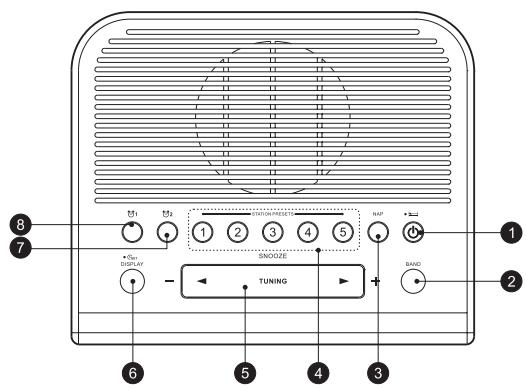
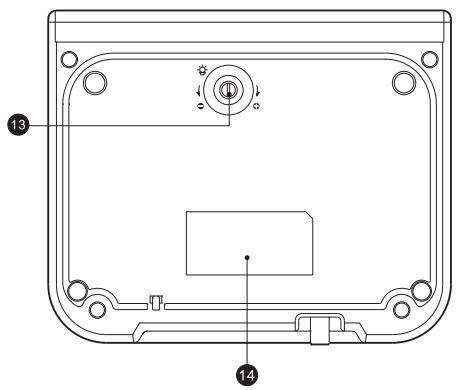
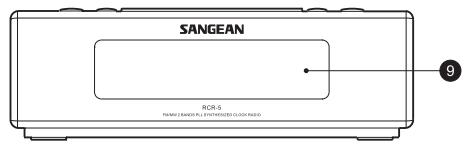
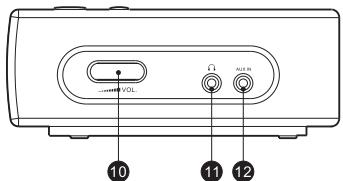
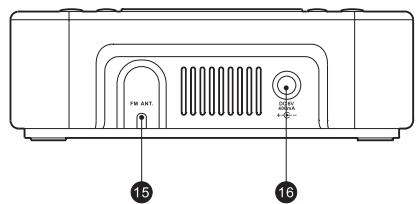
Controls
(1) Power on/off and Sleep Timer button
(2) BAND button
(3) NAP TIMER button
(4) STATION PRESETS
(5) TUNING Up/Down and Snooze
⑥ TIME SET/DISPLAY button
⑦ Alarm 2 button
Alarm 1 button
⑨ LCD Display
Volume Control knob
11 Headphones socket
12 AUX in
13 Display Backlight Adjustment button
14 Logo and specification mark
15 FM antenna
16 Power socket
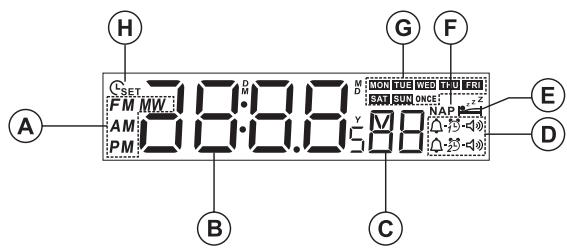
LCD display
A Radio band and a.m./p.m. display
⑧ Hour and minute digits
Second digits
Alarm indicators
⑥ Sleep timer
F Nap timer
(6) Week day
Clock set
GB
Operation
Clock Setting (date and time)
Clock time has to be set before alarm setting.
- Press and hold the TIME SET button for more than 2 seconds, the display will show _SET , and flash the year digits.
- Press TUNING Up/Down button to set the year.
-
Press the TIME SET button, then use the same way to set the date.
-
press and hold the TUNING Up/Down button for fast-forward or fast-backward.
-
Press the TIME SET button to set the hour with TUNING Up/Down button. Same way (press TIME SET then TUNING Up/Down) to the minute. The day of week is automatically set.
-
After the minute is set, then press the TIME SET button to complete the setting.
-
While setting, the setting will be cancelled after 30 seconds without pressing any buttons.
- After the time is under setting, the setting won't be cancelled even you don't press any button for more than 30 seconds. You need to press the TIME SET button to complete the setting, and the second digit will be set to 0 at the moment when you press the TIME SET button.
Radio operation
Turn on the radio with the POWER button.
Tune into desired stations
Station selection
- Press the TUNING up/down button, to tune into the frequency of your desired stations
- Scanning tuning- Press and hold the TUNING up/down button for more than 0.5 seconds and release, the radio will search for the next station.
STATION PRESETS
- Tune into the stations that you would like to store.
- Select a STATION PRESET button (1-5) and press it for more than 2 seconds until a beep sounds and the station is now stored.
Note:
When you store a new station in a preset, the station previously stored will be automatically erased.
Recall the station memories
To recall the station memories, simply press the BAND button to select the required bands and press the required STATION PRESET (1-5).
Volume
Turn the VOLUME knob to adjust the volume.
Alarm Clock
Alarm setting can be done while the power is during ON or OFF position.
The alarm clock is equipped with two alarm systems which can be operated independently of each other.
There are 2 kinds of alarm sounding, sound- buzzer and radio
- Select alarm system 1 or 2 by pressing the ALARM 1 or ALARM 2 button. Display will show the selected alarm system symbol, or
- Before the display goes back to the clock, press TIME SET button for 2 second until you hear the beep. The display will blink the hour. Press the TUNING up/down button to set the hour.
- Press the TIME SET button and the display will flash the minute digit. Press the TUNING up/down button to set the minute.
-
Press the TIME SET button and then press the TUNING up/down button to select if the alarm should work on daily, weekday (Monday to Friday), weekend (Saturday and Sunday), or only once. 4 options.
-
Press the TIME SET button and then press the TUNING up/down button to select the alarm sound. There are RADIO ALARM, and BUZZER ALARM 2 options.
a. If the BUZZER ALARM is selected – press the TIME SET button to complete the setting.
b. If the RADIO ALARM is selected – press the TIME SET button and then select the radio band and the frequency to choose the alarm radio station. Then press the TIME SET button to complete the setting.
c. The setting will automatically complete the setting after 30 seconds without any button pressed. But when the ALARM RADIO is under setting, it will not complete automatically until the TIME SET of POWER button is pressed.
-
After the alarm is set, the alarm status will be shown for 6 seconds then will go back to the clock.
-
HWS(Human Wake System): In buzzer alarm mode, the buzzer sound will increase in volume for 1 minute, then followed by 1 minute silence, then repeat the cycle for 1 hour.
GB
Deactivate alarm setting
Press the ALARM 1 or ALARM 2 button for 2 seconds until you hear the beep. The alarm symbol will show P . And the alarm will be deactivated. To reactivate the alarm, press the ALARM 1 or ALARM 2 button for 2 seconds until you hear the beep.
Stop the alarm signal
To stop the alarm sounding, press the POWER button.
Snoopze
To interrupt the sounding alarm ( radio or beep tone), press the SNOOZE button. The alarm stops and begins again with interval of 5 minutes. The alarm will continue for an hour whatever being interrupted.
Nap timer
With the NAP button, you can select the period for the short term alarm in 10 minutes steps from 10-120 minutes.
The Nap timer starts when you release the key. NAP will appear on display. The alarm signal sounds after the period of time which you have set.
If you wish to turn off the Nap timer before the time is up, simply adjust the number of minutes by pressing NAP button to OFF and release. NAP will disappear from display.
SLEEP timer – auto shut off
Continuously pressing the POWER button will activate the sleep function, the radio will switch off automatically in 15, 30, 60, 90, or 120 minutes.
The Sleep control begins when you release the POWER button and display will appear the minutes.
After the minutes which selected, the radio turns itself off automatically.
If you wish to turn off the radio beforehand, press POWER button.
And the SLEEP timer symbol will disappear.
Calendar Display
Press the TIME SET/DISPLAY button to see the year, and press it again to see the date. The display will go back to the clock in 3 seconds.
GB
24/12 hours format, AM, FM frequency step setting
-
Press and hold the BAND button for 6 second until you hear the beep, and the display will flash the current 24 / 12 hr format. Press the TUNING up/down button to select 24 hr (military hr) or 12 hr format.
-
After the 24/12 hour format setting, if you don't wish to make any change on tuning frequency step, please press the BAND button for 2 times (you will hear the beep for each time), then the display will go back to the clock. If you wish to change the tuning frequency step, follow the next steps:
-
Press the BAND button again, and it will beep and flash the FM frequency tuning step. If you wish to change the FM frequency step, press the TUNING up/down button to select.
a. If this radio was bought in USA, the FM tuning step selections are 100KHz /step and 200KHz /step.
b. If this radio was bought in Europe, the FM tuning step selections are 50KHz /step and 100KHz /step.: If you don't wish to make any change, don't press the TUNING up/down button.
-
Press the BAND button again, and it will beep and flash the AM(MW) frequency tuning step. Press the TUNING up/down button to select 9KHz/step or 10KHz/step.
-
10kHz/step should be selected when you are in Europe.
-
9kHz/step should be selected when you are in USA.
-
Press the BAND button to complete the setting.
AUX IN socket
Plug in external audio devices such as CD player to the AUX IN socket (on the side of the radio), then play your device and press the BAND button repeatedly until you see "AU" on the display. The radio will amplify and play out the signal form your device.
Headphones
The radio provides a Headphones socket to connect the headphones set. When plug in the headphones, the speaker is disconnected.
Display backlight adjustment
Turn the Display Backlight Adjustment button to adjust the back light level.
Power
There is a battery back up for 10 minutes which means: when the power is unplugged or during a black-out, the clock and all the storages will be lost in about 10 minutes.
GB
Technical data
Power supply:
120 Volt/60 Hz (USA version);
230 Volt/50 Hz (Europe version)/
ADAPTOR DC OUT 6V/0.5A
Frequency coverage:
FM 87.5 - 108.0 MHz
AM 520 - 1710 kHz (USA version);
AM 522 - 1629 kHz (Europe version)
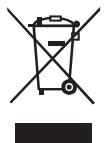
If at any time in the future you should need to dispose of this product please note that: Waste electrical products should not be disposed of with household waste. Please recycle where facilities exist. Check with your Local Authority or retailer for recycling advice. (Waste Electrical and Electronic Equipment Directive)