
PT-50 - Portable radio SANGEAN - Free user manual and instructions
Find the device manual for free PT-50 SANGEAN in PDF.



User questions about PT-50 SANGEAN
0 question about this device. Answer the ones you know or ask your own.
Ask a new question about this device
Download the instructions for your Portable radio in PDF format for free! Find your manual PT-50 - SANGEAN and take your electronic device back in hand. On this page are published all the documents necessary for the use of your device. PT-50 by SANGEAN.
USER MANUAL PT-50 SANGEAN
This device is designed for the playback of audio signals.
Any other use is expressly prohibited.
Continuous use of earphones at high volume can damage the user's hearing.
Protect the device from moisture (water drops or splashes). Do not place any vessels such as vases on the device. These may be knocked over and spill fluid on the electrical components, thus presenting a safety risk. Do not place any objects such as burning candles on the device.
When deciding where to place the device, please note that furniture surfaces are covered by various types of varnish and plastic, most of which contain chemical additives. These additives can corrode the device supports, leaving residues on the furniture surfaces which can be difficult or impossible to remove.
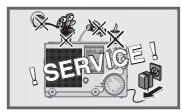
Do not use any cleaning agent, as this may damage the casing. Clean the device with a clean, moist leather cloth. Never open the device casing. Warranty claims are excluded for damage resulting from improper handling.
The type plate is located on the bottom of the device.
Environmental note
As little material as possible was used in the packaging of your device. It can be divided into two separate materials: cardboard (box) and polyethylene (bag). Please observe the local regulations for disposing of the packing material.
OVERVIEW
Controls
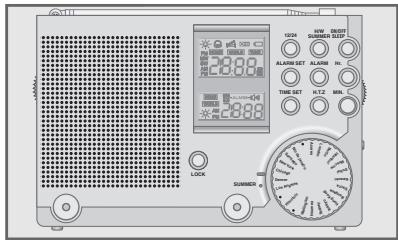

Front
ON/OFF SLEEP
HR.
MIN.
H/W
SUMMER
ALARM
H.T.Z
12/24
ALARM SET
Switches the device on and off.
For setting the clock and alarm time (hours).
For setting the clock and alarm time (minutes).
Switches between local time and GMT.
For switching to daylight saving time.
Switches between radio alarm clock and signal tone. Deactivates the alarm.
Sets the local time zone.
Switches between 12 and 24 hour clock format.
Activates the alarm time setting and the alarm.
OVERVIEW
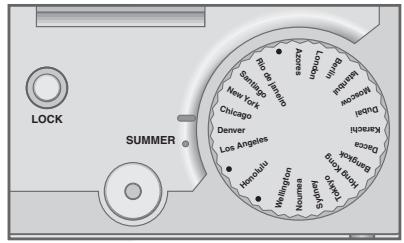
TIME SET For setting the clock in combination with HR. and MIN.
LONDON ... Knob for setting the global time zone.
SUMMER Marks the global time zone with daylight saving hours set.
LOCK Disables and enables the buttons.
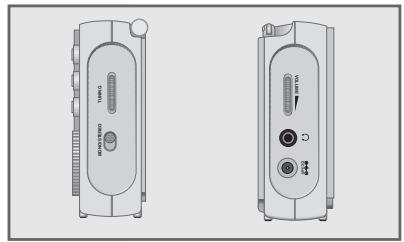
Right side of device
TUNING For tuning to radio stations.
MONO/STEREO Switches between stereo and mono reception in earphone mode.
Left side of device
VOLUME Adjusts the volume.
Socket for earphones (3.5 mm stereo jack).
DC 3-6V Connection socket for mains adapter (not supplied), input voltage 3-6 V (200 mA).
OVERVIEW
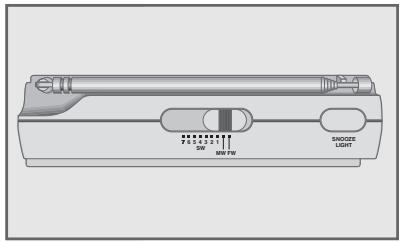
Top of device
SW 1 ... 7 Switches between the wavebands SW MW FM (short wave, frequency bands 1 to 7), MW (medium wave) and FM (VHF).
SNOOZE Interrupts the alarm function. Switches on the LIGHT back light for 12 seconds.
ANTENNA Telescopic antenna for SW and FM reception. The radio has a built-in rod antenna for MW reception.
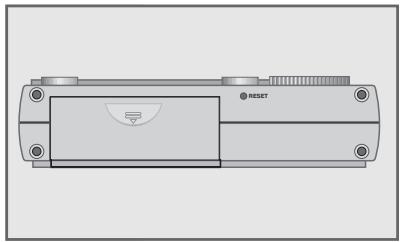
Bottom of device
RESET Returns the device to its original setting. Battery compartment.
Note: On the back of the device there are four buttons for fastening the leather case supplied.
OVERVIEW
The display
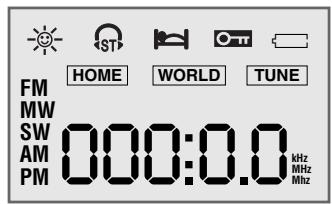
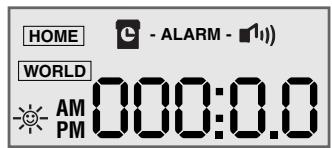


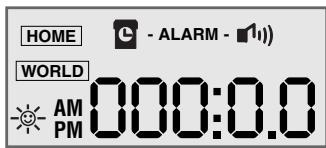
000.00 Shows the current time and the frequency.
AM PM Displays 12-hour format.
FM MW Shows the waveband FM (VHF), medium wave (MW) SW or short wave (SW).
kHz MHz Frequency display for MW (kHz), FM and SW (MHz).
HOME Local time is set.
WORLD GMT time is set.
TUNE Exact tuning display - the optimal setting for a radio station.

Daylight saving time is set.

Indicates FM stereo reception (earphone operation only).
The alarm is interrupted or the sleep timer is activated.
The key lock is activated.
OVERVIEW
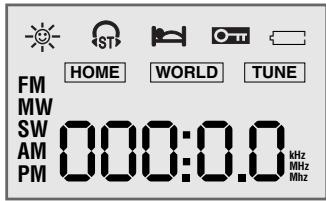
The batteries are low.
- ALARM - The alarm is activated with a signal tone ( «) or a radio station ( «).
POWER SUPPLY
Battery operation
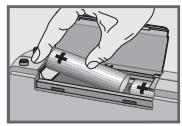
1 Open the battery compartment by pressing the marking and opening the lid.
2 When inserting the batteries ( 2 × 1.5 ~V , Mignon type LR6/AM3/AA), observe the polarity marked on the base of the battery compartment.
Notes:
When the batteries are low, appears in the display. Take out the batteries when you know that the device will not be used for a long period of time. The manufacturer accepts no liability for damage resulting from used batteries.
Environmental note:
Batteries, including those which contain no heavy metal, may not be disposed of with household waste. Please dispose of used batteries in an environmentally sound manner. Find out about the legal regulations which apply in your area.
Mains operation (with 6 V/200 mA mains adapter)
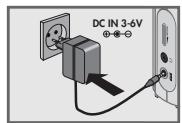
Check if the mains voltage on the mains adapter type plate corresponds to your local mains supply. The only way to disconnect the device from the mains supply is to unplug the adapter.
1 Plug the mains adapter cable into the DC 3-6V -包 包 socket on the left of the device.
2 Insert the mains adapter plug in the socket. - The batteries in the compartment are switched off.
SETTINGS
Setting the clock
Due to the earth's rotation, places to the west of you are behind you in time, and places to the east are ahead of you. Therefore, the earth is divided into 24 hourly time zones. This system is based on a standard time zone called UTC (Coordinated Universal Time), previously known as GMT (Greenwich Mean Time). Short wave stations always give the time according to UTC. Before you set the clock, find out your local time zone.
Setting the local time
When you first switch on the device, or if it has been without a power supply for a lengthy period, HOME« and « appear in the display. The time zone code, for example «5«, flashes to indicate that the clock has to be set.
1 Set the time zone using the knob on the front of the device.
2 Press »H.T.Z« (on the front of the device).
- Display: for example, »AM« and «12:00« flash.
3 Set the hours using HR. and the minutes using MIN. .
4 Press TIME SET to confirm the setting. -Display: the current local time.
5 Press 12 / 24 to switch between 12 and 24 hour clock format.
6 Set daylight saving time if necessary (see page 9).
SETTINGS
Setting daylight saving time
1 Hold down TIME SET until the time flashes in the display.
2 Press H/W SUMMER to put the clock forward by one hour.
3 Press TIME SET to confirm the setting. Display: and the current summer time.
Changing the local time
1 Hold down TIME SET until the time flashes in the display.
2 Set the hours using HR. and the minutes using MIN.
3 Press TIME SET to confirm the setting. -Display: the current local time.
Setting GMT
1 Set the time zone using the knob on the front of the device. - Display: the time in the selected time zone.
Switching the time between local time and GMT
1 Press »H/W SUMMER« to switch between local time and GMT. - Display: »HOME« or »WORLD«.
SETTINGS
Setting 12 or 24 hour format
1 Press 12 / 24 to switch between 12 and 24 hour clock format.
- Display: AM « or PM « for 12 hour format.
Setting the alarm time
The alarm time is always set in local time HOME. Before you set the alarm time, you must select the alarm signal (radio station or signal tone).
1 Press ALARM*.
- Display: >ALARM< flashes.
2 While ALARM is flashing, press ALARM to select the radio alarm ( 1) or signal tone ( 9).
- Display: 1) or flashes for two seconds and then remains lit.
3 Hold down ALARM SET until the alarm time flashes in the display.
4 Set the hours for the alarm time using HR. and the minutes using MIN.
5 Press ALARM SET to confirm the setting.
- Display: «ALARM - 11» « or » - ALARM.
OPERATION
Switching on and off
1 Press ON/OFF SLEEP to switch on the device.
- The device switches on with the radio station last selected.
2 Press ON/OFF SLEEP to switch off the device.
Radio operation
1 Press SW 1 ... 7 MW FM (on the top of the device) to select the wave band.
2 Tune in a radio station using TUNING (on the right side of the device).
Notes:
For FM reception pull out the telescopic antenna and tilt it until you receive the best signal. For short wave reception (SW) the antenna should be upright. For medium wave reception (MW), align the antenna by turning the device.
3 Adjust the volume using VOLUME (on the left side of the device).
Listening with earphones
1 Insert the microphone plug (Ø 3.5 mm, stereo) into the _ jack on the left of the device. - This automatically switches off the loudspeakers.
OPERATION
Stereo/mono reception (with earphones only)
If the signal from the FM stereo station is weak, you can improve the sound quality by switching to mono reception.
1 Press MONO/STEREO (on the right of the device) to switch to mono.
- Display: , disappears from the display.
2 Press MONO/STEREO (on the right of the device) to switch to stereo.
- Display: S_ST , if a stereo station is being received.
Alarm mode
Displaying the alarm time
1 Press ALARM SET 已 briefly.
- Display: the set alarm time.
Alarm with radio station
1 Press ON/OFF SLEEP to switch on the device.
2 Press SW 1 ... 7 MW FM (on the top of the device) to select the wave band.
3 Tune in a radio station using TUNING (on the right side of the device).
4 Adjust the alarm volume using VOLUME (on the left side of the device).
OPERATION
5 Select the radio alarm (» ¶ ¶) «) by pressing » ALARM «.
6 Press ON/OFF SLEEP to switch off the device.
- The device switches the radio on at the set time (alarm duration 1 hour).
Alarm with signal tone
1 Select the signal tone alarm (» C «) by pressing »ALARM«.
- The device switches on with the signal tone at the set time (alarm duration 1 hour).
- The signal tone increases in volume for one minute, stops for a minute and starts again.
Interrupting the alarm
1 Press SNOOZE LIGHT while the alarm is sounding.
- The alarm (signal tone or radio) stops.
-Display: - The alarm goes off again at 5-minute intervals (alarm duration 1 hour).
Cancelling the alarm for the day
1 Press ON/OFF SLEEP while the alarm is sounding.
- The alarm (signal tone or radio) stops.
- If the signal tone alarm is set, the device switches to radio mode.
- The alarm time set is retained for the next day.
OPERATION
Activating and deactivating the alarm
1 To deactivate the alarm, press ALARM
- Display: ALARM flashes and then disappears.
2 To activate the alarm, press ALARM<.
- Display: «ALARM - 11» « or » - ALARM « appears.
Timer mode
The device possesses a sleep timer, which switches it off in radio mode at a preset time. It is possible to set the switch-on time between 15 and 90 minutes.
Switching on the sleep timer
1 With the radio playing, press and hold down ON/OFF SLEEP
- Display: and the sleep time in 60 , 45 , 30 , 15 , and 90 intervals.
2 Release ON/OFF SLEEP to conclude the setting.
- After the selected switch-off time has elapsed, the device switches off automatically.
Switching off the sleep timer
1 To switch off the sleep timer before the set time, press ON/OFF SLEEP.
- The device switches off.
OPERATION
General information
Disabling the buttons
1 Press LOCK to disable the buttons.
-Display: 0m
- The volume control, stereo/mono switch and frequency band selector are not disabled.
2 Press LOCK again to enable the buttons.
- Display: « disappears from the display.
Display lighting
1 Press »SNOOZE LIGHT« to switch on the display lighting for 12 seconds.
2 Press SNOOZE LIGHT to switch off the display lighting.
Resetting the device
1 To reset the device to its original state, press RESET (on the bottom) using an implement such as a paper clip.
- All saved settings are deleted.
INFORMATION
Short wave reception
Your radio can receive signals in a number of frequency bands. It does not take long to get used to tuning to FM and MW stations, since these stations are always at the same places on the tuning scale because they broadcast at fixed wavelengths and frequencies.
Unfortunately, this is not always the case with short wave stations. Due to atmospheric conditions, short wave stations must frequently broadcast on different wavelengths. Most short wave bands are available all over the world and can be used by international broadcasters. At present these are the only wavelengths which provide listeners with direct reception over long distances. For this reason, short wave frequencies are not only used by radio stations, but also by other users such as amateur radio enthusiasts, shipping, aircraft and radio navigation systems.
If you want to listen to a particular SW station, you need to know the precise frequency and wavelength. Many short wave stations will send you broadcasting schedules which give you the information you need. You can also download the information from the Internet.
INFORMATION
Technical data

This device is noise-suppressed according to the applicable EU directives.
This product fulfils the European directives 89/336/EEC, 73/23/EEC and 93/68/EEC.
This device conforms to the safety regulation DIN EN 60065 (VDE 0860) and therefore the international safety regulation IEC 60065.
Technical and design modifications reserved.
INFORMATION
Power supply
Battery operation 2 × 1.5 ~V (type Mignon LR 6/AM 3/AA)
Mains operation 3-6 V (200 mA)- mains adapter, DC
Output 100 mW
Antennas
Telescopic antenna FM (VHF) and SW (short wave)
Ferrite rod antenna MW (medium wave)
Frequency bands
FM (VHF) 87.5 ... 108 MHz
MW (medium wave) 526.5 ... 1710 kHz
SW 1 ... 7 (short wave) 5.90 ... 6.20 MHz (49 m); 7.10 ... 7.35 MHz (41 m);
9.40 ... 9.90 MHz (31 m); 11.6 ... 12.10 MHz (25 m)
13.57 ... 13.87 MHz (21 m); 15.1 ... 15.73 MHz (19 m);
17.5 ... 17.9 MHz (16 m)
Sockets
DC socket 4.0mm 3-6 V (200 mA)
Earphone jack 3.5 mm stereo, 2 × 32 impedance
Dimensions and weight 128 mm x 87 mm x 33 mm (W x H x D); 270 g
Conector de corriente continua 4,0 mm, 3-6 V (200 mA)
Conector para auriculas 3,5 mm estereo, 2× 32 de impedancia