LEDCON-02 - LED Controller JBSYSTEMS - Free user manual and instructions
Find the device manual for free LEDCON-02 JBSYSTEMS in PDF.


User questions about LEDCON-02 JBSYSTEMS
0 question about this device. Answer the ones you know or ask your own.
Ask a new question about this device
Download the instructions for your LED Controller in PDF format for free! Find your manual LEDCON-02 - JBSYSTEMS and take your electronic device back in hand. On this page are published all the documents necessary for the use of your device. LEDCON-02 by JBSYSTEMS.
USER MANUAL LEDCON-02 JBSYSTEMS
Copyright © 2008 by BEGLEC cva.
Reproduction or publication of the content in any manner, without express permission of the publisher, is prohibited.
CE
Version: 1.1
JBSYSTEMS

Light

text_image
RECYCLE
text_image
Prohibition sign with crossed-out trash bin and prohibition symbolsEN - DISPOSAL OF THE DEVICE
Dispose of the unit and used batteries in an environment friendly manner according to your country regulations.
FR - DÉCLASSER L'APPAREIL
Thank you for buying this JB Systems ^® product. To take full advantage of all possibilities, please read these operating instructions very carefully.
FEATURES
This unit is radio-interference suppressed. This product meets the requirements of the current European and national guidelines. Conformity has been established and the relevant statements and documents have been deposited by the manufacturer.
- LEDCON-02 is an all round LED remote controller with extreme flexibility.
- LEDCON-02 has an integrated LED light modulator (switchable: 4 or 8 channels) for LED PAR56 and LED PAR64 projectors: you can control your LED PAR-projectors exactly the same way you did with your old halogen PAR-lamps when used with a traditional light modulator! But you can also do a lot more...
-
Remote controller for:
-
LED MANAGER
• LED SPOT & LED WASH - LED BALL
• LED PAR56 / PAR64
• ...
• Different working modes:
- 4 or 8 channel LED light modulator with integrated, music controlled, chases.
- Fixed color mode: Instant access to 9 pre-programmed colors
- Static chase mode: 12 different color chases with manual speed control
- Sound chase mode: 12 different color chases with audio triggering
- Spectrum mix: 32 different spectrum mix colors, including color fades
- Adjustable speed and dimming with fader
• Full automatic DMX-address function for up to 120 LED projectors!
- Blackout and "Full on" function
BEFORE USE
Check the contents:
Check that the carton contains the following items:
• LEDCON-02 controller
- AC/DC adapter
- Operating instructions
Some important instructions:
- Before you start using this unit, please check if there's no transportation damage. Should there be any, do not use the device and consult your dealer first.
- Important: This device left our factory in perfect condition and well packaged. It is absolutely necessary for the user to strictly follow the safety instructions and warnings in this user manual. Any damage caused by mishandling is not subject to warranty. The dealer will not accept responsibility for any resulting defects or problems caused by disregarding this user manual.
- Keep this booklet in a safe place for future consultation. If you sell the fixture, be sure to add this user manual.
- To protect the environment, please try to recycle the packing material as much as possible.
SAFETY INSTRUCTIONS:

CAUTION
RISK OF ELECTRIC SHOCK DO NOT OPEN

CAUTION: To reduce the risk of electric shock, do not remove the top cover. No user-serviceable parts inside. Refer servicing to qualified service personnel only.

The lightning flash with arrowhead symbol within the equilateral triangle is intended to alert the use or the presence of un-insulated “dangerous voltage” within the product's enclosure that may be of sufficient magnitude to constitute a risk of electric shock.

The exclamation point within the equilateral triangle is intended to alert the user to the presence of important operation and maintenance (servicing) instructions in the literature accompanying this appliance.

This symbol means: indoor use only.
This symbol means: Read instructions.
- To prevent fire or shock hazard, do not expose this appliance to rain or moisture.
- To avoid condensation to be formed inside, allow the unit to adapt to the surrounding temperatures when bringing it into a warm room after transport. Condense sometimes prevents the unit from working at full performance or may even cause damages.
• This unit is for indoor use only. - Don't place metal objects or spill liquid inside the unit. No objects filled with liquids, such as vases, shall be placed on this appliance. Electric shock or malfunction may result. If a foreign object enters the unit, immediately disconnect the mains power.
- No naked flame sources, such as lighted candles, should be placed on the appliance.
- Don't cover any ventilation openings as this may result in overheating.
- Prevent use in dusty environments and clean the unit regularly.
- Keep the unit away from children.
- Inexperienced persons should not operate this device.
- Maximum save ambient temperature is 40^ . Don't use this unit at higher ambient temperatures.
• Always unplug the unit when it is not used for a longer time or before you start servicing. - The electrical installation should be carried out by qualified personal only, according to the regulations for electrical and mechanical safety in your country.
- Check that the available voltage is not higher than the one stated on the rear panel of the unit.
- The socket inlet shall remain operable for disconnection from the mains.
- The power cord should always be in perfect condition: switch the unit immediately off when the power cord is squashed or damaged.
- Never let the power-cord come into contact with other cables!
- In order to prevent electric shock, do not open the cover. Apart from the mains fuse there are no user serviceable parts inside.
- Never repair a fuse or bypass the fuse holder. Always replace a damaged fuse with a fuse of the same type and electrical specifications!
- In the event of serious operating problems, stop using the appliance and contact your dealer immediately.
- Please use the original packing when the device is to be transported.
- Due to safety reasons it is prohibited to make unauthorized modifications to the unit.
•
MAINTENANCE
Clean by wiping with a polished cloth slightly dipped with water. Avoid getting water inside the unit. Do not use volatile liquids such as benzene or thinner which will damage the unit.
FUNCTIONS (FRONT)

text_image
LEDCON-02 4/8 CH CHASE/REMOTE CONTROLLER JBSYSTEMS Light ③ 1 4 2 FIXED COLO. & CHASES RED CHASE 1 GREEN CHASES GREEN CHASES CYAN CHASES 5 BLUE CHASES 1 G-PURPLE MAGENTA CHASE 3 WHITE CHASE 2 MASCUM RANKING FADER CONTROLS Y-G R-G G-BR R-GB DYNAMIC SPECTRUM SEQUENCE SPECTRUM RANDOM MOOD BRIGHT STANDARD YELLOW ORANGE RED COLOR FADE 2.5 SIC SPECTRUM MIX SPEED FADE MASTER 100% 8.1 SIC 2.6 SIC 100% BLACK OUT NOT PROJECTION FULL ON PREVENT PROJECTION SOUND TO CHASE ⑧ ⑤ ⑦ ⑥-
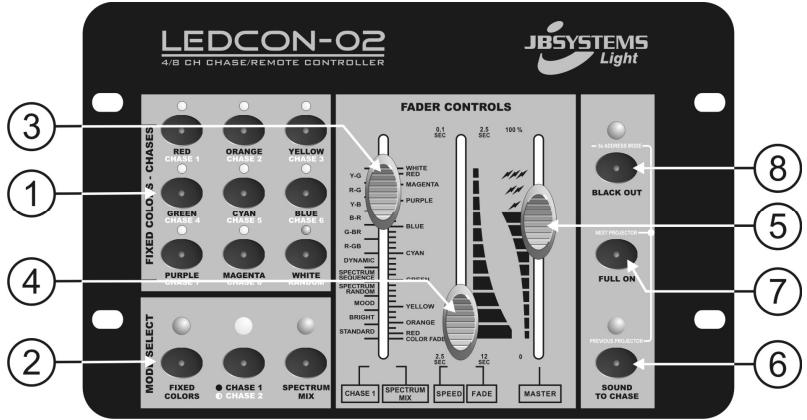
COLOR / CHASE BUTTONS: These buttons have different functions, depending on the selected working mode (refer to n°2):
-
FIXED COLOR MODE: You can select 9 different predefined colors.
- CHASE 2: You can select 8 different chases and a random chase. (sound activated or not)
-
AUTO ADDRESS MODE: You can determine the order of succession of the connected LED PAR-projectors. Refer to the chapter "ADDRESSING" for more information.
-
MODE SELECT BUTTONS: 3 buttons used to set the controller in different working modes:
-
FIXED COLORS: select this mode if you want to use the "fixed color" buttons (1).
-
CHASE MODE: used to select two different chase modes:
-
CHASE 1: select this mode if you want to select one of the 12 color chases using the "chase/color" fader (3). In Chase1 mode the yellow LED is lit.
- CHASE 2: select this mode if you want to use the controller as a 4 or 8 channel DJ light modulator. You can use the “color / chase buttons” (see n°1) to select the different chases. In Chase2 mode the yellow LED blinks.
-
SPECTRUM MIX: select this mode if you want to select one of the 32 different colors using the "chase/color" fader (3).
-
CHASE/COLOR FADER: used to select one of the available color chases:
-
Left side of the fader indicates the different chases.
- Right side of the fader indicates the different colors.
Important remark: There's also a function called "color fade" which is very nice for "background lighting" applications. Select this function to fade gently from one color to another. You can adjust the fade-over time with the color-fade fader(4).
-
SPEED/FADEFADER: used to select the chase speed or color fade time:
-
Left side of the fader indicates the chase speed, ranging from 2.5s to 0.1s.
-
Right side of the fader indicates the color fade time, ranging from 12s to 2.5s.
-
MASTER FADER: used to control the overall dimming of the LEDs and overall strobe speed.
-
SOUND BUTTON: used to toggle the chase mode between sound and static mode. Press this button during the "auto address" mode to select the previous projector. Refer to the chapter "ADDRESSING" for more information.
- FULL ON BUTTON: used to set the 3 colors (R+G+B) at maximum level. Press this button during the "auto address" mode to select the next projector. Refer to the chapter "ADDRESSING" for more information.
- BLACKOUT BUTTON: used to set the 3 colors (R+G+B) at zero level. Press this button for about 5 seconds to start the "automatic address" function. Refer to the chapter "ADDRESSING" for more information.
FUNCTIONS (REAR)
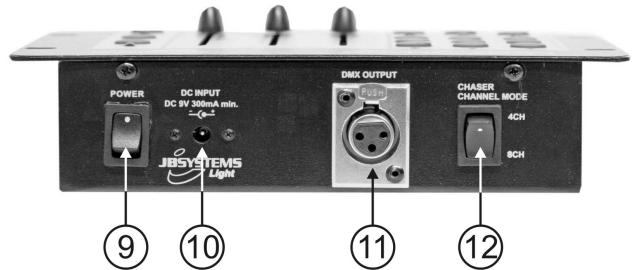
text_image
POWER DC INPUT DC 6V 300mA min. JBSYSTEMS LgM DMX OUTPUT Chaser CHANNEL MODE 4CH 8CH ⑨ ⑩ ⑪ ⑫ ⑫-
POWER SWITCH: used to switch the unit ON/OFF
-
DC INPUT: connect the supplied AC/DC adapter to this input. If you should use another adapter, please make sure that it has 9Vdc and minimum 300mA with + in the center.
- DMX OUTPUT: Sends DMX-signals to the connected units.
- CHASER CHANNEL MODE: used to determine if the LEDCON-02 should work as a 4 or 8 channel LED light modulator. Please note that you should always run the "auto address" function after changing the channel mode!
CONNECTIONS
With LED MANAGER and/or MINI LED MANAGER:
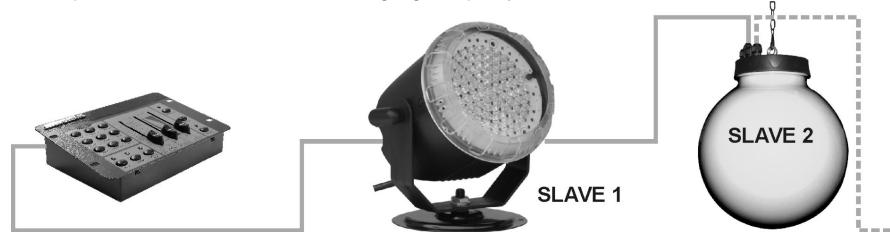
- Just “daisy chain” the DMX in/outputs of 1 or more LED-Managers with the DMX-output of the LEDCON-02 remote using a good quality balanced cable.

natural_image
Three electronic equipment units labeled SLAVE 1, SLAVE 2, and a small control panel (no visible text or symbols on components)- The LEDCON-02 remote will be used to control all connected slaves. The LED Managers are automatically switched as slaves (slave LED is lit). The controls on the slave units are disabled.
Important! Don't forget to run the "auto address" function; this will give all connected units their own address. (Refer to the chapter "ADDRESSING")
With LED BALL, LED SPOT/WASH, or other LED projectors:
- Just “daisy chain” the DMX in/outputs of 1 or more LED BALL and/or LED SPOT/WASH projectors with the DMX-output of the LEDCON-02 remote using a good quality balanced cable
text_image
SLAVE 1 SLAVE 2Important! Don't forget to run the "auto address" function; this will give all connected units their own address. (refer to the chapter "ADDRESSING")
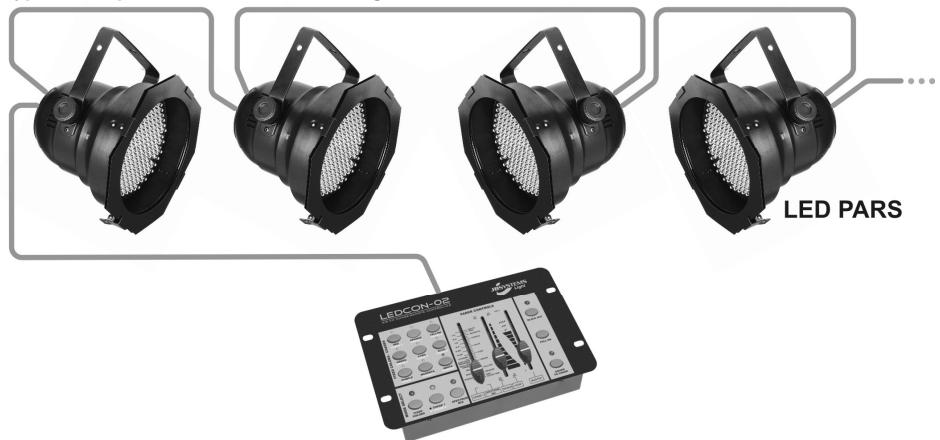
A typical setup when used as a DJ LED light modulator:
text_image
LED PARS LEDCON-02 LED CON-02 LED PARS LED CON-02 LED CON-02 LED CON-02 LED CON-02 LED CON-02 LED CON-02 LED CON-02 LED CON-02 LED CON-02 LED CON-02 LED CON-02 LED CON-02 LED CON-02 LED CON-02 LED CON-02 LED CON-02 LED CON-02 LED CON- LED PARS- Just “daisy chain” the DMX in/outputs of all connected LED PAR projectors with the DMX-output of the LEDCON-02 remote using a good quality balanced cable. You can connect up to 120 units! If you use minimum 8 projectors, you can put the LEDCON-02 in 8channel mode.
Important! Don't forget to run the "auto address" function; this will give all connected units their own address. (Refer to the chapter "ADDRESSING") DIP switches 0 to 9 on the LED PAR must be OFF!
ADDRESSING
Each time you build a different installation with the LEDCON-02, you should run this function. The LEDCON-02 will distribute new addresses to the connected projectors. There are two ways to distribute the addresses:
1. FULL AUTOMATIC ADDRESS DISTRIBUTION :
The LEDCON-02 distributes the addresses automatically to all the connected LED projectors. The first unit in the chain receives address 1, the next will have address 2, ... The address distribution depends on the channel mode and the number of connected LED projectors. Some examples:
- Set to 4 channel mode with 20 projectors → addressing will be: 1234 – 1234 – 1234 – 1234 - 1234
- Set to 8 channel mode with 20 projectors addressing will be: 12345678 - 12345678 - 1234
A. First determine if you will put the LEDCON-02 in 4 or 8 channel mode (see switch n°12)
B. Connect all projectors to the LEDCON-02 and switch the complete setup on.
C. Press the "blackout" button (see n°8) for about 5 seconds: until the red "blackout LED" starts blinking.
D. You will see notice that the first LED projector in the chain is lit.
E. Press the “sound to chase” button (see n°6) to select all projectors: all projectors are lit!
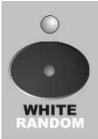
F. Press the "random chase" button (see picture →)
G. Press the "blackout" button again for about 5 seconds, until the "blackout" LED stops blinking.
H. Done!
2. MANUAL ADDRESS DISTRIBUTION :
The user can determine the order of succession of the LED projectors: you have full impact on the configuration but it takes more time to set up an installation with many projectors.
A. First determine if you will put the LEDCON-02 in 4 or 8 channel mode (see switch n°12)
B. Connect all projectors to the LEDCON-02 and switch the complete setup on.
C. Press the "blackout" button (see n°8) for about 5 seconds: until the red "blackout LED" starts blinking.
D. You will see notice that the first LED projector in the chain is lit. Now you can determine the address of this projector by pressing the corresponding color/chase button (see n°1):
o Press button "chase1" → the current LED projector receives address 1
o Press button "chase2" → the current LED projector receives address 2
o Press button "chase3" → the current LED projector receives address 3
o Press button "chase4" → the current LED projector receives address 4
o Press button "chase5" → the current LED projector receives address 5
o Press button "chase6" → the current LED projector receives address 6
o Press button "chase7" → the current LED projector receives address 7
o Press button "chase8" → the current LED projector receives address 8
E. Press the "full on" button (see n°7) to select the next projector and return to "D" until all projectors received an address. If you want to select the previous projector, simply press the "sound to chase" button (see n°6). Several projectors can be put on the same address.
F. When all projectors received an address, press the "blackout" button again for about 5 seconds, until the "blackout" LED stops blinking.
G. Done!
SPECIFICATIONS
Power Input: DC 9V 300mA minimum.
AC/DC Power adapter: AC 240V, 50Hz → 9Vdc / 300mA (or more)
DMX output: 3pin XLR
Audio input: None, internal microphone
Size: 21,0 x 14,0 x 4,6cm
Weight: 930 grams
Every information is subject to change without prior notice
You can download the latest version of this user manual on our website: www.beglec.com
MODE D'EMPLOI
FONCTIONS (FACE AVANT)
text_image
LEDCON-02 4/8 CH CHASE/REMOTE CONTROLLER JBSYSTEMS Light FIXED COLO. & CHASES RED CHASE 1 ORANGE CHASE 2 YELLOW CHASE 3 GREEN CHASE 4 CYAN CHASE 5 BLUE CHASE 6 G-PB R-G R-B G-BR R-GB R-GB DYNAMIC SPECTRUM SPECTRUM CHASE 7 MAGENTA CHASE 8 WHITE BANDON MOD. SELECT FIXED COLORS ● CHASE 1 ● CHASE 2 SPECTRUM MIX FADER CONTROLS 0.1 SEC 2.5 SEC 100 % WHITE RED MAGENTA Y-G R-G Y-B PURPLE B-R BLUE SPECTRUM RANDOM YELLOW STANDARD MOOD BRIGHT RED STANDARD RED COLOR FADE 2.5 SEC 12 SEC 0 CHASE 1 SPECTRUM MIX SPEED FADE MASTER SOUND TO CHASE BLACK OUT MULT PROJECTION FULL ON FREQUENCY PROJECTIONnatural_image
Three electronic device units labeled SLAVE 1, SLAVE 2, and a small black electronic device with control knobs (no visible text or symbols on components)text_image
LED PARS LEDCON-02natural_image
Three electronic equipment units labeled SLAVE 1, SLAVE 2, and a small black electronic device (no visible text or symbols on components)text_image
LED PARS LEDCON-02 LED CON-02 LED PARSnatural_image
Three electronic device units labeled SLAVE 1, SLAVE 2, and a small control panel (no visible text or symbols on components)text_image
LED PARS LEDCON-OSnatural_image
Three electronic equipment units labeled SLAVE 1, SLAVE 2, and a small black electronic device (no visible text or symbols on components)text_image
LED PARS LEDCON-02 LED CON-02 LED PARSTamanho: 21,0 x 14,0 x 4,6cm
Peso: 930 gramas