
VORTEX - Audio processor LEXICON - Free user manual and instructions
Find the device manual for free VORTEX LEXICON in PDF.


| Brand | LEXICON |
| Model | VORTEX |
| Product type | Audio processor |
| Dimensions (W x H x D) | 483 x 45 x 102 mm (19 x 1.75 x 4 inches) |
| Weight | 1.2 kg (2 lbs 12 oz) |
| Power supply | 9 V AC, 1 A wall adapter included |
| Audio inputs | 2 x 6.35 mm unbalanced jacks, min level -30 dBu |
| Audio outputs | 2 x 6.35 mm unbalanced jacks, nominal level -2 dBu |
| Frequency response | 20 Hz - 14 kHz (+1 dB / -3 dB) |
| Distortion + noise | < 0.03% at 1 kHz |
| Dynamic range | 83 dB typical |
| Conversion | Delta-Sigma modulation, 64x oversampling |
| Control connectors | 2 jacks for footswitches (Step/Bypass, Tap/A-B), 1 jack for expression pedal, 1 A/B relay jack |
| Main functions | Audio Morphing, 32 presets, 32 user registers, envelope control, tempo sync, rhythmic echoes |
| Maintenance and cleaning | Clean with a soft, dry cloth. Avoid solvents. |
| Safety | Compliant with Class B (radio interference) |
| Spare parts and repairability | Contact an authorized LEXICON dealer |
| General information | Professional audio processor with 19-inch rack interface |
Frequently Asked Questions - VORTEX LEXICON
User questions about VORTEX LEXICON
0 question about this device. Answer the ones you know or ask your own.
Ask a new question about this device
Download the instructions for your Audio processor in PDF format for free! Find your manual VORTEX - LEXICON and take your electronic device back in hand. On this page are published all the documents necessary for the use of your device. VORTEX by LEXICON.
USER MANUAL VORTEX LEXICON
AUDIO MORPHING PROCESSOR
User Guide
English
Unpacking and Inspection
After unpacking the unit, save all packing materials in case you ever need to re-ship. Thoroughly inspect the unit and packing materials for signs of damage. Report any shipment damage to the carrier at once; report equipment malfunction to your dealer.
Notice
This equipment generates and uses radio frequency energy and if not installed and used properly, that is, in strict accordance with the manufacturer's instructions, may cause interference to radio and television reception. It has been type tested and found to comply with the limits for a Class B computing device in accordance with the specifications in Subpart J of Part 15 of FCC Rules, which are designated to provide reasonable protection against such interference in a residential installation. However, there is no guarantee that interference will not occur in a particular installation. If this equipment does cause interference to radio or television reception, which can be determined by turning the equipment OFF and ON, the user is encouraged to try to correct the interference by one or more of the following measures: reorient the receiving antenna; relocate the computer with respect to the receiver; move the computer away from the receiver; plug the computer into a different outlet so that the computer and receiver are on different branch circuits. If necessary, the user should consult the dealer or an experienced radio/television technician for additional suggestions. The user may find the following booklet prepared by the Federal Communications Commission helpful: "How to identify and Resolve Radio/TV Interference Problems." This booklet is available from the U.S. Government Printing Office, Washington, DC 20402, Stock No. 004-000-00345-4.
Copyright ©1995, Lexicon Inc.
All Rights Reserved.
Lexicon Part #070-10646
Lexicon Inc. • 3 Oak Park • Bedford, MA 01730 • USA • Telephone 781-280-0300 • Fax 781-280-0490

Printed in the U.S.A.
Table of Contents
Getting Started 1
Introduction 1
Front Panel Overview 2
Setting Audio Levels · Setting MIX Values
Rear Panel Connections 4
Footswitch and Footpedal Connections • Headphones
Audio Connections 6
In-Line Processing • Using Vortex on a Mixer
Effects Return Bus
A/B Relay Switch 8
Basic Operation 9
Overview 9
Presets and Registers 10
Effect Parameters 11
Adjusting Parameter Values · About the Parameters
TAP and Echo Rhythms 13
Tempo and Rhythm · Tapping in a Tempo · Echo
Rhythms
Audio MorphingTM 16
About Morphing · Trying Some Morphs · Setting
Morph Rates
Pedal Control 18
Assign a Parameter to a Pedal • Capturing Parameter
Changes Made with a Pedal · Controlling Morphs
with a Pedal
Using Registers 21
Storing Effects · Clearing Register Pairs · Using
Footswitches · Finding the Preset Used to Create an Effect
Effect Descriptions 25
Overview 25
Reflexion 26
Atmosphere 28
Orbits 30
Centrifuge 32
Aerosol 34
Mosaic 36
Maze 38
Duo 40
Deja Vu 42
44
Shimmer 46
Sweep 48
Shadow 50
Cycloid 52
Bleen 54
Fractal 56
Specifications 58
English
Getting Started
Introduction
Congratulations on your purchase of Vortex, the world's first Audio Morphing™ processor! You are about to discover that Vortex sets new standards for sound processing — for both the type and variety of effects it produces, and for the musical way in which it lets you control effects.
Unique effects and exciting performance capabilities provide lots of room for individual expression and experimentation. More like a musical instrument than a passive effects "black box," Vortex will change the way you make music.
Vortex effects are organized into sixteen pairs of presets. Each consists of multiple modulation and delay functions, and each has its own distinctive sonic signature. Some are based on combinations of classic effects, such as echo, rotary speaker, autopan, and chorus, while others defy verbal description.
All 32 effects share a common set of sixteen parameters. Changing settings to customize an effect is fast and easy, and 32 user registers are provided for storing your own Vortex creations.
Audio MorphingTM allows you to control dynamic transformations between any two effects. While this can produce truly mindboggling effects, it couldn't be easier to control - requiring only a single button push.
Some of the other exciting features of Vortex are:
- Flexible processing paths: true stereo, dual mono, dual mono in/stereo out
- Envelope follower for dynamic control of each effect
- All echo rhythms synchronized to your master tempo
Cross-feed and feedback/cross-feed mix paths for spatial effects and complex echo rhythms - Register step and chains via footswitch
- Analog relay for musical instrument amplifier channel switching
To make sure you get the most out of Vortex, be sure to read the manual.
English
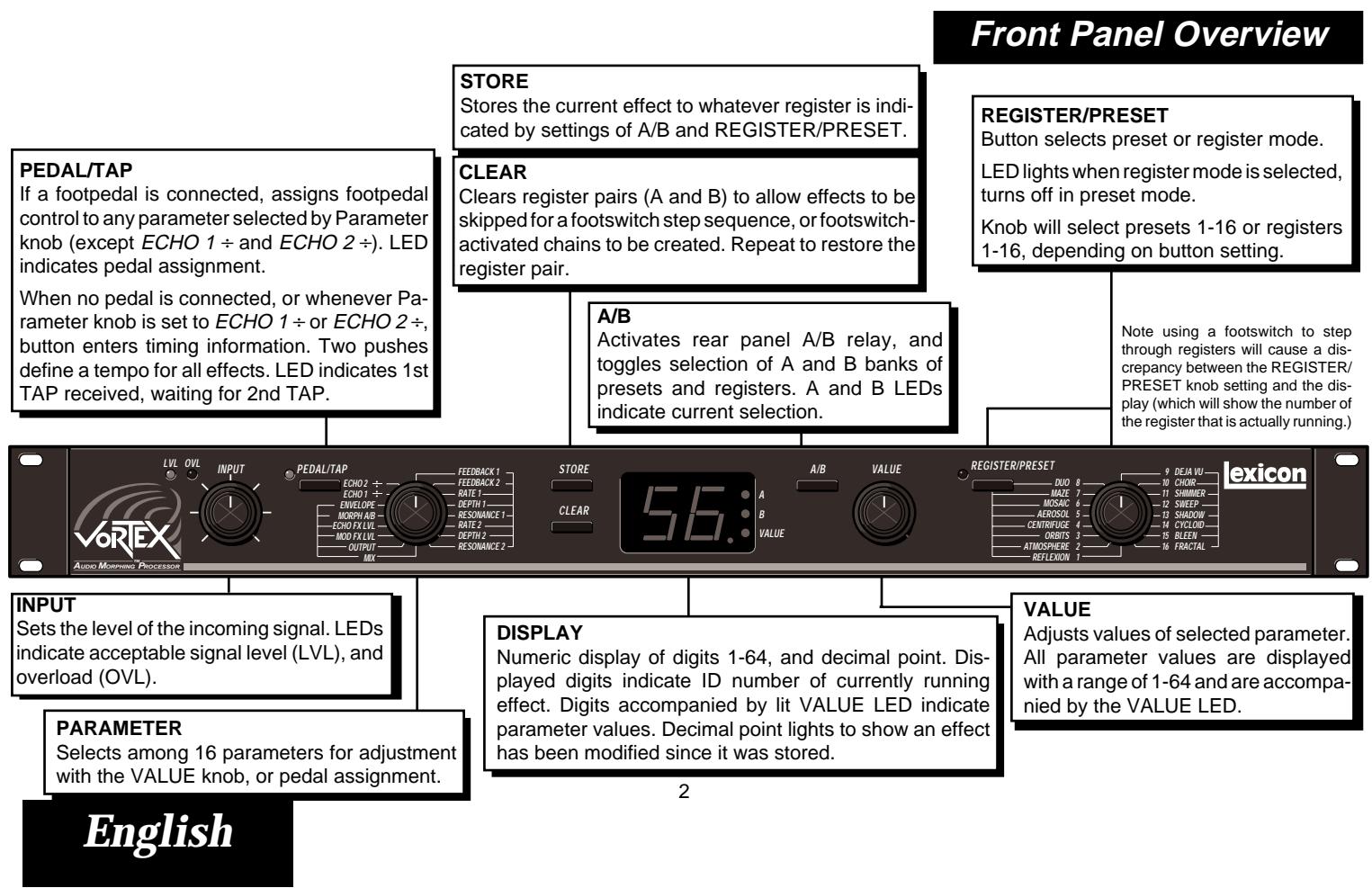
Setting Audio Levels
- Turn Vortex INPUT all the way down (fully counter-clockwise).
- Connect Vortex inputs to an audio source, and Vortex outputs to an amplifier or mixer.
- Apply an input signal at a level that you typically use.
-
While sending audio to Vortex, gradually turn up the INPUT control until the LVL LED* lights green. Continue to advance INPUT until the OVL LED lights on only the loudest peaks. If the OVL LED is lit continuously, turn the INPUT control down.
-
Adjust amplifier or mixer levels for optimum signal-to-noise performance.
-
The LVL LED is off when the incoming signal is low; it lights to indicate acceptable levels (6dB to 30dB below overload). The OVL LED lights red when the signal approaches overload. Acceptable signals will light the LVL LED almost continuously, and the OVL LED only on peaks.
Setting MIX Values
The sound of each Vortex preset is highly dependent on the mix of dry (unprocessed) and wet (processed) signals. MIX settings are stored with each effect. If Vortex outputs are connected to amplifier or mixer channel inputs, you should not have to adjust this parameter to use any of the presets.
If Vortex outputs are connected to a console's returns (and Vortex output is, therefore, mixed with dry signal from the console), you should select each effect and raise the MIX parameter to its maximum value. (64 = 100% wet)
Be aware that several Vortex effects are meant to be used at 100% wet (ORBITS, CENTRIFUGE, MOSAIC, etc.) When using Vortex with a console, you will get the strongest effect by connecting Vortex outputs to channel inputs.
Rear Panel Connections
Footswitch and Footpedal
Connections
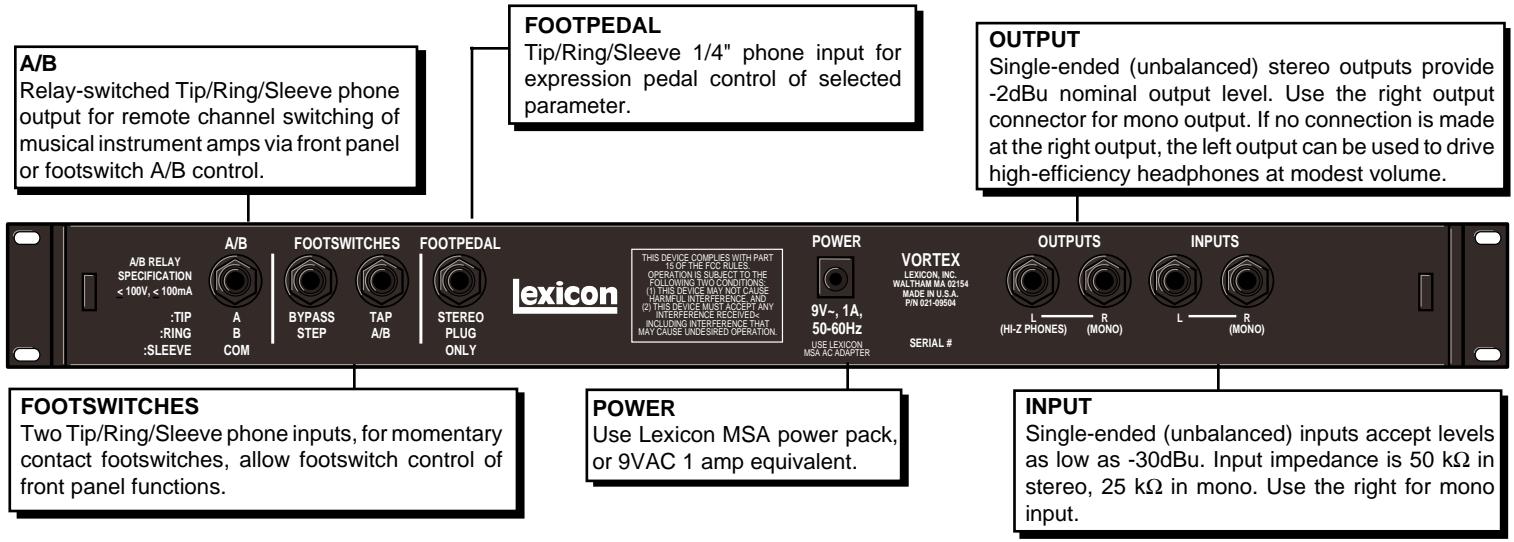
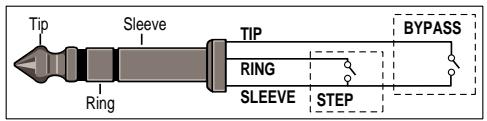
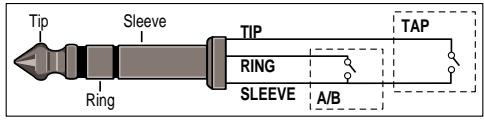
Footswitches connected via the rearpanel footswitch jacks allow you to perform register STEP and BYPASS functions and/or to control TAP and A/B effect morphing. Two momentary foot-switches can be wired to a tip-ring-sleeve connector. A stereo Y-connector allows two identical single switches to be used.
An expression pedal connected via the rear panel pedal jack allows continuous control of selected front panel parameter.
One footswitch is provided with your unit, along with a set of labels to identify footswitch functionality. If you are only going to be using one footswitch, connect it to perform TAP and A/B functions, or register STEP and BYPASS functions, and label it accordingly.
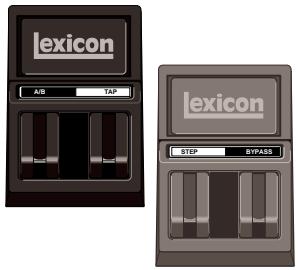
Use a second (optional) footswitch to control the remaining footswitch functions.


Headphones
A stereo signal which is adequate to drive high-efficiency headphones is available at the left output, provided no connections are made through the right output. This feature is provided as a convenience for practice purposes, and is intended to provide only modest volume.
Audio Connections
Audio connections to Vortex are unbalanced and should be made with high quality shielded cables with 1/4'' tip-sleeve phone jacks at the Vortex end.
Vortex is a true stereo processor. Left and right inputs are processed separately. The chart to the right shows the processing path of each preset.
Even if you are using a mono input, take advantage of the stereo outputs. All Vortex effects are designed to be mono compatible and to maximize the spatial characteristics of each effect. If mono output is required, use the right output jack. The left and right signals are summed internally when only the right output is used.
| Stereo In Stereo Out | Dual Stereo In Stereo Out | Dual Mono In Stereo Out | Dual Mono In Dual Mono Out | Mono In Stereo Out |
| Reflexion A/B | ||||
| Atmosphere A/B | ||||
| Orbits A/B | ||||
| Centrifuge A/B | ||||
| Aerosol A/B | ||||
| Mosaic A | Mosaic B | |||
| Maze B | Maze A | |||
| Duo B | Duo A | |||
| Deja Vu A/B | ||||
| Choir A | Choir B | |||
| Shimmer A/B | ||||
| Sweep A/B | ||||
| Shadow A | Shadow B | |||
| Cycloid A/B | ||||
| Bleen A | Bleen B | |||
| Fractal A/B |
In-Line Processing
Note that MIX settings are stored with Vortex effects. The presets have been designed with specific MIX settings for each effect which should not need adjustment when the unit is used in-line.
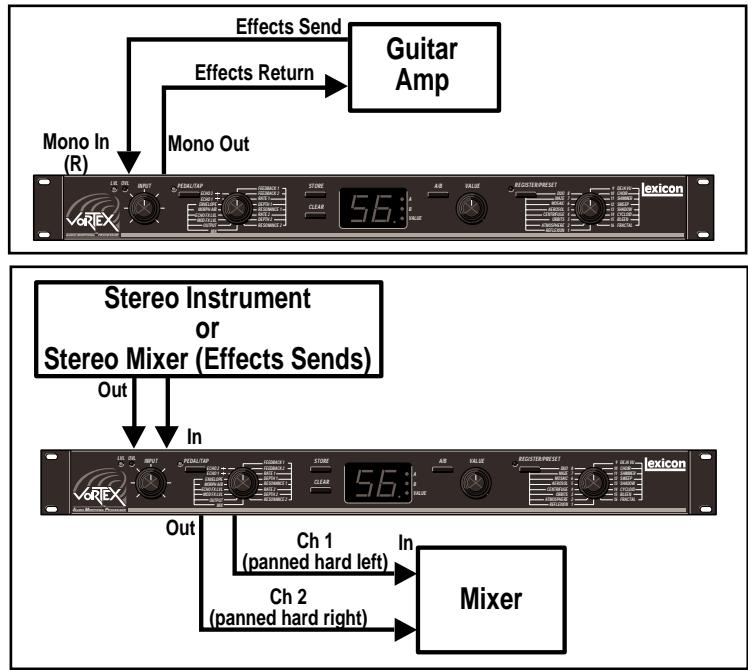
Using Vortex on a Mixer
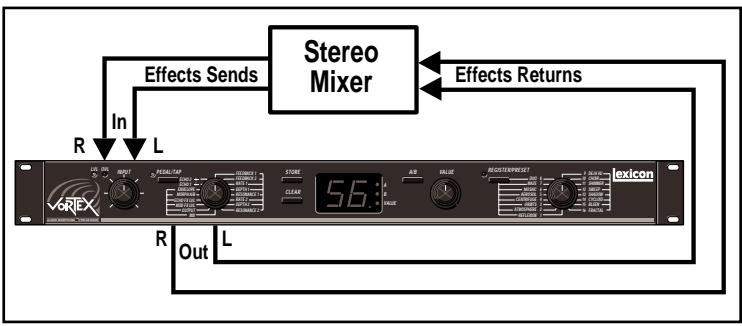
Effects Return Bus
If Vortex is using a console's returns, select each effect's MIX parameter, then use the VALUE knob to set it to its maximum value (64).
Some Vortex effects are meant to be heard 100% wet, with no dry signal added. Adjust your console's wet/dry mix accordingly.
A/B Relay Switch
Vortex is equipped with an electrically isolated analog switch that allows remote control of guitar amplifier lead/rhythm channel selection. Simply connect a standard 1/4" guitar cable between the Vortex rear panel A/B relay switch and the A/B switching input on your amp.
Both the front panel A/B button, and the footswitch A/B control will activate this switch, allowing you to simultaneously switch effects and amplifier settings.
For example, if your amp channel A corresponds to lead, and channel B to rhythm, you can load Vortex's A registers with effects you want to use on leads, and load the B registers with rhythm effects. Now, a single tap on the A/B footswitch will coordinate switching between lead effects on your A channel and rhythm effects on your B channel.
Any amplifier with a channel switching feature and a footswitch connection can be connected to the rear panel A/B relay connector on Vortex. The switch functions as follows:
| Mono plug* | Stereo plug | |
| A | switch closed | sleeve tied to Tip |
| B | switch open | sleeve tied to Ring |
- To switch polarity, use a stereo plug into Vortex, with a mono plug going into the amp. Attach the two wires to the connector sleeve and ring so that A = open and B = closed.
English
Basic Operation
Overview
Vortex provides a rich set of performance and programming features — all of which are simple and straightforward. Effect selection, editing, store, and morph functions are easily accomplished with dedicated knobs and buttons.
In Vortex, the tedious process of entering delay times which have to be recalculated for every tempo change is replaced by simple rhythm controls. The unique combination of the front panel TAP and ECHO ÷ controls makes it easy to set up precise echo rhythms and to synchronize the echo rhythms of every effect to any tempo on the fly!
Audio MorphingTM gives you unprecedented real-time control of parameter values, effects ordering and control routing. While the dynamically changing sounds can range from subtle to extreme, you control morphing with simply a button push or a pedal sweep.
An expression pedal can be assigned to control any one of fourteen parameters in each effect with a single button push (and pedal assignments can be stored with your effects.)
A dual footswitch, provided with your unit, allows you to bypass effects, step through your registers, or cycle through chains of effects.
Each of these functions is described in detail in this section.
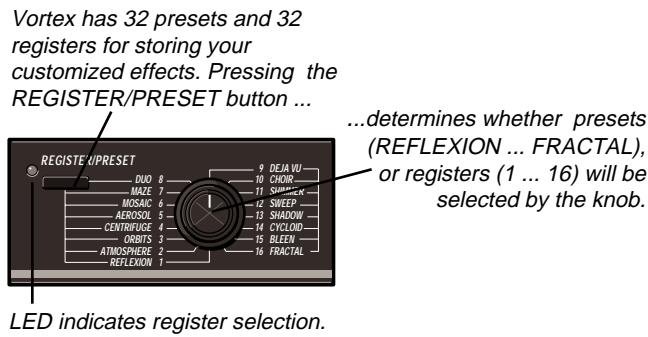
Vortex is loaded with 32 permanent presets, arranged in two banks, and numbered 1A-16A and 1B-16B.
Vortex also has 32 memory locations, called registers, where you can store your own effects. When first shipped, Vortex has a duplicate set of the presets loaded into the registers. Although these are grouped into register pairs which match the preset A/B pairs, you can store any effect you want into any register space.
The REGISTER/PRESET button determines whether the knob will load registers or preset. The LED lights to indicate register is selected.
Turn the REGISTER/PRESET knob to select and load the preset or register number you want.
Presets and Registers
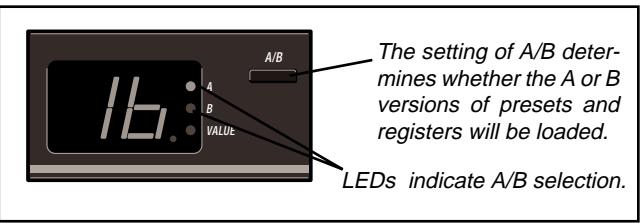
Each preset and register has an A and a B version. In the presets, A and B versions are matched into specific effect pairs. You can set up your own pairing system in the registers.
The front panel A/B button determines which version of an effect will be loaded. When this button is pressed with an effect running, it will initiate a dynamic transition, or morph from one effect to the other. (The ability to make these transitions is one of the most exciting features of Vortex and is explained fully under Morphing later in the manual.)
English
Effect Parameters
Adjusting Parameter Values
Each effect in Vortex has sixteen adjustable parameters. Control over these parameters is simple — select a parameter with the PARAMETER knob, then adjust it with the VALUE knob. All parameter settings made from the front panel can be stored with the effect.*
The VALUE knob is always active, and will adjust whichever parameter is indicated by the PARAMETER knob. The first turn of VALUE will display the current parameter setting and light the VALUE LED. Subsequent adjustments will increment or decrement parameter values along their entire range (1-64).
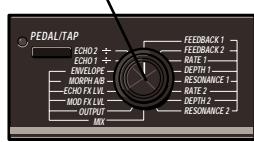
Select a parameter.
Parameter values (1-64) will be displayed when VALUE is turned.
The decimal point indicates changes have been made since the last store operation.
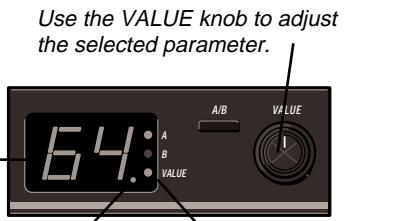
The VALUE LED lights whenever parameter values are displayed.
- Parameter changes made with an expression pedal are not automatically stored with the effect. See Pedal Control.
The decimal point on the display will light when a parameter is adjusted to indicate that the effect has been modified since the last store operation. If no further adjustments are made with VALUE, the display will revert to showing the number of the currently running effect. The edit indicator will remain on until the effect is stored, or until changes are lost by selecting another effect with the REGISTER/PRESET knob.
English
About the Parameters
Vortex parameters, in addition to providing familiar mix and level controls, allow you to access dimensional, rhythmic, and dynamic aspects of each effect. These controls make Vortex much more like a musical instrument than a simple effects box — they let you play Vortex's unique effects.
The MIX and OUTPUT controls, which have the same function in each effect, are described here. Certain other parameters, such as the modulation controls (Rate, Depth, etc.) affect different aspects of the modulation in each effect. These are marked with an asterisk () and described for specific effects in Effect Descriptions. Other parameters, such as the ECHO- ÷ controls and Morph A/B, are described fully in sections of their own.
Each parameter has a range of control which is displayed as 1-64. The general behavior of each parameter is as follows:
MIX
Controls the balance between Vortex effects (the combination of ECHO FX LVL and MOD FX LVL) and the dry audio signal. 1 = 100% dry; 64 = 100% wet.
OUTPUT
Controls the output level of the MIX signal.
*MOD FX LVL
Controls the level of the modulation portion of an effect. 1=off.
*ECHO FX LVL
Controls the level of the echo portion of an effect. 1=off.
MORPH A/B
Controls the rate of morphing between A and B effects. 1=10 seconds; 64=.01 second. See Audio Morphing.
*ENVELOPE
All Vortex effects are dynamically sensitive. ENVELOPE controls the amount of sensitivity applied to the effect. 1=off; 64=maximum sensitivity.
Note: When both inputs are used, ENVELOPE is derived from the left input.
ECHO 1÷ and ECHO 2÷
Vortex has two delay lines dedicated to echo effects. The ECHO ÷ controls allow selection of rhythmic divisions of the tempo you've set. See TAP and ECHO Rhythms.
*FEEDBACK 1 and 2
Control feedback to the two delay lines (ECHO 1 and 2). Several configurations of feedback and cross-feedback are used in the effects.
Vortex has two LFOs which are used to control different types of modulation (such as vibrato, rotary, pan, etc.) The RATE, DEPTH, and RESONANCE controls provide access to different aspects of the modulation portion of each effect.
\*RATE 1 and 2
Control the speed of the modulation effect. 1 = 0.1Hz . 64 = 100Hz . Higher speeds are capable of producing "ring modulation" effects.
*DEPTH 1 and 2
These controls are generally associated with RATE 1 and RATE 2, and control the amount of modulation.
*RESONANCE 1 and 2
Control aspects of the resonance around the modulation effect, such as level, cross-resonance level, tuning. etc.
TAP and Echo Rhythms
Tempo and Rhythm
Vortex has two independent delay lines (ECHO1 and ECHO2), which are configured in a variety of ways to create rhythmic effects. The configuration and extent of control over these echoes is one of the things that gives Vortex effects their exciting rhythmic patterns, and their dimensional quality. The other unique component in creating Vortex's echo effects is you.
Other effects processors require you to slave your tempo to their preset delay times, or to calculate and set an absolute tempo in milliseconds, then use that number to calculate delay times for appropriate rhythms, then to enter those delay times into the box. Changing tempo requires repeating the entire process.
Vortex will slave echo rhythms to any tempo you want. Setting tempo is as easy as tapping your foot, and you can change tempo as often as you like — even on the fly.
In Vortex, tempo is set simply by pressing TAP twice. Because every effect in the box is synchronized to the current tempo, all effects are always rhythmically compatible. You can tap with a footswitch, or with the front panel PEDAL/TAP button. (If you have a footpedal connected to Vortex, you must select one of the ECHO ÷ parameters in order for the button to function as TAP. See Pedal Control.)
The ECHO 1÷ and ECHO 2÷ controls allow you to easily set up extraordinary polyrhythms within any effect. These rhythmic divisions are automatically stored with the effect.
Tapping in a Tempo
Setting the tempo for Vortex couldn't be easier—simply press TAP twice in rhythm to establish the tempo you want. The front panel LED will light on your first press of TAP to indicate a tap interval is being calculated. Your second TAP defines the tap interval and turns off the LED. Now, any effect you select will be synchronized to your tempo. To select a new tempo at any time, just TAP twice. Vortex will update the tempo throughout the box on receipt of the second TAP. (If a second TAP is not received within approximately 30 seconds, Vortex will remain at the current tempo and turn the LED off.)
This simple method of setting tempo really frees you to experiment. Try running through the presets and simply tapping different intervals. Some effects will sound markedly different with the tempo altered. — Try listening to an effect, then TAP in a whole note interval and listen again. TAP in 3 beats, then 4 beats, to get an idea of the changes that can be made to a single effect.
Tap intervals in Vortex can be as long as 28 seconds, allowing long phrases of music, rather than single beats, to determine tempo.
Whenever Vortex is turned on, the tap interval will return to the default value. (1=a quarter-note at 65 bpm)
Echo Rhythms
Echo rhythms are divisions of the tap interval you've selected for Vortex. The ECHO 1+ and ECHO 2+ controls allow you to set independent rhythms, which will always be related to the tap interval, for each of Vortex's two delay lines.
For example, if you tap in a whole note interval (4 beats between taps), the parameter value 4 corresponds to quarter-note echoes, 8 corresponds to eighth-note echoes...64 to sixty-fourth-note echoes.
The ability to set different rhythmic divisions for Vortex's two echoes allows you to set up some very interesting patterns. For example:
- Load any effect with a dual echo configuration, such as preset 8. DUO B.
- Tap in a whole note interval (4 beats between taps).
- Turn the Parameter knob to ECHO 1 ÷ , and set the VALUE knob to 16. This will give ECHO 1 a sixteenth-note rhythm.
- Select ECHO 2 ÷ , and set its VALUE to 8, giving ECHO 2 an eighth-note rhythm.
Now, you can tap any interval, and the relationship between ECHO 1 and ECHO 2 rhythms will be maintained — and still be synchronized with the tempo. (ECHO 1 will always have a rhythm which is twice as fast as that of ECHO 2.)
Vortex echo divisions are calculated with 16-bit accuracy. This ensures that the rhythmic relationships between ECHO 1 and ECHO 2 are highly accurate and stable, even for unusual polyrhythms such as 2 against 9, or 11 against 13 — patterns that would be extremely tedious, and perhaps impossible, to set up on another effects processor.
Try setting up some patterns such as 3 against 2, 7 against 9, etc. — they're all a snap with Vortex.
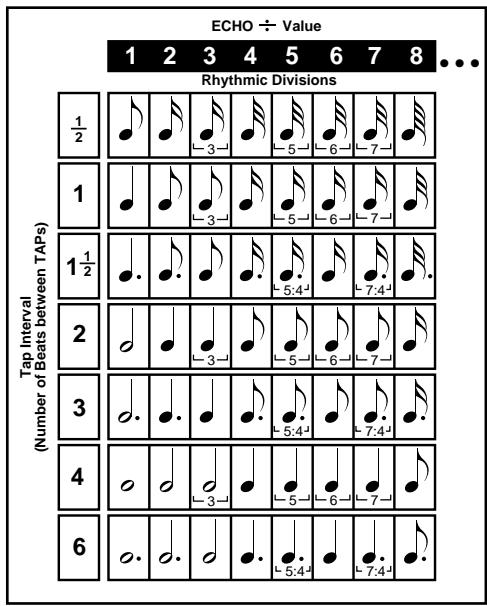
The maximum delay time for one echo in Vortex is 923 milliseconds. The maximum delay time for configurations which use Vortex's two delay lines in series is 1846 ms. In theory, this would require you to calculate the allowable tap interval/rhythmic division to make sure the times you enter fall below the limit. Vortex, however, not only performs this tedious calculation for you, but lets you ignore the whole issue of maximum delay times, by intelligently processing whatever combination you enter.
If a tap interval/ rhythmic division combination is selected which exceeds the maximum delay, Vortex will divide the selected delay time in half until it falls below the limit. For example, if a whole note won't fit, Vortex will give you a half note. If a half-note won't fit, it will give you a quarter note, and so on, until a compatible value fits. This way, no matter what tap interval and rhythmic division you select, the musical relationship between them is preserved.
English
Audio MorphingTM
About Morphing
One of the most exciting controls that Vortex gives you is the ability to continuously transform one effect into another. This feature, which we call Audio Morphing, ^TM allows you to transform closely related, or wildly dissimilar effects—and to set the time period over which the transformation occurs.
As this concept is completely new to audio effects, it will be helpful to keep a few things in mind when using this control.
Morphing is accomplished with the A/B switch.
When you press A/B, Vortex doesn't simply switch back and forth between Banks A and B. It transforms one effect into another.
The rate at which this transformation occurs is determined by the MORPH A/B parameter.
MORPH A/B allows you to determine the time it takes for one effect to transform into another when A/B is pressed. Morph rates,
like other parameters, are stored as part of the effect.
Morphs are performed between register pairs. To set up a morph, store one effect into an A register, then store another effect into the corresponding B register. You can store any preset, or any modified preset into any A or B register.
Because you can store any effect you want, in any register, you can select morphs to perform subtle, smooth parameter changes, or radical shifts between effects.
When you morph between two versions of the same effect, all of the parameter values move smoothly from one version to the other.
When you morph between two different effects, the entire structure of the effect transforms to the other effect. Everything changes — rates, levels, audio routing, routing of the LFOs and envelope, etc.
An expression pedal gives you dynamic control of morphing — and allows you to create dramatic new effects.
The ability to morph from any effect, or effect variation, in the box to any other effect gives you an infinite number of possible new effects, as a new effect is created at virtually every point in the morph. Assigning control of the morph to an expression pedal allows you not only expressive control over the morph, but allows you to halt the morph at any point. This is one of the most dramatic features of pedal control and is explained in detail in the next section, Pedal Control.
Trying Some Morphs
Vortex presets and registers are arranged in A/B pairs. When A/B is pressed (from the front panel, or via footswitch), Vortex will automatically morph between the A and B effects.
Try listening to some of the preset effect pairs to get an idea of what morphing can do with different effect combinations.
Preset 3 ORBITS
The A and B versions in this preset are variations on a single effect, B having slow orbital paths, and A having faster orbits. This is a good example of using morphing to produce subtle changes in the overall sound of an effect.
Preset 4 CENTRIFuge
The A and B versions are similar, but the difference in parameter settings for the two versions creates two related yet distinctly different effects. In this case, morphing produces a more dramatic change in the overall sound as the morph progresses from A to B.
Preset 15 BLEEN
The A and B versions are completely different from one another. A is based on envelope detune, while B is based on "ring modulated" echo feedback. The sound is completely transformed as the effect morphs from A to B.
Setting Morph Rates
The MORPH A/B parameter allows you to specify independent morph rates for each effect. The combined morph rates set for A and B determine the total length of time a morph will take. The total duration of the morph can be varied from 10 seconds to .01 second. (1=slowest rate; 64=fastest rate)
When you are morphing from A to B, the rate you have set for effect A determines how quickly you leave effect A. When you morph from B to A, it determines how quickly you arrive at effect A. The rate you set for effect B similarly controls departure and arrival rate to and from effect B.
When these two values are equal, you will hear A and B effects in equal proportion at the midpoint of the morph. Setting unequal morph rate values allows you to slide this transition point toward the A or B effect — essentially specifying what proportion of the total time will be spent on each effect. Along the transition path between one effect and another, some very unusual effects can be heard.
Pedal Control
Using an expression pedal with Vortex allows you a wide range of dynamic control over any parameter. Any one of fourteen parameters can be assigned to pedal control and pedal assignment can be stored as part of an effect. A and B effects can each have different pedal assignments.
To make use of the many features available through pedal control, simply connect a pedal via the rear panel FOOTPEDAL connector. Each time an effect is loaded, Vortex checks this connection to verify pedal connection. When a pedal is connected, the PEDAL function of the PEDAL/TAP button is activated.
Now, PEDAL/TAP functions as a TAP button only when ECHO 1 ÷ or ECHO 2 ÷ is selected. When the Parameter knob is turned to any other position, pressing this button assigns the selected parameter to pedal control.
Assign a Parameter to a Pedal
Assigning a parameter to the pedal is easy:
- Plug a pedal into Vortex, and load a new effect (so that Vortex will recognize pedal connection.)
- Turn the Parameter knob to select any of the fourteen assignable parameters — for example, MIX.
- Press PEDAL/TAP. The LED will light to indicate that the pedal has been assigned to that parameter.
(The decimal point on the display will also light, as pedal assignment is a change which can be stored with the effect.)
- When the pedal is moved beyond the displayed value of MIX, the pedal will acquire control over the full range of the MIX parameter.
With a standard expression pedal, the toe-up position = Parameter Value 1, toedown = 64 .
When a pedal is plugged into Vortex ...
...the PEDAL/TAP button assigns any one of fourteen parameters* to pedal control.
The LED will light when you assign a parameter and whenever an assigned parameter is selected with the knob, until the assignment is changed or removed.
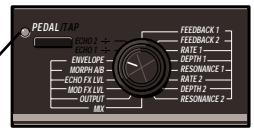
* Output level is not recommended for continuous control.
The PEDAL/TAP button performs TAP functions when ECHO 1 ÷ or ECHO 2 ÷ is selected.
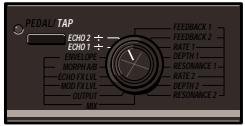
English
Once a parameter is assigned to a pedal, pedal control of the parameter is always active, even if you move the Parameter knob to select another parameter for editing.
While an assigned parameter is selected, value changes made with the pedal will be displayed. When pedal motion stops, the display will return to display of the register or preset number.
When the Parameter knob is turned to another position, the Pedal LED will turn off, and the value of the new parameter will be displayed. The new parameter can be edited with VALUE; the pedal will continue to control its assigned parameter.
To remove a pedal assignment, simply reselect the assigned parameter and press PEDAL/TAP, or select another parameter for assignment and press PEDAL/TAP. When a pedal is deassigned, the parameter returns to its original value (as set prior to pedal assignment.)
Remember that, once a pedal is connected to Vortex, whether or not a parameter assignment has been made, you must turn the Parameter knob to ECHO 1 ÷ or ECHO 2 ÷ to perform TAP functions with the button. (Footswitch TAP function is unaffected.)
Capturing Parameter Changes Made with a Pedal
Value changes made with an expression pedal are not automatically saved when you store an effect. If you want to save the value indicated by the current pedal position, turn the VALUE knob in either direction to set this as the "original" value. When the effect is stored, this is the value that will be saved for that parameter, even if the pedal is reassigned, or deassigned.
Note: If the pedal is unplugged while an effect is running, Vortex will not recognize the fact that there is no pedal until a new effect is loaded. If the pedal is unplugged while an effect with a pedal assignment is running, Vortex assumes the pedal has been moved to value = 1 , and will not allow pedal reassignment or deassignment. If you unplug the pedal, load a new effect to make sure that Vortex recognizes the disconnection.
Controlling Morphs with a Pedal
The behavior of the pedal when MORPH A/B is selected for pedal assignment is slightly different. When you assign MORPH A/B, the pedal immediately acquires control over the morph, and the morph jumps to the current pedal position. (Toe up=1=effect B; toe down=64=effect A.)
A/B still selects the A or B effect, and the A and B LEDs indicate which effect is available for editing. Edits can be made via the front panel to either A or B effect parameters, but the pedal determines which effect is being heard. For example, you can edit the parameters of effect B, and your edits will take effect, but if the pedal is in the toe down position, you will only be hearing effect A. You won't hear the results of your edits to effect B until you move the pedal to its toe up position.
When you deassign the pedal, Vortex will immediately switch to whichever effect, A or B, is indicated by the front panel LEDs.
Remember that A and B effects can have different pedal assignments. If either the A or B effect has been stored with the pedal assigned to MORPH A/B, (and a pedal is connected) pedal control is immediate when the effect is loaded.
If you are using Vortex's A/B relay feature, pedal morphing allows independent control over morphing and channel switching.
For example, you could use the pedal to control morphing between ORBITS A and ORBITS B, and use the A/B switch to select lead or rhythm channels for either effect.
Using Registers
Storing Effects
Vortex presets cannot be erased or overwritten by parameter changes; the original version will always be restored when loaded. If you make changes to a preset and want to save the changes as a custom effect, or if you want to match certain effects as A/B pairs, you must store your new versions into registers.
When first shipped, Vortex has a duplicate set of the presets loaded into the registers. Although these are grouped into register pairs which match the preset A/B pairs, you can store any effect you want into any register space. For example, you can store a version of Centrifuge B into Register 1A, and a version of Orbits A into Register 1B.
To store the currently running effect:
- Press STORE.
- If you were in preset mode, the register LED will go on, indicating that Vortex has automatically switched to register mode — selecting whatever register is indicated by the position of the REGISTER/ PRESET knob and the A/B button.
-
Releasing STORE will store the currently running effect into the register indicated on the display, overwriting the effect previously stored there. The display will flash briefly to indicate the store operation was successful.
-
Store operations are executed on release of the STORE button. If you want to store to a different register, or to a different register bank, than the one displayed, turn the REGISTER/PRESET knob to the register number you want, and check the setting of the A/B button before releasing STORE.
Clearing Register Pairs
Vortex has a clear function which allows the use of footswitches to link effects in a variety of useful ways. Clearing a register does not erase the contents of a register pair. It clears a space in the register sequence so that the register is skipped in any effect sequence you create. Note that the clear operation affects both register effects (A and B).
To clear a register pair...
- Press CLEAR.
- If you were in preset mode, the register LED will go on, indicating that Vortex has automatically switched to register mode — selecting whatever register pair is indicated by the position of the REGISTER/PRESET knob.
- Both A and B effects in the displayed register will be cleared, and the register ID number will flash. (The ID number of any cleared register flashes when selected with the REGISTER/PRESET knob.)
To restore a cleared register pair, simply repeat the clear operation.
English
Using Footswitches
A dual footswitch can be connected to Vortex to perform register step and bypass functions. (A second footswitch allows handoff control of A/B bank switching and TAP functions.)
Stepping through the registers
You can use a footswitch to step through either the A or the B bank of effects stored in the registers. (Use A/B to switch between banks.) The footswitch will increment continuously up to register 16, then wrap back to register 1 (or the first uncleared register).
If you are in preset mode, the first click of the switch will automatically switch you into register mode, loading whatever register is indicated by the position of the REGISTER/ PRESET knob and the setting of the A/B button; subsequent clicks will increment from that point on.
Skipping registers and creating chains
Vortex's clear function allows you to use a footswitch to skip effects you do not want in a sequence, or to create register chains.
Skipping allows you to create a specific sequence of effects. If, for example, you want to use a series of 8 effects, simply clear the 8 unwanted registers and turn the REGISTER/PRESET knob to 1. Now, the footswitch will increment through the registers, passing over the cleared registers without requiring you to step through them.
Turning the REGISTER/PRESET knob to any position other than 1, will set up register chains which use cleared registers as loop points.
Skip and chain functions are illustrated below.
Registers 4, 9, 10 and 14 have been cleared..

With the REGISTER/PRESET knob set to Register 1, the footswitch will step through the remaining registers, then loop back to Register 1.

Turning the REGISTER/PRESET knob to any position other than 1, will set up register chains which use cleared registers as loop points.
The combination of cleared registers shown above would create these four chains ...

If the REGISTER/PRESET knob is set to a register within a chain, the footswitch will cycle through the chain until the next cleared register, then loop back to the first register in the chain.
(To use a chain containing Register 1, you must set the REGISTER/PRESET knob to another register in the chain.)
With the REGISTER/PRESET knob set to Register 7, the footswitch will step through this sequence ...
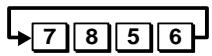
If the REGISTER/PRESET knob is set to a cleared register, the footswitch will skip to the first register in the next chain, then step through that chain.
Bypass
A footswitch can be used to toggle a bypass function. When active, "bP" (byPass) appears on the display. In this state the output of Vortex will remain at the level set by OUTPUT, but will be 100% dry (MIX setting=1).
While bypassed, PARAMETER, VALUE, and any assigned pedal functions are inactive.
REGISTER/PRESET and A/B functions (via footswitch or front panel) remain active during bypass, allowing you to cue an effect to load when bypass is turned off.
To use this feature, turn bypass on ("bP" displayed). Select a new effect (the ID number of the effect you select will briefly interrupt the display of "bP". If you want to switch banks, press A/B — the LED will respond to your selection, although the relay will not be activated until bypass is turned off. Now, when you turn bypass off, the effect you've selected will load.
TAP functions (via footswitch or front panel) also remain active during bypass, allowing you to change tempo while bypassed.
Finding the Preset Used to Create an Effect
Vortex gives you the ability to radically change the sound of any preset. Your new sounds can then be stored in any one of 32 locations (registers 1-16, A or B).
At some point, you may want to retrace your steps, and identify the preset used to create a particular stored sound.
To do this:
- Using the REGISTER/PRESET knob and the A/B button, select the register for which you want to identify the source.
- If you are not already in preset mode, press the REGISTER/PRESET button—the LED should go off.
Note that Vortex will load the preset which corresponds to the current knob position.
- Press and hold down the REGISTER/ PRESET button. The display will blink.
Now, Vortex will reload your register selection.
- While still holding down the REGISTER/ PRESET button, move the VALUE knob. The number and version (A or B) of the preset used to create that register will be displayed briefly.
This will not affect the audio—you will still be hearing the selected register.
The display will return to the selected register after a brief timeout, or on release of the REGISTER/PRESET button.
Effect Descriptions
Overview
Vortex effects are not passive, they are responsive to your playing. Each can be controlled dynamically by the ENVELOPE control, allowing you to play the effects with your own personal style.
Each effect is made up of several simultaneous modulation and delay modules. The sonic signature of each effect is determined by the number and type of these modules, as well as the audio and control connections between them.
Although each effect is designed with a different combination of modules, Vortex provides a single set of 16 general parameters to control them all.
All Vortex effects have the same general structure, as shown below. (The shaded area of the diagram is detailed in the individual effect descriptions that follow.)
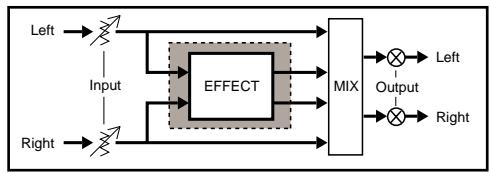
Certain parameters have similar characteristics in all Vortex effects. For example, OUTPUT and MIX always provide control of output level and processed/unprocessed mix. Within each effect, MOD FX LVL generally controls the amount of modulation effects, and ECHO FX LVL controls the amount of echo effects in the processed signal.
Vortex presets are designed to emphasize certain functions in each effect, but you will find that altering selected parameters allows you to create entirely different sounds from any single effect. The following diagrams and descriptions provide maps for your explorations, as well as descriptions of each preset pair and of the effect itself.
Note: When connections are made to both Vortex inputs, envelope control of all effects is driven by the left input.
English
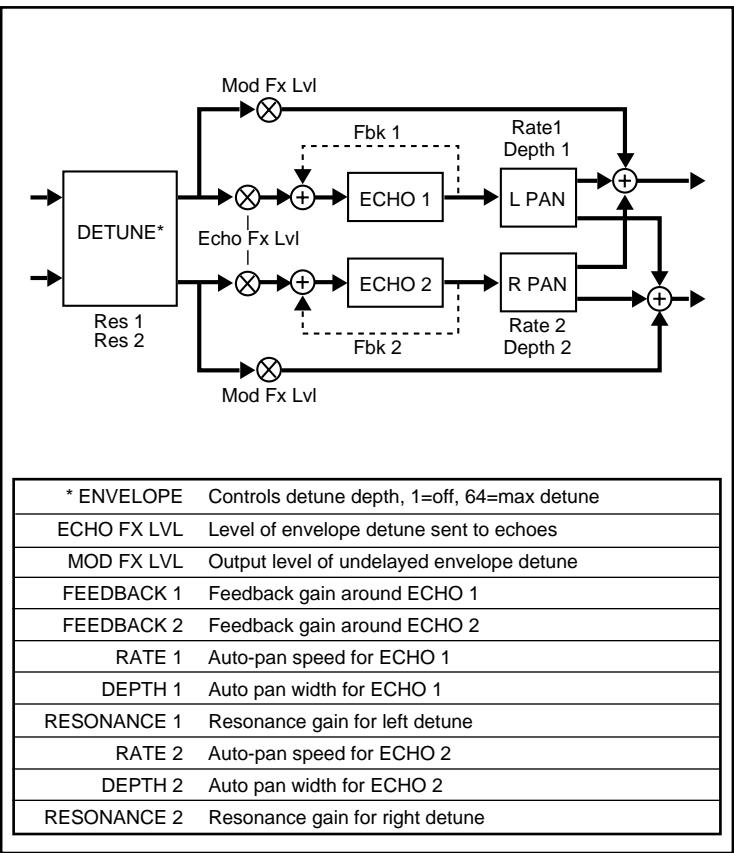
1 REFLEXION


- Reflexion consists of a stereo envelope detune module in series with dual echoes. Each echo, in turn, feeds an independent auto panner.
The detune is driven by ENVELOPE. The amount of detuning increases as the input varies from soft to loud. Different playing dynamics and ENVELOPE values can produce a wide range of effects from subtle pitch changes on note attacks for doubling effects, to radical pitch bends. Turning up RES1 and RES2 creates envelope flanging effects. MOD FX LVL controls the undelayed output of the detune effect.
As ECHO FX LVL is on the input to the echoes, an expression pedal assigned to this parameter can produce dramatic echo swells.
About the Reflexion Presets
Reflexion A produces a moderate doubling effect on loud attacks combined with echo rhythms that initially alternate between eighth-notes and eighth-note triplets, then "settle" into an eighth-note pattern. The echoes dance between left and right.
In Reflexion B, the envelope value is turned down, making the doubling effect more subtle. Resonance values are turned up, and the echo rhythms are set to 3 against 2.
Morphing between A and B produces smooth changes in dynamic response, and a cross-fade of echo rhythms.
If you have an expression pedal, you can use Reflexion to create a pedal-controlled flanger.
- Save copies of REFLEXION B into any A and B register pair.
- In the new B register, set ENVELOPE to 10 and press STORE.
- In the new A register, set ENVELOPE to 45 and press STORE.
- Assign the pedal to MORPH A/B
Now, moving the pedal will create a flange effect. For more dramatic flanging, turn up RESONANCE 1 and RESONANCE 2 in both A and B effects.
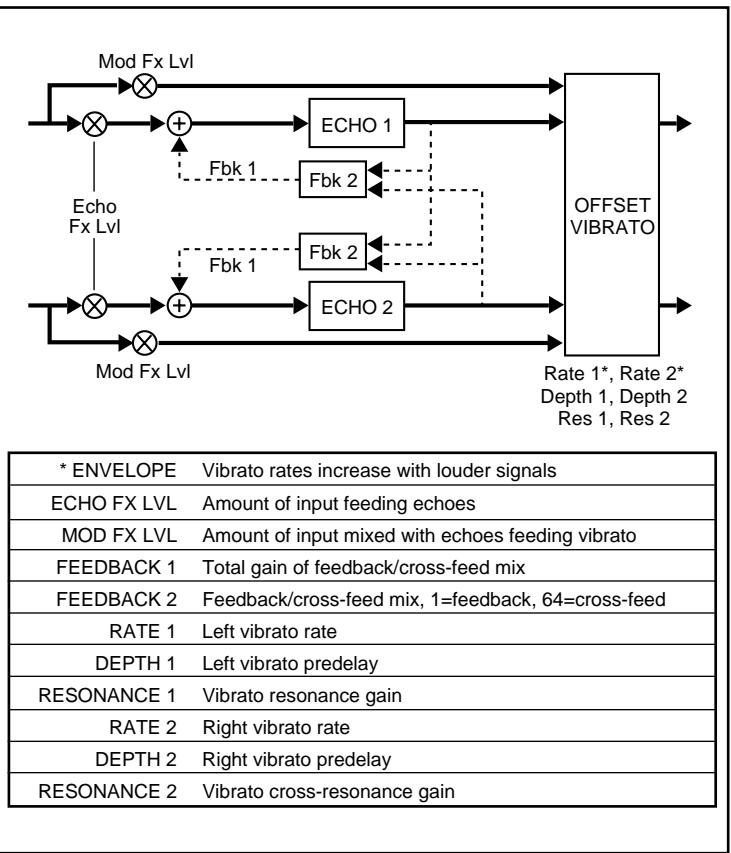
2 ATMOSPHERE
A
Atmosphere A consists of a stereo vibrato module which is fed by the input signal and echoes of the input signal. The echoes are arranged in a cross-mix configuration.
ENVELOPE controls vibrato rate, with louder notes making the vibrato quicker. ECHO FX LVL controls the amount of input signal feeding the echoes. MOD FX LVL controls the amount of undelayed input signal feeding the vibrato. DEPTH 1 and DEPTH 2 control offset delay for the left and right vibrato. Small differences in these two values will widen mono or stereo signals.
The cross-mix echo configuration allows you to create many rhythmic variations by altering feedback paths. In this configuration, FEEDBACK 2 controls the mix of feedback and cross-feed for both ECHO 1 and ECHO 2. When this value is 1, this mix is all feedback (i.e. each echo is independent.) At 64, the mix is all cross-feed. Between these extremes, each echo is fed by a mixture of feedback and cross-feed. These intermediate settings produce echo rhythms that change over time. FEEDBACK 1 is the level control for the feedback mix; FEEDBACK 2 controls the nature of the mix.
Use the Preset to create a space around your sound—in this case a rather nasty little space.
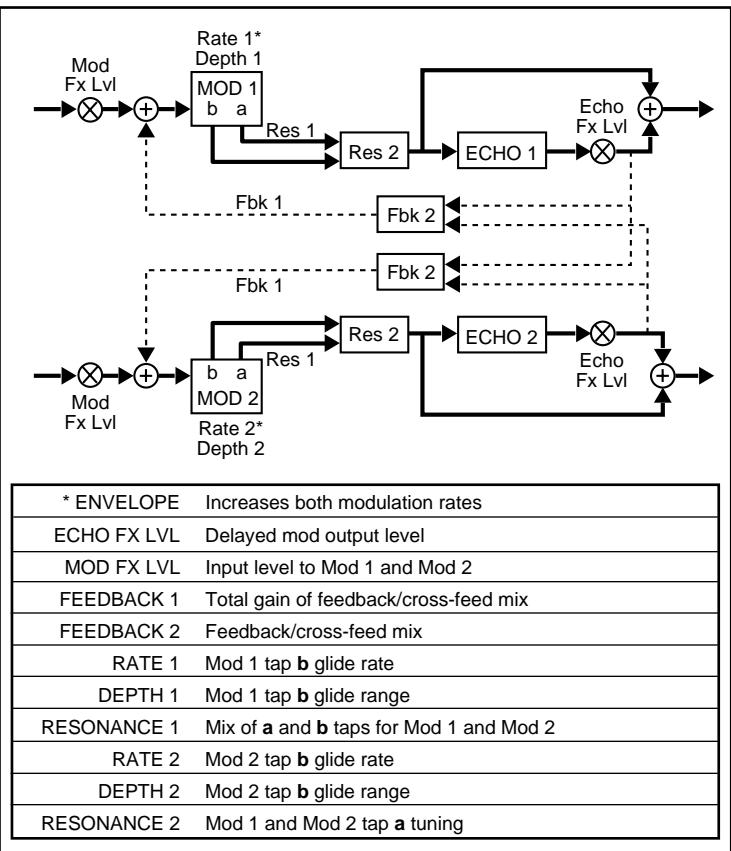
2 ATMOSPHERE
B
Atmosphere B has two modulators, each with two independent taps (a and b), which allow you to create tunable resonance effects. The modulators are in the feedback path of a cross-mix configuration. When feedback is used, every echo repeat is re-modulated.
ENVELOPE increases the rates of both modulators, causing modulation to speed up during louder notes and passages. The modulators in this effect are unique in that each has a gliding tap and a stationary tap. RATE 1 and DEPTH 1 control the glide speed and range of the gliding tap (b) of MOD 1. RATE 2 and DEPTH 2 control the glide speed and range of the gliding tap (b) of MOD 2. RESONANCE 2 controls the tuning of the stationary tap (a) in both MOD 1 and MOD 2. RESONANCE 1 controls the mix of the a and b tap levels for both modulators. The character of the modulated sound can be significantly altered with RESONANCE 1 and RESONANCE 2.
The cross-mix echo configuration is identical to that in Atmosphere A.
Use the Preset to add a variety of atmospheric effects to your sound.
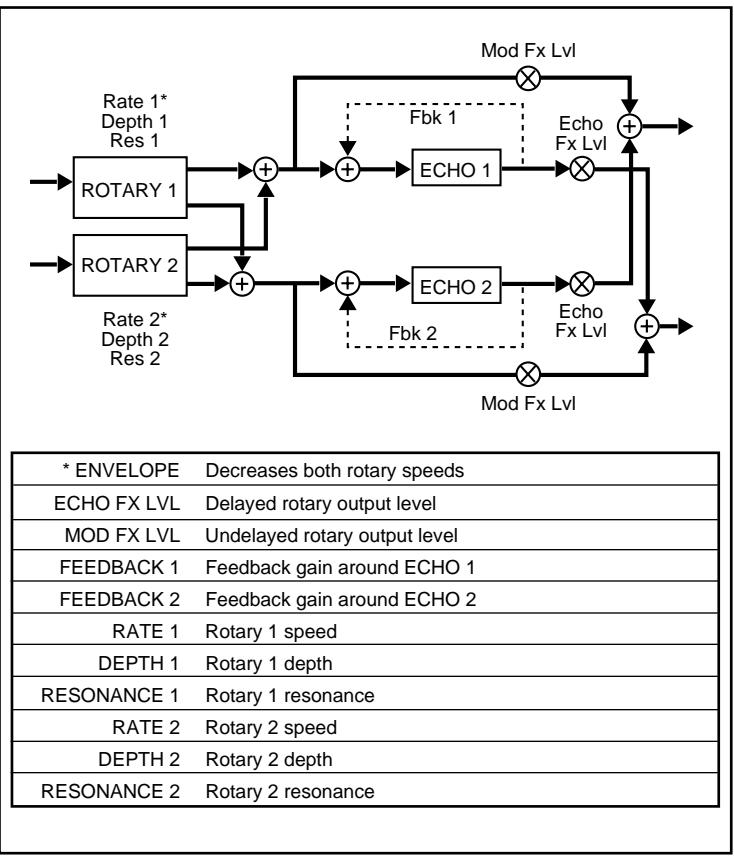
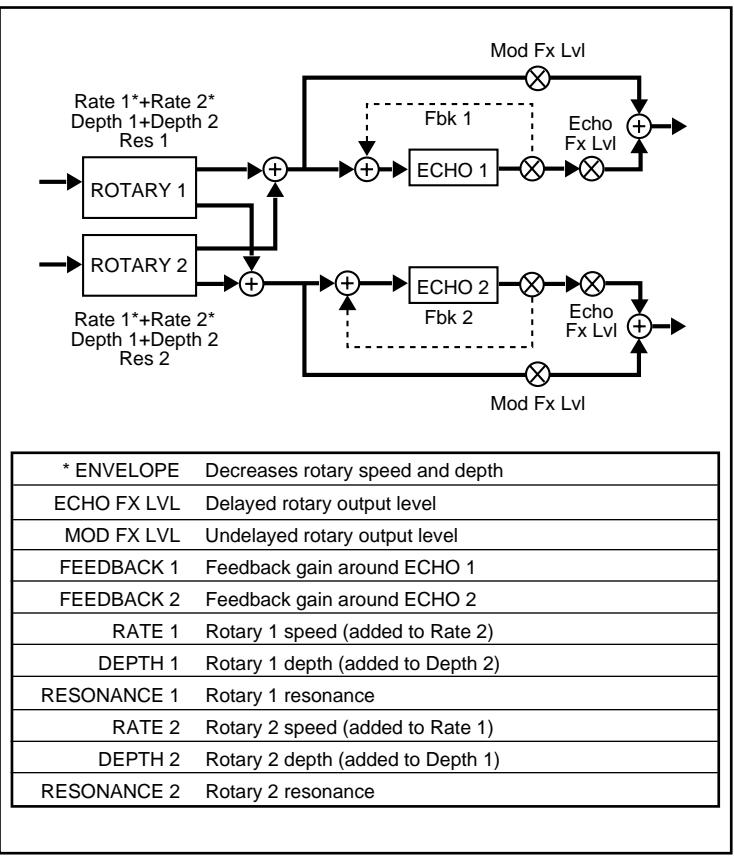
3 ORBITS


Orbits is designed around two rotary effects, one fed by the left input, one by the right. The output of both rotary effects is fed to echoes configured as a stereo pair. The left echo feeds the right output, and vice-versa, causing the echoes to revolve on opposing sides of the stereo field from the rotary effects.
ENVELOPE decreases both rotary speeds, so that louder signals cause the rotary effects to slow down. The left and right inputs are processed independently, allowing you to experiment with two input sources. You can, for example, send a voice into the left, and a guitar into the right, and each can have its own independent rotary effect.
To accurately simulate a cabinet rotary speaker with high-frequency and low-frequency rotors, use a mixer with low and high EQ on its sends feeding Vortex left and right inputs.
About the Orbits Presets
The A and B presets of Orbits are designed to simulate a pair of rotating speakers, with A set for fast, and B set for slow. Rate, depth and resonance settings are all altered to simulate this speed change.
In the presets, the envelope control is turned off, but this can be turned on to control rotary speed dynamically. (If a pedal is assigned to MORPH A/B, you can use it to control rotation speed of the rotary speaker.)
The morph rates are set to simulate the inertial drag when the rotors are sped up or slowed down.
4 CENTRIFuge
A
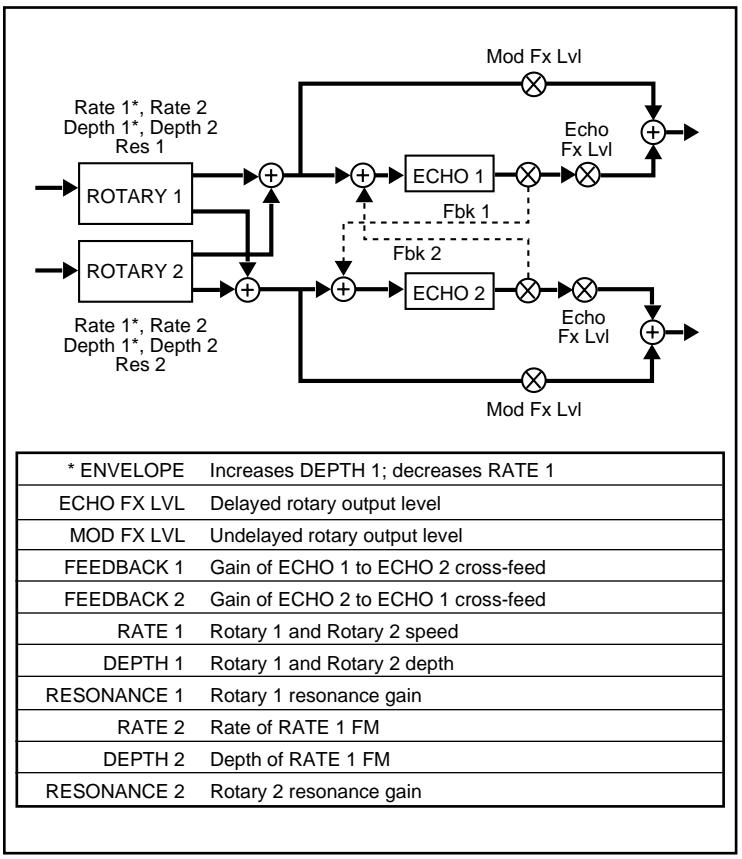
Centrifuge A is designed around two rotary effects, one fed by the left input, one by the right. The output of both rotary effects is fed to echoes configured as a stereo pair. The rotary effects always move in unison.
ENVELOPE decreases the rotary speed and depth. The rotary effects are controlled by a combination of RATE 1/DEPTH 1, and RATE 2/DEPTH 2. Either set of controls used alone will create a simple rotation effect with variable speed and depth. Used together (values set for both sets of controls) these controls create unusual rotation effects.
The Preset uses envelope control of rates, and resonance, to create a throaty, vowel-like sound, that increases in speed as sound fades away.
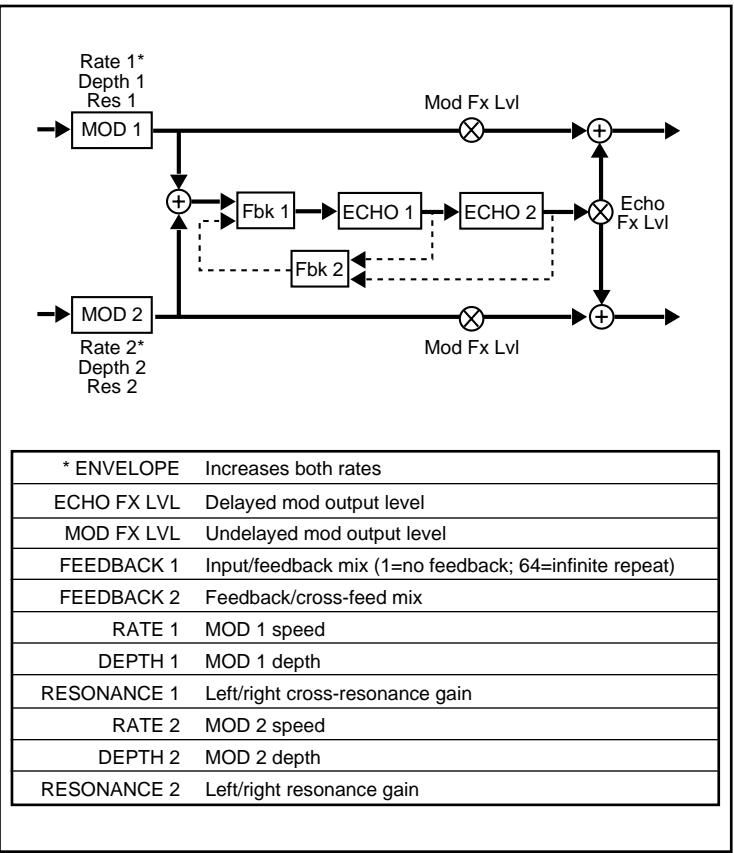
4 CENTRIFuge
B
Centrifuge B is designed around two rotary effects, one fed by the left input, one by the right. The output of both rotary effects is fed to echoes configured as a stereo pair with cross-feed. The rotary effects always move in unison.
ENVELOPE decreases RATE 1 and increases DEPTH 1, so that louder signals decrease the speed, while increasing depth. RATE 1 and DEPTH 1 control the speed of both rotary effects. RATE 2 controls the rate of RATE 1 FM. DEPTH 2 controls the depth of RATE 1 FM. (As you turn up DEPTH 2, RATE 1 will get faster and slower at the speed of RATE 2, allowing you to create a rotary effect which is constantly changing from slow to fast.)
The Preset uses envelope control to create a downward spiral effect. Loud signals produce wide and slow rotation which speeds up and narrows as the signal fades. (The preset has DEPTH 2 turned off.)
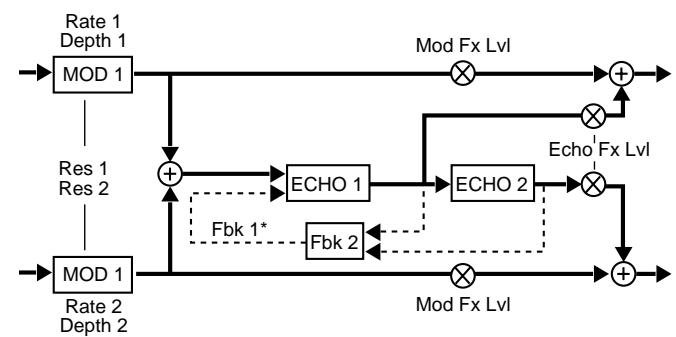
5 AEROSOL
A
Aerosol A has two modulators which interact to produce a variety of modulation effects (flanger, vibrato, chorus, etc.) The modulators feed two echoes which are configured as a cascade looper.
ENVELOPE increases RATE 1 and RATE 2, so that loud signals increase the speed of modulation. Using RESONANCE 2 alone (RESONANCE 1 = 1 ) maintains a stereo image in the modulation effect. RATE 1 and DEPTH 1 will affect left modulation and RATE 2, DEPTH 2 will affect right modulation.
Using RESONANCE 1 (cross-resonance) mixes the left and right modulation signals together. The rate and depth controls will affect both left and right.
Having the two echoes cascaded doubles the maximum amount of available delay time. FEEDBACK 2 controls the mix of ECHO 1 feedback and ECHO 2 feedback. When this value is 1, this mix is all ECHO 1 feedback. At 64, the mix is all ECHO 2 feedback (producing the longest echoes.) Between these extremes, ECHO 1 is fed by a mixture of the two feedbacks. These intermediate settings produce echo rhythms that change over time.
FEEDBACK 1 controls the mix of input signal and feedback mix fed into ECHO 1. When FEEDBACK 1 = 1 , there is no feedback. At 64, only feedback is sent into the echoes. This creates an infinite loop.
The Preset is set to produce a very deep stereo flange with subtle echoes.
| * ENVELOPE | Decreases total feedback level |
| ECHO FX LVL | Delayed mod output level |
| MOD FX LVL | Undelayed mod output level |
| FEEDBACK 1 | Total gain of feedback/cross-feed mix |
| FEEDBACK 2 | Feedback/cross-feed mix |
| RATE 1 | MOD 1 speed |
| DEPTH 1 | MOD 1 depth |
| RESONANCE 1 | Left/right cross-resonance |
| RATE 2 | MOD 2 speed |
| DEPTH 2 | MOD 2 depth |
| RESONANCE 2 | Left/right resonance |
5 AEROSOL
B
Aerosol B has two modulators which interact to produce a variety of modulation effects (flanger, vibrato, chorus, etc.) The modulators feed two echoes which are configured as a bounce echo.
ENVELOPE decreases FEEDBACK 1, which controls the total feedback level, so that loud signals have only a single echo repeat, and soft signals have many. Using RESONANCE 2 alone (RESONANCE 1 = 1 ) maintains a stereo image in the modulation effect. RATE 1 and DEPTH 1 will affect left modulation; RATE 2, DEPTH 2 will affect right modulation.
Using RESONANCE 1 (cross-resonance) mixes the left and right modulation signals together. The rate and depth controls will affect both left and right.
Both echoes are arranged in series, but ECHO 1 feeds the left output, while ECHO 2 feeds the right. This generates echoes that bounce between left and right. FEEDBACK 2 controls the mix of ECHO 1 feedback and ECHO 2 feedback. When this value is 1, this mix is all ECHO 1 feedback. At 64, the mix is all ECHO 2 feedback. Between these extremes, ECHO 1 is fed by a mixture of the two feedbacks. These intermediate settings produce echo rhythms that change over time.
The Preset uses MIX, MOD FX LVL, and ECHO FX LVL to create a primarily dry sound, followed by pitch-modulated echoes which alternate between left and right.
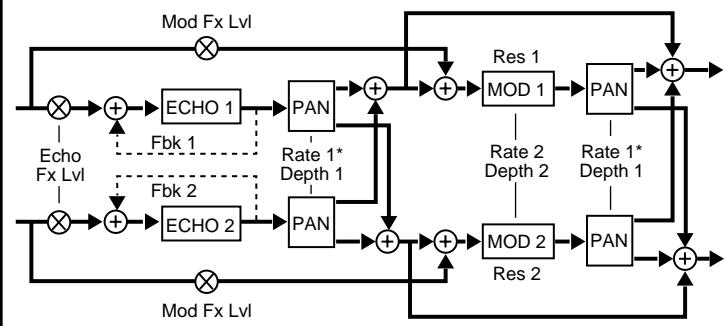
| * ENVELOPE | Decreases panning rate of all panners |
| ECHO FX LVL | Input to echoes |
| MOD FX LVL | Undelayed input level to autopan mods |
| FEEDBACK 1 | Feedback gain around ECHO 1 |
| FEEDBACK 2 | Feedback gain around ECHO 2 |
| RATE 1 | Pan rate |
| DEPTH 1 | Pan width |
| RESONANCE 1 | MOD 1 resonance |
| RATE 2 | MOD 1 and MOD 2 speed |
| DEPTH 2 | MOD 1 and MOD 2 depth |
| RESONANCE 2 | MOD 2 resonance |
6 MOSAIC
A
Mosaic A is configured with dual chase panners, one on each input. This allows the left and right modulation effects to be chased by their echoes in opposite directions.
ENVELOPE decreases the panning rate, so that loud signals slow down the panning. This effect uses four independent panners. The output of the panners is configured such that each modulation effect and its echo are fixed in a separate quadrant of an orbit controlled by RATE 1 and DEPTH 1. RATE 1 controls the speed. DEPTH 1 controls the width of the orbit. (When DEPTH 1 is set to 1, MOD 1 and ECHO 1 are routed to the left output, and MOD 2 and ECHO 2 are routed to the right output.)
Mono and stereo sources produce different kinds of motion effects. Stereo inputs will cause the stereo image to spin and to be chased by its echoes. If you use two separate mono signals, such as guitar and voice, both the signals and their echoes will chase one another in opposite directions.
If different values are set for ECHO 1 and ECHO 2 with a mono source, the echoes will move in unpredictable patterns. If both echoes are set to the same value, but their feedback values are unequal, the first echo repeats will appear to be centered, but will then begin to snake between left and right as they fade.
The Preset has the left input chased by quarter-note echoes, and the right input chased by quarter-note triplet echoes.
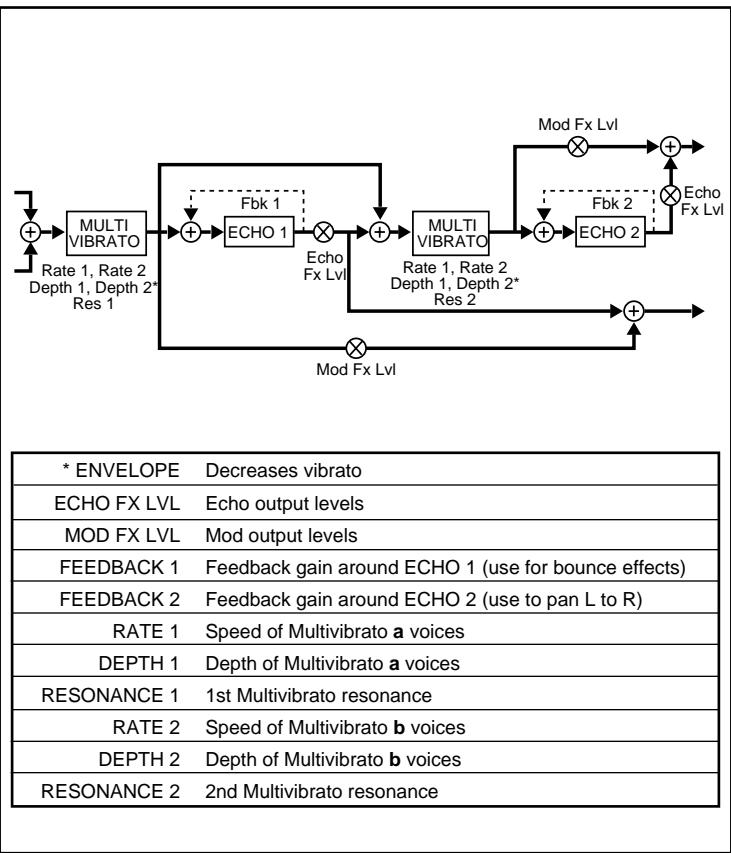
6 Mosaic
B
Mosaic B has four modules arranged in series. Modulation and echo effects are accumulated as signals progress through this configuration.
ENVELOPE decreases the vibrato depths, causing modulation effects to decrease with loud signals. The configuration allows you to hear each step of the modulation and echo accumulation as it progresses. The vibrato effect has two sets of stereo vibrato voices. One set of voices (a) is controlled by RATE 1 and DEPTH 1. The other set (b) is controlled by RATE 2 and DEPTH 2. The a voices shift in pitch in opposition to each other, as do the b voices. This can be used to produce very rich vibrato and chorus effects.
MOD FX LVL controls the direct output of MOD 1 (left) and MOD 2 (right). ECHO FX LVL controls the amount of echo fed into the modulators, as well as the direct echo output. (ECHO 1 is left, ECHO 2 is right.)
The Preset produces a deep, resonant modulation with very tight echoes. ENVELOPE is set to control modulation rate dynamically.
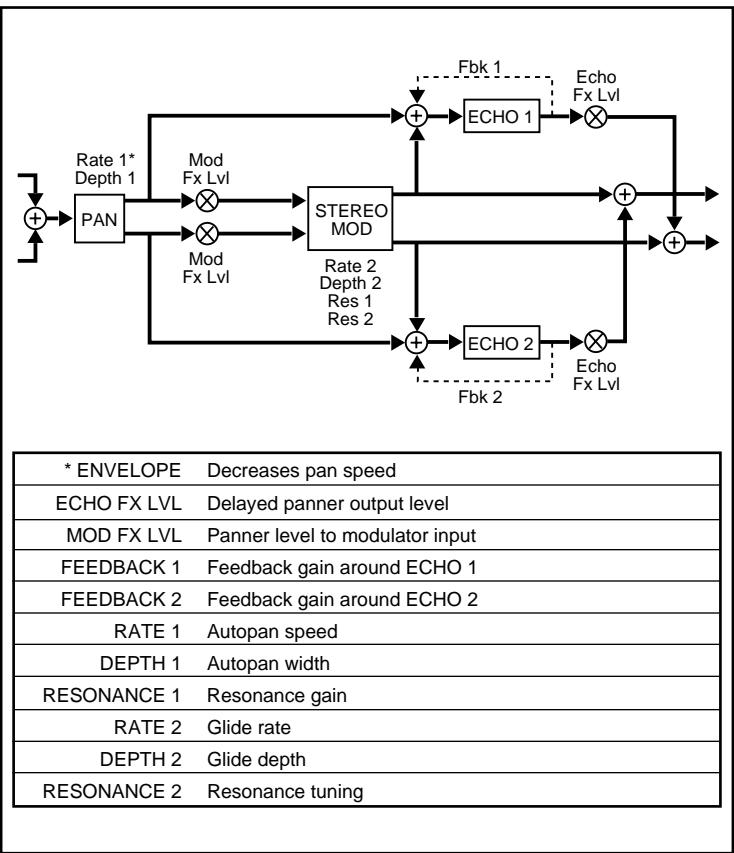
7 MAZE
A
Maze A has a panner that sprays a mono mix of the input signals across the inputs of a stereo modulator and a stereo echo pair.
ENVELOPE decreases the panning speed, so that pan rate decreases with loud signals. RATE 1 and DEPTH 1 control pan speed and width. RATE 2 and DEPTH 2 control the modulation glide rate and depth. RESONANCE 1 controls the left and right resonance gain for the modulator. RESONANCE 2 controls left and right resonance tuning.
The Preset combines pan, modulation, and stereo echo to create a dynamic spacious effect.
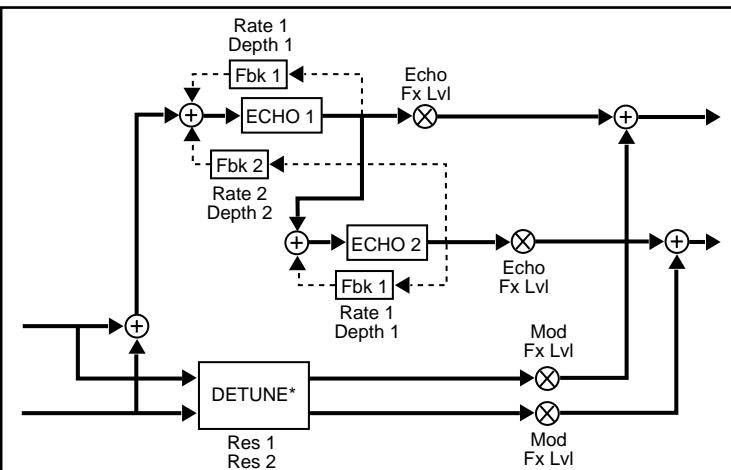
| * ENVELOPE | Amount of detune (Loud signals=max detune, soft=none) |
| ECHO FX LVL | Echo output level |
| MOD FX LVL | Stereo envelope detune output |
| FEEDBACK 1 | Fixed feedback gain for ECHO 1 and ECHO 2 |
| FEEDBACK 2 | Fixed cross-feed gain for ECHO 1 and ECHO 2 |
| RATE 1 | ECHO 1 and ECHO 2 feedback AM rate |
| DEPTH 1 | ECHO 1 and ECHO 2 feedback AM depth |
| RESONANCE 1 | Resonance gain for left detune |
| RATE 2 | ECHO 1 and ECHO 2 cross-feed AM rate |
| DEPTH 2 | ECHO 1 and ECHO 2 cross-feed AM depth |
| RESONANCE 2 | Resonance gain for right detune |
7 MAZE
B
Maze B is configured as two parallel effects. One has stereo envelope detune, and the other has a unique echo configuration with feedback AM.
ENVELOPE controls the amount of detune, so that louder signals increase detuning. The output of the detuner is controlled by MOD FX LVL. If this control is turned down to 1, it completely shuts down the detune effect. Likewise, the output of the bounce echo is controlled by ECHO FX LVL. If this control is turned down to 1, it completely shuts down the echo effect.
The echoes are arranged in series. ECHO 1 feeds the left output, while ECHO 2 feeds the right. This generates echoes that bounce between left and right. FEEDBACK 1 controls the amount of feedback for both echoes. FEEDBACK 2 controls the amount of cross-feedback for both echoes. RATE 1 and DEPTH 1 control amplitude modulation of the feedback for both echoes. RATE 2 and DEPTH 2 control the amplitude modulation of the cross-feedback for both echoes. Turning up DEPTH 1 and/or DEPTH 2 modulates feedback (or cross-feed) levels. At low rates, this produces a tremolo-like effect. At faster rates, this produces "ring modulator" effects.
The Preset uses ENVELOPE to produce a slight flange on note attacks. The amount of feedback and cross-feed is slowly changed by RATE 1 and RATE 2.
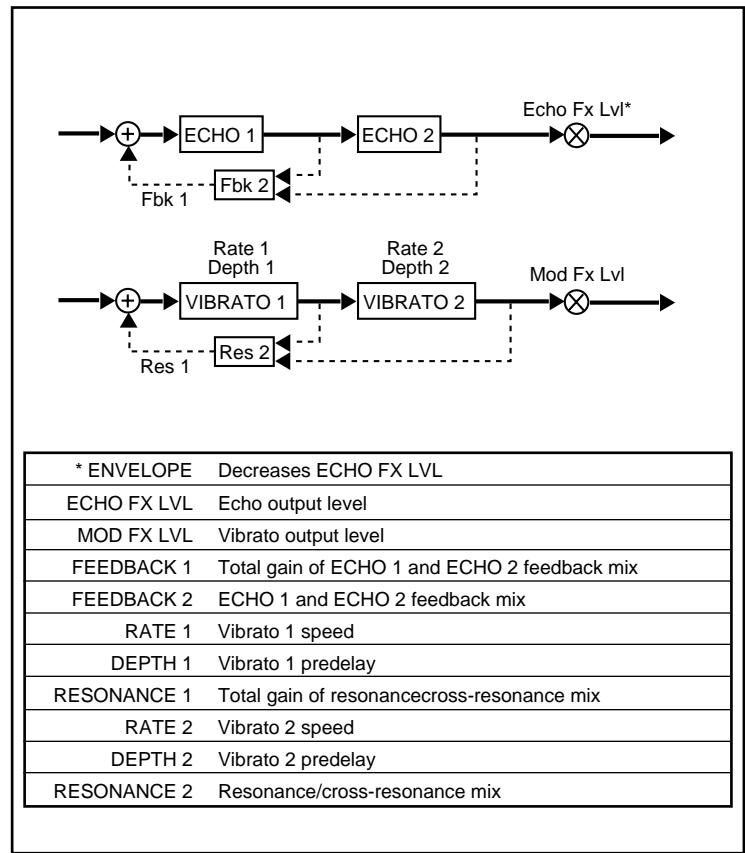
8 DUO
A
Duo A is configured as two independent mono effects. The left input feeds a cascade echo. The right input feeds a cascade vibrato.
ENVELOPE decreases ECHO FX LVL, pulling the echoes down out of the way of loud signals, and bringing them back up whenever softer signals are received.
FEEDBACK 2 controls the mix of ECHO 1 feedback and ECHO 2 feedback. When this value is 1, this mix is all ECHO 1 feedback. At 64, the mix is all ECHO 2 feedback. Between these extremes, ECHO 1 is fed by a mixture of the two feedbacks. These intermediate settings produce echo rhythms that change over time. FEEDBACK 1 controls the total feedback level.
The cascade vibrato configuration allows unique multi-rate modulation effects. RESONANCE 2 controls the mix of VIBRATO 1 and VIBRATO 2 resonance. When this value is 1, this mix is all VIBRATO 1 resonance. At 64, the mix is all VIBRATO 2 resonance. Between these extremes, VIBRATO 1 is fed by a mixture of the two resonances. RESONANCE 1 controls the total resonance level.
The Preset is designed to work with two different signals feeding left and right. The left is set to produce long echoes, ducked by ENVELOPE. The right is set to create a multi-rate chorus effect.
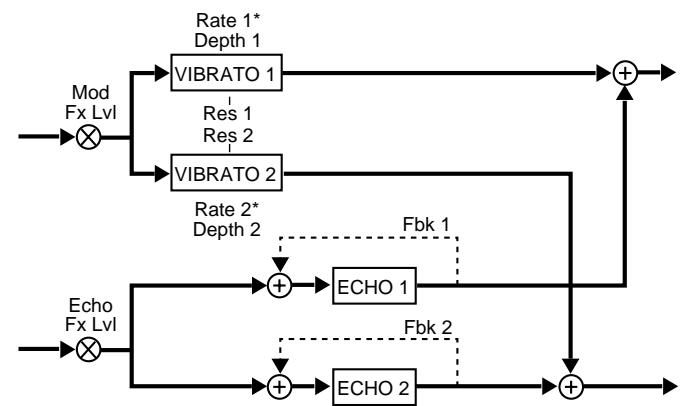
| * ENVELOPE | Increases vibrato rates |
| ECHO FX LVL | Left input into echoes |
| MOD FX LVL | Right input into vibrato |
| FEEDBACK 1 | Feedback gain around ECHO 1 |
| FEEDBACK 2 | Feedback gain around ECHO 2 |
| RATE 1 | Vibrato 1 rate |
| DEPTH 1 | Vibrato 1 predelay |
| RESONANCE 1 | Vibrato 1 and Vibrato 2 resonance |
| RATE 2 | Vibrato 2 rate |
| DEPTH 2 | Vibrato 2 predelay |
| RESONANCE 2 | Vibrato cross-mix |
8 DUO
B
Duo B is configured as two independent mono in/stereo out effects. The left input feeds a dual vibrato effect. The right input feeds a dual delay effect.
ENVELOPE increases vibrato rates, with louder notes making the vibrato quicker. DEPTH 1 and DEPTH 2 control offset delay for the left and right vibrato. Small differences in these two values will widen the mono signal.
RESONANCE 1 is the resonance gain for both VIBRATO 1 and VIBRATO 2. RESONANCE 2 is a cross-mix control for the vibrato effect. As RESONANCE 2 is increased, the outputs of VIBRATO 1 and VIBRATO 2 (in addition to being sent to the left and right) are sent to the opposite outputs. This fills in the center of the stereo vibrato effect.
The Preset is designed to work with either a mono signal, or with two different signals feeding left and right. The left is set to produce a dynamic stereo vibrato. The right is set to create a stereo echo effect with quarter-notes in the left side and quarter-note triplets on the right side.
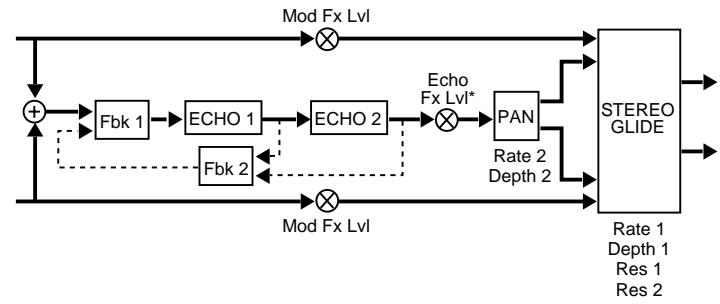
| * ENVELOPE | Decreases ECHO FX LVL |
| ECHO FX LVL | Delayed output into stereo glide |
| MOD FX LVL | Undelayed input to stereo glide |
| FEEDBACK 1 | Input/feedback mix (1=no feedback; 64=infinite repeat) |
| FEEDBACK 2 | Feedback/cross-feed mix |
| RATE 1 | Stereo glide rate |
| DEPTH 1 | Stereo glide depth |
| RESONANCE 1 | Stereo resonance |
| RATE 2 | Autopan rate |
| DEPTH 2 | Autopan width (min=center, max=L to R) |
| RESONANCE 2 | Stereo glide cross-resonance gain |
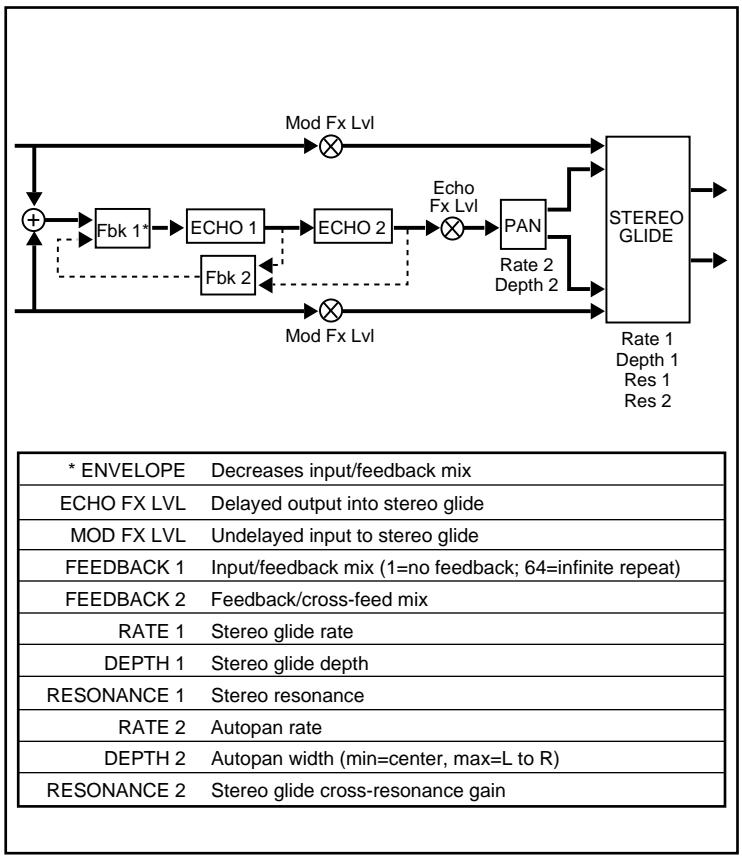
9 DEJA VU
A
Deja Vu A is configured with a cascade looper with envelope control of the looper's output level. The output of the looper is fed into a panner which sprays the effect into a stereo glide. The stereo glide is also fed directly by the inputs.
ENVELOPE decreases ECHO FX LVL, pulling the echoes down out of the way of loud signals, and bringing them back up whenever softer signals are received.
FEEDBACK 2 controls the mix of ECHO 1 feedback and ECHO 2 feedback. When this value is 1, this mix is all ECHO 1 feedback. At 64, the mix is all ECHO 2 feedback (producing the longest echoes.) Between these extremes, ECHO 1 is fed by a mixture of the two feedbacks. These intermediate settings produce echo rhythms that change over time.
FEEDBACK 1 controls the mix of input signal and feedback mix fed into ECHO 1. When FEEDBACK 1 = 1 , there is no feedback. At 64, only feedback is sent into the echoes. This creates an infinite loop. Setting DEPTH 2 to 1, in effect, turns off the panner.
In the Preset, the panner and the stereo glide are turned off, leaving just a simple echo ducking effect. Turn up DEPTH 1 and DEPTH 2 to add modulation and panning.
9 DEJA VU
B
Deja Vu B is configured with a cascade looper with envelope control of the looper's input mix. The output of the looper is fed into a panner which sprays the effect into a stereo glide. The stereo glide is also fed directly by the inputs.
All of the controls in this effect are identical to those of the A version, except that here ENVELOPE decreases the input/feedback mix. Loud signals increase the amount of input signal in the mix; soft signals increase the amount of feedback.
The Preset creates a unique overdub looper. Whatever you play will be repeated indefinitely. New material will replace older portions of the loop as it is played.
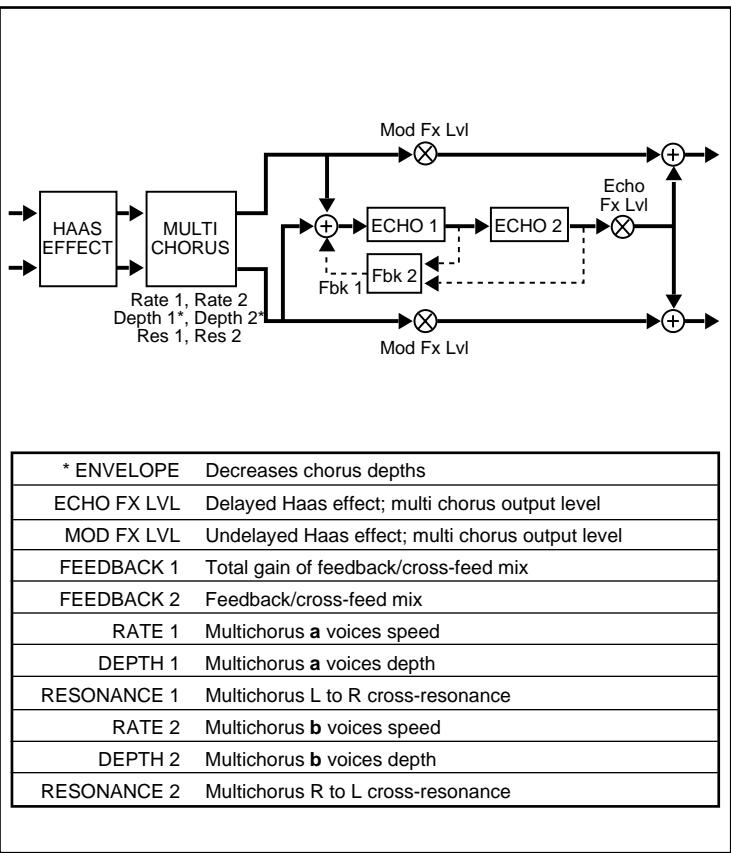
10 CHOIR
A
Choir A is configured with three modules: Haas Effect, Multi Chorus and cascaded echoes. This effect produces rich chorusing, widens stereo images and synthesizes stereo from mono sources.
ENVELOPE decreases chorus depths, so that the chorus effect increases as the signal gets softer. The Haas Effect places small fixed delays on the left and right inputs to push signals outward in the stereo field. No controls are provided for this effect, which is always present and fixed.
The multichorus module has two independent sets of stereo voices (a and b). RATE 1 and DEPTH 1 control the speed and depth of the a set of voices. RATE 2 and DEPTH 2 control the b voices.
The cascade echo fills the central space left by the stereo signal spread created by the Haas Effect.
FEEDBACK 2 controls the mix of ECHO 1 feedback and ECHO 2 feedback. When this value is 1, this mix is all ECHO 1 feedback. At 64, the mix is all ECHO 2 feedback. Between these extremes, ECHO 1 is fed by a mixture of the two feedbacks. These intermediate settings produce echo rhythms that change over time. FEEDBACK 1 controls the total feedback level.
The Preset is a rich stereo chorus that works well with either stereo or mono sources. FEEDBACK 2 is set to 29, causing the cascaded echoes to produce a rhythm pattern which changes over time.
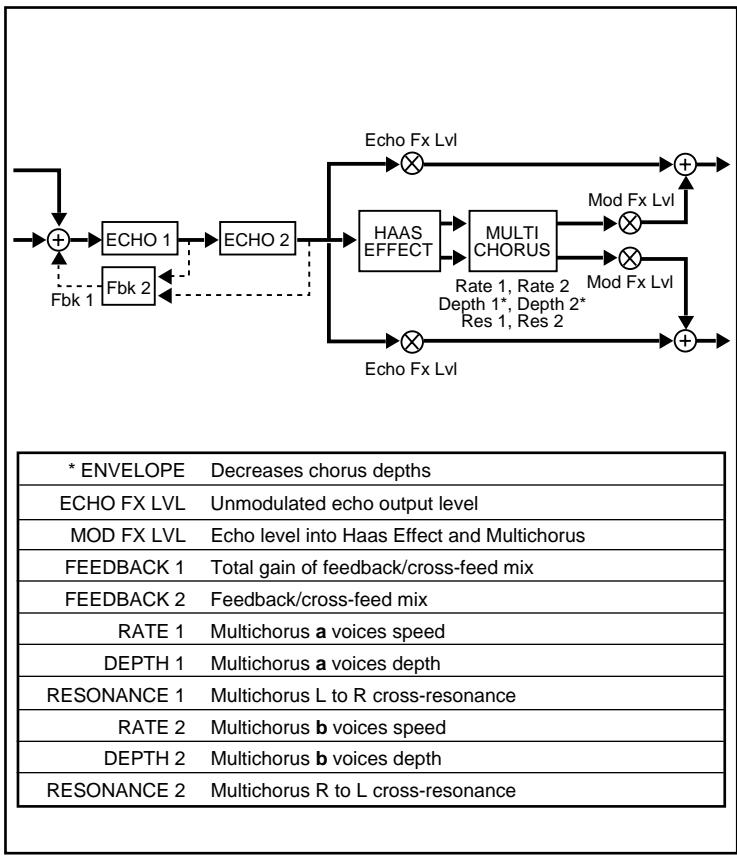
10 CHOIR
B
Choir B is predominantly an echo effect, with a cascade looper feeding a Haas Effect and a multichorus module.
ENVELOPE decreases chorus depths, so that the chorus effect increases as the signal gets softer.
The controls are the same as those in Version A. In Version B, however, the input signal is summed to mono and sent into the cascade echo. The output of the cascade echo is sent equally to the left and right outputs, and into the Haas Effect which converts the mono signal into a wide image. From there, the signals are sent into the multichorus effect and recombined with the echo effect at the output.
The Preset has MIX set to nearly dry (17), so that your orginal signal is heard unprocessed, then is surrounded by a rich choir of echoes.
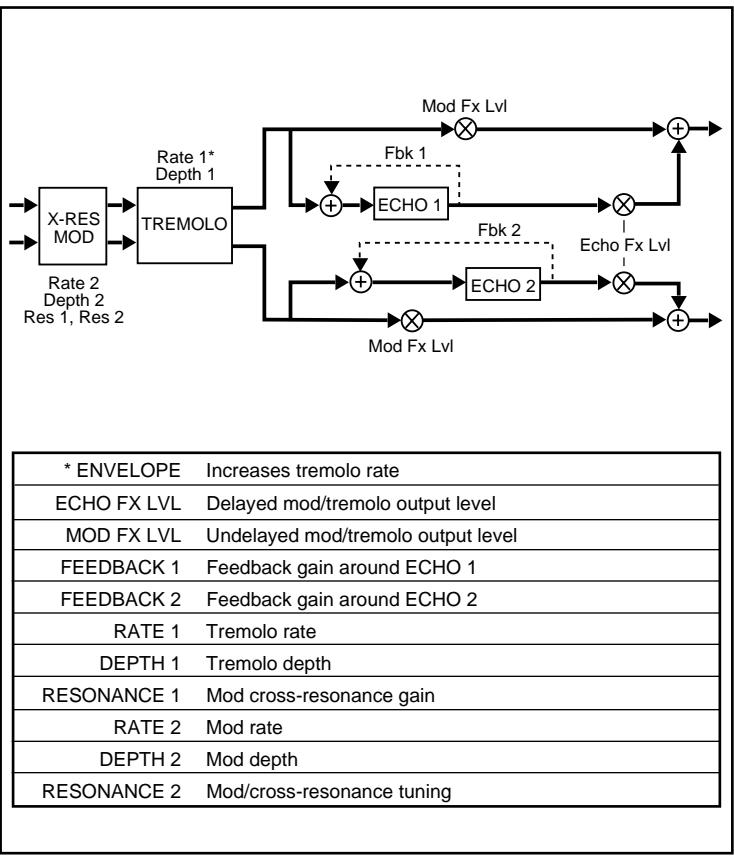
11 SHIMMER
A
Shimmer A utilizes a cross-resonance modulator feeding a stereo tremolo, which is, in turn, sent to both the outputs and the inputs of a stereo echo pair. The tremolo in this effect is mono compatible.
ENVELOPE increases the tremolo rate, so that the tremolo rate increases as signals get louder.
Tremolo is a stereo effect, in that a stereo signal fed into the effect maintains its stereo image throughout. Tremolo is synchronized so that left and right channels move together. The tremolo effect is maintained even if the output of Vortex is mixed to mono.
The Preset is set to provide dynamically controlled tremolo. Increase DEPTH 2 to add modulation effects. Increase ECHO FX LVL to add echoes.
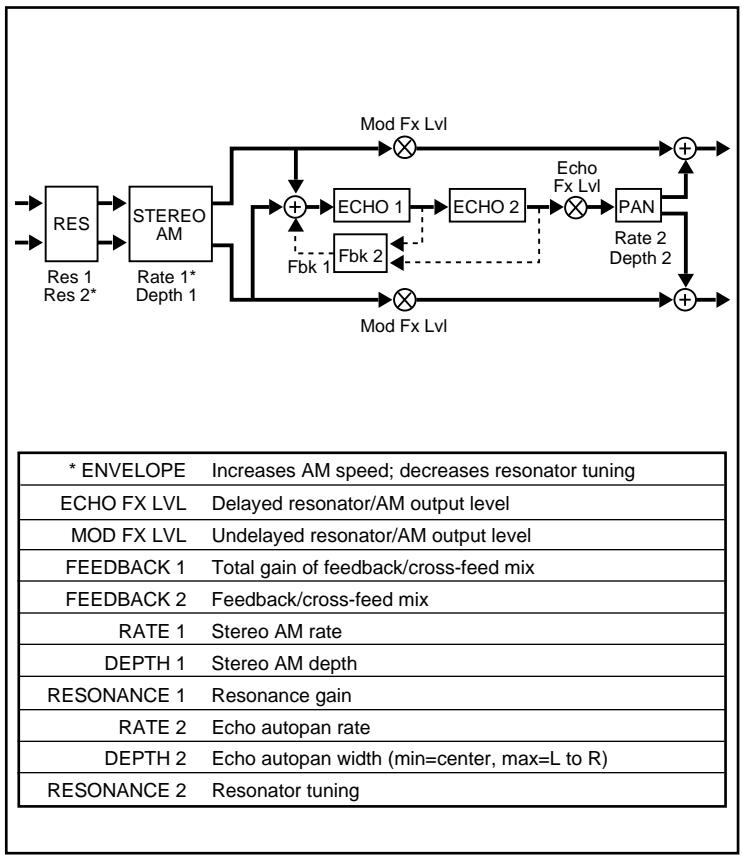
11 SHIMMER
B
Shimmer B has a stereo resonator feeding a stereo amplitude modulator, which is, in turn, sent to both the outputs and the inputs of a cascaded echo. The output of the cascaded echoes is sent to an auto-panner before it too is sent to the outputs.
ENVELOPE increases the amplitude modulation speed and decreases the resonator tuning so that, as signals get louder, the speed of the amplitude modulation increases and the tuning value decreases.
This effect has a tunable resonator which allows you to emphasize different frequencies based on the value of RESONANCE 2. The amount of resonance is controlled by RESONANCE 1. At higher values, this will produce a pronounced ringing at the tuned frequency. As ENVELOPE can control this tuned frequency, many unusual dynamic effects can be created by playing with the envelope and resonance controls.
DEPTH 1 controls the amount of signal sent to the amplitude modulator. For any effect to be heard, this must be set to a value greater than 1. Amplitude is modulated 90^ out of phase. High values of RATE 1 can produce "ring modulator" effects.
The Preset creates a shimmering wash of sound. This is done by combining dynamic amplitude modulation and echo panning.
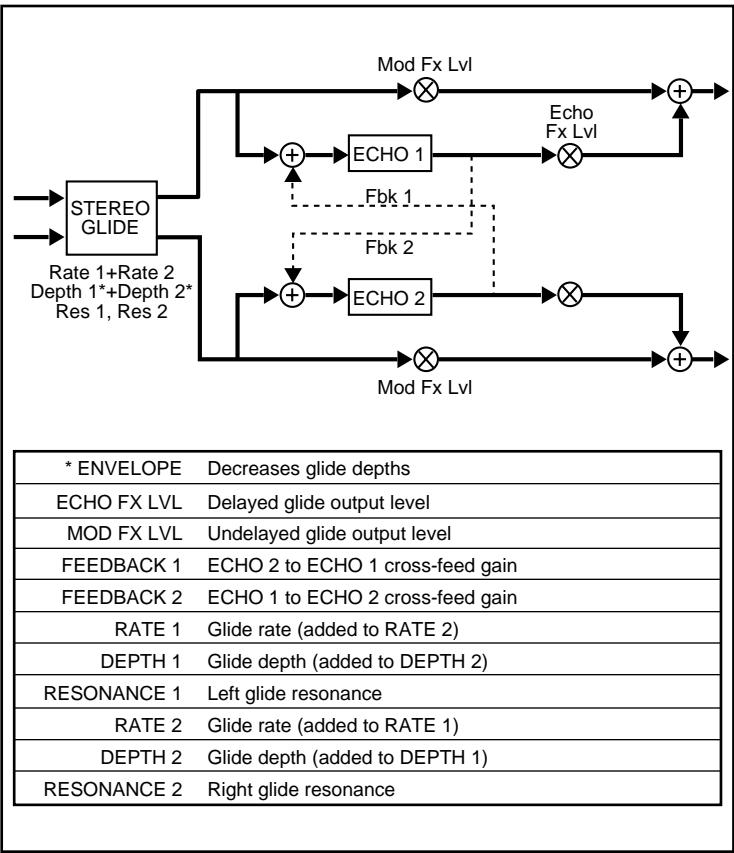
12 SWEEP
A
Sweep A consists of a stereo glide whose outputs go directly to both left and right outputs, as well as to a pair of cross-feed echoes.
ENVELOPE decreases the glide depths, so that the glide effect grows stronger as sound fades. The Stereo Glide is used to create a vibrato-like pitch shift, with pitch modulation synchronized for left and right. The amount of glide, and its speed, are determined by the combined settings of the rate, depth, and resonance controls. This effect creates complex periodic combinations. If there is no dry signal in the mix (MIX=64) you will get vibrato-like effects. Decreasing the value of MIX will yield more of a chorusing effect.
The cross-feed echoes give you echo rhythms that cross from left to right.
The Preset gives you dynamically controlled vibrato that fades in as your sound fades out.
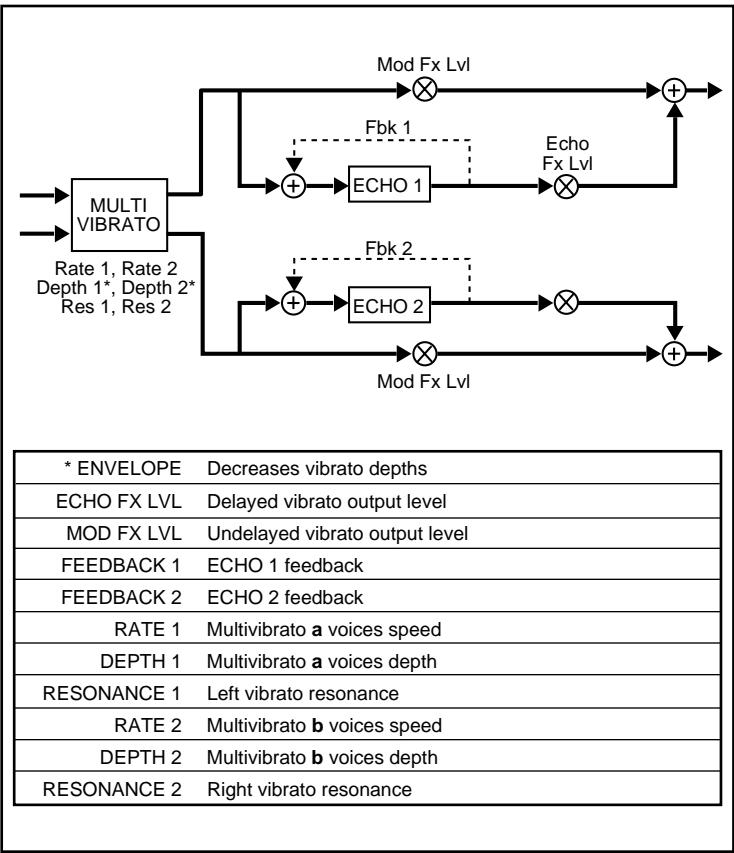
12 SWEEP
B
Sweep B consists of a stereo multi-vibrato effect whose outputs go directly to left and right outputs, as well as to a stereo pair of echoes.
ENVELOPE decreases the vibrato depths, so that vibrato grows stronger as sounds fade.
The vibrato effect has two sets of stereo vibrato voices. One set of voices (a) is controlled by RATE 1 and DEPTH 1. The other set (b) is controlled by RATE 2 and DEPTH 2. The a voices shift in pitch in opposition to each other, as do the b voices. This can be used to produce very rich vibrato and chorus effects.
ECHO 1 is fed by the left vibrato voices. ECHO 2 is fed by the right vibrato voices. Mixing the echo effect with the vibrato enhances the effect.
The Preset is a dynamically controlled vibrato. The effect is very deep, with resonance controls turned up to create a very lush sound.
| * ENVELOPE | Decreases feedback mix and echo outputs |
| ECHO FX LVL | Echo output level |
| MOD FX LVL | Modulation output level |
| FEEDBACK 1 | Total gain of feedback/cross-feed mix for both delays |
| FEEDBACK 2 | Feedback/cross-feed mix for both delays |
| RATE 1 | Mod left glide rate |
| DEPTH 1 | Mod left glide depth |
| RESONANCE 1 | Mod cross-resonance (R to L) |
| RATE 2 | Mod right glide rate |
| DEPTH 2 | Mod right glide depth |
| RESONANCE 2 | Mod cross-resonance (L to R) |
13 SHADOW
A
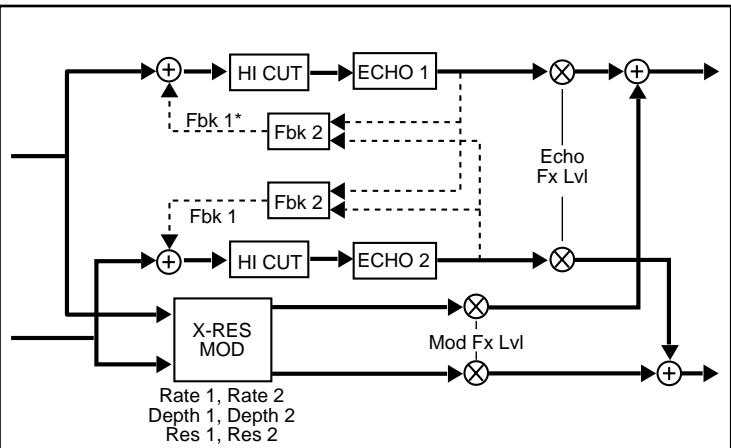
Shadow A is configured as two independent stereo effects. One is a cross-resonance modulator, the other consists of cross-mix echoes with high-cut filters in the feedback paths.
ENVELOPE decreases both feedback mix and echo outputs for both echoes.
The cross-resonance modulator has independent glide rate and depth controls for the left and right sides.
The echoes each have high-cut filters in their respective feedback paths. These filters cause the echoes to get progressively darker as they repeat. This is reminiscent of the sound of tape echo.
The Preset is designed with a subtle stereo chorus in parallel with "analog tape" echoes. ENVELOPE is set to pull echoes way down in the mix while new notes are played. — When your input signal stops, the echoes are heard. Try this with solos and melody lines.
13 SHADOW
B
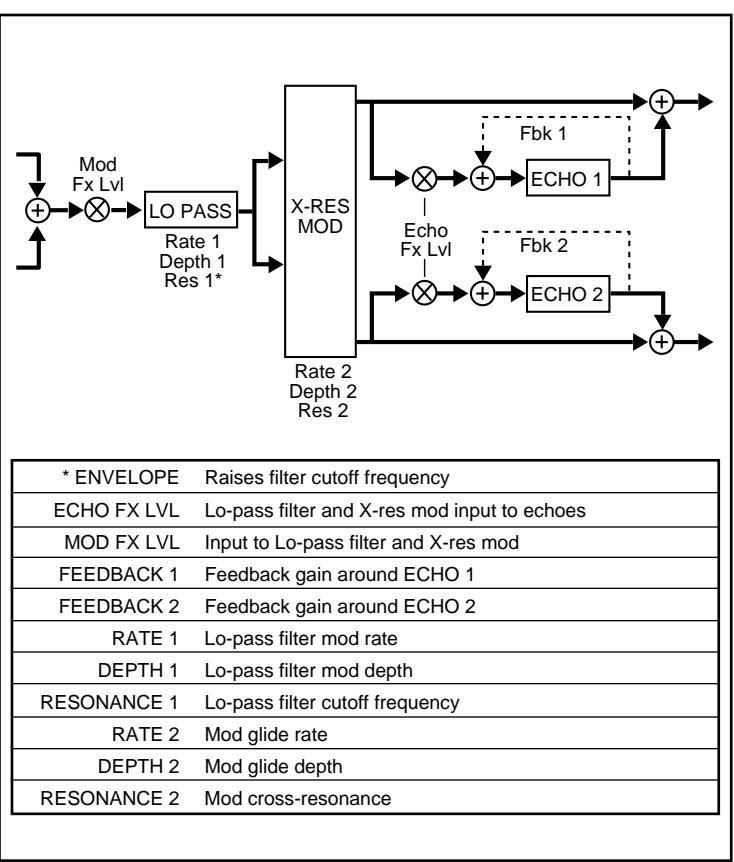
Shadow B uses a dynamic low-pass filter as a master tone control for its modulation and echo effects. The filter can be set for a uniform tone, or used to create constantly varying shades from light to dark.
ENVELOPE raises filter cutoff frequency, so that loud signals are bright, then darken as they fade.
The low-pass filter, in addition to being dynamically controlled by ENVELOPE, is controlled by RATE 1, DEPTH 1, and RESONANCE 1. RESONANCE 1 sets the cutoff frequency of the filter. (Higher values correspond to higher cutoff frequencies.) RATE 1 and DEPTH 1 are modulation controls for the filter. This filter acts as a master tone control for the entire effect.
The filter can be set to specific values (using RESONANCE 1) to cause the effect to be uniformly dark or bright. Alternatively, RATE 1 and DEPTH 1 can be set to produce degrees of brightness and darkness that constantly change throughout the effect.
The Preset uses slow modulation of the filter to effectively fade echo and modulation effects in and out of your sound while simultaneously changing their tone from bright to dark.
14 CYCLOID
A
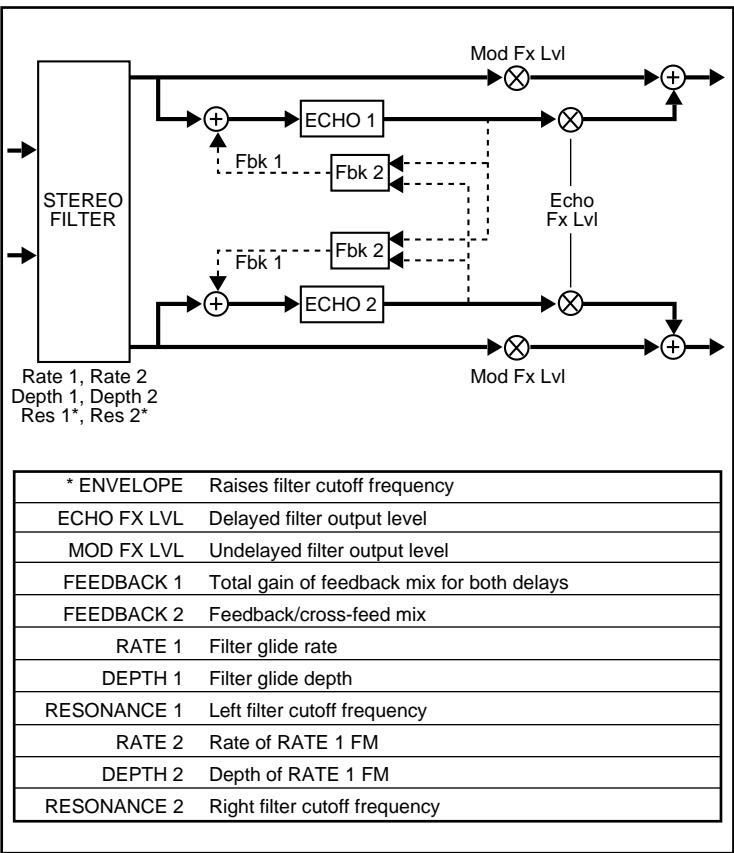
Cycloid A utilizes a dynamic stereo low-pass filter that produces different spatial effects by cyclic changes in the tone of left and right signals.
ENVELOPE raises the filter cutoff frequency, so that loud sounds are initially bright, then grow darker as they fade. The filter cutoff frequency is also controlled by DEPTH 1 and by both resonance controls. The interaction of these parameters with the ENVELOPE control produces many interesting dynamic effects. The filter is modulated by a sine² wave form (left and right are modulated 90^ out of phase with respect to each other) to produce "filter panning," where the sound moves from left to right based on tone rather than level. RATE 1 and DEPTH 1 control the speed and amount of filter modulation. The rate of this modulation can itself be modulated by RATE 2 and DEPTH 2 (FM).
Placing the echoes behind the filter gives control over the tone color of the signal going into the echoes. (Each echo repeat has the same degree of darkness.)
The Preset creates a swirling, left-right motion by modulating the filter with RATE 1 and DEPTH 1. The speed of this motion is subtly varied by RATE 2 and DEPTH 2. ENVELOPE control is used to decrease the motion on louder signals. Left and right eighth-note, triplet, and sixteenth-note echoes increase the apparent "width" of the sound.
14 CYCLOID
B
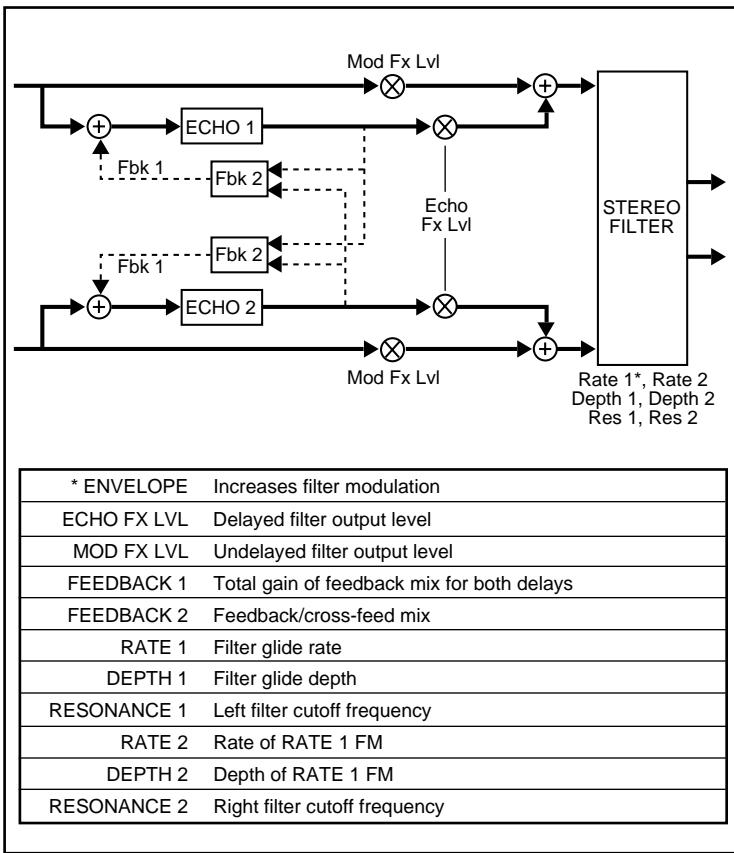
Cycloid B varies the configuration used in Cycloid A by placing the cross-mix echoes in front of the stereo filter. This allows the filter to change the tone of echoes as they repeat.
ENVELOPE increases RATE 1 (filter modulation), so that you can set the filter to behave in a specific way when there is input, and another way when the signal is absent and there are only repeating echoes. All other controls are as described in Cycloid A.
The Preset uses dynamic control of the filter modulation rate to cause filter panning to increase with loud signals. When no input signal is present, echoes still flow through the filter, but at a slower panning rate. Settings of ECHO 1 and 2, and FEEDBACK 1 and 2, control these bouncing echoes. Use FEEDBACK 1 to increase or decrease the total amount of feedback.
15 BLEEN
A
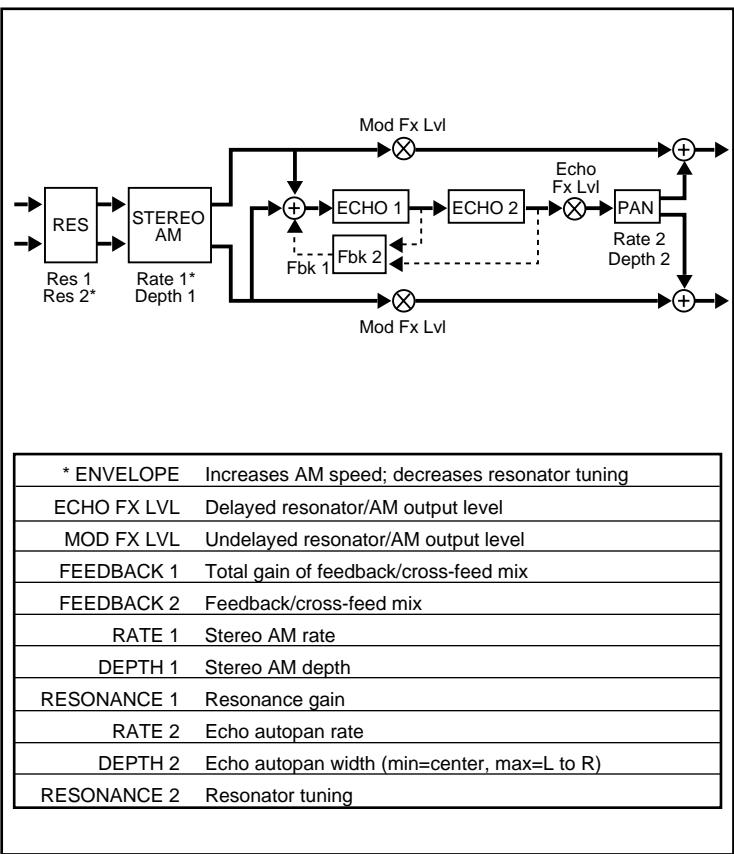
Bleen A has a stereo resonator feeding a stereo amplitude modulator, which is, in turn, sent to both the outputs and the inputs of a cascaded echo. The output of the cascaded echoes is sent to an auto-panner before it too is sent to the outputs.
ENVELOPE increases the amplitude modulation speed and decreases the resonator tuning so that, as signals get louder, the speed of the amplitude modulation increases and the tuning value decreases.
This effect has a tunable resonator which allows you to emphasize different frequencies based on the value of RESONANCE 2. The amount of resonance is controlled by RESONANCE 1. At higher values, this will produce a pronounced ringing at the tuned frequency. As ENVELOPE can control this tuned frequency, many unusual dynamic effects can be created by playing with the envelope and resonance controls.
DEPTH 1 controls the amount of signal sent to the amplitude modulator. For any effect to be heard, this must be set to a value greater than 1. Amplitude is modulated 90^ out of phase. High values of RATE 1 can produce "ring modulator" effects.
This Preset is an example of a dramatic special effect driven by the dynamics of the input signal. This works particularly well with sources that produce short percussive sounds.
| * ENVELOPE | Amount of detune (Loud signals=max detune,soft=none) |
| ECHO FX LVL | Echo output level |
| MOD FX LVL | Stereo envelope detune output |
| FEEDBACK 1 | Fixed feedback gain for ECHO 1 and ECHO 2 |
| FEEDBACK 2 | Fixed cross-feed gain for ECHO 1 and ECHO 2 |
| RATE 1 | ECHO 1 and ECHO 2 feedback AM rate |
| DEPTH 1 | ECHO 1 and ECHO 2 feedback AM depth |
| RESONANCE 1 | Resonance gain for left detune |
| RATE 2 | ECHO 1 and ECHO 2 cross-feed AM rate |
| DEPTH 2 | ECHO 1 and ECHO 2 cross-feed AM depth |
| RESONANCE 2 | Resonance gain for right detune |
15 BLEEN
B
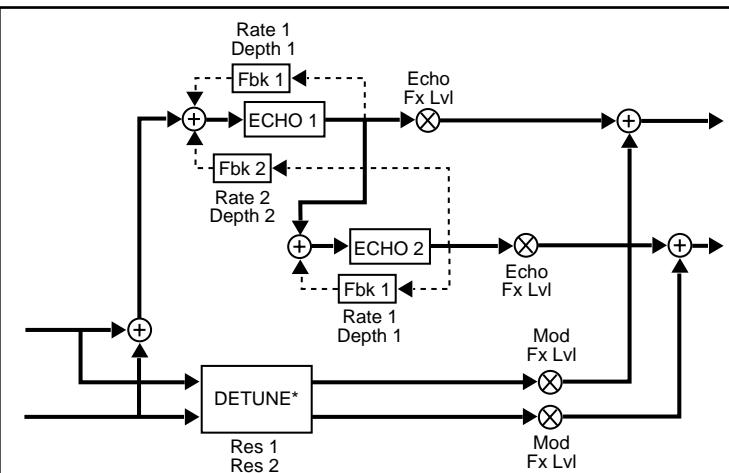
Bleen B is configured as two parallel effects. One has stereo envelope detune, and the other has a unique echo configuration with feedback AM.
ENVELOPE controls the amount of detune. The output of the detuner is controlled by MOD FX LVL. If this control is turned down to 1, it completely shuts down the detune effect. Likewise, the output of the bounce echo is controlled by ECHO FX LVL which, if turned down to 1, will completely shut down the echo effect.
The echoes are arranged in series. ECHO 1 feeds the left output, while ECHO 2 feeds the right. This generates echoes that bounce between left and right. FEEDBACK 1 controls the amount of feedback for both echoes. FEEDBACK 2 controls the amount of cross-feedback for both echoes. RATE 1 and DEPTH 1 control amplitude modulation of the feedback for both echoes. RATE 2 and DEPTH 2 control the amplitude modulation of the cross-feedback for both echoes. Turning up DEPTH 1 and/or DEPTH 2 modulates feedback (or cross-feed) levels. At low rates, this produces a tremolo-like effect. At faster rates, this produces "ring modulator" effects.
The Preset takes advantage of a large pitch bend driven by input amplitude. This creates dramatic effects with short percussive sounds or with intermittent material such as brief vocal phrases. The preset produces echoes that change in pitch as they bounce from side to side. Turn up DEPTH 2 to extend these bouncing pitch-shifted echoes.
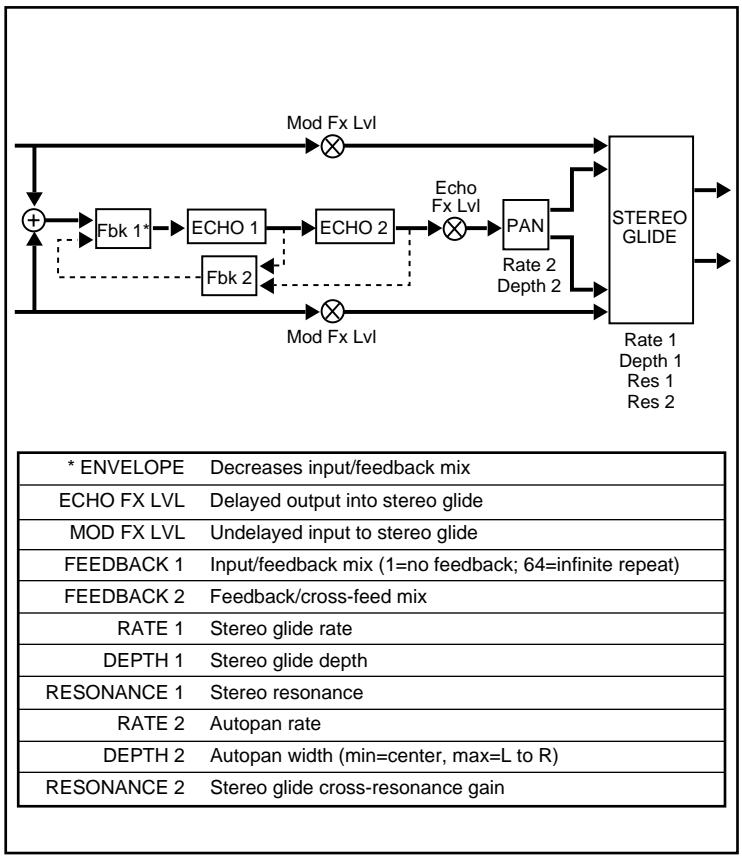
16 FRACTAL


Fractal A and B are configured with a cascade looper with envelope control of the looper's input mix. The output of the looper is fed into a panner which sprays the effect into a stereo glide. The stereo glide is also fed directly by the inputs.
ENVELOPE decreases the input/feedback mix. Loud signals increase the amount of input signal in the mix; soft signals increase the amount of feedback.
FEEDBACK 2 controls the mix of ECHO 1 feedback and ECHO 2 feedback. When this value is 1, this mix is all ECHO 1 feedback. At 64, the mix is all ECHO 2 feedback (producing the longest echoes.) Between these extremes, ECHO 1 is fed by a mixture of the two feedbacks. These intermediate settings produce echo rhythms that change over time.
FEEDBACK 1 controls the mix of input signal and feedback mix fed into ECHO 1. When FEEDBACK 1 = 1 , there is no feedback. At 64, only feedback is sent into the echoes. This creates an infinite loop.
Setting DEPTH 2 to 1, in effect, turns off the panner.
About the Fractal Presets
FractalA produces a long echo with rhythm patterns that degenerate as the echo repeats and fades away. The unusual rhythm effect is created by setting FEEDBACK 2 to a mixture of feedback and cross-feed echoes. The echoes are panned from side to side, and then modulated by the stereo glide.
Fractal B is designed as a looper, with input signals looping indefinitely. As phrases within the loop repeat, they are deconstructed, causing a linear sequence of sounds to stack up into a single repeating event. In addition, the output of the looper is panned back and forth and modulated by the stereo glide.
Specifications
Audio Inputs (2)
Level -30dBu minimum
Impedance stereo/50kΩ unbalanced
mono/25kΩ unbalanced
Audio Outputs (2)
Level -2dBu nominal
+8dBu maximum
Impedance 600Ω unbalanced
Footswitch Connectors
Tip/Ring/Sleeve phone jacks (2) for:
Bypass and Register Step
Tap and A/B Selection
Footpedal Connector
Tip/Ring/Sleeve phone jack for Expression pedal with stereo plug
A/B Relay
Tip/Ring/Sleeve phone jack, rated at ≤ 100mA
Frequency Response
20Hz-14kHz, +1dB to -3dB
THD+N
<0.03%@1kHz
Dynamic Range
83dB typical, 20Hz-20kHz bandwidth
Conversion
Delta-Sigma modulation with 64x oversampling
Power Requirements
9VAC, 1A wall transformer provided
Dimensions
19"W x 1.75"H x 4"D (483 x 45 x 102mm)
Weight
Unit: 2 lbs, 12 oz (1.2kg)
Environment
Operating
Temperature 32^ to 104^ (0^ to 40^)
Storage -20° to 170° F (-30° to 75°C)
Relative
Humidity 95% non-condensing
Specifications subject to change without notice.
English
Lexicon

AUDIO MORPHING PROCESSOR
Mode d'emploi
François
Table des matieres
Mise en route 1
Introduction 1
Commander la transmutation
par pédale
Contournment (BYPASS)
AUDIO MORPHING PROCESSOR
Bedienungsanleitung
Deutsch
Inhaltsverzeichnis
Zu Beginn 1
Einführung 1
ZudenOrbits-Presents
AUDIO MORPHING PROCESSOR
Guía del usuario
Espanol
Indice
Comenzando 1
Introduccion 1
Panel frontal 2
AUDIO MORPHING PROCESSOR
Guida per l'Utente
Italiano
Controllo a Pedale 18
The detune is driven by ENVELOPE. The amount of detuning increases as the input varies from soft to loud. Different playing dynamics and ENVELOPE values can produce a wide range of effects from subtle pitch changes on note attacks for doubling effects, to radical pitch bends. Turning up RES1 and RES2 creates envelope flanging effects. MOD FX LVL controls the undelayed output of the detune effect.