CRUNCHTONE - Guitar amplifier LINE 6 - Free user manual and instructions
Find the device manual for free CRUNCHTONE LINE 6 in PDF.



User questions about CRUNCHTONE LINE 6
0 question about this device. Answer the ones you know or ask your own.
Ask a new question about this device
Download the instructions for your Guitar amplifier in PDF format for free! Find your manual CRUNCHTONE - LINE 6 and take your electronic device back in hand. On this page are published all the documents necessary for the use of your device. CRUNCHTONE by LINE 6.
USER MANUAL CRUNCHTONE LINE 6
Pilot's Handbook for Crunchtone
Line 6, ToneCore, Constrictor, Crunchtone, Echo Park, Space Chorus, Tap Tremolo and Über Metal are trademarks of Line 6, Inc.
CAUTION
This equipment has been tested and found to comply with the limits for a Class B digital device pursuant to Part 15 of FCC Rules. Operation is subject to the following two conditions: (1) This device may not cause harmful interference, and (2) this device must accept any interference received, including interference that may cause undesired operation.
WARNING
To reduce the risk of fire or electric shock, do not expose this appliance to rain or moisture.

The exclamation point within a triangle means, "Caution!" Please read the information next to all caution signs.

The lightning symbol within a triangle means, "Electrical caution!" It indicates the presence of information about operating voltage and potential risks of electrical shock.

You should read these Important Safety Instructions. Keep these instructions in a safe place.

Before using your ToneCore, carefully read the applicable items of these operating instructions and the safety suggestions.
- Obey all warnings on the pedal and in the ToneCore Pilot's Handbook.
- Connect optional power supply only to AC power outlets rated 100-120V or 200-240V 47-63Hz (see indications on optional power supply).
-
Do not perform service operations beyond those described in the ToneCore Pilot's Handbook. Service is required when the apparatus has been damaged in any way, such as:
-
power-supply cord or plug is damaged
liquid has been spilled or objects have fallen into the apparatus
the unit has been exposed to rain or moisture
the unit does not operate normally or changes in performance in a significant way
the unit is dropped or the enclosure is damaged. -
Do not place near heat sources, such as radiators, heat registers, or appliances which produce heat.
- Guard against objects or liquids entering the enclosure. Do not use or place unit near water.
- Unplug the power supply when not in use for extended periods of time. Unplug the power supply during lightning storms.
- Clean only with a damp cloth.
- Only use attachments/accessories specified by the manufacturer.
- Prolonged listening at high volume levels may cause irreparable hearing loss and/or damage. Always be sure to practice "safe listening."
Crunchtone Pilot's Handbook
Output your ToneCore to your amplifier, or route it through another pedal.
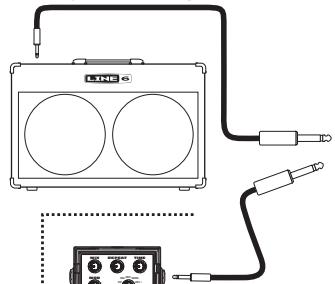
Connect your guitar using a standard cable.
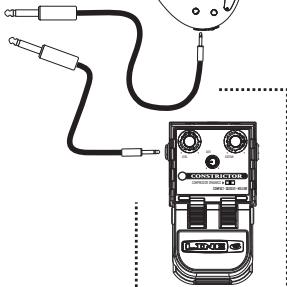
You can, of course, feed your ToneCore with another effect pedal instead of a guitar.
Greetings and salutations! Thank you for inviting the Line 6 Crunchtone overdrive pedal into your life.
Effect On-Off / Power Indicator Light
The Power Indicator Light on your ToneCore uses two colors to indicate the pedal's state:
Light not lit - Effect is bypassed (off)
GREEN - Effect is engaged (on)
- RED (flashing) - Batteries should be replaced
This low power indication will override all other states
Connections and Power Indicator Light
In Jack
Here's where it all begins. Use a standard guitar cable to connect your guitar, or the output of another effect to use in combination with your ToneCore. Like most pedals, inserting a plug into this jack will turn on the power to your ToneCore. Disconnect the plug from this jack when the ToneCore is not being used.
Out Jack
Use a standard guitar cable to connect to the input of a guitar amp, or the input of another effect that will feed your amp.
Power Jack
Connect an optional ToneCore-compatible Line 6 power supply like the DC-1, and you'll never need a 9-volt battery again!
Foot Switch
Stomp on this to turn Crunchtone's effect sound processing on and off.
Crunchtone Pilot's Handbook

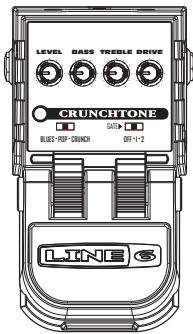
LEVEL BASS TREBLE DRIVE

CRUNCHTONE
BLUES·PDP·CRUNCH
GATE

OFF·1·2
Controls
Level
This sets the output level. Higher levels will hit the amp or effect fed by the Crunchtone with more signal level, giving you more volume. If the level is high enough, it may also cause more distortion to be created within the receiving amp or pedal.
Bass
Add more low end to your sound by turning this knob up, or reduce it by turning the knob down. Point the knob straight up to leave your tone unaltered.
Treble
Just like the Bass knob, only it's working the high end. Point the knob straight up to leave your tone alone.
Drive
The drive knob controls the amount of distortion created within your Crunchtone. You may want to use the Gate to tame unwanted noise, especially when you've got the Drive set high.
Model Switch
Give this a flick to reconfigure the virtual circuitry inside your CrunchTone, and enjoy three distinctly different sound "flavors":
Blues is designed to produce a glassy, snappy 6L6-style overdrive tone for playing the blues.
Pop is just the thing when you need a nice, 60's-style Class A pop rock bark.
Crunch gives a punchy, slightly compressed overdrive tone, much like what you'd get from a full stack amp-and-cab setup.
Gate
Off-Disables the Gate.
Gate 1 - A soft and mild noise gate, self-adjusting to your current Drive knob setting (cool, huh?).
Gate 2 - A heavy, fast-clamping gate. Great for those aggressive metal chords and palm muting.
Battery Access Instructions
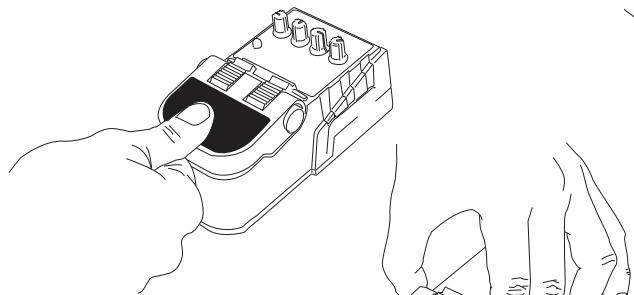
1)Depress pedal fully.
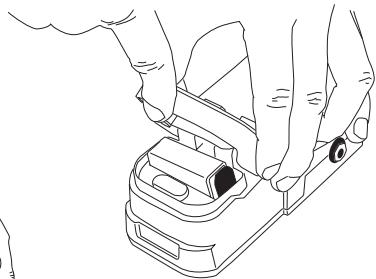
3) Squeezing hinge, raise pedal to reveal battery.
2) While holding pedal, squeeze both sides of hinge as shown.
Battery Access Instructions
Power Supply
Connect an optional Line 6 DC-1 power supply and you'll never need a 9-volt battery again! It is also compatible with most popular 9 Volt DC stomp boxes. Using the power supply will disconnect the battery.

POWER REQUIREMENTS
| Min | Nominal | Max | |
| Supply Voltage | 6 VDC | 9.6 VDC | 16 VDC |
| Supply Current @ 9.6VDC | 40mADC | 60mADC | 100mADC |
| Power @ 9.6VDC | 0.4 Watt | 0.6 Watt | 1 Watt |
Crunchtone Pilot's Handbook

LEVEL BASS TREBLE DRIVE
CRUNCHTONE


BLUES·PDP·CRUNCH
OFF·1·2

LEVEL BASS TREBLE DRIVE

CRUNCHTONE


BLUES·PDP·CRUNCH
OFF·1·2
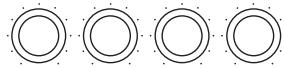
LEVEL BASS TREBLE DRIVE

CRUNCHTONE


BLUES·PDP·CRUNCH
OFF·1·2

LEVEL BASS TREBLE DRIVE


CRUNCHTONE


BLUES·PDP·CRUNCH
OFF·1·2
Texas Blues
Give this setting a try when you're brewing up some Texas shuffle blues.

LEVEL BASS TREBLE DRIVE


CRUNCHTONE


BLUES·PDP-CRUNCH
OFF·1·2
Across The Pond
We like this setting for those nice, jangly pop chords.

LEVEL BASS TREBLE DRIVE


CRUNCHTONE


BLUES·PDP-CRUNCH
OFF·1·2
Stack O' Drive
This setting should give you a generous helping of distortion for thick, sustaining single note lines.
Crunchtone Pilot's Handbook
Please register your purchase now at www.line6.com/register. Or fill out and send in the included registration card. Once you're registered, we can handle problems faster and inform you of advance information, upgrades and other news. Thanks in advance for registering, and good luck in your music!
Line 6, Inc. (hereinafter "Line 6") warrants that your new Line 6 product, when purchased at an authorized Line 6 dealer in the United States of America ("USA") or Canada, shall be free of defects in materials and workmanship for a period of one (I) year from the original date of purchase. Please contact your dealer for information on warranty and service outside of the USA and Canada.
During the warranty period, Line 6 shall, at its sole option, either repair or replace any product that proves to be defective upon inspection by Line 6.
Line 6 reserves the right to update any unit returned for repair and to change or improve the design of the product at any time without notice. Line 6 reserves the right to use reconditioned parts and assemblies as warranty replacements for authorized repairs.
This warranty is extended to the original retail purchaser. This warranty can be transferred to anyone who may subsequently purchase this product provided that such transfer is made within the applicable warranty period and Line 6 is provided with all of the following items: (i) all warranty registration information (as set forth on the registration card) for the new owner, (ii) proof of the transfer within thirty (30) days of the transfer purchase, and (iii) a photocopy of the original sales receipt. Warranty coverage shall be determined by Line 6 in its sole discretion.
This is your sole warranty. Line 6 does not authorize any third party, including any dealer or sales representative, to assume any liability on behalf of Line 6 or to make any warranty for Line 6.
Warranty Information
Line 6 may, at its option, require proof of original purchase date in the form of a dated copy of original authorized dealer's invoice or sales receipt.
Service and repairs of Line 6 products are to be performed only at the Line 6 factory or a Line 6 authorized service center. Line 6 may require advanced authorization of repairs to authorized service centers. Unauthorized service, repair or modification will void this warranty.
DISCLAIMER AND LIMITATION OF WARRANTY
THE FOREGOING WARRANTY IS THE ONLY WARRANTY GIVEN BY LINE 6 AND IS IN LIEU OF ALL OTHER WARRANTY. ALL IMPLIED WARRANTY, INCLUDING WARRANTY OF MERCHANTABILITY AND FITNESS FOR ANY PARTICULAR PURPOSE, EXCEEDING THE SPECIFIC PROVISIONS OF THIS WARRANTY ARE HEREBY DISCLAIMED AND EXCUSED FROM THIS WARRANTY. UPON EXPIRATION OF THE APPLICABLE EXPRESS WARRANTY PERIOD (1 YEAR), LINE 6 SHALL HAVE NO FURTHER WARRANTY OBLIGATION OF ANY KIND, EXPRESS OR IMPLIED. LINE 6 SHALL IN NO EVENT BE LIABLE FOR ANY SPECIAL, INCIDENTAL OR CONSEQUENTIAL DAMAGES SUFFERED BY THE PURCHASER OR ANY THIRD PARTY, INCLUDING WITHOUT LIMITATION, DAMAGES FOR LOSS OF PROFITS OR BUSINESS, OR DAMAGES RESULTING FROM USE OR PERFORMANCE OF THE PRODUCT, WHETHER IN CONTRACT OR INTORT. LINE 6 SHALL NOT BE LIABLE FOR ANY EXPENSES, CLAIMS, OR SUITS ARISING OUT OF OR RELATING TO ANY OF THE FOREGOING. Some states do not allow the exclusion or limitation of implied warranties so some of the above limitations and exclusions may not apply to you. This warranty gives you specific legal rights, and you may also have other rights, which vary, from state to state. This warranty only applies to products sold and used in the USA and Canada. Line 6 shall not be liable for damages or loss resulting from the negligent or intentional acts of the shipper or its contracted affiliates. You should contact the shipper for proper claims procedures in the event of damage or loss resulting from shipment.
Customer Service
Before contacting the Line 6 Customer Service team, please take the time to look through this publication to see if it can answer your questions. Additional helpful information is on the Support page of the Line 6 web site at www.line6.com/support , including the searchable Knowlegebase/FAQTRAQ system which is often the fastest and easiest way to get the answers you need.
Need to talk to an actual human on the Line 6 Customer Service team by phone? Have your serial number handy and take some notes for yourself before you call, so you remember everything you want to ask about. In the USA or Canada, you can contact Line 6 at (818) 575-3600, 8AM to 5PM Monday through Friday (Pacific Time). Outside the USA and Canada, please contact your distributor directly to arrange service. The list of Line 6 distributors is available on the Internet at www.line6.com.
To obtain factory service
You must obtain a return authorization (RA) number before sending any unit to Line 6 for service. Products returned without an RA number will be returned to your at your sole expense. If you live in the United States, log an incident in our online support system at www.line6.com/support or call (818) 575-3600 or and we will help you find the best way to get your unit repaired, whether it be returning the unit to Line 6 or finding an Authorized Service Center. If you live in Europe, email euroinfo@line6.com or call Line 6 UK at +44 (0)178 882 1600. If you live outside of these areas, please contact your local distributor. If you do not know whom your distributor is, either call us at (818) 575-3600 or use the distributor locator at www.line6.com/support .
Line 6, ToneCore, Constrictor, Crunchtone, Echo Park, Space Chorus, Tap Tremoloy Uber Metal son marcas commerciales de Line 6, Inc.
PRECAUCION
Line 6, ToneCore, Constrictor, Crunchtone, Echo Park, Space Chorus, Tap Tremolo en Uber Metal়n handelsmerken van Line 6, Inc.
OPGELET
Drayton Fields Industrial Estate, Daventry
Northamptonshire NN1 5PB
Groot-Britannie