
MAGICOLOR 4690MF - Color laser multifunction printer KONICA - Free user manual and instructions
Find the device manual for free MAGICOLOR 4690MF KONICA in PDF.


| Product type | Color laser multifunction printer |
| Brand | Konica Minolta |
| Model | Magicolor 4690MF |
| Main functions | Print, copy, scan, fax |
| Print speed | 25 ppm color and black & white |
| Print resolution | 2400 x 600 dpi (class) |
| Recommended monthly duty cycle | 120,000 pages |
| Maximum paper capacity | 850 sheets (with optional 500-sheet tray) |
| Standard paper input | 1 x 250-sheet tray + 100-sheet multipurpose tray |
| Automatic duplex | Yes (print, copy, scan) |
| Automatic document feeder (RADF) | 50 sheets, up to 216 x 356 mm |
| Connectivity | Ethernet 10/100BaseTX, USB 2.0, USB 1.1 Host |
| Scanning | To Email, FTP, SMB, USB; TWAIN and WIA drivers |
| Fax | Super G3 33.6 Kbps, 6 MB memory, 220 speed dials |
| Dimensions (W x D x H) | 539 x 590 x 578 mm |
| Weight | 55 kg (with consumables) |
| Power supply | 100-240 V AC, 50/60 Hz |
| Power consumption (average) | 650 W printing, 25 W economy standby |
| Noise level | 53.5 dB printing, 54.5 dB copying |
| Operating temperature | 10 to 35 °C |
| Operating humidity | 15 to 85% RH |
| Main consumables | Toner (CMYK), imaging units, waste toner bottle |
| Warranty | 1 year on-site |
Frequently Asked Questions - MAGICOLOR 4690MF KONICA
User questions about MAGICOLOR 4690MF KONICA
0 question about this device. Answer the ones you know or ask your own.
Ask a new question about this device
Download the instructions for your Color laser multifunction printer in PDF format for free! Find your manual MAGICOLOR 4690MF - KONICA and take your electronic device back in hand. On this page are published all the documents necessary for the use of your device. MAGICOLOR 4690MF by KONICA.
USER MANUAL MAGICOLOR 4690MF KONICA
MULTIPLE FUNCTIONS—ONE ADDRESS
Save time, space, and money with the magicolor® 4690MF color laser all-in-one. This compact multitasker features professional-quality printing and copying at 25 ppm color and b&w. It also boasts enhanced scanning and 33.6 Kbps Super G3 fax functionality. Yet, its space-saving design easily fits into any size workspace. And this quiet workhorse won't disturb your office. Even while delivering bold two-sided prints the magicolor 4690MF keeps noise levels at a minimum so you can carry on business as usual. Time saving print/copy/scan/fax options and user friendly design make the magicolor 4690MF the perfect complement to any productive work environment.
magicolor 4690MF
ULTRA FAST 25 PPM PRINT AND COPY SPEED-COLOR AND B&W
UP TO 120,000 PRINT-PER-MONTH DUTY CYCLE
VIVID 2400 X 600 DPI-CLASS PRINT QUALITY
AMAZING COLOR WITH SIMITRI® HD POLYMERIZED TONER
SCAN TO EMAIL, SMB, FTP OR USB; NETWORK TWAIN
33.6 KBPS SUPER G3 FAX CAPABILITY
50-SHEET REVERSING AUTO DOCUMENT FEEDER FOR MULTI-PAGE COPIES & SCANS
BUILT-IN AUTOMATIC DUPLEXER AND REVERSING AUTOMATIC DOCUMENT FEEDER FOR TWO-SIDED PRINTS, COPIES AND SCANS
LOWER HEIGHT FOR INCREASED ACCESSIBILITY
850-SHEET MAX. PAPER CAPACITY WITH 500-SHEET OPTIONAL TRAY
▶ PAGESCOPE® UTILITIES FOR ADVANCED PRINTER MANAGEMENT
DO BUSINESS BETTER
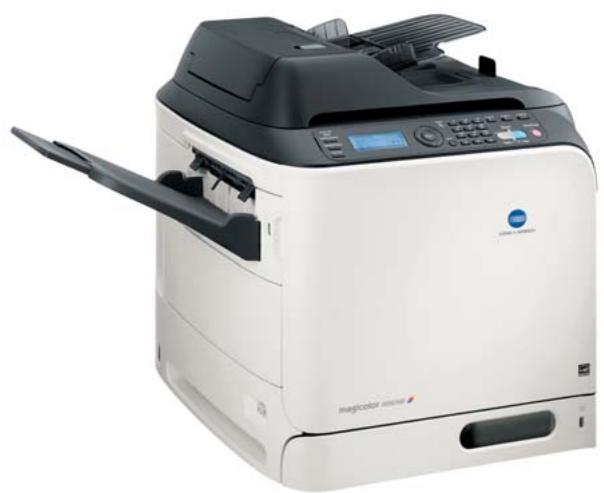


LOW ACOUSTIC LEVELS. THE MAGICOLOR 4690MF WON'T DISTURB YOUR WORKSPACE. EVEN WHILE DUPLEXING, THIS QUIET WORKHORSE HAS THE LOWEST ACOUSTIC LEVEL IN ITS CLASS.
COMPACT MULTITASKER
Full function all-in-one. The magicolor 4690MF prints, copies, faxes, even scans from one location. A one-product solution for your organization's essential business functions means less time and money spent maintaining separate machines and more time focusing on the important tasks at hand.
Versatile office assistant. The magicolor 4690MF easily satisfies the demands of a busy office by effortlessly transitioning between print, copy, scan or fax modes for flawless results.
PRODUCTIVITY CENTER
Quick, quality color. Create bold prints, detailed scans and crisp faxes with the touch of a button. The magicolor 4690MF delivers prints and copies at 25 ppm—color and b&W. And with enhanced scanning and intuitive faxing features this streamlined workhorse will deliver high-quality results from the first page to the last.
Economical and time saving. The magicolor 4690MF comes equipped with an internal automatic duplexer and a 50-sheet reversing automatic document feeder. Two-sided printing delivers economical, high impact documents while a built-in RADF means less micro-managing and more productivity.
FEATURES, OPTIONS & BENEFITS
Consolidate your office essentials. With a height of only 22.76 inches, the magicolor 4690MF seamlessly fits into any work environment. By combining four essential business functions—print, copy, scan and fax—into one compact solution, the space-saving magicolor 4690MF is also a cost-effective solution for today's busy professionals.
Quick and convenient copies. Equipped with a 50-sheet reversing automatic document feeder, the magicolor 4690MF provides timesaving, unattended copying. And the automatic duplexer allows users to make 2-sided copies from 1-sided originals at the click of a button. Users can also adjust lightness, density and resolution from the intuitive control panel for complete customization.
Scanning made easy. Scan in detailed 600 × 600 dpi quality directly to Email, SMB, FTP, and USB as JPEG, PDF, TIFF files with TWAIN and WIA compatibility. For added convenience, scan any document up to 8.5'' × 14'' from the flatbed glass or automatic document feeder. Choose text, photo, or combination to customize your scanned image for attention-demanding digital documents.
High-speed fax capabilities. The magicolor 4690MF stand-alone 33.6 Kbps Super G3 fax includes 220 speed dials, 20 group dials and up to 6 MB of fax memory. It also is equipped with an internal address book that can be accessed from the control panel for quick number retrieval.
Do not disturb design. The magicolor 4690MF features a low acoustic noise so it is perfectly at home on desktop or in a shared workspace. Even while delivering eye-catching, colorful copies and prints at 25 ppm color and b&w, this multitasker remains quiet while delivering high throughput.
User-friendly all-in-one. The magicolor 4690MF was designed with the user in mind. From preinstalled, ready-to-use supplies to an intuitive control panel, this all-in-one features effortless operation. Compatibility with all major operating systems, plus 10/100 Base T, USB 2.0 and USB 1.1 connectivity ensure you'll be up and running in no time.
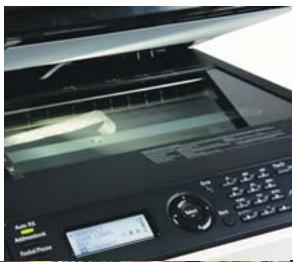
ENHANCED SCANNING. BY USING THE ADF OR FLATBED USERS CAN SCAN DOCUMENTS UP TO 8.5^ × 14^ DIRECTLY TO EMAIL, FTP, USB OR SMB.
QUICK POWER SAVE
RECOVERY. THE ALWAYS
READY MAGICOLOR 4690MF
WILL NEVER KEEP YOU
WAITING, WITH A RETURN
TIME FROM POWER SAVE
MODE OF 50 SECONDS.
25 PPM 25 PPM

CONSISTENT, BRILLIANT RESULTS. IMPRESSIVE SPECS INCLUDING HIGH RESOLUTION AND A ROBUST DUTY CYCLE OF 120,000 PRINTS PER MONTH ENSURE PROFESSIONAL-QUALITY OUTPUT EVERY TIME.
AUTOMATIC, UNATTENDED PRODUCTION. A 50-SHEET REVERSING AUTOMATIC DOCUMENT FEEDER AND BUILT-IN DUPEXER SAVE USERS TIME AND PAPER. AN OPTIONAL 500-SHEET CASSETTE INCREASES THE MAX PAPER INPUT TO 850-SHEETS FOR FEWER REFILLS.
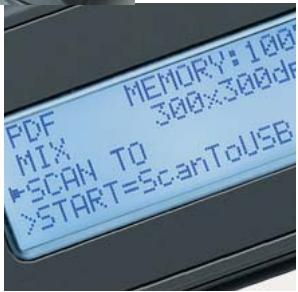
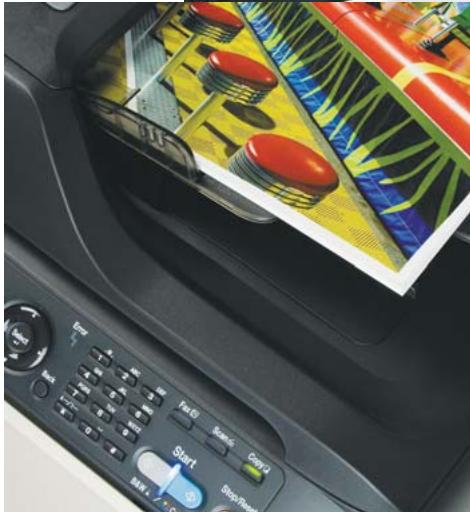
EASY TO USE CONTROL PANEL A 20 CHARACTER BY 4 LINE DISPLAY IS EASY TO SEE AND USE. AN INTUITIVE MENU SYSTEM PLUS A SIMPLE HARD KEY LAYOUT MAKES LEARNING ALL THE FUNCTIONS OF THIS AIO EFFORTLESS.
magicolor 4690MF
GENERAL SPECIFICATIONS
PRINT METHOD:
Electrophotographic Laser
PRINT SPEED*:
Color: 25 ppm
Monochrome: 25 ppm
*Exact print speed differs depending on system configuration, software application, driver and document complexity.
WARM-UP TIME:
50 seconds (sleep mode to ready)
FIRST-PAGE OUTPUT TIME:
Color: 18 seconds
Monochrome: 18 seconds
RESOLUTION:
2400x600,1200x600,600x600dpi
RECOMMENDED MONTHLY DUTY CYCLE:
120,000 prints
COPY
COPY SPEED:
Color: 25 cpm
Monochrome: 25 cpm
FIRST-PAGE OUTPUT TIME:
Color: 28 seconds
Monochrome: 25 seconds
RESOLUTION:
600× 600,600× 300dpi
COPY SETTINGS:
Density (7 Steps)
Reduce/Enlarge (25 - 400%)
Collate, Number of copies (1-99)
Quality (Text/Photo/Mix, Normal/Fine)
Duplex, 2-in-1, 4-in-1, ID card copy
Poster copy, Clone copy
AUTOMATIC DOCUMENT FEEDER:
50 sheets, up to 8.5'' × 14''
magicolor

1
PAC


© 2010 KONICA MINOLA BUSINESS SOLUTIONS U.S.A., INC. All rights reserved. Reproduction in whole or in part without written permission is prohibited. Konica Minolta and The essentials of imaging are trademarks of KONICA MINOLA HOLDINGS, INC. magicolor and PageScope are registered trademarks of KONICA MINOLA BUSINESS TECHNOLOGIES, INC. Simitri is a registered trademark of KONICA MINOLA BUSINESS SOLUTIONS U.S.A., INC. All other brands and product names are registered trademarks or trademarks of their respective owners.
Design and specifications are subject to change without notice.

KONICA MINOLTA
KONICA MINOLTA
BUSINESS SOLUTIONS U.S.A., INC.
100 Williams Drive
Ramsey, NJ 07446
www.kmbs.konicaminolta.us
www.kmbs.konicaminolta.us/solutions
SCAN*
*Notice for U.S.A.:
This product may contain mercury in the lamp used in the scanning unit. Please dispose of it according to local, state, or federal laws.
SCANNER TYPE:
Flatbed
Automatic Document Feeder
SCAN SPEED:\*
300 dpi: approx. 2 sec/pg
600 dpi; approx. 4 sec/pg
*Varies by resolution and amount of data scanned
RESOLUTION:
600× 600,600× 300 dpi
COLOR DEPTH:
24 bit
SCAN BED (PLATEN) SIZE:
Up to 8.5" x 14"
SCAN DESTINATION:
Scan to Email (Ethernet), FTP, SMB, USB
SCAN DRIVERS:
TWAIN and WIA (Windows only)
SCAN UTILITIES:
LinkMagic (Windows only), PageScope
WorkwareTM (optional)
AUTOMATIC DOCUMENT FEEDER:
50 sheets, up to 8.5'' × 14'' (216 x 356 mm)
PC FAX
Send and receive digital taxes
(PC fax modem required)
FAX
FAX SPEED:
33.6 Kbps Super G3
FAX RESOLUTION:
Standard (203 x 98 dpi)
Fine (203 x 196 dpi)
Super Fine (203 x 392 dpi)
FAX MEMORY:
6 MB
COMPRESSION:
MH/MR/MMR/JBIG
AUTO REDUCTION:
Yes
DIALING:
Speed Dials: 220
Group Dial: 20 groups; 50 stations/group
Broadcast: 255 stations
HARDWARE AND SOFTWARE CAPABILITIES
PROCESSOR:
200MHz
MEMORY:
256 MB DDR SDRAM on board
Enhanced Automatic Image Density Control
(eAIDC)
HOST SYSTEM REQUIREMENTS
WINDOWS
400 MHz Pentium II with 128 MB RAM
256 MB free disk space
CD-ROM/DVD drive
MACINTOSH
Power PC G3 with 128 MB RAM
256 MB free disk space
CD-ROM/DVD drive
INTERFACE SUPPORT
Ethernet (10/100BaseTX)
USB 2.0
USB 1.1 Host Port
ETHERNET PROTOCOLS
TCP/IP, EtherTalk, IPX/SPX, UDP, IPP v1.1
SNMP, HTTP/HTTPS, WSD
PAPER HANDLING
STANDARD PAPER INPUT:
250-sheet cassette
100-sheet multipurpose tray
OPTIONAL PAPER INPUT:
500-sheet lower feeder
STANDARD PAPER OUTPUT:
250-sheet face-down output tray
AUTOMATIC DUPLEXER:
For two-sided printing
PAPER SIZES SUPPORTED:
100-sheet multipurpose tray:
Letter
Legal
4"×6"
16K
Executive
Folio
Govt. Letter
Govt. Legal
Kai 16,32
Officio
UK Quarto
SP Folio
Statement
YOUKEI 6
A4,A5,A6
B5.B6
Custom Sizes:
(W) 3.2^ - 8.5^ to (L) 5.8^ - 14^
(W) 92-216 mm to (L) 148-356 mm
Envelopes:
Monarch, Com 10, DL, B5 (ISO), C6,
Choukei #3
Postcards
Double, Japanese
250-sheet lower feeder unit:
Letter
4"x6"
16K
Executive
Kai 16,32
Govt. Letter
UK Quarto
Statement
Custom Sizes:
(W) 3.2'' - 8.5'' to (L) 5.8'' - 11.69''
(W) 92-216 mm to (L) 148-297 mm
A4,A5,A6
B5,B6
500-sheet optional lower feeder unit:
Letter
Legal
Executive
Govt. Legal
A4
B5
Duplexer:
Letter
Legal
16K
Executive
Folio
Govt. Letter
Govt. Legal
Kai 16
Officio
SP Folio
A4
B5
Custom Sizes:
(W) 7.17^ - 8.5^ to (L) 10.12^ - 11.69^
(W) 182-216 mm to (L) 257-297 mm
PRINTABLE AREA:
0.157" (4 mm) from all edges
8.19" (208 mm) maximum print width
13.7" (348 mm) maximum print length
PAPER WEIGHTS:
Plain Paper: 16-24 lb. Bond (60-90 g/m²)
Thick Stock: 24-110 lb. Index (90-210 g/m²) via
multipurpose Tray only
Automatic Document Feeder:
Simplex: Up to 34 lb. Bond (35-128 g/m²)
Duplex: Up to 34 lb. Bond (50-128 g/m²)
Duplexer: 16-24 lb. Bond (60-90 g/m²)
PRINT MEDIA:
Plain Paper
Recycled Paper
Letterhead
Thick Stock
Glossy Stoc
Transparencies
Laser Quality Labels
Envelopes
Postcards
PHYSICAL
TYPE:
Tandem Full Color AIO
DIMENSIONS (WXDXH):
21.22" x 23.23" x 22.76"
(539× 590× 578mm)
W
121 lbs. (55kg) - w/ consumables
ELECTRICAL
POWER REQUIREMENTS:
100 VAC. 5
120 VAC, 50/60 Hz
220-240 VAC, 50/60 Hz
POWER CONSUMPTION:
Average: 650 Watts
Maximum: 1,250 Watts Max.
Standby: 200 Watts Avg.
Low Power Mode: 140 Watts or less
Energy Saver: 25 Watts or less
ENERGY STAR COMPLIANT*:
28W or less
*The addition of some options, in some combinations,
may cause the product to become non-compliant.
ENVIRONMENTAL
TEMPERATURE REQUIREMENTS:
Operating: 50^ to 95^ F (10^ to 35^ C)
HUMIDITY:
Operating: 15% to 85% RH
NOISE LEVELS:
Printing: <53.5 dB
Standby: <39 dB
Copying: <54.5 dB
REGULATORY/SAFETY CONFORMITY:
UL, cUL, CSA, FCC-B, CDRH
CONSUMABLES*:
In-Box Toner: Cyan, Magenta, Yellow, Black
(yield up to 3,000 pages @ 5 % coverage)
Replacement Toner: Cyan, Magenta, Yellow,
Black (yield up to 4,000 or 8,000 pages
@ 5% coverage)
Imaging Unit: Cyan, Magenta, Yellow, Black
(yield up to 30,000 pages)
Waste Toner Box
*The stated life expectancy of each consumable is based on printing under specific operating conditions such as page coverage for a particular page size (5% coverage of letter/A4). The actual consumable's life will vary depending on the use and other printing variables including page coverage, page size, media type, continuous or intermittent printing, and ambient temperature and humidity.
WARRANTY:
One-year on-site